Search our articles
Search

Featured articles

Conversational Commerce Trends

The State of Conversational Commerce: 5 Trends Reshaping Ecommerce in 2026

Explore 5 key trends from The State of Conversational Commerce Trends Report in 2026.
By Gabrielle Policella
0 min read . By Gabrielle Policella

TL;DR:

  • AI is resolving tickets, not just replying. AI now handles 31% of customer interactions for ecommerce brands, and that number is expected to nearly double within two years.
  • Every channel is becoming a storefront. Conversations are replacing the traditional browse-and-buy journey, with 79% of brands reporting sales from AI-driven interactions. 
  • AI is shortening the buying cycle. 93% of AI-influenced purchases happen within the first 48 hours of the conversation. 
  • CX teams are changing, not shrinking. Ecommerce brands are actively hiring for more technical roles to implement, coach, and maintain AI. 
  • The winning model is hybrid. AI handles volume and speed, while humans handle complexity and judgment. 

The way shoppers buy online has shifted and customers are at the center. 

They no longer want to scroll through product pages, dig through FAQs, or wait 24 hours for an email reply. They open a conversation, ask a specific question, and expect a useful answer in seconds. Brands that can’t deliver these experiences at scale are seeing customer hesitation turn into abandoned carts and lost revenue. 

This shift has a name: conversational commerce. It's the practice of using real-time, two-way conversations as your primary sales channel, through chat, AI agents, messaging apps, and voice. 

What started as an experiment for early adopters has become a key growth lever, with 84% of ecommerce brands treating conversational commerce as a strategic pillar this year vs. last year. 

Bar chart showing percentage of customer interactions handled by AI: 31% in 2025 and 47% within the next two years.

We surveyed 400 ecommerce decision-makers across North America, the U.K., and Europe to understand how conversational commerce and AI are reshaping the ecommerce landscape. These findings are complemented by aggregated and anonymized internal Gorgias platform data from 16,000+ ecommerce brands.

The State of Conversational Commerce in 2026 trends report breaks down all of the findings, including five key trends shaping the ecommerce landscape. 

{{lead-magnet-1}}

Trend 1: AI is table stakes for ecommerce and it’s no longer just about efficiency

A few years ago, adding an AI chatbot to your site that could provide tracking links and Help Center article recommendations was a differentiator. Today, it's table stakes. McKinsey found that 71% of shoppers expect personalized experiences, and 76% get frustrated when they don't get them. 

Right now, most ecommerce professionals use AI, with 93% having used it for at least 1 year. Enthusiasm is accelerating quickly, with only 30% of ecommerce professionals rating their excitement for AI at 10/10 in April 2025. Similarly, while AI adoption rose steadily year over year, it reached a clear peak in 2026.

Bar chart showing ecommerce professionals using AI: 69.2% in 2024, 77.2% in 2025, and 96% in 2026.

The use cases driving this adoption are practical and high-volume:

  • Order tracking and status updates
  • Returns, exchanges, and refund requests
  • Shipping FAQs and delivery estimates
Bar chart showing AI use cases across ecommerce: customer support automation (96%), AI product recommendations (88%), automated tracking updates (69%), AI personalization (64%), inventory control (51%), dynamic pricing (36%), and order fulfillment (18%).

These are the tickets that flood brands’ inboxes every day. AI agents resolve them instantly, without pulling teams away from conversations that actually require human judgment.

Explore AI adoption and use case data in more depth in the full report. 

Trend 2: Conversations are the new path to checkout

The traditional ecommerce funnel, visit site, browse products, add to cart, check out, is losing ground. Shoppers now discover products on Instagram, ask questions via direct message, and complete purchases without ever visiting a website.

Side-by-side comparison of page-based and conversation-led customer journeys, highlighting AI-driven real-time recommendations, proactive information, and post-purchase support within a single conversation.

Conversational AI is actively increasing revenue, with 79% of brands reporting that AI-driven interactions have increased sales and conversion in their business.

Bar chart showing percentage of customer interactions handled by AI: 31% in 2025 and 47% within the next two years.

The practical implication is that every channel is becoming a storefront. Creating personalized touchpoints with customers earlier in the journey, through proactive engagement, is impacting the bottom line. 

Read the full report to explore how AI conversions have increased QoQ by industry.  

Trend 3: AI is accelerating the purchase cycle

Pre-purchase hesitation is one of the biggest conversion killers in ecommerce. A shopper lands on your product page, has a question about sizing or compatibility, can't find the answer quickly, and leaves. That's a lost sale that had nothing to do with your product.

Conversational AI changes that dynamic. When a shopper can ask a question and get an accurate, personalized answer in real time, the friction disappears. 

Brands using Gorgias saw this play out at scale in 2025. When AI Agent recommended a product, 80% of the resulting purchases happened the same day, and 13% happened the next day. 

AI chat interface recommending apparel items based on cart contents, alongside statistic stating 93% of purchases occur within 48 hours of an AI agent’s recommendation.

Brands are further accelerating the buying cycle through proactive engagement. On-site features such as suggested product questions, recommendations triggered by search results, and “Ask Anything” input bars drove 50% of conversation-driven purchases during BFCM 2025. 

Explore how AI is collapsing the purchase cycle in Trend 3 of the report.

Trend 4: AI is making CX teams more technical 

There's a persistent narrative that AI is making CX teams redundant. The data tells a different story. 62% of ecommerce brands are planning to grow their teams, not cut them. But the scope of those teams is changing.

Bar chart of expected headcount changes over 12 months: 21% increase significantly, 41% increase somewhat, 28% stay the same, 9% decrease somewhat, and 1% decrease significantly.

New roles are emerging around AI configuration and quality assurance. Teams are investing in technical members to write AI Guidance instructions, develop tone-of-voice instructions, and continuously QA results. 

CX teams are also bridging the gap between support goals and revenue goals, as the two functions increasingly overlap.

Donut chart indicating 77% of companies report at least some convergence between support and sales functions due to AI.

The result is CX teams that are more technical than they were before. Agents who once spent their days answering repetitive tickets are now spending that time on higher-value work: complex escalations, VIP customer relationships, and improving the AI systems and knowledge bases that handle the volume.

Learn more about the evolution of CX roles in Trend #4. 

Trend 5: The future is hybrid: AI-first, humans when it counts

Despite increasing AI adoption, data shows that ecommerce brands shouldn’t strive for 100% automation. Winning brands are building systems in which AI handles repetitive tier-1 tickets, and humans handle complex, sensitive cases. 

Chart showing which inquiries are handled by AI vs. humans.

AI handles speed and scale. It resolves order-tracking requests at 2 a.m., processes return-eligibility checks in seconds, and answers the same shipping question for the thousandth time without compromising quality. 

Human agents handle conversations that require context, empathy, or decisions that fall outside the standard playbook. There are several topics where shoppers still prefer human support.

Bar chart showing customers prefer human support for order issues (54%), product advice (35%), and returns or refunds (24%).

Successful hybrid systems require continuous iteration, meaning reviewing handover topics, Guidance, and reviewing AI tickets on a weekly basis. 

Discover how leading brands are balancing human and AI systems in Trend #5. 

Where conversational commerce is heading by 2030

The 2026 trends are about expansion and standardization. The 2030 predictions are about what comes next.

Bar chart showing brand expectations by 2030: 89% expect AI voice purchasing, 29% expect AI multilingual support, and 19% expect proactive AI upsells and cross-sells.

Voice-based purchasing is the biggest bet on the horizon. Only 7% of brands currently use voice assistants for commerce, but 89% expect it to be standard by 2030. The vision is a customer who can reorder a product, check their subscription status, or manage a return entirely over the phone.

Proactive AI is the other major shift. Rather than waiting for a customer to reach out, AI will anticipate needs based on browsing behavior, purchase history, and where someone is in their relationship with your brand. Think of it as the digital equivalent of a sales associate who remembers what you bought last time and knows what you're likely to need next.

Explore where ecommerce brands are allocating their AI budgets in the full report. 

Start building your conversational commerce strategy today

The brands winning in 2026 are creating smart, scalable systems where AIhandles volume and humans handle nuance. They’re treating every conversational channel as an opportunity to serve and sell.

The data is clear: AI adoption is accelerating, customer expectations are rising, and the revenue impact of getting this right is measurable.

{{lead-magnet-1}}

min read.
Introducing Helpdesk 2.0

Introducing Helpdesk 2.0: Built for How Agents Work

We rebuilt the Gorgias workspace around how agents actually work. Here's what changed and why.
By Christelle Agustin
0 min read . By Christelle Agustin

TL;DR:

  • Built directly from agent feedback, Helpdesk 2.0 fixes real workflow pain points. The redesign focuses on reducing friction and helping agents handle more context-heavy tickets.
  • A chat-style interface replaces the old email layout. Conversations are easier to follow and resolve in one view.
  • Customer context is shown beside the conversation in a right-side panel. Agents can view history, orders, and details without leaving the ticket.
  • AI handoffs come with clear summaries. Agents instantly see what happened, what was tried, and what to do next.
  • Navigation is simpler and faster across teams. Clean menus, structured queues, and multi-store access keep agents moving efficiently.

Helpdesk 2.0 starts with the people who use it most: the agents. 

We spent time understanding customer support from the agent's seat. What do they reach for constantly? What slows them down? What does a better workday look like? 

Everything we found is in this brand-new update.

Why we redesigned Helpdesk

Conversational commerce is the new standard. 

In customer support, this means customers expect context to remain intact wherever they reach out, whether a conversation starts on social, moves to email, or ends on a call.

This new approach to support has also changed the agent's role. Recurring tickets, like order status checks, shipping updates, and returns, are now handled by AI. What lands in the agent inbox are edge cases that require human judgment and troubleshooting, or tickets that require the full picture.

However, the original Helpdesk was built for a different era of support.

Context was separated across views rather than built into the conversation itself. It's something one in five Gorgias customers flagged, through support tickets, NPS surveys, and conversations with our team. So, we got to work. 

Helpdesk 2.0 is the result.

What's new in Helpdesk 2.0

Here's a look at everything that changed.

Read conversations the way they're meant to be read

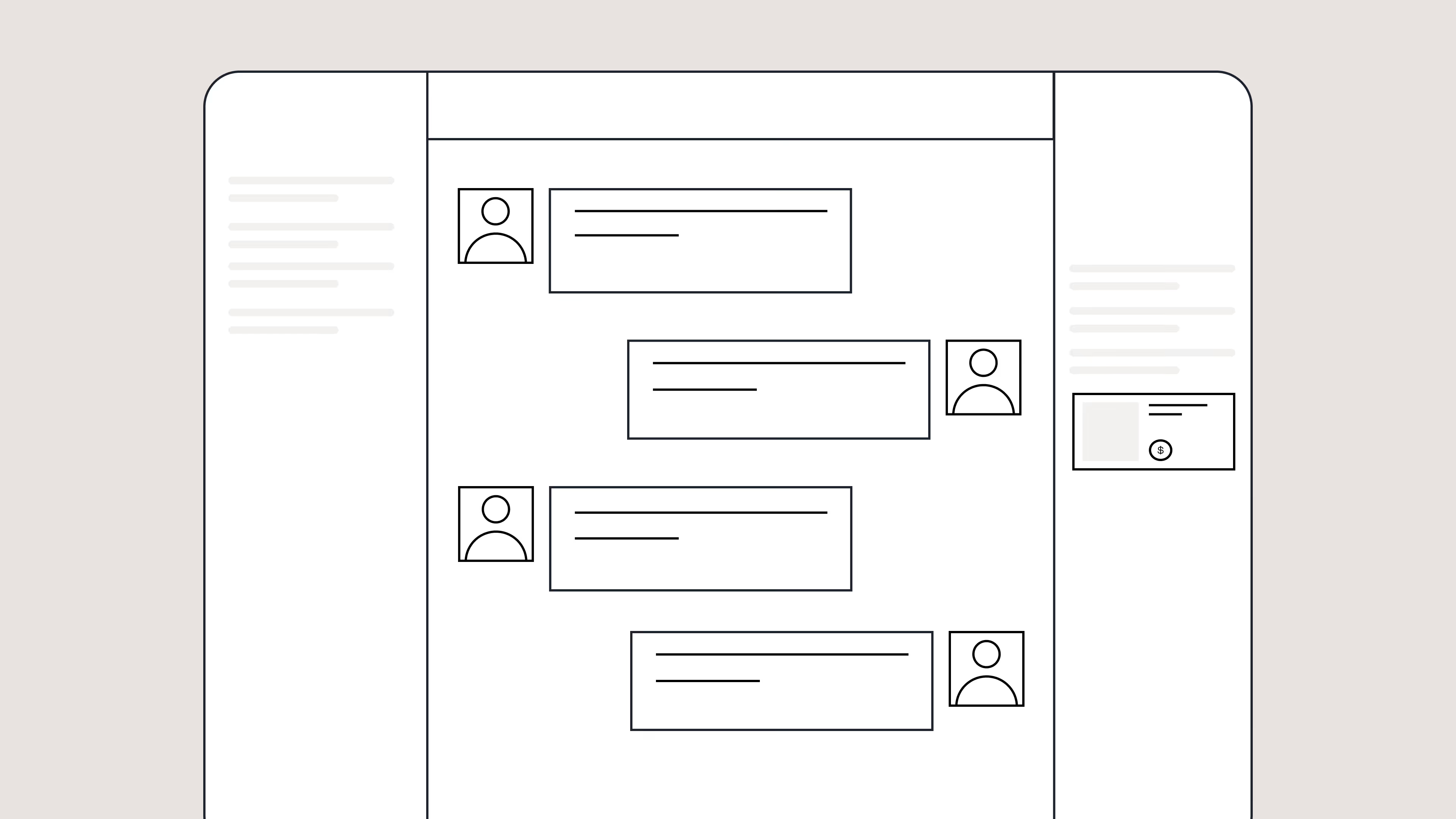
Conversations have a natural rhythm, one that’s already found in every messaging tool we use. We brought that same layout into the helpdesk. 

Say goodbye to the 2000s email interface and hello to chat bubbles. This updated design changes how quickly you can orient yourself and resolve the ticket in one go.
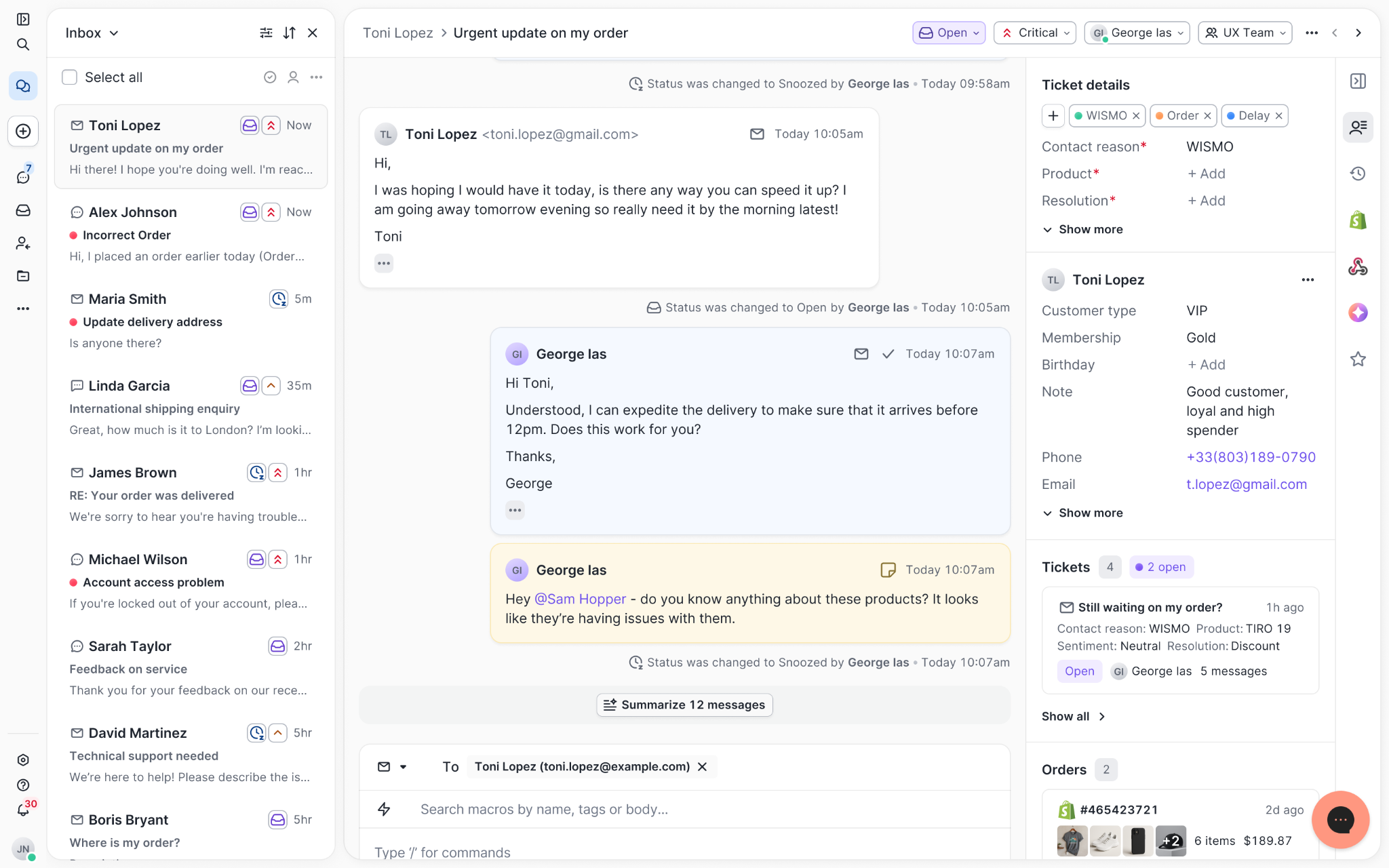
Gorgias's Helpdesk 2.0 uses chat bubbles to format conversations.

Chats with customers now look like real conversations, using the speech bubble style you’re familiar with on popular messaging apps.

Check customer history without losing your place

Checking a customer's history used to mean leaving the conversation, an extra step that interrupted what should have been a smooth workflow.

Now, past conversations open in a sidebar next to the active conversation. You can view a customer’s full history, search through their timeline, and open prior tickets without going to a new page.

The Customer Timeline allows you to scroll through past tickets, orders, and customer information.

Check past conversations, orders, and customer details in the brand-new Customer Timeline.

See order details the moment you open a ticket

Order information is easier to reference than ever. Open a ticket, and you instantly see the customer's recent orders, marked with product images and invoice details at a glance. Need to dig deeper? Click on an order, and the expanded information appears in the same panel.

For teams using custom integrations, apps are fixed in a quick-access integration menu on the right.
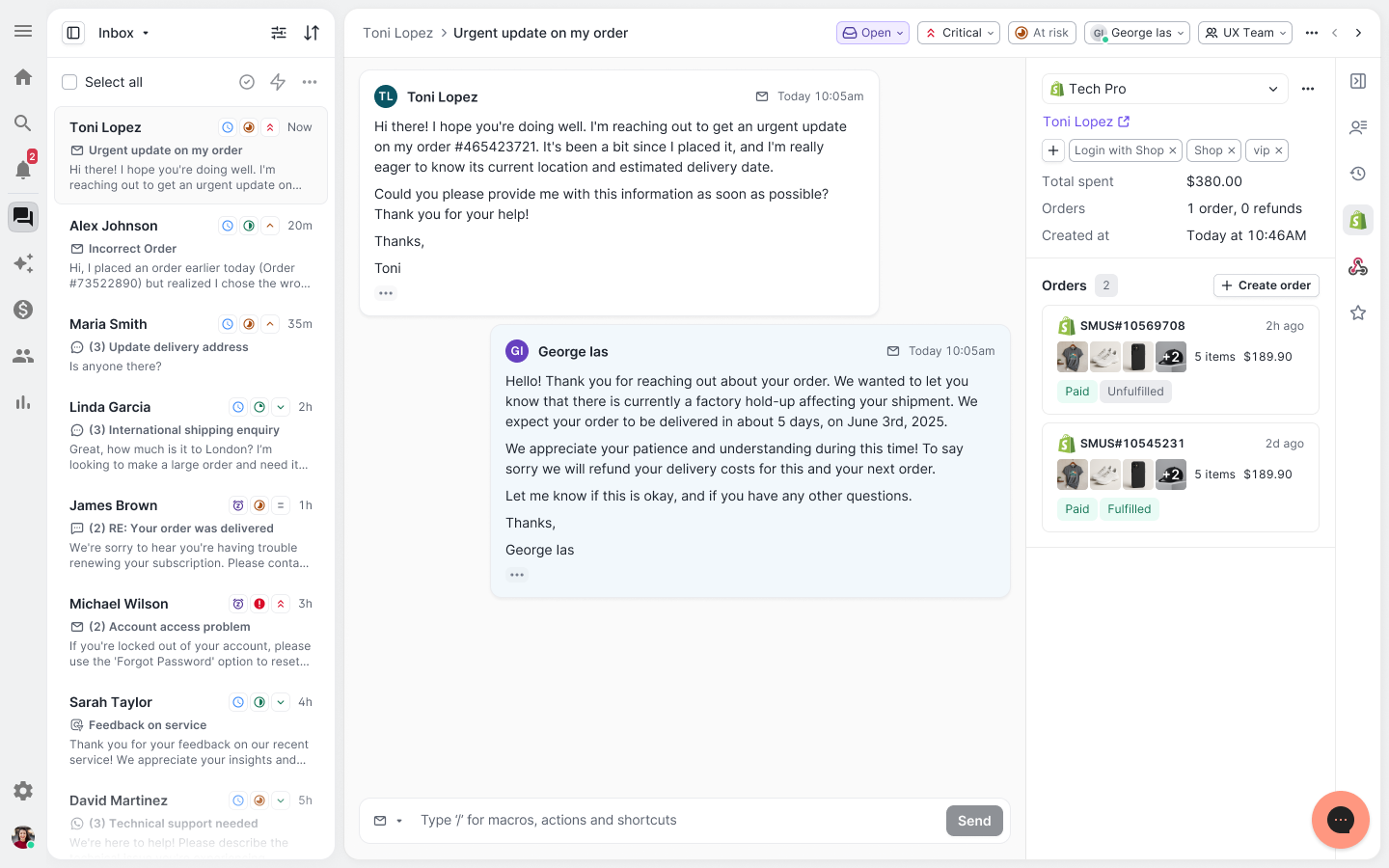
Orders include product images, number of items, total, time created, and the order number.

See order details, product images, and totals at a glance on the right panel, without leaving the conversation.

Pick up where AI left off

You shouldn't have to dig through a thread to figure out what AI already tried. Now you don't have to.

When AI Agent escalates a conversation, it includes a concise handover summary that mentions the issue, what actions were taken, and why it was passed to your team.
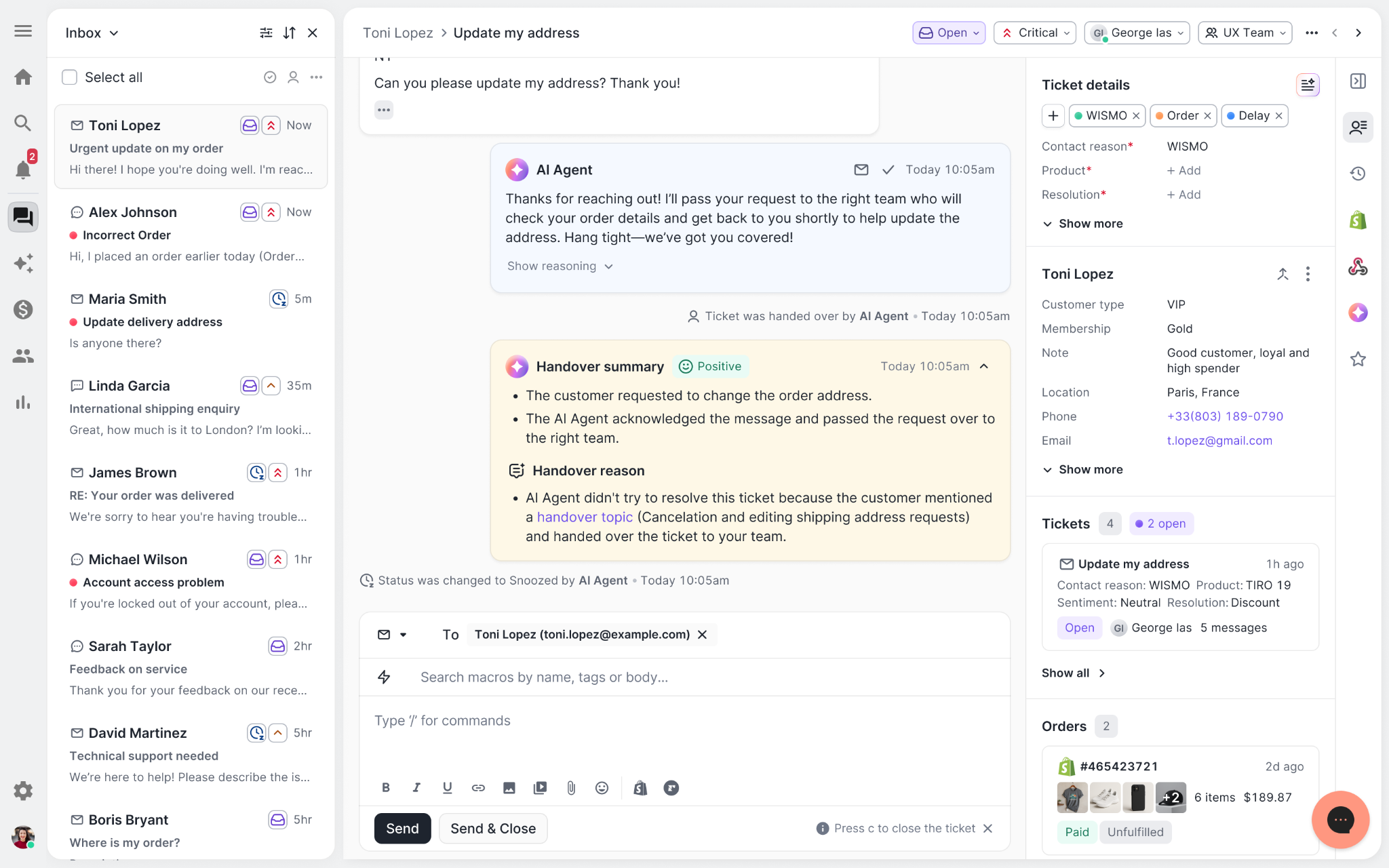
AI Agent includes a handover summary in the ticket thread.

Escalated tickets include a brief AI-generated handover summary, marked in yellow, for quick reference.

Move faster across every store and team

We restructured and simplified the navigation. The left sidebar organizes everything into clear categories: Inbox, AI Agent, Marketing, and Analytics, so anyone on your team knows exactly where to go.

To quickly update your knowledge base or adjust a workflow, both now live right in the sidebar. For teams managing multiple stores, switching between them is just as straightforward, accessible from the sidebar, so agents can move between inboxes without breaking their flow.
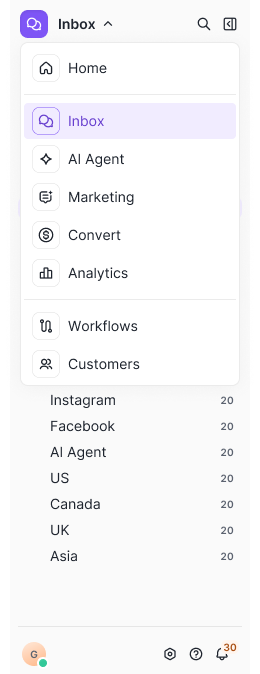
Gorgias Helpdesk 2.0 menu

Agents can switch between stores and their corresponding inboxes directly from the left menu.

A workspace that works the way agents do

Support comes down to the person on the other end of the conversation. We built Helpdesk 2.0 is to make sure they have everything they need to show up for that moment.

The best way to see the difference is to work in it. Start a free trial today.
min read.
Ecom Lab Announcement

Ecommerce Finally Has a Research Hub Built on Real Data

The Ecom Lab is here. Explore first-party ecommerce data on AI adoption, support performance, and industry benchmarks.
By Gorgias Team
0 min read . By Gorgias Team

TL;DR:

  • The Ecom Lab is Gorgias’s public research hub for ecommerce insights. It shares real, first-party data to help teams understand industry performance and trends.
  • It exists to solve the lack of reliable ecommerce benchmarks. Most available data is self-reported or too broad, making it hard for teams to accurately measure performance.
  • The goal is to give ecommerce teams a clear baseline for smarter decisions. With real benchmarks, you can better evaluate performance and opportunities.
  • The Ecom Lab makes metrics like AI adoption, response times, and CSAT visible. These are segmented by brand size, GMV, and vertical so you can benchmark more precisely.
  • The latest reports reveal major gaps in AI adoption and benchmarking practices. They also highlight how inefficient support processes are driving costs.

Industry benchmarks for ecommerce are hard to come by. Most of what's out there is self-reported, survey-based, or too aggregated to be usable. Teams are left wondering whether their AI adoption is on par with industry standards or if their response times are costing them revenue.

That's a gap we're in a unique position to close. 

Gorgias processes millions of customer conversations across thousands of ecommerce brands every day. This has given us a rare, unfiltered view into how the industry operates. But until now, we’ve kept those insights largely internal.

Today, we're making it public with the Ecom Lab

The result is years of first-party data from thousands of ecommerce brands, packaged into findings that give teams a real foundation to build their strategy on.

What is the Ecom Lab?

The Ecom Lab is Gorgias's public research hub for ecommerce. It publishes insights and reports on AI adoption, support performance, financial impact, and industry trends.

The goal is simple: give teams a real baseline to measure against and to uncover the industry's inner workings.

What data can you find in the Ecom Lab?

Metrics that actually move decisions. 

The Ecom Lab publishes metrics that matter to ecommerce professionals, including AI adoption rates, first response times, CSAT scores, conversion rates, and ticket intents, all broken down by brand size, GMV tier, and industry vertical.

For the first time, teams can see exactly where they stand in comparison to the broader market.

Read the first three reports now

AI is Everywhere reveals why roughly 4 in 5 ecommerce brands still haven't deployed AI in customer-facing support.

Stop Benchmarking Against the Average argues that support teams should benchmark response times against their specific industry vertical rather than the overall average.

Most Brands are Overpaying for Support breaks down the actual cost of support ticket volume and what happens when AI handles the load.

Go to the Ecom Lab →

min read.
Create powerful self-service resources
Capture support-generated revenue
Automate repetitive tasks

Further reading

AI Chatbot

What is an AI Chatbot? A Complete Guide for Ecommerce

By Gorgias Team
min read.
0 min read . By Gorgias Team

TL;DR:

  • AI chatbots give ecommerce stores instant, 24/7 support without growing your team. They handle common tasks like order tracking, returns, and product questions using conversational AI.
  • Unlike scripted bots, modern AI chatbots understand context and nuance. They recognize intent even when customers don’t use exact keywords and can escalate complex issues to humans when needed.
  • Combining AI with live agents creates a seamless support experience. Bots handle routine tickets while humans take over when empathy or deeper problem-solving is required.
  • AI chatbots reduce support costs and drive more revenue. They free up agents, improve response times, boost conversions, and increase customer satisfaction.
  • To choose the right chatbot, focus on ecommerce-specific features. Prioritize deep integrations, brand tone training, clear escalation paths, and performance analytics.

Your customers expect answers now, not in hours, not tomorrow, but the instant they ask. An AI chatbot handles order tracking, returns, and product questions around the clock without hiring more support agents. 

For ecommerce brands buried in repetitive tickets while trying to keep service personal, AI chatbots turn support costs into actual revenue. Here's everything you need to know about choosing and implementing the right solution for your store.

What is an AI chatbot?

An AI chatbot is conversational software that uses large language models (LLMs) to chat with customers. This means it can hold natural conversations with your shoppers, answer their questions, and help them resolve tasks without human intervention.

Unlike older chatbots that followed pre-set scripts, AI chatbots understand context and nuance. They can interpret what a customer really means, even when they don't use exact keywords. For example, if someone asks, "Can I get my money back?" the chatbot understands they're asking about returns, not requesting a literal cash withdrawal.

Modern AI chatbots use techniques like retrieval-augmented generation to pull information from verified sources — like your Help Center or product catalog — ensuring accurate answers. When they encounter issues beyond their capabilities, they know to escalate to human agents.

Related: What is conversational AI? The ecommerce guide

AI chatbots vs live chat 

While these chat tools both facilitate conversations, they serve different purposes and have unique strengths.

Feature

AI Chatbot

Live Chat

Availability

24/7 automated

Business hours

Response time

Instant

Minutes to hours

Handling capacity

Unlimited concurrent

Limited by staff

Personalization

Data-driven

Human intuition

Complex problem solving

Limited, escalates

Full capability

Cost structure

Per conversation/month

Per agent seat

Live chat excels at solving complex or sensitive issues that require human empathy and judgment. AI chatbots provide instant, 24/7 answers to common questions.

The most effective approach combines AI chatbots with seamless human handoff. The chatbot handles initial inquiries, and if it can't resolve the issue, it escalates the conversation — along with all context — to a live agent. Modern platforms blend these capabilities into unified helpdesk solutions.

How an AI chatbot works for ecommerce

When asks a question in your website’s chat tool, your AI chatbot follows a sophisticated process to deliver accurate answers in seconds:

  • Natural language processing (NLP): Breaks down the customer's message to understand their core request
  • Intent recognition: Detects whether they're tracking an order, asking about returns, or seeking product information
  • Vector search: Converts questions into mathematical representations to find the closest match in your knowledge base, understanding questions asked in different ways
  • Context window: Maintains conversation history to reference earlier messages and hold natural, back-and-forth dialogue
  • API integrations: Connects to your Shopify store and other tools for real-time access to order details, inventory, and customer data
  • Grounding and confidence thresholds: Anchors responses to verified information and escalates to human agents when unsure

This combination allows AI chatbots to handle routine inquiries while knowing when to bring in your support team for complex issues.

Benefits of AI chatbots for ecommerce brands

AI chatbots deliver measurable improvements to both customer experience and business outcomes. They transform your support operation from a cost center into a revenue driver.

Better customer engagement and loyalty

Customers expect instant, personalized answers no matter the time — and AI chatbots do these at scale. Using your brand’s knowledge base, AI chatbots maintain your brand voice and guidelines while giving unique responses to customers. This means better customer education, engagement, and a higher likelihood of conversion.

Lower operational costs and higher efficiency

AI interactions cost significantly less than human support. By automating repetitive tickets, you scale support without adding headcount — a crucial move during peak seasons. Tedious work is dramatically reduced, giving agents time to strategize, address complex tickets, and build deeper customer relationships.

Increased revenue and conversions

An AI chatbot’s ability to detect customer intent means it knows when to upsell your products. Whether it is dealing with a new customer or a returning one, AI keeps conversations proactive by providing personalized recommendations, 

What to use an AI chatbot for in your ecommerce store

Start by automating your highest-volume, repetitive inquiries. This delivers the fastest ROI and lets your team focus on conversations that actually need human expertise.

Answer "Where is my order?" instantly

WISMO tickets likely dominate your inbox. Connect your chatbot to shipping carriers via API for real-time tracking, split shipment explanations, and delay notifications. Set up proactive shipping updates to prevent these tickets entirely. The bot escalates only when packages are missing.

Process returns and exchanges without agent involvement

Your chatbot checks return eligibility, generates labels, and communicates refund timelines. Integrate with Loop or ReturnGO for self-service. It suggests exchanges over refunds to preserve revenue — swapping a wrong size instead of losing the sale. Complex cases like damaged goods get escalated with full context.

Guide shoppers to the right products

Turn your chatbot into a sales associate that recommends products based on browsing history, answers sizing questions, suggests gifts, and bundles complementary items. Instantly addressing purchase-blocking questions about materials or stock availability removes friction and increases conversions.

Related: Guide more shoppers to checkout with conversation-led AI

AI chatbot risks and limitations for ecommerce

While powerful, AI chatbots have limitations you need to understand and plan for. Being aware of these risks helps you implement safeguards and set appropriate expectations:

  • AI chatbots can sometimes generate plausible but incorrect answers, a phenomenon called “hallucination.” Using grounding techniques that anchor responses to verified information from your knowledge base helps prevent this. Regular monitoring and quality assurance are essential for maintaining accuracy.
  • Data privacy and security require careful attention. Your chatbot must comply with regulations like GDPR and PCI standards when handling customer information. Look for platforms with built-in safety filters and data redaction features to protect sensitive information.
  • Brand voice can drift over time as the AI learns from interactions. Regular audits ensure responses stay consistent with your intended tone and messaging. Complex emotional situations requiring human empathy should always escalate to human agents — AI cannot replace genuine human connection in sensitive circumstances.

How to choose an AI chatbot for your ecommerce store

Selecting the right AI chatbot requires evaluating platforms based on ecommerce-specific needs, not generic chatbot features. Focus on solutions built specifically for online retail.

Define priority intents

Analyze your support ticket data to identify the most common customer questions. These become your priority intents that the chatbot must handle excellently. Differentiate between must-have intents like order tracking and returns versus nice-to-have intents like detailed product education.

Calculate potential deflection rates for each intent category to understand the business impact. Focus on intents that represent high volume and clear resolution paths.

Map required integrations

Create a comprehensive list of your essential tools and platforms:

  • Shopify: Core ecommerce platform integration
  • Shipping carriers: Real-time tracking and delivery updates
  • Returns platforms: Automated returns processing
  • Review systems: Customer feedback management
  • Subscription tools: Recurring order management
  • Loyalty programs: Customer tier and rewards information

Look for platforms with deep, native integrations rather than basic API connections. Native integrations provide richer data access and more reliable performance.

Set guardrails and escalation

Define clear boundaries for AI capabilities and establish escalation triggers:

  • Sentiment detection: Route frustrated customers to human agents
  • Keyword triggers: Escalate conversations mentioning legal issues or health concerns
  • Repeated failures: Hand off when AI cannot resolve after multiple attempts
  • VIP customers: Provide premium support routing for high-value customers

Ensure the handoff process preserves conversation context so human agents can continue seamlessly where AI left off.

Validate brand tone

Your chatbot represents your brand in every interaction. The platform should allow you to train the AI on your specific brand guidelines, approved language, and desired tone of voice.

Test responses across different scenarios and customer types to ensure consistency. Look for platforms that provide ongoing monitoring tools to prevent tone drift over time.

Plan analytics and QA

Choose a platform with robust analytics and quality assurance capabilities:

  • Performance dashboards: Real-time metrics on key performance indicators
  • Conversation reviews: Tools for auditing AI interactions
  • Feedback loops: Systems for continuous training and improvement
  • A/B testing: Capabilities to optimize response strategies

Core performance metrics:

  • CSAT scores: Compare customer satisfaction for AI versus human interactions
  • Deflection rate: Percentage of tickets resolved without human intervention
  • Containment rate: Conversations completed entirely by AI
  • Average handle time: Speed of resolution for different inquiry types
  • First contact resolution: Issues solved in a single interaction

Business impact metrics:

  • Revenue attribution: Sales directly influenced or generated by the chatbot
  • Cost per resolution: AI versus human agent cost comparison
  • Self-service adoption: Customers successfully using AI for resolution
  • Abandonment rate: Conversations left unfinished by customers

Set realistic benchmarks based on your industry and business model. Use these metrics to identify improvement opportunities and demonstrate return on investment to stakeholders.

Transform your customer experience with Gorgias AI Agent

Ready to join thousands of ecommerce brands using AI to delight customers and drive revenue? Gorgias AI Agent integrates seamlessly with Shopify to deliver instant, accurate support that sounds just like your brand.

Book a demo to see how AI Agent can handle your specific use cases and start automating within days, not months.

{{lead-magnet-2}}

Best AI for Customer Support

10 Best AI Platforms for Customer Support (With Pricing)

By Gorgias Team
min read.
0 min read . By Gorgias Team

TL;DR:

  • AI customer support tools go beyond speed and actually reduce workload. The right platform automates repetitive tickets so your team can focus on high-value conversations.
  • AI works by using natural language processing (NLP) to generate real-time, context-aware responses. NLP helps the AI understand customer intent and reply in a way that matches your knowledge base and brand tone.
  • Choosing the right platform depends on your business type, budget, and goals. Gorgias is ideal for ecommerce, Shopify Inbox offers a solid free option, and Zendesk or Intercom fit larger or multichannel teams.
  • Take a phased approach when implementing AI. Start small by automating common inquiries, train the AI on your brand voice, and expand based on performance.
  • Top brands are already seeing ROI from AI. Companies like Psycho Bunny, Osea Malibu, and Dr. Bronner’s use AI to cut costs, boost efficiency, and improve customer satisfaction.

If you lead a support team today, you’re probably evaluating AI tools with a different lens than you were a year ago. The question isn’t only “How fast is it?” It’s “What work will this actually take off my team’s plate?”

By 2026, Forrester predicts 30% of enterprises will build parallel AI functions, including hiring managers to train AI agents, ops teams to tune their performance, and specialists to step in when things go wrong.

That means choosing the right AI platform isn’t optional — it’s a step into the future of support work.

In this list, we cover what AI for customer support is, how it helps customer experience teams hit their goals, the top platforms to consider, how to evaluate and implement them, and the brands already seeing results.

Jump ahead:

  • Best for ecommerce brands: Gorgias
  • Best for large multichannel teams: Zendesk
  • Best for limited budgets: Shopify Inbox
  • Best for email-only support: Help Scout 
  • Best for in-app messaging: Intercom
  • Best for small and mid-sized businesses: Tidio
  • Best for Freshworks ecosystems: Freshdesk 
  • Best for automation at scale: Ada 
  • Best for compliance-sensitive brands: Level AI

What is AI for customer support?

AI for customer support is software that uses artificial intelligence to manage and automate customer interactions. It can respond to customers on channels like chat, email, and social messaging — even before a human agent needs to step in.

It works by using natural language processing (NLP) to understand intent and generate contextually relevant replies. Instead of following rigid scripts like traditional chatbots, AI produces responses in real time based on your policies, data, and brand voice.

Because of this, AI can handle a significant share of repetitive tickets while giving agents the space to focus on more complex and relationship-driving issues.

Read more: What is conversational AI? The ecommerce guide

How AI helps customer support teams hit their goals

By automating repetitive tasks, AI frees up human agents to focus on complex problems that require empathy and creative thinking.

Here's how AI improves your support metrics:

  • 24/7 availability: AI provides instant responses around the clock, even when your team is offline
  • Deflection rate: AI resolves common questions without human intervention, reducing overall ticket volume
  • First contact resolution: AI delivers consistent answers from your knowledge base, solving more issues in one interaction
  • Average handle time: Automation speeds up resolutions by giving agents context and suggested replies
  • Customer satisfaction: Faster, more accurate support leads to happier customers

AI also helps you scale during peak seasons like Black Friday without hiring temporary staff. This efficiency translates into lower costs and a more strategic support operation.

The best AI platforms for customer support

Choosing the right AI platform depends on your industry, team size, and specific challenges. We evaluated solutions based on AI capabilities, ease of use, integrations, and business fit.

Best for ecommerce brands: Gorgias

Pricing: $40/month

Gorgias is a conversational AI platform built specifically for ecommerce. Its deep integration with Shopify lets it automate up to 60% of support tickets with direct access to Shopify actions right in the platform.

The AI Agent can edit orders, issue refunds, and apply discount codes directly in your helpdesk. This means customers get instant help with common requests like order changes or returns. The platform also powers personalized product recommendations and proactive chat campaigns, turning your support team into a revenue driver.

Gorgias offers tiered pricing starting with a Starter plan for small brands and scaling to enterprise solutions.

Best for large multichannel teams: Zendesk

Pricing: $55/month

Zendesk is an enterprise-grade platform with mature AI features. Its Answer Bot and intelligence tools help manage high volumes across multiple channels. Zendesk is known for scalability and extensive integrations.

The AI analyzes intent and sentiment to route tickets effectively and provide agents with helpful context. You can automate responses to common questions while ensuring complex issues reach the right specialists.

However, Zendesk's complexity and higher price point can overwhelm smaller teams. It's best for businesses that need its full suite of enterprise features.

Best for limited budgets: Shopify Inbox

Pricing: Free

Shopify Inbox is a free live chat tool built specifically for Shopify brands, making it an easy entry point for teams that want to experiment with AI support. The AI suggests replies based on customer messages, helping agents respond quickly without needing a full helpdesk.

Because it’s tied directly to Shopify, agents can see customer details, past orders, and cart activity right inside the chat. This gives small teams enough context to answer common questions fast and keep shoppers moving toward checkout.

That said, Shopify Inbox’s automation capabilities are limited. It’s best for smaller brands testing live chat or those who need a no-cost solution. This means teams that want deeper automation will likely outgrow it.

Best for email-only support: Help Scout 

Pricing: $25/month

Help Scout focuses on simplicity and human-centric customer service. Its AI features, including Beacon and AI Assist, are straightforward and easy to implement. The AI suggests replies to agents and pulls relevant articles into conversations.

This platform is ideal for teams that want a clean interface and simple AI augmentation. While user-friendly, its AI capabilities aren't as advanced as platforms like Gorgias or Intercom.

Best for in-app messaging: Intercom 

Pricing: $0.99 per resolution with your current helpdesk

Intercom excels at conversational support, particularly for product-led and SaaS companies. Its AI chatbot, Fin, uses advanced language models to provide natural, human-like conversations within your app or website.

Intercom's AI can qualify leads, onboard new users, and resolve support questions by referencing your knowledge base. It's excellent for engaging users during their product experience.

The pricing model is usage-based, which can become expensive as you scale and add more advanced AI capabilities.

Best for small and mid-sized businesses: Tidio

Pricing: $24.17/month

Tidio combines live chat and basic chatbot features, making it popular with small businesses. It features a visual flow builder for creating simple chatbots without coding.

Tidio offers a free plan with limited features, with paid plans unlocking more capabilities. While it's a great starting point for chat automation, it lacks sophisticated NLP and deep integrations needed for complex operations.

Best for Freshworks ecosystems: Freshdesk 

Pricing: $49/month

Freshdesk offers Freddy AI, which provides omnichannel support capabilities. It's a strong choice for businesses already using other Freshworks products. Freddy AI automates responses, suggests solutions to agents, and predicts customer needs.

The platform includes workflow automation and predictive contact scoring to help prioritize tickets. Freshdesk offers several pricing tiers, but the most powerful AI features are on higher-priced plans.

Best for automation at scale: Ada 

Pricing: $499/month

Ada is a pure-play conversational AI platform designed for enterprise automation. It offers a powerful, no-code bot builder for creating sophisticated automation flows for complex use cases.

Ada handles massive scale and integrates with existing helpdesks. Because it focuses solely on automation, it can achieve very high deflection rates. The downside is that you need a separate system for human agents and enterprise-level pricing.

Best for compliance-sensitive brands: Level AI

Pricing: $35 per agent + $1500+ per integration + platform fees

Level AI specializes in quality assurance and agent performance. Instead of focusing on ticket deflection, it analyzes customer conversations to provide real-time coaching and feedback to agents.

The platform uses sentiment analysis, topic detection, and agent screen recording to identify coaching opportunities. It's excellent for large teams focused on improving agent quality and consistency. However, it's a specialized solution that requires a separate helpdesk.

How to evaluate and implement AI for customer support

Adopting AI requires a strategic approach, not just a technical one. Successful implementation starts with clear planning and phased rollout. Instead of automating everything at once, focus on early wins and expand from there.

1. Define goals and KPIs for automation

Before starting, determine what you want to achieve. Are you trying to reduce response times, lower cost-per-ticket, or improve customer satisfaction scores? Set specific, measurable goals like "achieve 30% ticket deflection for order inquiries within 60 days."

Establish baseline metrics before implementing AI. This lets you accurately track progress and demonstrate return on investment.

2. Select channels and intents to automate first

Start with low-hanging fruit, or basic, repetitive customer inquiries. For most ecommerce brands, this means questions like "Where is my order?", "What is your return policy?", and basic product questions.

Prioritize channels where you receive the most inquiries, whether email, live chat, or social media. By tackling your most frequent questions first, you'll see the biggest impact on your team's workload.

3. Train AI on brand voice and policies

Your AI is only as smart as the information you provide. A comprehensive and current knowledge base is critical for success. The AI uses these articles to learn your policies, product details, and brand voice.

Set up clear guardrails and escalation rules. Define which topics the AI shouldn't handle — like angry customers or complex technical issues — and create seamless handoff processes to human agents. Getting your AI brand voice right ensures consistent, on-brand interactions across all automated responses.

Which companies use AI for customer support?

Today’s leading brands are fully leveraging AI to help deliver high-quality support. Take a look at how AI helps these four brands win:

Psycho Bunny uses AI to double revenue without adding headcount

What they use AI for: Automating 25–30% of repetitive tickets across email and chat on Gorgias after switching from Zendesk.

Results: Faster responses (1-minute email first response time), reduced seasonal hiring, and 10% YoY savings in operational costs.

Read Psycho Bunny’s story ->

Osea Malibu uses AI to cut QA time by 75%

What they use AI for: Automatically reviewing 100% of tickets daily with Auto QA to surface tone, adherence, and macro-usage issues.

Results: 15 minutes of weekly QA versus over 1 hour, and faster coaching cycles that improve agent performance and customer experience.

Read Osea Malibu’s story -> 

Dr. Bronner’s uses AI to save $100k/year

What they use AI for: Automating routine support questions to improve efficiency and reduce reliance on Salesforce.

Results: Automated 45% of inquiries in two months, saved $100k per year, and improved CSAT by 11%.

Read Dr. Bronner’s story ->

Ekster uses AI to do the work of four agents

What they use AI for: Automating high-volume, repetitive questions to offset a leaner support team and manage peak-season spikes.

Results: Automated 27% of customer support tickets and kept service levels high despite losing almost half of their support team.

Read Ekster’s story -> 

Stay reliable with the right AI platform

The strongest platforms aren’t just chatbots. They’re systems that make your agents’ jobs easier, automate the repetitive work they’re tired of, and help you bring in more revenue.

If you’re still hesitant, you’re not alone. Most CX leaders worry about where to start. The safest path is to focus on the problems that slow your team down today, roll out AI in phases, and refine as you go.

When you do that, AI stops being a risky bet and becomes one of the most dependable parts of your operation.

Book a demo to see how the right platform can make that shift a whole lot easier.

{{lead-magnet-2}}

Helpdesk Solutions

Best Helpdesk Solutions for Ecommerce Brands in 2026

By Gorgias Team
min read.
0 min read . By Gorgias Team

TL;DR:

  • Modern helpdesk solutions combine AI automation with human support to handle customer inquiries across email, chat, social, SMS, and voice
  • The best platforms for ecommerce integrate directly with Shopify and your tech stack to provide order context and enable self-service
  • Leading solutions now automate repetitive tickets while empowering agents to deliver personalized, revenue-driving conversations
  • Pricing typically ranges from free starter plans to enterprise tiers based on agent seats and features
  • Gorgias leads for Shopify brands, while Zendesk and Freshdesk serve broader omnichannel needs

Customer support has evolved beyond simple ticket management. Today's helpdesk solutions unite every customer conversation in one platform while automating repetitive tasks through AI. 

For ecommerce brands, this means turning support from a cost center into a revenue driver. The right helpdesk connects to your Shopify store, understands your customers' order history, and helps agents resolve issues faster. 

We evaluated the top platforms based on their ecommerce capabilities, AI features, and ability to scale with growing brands.

What is a helpdesk solution?

A helpdesk solution is a centralized platform that manages all customer support interactions across channels like email, chat, social media, and phone. This means you can see every customer message in one place instead of jumping between different apps and platforms.

The system organizes customer inquiries into tickets, routes them to the right agents, and tracks resolution from start to finish. Think of it as your command center for customer conversations.

Modern helpdesk platforms go beyond basic ticketing. They integrate with your ecommerce platform to pull order data, automate responses to common questions, and provide self-service options through knowledge bases and AI assistants.

The core components work together to streamline your support:

How we evaluate helpdesk solutions for ecommerce

We tested each platform against criteria that matter most for online stores. Our evaluation focused on real-world ecommerce scenarios like order tracking inquiries, return requests, and pre-purchase questions.

We wanted to see which tools empower agents to solve problems quickly while maintaining a personal touch. Speed matters, but so does the human connection that builds loyalty.

Our testing covered these key areas:

  • Ecommerce integrations: How well does it connect to Shopify, BigCommerce, and other platforms you already use?
  • AI capabilities: Can it actually understand and respond to complex customer questions accurately?
  • Setup simplicity: How long from signup to resolving your first ticket?
  • Agent experience: Is the interface intuitive with helpful shortcuts and features?
  • Customer experience: Do shoppers get fast, helpful responses through multiple channels?
  • Growth potential: Will it handle more tickets and team members as you scale?

We prioritized platforms that understand ecommerce workflows. This means recognizing order numbers in messages, accessing complete customer purchase history, and letting agents process refunds without switching between different tools.

The best helpdesk solutions for ecommerce brands

We ranked these platforms based on their ability to serve ecommerce teams specifically. Each excels in different areas, from AI automation to enterprise scalability.

Platform

Starting Price

Free Plan

AI Included

Shopify App

Best For

Gorgias

$10/month

Yes (limited)

Yes

Native

Shopify brands

Zendesk

$19/agent/month

No

Add-on

Yes

Enterprises

Freshdesk

Free

Yes

Yes (paid tiers)

Yes

Growing teams

Intercom

$39/month

No

Add-on

Yes

SaaS companies

Gladly

Custom

No

Yes

Yes

Voice-heavy support

Kustomer

$89/agent/month

No

Yes

Yes

Journey mapping

Help Scout

$20/user/month

No

Yes

Yes

Email teams

Gorgias, for Shopify brands

Gorgias is purpose-built for ecommerce, with deep Shopify integration that turns support into a sales channel. The platform pulls complete order history and customer data directly into tickets.

This means your agents can modify orders, issue refunds, and recommend products without leaving the helpdesk. They see everything they need to help customers and drive sales in one screen.

Best for: DTC brands on Shopify looking to automate support while driving revenue

Limitations: Less suited for B2B or non-ecommerce businesses

Key features include AI Agent that handles up to 60% of inquiries automatically, revenue tracking on support interactions, and one-click order management actions. The AI capabilities focus on natural language understanding trained specifically on ecommerce scenarios, automatic intent detection, and personalized product recommendations.

Zendesk, for omnichannel enterprises

Zendesk offers the most comprehensive channel coverage with mature features for large support teams. The platform excels at complex workflows and custom integrations but requires more setup time than ecommerce-specific alternatives.

Best for: Enterprise brands needing advanced customization and global support

Limitations: Steep learning curve and higher costs for small teams

The platform includes Zendesk AI for automated responses, workforce management tools, and advanced routing capabilities. AI features cover predictive satisfaction scores, intelligent triage and routing, and sentiment analysis across all customer interactions.

Freshdesk, for multichannel support

Freshdesk balances functionality with affordability, offering strong multichannel support and automation features. The platform includes built-in phone support and field service management uncommon at its price point.

Best for: Growing businesses wanting enterprise features without enterprise pricing

Limitations: Limited ecommerce-specific features compared to specialized platforms

Key features include Freddy AI assistant, collision detection to prevent duplicate work, and parent-child ticketing for complex issues. AI capabilities handle auto-categorization of tickets, thank you detection to close resolved tickets, and AI-powered knowledge base suggestions.

Intercom, for conversational support

Intercom pioneered conversational support with its messenger-first approach. The platform excels at proactive engagement and combines support with marketing automation and product tours.

Best for: SaaS and tech companies prioritizing chat and in-app messaging

Limitations: Email support feels secondary; expensive for large teams

Features include Fin AI agent for instant answers, custom bots with a visual builder, and integrated product tours. AI capabilities include Resolution Bot trained on help articles, custom answers for specific queries, and multilingual AI support.

Other notable helpdesk platforms

Gladly builds complete customer profiles that follow conversations across channels. Agents see the entire history in one timeline, eliminating the need to ask customers to repeat themselves. Best for brands where phone support is critical.

Kustomer treats each customer as a complete profile rather than a series of tickets. The platform's timeline view shows every interaction, order, and event in chronological order. Best for brands wanting deep customer insights and journey mapping.

Help Scout maintains email's personal touch while adding collaboration features. The platform intentionally keeps things simple, making it ideal for teams that don't need complex workflows. Best for small teams prioritizing email support.

Helpdesk benefits for ecommerce customer experience

A modern helpdesk transforms how ecommerce brands interact with customers. Beyond resolving issues faster, these platforms turn support conversations into opportunities for growth.

Revenue impact happens through support in several ways:

  • Proactive sales assistance: Agents recommend products based on what customers are browsing or have purchased before
  • Cart recovery: Automated messages re-engage shoppers who abandoned their carts
  • Upselling opportunities: AI suggests complementary items during support conversations
  • Retention improvement: Fast, helpful resolution prevents customers from switching to competitors

Operational efficiency improves across your team:

  • Ticket deflection: Self-service options reduce the number of tickets hitting your inbox
  • Faster resolution: Automation handles routine inquiries instantly, freeing agents for complex issues
  • Agent productivity: One-click actions eliminate repetitive tasks like looking up orders
  • Reduced training time: Centralized knowledge and customer data help new agents get up to speed quickly

The compound effect is significant. Brands using modern helpdesks report higher customer satisfaction scores, increased average order values, and reduced support costs. When agents spend less time on repetitive tasks, they focus on building relationships that drive loyalty and repeat purchases.

Key features to look for in helpdesk solutions

Not all helpdesk features deliver equal value for ecommerce teams. Focus on capabilities that directly impact customer experience and team efficiency rather than getting distracted by bells and whistles you won't use.

Feature Category

Must-Have

Nice-to-Have

Advanced

Channels

Email, Chat

Social, SMS

Voice, Video

Automation

Macros, Rules

AI responses

Predictive routing

Integration

Ecommerce platform

Email marketing

ERP, WMS

Analytics

Response time, CSAT

Revenue tracking

Predictive insights

Self-service

Knowledge base

Community

AI assistant

Core functionality you need:

  • Unified inbox: See all channels in one view without switching between tabs or apps
  • Smart routing: Automatically assign tickets based on topic, urgency, or which agent has the right skills
  • Collision detection: Prevent multiple agents from answering the same ticket and confusing customers
  • Bulk actions: Update multiple tickets at once to save time on administrative tasks

AI and automation that actually helps:

  • Intent detection: Understand what customers need without manually tagging every ticket
  • Auto-responses: Answer common questions instantly with accurate, helpful information
  • Suggested replies: Help agents respond faster with AI recommendations based on context
  • Workflow automation: Trigger actions automatically based on conditions you set

Ecommerce-specific features that matter:

  • Order management: View and modify orders directly within tickets without switching systems
  • Customer timeline: See complete purchase and interaction history in one place
  • Product catalog access: Reference current inventory, specifications, and pricing
  • Revenue attribution: Track which support interactions influence sales and repeat purchases

Self-service capabilities customers expect:

  • Knowledge base: Searchable help articles with analytics showing what customers actually read
  • Chat widgets: Embedded assistance on your website that feels natural and helpful
  • Contact forms: Structured inquiries that gather the right information upfront
  • Order tracking: Let customers check status without contacting support

How to choose a helpdesk solution for your brand

Selecting the right helpdesk requires matching platform capabilities to your specific needs. Start with your current pain points and where you want to be in 12 months, not just what sounds impressive in demos.

Assess what you actually need:

  • Volume analysis: Count your average daily tickets and identify peak periods like holidays or product launches
  • Channel audit: List where customers currently contact you and which support cannels matter most
  • Team structure: Consider current agent count, skill levels, and how you want to organize work
  • Tech stack: Document existing tools that need to integrate seamlessly

Evaluate platforms the right way:

  • Request demos: See the platform handling your actual use cases, not generic examples
  • Start free trials: Test with real tickets and your actual agents, not just administrators
  • Check references: Talk to similar brands using the platform about their real experience
  • Review roadmaps: Make sure the vendor's direction aligns with where your business is headed

Plan implementation for success:

  1. Map your current workflows before migrating anything
  2. Clean up historical data so it imports smoothly
  3. Train power users first to become internal champions
  4. Run systems in parallel during transition to avoid disruption
  5. Gather feedback from agents and customers, then iterate

The best helpdesk aligns with how your team works today while supporting where you're headed tomorrow. Don't choose based on features you might need someday — choose based on problems you need to solve right now.

Helpdesk pricing models and typical costs

Helpdesk pricing varies widely based on features, team size, and vendor approach. Understanding the models helps you budget accurately and avoid surprise costs that blow up your monthly expenses.

Common pricing structures work like this:

  • Per-agent pricing: Pay for each support team member who needs access
  • Tiered plans: Feature bundles at set price points with clear upgrade paths
  • Usage-based: Cost scales with ticket volume or customer contacts
  • Freemium: Basic features free with paid upgrades for advanced capabilities

Most ecommerce brands end up paying between $50-$500 USD monthly for helpdesk software, depending on team size and features needed. Entry-level plans start free or around $10 per agent, while advanced features like AI and voice support can push costs to $100+ per agent monthly.

Hidden costs that catch teams off guard:

  • Implementation fees: One-time setup and migration charges that can run thousands of dollars
  • Training costs: Time investment for vendor-led or self-directed learning
  • Integration expenses: Connecting to existing tools often requires developer time
  • Add-on features: AI, advanced analytics, and additional channels usually cost extra

Calculate return on investment by tracking:

  • Time savings: Reduced handle time multiplied by agent hourly cost
  • Deflection value: Tickets avoided through self-service and automation
  • Revenue impact: Sales influenced by support interactions and recommendations
  • Retention improvement: Reduced churn from better, faster customer experience

Most brands see positive ROI within three to six months when accounting for efficiency gains and revenue impact. The key is measuring what matters, not just what's easy to track.

Get started with an ecommerce-ready helpdesk

Your next step depends on your current situation. If you're drowning in tickets, start with a platform that offers quick AI automation to handle the repetitive stuff. If customer experience is suffering, prioritize platforms with strong self-service and omnichannel features.

The right helpdesk doesn't just solve today's problems — it scales with your ambitions and turns support into a competitive advantage. Book a demo to see how leading ecommerce brands transform support into a growth engine that drives revenue while keeping customers happy.

{{lead-magnet-2}}

Customer Experience

Customer Experience in Ecommerce: The Complete Guide

By Gorgias Team
min read.
0 min read . By Gorgias Team

TL;DR:

  • Customer experience (CX) encompasses every interaction a customer has with your brand, from first discovery through post-purchase support
  • CX differs from customer service by including the entire journey, not just support touchpoints
  • Great ecommerce experiences drive higher retention rates, increased lifetime value, and stronger word-of-mouth marketing
  • Measuring CX requires tracking both quantitative metrics (CSAT, NPS) and qualitative feedback across all channels
  • Modern CX relies on omnichannel tools, AI automation, and self-service options to meet customer expectations

Customer experience shapes how shoppers perceive your brand at every touchpoint. From the moment they discover your store through ads or social media to their post-purchase support interactions, each moment contributes to their overall impression. 

For ecommerce brands, this means coordinating everything from your website design to your shipping notifications to your return process. The brands that excel at CX turn one-time buyers into loyal customers who spend more and recommend your products to others.

What is customer experience?

Customer experience is the overall perception a shopper has of your brand based on every interaction they have with you. This means everything from seeing your Instagram account to unboxing their order and getting help from your support team shapes how they feel about your business.

CX includes three types of responses from your customers. Cognitive responses are what they think about your brand. Emotional responses are how your brand makes them feel. Behavioral responses are the actions they take, like making a purchase or leaving a review.

Your customer experience spans multiple touchpoints and stages:

  • Discovery touchpoints: Social media ads, search results, influencer mentions, word-of-mouth recommendations
  • Shopping touchpoints: Website browsing, product pages, checkout process, payment options
  • Fulfillment touchpoints: Order confirmation emails, shipping notifications, delivery experience, packaging
  • Support touchpoints: Live chat conversations, email responses, return processes, help center articles

Each touchpoint either builds trust or creates friction. When you nail the experience across all these moments, customers come back for more.

How is customer experience different from customer service?

Category

Customer Service

Customer Experience

Core Function

Reacts to problems

Shapes the full journey

Scope

Support interactions only

Every touchpoint with the brand

Primary Goal

Fix issues after they happen

Prevent issues and create positive moments

Channels

Email, chat, phone

Marketing, website, product, shipping, returns, support

Ownership

Support team

Entire company

Metrics

Response time and resolution rate

Retention, lifetime value, referral rates

Business Impact

Improves satisfaction during issues

Drives long-term loyalty and revenue

Relationship

One piece of the experience

The full system customers move through

Customer service is reactive support when problems arise. Customer experience is proactive engagement across your customer's entire journey with your brand.

Think of customer service as one piece of a much larger puzzle. Customer service focuses on solving problems after they happen, while customer experience shapes the entire journey that a customer goes through — from their welcome email, all the way to their conversation with an agent after purchase.

Why customer experience matters in ecommerce

Customer experience becomes your advantage when products and prices look similar across brands. A better experience makes shoppers choose you, come back again, and recommend you to others.

These are the main benefits of investing in customer experience as an ecommerce business.

Good first impression for new customers

A strong first experience builds confidence. When shoppers understand your product, know what to expect, and can get quick answers, buying feels easy instead of risky. Clear details remove second thoughts. Helpful support fills in any gaps. A checkout that “just works” keeps people moving forward rather than leaving you for a competitor.

Lower operating costs

When customers can find answers on their own, your team spends less time on repetitive questions. Good CX practices like communicating before issues pop up help your team avoid a wave of preventable tickets. And when your product info is accurate and helpful? You’ll notice fewer returns and disappointed reviews. All of this reduces workload and saves money as you grow.

Related: The hidden power and ROI of automated customer support

Stronger brand reputation

People love to talk about brands that make their lives easier, and that starts with the customer experience. A well-thought-out customer experience becomes strong enough to inspire positive word-of-mouth reviews, viral social shares, and a better reputation.

What makes a great customer experience in ecommerce

A great customer experience is the one shoppers barely notice because nothing gets in their way. The path from browsing to buying feels simple, and customers never have to wonder what to do next. When the experience feels this easy, it builds trust — and trust becomes the reason they come back.

Here are the core components that lead to that kind of experience.

Accuracy

As AI becomes essential to customer experience, accuracy is the new standard customers judge you by. Speed matters, but it's worthless if the answer is wrong. Shoppers want one-touch resolutions, not back-and-forth conversations or unnecessary escalations.

Related: AI Agent keeps getting smarter (here’s the data to prove it)

Speed

Speed still matters because most shoppers want to get in, get what they need, and get out. When they have a question about items already in their cart, a quick answer can be the difference between a completed order and an abandoned one. Slow support creates doubt, while fast responses and reliable shipping options keep momentum going and help customers finish their purchase with confidence.

Read more: Why faster isn’t always better: The pitfalls of fast-only customer support

Personalization

A 2024 survey found that about 80% of consumers expect personalized interactions from the brands they shop with personalization expectations. When recommendations feel relevant, customers feel understood and are more likely to come back.

Transparency

All your customers want is honesty. Showing accurate inventory, reliable shipping estimates, and clear return policies all build trust from the very start. Make your expectations clear, and you're less likely to face returns, complaints, and frustrated customers.

Accessibility

The best customer experiences feel intuitive. Give shoppers a clear path to the details they need, whether they’re checking sizing or reviewing return policies. Nothing should feel tucked away. Visible support options and intuitive navigation help customers move toward checkout without second-guessing the process.

How to measure customer experience (metrics and KPIs)

You need both numbers and stories to understand your customer experience performance. Quantitative metrics show you what's happening. Qualitative feedback explains why it's happening.

CSAT

Customer Satisfaction (CSAT) measures immediate happiness with specific interactions. Ask customers to rate their experience after support conversations or purchases. This gives you real-time feedback on individual touchpoints.

NPS

Net Promoter Score (NPS) measures overall loyalty by asking how likely customers are to recommend your brand. Scores range from zero to 10. Promoters (9-10) drive growth through referrals. Detractors (0-6) may damage your reputation through negative word-of-mouth.

Customer effort

Customer Effort Score (CES) measures how much work customers put in to get help. Lower effort scores predict higher loyalty. Customers remember when you make things easy for them.

Handle times

Average handle time (AHT) and first contact resolution (FCR) measure your support team's efficiency. While not direct customer experience metrics, they impact how customers perceive your responsiveness and competence.

Churn rate

Churn rate shows the percentage of customers who stop buying from you. High churn often signals experience problems that need attention. Track churn by customer segments to identify patterns.

Customer lifetime value

Customer lifetime value (CLV) predicts total revenue from each customer relationship. Improving experience is one of the most effective ways to increase CLV. Happy customers buy more often and spend more over time.

What you need to run your first customer experience function

A customer experience strategy is the plan for how your brand treats customers from the moment they discover you to the moment they buy again. The easiest way to think about it is in layers.

1. Customer-facing interactions

This is the top layer and the part customers notice first. Clear product pages, helpful support, fast shipping updates, and easy returns all belong here. These touchpoints affect how customers feel about buying from you. A strong strategy starts with deciding what “a great experience” looks like at each of these moments.

Quick Tip: Start small. Pick one or two touchpoints that cause the most friction, like a product page or the returns process, and improve them first. Early wins give you the confidence to keep expanding your CX foundation without getting overwhelmed.

2. Customer research

To deliver an unforgettable experience, you need to know what customers actually want. This layer focuses on gathering real feedback from reviews, surveys, and customer conversations. You don’t need a complex process for this — just a consistent way to spot patterns and record what customers love and don’t love.

Read more: How to use CX data to improve marketing, messaging & conversions

3. Journey planning

Once you understand your customers, map out their relationship with your brand from first click to repeat purchase. It can be a simple outline that shows the main steps customers take and where friction typically occurs. This layer helps you prioritize the improvements that will have the greatest impact.

4. Roles and responsibilities

It’s time to get in the weeds: decide who owns which part of the customer journey. Who will handle product info? Respond to support tickets? Oversee shipping and logistics? Clear ownership ensures a consistent experience even as the business grows.

Here are some guiding questions to help decide who should own what:

  • Which parts of the customer journey should the CX team own right now? This might include support responses, FAQs, returns communication, and post-purchase messaging. It typically wouldn’t own inventory, shipping operations, or product page content.
  • Which tasks take the most time or create the most friction for customers? These become your first areas to delegate or hire for.
  • If you could hire one person next, what CX work would they take over immediately? This helps you prioritize whether you need a support specialist, a CX operations role, or someone focused on retention.

5. Tools and systems behind the scenes

This is the foundation layer that supports your entire CX function. You need tools that bring customer data together, help your team communicate with shoppers, automate repeat questions, and show how you’re performing. A good CX platform becomes the backbone of your operation.

We recommend using an ecommerce-specific helpdesk with the following features:

  • Omnichannel: Your helpdesk should integrate all your support channels — from email and chat to SMS and social media — and funnel them into a single inbox for quick responding. 
  • AI-powered chat features: Customers ask questions even when your team is offline. Ensure you can resolve their issues with an AI chat trained on your policies and can deliver accurate answers 24/7.
  • In-depth analytics: Improvement is key to meeting customer expectations. It’s imperative that your tool comes with analytics on agent performance, automation opportunities, customer satisfaction, and product insights.

Read more: Best AI helpdesk tools: 10 platforms compared

Put your customer experience strategy into motion

You now have the building blocks of what makes a strong customer experience. The next step is to put those elements into practice by improving the touchpoints customers feel most strongly about and tightening the systems that support them.

AI-powered support helps you do this at scale by resolving repeat questions instantly and giving your team more time for work that moves the business forward.

Book a demo to explore how leading ecommerce brands use Gorgias to automate up to 60% of support inquiries.

{{lead-magnet-2}}

Future of Conversational Commerce

The Future of Conversational Commerce for Ecommerce Brands

By Gorgias Team
min read.
0 min read . By Gorgias Team

TL;DR:

  • Conversational commerce uses real-time messaging to turn conversations into sales through chat, AI, and messaging apps
  • Success comes from focusing on high-intent moments across the customer journey, from pre-purchase guidance to post-purchase automation
  • The best tech stack for conversational commerce combines AI agents, helpdesks, and Shopify data for personalized experiences
  • Future trends include agentic assistants, visual search, and stronger safeguards for customer trust

Online shopping has transformed from simple catalogs to live selling to conversational commerce — all in just a few years. The advent of conversational AI has turned shopping into a collaborative activity, with AI agents, or smart chatbots, assisting with searches, recommendations, and purchases.

As conversational commerce evolves, brands that embrace it now will be best positioned to nurture their customer base and unlock new revenue opportunities. 

In this post, we'll explore how AI is reshaping conversational commerce, where it drives the most ROI, and the technology you need to implement it successfully today and beyond.

{{lead-magnet-1}}

What is conversational commerce?

Conversational commerce is a sales and support strategy that uses real-time conversations to help customers shop, often via a conversational AI tool. This means you can sell products and solve problems through chat, messaging apps, and voice assistants. 

Think of it as bringing your store into the conversation. When a customer asks “Does this jacket run large?” through chat, they get an instant answer that helps them decide to buy. 

The core channels for conversational commerce include:

  • Live chat widgets: Pop-up chat boxes on your website where customers can ask questions
  • AI assistants: Smart chatbots that understand natural language and can complete tasks
  • Messaging apps: WhatsApp, Facebook Messenger, and SMS where customers already spend time
  • Voice assistants: Phone support powered by AI that can handle calls 24/7

This approach bridges the gap between shopping and support. Your support team becomes a revenue driver by helping shoppers feel confident and ready to buy.

How AI is changing conversational commerce for ecommerce brands

AI is the engine making conversational commerce work at scale. Modern AI can understand what customers mean, not just what they type, making conversations feel natural and helpful.

Round-the-clock conversations with generative AI

Generative AI and large language models have changed everything. These systems can understand context, detect emotions, and respond like a human would. This means your AI can handle complex questions about sizing, shipping, or product compatibility without sounding robotic.

You can train AI on your specific brand voice, policies, and product information. When a customer asks about your return policy, the AI responds using your exact guidelines and tone. This makes every automated conversation feel authentic and accurate.

Conversion uplift with proactive messaging

Modern AI doesn't just wait for customers to ask questions. It watches shopper behavior and jumps in at the right moment to help.

If someone spends three minutes on a product page without buying, AI can offer help with sizing or answer common questions. If a customer adds items to their cart but hesitates at checkout, the AI can address concerns about shipping costs or return policies.

This proactive approach catches customers before they leave your site. The result is fewer abandoned carts and more completed purchases.

Transparent escalations from AI to human, and vice versa

Customers want to know when they're talking to AI versus a human. Smart brands are transparent about their AI use and make it easy to escalate to human agents when needed.

The key is using AI to enhance the experience, not replace human connection entirely. Set clear boundaries for what your AI can handle and always provide an obvious path to human help for complex issues.

Where conversational commerce drives ROI across the customer journey

Conversational commerce impacts every touchpoint from discovery to retention. Here's where it delivers the biggest returns.

Pre-purchase guidance and conversion lift

When shoppers have questions about products, fast answers make the difference between a sale and a lost customer. Conversational tools provide instant responses about sizing, materials, compatibility, and shipping.

AI agents can also act as personal shoppers. They analyze browsing behavior and recommend products that match what the customer is looking for. This guidance removes friction and gives shoppers confidence to buy.

Key benefits include:

  • Instant answers: No waiting for email responses or searching through FAQ pages
  • Personalized recommendations: AI suggests products based on browsing history and preferences
  • Confidence building: Customers feel supported in their purchase decisions

Cart recovery and reduced abandonment

Cart abandonment costs ecommerce brands billions in lost revenue. Conversational commerce offers a direct solution by engaging hesitant shoppers at checkout.

Instead of generic pop-ups, AI can start personalized conversations addressing specific concerns. Maybe the customer is worried about shipping costs or return policies. The AI can explain your policies or offer a small discount to encourage completion.

This personal touch turns potential lost sales into revenue. Customers appreciate the help and are more likely to complete their purchase.

Post-purchase automation and lower costs

The most common support tickets are post-purchase questions like, “Where is my order?” AI can handle these inquiries instantly, providing tracking updates, processing returns, or modifying orders without human intervention.

This automation dramatically reduces ticket volume for your support team. Your agents can focus on complex issues that require human judgment while AI handles the routine stuff. The result is lower support costs and faster resolution times.

Retention campaigns and higher lifetime value

Conversational channels like SMS and WhatsApp are perfect for staying connected with customers after purchase. You can send personalized offers, new product announcements, or win-back campaigns directly to their phones.

These messages feel more personal than email because they arrive in apps customers use daily. Higher engagement leads to more repeat purchases and stronger customer relationships.

Best practices to implement conversational commerce in 2025

You don't need to overhaul everything at once. Smart implementation starts small and scales based on results.

Start with high-intent touchpoints

Focus on pages where conversations will have the biggest impact. These are places where customers are actively making decisions or need help.

High-impact locations include:

  • Product pages: Answer questions about features, sizing, and compatibility
  • Checkout pages: Address last-minute concerns about shipping or returns
  • Order tracking pages: Provide instant updates to reduce support tickets

Deploy chat on these pages first. Measure the impact before expanding to other areas of your site.

Integrate data and systems

Conversational commerce works best when connected to your other tools. Integration with Shopify, your customer relationship management system, and shipping software gives agents complete context.

When a customer starts a chat, your agent (human or AI) can see their order history, past conversations, and loyalty status. This eliminates the need for customers to repeat information and enables truly personalized service.

Measure conversation-to-conversion

Track metrics that matter for your business, not just support efficiency. While response time is important, the real goal is understanding how conversations impact revenue.

Key metrics to monitor:

  • Conversion rate from chat: How many chat conversations lead to purchases
  • Average order value: Whether chat customers spend more than average
  • Cart recovery rate: How many abandoned carts get saved through conversation

Set up proper attribution to connect conversations to sales. This proves the value of your conversational commerce investment.

Keep human handoff obvious

AI is powerful but can't solve every problem. Make it easy for customers to reach human agents when needed.

Train your AI to recognize complex issues, frustrated language, or specific keywords that require human help. Display the “talk to a human” option prominently in your chat interface. This builds trust and ensures customers never feel trapped in automation.

The tech stack for conversational commerce on Shopify

Building effective conversational commerce requires the right tools working together. For Shopify brands, this means platforms that integrate deeply with your store data.

AI Agent for support and sales

A modern AI Agent does more than answer questions. It's trained on your brand voice and policies to handle both support tickets and sales conversations.

Your AI can resolve common inquiries like order tracking while also guiding shoppers with product recommendations. It can apply discount codes, answer pre-sale questions, and even upsell related products. This makes it a 24/7 revenue driver, not just a support tool.

Read more: How AI Agent works & gathers data

Ecommerce-centric helpdesk

Customers contact you through email, chat, social media, SMS, and phone. A helpdesk made for ecommerce brings all these conversations into one place.

This gives your team complete visibility into every customer interaction. They can see the full conversation history regardless of channel and provide consistent, informed responses. No more asking customers to repeat their issues or losing context when switching between platforms.

Voice and SMS for real-time engagement

Phone and text support shouldn't require separate systems. Integrated voice and SMS solutions work within your existing helpdesk.

Features like interactive voice response menus help customers self-serve common requests. SMS is perfect for order updates, shipping notifications, and marketing campaigns. The ability to seamlessly move conversations between channels gives customers ultimate flexibility.

What the future of conversational commerce looks like for DTC brands

Several trends will shape conversational commerce in the next few years. Preparing for these changes gives you competitive advantage.

Agentic assistants and guided selling

The next evolution is agentic AI that can complete multi-step tasks autonomously. Instead of just answering questions, these assistants will take action on behalf of customers.

Imagine a customer saying “I need to exchange this shirt for a larger size.” An agentic assistant could process the return, generate a shipping label, create a new order for the correct size, and send tracking information — all in one conversation.

This level of automation makes shopping truly effortless. Customers get what they need without jumping between systems or waiting for human agents.

Read more: Stop resolving these 7 tickets manually (Use AI Agent Actions instead)

Visual and voice search and faster discovery

How customers find products is changing rapidly. Soon, shoppers will upload photos of items they like and ask AI to find similar products in your store. Voice search will become more sophisticated, letting customers describe what they want in natural language.

To prepare, ensure your product catalog has rich descriptions and proper tagging. This helps AI understand and match products to these new search methods. Brands that optimize for visual and voice discovery will capture more traffic.

Security and safeguards in AI commerce

As more transactions happen through conversations, security becomes critical. Customers need to trust that their data is safe and their interactions are legitimate.

This means implementing strong fraud prevention, being transparent about AI use, and following privacy-by-design principles. Building customer trust requires balancing personalization with privacy protection. Brands that get this right will have lasting competitive advantage.

Turn conversations into revenue with Gorgias

Gorgias combines conversational AI, an omnichannel helpdesk, and deep Shopify integration to deliver true conversational commerce. Our AI automates up to 60% of common inquiries while increasing conversion rates through personalized shopping assistance.

Ready to see conversational commerce in action? Book a demo to learn how Gorgias can level up your customer experience. 

{{lead-magnet-2}}

Conversational Commerce Benefits

7 Key Benefits of Conversational Commerce for Ecommerce

By Gorgias Team
min read.
0 min read . By Gorgias Team

TL;DR:

  • Conversational commerce uses real-time messaging to turn support into sales opportunities
  • Brands see higher conversion rates through instant answers to pre-purchase questions
  • AI and automation handles repetitive inquiries while agents focus on complex issues
  • Personalized recommendations and proactive messaging increase average order value
  • Customer data from conversations powers smarter marketing and loyalty programs

Ecommerce and retail accounted for over 35% of conversational commerce spend in 2023, totaling $9 billion globally. This isn't surprising — conversational commerce delivers what customers demand nowadays: immediate, personalized responses wherever they shop. 

We’ll explain what conversational commerce is, its benefits for ecommerce brands, and how to implement it effectively.

What is conversational commerce?

Conversational commerce is the practice of using real-time, two-way conversations as your storefront, turning every customer interaction into an opportunity to sell, support, and build relationships through instant messaging.

The key difference from traditional ecommerce is the interactive element. You're not just displaying products and hoping customers buy. You're actively answering questions and guiding shoppers through their experience in real time.

These conversations happen across four main channels:

  • Live chat: A chat widget on your site where shoppers get immediate answers from human agents or automation. One agent can manage multiple chats simultaneously, boosting efficiency while keeping things personal.
  • AI assistants: Smart helpers that use Natural Language Processing (NLP) to understand customer intent. They guide shoppers through questions, offer product suggestions, handle FAQs, and can complete transactions or post-purchase support right in the chat.
  • Messaging apps: WhatsApp, Facebook Messenger, and SMS. Instead of sending customers to your website, you bring the shopping to them in channels they already trust.
  • Voice assistants: AI-powered voice support that delivers natural phone conversations without needing a call center. These agents answer questions, route calls, handle returns and exchanges, and personalize support based on customer behavior.

Read more: Conversational commerce: A complete beginner's guide

The benefits of conversational commerce for ecommerce brands

Conversational commerce delivers measurable results that impact both revenue and operational efficiency. Here are the seven key benefits you can expect.

1. Higher conversion rates from instant answers

When shoppers have questions, they want answers immediately. Making them wait for email replies often means losing the sale.

Conversational commerce removes this barrier by providing instant responses. Questions about sizing, product features, or shipping policies get answered in seconds. This is especially critical for mobile shoppers who have less patience for complex navigation.

Real-time answers work because they catch customers at the moment of highest intent. When someone is actively considering a purchase and asks a question, an immediate helpful response often provides the final push they need to buy.

2. Bigger average order value from personalized recommendations

Conversations create natural opportunities for upselling that are often hard to come by when a customer just wants to know where their order is. Based on what customers ask or what's in their cart, you can make relevant recommendations that feel helpful rather than pushy.

  • Context-based suggestions: If someone buys a camera, suggest a compatible lens or carrying case
  • Bundle recommendations: Offer complete outfits when customers buy individual clothing items
  • Upgrade opportunities: Present premium versions when customers ask about basic products

These recommendations work because they're contextual and helpful. Customers see them as expert advice rather than sales pitches, leading to natural increases in average order value.

3. Lower cart abandonment with proactive messaging

Cart abandonment affects nearly every ecommerce store. Conversational commerce gives you powerful tools to combat this problem through proactive engagement.

You can set up triggers that automatically engage shoppers showing signs of abandonment. A simple message like "Questions about the items in your cart?" can re-engage hesitant buyers. You can also offer time-sensitive discounts or clarify shipping information that might be causing hesitation.

The key is timing. Catching customers at the right moment with the right message can recover significant revenue that would otherwise be lost.

Related: Why campaign timing matters: 4 ways to get it right

4. Faster resolutions with automation

Many support inquiries are repetitive and simple to resolve. Questions about order status, return policies, or shipping information can easily be handled by AI agents.

Automating these responses provides several benefits:

  • Instant answers: Customers get help immediately, even outside business hours
  • Agent efficiency: Human agents focus on complex issues that require personal attention
  • Consistent quality: AI provides accurate, on-brand responses every time
  • Scalability: Handle volume spikes without increasing headcount

This automation doesn't replace human agents. It frees them to do more work that drives actual business value.

5. Lower support costs with self-service

Self-service capabilities significantly reduce support ticket volume. AI-powered chatbots and well-structured help centers can deflect common questions before they reach your team.

This approach allows you to scale support operations without proportionally increasing costs. You can handle seasonal volume spikes like Black Friday Cyber Monday without overwhelming your team or sacrificing service quality.

The cost savings compound over time. Every automated resolution reduces the load on human agents, allowing smaller teams to support larger customer bases effectively.

6. Richer customer data for smarter campaigns

Every conversation generates valuable zero-party data — information customers willingly share with you. Through natural dialogue, you learn about preferences, pain points, and purchase motivations.

This data becomes a goldmine for marketing teams:

  • Targeted segments: Create highly specific customer groups based on expressed interests
  • Personalized content: Tailor website and email content to individual preferences
  • Product development: Use customer feedback to inform future product decisions
  • Campaign optimization: Understand what messaging resonates with different customer types

The more you understand your customers through conversations, the more effective all your marketing becomes.

7. Stronger loyalty through consistent, human-like support

Conversational commerce builds relationships through every interaction. When customers feel heard and valued, they become repeat buyers and brand advocates.

Fast, helpful, and personalized interactions create memorable experiences that build trust. By maintaining consistent brand voice across all channels and providing support that feels human, you foster emotional connections with customers.

These relationships are the foundation of long-term business success. Loyal customers have higher lifetime value, make more frequent purchases, and refer others to your brand.

High-impact use cases for DTC brands

DTC brands thrive by turning the online shopping experience into a competitive advantage. Maximizing each touchpoint with conversational commerce is how you do it. Focus on these use cases for quick, measurable impact.

Pre-purchase consultative selling for guidance

Products requiring education — like skincare, supplements, or technical apparel — hugely benefit from conversational selling. Chat acts as a virtual consultant, helping customers find the product made for them.

How to implement: Create guided flows that ask about customer needs and recommend perfect products. This consultative approach builds confidence and helps shoppers feel certain about their choices.

Order status and returns self-service for deflection

Order status and returns questions dominate most support queues. Automating these inquiries reduces the load of day-to-day tasks, benefiting long-term efficiency.

How to implement: Set up self-serve order management on your website. Guide customers through return initiation directly within chat and link to your returns portal. This deflects huge volumes of repetitive tickets.

Cart and discount recovery for saved revenue

Proactively engaging cart abandoners delivers some of the highest ROI in conversational commerce. When customers have items in cart but haven't checked out, trigger helpful messages.

How to implement: Offer to answer questions or provide time-sensitive discounts to create urgency. This simple intervention can recover significant otherwise-lost revenue.

Best practices to get started without overwhelming your team

Implementing conversational commerce doesn't require massive overhauls. Start small, prove value, and expand based on results.

Start with top intents like WISMO and returns

Don't automate everything immediately. Begin with your highest-volume, most repetitive inquiries — typically order status questions and return policy inquiries.

Build solid automation for these top intents first. Measure impact on ticket volume, resolution time, and customer satisfaction. This creates clear wins and builds momentum for future expansion.

Launch on one high-impact channel first

Choose one channel based on where your customers are most active. Analyze your data to understand whether that's website chat, Instagram DMs, or SMS.

Master that channel before expanding to others. This allows you to test, learn, and optimize in a controlled environment. Apply these learnings as you scale to ensure consistent, high-quality experiences everywhere.

The future of conversational commerce for ecommerce teams

Generative AI is making support conversations more natural than ever.

The future focuses on proactive and predictive engagement, where brands anticipate customer needs before they're expressed. As privacy concerns grow, owned channels and first-party data from conversations become increasingly valuable for building direct customer relationships.

Ready to see how leading ecommerce brands turn every customer conversation into growth opportunities? Book a demo to see Gorgias in action and learn how you can transform your customer experience.

{{lead-magnet-2}}

Food & Beverage Self-Service

How Food & Beverage Brands Can Level Up Self-Service Before BFCM

By Alexa Hertel
min read.
0 min read . By Alexa Hertel

TL;DR:

  • Most food & beverage support tickets during BFCM are predictable. Subscription cancellations, WISMO, and product questions make up the bulk—so prep answers ahead of time.
  • Proactive CX site updates can drastically cut down repetitive tickets. Add ingredient lists, cooking instructions, and clear refund policies to product pages and FAQs.
  • FAQ pages should go deep, not just broad. Answer hyper-specific questions like “Will this break my fast?” to help customers self-serve without hesitation.
  • Transparency about stock reduces confusion and cart abandonment. Show inventory levels, set up waitlists, and clearly state cancellation windows.

In 2024, Shopify merchants drove $11.5 billion in sales over Black Friday Cyber Monday. Now, BFCM is quickly approaching, with some brands and major retailers already hosting sales.

If you’re feeling late to prepare for the season or want to maximize the number of sales you’ll make, we’ll cover how food and beverage CX teams can serve up better self-serve resources for this year’s BFCM. 

Learn how to answer and deflect customers’ top questions before they’re escalated to your support team.

💡 Your guide to everything peak season → The Gorgias BFCM Hub

Handling BFCM as a food & beverage brand

During busy seasons like BFCM and beyond, staying on top of routine customer asks can be an extreme challenge. 

“Every founder thinks BFCM is the highest peak feeling of nervousness,” says Ron Shah, CEO and Co-founder of supplement brand Obvi

“It’s a tough week. So anything that makes our team’s life easier instantly means we can focus more on things that need the time,” he continues. 

Anticipating contact reasons and preparing methods (like automated responses, macros, and enabling an AI Agent) is something that can help. Below, find the top contact reasons for food and beverage companies in 2025. 

Top contact reasons in the food & beverage industry 

According to Gorgias proprietary data, the top reason customers reach out to brands in the food and beverage industry is to cancel a subscription (13%) followed by order status questions (9.1%).

Compared to other verticals, food and beverage brands see relatively low ticket volume — about 20 tickets per 100 orders versus 46 for electronics — which means each interaction carries more weight and self-service gaps are easier to close.

Contact Reason

% of Tickets

🍽️ Subscription cancellation

13%

🚚 Order status (WISMO)

9.1%

❌ Order cancellation

6.5%

🥫 Product details

5.7%

🧃 Product availability

4.1%

⭐ Positive feedback

3.9%

7 ways to improve your self-serve resources before BFCM

  1. Add informative blurbs on product pages 
  2. Craft additional help center and FAQ articles 
  3. Automate responses with AI or Macros 
  4. Get specific about product availability
  5. Provide order cancellation and refund policies upfront
  6. Add how-to information
  7. Build resources to help with buying decisions 

1) Add informative blurbs on product pages

Because product detail queries represent 5.7% of contact reasons for the food and beverage industry, the more information you provide on your product pages, the better. 

Include things like calorie content, nutritional information, and all ingredients.  

For example, ready-to-heat meal company The Dinner Ladies includes a dropdown menu on each product page for further reading. Categories include serving instructions, a full ingredient list, allergens, nutritional information, and even a handy “size guide” that shows how many people the meal serves. 

The Dinner Ladies product page showing parmesan biscuits with tapenade and mascarpone.
The Dinner Ladies includes a drop down menu full of key information on its product pages. The Dinner Ladies

2) Craft additional Help Center and FAQ articles

FAQ pages make up the information hub of your website. They exist to provide customers with a way to get their questions answered without reaching out to you.   

This includes information like how food should be stored, how long its shelf life is, delivery range, and serving instructions. FAQs can even direct customers toward finding out where their order is and what its status is. 

Graphic listing benefits of FAQ pages including saving time and improving SEO.

In the context of BFCM, FAQs are all about deflecting repetitive questions away from your team and assisting shoppers in finding what they need faster. 

That’s the strategy for German supplement brand mybacs

“Our focus is to improve automations to make it easier for customers to self-handle their requests. This goes hand in hand with making our FAQs more comprehensive to give customers all the information they need,” says Alexander Grassmann, its Co-Founder & COO.

As you contemplate what to add to your FAQ page, remember that more information is usually better. That’s the approach Everyday Dose takes, answering even hyper-specific questions like, “Will it break my fast?” or “Do I have to use milk?”

Everyday Dose FAQ page showing product, payments, and subscription question categories.
Everyday Dose has an extensive FAQ page that guides shoppers through top questions and answers. Everyday Dose

While the FAQs you choose to add will be specific to your products, peruse the top-notch food and bev FAQ pages below. 

Time for some FAQ inspo:

3) Automate responses with AI or macros

AI Agents and AI-powered Shopping Assistants are easy to set up and are extremely effective in handling customer interactions––especially during BFCM.  

“I told our team we were going to onboard Gorgias AI Agent for BFCM, so a good portion of tickets would be handled automatically,” says Ron Shah, CEO and Co-founder at Obvi. “There was a huge sigh of relief knowing that customers were going to be taken care of.” 

And, they’re getting smarter. AI Agent’s CSAT is just 0.6 points shy of human agents’ average CSAT score. 

Obvi homepage promoting Black Friday sale with 50% off and chat support window open.
Obvi 

Here are the specific responses and use cases we recommend automating

  • WISMO (where is my order) inquiries 
  • Product related questions 
  • Returns 
  • Order issues
  • Cancellations 
  • Discounts, including BFCM related 
  • Customer feedback
  • Account management
  • Collaboration requests 
  • Rerouting complex queries

Get your checklist here: How to prep for peak season: BFCM automation checklist

4) Get specific about product availability

With high price reductions often comes faster-than-usual sell out times. By offering transparency around item quantities, you can avoid frustrated or upset customers. 

For example, you could show how many items are left under a certain threshold (e.g. “Only 10 items left”), or, like Rebel Cheese does, mention whether items have sold out in the past.  

Rebel Cheese product page for Thanksgiving Cheeseboard Classics featuring six vegan cheeses on wood board.
Rebel Cheese warns shoppers that its Thanksgiving cheese board has sold out 3x already. Rebel Cheese  

You could also set up presales, give people the option to add themselves to a waitlist, and provide early access to VIP shoppers. 

5) Provide order cancellation and refund policies upfront 

Give shoppers a heads up whether they’ll be able to cancel an order once placed, and what your refund policies are. 

For example, cookware brand Misen follows its order confirmation email with a “change or cancel within one hour” email that provides a handy link to do so. 

Misen order confirmation email with link to change or cancel within one hour of checkout.
Cookware brand Misen follows up its order confirmation email with the option to edit within one hour. Misen 

Your refund policies and order cancellations should live within an FAQ and in the footer of your website. 

6) Add how-to information 

Include how-to information on your website within your FAQs, on your blog, or as a standalone webpage. That might be sharing how to use a product, how to cook with it, or how to prepare it. This can prevent customers from asking questions like, “how do you use this?” or “how do I cook this?” or “what can I use this with?” etc. 

For example, Purity Coffee created a full brewing guide with illustrations:

Purity Coffee brewing guide showing home drip and commercial batch brewer illustrations.
Purity Coffee has an extensive brewing guide on its website. Purity Coffee

Similarly, for its unique preseasoned carbon steel pan, Misen lists out care instructions

Butter melting in a seasoned carbon steel pan on a gas stove.
Misen 

And for those who want to understand the level of prep and cooking time involved, The Dinner Ladies feature cooking instructions on each product page. 

The Dinner Ladies product page featuring duck sausage rolls with cherry and plum dipping sauce.
The Dinner Ladies feature a how to cook section on product pages. The Dinner Ladies 

7) Build resources to help with buying decisions 

Interactive quizzes, buying guides, and gift guides can help ensure shoppers choose the right items for them––without contacting you first. 

For example, Trade Coffee Co created a quiz to help first timers find their perfect coffee match: 

Trade Coffee Co offers an interactive quiz to lead shoppers to their perfect coffee match. Trade Coffee Co

Set your team up for BFCM success with Gorgias 

The more information you can share with customers upfront, the better. That will leave your team time to tackle the heady stuff. 

If you’re looking for an AI-assist this season, check out Gorgias’s suite of products like AI Agent and Shopping Assistant

{{lead-magnet-2}}

What is Conversational AI? The Ecommerce Guide

By Gorgias Team
min read.
0 min read . By Gorgias Team

TL;DR:

  • Conversational AI combines natural language processing, machine learning, and generative AI to create human-like interactions
  • For ecommerce, it automates customer service, drives sales through personalized recommendations, and scales support 24/7
  • Key types include chatbots, voice assistants, and AI agents that handle both support and sales tasks
  • Implementation requires defining clear goals, choosing an ecommerce-ready platform, and connecting your tech stack

Conversational AI changes how ecommerce brands interact with customers by enabling natural, human-like conversations at scale, helping reduce customer churn

Instead of forcing shoppers through rigid menus or making them wait for support, conversational AI understands questions, detects intent, and delivers instant, personalized responses. 

This technology powers everything from customer service chatbots to voice assistants, helping brands automate repetitive tasks while maintaining the personal touch customers expect. 

For ecommerce specifically, it means handling order inquiries, providing product recommendations, and recovering abandoned carts — all without adding headcount.

What is conversational AI?

Conversational AI is a type of artificial intelligence that allows computers to understand, process, and respond to human language through natural, two-way conversations. This means your customers can ask questions in their own words and get helpful answers that feel like they're talking to a real person.

Unlike basic chatbots that only recognize specific keywords, conversational AI actually understands what your customers mean. It can handle typos, slang, and complex questions that have multiple parts. The AI learns from every conversation, getting better at helping your customers over time.

Think of it as having a super-smart team member who never sleeps, never gets frustrated, and remembers every detail about your products and policies. This AI team member can chat with customers on your website, answer questions through social media, or even handle phone calls.

What are the key components of conversational AI?

Conversational AI works because several smart technologies team up to understand and respond to your customers. Each piece has a specific job in making conversations feel natural and helpful.

Natural Language Processing (NLP) is the foundation that breaks down human language into pieces a computer can understand. This means when a customer types "Where's my order?" the AI can identify the important words and grammar structure.

Natural Language Understanding (NLU) figures out what the customer actually wants. This is the smart part that realizes "Where's my order?" means the customer wants to track a shipment, even if they phrase it differently like "I need to check my package status."

Natural Language Generation (NLG) creates responses that sound human and helpful. Instead of robotic answers, it crafts replies that match your brand's voice and provide exactly what the customer needs to know.

The dialog manager keeps track of the entire conversation. This means if a customer asks a follow-up question, the AI remembers what you were just talking about and can give a relevant answer.

Your knowledge base stores all the information the AI needs to help customers. This includes your return policy, product details, shipping information, and any other facts your team would use to answer questions.

How does conversational AI work?

Conversational AI follows a simple three-step process that happens in seconds. Understanding this process helps you see why it's so much more powerful than old-school chatbots.

1) It processes input across voice and text with NLP

When a customer sends a message or asks a question, the AI first needs to understand what they're saying. For text messages from chat, email, or social media, the system breaks down the sentence into individual words and analyzes the grammar.

For voice interactions like phone calls, the AI uses speech recognition to turn spoken words into text first. Modern systems handle different accents, background noise, and natural speech patterns without missing a beat.

2) It detects intent and context with NLU

Once the AI has the customer's words, it needs to figure out what they actually want. The system looks for the customer's intent — their goal or what they're trying to accomplish.

For example, when someone asks "Can I return this sweater I bought last week?" the AI identifies the intent as wanting to make a return. It also pulls out important details like the product type and timeframe.

The AI also uses context from earlier in the conversation. If the customer mentioned their order number earlier, the AI remembers it and can use that information to help with the return request.

3) It generates responses with NLG

After understanding what the customer wants, the AI creates a helpful response. It might pull information from your knowledge base, personalize the answer with the customer's specific details, or generate a completely new response using generative AI.

The system also checks how confident it is in its answer. If the AI isn't sure about something or if the topic is too complex, it knows to hand the conversation over to one of your human agents.

What are the types of conversational AI?

Different types of conversational AI work better for different situations in your ecommerce business. Understanding these types helps you choose the right solution for your customers and team.

Chatbots handle scripted and AI-driven chat

Chatbots are the most common type you'll see on websites and messaging apps. Early chatbots followed strict scripts — if a customer's question didn't match the script exactly, the bot would get confused and give unhelpful answers.

Modern AI-powered chatbots understand natural language and can handle much more complex conversations. The best systems combine both approaches: using simple rules for straightforward questions and AI for everything else.

These chatbots work great for answering common questions about shipping, returns, and product details. They can also help customers find the right products or guide them through your checkout process.

Voice assistants manage speech-based requests

Voice assistants bring conversational AI to phone support and other voice channels. These aren't the old phone trees that made customers press numbers to navigate menus.

Instead, customers can speak naturally and get helpful answers right away. Voice assistants can look up order information, explain your return policy, or even process simple requests like address changes.

This works especially well for customers who prefer calling over typing, or when they need help while their hands are busy.

Read more: How Cornbread Hemp reached a 13.6% phone conversion rate with Gorgias Voice

AI agents and copilots assist teams and customers

AI agents are the most advanced type of conversational AI. Unlike chatbots that mainly provide information, AI agents can actually take action on behalf of customers.

These systems connect to your other business tools like Shopify, your shipping software, or your returns platform. This means they can do things like:

  • Process returns: Start a return and send the customer a shipping label
  • Update orders: Change a shipping address or add items to an existing order
  • Handle refunds: Issue refunds for eligible orders automatically
  • Manage subscriptions: Skip shipments or update subscription preferences

Copilots work alongside your human agents, suggesting responses and pulling up customer information to help resolve issues faster.

Read more: How AI Agent works & gathers data

What are the benefits of conversational AI for ecommerce?

Conversational AI delivers real business results for ecommerce brands. The benefits go beyond just making your support team more efficient — though that's certainly part of it.

24/7 availability means you never miss a sale or support opportunity. Customers can get help at 2 a.m. or during holidays when your team is offline. This is especially valuable for international customers in different time zones.

Instant responses prevent cart abandonment and customer frustration, improving first contact resolution. When someone has a question about sizing or shipping, they get an answer immediately instead of waiting hours or days for an email response.

Personalized interactions at scale drive higher average order values. The AI can recommend products based on what customers are browsing, their purchase history, and their preferences, just like your best salesperson would.

Cost efficiency comes from handling repetitive questions automatically. Your human agents can focus on complex issues, VIP customers, and revenue-generating activities instead of answering the same shipping questions over and over.

Multilingual support helps you serve global customers without hiring native speakers for every language. The AI can communicate in dozens of languages, opening up new markets for your business.

What are the most valuable conversational AI use cases for ecommerce?

Certain moments in the shopping experience create the biggest opportunities for conversational AI to drive results. Focus on these high-impact use cases first.

Pre-purchase questions are your biggest conversion opportunity. When someone is looking at a product but hasn't bought yet, quick answers about sizing, materials, or compatibility can close the sale. The AI can also suggest complementary products or highlight features the customer might have missed.

Order tracking makes up the largest volume of support tickets for most ecommerce brands. Customers want to know where their package is, when it will arrive, and what to do if there's a delay. AI handles these WISMO requests instantly by pulling real-time tracking information.

Returns and exchanges can be complex, but AI excels at the initial screening. It can check if an item is eligible for return, explain your policy, and start the return process. For straightforward returns, customers never need to wait for human help.

Cart recovery works best when it's immediate and personal. AI can detect when someone abandons their cart and reach out through chat or email with personalized messages, discount offers, or answers to common concerns that prevent purchases.

Post-purchase support keeps customers happy after they buy. The AI can send order confirmations, provide care instructions, suggest related products, and handle simple issues like address changes.

How do you implement conversational AI in an ecommerce tech stack?

Getting started with conversational AI doesn't require a complete overhaul of your systems. The key is starting with clear goals and building your capabilities over time.

Step 1: Define goals and KPIs for automation

The best automation opportunities are found in your tickets. Look for questions that come up repeatedly and have straightforward answers. Common examples include order status, return policies, and basic product information.

Set realistic goals for your first phase. You might aim to automate 30% of your tickets or reduce average response time by half. Track metrics like:

  • Automation rate: Percentage of tickets resolved without human intervention
  • Customer satisfaction: How happy customers are with AI interactions
  • Revenue impact: Sales influenced by AI recommendations or cart recovery

Step 2: Choose an ecommerce-ready AI platform

Not all conversational AI platforms understand ecommerce needs. Look for a platform that integrates directly with Shopify and your other business tools. This connection is essential for pulling real-time order data, customer history, and product information.

Your platform should come with pre-built actions for common ecommerce tasks like order lookups, return processing, and subscription management. This saves months of custom development work.

Make sure you can control the AI's behavior through clear guidance and rules. You need to be able to set your brand voice, define when to escalate to humans, and update the AI's knowledge as your business changes.

Step 3: Connect Shopify and key tools, then iterate

Start your implementation by connecting your Shopify store to give the AI access to order and customer data. Don’t forget to integrate the rest of your tech stack like shipping software, returns platforms, and loyalty programs.

Launch with a few core use cases like order tracking and basic product questions. Monitor the AI's performance closely and gather feedback from both customers and your support team. Use this data to refine the AI's responses and gradually expand its capabilities. 

The best approach is iterative — start small, learn what works, and build from there.

What are the challenges and risks of conversational AI?

While conversational AI offers significant benefits, you need to be aware of potential challenges and plan for them from the start.

Accuracy concerns arise when AI systems provide incorrect information or "hallucinate" facts that aren't true. Prevent this by using platforms that ground responses in your verified knowledge base and product data rather than generating answers from scratch.

Brand voice consistency becomes critical when AI represents your brand to customers. Set clear guidelines for tone, style, and messaging. Test the AI's responses regularly to ensure they align with how your human team would handle similar situations.

Data privacy requires careful attention since conversational AI handles sensitive customer information. Choose platforms with strong security measures, data encryption, and compliance with regulations like GDPR. Look for features like automatic removal of personal information from conversation logs.

Over-automation can frustrate customers when complex issues require human empathy and problem-solving. Design clear escalation paths so customers can easily reach human agents when needed. Train your AI to recognize when a situation is beyond its capabilities.

Integration complexity can slow down implementation if your chosen platform doesn't work well with your existing tools. This is why choosing an ecommerce-focused platform with pre-built integrations is so important.

Turn conversations into revenue with conversational AI

The brands winning with conversational AI start with clear goals, choose the right platform, and iterate based on real performance data. They don't try to automate everything at once. They focus on high-impact use cases that deliver real results.

Ready to see how conversational AI can transform your ecommerce support and sales? Book a demo with Gorgias — built specifically for ecommerce brands.

{{lead-magnet-2}}

Building delightful customer interactions starts in your inbox

Registered! Get excited, some awesome content is on the way! 📨
Oops! Something went wrong while submitting the form.
A hand holds an envelope that has a webpage coming out of it next to stars and other webpages