
.png)

Newsletter Signup
The best in CX and ecommerce, right to your inbox
Featured articles
Ticket Volume: How to Measure It, Benchmark It, and Reduce It
Gorgias AI Agent Pricing, Explained
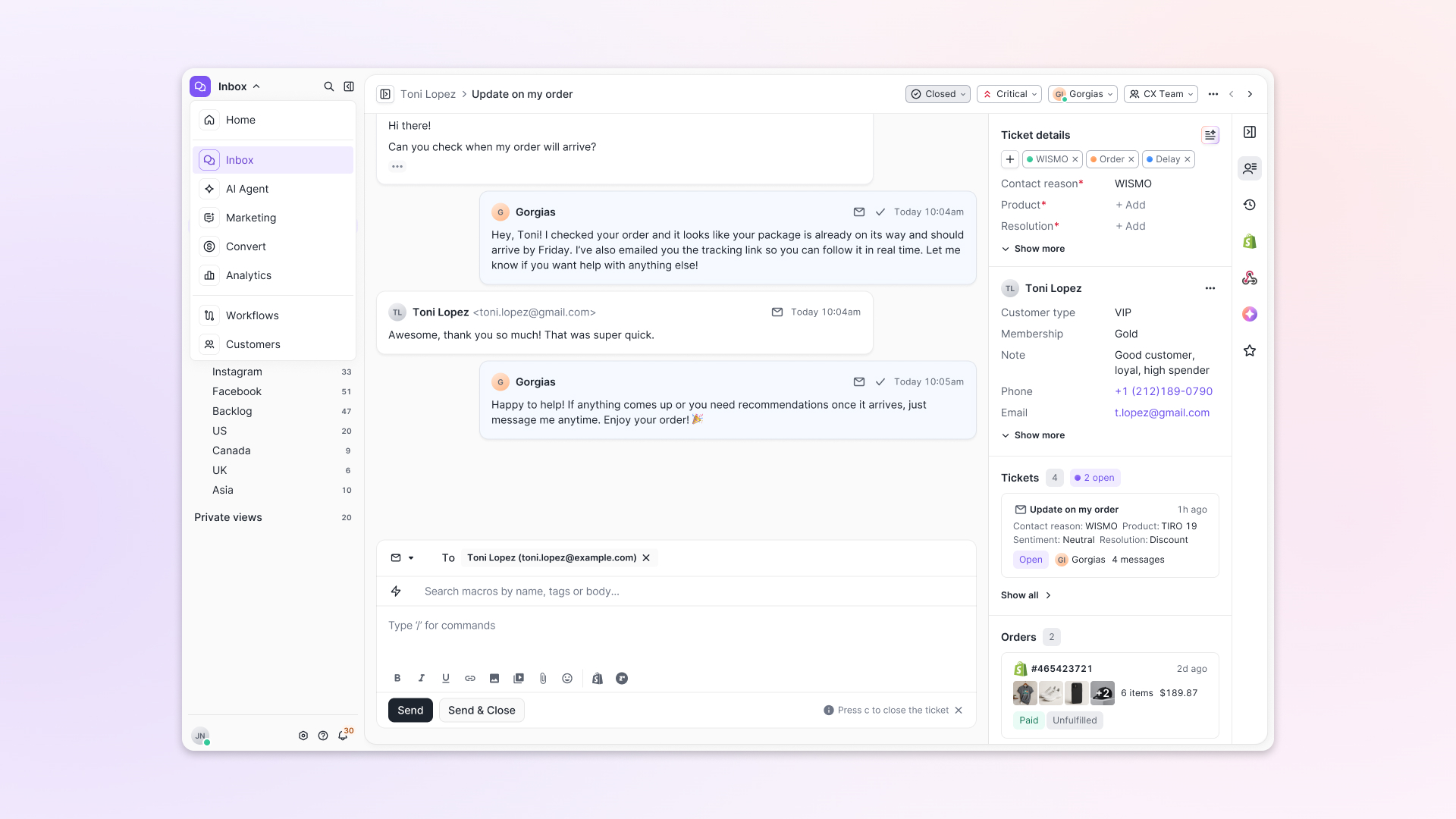
Introducing Helpdesk 2.0: Built for How Agents Work
TL;DR:
- Built directly from agent feedback, Helpdesk 2.0 fixes real workflow pain points. The redesign focuses on reducing friction and helping agents handle more context-heavy tickets.
- A chat-style interface replaces the old email layout. Conversations are easier to follow and resolve in one view.
- Customer context is shown beside the conversation in a right-side panel. Agents can view history, orders, and details without leaving the ticket.
- AI handoffs come with clear summaries. Agents instantly see what happened, what was tried, and what to do next.
- Navigation is simpler and faster across teams. Clean menus, structured queues, and multi-store access keep agents moving efficiently.
Helpdesk 2.0 starts with the people who use it most: the agents.
We spent time understanding customer support from the agent's seat. What do they reach for constantly? What slows them down? What does a better workday look like?
Everything we found is in this brand-new update.
Why we redesigned Helpdesk
Conversational commerce is the new standard.
In customer support, this means customers expect context to remain intact wherever they reach out, whether a conversation starts on social, moves to email, or ends on a call.
This new approach to support has also changed the agent's role. Recurring tickets, like order status checks, shipping updates, and returns, are now handled by AI. What lands in the agent inbox are edge cases that require human judgment and troubleshooting, or tickets that require the full picture.
However, the original Helpdesk was built for a different era of support.
Context was separated across views rather than built into the conversation itself. It's something one in five Gorgias customers flagged, through support tickets, NPS surveys, and conversations with our team. So, we got to work.
Helpdesk 2.0 is the result.
What's new in Helpdesk 2.0
Here's a look at everything that changed.
Read conversations the way they're meant to be read
Conversations have a natural rhythm, one that’s already found in every messaging tool we use. We brought that same layout into the helpdesk.
Say goodbye to the 2000s email interface and hello to chat bubbles. This updated design changes how quickly you can orient yourself and resolve the ticket in one go.
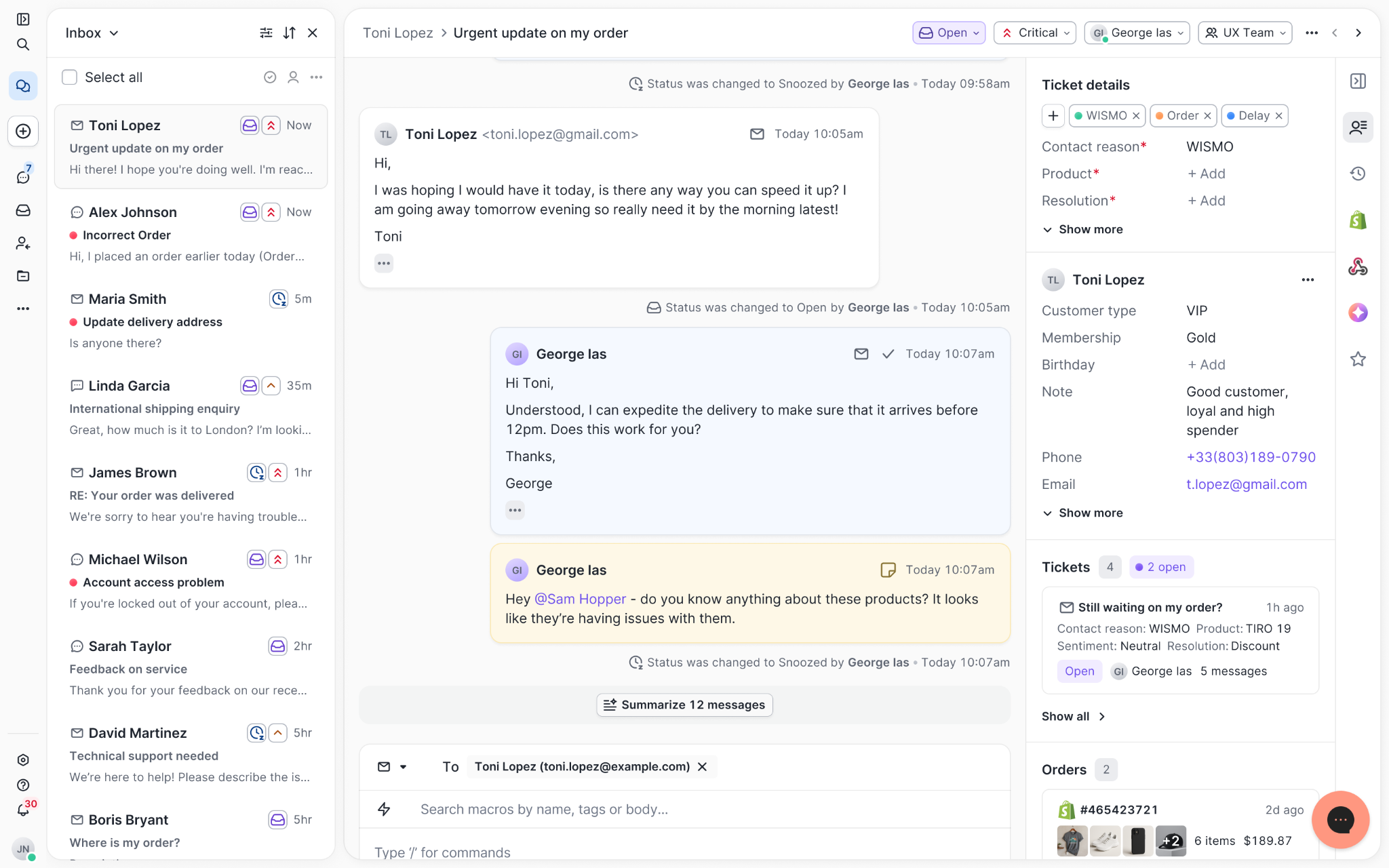
Chats with customers now look like real conversations, using the speech bubble style you’re familiar with on popular messaging apps.
Check customer history without losing your place
Checking a customer's history used to mean leaving the conversation, an extra step that interrupted what should have been a smooth workflow.
Now, past conversations open in a sidebar next to the active conversation. You can view a customer’s full history, search through their timeline, and open prior tickets without going to a new page.

Check past conversations, orders, and customer details in the brand-new Customer Timeline.
See order details the moment you open a ticket
Order information is easier to reference than ever. Open a ticket, and you instantly see the customer's recent orders, marked with product images and invoice details at a glance. Need to dig deeper? Click on an order, and the expanded information appears in the same panel.
For teams using custom integrations, apps are fixed in a quick-access integration menu on the right.
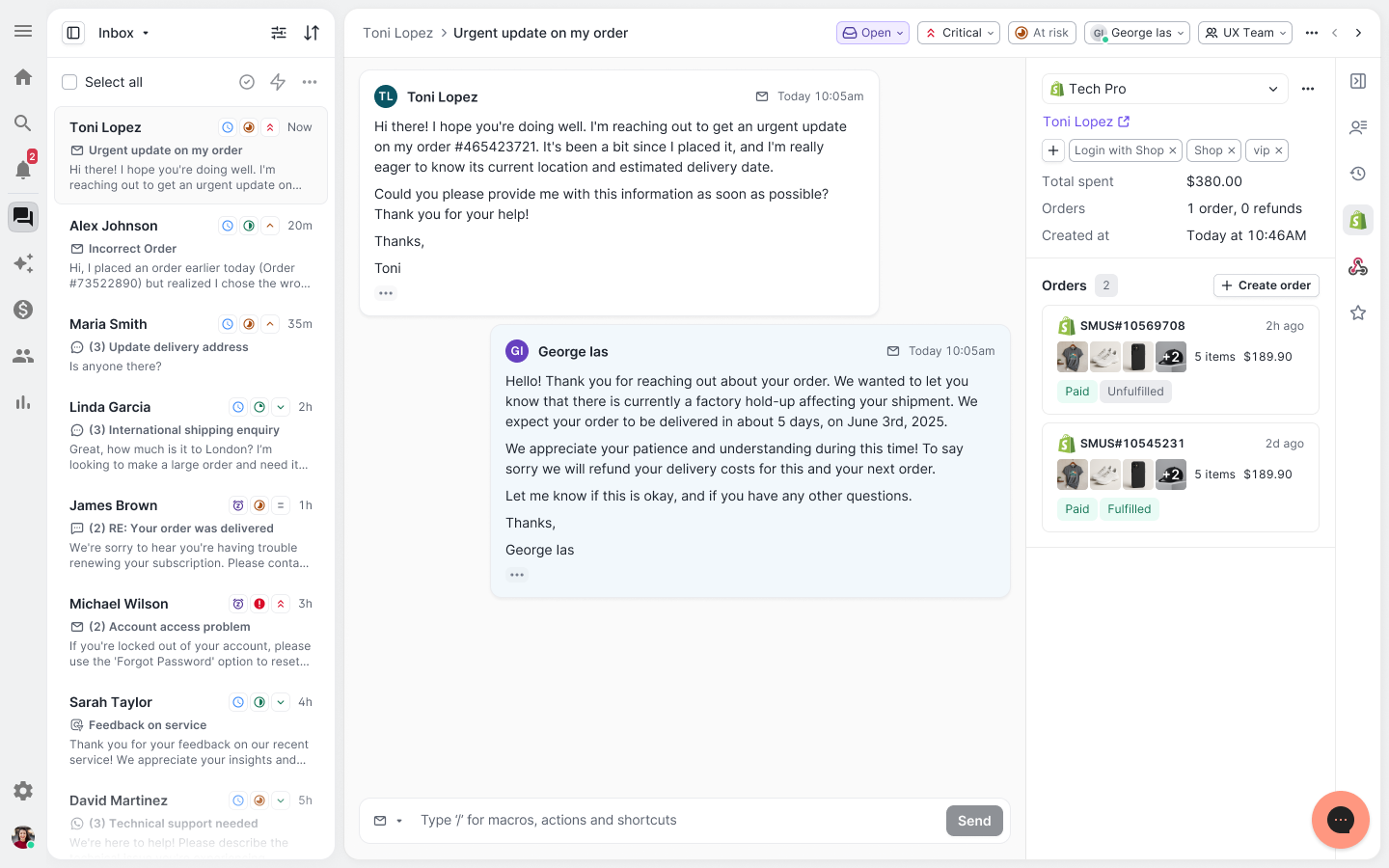
See order details, product images, and totals at a glance on the right panel, without leaving the conversation.
Pick up where AI left off
You shouldn't have to dig through a thread to figure out what AI already tried. Now you don't have to.
When AI Agent escalates a conversation, it includes a concise handover summary that mentions the issue, what actions were taken, and why it was passed to your team.
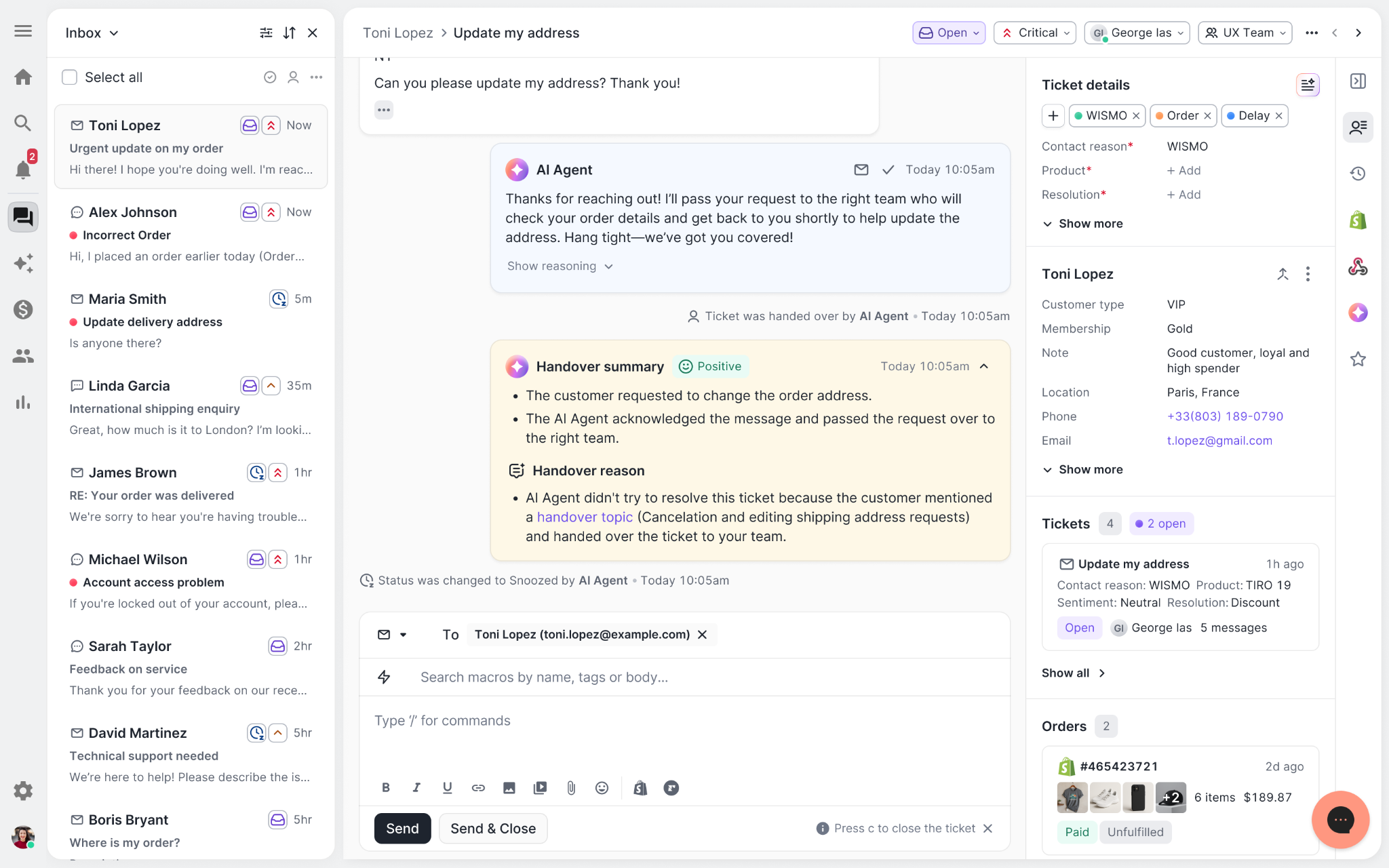
Escalated tickets include a brief AI-generated handover summary, marked in yellow, for quick reference.
Move faster across every store and team
We restructured and simplified the navigation. The left sidebar organizes everything into clear categories: Inbox, AI Agent, Marketing, and Analytics, so anyone on your team knows exactly where to go.
To quickly update your knowledge base or adjust a workflow, both now live right in the sidebar. For teams managing multiple stores, switching between them is just as straightforward, accessible from the sidebar, so agents can move between inboxes without breaking their flow.
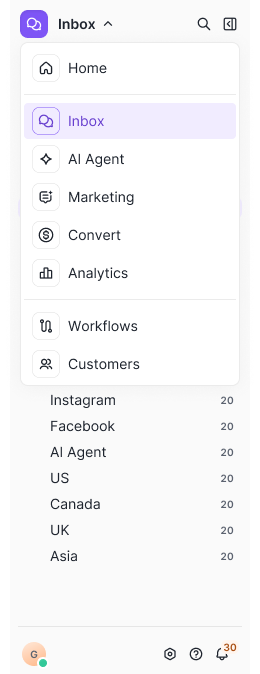
Agents can switch between stores and their corresponding inboxes directly from the left menu.
A workspace that works the way agents do
Support comes down to the person on the other end of the conversation. We built Helpdesk 2.0 is to make sure they have everything they need to show up for that moment.
The best way to see the difference is to work in it. Start a free trial today.


Further reading

How Campus Protein built a multi-million dollar business
The supplement industry is not often the first thing that comes to mind when looking to start a new business. It’s crowded, the barriers to entry are low, the margins are thin, and there are some established and well-known brands with large budgets to outspend competitors.
And yet, Campus Protein, a provider of supplement to college students that started in a dorm room in 2010, has managed to carve itself a highly profitable niche and power its way to millions of dollars in revenue.
No, there’s no magic sauce or secret weapon that helped them do it. They have the same access to resources as everyone else. In fact, they have a smaller team than older brands in the space.
The only difference is they focused on one thing that others in the industry weren’t, the customer experience. This is the story of how they did that and dominated behemoths like GNC in colleges across the US.

Identifying The Problem
Before coming up with the idea, founder Russell Saks was just another sophomore at Indiana University. After joining a fraternity, his new friends convinced him to start hitting the gym.
As Russell started getting into fitness, he noticed that every month his friends would head to the local supplements store to purchase $200 to $300 worth of protein and workout drinks. These were the same people who always complained that they didn’t have beer money on the weekends. Yet here they were, spending hundreds of dollars on supplements without batting an eyelid.
In any industry as crowded as the supplement industry, there are always cheaper options. You can go online and buy your supplements at a much lower price than at the local store. However, the drawback is that you have to wait for it. And, as Russell found out, college students never planned ahead and always needed their next tub of protein powder instantly.
Ever the entrepreneur, Russell figured there was an opportunity here. If he could combine the affordability of online prices with the same-day delivery of the local store, he had a business. All he had to do was bulk order product from a low-cost site in advance, store it locally, and then redistribute it to students when they needed it.
As with any business, those initial days were rough. Yes, there was demand and Russell would often sell out each batch soon after they came in, but the margins were razor thin. To maintain cost-effectiveness, Russell sometimes had to take a loss on certain products.
On top of that, Russell found that his life was getting consumed by the fledgling business. To scale it up, he needed help. His friend and first business partner (now Chief Sales Officer), Mike Yewdell, was a fellow student at Indiana University with lots of connections. With his network, they quickly became the go-to source for supplements on campus.
Russell’s next stop was his high school friend (now business partner and CMO), Tarun Singh, who was studying in Boston University at the time. Tarun noticed the same problems at his school and quickly expanded Campus Protein to his school and then the entire Boston area.
The final piece fell into place when they entered into a business competition and won $100,000 to scale up. With the up-front money, they could negotiate deals with supplement makers to improve their margins, and expand to more college to increase sales.
Today, Campus Protein is in over 300 colleges across the US and shows no signs of slowing down. But none of that would have happened if Russell hadn’t been hyper-focused on a certain type of customer and their needs.

Customer Experience As A Growth Channel
One thing Russell learned early on was that college students had very specific needs. Thus, they craved a personalized experience. They needed help with what supplements to buy based on their goals and budget.
At the local supplement stores, Russell noticed that they couldn’t get any of that. Firstly, they sold to everyone so they didn’t have any expertise specific to the college student market. Secondly, they were trained to sell as much product as possible, so they’d often push supplements that weren’t right for the students.
Russell realized that Campus Protein needed to really understand the needs of a college student to own the market. That meant the company needed to hire students who were into fitness. And so the Campus Rep program was born.
A Campus Rep's main job is sales and marketing. They grow awareness for the brand and encourage help other students achieve their fitness goals.
By recruiting Reps in each college, Campus Protein could keep their core team lean while maintaining a large salesforce on the ground.
This has been the real key to their growth. These Reps are their ideal customers, and they hang out with other prospective customers. Thus, they provide a customer experience that’s far better than anything other brands can offer.
Imagine you’re a college student. Before Campus Protein came along, you had to figure out which products to buy, got pressured into buying unnecessary stuff, and ended up with very little money left over.
Today, you probably have a Campus Protein rep in your gym, wearing a branded tank. He’s giving out free tasters, providing you with workout tips and nutrition advice, listens to your goals, and hands you a card with a link where you can buy exactly what you need for much less. How’s that for customer experience?

Extending The Experience Online
Campus Protein may be marketing offline with their campus reps but all their sales come from their Shopify website. That’s the best way for them to scale.
Here’s how it works - they have warehouses across the country where they stock product. Because of their deep customer understanding, they know exactly what to stock and what not to stock. The campus reps then go around building awareness, and students head to the website to make their purchase. Because of the warehouse network, they get their products pretty quickly.
Because the actual sale is made online, the website becomes a crucial part of their strategy. If they don’t provide the same level of customer support and care their reps do, they’ll drop the ball and lose the sale. More importantly, they’ll lose trust. One bad experience could hurt their reputation across an entire college.
To replicate the one-on-one support of their reps, they used website chat. In the early days, they started with Zopim Chat. But as they grew, they found that it was too basic for their needs. They couldn’t tell if someone they were chatting with was an existing customer or a new one. They couldn’t tell if it was a new conversation or a continuation of one that happened in a different channel. It was a poor experience for the customer and the company.
Remember, they have a small core team, so they needed a customer support tool that could do the heavy lifting for them. That’s when they came across Gorgias and it allowed them to create an online experience that increased conversions and revenues.
For starters, Gorgias combines all their customer support channels (chat, email, phone, social media) into one unified view, and builds a profile of each customer. When a student chats with them, Campus Protein know if they are a previous customer, can see all past conversations and sales in their dashboard, and can provide relevant support.
Compare that to the typical support you get when you’re forced to repeat your previous conversations each time you chat with someone.

To speed things up, Gorgias also has macros and templated responses based on the question. For example, if a customer wants to know where their order is, Gorgias presents the support agent with a templated response that pulls in the customer’s order details from Shopify. With just a click, the support agent can answer the question in near real-time.
Automations like this also frees up time for support agents to provide more detailed answers to complicated questions, like when a student asks for nutrition advice. Again, they can provide the same level of caring support that reps do and this helps increase sales.
Another way they increase sales is by detecting if customers are spending a lot of time on a certain page and initiating a chat with them. For example, if someone is on the checkout for too long, Gorgias automatically pops a chat and ask them if they need help. This directly increases conversions.

Perhaps the most important way Campus Protein uses customer support to increase revenues is by converting feedback into website and product changes. For every question that comes in, they try to understand why it wasn’t obvious on the website, and make the appropriate change. This leads to fewer tickets of the same type and higher conversions.
Widening The Moat
At the end of the day, Campus Protein is just another retailer. In an industry like supplements, anyone can replicate their model, or existing brands like GNC can enter the market. So why hasn’t that happened yet?
Like Warren Buffett says, every business needs to have a moat, something that defends them against competition. In Campus Protein’s case, it’s their deep customer knowledge and the personal level of support they provide.
A college student is introduced to Campus Protein via the local rep. They’re nice, helpful, and remember the student’s name each time. When the student goes online, they have the same experience. Their previous conversations are remembered and even their most complicated questions are answered with care.
Now, you may not be able to create a rep army like Campus Protein for your eCommerce business, but you sure can create an online customer experience that sets you apart from others in your industry.
With Gorgias, whenever a customer creates a ticket on any channel, you have all their information like previous conversations and sales, right there. Instead of asking the customer if they’ve written in before or what their order numbers are, you can get straight to the important stuff. And with all the templates, macros, and automations available, you can do it in minutes.

When a customer has to decide between purchasing at a store where they forget about you after the sale, versus one where they treat you like a friend and remember you a year later, which do you think they’ll choose?
Give your customers a great experience and, like Campus Protein, you’ll have a business that keeps going up.
Curious about how Gorgias can optimize customer service? Click here to learn more.


Gorgias Builds Strong Relationships With Aircall
Aircall is a cloud-based call center software made for support teams. With Aircall, support agents can track everything from A-Z, on any device, with zero hardware to manage. The right tool to increase agent efficiency and customer satisfaction!
Aircall Makes the Gorgias Helpdesk Complete
After listening to early customer feedback, we quickly realized we needed to find a phone integration that empowered users to manage voice calls as easily as emails or chats.
Traditional helpdesk integrations simply log calls as tickets. We wanted to go one step further and associate the phone call with the right customer. This way, agents can see the full conversation history between the brand and the customer.
By building Aircall’s cloud-based phone into the Gorgias platform, agents can also quickly edit orders while on the phone based on the case history they see. After a call has ended, all notes will be added to the correct customer’s profile along with a link to the full call recording.

Why Aircall was the Right Choice
Looking back, the partnership has been mutually beneficial and seamlessly implemented.
Aircall has a well-documented API that our dev team could easily use. We were able to build a working and robust phone integration with Aircall in just a few hours. Four days later, after QA testing, the new solutions were fully functional and ready to use.
Since Gorgias and Aircall both seek to provide the best customer experience possible, cross-company visibility has become a valuable source of new leads and sales. Furthermore, we conduct regular catch-up meetings and share a Slack channel to make sure both teams work hand-in-hand to create the best integration and the best results. The partnership with Aircall is super valuable for both our customers and our respective companies and we strongly recommend each others.
If you're already a Gorgias customer, head to your account and go to Integrations to connect Aircall. If not, you can create an account here and get started in a few minutes.

Event #1: Optimizing Brand Experience To Drive Revenue
Last thursday, we organized our first event at Gorgias. It was the perfect opportunity to celebrate our new round of funding and recent moving to a new office in SOMA, while discussing brand culture and customer experience.
Special thanks to our speakers Renee L. Halvorsen from Marine Layer, Alicia Levine from Sunski, Dorian Greenow from Keto-Mojo and Anthony Benedettini from Dry Farm Wines.
 |
Here are the key takeaways you should remember:
- As an e-commerce brand, you cannot compete on price with Amazon and powerful dropshippers. That’s why brand experience is your key differentiation factor.
- Building a strong brand experience requires to be present on each distribution channel. Don’t let your resellers do the job for you! Sunski for example prepares “environment kits” for their resellers and marketplaces. This way, customers can experience Sunski’s spirit beyond its website.
- When building brand experience, your community is your key success factor. Create a pool of ambassadors who will promote your brand, and reward them with presents, promo codes, and dedicated attention.
- Bet on your own team! Building a great mindset within your team will help you create a strong and consistent brand image. At Keto-Mojo, each member of the team does customer service, so that everyone focus on what customers really need. Besides, the founder should inspire a culture of passion and dedication to the product.
You missed our event? Don’t worry, it was the very first of many!
Curious about how Gorgias can optimize customer service? Create an account here and get started in a few minutes!

Thank you, interns!

Announcing the ReCharge integration
Recharge is the most popular subscription app in the Shopify app store and is the preferred solution for Shopify Plus stores. Over 10,000 Shopify merchants chose ReCharge to help sell products on a recurring basis, including stores like Dr. Axe, Hubble Contacts, and 5 Hour Energy.
The challenge is, when a customer has an issue with their subscription, the support team needs to jump between their helpdesk, Shopify and the ReCharge platform to fix the problem. This negatively impacts response time. Agents end up wasting hours per week going to ReCharge to skip a box for a customer, edit a subscription, etc. One of the key advantages of using Gorgias is to manage all your customer support in one place. A few months ago, our customer Darn Good Yarn asked us to build an integration with ReCharge. They no longer wanted to switch between ReCharge, Shopify and their helpdesk. This was completely aligned with our vision, so we decided to build it.
Today, we're excited to announce we've partnered with ReCharge to launch this integration.
Here are the key benefits:
- Display ReCharge subscriptions next to support tickets.
- Edit ReCharge subscriptions in one click from your helpdesk: refund charges, skip monthly payments or cancel subscriptions from Gorgias
- When a customer ask to edit their subscription, you can send them an auto-response with the link to manage the subscription.
“Gorgias gives us a holistic view of our customers. This way we can provide them with fast and personalized help”
Nicole Snow, DarnGoodYarn
Let’s take the example of Averill John. She wants to cancel her subscription to the Yummy Box and has just sent an email to your support.
Here is how your helpdesk looks like:

You can see that Astrid has been assigned to this ticket and that this ticket is tagged “Ambassador”. It means that Averill is one of your super loyal customers.
On the right, you can see the ReCharge account data of Averill. Here, Averill has a monthly subscription to the Yummy Box and will be charged on the 15th of October.
Astrid can skip the October charge in one-click on the “Skip charge on subscription” button. It will immediately set the action within ReCharge. Response time? Less than 1 minute!
If you're already a Gorgias customer, head to your account and go to Integrations to connect ReCharge. If not, you can create an account here and get started in a few minutes.

Announcing the Aircall integration
One of the key advantages of using Gorgias is to provide a unified support experience to your customers across all channels. A few months ago, some of our customers asked us to build a phone integration. Traditional helpdesk integrations simply log calls as tickets. We wanted to go one step further and associate the phone call with the right customer.
Today, we're excited to announce we've partnered with Aircall to build this integration.
Aircall arms small-to-medium sized business (SMBs) with a phone system built for modern business. With zero hardware to manage, dozens of integration options to explore, and the ability to add local numbers in more than 40 countries, support teams can easily provide phone support in minutes.

Here are the benefits of this new integration:
- When a customer calls your company in Aircall, it creates a ticket in Gorgias and automatically matches it with the corresponding Shopify customer. This way, your staff can edit orders while they are on the phone with the customer.
- Your team sees all previous interactions they had with each customer, under their timeline.
- Get omni-channel statistics. Gorgias stats include Aircall phone data. For instance, you can monitor if you're getting more return requests over the phone or through Facebook Messenger.
If you're already a Gorgias customer, head to your account and go to Integrations to connect Aircall. If not, you can create an account here and get started in a few minutes.

We're joining the Shopify Plus Technology Partner Program

We're integrating with LoyaltyLion!
Great news! Today, we're announcing a new integration with LoyaltyLion. LoyaltyLion is a digital loyalty framework that gives ecommerce stores innovative ways to engage and retain customers.
Our mutual customer Darn Good Yarn uses it to successfully increase customer retention. When they switched from Freshdesk to Gorgias to manage customer support, they wanted to leverage their loyalty program for customer support.
We used their feedback to build the integration with LoyaltyLion, which they have been using for a couple months in beta. Today, we're excited to make it available to all our users.
What is the LoyaltyLion integration?
Here are some of the benefits of this integration:
- Display how many points a customer has when they contact your support team
- When you respond to customer support requests, award loyalty points to customers directly in Gorgias
- Include the customer's personal referral url in your responses. This way, if they are happy about your support, they'll refer their friends to your store.

Overall, this allows your team to use your loyalty program for customer service.
"We love being able to issue our customers loyalty points directly from Gorgias! It's a great way to boost efficiency and also customer retention."
Chloe Kesler, Customer Support manager at Darn Good Yarn
How can I use the LoyaltyLion Integration?
The integration is immediately available on your Gorgias account. If you don't have an account, you can create one here. Then, follow the instructions in our documentation and you can get started!