.png)
.png)
An interview with Max Pruvost, Gorgias SVP of Product, the engineer behind the Gorgias AI Agent Benchmark.
Everyone evaluating an AI agent today is working from a different scorecard.
Gorgias wanted something a buyer could actually interrogate, so we built one. The AI Agent Benchmark tests AI agents on 200+ live ecommerce stores, has evaluated more than 8,000 conversations, blind-scores the quality of each one against a public rubric, and ranks 12 vendors over a rolling 90-day window.
We sat down with Max Pruvost, the engineer who built the benchmark, to talk about why the standard was needed, how it actually works, and what it took to make the numbers reliable and unbiased.
Max: Because the numbers don't mean the same thing. "Automation" can mean resolved, contained, or merely answered. The customer might have gotten what they needed, or they might have been pushed to a contact form, and both get counted the same way. "Fast" can mean the first word of a response or the complete answer; those are wildly different experiences for a shopper. And the way that vendors rate quality has been subjective or not at all standardized.
We wanted a single rubric, applied identically to everyone, that describes the two jobs an ecommerce AI agent actually has: helping a shopper buy, and resolving support without needing to pass it off to a human because the team is busy dealing with more complex tickets.
Max: A storefront assistant does two very different jobs, and they punish different weaknesses. A shopping conversation is revenue-critical and impatient. If the recommendation takes twenty seconds, or the shopper can’t get a good recommendation at all, they’re gone. If the buyer doesn’t feel confident about their purchase decision, the agent hasn’t done its job. It’s important that shoppers get all their questions about the product and the brand’s policies answered quickly and accurately, before they drop off.
A support conversation is about containment: did the customer get their refund question answered without anyone touching a ticket? Speed matters far less there.
If you average the two, a vendor that's excellent at policy answers and useless at recommending products can look identical to one that does both. So the benchmark measures the two lanes separately and weights them differently: shopping is 40% automation, 35% quality, 25% speed; support is 50% automation, 40% quality, 10% speed.
Max: Every conversation runs against the live widget on a real storefront, using the same AI deployment customers actually interact with. Each conversation starts completely fresh, with no browsing history or prior context, and our test shopper types every question in its own words. That matters: quick-reply buttons can trigger canned answers that make speed and automation look better than they really are.
The questions are deliberately hard: compound, multi-constraint, and built on earlier answers, with objections and edge cases along the way. Support scenarios include things like splitting a refund between a gift card and credit card or changing an address mid-transit. Shopping scenarios go from open-ended discovery through comparison and objections, all the way to add-to-cart.
Max: We made three design decisions to make it more trustworthy.
First, blindness. Before judging, we strip out vendor and store identity, so the judge sees behavior, not brands. The information that links a conversation back to its vendor is kept separate and never reaches the judge.
Second, each lane's rubric breaks down into simple yes/no checks, twenty-six of them across the two lanes. The LLM judge answers yes or no per check, and the score out of 100 is calculated from those answers by a fixed formula. A judge can't "feel" an 82.
Third, every passing check must quote the actual transcript, and the quote is verified against the stored transcript in code, an invented quote is demoted to a fail. And the objective parts are even stricter: whether a reply really contains a price, a link, a review quote or a product option is detected by code straight from the transcript, not judged by feel.
Max: The benchmark counts a conversation as automated only when the AI handled it with zero human touch, no handover to a person, and no deflection out of the channel. No "email us," no contact form, no "call us." If more than half of an agent's replies in a conversation push the customer out of the channel, we count the conversation as unresolved.
And importantly, the questions are designed so no turn ever asks for a human. Any handover the AI initiates is its own choice, attributable to a capability gap, not a scripted escape hatch. Also: early bails count against the vendor, and broken widgets are reported separately, never silently dropped or scored as zero. None of that flatters anyone. It's the same measure for every vendor.
Max: Because a competitive benchmark nobody outside can check is only an assertion. The rubric is downloadable; the scoring rules, quality gates and neutrality policies are documented. Every scoring decision is written into code as a separate, tested rule, 145 of them, and before any board goes live an automated check blocks it from publishing if it breaks its own rules. The whole thing runs automatically every day: capture, judge, audit, verify, publish. No vendor-specific store exclusions exist.
We would rather someone find a flaw in our method than trust a number they can't inspect. The point is not that our methodology is beyond debate, the point is that the debate should happen around a visible, repeatable standard instead of around marketing claims.
Max: Three things. First, demand the definition behind every number, what counts as automated, what stops the latency clock, who picked the quality score. Second, configuration beats model: the same vendor scores well on one store and near zero on another, so the deployment you'd actually run is what matters, and testimonials and demos hide that. Third, the most common failure in the field isn't a wrong answer, it's a wall or a loop: authentication demands, repeated clarifying questions, handing everything to a human. Those are guardrail problems, and they're cheap to fix once you can see them.
The full methodology, rubric and live scoreboard are public at evals.gorgias.com. Every number in this piece comes from the September 9, 2026 board, ranked over its 90-day window.
TL;DR:
Getting more out of your Zendesk AI Agent comes down to better configuration. The problem is that auditing your own setup requires time you don't have.
Gaia for Zendesk is a free Chrome extension from Gorgias that clears that backlog in minutes. It connects to your Zendesk account, reads your tickets, and generates the components your AI Agent needs to resolve more conversations without escalation.
Below, you'll find everything you need to get started: how to install Gaia, what it can do, and the use cases teams are already putting it to work for.
Jump to:
Zendesk Suite admins and agents who want to set up or improve their Zendesk AI Agent (and, optionally, Zendesk Copilot).
Throughout this article, "AI Agent" refers to Zendesk's own AI Agent feature, not Gorgias's product. Gaia is the Gorgias-built Chrome extension that helps you configure it.
Gaia for Zendesk is a free Chrome extension built by Gorgias that connects to your Zendesk account and analyzes your real ticket history.
It autonomously transforms that data into the core components your Zendesk AI Agent needs to resolve more tickets without human intervention: guidances, instructions, voice-of-customer insights, and Copilot procedures.
Gaia opens automatically as a side panel on any .zendesk.com page. You choose a workflow, Gaia runs the analysis and generates structured drafts, and you review and approve what should be applied to your Zendesk workspace.
What Gaia can do:
Good to know: Gaia is autonomous in how it analyzes your data and generates recommendations, but nothing is applied without your approval.
How well your AI Agent performs comes down to how well it is configured. Clear instructions, well-defined intents, and up-to-date procedures are what separate an AI Agent that resolves tickets from one that escalates them — and building that foundation manually takes time most teams do not have.
Gaia removes that constraint by turning your existing support data into structured, ready-to-review outputs:
Tip: Teams that define five or more strong guidances typically see a meaningful lift in the share of tickets their AI Agent resolves without escalation. Gaia is designed to help you reach and expand beyond that baseline quickly.
Installation takes about five minutes. You'll need admin access to your Zendesk account to generate an API token.
Make sure you're using Google Chrome or another Chromium-based browser (such as Edge or Brave). Gaia is not available for Safari or Firefox at launch.
Follow these steps:
1. Install the Gaia for Zendesk extension. Go to the Chrome Web Store listing for Gaia for Zendesk by Gorgias and click Add to Chrome. Confirm the permissions to complete installation.
2. Generate a Zendesk API token. In Zendesk, navigate to Admin Center › Apps and integrations › Zendesk API. Enable Token access if needed, then click Add API token. Copy and store the token securely (it will not be visible again).
3. Open the Gaia extension and add your credentials. Click the Gaia icon in your Chrome toolbar, then open Settings. Enter:
4. Click Save. Gaia will validate the connection.
5. Open any Zendesk page. Navigate to any page in your Zendesk account. Gaia will appear as a side panel where you can select a workflow and begin.
Here are the four most common ways teams use Gaia for Zendesk.
Best for: Teams already using Zendesk AI Agent or Answer Bot but not reaching their automation goals
Select Improve my AI Agent. Gaia analyzes escalated tickets against your current guidances to identify missing intents, unclear instructions, and outdated logic, then proposes prioritized improvements.
Best for: Teams starting without an established AI configuration
Select Create my first instructions. Gaia generates a foundational set of 15 instructions covering common ecommerce scenarios (order status, refunds, cancellations, shipping, returns).
Best for: Support, CX, and operations teams planning improvements or reporting on performance
Select Analyze my tickets. Gaia summarizes ticket volume, top intents, and escalation drivers to highlight where automation or process improvements will have the greatest impact.
Best for: Teams using Zendesk Copilot who want consistent, scalable agent workflows
Requires the Copilot add-on in Zendesk. Select Create my first procedures. Gaia converts real agent behavior into structured WHEN/IF/THEN procedures that standardize how common scenarios are handled.
Gaia connects to your Zendesk account, reads your ticket history, and shows you exactly where your setup is falling short. Install the free Chrome extension and run your first analysis in under a minute.
The best in CX and ecommerce, right to your inbox

TL;DR:
Your ticket volume number is probably wrong. If customers are reaching you through email forwards, Slack DMs, or channels that bypass your helpdesk, those tickets aren't being counted, and your SLA reporting is built on incomplete data. This guide covers how to get an accurate count, break it down by channel and category, and use your vertical benchmark to figure out whether your volume is actually a problem or just normal for your industry.
Ticket volume is the total number of customer inquiries your support team receives across all channels — email, live chat, phone, social media, and contact forms — within a specific time period. It is the most direct measure of your team's workload.
Do not confuse it with contact rate. Contact rate = tickets ÷ orders (or customers). That normalized number is more useful for benchmarking and planning because it accounts for business growth. Raw ticket volume tells you how busy your team is. Contact rate tells you whether support demand is outpacing your business.
Start by looking at the last 30 days of customer conversations, no matter where they currently live.
Pull these four numbers:
Here’s how to pull that data depending on your setup:
Open your inbox or Sent folder and filter by the last 30 days. Count how many customer conversations came in during that period. You can also copy subject lines into ChatGPT or Claude to group conversations by topic.
Go to Inbox > Conversations and review your recent conversations. Count how many messages you received and look for repeated themes or questions.
Most helpdesks have ticket reporting or exports built in. Search “export tickets” or “ticket report” in your platform’s help center. From there, you can pull:
If a large portion of customer questions are still happening in untracked places like Slack DMs, personal inboxes, or Instagram comments, your reporting is incomplete. Before optimizing support operations, route customer conversations into one shared system so you can accurately measure volume, response times, and recurring issues.
A raw ticket count tells you how busy your team is. The breakdown tells you what to fix.
|
Category |
What high volume signals |
What to do |
|
"Where is my order?" |
No proactive shipping updates; poor tracking page |
Automate WISMO with AI Agent; add tracking link to order confirmation |
|
Returns and exchanges |
Confusing return policy; no self-serve portal |
Add a clear returns page; enable self-serve exchange flows |
|
Sizing and product questions |
Weak product page content |
Add size guides, FAQs, and fit notes directly on product pages |
|
Account and subscription issues |
Customers can't self-serve basic account changes |
Build or improve your Help Center; enable self-serve account management |
|
Payment and billing |
Checkout friction or unclear pricing |
Fix at the source — this is rarely a support problem |
Run this categorization for your last 30 days. Your top two or three categories are your highest-leverage targets.
Ticket volume only tells part of the story. Track it alongside:
Once you know what is driving your volume, address each category at the source. The goal is to eliminate unnecessary tickets.
Automate the highest-volume, lowest-complexity tickets first. WISMO inquiries, order status checks, and basic return initiations require no agent judgment. An AI Agent connected to your ecommerce platform can handle these end-to-end without a human stepping in. When a question is too complex, the AI escalates it with full context attached.
Build self-service content around your top categories. A Help Center that directly addresses your most common ticket types is the highest-leverage tool for sustained volume reduction. Start with your top five categories. Write one article per category. Surface those articles on relevant product pages, in checkout, and in post-purchase emails — before customers need to search.
Send proactive messages at the moments that generate the most tickets. Post-purchase is the single highest-value touchpoint: an order confirmation that includes a tracking link, estimated delivery window, and a clear link to your return policy eliminates a large share of inbound questions before they are ever submitted.
Measure deflection, not just volume. Deflection rate, the percentage of issues resolved through self-service or automation, is the metric that tells you whether your volume reduction efforts are actually working. Track it weekly alongside CSAT for automated interactions to make sure quality is holding.
The all-industry average is not your benchmark. Ticket volume per 100 orders varies 2.4x across verticals, so comparing yourself to a cross-industry number will either make you complacent or create false urgency.
According to Gorgias platform data from March 2026 across 14 verticals at the $10M GMV band, here is what tickets per 100 orders actually looks like by vertical:
|
Vertical |
Tickets per 100 orders |
|
Electronics |
46 |
|
Vehicles & Parts |
46 |
|
Hardware |
41 |
|
Luggage & Bags |
32 |
|
Home & Garden |
32 |
|
Sporting Goods |
32 |
|
Baby & Toddler |
24 |
|
Business & Industrial |
25 |
|
Animals & Pet Supplies |
25 |
|
Apparel & Accessories |
22 |
|
Health & Beauty |
21 |
|
Arts & Entertainment |
21 |
|
Food & Beverages |
20 |
|
Toys & Games |
19 |
Source: Gorgias Ecom Lab, March 2026
High ticket volume is not always a sign of poor CX — it often reflects product complexity. Electronics brands generate nearly one ticket per two orders because customers have more pre- and post-purchase questions about technical products. Food and Beverage brands generate about one in five. That gap is not a performance difference; it is a category difference.
The right question is not "are we below 10 tickets per 100 orders?" It is "are we above or below our vertical peers?" Find your row. That is your baseline. Then use the reduction tactics above to move below it.
If your ticketing tool uses usage-based pricing, where your bill scales with ticket volume rather than agent headcount, forecasting volume directly affects your budget.
The core formula is simple:
Projected tickets = projected orders × (tickets per 100 orders ÷ 100)
So if you expect 2,000 orders next month and your vertical median is 22 tickets per 100 orders, your forecast is approximately 440 tickets.
But a flat monthly estimate misses the real risk: peak seasons. A volume spike during BFCM that triples your order volume will also triple your ticket count — and your bill — unless you have guardrails in place.
To build a more accurate forecast:
Before signing any usage-based contract, ask two questions: What counts as a billable ticket? And is there a hard cap on monthly charges? Variable billing only works in your favor if you have clear definitions of what triggers a charge and a ceiling on how high costs can go during an unexpected spike.
If your platform bills per ticket resolved by a human agent (not AI), your deflection rate becomes a financial metric, not just an operational one. Every percentage point of additional deflection directly reduces your bill.
Begin by identifying your top ticket categories, then work backward to find the root cause of each one.
From there, layer in self-service content, automation, and proactive messaging to address those root causes directly. The result is a support operation that handles more customers and a team that spends its time on the work that actually requires human judgment.
Book a demo to see how Gorgias helps ecommerce brands reduce ticket volume and improve customer experience at the same time.
{{lead-magnet-2}}

TL;DR:
If you're wondering what it costs to add AI Agent to your Helpdesk, you're in the right place. This article walks through how pricing works, what counts as a billable interaction, and how to think about the investment before talking to anyone on our team.
The good news: there are no seat fees, no per-message charges, and no token-based billing. You pay for conversations your AI actually resolves. If you've looked into other AI tools for customer support and found the pricing models confusing or hard to predict, Gorgias AI Agent works differently.
A billable interaction is counted when the AI resolves a customer conversation entirely on its own. The customer asks something, the AI handles it, the conversation closes. That's one interaction.
If the AI can't fully resolve a conversation and hands it to a human agent, that ticket shifts over to your regular Helpdesk plan. It becomes a standard resolved ticket. You're not charged for both.
A few things that don't count as billable interactions:
This matters most for brands coming from seat-based tools. With Gorgias, your whole team can work in the platform. Agent seats are unlimited. Pricing scales with what your AI is actually doing, not with how many people have access.
Understand the difference between seat-based vs. usage-based pricing.
AI Agent is an add-on to your Gorgias Helpdesk plan. The two are priced separately but work together. Your Helpdesk plan covers all the conversations your human agents resolve. Your AI Agent plan covers the interactions the AI resolves on its own.
When you choose a plan, you select how many automated interactions you want included per month. Depending on your plan, that ranges from 90 to 2,500+ interactions, with custom interaction numbers available for enterprise. You can see the full breakdown on the Gorgias pricing page.
Each resolved conversation costs $0.90 on most plans. Starter plans begin at $1 per resolved conversation. You only pay for fully automated interactions, meaning conversations the AI handles from start to finish without a human stepping in.
The main input is your average monthly ticket volume. From there, you estimate how many of those conversations AI could realistically handle on its own.
Order status updates, return requests, and shipping questions tend to be the highest-volume ticket types AI resolves well. AI Agent actions shows the full range of what it can handle, which makes it easier to estimate your starting number.
Your actual automation rate, meaning the share of total tickets the AI ends up resolving, emerges from usage over time. Most brands start with their most repetitive ticket types and expand from there as they see results.
Related: Which Gorgias plan should you choose?
You're charged an overage fee for each additional automated interaction if you exceed your plan's baseline in a given month. The exact rate depends on your plan tier and whether you're on a monthly or annual subscription.
Generally, the higher your plan tier, the lower your overage rate. Annual plans also carry lower overage rates than monthly plans. So if you're regularly going over, upgrading to a higher tier or switching to annual often works out cheaper than paying overage fees month after month.
If you're on a Support + Shopping Assistant plan, the overage rate is $1.50 per interaction across all paid tiers. If you're on a Support-only plan, rates range from $1.00 to $2.00 per interaction on monthly plans, and $0.83 to $1.67 on annual plans, depending on your tier.
For seasonal businesses, forecasting your customer service volume before peak periods is the best way to choose the right plan size and avoid unexpected fees.
At $0.90 per resolved interaction on most plans, each AI resolution costs less than a human agent handling the same ticket. Once you know what a human-resolved ticket costs your business, the comparison becomes straightforward.
For brands building an internal case for the investment, how to pitch AI Agent to your boss covers the ROI framing in detail.
To see what results look like in practice, how 10 brands transformed customer support into revenue has real ecommerce examples.
AI Agent comes with everything you need to set it up, customize it, and improve it over time:
Learn more: Gorgias AI Agent guardrails: What they are and how to configure them
The best way to get a sense of what AI Agent will cost is to look at your own ticket volume and the types of questions your customers ask most. From there, the right plan becomes much clearer.
If you want to talk through the numbers with someone from our team, book a demo and we'll walk through it with you.
If you'd rather keep exploring first, here are a few good next reads:
{{lead-magnet-2}}

TL;DR:
Helpdesk 2.0 starts with the people who use it most: the agents.
We spent time understanding customer support from the agent's seat. What do they reach for constantly? What slows them down? What does a better workday look like?
Everything we found is in this brand-new update.
Conversational commerce is the new standard.
In customer support, this means customers expect context to remain intact wherever they reach out, whether a conversation starts on social, moves to email, or ends on a call.
This new approach to support has also changed the agent's role. Recurring tickets, like order status checks, shipping updates, and returns, are now handled by AI. What lands in the agent inbox are edge cases that require human judgment and troubleshooting, or tickets that require the full picture.
However, the original Helpdesk was built for a different era of support.
Context was separated across views rather than built into the conversation itself. It's something one in five Gorgias customers flagged, through support tickets, NPS surveys, and conversations with our team. So, we got to work.
Helpdesk 2.0 is the result.
Here's a look at everything that changed.
Conversations have a natural rhythm, one that’s already found in every messaging tool we use. We brought that same layout into the helpdesk.
Say goodbye to the 2000s email interface and hello to chat bubbles. This updated design changes how quickly you can orient yourself and resolve the ticket in one go.
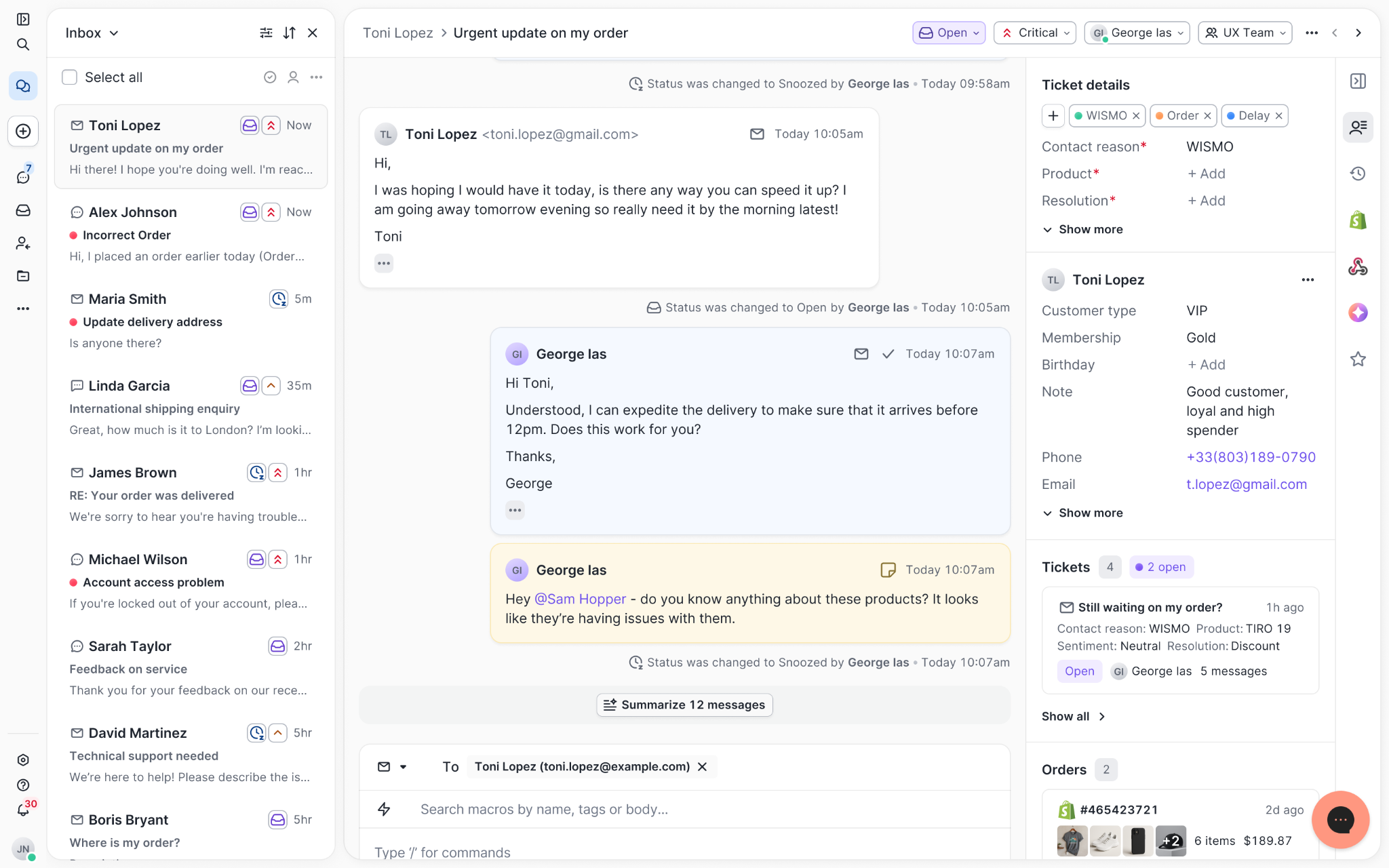
Chats with customers now look like real conversations, using the speech bubble style you’re familiar with on popular messaging apps.
Checking a customer's history used to mean leaving the conversation, an extra step that interrupted what should have been a smooth workflow.
Now, past conversations open in a sidebar next to the active conversation. You can view a customer’s full history, search through their timeline, and open prior tickets without going to a new page.

Check past conversations, orders, and customer details in the brand-new Customer Timeline.
Order information is easier to reference than ever. Open a ticket, and you instantly see the customer's recent orders, marked with product images and invoice details at a glance. Need to dig deeper? Click on an order, and the expanded information appears in the same panel.
For teams using custom integrations, apps are fixed in a quick-access integration menu on the right.
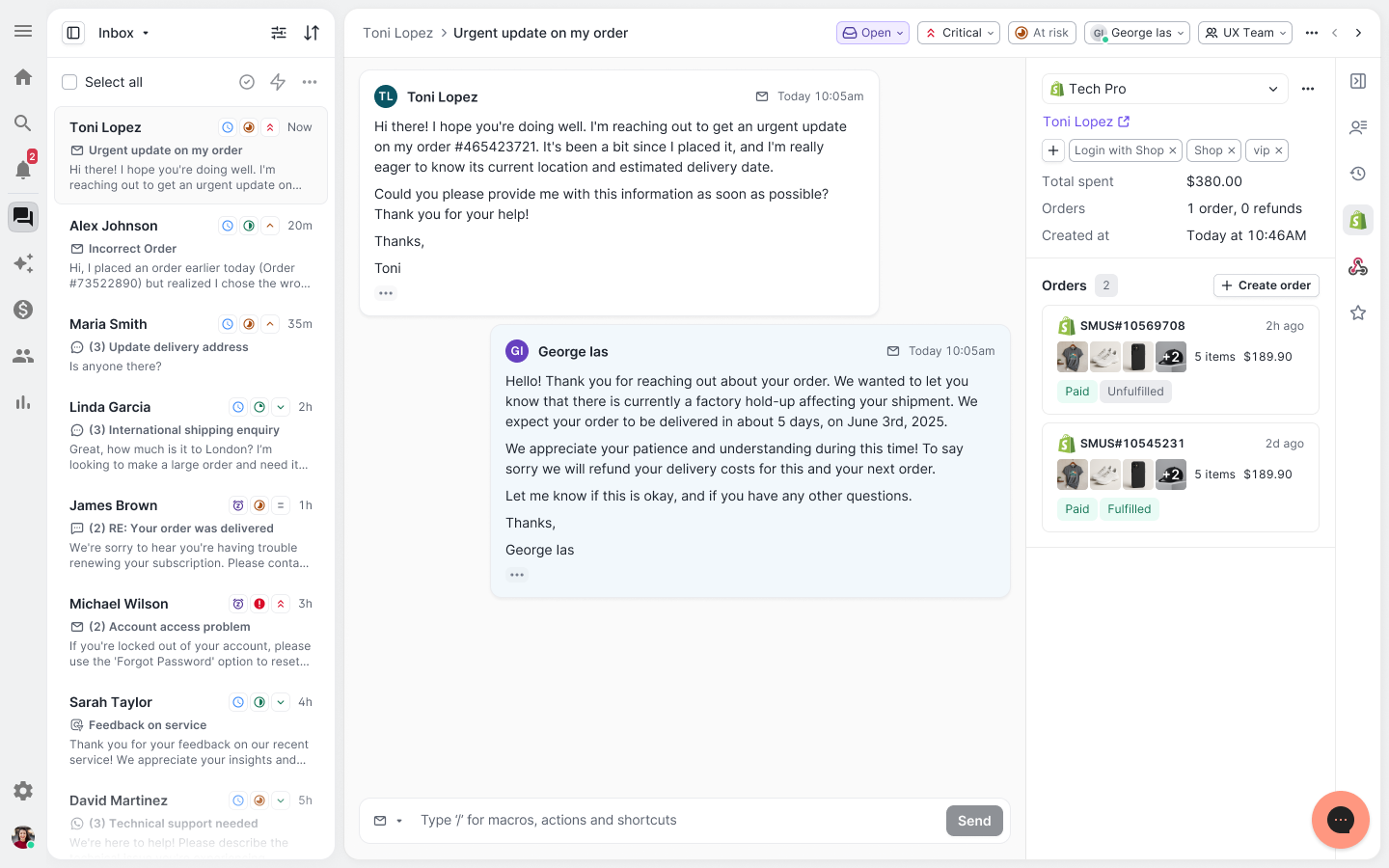
See order details, product images, and totals at a glance on the right panel, without leaving the conversation.
You shouldn't have to dig through a thread to figure out what AI already tried. Now you don't have to.
When AI Agent escalates a conversation, it includes a concise handover summary that mentions the issue, what actions were taken, and why it was passed to your team.
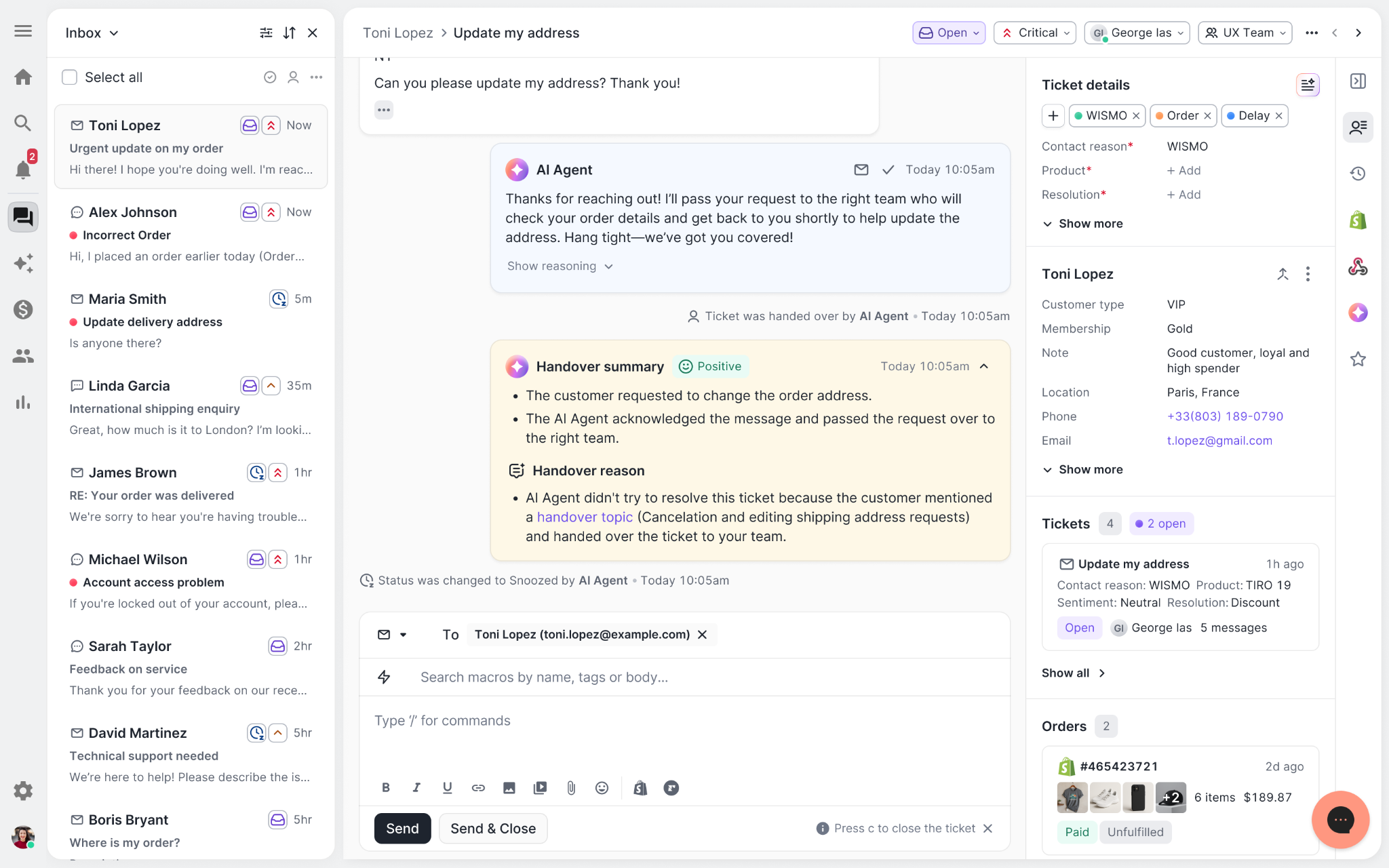
Escalated tickets include a brief AI-generated handover summary, marked in yellow, for quick reference.
We restructured and simplified the navigation. The left sidebar organizes everything into clear categories: Inbox, AI Agent, Marketing, and Analytics, so anyone on your team knows exactly where to go.
To quickly update your knowledge base or adjust a workflow, both now live right in the sidebar. For teams managing multiple stores, switching between them is just as straightforward, accessible from the sidebar, so agents can move between inboxes without breaking their flow.
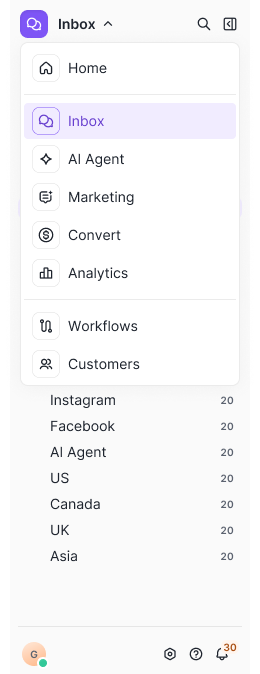
Agents can switch between stores and their corresponding inboxes directly from the left menu.
Support comes down to the person on the other end of the conversation. We built Helpdesk 2.0 is to make sure they have everything they need to show up for that moment.
The best way to see the difference is to work in it. Start a free trial today.


TL;DR:
Conversational commerce finally has a scoreboard.
For years, CX leaders knew support conversations mattered, they just couldn’t prove how much. Conversations lived in that gray area of ecommerce where shoppers got answers, agents did their best, and everyone agreed the channel was “important”…
But tying those interactions back to actual revenue? Nearly impossible.
Fast forward to today, and everything has changed.
Real-time conversations — whether handled by a human agent or powered by AI — now leave a measurable footprint across the entire customer journey. You can see how many conversations directly influenced a purchase.
In other words, conversational commerce is finally something CX teams can measure, optimize, and scale with confidence.
If you want to prove the value of your CX strategy to your CFO, your marketing team, or your CEO, you need data, not anecdotes.
Leadership isn’t swayed by “We think conversations help shoppers.” They want to see the receipts. They want to know exactly how interactions influence revenue, which conversations drive conversion, and where AI meaningfully reduces workload without sacrificing quality.
That’s why conversational commerce metrics matter now more than ever. This gives CX leaders a way to:
These metrics let you track impact with clarity and confidence.
And once you can measure it, you can build a stronger case for deeper investment in conversational tools and strategy.
So, what exactly should CX teams be measuring?
While conversational commerce touches every part of the customer journey, the most meaningful insights fall into four core categories:
Let’s dive into each.
If you want to understand how well your conversational commerce strategy is working, automation performance is the first place to look. These metrics reveal how effectively AI is resolving shopper needs, reducing ticket volume, and stepping into revenue-driving conversations at scale.
The two most foundational metrics?
Resolution rate measures how many conversations your AI handles from start to finish without needing a human to take over. On paper, high resolution rates sound like a guaranteed win. It suggests your AI is handling product questions, sizing concerns, shade matching, order guidance, and more — all without adding to your team’s workload.
But a high resolution rate doesn’t automatically mean your AI is performing well.
Yes, the ticket was “resolved,” but was the customer actually helped? Was the answer accurate? Did the shopper leave satisfied or frustrated?
This is where quality assurance becomes essential. Your AI should be resolving tickets accurately and helpfully, not simply checking boxes.
At its best, a strong resolution rate signals that your AI is:
When resolution rate quality goes up, so does revenue influence.
You can see this clearly with beauty brands, where accuracy matters enormously. bareMinerals, for example, used to receive a flood of shade-matching questions. Everything from “Which concealer matches my undertone?” to “This foundation shade was discontinued; what’s the closest match?”
Before AI, these questions required well-trained agents and often created inconsistencies depending on who answered.
Once they introduced Shopping Assistant, resolution rate suddenly became more meaningful. AI wasn’t just closing tickets; it was giving smarter, more confident recommendations than many agents could deliver at scale, especially after hours.
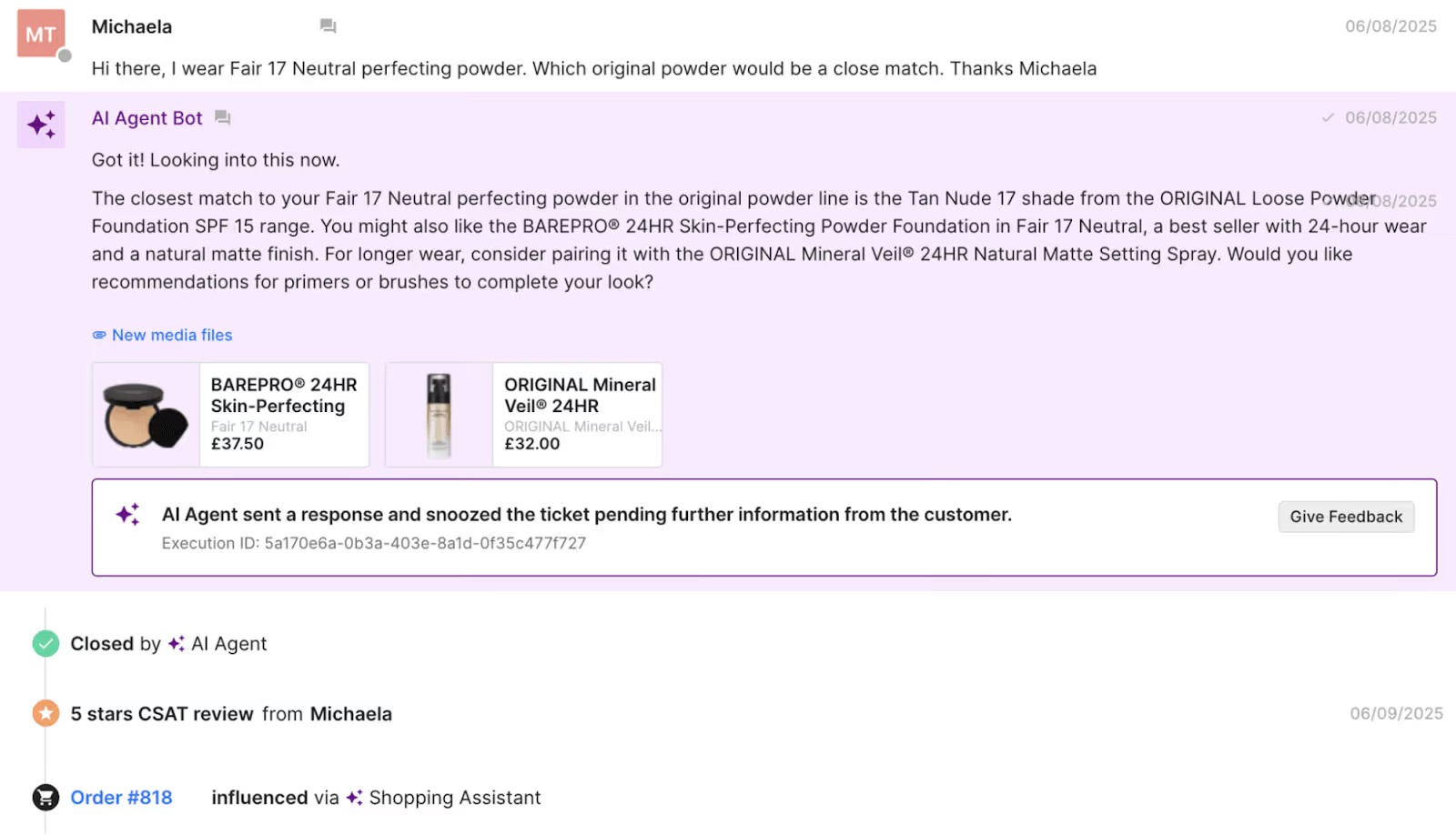
That accuracy paid off.
AI-influenced purchases at bareMinerals had zero returns in the first 30 days because customers were finally getting the right shade the first time.
That’s the difference between “resolved” and resolved well.
The zero-touch ticket rate measures something slightly different: the percentage of conversations AI manages entirely on its own, without ever being escalated to an agent.
This metric is a direct lens into:
More importantly, deflection widens the funnel for more revenue-driven conversations.
When AI deflects more inbound questions, your support team can focus on conversations that truly require human expertise, including returns exceptions, escalations, VIP shoppers, and emotionally sensitive interactions.
Brands with strong deflection rates typically see:
If automation metrics tell you how well your AI is working, conversion and revenue metrics tell you how well it’s selling.
This category is where conversational commerce really proves its value because it shows the direct financial impact of every human- or AI-led interaction.
Chat conversion rate measures the percentage of conversations that end in a purchase, and it’s one of the clearest indicators of whether your conversational strategy is influencing shopper decisions.
A strong CVR tells you that conversations are:
You see this clearly with brands selling technical or performance-driven products.
Outdoor apparel shoppers, for example, don’t just need “a jacket” — they need to know which jacket will hold up in specific temperatures, conditions, or terrains. A well-trained AI can step into that moment and convert uncertainty into action.
Arc’teryx saw this firsthand.
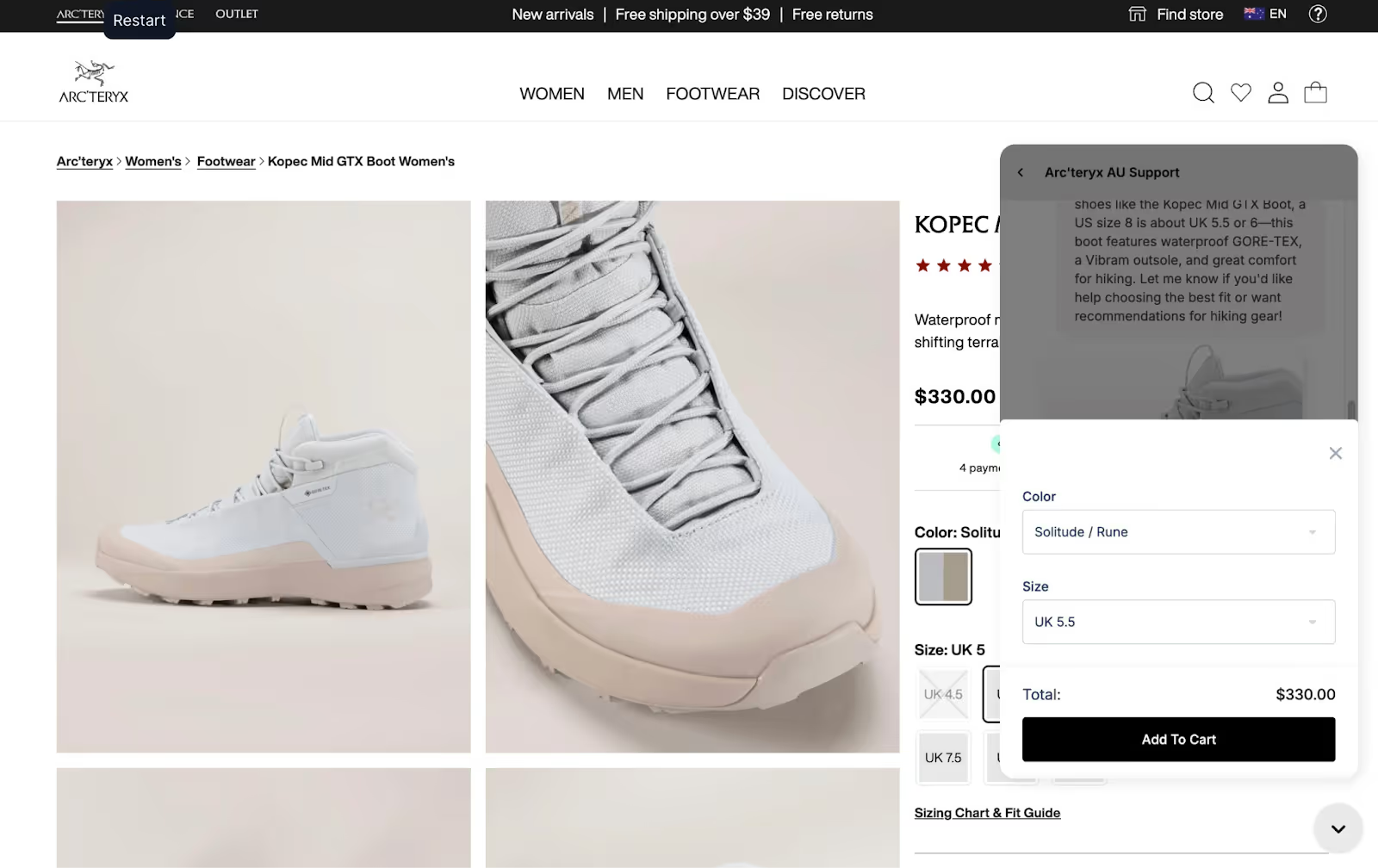
Once Shopping Assistant started handling their high-intent pre-purchase questions, their chat conversion rate jumped dramatically — from 4% to 7%. A 75% lift.
That’s what happens when shoppers finally get the expert guidance they’ve been searching for.
Not every shopper buys the moment they finish a chat. Some take a few hours. Some need a day or two. Some want to compare specs or read reviews before committing.
GMV influenced captures this “tail effect” by tracking revenue within 1–3 days of a conversation.
It’s especially powerful for:
In Arc’teryx’s case, shoppers often take time to confirm they’re choosing the right technical gear.
Yet even with that natural pause in behavior, Shopping Assistant still influenced 3.7% of all revenue, not by forcing instant decisions, but by providing the clarity people needed to make the right one.
This metric looks at the average order value of shoppers who engage in a conversation versus those who don’t.
If the conversational AOV is higher, it means your AI or agents are educating customers in ways that naturally expand the cart.
Examples of AOV-lifting conversations include:
When conversations are done well, AOV increases not because shoppers are being upsold, but because they’re being guided.
ROI compares the revenue generated by conversational AI to the cost of the tool itself — in short, this is the number that turns heads in boardrooms.
Strong ROI shows that your AI:
When ROI looks like that, AI stops being a “tool” and starts being an undeniable growth lever.
Related: The hidden power and ROI of automated customer support
Not every metric in conversational commerce is a final outcome. Some are early signals that show whether shoppers are interested, paying attention, and moving closer to a purchase.
These engagement metrics are especially valuable because they reveal why conversations convert, not just whether they do. When engagement goes up, conversion usually follows.
CTR measures the percentage of shoppers who click the product links shared during a conversation. It’s one of the cleanest leading indicators of buyer intent because it reflects a moment where curiosity turns into action.
If CTR is high, it’s a sign that:
In other words, CTR tells you which conversations are influencing shopping behavior.
And the connection between CTR and revenue is often tighter than teams expect.
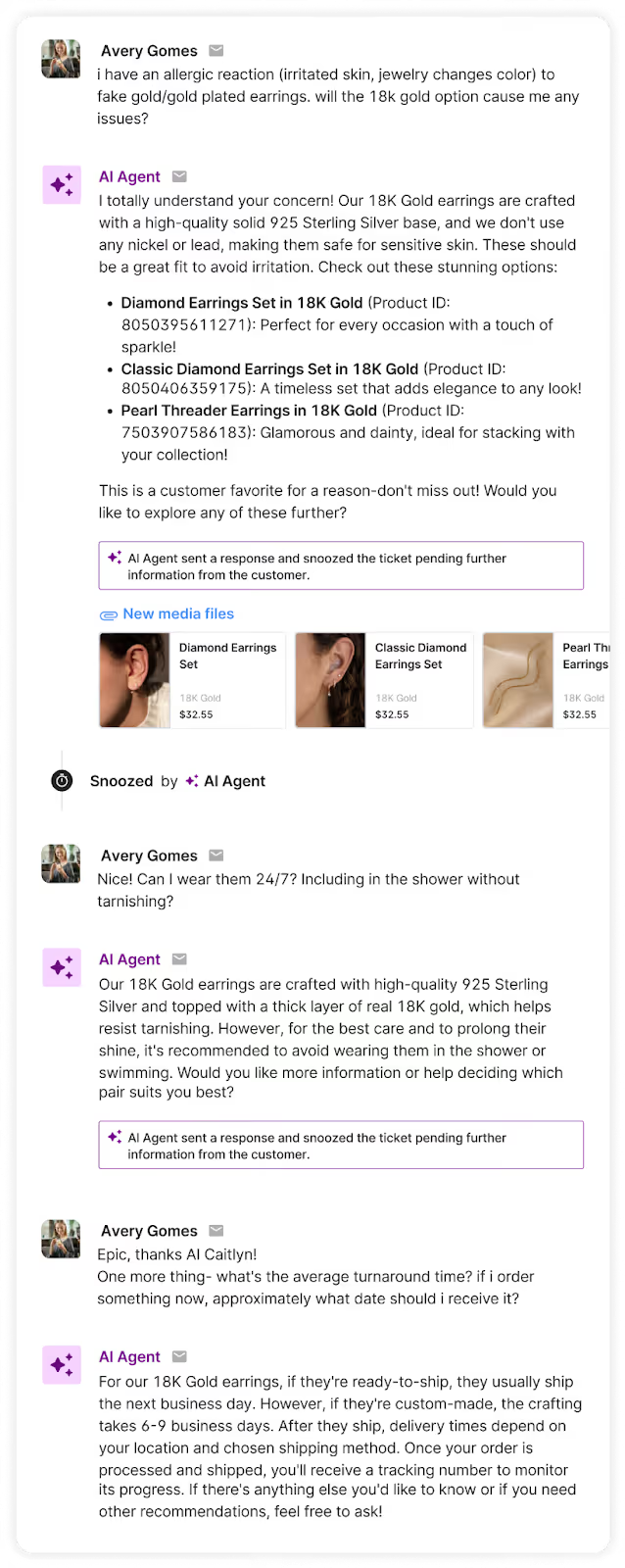
Just look at what happened with Caitlyn Minimalist. When they began comparing the results of human-led conversations versus AI-assisted ones over a 90-day period, CTR became one of the clearest predictors of success. Their Shopping Assistant consistently drove meaningful engagement with its recommendations — an 18% click-through rate on the products it suggested.
That level of engagement translated directly into better outcomes:
When shoppers click, they’re moving deeper into the buying cycle. Strong CTR makes it easier to forecast conversion and understand how well your conversational flows are guiding shoppers toward the right products.
Discounting can be one of the fastest ways to nudge a shopper toward checkout, but it’s also one of the fastest ways to erode margins.
That’s why discount-related metrics matter so much in conversational commerce.
They show not just whether AI is using discounts, but how effectively those discounts are driving conversions.
This metric tracks how many discount codes or promotional offers your AI is sharing during conversations.
Ideally, discounts should be purposeful — timed to moments when a shopper hesitates or needs an extra nudge — not rolled out as a one-size-fits-all script. When you monitor “discounts offered,” you can ensure that incentives are being used as conversion tools, not crutches.
This visibility becomes particularly important at high-intent touchpoints, such as exit intent or cart recovery interactions, where a small incentive can meaningfully increase conversion if used correctly.
Offering a discount is one thing. Seeing whether customers use it is another.
A high “discounts applied” rate suggests:
A low usage rate tells a different story: Your team (or your AI) is discounting unnecessarily.
This metric alone often surprises brands. More often than not, CX teams discover they can discount less without hurting conversion, or that a non-discount incentive (like a relevant product recommendation) performs just as well.
Understanding this relationship helps teams tighten their promotional strategy, protect margins, and use discounts only where they actually drive incremental revenue.
Once you know which metrics matter, the next step is building a system that brings them together in one place.
Think of your conversational commerce scorecard as a decision-making engine — something that helps you understand performance at a glance, spot bottlenecks, optimize AI, and guide shoppers more effectively.
In Gorgias, you can customize your analytics dashboard to watch the metrics that matter most to your brand. This becomes the single source of truth for understanding how conversations influence revenue.
Here’s what a powerful dashboard unlocks:
Some parts of the customer journey are perfect for AI: repetitive questions, product education, sizing guidance, shade matching, order status checks.
Others still benefit from human support, like emotional conversations, complex troubleshooting, multi-item styling, or high-value VIP concerns.
Metrics like resolution rate, zero-touch ticket rate, and chat conversion rate show you exactly which is which.
When you track these consistently, you can:
For example, if AI handles 80% of sizing questions successfully but struggles with multi-item styling advice, that tells you where to invest in improving AI, and where human expertise should remain the default.
Metrics like CTR, CVR, and conversational AOV reveal the inner workings of shopper decision-making. They show which recommendations resonate, which don’t, and which messaging actually moves someone to purchase.
With these insights, CX teams can:
For instance, if shoppers repeatedly ask clarifying questions about a product’s material or fit, that’s a signal for merchandising or product teams.
If recommendations with social proof get high engagement, marketing can integrate that insight into on-site messaging.
Conversations reveal what customers really care about — often before analytics do.
This is the moment when the scorecard stops being a CX tool and becomes a business tool.
A clear set of metrics shows how conversations tie to:
When a CX leader walks into a meeting and says, “Our AI Assistant influenced 5% of last month’s revenue” or “Conversational shoppers have a 20% higher AOV,” the perception of CX changes instantly.
You’re no longer a support cost. You’re a revenue channel.
And once you have numbers like ROI or revenue influence in hand, it becomes nearly impossible for anyone to argue against further investment in CX automation.
A scorecard doesn’t just show what’s working, it surfaces what’s not.
Metrics make friction obvious:
Metric Signal |
What It Means |
|---|---|
Low CTR |
Recommendations may be irrelevant or poorly timed. |
Low CVR |
Conversations aren’t persuasive enough to drive a purchase. |
High deflection but low revenue |
AI is resolving tickets, but not effectively selling. |
High discount usage |
Shoppers rely on incentives to convert. |
Low discount usage |
You may be offering discounts unnecessarily and losing margin. |
Once you identify these patterns, you can run targeted experiments:
Compounded over time, these moments create major lifts in conversion and revenue.
One of the biggest hidden values of conversational data is how it strengthens cross-functional decision-making.
A clear analytics dashboard gives teams visibility into:
Suddenly, CX isn’t just answering questions — it’s informing strategy across the business.
With the right metrics in place, CX leaders can finally quantify the impact of every interaction, and use that data to shape smarter, more profitable customer journeys.
If you're ready to measure — and scale — the impact of your conversations, tools like Gorgias AI Agent and Shopping Assistant give CX teams the visibility, accuracy, and performance needed to turn every interaction into revenue.
Want to see it in action? Book a demo and discover what conversational commerce can do for your bottom line.
{{lead-magnet-2}}
TL;DR:
Your AI chatbot just told a customer their order ships in two days when you actually need five. That's an AI hallucination, or false information delivered with complete confidence.
These fake-but-convincing responses can wreck customer trust and create headaches for your support team. Understanding what triggers these AI mistakes and how to stop them matters for any brand using AI in customer service.
This guide covers everything support teams need to know about AI hallucinations, from spotting them to building systems that keep your AI honest and helpful.
{{lead-magnet-1}}
AI hallucinations are false or made-up responses from AI models that sound completely believable. This means the AI creates information that isn't based on real data but presents it like it's a fact.
The term “hallucination” comes from psychology, but AI hallucinations work differently than human ones. When an AI hallucinates, it's not seeing things that aren't there. Instead, it's filling gaps in its knowledge with creative guesswork.
Large language models (LLMs) power most modern chatbots. These models predict what word comes next based on patterns they learned during training. Sometimes they predict wrong and create entirely made-up information.
The real problem isn't that AI makes mistakes — it's how confidently it delivers wrong answers. Your AI won't say “I think” or “maybe.” It states false information with authority, making errors hard to catch.
For your ecommerce brand, this could mean your chatbot invents return policies or confirms products are in stock when they're not. These confident lies break customer trust and force your human agents to clean up the mess.
AI hallucinations are baked into how current models function, caused by training data limitations, missing context, and statistical prediction errors that lead AI to invent convincing but false answers. Knowing why they happen helps you prevent them in your customer support.
Insufficient training data creates the biggest problems. When you ask AI about topics it hasn't learned, it tries to fill knowledge gaps with educated guesses. These guesses often sound reasonable but are completely wrong.
Overfitting happens when AI memorizes training examples instead of learning patterns. The model becomes an expert at repeating what it's seen before but terrible at handling new situations.
Ambiguous prompts confuse AI models. When customers ask vague questions that could mean several things, AI picks one interpretation and runs with it.
Outdated information causes problems because most AI models have knowledge cutoffs. They don't know about new promotions, products, or policy changes after their training ended. Your AI might confidently share old shipping times or discontinued product details.
Pattern misapplication occurs when AI applies learned patterns to wrong situations. The model recognizes linguistic patterns and uses them inappropriately, creating responses that sound right but make no sense in context.
AI hallucinations create real problems for support teams. When chatbots hallucinate, human agents spend time fixing the damage instead of helping customers with genuine needs.
Here are common ways AI hallucinates in ecommerce support:
Each hallucination creates a cascade of problems. Customers get frustrated when promises don't match reality. Your support team wastes time explaining why the AI was wrong. Your brand reputation takes a hit when customers can't trust your automated responses.
The worst part? These hallucinations often sound more helpful than honest answers. An AI that says “I don't know” seems less useful than one that confidently provides detailed (but wrong) information.
You can't eliminate AI hallucinations completely, but you can reduce them. The key is moving from pure text generation to grounded, controlled responses based on your real data.
Instead of letting AI create any response it wants, give it specific options to choose from. For common questions about returns or shipping, create approved response categories. This prevents AI from inventing policies on the spot.
Decision trees work well for this approach. When customers ask about returns, your AI follows a predetermined path: check order date, verify product type, provide appropriate response. No creativity required.
You can also set response templates for frequent questions. Templates include placeholders for customer names or order numbers while keeping core information consistent and accurate.
Related: How to write Guidance with the “when, if, then” framework
Generic AI training creates generic problems. Train your AI specifically on your business data — past support tickets, verified Help Center articles, and current product information.
Your training data should include:
Quality matters more than quantity. It’s better to train on 1,000 accurate examples than 10,000 low-quality ones.
Templates give AI structure while allowing personalization. Instead of generating responses from scratch, AI fills in blanks within approved frameworks.
A shipping template might look like:
Templates ensure consistency across all AI responses. Customers get the same quality information whether they chat at 2 pm or 2 am. Your brand voice stays consistent even when AI handles the conversation.
Set explicit boundaries for your AI through system prompts and instructions. Create lists of topics that always need human agents, like product safety complaints or legal threats.
Specify which information sources AI can use. Point it toward your Help Center and product database while blocking access to general internet information that might be outdated or irrelevant.
You can also create escalation triggers. When AI encounters certain keywords or question types, it automatically passes the conversation to a human agent instead of guessing.
AI isn't a set-it-and-forget-it tool. Regular testing catches problems before customers do.
Set up quality checks on AI responses. Review a sample of conversations weekly to spot inaccuracies or areas for improvement. Look for patterns in escalated tickets — they often reveal gaps in AI training.
A/B testing helps optimize AI performance. Try different prompt configurations to see which produces more accurate responses. Monitor customer satisfaction scores for AI-handled tickets compared to human-handled ones.
Customer feedback provides valuable insights. When customers report AI errors, use those examples to improve training data and refine response templates.
Build safety nets into your AI system. Set confidence thresholds so the AI only responds when it's confident in its answer. Uncertain responses get escalated to human agents automatically.
Create clear escalation paths for complex issues. AI should recognize when questions go beyond its capabilities and smoothly transfer customers to appropriate team members.
Human oversight doesn't mean micromanaging every AI response. Instead, focus on monitoring patterns and intervening when AI consistently struggles with specific questions.
This strategy delivers the biggest impact for ecommerce brands. Grounding means forcing AI to base responses on verified, real-time data from your tech stack.
When customers ask about order status, grounded AI checks live Shopify data instead of guessing. When they ask about policies, it pulls exact text from your Help Center instead of paraphrasing from memory.
Grounding transforms AI from a creative writer into a reliable assistant. It can only share information that exists in your approved systems, dramatically reducing hallucination risk.
Integration with your ecommerce platform ensures AI always has current information about inventory, shipping, and customer orders. No more promising products you don't have or delivery dates you can't meet.
The brands winning with AI have put in the hours to train it. They've built systems that combine AI efficiency with human oversight, creating customer experiences that feel both fast and trustworthy.
Gorgias AI Agent demonstrates this approach in action. It grounds responses in your Shopify data and Help Center content, ensuring every automated interaction reflects your actual business information. Customizable guardrails let you set boundaries while maintaining the speed customers expect.
Ready to see how accurate AI can transform your support operations? Book a demo and discover how to automate customer service without sacrificing quality or control.
{{lead-magnet-2}}
TL;DR:
When Rhoback introduced an AI Agent to its customer experience team, it did more than automate routine tickets. Implementation revealed an opportunity to improve documentation, collaborate cross-functionally, and establish a clear brand tone of voice.
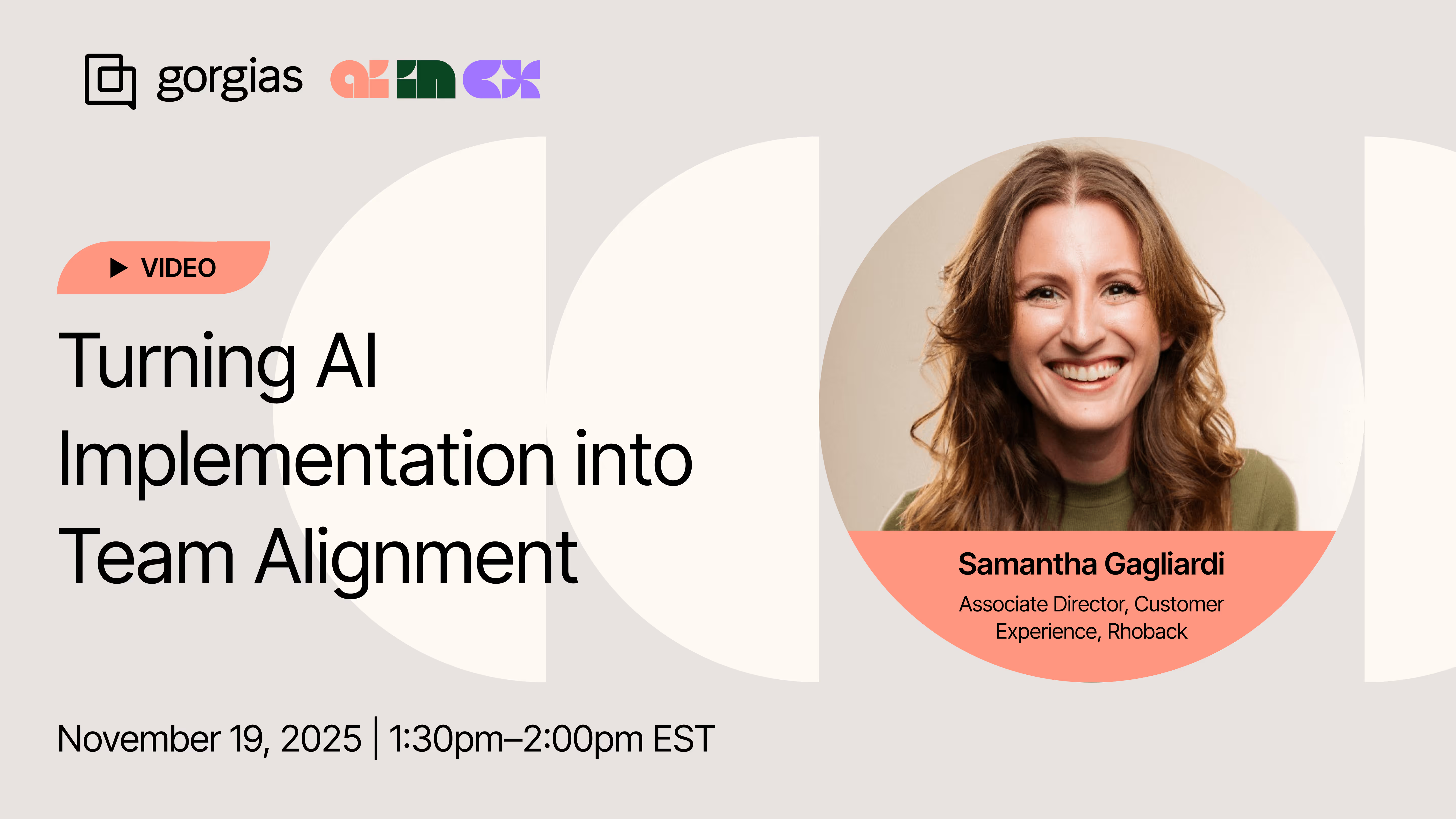
Samantha Gagliardi, Associate Director of Customer Experience at Rhoback, explains the entire process in the first episode of our AI in CX webinar series.
With any new tool, the pre-implementation phase can take some time. Creating proper documentation, training internal teams, and integrating with your tech stack are all important steps that happen before you go live.
But sometimes it’s okay just to launch a tool and optimize as you go.
Rhoback launched its AI agent two weeks before BFCM to automate routine tickets during the busy season.
Why it worked:
Before turning on Rhoback’s AI Agent, Samantha’s team reviewed every FAQ, policy, and help article that human agents are trained on. This helped establish clear CX expectations that they could program into an AI Agent.
Samantha also reviewed the most frequently asked questions and the ideal responses to each. Which ones needed an empathetic human touch and which ones required fast, accurate information?
“AI tells you immediately when your data isn’t clean. If a product detail page says one thing and the help center says another, it shows up right away.”
Rhoback’s pre-implementation audit checklist:
Read more: How to Optimize Your Help Center for AI Agent
It’s often said that you should train your AI Agent like a brand-new employee.
Samantha took it one step further and recommended treating AI like a toddler, with clear, patient, repetitive instructions.
“The AI does not have a sense of good and bad. It’s going to say whatever you train it, so you need to break it down like you’re talking to a three-year-old that doesn’t know any different. Your directions should be so detailed that there is no room for error.”
Practical tips:
Read more: How to Write Guidance with the “When, If, Then” Framework
For Rhoback, an on-brand Tone of Voice was a non-negotiable. Samantha built a character study that shaped Rhoback’s AI Agent’s custom brand voice.
“I built out the character of Rhoback, how it talks, what age it feels like, what its personality is. If it does not sound like us, it is not worth implementing.”
Key questions to shape your AI Agent’s tone of voice:
Once Samantha started testing the AI Agent, it quickly revealed misalignment between Rhoback’s teams. With such an extensive product catalog, AI showed that product details did not always match the Help Center or CX documentation.
This made a case for stronger collaboration amongst the CX, Product, and Ecommerce teams to work towards their shared goal of prioritizing the customer.
“It opened up conversations we were not having before. We all want the customer to be happy, from the moment they click on an ad to the moment they purchase to the moment they receive their order. AI Agent allowed us to see the areas we need to improve upon.”
Tips to improve internal alignment:
Despite the benefits of AI for CX, there’s still trepidation. Agents are concerned that AI would replace them, while customers worry they won’t be able to reach a human. Both are valid concerns, but clearly communicating internally and externally can mitigate skepticism.
At Rhoback, Samantha built internal trust by looping in key stakeholders throughout the testing process. “I showed my team that it is not replacing them. It’s meant to be a support that helps them be even more successful with what they’re already doing," Samantha explains.
On the customer side, Samantha trained their AI Agent to tell customers in the first message that it is an AI customer service assistant that will try to help them or pass them along to a human if it can’t.
How Rhoback built AI confidence:
Read more: How CX Leaders are Actually Using AI: 6 Must-Know Lessons
Here is Rhoback’s approach distilled into a simple framework you can apply.
Watch the full conversation with Samantha to learn how AI can act as a catalyst for better internal alignment.
📌 Join us for episode 2 of AI in CX: Building a Conversational Commerce Strategy that Converts with Cornbread Hemp on December 16.
{{lead-magnet-1}}

TL;DR:
AI has moved from experimental technology to essential infrastructure for ecommerce brands. The smartest CX leaders are using it to handle repetitive support tickets, personalize shopping experiences, and predict customer needs before they arise.
This guide breaks down the AI use cases that actually move the needle for ecommerce teams. You'll learn which applications deliver immediate ROI, how to implement them without disrupting operations, and how to measure success.
Different AI technologies handle different parts of your ecommerce business. Understanding what each type does helps you pick the right tool for each job.
Generative AI creates new content from existing information — whether that's product descriptions, email responses, or marketing copy. It writes in a natural tone that matches your brand voice instead of sounding robotic.
Where it’s used: AI agents in chat, automated content creation for product pages, and personalized email campaigns
LLMs are the engines behind conversational AI. They understand context, handle complex customer questions, and generate human-like responses at scale.
Where it’s used: Customer support chatbots, content generation tools, automated response systems
Predictive analytics uses your historical data to forecast future outcomes. It tells you which customers are likely to churn, what products will be in demand next month, and when to reorder inventory.
Where it’s used: Customer lifetime value forecasts, at-risk customers detection, and seasonal inventory planning
Machine learning algorithms spot patterns in your data that humans would miss. These systems learn and improve over time, making smarter recommendations and decisions with each interaction.
Where it’s used: Product recommendations, dynamic pricing, fraud detection, and customer segmentation
Computer vision teaches machines to understand images and videos. It analyzes visual content to identify products, detect quality issues, and recognize patterns.
Where it’s used: Automated product tagging, quality control checks, counterfeit detection, and visual inventory management
Visual search lets customers upload photos to find similar products in your catalog. Instead of describing what they want, they show you.
Where it’s used: Reverse image search, style matching, and "shop the look" features
AI delivers real improvements you can measure across revenue, costs, and customer satisfaction. Here's what happens when you implement AI the right way.
AI analyzes how customers browse, what they've bought before, and their preferences to create personalized experiences at scale. Product recommendations become spot-on. Marketing messages hit the right tone. Prices adjust based on what customers are willing to pay.
You get higher conversion rates, bigger average order values, and more repeat purchases. Personalization that would take your team hours happens instantly.
AI handles the repetitive tasks that eat up your team's time. Support tickets get answered immediately. Product descriptions write themselves. Inventory levels adjust based on predicted demand.
This cuts operational costs while freeing your team to focus on strategic work. Instead of answering "where's my order" hundreds of times, your agents handle complex issues that actually need human judgment.
AI analyzes massive amounts of data in seconds that would take your team days or weeks to process manually. It connects patterns across millions of customer interactions, inventory movements, and sales transactions instantly.
Instead of digging through spreadsheets, you get clear answers about what's working, what's not, and what to do next. Your team moves faster and makes more informed decisions across marketing, inventory, and customer experience.
These AI applications deliver immediate impact for ecommerce brands. Each use case solves a specific problem while driving measurable results.
AI agents handle customer conversations across chat, email, and social channels. They answer product questions, process returns, and guide shoppers to the right items. Unlike basic chatbots, modern AI assistants understand context and keep conversations flowing naturally.
Key capabilities your AI assistant should have:
The best AI assistants learn from every conversation, getting better at helping customers over time.
Recommendation engines analyze customer behavior to suggest products they actually want. AI considers browsing history, past purchases, what similar customers bought, and store inventory to deliver suggestions.
Effective recommendations show up throughout the shopping experience:
AI predicts future demand by analyzing historical sales, seasonal trends, market conditions, and external factors. This prevents stockouts during busy periods and reduces excess inventory when sales slow down.
Your demand forecasting should consider:
Generative AI writes product descriptions, creates marketing copy, and translates content for international markets. This scales your content production without sacrificing quality or losing your brand voice.
AI content generation handles:
AI-powered search understands natural language queries and shopping intent. Instead of just matching keywords, it figures out what customers actually want. Visual search lets customers find products by uploading photos.
Modern search AI includes:
Dynamic pricing AI adjusts your prices based on demand, competition, inventory levels, and customer segments. This maximizes revenue while keeping you competitive in the market.
Your pricing optimization should monitor:
AI identifies fraudulent transactions before they go through. Machine learning models analyze transaction patterns, user behavior, and device information to flag suspicious activity.
Fraud detection systems watch for:
Successful AI implementation needs strategy, not just technology. Follow this approach to avoid common mistakes and deliver results you can measure.
Start with clear business goals. What specific problem will AI solve for you? How will you know if it's working? Set baseline measurements before you implement anything so you can track real improvement.
Track these essential metrics:
Document your current performance for each metric. This becomes your starting point for measuring AI impact.
Pick one high-impact use case for your pilot program. Run it alongside your existing processes to compare performance. This controlled approach proves ROI before you roll out AI everywhere.
Follow these pilot best practices:
Measuring AI ROI means tracking both quick wins and long-term value. Focus on metrics that directly connect to business outcomes.
Monitor three core categories to understand your AI impact.
Conversion improvements:
Efficiency gains:
Revenue impact:
Calculate ROI by comparing these metrics before and after AI implementation. Include both direct revenue gains and cost savings in your calculations.
Use this checklist to launch your first AI use case successfully.
Assessment:
Planning:
Implementation:
Optimization:
Your next step is simple. Pick one use case that addresses your biggest pain point. Measure the impact. Then expand from there.
Book a demo to see how Gorgias helps ecommerce brands implement AI that drives real results.
{{lead-magnet-2}}

TL;DR:
While most ecommerce brands debate whether to implement AI support, customers already rate AI assistance nearly as highly as human support. The future isn't coming. It's being built in real-time by brands paying attention.
As a conversational commerce platform processing millions of support tickets across thousands of brands, we see what's working before it becomes common knowledge. Three major shifts are converging faster than most founders realize, and this article breaks down what's already happening rather than what might happen someday.
By the end of 2026, we predict that the performance gap between ecommerce brands won't be determined by who adopted AI first. It will be determined by who built the content foundation that makes AI actually work.
Right now, we're watching this split happen in real time. AI can only be as good as the knowledge base it draws from. When we analyze why AI escalates tickets to human agents, the pattern is unmistakable.
The five topics triggering the most AI escalations are:
These aren’t complicated questions — they're routine questions every ecommerce brand faces daily. Yet some brands automate these at 60%+ rates while others plateau at 20%. The difference isn't better AI. It's better documentation.
Take SuitShop, a formalwear brand that reached 30% automation with a lean CX team. Their Director of Customer Experience, Katy Eriks, treats AI like a team member who needs coaching, not a plug-and-play tool.
When Katy first turned on AI in August 2023, the results were underwhelming. So she paused during their slow season and rebuilt their Help Center from the ground up. "I went back to the tickets I had to answer myself, checked what people were searching in the Help Center, and filled in the gaps," she explained.
The brands achieving high automation rates share Katie's approach:
AI echoes whatever foundation you provide. Clear documentation becomes instant, accurate support. Vague policies become confused AI that defaults to human escalation.
Read more: Coach AI Agent in one hour a week: SuitShop’s guide
Two distinct groups will emerge next year. Brands that invest in documentation quality now will deliver consistently better experiences at lower costs. Those who try to deploy AI on top of messy operations will hit automation plateaus and rising support costs. Every brand will eventually have access to similar AI technology. The competitive advantage will belong to those who did the unexciting work first.
Something shifted in July 2025. Gorgias’s AI accuracy jumped significantly after the GPT-5 release. For the first time, CX teams stopped second-guessing every AI response. We watched brand confidence in AI-generated responses rise from 57% to 85% in just a few months.
What this means in practice is that AI now outperforms human agents:
For the first time, AI isn't just faster than humans. It's more consistent, more accurate, and even more empathetic at scale.
This isn't about replacing humans. It's about what becomes possible when you free your team from repetitive work. Customer expectations are being reset by whoever responds fastest and most completely, and the brands crossing this threshold first are creating a competitive moat.
At Gorgias, the most telling signal was AI CSAT on chat improved 40% faster than on email this year. In other words, customers are beginning to prefer AI for certain interactions because it's immediate and complete.
Within the next year, we expect the satisfaction gap to hit zero for transactional support. The question isn't whether AI can match humans. It's what you'll do with your human agents once it does.
The brands that have always known support should drive revenue will finally have the infrastructure to make it happen on a bigger scale. AI removes the constraint that's held this strategy back: human bandwidth.
Most ecommerce leaders already understand that support conversations are sales opportunities. Product questions, sizing concerns, and “just browsing” chats are all chances to recommend, upsell, and convert. The problem wasn't awareness but execution at volume.
We analyzed revenue impact across brands using AI-powered product recommendations in support conversations. The results speak for themselves:
It's clear that conversations that weave in product recommendations convert at higher rates and result in larger order values. It’s time to treat support conversations as active buying conversations.
If you're already training support teams on product knowledge and tracking revenue per conversation, keep doing exactly what you're doing. You've been ahead of the curve. Now AI gives you the infrastructure to scale those same practices without the cost increase.
If you've been treating support purely as a cost center, start measuring revenue influence now. Track which conversations lead to purchases, which agents naturally upsell, and where customers ask for product guidance.
We are now past the point where response time is a brand's key differentiator. It is now the use of conversational commerce or systems that share details and context across every touchpoint.
Today, a typical customer journey looks something like this: see product on Instagram, ask a question via DM, complete purchase on mobile, track order via email. At each step, customers expect you to remember everything from the last interaction.
The most successful ecommerce tech stacks treat the helpdesk as the foundation that connects everything else. When your support platform connects to your ecommerce platform, shipping providers, returns portal, and every customer communication channel, context flows automatically.
A modern integration approach looks like this. Your ecommerce platform (like Shopify) feeds order data into a helpdesk like Gorgias, which becomes the hub for all customer conversations across email, chat, SMS, and social DMs. From there, connections branch out to payment providers, shipping carriers, and marketing automation tools.
As Dr. Bronner’s Senior CX Manager noted, “While Salesforce needed heavy development, Gorgias connected to our entire stack with just a few clicks. Our team can now manage workflows without needing custom development — we save $100k/year by switching."
As new channels emerge, brands with flexible tech stacks will adapt quickly while those with static systems will need months of development work to support new touchpoints. The winners will be brands that invest in their tools before adding new channels, not after customer complaints force their hand.
Start auditing your current integrations now. Where does customer data get stuck? Which systems don’t connect to each other? These gaps are costing you more than you realize, and in the future, they'll be the key to scaling or staying stagnant.
Post-purchase support quality will be a stronger predictor of customer lifetime value than any email campaign. Brands that treat support as a retention investment rather than a cost center will outperform in repeat purchase rates.
Returns and exchanges are make-or-break moments for customer lifetime value. How you handle problems, delays, and disappointments determines whether customers come back or shop elsewhere next time. According to Narvar, 96% of customers say they won’t repurchase from a brand after a poor return experience.
What customers expect reflects this reality. They want proactive shipping updates without having to ask, one-click returns with instant label generation, and notifications about problems before they have to reach out. When something goes wrong, they expect you to tell them first, not make them track you down for answers.
The quality of your response when things go wrong matters more than getting everything right the first time. Exchange suggestions during the return flow can keep the sale alive, turning a potential loss into loyalty.
Brands that treat post-purchase as a retention strategy rather than a task to cross off will see much higher repeat purchase rates. Those still relying purely on email marketing for retention will wonder why their customer lifetime value plateaus.
Start measuring post-return CSAT scores and repeat purchase rates by support interaction quality. These metrics will tell you whether your post-purchase experience is building loyalty or quietly eroding it.
After absorbing these predictions about AI accuracy, content infrastructure, revenue-centric support, context, and post-purchase tactics, here's your roadmap for the next 24 months.
Now (in 90 days):
Next (in 6-12 months):
Watch (in 12-24 months):
The patterns we've shared, from AI crossing the accuracy threshold to documentation quality, are happening right now across thousands of brands. Over the next 24 months, teams will be separated by operational maturity.
Book a demo to see how leading brands are already there.
{{lead-magnet-2}}

TL;DR:
Your customers expect answers now, not in hours, not tomorrow, but the instant they ask. An AI chatbot handles order tracking, returns, and product questions around the clock without hiring more support agents.
For ecommerce brands buried in repetitive tickets while trying to keep service personal, AI chatbots turn support costs into actual revenue. Here's everything you need to know about choosing and implementing the right solution for your store.
An AI chatbot is conversational software that uses large language models (LLMs) to chat with customers. This means it can hold natural conversations with your shoppers, answer their questions, and help them resolve tasks without human intervention.
Unlike older chatbots that followed pre-set scripts, AI chatbots understand context and nuance. They can interpret what a customer really means, even when they don't use exact keywords. For example, if someone asks, "Can I get my money back?" the chatbot understands they're asking about returns, not requesting a literal cash withdrawal.
Modern AI chatbots use techniques like retrieval-augmented generation to pull information from verified sources — like your Help Center or product catalog — ensuring accurate answers. When they encounter issues beyond their capabilities, they know to escalate to human agents.
Related: What is conversational AI? The ecommerce guide
While these chat tools both facilitate conversations, they serve different purposes and have unique strengths.
Feature |
AI Chatbot |
Live Chat |
|---|---|---|
Availability |
24/7 automated |
Business hours |
Response time |
Instant |
Minutes to hours |
Handling capacity |
Unlimited concurrent |
Limited by staff |
Personalization |
Data-driven |
Human intuition |
Complex problem solving |
Limited, escalates |
Full capability |
Cost structure |
Per conversation/month |
Per agent seat |
Live chat excels at solving complex or sensitive issues that require human empathy and judgment. AI chatbots provide instant, 24/7 answers to common questions.
The most effective approach combines AI chatbots with seamless human handoff. The chatbot handles initial inquiries, and if it can't resolve the issue, it escalates the conversation — along with all context — to a live agent. Modern platforms blend these capabilities into unified helpdesk solutions.
When asks a question in your website’s chat tool, your AI chatbot follows a sophisticated process to deliver accurate answers in seconds:
This combination allows AI chatbots to handle routine inquiries while knowing when to bring in your support team for complex issues.
AI chatbots deliver measurable improvements to both customer experience and business outcomes. They transform your support operation from a cost center into a revenue driver.
Customers expect instant, personalized answers no matter the time — and AI chatbots do these at scale. Using your brand’s knowledge base, AI chatbots maintain your brand voice and guidelines while giving unique responses to customers. This means better customer education, engagement, and a higher likelihood of conversion.
AI interactions cost significantly less than human support. By automating repetitive tickets, you scale support without adding headcount — a crucial move during peak seasons. Tedious work is dramatically reduced, giving agents time to strategize, address complex tickets, and build deeper customer relationships.
An AI chatbot’s ability to detect customer intent means it knows when to upsell your products. Whether it is dealing with a new customer or a returning one, AI keeps conversations proactive by providing personalized recommendations,
Start by automating your highest-volume, repetitive inquiries. This delivers the fastest ROI and lets your team focus on conversations that actually need human expertise.
WISMO tickets likely dominate your inbox. Connect your chatbot to shipping carriers via API for real-time tracking, split shipment explanations, and delay notifications. Set up proactive shipping updates to prevent these tickets entirely. The bot escalates only when packages are missing.
Your chatbot checks return eligibility, generates labels, and communicates refund timelines. Integrate with Loop or ReturnGO for self-service. It suggests exchanges over refunds to preserve revenue — swapping a wrong size instead of losing the sale. Complex cases like damaged goods get escalated with full context.
Turn your chatbot into a sales associate that recommends products based on browsing history, answers sizing questions, suggests gifts, and bundles complementary items. Instantly addressing purchase-blocking questions about materials or stock availability removes friction and increases conversions.
Related: Guide more shoppers to checkout with conversation-led AI
While powerful, AI chatbots have limitations you need to understand and plan for. Being aware of these risks helps you implement safeguards and set appropriate expectations:
Selecting the right AI chatbot requires evaluating platforms based on ecommerce-specific needs, not generic chatbot features. Focus on solutions built specifically for online retail.
Analyze your support ticket data to identify the most common customer questions. These become your priority intents that the chatbot must handle excellently. Differentiate between must-have intents like order tracking and returns versus nice-to-have intents like detailed product education.
Calculate potential deflection rates for each intent category to understand the business impact. Focus on intents that represent high volume and clear resolution paths.
Create a comprehensive list of your essential tools and platforms:
Look for platforms with deep, native integrations rather than basic API connections. Native integrations provide richer data access and more reliable performance.
Define clear boundaries for AI capabilities and establish escalation triggers:
Ensure the handoff process preserves conversation context so human agents can continue seamlessly where AI left off.
Your chatbot represents your brand in every interaction. The platform should allow you to train the AI on your specific brand guidelines, approved language, and desired tone of voice.
Test responses across different scenarios and customer types to ensure consistency. Look for platforms that provide ongoing monitoring tools to prevent tone drift over time.
Choose a platform with robust analytics and quality assurance capabilities:
Core performance metrics:
Business impact metrics:
Set realistic benchmarks based on your industry and business model. Use these metrics to identify improvement opportunities and demonstrate return on investment to stakeholders.
Ready to join thousands of ecommerce brands using AI to delight customers and drive revenue? Gorgias AI Agent integrates seamlessly with Shopify to deliver instant, accurate support that sounds just like your brand.
Book a demo to see how AI Agent can handle your specific use cases and start automating within days, not months.
{{lead-magnet-2}}

TL;DR:
If you lead a support team today, you’re probably evaluating AI tools with a different lens than you were a year ago. The question isn’t only “How fast is it?” It’s “What work will this actually take off my team’s plate?”
By 2026, Forrester predicts 30% of enterprises will build parallel AI functions, including hiring managers to train AI agents, ops teams to tune their performance, and specialists to step in when things go wrong.
That means choosing the right AI platform isn’t optional — it’s a step into the future of support work.
In this list, we cover what AI for customer support is, how it helps customer experience teams hit their goals, the top platforms to consider, how to evaluate and implement them, and the brands already seeing results.
Jump ahead:
AI for customer support is software that uses artificial intelligence to manage and automate customer interactions. It can respond to customers on channels like chat, email, and social messaging — even before a human agent needs to step in.
It works by using natural language processing (NLP) to understand intent and generate contextually relevant replies. Instead of following rigid scripts like traditional chatbots, AI produces responses in real time based on your policies, data, and brand voice.
Because of this, AI can handle a significant share of repetitive tickets while giving agents the space to focus on more complex and relationship-driving issues.
Read more: What is conversational AI? The ecommerce guide
By automating repetitive tasks, AI frees up human agents to focus on complex problems that require empathy and creative thinking.
Here's how AI improves your support metrics:
AI also helps you scale during peak seasons like Black Friday without hiring temporary staff. This efficiency translates into lower costs and a more strategic support operation.
Choosing the right AI platform depends on your industry, team size, and specific challenges. We evaluated solutions based on AI capabilities, ease of use, integrations, and business fit.
Pricing: $40/month
Gorgias is a conversational AI platform built specifically for ecommerce. Its deep integration with Shopify lets it automate up to 60% of support tickets with direct access to Shopify actions right in the platform.
The AI Agent can edit orders, issue refunds, and apply discount codes directly in your helpdesk. This means customers get instant help with common requests like order changes or returns. The platform also powers personalized product recommendations and proactive chat campaigns, turning your support team into a revenue driver.
Gorgias offers tiered pricing starting with a Starter plan for small brands and scaling to enterprise solutions.
Pricing: $55/month
Zendesk is an enterprise-grade platform with mature AI features. Its Answer Bot and intelligence tools help manage high volumes across multiple channels. Zendesk is known for scalability and extensive integrations.
The AI analyzes intent and sentiment to route tickets effectively and provide agents with helpful context. You can automate responses to common questions while ensuring complex issues reach the right specialists.
However, Zendesk's complexity and higher price point can overwhelm smaller teams. It's best for businesses that need its full suite of enterprise features.
Pricing: Free
Shopify Inbox is a free live chat tool built specifically for Shopify brands, making it an easy entry point for teams that want to experiment with AI support. The AI suggests replies based on customer messages, helping agents respond quickly without needing a full helpdesk.
Because it’s tied directly to Shopify, agents can see customer details, past orders, and cart activity right inside the chat. This gives small teams enough context to answer common questions fast and keep shoppers moving toward checkout.
That said, Shopify Inbox’s automation capabilities are limited. It’s best for smaller brands testing live chat or those who need a no-cost solution. This means teams that want deeper automation will likely outgrow it.
Pricing: $25/month
Help Scout focuses on simplicity and human-centric customer service. Its AI features, including Beacon and AI Assist, are straightforward and easy to implement. The AI suggests replies to agents and pulls relevant articles into conversations.
This platform is ideal for teams that want a clean interface and simple AI augmentation. While user-friendly, its AI capabilities aren't as advanced as platforms like Gorgias or Intercom.
Pricing: $0.99 per resolution with your current helpdesk
Intercom excels at conversational support, particularly for product-led and SaaS companies. Its AI chatbot, Fin, uses advanced language models to provide natural, human-like conversations within your app or website.
Intercom's AI can qualify leads, onboard new users, and resolve support questions by referencing your knowledge base. It's excellent for engaging users during their product experience.
The pricing model is usage-based, which can become expensive as you scale and add more advanced AI capabilities.
Pricing: $24.17/month
Tidio combines live chat and basic chatbot features, making it popular with small businesses. It features a visual flow builder for creating simple chatbots without coding.
Tidio offers a free plan with limited features, with paid plans unlocking more capabilities. While it's a great starting point for chat automation, it lacks sophisticated NLP and deep integrations needed for complex operations.
Pricing: $49/month
Freshdesk offers Freddy AI, which provides omnichannel support capabilities. It's a strong choice for businesses already using other Freshworks products. Freddy AI automates responses, suggests solutions to agents, and predicts customer needs.
The platform includes workflow automation and predictive contact scoring to help prioritize tickets. Freshdesk offers several pricing tiers, but the most powerful AI features are on higher-priced plans.
Pricing: $499/month
Ada is a pure-play conversational AI platform designed for enterprise automation. It offers a powerful, no-code bot builder for creating sophisticated automation flows for complex use cases.
Ada handles massive scale and integrates with existing helpdesks. Because it focuses solely on automation, it can achieve very high deflection rates. The downside is that you need a separate system for human agents and enterprise-level pricing.
Pricing: $35 per agent + $1500+ per integration + platform fees
Level AI specializes in quality assurance and agent performance. Instead of focusing on ticket deflection, it analyzes customer conversations to provide real-time coaching and feedback to agents.
The platform uses sentiment analysis, topic detection, and agent screen recording to identify coaching opportunities. It's excellent for large teams focused on improving agent quality and consistency. However, it's a specialized solution that requires a separate helpdesk.
Adopting AI requires a strategic approach, not just a technical one. Successful implementation starts with clear planning and phased rollout. Instead of automating everything at once, focus on early wins and expand from there.
Before starting, determine what you want to achieve. Are you trying to reduce response times, lower cost-per-ticket, or improve customer satisfaction scores? Set specific, measurable goals like "achieve 30% ticket deflection for order inquiries within 60 days."
Establish baseline metrics before implementing AI. This lets you accurately track progress and demonstrate return on investment.
Start with low-hanging fruit, or basic, repetitive customer inquiries. For most ecommerce brands, this means questions like "Where is my order?", "What is your return policy?", and basic product questions.
Prioritize channels where you receive the most inquiries, whether email, live chat, or social media. By tackling your most frequent questions first, you'll see the biggest impact on your team's workload.
Your AI is only as smart as the information you provide. A comprehensive and current knowledge base is critical for success. The AI uses these articles to learn your policies, product details, and brand voice.
Set up clear guardrails and escalation rules. Define which topics the AI shouldn't handle — like angry customers or complex technical issues — and create seamless handoff processes to human agents. Getting your AI brand voice right ensures consistent, on-brand interactions across all automated responses.
Today’s leading brands are fully leveraging AI to help deliver high-quality support. Take a look at how AI helps these four brands win:
What they use AI for: Automating 25–30% of repetitive tickets across email and chat on Gorgias after switching from Zendesk.
Results: Faster responses (1-minute email first response time), reduced seasonal hiring, and 10% YoY savings in operational costs.
What they use AI for: Automatically reviewing 100% of tickets daily with Auto QA to surface tone, adherence, and macro-usage issues.
Results: 15 minutes of weekly QA versus over 1 hour, and faster coaching cycles that improve agent performance and customer experience.
What they use AI for: Automating routine support questions to improve efficiency and reduce reliance on Salesforce.
Results: Automated 45% of inquiries in two months, saved $100k per year, and improved CSAT by 11%.
What they use AI for: Automating high-volume, repetitive questions to offset a leaner support team and manage peak-season spikes.
Results: Automated 27% of customer support tickets and kept service levels high despite losing almost half of their support team.
The strongest platforms aren’t just chatbots. They’re systems that make your agents’ jobs easier, automate the repetitive work they’re tired of, and help you bring in more revenue.
If you’re still hesitant, you’re not alone. Most CX leaders worry about where to start. The safest path is to focus on the problems that slow your team down today, roll out AI in phases, and refine as you go.
When you do that, AI stops being a risky bet and becomes one of the most dependable parts of your operation.
Book a demo to see how the right platform can make that shift a whole lot easier.
{{lead-magnet-2}}

TL;DR:
Customer support has evolved beyond simple ticket management. Today's helpdesk solutions unite every customer conversation in one platform while automating repetitive tasks through AI.
For ecommerce brands, this means turning support from a cost center into a revenue driver. The right helpdesk connects to your Shopify store, understands your customers' order history, and helps agents resolve issues faster.
We evaluated the top platforms based on their ecommerce capabilities, AI features, and ability to scale with growing brands.
A helpdesk solution is a centralized platform that manages all customer support interactions across channels like email, chat, social media, and phone. This means you can see every customer message in one place instead of jumping between different apps and platforms.
The system organizes customer inquiries into tickets, routes them to the right agents, and tracks resolution from start to finish. Think of it as your command center for customer conversations.
Modern helpdesk platforms go beyond basic ticketing. They integrate with your ecommerce platform to pull order data, automate responses to common questions, and provide self-service options through knowledge bases and AI assistants.
The core components work together to streamline your support:
We tested each platform against criteria that matter most for online stores. Our evaluation focused on real-world ecommerce scenarios like order tracking inquiries, return requests, and pre-purchase questions.
We wanted to see which tools empower agents to solve problems quickly while maintaining a personal touch. Speed matters, but so does the human connection that builds loyalty.
Our testing covered these key areas:
We prioritized platforms that understand ecommerce workflows. This means recognizing order numbers in messages, accessing complete customer purchase history, and letting agents process refunds without switching between different tools.
We ranked these platforms based on their ability to serve ecommerce teams specifically. Each excels in different areas, from AI automation to enterprise scalability.
Platform |
Starting Price |
Free Plan |
AI Included |
Shopify App |
Best For |
|---|---|---|---|---|---|
Gorgias |
$10/month |
Yes (limited) |
Yes |
Native |
Shopify brands |
Zendesk |
$19/agent/month |
No |
Add-on |
Yes |
Enterprises |
Freshdesk |
Free |
Yes |
Yes (paid tiers) |
Yes |
Growing teams |
Intercom |
$39/month |
No |
Add-on |
Yes |
SaaS companies |
Gladly |
Custom |
No |
Yes |
Yes |
Voice-heavy support |
Kustomer |
$89/agent/month |
No |
Yes |
Yes |
Journey mapping |
Help Scout |
$20/user/month |
No |
Yes |
Yes |
Email teams |
Gorgias is purpose-built for ecommerce, with deep Shopify integration that turns support into a sales channel. The platform pulls complete order history and customer data directly into tickets.
This means your agents can modify orders, issue refunds, and recommend products without leaving the helpdesk. They see everything they need to help customers and drive sales in one screen.
Best for: DTC brands on Shopify looking to automate support while driving revenue
Limitations: Less suited for B2B or non-ecommerce businesses
Key features include AI Agent that handles up to 60% of inquiries automatically, revenue tracking on support interactions, and one-click order management actions. The AI capabilities focus on natural language understanding trained specifically on ecommerce scenarios, automatic intent detection, and personalized product recommendations.
Zendesk offers the most comprehensive channel coverage with mature features for large support teams. The platform excels at complex workflows and custom integrations but requires more setup time than ecommerce-specific alternatives.
Best for: Enterprise brands needing advanced customization and global support
Limitations: Steep learning curve and higher costs for small teams
The platform includes Zendesk AI for automated responses, workforce management tools, and advanced routing capabilities. AI features cover predictive satisfaction scores, intelligent triage and routing, and sentiment analysis across all customer interactions.
Freshdesk balances functionality with affordability, offering strong multichannel support and automation features. The platform includes built-in phone support and field service management uncommon at its price point.
Best for: Growing businesses wanting enterprise features without enterprise pricing
Limitations: Limited ecommerce-specific features compared to specialized platforms
Key features include Freddy AI assistant, collision detection to prevent duplicate work, and parent-child ticketing for complex issues. AI capabilities handle auto-categorization of tickets, thank you detection to close resolved tickets, and AI-powered knowledge base suggestions.
Intercom pioneered conversational support with its messenger-first approach. The platform excels at proactive engagement and combines support with marketing automation and product tours.
Best for: SaaS and tech companies prioritizing chat and in-app messaging
Limitations: Email support feels secondary; expensive for large teams
Features include Fin AI agent for instant answers, custom bots with a visual builder, and integrated product tours. AI capabilities include Resolution Bot trained on help articles, custom answers for specific queries, and multilingual AI support.
Gladly builds complete customer profiles that follow conversations across channels. Agents see the entire history in one timeline, eliminating the need to ask customers to repeat themselves. Best for brands where phone support is critical.
Kustomer treats each customer as a complete profile rather than a series of tickets. The platform's timeline view shows every interaction, order, and event in chronological order. Best for brands wanting deep customer insights and journey mapping.
Help Scout maintains email's personal touch while adding collaboration features. The platform intentionally keeps things simple, making it ideal for teams that don't need complex workflows. Best for small teams prioritizing email support.
A modern helpdesk transforms how ecommerce brands interact with customers. Beyond resolving issues faster, these platforms turn support conversations into opportunities for growth.
Revenue impact happens through support in several ways:
Operational efficiency improves across your team:
The compound effect is significant. Brands using modern helpdesks report higher customer satisfaction scores, increased average order values, and reduced support costs. When agents spend less time on repetitive tasks, they focus on building relationships that drive loyalty and repeat purchases.
Not all helpdesk features deliver equal value for ecommerce teams. Focus on capabilities that directly impact customer experience and team efficiency rather than getting distracted by bells and whistles you won't use.
|
Feature Category |
Must-Have |
Nice-to-Have |
Advanced |
|---|---|---|---|
Channels |
Email, Chat |
Social, SMS |
Voice, Video |
Automation |
Macros, Rules |
AI responses |
Predictive routing |
Integration |
Ecommerce platform |
Email marketing |
ERP, WMS |
Analytics |
Response time, CSAT |
Revenue tracking |
Predictive insights |
Self-service |
Knowledge base |
Community |
AI assistant |
Core functionality you need:
AI and automation that actually helps:
Ecommerce-specific features that matter:
Self-service capabilities customers expect:
Selecting the right helpdesk requires matching platform capabilities to your specific needs. Start with your current pain points and where you want to be in 12 months, not just what sounds impressive in demos.
Assess what you actually need:
Evaluate platforms the right way:
Plan implementation for success:
The best helpdesk aligns with how your team works today while supporting where you're headed tomorrow. Don't choose based on features you might need someday — choose based on problems you need to solve right now.
Helpdesk pricing varies widely based on features, team size, and vendor approach. Understanding the models helps you budget accurately and avoid surprise costs that blow up your monthly expenses.
Common pricing structures work like this:
Most ecommerce brands end up paying between $50-$500 USD monthly for helpdesk software, depending on team size and features needed. Entry-level plans start free or around $10 per agent, while advanced features like AI and voice support can push costs to $100+ per agent monthly.
Hidden costs that catch teams off guard:
Calculate return on investment by tracking:
Most brands see positive ROI within three to six months when accounting for efficiency gains and revenue impact. The key is measuring what matters, not just what's easy to track.
Your next step depends on your current situation. If you're drowning in tickets, start with a platform that offers quick AI automation to handle the repetitive stuff. If customer experience is suffering, prioritize platforms with strong self-service and omnichannel features.
The right helpdesk doesn't just solve today's problems — it scales with your ambitions and turns support into a competitive advantage. Book a demo to see how leading ecommerce brands transform support into a growth engine that drives revenue while keeping customers happy.
{{lead-magnet-2}}