.png)
.png)
An interview with Max Pruvost, Gorgias SVP of Product, the engineer behind the Gorgias AI Agent Benchmark.
Everyone evaluating an AI agent today is working from a different scorecard.
Gorgias wanted something a buyer could actually interrogate, so we built one. The AI Agent Benchmark tests AI agents on 200+ live ecommerce stores, has evaluated more than 8,000 conversations, blind-scores the quality of each one against a public rubric, and ranks 12 vendors over a rolling 90-day window.
We sat down with Max Pruvost, the engineer who built the benchmark, to talk about why the standard was needed, how it actually works, and what it took to make the numbers reliable and unbiased.
Max: Because the numbers don't mean the same thing. "Automation" can mean resolved, contained, or merely answered. The customer might have gotten what they needed, or they might have been pushed to a contact form, and both get counted the same way. "Fast" can mean the first word of a response or the complete answer; those are wildly different experiences for a shopper. And the way that vendors rate quality has been subjective or not at all standardized.
We wanted a single rubric, applied identically to everyone, that describes the two jobs an ecommerce AI agent actually has: helping a shopper buy, and resolving support without needing to pass it off to a human because the team is busy dealing with more complex tickets.
Max: A storefront assistant does two very different jobs, and they punish different weaknesses. A shopping conversation is revenue-critical and impatient. If the recommendation takes twenty seconds, or the shopper can’t get a good recommendation at all, they’re gone. If the buyer doesn’t feel confident about their purchase decision, the agent hasn’t done its job. It’s important that shoppers get all their questions about the product and the brand’s policies answered quickly and accurately, before they drop off.
A support conversation is about containment: did the customer get their refund question answered without anyone touching a ticket? Speed matters far less there.
If you average the two, a vendor that's excellent at policy answers and useless at recommending products can look identical to one that does both. So the benchmark measures the two lanes separately and weights them differently: shopping is 40% automation, 35% quality, 25% speed; support is 50% automation, 40% quality, 10% speed.
Max: Every conversation runs against the live widget on a real storefront, using the same AI deployment customers actually interact with. Each conversation starts completely fresh, with no browsing history or prior context, and our test shopper types every question in its own words. That matters: quick-reply buttons can trigger canned answers that make speed and automation look better than they really are.
The questions are deliberately hard: compound, multi-constraint, and built on earlier answers, with objections and edge cases along the way. Support scenarios include things like splitting a refund between a gift card and credit card or changing an address mid-transit. Shopping scenarios go from open-ended discovery through comparison and objections, all the way to add-to-cart.
Max: We made three design decisions to make it more trustworthy.
First, blindness. Before judging, we strip out vendor and store identity, so the judge sees behavior, not brands. The information that links a conversation back to its vendor is kept separate and never reaches the judge.
Second, each lane's rubric breaks down into simple yes/no checks, twenty-six of them across the two lanes. The LLM judge answers yes or no per check, and the score out of 100 is calculated from those answers by a fixed formula. A judge can't "feel" an 82.
Third, every passing check must quote the actual transcript, and the quote is verified against the stored transcript in code, an invented quote is demoted to a fail. And the objective parts are even stricter: whether a reply really contains a price, a link, a review quote or a product option is detected by code straight from the transcript, not judged by feel.
Max: The benchmark counts a conversation as automated only when the AI handled it with zero human touch, no handover to a person, and no deflection out of the channel. No "email us," no contact form, no "call us." If more than half of an agent's replies in a conversation push the customer out of the channel, we count the conversation as unresolved.
And importantly, the questions are designed so no turn ever asks for a human. Any handover the AI initiates is its own choice, attributable to a capability gap, not a scripted escape hatch. Also: early bails count against the vendor, and broken widgets are reported separately, never silently dropped or scored as zero. None of that flatters anyone. It's the same measure for every vendor.
Max: Because a competitive benchmark nobody outside can check is only an assertion. The rubric is downloadable; the scoring rules, quality gates and neutrality policies are documented. Every scoring decision is written into code as a separate, tested rule, 145 of them, and before any board goes live an automated check blocks it from publishing if it breaks its own rules. The whole thing runs automatically every day: capture, judge, audit, verify, publish. No vendor-specific store exclusions exist.
We would rather someone find a flaw in our method than trust a number they can't inspect. The point is not that our methodology is beyond debate, the point is that the debate should happen around a visible, repeatable standard instead of around marketing claims.
Max: Three things. First, demand the definition behind every number, what counts as automated, what stops the latency clock, who picked the quality score. Second, configuration beats model: the same vendor scores well on one store and near zero on another, so the deployment you'd actually run is what matters, and testimonials and demos hide that. Third, the most common failure in the field isn't a wrong answer, it's a wall or a loop: authentication demands, repeated clarifying questions, handing everything to a human. Those are guardrail problems, and they're cheap to fix once you can see them.
The full methodology, rubric and live scoreboard are public at evals.gorgias.com. Every number in this piece comes from the September 9, 2026 board, ranked over its 90-day window.
TL;DR:
Getting more out of your Zendesk AI Agent comes down to better configuration. The problem is that auditing your own setup requires time you don't have.
Gaia for Zendesk is a free Chrome extension from Gorgias that clears that backlog in minutes. It connects to your Zendesk account, reads your tickets, and generates the components your AI Agent needs to resolve more conversations without escalation.
Below, you'll find everything you need to get started: how to install Gaia, what it can do, and the use cases teams are already putting it to work for.
Jump to:
Zendesk Suite admins and agents who want to set up or improve their Zendesk AI Agent (and, optionally, Zendesk Copilot).
Throughout this article, "AI Agent" refers to Zendesk's own AI Agent feature, not Gorgias's product. Gaia is the Gorgias-built Chrome extension that helps you configure it.
Gaia for Zendesk is a free Chrome extension built by Gorgias that connects to your Zendesk account and analyzes your real ticket history.
It autonomously transforms that data into the core components your Zendesk AI Agent needs to resolve more tickets without human intervention: guidances, instructions, voice-of-customer insights, and Copilot procedures.
Gaia opens automatically as a side panel on any .zendesk.com page. You choose a workflow, Gaia runs the analysis and generates structured drafts, and you review and approve what should be applied to your Zendesk workspace.
What Gaia can do:
Good to know: Gaia is autonomous in how it analyzes your data and generates recommendations, but nothing is applied without your approval.
How well your AI Agent performs comes down to how well it is configured. Clear instructions, well-defined intents, and up-to-date procedures are what separate an AI Agent that resolves tickets from one that escalates them — and building that foundation manually takes time most teams do not have.
Gaia removes that constraint by turning your existing support data into structured, ready-to-review outputs:
Tip: Teams that define five or more strong guidances typically see a meaningful lift in the share of tickets their AI Agent resolves without escalation. Gaia is designed to help you reach and expand beyond that baseline quickly.
Installation takes about five minutes. You'll need admin access to your Zendesk account to generate an API token.
Make sure you're using Google Chrome or another Chromium-based browser (such as Edge or Brave). Gaia is not available for Safari or Firefox at launch.
Follow these steps:
1. Install the Gaia for Zendesk extension. Go to the Chrome Web Store listing for Gaia for Zendesk by Gorgias and click Add to Chrome. Confirm the permissions to complete installation.
2. Generate a Zendesk API token. In Zendesk, navigate to Admin Center › Apps and integrations › Zendesk API. Enable Token access if needed, then click Add API token. Copy and store the token securely (it will not be visible again).
3. Open the Gaia extension and add your credentials. Click the Gaia icon in your Chrome toolbar, then open Settings. Enter:
4. Click Save. Gaia will validate the connection.
5. Open any Zendesk page. Navigate to any page in your Zendesk account. Gaia will appear as a side panel where you can select a workflow and begin.
Here are the four most common ways teams use Gaia for Zendesk.
Best for: Teams already using Zendesk AI Agent or Answer Bot but not reaching their automation goals
Select Improve my AI Agent. Gaia analyzes escalated tickets against your current guidances to identify missing intents, unclear instructions, and outdated logic, then proposes prioritized improvements.
Best for: Teams starting without an established AI configuration
Select Create my first instructions. Gaia generates a foundational set of 15 instructions covering common ecommerce scenarios (order status, refunds, cancellations, shipping, returns).
Best for: Support, CX, and operations teams planning improvements or reporting on performance
Select Analyze my tickets. Gaia summarizes ticket volume, top intents, and escalation drivers to highlight where automation or process improvements will have the greatest impact.
Best for: Teams using Zendesk Copilot who want consistent, scalable agent workflows
Requires the Copilot add-on in Zendesk. Select Create my first procedures. Gaia converts real agent behavior into structured WHEN/IF/THEN procedures that standardize how common scenarios are handled.
Gaia connects to your Zendesk account, reads your ticket history, and shows you exactly where your setup is falling short. Install the free Chrome extension and run your first analysis in under a minute.
The best in CX and ecommerce, right to your inbox

TL;DR:
Your ticket volume number is probably wrong. If customers are reaching you through email forwards, Slack DMs, or channels that bypass your helpdesk, those tickets aren't being counted, and your SLA reporting is built on incomplete data. This guide covers how to get an accurate count, break it down by channel and category, and use your vertical benchmark to figure out whether your volume is actually a problem or just normal for your industry.
Ticket volume is the total number of customer inquiries your support team receives across all channels — email, live chat, phone, social media, and contact forms — within a specific time period. It is the most direct measure of your team's workload.
Do not confuse it with contact rate. Contact rate = tickets ÷ orders (or customers). That normalized number is more useful for benchmarking and planning because it accounts for business growth. Raw ticket volume tells you how busy your team is. Contact rate tells you whether support demand is outpacing your business.
Start by looking at the last 30 days of customer conversations, no matter where they currently live.
Pull these four numbers:
Here’s how to pull that data depending on your setup:
Open your inbox or Sent folder and filter by the last 30 days. Count how many customer conversations came in during that period. You can also copy subject lines into ChatGPT or Claude to group conversations by topic.
Go to Inbox > Conversations and review your recent conversations. Count how many messages you received and look for repeated themes or questions.
Most helpdesks have ticket reporting or exports built in. Search “export tickets” or “ticket report” in your platform’s help center. From there, you can pull:
If a large portion of customer questions are still happening in untracked places like Slack DMs, personal inboxes, or Instagram comments, your reporting is incomplete. Before optimizing support operations, route customer conversations into one shared system so you can accurately measure volume, response times, and recurring issues.
A raw ticket count tells you how busy your team is. The breakdown tells you what to fix.
|
Category |
What high volume signals |
What to do |
|
"Where is my order?" |
No proactive shipping updates; poor tracking page |
Automate WISMO with AI Agent; add tracking link to order confirmation |
|
Returns and exchanges |
Confusing return policy; no self-serve portal |
Add a clear returns page; enable self-serve exchange flows |
|
Sizing and product questions |
Weak product page content |
Add size guides, FAQs, and fit notes directly on product pages |
|
Account and subscription issues |
Customers can't self-serve basic account changes |
Build or improve your Help Center; enable self-serve account management |
|
Payment and billing |
Checkout friction or unclear pricing |
Fix at the source — this is rarely a support problem |
Run this categorization for your last 30 days. Your top two or three categories are your highest-leverage targets.
Ticket volume only tells part of the story. Track it alongside:
Once you know what is driving your volume, address each category at the source. The goal is to eliminate unnecessary tickets.
Automate the highest-volume, lowest-complexity tickets first. WISMO inquiries, order status checks, and basic return initiations require no agent judgment. An AI Agent connected to your ecommerce platform can handle these end-to-end without a human stepping in. When a question is too complex, the AI escalates it with full context attached.
Build self-service content around your top categories. A Help Center that directly addresses your most common ticket types is the highest-leverage tool for sustained volume reduction. Start with your top five categories. Write one article per category. Surface those articles on relevant product pages, in checkout, and in post-purchase emails — before customers need to search.
Send proactive messages at the moments that generate the most tickets. Post-purchase is the single highest-value touchpoint: an order confirmation that includes a tracking link, estimated delivery window, and a clear link to your return policy eliminates a large share of inbound questions before they are ever submitted.
Measure deflection, not just volume. Deflection rate, the percentage of issues resolved through self-service or automation, is the metric that tells you whether your volume reduction efforts are actually working. Track it weekly alongside CSAT for automated interactions to make sure quality is holding.
The all-industry average is not your benchmark. Ticket volume per 100 orders varies 2.4x across verticals, so comparing yourself to a cross-industry number will either make you complacent or create false urgency.
According to Gorgias platform data from March 2026 across 14 verticals at the $10M GMV band, here is what tickets per 100 orders actually looks like by vertical:
|
Vertical |
Tickets per 100 orders |
|
Electronics |
46 |
|
Vehicles & Parts |
46 |
|
Hardware |
41 |
|
Luggage & Bags |
32 |
|
Home & Garden |
32 |
|
Sporting Goods |
32 |
|
Baby & Toddler |
24 |
|
Business & Industrial |
25 |
|
Animals & Pet Supplies |
25 |
|
Apparel & Accessories |
22 |
|
Health & Beauty |
21 |
|
Arts & Entertainment |
21 |
|
Food & Beverages |
20 |
|
Toys & Games |
19 |
Source: Gorgias Ecom Lab, March 2026
High ticket volume is not always a sign of poor CX — it often reflects product complexity. Electronics brands generate nearly one ticket per two orders because customers have more pre- and post-purchase questions about technical products. Food and Beverage brands generate about one in five. That gap is not a performance difference; it is a category difference.
The right question is not "are we below 10 tickets per 100 orders?" It is "are we above or below our vertical peers?" Find your row. That is your baseline. Then use the reduction tactics above to move below it.
If your ticketing tool uses usage-based pricing, where your bill scales with ticket volume rather than agent headcount, forecasting volume directly affects your budget.
The core formula is simple:
Projected tickets = projected orders × (tickets per 100 orders ÷ 100)
So if you expect 2,000 orders next month and your vertical median is 22 tickets per 100 orders, your forecast is approximately 440 tickets.
But a flat monthly estimate misses the real risk: peak seasons. A volume spike during BFCM that triples your order volume will also triple your ticket count — and your bill — unless you have guardrails in place.
To build a more accurate forecast:
Before signing any usage-based contract, ask two questions: What counts as a billable ticket? And is there a hard cap on monthly charges? Variable billing only works in your favor if you have clear definitions of what triggers a charge and a ceiling on how high costs can go during an unexpected spike.
If your platform bills per ticket resolved by a human agent (not AI), your deflection rate becomes a financial metric, not just an operational one. Every percentage point of additional deflection directly reduces your bill.
Begin by identifying your top ticket categories, then work backward to find the root cause of each one.
From there, layer in self-service content, automation, and proactive messaging to address those root causes directly. The result is a support operation that handles more customers and a team that spends its time on the work that actually requires human judgment.
Book a demo to see how Gorgias helps ecommerce brands reduce ticket volume and improve customer experience at the same time.
{{lead-magnet-2}}

TL;DR:
If you're wondering what it costs to add AI Agent to your Helpdesk, you're in the right place. This article walks through how pricing works, what counts as a billable interaction, and how to think about the investment before talking to anyone on our team.
The good news: there are no seat fees, no per-message charges, and no token-based billing. You pay for conversations your AI actually resolves. If you've looked into other AI tools for customer support and found the pricing models confusing or hard to predict, Gorgias AI Agent works differently.
A billable interaction is counted when the AI resolves a customer conversation entirely on its own. The customer asks something, the AI handles it, the conversation closes. That's one interaction.
If the AI can't fully resolve a conversation and hands it to a human agent, that ticket shifts over to your regular Helpdesk plan. It becomes a standard resolved ticket. You're not charged for both.
A few things that don't count as billable interactions:
This matters most for brands coming from seat-based tools. With Gorgias, your whole team can work in the platform. Agent seats are unlimited. Pricing scales with what your AI is actually doing, not with how many people have access.
Understand the difference between seat-based vs. usage-based pricing.
AI Agent is an add-on to your Gorgias Helpdesk plan. The two are priced separately but work together. Your Helpdesk plan covers all the conversations your human agents resolve. Your AI Agent plan covers the interactions the AI resolves on its own.
When you choose a plan, you select how many automated interactions you want included per month. Depending on your plan, that ranges from 90 to 2,500+ interactions, with custom interaction numbers available for enterprise. You can see the full breakdown on the Gorgias pricing page.
Each resolved conversation costs $0.90 on most plans. Starter plans begin at $1 per resolved conversation. You only pay for fully automated interactions, meaning conversations the AI handles from start to finish without a human stepping in.
The main input is your average monthly ticket volume. From there, you estimate how many of those conversations AI could realistically handle on its own.
Order status updates, return requests, and shipping questions tend to be the highest-volume ticket types AI resolves well. AI Agent actions shows the full range of what it can handle, which makes it easier to estimate your starting number.
Your actual automation rate, meaning the share of total tickets the AI ends up resolving, emerges from usage over time. Most brands start with their most repetitive ticket types and expand from there as they see results.
Related: Which Gorgias plan should you choose?
You're charged an overage fee for each additional automated interaction if you exceed your plan's baseline in a given month. The exact rate depends on your plan tier and whether you're on a monthly or annual subscription.
Generally, the higher your plan tier, the lower your overage rate. Annual plans also carry lower overage rates than monthly plans. So if you're regularly going over, upgrading to a higher tier or switching to annual often works out cheaper than paying overage fees month after month.
If you're on a Support + Shopping Assistant plan, the overage rate is $1.50 per interaction across all paid tiers. If you're on a Support-only plan, rates range from $1.00 to $2.00 per interaction on monthly plans, and $0.83 to $1.67 on annual plans, depending on your tier.
For seasonal businesses, forecasting your customer service volume before peak periods is the best way to choose the right plan size and avoid unexpected fees.
At $0.90 per resolved interaction on most plans, each AI resolution costs less than a human agent handling the same ticket. Once you know what a human-resolved ticket costs your business, the comparison becomes straightforward.
For brands building an internal case for the investment, how to pitch AI Agent to your boss covers the ROI framing in detail.
To see what results look like in practice, how 10 brands transformed customer support into revenue has real ecommerce examples.
AI Agent comes with everything you need to set it up, customize it, and improve it over time:
Learn more: Gorgias AI Agent guardrails: What they are and how to configure them
The best way to get a sense of what AI Agent will cost is to look at your own ticket volume and the types of questions your customers ask most. From there, the right plan becomes much clearer.
If you want to talk through the numbers with someone from our team, book a demo and we'll walk through it with you.
If you'd rather keep exploring first, here are a few good next reads:
{{lead-magnet-2}}

TL;DR:
Helpdesk 2.0 starts with the people who use it most: the agents.
We spent time understanding customer support from the agent's seat. What do they reach for constantly? What slows them down? What does a better workday look like?
Everything we found is in this brand-new update.
Conversational commerce is the new standard.
In customer support, this means customers expect context to remain intact wherever they reach out, whether a conversation starts on social, moves to email, or ends on a call.
This new approach to support has also changed the agent's role. Recurring tickets, like order status checks, shipping updates, and returns, are now handled by AI. What lands in the agent inbox are edge cases that require human judgment and troubleshooting, or tickets that require the full picture.
However, the original Helpdesk was built for a different era of support.
Context was separated across views rather than built into the conversation itself. It's something one in five Gorgias customers flagged, through support tickets, NPS surveys, and conversations with our team. So, we got to work.
Helpdesk 2.0 is the result.
Here's a look at everything that changed.
Conversations have a natural rhythm, one that’s already found in every messaging tool we use. We brought that same layout into the helpdesk.
Say goodbye to the 2000s email interface and hello to chat bubbles. This updated design changes how quickly you can orient yourself and resolve the ticket in one go.
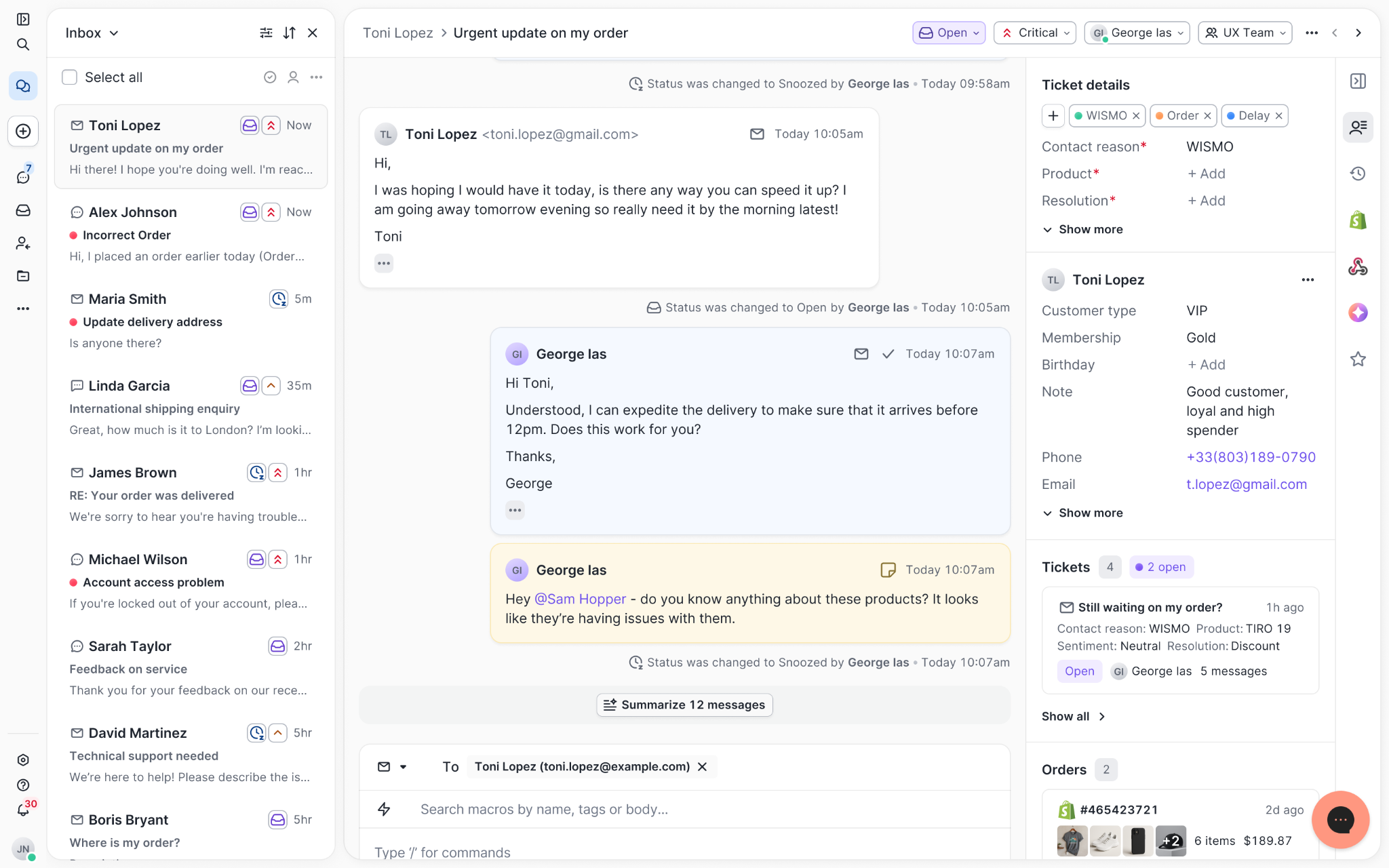
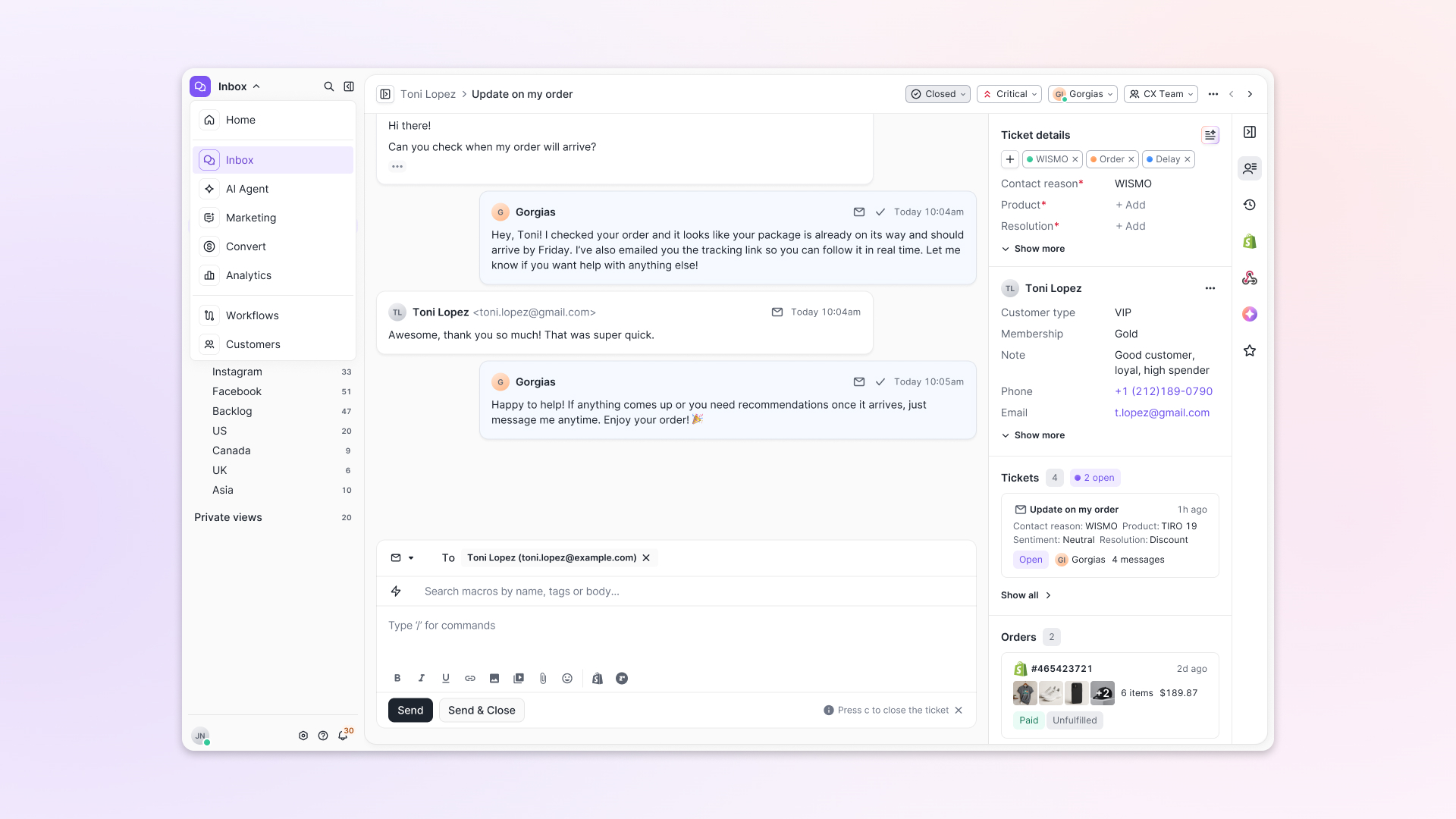
Chats with customers now look like real conversations, using the speech bubble style you’re familiar with on popular messaging apps.
Checking a customer's history used to mean leaving the conversation, an extra step that interrupted what should have been a smooth workflow.
Now, past conversations open in a sidebar next to the active conversation. You can view a customer’s full history, search through their timeline, and open prior tickets without going to a new page.

Check past conversations, orders, and customer details in the brand-new Customer Timeline.
Order information is easier to reference than ever. Open a ticket, and you instantly see the customer's recent orders, marked with product images and invoice details at a glance. Need to dig deeper? Click on an order, and the expanded information appears in the same panel.
For teams using custom integrations, apps are fixed in a quick-access integration menu on the right.
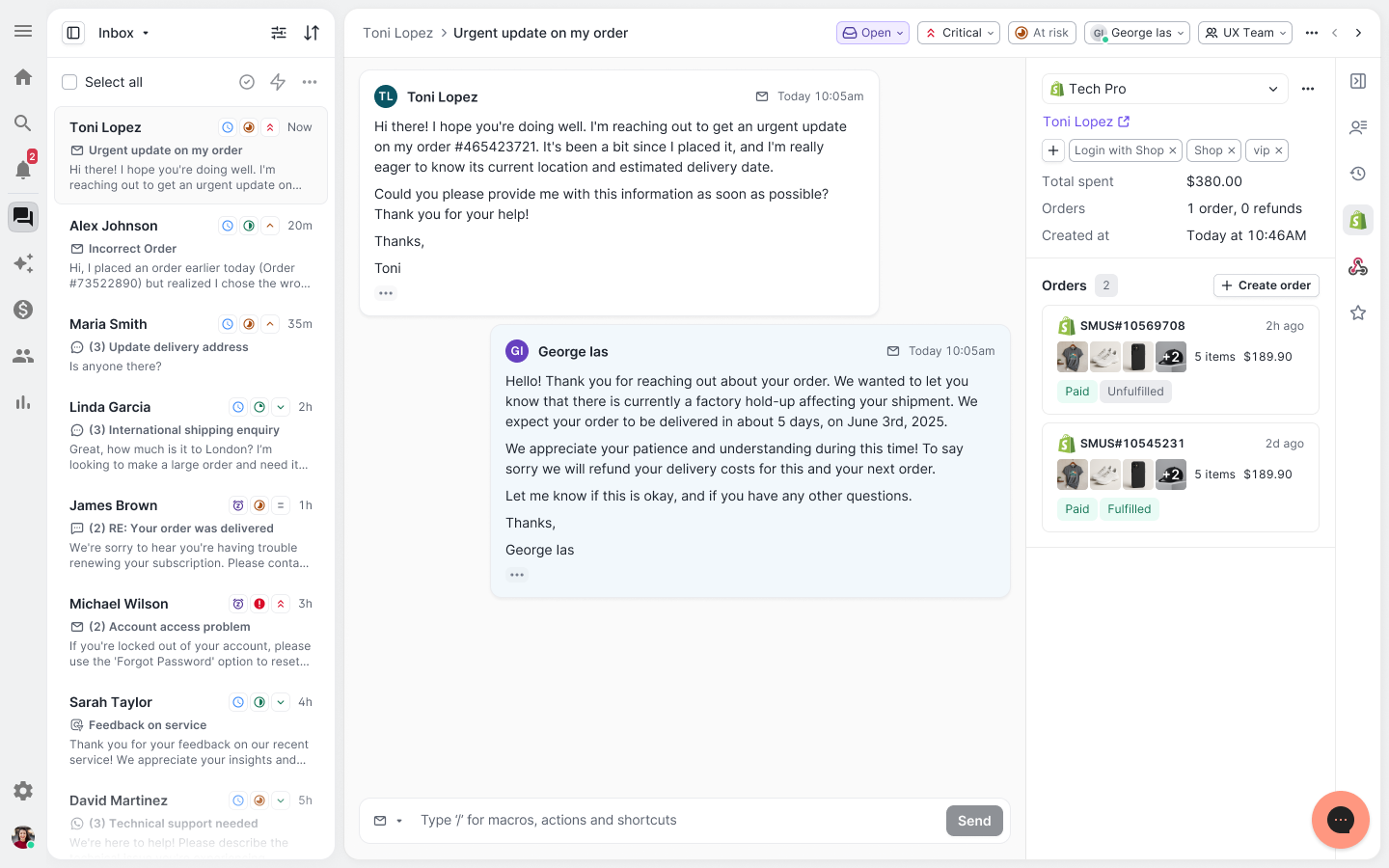
See order details, product images, and totals at a glance on the right panel, without leaving the conversation.
You shouldn't have to dig through a thread to figure out what AI already tried. Now you don't have to.
When AI Agent escalates a conversation, it includes a concise handover summary that mentions the issue, what actions were taken, and why it was passed to your team.
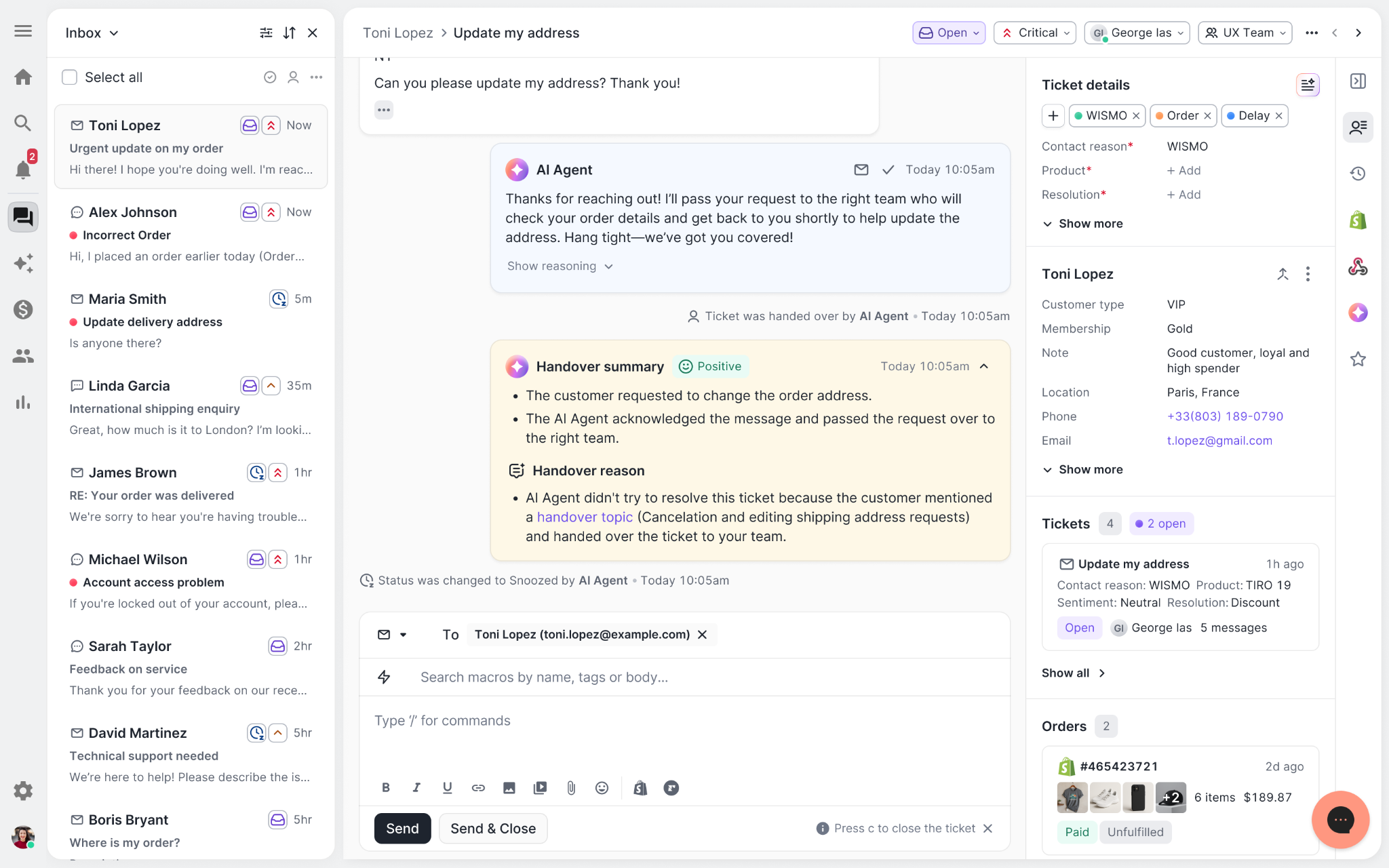
Escalated tickets include a brief AI-generated handover summary, marked in yellow, for quick reference.
We restructured and simplified the navigation. The left sidebar organizes everything into clear categories: Inbox, AI Agent, Marketing, and Analytics, so anyone on your team knows exactly where to go.
To quickly update your knowledge base or adjust a workflow, both now live right in the sidebar. For teams managing multiple stores, switching between them is just as straightforward, accessible from the sidebar, so agents can move between inboxes without breaking their flow.
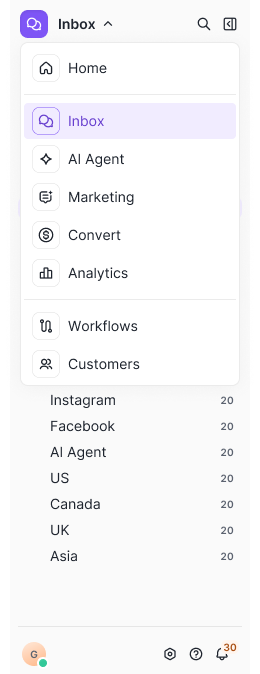
Agents can switch between stores and their corresponding inboxes directly from the left menu.
Support comes down to the person on the other end of the conversation. We built Helpdesk 2.0 is to make sure they have everything they need to show up for that moment.
The best way to see the difference is to work in it. Start a free trial today.


TL;DR:
People are only able to identify AI-generated content 46.9% of the time. That’s less than half the time!
In the ecommerce customer service industry, this is just one reason teams are getting more comfortable with using AI.
Better language processing abilities mean AI can be a better extension of CX teams, relieving agents of repetitive questions, like where is my order?, while speaking in a way that’s familiar and delightful to customers.
Upholding a strong brand voice should be one of your top priorities in CX. With Gorgias AI Agent, you can choose AI Agent’s exact tone of voice, from sophisticated to fun. Below, check out seven AI Agent brand voice examples from real customer conversations.
“We’ve had customers respond to the AI thinking they were speaking to a real person. That’s how elevated the response was from AI.”
—Emily McEnany, Senior CX Manager at Dr. Bronner’s
Tone of Voice refers to how AI Agent communicates with your customers. In Gorgias, you can select from three pre-built tone options:
Or, you can create a custom tone, keeping your brand guidelines, style guide, and target audience in mind.
Note: AI Agent and Tone of Voice are only available to Gorgias Automate subscribers.
{{lead-magnet-1}}
Explore how effectively AI Agent adapts to seven distinct tones in the examples below. First, we’ll show you what a preset AI Agent tone option sounds like, then we’ll move on to six examples using custom instructions.
Feel free to copy and paste our provided instructions to set up your AI Agent with the custom tone of your choice, or, even better, take some inspiration to create your own.
A friendly AI Agent is the go-to for most CX teams. A Friendly tone of voice is outgoing and welcomes inquiries with enthusiasm. If you were to imagine the model support agent, they would speak like this.
The Friendly tone of voice is available by default in AI Agent’s settings.
Here’s how an AI Agent with a Friendly tone of voice responds to a customer asking for samples and coupons:

Now, we move away from AI Agent’s default Tone of Voice options and toward the vast possibilities of the Custom option.
If you prefer your AI Agent get to the point in as few words as possible, create a Custom tone of voice that breaks up text into separate lines, limits paragraphs to two to three sentences, and keeps responses short.
💡 Tip: Access a custom tone of voice by going to Automate > AI Agent > Settings > Tone of Voice > Custom. A text field will appear where you can write your instructions.

Tone of voice instructions:
Acknowledge the customer's feelings by briefly repeating their initial concern(s). Break text up, don’t send entire paragraphs, and keep responses short and easy to read. Keep interactions brief but filled with empathy. We are not long-winded. Keep an informative tone while remaining professional, clear, and easy for customers to follow. Insert links where needed. Don't use too many adjectives when expressing empathy. Never tell the customer to email support or contact our customer service team.
Here’s how an AI Agent with a direct and brief tone of voice responds to a customer who wants to cancel their order:

Who says support agents can’t have personality? Bring some fun into your conversations by creating a custom tone of voice that allows your AI Agent to use emojis and exclamation points.
Tone of voice instructions:
Greet with first name only. Acknowledge the customer's feelings by repeating their initial concern(s). Be concise and provide shorter responses, try to keep your responses to a few sentences. Use a warm, positive, and engaging—like chatting with a helpful, considerate friend. Sign off with "Best Regards". Avoid jokes or comments related to sensitive topics. Make the customer feel like a friend. You can include approved emojis for a personal touch and exclamation points. Approved emojis to use: 💞🫶✨🥰💖🎀💓💘🥳💗💕💯 You should recognize and celebrate personal milestones mentioned by customers, making the interaction feel more personal. After the customer's initial message, there's no need to restate their issue in follow-up responses.
Here’s how an AI Agent with a fun tone of voice responds to a customer asking about exchanging their damaged product:

Customer support often gets a bad rep. Customers anticipate long response times and unpleasant interactions. Flip customer expectations by giving your AI Agent a calming and comforting voice that can instantly fix negative experiences.
💡 Tip: Brands in the wellness and baby industry would do well to use a comforting tone of voice for their AI Agent.
Tone of voice instructions:
Our brand embodies the role of a nurturing parent, promoting happiness, growth, and well-being while creating moments of joy and inspiration. Stay genuine and reflect childlike wonder without being overly sentimental. We maintain a positive and supportive tone, offering a safe, comforting space. Avoid admitting fault or apologizing. Be shorter in replies. Do not offer replacements. Do not give out phone numbers.
Here’s how an AI Agent with a comforting tone of voice responds to a customer asking about exchanging their damaged product:

Give your AI Agent a laid-back, “we’ve got your back” vibe that feels like chatting with a buddy. This tone keeps things casual, approachable, and like you’re ready to tackle any issue together.
Tone of voice instructions:
Sound like a gym bro. Speak casually and friendly. Be eager to help. However, do not go overboard with puns or stereotypical phrases. You may use the following emojis: 🤙💪🏋️ End responses with "Stay awesome,"
Here’s how an AI Agent with a bro-y tone of voice responds to a customer asking about glove sizing:

If your brand isn’t afraid to lean into humor and puns, this tone will definitely connect with your audience. Let your AI Agent use wit and clever wordplay to keep conversations lighthearted and customers smiling at their screens.
Tone of voice instructions:
Speak in bee and honey puns and use colorful emojis. Use at least one emoji per message. Keep your messages brief. Sign off with a different pun in every conversation. If a customer is upset or needs urgent help, avoid puns.
Here’s how an AI Agent with a punny tone of voice responds to a customer asking about suit sizes:

In all of our examples, AI Agent responses can easily be mistaken for one of your human agents. But if, for any reason, you want to change that by making your AI Agent sound robotic — it’s possible.
Tone of voice instructions:
Sound like a robot. Make robot sounds and puns. Use short, direct, and easy-to-read sentences.
Here’s how an AI Agent with a robotic tone of voice responds to a customer asking about exchanging their damaged product:

Like a chameleon, AI Agent adapts to your brand voice. Whether it’s friendly, professional, or a custom tone, you can be sure that every interaction aligns with your brand’s identity.
With AI Agent on your side, you have the power to make each conversation feel authentic. Take it from Psycho Bunny’s Senior Customer Experience Manager Tosha Moyer who says, “The overall tone is good, and its responses are really excellent.”
Ready to see AI Agent’s excellence for yourself? Book a demo and discover how AI Agent can be a permanent part of your team.
{{lead-magnet-2}}

This episode’s featured guest is Nik Sharma, the CEO at Sharma Brands. He works with founders and executives of a wide variety of brands to launch their digital platform, develop an acquisition and retention strategy, expand their channels, and optimize their revenue. He has worked with big brands such as Bill Blass, Roc Nation, and Haus, and he is on the podcast today to discuss the importance of customer service.
Customer service is a brand’s frontline of defense. They are the first to know when something is wrong, broken, or if anything can be done better. By identifying the needs, concerns, and issues of the customer faster than anyone else, they can also fix or address problems before it gets any bigger and becomes damaging to the company. For example, when Nik was working with Judy, an emergency kit brand, there was an issue with their discount code. It simply was not working but no one knew until an online shopper got in contact with customer service. Immediately, the code was fixed and although Judy must have lost several potential customers during the mistake, they could have lost far more if customer service were not there to receive and respond to the matter.
It is important to keep the customer happy. If it is their first time ordering from a brand and they have a less than stellar experience, they are most likely not going to order again. They will not give any of the company’s second products a try, such as the more expensive purchases or subscriptions. That is why customer service is there to pacify the consumer and their issues, acting as a prevention method to any bad experiences. By offering even simple solutions from a technical standpoint, such as dealing with refunds or providing a shipping label, the customer is excited that the brand provided them with a solution.
Through this excitement and acknowledgement, an intimate relationship is created between the brand and customer. The customer feels valued as the brand understands and emphasizes with them. They recognize that they will be taken care of and as more customers begin to feel the same way, a community is built. Every company talks about wanting to build a community and all the strategies that it will take to do so, but the easiest and fastest way to accomplish that is by just having an efficient customer support team. Even a simple third-party logistics team can give a significant boost to a brand by providing front-line workers for customers.
It is not an exaggeration to say that customer service is the most vital piece of a brand. Nik has seen firsthand what good customer service can do and how much feedback, both positive and negative, it can receive. By offering world-class customer experiences, it can boost businesses to new heights and maximize profits. To speak to Nik and to get a further insight into the importance of customer service, he can reached via text at 917-905-2340.