
.png)

Newsletter Signup
The best in CX and ecommerce, right to your inbox
Featured articles
Ticket Volume: How to Measure It, Benchmark It, and Reduce It
Gorgias AI Agent Pricing, Explained
Introducing Helpdesk 2.0: Built for How Agents Work
TL;DR:
- Built directly from agent feedback, Helpdesk 2.0 fixes real workflow pain points. The redesign focuses on reducing friction and helping agents handle more context-heavy tickets.
- A chat-style interface replaces the old email layout. Conversations are easier to follow and resolve in one view.
- Customer context is shown beside the conversation in a right-side panel. Agents can view history, orders, and details without leaving the ticket.
- AI handoffs come with clear summaries. Agents instantly see what happened, what was tried, and what to do next.
- Navigation is simpler and faster across teams. Clean menus, structured queues, and multi-store access keep agents moving efficiently.
Helpdesk 2.0 starts with the people who use it most: the agents.
We spent time understanding customer support from the agent's seat. What do they reach for constantly? What slows them down? What does a better workday look like?
Everything we found is in this brand-new update.
Why we redesigned Helpdesk
Conversational commerce is the new standard.
In customer support, this means customers expect context to remain intact wherever they reach out, whether a conversation starts on social, moves to email, or ends on a call.
This new approach to support has also changed the agent's role. Recurring tickets, like order status checks, shipping updates, and returns, are now handled by AI. What lands in the agent inbox are edge cases that require human judgment and troubleshooting, or tickets that require the full picture.
However, the original Helpdesk was built for a different era of support.
Context was separated across views rather than built into the conversation itself. It's something one in five Gorgias customers flagged, through support tickets, NPS surveys, and conversations with our team. So, we got to work.
Helpdesk 2.0 is the result.
What's new in Helpdesk 2.0
Here's a look at everything that changed.
Read conversations the way they're meant to be read
Conversations have a natural rhythm, one that’s already found in every messaging tool we use. We brought that same layout into the helpdesk.
Say goodbye to the 2000s email interface and hello to chat bubbles. This updated design changes how quickly you can orient yourself and resolve the ticket in one go.
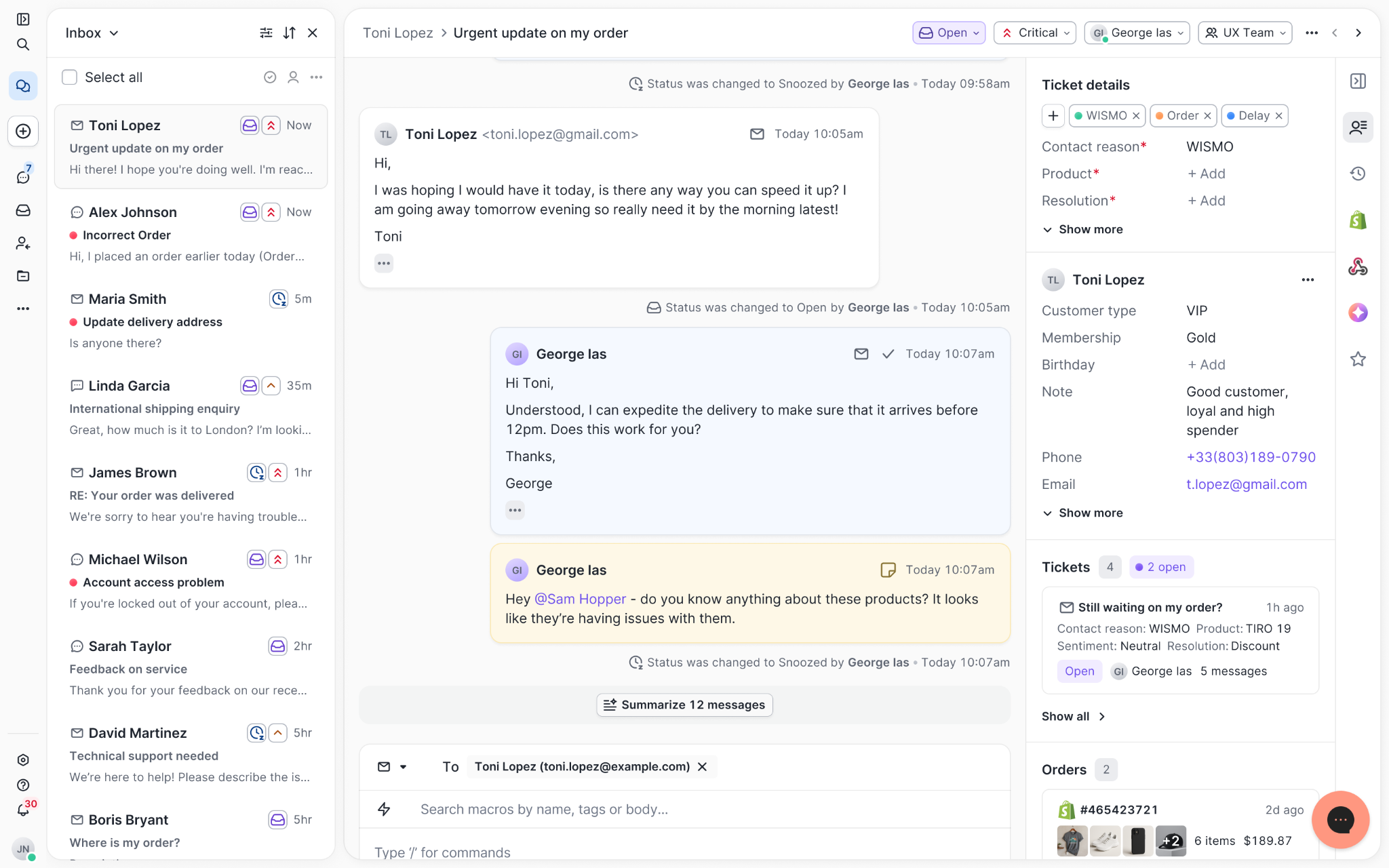
Chats with customers now look like real conversations, using the speech bubble style you’re familiar with on popular messaging apps.
Check customer history without losing your place
Checking a customer's history used to mean leaving the conversation, an extra step that interrupted what should have been a smooth workflow.
Now, past conversations open in a sidebar next to the active conversation. You can view a customer’s full history, search through their timeline, and open prior tickets without going to a new page.

Check past conversations, orders, and customer details in the brand-new Customer Timeline.
See order details the moment you open a ticket
Order information is easier to reference than ever. Open a ticket, and you instantly see the customer's recent orders, marked with product images and invoice details at a glance. Need to dig deeper? Click on an order, and the expanded information appears in the same panel.
For teams using custom integrations, apps are fixed in a quick-access integration menu on the right.
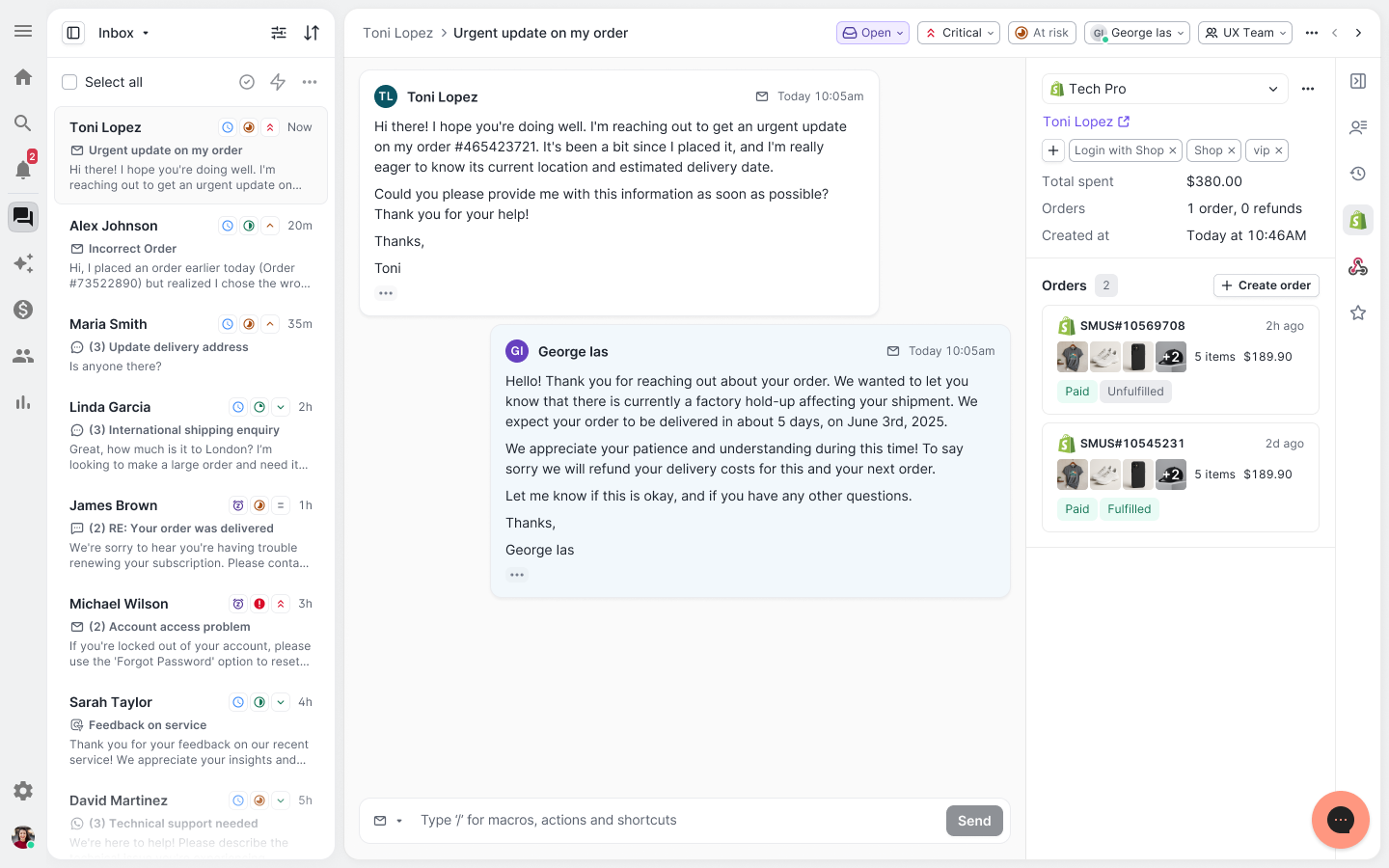
See order details, product images, and totals at a glance on the right panel, without leaving the conversation.
Pick up where AI left off
You shouldn't have to dig through a thread to figure out what AI already tried. Now you don't have to.
When AI Agent escalates a conversation, it includes a concise handover summary that mentions the issue, what actions were taken, and why it was passed to your team.
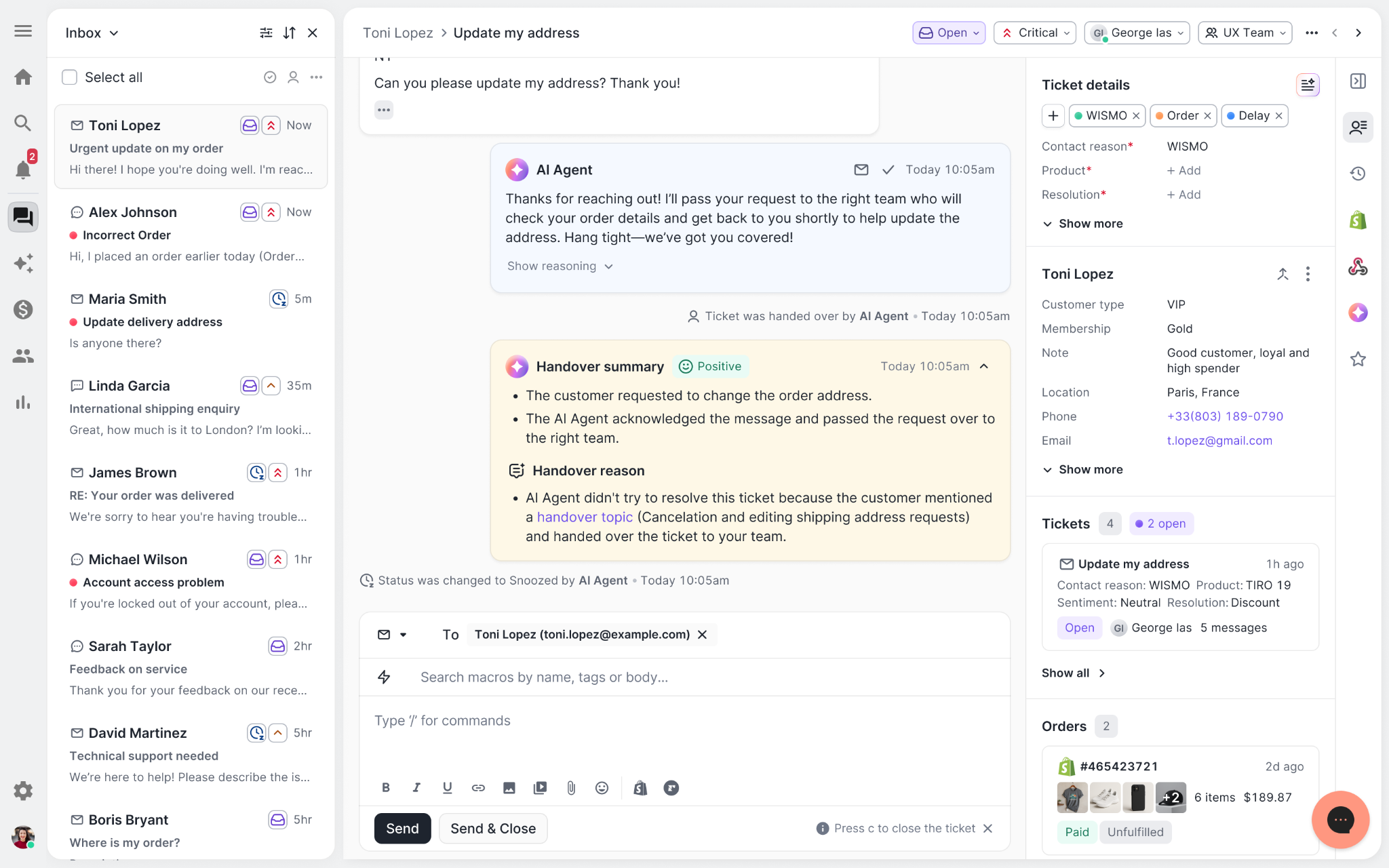
Escalated tickets include a brief AI-generated handover summary, marked in yellow, for quick reference.
Move faster across every store and team
We restructured and simplified the navigation. The left sidebar organizes everything into clear categories: Inbox, AI Agent, Marketing, and Analytics, so anyone on your team knows exactly where to go.
To quickly update your knowledge base or adjust a workflow, both now live right in the sidebar. For teams managing multiple stores, switching between them is just as straightforward, accessible from the sidebar, so agents can move between inboxes without breaking their flow.
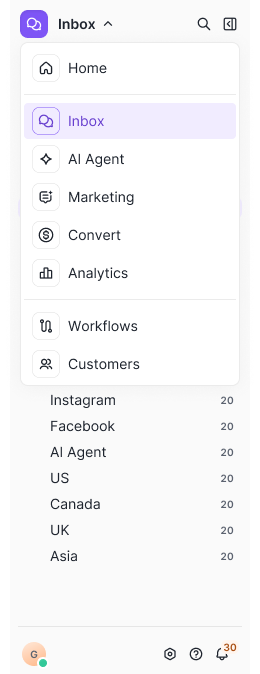
Agents can switch between stores and their corresponding inboxes directly from the left menu.
A workspace that works the way agents do
Support comes down to the person on the other end of the conversation. We built Helpdesk 2.0 is to make sure they have everything they need to show up for that moment.
The best way to see the difference is to work in it. Start a free trial today.


Further reading

Understanding Shopify Plus Pricing & Cost
Without a doubt, Shopify is one of the most popular e-commerce platforms. Entrepreneur magazine ranks it as one of the Top 6 Ecommerce Platforms for Small Businesses. And Inc. Magazine ranks Shopify in their list of Top Seven E-Commerce Platforms. What’s more, Market Watch calls Shopify “the leading multi-channel commerce platform”.
Headquartered in Ottawa, Ontario, Shopify is an e-commerce platform for both online stores and retail POS (point-of-sale) systems. Shopify describes itself as “One platform with all the ecommerce and point of sale features you need to start, run, and grow your business.”
According to Shopify, more than 800,000 businesses in 175 countries use its e-commerce platform. For the calendar year 2018, the platform’s total gross merchandise volume exceeded $41.1 billion. In a recent earnings forecast, Shopify expects 2019 revenue to be between $1.48 billion and $1.50 billion.
Out of the box, Shopify offers a low threshold for entry and is easy to set up and use. Shopify offers several basic plans and pricing models for a variety of business types and sizes. Their entry pricing model serves as an excellent example for current and future startups to emulate.
However, for more robust businesses and existing enterprises looking to migrate to a new e-commerce platform, there is Shopify Plus. Launched in 2014 the Plus option is geared towards enterprise level businesses. As a result, it is more robust. In this article, we’ll explore Shopify Plus, look at Shopify Plus pricing, and compare it to a few other e-commerce platforms.

Advantages of Shopify Plus
While Shopify is adequate for your average e-commerce outfit, larger enterprises have more extensive c-commerce needs. Consequently, these companies need better-than-average solutions. As a result, many flagship brands, including Kylie Jenner, Red Bull, and others, use Shopify Plus.
Even though all of Shopify’s options (including Shopify Plus) use the same dashboard, editor, and help center, Shopify Plus offers these enterprise-level companies much more functionality than any of Shopify’s other plans.
For example, Shopify Plus comes with unlimited staff accounts along with personalized help and support. On top of that, it can handle over 10,000 transactions per minute. This means that large-volume retailers don’t need to worry about whether their site will crash. Marketing educator, consultant, and SEO specialist Nate Shivar lists a several of Shopify Plus’ other main advantages.
- Scaling Reliability — Proven infrastructure which supports enterprise-level businesses or business’ scaling up to that enterprise level; also beneficial for retailers who need seasonal scaling to accommodate increased holiday traffic
- International Deployment — Built-in tools like geo-targeting, currency, and language options to easily and quickly expand internationally
- APIs, Integration & Extensions — Add-on friendly and easily extensible with its own App Store ecosystem
- Predictable Pricing — Starts at $2,000 per month, which includes a lot of beneficial services:
- Development and Maintenance — Includes hosting, servers, bug fixes, order management, bandwidth, feature implementation, and file storage are all part of the platform
- Technical Support and Account Management — Dedicated account manager for each client
- Marketing — Includes many standard marketing tools
All of these features make Shopify Plus an ideal option for launching an e-commerce site or adding e-commerce options to existing sites.
Check out our in-depth post of the benefits of Shopify Plus for more information.
The Base Costs of a Shopify Plus License
As stated above, the Shopify Plus annual licensing fee starts at $2,000 per month. So you could plan on spending at least $24,000 per year on the license alone. In addition, you will spend an extra percentage depending on your revenue. Since Shopify Plus bases pricing on usage and sales volume, the license cost increases when you exceed $800k in a month.
On top of the basis licensing fee, Shopify Plus also has a fee structure based on revenues. This is the actual pricing of the platform. There is a ceiling to this pricing — the maximum license fee is $40,000 monthly. For example, according to Shopify Plus pricing, a $1,000,000 per month company pays $2,500 in monthly licensing fees. In order for that same merchant to pay the maximum $40,000 monthly license fee, they would need to reach $16 million in monthly sales.
So what does $2,000 a month buy you on the Shopify Plus platform? This monthly license covers a number of services, including:
- Hosting Fees
- Maintenance Costs
- Version Upgrades
- Native Multi-channel Capabilities
- Shopify’s POS solution — along with integrated selling solutions for eBay, Facebook, and Amazon
- Account Management — including a dedicated Launch Manager and Account Manager who typically provides:
- General Shopify support and suggestions
- About 3 hours per month of basic front-end development work
- Guidance for growing your store
- Onboarding support
- General Shopify Plus solutions advice
Overall, the Shopify Plus pricing structure is competitive. Especially considering that this cost includes hosting. Specifically, this pricing positions the platform on the lower end for enterprise-level e-commerce solutions.
But what if you already have an e-commerce presence? Can you migrate to Shopify Plus? The short answer is ‘Yes’. If your business already has an online store, but have thought of switching to a new platform, then this Shopify Plus pricing guide is perfect for you. This guide won’t dive into the technicalities of migration, but it will mainly focus on options and pricing.
Moving an Existing E-commerce Site to Shopify Plus
An increasing number of retailers have chosen to move to Shopify Plus including MVMT, Gymshark, Hawkers, puravida, and Emma Bridgewater. Of course the Shopify Plus website touts all the platform’s features, benefits, and perks. However, Shopify does not explicitly list the cost of migrating your site from your current e-commerce platform to Shopify Plus.
In general, the lack or standard pricing for moving your site to Shopify Plus is mainly because each business is unique. Specifically, Shopify Plus asks you to contact them, so they can walk you through the process, plans, and pricing. This makes sense, especially considering that your specific Shopify Plus pricing depends on several factors including scale, revenue, traffic, and others.
Side Costs of Shopify Plus
Although Shopify doesn’t outline the side costs of migration, at the same time, there are some sample prices from third-parties that serve as solid guidelines. Based on a hypothetical mid-level Shopify Plus project, we’ve outlined some more specific pricing for a mid-level enterprise’s first year of using Shopify Plus. Overall, a mid-level user could expect to spend between $130,200 and $270,200 during their first year with Shopify Plus. Below is a cost breakdown:
- $60,000 to $200,000 — The average build cost for a Shopify Plus site; depends on the scope of the project and complexity of the site
- $24,000 annually — Annual Shopify Plus licensing cost, starting at $2000 per month; this increases based on your revenue level
- $36,000 annually — BAU development costs
- $7,200 annually- Third party services for shipping, personalization, search, etc.
- $3,000 annually (about $250 per month) — Average yearly app costs
Factoring in Costs for Shopify Apps
Shopify Plus has a great deal of functionality. At the same time, third-party apps boost and extend its capacity even further. These apps meet needs like enhanced SEO tools, enterprise-level functionality, and enhanced site personalization. As a result, when talking about Shopify Plus pricing, be aware that you’ll need to spend money on additional apps for improved functionality of your e-commerce site.
In general, the norm for Shopify Plus third-party apps to pay a monthly licensing fee. One of the great benefits of this pricing model is the low cost of entry. Yet at the same time, paying a monthly fee for numerous apps tends to add up. If you are accustomed to Magento, which generally offers one-off license fees for apps, this will require an adjustment to your budgeting.
So even though you’ll spend less money up front, your total monthly costs for Shopify Plus apps may be more than you’re accustomed to. What’s more, apps have different monthly costs — licensing fees for Shopify Plus apps range from $50 to $500 each. However, one major benefit of monthly app licenses is that if you don’t like an app or find you don’t need it, you simply stop using it and find another app.
Be aware that if your business requires a specialized, custom-made app, then you’ll pay a premium for it. For example, development firms tend to charge $90 to $175 per hour for built-from-scratch apps. So the actual cost of the app will depend on its complexity, function, and size.
Related: Our list of the best Shopify apps for ecommerce merchants.
Site Design and Build Costs
Regarding site design and build, Shopify Plus does offer templates you to purchase. Yet if you choose a template, you’ll inevitably want to personalize it to differentiate your site from all the other e-commerce sites out there. This means you’ll pay for personalization, either in the form of a tailor-made site or a heavily-modified template.
Whether you do this design and build work in-house or contract with a design firm or a freelancer, it is important to factor in this cost. Depending on your needs, the estimated cost for this service might range between $75,000 and $100,000 (or more). And of course, the actual cost hinges on the complexity of your site and your business’ specific needs. Larger merchants with more complex needs will spend considerably more during the design and build process.
When migrating your site to Shopify Plus, make sure you work with a firm or freelancer who specializes in this platform. Overall, the firm you choose should be both creative and practical. This means they should deliver a unique, attractive, user-friendly site which also delivers exceptional functionality on every level.
Because of this, finding the right agency to build your site is key to success. Consider working with a Shopify Plus Technology partner to ensure you get the build possible.
Payment Processing Costs Via Shopify Payments
On top of the licensing fees, every merchant pays payment processing costs to a payment processor. This is true whether you use Shopify Payments or third-party processor. At the same time, you might find lower charges by using a third-party payment processor. In addition, be aware that Shopify does charge a 0.15% fee if you use a third-party payment provider.
Shopify Plus Pricing Compared to Other Platforms
How does Shopify Plus pricing stack up to other e-commerce platforms? Below we examine a few of the most popular platforms and compare them to Shopify Plus:
Shopify Plus vs Shopify

When talking about Shopify Plus, it’s helpful to introduce regular Shopify. With this plan, you get a 14-day free trial period without any up-front setup fees. Simply you can jump in and set up your store while you decide which pricing plan best fits your needs. There are three monthly pricing options:
- Basic Shopify (for starting your new business) - $29 per month
- Shopify (for growing your business) - $79 per month
- Advanced Shopify (for scaling your business) - $299 per month
Each of these plans comes with different options and levels of service for your business. All three come with an online store, sales channels, 24/7 customer support, unlimited products, the Shopify POS app, and other features. Yet, as you can imagine, the more you pay, the more options you get for your business.
For example, the Basic plan includes 2 Staff Accounts while the Shopify and Advanced Shopify include 5 and 15 Staff Accounts respectively. In addition, Advanced Shopify has exclusive features like an Advanced Report Builder and Third-party Calculated Shipping Rates. However, Shopify Plus definitely has even more to offer.
Read our in-depth comparison of Shopify and Shopify Plus.
Shopify Plus vs Magento 2 Commerce

First released in 2008 by Varien, Inc, Magento is an open-source platform. Written in PHP, Varien originally developed this e-commerce software with the help of volunteers. Varien released the first general-availability version of Magento on March 31, 2008. After changing hands a couple of times, Adobe later acquired the platform. On November 17, 2015, Magento 2.0 was released.
Overall, Shopify Plus is less expensive than Magento 2 Commerce. According to Ecommerce Guide:
The ‘Total Cost of Ownership’ of a website built on Shopify Plus tends to be cheaper than a site built on Magento 2 Commerce.
The site also suggests that this lower cost makes Shopify Plus a better option for businesses that are currently at lower revenue levels. The article also details a few other costs comparisons between Shopify Plus and Magento:
- Design/ Build Costs — Magento Commerce builds tend to cost more than Shopify Plus projects. One reason for Shopify Plus’ lower build cost is that the builds involve less integration work and less backend development. In the end, less time working on the build means you spend less money up front. Specifically, Ecommerce Guide estimates spending about $100,000 for a Shopify Plus build and between $150,000 to $500,000 for a Magento 2 Commerce build.
- License Fees — Although both Shopify Plus and Magento 2 Commerce come with a license fee, Shopify Plus charges on a monthly fee while Magento charges an upfront, annual license fee. As is the case with Shopify Plus, Magento also bases the fee on your business’ revenue level. However, Magento bills you up front annually as ‘Gross Merchandise Value’. So for Magento Commerce licensing fees, expect to pay about $2,000 per month if you’re at the lowest monthly level fee.
- Hosting — As stated above, the $2,000 per month Shopify Plus license fee includes hosting. Shopify Plus hosting includes security patches, SSL certificates, PCI compliance, and other things. In comparison, Magento offers two options. Magento 2 Commerce Cloud has a similar hosting package but at a slightly higher monthly fee. Magento’s base cost is around $3,333 which includes the license and hosting.
- Site Maintenance — For monthly maintenance, fixes, and updates, Shopify Plus is typically cheaper than Magento.
At the end of the day, Shopify Plus is generally less expensive than Magento 2 Commerce. At the same time it depends on your business’ specific needs.
Shopify Plus vs WooCommerce

For small to large-sized online merchants that use WordPress, WooCommerce is a popular open-source e-commerce plugin. Designed specifically for WordPress, it launched September 27, 2011. The fact that the plugin is free (the base product) easy install makes it an attractive to businesses of a certain size.
In a comparison article, Simon Gondeck puts Shopify Plus up against Woo Commerce. He bases his comparison on several factors. Gondeck uses the example of a lower mid-market ecommerce business making between $1 million and $10 million in annual sales.
For a Shopify Plus site, he estimates the build cost (design and development) to be around $30,000. The monthly license fee is $2,000 per month, but Gondeck adds an estimated $2,000 per month for ‘developer maintenance costs’. At the end of the first year, he estimates the cost for a Shopify Plus site to be about $78,000. However, once the site is fully developed, the second year cost would drop to an estimated $48,000 per year.
For WooCommerce, Gondeck estimates the build cost to be about the same as Shopify Plus (around $30,000). However, he believes WooCommerce has lower month to month maintenance fees and costs. Although the developer maintenance costs are similar (about $2,000 per month), the monthly license fee (which includes the domain and hosting costs) is only about $200 per month. With all the costs totaled up, WooCommerce comes in at around $55,200 for the first year with an ongoing annual cost of about $26,400 per year.
Yet in the end, Shopify Plus pricing comes out slightly higher than WooCommerce in a head-to-head comparison. Gondeck recommends Shopify Plus for its simplicity and ease of use out of the box. He specifically recommends this e-commerce platform “for larger businesses with no current ecommerce presence.”
Shopify Plus vs BigCommerce Enterprise

Founded in 2009, BigCommerce develops e-commerce software for businesses. According to the company, the BigCommerce platform has processed $16 billion in total sales.
Like Shopify, BigCommerce has also launched an enterprise-level platform, BigCommerce Enterprise. Launched in May 2015, the platform was designed to accommodate high-volume retailers. And like Shopify Plus, BigCommerce also hosts some big name brands such as Skullcandy and Ford. So how does Shopify Plus pricing compare to BigCommerce Enterprise?
As we’ve already said a couple of times, Shopify Plus pricing starts at $2,000 per month with increases based on your sales volume. Also, Shopify Plus has no hosting fees, support fees, or monthly maintenance costs. In contrast, BigCommerce Enterprise’ pricing various greatly. Like Shopify Plus, BigCommerce doesn’t explicitly list prices for the Enterprise platform. However, according to WebMakeWebsites, you can get a basic plan for around $400 per month.
However, Nate Shivar puts the BigCommerce Enterprise’s monthly price at around $1,000. Yet, depending on your business’ capacity and needs, the high end of the monthly fee can add up to $15,000 per month. In the end, Paul Rogers states:
The pricing of Shopify Plus and BigCommerce generally comes out very similar — the licensing is comparable (with BigCommerce Enterprise being based on order volume and Shopify Plus being a GMV model with a minimum fee) and build costs are generally in the $75k – $200k bracket for both, in my experience. Shopify Plus does have some additional charges if you choose to use an external payment provider, but this is relatively low (0.25%).
Like Shopify Plus pricing, your actual BigCommerce pricing monthly depends on your sales, traffic, and other factors.
In Conclusion: Advantages of Shopify Plus
Without a doubt, Shopify is one of the top e-commerce platforms available today. And with Shopify Plus, enterprise-level businesses benefit from exceptional functionality to meet all their e-commerce needs. Compared to popular platforms like Magento, WooCommerce, and BigCommerce, Shopify Plus is a great platform for new e-commerce sites or for companies looking to migrate to a more robust platform. So whether you’re already at the enterprise level or you have plans to scale up to the next level like Campus Protein, Shopify Plus is certainly one of your best e-commerce options.
Still on the fence? Read our in-depth review of Shopify Plus.
Gorgias is a customer support helpdesk providing flawless customer service for Shopify stores. Currently, we partner with over 1,000 merchants and our Starter plan is only $10/month. Get started for free or schedule a demo today! Or Contact Us Today to learn more about what we can do for your Shopify site.

How to Calculate the Marginal Cost of Customer Service
And the Margin that Customer Service Impacts Your Net Profit.
In, The State of the Ecommerce Customer Service Industry Report for 2019, we found that a surprising 79% of respondents do not know the cost of a support ticket on the company.
This is quite scary, as this metric helps define the overall profitability of the product, and set reinvestment schedules for the growth of your company.
If costs overtake margin, you lose money with every sale.
While the Gorgias mission is to turn customer service from a cost center into a revenue generator, we do need to acknowledge the raw costs of customer support in order to bake it into our calculation of margin.
What metrics are we going to cover:
- Cost per support ticket.
- Cost per order.
- Cost per revenue.
Why should you track these metric?
- It helps baseline your opportunity for growth and profitability.
- You can make concerted efforts to lower your cost with customer service improvements.
- You can track indicators that something is going wrong with your business, and may require extra attention from the Head of Ecommerce or COO.
- You can hold your head of customer service accountable for staying within appropriate margins, and incentivize them accordingly.
Now, let’s get into it…
Step 1: Calculate your Cost Per Ticket
Here’s the data you need to collect:
Total cost of customer service. This includes technology, employees, managers, office space, equipment, travel… Everything. This should be easy to calculate if your accounting department is doing their job; they should be able to just hand you over a number. A monthly breakdown of the trailing 12 months is best.
Tickets per month. This can be found in your Gorgias dashboard under “Statistics.
Be sure to set the dates to match appropriately:

Now that we have these two numbers, we can get an understanding of our cost per support ticket.
Simply divide: In this example, we’ve got 1651 tickets in December. We spent ~$4500 on customer service. Therefore each ticket costs us $2.73.
Knowing your average cost per ticket helps you understand the time and value behind resolving customer inquiries. If this number goes up, then you’re inquiries are getting more complex - its either taking more time or more people to answer the same number of questions.
If you ever see this number spike, it’s likely due to a flaw in your product design. Immediately begin looking for commonalities among tickets, inspecting your inventory, and trying to get to the root of the problem before you make even more customers unhappy.
Step 2: Calculate Your Support Cost Per Order
Next up, you need to know your support cost per order, in order to bake customer support into your margin.
Here’s the data you need to collect:
- Orders per month.
To find this, simply log in to your Shopify dashboard, go to Orders, and add in a couple filters:

You can then “select all” and it will tell you the count of orders. For additional accuracy, you may want completed orders, not including refunds or other issues.
For our example month, we placed 2621 orders. That gives us a cost per order of $1.73
According to our Ecommerce Customer Service data, we estimate that small stores will see 88 support tickets per 100 orders, or roughly 1.1 support tickets for every $100 in revenue.
While large stores, with over $500k revenue/month, will see only 56 support tickets per month and .4 support tickets per every $100 in revenue.
How does your support cost per order compare with these benchmarks? Let us know in the comments below.
Calculate Your Cost Per Revenue
Sometimes it's helpful to calculate your cost per revenue as well, which is simply grabbing your net sales number from Shopify and dividing by tickets.
Data you need to collect:
Revenue.
Step 3: Consult with COO / Head of Ecommerce
You were previously calculating your margin without including the cost of support…
Even though support drives customer satisfaction, retention, and, in some cases, sales, it also has a clear impact on margin.
How does this new metric affect your COGS? Your margin?
If your average order value is $50, with a $13 margin, you now have only a $11.27 margin.
How does that affect your advertising objectives?
How does it affect your ability to invest into product research?
What can you do to improve your cost per order?
A lot. Mostly, this is called: ticket mitigation.
Here’s some of the more common opportunities:
- Updating your FAQ page.
- Improving your product detail pages.
- Video explainers.
- Onboarding videos.
- Educational retargeting campaigns,
- Stricter / more clear checkout processes.
- Improved notification emails to users.
- Faster shipping.
- Implementing new channels like SMS, on-site chat, or phone.
Final Thoughts
When you hire a new support agent, or manager, you will see your costs go up.
This is the nature of business: you’re investing in a new hire with the expectation that there will be more demand for them to fulfil.
You’re job, as an operations manager, head of Ecommerce, or COO, is to make sure those costs don’t get out of control while you look to scale your business.
Figure out what margins are acceptable to you and invest in growth cautiously. We’ve seen all too many companies fail because they oversupply and hit stretches of low demand.
That being said, if the business has healthy cashflow, and reasonable growth, I’d invest more in customer service before upping my ad budget.
It takes time to onboard new agents, and if you don’t have someone matching that demand, you’re creating unhappy customers, which is a surefire way to eat your margins even faster.

3 Ways to Reduce the Load On Your Customer Support Team
By Ross Beyeler, Founder and CEO of Growth Spark
Often, a support team answers the same questions over and over…
Or issues returns repeatedly for reasons that could be addressed internally…
Maybe the sizing isn’t well represented, the fulfillment house has mixed up SKUs, or your product images aren’t clear or detailed enough.
If you can lighten the load for your customer support team, you can save significant time and costs, while at the same time improving the buying experience for your customers.
The goals here are to:
- Reduce repeat inquiries
- Shorten first response times
- Speed up problem resolution time
- Lower overall customer care costs
The key is to address your customers questions and issues before they ask your support team. Here's how you do that:
A Better FAQ Page
91% of shoppers would gladly try to answer their own questions first using an online knowledge base or FAQ page before reaching out to a customer service team, according to a survey by Coleman Parkes for Amdocs.
This means that your FAQ page is a huge opportunity to answer your customers’ most common questions and issues so they don’t need to reach out to customer support.
FAQ information typically falls into one of two distinct buckets: product-specific and buying process.
Product Specific: Common questions about individual products may be better off addressed on the product pages rather than in a broad FAQ page. You may need to provide clearer or more comprehensive product descriptions, or consider more or better photography to clear up common product questions.
Buying Process: Questions about shipping, returns, policies, and other operational topics are best addressed in a single easy-to-find page like an FAQ.
When is the last time you cross-checked the content of your FAQ page with the data from your customer support team?
There are many customer support tools like Gorgias that will make it easy for you to track the reasons behind why users submit a ticket.
Once you begin tracking the topic, or tag, of your questions, you can easily identify the questions that top the list, and permanently add the responses to the FAQ.
Bonus points: Prioritize the FAQ page based on the frequency of each customer service inquiry so that the most relevant answers are closer to the top.
Your next step is to set up a monthly meeting with your head of customer service to review the feedback coming in from your customers and ask yourself:
- What are the most frequent topics of support inquiries?
- What issues take up the majority of your support team’s time and resources?
- What issues are emerging or could emerge do to seasonality or new initiatives within our company?
Remember, an FAQ page is:
- Easy to find
- If shoppers can’t find it quickly and easily, they won’t use it and all your work answering all of their questions will go to waste. If you have an answer on your FAQ page, yet people are still inquiring, they might be having trouble finding the page.
- Searchable
- Include a search bar so that shoppers can easily find the answers for their specific problem without having to read through everything else.
- Easy to read
- Use simple, conversational language. Technical slang gives most of us a headache, and leaves most people reaching for the closest live human to explain it in terms they understand.
For more on FAQ pages, check out this Shopify article.
Now that you have your FAQ page squared away, be sure to track visitors to the page and note any changes in volume, and look for changes in your support ticket volume around those related questions.
Remember: You should never answer a support ticket only by referencing your FAQ page. Always include the information they are asking for directly within your response. After that, let the customer know that there is an FAQ page for more information, to avoid future tickets.
See Where Your Customers Get Tripped Up
Have you watched actual customers explore your online store to see where they stumble?
Customer behavior tools like Hotjar make it easy to review how customers navigate your website. One way that customer behavior analysis tools can help you understand exactly how your customers are using your site is with heat maps.
 |
A heat map is a visual representation of the most popular (hot) and unpopular (cold) elements of a website page. They can give you an at-a-glance understanding of how people interact with individual website pages. Elements that get the most views and interaction are shown in red, so you can immediately spot what your users are clicking on. Those that most people tend to ignore appear in blue.
Once you know which parts of your website are most (and least) useful to shoppers, you can tweak those elements to make the on-site experience easier to use.
Customer behavior data can inform on-site improvements, such as:
- Identifying any “dead” pages so you can remove them
- Recognizing “deep” content that requires too many clicks for customers to reach, and making it more visible or accessible
- Ensuring that customers can easily see and access main links, buttons, and CTAs
- Making sure that important elements are getting the attention they deserve
- Checking whether any static elements are getting clicked too often, and adjusting them to clarify that they aren’t a linked object
It may require some A/B testing to ensure your changes deliver results.
Learn from Returns
According to a recent Shopify post, during the holiday season, Ecommerce returns surge to 30 percent (or as high as 50 percent for “expensive” products).
Return deliveries are estimated to exceed $550 billion by 2020 in the U.S. alone.
Many of those returns are probably associated with a customer support ticket - whether customers are asking questions about the product they received, or need help processing their return.
Anything you can do to reduce the number of returns - and the number of customer support requests associated with them - can mean a huge boost for your bottom line.
So, what causes returns?
Returns can often be traced back to a disconnect between customer expectations and the reality of the product once they receive it. It may be that:
- It doesn’t fit the way they expected
- It doesn’t look or feel like they thought it would
- Delivery came later than they expected (or not at all)
All of these problems (and more) can be prevented in advance with improvements to your website content.
Sizing Issues
While fit can be a difficult factor to get right online, including detailed dimensions is a big step in the right direction. Some apparel merchants are taking sizing one step further with interactive fit guides, like the one above Nudie Jeans, which uses an app integration called Virtusize:.
 |
Appearance Issues
Poor quality or not enough product images can make it difficult for customers to accurately understand what your product will look like when it arrives at their home.
You can easily reduce your return rate by making sure your product photography is clear and high-quality, and illustrates all of the primary parts of each product. More complicated or detailed products can also benefit from a video or 360-view.
Detailed product descriptions can also help address confusion about product appearance and feel. Sol de Janeiro does this with a multi-tab product content area that defaults to a brief product highlight, with additional tabs to provide more details.
 |
Fulfillment Issues
Are orders not being fulfilled to the right customers?
Are deliveries taking longer than they should?
Analyzing your fulfillment data and using that information to make adjustments to your website content - such as average delivery times - can help eliminate a source of customer support calls.
 |
For example, maybe you want to be able to deliver every order within two days, but your current fulfillment resources simply can’t make that happen consistently. Being up-front and clear about realistic delivery times (like The Black Dog does in their Shipping FAQ page, above) will help set customers’ expectations appropriately.
Bonus: To get setup on two day shipping, consider our partners at ShipBob.
Final Thoughts
Continue to study your on-site data using Google Analytics or Shopify’s native analytics and look for high exit % pages. These may be pages where prospects or customers are running into a dead end and being forced to turn to support.
You can also create a goal in Google Analytics that corresponds to contacting support, then reverse the user path to determine which pages lead to them submitting a ticket / hitting that “contact” or “support” button.
Chances are, there are a few areas of “low hanging fruit” that can make significant improvements to your customer support load once you find them and address the root concerns. And with those small fixes, you could see a big impact on your bottom line, and a better on-site experience for your customers.
Read more about customer support on our trusted partner’s site, Growth Spark:

Customer Loyalty: Bringing The Human Touch Back To Ecommerce
Ecommerce has become awash with digital bells and whistles. Technology has no doubt enhanced the shopper experience but the rapid rate of digital innovation has had a profound effect on customer expectations. By 2020, customers expect brands to automatically personalize experiences to address (not just predict) their current – and future – needs.
But, although customers expect more in terms of tech, they still crave the person-to-person connection. In fact, 75% of consumers want to see more human interaction, not less.
At LoyaltyLion we know that bringing back this human-touch depends on providing a good customer experience. Clearly, a worthwhile cause, as studies show that 86% of shoppers who received great customer care are more likely to repeat purchase. By going the extra mile to treat your shoppers as people – rather than numbers – you can secure a faithful, constant customer base.

Here are three insights that will help you bring the human touch back to your online store.
Use Data To Personalize Communications
Each customer is unique. They interact with your brand in different ways, all while having their own personal needs and desires. When a customer feels that you have taken the time to understand their unique requirements, they will trust and value your brand more.
Data and personalization go hand in hand. By using member information to learn how customers engage with your loyalty program, you can understand their feelings towards your brand and react accordingly. Being data-driven is the key to true e-commerce success.
One golden opportunity to personalize your communications this is through targeted emails. Use your Gorgias dashboard to identify past interactions and purchases, as well as a customer’s loyalty points balance. You can then use that member data to create bespoke rewards that you can send right to your customer’s inbox.
Maybe you’ve noticed that they keep eyeing a specific product range? If so, give them discounts on new products in that collection to tempt them to back to buy again. Or perhaps you’re aware that they’re just a couple of points away from their next reward. Give them a little nudge to return and receive their reward sooner. For example, LoyaltyLion user Dr. Axe alerts customers when they have rewards waiting to be claimed, and suggests a particular product to redeem that reward on.

Find Ways To Delight Customers
Shoppers love to feel that they’re your only priority and that you care about them on a personal level. They want to feel valued as individuals, not just another number in an extensive database.
Loyalty strategies should incorporate ways to surprise and delight customers. For example, making it easy to offer customers points on their birthday or taking a moment to personally congratulate them when they’ve made a certain number of purchases with you. Beauty Bakerie, for example, offers their customers 500 points on their birthday.

With Connectors for Shopify Flow, it’s easy to use LoyaltyLion and Gorgias to set up triggers that automatically create tickets on a customer’s birthday, reminding a representative to get in touch. It’s the thought that counts and going the extra mile will ensure your customers trust and remember you. Plus, you’ll feel good about it too!
Convert Negative Experiences Into Positive Ones
Customers get frustrated when they feel their complaints aren’t taken seriously. Dissatisfied customers will tell between nine and 15 people if they have a bad brand experience. Using Gorgias’ helpdesk and macros, you can help resolve complaints whilst maintaining a personal touch. For example, ethical online yarn store, Darn Good Yarn uses the helpdesk to analyse and automate how they solve common customer issues, using a whole database of the shopper’s history to address specific queries in a more informed way.
If you are reacting to customers have had a negative experience, your loyalty program can help you demonstrate you care. You might consider offering bonus points or benefits such as free delivery, or moving them up a loyalty tier so that they can unlock more exclusive rewards in the future. These tokens of appreciation can turn a bitter experience into a sweet deal.

Research shows that 94% of customers who have their issues solved painlessly said they would purchase from that company again. This shows that helping customers to solve their problems is key to securing their long-term loyalty. Treat your most valuable customers well by making their shopping experiences as easy as possible. In return, they’ll give you their loyalty.
It’s all about people-to-people
In a world where technology and data can give ecommerce stores a competitive edge, there’s a risk that we could lose touch with the human side of retailing. Human exchanges are still, and always will be, the primary driver of loyalty. So, use digital personalization to your advantage and treat your customers as individuals.

Small engineering team as a competitive advantage
It's been over 3 years since we've started working on the Gorgias helpdesk. The engineering team started with just me (Alex) and then gradually grew to a team of 5 people. We're a small team, but we've accomplished a lot during this period. Here are some stats from 0 code/customers/revenue in Oct 2015 to this:
- Handled over 16 million tickets.
- 2000 daily active sessions with an average length of ~4h each.
- 600 paying customers (companies).
- 17% MoM revenue growth.
Modest numbers to be sure, but we're very proud that people use our product in a big part of their workday and hopefully are becoming more productive while doing so. The whole idea behind our product is to scale customer support with as little resources as possible. Given this, perhaps it's only natural to build our product with a small team as well?

We've been suffering chronically from "not having enough people" - we still do. That forced us to adopt a certain engineering culture that I want to talk about in this post.
When we first started building Gorgias, having just a few people on the team allowed us to progress at a pace where we could collect real feedback from our customers with things that really mattered to them rather than building every feature they ask for. A lot of their asks seemed legitimate, but because we didn't have a lot of people it forced us to prioritize the critical, high impact things first.
Having a small team can act like a barrier that blocks you from building a bloated product.
I want to make more of a case for the above statement, but first I'd like to get a bit more into what we did during the 3 year period.
Once we've build an initial version of the app and got our first customers we quickly realized that building a "second Gmail" is super-hard:
- Communication protocols (email/facebook/etc..) are complicated - we knew that before we even started, but it's difficult to describe the amount of work that needs to get done to make them work correctly. The amount of corner cases and weird protocol quirks is just staggering. In fact I would even go ahead and say that if you're integrating with any kind of external systems (webhooks, REST apis, etc..) then you're going to have a very hard time making them work correctly.
- Having a highly-available and fast app is very hard when you don't have a team of full-time SREs. Scalability was not our big concern when we first started because we didn't have customers, but having an app that was always on was very important, remember the ~4h average session length? It meant that we had to make some architecture and infrastructure decisions that allowed for a high uptime.
- Customer support software space has a very high barrier for entry these days. You need to have certain features before people start to even consider you as a platform. The switching costs are high as well because now you have to train your people on a new app and changing people's routine is hard.
It takes a lot of effort to get to a point where you can compete with the likes of Gmail or Zendesk - both amazing products btw. This was definitely the case for us, for close to 2 years we had only a couple of customers and our product wasn't that good if we're being honest.
So what changed a year ago? To put it simply: our product didn't suck anymore. Or sucked less. It had that minimum set of features and stability that made it attractive enough to our main customer base (Shopify merchants) that were passionate about productivity in the customer support space. That, and the tenacity of our CEO Romain who was convincing everyone that they should use us.
So we started having our second wave of early adopters and all our hard work was finally starting to pay-off!
Now that we had more and bigger customers we were starting to have performance issues, our app was slow, suddenly we were starting to get bombarded by viral facebook posts events or promotional events via an email campaigns, we didn't have enough monitoring in place, our app was pretty inefficient, the main database was a frequent source of congestion. So we started fixing those issues while still receiving numerous feature requests.
Thankfully we didn't actually optimize our code that much before (no customers!) and there were a lot of low hanging fruits at first, but it still put a lot of stress on the team which was becoming tired and overworked and requested to hire more people to build those features and help with the performance issues.
We all agreed that it would be for the best to have more people on the team, but hiring is hard. Competent coders are not just randomly looking for the next gig. SF is also a very expensive city and for a startup that raised $1.5M and a 2 years of money burned we couldn't really compete with other players in town. We've started working with some great devs in Europe, we worked with a few talented interns as well and we tried to get by until we could have more customers and hopefully raise some more money to hire more people.
I could speak more about hiring in the Bay Area and there are a lot of things we did wrong and still have a lot of things to learn, but that's probably an even longer post than this one. But yeah, it's hard to find someone good, it's expensive, etc...
So what is the situation right now? Well, it's not much better. We've raise d a seed extension round from SaaStr with Jason Lemkin and hired a few people in the Growth team, but we still have a hard time hiring in SF or remote. In the meantime we have a small team and want to talk about that.
On the importance of saying NO
I think it's important to realize the advantages of having a smaller team and the single most important super-powers that you're forced to acquire is saying NO more often that you would with a bigger team. If you have a bigger team and say no to a feature, new platform, integration, etc.. it's harder to justify the decision. There are arguments like:
... we have enough devs! They are paid to make features, so what's the problem!?
... the data shows that 50% of our customers are saying that they want this or that feature, we must build it!
But do we absolutely need to build that feature? Are the customers going to be a lot less effective with your product otherwise? Is it going to be a big boost for them or just a nice improvement? Once a feature is there you have to maintain it, fix bugs, improve it, etc.. The thing with data driven decisions is that sometimes it can be biased towards some historical practice that might not have a place in your current world.
Now, I'm not saying that you shouldn't listen to your customers, you absolutely have to, but be sure you understand well what they want before taking action and understanding takes time. Having an artificial brake on your enthusiasm might be a good thing.
Engineers build things, the natural tendency is to accept any technical challenge because of ego, curiosity, fun, etc... It takes discipline to say no and stick by it. A small team is making it easier to do it.
Automation
When you have a small team you're forced to automate a lot more often some of your workflows. You don't have the luxury to do repetitive stuff so:
- You start writing more tests because you don't have people hired in QA and you don't want to repeat the same tests all the time.
- You add optional static typing, linting and other code quality tools because you don't have time to deal with random type errors or have debates about tabs vs spaces.
- You resolve repetitive bugs by doing some refactoring because you can't deal with the constant flow of tech support tickets.
- You make a lot of tasks retry-able so if a HTTP request to facebook failed you don't have to manually retry them.
- Cronjobs, cronjobs everywhere.
Building the right culture is a long process
People that work at Gorgias come from different backgrounds and sometimes it can be challenging to be on the same page. In some cases our work processes are similar to many other companies:
- Github for our code and issues.
- Code-reviews on Reviewable - it's awesome!
- Jenkins to build our docker images and upload them to google cloud.
- Kubernetes to run everything on GKE.
- Sentry to collect production errors.
- Datadog to monitor everything.
But there is so much more than just the above processes to engineering:
- The way we all come together and decide how certain things will be built or fixed.
- The way we talk about a certain API decisions and refactoring.
- The way we deal with an outage and a bad bug that affects our biggest customers.
These things need time to happen to be embedded in your engineering consciousness and if you're the first-time founder (like myself) you also need the time to understand how to operate in this environment.
Management overhead
Never managed a big team so I can't really speak about it's dynamics, but I would expect that because there are more people there is a lot more bandwidth you have to manage, a lot more people have to agree, a lot more politics have to be settled. I don't look forward to that to be honest, the more time I can get away with hiring as little as possible without a big sacrifice of our growth as a company the more I'll try to delay it.
I conclusion I would say that it's totally fine to have a small team, in fact, I'm considering it a competitive advantage that you should try to keep as long as you can.
The irony
I made a point in this post that having a small team is a competitive advantage, but I also think that we are ready to grow our team a bit. Yep, we're hiring!

Scale your Messenger marketing with Octane AI and Gorgias

Integrate your Smile.io account to Gorgias!
Loyalty programs are widely used amongst e-commerce merchants to grow and maintain market share by improving the number of repeat customers and attracting new ones. These programs come in different formats - from loyalty points to surprise gifts depending on the level of loyalty of each customer - and have proven efficient to help brands build a community of consumers based on the emotional attachment to their identity and values.
As a customer support helpdesk, Gorgias is focused on providing the best experience for both end-consumers and support agents. Consequently, giving access to the most accurate information about your customers’ loyalty status enables your support team to adapt their answers to customer requests.
Thus, it seemed only natural that we partner with Smile.io, a rewards platform that has helped over 20,000 merchants reward their most loyal customers for performing profitable actions.
With Smile, you can create and manage reward programs such as loyalty points, referrals and VIP programs, to build a fruitful relationship with your customers.
Because Gorgias is appreciated for its ease of use and automation tools, we have decided to build a strong integration with Smile: not only can your support team have easy access to all the necessary data about your customers, but they can also use Smile variables in canned responses (or “macros”) and automation rules.
- Display your customers’ Smile profiles next to tickets

- Use Smile variables (loyalty status, points balance, VIP program, referral url) in both your macros and your rules

By integrating your Smile account to Gorgias, you’ll be able to improve yet again not only your customer support but also your customers’ engagement to your brand. Our early adopters of the integration are already thrilled by it!
"We're loving the Smile integration so far! Having access to the variables in the automation features of Gorgias (macros and rules) is a game-changer, especially now that we're focusing on improving our loyalty program. It would be great if the integration went a little further in the future to enable editing loyalty points!"
Chris Storey, Founder and CEO at Dinkydoo
If you're already a Gorgias customer, you can connect Smile directly from your Gorgias account, in the Integrations section. If not, you can create an account here and get started in a few minutes.

Announcing the Okendo integration
Here at Gorgias, our aim is to provide the best customer support tools to our clients, whatever their specific needs. The more you grow, the more we work to develop our offer so that you can benefit from a tailor-made spectrum of integrations. As your business becomes more successful, you need to adapt your website to a fast-growing community of consumers, especially regarding the quality of your reviews and how they appear.
This is why today we are proud to announce our new partnership with Okendo, a customer-marketing platform perfectly suited for high-performance Shopify businesses.
Okendo helps Shopify’s fastest growing companies like oVertone, Paul Evans and Dormify build vibrant customer communities through product ratings & reviews, customer photos/videos and Q&A.
Along with this, Okendo gives you the tools to leverage customer generated content across other marketing channels such as Google Search, Google Shopping, Facebook and Instagram.
Since one of the key advantages of using Gorgias is to manage all your customer support in one dashboard, we decided to design a straight-to-the-point integration:
If a customer leaves low rating review such as < 3 stars and/or with negative sentiment, Okendo can automatically create a ticket in Gorgias. This way, your staff can quickly engage in a conversation with them to understand what went wrong, and address the issue immediately.

We believe this integration will take your customer support teams to the next level, as Okendo has already convinced some of our key clients.
"One of our biggest assets is our unique customer community, so being able to maintain it as active and engaged as possible is key for our business. And making sure that we address any negative experience efficiently and in no time is just as important: this is exactly what the Okendo integration within Gorgias has enabled us to do, by automatically creating a ticket for these cases with the review displayed right next to it."
Dan Appelstein, Founder & CEO at BeGummy
"Aside from being excellent at building shopper trust, reviews enable us to identify customers who, for whatever reason, have had a less than stellar experience. The Okendo + Gorgias integration enables us to flag these instances and automatically assign a Gorgias ticket to a member of our Client Services Team, so that we can follow up and do our best to assist them with whatever issues they're encountering. This integration, along with Okendo’s consistent availability and unwavering support, have made the integration between these two platforms seamless and successful!"
Jae Sutherland, Director of Client Service at oVertone
If you're already a Gorgias customer, we can introduce you to Okendo to implement the integration directly from your Okendo account. If not, you can create an account here and get started in a few minutes.