


Newsletter Signup
The best in CX and ecommerce, right to your inbox
Featured articles

Ticket Volume: How to Measure It, Benchmark It, and Reduce It

Gorgias AI Agent Pricing, Explained

Introducing Helpdesk 2.0: Built for How Agents Work
TL;DR:
- Built directly from agent feedback, Helpdesk 2.0 fixes real workflow pain points. The redesign focuses on reducing friction and helping agents handle more context-heavy tickets.
- A chat-style interface replaces the old email layout. Conversations are easier to follow and resolve in one view.
- Customer context is shown beside the conversation in a right-side panel. Agents can view history, orders, and details without leaving the ticket.
- AI handoffs come with clear summaries. Agents instantly see what happened, what was tried, and what to do next.
- Navigation is simpler and faster across teams. Clean menus, structured queues, and multi-store access keep agents moving efficiently.
Helpdesk 2.0 starts with the people who use it most: the agents.
We spent time understanding customer support from the agent's seat. What do they reach for constantly? What slows them down? What does a better workday look like?
Everything we found is in this brand-new update.
Why we redesigned Helpdesk
Conversational commerce is the new standard.
In customer support, this means customers expect context to remain intact wherever they reach out, whether a conversation starts on social, moves to email, or ends on a call.
This new approach to support has also changed the agent's role. Recurring tickets, like order status checks, shipping updates, and returns, are now handled by AI. What lands in the agent inbox are edge cases that require human judgment and troubleshooting, or tickets that require the full picture.
However, the original Helpdesk was built for a different era of support.
Context was separated across views rather than built into the conversation itself. It's something one in five Gorgias customers flagged, through support tickets, NPS surveys, and conversations with our team. So, we got to work.
Helpdesk 2.0 is the result.
What's new in Helpdesk 2.0
Here's a look at everything that changed.
Read conversations the way they're meant to be read
Conversations have a natural rhythm, one that’s already found in every messaging tool we use. We brought that same layout into the helpdesk.
Say goodbye to the 2000s email interface and hello to chat bubbles. This updated design changes how quickly you can orient yourself and resolve the ticket in one go.

Chats with customers now look like real conversations, using the speech bubble style you’re familiar with on popular messaging apps.
Check customer history without losing your place
Checking a customer's history used to mean leaving the conversation, an extra step that interrupted what should have been a smooth workflow.
Now, past conversations open in a sidebar next to the active conversation. You can view a customer’s full history, search through their timeline, and open prior tickets without going to a new page.

Check past conversations, orders, and customer details in the brand-new Customer Timeline.
See order details the moment you open a ticket
Order information is easier to reference than ever. Open a ticket, and you instantly see the customer's recent orders, marked with product images and invoice details at a glance. Need to dig deeper? Click on an order, and the expanded information appears in the same panel.
For teams using custom integrations, apps are fixed in a quick-access integration menu on the right.

See order details, product images, and totals at a glance on the right panel, without leaving the conversation.
Pick up where AI left off
You shouldn't have to dig through a thread to figure out what AI already tried. Now you don't have to.
When AI Agent escalates a conversation, it includes a concise handover summary that mentions the issue, what actions were taken, and why it was passed to your team.

Escalated tickets include a brief AI-generated handover summary, marked in yellow, for quick reference.
Move faster across every store and team
We restructured and simplified the navigation. The left sidebar organizes everything into clear categories: Inbox, AI Agent, Marketing, and Analytics, so anyone on your team knows exactly where to go.
To quickly update your knowledge base or adjust a workflow, both now live right in the sidebar. For teams managing multiple stores, switching between them is just as straightforward, accessible from the sidebar, so agents can move between inboxes without breaking their flow.

Agents can switch between stores and their corresponding inboxes directly from the left menu.
A workspace that works the way agents do
Support comes down to the person on the other end of the conversation. We built Helpdesk 2.0 is to make sure they have everything they need to show up for that moment.
The best way to see the difference is to work in it. Start a free trial today.




Further reading

9 Ways to Use AI to Personalize the Customer Journey
TL;DR:
- Use AI across both support and sales. Ecommerce brands are using AI to drive revenue and efficiency by combining automation in chat, email, and customer data with personalized product guidance and upsells.
- Analyze post-purchase surveys with AI to uncover customer insights. AI quickly identifies themes, sentiment, and trends from open-ended feedback to inform product, shipping, and support decisions.
- Predict customer intent with AI before they take action. By analyzing behavior like cart activity or page views, AI can engage high-intent shoppers with personalized nudges in real time.
- Automate QA and proactive support with AI. AI reviews 100% of conversations, flags quality issues, and triggers outreach for known problems — all before customers even ask.
Shoppers aren’t just open to AI — they’re starting to expect it.
According to IBM, 3 in 5 consumers want to use AI as they shop. And a McKinsey study found that 71% expect personalized experiences from the brands they buy from. When they don’t get that? Two-thirds say they’re frustrated.
But while most brands associate AI with support automation, its real power lies in something bigger: scaling personalization across the entire customer journey.
We’ll show you how to do that in this article.
AI for customer data
Before AI can personalize emails, recommend products, or answer support tickets, it needs one thing: good data.
That’s why one of the best places to start using AI isn’t in sales or support — but in enriching your customer data. With a deeper understanding of who your customers are, what they want, and how they behave, AI becomes a personalization engine across your entire business.
Enriching surveys with AI
Post-purchase surveys are gold mines for understanding customers — but digging through the data manually? Not so fun.
AI can help by analyzing survey responses at scale, identifying trends, and categorizing open-ended customer feedback into clear, actionable insights. Instead of skimming thousands of answers to spot what customers are saying about your shipping times, AI can surface those insights instantly — along with sentiment and behavior signals you might’ve missed.
Try this prompt when doing this: "Analyze 500 open-ended post-purchase survey responses. Identify the top 5 recurring themes, categorize customer sentiment (positive, neutral, negative), and surface any trends related to product quality, delivery experience, or customer support."
Predicting customer intent before they even say a word
One of AI’s biggest strengths? Spotting intent.
By analyzing things like page views, cart activity, scroll behavior, and previous purchases, AI can identify which shoppers are ready to buy, which ones are likely to churn, and which just need a little nudge to move forward.
This doesn’t just apply to email and retargeting. It also works on live chat, in real time.
Take TUSHY, for example.
To eliminate friction in the buying journey, TUSHY introduced Shopping Assistant — a virtual assistant designed to guide shoppers toward the right product before they drop off.
Instead of letting potential customers bounce with unanswered questions, the AI Agent steps in to offer:
- Personalized product recommendations based on shopper questions
- Compatibility guidance (especially for customers unsure which bidet works with their toilet)
- Real-time installation tips and links to helpful how-to articles

With a growing product catalog, TUSHY realized first-time buyers were overwhelmed with options — and needed help choosing what would work best for their home and hygiene preferences.
“What amazed us most is that the AI Agent doesn’t just help customers choose the perfect bidet for their booty — it also provides measurement and fit guidance, high-level installation support, and even recommends all the necessary spare parts for skirted toilet installations. It’s ushering in a new era of customer service — one that’s immediate, informative, and confidence-boosting as people rethink their bathroom habits.”
—Ren Fuller-Wasserman, Sr. Director of Customer Experience at TUSHY
Forecasting revenue by segment
AI also helps you see the road ahead.
Instead of looking at retention and loyalty metrics in isolation, AI can help you forecast what’s likely to happen next and where to focus your attention.
By segmenting customers based on behaviors like average order value, order frequency, and churn risk, AI can identify revenue opportunities and weak spots before they impact your bottom line.
All you need is the right prompt. Here’s an example you can run using your own data in any AI tool:
Prompt: “Analyze my customer data to forecast revenue by segment. Break customers into at least three groups based on behavior patterns like average order value, purchase frequency, and churn risk.
For each segment, provide:
- A projected revenue trend for the next quarter
- A key insight about their behavior
- One actionable recommendation to either grow or retain revenue from that segment.”
Here’s what a result might look like:
- VIPs (Top 5% by LTV): Predicted 15% growth next quarter based on repeat behavior
- One-time Buyers: 70% churn risk flagged—time to trigger a win-back campaign
- Discount-Only Shoppers: Revenue likely to dip unless incentive strategy changes
Instead of flying blind, you’re making decisions with clarity — and backing them with data that scales.
AI for sales
When used strategically, AI becomes a proactive sales agent that can identify opportunities in real-time: recommending the right product to the right shopper at the right moment.
Here’s how ecommerce brands are using AI to drive revenue across every part of the funnel.
Dynamic pricing that responds to the market (and the shopper)
Your prices shouldn’t be static — especially when your competitors, inventory, and customer behavior are anything but.
AI-powered tools like Shopping Assistant help brands automatically adjust pricing based on shopper behavior. The goal is to make the right offer to the right customer.
For example:
- Show a discount to a price-sensitive shopper who’s hesitating at checkout
- Recommend premium add-ons to high-LTV customers who are more likely to spend
With dynamic pricing, you can protect your margins and boost conversions — without relying on blanket sales.
Turning chat into a personal shopper (that never sleeps)
AI-powered chat is no longer just a glorified FAQ. Today, it can act as a real-time shopping assistant — guiding customers, boosting conversions, and helping your team reclaim time.
That’s exactly what Pepper did with “Penelope,” their AI Agent built on Gorgias.
With a rapidly growing product catalog (22 new SKUs in 2024 alone), Pepper knew shoppers needed help discovering the right products. Customers often had questions about styles, materials, or sizing, and if they didn’t get answers right away, they’d abandon carts and move on.
Instead of hiring more agents to keep up, Pepper deployed Penelope to live chat and email.
Her job?
- Instantly answer questions about fit, fabric, or product differences
- Guide shoppers toward the best option for their needs
- Recommend complementary products (like matching panties or bottoms)
- Free up agents to focus on higher-value 1:1 moments, like virtual fit sessions
“With AI Agent, we’re not just putting information in our customer’s hands; we’re putting bras in their hands... We’re turning customer support from a cost center to a revenue generator.”
—Gabrielle McWhirter, CX Operations Lead at Pepper

Let’s look at how Penelope performs on the floor:
Real-time recommendations
A shopper asked about the difference between two wire-free bras. Penelope broke down the styles, support level, and fabric in plain language — then followed up with personalized suggestions based on the shopper’s preferences.
Proactive engagement
Using Gorgias Convert chat campaigns, Pepper triggers targeted messages to shoppers based on behavior. If someone is browsing white bras? Penelope jumps in and offers assistance, often leading to faster decisions and fewer abandoned carts.
Intelligent upsells
If a customer adds a swimsuit top to their cart, Penelope suggests matching bottoms. No full-screen popups, no awkward sales scripts — just thoughtful, helpful guidance.
Support and sales in one
Penelope also handles WISMO tickets and return inquiries. If a shopper is dealing with a sizing issue, Penelope walks them through the return process and links to Pepper’s Fit Guide to make sure the next purchase is spot on.

By implementing AI into chat, Pepper saw a 19% conversion rate from AI-assisted chats, an 18% uplift in AOV, and a 92.1% decrease in resolution time.
With Penelope handling repetitive and revenue-driving tasks, Pepper’s team now has more time to offer truly personalized touches — like virtual fit sessions that have turned refunds into exchanges and even upsells.
Curating bundles with AI-powered sales data
Bundling is a proven tactic for increasing AOV — but most brands still rely on subjective judgment calls or static reports to decide which products to group.
AI can take this a step further.
Instead of just looking at what’s bought together in the same cart, AI can analyze purchase sequences. For example, what people tend to buy as a follow-up 30 days after their first order. This gives you powerful clues into natural buying behavior and bundling opportunities you might’ve missed.
If you’re looking to explore this at scale, you can use anonymized sales data and feed it into AI tools to surface patterns in:
- Frequently bundled items
- Follow-up purchases within a set time frame
- High-value product pairings with repeat potential
Try this prompt:
"Analyze this spreadsheet of order data and identify product bundle opportunities. Look for: (1) products frequently purchased together in the same order, (2) items commonly bought as a second purchase within 30 days of the first, and (3) patterns in high-value or high-frequency product pairings. Provide insights on the most promising bundles and why they might work well together."
Just make sure you’re keeping customer data anonymous — and always double-check the insights with your team.
Related: Ecommerce product categorization: How to organize your products
AI for support
AI isn’t just here to deflect tickets. From quality assurance to proactive outreach, AI can elevate the entire support experience — on both sides of the conversation.
Quality checks powered by AI
Manual QA is slow, selective, and often feels like it’s chasing the wrong tickets.
That’s where Auto QA comes in. Instead of reviewing just a handful of conversations each week, Auto QA evaluates 100% of private messages, whether they’re handled by a human or an AI agent.
Every message is scored on key metrics like:
- Resolution completeness
- Brand voice
- Empathy and tone
- Accuracy
It gives support leaders a full picture of how their team is performing, so they can coach with clarity, not just gut feeling.
Here’s what brands can do with automated QA:
- Save time by focusing only on the conversations that need attention
- Ensure consistency across agents and AI with a single scoring standard
- Improve agent performance with targeted coaching and feedback
- Deliver higher-quality support that customers actually notice
Let’s walk through a real example.
Customer: “Hi, my device broke, and I bought it less than a month ago.”
Agent: “Hi Kelly, please send us a photo or a video so we can determine the issue with your device.”
Auto QA flags this interaction with:
- Communication Score: 3/5 — The agent was clear, but could have shown more empathy in tone.
- Resolution Score: Complete — The issue was addressed effectively.
Proactive support that reaches out first
Reactive support is table stakes. AI takes it a step further by anticipating issues before they happen — and proactively helping customers.
Let’s say login errors spike after a product update. AI detects the surge and automatically triggers an email to affected customers with a simple fix. No need for them to dig through help docs or wait on chat — support meets them right where they are.
Proactive AI can also be used for:
- Order delay notifications with live tracking updates
- Subscription renewal reminders
- Back-in-stock alerts with support follow-up for next steps
This saves the time of your agents because the AI will spot problems before they turn into tickets.
Understanding sentiment at scale
Your customers are telling you what they think. AI just helps you hear it more clearly.
By analyzing reviews, support tickets, post-purchase surveys, and social comments, AI can spot sentiment trends that might otherwise fly under the radar.
For example:
- Multiple reviews mention “runs small”? AI flags it, so your team can update the product description or add a sizing chart.
- A sudden rise in “frustrated” language in support tickets? Time to check if something’s off with your shipping or product quality.
Related: 12 ways to upgrade your data and trend analysis with Ticket Fields
Personalization at scale starts with the right AI stack
Whether you’re enriching customer data, making smarter product recommendations, triggering dynamic pricing, or proactively resolving support issues, AI gives your team the power to scale personalization without sacrificing quality.
With Gorgias, you can bring many of these use cases to life — from AI-powered chat that drives conversions to automated support that still feels human.
And with our app store, you can tap into additional AI tools for data enrichment, direct mail, bundling insights, and more.
Personalized ecommerce doesn’t have to mean more work. With the right AI tools in your corner, it means smarter work — and better results.
{{lead-magnet-1}}

8 AI Trends in Ecommerce: What’s Changing and How to Prepare
TL;DR:
- AI is reshaping ecommerce, giving early adopters a competitive edge. From visual search to dynamic pricing, these tools meet rising customer expectations and drive growth.
- Conversational AI boosts support efficiency and customer satisfaction. Solutions like Gorgias AI Agent automatically resolve up to 60% of tickets while personalizing responses across channels.
- Personalization now extends beyond product recommendations. AI is customizing everything from discounts to website layouts in real-time, creating unique experiences that convert.
- AI automation streamlines back-end operations for inventory and pricing. By predicting demand and adjusting prices dynamically, brands improve margins while reducing stock issues.
AI is no longer a futuristic concept associated with sci-fi movies and robots. It’s driving real change in ecommerce right now. Currently, 84% of ecommerce businesses list AI as their top priority. And it’s only getting bigger. By 2034, the ecommerce AI market is expected to hit $62.64 billion.
Brands that use AI to improve personalization, automate customer support, and refine pricing strategies will have a major competitive edge.
The good news? Most brands are still figuring it out, which means there’s huge potential for early adopters to stand out.
Let’s dive into the key AI trends shaping ecommerce in 2025, and how you can use them to future-proof your business.
1. Visual search
Instead of searching for keywords, shoppers can upload a photo and instantly find similar or matching products. Visual search eliminates the guesswork of finding the right words to describe an item and reduces friction in the search process.
In 2025, improvements in computer vision and machine learning will make visual search faster. AI will better recognize patterns, colors, and textures, delivering more precise results in real-time.
For customers, visual search simplifies product discovery while brands benefit from increased average order values. Visual search creates more opportunities to surface related products that customers might miss during manual searches, ultimately boosting conversion and revenue.
Pinterest is already doing it. With Pinterest Lens, users can take a picture on the spot to find similar products or ideas to help them with easier purchases or creative projects.

Pro Tip: Optimize product images and metadata (like color, size, and material) so your products appear accurately in visual search results. Clean, high-quality images and detailed tagging will make your catalog easier for AI to process and match.
2. Conversational AI
Conversational AI, like Gorgias AI Agent, already handles 60% of customer conversations. Brands that adopt it often see more than a 25% improvement in customer satisfaction, revenue, or cost reduction.
Soon, advanced natural language processing (NLP) will make it easier for customers to use text, voice, and images to find exactly what they’re looking for. These multimodal capabilities will elevate support conversations, resulting in fewer abandoned carts and support teams that can focus on more complex issues.
For example, Glamnetic uses AI Agent to manage customer inquiries across multiple channels, resolving 40% of requests automatically while maintaining a personalized touch. Their AI can automate responses to common questions, recommend products based on browsing history, and even track orders in real-time.

Pro Tip: Invest in AI chat tools that integrate with your customer support system and sync with real-time product and order data. Your responses will be accurate and timely, without losing the personal touch.
Read more: The Gorgias & Shopify integration: 8 features your support team will love
3. Product recommendations
According to McKinsey, omnichannel personalization strategies, including tailored product recommendations, have a 10-15% uplift potential in revenue and retention. But with only 1 in 10 retailers fully implementing personalization across channels, there’s a massive opportunity for brands to innovate.
In 2025, AI-driven product recommendations will become even more precise by analyzing customer behavior, preferences, and purchase history in real-time. Predictive AI will adjust recommendations on the fly, showing customers the right products at the right moment.
Take Kreyol Essence as an example. They use Gorgias Convert to track customer behavior and recommend products based on past purchases and browsing patterns. When a customer buys a hair mask, AI suggests complementary products like scalp oil or leave-in conditioner — increasing average order value without feeling pushy.

Personalization boosts sales by helping customers discover products they actually want. Plus, it creates a more tailored shopping experience, which encourages customers to return.
Pro Tip: Test different recommendation strategies, like “frequently bought together” or “you may also like,” to see which ones drive the most conversions.
Learn more: Reduce Customer Effort with AI: A Smarter Approach Than Surprise and Delight
4. Voice commerce
In 2025, more customers may use smart speakers and voice assistants like Alexa and Google Assistant to shop hands-free. AI will improve voice recognition and contextual understanding, so it’s easier for customers to find products they want.
Instead of fumbling with a keyboard, customers will be able to say, “Order more coffee pods,” and AI will not only recognize the request but also pull up the preferred brand and size based on past orders. Less friction will make the buying process more intuitive, especially for repeat purchases.
Voice commerce expands shopping accessibility and creates a more convenient experience for busy customers. It also opens the door for brands to surface product recommendations and upsell during the conversation.
Pro Tip: Optimize product descriptions and catalog structure for voice search. Clear, simple language and detailed product tags will help AI understand and surface the right products.
5. Dynamic pricing
A recent McKinsey report suggests that investing in real-time customer analytics will continue to be key to adjusting pricing and more effectively targeting customers.
In 2025, machine learning will allow ecommerce brands to adjust product prices instantly based on demand, competitor pricing, and customer behavior. If a competitor drops their price on a popular item, AI can respond immediately, so you stay competitive without sacrificing margins.
Machine learning will also refine pricing models over time, finding the sweet spot between profitability and customer conversion.
For example, AI might detect that customers are more likely to buy a product when it’s priced at $29.99 rather than $30, and adjust accordingly. More competitive pricing means higher revenue and better margins, but it also increases customer trust when prices are consistent with market trends.
Pro Tip: Test different pricing strategies and monitor how they affect sales and customer behavior.
6. Better customer insights
According to McKinsey, AI-driven personalization and customer insights can improve marketing efficiency by 10-30% and cut costs significantly.
In 2025, AI will analyze customer data like purchase history, browsing patterns, and feedback to generate smarter, more actionable next steps. Instead of guessing what customers want, brands will have the data to predict it.
For example, Shopping Assistant can identify a shopper’s interest level and purchase intent and then use it to adjust its conversational strategy. It analyzes shopper data like browsing behavior, cart activity, and purchase history.
Here’s how it would behave for different customers:
- A browsing customer: AI Agent will ask clarifying questions
- An interested customer: AI Agent provides tailored recommendations and handles objections
- A customer with an intent to buy: AI Agent assists with checkout, payment, and nudges purchase

7. Personalized shopping
AI-driven personalization leads to a 5-10% higher customer satisfaction and engagement. Yet, only 15% have fully implemented it across all channels — leaving a huge gap to fill.
In 2025, AI-driven personalization will go beyond product recommendations. Brands will be able to adjust website layouts based on customer preferences, highlight products that align with their style, and even customize customer service interactions.
A higher level of personalization will boost conversion rates and customer satisfaction. When customers feel like a brand “gets” them, they’re more likely to make a purchase and come back for more.
For example, Shopping Assistant can adjust discounts and provide smart incentives to drive sales. When adjusting for discounts, AI Agent analyzes shopper behavior, including browsing activity, cart status, and conversation context, to offer a discount based on how engaged and ready the shopper is to buy.

Pro Tip: Use AI to test different personalization strategies and refine them based on performance data. Small adjustments, like changing product order or highlighting specific categories, can have a big impact on sales.
8. Automated inventory management
Keeping the right products in stock at the right time is about to get a whole lot easier. In 2025, AI will predict demand patterns and automate restocking decisions based on sales trends, seasonality, and customer behavior. Instead of manually tracking inventory, AI will handle it in real time to avoid stock issues.
For example, AI could notice a spike in orders for a specific product right before the holidays. It could then automatically increase stock levels to meet demand or scale back on items that aren’t moving as fast. Real-time tracking means fewer missed sales and less wasted inventory.
Efficient inventory management not only cuts costs but also improves the customer experience. When products are consistently available, customers are more likely to trust and stick with your brand.
Pro Tip: Implement AI-powered inventory management to sync data across all sales channels. This ensures accurate stock levels and seamless fulfillment, whether customers are shopping online or in-store.
Embrace AI trends in your ecommerce store in 2025
AI makes it easier for brands to deliver a personalized and efficient shopping experience. From helping customers find products faster with visual search to automating support with conversational AI, there are plenty of opportunities for personalization.
The brands that adopt and refine these strategies now will be better positioned to meet customer expectations and stay ahead of the competition. Start by implementing conversational AI and later test some other AI trends like personalized suggestions.
Ready to see how AI can upgrade your brand? Book a demo to see AI Agent in action.
{{lead-magnet-1}}

How to Bridge the Sales Gap with AI and Human Intelligence
TL;DR:
- Combine AI and human agents for the best sales and support experience. Gorgias AI Agent handles repetitive tasks and pre-sales questions instantly 24/7, so human agents can focus on complex interactions.
- Proactively engage shoppers with AI to drive conversions. AI Agent's Shopping Assistant skill checks browsing behavior and cart data to offer recommendations and real-time assistance, leading to higher sales.
- Reduce drop-off rates with Shopping Assistant's floating query bar. Customers can ask questions in real time, while the Shopping Assistant understands the buying intent and adjusts its sales strategy to nudge them toward the checkout.
- Lower support costs with AI Agent. Brands using AI Agent see major time and cost savings while reducing response times, increasing revenue, and keeping support teams efficient.
Ecommerce brands are under pressure to convert more shoppers, but relying only on AI or human agents can lead to missed sales opportunities. While 34% feel that the use of AI improved their customer experience, according to Statista, 27% feel it hasn’t made a difference — suggesting that AI alone isn’t always the answer.
It’s true that AI speeds up responses and personalizes interactions at scale, while human agents build trust and close complex deals. But the solution isn't to choose one over the other.
This article will evaluate the strengths of both AI and human agents, offering insights to help you optimize and scale your pre-sale strategies using a hybrid AI-human intelligence approach.
{{lead-magnet-1}}
How combining AI & human assistance improves the shopping experience
Using AI and human support agents together in a hybrid approach will directly impact your success as a brand. It allows you to:
- Minimize friction and navigation frustrations
- Instantly answer pre-sales questions to reduce drop-off
- Proactively engage with customers and offer help with a floating query bar
- Help with Quality Assurance
- Personalize product recommendations and upsells
- Reduce costs and increase return on investment
1) Minimize friction and navigation frustrations
Reducing customer effort is one of the key ways to spark delight and satisfaction from customer interactions. The more stress-free and simple you can make navigating the shopping experience, the better.
AI comes in handy here in many ways, like:
- Providing instant responses
- Giving shoppers an easy way to locate and interact with support
- Automating FAQs
- Automating order edits
- Personalizing product recommendations
- Performing upsells and cross-sells
All of these traits combined make a much easier experience for customers and an efficient, streamlined process for the brand. When agents aren’t bogged down with questions like these, they can focus on high-touch situations.
2) Instantly answer pre-sales questions to reduce drop-off
Pre-sales support moves the needle by answering crucial customer questions that might be blocking a purchase. Tools like Shopping Assistant make a world of difference on your store’s website. A part of AI Agent, Shopping Assistant has a 75% higher conversion rate than human agents, on average.
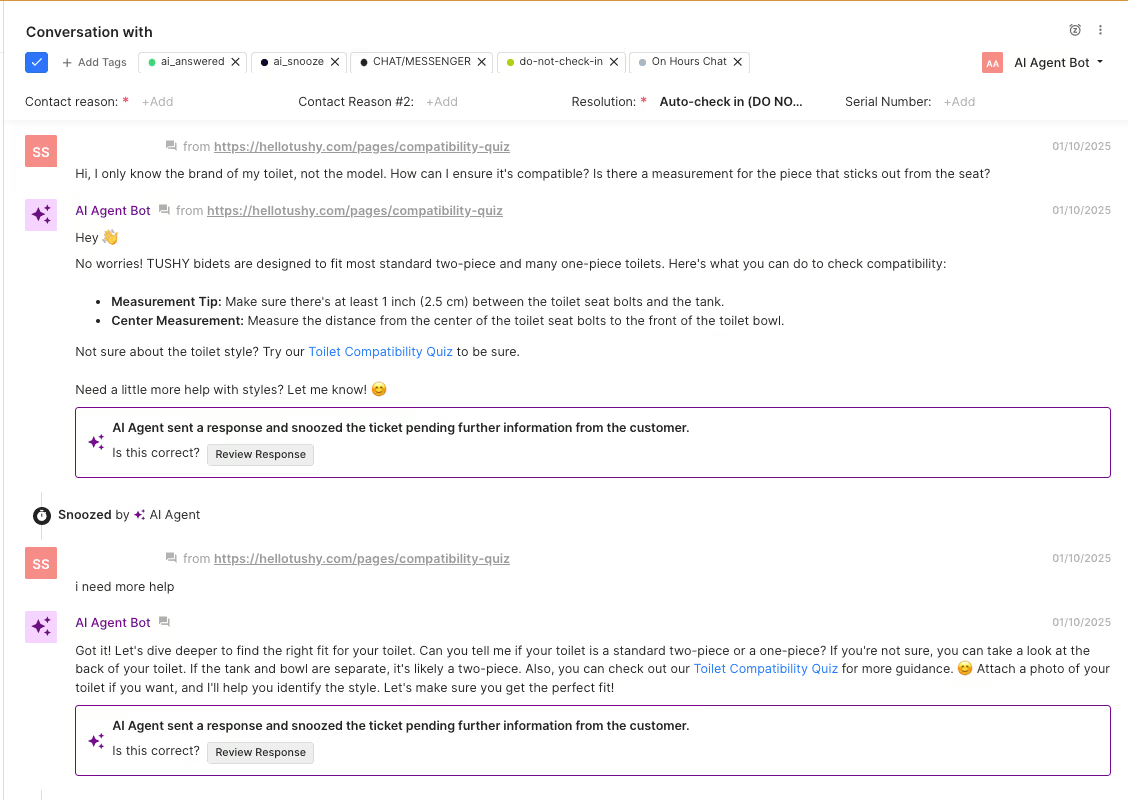
Here’s an example of what it looks like from bidet company TUSHY:
3) Proactively engage with customers and offer help with a floating query bar
AI understands a shopper’s journey by tracking key behavioral signals: products and pages viewed, purchase history, and cart data.
The floating query bar transforms product search into a seamless conversation, eliminating the need for clicks, filters, or endless navigation. It allows customers to find what they're looking for through natural conversation with the Shopping Assistant—wherever they are on your site.
Because AI tracks this information, it can personalize interactions based on the signals above. It does this by asking clarifying questions and remembering previous interactions in the same session.
This type of proactive support actually leads to more sales: it garnered almost 10k in revenue for jewelry shop Caitlyn Minimalist.
”Customers interact with the Shopping Assistant like they would a customer service rep—it’s a two-way conversation where they answer questions and get personalized product recommendations,” says Gabi, Customer Service Lead at Caitlyn Minimalist.
That success was similar for beauty shop Glamnetic.
“An instant response builds confidence,” says Mia Chapa, its Sr. Director of Customer Experience.
“We live in a world with short attention spans, so customers appreciate how quickly we can respond to their inquiries.”

4) Help with Quality Assurance
Quality assurance in CX is the process of ensuring that each customer interaction fits a specified list of criteria (communication, resolution completeness, attitude, etc.).
While this process has largely been a manual and time-consuming one, AI changes that for support teams.
AI-powered QA can actually review all tickets, is a scalable solution, is more consistent in its review process, saves time, and even provides instant agent feedback.
Manual QA, on the other hand, is a time-consuming and slow process, and often means feedback is delayed until leaders have the chance to review tickets. Even once they get to QA, there's a limit to how many tickets they can review in a given time frame.
Feature spotlight: Meet Auto QA: Quality checks are here to stay
5) Personalize product recommendations and upsells
AI can even make product recommendations for shoppers. These recommendations are based on browsing actions like if they repeatedly view the same pages and check return and shipping policies. It also tracks their entire behavior across your store: products and pages viewed, purchase history, cart data, and cart abandonment data.
Caitlyn Minimalist achieved incredible outcomes by leveraging AI for personalized recommendations:
- 59% reduction in customer response time
- 25% conversion rate
- $9,800 in direct revenue generated by AI Agent
“We've always based our customer service on a patient, empathetic point of view because a lot of people purchase for important moments in their lives—weddings, deaths, graduations. People are gifting in response to big life moments, so we need the Shopping Assistant to really listen to our customer’s situation and support them,” says Michael Holcombe, Co-owner and Director of Operations at Caitlyn Minimalist.
Shopping Assistant can also handle objections and offer discounts, if price is what’s stopping customers from completing a purchase.

6) Reduce costs and increase return on investment
We’re not talking about reducing headcount. AI just supports agents in being able to handle their core responsibilities better. For example, mybacs was able to double the number of tickets they resolved without adding a single person to the team.
“This isn’t a matter of eliminating jobs, but giving our employees their primary jobs back," says Luke Wronski, CEO of RiG’d Supply. “Our hope is to have AI give us the time back to have a conversation with you about the stuff that keeps us stoked to do what we do.”
Aside from saving money on hiring additional human agents, AI helps your support team reduce costs in other ways.
For Dr. Bronners, that meant 4 days per month in team time-savings by handling routine inquiries efficiently, and $100,000 saved per year by switching from Salesforce to Gorgias.
Top AI tool for CX: Gorgias AI Agent
Gorgias is hands down the best AI tool—not just for CX, but also for teams like web, ecommerce, and marketing. And our customers couldn’t agree more.
“We were hesitant at first, but AI Agent has really picked up on our brand’s voice. We’ve had feedback from customers who didn’t even realize they were talking to an AI,” says Lynsay Schrader, Lab and Customer Service Senior Manager at Jonas Paul Eyewear.
Here’s a complete rundown of how Gorgias AI Agent bridges gaps in customer experience:
Combine humans with AI for powerful results
A hybrid human and AI Agent approach is the best way to level up your customer support operations and sales strategy.
Book a demo with us to see the power of AI Agent.
{{lead-magnet-2}}

How to Build the Perfect CX Report in Gorgias (7 Dashboard Examples)
TL;DR:
- CX reports help you track performance, trends, and team impact. They show how support efforts drive business goals, but manual reporting often buries key insights.
- Gorgias Dashboards can be customized with 70+ metrics. You can mix and match KPIs like automation rate, resolution time, and CSAT to create reports that fit your needs.
- You can add filters to drill down into key insights. Filter reports by tags, channels, ticket fields, agents, integrations, and more to uncover trends and make data-driven decisions.
- You can create up to 10 dashboards in Gorgias. Each dashboard can include up to 20 charts, helping you track multiple CX priorities in one place.
As a CX manager, your reporting is your strategic advantage. It's how you prove your team's value, identify emerging trends, and determine exactly what decisions to make.
But when creating those reports becomes time-consuming? That's when insights get buried.
With Gorgias Dashboards, you can build CX reports rooted in your business goals. Unlike standard reports, these customizable dashboards allow you to mix and match over 70 metrics and KPIs, so you can track progress on efforts like reducing your ticket backlog, boosting automation rate, and more.
In this post, we’ll tell you why CX reporting matters, how to set up Dashboards in Gorgias, and show you seven different ways to customize them based on your business needs.
7 Dashboard examples based on your goals
With 70+ charts and metrics to choose from, there are endless ways to style your dashboard. To make it easier for you, we’ve put together seven dashboards for specific use cases.
Setup 1: The performance overview dashboard
Let’s start with the basics. This is an all-in-one dashboard for a high-level overview of support and agent performance.
Recommended metrics to track:
- Average CSAT over time – Tracks CSAT trends and helps identify when and why satisfaction fluctuates.
- Agent performance (Closed tickets, CSAT, FRT, Ticket Handle Time) – Provides a comparative view of agent efficiency and effectiveness.
- Automation rate – Measures the percentage of interactions resolved without an agent.
- Resolution completeness rate – Ensures agents are fully addressing customer inquiries before closing tickets.
- Busiest times – Identifies peak support hours for better staffing decisions.
- Created vs. closed tickets – Helps track whether ticket volume is increasing, decreasing, or stabilizing.
- Support-driven revenue – Shows how CX efforts contribute directly to revenue.
- Overall time saved by agents – Quantifies the operational efficiency of automation and support workflows.

Setup 2: Recover from low CSAT
Trying to bump up your CSAT score? This dashboard will help you improve customer satisfaction by keeping metrics related to response time and customer sentiment in your line of sight.
Recommended metrics to track:
- Average CSAT – Track overall customer sentiment.
- CSAT over time – Identify trends in satisfaction scores.
- Resolution time – Assess the average time tickets are resolved.
- First response time – Ensure customers are getting quick responses.
- Messages per ticket – Analyze whether customers need to follow up multiple times to get an issue resolved.
- Comment highlights – Identify recurring customer complaints and positive feedback.
Make sure to add a filter for customer satisfaction scores of 1-2 stars to dig into the reasons for low scores. Go to Add Filter > Satisfaction score > check 1 and 2 stars, as shown below:

What to look out for:
- If CSAT drops when resolution times increase, implement low-lift fixes like automating your most asked questions with Flows.
- If messages per ticket are high, train agents on clearer communication to resolve issues in fewer touches. Macros are an excellent way to let agents send complete and on-brand replies.
- Take note of recurring topics found in both positive and negative customer comments. Use these insights to finetune your CX.

Setup 3: Catch up on your Chat tickets
Peak seasons are the ultimate test of how robust your customer support organizational structure is, and nowhere is it more obvious than in your chat tickets. Without well-trained agents and proper automations in place, it’s easy to drown. Here’s a dashboard to keep up with chat inquiries.
Recommended metrics to track:
- Open tickets – Track the number of unresolved chat tickets.
- Created vs. closed tickets – See if new tickets are outpacing resolutions.
- First response time – Identify delays in initial responses.
- Resolution time – Track how long it takes to close tickets.
- Busiest times – Understand when ticket volume is highest.
- Agent performance – Compare workload distribution amongst agents.
Don’t forget to toggle the filter for the chat channel by clicking Add Filter > Channel > Chat.

What to look out for:
- More open tickets than closed? Adjust your agent schedule or use conversational AI like AI Agent to automate up to 60% of your inquiries.
- Slow first response time? The average first response time ranges from 1-9 hours based on your industry vertical. Reduce response time by using AI and automation to quickly resolve common questions.
- Take note of the busiest times of the week to schedule agents accordingly.
Setup 4: Improve SLA compliance
Maybe you’re in this rut: You’ve established your SLAs (service level agreements), but your team is struggling to meet them. What now?
Go back to the data. With this SLA compliance dashboard, you can look at exactly how many tickets have breached or achieved SLAs while monitoring agent performance. This dashboard is ideal for brands that provide warranties and/or limited-time return windows.
Recommended metrics to track:
- Tickets with breached SLAs – Track service requests that exceed the SLA timeframe.
- Achieved and breached tickets – Compare SLA compliance over time.
- Ticket handle time – Measure how long agents spend on service-related tickets.
- Agent performance (Closed tickets, CSAT, FRT, Handle Time) – Identify service efficiency gaps.
- Busiest times – Understand peak service request periods to optimize scheduling.
You may find that breached SLAs are caused by certain topics (like refunds) or channels (like social media). Dive deeper by adding a filter for contact reason and channel. Click Add Filter > Contact Reason / Channel.

What to look out for:
- If SLA breaches increase, improve agent scheduling and automate follow-ups with AI Agent, Flows, and Macros.
- If certain agents have longer handle times, review training and escalation procedures.
- If the busiest times overlap with SLA breaches, reallocate staffing to high-volume periods.
Setup 5: Reduce refund & return requests
Constant returns and refund requests are issues you want to address immediately. Looking at return reasons per customer is inefficient. Instead, get the bigger picture with a dashboard that highlights customer sentiment and product data.
Recommended metrics to track:
- Ticket Fields - Top Used Values – Track the most common reasons for returns (e.g., “wrong size,” “poor quality,” “damaged on arrival”).
- Comment highlights – Identify patterns in customer complaints about product issues.
- Reviewed tickets – Ensure all return-related issues are properly reviewed and categorized.
- Resolution time – Track how long it takes to resolve return/refund tickets.
- Support-driven revenue – Assess whether support teams are turning return requests into exchanges or alternative purchases.
Pro Tip: This dashboard works best if you have a Ticket Field for Contact Reason and Return as a Contact Reason. Then you can add a filter for return-related tickets by clicking Add Filter > Contact Reasons > Return.

What to look out for:
- Pay close attention to your top return reason. This can help you improve product quality, packaging, shipping logistics, and policies.
- If CSAT is low for return-related tickets, update your return policies or consider giving customers in-store credit, exchanges, or discounts.
Related: 12 ways to upgrade your data and trend analysis with Ticket Fields
Setup 6: Monitor customer sentiment on product quality
From food and beverage to skincare brands, product quality is central to your success. Use this dashboard to keep an eye on how customers feel about your products, then use the data to implement changes customers actually want.
Recommended metrics to track:
- Ticket Fields - Top Used Values – Track commonly used feedback labels (e.g., “too salty,” “bland,” “packaging issue”).
- Trend - Evolution of top 10 used values – Monitor changes in product sentiment over time.
- Comment highlights – Identify trends in positive and negative feedback.
- Reviewed tickets – With our AI-powered quality assurance feature, Auto QA, ensure return-related tickets follow your brand’s policies.
- Satisfaction score – Understand how product issues impact CSAT.
You can analyze specific customer sentiments (like tickets that only say “too salty”) by applying a filter. For example, you would click Add Filter > Ticket Field Filters > Flavor > Too Salty.

What to look out for:
- Take note of your top used ticket value, so you can adjust your product formulation, packaging, etc.
- If you’ve made recent changes to your product, analyzing the trend of your top 10 used values is a great way to understand how customers feel about those changes.
- Improve your satisfaction score based on customer reviews.
Setup 7: Optimize social media support
More and more customers are using social media apps to shop — in fact, the global social commerce market is projected to grow by 31.6% each year through 2030. The best way to give browsers a good first impression of your brand is by prioritizing social media support.
Recommended metrics to track:
- Channel performance – Compare social media ticket volume to email and chat.
- Tickets with breached SLAs – Ensure fast responses on high-priority platforms.
- First response time (by channel) – Ensure social media inquiries receive timely responses.
- Conversion rates from live chat/helpdesk – Measure how well support influences sales.
- Top performers – First response time – Highlight the agents excelling in social engagement.
Don’t forget to apply a filter for your social media platforms by clicking Add Filter > Channel > Facebook / Instagram / TikTok Shop.

What to look out for:
- If first response times are longer for social media than email or chat, assign dedicated agents to your social media channels or use automated replies.
- Monitor tickets with breached SLAs on a weekly basis, and aim to reduce it with AI Agent.
- If you have more created tickets vs. closed tickets, consider posting more product education content and updating your self-service resources.
How to create a dashboard in Gorgias
You can create up to 10 dashboards. Here’s how to create a new dashboard:
- Go to Statistics > Dashboards.
- Click + (plus sign) > Create a new dashboard.
- Click Add Charts. Choose from 70+ charts. You may add a maximum of 20 charts in a dashboard.
- Looking for a specific trend? Click + Add Filter to focus on key data.
- Need to save your dashboard data? Click Actions > Download Data to export the report as a CSV file.
Try it for yourself with our interactive tutorial:
Make data-driven CX your competitive advantage
With Gorgias Dashboards, CX managers have full control over their reporting.
By tracking the right KPIs and customizing dashboards based on goals, your team can set the standard for flawless customer support.
Find out the power of custom dashboards in Gorgias. Book a demo now.
{{lead-magnet-1}}

Should Brands Disclose AI in Customer Interactions? A Guide for CX Leaders
TL;DR:
AI is everywhere in customer service—powering live chats, drafting responses, and handling inquiries faster than ever.
But as AI takes on more of the customer experience, one question keeps coming up: Should brands tell customers when they’re talking to AI?
Legally, the answer depends on where you operate. Ethically? That’s where things get interesting. Some argue that transparency builds trust. Others worry it might undermine confidence in support interactions.
So, what’s the right move?
This guide breaks down the debate and gives CX leaders a framework to decide when (and how) to disclose AI—so you can strike the right balance between innovation and trust.
The legal landscape: What are the disclosure requirements?
Depending on where your business operates, disclosure laws may be strict, vague, or nonexistent. Some laws, such as the California Bolstering Online Transparency Act, prohibit misleading consumers about the use of automated artificial identities.
For maximum legal protection, it’s best to proactively disclose AI use—even when not explicitly required.
A simple disclaimer can go a long way in avoiding legal headaches down the line. Here’s how to disclose AI use in customer interactions:
- In email: Use your email signature to indicate that AI has assisted in generating the response.
- In chat: Update your Privacy Policy to clarify when AI is involved in customer interactions.
Truthfully, AI laws are evolving fast. That’s why we recommend consulting legal counsel to ensure your disclosure practices align with the latest requirements in your region.
But beyond avoiding legal trouble, transparency around AI usage can reinforce customer trust. If customers feel deceived, they may question the reliability of your brand, even if the AI delivers great service.
Related reading: How AI Agent works & gathers data
How does disclosure impact trust and satisfaction?
Research shows that 85% of consumers want companies to share AI assurance practices before bringing AI-driven products and experiences to market.
But what does “transparency” actually mean in this context? An article in Forbes broke it down, explaining that customers expect three key things:
- Clear disclosure: They want to know when AI is (and isn’t) used in customer interactions.
- Simple, non-technical language: AI disclosures shouldn’t feel like reading a terms-of-service agreement. Keep it digestible.
- Easy-to-find information: AI disclosures should be visible—not buried in fine print. A chatbot notification, a banner on your site, or a brief message before an AI-powered chat begins can make a big difference.
How you disclose AI matters just as much as whether you disclose it. At the end of the day, AI isn’t inherently good or bad—it’s all about how it’s implemented and trained.
The business perspective: Risks and benefits of AI transparency
The way a brand approaches AI disclosure can impact trust, satisfaction, and even conversion rates—making it a decision that goes beyond simple legal requirements.
While some customers appreciate honesty, others may hesitate if they prefer human support. Brands must weigh the pros and cons to determine the best approach for their audience.
Risks of disclosure
Let’s be honest: AI in customer service still carries baggage. While some consumers embrace AI-driven support, others hear "AI" and immediately picture frustrating, robotic chatbots that can’t understand their questions.
This is one of the biggest risks of transparency: customers who’ve had bad AI experiences in the past may assume the worst and disengage the moment they realize they’re not speaking to a human.
For brands that thrive on personal connection and high-touch service, openly stating that AI is involved could create skepticism or drop-off rates before customers even give it a chance.
Another challenge? The perception gap.
Even if AI is handling inquiries smoothly, some customers may assume it lacks the empathy, nuance, or problem-solving skills of a live agent. Certain industries may find that transparency about AI use leads to more escalations, not fewer, simply because customers expect a human touch.
Benefits of disclosure
Despite the risks, transparency about AI can actually be a trust-building strategy when handled correctly.
Customers who value openness and ethical business practices tend to appreciate brands that don’t try to disguise AI as a human.
Being upfront also manages expectations. If a customer knows they’re speaking to AI, they’re less likely to feel misled or frustrated if they encounter a limitation. Instead of feeling like they were "tricked" into thinking they were talking to a human, they enter the conversation with the right mindset—often leading to higher satisfaction rates.
And then there’s the long-term brand impact.
If customers eventually realize (through phrasing, tone, or inconsistencies) that they weren’t speaking with a human when they thought they were, it can erode trust.
Deception—whether intentional or not—can backfire. Proactively disclosing AI use prevents backlash and reinforces credibility, especially as AI becomes a bigger part of the customer experience.
Example: How Arcade Belts used AI transparency without losing the human touch
Arcade Belts, known for its high-quality belts, wanted to improve efficiency without compromising customer experience. By implementing Gorgias Automate, they reduced their reliance on manual support, creating self-service flows to handle common inquiries.

Initially, automation helped manage routine questions, such as product recommendations and shipping policies. But when they integrated Gorgias AI Agent, they cut their ticket volume in half.
The transition was so seamless that customers often couldn’t tell they were interacting with AI. “Getting tickets down to just a handful a day has been awesome,” shares Grant, Ecommerce Coordinator at Arcade Belts. ”A lot of times, I'll receive the response, ‘Wow, I didn't know that was AI.”
You can read more about how they’re using AI Agent here.
Decision-making framework: Should you disclose AI?
We mentioned it earlier, but deciding whether or not to disclose your use of AI in customer support depends on compliance, customer expectations, and business goals. That said, this four-part framework helps CX leaders evaluate the right approach for their brand:
Step 1: Assess legal requirements
Before making any decisions, ensure your brand is compliant with AI transparency regulations.
- Research regional laws governing AI disclosure, as requirements vary by jurisdiction.
- Consult legal counsel to confirm whether your AI usage falls under any mandated disclosure policies.
- Stay informed on evolving AI governance frameworks that could introduce new compliance obligations.
Step 2: Review customer expectations and brand positioning
AI transparency should align with your brand’s values and customer experience strategy.
- Consider whether transparency supports your brand’s messaging—does your audience expect openness, or do they prioritize seamless interactions?
- Analyze customer sentiment through surveys and engagement data to determine if they prefer knowing when they’re speaking with AI.
- Review past AI interactions to identify patterns in customer reactions and adjust your approach accordingly.
Step 3: Test both approaches and measure the impact on CSAT
Rather than making assumptions, run controlled tests to see how AI disclosure affects customer satisfaction.
- Conduct A/B tests comparing interactions with and without AI disclosure.
- Track key support metrics like response time, CSAT scores, and AI resolution rates to measure effectiveness.
- Experiment with different positioning strategies—does framing AI as a helpful assistant improve customer perception?
Step 4: Adjust based on customer feedback and industry trends
AI strategies shouldn’t be static. As customer preferences and AI capabilities evolve, brands should refine their approach accordingly.
- Regularly collect customer feedback to understand how AI disclosure impacts their experience.
- Monitor industry trends to see how competitors and market leaders are handling AI transparency.
- Stay flexible—if sentiment shifts, be ready to adjust your disclosure strategy to maintain trust and efficiency.
Best practices for AI disclosure (if you choose to disclose)
If you decide to be transparent about AI in customer interactions, how you communicate it is just as important as the disclosure itself. Let’s talk about how to get it right and make AI work with your customer experience, not against it.
First, make AI part of your brand voice
AI doesn’t have to sound like a corporate FAQ page. Giving it a personality that aligns with your brand makes interactions feel natural and engaging. Whether it’s playful, professional, or ultra-efficient, the way AI speaks should feel like a natural extension of your team, not an out-of-place add-on.
Instead of:
"I am an automated assistant. How may I assist you?"
Try something on-brand:
"Hey there! I’m your AI assistant, here to help—ask me anything!"
A small tweak in tone can make AI feel more human while still keeping transparency front and center.

Read more: AI tone of voice: Tips for on-brand customer communication
Clarify the AI’s role
One of the biggest mistakes brands make? Leaving customers guessing whether they’re speaking to AI or a human. That uncertainty leads to frustration and distrust.
Instead, be clear about what AI can and can’t do. If it’s handling routine questions, product recommendations, or order tracking, say so. If complex issues will be escalated to a human agent, let customers know upfront.
Framing matters. Instead of making AI sound like a replacement, position it as a helpful extension of your support team—one that speeds up resolutions, but hands off conversations when needed.
Blend human and AI seamlessly
Even the best AI has limits—and customers know it. Nothing is more frustrating than a bot endlessly looping through scripted responses when a customer just needs a real person to step in.
AI should be the first line of defense, but human agents should always be an option, especially for high-stakes or emotionally charged interactions.
A smooth handoff can sound like:
"Looks like this one needs a human touch! Connecting you with a support expert now."
Frame AI messaging positively
AI disclosure doesn’t have to feel like an apology. Instead of focusing on limitations, highlight the benefits AI brings to the experience:
- Faster responses
- 24/7 availability
- Instant answers to common questions
It’s the difference between:
"This is an AI agent. A human will follow up later."
vs.
"I’m your AI assistant! I can answer most questions instantly—but if you need extra help, I’ll connect you with a team member ASAP."
The right framing makes AI feel like an advantage, not a compromise.
Monitor customer feedback and adjust messaging
AI perception isn’t static. Regularly analyzing sentiment data and customer feedback can help refine AI messaging over time—whether that means adjusting tone, improving explanations, or updating how AI is introduced.
When you follow these best practices, AI can be a real gamechanger for your customer support. Just take it from Jonas Paul…
When AI is done right: Jonas Paul’s success story
Jonas Paul Eyewear, a direct-to-consumer brand specializing in kids' eyewear, needed a way to manage high volumes of tickets during the back-to-school season without overwhelming their customer care team.

To streamline these conversations, Jonas Paul implemented AI Agent to provide instant responses to FAQs. This allowed human agents to focus on more complex cases that required personalized attention.
“Being able to automate responses for things like prescription details and return policies has allowed us to focus more on the nuanced questions that require more time and care. It’s been a game changer for our team,” said Lynsay Schrader, Lab and Customer Service Senior Manager and Jonas Paul.
Jonas Paul saw a 96% decrease in First Response Time and a 2x ROI on Gorgias AI Agent with influenced revenue. You can dive in more here.
Make AI transparency work for you with AI Agent
Whether or not your brand chooses to disclose AI in customer interactions, the key is to ensure AI enhances the customer experience without compromising transparency, accuracy, or brand identity.
So how can you get started? Gorgias AI Agent was built with both effectiveness and transparency in mind.
For every interaction, AI Agent provides an internal note detailing:
- The Guidance, Articles, or Macros it referenced
- The source of any account information it used
- A prompt for your feedback to continually refine and improve responses
Excited to see how AI Agent can transform your brand? Book a demo.
{{lead-magnet-1}}

Grow Your Business with Conversational AI: Insights from Glamnetic & Audien Hearing
TL;DR:
- Glamnetic eliminated over 15,000 repetitive responses with AI, letting their team focus on complex customer needs and sales opportunities.
- Audien Hearing found their AI support was matching or beating human performance, with faster responses and better conversion rates.
- AI turned out to be more than just a time-saver—it became a serious revenue generator by engaging shoppers in real-time and driving sales.
- This is just the beginning for AI in customer experience. AI will transform everything from personalized recommendations to proactive sales and marketing.
The AI revolution in ecommerce customer support is already here. 77% of service teams are already using AI, and 92% say it improves time to resolution.
Brands that embrace AI can improve efficiency, scale faster, and deliver better customer experiences.
But what does that look like in practice?
In a recent Grow Your Business in 2025 with Conversational AI webinar, Kevin Gould, co-founder of Glamnetic, and Zoe Kahn, owner of Inevitable Agency & former VP of Retention and CX at Audien Hearing, shared how their teams use Gorgias AI Agent to streamline support, reduce workloads, and convert more shoppers into customers.
For them, AI isn’t just hype, it’s delivering real results—and Kevin and Zoe have seen it firsthand.
Ahead, we’ll break down Kevin and Zoe’s firsthand experiences, covering:
- How AI helped Glamnetic reduce manual responses by 15,000–16,000 tickets
- How AI-powered responses helped Audien Hearing capture more revenue
- The biggest misconceptions about AI in customer support—and why they’re wrong
- What AI-driven CX will look like in 2025 and beyond
Watch the full webinar replay here:
How AI reduces 16,000 manual tickets and scales CX
As ecommerce brands grow, so does the demand for fast, high-quality customer support. But hiring and training more agents isn’t always scalable—especially when a significant portion of support tickets are repetitive, like “Where’s my order?” or “How long does shipping take?”
That’s where AI comes in. Instead of bogging down human agents with routine questions, AI-powered support can handle high ticket volumes instantly, freeing up CX teams to focus on complex issues, relationship-building, and revenue-generating conversations.
Both Glamnetic and Audien Hearing have seen firsthand how AI can transform CX. Glamnetic reduced manual responses by 15,000–16,000 tickets, while Audien Hearing saw AI outperform some human agents in both response speed and upselling.
Related reading: How to build an effective AI-driven customer support strategy
How Glamnetic uses AI to cut manual responses by 25%
As Glamnetic scaled, so did its customer support workload. Managing tens of thousands of tickets while maintaining fast, high-quality support became a challenge. Many of the inquiries Glamnetic receives are repetitive––think order updates, shipping questions, and product details.
The brand needed a way to streamline responses without losing the personal touch.
Here’s what made the difference: Glamnetic used AI Agent to automate responses for thousands of tickets, allowing human agents to focus on higher-value interactions that drive customer loyalty and sales.
Kevin Gould, co-founder of Glamnetic, was excited about infusing AI across the entire business. “CX felt like the first natural extension. A big part of that was [Gorgias] pushing us into it pretty quickly. We saw early on that AI could be a force multiplier for the business."

The results speak for themselves:
- 15,000–16,000 fewer manual responses—freeing up agents for more complex cases.
- Faster response times, improving the overall customer experience.
- Smarter AI-driven sales, turning support inquiries into revenue opportunities.
Read more: How Glamnetic uses AI Agent to handle 40% of Support Volume with "mind-blowing" results
"What’s really interesting is that AI handled 24% of tickets across the entire year…Now, we’ve gotten much smarter about how we deploy AI for revenue generation, and it’s been highly impactful. It’s well worth your time to deploy this across your company." —Kevin Gould, Co-founder, Glamnetic
How Audien Hearing scaled support without adding headcount
Scaling customer support while keeping costs in check is a challenge for any fast-growing ecommerce brand—especially one focused on retention and long-term customer relationships.
For Audien Hearing, this meant managing a team of over 80 support agents while ensuring that every interaction added value to the customer experience.
Rather than endlessly hiring more agents, Audien Hearing turned to AI to optimize. AI Agent helped them handle high ticket volumes faster, without sacrificing quality. With AI handling routine inquiries, their team was able to focus on higher-value conversations that drove long-term growth.
Zoe Kahn, former VP of Retention & CX, notes the importance of efficiency when managing large teams, “Once you reach that scale, you have to figure out how to be efficient and adapt to the right tools. AI helped us a lot. That said, it’s not a magic button. It takes training and adjustment. Adopting AI with Gorgias has allowed our team to focus on the tasks that truly need a human touch."
The impact was undeniable:
- AI became one of Audien Hearing’s fastest agents, reducing response times.
- Support scaled without adding headcount, optimizing costs.
- AI-driven interactions increased revenue by converting browsing customers in real-time.

Read more: How Audien Hearing increased efficiency for 75 agents and reduced product returns by 5%
"[AI Agent] ended up being one of our fastest agents—answering the most tickets and driving the most revenue. A lot of that revenue was potentially missed revenue because these were customers sitting on the site, asking questions about the products, and wanting an answer now so they could purchase…Now, AI can answer those questions immediately and convert those customers." —Zoe Kahn, former VP of Retention & CX, Audien Hearing
Initial AI skepticism and common concerns
AI in customer support still raises eyebrows. Some brands worry about losing the human touch, while others fear AI will replace agents rather than support them.
Even Zoe Kahn was initially skeptical about AI’s role in customer experience:
"I wasn't fully convinced at first—I wanted humans talking to my customers. But as soon as I saw it working well, and just as great as some of my agents, if not even better because of faster responses, and we're having agents train it... it's much easier now with a bunch of wins.”
What changed? Seeing AI in action—handling repetitive, time-consuming tasks like order tracking and FAQs, while human agents focused on complex cases, upselling, and retention.
For Kevin Gould, AI wasn’t brought in to cut costs but to help the CX team work smarter, not harder:
“We try to think a lot about how to work smarter, not harder. On one end of the spectrum, there's a lot of tedious, repetitive emails that can be automated right off the jump. Then as you move up the stack, from servicing up to generating revenue, it starts to get really interesting. If our ultimate goal is to provide customers with the best experience possible, then why not free up our agents from tedious tasks and double down on the things that push us towards that goal?”
The key takeaway? AI isn’t automation just for the sake of automation. It’s for scaling smarter and freeing up CX teams to have the right conversations at the right time.
Related reading: How to automate half of your CX tasks
What’s next for AI in ecommerce CX in 2025?
AI in ecommerce customer support started as a cost-saving tool and is now proving to be a revenue driver. Looking ahead to 2025, AI’s role in personalization, proactive selling, and marketing integration will only grow.
For Zoe Kahn, the future of AI involves building stronger customer relationships:
"Take time to create community with your customers. Have the ability to think not only about revenue driving but also customer retention. Every time you have an opportunity to talk to a customer, take it. If teams don't have that time that could be freed up from training an AI agent, we see them rushing through replies that could really ruin their relationships with customers."
This shift toward AI-powered personalization is something Kevin Gould is already seeing in action. He predicts AI will become a key player in conversational selling, guiding customers to the right products at the right time:
"Eventually, we'll get to a place where AI is going to become a great recommendation engine. If we sell press-on nails, and a consumer has bought a few different styles in the past, AI can quickly pivot into conversational selling."
Beyond support, Kevin also believes that AI is blurring the lines between CX and marketing. As brands gain deeper insights into customer behavior, AI-powered support will help fuel marketing campaigns, drive retention, and create highly personalized experiences:
"If I asked [my support agent] how she sees her job, she’d say it started four years ago as customer service, then evolved into customer experience. Over time, different layers of customer experience emerged to the point where it's now an integrated marketing role.
She's collaborating closely with marketing specialists—growth marketing, brand marketing, and more. At this point, this role is almost like an extension of the marketing team...It requires a balanced mindset that blends marketing expertise with a deep understanding of customer experience to be successful."
Related reading: 6 ways to increase conversions by 6%+ with onsite campaigns
Why 2025 is the year to embrace AI in CX
In 2025, AI will go beyond responding to customers. It will anticipate their needs, personalize their journey, and turn support into a revenue-generating powerhouse.
As Kevin Gould and Zoe Kahn shared, brands that embrace AI free up their teams to focus on high-impact conversations that build loyalty and boost sales.
From Glamnetic reducing 15,000+ manual responses to Audien Hearing’s AI-powered revenue wins, the results speak for themselves. AI helps brands personalize support, engage customers in real-time, and even drive conversational selling.
Ready to see how many routine tickets you could automate? Book a demo to see AI Agent in action.
{{lead-magnet-1}}

Meet Auto QA: Quality Checks Are Here to Stay
TL;DR:
- Manual QA is time-consuming—Auto QA does the heavy lifting. It frees up team leads by automatically reviewing conversations with accuracy and consistency, so they can focus on improving support.
- Auto QA scores 100% of private text conversations, whether handled by a human or Gorgias AI Agent. It evaluates support quality based on Resolution Completeness, Communication, and Language Proficiency.
- Auto QA supports multiple languages but provides feedback in English. It can assess tickets in any language supported by OpenAI’s GPT-4, ensuring global teams can benefit from automated QA.
- Start with individual meetings before a team-wide rollout of Auto QA. One-on-one conversations help address specific agent concerns and ensure a smooth transition.
Customer satisfaction scores (CSAT) have long been the go-to metric for measuring support quality, with 53% of customer experience leads relying on them. However, CSAT only tells you part of the story.
When customers rate their experience 3 out of 5, what does it really mean? Did they rate the agent’s actions or the company’s policies? Was an agent helpful or inefficient? Did they take unnecessary steps to get to the answer?
Quality assurance checks can fill these gaps, but manual QA is a heavy lift. Team leads often struggle to review more than a small sample of conversations, leaving many issues unchecked.
Auto QA redefines quality assurance for today’s support teams. It transforms QA from a manual task into an automated feedback engine that helps your team deliver excellent support, every single time.
Let's dive into how Auto QA works, how accurate its scoring is, and how you can add it to your support workflow to start improving customer conversations today.
What is Auto QA?
Gorgias Auto QA upgrades the customer service QA process by automatically evaluating 100% of private text conversations, whether handled by a human or AI Agent.
Each message is scored on metrics like Resolution Completeness, Brand Voice, and Accuracy, helping teams fix and address areas of improvement.
With an automated QA process, brands can:
- Save time: Automated quality checks help team leads focus on the most critical tickets.
- Ensure consistency: Both human agents and AI Agent are evaluated with a unified, comprehensive quality score.
- Boost performance: Agents can receive targeted coaching to provide more consistent customer experiences.
- Meet customer expectations: Customers benefit from higher-quality support with quicker resolutions and accurate responses.
How Auto QA works
Let's explore a real-life scenario: A customer reaches out about a product issue, seeking troubleshooting help. Here’s how the interaction unfolds:
Customer: "Hi, my device broke, and I bought it less than a month ago. -Kelly"
Support Agent: "Hi Kelly, please send us a photo or a video so we can determine the issue with your device. -Michael"
The ticket is eventually closed, but the customer doesn't leave a CSAT score.
In this case, Auto QA would provide the following insights:
- Communication Score: 3/5. Reason: The agent's wording could benefit from more empathy.
- Resolution Score: "Complete". Reason: The agent effectively addressed the customer's concerns.

How accurate is Auto QA’s scoring?
Auto QA uses a comprehensive scoring system that evaluates conversations on communication proficiency and knowledge accuracy.
To ensure accuracy, Auto QA only scores interactions with at least 250 characters and messages from both agents and customers. It's also smart enough to filter out automated responses, spam, and bot messages.
Auto QA automatically scores three main aspects:
- Resolution Completeness: Did the agent solve everything the customer asked about? This area is scored with a "Complete" or "Incomplete.” For instance, it correctly marks a ticket as "Complete" when a customer resolves their issue or when there's no clear question to address.
- Communication Quality: How well did the agent listen and show empathy? Uses a 1-5 scale, looking at how well your agents acknowledged a customer’s concerns and communicated the solution.
- Language Proficiency: Did the agent communicate properly? Uses a 1-5 scale to check spelling, grammar, and syntax.
For deeper feedback, certain criteria require manual scoring from team leads:
- Accuracy: How accurate was the information provided by the agent?
- Efficiency: How quickly did the agent handle the ticket? How well did they minimize the number of follow-ups?
- Internal Compliance: How closely did the agent follow your team’s internal processes and brand guidelines?
- Brand Voice: How well did the agent use brand vocabulary, greetings, sign-offs, and tone of voice?

How to integrate Auto QA into your workflow
Whether you're just starting with quality checks or transitioning from manual QA, Auto QA can seamlessly fit into your existing processes. Here's how to get started.
1. Set your standards
What does “good” look like for your team? Review Auto QA's scoring system and decide which metrics matter most for your brand, from Resolution Completeness to Brand Voice. This will help you set realistic targets for your team to work toward.
Tip: Start by prioritizing a couple of areas. This could look like prioritizing a 5/5 Resolution Completeness score while deprioritizing Brand Voice. As your team gets comfortable with Auto QA, you can ramp up to improving Brand Voice.
2. Agree on a scoring system
Since some criteria—Accuracy, Efficiency, Internal Compliance, and Brand Voice—require manual scoring, it’s best to agree on how your team will use the scoring scale.
For example, each score from 1 to 5 receives a distinct piece of feedback. Here’s what that would look for the Efficiency criteria:
- 1/5 stars: Excessive back-and-forth that could have been avoided
- 2/5 stars: Resolution took longer than necessary due to poor process
- 3/5 stars: Average handling time with some unnecessary steps
- 4/5 stars: Quick resolution with minimal back-and-forth
- 5/5 stars: One-touch resolution
3. Prepare your agents
Start rolling out Auto QA through individual meetings with agents rather than overwhelming your team with a general training session. One-on-one conversations allow you to better address each agent's specific questions and concerns. Make sure to cover the following:
- Explain that Auto QA is meant to help make conversations consistent, not police agents
- Explain the scoring criteria and what each score means
- Highlight which criteria agents should prioritize
If regular one-on-one meetings aren't part of your routine, consider introducing Auto QA during your weekly team meetings or through a dedicated training session. Just remember to leave plenty of time for questions and walk through multiple examples to ensure everyone is comfortable with the system.
4. Establish a review schedule
To solidify QA checks, create a simple routine for reviewing Auto QA insights with the Auto QA Report (navigate to Statistics > Auto QA).
- Weekly: Do a quick check of automated scores.
- Monthly: Analyze trends and patterns across conversations.
- Quarterly: Review and adjust quality benchmarks.

5. Act on insights
Once you’ve collected a substantial amount of Auto QA data, there are a few follow-up actions you can take to continue having high-quality conversations:
- Set the example by sharing high-scoring conversations in your team meetings.
- Coach agents individually by reviewing their tickets together. Celebrate high-scoring conversations and provide targeted feedback on areas for improvement. This immediate, personalized approach helps agents grow faster than general training sessions.
- Increase product and policy knowledge by refining internal guidelines on brand voice, escalation processes, and more.
Remember, Auto QA works alongside your existing processes—it doesn't replace them. Start small, focus on the metrics that matter most to your team, and scale up as you get comfortable with Auto QA.
Brands are excited about the power of Auto QA
We invited leading ecommerce brands to beta test Auto QA, and their feedback highlights how it's transforming quality assurance across support teams of all sizes.
amika's support team values the complete visibility beyond CSAT: "Auto QA dramatically widens the volume of tickets we can review," they share. "A 5-point scale only tells you so much, and relying on consumers providing feedback limits what you're able to learn from."
Peachybbies' CX team enjoys real-time improvement: "Being able to give real-time feedback is pivotal, especially during peak times," their team explains. "Auto QA catches pretty much everything I'd want a human QA agent to catch."
OSEA Malibu's managers discovered operational insights: "It helps managers understand when a macro or process is leading to incomplete conversations versus when an agent made a mistake," their support lead shares.
Bring quality into every conversation with Auto QA
By prioritizing QA, your team can identify potential problems early, reduce errors, and improve overall performance, leading to a smoother, more reliable experience for customers––and your CX team.
In the long run, brands focusing on QA can gain a competitive edge. Book a demo now to see what Auto QA can do for you.
{{lead-magnet-1}}

5 CX Metrics To Track in 2025: A Guide for Managers
There are tons of CX metrics you could be tracking. But where you spend your time is crucial as a customer experience leader.
According to recent data, these are the top five CX metrics for you to prioritize and improve on in 2025.
{{lead-magnet-1}}
Why CX metrics are essential for success
Not tracking CX metrics is like putting a loaf of bread in the oven but leaving baking time to chance. Without a set timer, you could end up with an underbaked bowl of dough or a burnt mess. Unless you have a sixth sense, it’s going to be really challenging to end up with something good.
In the same vein, metrics provide clear parameters for success. Meet or exceed them and your team is doing well; fall short and you’ll be better equipped to identify pain points and solve them.
Here are a few additional reasons why setting customer support metrics is key to success.
- Measure success and ROI. By tracking KPIs like resolution time, first response time, and CSAT, you can gauge the health of your customer support program and potentially justify investments in CX initiatives in the future.
- Identify customer and team pain points. Metrics help uncover areas where customers or your team is struggling. For example, high resolution times or low CSAT scores signal friction in the experience that you can address.
- Create accountability within your team. When everyone on your team understands what success looks like, it aligns efforts and keeps everyone focused on shared goals.
- Prioritize resources. Metrics guide CX leaders on where to allocate resources—for example, leveraging AI and automation to tackle repetitive tickets when ticket volume adds up or resolution times are getting high.
- Get proactive. Metrics reveal trends in customer behavior which can help you predict customer needs and make proactive adjustments in your CX strategy. By monitoring customer sentiment and acting on feedback, CX leaders can create more personalized and positive experiences.
Tip : AI and automation can be valuable sidekicks as you look to optimize and improve on metrics. That’s especially true for busy periods: in 2024, 70% of CX leaders relied on AI and automation during peak seasons.

Resolution time should be your main focus for 2025
Customers are done with being patient. One study found that two thirds of respondents valued speed to reply just as much as product price.
A recent survey we ran found the same thing.
In our 2024 customer expectations survey, we asked CX leads and agents which metric they used to track success. Here’s what they said:
- Resolution Time (71%)
- First Response Time (59%)
- CSAT (53%)
- Revenue or Sales Impact (41%)
- Ticket Volume (41%)
Resolution time is going to be a key differentiator for your team this year. It should be your primary focus when it comes to optimizing different facets of your customer service strategy.

Top 5 CX metrics for 2025 & how to improve them with AI
1) Resolution time
Resolution time is the average time it takes to resolve a customer request from start to finish.
How do you calculate resolution time?
To calculate resolution time, you’ll take the total resolution time within a set period and divide it by the total number of customer interactions your team tackled within that same time frame.
Average resolution time = Total resolution time in a defined period / Total number of customer interactions resolved in that period
How to use AI & automation to improve it
According to a 2023 study from Statista, 70% of support leaders noted that the customer support metrics that AI had the greatest positive effect on was resolution time.
You can use automation features to send Macros to answer common questions, or leverage AI to interact as an agent via email or chat. The instant nature of these tools means that customers won’t have to wait in a queue for your team to get to them.
For example, Wildride implemented Gorgias AI Agent to manage an influx of 1,000 tickets per week. After AI Agent took over 33% of email inquiries, the team saw a 24% decrease in resolution time. That allowed the team to focus on more complex issues, streamline their support process, and make their customers happier.
2) First Response Time (FRT)
First response time is the length of time it takes for a customer service team to send the initial reply to a customer inquiry.
How do you calculate first response time?
To calculate average first response time, take the total amount of time it took for your team to respond to initial customer requests and divide by the total number of tickets within a set time frame.
How to use AI & automation to improve it
Your team is busy––when they’re not tackling repetitive questions, they’re helping customers with complicated or high-effort requests. All of that work is going to bog down your FRT, especially during more buzzy periods like sales, new releases, or over the holidays.
By using AI to jump in to handle those more routine requests, you can significantly reduce your FRT and give your team time back to tackle more heavy-lift needs.
For example, AI Agent helped Glamnetic achieve a 91% improvement in first response time during Black Friday Cyber Monday (BFCM) 2024. They got FRT down from their pre-AI Agent time of eight minutes to 40 seconds.
Here’s what that looked like in practice:

3) Customer Satisfaction Score (CSAT)
CSAT scores show how satisfied customers are with a product, service, or interaction, typically gathered through surveys.
How is CSAT calculated?
CSAT is calculated via a five-point rating scale survey sent to customers after a support interaction, where one is the worst experience and five is the best. While it can be calculated in different ways, at Gorgias the average of all survey responses is your CSAT score.
How to use AI & automation to improve it
When customers reach out for support, they’re expecting a fast response––regardless if they have an issue or are contemplating their next purchase.
That’s why using automation or AI tools to provide that lightning quick response, even if it directs shoppers to a self-service resource, can be extremely effective in raising CSAT scores. These responses could be sent by an AI agent that responds like a human agent would or an automated Macro built to fire off pre-crafted templates to common questions.
In luxury golf brand VESSEL’s case, customers felt that the AI responses were helpful and seemed on-par with the level of support they’d expect from a human agent.
“Our customers expect almost immediate responses, and so being able to automate that, even if it's not necessarily the exact answer that they're looking for, but being able to send over information to give them the reassurance that we're looking into it or trying to find an answer, whatever it may be, that's been a huge help to our team,” says Lauren Reams, the Customer Experience Manager at VESSEL.
4) Revenue or sales impact
The direct or indirect effect of customer service or business activities on generating sales or revenue.
How do you calculate it?
There are different ways to calculate revenue generated and the sales impact of customer support, and quantifying the indirect impact can be difficult. But generally, the formula looks like this:
ROI = [ (Money earned - Money spent) / Money spent ] x 100
Resource: How to measure & improve customer service ROI
How to use AI & automation to improve it
Leveraging AI and automation can provide significant cost savings because it acts as an additional agent who can tackle repetitive questions, translating to money saved on the time it would take for human agents to manually answer those questions.
The results are tangible: by automating 48% of inquiries, Dr. Bronner's saved $5,248 in the first month, and $100K in the first year.
Jonas Paul Eyewear saw revenue influenced by AI Agent as well: the team tracked $600 of sales revenue directly to the tool after it effectively answered pre-sales support questions from shoppers.

5) Ticket volume
Ticket volume is the total number of customer service inquiries that a team receives over a specific period of time.
How do you calculate it?
The customer support tool you use will be able to calculate ticket volume for you, as it’s the total number of tickets that have come in within a set amount of time. If you don’t use a CX platform yet and are still using something like Gmail or Excel, you’ll perform this count manually.
How to use AI & automation to improve it
Set rules to trigger automated responses to common questions, or ask an AI agent to completely take them off your team’s plate.
Arcade Belts, for example, saw a 50% reduction in ticket volume by using Gorgias AI Agent.
How to get buy in to improve your CX program
Tracking CX metrics is valuable for more than just gauging your program's effectiveness. The more you improve upon your CX metrics, the more you can leverage them to prove your support function’s value within your company.
- Tie CX to revenue. Show how improvements in customer satisfaction or repeat purchase rates directly impact revenue growth.
- Show industry benchmarks. Compare your team’s stats to competitors or industry averages to demonstrate how well your support strategy is working.
- Demonstrate your team’s impact on sales and retention. Use the metrics you’ve collected to show support’s impact on converting customers asking pre-sales questions and getting repeat customers.
- Ask to expand your team’s budget. Pitch acquiring additional buy in and resources by presenting revenue generated, costs saved through tools like AI and automation, and happy customers created.
How to use metrics to evaluate AI performanceIf you want to transform customer experience for the long term, the AI tools you use should never be “set it and forget it” solutions. Just as you do with your human agents, you can use metrics to evaluate your AI agent to make sure it’s performing well. If you use Gorgias, you’ll find these metrics under the AI Agent dashboard.
To review AI Agent’s performance:


It’s also easy to retrain your AI's performance by adjusting settings like Guidance, refining the internal documents it draws from, setting up brand voice, or creating a Handover topic list to escalate certain types of tickets to human agents.
Start tracking top CX metrics
Whether you’re new to being a CX leader or you’re a seasoned pro, tracking and improving on your CX metrics will help your team stand out among the rest. A key way to improve them is to leverage AI and Automation tools, and Gorgias is here to help you do it.
{{lead-magnet-2}}
Building delightful customer interactions starts in your inbox
