
.png)

Newsletter Signup
The best in CX and ecommerce, right to your inbox
Featured articles

Ticket Volume: How to Measure It, Benchmark It, and Reduce It

Gorgias AI Agent Pricing, Explained

Introducing Helpdesk 2.0: Built for How Agents Work
TL;DR:
- Built directly from agent feedback, Helpdesk 2.0 fixes real workflow pain points. The redesign focuses on reducing friction and helping agents handle more context-heavy tickets.
- A chat-style interface replaces the old email layout. Conversations are easier to follow and resolve in one view.
- Customer context is shown beside the conversation in a right-side panel. Agents can view history, orders, and details without leaving the ticket.
- AI handoffs come with clear summaries. Agents instantly see what happened, what was tried, and what to do next.
- Navigation is simpler and faster across teams. Clean menus, structured queues, and multi-store access keep agents moving efficiently.
Helpdesk 2.0 starts with the people who use it most: the agents.
We spent time understanding customer support from the agent's seat. What do they reach for constantly? What slows them down? What does a better workday look like?
Everything we found is in this brand-new update.
Why we redesigned Helpdesk
Conversational commerce is the new standard.
In customer support, this means customers expect context to remain intact wherever they reach out, whether a conversation starts on social, moves to email, or ends on a call.
This new approach to support has also changed the agent's role. Recurring tickets, like order status checks, shipping updates, and returns, are now handled by AI. What lands in the agent inbox are edge cases that require human judgment and troubleshooting, or tickets that require the full picture.
However, the original Helpdesk was built for a different era of support.
Context was separated across views rather than built into the conversation itself. It's something one in five Gorgias customers flagged, through support tickets, NPS surveys, and conversations with our team. So, we got to work.
Helpdesk 2.0 is the result.
What's new in Helpdesk 2.0
Here's a look at everything that changed.
Read conversations the way they're meant to be read
Conversations have a natural rhythm, one that’s already found in every messaging tool we use. We brought that same layout into the helpdesk.
Say goodbye to the 2000s email interface and hello to chat bubbles. This updated design changes how quickly you can orient yourself and resolve the ticket in one go.

Chats with customers now look like real conversations, using the speech bubble style you’re familiar with on popular messaging apps.
Check customer history without losing your place
Checking a customer's history used to mean leaving the conversation, an extra step that interrupted what should have been a smooth workflow.
Now, past conversations open in a sidebar next to the active conversation. You can view a customer’s full history, search through their timeline, and open prior tickets without going to a new page.

Check past conversations, orders, and customer details in the brand-new Customer Timeline.
See order details the moment you open a ticket
Order information is easier to reference than ever. Open a ticket, and you instantly see the customer's recent orders, marked with product images and invoice details at a glance. Need to dig deeper? Click on an order, and the expanded information appears in the same panel.
For teams using custom integrations, apps are fixed in a quick-access integration menu on the right.

See order details, product images, and totals at a glance on the right panel, without leaving the conversation.
Pick up where AI left off
You shouldn't have to dig through a thread to figure out what AI already tried. Now you don't have to.
When AI Agent escalates a conversation, it includes a concise handover summary that mentions the issue, what actions were taken, and why it was passed to your team.

Escalated tickets include a brief AI-generated handover summary, marked in yellow, for quick reference.
Move faster across every store and team
We restructured and simplified the navigation. The left sidebar organizes everything into clear categories: Inbox, AI Agent, Marketing, and Analytics, so anyone on your team knows exactly where to go.
To quickly update your knowledge base or adjust a workflow, both now live right in the sidebar. For teams managing multiple stores, switching between them is just as straightforward, accessible from the sidebar, so agents can move between inboxes without breaking their flow.

Agents can switch between stores and their corresponding inboxes directly from the left menu.
A workspace that works the way agents do
Support comes down to the person on the other end of the conversation. We built Helpdesk 2.0 is to make sure they have everything they need to show up for that moment.
The best way to see the difference is to work in it. Start a free trial today.



Further reading
.avif)
5 Holiday Onsite Campaigns to Maximize Year-End Sales
Not sure where to go once the Black Friday and Cyber Monday excitement settles down? Don't worry—you're not alone. Many ecommerce brands will celebrate the uplift in sales from the four-day shopping frenzy without realizing there's a huge opportunity to keep the momentum going.
The holiday shopping season is your final chance to drive sales, delight customers, and end the year strong. These five proven campaigns will help you capture last-minute shoppers, increase repeat purchases, and maximize results.
1. Gift finder campaign: make gifting easy 🎁
Help shoppers find the perfect gift or gift bundle by linking existing resources in the campaign or offering pre-sales assistance through a conversational campaign (recommended).
Shoppers love personalized recommendations. A gift finder campaign highlights curated suggestions that simplify their decision-making.
- How it works: Trigger a message when shoppers spend over 15 seconds on a product page.
- Example message: “Looking for the perfect gift? This [product] is a fan favorite and pairs perfectly with [accessory]. Complete your gift with just one click!” OR;
- Example message #2: “Not sure what to get? We can help! Click here to chat with us about finding the perfect gift.”
- Why it works: Gift bundles increase average order value (AOV) by 20%.
Pro tip: Highlight top-rated products or seasonal bestsellers to build trust.

2. Last-minute shopper campaign: create urgency ⏰
Encourage quick action as deadlines approach.
Last-minute shoppers are in a rush, so combining urgency with a discount is the perfect motivator.
- How it works: Use an exit-intent popup during the final shopping days.
- Example message: “Still need gifts? Use code HOLIDAY10 for 10% off and get delivery by [date]. Hurry—time is running out!”
- Why it works: Exit-intent campaigns double engagement and reduce bounce rates by 37%.
Pro tip: ”You can also set a cart value threshold, ensuring that tailored offers are only provided to shoppers once they’ve added the minimum to their cart. You can also use a unique discount code rather than a generic code to drive a higher CTR.

3. Post-BFCM re-engagement campaign: boost loyalty 🔄
Turn Black Friday shoppers into repeat customers.
Reconnect with returning buyers by rewarding them for their loyalty.
- How it works: Display a personalized offer when previous shoppers return to your site.
- Example message: “Thanks for shopping with us on Black Friday! Here’s an exclusive 15% loyalty discount for your next holiday purchase.”
- Why it works: Repeat customers typically spend more, with a 10% boost in gross merchandise value (GMV).
Pro tip: Use the customer’s previous purchase to recommend complementary products.

4. AI-powered product recommendation: upsell effortlessly 🤖
Suggest relevant items to increase cart value.
Use AI to offer personalized product recommendations based on what shoppers are browsing or have in their cart.
- How it works: Show a message at checkout or when shoppers add an item to their cart, utilizing our tagging conditions to create highly targeted audience segments.
- Example message:“Love [product]? Add [related item] to complete the set! Customers who bought this also loved [product 2].”
- Why it works: Personalized upsell recommendations increase AOV by up to 15%.
Pro tip: Highlight frequently bought together items or exclusive bundles for the holidays.

You can easily set up product recommendations shown on your cart page with Gorgias Convert:

5. Holiday new arrivals campaign: spotlight seasonal exclusives ✨
Build excitement with fresh, holiday-themed products.
Shoppers love discovering new arrivals, especially during the holiday season.
- How it works: Target homepage visitors or holiday collection browsers.
- Example message: “Just in time for the holidays! Explore our exclusive [product line] and find the perfect gift.”
- Why it works: Announcements for new products increase conversions by 6%.
Pro tip: Use festive visuals and emphasize limited availability to drive urgency.

Don’t forget to A/B test your campaigns 🧪
Testing helps you discover what works best for your audience. Experiment with different offers, visuals, or CTAs to optimize results.
- Example: Test two versions of a free shipping upsell campaign.
- Version A: “Spend $15 more to get free shipping!”
- Version B: “You’re $15 away from free shipping. Add [product] to your cart now!”
- Result: Version B may outperform because it includes a clear product recommendation, reducing customer effort.
Pro tip: Track key metrics like click-through rate (CTR) and AOV to measure success.

These holiday campaigns are proven to boost sales and customer engagement during the busiest time of year. Use tools like Gorgias Convert to launch, personalize, and optimize your strategies seamlessly.
Don’t wait—end the year strong with campaigns that deliver results!
{{lead-magnet-1}}

How to Leverage Tools to Manage a High Volume of Sales on TikTok Shop
TikTok Shop generated 68.1% of gross market value sales across all social media platforms in 2024 and $3.8 billion in sales in 2023. Clearly, it’s becoming a massive channel with abundant opportunities for sellers.
To effectively harness TikTok Shop, however, brands with high-volume sales need to understand the specific challenges they will face when launching on the social platform.
Many of these are operational, like maintaining an accurate inventory list between platforms, supporting customers efficiently, and fulfilling a large number of orders.
When used together, AfterShip Feed and Gorgias can help you overcome these operational hurdles and start selling on TikTok Shop sooner.
{{lead-magnet-1}}
Streamline order management & customer support on TikTok Shop
TikTok Shop is the commerce-enabled side of TikTok, where brands and creators can list their products for sale. Shoppers then make a purchase through shoppable (in-feed) videos, live shopping, or product showcases. The app aims to provide a “frictionless checkout experience,” enabling shoppers to engage with their favorite accounts and add-to-cart in a flash.

While setting up a TikTok Shop is relatively simple, if you already run an ecommerce store that does a high volume of sales, adding TikTok Shop as an additional channel will be a little more complex. Thankfully, tools like AfterShip Feed and Gorgias can help you solve many operational issues and provide the same best-in-class customer experience on TikTok Shop as you do on your other channels..
Here’s a highlight reel on how you can implement both tools to improve efficiency and customer satisfaction, tackling issues like fulfillment or customer support inquiries from the same customers on different channels.
Centralize customer support with Gorgias

800+ Gorgias customers currently use the TikTok Shop integration. It’s quick and easy to connect. With it, you can:
Manage all customer interactions in one place
Coordinating customer support across different channels can be a pain. With Gorgias, however, you’ll be able to manage inquiries more efficiently and handle all shoppers’ messages by responding to TikTok Shop inquiries directly from Gorgias using text, images, and videos.
Additionally, you can address order-related issues and manage cancellations, returns, and refunds from TikTok Shop in the same Gorgias dashboard you use for your existing channels.
Automate ticket creation
Leverage Gorgias’s automated ticket creation to reduce First Response Time (FRT) and ensure that you don’t miss a single customer inquiry from TikTok Shop. Save time by handling repetitive tasks (like order status updates) with automation.
Enhance customers’ experience
Enabling the Gorgias TikTok Shop integration will allow you to maintain better control over communication and provide a consistent customer experience. Customers shopping via TikTok Shop will benefit from quicker responses, improving overall satisfaction and boosting brand loyalty.
Simplify operations with AfterShip Feed
AfterShip Feed is a reliable TikTok Shop management tool with 1,800 customers. It auto-syncs products, inventory, and orders between TikTok Shop and ecommerce platforms.
Partner AfterShip Feed with TikTok Shop to:

List on TikTok Shop more efficiently
AfterShip Feed makes listing high volumes of products on TikTok Shop easier through bulk uploads and editing, enabling you to update up to 10,000 SKUs at once.
It uses AI to add key product details and keep your product listings accurate and consistent. Tools like category templates and product ID generation make it even easier to list your full catalog.
Safeguard your revenue
AfterShip Feed has several features that will help you avoid lost revenue, especially during busy times like BFCM.

Inventory threshold
Inventory threshold helps you determine the minimum amount of inventory you need to have on hand to avoid selling out or buying too much. You can also set a fixed amount of inventory aside for TikTok Shop.
Price rules
Price rules help you set the ideal prices for each item you sell to protect your profit margins.
Fulfillment hold
A fulfillment hold stops an order at the fulfillment stage to ensure sufficient funds on the customer side, sufficient stock on yours—or to solve another issue behind the scenes. TikTok Shop has a standard 1-hour fulfillment hold, which can cause issues with inventory syncing on your main ecommerce platform.
Streamline order management
AfterShip Feed supports multiple fulfillment methods and integrates with many returns solutions. Sync orders from TikTok Shop with your existing fulfillment systems, ensuring timely and accurate deliveries. You can sync up to 24,000 orders to Shopify per hour.
Other features include order ID, shipping method, and product-SKU mapping.
Which are the top-grossing TikTok Shop industries?
Two industries in particular see massive sales from TikTok Shop: beauty and personal care, and womenswear and underwear. According to a 2024 report from Statista, the beauty category saw over 370 million sales and women’s fashion 284 million sales in 2023.

The beauty category alone has generated almost $2.5 billion in GMV, while the womenswear category has seen $1.39 billion.
If your brand belongs to one of these categories, including Gorgias and AfterShip Feed in your TikTok Shop toolkit could be a great fit for you.
Gorgias and AfterShip create better experiences
Pairing Gorgias and AfterShip Feed will help you deliver a fantastic customer experience and grow your business on TikTok Shop.

How to Pitch AI Agent to Your Boss
TL;DR:
- AI Agent reduces workload and prevents burnout for CX teams. It handles routine queries and allows your human agents to focus on providing a higher level of service where it's needed most.
- AI Agent is secure and compliant with industry standards. Gorgias uses a zero data retention policy and follows strict security regulations, including SOC 2 Type II certification.
- AI Agent delivers personalized, on-brand responses. Custom Guidance and data from sources like Shopify allow AI Agent to maintain brand consistency while providing tailored customer interactions.
- Real-world success stories show tangible results with AI Agent. Brands like Psycho Bunny and Baby Gold have seen significant improvements in response times and resolution rates by implementing AI Agent.
AI changes the way CX teams operate. But we firmly believe that it’s a good thing.
It will help you improve your team’s workload, say goodbye to burnout, and create a more consistent and speedy experience for your customers.
Here’s the process we recommend for pitching Gorgias AI Agent to your boss, complete with an FAQ section for quick answers.
Jump to a section:
- Start with the benefits
- Outline the data & security safeguards in place
- Highlight its brand accuracy and personalization
- Share success stories
- Set expectations
{{lead-magnet-1}}
Start with the benefits
Gorgias views AI as an extension of CX teams, and that’s how many of our customers see AI Agent as well. Baby Gold calls theirs Michelle, Psycho Bunny calls theirs Lisa.
These autonomous agents allow your human agents to focus on more complex and nuanced issues, providing a higher level of service where your customers need it most.
Here are some other things that make AI Agent a great addition to your team:
- ⏰ 24/7 availability: AI Agent operates around the clock, ensuring that customer inquiries are addressed promptly at any time, including weekends and holidays.
- 🏔️ Scalability: AI Agent can handle a high volume of inquiries simultaneously without any decrease in performance. This scalability is particularly valuable during peak times like BFCM.
- 🚀 Efficiency and speed: AI Agent can process and respond to queries much faster than human agents, leading to quicker resolutions and improved customer satisfaction.
- 🦎Adaptability: AI Agent can quickly adapt to new information, products, or changes in policies immediately – all you have to do is add them to your knowledge docs and to the Guidance you set.
- 🦾 Full control: You stay in full control of how AI Agent behaves in specific scenarios. Give AI Agent custom Guidance to ensure that each interaction with your customers reflects your brand’s values, policies and tone.
📚 Further reading: Our AI Approach: Onboard, Automate, Observe, and Coach
Outline the data & security safeguards in place
Rest assured that AI Agent and Gorgias operate under a zero data retention (ZDR) policy. Once data is used, it isn’t stored.
We’re SOC 2 Type II Certified and follow strict regulations in regards to data security.
You can view the terms that cover the data we collect and how we use Artificial Intelligence by reading Our Master Service Agreement (MSA) and Data Processing Agreement (DPA).
🎯 Resource: How AI Agent works & gathers data

Highlight its brand accuracy and personalization
AI Agent provides consistent, accurate, and on-brand responses based on the information in your Help Center, Shopify order data, Macros, handover instructions, and the actual custom Guidance you set for it.
It might just surprise you with just how specialized it can get.
“Sometimes agents forget personal details to call out when communicating with our customers, like birthdays or weddings,” says Sindi Melgar, the Customer Service Manager at Baby Gold.
“But I noticed on a few different occasions where AI Agent (ours is named Michelle) is highlighting these things and is saying, ‘Congratulations on your wedding!’ Just the tone of voice that Michelle is able to adopt is definitely on brand for us.”
Ensure certain topics are handed over or excluded
When you set up AI Agent, you’ll also let it know the types of topics you’d like it not to answer.
AI Agent automatically hands over tickets to your team whenever it lacks confidence in an answer or detects an angry customer.
But you can also use handover rules to choose how AI Agent behaves when it passes tickets to your human team, and add specific topics that it should always hand over to your team.
🎯 Resource: Customize how AI Agent behaves
Provide feedback on responses
Don’t like something AI Agent said? Or, did you love an answer it gave?
It’s easy to let AI Agent know by telling it you liked the response, saying it should have pulled from a different resource, or reporting an issue.

🎯 Resource: How to coach AI Agent and give feedback
Prioritize your team’s docs
AI Agent uses your Shopify order data, Macros, your brand’s webpages, as well as your Help Center to give your customers accurate and on-brand responses. It also prioritizes any Guidance that you set.
🎯 Resource: Why having a quality knowledge base is essential to using AI for CX
Share success stories
We wouldn’t expect you to onboard a new tool without some actual statistics and reviews. Below, browse three success stories and the fantastic metrics that AI Agent helped their teams achieve.

After just one month of implementing AI Agent, the team at VESSEL not only increased the number of emails automated via AI Agent by 20%, but reduced first response time to 58 seconds and saw their resolution time decrease to one minute and six seconds.

When Baby Gold implemented AI Agent, they achieved a 49-second first response time, a one-minute and four-second resolution time, and answered 1,361 tickets. They also quadrupled their email automation rate.

Psycho Bunny saw a 99.8% faster first response time, 99.4% faster resolution time, and 26% of tickets resolved by AI Agent.
“Our customer support KPIs are already fantastic: we're already leading in the industry,” said Tosha Moyer, Senior Customer Experience Manager at Psycho Bunny.
“To improve on that, we need AI—it’s not physically or financially possible with human agents alone.”
Set expectations
AI Agent isn’t going to find lost packages, pick up the phone, or fix damaged products. While this might seem obvious, it’s important to understand AI Agent’s core capabilities, as we want this to be an exciting and useful addition to your team.
“AI Agent does a great job of efficiently handling returns and exchanges, and split shipment tracking info,” shares Tosha Moyer. “The overall tone is good and some of its responses are really excellent.”
Below, find the top use cases for AI Agent, as well as the specific actions you can configure for it within Gorgias.
AI Agent use cases
These are the top AI Agent use cases that we recommend:
- Where is my order? (WISMO) inquiries
- Product-related questions
- Returns
- Order issues
- Cancellations
- Discounts (including BFCM)
- Customer feedback
- Account management
- Collaboration requests
The specific actions you currently can configure for AI Agent include:
- Cancel an order in Shopify
- Edit a shipping address in Shopify
- Send Loop Returns portal deep link
- Send return shipping status from Loop Returns
- Cancel a subscription in Recharge
With more to come! And to quiet any worries, it’s worth mentioning that AI Agent will not perform any actions without you confirming them first.
Enhance your brand reputation and build trust
Offering fast, accurate, and 24/7 support can significantly enhance your brand reputation and build customer trust, which can translate into higher customer loyalty and increased revenue.
{{lead-magnet-2}}

10 Must-Know AI Agent Use Cases for Instant Resolutions
TL;DR:
- Gorgias AI Agent handles a variety of customer inquiries. These include order tracking, returns, cancellations, discounts, account management, feedback, collaboration requests, and complex topics.
- Use Guidance to train AI Agent to handle each type of inquiry. Guidance acts like a built-in training manual, helping AI Agent follow your brand’s guidelines in every interaction.
- Test and refine Guidance to keep responses accurate. Use Test Mode to ensure AI Agent follows instructions, reflects your brand’s tone, and escalates when needed.
- AI Agent can provide 24/7 support. Even when your agents are offline, AI Agent can respond to customers, reducing response times and keeping customers satisfied.
For support teams, sending the right answer at the right time, every time, is the ultimate goal. But with limited resources and operating hours, how can you be there for your customers 24/7? We’ve got an answer.
Designed specifically for ecommerce brands, AI Agent is conversational AI that steps in where human agents are stretched thin: handling repetitive tickets. AI Agent is trained on your brand’s policies, voice, and instructions, helping you resolve customer inquiries like your agents — but faster.
We’ll cover 10 types of inquiries AI Agent can resolve instantly, complete with template instructions (Guidance) and real-life examples. Plus, keep in mind five best practices to get the most out of your new AI teammate.
{{lead-magnet-1}}
10 AI Agent use cases, templates, and examples
Each use case comes with a template for Guidance instructions that acts like a built-in training manual for AI Agent. Then, see how AI Agent uses those templates to respond to real customer tickets.
Note: Guidance are special instructions that tell Gorgias’s AI Agent exactly how to handle customer questions, including when to hand them off to your human agents. This gives you control over AI Agent, so every AI interaction is always aligned with your brand’s protocols.
1. Where is my order? (WISMO) inquiries
90% of shoppers want to be able to track their orders, according to DispatchTrack. Easily fulfill those neverending WISMO requests with one comprehensive Guidance that detects a customer’s current order status to give them the best answer.
Include these key elements in your where is my order? Guidance instructions:
- Detect if a tracking number is available: If the order has a tracking number, provide the link to the tracking page.
- Provide delivery time: Automatically calculate and share the expected delivery date based on the shipping method.
- Check order status: Inform the customer whether the order is processing, shipped, or delivered.
- Handle delivery delays: If the system detects a delay, apologize and offer an updated delivery estimate.
- Escalate complex issues: If the order is missing or has incorrect tracking info, escalate the ticket to a human agent for further review.
Here’s an example of a where is my order? Guidance setup, available as a template in Gorgias:

Here’s how AI Agent uses that Guidance to assist a customer with their order inquiry:

💡 Pro Tip: Can’t find AI Agent? Double-check that you have an active AI Agent subscription and connect Shopify to Gorgias. To do this, go to Settings > My Apps > Shopify > Update app permissions. You must be an Admin to complete this task.
2. Product-related questions
Shoppers ask product questions to get the clarity they need before buying. These pre-sales questions can make or break their decision to buy your product. Close the gap from browsing to checkout by using AI Agent to deliver quick, accurate answers that help them make confident decisions.
Here’s an example of a product-focused Guidance setup:

Here’s how AI Agent uses that Guidance to assist a customer with their product inquiry:

💡 Pro Tip: AI Agent can also learn information from your web pages. Go to AI Agent > Knowledge > Public URL sources to sync key web pages like sizing guides, blog posts, and more.
3. Returns
Answering ecommerce return requests can be time-consuming. Requests can range from a simple what is your return policy? question to customers wanting to go through the return process. Regardless, return inquiries can easily be handled by AI and handed off to a human agent if necessary.
Include these key elements in your returns Guidance instructions:
- Determine return eligibility: Check if the order is within the return window based on your policy.
- Identify non-returnable items: Inform customers if their item is non-returnable due to your specific policies.
- Guide through the return process: Provide instructions on how to initiate a return, including steps like entering an order number or using a return portal link.
- Inform about processing times: Share estimated times for processing returns and refunds.
- Escalate complex cases: If the return involves exceptions, like damaged goods or international returns, escalate the ticket to a human agent.
Here’s an example of a returns inquiry Guidance setup, available as a template in Gorgias:

Now, look at how AI Agent uses this Guidance to assist a customer with their return request:

💡 Pro Tip: If you’re using Loop Returns, set up AI Agent to automatically send a returns portal link to customers. This Action fully resolves returns inquiries by directing shoppers straight to their orders.
4. Order issues
Order issue tickets often require back-and-forth. The customer states their problem, you ask for photo verification and check if the customer has tried all the different solutions — the list goes on. Let AI Agent cover the bases for you every time, and if needed, escalate the ticket to your team.
Include these key elements in your order issues Guidance instructions:
- Express empathy for any inconvenience caused: Show that your customer’s happiness and experience are priorities.
- Handle damaged products: Provide instructions for customers to submit photos of damaged goods, then process a replacement or refund based on your policy.
- Correct incorrect shipments: If the wrong item was sent, guide the customer through returning the incorrect item and arrange for the correct product to be shipped.
- Escalate the issue: Route the ticket to a human agent for further handling.
Here’s an example of a Guidance setup for handling order issues, available as a template in Gorgias:

Here’s how AI Agent follows this Guidance to resolve a customer’s order issue:

5. Cancellations
Canceling orders is pretty much a race against order fulfillment and your third-party logistics. The key is to catch these inquiries as soon they hit your inbox. The problem? Tickets can come late at night or outside of your business hours. However, when you let AI Agent handle them, customers can rest assured that their request will be dealt with.
Include these key elements in your cancellation Guidance instructions:
- Check order status: Determine if the order is eligible for cancellation based on its shipping status.
- Process cancellation: If eligible, guide the customer through the cancellation process and confirm the order has been canceled.
- Handle shipped orders: If the order has already shipped, instruct the customer on how to return the item once received, or escalate the case to a human agent.
- Escalate exceptions: For complex or time-sensitive cancellations, escalate the ticket to a human agent.
Here’s an example of a cancellation Guidance setup, available as a template in Gorgias:

Here’s how AI Agent follows this Guidance to handle a customer’s cancellation request:

💡 Did you know? You can let AI Agent cancel an order when the customer and order meet certain conditions. For example, the Action will only be performed if the fulfillment status is still empty. Go to AI Agent > Support Actions > Create from Template > Cancel order.
6. Discounts (including BFCM)
Come holiday season, including Black Friday, you’ll be swamped with loads of discount inquiries. Whether it’s customers asking about discount codes not working or if you have any codes available, these repetitive inquiries are best resolved by AI.
Include these key elements in your discount Guidance instructions:
- Provide active discount codes: Provide customers with a list of current discount codes and their eligibility criteria.
- Assist with missed discount codes: Help customers who forgot to add a discount code by offering guidance on how to apply it retroactively or escalate to an agent.
- Troubleshoot code issues: Guide customers through common reasons why a discount code might not be working, like expiry dates, minimum purchase requirements, or product exclusions.
- Upsell by offering alternatives to discounts: If no active code is provided, offer alternative available promotions or direct them to sign up for the latest offers.
Here’s an example of a discount inquiry Guidance setup, available as a template in Gorgias:

Here’s how AI Agent follows this Guidance to handle a customer asking for coupons:

7. Customer feedback
Acknowledging feedback, good and bad, can make customers more willing to keep doing business with you. Maintain an honest rapport with customers by letting them know you’re always listening.
Include these key elements in your feedback Guidance instructions:
- Acknowledge positive feedback: Respond with a thoughtful, genuine thank-you message, reinforcing customer appreciation.
- Request a public-facing review: Encourage customers who leave positive feedback to share their experience further, such as writing a product review or sharing their thoughts on social media.
- Escalate negative feedback: For negative feedback, escalate the ticket to a human agent.
Here’s an example of a customer feedback Guidance setup:

Here’s how AI Agent uses this Guidance to respond to positive feedback:

💡 Pro Tip: Let AI Agent automatically tag feedback tickets for you by going to AI Agent > Settings > AI ticket tagging. This way, your agents can find all customer feedback organized in one place.
8. Account management
Account management tasks like updating details or managing subscriptions are tedious, time-consuming, and often things customers can do themselves. Let AI Agent handle these tasks to speed up resolutions.
Include these key elements in your account management Guidance instructions:
- Provide instructions: Provide clear instructions for updating account details like email, shipping address, or payment methods.
- Verify identity for security: Include steps to verify customer identity before making sensitive changes, like account or subscription modifications.
- Escalate complex issues: For issues like account access problems or billing disputes, escalate to a human agent.
Here’s an example of a Guidance setup for account management, available as a template in Gorgias:

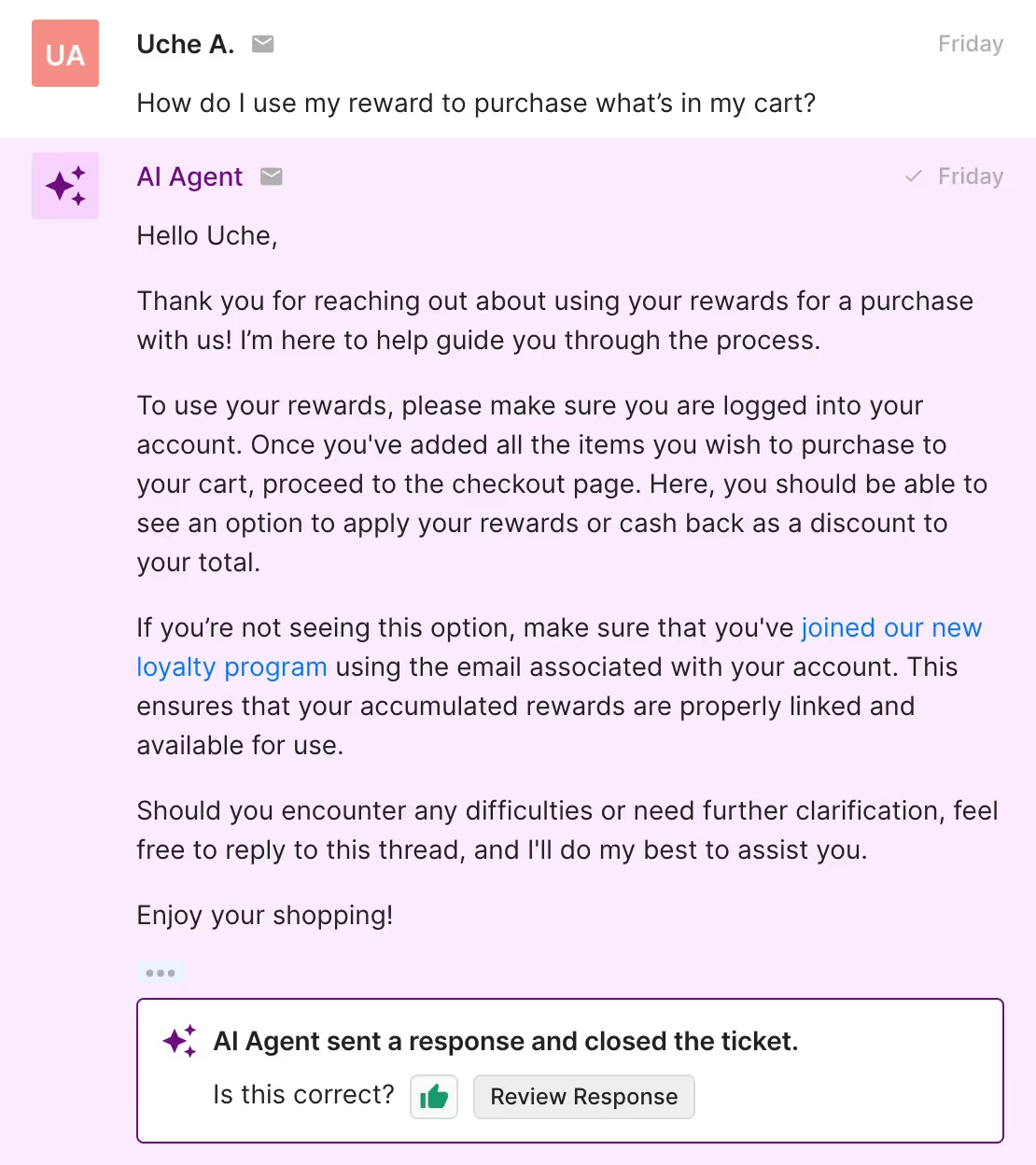
Take a look at how AI Agent uses this Guidance to help a customer with managing their rewards:
💡 Pro Tip: Use Recharge Actions to automate subscription cancellations or skip shipments with AI Agent. Go to AI Agent > Support Actions > Create from Template > Cancel subscription or Skip next subscription shipment.
9. Collaboration requests
Influencer marketing is on the rise as customers look to social proof when deciding what products to buy. With the right Guidance, your AI Agent can easily manage collaboration and marketing partnership inquiries.
Include these key elements in your collaboration requests Guidance instructions:
- Gather social media profiles: Prompt customers to share their social media profiles and relevant platforms for review if they haven’t.
- Request collaboration details: Ask for specifics about the type of collaboration or partnership they’re interested in (e.g., influencer campaigns, sponsorships).
- Provide next steps: Let the customer know their request will be reviewed and what they can expect in terms of timing.
- Escalate complex or high-value inquiries: For more significant partnerships, escalate the request to your marketing or partnerships team.
Here’s an example of a collaboration request Guidance setup:

See how AI Agent uses this Guidance to respond to a collaboration request from a content creator:

10. Complex and sensitive topics
AI Agent isn’t designed to handle all tickets. For highly complex and sensitive topics, instruct AI Agent to reroute them to your human agents who are equipped to handle certain subjects with more caution and context than AI.
For example, a makeup brand would disable AI Agent from taking on tickets about allergic reactions or health concerns so customers receive safe advice.
Here are other messages you should prevent AI Agent from answering:
- Messages that mention legal actions
- Messages that mention allergic reactions or health issues
- Messages where customers report negative reactions to products
- Messages that mention unsubscribing, stop messages, stop emails or stop texts
Take a look at how AI Agent escalates a ticket about a damaged product:

Note: AI Agent automatically escalates messages with angry language and sentiment to your support team — no Guidance needed.
Keep these 5 Guidance best practices in mind
While AI Agent answers most customer inquiries, you’ll still need to be there to provide it with the barriers to keep its answers on-brand and accurate.
Here are five best practices to keep in mind when creating Guidance instructions.
1. Include Guidance for your top 5 most FAQs
Prime AI Agent with essential brand information by creating Guidance for the top five most common customer questions:
- Order status and tracking
- Returns, exchanges, and refunds
- Order cancellations and edits
- Discounts and promos
- Subscription/account management
You can automate a significant portion of customer support and save time for your team just by letting AI Agent answer these tickets.
2. Use a descriptive Guidance name
Always use clear and descriptive names for your Guidance. AI Agent relies on this information to identify whether the Guidance is relevant to the customer’s question.
For example, instead of naming it “Shipping,” use something like “Shipping policy – domestic & international” to help AI Agent choose the right response.
3. Include examples in your instructions
It’s important to include detailed examples to help AI Agent detect the intent behind your incoming tickets. Clear examples let AI Agent match customer inquiries with the correct response more reliably.
For instance, instead of just saying, “Answer shipping questions,” give it an example: “For domestic orders, say: ‘Shipping takes 5-7 days. For international orders, it takes 10-15 days.’” This helps AI Agent detect when a question is about shipping timelines and respond appropriately.
4. Review and update your Guidance
Customer needs and products change over time, so it’s important to check back on your Guidance to make sure it’s relevant. AI Agent’s responses should reflect any changes to your policies, products, or processes to provide customers with up-to-date information.
5. Test new and updated Guidance in Test Mode
Before going live with new or updated Guidance, use Test Mode to make sure AI Agent is responding as expected.
Here are key things to check in Test Mode:
- Help Center articles: Verify that AI Agent is pulling from the correct Help Center resources.
- Guidance instructions: Test your updated Guidance to make sure AI Agent follows the protocols you have laid out.
- Excluded topics: Ask AI Agent questions about excluded topics to make sure it escalates the inquiry as needed.
- Tone of voice: Check that AI Agent’s responses are in your brand’s tone.
Lead conversations to faster resolutions with AI Agent
Right out of the box, Gorgias includes Guidance templates to help AI Agent manage your FAQs, like returns inquiries, shipping questions, and more.
Equip your AI Agent with Guidance and watch your support team thrive with more time to nurture your customer relationships and handle complex tasks.
See how AI Agent can transform your support team within minutes by booking a demo today.
{{lead-magnet-2}}


Guide To Creating and Managing A Customer Knowledge Base
Let’s be clear: a customer knowledge base is not a landing page full of frequently asked questions.
Sure, FAQs can live in your knowledge base, but they can do so much more than simple Q&A.
A well-crafted Help Center is a strategic asset, propelling your conversion goals by easily guiding customers through the sales funnel.
We’ll walk you through what a knowledge base is, how it can support your bottom line, and everything you need to know to create yours successfully.
What is a customer knowledge base?
Customers love having the power to solve problems independently and on their schedule. That's precisely what a knowledge base delivers.
Your knowledge base isn’t just a static library of articles — it's an interactive portal connecting your customers to sales and customer service. That means making it easy for them to find answers before purchasing and helping them troubleshoot any possible issues afterward.
{{lead-magnet-1}}
How a knowledge base can transform your customer service (and customer experience)
Now that we've introduced the concept of a knowledge base, let's dive deeper into how these helpful landing pages can drive revenue by leveling up your customer service game.
Zero-touch resolutions
90% of consumers worldwide consider issue resolution as their top priority for customer service. And with a knowledge base, you can make their dreams come true with 24/7 self-service support.
Think of a customer knowledge base as your company's information powerhouse that includes helpful articles, FAQs, contact methods, and more ––– all readily available 24/7 for your customers to tap into whenever they need help.
And the magic word that describes why a knowledge base is so powerful? Self-service.
Nail this experience, and your knowledge base will serve as a revenue-driving machine for acquisition- and retention-based goals.
No more waiting in line, playing phone tag, or being told the customer support team is “offline until tomorrow.” As long as customers can easily locate the information they’re after (more on this later), they get an immediate response to their questions.
Reduce support burden (and response time as a result)
Your support team deals with a mountain of questions every day:
- "Where's my order?"
- "What's your refund policy?"
- "How long does shipping take?"
…These are the classics.
Imagine dramatically cutting down the number of repetitive inquiries your team handles or eliminating them entirely. Your knowledge base can make this happen. By leveraging data to pinpoint the most frequently asked questions, you can create help articles that address these issues and showcase them at the top of your knowledge base.
But how do you identify the most common questions? Two straightforward solutions are already at your fingertips in the Gorgias Helpdesk.
1. Monitor commonly used tags: Tags are labels for categorizing tickets by topic or customer intent. Regularly reviewing tags helps identify common customer inquiries. Generally, the more a tag is used, the greater the need for clarity on that topic.
On Gorgias, navigate to Statistics > Ticket Insights > Tags to see the frequency of tag usage. This view gives you an overview of popular tags. You can adjust the view by filtering by app integration, channel, and date range.

2. Review your intent statistics: Intent Statistics provide valuable insights into why customers contact support. You can understand the primary reasons behind customer queries by analyzing these statistics.
On Gorgias, go to Statistics > Ticket Insights > Intents to review the usage frequency of different customer intents.
This feature provides a clear bar graph view of customer concerns frequently mentioned in messages. You can also change the view using channel and date range filters.

The result: Customers don’t have to search through your articles, and your support team frees up time to focus on providing better customer experiences.
Questions answered, problems solved.
Final tip: To streamline the creation of your Help Center, we created 50+ ready-to-use article templates on key topics like shipping, tracking, account setup, and product details. See the templates here.
Turn inquiries into sales
Customers browsing your store often need help deciding between options or understanding how your product works. Don’t let them leave with uncertainty.
A knowledge base isn't just for answering questions about shipping or order tracking — it can also function as a personal shopper, guiding customers toward the perfect fit or style.
With Gorgias Convert, you can engage customers at key moments with personalized, persuasive messaging. Offer exactly what they need while they’re viewing a product, such as a helpful guide from your knowledge base that:
- Clarifies product details
- Increases brand awareness
- Encourages them to explore more of your catalog
Take TUSHY, which highlights an article on their toilet compatibility page when customers show a 30-second delay on their bidet product page.

As another example, if a customer asks, "I have wide feet. Will your shoes fit me?" don’t just respond with a simple "yes." Take it further by sharing helpful links to articles about your shoe size and fit. This approach answers their question and boosts their confidence in purchasing.
Reinforce your brand
Delivering information in a consistent tone across all customer interactions builds trust and leaves a lasting impression. You can easily do this in your knowledge base by staying in line with your brand's tone and style and communicating your company’s values.
Let’s run through an example: Let's say you sell organic skincare products, and you want to use your knowledge base to establish your expertise and the brand values you share with like-minded people.
Health-conscious consumers often have specific concerns about product safety, ingredients, and potential side effects. Your knowledge base is the ideal platform to address these concerns transparently. How?
Explain the benefits of organic ingredients, the absence of harmful chemicals, and how your products contribute to healthier skin.
Proactively addressing these concerns promotes a lifestyle choice centered around happy skin and well-being. Doing so will set you up to be seen as a trustworthy source of information about safe beauty.
Everything you need to know about creating & managing a customer knowledge base
Next, we’ll walk you through creating and managing your customer-facing knowledge base.
How to set up a knowledge base
These initial steps are the foundation of a successful knowledge base, ensuring long-term success.
1) Identify your customer’s frequently asked questions
To lay the groundwork for your knowledge base, you need to know your customers like the back of your hand. A few ways you can kick off this research:
Review key questions and phrases from your previous conversations with customers: Dive into your customer support history, whether it’s through email, live chat, or social media.
Look for recurring questions, common issues, or patterns. For example, those should be high-priority topics if you're constantly fielding inquiries about sizing or return policies.
You can learn these by looking into the reasons for contact with Gorgias. This AI-powered feature identifies a ticket's contact reason from its message content. Reasons could range from cancellations and refunds to shipment issues and feedback. The Contact Reason is conveniently located at the top of each ticket, as shown in the image below.

Use customer satisfaction surveys to discover what burning questions are on your shoppers’ minds: To view satisfaction scores on Gorgias, navigate to Statistics > Support Performance > Satisfaction.
This section provides details on surveys sent, response rates, average ratings, and response distribution over three months. Filter for scores of 3 stars or below. Analyzing lower ratings and their accompanying comments will help you pinpoint the topics your Help Center articles should address.

Any customer data you have available becomes your roadmap to creating valuable knowledge base content.
The research step is crucial, and here’s why: In 2022, Deloitte Digital conducted research with Twilio about the business value of trust. The results showed that when companies make it easy to do business with them, 96% of consumers trust the brand more.
When asked how companies can make it easier to do business with them, customers said the following factors are the most important:
- Making sure issues are resolved quickly
- Being able to easily get in touch with a real person for help (and not getting bounced around from person to person when trying to solve a problem)
- Being able to simply find answers and get information as needed on their own.
Your knowledge base can help with all three factors. As a result, Deloitte’s research found that customers are more likely to reward that trust by making more frequent and higher-value purchases.
2) Use templates to streamline page creation
Starting a Help Center can be daunting, especially when you're strapped for time already.
Creating a Help Center involves research, brand consistency, copywriting, and page structure. Luckily, platforms like Gorgias provide templates that eliminate the guesswork and lighten the load.
These ready-to-use templates are crafted from successful Help Centers across various industries, giving you a proven framework to structure your own content confidently.
3) Customize the look of your knowledge base
Your knowledge base isn't just a sidekick. It's a key part of your brand's identity. No matter if a new customer lands on your knowledge base through your main site or via a Google search, it should feel like they're interacting with the same business as they jump between the knowledge base and your main site pages.
That’s why you need to ensure your knowledge base’s branding seamlessly matches your website, creating a cohesive experience for your customers.
A few elements to consider:
- Add your logo to the header
- Match the header design to your main website
- Edit fonts and use your preferred typeface
- Use similar iconography and images as you would on your other website pages
Princess Polly’s customer knowledge base ties in all of these elements well. Even though the knowledge base is on a separate subdomain, it doesn’t feel any different from the brand’s main domain from a user’s perspective.

Princess Polly's knowledge base design matches its main homepage, keeping the user experience cohesive.
Platforms like Gorgias allow you to edit fonts, logos, and headers for your Help Center without any coding required. If you're craving more customization, you can dip into HTML and CSS to tailor specific elements.
4) Make your pages categorizable and searchable
Remember, the goal here is to make things effortless for your customers. If your knowledge base is a maze of articles without clear categorization, it's not user-friendly — it's a Q&A jungle that nobody wants to venture through.
Organize all your articles with crystal-clear categorization — think "Shipping," "Returns," "Loyalty Program," and "Sizing." Don't forget to add a smart search bar that understands keywords and common phrases to recommend relevant articles.
"We have a great Help Center that attracts tens of thousands of monthly visitors who are then redirected back to the main site and in this circular motion where we don't want those customers to drop off. Two critical aspects drive this success: ensuring accessibility so customers can easily find the answers they need, and providing direct contact options for our team. We don't want you to have to go searching for your answer to the point where you're frustrated and you stop that purchasing experience." —Colin Waters, Leading at The Feed & former Associate Director of Customer Experience at BrüMate
Turn your knowledge base into an interactive Help Center
Once you’ve gone through the foundational steps, you can work on taking your knowledge base to the next level. This will enhance customer satisfaction and engagement.
5) Create automated and interactive FAQs
In a world where 65% of customers expect companies to adapt to their changing needs and preferences, proactive customer service is essential. One way you can satisfy this expectation is to use automated and interactive FAQs via chatbot that adjust to customer needs.
For example, with Gorgias Automate, you can use Article Recommendations in Chat to help customers out without live agent help. When they type in the Chat, they'll automatically receive a relevant Help Center article suggestion.
The goal is to answer the customer’s question without having to pull in a support agent.
What if automation doesn’t answer a customers’ question? Glad you asked! At the end of the flow, if the customer still requires help then a ticket is then created for an agent to follow up.
6) Offer self-serve order tracking
Order tracking is a hot topic for customers, so don't be shy about it. Add more than one CTA that customers can click to track their order without having to get in touch with your team.
Feature an order tracking CTA prominently in your knowledge base's header, via chat, and as a main option on the Help Center page.
See the screenshot from Parade below, for example: This may seem overkill, but we promise it’s not. The data to prove it: merchants who use Gorgias’s automation tools reduce support tickets in their helpdesk by 60%.
7) Go multimedia

When it comes to crafting a comprehensive knowledge base solution, text alone might not always suffice. Customers often prefer visual cues, and research has shown that visual content can significantly improve understanding and retention of information.
Think about any time you’ve built a piece of furniture that you bought online. Those manuals are confusing enough as is — even with the images added to every step. Imagine how much head-scratching you’d be doing if you didn’t have the images to accompany you.
That’s why images, videos, and other iconography are useful to include in your knowledge base, so you can eliminate confusion and boost user confidence.
Check out how Loop uses videos along with written instructions for tutorials:

8) Make contact forms easily accessible
Yes, one of the key objectives of a knowledge base is to empower customers to find answers and solutions independently. However, there will always be situations where customers require personalized support — like when an order arrives damaged, for example.
Integrating contact forms directly into your knowledge base provides a straightforward channel for customers to reach out for assistance. But these inquiries can be difficult to keep up with when you have multiple forms living on various parts of your site.
💡 Tip: Add a “contact us” CTA in your knowledge base. If a customer clicks it, they’re redirected to the main contact page on your website. You can also create a knowledge base form that’s separate to track traffic from the Help Center page alone.
Here’s an example from BrüMate, which features its “contact us” form directly on the Knowledge Base domain:

9) Add flexible communication options
It’d be nice if you could promptly answer every customer’s question, but sometimes, a self-service knowledge base isn't enough. Unique situations will arise, and that's where the human touch comes in.
A staggering 83% of customers agree that they feel more loyal to brands that respond to and resolve their complaints. So, be prepared to chat live when the need arises.
Concerned about managing live chat support? A few ways to make it easier for strapped CX teams:
- Only implement live chat on specific web pages, so it’s not featured on all pages on your site.
- Set realistic SLAs for when your customer support team is online, so if it’s outside working hours the customer shouldn’t expect an answer until the following day.
- Highlight your most prominent FAQ articles as soon as someone opens the live chat window, so they can find certain answers without contacting your team.
Here’s another knowledge base example from Princess Polly, which features a live chat widget on its knowledge base page and highlights key FAQs.

⚡ Key Takeaway: Every customer has a different preference for how they want to be communicated with. It’s important that you offer various methods to satisfy those preferences.
Keep your knowledge base updated
Your knowledge base is an ongoing initiative. As you expand your product line and discover new information, you’re going to want to adapt your knowledge base to continue meeting the needs of your buyers.
So lastly, let’s talk about maintaining and evolving your knowledge base to ensure you continue providing a high-quality and effective experience.
10) Track knowledge base analytics
Your knowledge base is an evolving entity. Using analytics to your advantage will help you continue to improve it over time.
Here are a few questions to consider:
- Are some queries or questions more popular than others? Use this to improve your content hierarchy by placing the most relevant information upfront.
- Is one method of communication preferred? Customers naturally scan left to right and top to bottom. Line up your most popular contact options with that in mind. For example, if you’re placing email, live chat, and phone number options left to right, feature email first if you know that’s the most popular contact option.
- What time of day do you see an uptick in engagement on your knowledge base? Trigger a customer service email workflow that shares FAQ pages to send during these times.
- What common questions can you place on other areas of your website? If customers are asking how your products are sustainable, it might be worth just adding that information directly to your homepage, product description pages, or on social media. Plus, you can pass this feedback to other teams like marketing, which can delve deeper to solve these problems at the root.
Gorgias's cloud-based integration with Google Analytics makes tracking engagement a cinch, helping you uncover the most-viewed questions, peak activity times, and top-clicked links.
11) Get feedback from customers
Metrics from your analytics tools is helpful but becomes even stronger when you combine it with qualitative data. This type of information has to be collected directly from customers, which you can do via feedback forms.
After each support interaction, simply ask customers how you can improve. Some questions you can ask are:
- Did they know your Help Center existed?
- Was it easy to find?
- Did they have trouble finding the answer they needed?
12) Optimize your knowledge base for search
Did you know your knowledge base can be used as an acquisition tool by driving organic traffic to your website? Optimize it for search engines by framing questions as main headings.
For example, article titles can be formatted like, "What is your return policy?" This way, when potential customers search Google for answers, your article will appear.
When building your knowledge base in Gorgias, you can even customize your meta title and description for an extra SEO boost. Check out ALOHAS’ knowledge base as an example. For customers who search “What is Alohas’ return policy?” in Google, this article will show:

The ALOHAS Help Center is the highlighted result on Google thanks to search engine optimization.
13) Regularly audit articles
We all know things won’t stay the same forever. Products change, ingredients shift, and branding gets a makeover.
When information changes, It's essential to shift the information in your knowledge base too.
What if you decide to change your shipping policy, so it’s only free after a customer spends $50 versus $25? The last thing you want is an irate customer pointing to an old article that mentions the $25 rule.
This is why you must regularly audit and quality check your articles to ensure they're as recent as possible. Failing to do so can impact customer loyalty.
Examples of a full-fledged interactive knowledge base
Now that you have the full scoop on building a successful customer knowledge base, looking at specific examples may help.
Here are a few businesses that have integrated automation, clear categorization, and user-friendly interfaces to empower customers to find answers and solutions efficiently.
BrüMate
BrüMate's Help Center stands out for its customer-centric approach. Here's what makes it effective:
Directly addresses key questions
Right at the top of the page, BrüMate addresses two of the most common customer queries: the returns policy and compatibility with their products. This ensures that customers can find answers without scrolling.

Directing customers to the right product
BrüMate goes a step further by offering a personalized product finder quiz. This interactive element helps customers discover the perfect BrüMate product that suits their needs without the hassle of extensive research.

“We’ve started pushing people towards resources that are in our Help Center. We're trying to help our customers self-solve.”
—Colin Waters, leading at The Feed & former Associate Director of Customer Experience at BrüMate
Accessible support
The Help Center features easily accessible header links, including options to track packages and return to the main site. The chat bubble is readily available, and if the customer service team is offline, customers can access helpful articles.
ALOHAS
ALOHAS’s Help Center excels in providing quick and convenient access to information. Here's what sets it apart:
Top questions featured
Just like BrüMate, ALOHAS prioritizes customer needs by featuring top questions prominently at the top of the page. This means customers don't have to scroll to find answers.

ALOHAS puts its most frequently asked questions about refunds and shipping at the top of its knowledge base.
Effective use of iconography
ALOHAS uses icons effectively for Call to Action (CTA) buttons related to orders, including tracking, returns, cancellations, and reporting issues.

ALOHAS makes it easier to navigate their knowledge base with icons and emojis.
User friendly categorization
The Help Center is well-organized with clear categorization of articles, making it easy for users to navigate and find relevant information.
Powerful search function
ALOHAS' search function is highly effective, pulling relevant information based on key phrases, further enhancing the user experience.

ALOHAS includes a search bar to allow customers to find their specific questions quickly.
LUNO
LUNO takes a minimalist approach that proves simplicity can be highly effective:
Simplicity
LUNO demonstrates that sometimes less is more. The Help Center is clean and uncluttered, ensuring customers can find what they need without distractions.

LUNO's knowledge base is simple without extra decorative elements like images or icons.
Dedicated product information
Many articles are dedicated to specific product questions, such as compatibility, user manuals, and repair guides. It serves as a virtual manual for customers.
Turn your customer service knowledge base into a conversion machine
88% of customers already search your website for some kind of knowledge base or FAQ. It's your chance to transform those searches into conversions.
All of the knowledge base tools mentioned today are available with Gorgias, which you can try for free for 7 days.
{{lead-magnet-2}}

How AI Agent Works & Gathers Data
TL;DR:
- No data is stored. AI Agent follows a zero data retention policy and complies with regulations like GDPR and CPRA.
- Learns from your store’s data to provide personalized support. AI Agent pulls from sources like Shopify, your Help Center, and internal documents to respond with relevant, on-brand answers. The use of internal knowledge rather than public databases helps to avoid generic answers.
- Constructs sentences using a mix of different large language models (LLMs). AI Agent uses OpenAI, Anthropic, and other models to form natural-sounding responses.
- Feedback helps improve AI Agent’s performance. Support teams can review AI Agent’s responses, while Gorgias also monitors feedback from thousands of brands to optimize back-end prompts.
AI Agent is a conversational AI support assistant designed specifically for ecommerce brands. Trained on your store’s Shopify data, policies, and brand guidelines, AI Agent responds to customer interactions with personalized, high-quality answers.
But is it the good type of AI?
As AI emerges more and more as a necessity for CX teams, there are a few common concerns among leaders. Worries that it will steal customer data, use data to enhance OpenAI’s LLM, or leverage shopper data for things outside of its scope are just a few.
To quell those concerns, we’ll go into the specifics of how AI Agent actually collects and uses data.
{{lead-magnet-1}}
Jump to an answer:
- How does AI Agent collect data?
- Does AI Agent store data?
- Is AI Agent trustworthy?
- How accurate are the support responses?
- Do you have to legally disclose that you’re using AI?
How does AI Agent collect data?
Gorgias’s AI Agent uses merchants’ unique data, including orders, ticket information, product catalogs, and store content, and then uses a blend of state-of-the-art LLMs, including OpenAI and Anthropic, to help it construct natural, human-like responses.
AI Agent uses the following as data sources:
- Custom Guidance
- Shopify order data
- Your Help Center
- Public webpages
- Macros
- Handover instructions and excluded topics

How AI Agent handles Shopify order data
The information AI Agent has access to is approximately the same data as the one presented in the Shopify widget in the Gorgias helpdesk. We push this same information to AI Agent to compute the next step for the customer.
Some of the data permissions that AI Agent has when integrated with Shopify include access to all orders, all draft orders, order edits, fulfilments, products, customers, themes, discounts, scripts, and content.
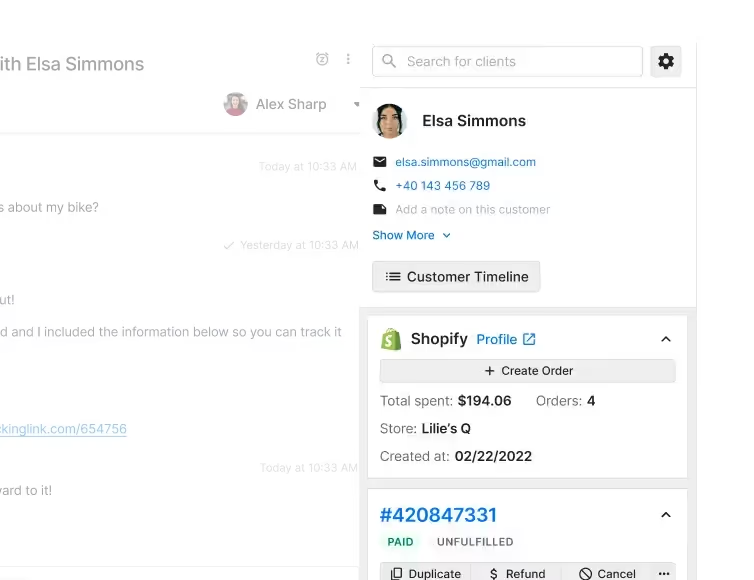
The Customer Sidebar displays Shopify data.
How AI Agent chooses data between different data sources
AI Agent processes the information from the ticket to understand where to pull the relevant data from, such as correlating information from the account associated with the interaction as well as the intent of the message. Here’s how it works.
🎟️ Ticket analysis
AI Agent first analyzes the content of the ticket to identify the key information and intent behind the customer's inquiry.
📊 Data correlation
It correlates this information with the available data sources, such as Guidance your team sets up (which takes precedence over other knowledge sources), Help Center articles, Macros, and any other integrated knowledge bases.
🤔 Context understanding
AI Agent understands the context of the message and retrieves relevant data. If there are multiple sources of information, it determines which source is most pertinent to the query.

💬 Clarifying questions
If the ticket has vague or insufficient information, AI Agent will ask clarifying questions to ensure it pulls the correct information.
✅ Internal QA process
Before sending the response, AI Agent undergoes an internal QA process where it verifies the information and creates an internal note for the merchant. This note includes information on what knowledge and Shopify data was used, and shows "reasoning" for the event if the QA failed.

🗣️ Feedback loop
Merchants or admins can provide feedback on whether the resolution was good or bad, and AI Agent uses this feedback to improve future responses.
Does AI Agent store data?
Gorgias and AI Agent do not store shopper or customer data.
AI Agent operates under a zero data retention (ZDR) policy, meaning that once the request is processed, the data is not stored.
📚 Further reading: Our Master Service Agreement (MSA) and Data Processing Agreement (DPA) govern the use of all Gorgias services, including AI Agent. If you’d like to learn more, these terms detail the data we collect and how we use Artificial Intelligence.
AI Agent prioritizes data security
Data privacy and security are top priorities for us, and our systems are designed to handle data in a secure manner without retaining personal or sensitive information.
AI Agent uses language models developed by OpenAI. OpenAI does not use customer data to train their models, and there is a zero data retention policy. Any data sent through the API is not stored beyond the duration needed to serve the request pulled.
Gorgias is SOC 2 Type II compliant and adheres to strict regulations and standards to ensure the privacy, security, and proper handling of sensitive data.
AI Agent does not use shopper data to enhance its LLM
AI Agent and Gorgias comply with stringent data privacy regulations, such as the General Data Protection Regulation (GDPR) and California Privacy Rights Act (CPRA), ensuring that shopper data is handled securely and responsibly without being used for model enhancement.
This approach ensures that shopper data remains private and is not utilized beyond the scope of providing immediate customer support.
“We were initially nervous about using AI, but it has quickly proven its worth. Our community members have even mistaken the AI Agent for a real person, which speaks volumes about how well it aligns with our brand voice.”
—Zoe Cranney, Community Experience Expert, LSKD
Is AI Agent trustworthy?
Yes! AI Agent was built not only to provide instant and accurate responses, but also with transparency in mind. For every interaction that AI Agent has, it provides you with an internal note that covers:
- The Guidance/Articles/Macros it used
- The source of the account information it pulled
- A prompt for your feedback to improve future responses

How accurate are the support responses?
While no AI tool is capable of perfect accuracy 100% of the time, we put several safeguards in place to keep AI Agent from sending inaccurate information.
Trained on your knowledge — not generic information
When AI Agent responds to a customer, it pulls from your team’s specific documents. Aside from the Guidance you set, which it prioritizes, AI Agent uses your Shopify order data, Macros, your brand’s webpages, as well as your Help Center.
Using AI Agent is unlike only relying on ChatGPT for answers, which uses broad information. AI Agent draws from your data only, making its responses highly accurate and personalized to your brand.
We use multiple LLMs for natural language processing
LLMs like OpenAI and Anthropic’s main role in AI Agent is to recognize and form natural-flowing responses. It can speak in different languages and tones to align with your brand voice. This, combined with your own internal knowledge sources, helps add that human touch that sets it apart from automated emails and bots.
Topics can be excluded or handed over
As another layer of control, we let you define topics that AI Agent should completely ignore and hand over to your team.
For example, some topics — such as medical questions or legal threats — are too sensitive to handle with AI. You can add these to your Exclusion or Handover topics to ensure AI Agent does not respond to them.
Teams can provide feedback on resolutions
You can improve AI Agent’s responses by providing feedback on how it handled tickets. You can either approve of its behavior or suggest adjustments to improve future interactions.
For example, when an influencer reached out to hip toddler carrier brand Wildride and said, “I really love you guys,” AI Agent replied, “Love you too ❤️❤️”.
Amber van den Berg, Head of Customer Experience, found this really funny, as it was exactly the type of response the team would have given. But if that response wasn’t quite right, or wasn’t on brand, they could have given AI Agent that feedback.
Do you have to legally disclose that you’re using AI?
You have the choice of whether or not to disclose your use of AI in response generated by AI Agent.
However, for maximum legal protection, we recommend using your email signature to indicate that the message your customers receive has been created with AI.
- In email: Use the Email Signature setting to disclose your use of AI.
- In chat: Use the Privacy Policy feature to disclose your use of AI.
Note: Some laws, such as the California Bolstering Online Transparency Act, prohibit misleading consumers about the use of automated artificial identities.
Give better support to your CX team & your customers
"I saw how well AI Agent was replying to customers and really started to think about how we could optimize it to work for us even more,” said Amber van den Berg, Head of Customer Experience at Wildride.
“Within one month, AI Agent was answering 33% of emails, which is quite impressive." This was essential for Wildride’s CX team after viral social media content bumped 1000 tickets per month to 1000 tickets per week.
Now, the team is freed up to focus on more complex issues, and AI Agent can fill in the rest.
Book a demo to see how AI Agent can work for you.
{{lead-magnet-2}}

Reduce Customer Effort with AI: A Smarter Approach Than Surprise and Delight
TL;DR:
- Loyalty comes from ease, not delight. Simplifying customer support drives more loyalty than going above and beyond to surprise customers.
- High-effort interactions hurt loyalty. Long, complicated support experiences can push even satisfied customers to competitors.
- AI reduces customer effort. AI can automate simple tasks like FAQs, personalizing support, and order modifications, so your team can handle more complex tasks.
- AI enhances human support. AI works best when it complements your team by handling repetitive tasks.
For years, businesses have chased the idea that delighting customers is how to earn loyalty. The belief is simple: go above and beyond, exceed expectations, and customers will come back.
However, research from The Effortless Experience, a best-selling customer service book by Matthew Dixon, shows that this approach might be wrong. Focusing on customer delight often makes the experience more complicated and less efficient.
Most businesses aim to wow customers, but trying too hard leads to longer customer support interactions and higher costs. The real key to customer loyalty is making things easy.
Below, find out how AI is another string to your customer support bow, allowing you to increase speed and reduce effort while maintaining your brand's empathetic voice.
{{lead-magnet-1}}
Why doesn’t customer delight drive loyalty?
When customers reach out with a problem they want a prompt solution––90% of customers say an “immediate” response is important.
Delight is a problem when it adds additional steps and doesn’t solve the problem upfront.
Customers don’t want a solution with all the bells and whistles. They simply want to solve the problem ASAP.
There’s a disconnect between satisfaction and loyalty
It’s a common misconception that satisfied customers are loyal customers. But the numbers tell a different story. Research shows that satisfaction doesn’t always lead to loyalty.
In fact, 20% of customers who say they’re satisfied with a service still plan to switch to a competitor. Satisfaction alone isn’t enough to keep customers from exploring other options.
High-effort experiences put customers off
High-effort experiences are a major driver of customer disloyalty. Studies show that 96% of customers who encounter high effort interactions become disloyal.
When customers feel like they have to jump through hoops to get help, they’re more likely to take their business elsewhere.

Read more: Why you need to monitor customer effort score (& how to do it)
It’s easier to trigger disloyalty than loyalty
Negative experiences are much more likely to leave a lasting impression. Even when customers feel satisfied with the products, high-effort experiences can negatively impact loyalty.
For example, a customer may contact customer service due to a minor issue, such as a shipping delay. However, they may have to wait a long time to get a response or repeat their issue to multiple agents. Even if the issue is eventually resolved, they will leave frustrated and less likely to return.
If you need to put in extra effort, even positive interactions will fall short.
Bonus track: High-effort experiences are expensive
Trying to delight customers might sound like a winning strategy, but it often comes with a hefty price tag. Offering freebies, bending rules, and making special exceptions can increase your operational costs significantly. When these additional costs don’t contribute to customer satisfaction or loyalty, it’s important to evaluate if they’re worthwhile.
Read more: The hidden power and ROI of automated customer support
Simplify, don’t surprise: How can AI help reduce customer effort?
Several common issues make customer support a hassle. Some of the biggest culprits are multiple contacts to resolve a single issue, having to repeat information, and being transferred from one agent to another.
You can solve these common customer complaints with AI.
But won’t AI make my brand sound robotic and devoid of human touch?
Our hot take is that AI actually frees up your team to focus on more valuable tasks.
For example, RiG’d Supply, a brand specializing in off-road vehicle accessories, is letting AI handle some of the repetitive work so they can do better customer service. As a small team, even the CEO occasionally jumps in to keep up with the repetitive daily requests.
“This isn’t a matter of eliminating jobs, but giving our employees their primary jobs back. We get more bandwidth back to be able to take phone calls and hear how we can help you have the best possible experience on your next ramble,” says Luke Wronski, CEO of RiG’d Supply. “Our hope is to have AI give us the time back to have a conversation with you about the stuff that keeps us stoked to do what we do.”

Read more: Our AI approach: Onboard, automate, observe, and coach
5 AI strategies to minimize customer effort
Don’t get us wrong, AI can’t handle every moving piece of your customer support. So don’t assume you can replace your whole support team with AI. You still need high-quality human support for more complex tasks.
But if you have a solid support team that provides top-quality customer experience, you already have the right foundation to benefit from AI.
1. Automate frequently asked questions
AI tools are excellent at resolving simple customer queries, such as “Where is my order?” or “How much is delivery?” on the first contact.
Quick, accurate responses lead to a smooth experience and less effort from both sides. Customers no longer need to follow up multiple times for the same issue. Plus, you’ll save time that your support team can use for more complex issues.
Consider using an automated customer experience platform with an AI assistant. For example, Gorgias AI Agent automatically responds to FAQs like “How much is shipping?” or “When will my order arrive?” in your brand’s voice. For more technical requests, it assigns them to the right agents.
Read more: What's the secret to reducing WISMO requests?
2. Personalize support
AI can analyze customer data to deliver personalized suggestions. For example, if a customer frequently orders the same product, AI might recommend a subscription service to save them time and effort. Or if a customer has ordered several cooking utensils from the same product line, AI might suggest matching pans to complete their set.
💡Pro Tip: Find a CX platform with AI that offers custom, human-like responses. You can program your AI Agent to respond in different tones — friendly, professional, playful, or empathetic — so it feels more like your brand and less like a robot.

3. Provide guidance for next issue-avoidance
Imagine solving your customers' problems before they even know they have them — that’s next-issue avoidance. With AI, you can recall past interactions and customer habits to anticipate their needs.
If a customer has had issues with a product before, AI could suggest a protection plan upfront, saving them from future headaches. Your AI solution should help you stay one step ahead so customer support remains smooth and customers are happy.
Some AI assistants can even learn specific instructions or “Guidance” for handling certain topics. For example, you could create a Guidance instructing the AI to request photos if a customer reports a damaged product. If the AI detects that photos are already included, it automatically escalates the ticket to a human agent.
4. Automate order edits
AI’s capabilities shouldn’t end at answering FAQs. AI can also handle routine tasks like address changes or order modifications so your team can focus on issues that need more technical problem-solving.
Speedy resolutions keep customers happy, and as long as the issue is resolved efficiently, they care more about the result than who handled it.
For example, brands using Shopify can use Gorgias AI Agent to cancel orders and update shipping addresses without manual intervention from agents — so agents can dive into more complex requests that need their expertise, like upselling or resolving negative customer feedback.

5. Answer customer concerns with AI recommendations
Let’s face it—nobody wants to jump through hoops to get help. AI-powered helpdesks dig into customer interactions to find out where things get sticky and offer smart suggestions to improve the process.
For instance, AI might notice that customers are often confused about how to download and print the shipping label to return items. With this insight, you could make it easier and faster for customers to find and print the correct label.
Gorgias AI Agent goes a step further by detecting your customers' top concerns and allowing you to create knowledge base articles about them automatically. Brands can use this data to update their Help Center and FAQs, make key webpages more visible, and enhance product pages, ensuring customers find the answers they need quickly and easily.

Embrace effortless customer experience with AI
Customer loyalty isn’t won with flashy gestures. Instead, brands earn it by making things easy. AI is your best friend here, helping you streamline interactions, solve issues before they even arise, and keep customers in the loop without them having to chase down information. Remember, AI is there to enhance an already solid customer experience foundation and to help your team.
It’s time to rethink how you approach customer support. With AI, you can craft a seamless, low-effort experience that satisfies customers and turns them into loyal fans.
Book a demo to see how Gorgias can eliminate customer effort.
{{lead-magnet-2}}
Building delightful customer interactions starts in your inbox
