
.png)

Newsletter Signup
The best in CX and ecommerce, right to your inbox
Featured articles

Ticket Volume: How to Measure It, Benchmark It, and Reduce It

Gorgias AI Agent Pricing, Explained

Introducing Helpdesk 2.0: Built for How Agents Work
TL;DR:
- Built directly from agent feedback, Helpdesk 2.0 fixes real workflow pain points. The redesign focuses on reducing friction and helping agents handle more context-heavy tickets.
- A chat-style interface replaces the old email layout. Conversations are easier to follow and resolve in one view.
- Customer context is shown beside the conversation in a right-side panel. Agents can view history, orders, and details without leaving the ticket.
- AI handoffs come with clear summaries. Agents instantly see what happened, what was tried, and what to do next.
- Navigation is simpler and faster across teams. Clean menus, structured queues, and multi-store access keep agents moving efficiently.
Helpdesk 2.0 starts with the people who use it most: the agents.
We spent time understanding customer support from the agent's seat. What do they reach for constantly? What slows them down? What does a better workday look like?
Everything we found is in this brand-new update.
Why we redesigned Helpdesk
Conversational commerce is the new standard.
In customer support, this means customers expect context to remain intact wherever they reach out, whether a conversation starts on social, moves to email, or ends on a call.
This new approach to support has also changed the agent's role. Recurring tickets, like order status checks, shipping updates, and returns, are now handled by AI. What lands in the agent inbox are edge cases that require human judgment and troubleshooting, or tickets that require the full picture.
However, the original Helpdesk was built for a different era of support.
Context was separated across views rather than built into the conversation itself. It's something one in five Gorgias customers flagged, through support tickets, NPS surveys, and conversations with our team. So, we got to work.
Helpdesk 2.0 is the result.
What's new in Helpdesk 2.0
Here's a look at everything that changed.
Read conversations the way they're meant to be read
Conversations have a natural rhythm, one that’s already found in every messaging tool we use. We brought that same layout into the helpdesk.
Say goodbye to the 2000s email interface and hello to chat bubbles. This updated design changes how quickly you can orient yourself and resolve the ticket in one go.

Chats with customers now look like real conversations, using the speech bubble style you’re familiar with on popular messaging apps.
Check customer history without losing your place
Checking a customer's history used to mean leaving the conversation, an extra step that interrupted what should have been a smooth workflow.
Now, past conversations open in a sidebar next to the active conversation. You can view a customer’s full history, search through their timeline, and open prior tickets without going to a new page.

Check past conversations, orders, and customer details in the brand-new Customer Timeline.
See order details the moment you open a ticket
Order information is easier to reference than ever. Open a ticket, and you instantly see the customer's recent orders, marked with product images and invoice details at a glance. Need to dig deeper? Click on an order, and the expanded information appears in the same panel.
For teams using custom integrations, apps are fixed in a quick-access integration menu on the right.

See order details, product images, and totals at a glance on the right panel, without leaving the conversation.
Pick up where AI left off
You shouldn't have to dig through a thread to figure out what AI already tried. Now you don't have to.
When AI Agent escalates a conversation, it includes a concise handover summary that mentions the issue, what actions were taken, and why it was passed to your team.

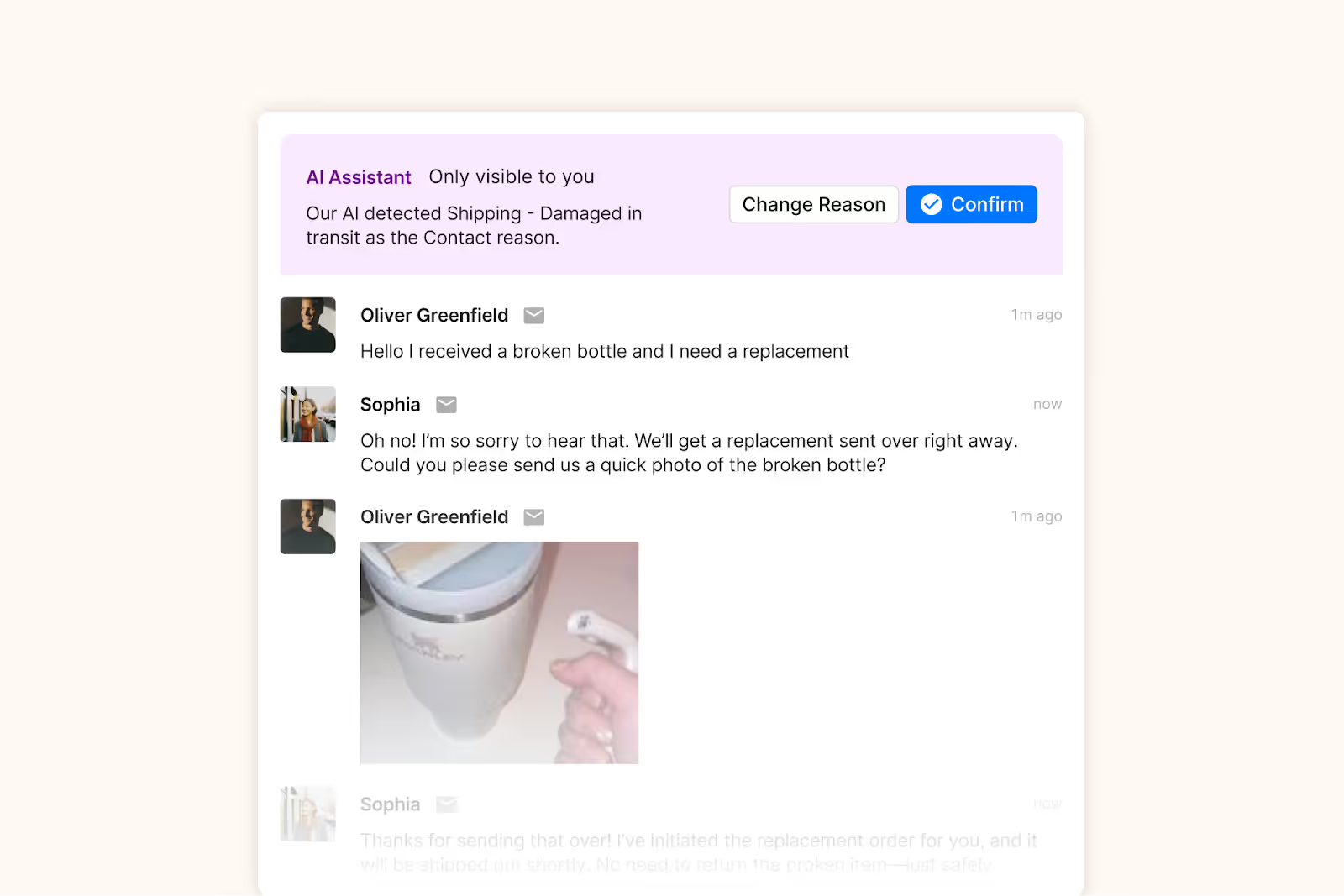
Escalated tickets include a brief AI-generated handover summary, marked in yellow, for quick reference.
Move faster across every store and team
We restructured and simplified the navigation. The left sidebar organizes everything into clear categories: Inbox, AI Agent, Marketing, and Analytics, so anyone on your team knows exactly where to go.
To quickly update your knowledge base or adjust a workflow, both now live right in the sidebar. For teams managing multiple stores, switching between them is just as straightforward, accessible from the sidebar, so agents can move between inboxes without breaking their flow.

Agents can switch between stores and their corresponding inboxes directly from the left menu.
A workspace that works the way agents do
Support comes down to the person on the other end of the conversation. We built Helpdesk 2.0 is to make sure they have everything they need to show up for that moment.
The best way to see the difference is to work in it. Start a free trial today.



Further reading

How CX Leaders are Actually Using AI: 6 Must-Know Lessons
TL;DR:
- Train your AI like a new hire. Give it tone guidelines, review weekly, and keep refining to stay on-brand.
- Adapt AI to real customer behavior. Adjust tone and timing to improve satisfaction, even if the answer stays the same.
- Use AI to drive sales, not just support. Top brands use it to answer product questions and guide pre-purchase decisions.
- Start small and improve as you go. Begin with one common question and test often to build momentum.
If you’ve been side-eyeing AI and wondering if it’s just hype, you’re not alone. A lot of CX leaders were skeptical, too:
“I used to be the loudest skeptic,” said Amber van den Berg, Head of CX at Wildride. “I was worried it would feel cold and robotic, completely disconnected from the warm, personal vibe we’d worked so hard to build.”
But fast forward to today, and teams at Wildride, OLIPOP, bareMinerals, and Love Wellness are using AI to do more than just deflect tickets. They’re…
- Cutting costs without cutting corners
- Driving revenue before a customer even checks out
- Delivering fast, on-brand, human-feeling support at scale
Here are six lessons you can steal from the brands doing it best.
{{lead-magnet-1}}
1. Think of AI as your sidekick
We need to get one point across clearly: AI isn’t about replacing your support team.
For brands with lean CX teams, burnout is a serious problem. And it’s one of the biggest reasons AI adoption is accelerating.
“I was constantly seeing the same frustrating inquiries—sponsorship asks, bachelorette party freebies, PR requests… 45% of our tickets were these kinds of messages,” said Nancy Sayo, Director of Consumer Services at global beauty brand, bareMinerals.
“Once I realized AI could handle them with kindness and consistency without pulling in my team, I was sold.”
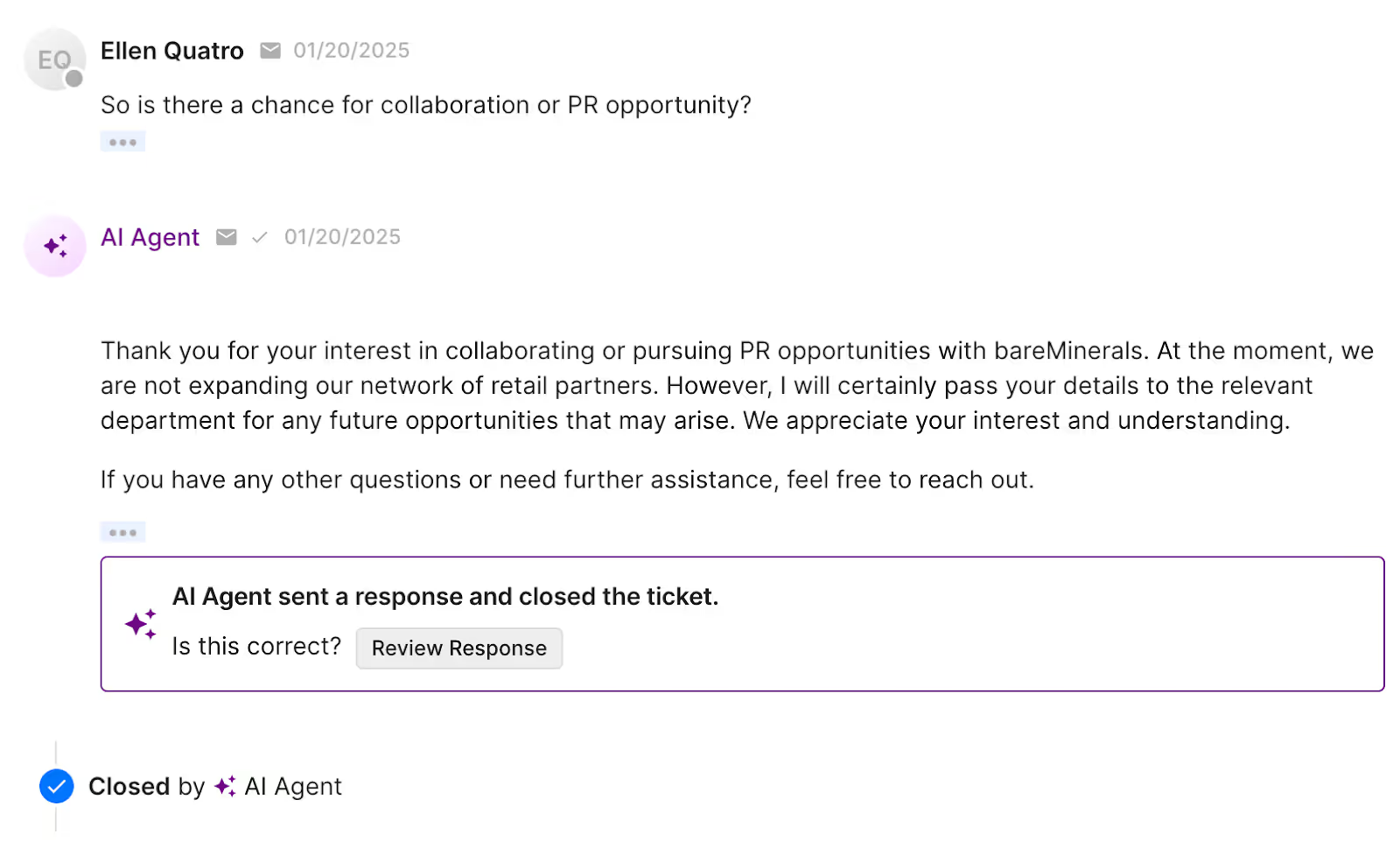
Instead of thinking of AI as a replacement, think of it as an enhancement.
It’s about making sure your CX team doesn’t burn out answering the same five questions 50 times a day.
With Gorgias AI Agent, Nancy’s team now uses automation to absorb the high-volume, low-conversion noise, freeing up their seasoned agents to focus on real revenue-driving moments.
“We use AI to handle low-complexity tickets. And we route higher-value customers to our human sales team—people who’ve been doing makeup for over a decade and really know what they’re doing.”
TL;DR? The smartest teams use AI to take the weight of repetitive tickets (“Do you ship internationally?” “Can I get free samples?”) off their shoulders so agents can focus on conversations that build trust, drive loyalty, and increase LTV.
2. Train your AI like a team member
While you can get started with AI quickly for simple queries, we don't recommend using it “out of the box.” And honestly, that’s a good thing.
Brands that “set it and forget it” are missing the point. Because if you want AI to sound exactly like your brand—not like every other chatbot on the internet—you need to give it the same context you’d give a new hire.
Amber van den Berg, Head of Customer Experience at baby carrier brand Wildride, wrote out detailed tone guidelines, including:
- Dos and don’ts for customer conversations
- Approved Dutch-to-English translations
- Example replies for nuanced, emotional questions
- Pre-written macros for product recs and delivery issues
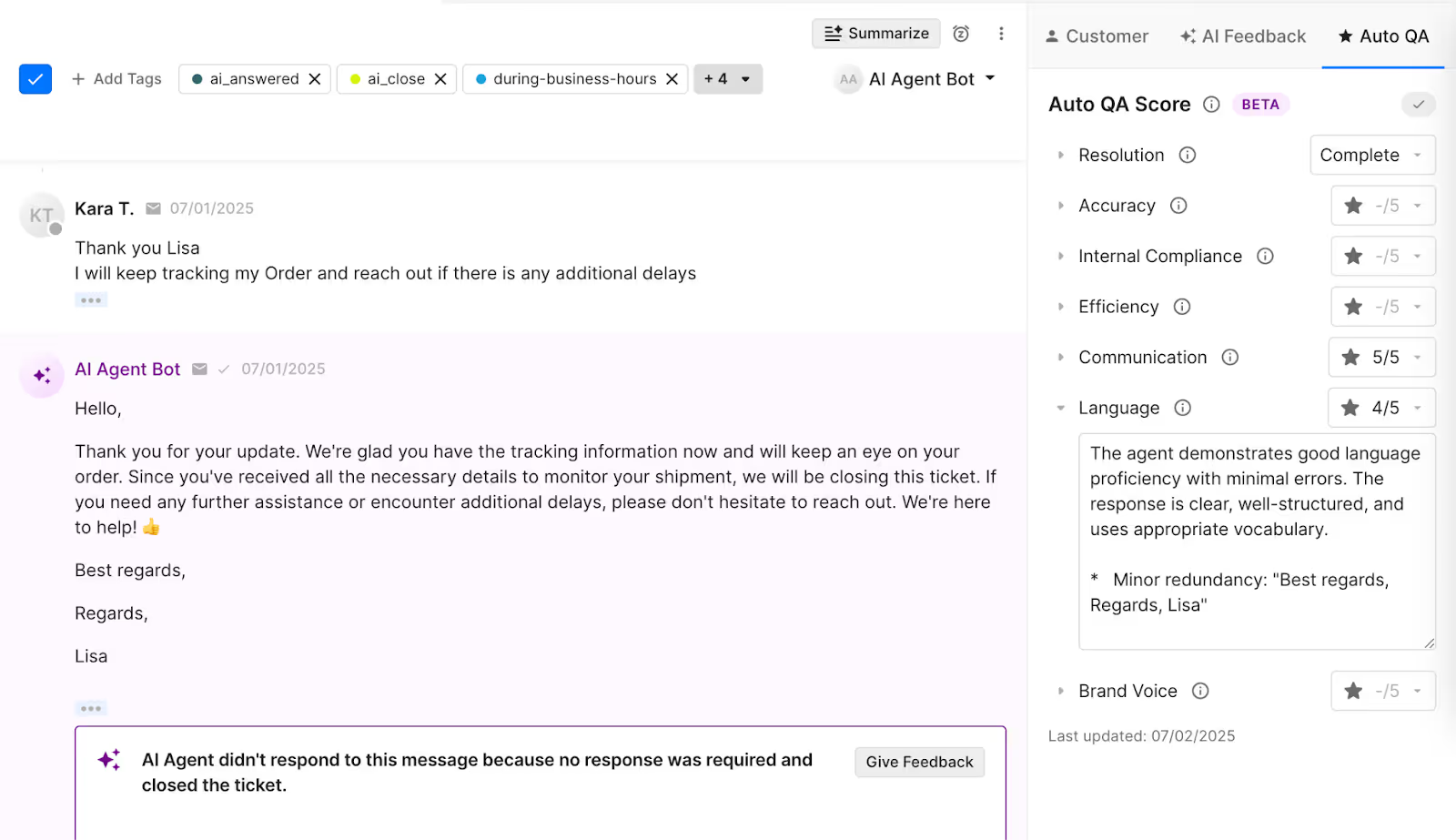
“Lisa, our AI agent, is basically a super well-trained intern who never sleeps. I give her the same updates I give my human team, and I review Lisa’s conversations every week,” said Amber. “If something feels off-brand, too robotic, or just not Wildride enough, I tweak it.”
The feedback never stops, and that’s what makes Lisa so effective.
Related: Meet Auto QA: Quality checks are here to stay
3. Let AI mirror the pacing of real conversations
Even when AI gets it right, customers might not always feel like it did. Especially if the tone of voice is off or if your customer base just isn’t used to automation.
“Our CSAT was low at first,” said Nancy Sayo of bareMinerals. “Even if the response was accurate and beautifully written, our older customers just didn’t want to interact with AI.”
So Nancy’s team adapted. Rather than giving customers a blunt “no” to product requests, they restructured the flow:
“If someone asked for free product, we’d say, ‘We’ll send this to the team and follow up.’ Then, 3-5 days later, the AI would close the loop. It softened the blow and made customers feel heard—even if the answer didn’t change.”
That simple tweak raised CSAT and created a better customer experience without requiring a human to step in.
Inside Gorgias, teams like bareMinerals review AI performance weekly, not just to catch mistakes, but to optimize for tone, satisfaction, and brand feel. They use:
- CSAT reporting to spot dips in sentiment
- Conversation analytics to flag where AI may be losing trust
- Macro editing to quickly adjust common replies
AI gives you the flexibility to test, tweak, and tailor your approach in a way traditional support channels never could.

4. Use AI to drive sales—not just support
Too many CX teams still treat AI like a glorified autoresponder. But the most forward-thinking brands are using it to guide shoppers to checkout.
“Our customers often ask: ‘Which carrier is better for warm weather?’ or ‘Will this fit both me and my taller partner?’” said Amber van den Berg, Head of CX at Wildride. “Lisa doesn’t just answer—she gives context, recommends features, and highlights small touches like the fact that a diaper fits in the side pocket.”
With Gorgias Shopping Assistant, brands can turn AI into a proactive sales assistant—answering product questions in real time, referencing what’s in the customer’s cart, and nudging them toward the best option with empathy.
5. CX insights should power the rest of your business
Great support doesn’t stop at the inbox. At Love Wellness, CX is the connective tissue between ecommerce, product, and marketing.
“We meet quarterly with our CX and ecommerce teams to review top questions, objections, and patterns,” said Mckay Elliot, Director of Amazon at Love Wellness. “That feedback goes straight into product development and PDP optimizations on both DTC and Amazon.”
But it’s not just a quarterly ritual. Feedback sharing is embedded in the culture, and they do this with a Slack channel dedicated to customer feedback.
Dropping in insights is part of the team’s daily and weekly responsibilities. It helps everyone stay close to the content, and it sparks real collaboration on what we can improve. They then use those insights to improve ad messaging and content.

Your team has so much data they can review between channels like email, SMS, chat, and social media—both compliments and complaints. You need to be willing to listen to every customer’s needs.
Read more: Why customer service is important (according to a VP of CX)
6. Don’t overthink it, start small
One of the biggest mistakes brands make with AI? Trying to do too much, too soon.
Rolling out AI should feel like a phased launch, not a switch flip. The best results come from starting simple, testing often, and iterating as you go.
“We started with one simple question—‘Do you ship internationally?’—and built from there,” said Amber van den Berg of Wildride.
“And if it doesn’t work? You can always turn it off,” added Anne Dyer, Sr. Manager of CX & Loyalty Marketing at OLIPOP. “The key is to test, review, and keep iterating. AI should enhance your human experience, not replace it.”
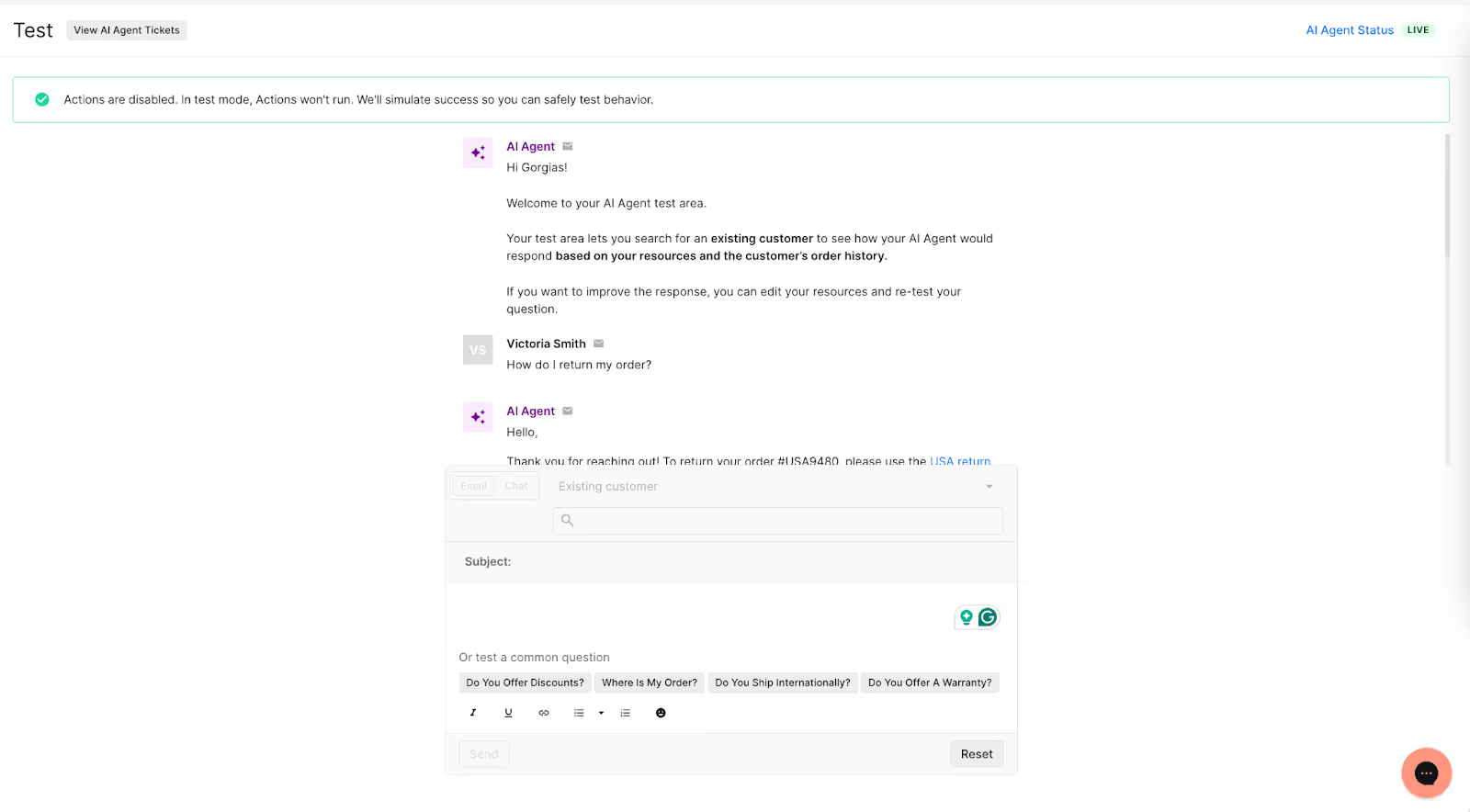
If your helpdesk supports it, start in a test environment to preview answers before going live. Then roll out automation gradually by channel, topic, or ticket type and QA every step of the way.
For most brands, the best starting point is high-volume, low-complexity tickets like:
- “Where’s my order?”
- Subscription pauses or cancellations
- Returns and exchanges
- Store policies and FAQs
You don’t need to solve everything on day 1. Just commit to one question, one channel, and one hour per week. That’s where real momentum starts.
Related: Store policies by industry, explained: What to include for every vertical
How do you measure the impact of AI in CX?
Most CX teams are used to tracking classic metrics like ticket volume and CSAT. But when AI enters the mix, your definition of success shifts. It’s not all about how fast you handle tickets anymore—it’s about how customers feel after conversations with AI, team efficiency, and the quality of every interaction.
Here are the metric CX teams used to track without AI—and what they track now with AI:
The best use of AI makes space for human touch
AI isn’t here to replace your CX team. It’s here to free them up, so they can focus on deeper, more meaningful conversations that build loyalty and drive revenue.
So if you’re on the fence, start small. Train it. Review weekly. Build the muscle.
You’ll be surprised how quickly AI becomes your favorite intern.
If you want more tips from the experts featured today, you can:

Why Consolidated Doesn’t Mean Compromised: Top 3 Myths Debunked
TL;DR:
- Consolidation doesn’t mean giving up flexibility. The right all-in-one tools are modular and API-friendly, so teams can customize and integrate freely.
- You gain efficiency, not lose features. One platform means fewer gaps, less manual work, and faster support.
- It’s more affordable and faster than you think. Consolidation cuts hidden costs and delivers ROI quickly.
- Gorgias is built for ecommerce. With a deep Shopify integration and 100+ apps to connect to, it can scale with CX teams, no matter their size.
If your CX team is juggling a dozen different tools just to answer one support ticket, you’re not alone. According to our 2025 Ecommerce Trends report, 42.28% of ecommerce professionals use six or more tools every day. Plus, nearly 40% spend $5,000–$50,000 annually on their tech stack.
That’s a lot of money and a lot of tabs.
It’s no wonder “tech stack fatigue” is setting in. But while many brands are ready to simplify, there’s still hesitation around consolidation. The biggest fear is that all-in-one tools are too rigid or basic to handle the complexity of a growing business.
But the truth is, consolidation doesn’t mean compromise. When done right, it means clarity, speed, and control. It also means fewer tools, smoother workflows, and faster customer support.
Let’s bust some myths and show you what smart consolidation looks like.
{{lead-magnet-1}}
Myth #1: “All-in-one tools are too rigid”
One of the biggest blockers to consolidation is compatibility. Fifty-two percent of ecommerce professionals said they hesitate to consolidate because they’re worried about tools not playing nicely together.
That hesitation makes sense. In the past, “all-in-one” tools meant being locked into a single provider’s ecosystem, with limited integrations and rigid workflows. For CX teams managing fast-moving ops and dozens of tools, from email and returns to reviews and subscriptions, the idea of losing flexibility is a non-starter.
Reality: All-in-one tools are modular, not monolithic
Modern support platforms have moved away from monolithic systems and toward modular API-friendly designs that give brands control instead of constraints.
If you choose the right platform, consolidation doesn’t lead to a loss of functionality. Instead, it means getting a better-connected system that works smarter.
Just ask Audien Hearing who uses Gorgias’s open API to create an integration with its warehouse software to manage returns directly in Gorgias instead of a shared Google spreadsheet.
They also combine the power of Gorgias Voice with an integration to Aircall to resolve thousands of questions a day. This integration enables agents to access customer and order data directly from Gorgias while on a call—staying in one workspace.
“It's amazing that we're able to create any custom solutions we want with Gorgias's open API. Gorgias is way more than a typical helpdesk if you utilize the features it offers,” says Zoe Kahn, VP of Retention and Customer Experience at Audien Hearing.

Read more: The Gorgias & Shopify integration: 8 features your support team will love
Myth #2: “We’ll lose features we rely on”
Another common hesitation around consolidation is the risk of putting all your eggs in one basket. If everything runs through one tool, what happens when something breaks or you need to pivot?
It’s understandable, many teams worry that one tool can’t possibly do everything well. Maybe it won’t support their preferred channels, or the automation will be too limited. Or maybe they’ve been burned by a platform that promised too much and delivered too little.
Reality: All-in-one tools reduce gaps, not capabilities
In reality, consolidating gives CX teams more freedom, not less.
Instead of stitching together half a dozen tools and hoping they sync, teams using a single, well-integrated platform gain:
- A centralized view of the customer
- Cleaner workflows with fewer manual handoffs
- Less time spent training agents on multiple systems
- And fewer gaps in data or context
Under one system, your team doesn’t have to jump between tabs anymore. They can just focus on helping customers, quickly and consistently.
Take it from Osea Malibu, a seaweed‑infused skincare brand that transformed their support quality assurance process using Gorgias Auto QA. Their manual QA system was time-consuming and couldn’t scale as ticket volume surged. But the switch made impressive improvements:
- QA time reduced by 75%, from over an hour per week to just 15 minutes
- 100% of tickets now automatically quality‑checked, instead of a small manual sample
- CSAT increased (during BFCM) to 4.74/5, reflecting better consistency and faster resolutions
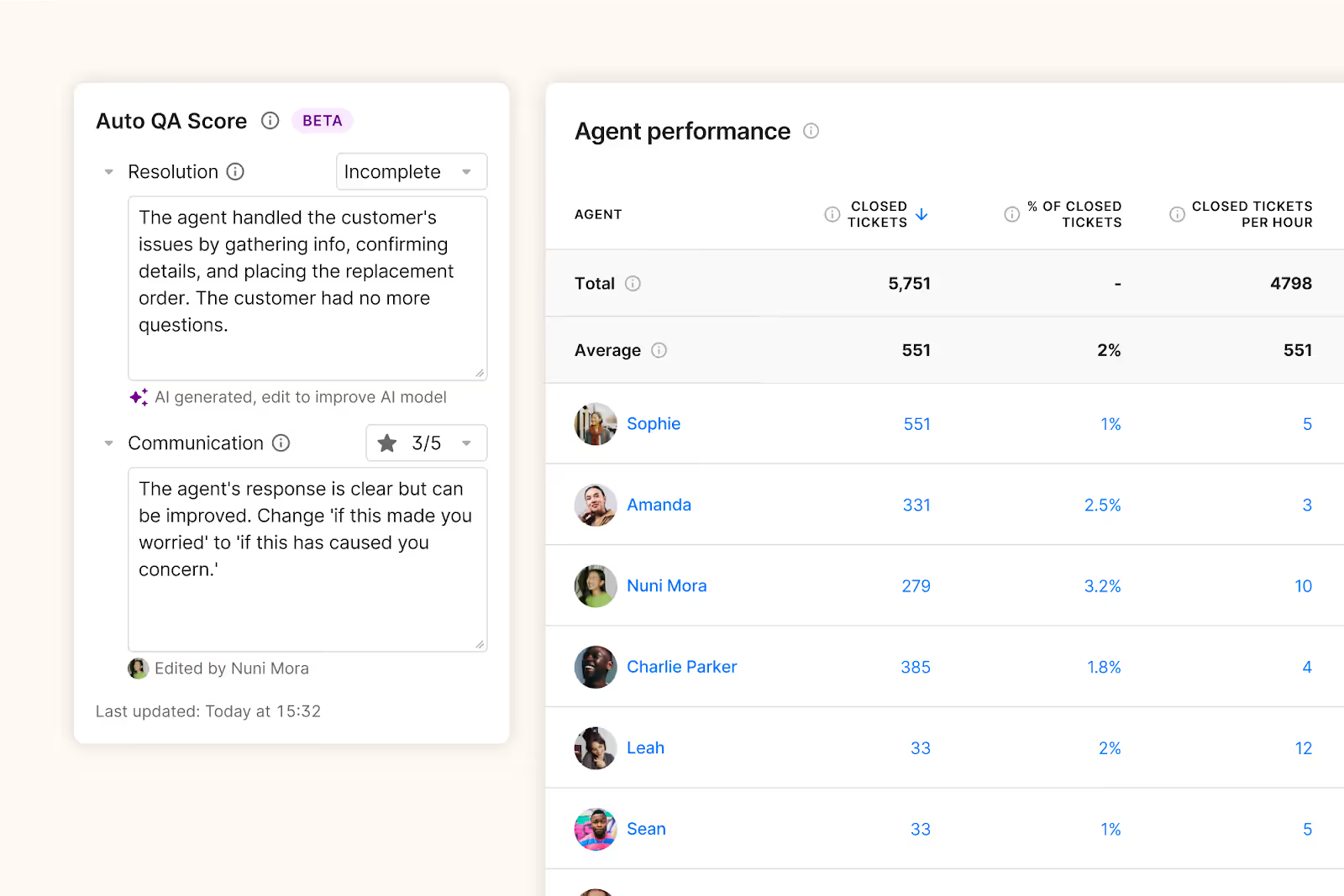
“Gorgias Auto QA saved me so much time. What used to take over an hour now only takes 15 minutes a week, and I no longer have to worry about spreadsheets.” —Sare Sahagun, Customer Care Manager at Osea Malibu
Myth #3: “Consolidation is expensive and time-consuming”
On paper, consolidation sounds smart. But 47.6% of ecommerce professionals say cost is a barrier, and 40.3% worry about the time it takes to implement a new system.
Sticking with a fragmented stack isn’t exactly cheap or quick, either. Between training new agents, managing multiple vendors, and patching together tools that don’t fully sync, the hidden costs add up fast.
Reality: Consolidation reduces overhead and busywork
It’s not actually consolidation that drains your resources—it’s complexity. And with Gorgias, simplifying pays off fast.
Trove Brands is a standout example. After centralizing their support with Gorgias, they implemented AI-powered order cancellation workflows and saw:
- 45% of tickets automated, cutting manual workload
- 70% reduction in failed order cancellations, saving costs and frustration
- 99.93% faster first response time during BFCM 2024 (from 11 hours 30 minutes to just 30 seconds)
Related: The hidden cost of not adopting AI in ecommerce
What’s the top benefit of consolidating your tech stack?
The biggest benefit of fewer tools is efficiency. It’s also a direct line to real business impact.
Constant tab-switching and duplicate data entry mean way too much time spent managing platforms instead of helping customers.
When you consolidate your tech stack, your team spends less time learning new systems, chasing down info, or waiting for one tool to sync with another.
Instead, they get everything they need in one place, faster replies, smoother workflows, and happier customers.
And that all adds up to better CSAT, lower churn, and a support team that’s finally free to focus on what matters.
What makes Gorgias different from other all-in-one platforms?
Gorgias is built specifically for ecommerce brands, with features that reflect the way CX teams actually work.
As Shopify’s only Premier Partner for customer support, we offer a native integration that pulls in key order data and context automatically, so agents have everything they need without switching platforms. That means conversations, AI, automation, revenue data, and reporting are in one place.
Our open app ecosystem allows you to connect to 100+ tools like Shopify, Klaviyo, Yotpo, and Recharge in just a few clicks. Need more customization? Our add-ons, like AI Agent and Voice let you level up at your own pace.
Whether you're handling hundreds of tickets a week or scaling globally, Gorgias adapts—so you don’t have to keep reinventing your support stack every six months.
Time to rethink your stack
Dr. Bronner’s, a globally recognized organic soap and personal care brand, made the switch from Salesforce to Gorgias to keep up with growing support demands, and it paid off fast.
Here are the results they saw with Gorgias:
- $100,000 saved in the first year by cutting licensing and developer costs
- 45% of all customer queries automated after just 2 months
- 74% reduction in ticket resolution time, powering faster support
- 11% increase in CSAT, thanks to quicker, more personalized responses
“We don’t get boxed out because we only work with Gorgias tools. Gorgias deeply understands the needs of CX, Shopify, and orders and how those tools work together so that it’s really easy for us to work across the board throughout those tools and that didn’t exist in our last setup at all,” says Emily McEnany, Senior CX Manager at Dr. Bronner’s.
If you’re still stitching together half a dozen tools to handle support, it might be time to ask: Is your tech stack helping you or holding you back?
With Gorgias, you get centralization and flexibility, so your team can move faster, serve better, and scale smarter.
Book a demo or dive into the full 2025 Ecommerce Trends report to see how other brands are rethinking their stacks.
{{lead-magnet-2}}

You’re Missing Out on Sales Without an AI Shopping Assistant—Here’s Why
TL;DR:
- Shoppers won’t wait for help—so they leave. Without instant answers, you’re losing sales to hesitation and unanswered questions.
- AI shopping assistants step in right away. They guide, recommend, and resolve concerns in real time, 24/7.
- They boost conversions and AOV. Brands like Pepper and TUSHY saw up to 62% more conversions after adding one.
- They go beyond chatbots. AI assistants proactively sell, using browsing behavior to tailor messages and close more carts.
- Gorgias Shopping Assistant is built for Shopify brands. It starts conversations, mirrors your brand voice, uses browsing data, suggests products, and sends dynamic discounts.
Shoppers aren’t always going to reach out and ask the questions they have, especially if they’re going to have to wait for a response from a CX team.
That means you’re losing sales to friction, indecision, or information gaps.
In 2025, the average cart abandonment rate is 70.19%. But if you can find an AI tool that doubles as a support and sales agent, it could make all the difference.
Gorgias’s Shopping Assistant, for example, has brought a 62% uplift in conversion rate for brands that implement it.
Ahead, learn where you can leverage an AI shopping assistant to increase conversions and craft better purchase experiences.
{{lead-magnet-1}}
What is an AI shopping assistant?
An AI shopping assistant is a chat tool powered by AI to provide pre-sales support for shoppers. It can answer questions, make product recommendations, and help guide shoppers in the right direction if they’re stuck.
Gorgias's Shopping Assistant is a powerful, hyper-personalized AI tool built for Shopify brands. Unlike other AI tools, Shopping Assistant starts conversations with customers, not the other way around. It’s uniquely tailored for each customer by tracking browsing behavior during each session and remembering what shoppers say, keeping conversations natural and recommendations relevant.
It’ll also chat with shoppers in your own brand voice, as its responses are pulled right from the knowledge you feed it.
At which point do brands lose sales in the customer journey?
The stages of the customer journey where common drop-off points occur for brands that lack proactive support include:
- Discovery (casual browsing)
- Interested (considering making a purchase)
- Ready to buy (strong purchase intent)
1) Discovery (casual browsing)
There’s a big chance that shoppers—especially first-timers—have questions, but aren’t willing to wait for a human to get back to them. And when your CX team is off the clock? Customers will likely leave altogether.
An AI shopping assistant can help you engage customers right away, even outside your business hours.
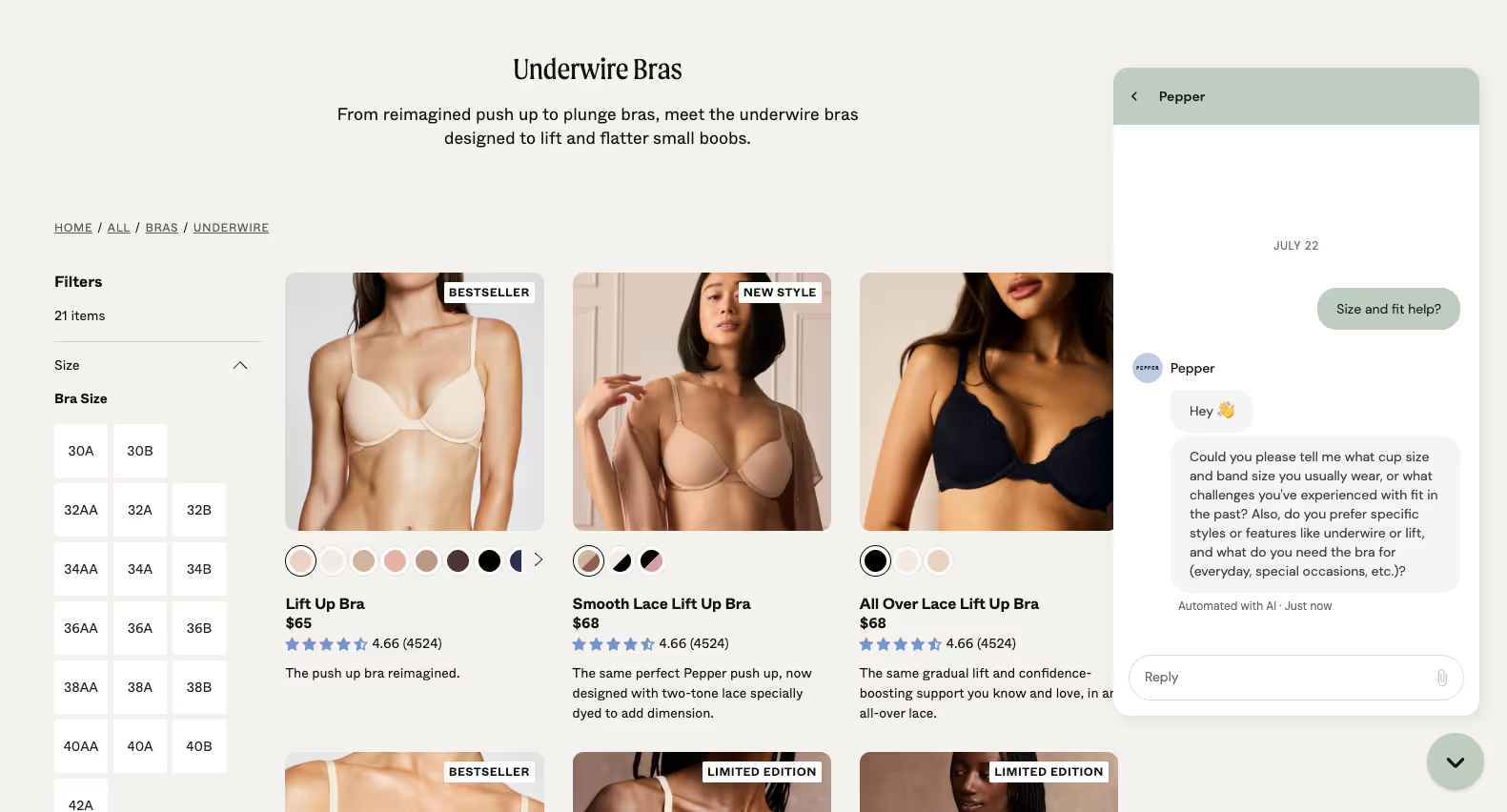
Bra brand Pepper uses Gorgias Shopping Assistant to help shoppers find their perfect size. When it detects hesitation, Shopping Assistant points customers to the sizing guide.
This proactive approach creates an easy path for conversation and sets the precedent that any questions will be answered immediately, providing a better––and less confusing––experience.
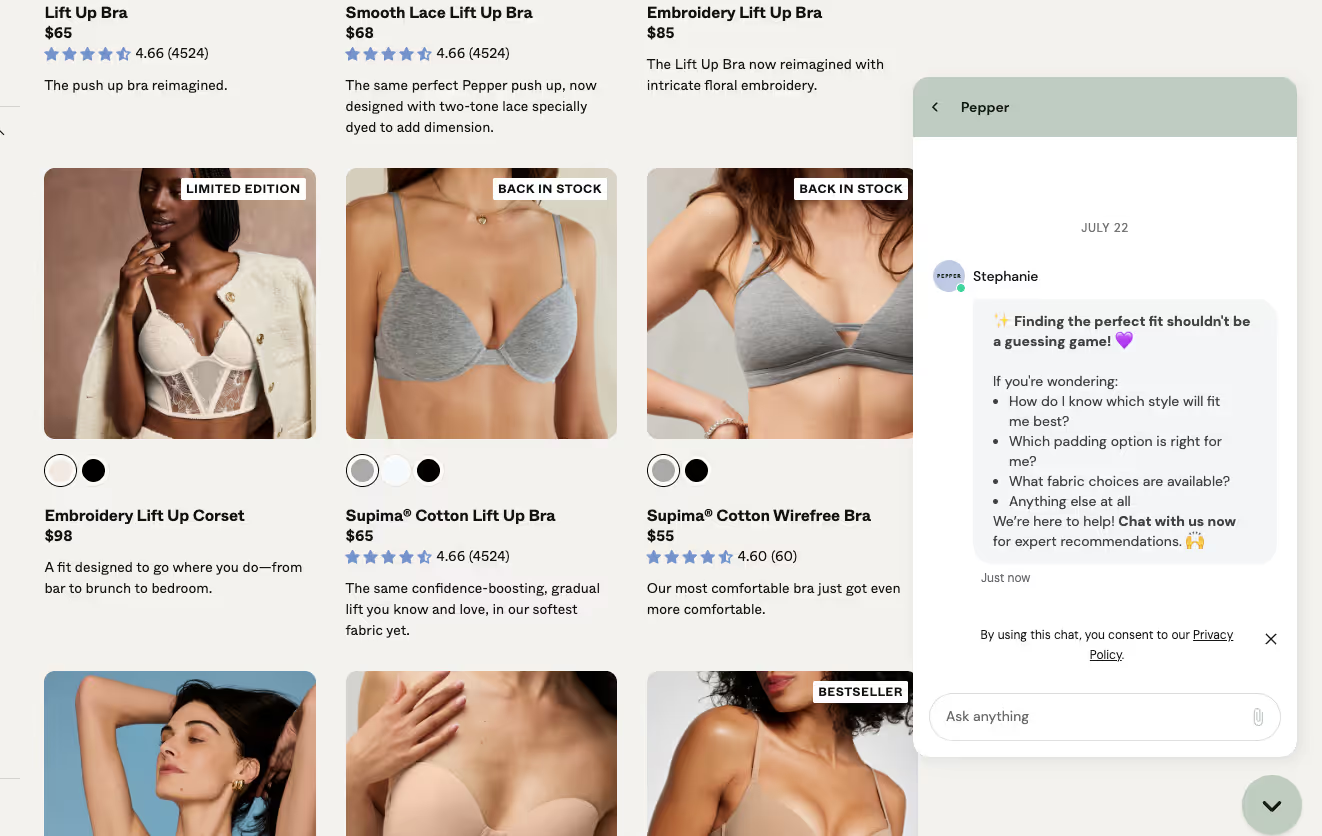
“With Shopping Assistant, we’re not just putting information in our customers’ hands; we’re putting bras in their hands,” says Gabrielle McWhirter, CX Operations Lead at Pepper.
Impact these metrics 📈
For shoppers in the Discovery stage, using a Shopping Assistant boosts clicks and time on site and reduces bounce rate. It does this by surfacing specific questions on relevant product pages. Pepper boosted their conversion rate by 19% with Gorgias Shopping Assistant.
Read more: How Pepper’s AI Agent automates 54% of support and converts 19% of conversations
2) Interested (considering making a purchase)
In a retail environment, a salesperson can give shoppers recommendations by asking a few questions, especially if they’re unsure of what to buy.
AI shopping assistants have the ability to mirror those in-person shopping experiences by interacting with customers in real-time to help them find their perfect match.
Shoppers can give as much (e.g., “Help! What dress is suitable for a wedding reception?”) or as little information as they’d like, and the AI shopping assistant will do the rest.
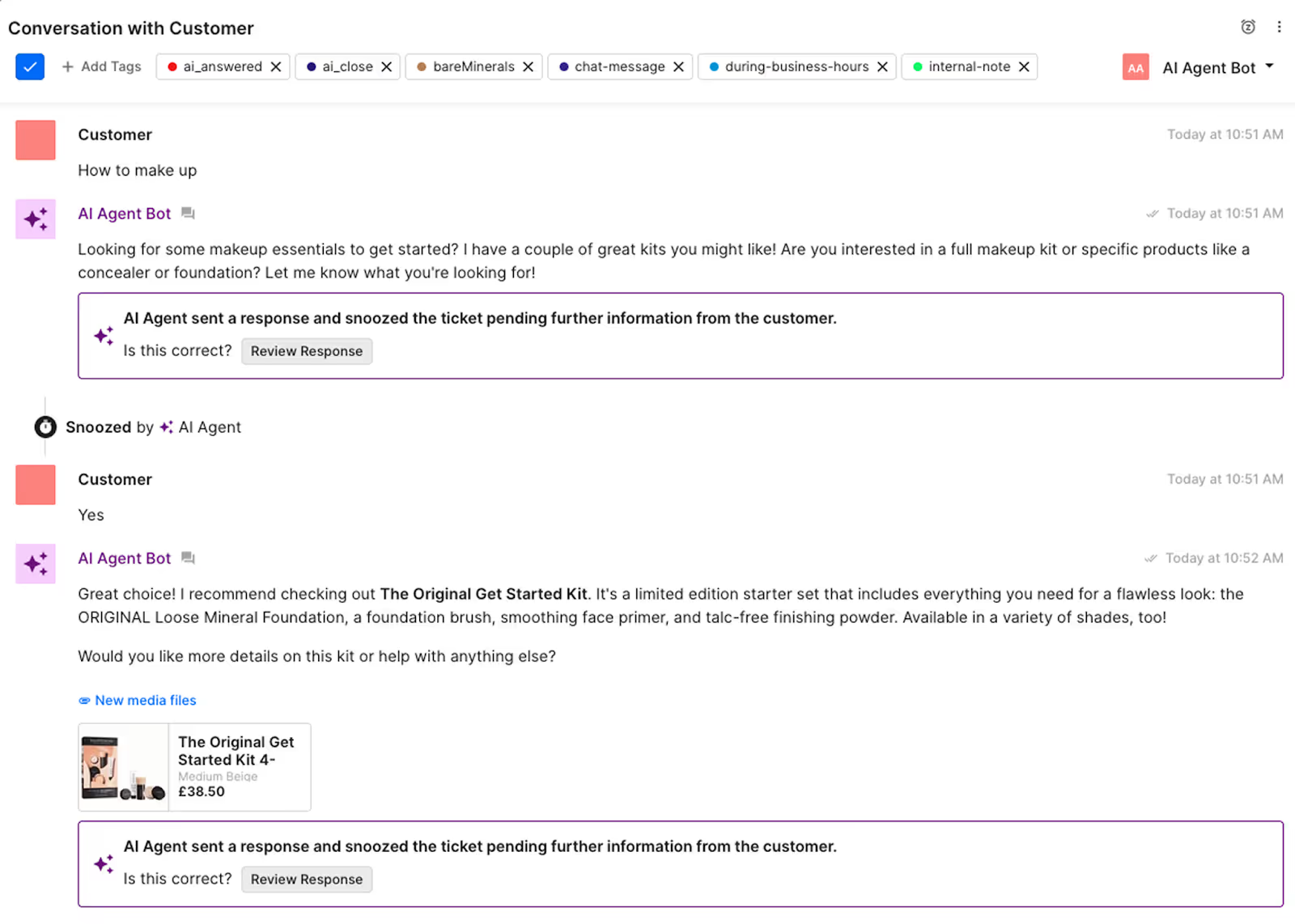
It’s possible even for questions that are slightly vague, like a customer who types in “how to make up” without any other context:
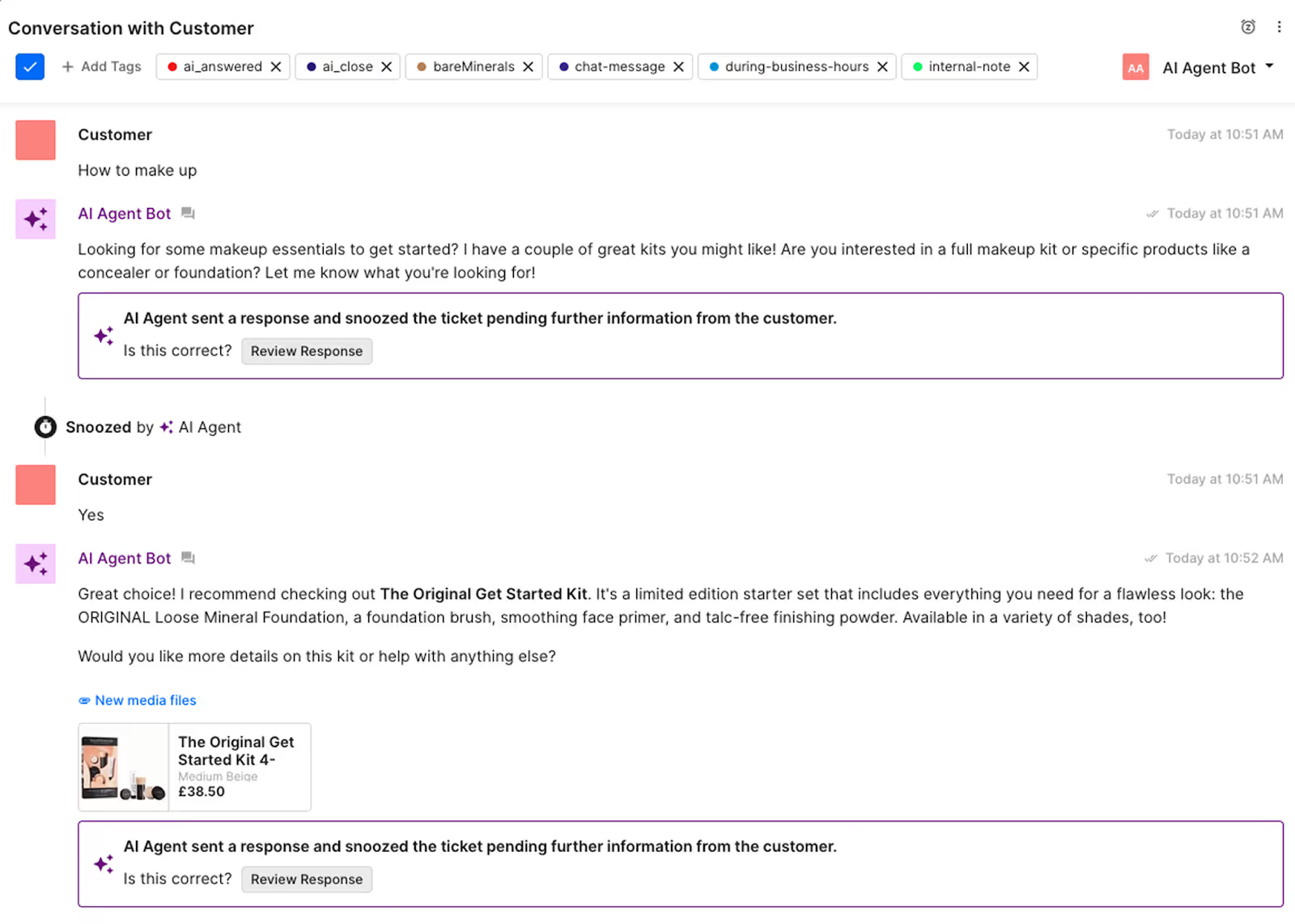
For example, jewelry shop Caitlyn Minimalist uses Shopping Assistant to recommend products, engaging interested customers and bringing them closer to a purchase.
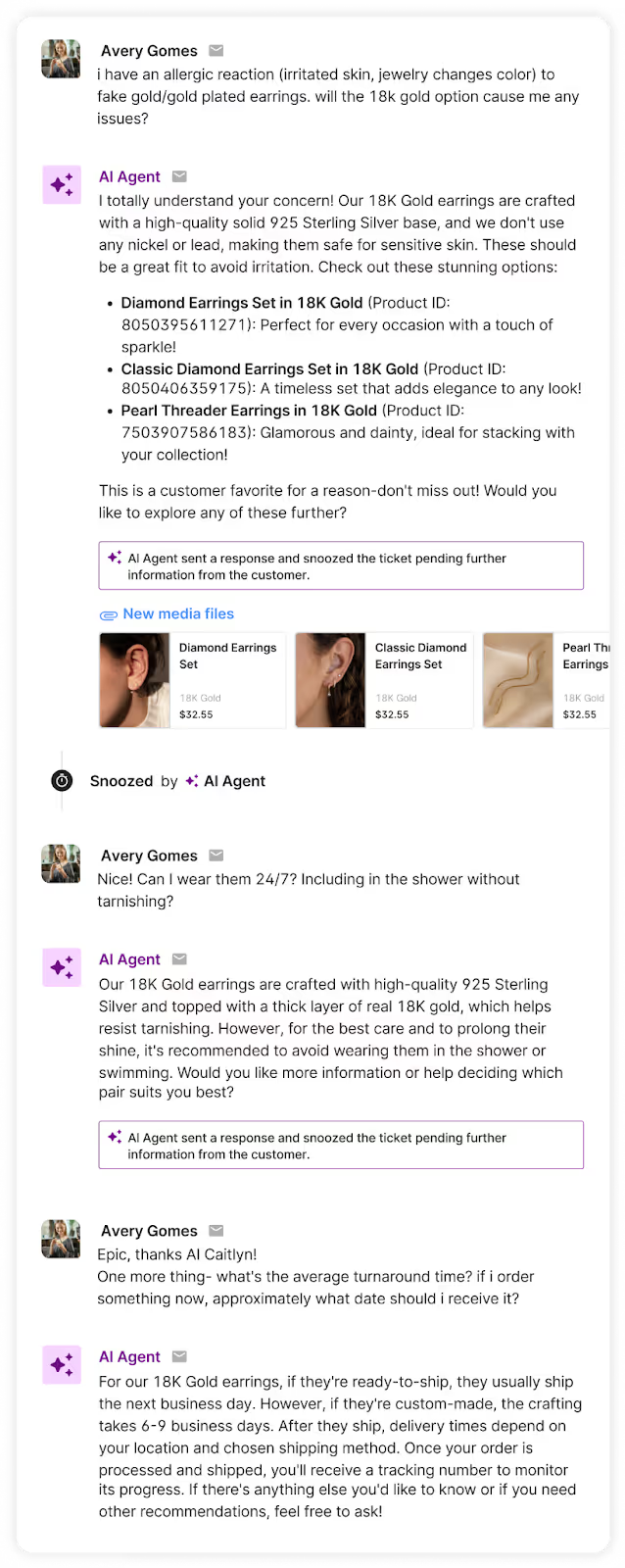
“As a result of Shopping Assistant, we've seen a measurable lift in AOV through more meaningful customer interactions,” says Anthony Ponce, Head of Customer Experience at Caitlyn Minimalist.
“Our clients are provided the right information at the right time, creating a seamless experience that builds trust and drives confident purchases."
Impact these metrics 📈
According to data from Gorgias, email is the highest volume support channel, with ~25% of that tied to pre-sales. AI shopping assistants tackle these pre-sales asks and also upsell by recommending complementary products. This can lead to a boost in average order value (AOV) and conversion rate.
Read more: How Caitlyn Minimalist uses Shopping Assistant to turn single purchases into jewelry collections
3) Ready to buy (strong purchase intent)
The main reasons customers abandoned a cart in 2025 include:
- Extra costs (like shipping, fees, taxes) - 39%
- Delivery times were too slow - 21%
- Checkout was too complicated or long - 18%
- Didn’t like return policy - 15%
An AI shopping assistant can mitigate or resolve these issues. They resolve crucial questions—like delivery time or return policies—that need in-the-moment answers. By alleviating pre-sale concerns, they give customers the confidence to make a purchase.
For example, bidet brand TUSHY leverages Shopping Assistant to answer questions about toilet compatibility that might flush a pending sale.
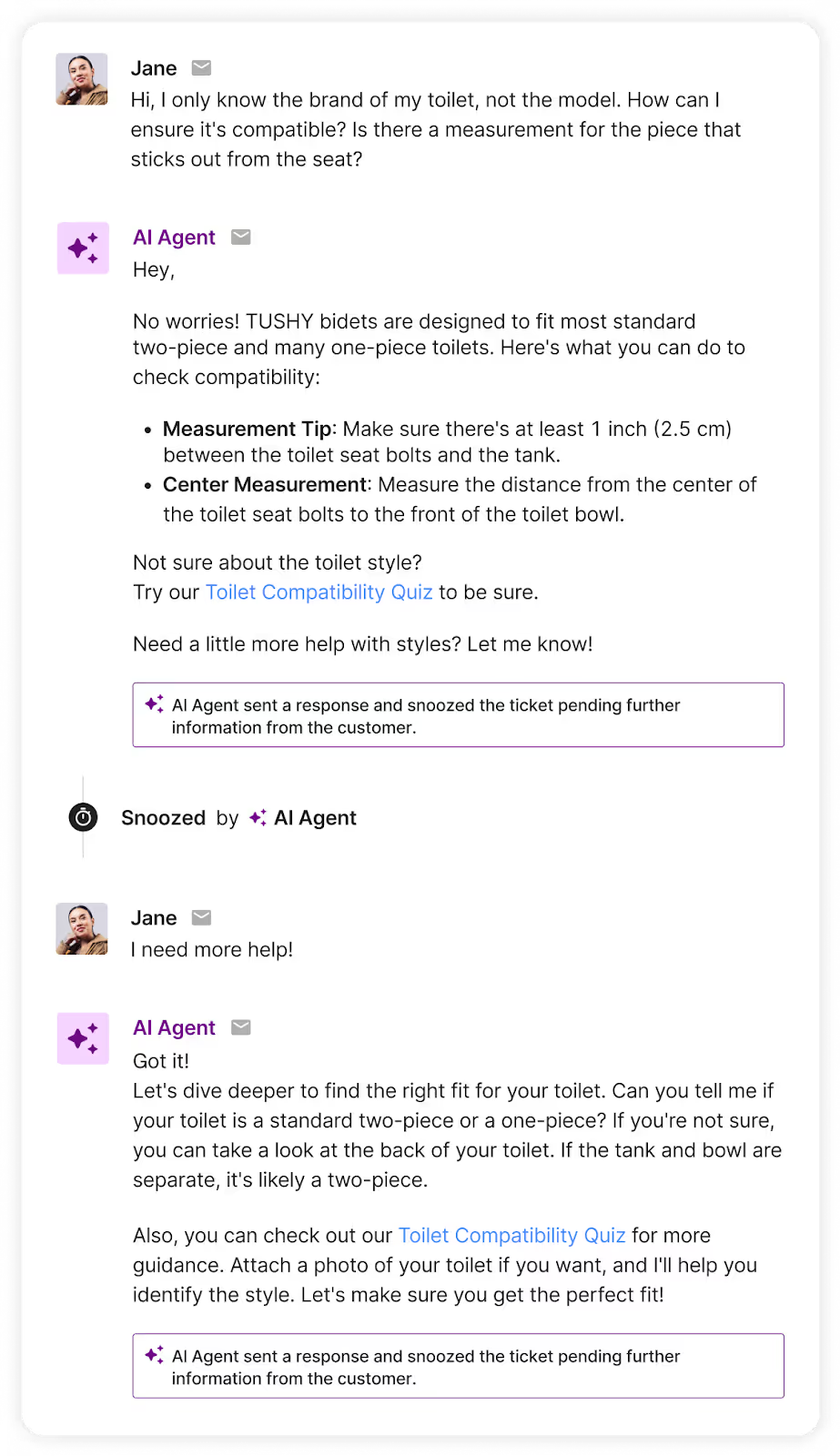
Aside from quelling customer concerns, Shopping Assistant can also send discount codes to close deals. Unlike general discount codes you find across the internet, these discounts are uniquely generated for each customer, keeping them engaged and on your site.
Impact these metrics 📈
AI shopping assistants can reduce cart abandonment rate and increase conversion rate. Gorgias Shopping Assistant adjusts to your sales strategy by sending customers discount codes that can be the final nudge to checkout.
Why traditional chatbots don’t cut it anymore
Most AI tools are built just for support. They deflect tickets and answer FAQs, but they’re not built to sell.
Shopping Assistant proves that support teams can also drive revenue by upselling, suggesting exchanges, and giving shoppers the confidence to try a brand for the first time (or to give it another shot).
Gorgias’s AI Shopping Assistant uses context-based decision making and looks for specific behavioral signals:
- Products viewed - Which product pages have they visited?
- Pages views - What pages have they explored, like FAQs, reviews or categories?
- Current page - Which page are they currently browsing?
- Purchase history – What have they bought from this brand before?
- Cart data - What items are currently in their cart?
Improve conversions with Gorgias Shopping Assistant
Ultimately, the cost of not adopting AI can be higher than the investment of implementing it. 77.2% of ecommerce professionals use AI to improve their work. Why not extend those benefits to your customers?
AI Shopping Assistants help you create better customer experiences overall. These tools help reduce customer effort, increase average order value, save would-be-lost sales, and create more customer touchpoints.
Hire the always-on Shopping Assistant that never misses a sale.
{{lead-magnet-2}}

Guide More Shoppers to Checkout with Conversation-Led AI
TL;DR:
- Shopping Assistant is your new AI sales closer. It jumps in when shoppers hesitate, delivering real-time, personalized support that drives conversions.
- It boosts revenue by acting like your best salesperson. It knows when to recommend, upsell, or offer a discount, without being pushy.
- It remembers what shoppers do mid-session. That means smarter conversations, better suggestions, and bigger order values.
- It’s already delivering results. Brands using Shopping Assistant are seeing 62% more conversions, 10% higher AOV, and 5x ROI.
- You control the strategy. Customize how it promotes discounts, when it steps in, and how it speaks.
What’s the common factor between shoppers debating between products and considering a splurge? Hesitation.
Today’s shoppers are overwhelmed with choices. They don’t want to be left to figure things out on their own. They want guidance.
But most brands are missing that crucial piece of the puzzle. They lack a strategy that accompanies shoppers on their journey. A tool that encourages shoppers to proceed to checkout. And, ultimately, a customer experience devoid of a sales approach.
That’s why we built Shopping Assistant, an AI Agent that proactively engages browsers, offers context-aware product recommendations, and turns hesitation into conversions in real time.
And it’s working. Brands using Shopping Assistant are seeing a 62% uplift in conversion, 10% higher average order value, and 5x ROI.
Here’s a closer look at what’s behind the magic.
{{lead-magnet-1}}
AI-powered shopping, built for sales
Most traditional chatbots passively wait for questions and deliver answers that aren’t personalized to each shopper's preferences.
Unlike these bots, Shopping Assistant reads real-time signals like pages viewed, cart contents, and conversation tone. This results in a solution that not only offers support but also offers personalized, proactive selling. This enables Shopping Assistant to continuously refine and adjust its playbook, evolving with each shopper as their journey matures.
Here’s how Shopping Assistant engages with customers across the shopping journey:
- Discovery: Gathers preferences and educates.
- Interested: Makes targeted product suggestions.
- Ready to Buy: Assists with checkout, nudges purchases with discounts.
Take this example below. When a customer vaguely asks “how to make up,” Shopping Assistant interprets it as a sign of interest in makeup products and recommends a starter kit.
Personalization that understands you
Where traditional bots reset with every message, Shopping Assistant does the opposite. It has built-in context-aware intelligence that remembers what shoppers have clicked, viewed, and added to their cart during a session.
This enables natural, relevant, and persuasive conversations that truly resonate with each shopper. It goes beyond reading messages and observes behavior to adapt its responses.
That means it knows if someone has:
- Viewed three red lipsticks but didn’t add to cart
- Repeatedly checked sizing info for the same dress
- Added two serums to their cart after browsing dry skin FAQs
With plenty of context to work with, Shopping Assistant is not only smarter but also more profitable than the average chatbot. It drives more conversions with product recommendations and lifts average order value with timely upsells based on what’s been added to the cart or viewed.
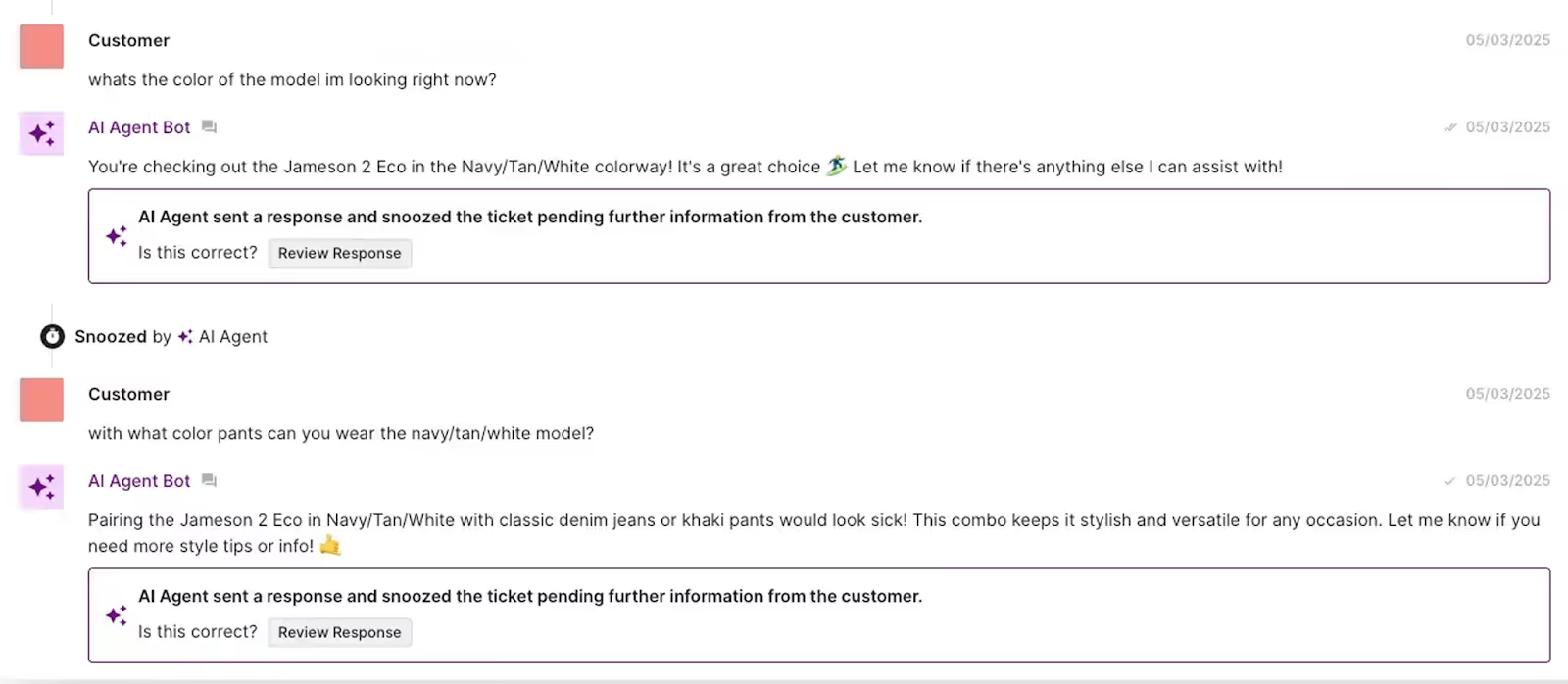
Here’s what it looks like in action: When a customer engages through a product page, Shopping Assistant recommends a matching outfit, suggesting it’s aware of alternate product variants and the customer's likely interest in that style.
Dynamic discounts that convert without undercutting
Promotions are powerful, but they’re not one-size-fits-all.
With Shopping Assistant, merchants can define their discount strategy to align with their brand. These strategies can range from offering no deals to using aggressive promotions.
Once the strategy is set, Shopping Assistant waits for hesitation and customer intent to trigger a discount, firing it at the most conversion-worthy moment.
Proactive engagement in 3 ways
Shopping Assistant initiates conversations. It’s built to engage shoppers, spotting when they linger or show signs of confusion, stepping in with timely, personalized help.
Every second counts in ecommerce. If a shopper pauses on a product page or is left scrolling through an endless search results page, Shopping Assistant detects it in real-time and reaches out with a relevant prompt like:
- “Need help picking the right shade?”
- “Want to know our return policy before you buy?”
Here’s how Shopping Assistant reduces drop-off, builds confidence, and drives faster decision-making in three different ways.
1. Suggested product questions
Shopping Assistant automatically triggers commonly asked questions depending on the product currently being viewed. In one click, shoppers can get the answer to the question they’re curious about. This combats hesitation caused by a lack of information, resulting in more confident conversions.
2. Ask Anything Input
When shoppers land on the homepage, it’s easy to become overwhelmed and not know where to navigate. The Ask Anything Input provides an easy way to start a conversation with Shopping Assistant and get the guidance they need.
Shopping Assistant can refine its response to the customer based on the page context. For example, when the customer is on a product page, Shopping Assistant knows exactly what product is being asked about.
3. Trigger on Search
Shopping Assistant can step in to offer pinpointed help based on a shopper’s search query. Instead of scrolling through a results page, Shopping Assistant triggers a message based on what the shopper entered, offering an easier and faster way to find what they need.
Smart recommendations and relevant upsells
Shopping Assistant’s suggestions are rooted in real context: what the shopper has viewed, added to cart, or asked about. Whether they’re exploring a specific product line or revisiting a category they’ve shown interest in, Shopping Assistant delivers relevant upsells and complementary items that make sense for the customer.
This personalized approach to upselling increases cart size without feeling forced—it’s smart, seamless, and sales-driven.
Shopping Assistant can even turn vague product questions into upsell opportunities. By asking questions, it learns more about an individual to come up with recommendations that best fit their preferences.
Try Shopping Assistant today
Shopping Assistant is transforming the way shoppers engage and helping ecommerce brands sell more effectively. Through smarter conversations and real-time personalization, it turns every interaction into an opportunity to convert, build trust, and drive revenue.
{{lead-magnet-2}}

Coach AI Agent in One Hour a Week: SuitShop’s Guide
TL;DR:
- Don't just turn it on, coach it. Treating your AI Agent like a team member, not a plug-and-play tool, is what makes it truly helpful and memorable.
- One owner and one hour a week is enough to make a big impact. SuitShop’s Katy Eriks runs QA and training solo, using a repeatable system to log feedback and improve performance weekly.
- Don't forget to pause and evaluate. SuitShop temporarily turned off AI to improve their help content, making automation far more effective when it came back online.
- Let your best human agents guide your AI. Katie studied her top-performing teammate's tickets to teach AI the best responses and macros.
- Brand voice matters as much as accuracy. SuitShop's AI Agent "Max" is trained to sound warm, helpful, and on-brand. Customers even thank it by name.
The most coachable team member on your support team might not be human.
Brands that want to keep up with rising customer expectations are turning to AI to help meet demand. But as SuitShop’s Director of Customer Experience, Katie Eriks, will tell you, great results don’t come from flipping a switch.
They come from coaching.
Since implementing Gorgias AI Agent, SuitShop has reached a 30% automation rate, all while maintaining a lean CX team and giving every customer the tailored experience they expect (literally and figuratively).
“I consider myself its boss,” said Katie, who runs the entire coaching process solo. With under an hour of weekly maintenance now, SuitShop’s AI Agent runs efficiently, accurately, and on-brand.
Katie spoke at Gorgias Connect 2025 to share exactly how she got there. You can watch her full session below:
The case for coaching your AI Agent
When brands think about automation, they often imagine flipping a switch and watching repetitive tasks vanish. But in practice, it’s not that simple, at least not if you care about customer experience.
Gorgias encourages brands to treat their AI Agent like a junior teammate — someone you onboard, train, observe, and coach over time.
Brands that do this well are already seeing massive gains:
- 60%+ of customer conversations fully automated
- First response times under 30 seconds
- Consistent CSAT scores of 4.5 and above
- Major cost savings during high-volume seasons
For SuitShop, automation was about creating space for their small team to focus on specialized service. Space to scale without scaling headcount. And space to do it all without losing their voice.
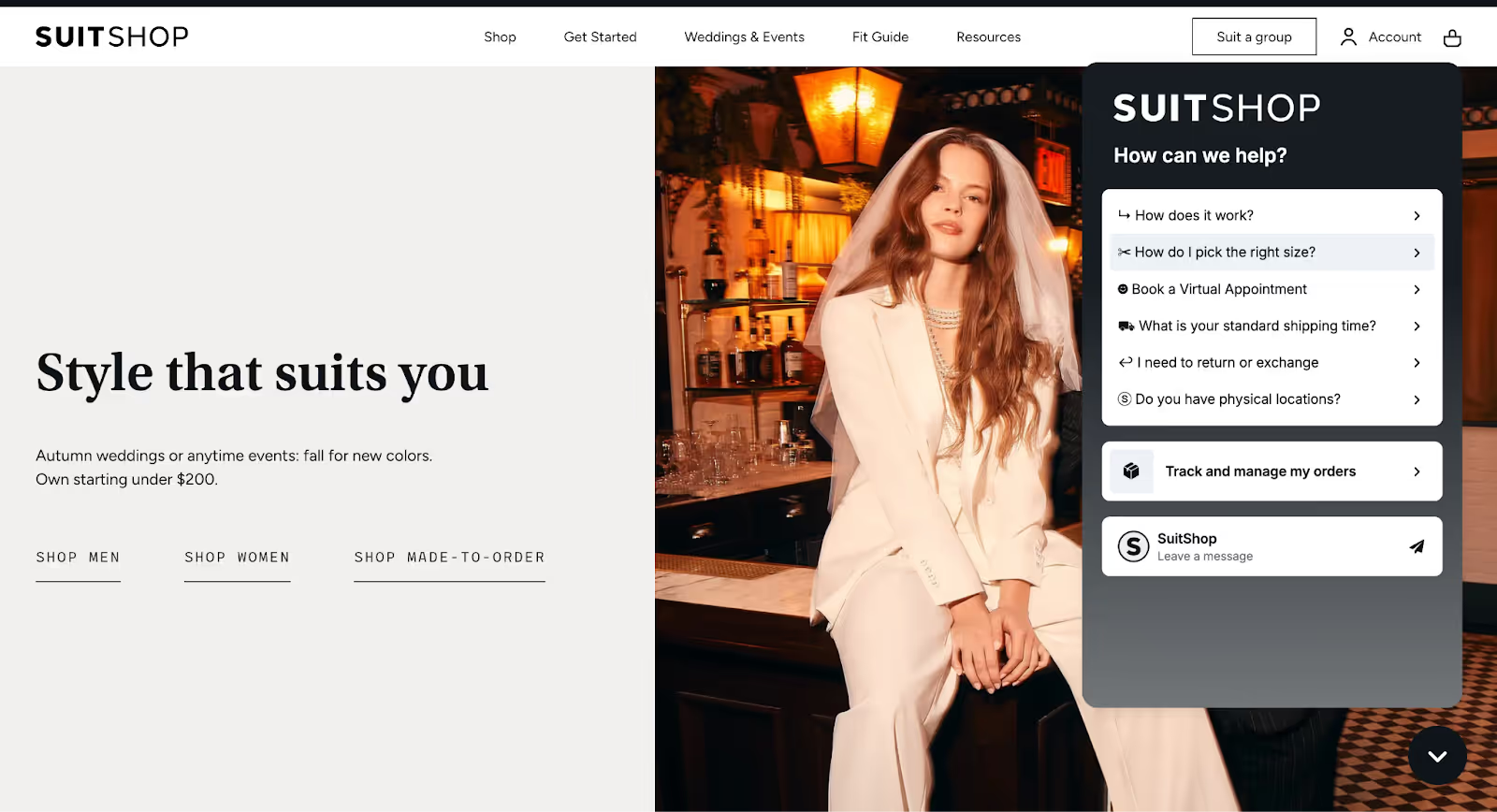
Step-by-step: SuitShop’s AI coaching workflow
Katie and her team had been longtime Gorgias users, but when they turned on AI Agent in August 2023, the results were unremarkable. The responses weren’t inaccurate, but they weren’t helpful enough either.
What Katie learned was to “Be hands-on early. Use downtime to train. And never stop refining.”
So she got to work, not by replacing the tool, but by going deeper into it. Here are her coaching tips:
One owner, one hour a week
Katie made herself the sole point of contact for training and QA. That might sound like a lot, but over time, it became a light lift.
“At this point, it’s definitely less than one hour per week,” she said. “In the beginning, it was more time-consuming because I needed to create help center articles and Guidance regularly. Now I’ve got it down to a pretty quick thumbs-up, thumbs-down kind of process.”
Katie uses Monday mornings to review AI Agent tickets from over the weekend, when fewer human agents are available and AI takes the lead.
Read more: Why your strategy needs customer service quality assurance
Pause and perfect before scaling
Unlike many retail brands, SuitShop’s busiest time isn’t the holiday rush — it’s wedding season in the summer and fall. So when things quieted down in December, Katie used that time strategically.
She temporarily turned off the AI Agent to regroup.
“I decided to turn it off and really beef up our Help Center,” she explained. “I went back to the tickets I had to answer myself, checked what people were searching in the Help Center, and filled in the gaps.”
She built out content with a mix of blog knowledge, internal macros, and ChatGPT. Once she felt confident the content base was solid, she turned AI back on.
Read more: How to optimize your Help Center for AI Agent
Use data to guide your coaching plan
Once SuitShop’s foundational content was in place, Katie didn’t just sit back and hope for the best. Instead, she built a repeatable feedback loop grounded in data — one that helped her spot opportunities for improvement before they became issues.
Rather than combing through tickets at random, Katie created custom views inside Gorgias to zero in on the most impactful coaching moments:
- Low CSAT tickets: Any conversation that ended with a customer satisfaction score below expectations got flagged. These were clear indicators that something about the tone, accuracy, or clarity of the AI response had fallen short.
- High handover rates: Katie looked at the tickets AI Agent was regularly handing off to humans. Many of these were actually answerable. The handover just meant that guidance was missing, miscategorized, or too vague.
- Agent-tagged tickets: To make this scalable, Katie empowered her team to flag any strange or impressive responses from the AI. By using a tag like AI_agent_feedback, team members could drop tickets into a coaching queue without needing to write a full explanation.
To keep all of this actionable, Katie logs insights in a shared spreadsheet that functions as a live to-do list. Every row includes:
- A link to the ticket
- A summary of the issue
- The resolution (e.g., new Guidance or macro needed)
- A status tracker (not started / in progress / completed)
- A link to the resource she created in response
These insights are also available in Gorgias’s dashboard, where you can identify the top issues customers had.
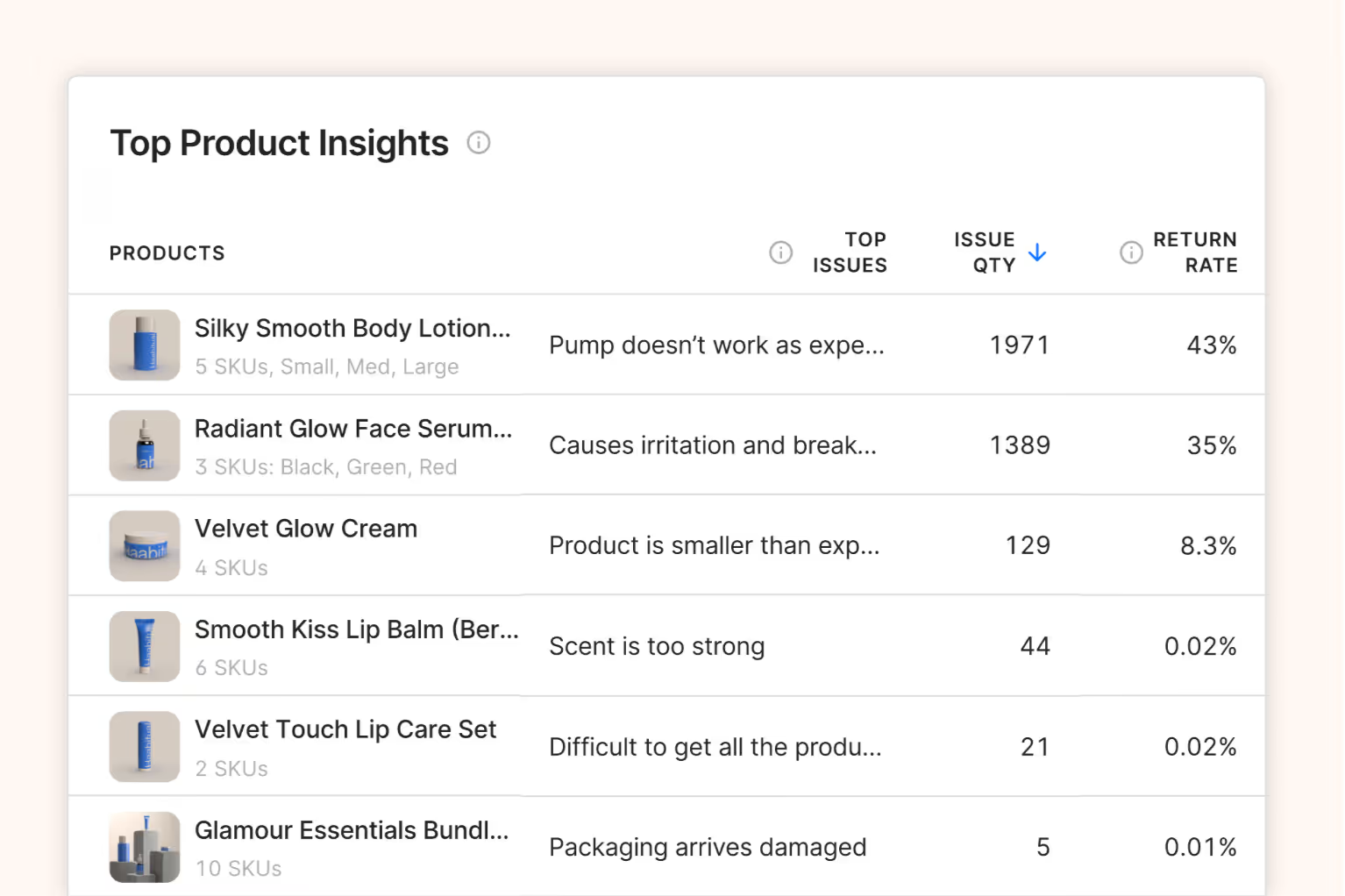
“Sometimes I do it all in the moment. Other times I’ll log it and come back later when I can take the time to do it right.”
By combining frontline feedback with structured ticket views, Katie turned scattered QA into a consistent coaching system — one that ensures SuitShop’s AI Agent keeps getting smarter every week.
Learn from your human agents
One of Katie’s most effective strategies comes from her own team.
Like many CX leads, she noticed that some agents consistently resolved tickets in a single touch. That pattern, Katie realized, wasn’t just a win for customers, it was a roadmap for an AI-driven support strategy.
Her teammate Tacy quickly became her go-to signal for what the AI Agent needed to learn next.
“I pull her tickets often to see what she’s responded with. It helps AI learn from her directly.”
By reviewing Tacy’s ticket history, Katie identified standard replies that didn’t yet exist as macros or Guidance. If Tacy was writing the same sentence repeatedly or copy-pasting a reply manually, that meant it could (and should) be taught to the AI Agent.
She also tracked Tacy’s macro usage rate. If Tacy frequently used a macro for a certain issue, but other agents weren’t, it flagged an opportunity to standardize responses across the team and the AI.
The key insight? If it only takes one touch for a human to answer, the AI can be trained to do it too.
These small efficiency wins added up quickly, especially during peak season, when the ability to automate just a few extra conversations per day created meaningful breathing room for the rest of the team.
Related: How to automate half of your CX tasks
Make your AI sound human (and on-brand)
Automation without brand voice feels robotic. Katie made sure SuitShop’s AI Agent sounded like a natural extension of the team, and that started with a name: Max.
“We get replies like, ‘Thanks Max!’ from customers who think it’s a real person.”
Using AI Agent’s tone of voice settings, Katie went deep on personalization. She customized everything from sentence structure and greeting format to whether or not emojis and exclamation marks should be used (they shouldn’t, in SuitShop’s case).
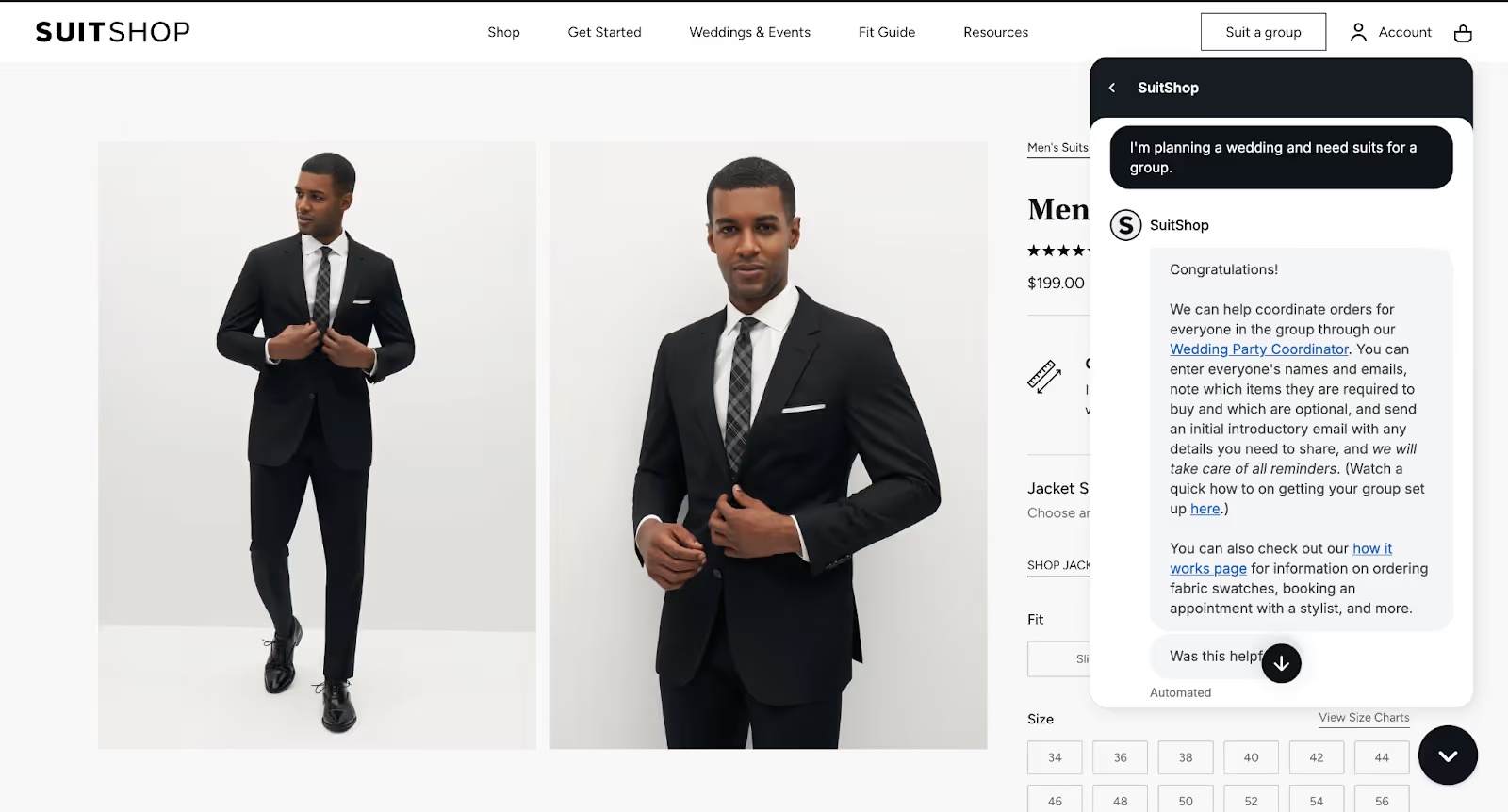
Her AI Agent instructions include clear direction on:
- Tone: Warm, empathetic, clear, especially with high-stress wedding-related issues
- Structure: Shorter responses for chat, slightly more detailed for email
- Dos and Don’ts: Specific words or phrases to use or avoid, pulled from real team responses
- First/last name use: Always first name only, to keep things friendly but respectful
Katie also made sure she instructed AI Agent to acknowledge customer emotions — especially frustration — and to offer reassurance when things went wrong.
And because AI responses are written at lightning speed, she regularly reviewed messages to ensure they didn’t come off as cold or abrupt, especially in sensitive situations like delayed wedding orders or size issues close to the event date.
Live coaching: What it looks like in practice
In the workshop, Katie walked through two real support tickets where AI missed the mark and how she used those moments to improve.
In one case, a customer asked a common question: “The navy suit I’m looking at says ‘unfinished pant hem.’ Will the pants need to be hemmed?”
Despite having help articles and macros explaining this exact issue, AI Agent responded: “I don’t have the information to answer your question.”
That was a red flag.
Katie immediately stepped in to coach the agent by:
- Applying the correct existing resources
- Writing an ideal sample reply as an internal note
- Checking tone, empathy, and phrasing
- Testing the fix by pasting the same question into the test environment
“I like to write a short internal note, so if I see that ticket again, I know exactly how I coached it.”
In another case, AI Agent was incorrectly handing off a sizing question about jacket sleeve length. Katie realized that a previous broad handover topic ("sizing and fit questions") was causing confusion by flagging issues that the AI should have been able to handle.
So she deleted the handover topic and replaced it with a clear guidance article — complete with example questions, macros, and links to sizing resources.
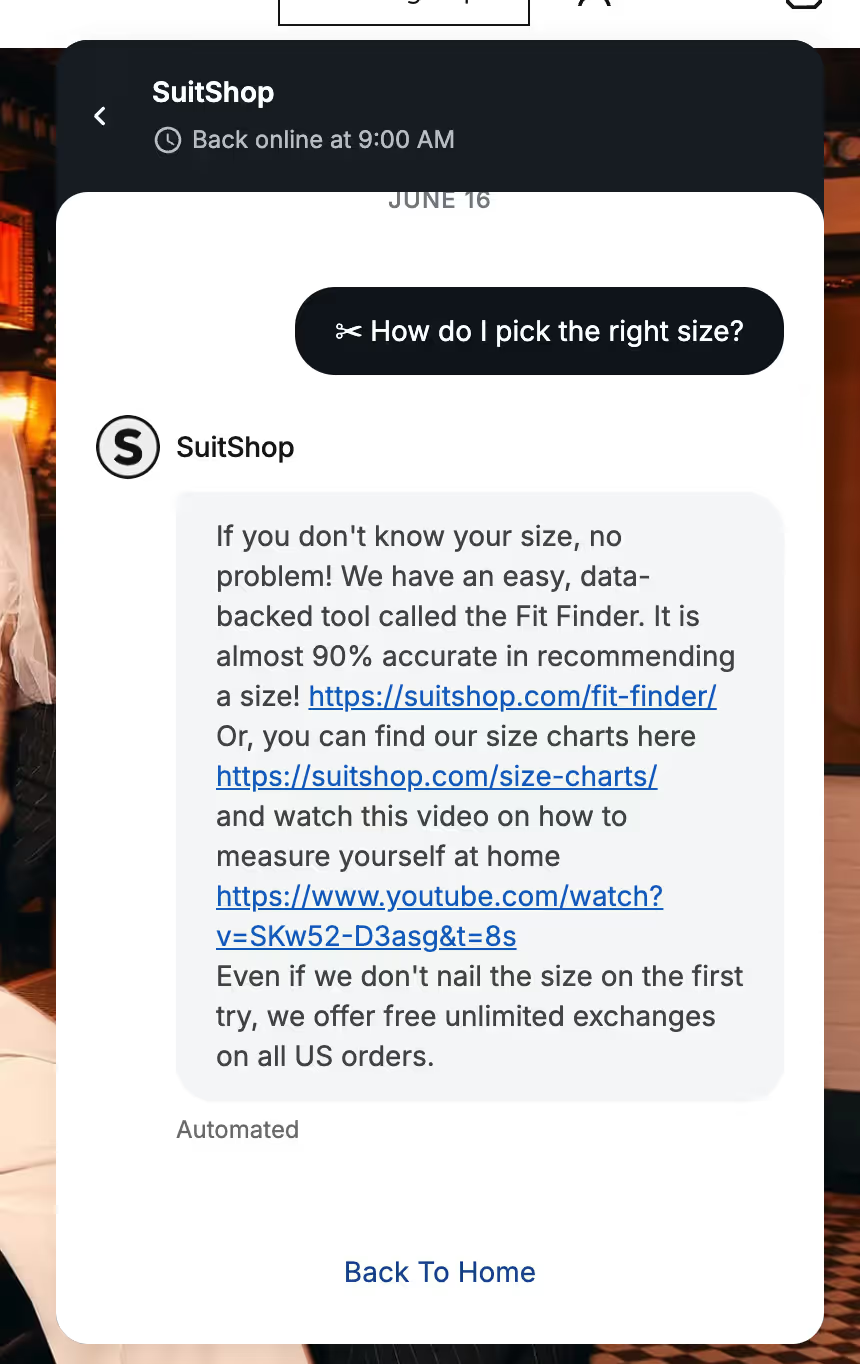
“Once I added specific questions in quotes, it made a huge difference.”
What's next: AI tools that help you scale faster
SuitShop didn’t automate 100% of CX — but that’s not the point. At 30% automation (and growing), Katie gives her team more time to specialize, connect, and handle urgent or emotional conversations with care.
Here’s what Gorgias offers to help as well:
- Optimized intent dashboards: These show the most common topics customers ask about, the AI’s performance on those topics, and how much opportunity there is to increase automation.
- Auto-generated knowledge: Based on your macros, Help Center, and even Shopify data, Gorgias can now draft suggested guidance for your review, making it faster to train your AI Agent without starting from scratch.
- Auto QA: This tool scores every AI (and human) response based on resolution, accuracy, communication, and tone. It gives you full visibility across your team and automations, without needing to review each ticket manually.
Whether you’re just getting started or trying to move beyond basic automation, Katie’s approach proves that coached AI outperforms out-of-the-box tools every time.
Want to coach your AI Agent like SuitShop? Book a demo to see how Gorgias can help you scale smarter.
{{lead-magnet-1}}


Every Successful Marketing Campaign Starts with a Customer Question
TL;DR:
- Start with your CX team—they know what customers are asking. Their insights reveal what’s confusing, what’s converting, and what’s causing returns before marketing ever gets involved.
- Turn pre-sale questions into better messaging. Use common support queries to improve landing pages, product descriptions, and emails so customers feel confident enough to convert.
- Your best-performing products aren’t always the most hyped. Let real customer comments guide your messaging by identifying what people rave about in chats and reviews.
- Customer confusion and returns usually stem from messaging gaps. Fix product pages, policies, and descriptions to better reflect what people need to know upfront.
Your CX team talks to customers every day. They know what’s confusing, driving purchases, and causing returns, because they hear it firsthand.
But all too often, those insights stay siloed in support tickets and live chat transcripts instead of informing the campaigns that shape the customer journey.
This post is here to change that. We’re breaking down the most valuable questions marketing teams should be asking their CX counterparts. When marketing and CX work together, you get more relevant messaging, smarter product positioning, and campaigns that convert.
Whether you’re planning a big seasonal push or just want to improve product education, this is where to start.
{{lead-magnet-1}}
1. What do customers ask about before buying?
Your CX team knows what makes shoppers hesitate. They’re the ones fielding questions like: Does this come in a larger size? Is it final sale? Will it arrive in time?
Beyond being pre-sale inquiries, they’re signals. They reveal what your customers care about most, and where your messaging may be falling short. When marketing teams tune into this, they can proactively address objections in landing pages, product detail pages (PDPs), emails, and top-of-funnel content.

At luxury jewelry store Jaxxon, Director of Customer Experience Caela Castillo saw firsthand how important it is to address these questions early.
“Chat used to be a support tool for repetitive questions and problem-solving, but now AI Agent takes care of that for us,” she said. Once those friction points were handled upfront, the CX team could focus on more meaningful conversations, and conversions improved.
And when AI recommended the wrong products? Conversions dropped. It was a clear signal that relevance matters, especially before the sale.
Ask your CX team:
“What do customers most often need to know before they buy, and how can we answer that earlier in the journey?”
2. What product do customers rave about—and why?
Your best-selling product isn’t always your hero product. Sometimes, it’s that under-the-radar item that customers can’t stop talking about. The one that shows up again and again in reviews, chats, and post-purchase surveys.
The insight is gold for marketers. The key is to find out why people love it. Is it the fit? The feel? The results?
At online fashion brand, Princess Polly, Alexandria shared that her team expected Gen Z shoppers to lean on AI for recs, but what really influenced them was customer feedback. Reviews, not bots, built trust. That’s why campaigns built around real customer language and experiences often outperform the most polished product copy.
Shopping Assistant can turn those rave reviews into real-time action. It highlights top products using your Shopify product catalog to make personalized recommendations, proactively assists shoppers by using behavior signals, and even offers tailored discounts when they’re ready to convert. That means less guesswork, greater relevance, and an easier path to purchase.

Ask your CX team:
“Which product do customers rave about most, and what exactly are they saying?”
3. What product causes the most complaints?
When customers are frustrated, it’s easy to blame the product. But in many cases, the issue isn’t quality, it’s communication.
At Shinesty, a men’s underwear brand, Molly Kerrigan, Senior Director of Retention, observed that high return rates often stemmed from unmet customer expectations.
She noted the importance of maintaining clear and consistent communication as the company grows, “We get a lot of praise from our customers, and they talk highly of our CX team after 1:1 interactions. We can’t lose that as we scale.”
Molly notes that using Gorgias AI Agent enables Shinesty’s customers to receive quick answers, freeing her team's time for more complex or sensitive issues.
Similarly, Princess Polly saw that delivering a standout customer experience meant being fast, consistent, and helpful at every stage. After switching to Gorgias, their support performance improved dramatically:
- 80% decrease in resolution time
- 95% decrease in first response time
- 40% increase in efficiency
Before changing the product, try updating the messaging. Use insights from CX to rewrite descriptions, add size guides, include user-generated content, or even build a quick-fit quiz. Small tweaks help set clearer expectations and reduce unnecessary returns.
Ask your CX team:
“Which products are driving the most complaints, and what do customers wish they knew before buying?”
4. What confuses customers the most?
Confusion is a conversion killer. If a customer isn’t sure about how something works, what’s included, or whether it’s right for them, they’re more likely to bounce.
That’s why it pays to ask your CX team where customers get stuck. Is it a product feature that needs more context? A vague store policy? A missing detail on a bundle?
The good news is that most confusion is fixable. Start with the following steps:
- Simplify your product pages
- Add quick-hit FAQs to your emails
- Use plain language and real examples
If you’re using Shopping Assistant, you can go even further. It can detect when shoppers are hesitant and provides real-time nudges. Like an assistant who knows all your needs, Shopping Assistant automatically surfaces the questions customers are likely to ask when evaluating a product, so they’re equipped with the clarity they need to proceed to checkout.

TUSHY, a modern bidet brand, faced similar challenges. As bidets aren't mainstream in North America, shoppers often had concerns about product compatibility and installation. They’d ask questions like:
- Will a bidet fit my toilet?
- Is installation complicated?
- Which bidet is right for me?
Without immediate answers, many potential buyers would abandon their purchase. To address this, TUSHY implemented Shopping Assistant, providing instant support. Taking this approach resulted in an 81% higher chat conversion rate compared to human agents and a 13x return on investment.
“The Shopping Assistant has been a game-changer for our team, especially with the launch of our latest bidet models. Expanding our product catalog has given customers more choices than ever, which can overwhelm first-time buyers. Now, they’re increasingly looking to us for guidance on finding the right fit for their home and personal hygiene needs,” said Ren Fuller-Wasserman, Sr. Director of Customer Experience at TUSHY.
Ask your CX team:
“Where do customers get confused most often—and how can we clear that up sooner?”
5. Which products are frequently bought together?
Your CX team picks up on patterns that analytics sometimes miss. They hear which items customers ask about in the same chat, which products get added to carts together, and which pairings people reorder time and time again.
That intel is a goldmine for bundling and upselling. It helps you build smarter campaigns that feel relevant and drive real value.
Zoe Kahn, owner of Inevitable Agency and former VP of Retention and CX at Audien Hearing, emphasizes the importance of using AI to enhance customer interactions.
“A lot of that revenue was potentially missed revenue because these were customers sitting on the site, asking questions about the products, and wanting an answer now so they could purchase…Now, AI can answer those questions immediately and convert those customers.”
With Shopping Assistant, you can act on these insights in real time. It will surface personalized product pairings, bundle suggestions, or accessories based on customer behavior. All before they hit the checkout page.

6. Which products lead to the most returns, and why?
Returns cut into your margins and chip away at trust. Most of the time, they’re not caused by poor-quality products. They happen because expectations weren’t met.
Your CX team already knows which items come back the most and why. Maybe the color doesn’t match the photos. Perhaps the fit runs small, or the product description left out a crucial detail.
Instead of pushing the product harder, reframe how you present it. Add real customer photos. Include fit notes or a sizing chart. Call out anything that might surprise the customer post-purchase. A little clarity upfront goes a long way in reducing returns and boosting retention.
At Pepper, an intimates brand specializing in bras for small-chested bodies, they recognized the importance of pre-sale education. When customers have sizing questions, their AI Agent, Penelope, can provide immediate assistance.
“Penelope takes the information we give her and responds better than a Macro. She tailors it so that it sounds like a natural conversation between two people,” said Gabrielle McWhirter, CX Operations Lead at Pepper.
By proactively providing instant support, Pepper improved customer satisfaction and saw an 18% uplift in average order value.
Ask your CX team:
“Which products get returned the most—and what could we do upfront to change that?”
CX + marketing = smarter campaigns, better results
Before you launch your next campaign, start with a quick sync with your CX lead. They already know what your customers need to hear. You just have to ask.
From fixing messaging gaps to surfacing the right products at the right time, these insights help you connect with customers in personal, timely, and relevant ways.
Tools like Shopping Assistant make it easier than ever to act on this data in real time. You can turn CX knowledge into dynamic recommendations, personalized nudges, and smarter discounts.
Ready to see how you can improve your online shopping experience? Book a demo to see how Gorgias Shopping Assistant engages customers in real-time.

How to Use CX Data to Improve Marketing, Messaging & Conversions
TL;DR:
- Your support inbox is full of marketing gold. CX insights can sharpen messaging and inspire high-impact campaigns.
- Ticket data unlocks smarter segmentation. Use support interactions to build more relevant, behavior-based audiences.
- Chat campaigns work better with CX insights. Tackle objections in real time and lift conversions with proactive messages.
- Use objection data to reduce drop-offs. Identify common blockers and address them in product pages, ads, and chat prompts.
- Help Center stats guide better content. Turn top-searched questions into FAQs, landing pages, and ad copy.
Today’s best marketing starts with your customers.
According to Forrester’s 2024 research, “Customer-obsessed organizations reported 41% faster revenue growth, 49% faster profit growth, and 51% better customer retention than those at non-customer-obsessed organizations.”
Support teams interact with hundreds or thousands of customers every week, collecting valuable insights in the process. This voice of the customer (VOC) data is a goldmine for marketers, but it too often stays siloed among CX teams.
Ahead, we’ll break down how ecommerce brands can tap into CX insights to drive better marketing.
5 ways to use CX data to improve marketing
CX can play a crucial role in driving growth, but many brands aren’t leveraging it for marketing insights yet.
When connected to marketing, CX becomes a proactive engine that fuels better segmentation, sharper messaging, smarter campaigns, and more personalized content.
Support functions collect objections, complaints, compliments, and pre-purchase questions. When you capture and apply those insights, your marketing can target the precise roadblocks—and key sales differentiators—customers care about.
Here’s how to turn CX insights into a high-impact marketing strategy, with real examples from brands using Gorgias.
- Leverage ticket insights to improve messaging
- Segment customers based on support interactions
- Launch more targeted chat campaigns
- Reduce drop-offs and abandoned carts
- Monitor Help Center and Dashboard stats to craft smarter content
1) Leverage ticket insights to improve messaging
When you want to sharpen your brand messaging, there’s no better place to look than your support inbox. Your support inbox is a rich resource full of information specific to your brand and your customers.
Tools like Gorgias Ticket Insights help surface recurring themes, top questions, and friction points across all conversations. By analyzing these patterns, marketers can identify the exact words customers use to describe problems, questions, or product feedback and then reflect that language across ads, landing pages, and emails.
How to implement
Spikes in tickets around specific topics (sizing, shipping timelines, and materials, for example) are insights marketers can use to update and improve corresponding content.
This can increase confidence and conversion on key pages.
By incorporating the same terminology and phrasing customers use in support conversations, brands can also increase resonance across ads, emails, and social media. Messaging that mirrors the customer’s language builds trust and helps audiences feel understood.
Ask your CX team 💬 What product issues or themes have emerged this quarter?

For example, cordless heating cushion brand Stoov® used Ticket Fields in Gorgias to understand and resolve a ticket spike. By figuring out that some customers were dissatisfied with the battery life of its core product offering, the team was able to add an optional upsell. For €20, shoppers now have the option to purchase a larger battery.
The results were meaningful: the brand saw 50% of customers opt for this battery, resulting in a 10% increase in average order value (AOV). And while the team saw a significant increase in revenue, they saw no increase in support ticket volume.
2) Segment customers based on support interactions
Most marketers rely on transactional data—like past purchases or time since last order—to build audience segments. But support data reveals a whole new layer of context: behavior, concerns, sentiment, and urgency.
Tools like Gorgias’s Ticket Insights and Ticket Fields allow CX teams to customize different properties attached to tickets. Agents can fill these out to capture data more accurately.
Here’s how these types of tools work: tickets come with a mandatory field for return reasons, product feedback, contact reason, etc. Before the agent closes the ticket, they use a dropdown menu to fill out the ticket field.
How to implement
Studying support interactions helps answer key questions around why customers are getting in touch. This data can provide marketing teams with a way to build smarter segments for campaigns or personalized journeys.
For example, if one product is getting a large amount of inquiries, marketing teams could segment customers interested in those products and launch pre-sales education campaigns.
Fashion brand Psycho Bunny switched from Zendesk to Gorgias to improve access to reporting tools that surfaced customer patterns and support trends.
“By cross-referencing our Gorgias data with insights around basket size, product performance, and store performance, we can inform broader business decisions. For example, we can see if a certain store location generated more tickets or how many incoming queries are about a certain product,” says Jean-Aymeri de Magistris, VP IT, Data & Analytics, and PMO at Psycho Bunny.
By integrating insights like these with marketing workflows, teams can build more relevant segments that improve retention and engagement.
Ask your CX team 💬 Which customer segments are most likely to churn or repurchase?
3) Launch more targeted chat campaigns
Chat campaigns are proactive messages that trigger based on real-time behavior and context. You can use CX trends to design campaigns that directly address common objections, answer FAQs, or deliver tailored offers.
How to implement
Start by reviewing your most common pre-purchase questions with your CX team. Then, create chat prompts that address those concerns exactly where they arise. For example, a sizing guide prompt on product pages or a shipping FAQ in the cart.
Make sure your message feels helpful and not overly salesy. Conversational AI assistants like AI Agent can also tailor responses in real-time, helping customers get what they need without leaving the page.

Pepper, a size-inclusive bra brand, put this into practice by combining their AI Agent (named Penelope) with targeted chat campaigns to guide shoppers through one of their most common friction points: sizing. Thanks to insights from their support team, Pepper created messaging that helped customers find the right fit instantly. The result was an 18% uplift in average order value.
“With AI Agent, we’re not just putting information in our customers’ hands; we’re putting bras in their hands. With Penelope on board, we’re turning customer support from a cost center to a revenue generator,” says Gabrielle McWhirter, CX Operations Lead at Pepper.
Ask your CX team 💬 How are customers reacting to recent promotions or launches?
4) Reduce drop-offs and abandoned carts
When shoppers hesitate at checkout, it’s often because they don’t have the information they need.
Tapping into support conversations allows CX teams to identify common objections. They can then share those insights with marketing to refine product messaging, improve product pages, ads, and marketing campaigns.
How to implement
Use customer service data to identify the top three objections customers have before converting. These might be concerns about sizing, compatibility, delivery time, or product setup. Then, pair that knowledge with a proactive AI sales tool like Shopping Assistant to offer timely answers that move shoppers closer to purchase.
For example, TUSHY, a modern bidet company, found that many prospective customers were hesitant because they weren’t sure how difficult the installation would be. By using a real-time shopping assistant to address these concerns directly on-site, TUSHY was able to guide shoppers past uncertainty.

Ask your CX team 💬 What are the top three reasons customers contact us before they buy?
5) Monitor Help Center and Dashboard stats to craft smarter content
If you want to know what content your customers actually need, your Help Center holds the answers. Real customer questions are found right in Help Center search queries and article analytics.
By tracking which articles are most viewed, most searched, and most frequently updated, marketers can spot common knowledge gaps and fill them with high-value content.
How to implement
Start by reviewing your Help Center Statistics to see which articles are performing well, which ones are underutilized, and what terms customers are searching for.
If an article about “returns policy” is getting a spike in views, that’s your cue to simplify the policy or preempt questions with a dedicated email campaign. Marketing teams could also use this insight to build FAQ-rich landing pages, preempt questions in email flows, or even turn top-performing help content into organic blog posts or performance ad copy.
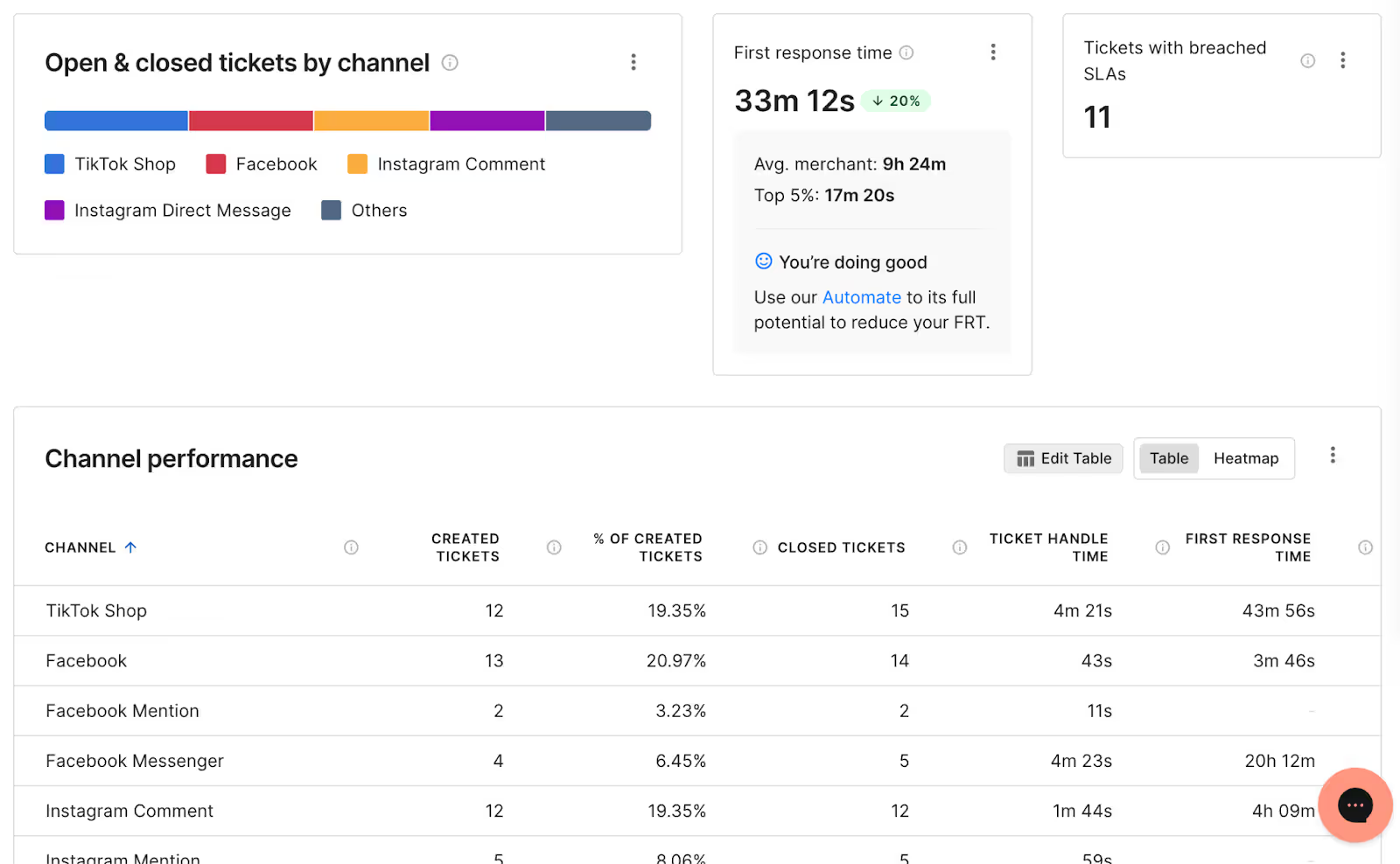
You can also use Gorgias's Dashboard to spot emerging trends across all your channels. This custom reporting feature lets you choose from various charts that reveal high-level patterns—like the most common contact reasons or sudden spikes in ticket volume—giving marketers early insight into shifting customer sentiment and trending topics across social platforms.
Ask your CX team 💬 Which articles in our Help Center are most searched right now?
Find alignment between CX and marketing teams
When support and marketing teams collaborate, you unlock a cycle of continuous improvement. CX teams surface the insights, marketing turns them into strategy, and both sides drive measurable results.
Here’s how to make it work:
- Set up recurring syncs between CX and marketing teams to review insights from customer service reports.
- Involve support in campaign planning to consider what customer objections might come up.
- Encourage CX to tag tickets based on themes or behavior that marketing can act on.
Unlock revenue by listening to your customers
We need to reframe CX as a proactive function that drives revenue.
Support teams already have the answers marketers are searching for. You just need the tools to tap into them. Gorgias makes that easy, with flexible reporting features, powerful AI, automated tagging, and integrations that bridge the gap between CX and marketing.
Want to connect your support data to better marketing?
Explore Gorgias’s analytics tools or book a demo to speak to a product expert about how to integrate your support strategy with marketing.
{{lead-magnet-1}}
Building delightful customer interactions starts in your inbox
