Search our articles
Search

Featured articles

Ticket Volume: How to Measure It, Benchmark It, and Reduce It

Learn what ticket volume is, how to calculate contact rate, and which categories to target first to reduce unnecessary tickets.
By Gorgias Team
0 min read . By Gorgias Team

TL;DR:

  • Ticket volume is your support workload: It counts every customer inquiry across every channel in a given time period.
  • High volume signals friction in your business: Spikes usually point to unclear policies, product issues, or gaps in your website experience.
  • Every ticket has a real cost: Agent time, tooling, and overhead add up fast — and they compound during peak seasons.
  • Automation reduces volume without reducing quality: AI tools and self-service deflect repetitive questions while keeping customers satisfied.
  • Measurement drives improvement: Tracking volume by channel, category, and time period reveals exactly where to focus your efforts.

Your ticket volume number is probably wrong. If customers are reaching you through email forwards, Slack DMs, or channels that bypass your helpdesk, those tickets aren't being counted, and your SLA reporting is built on incomplete data. This guide covers how to get an accurate count, break it down by channel and category, and use your vertical benchmark to figure out whether your volume is actually a problem or just normal for your industry.

What is ticket volume?

Ticket volume is the total number of customer inquiries your support team receives across all channels — email, live chat, phone, social media, and contact forms — within a specific time period. It is the most direct measure of your team's workload.

Do not confuse it with contact rate. Contact rate = tickets ÷ orders (or customers). That normalized number is more useful for benchmarking and planning because it accounts for business growth. Raw ticket volume tells you how busy your team is. Contact rate tells you whether support demand is outpacing your business.

How to calculate your ticket volume

Start by looking at the last 30 days of customer conversations, no matter where they currently live.

Pull these four numbers:

  • Total customer questions received across all channels
  • Breakdown by channel (email, chat, social DMs, phone, contact forms, etc.)
  • Breakdown by category (shipping, returns, product questions, account issues)
  • Tickets or conversations per order during the same period — this gives you your contact rate baseline

Here’s how to pull that data depending on your setup:

Gmail or Outlook

Open your inbox or Sent folder and filter by the last 30 days. Count how many customer conversations came in during that period. You can also copy subject lines into ChatGPT or Claude to group conversations by topic.

Shopify Inbox

Go to Inbox > Conversations and review your recent conversations. Count how many messages you received and look for repeated themes or questions.

Any helpdesk (Gorgias, Zendesk, Freshdesk, Help Scout, etc.)

Most helpdesks have ticket reporting or exports built in. Search “export tickets” or “ticket report” in your platform’s help center. From there, you can pull:

  • Total tickets
  • Channel breakdown
  • Top ticket categories
  • Tickets over time

If a large portion of customer questions are still happening in untracked places like Slack DMs, personal inboxes, or Instagram comments, your reporting is incomplete. Before optimizing support operations, route customer conversations into one shared system so you can accurately measure volume, response times, and recurring issues.

Why your volume breakdown matters more than the total

A raw ticket count tells you how busy your team is. The breakdown tells you what to fix.

Category

What high volume signals

What to do

"Where is my order?"

No proactive shipping updates; poor tracking page

Automate WISMO with AI Agent; add tracking link to order confirmation

Returns and exchanges

Confusing return policy; no self-serve portal

Add a clear returns page; enable self-serve exchange flows

Sizing and product questions

Weak product page content

Add size guides, FAQs, and fit notes directly on product pages

Account and subscription issues

Customers can't self-serve basic account changes

Build or improve your Help Center; enable self-serve account management

Payment and billing

Checkout friction or unclear pricing

Fix at the source — this is rarely a support problem

Run this categorization for your last 30 days. Your top two or three categories are your highest-leverage targets.

Track volume alongside these KPIs

Ticket volume only tells part of the story. Track it alongside:

  • Contact rate (tickets ÷ orders) — so you know if volume is growing faster than your business
  • First response time (FRT) — volume spikes show up here first
  • Average handle time (AHT) — high AHT + high volume = a capacity problem
  • Cost per ticket — total support costs ÷ total tickets, the clearest financial measure
  • Backlog size — a growing backlog is the earliest warning sign that volume is outpacing capacity
  • Deflection rate — tickets resolved through self-service or automation without agent involvement

How to reduce ticket volume without reducing quality

Once you know what is driving your volume, address each category at the source. The goal is to eliminate unnecessary tickets.

Automate the highest-volume, lowest-complexity tickets first. WISMO inquiries, order status checks, and basic return initiations require no agent judgment. An AI Agent connected to your ecommerce platform can handle these end-to-end without a human stepping in. When a question is too complex, the AI escalates it with full context attached.

Build self-service content around your top categories. A Help Center that directly addresses your most common ticket types is the highest-leverage tool for sustained volume reduction. Start with your top five categories. Write one article per category. Surface those articles on relevant product pages, in checkout, and in post-purchase emails — before customers need to search.

Send proactive messages at the moments that generate the most tickets. Post-purchase is the single highest-value touchpoint: an order confirmation that includes a tracking link, estimated delivery window, and a clear link to your return policy eliminates a large share of inbound questions before they are ever submitted.

Measure deflection, not just volume. Deflection rate, the percentage of issues resolved through self-service or automation, is the metric that tells you whether your volume reduction efforts are actually working. Track it weekly alongside CSAT for automated interactions to make sure quality is holding.

Ticket volume benchmarks

The all-industry average is not your benchmark. Ticket volume per 100 orders varies 2.4x across verticals, so comparing yourself to a cross-industry number will either make you complacent or create false urgency.

According to Gorgias platform data from March 2026 across 14 verticals at the $10M GMV band, here is what tickets per 100 orders actually looks like by vertical:

Vertical

Tickets per 100 orders

Electronics

46

Vehicles & Parts

46

Hardware

41

Luggage & Bags

32

Home & Garden

32

Sporting Goods

32

Baby & Toddler

24

Business & Industrial

25

Animals & Pet Supplies

25

Apparel & Accessories

22

Health & Beauty

21

Arts & Entertainment

21

Food & Beverages

20

Toys & Games

19

Source: Gorgias Ecom Lab, March 2026

High ticket volume is not always a sign of poor CX — it often reflects product complexity. Electronics brands generate nearly one ticket per two orders because customers have more pre- and post-purchase questions about technical products. Food and Beverage brands generate about one in five. That gap is not a performance difference; it is a category difference.

The right question is not "are we below 10 tickets per 100 orders?" It is "are we above or below our vertical peers?" Find your row. That is your baseline. Then use the reduction tactics above to move below it.

How to predict ticket volume if your tool charges per ticket

If your ticketing tool uses usage-based pricing, where your bill scales with ticket volume rather than agent headcount, forecasting volume directly affects your budget.

The core formula is simple:

Projected tickets = projected orders × (tickets per 100 orders ÷ 100)

So if you expect 2,000 orders next month and your vertical median is 22 tickets per 100 orders, your forecast is approximately 440 tickets.

But a flat monthly estimate misses the real risk: peak seasons. A volume spike during BFCM that triples your order volume will also triple your ticket count — and your bill — unless you have guardrails in place.

To build a more accurate forecast:

  • Use your contact rate, not raw volume. Divide your tickets by orders for each of the last 12 months. This gives you a stable ratio that accounts for business growth and seasonal swings.
  • Apply that ratio to your order forecast. If your marketing team has a sales projection for November, multiply it by your contact rate to estimate support volume.
  • Separate your AI-handled tickets from agent-handled tickets. Some platforms bill differently for automated resolutions versus human ones. If you're using an AI Agent to deflect WISMO and returns, those deflected tickets may not count toward your billable volume at all — which changes the math significantly.
  • Build in a buffer for peak periods. Your contact rate tends to rise during high-demand periods, not just your order volume. First-time customers generate more tickets than repeat buyers, and BFCM brings a disproportionate share of first-timers.

Before signing any usage-based contract, ask two questions: What counts as a billable ticket? And is there a hard cap on monthly charges? Variable billing only works in your favor if you have clear definitions of what triggers a charge and a ceiling on how high costs can go during an unexpected spike.

If your platform bills per ticket resolved by a human agent (not AI), your deflection rate becomes a financial metric, not just an operational one. Every percentage point of additional deflection directly reduces your bill.

Start reducing ticket volume today

Begin by identifying your top ticket categories, then work backward to find the root cause of each one.

From there, layer in self-service content, automation, and proactive messaging to address those root causes directly. The result is a support operation that handles more customers and a team that spends its time on the work that actually requires human judgment.

Book a demo to see how Gorgias helps ecommerce brands reduce ticket volume and improve customer experience at the same time.

{{lead-magnet-2}}

min read.
AI Agent Pricing Explained

Gorgias AI Agent Pricing, Explained

Learn how Gorgias AI Agent pricing works, what counts as a billable interaction, and how to choose the right plan for your store.
By Gorgias Team
0 min read . By Gorgias Team

TL;DR:

  • AI Agent is priced per resolved interaction, not per seat or per message. You only pay when the AI fully resolves a conversation on its own.
  • Most plans are $0.90 per resolved interaction. Starter plans begin at $1. Plans include 90 to 2,500+ automated interactions per month.
  • If you go over your plan, overage fees apply per additional interaction. Rates vary by tier and are lower on annual plans.
  • Your automation rate emerges from usage over time. Start by estimating your ticket volume and pick an interaction allotment that fits.
  • AI Agent runs on email, chat, and SMS, and includes tone of voice customization, Actions, multi-language support, vision, and performance reporting.

If you're wondering what it costs to add AI Agent to your Helpdesk, you're in the right place. This article walks through how pricing works, what counts as a billable interaction, and how to think about the investment before talking to anyone on our team.

The good news: there are no seat fees, no per-message charges, and no token-based billing. You pay for conversations your AI actually resolves. If you've looked into other AI tools for customer support and found the pricing models confusing or hard to predict, Gorgias AI Agent works differently.

What is a billable interaction?

A billable interaction is counted when the AI resolves a customer conversation entirely on its own. The customer asks something, the AI handles it, the conversation closes. That's one interaction.

If the AI can't fully resolve a conversation and hands it to a human agent, that ticket shifts over to your regular Helpdesk plan. It becomes a standard resolved ticket. You're not charged for both.

A few things that don't count as billable interactions:

  • Emails that come in but no one replies to
  • Spam or filtered messages
  • Conversations resolved by a human agent

This matters most for brands coming from seat-based tools. With Gorgias, your whole team can work in the platform. Agent seats are unlimited. Pricing scales with what your AI is actually doing, not with how many people have access.

Understand the difference between seat-based vs. usage-based pricing.

How AI Agent plans work

AI Agent is an add-on to your Gorgias Helpdesk plan. The two are priced separately but work together. Your Helpdesk plan covers all the conversations your human agents resolve. Your AI Agent plan covers the interactions the AI resolves on its own.

When you choose a plan, you select how many automated interactions you want included per month. Depending on your plan, that ranges from 90 to 2,500+ interactions, with custom interaction numbers available for enterprise. You can see the full breakdown on the Gorgias pricing page.

Each resolved conversation costs $0.90 on most plans. Starter plans begin at $1 per resolved conversation. You only pay for fully automated interactions, meaning conversations the AI handles from start to finish without a human stepping in.

Choosing the right plan

The main input is your average monthly ticket volume. From there, you estimate how many of those conversations AI could realistically handle on its own.

Order status updates, return requests, and shipping questions tend to be the highest-volume ticket types AI resolves well. AI Agent actions shows the full range of what it can handle, which makes it easier to estimate your starting number.

Your actual automation rate, meaning the share of total tickets the AI ends up resolving, emerges from usage over time. Most brands start with their most repetitive ticket types and expand from there as they see results.

Related: Which Gorgias plan should you choose?

What happens if you go over your plan

You're charged an overage fee for each additional automated interaction if you exceed your plan's baseline in a given month. The exact rate depends on your plan tier and whether you're on a monthly or annual subscription.

Generally, the higher your plan tier, the lower your overage rate. Annual plans also carry lower overage rates than monthly plans. So if you're regularly going over, upgrading to a higher tier or switching to annual often works out cheaper than paying overage fees month after month.

If you're on a Support + Shopping Assistant plan, the overage rate is $1.50 per interaction across all paid tiers. If you're on a Support-only plan, rates range from $1.00 to $2.00 per interaction on monthly plans, and $0.83 to $1.67 on annual plans, depending on your tier.

For seasonal businesses, forecasting your customer service volume before peak periods is the best way to choose the right plan size and avoid unexpected fees.

How to think about the cost

At $0.90 per resolved interaction on most plans, each AI resolution costs less than a human agent handling the same ticket. Once you know what a human-resolved ticket costs your business, the comparison becomes straightforward.

For brands building an internal case for the investment, how to pitch AI Agent to your boss covers the ROI framing in detail. 

To see what results look like in practice, how 10 brands transformed customer support into revenue has real ecommerce examples.

What's included with AI Agent

AI Agent comes with everything you need to set it up, customize it, and improve it over time:

  • Knowledge training — AI Agent learns from your Shopify data, store website, Help Center articles, URLs, documents, and custom guidance. The more content it has, the more accurately it responds.
  • Tone of voice — set instructions for how AI Agent sounds, whether that's professional, friendly, or something else, and it stays consistent across every conversation.
  • Actions — connect AI Agent to your other tools so it can complete tasks like cancelling an order, processing a return, or modifying a subscription without a human stepping in. See what AI Agent can do.
  • Multi-language support — AI Agent detects the language a customer writes in and replies in the same language automatically.
  • Vision — AI Agent can read and understand images, so it can handle tickets where customers share photos of damaged items or order issues.
  • Performance reporting — track automation rate, CSAT, first-response time, and ticket topics directly in the dashboard.
  • Testing — preview how AI Agent responds to real customer questions before going live or after making changes.
  • Handover to humans — AI Agent automatically passes conversations to your team when it lacks confidence, detects frustration, or encounters a topic you've marked for human handling.

Learn more: Gorgias AI Agent guardrails: What they are and how to configure them

Curious what AI Agent would automate for your store?

The best way to get a sense of what AI Agent will cost is to look at your own ticket volume and the types of questions your customers ask most. From there, the right plan becomes much clearer.

If you want to talk through the numbers with someone from our team, book a demo and we'll walk through it with you.

If you'd rather keep exploring first, here are a few good next reads:

{{lead-magnet-2}}

min read.
Introducing Helpdesk 2.0

Introducing Helpdesk 2.0: Built for How Agents Work

We rebuilt the Gorgias workspace around how agents actually work. Here's what changed and why.
By Christelle Agustin
0 min read . By Christelle Agustin

TL;DR:

  • Built directly from agent feedback, Helpdesk 2.0 fixes real workflow pain points. The redesign focuses on reducing friction and helping agents handle more context-heavy tickets.
  • A chat-style interface replaces the old email layout. Conversations are easier to follow and resolve in one view.
  • Customer context is shown beside the conversation in a right-side panel. Agents can view history, orders, and details without leaving the ticket.
  • AI handoffs come with clear summaries. Agents instantly see what happened, what was tried, and what to do next.
  • Navigation is simpler and faster across teams. Clean menus, structured queues, and multi-store access keep agents moving efficiently.

Helpdesk 2.0 starts with the people who use it most: the agents. 

We spent time understanding customer support from the agent's seat. What do they reach for constantly? What slows them down? What does a better workday look like? 

Everything we found is in this brand-new update.

Why we redesigned Helpdesk

Conversational commerce is the new standard. 

In customer support, this means customers expect context to remain intact wherever they reach out, whether a conversation starts on social, moves to email, or ends on a call.

This new approach to support has also changed the agent's role. Recurring tickets, like order status checks, shipping updates, and returns, are now handled by AI. What lands in the agent inbox are edge cases that require human judgment and troubleshooting, or tickets that require the full picture.

However, the original Helpdesk was built for a different era of support.

Context was separated across views rather than built into the conversation itself. It's something one in five Gorgias customers flagged, through support tickets, NPS surveys, and conversations with our team. So, we got to work. 

Helpdesk 2.0 is the result.

What's new in Helpdesk 2.0

Here's a look at everything that changed.

Read conversations the way they're meant to be read

Conversations have a natural rhythm, one that’s already found in every messaging tool we use. We brought that same layout into the helpdesk. 

Say goodbye to the 2000s email interface and hello to chat bubbles. This updated design changes how quickly you can orient yourself and resolve the ticket in one go.

Gorgias's Helpdesk 2.0 uses chat bubbles to format conversations.

Chats with customers now look like real conversations, using the speech bubble style you’re familiar with on popular messaging apps.

Check customer history without losing your place

Checking a customer's history used to mean leaving the conversation, an extra step that interrupted what should have been a smooth workflow.

Now, past conversations open in a sidebar next to the active conversation. You can view a customer’s full history, search through their timeline, and open prior tickets without going to a new page.

The Customer Timeline allows you to scroll through past tickets, orders, and customer information.

Check past conversations, orders, and customer details in the brand-new Customer Timeline.

See order details the moment you open a ticket

Order information is easier to reference than ever. Open a ticket, and you instantly see the customer's recent orders, marked with product images and invoice details at a glance. Need to dig deeper? Click on an order, and the expanded information appears in the same panel.

For teams using custom integrations, apps are fixed in a quick-access integration menu on the right.

Orders include product images, number of items, total, time created, and the order number.

See order details, product images, and totals at a glance on the right panel, without leaving the conversation.

Pick up where AI left off

You shouldn't have to dig through a thread to figure out what AI already tried. Now you don't have to.

When AI Agent escalates a conversation, it includes a concise handover summary that mentions the issue, what actions were taken, and why it was passed to your team.

AI Agent includes a handover summary in the ticket thread.

Escalated tickets include a brief AI-generated handover summary, marked in yellow, for quick reference.

Move faster across every store and team

We restructured and simplified the navigation. The left sidebar organizes everything into clear categories: Inbox, AI Agent, Marketing, and Analytics, so anyone on your team knows exactly where to go.

To quickly update your knowledge base or adjust a workflow, both now live right in the sidebar. For teams managing multiple stores, switching between them is just as straightforward, accessible from the sidebar, so agents can move between inboxes without breaking their flow.

Gorgias Helpdesk 2.0 menu

Agents can switch between stores and their corresponding inboxes directly from the left menu.

A workspace that works the way agents do

Support comes down to the person on the other end of the conversation. We built Helpdesk 2.0 is to make sure they have everything they need to show up for that moment.

The best way to see the difference is to work in it. Start a free trial today.

min read.
Create powerful self-service resources
Capture support-generated revenue
Automate repetitive tasks

Further reading

We Rebuilt Chat

We Rebuilt Chat to Feel Less Like a Bot. Here Are the Results

By Gorgias Team
min read.
0 min read . By Gorgias Team

TL;DR:

  • Chat is growing 2.5x faster than email. The shift toward real-time, conversational commerce pushed a full redesign to match how people actually want to shop.
  • The new Chat is designed to drive action, not just answer questions. Clickable replies, contextual prompts, and built-in shopping features guide shoppers from discovery to checkout faster.
  • 36% more customers click on products shown in Chat. Shoppable product cards make browsing feel natural and keep shoppers engaged in the conversation.
  • 2.25x more shoppers add products to cart from Chat. Removing external links and keeping the journey in one place significantly increases buying intent.
  • 7.3% more shoppers engage with Chat overall. Cleaner design and contextual entry points encourage more visitors to start conversations earlier.

In 2025, chat’s growth outpaced email by 2.5x quarter over quarter. Chat has become our most powerful customer experience tool for how shoppers discover products, ask questions, and decide to buy. 

We knew it needed an upgrade, so we reimagined the entire experience from the ground up.

The result is 36% more engagement with product recommendations, nearly 2.25x more shoppers add-to-cart, and 7.3% more customer engagement.

In this post, we'll walk you through our thinking, what’s new in Chat, and how brands are already seeing big gains.

Why the legacy experience needed a makeover

Chat has outpaced email support. Today’s shoppers prefer the speed of quick chat conversations over email. And when shoppers make a new move, we watch, listen, and move with them. 

This behavioral shift isn’t happening in isolation. It aligns with the rise of conversational commerce and proves a universal move toward real-time conversations in ecommerce.

In fact, the signals were already there. Two years of building AI Agent showed us just how much design shapes behavior. The interface is the experience, and we knew that pushing chat experiences to closely resemble human interactions would transform how shoppers engage.

Our new and updated chat brings that vision to life. We believe that shopping is moving from static pages to conversations. This new update is built for how people actually want to shop.

What the new Chat can do

The new design turns live chat into an interactive shopping surface made for modern shoppers. We've brought together multiple ways for shoppers to jump into chat, added clickable replies instead of typing, browsable product cards right in the conversation, and quick cart access.

Let's walk through what's new.

A cleaner visual experience

Chat now comes in a softer color palette that adapts to your store’s branding. We removed message bubbles in favor of an airy design that brings in the familiarity of speaking to your favorite conversational AI assistant. Every interaction now has the breathing room for deeper conversation and personalization.
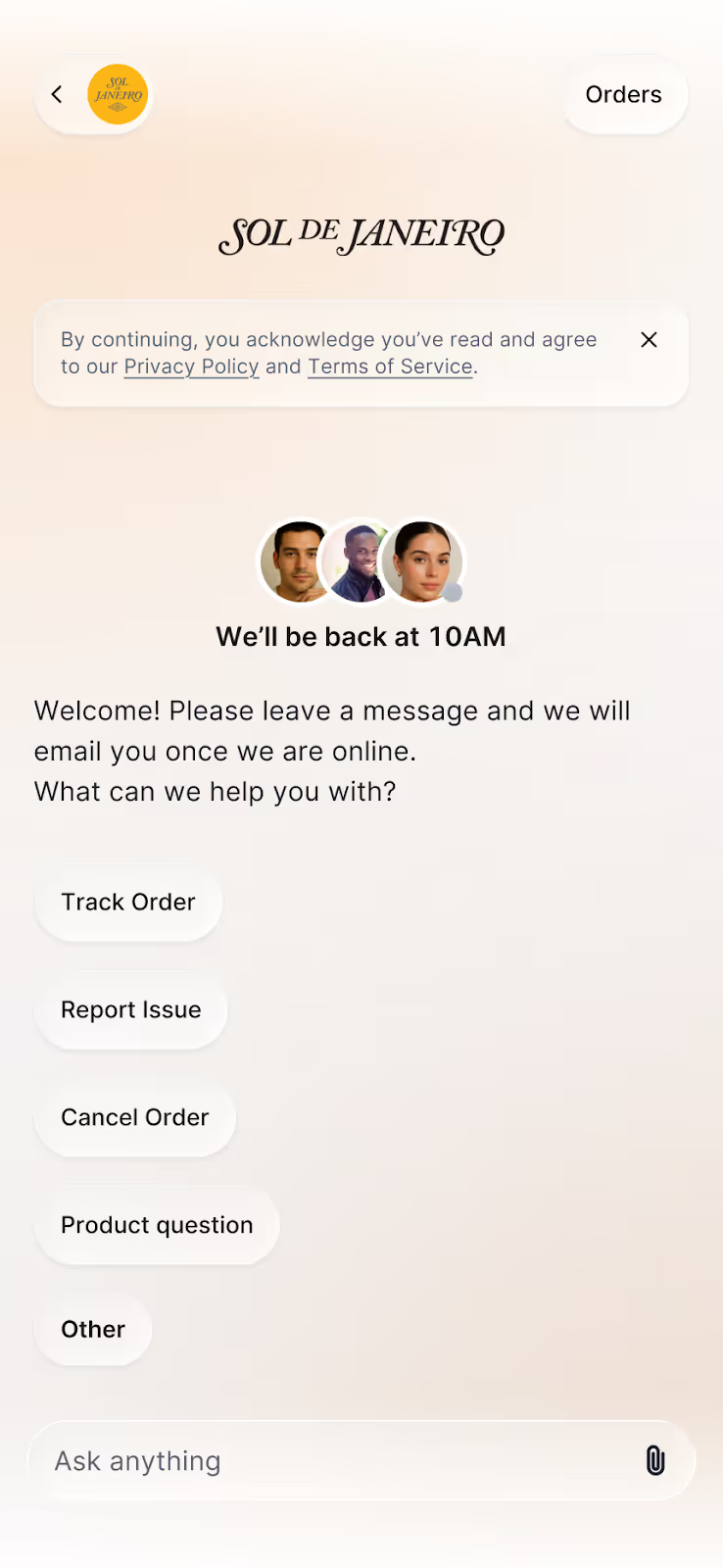
Sol de Janeiro's Gorgias Chat has an orange to gray gradient background. A list of shortcuts like Track order, Report issue, and Other are listed.

One-click replies that move shoppers forward

It’s now easier for shoppers to get an answer with quick reply buttons and suggested questions in Chat. This replaces the tree-based flows of the previous Chat, removing the need to follow a fixed path. Shoppers can find answers faster without typing text-heavy explanations.
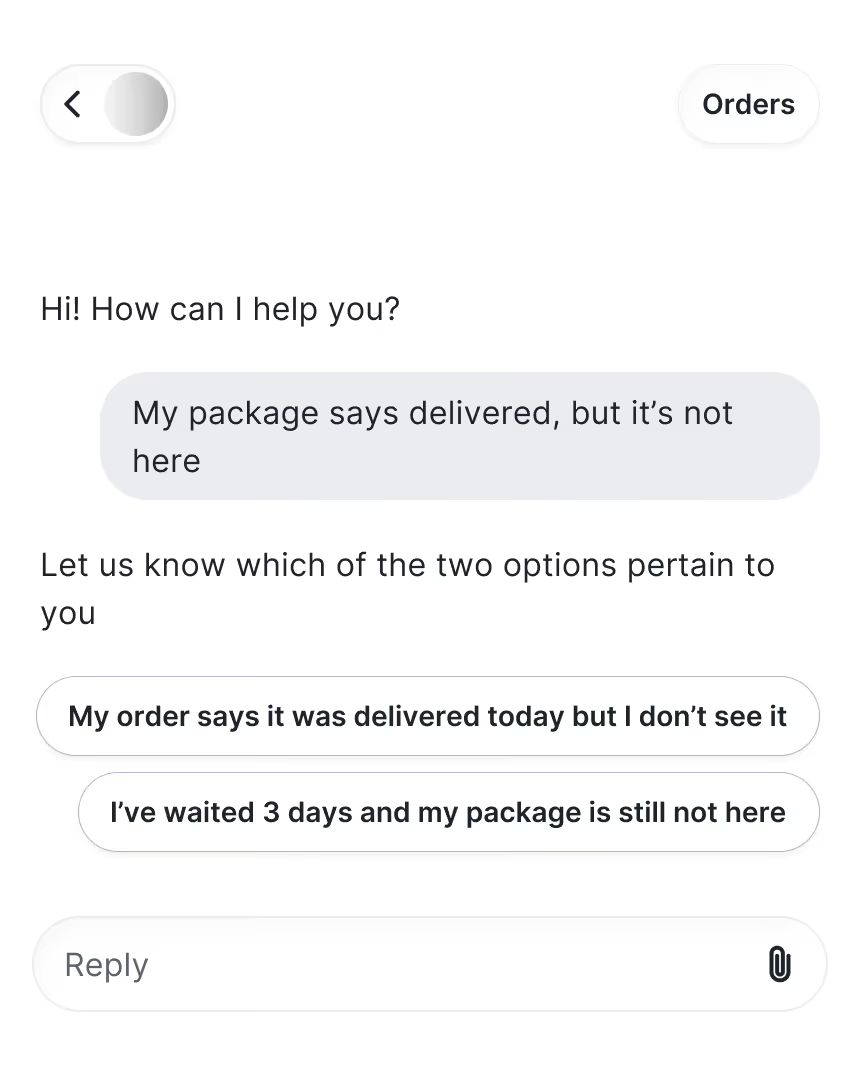
Clickable replies to an undelivered package is shown in Gorgias Chat to reduce typing.

Shoppable product cards in messages

Browsing and buying within Chat is now possible. Previously, it only supported product links that would open in a new page. With the upgrade, you can view item details without leaving the conversation. Shoppers can browse, compare products, and add to cart in one place.
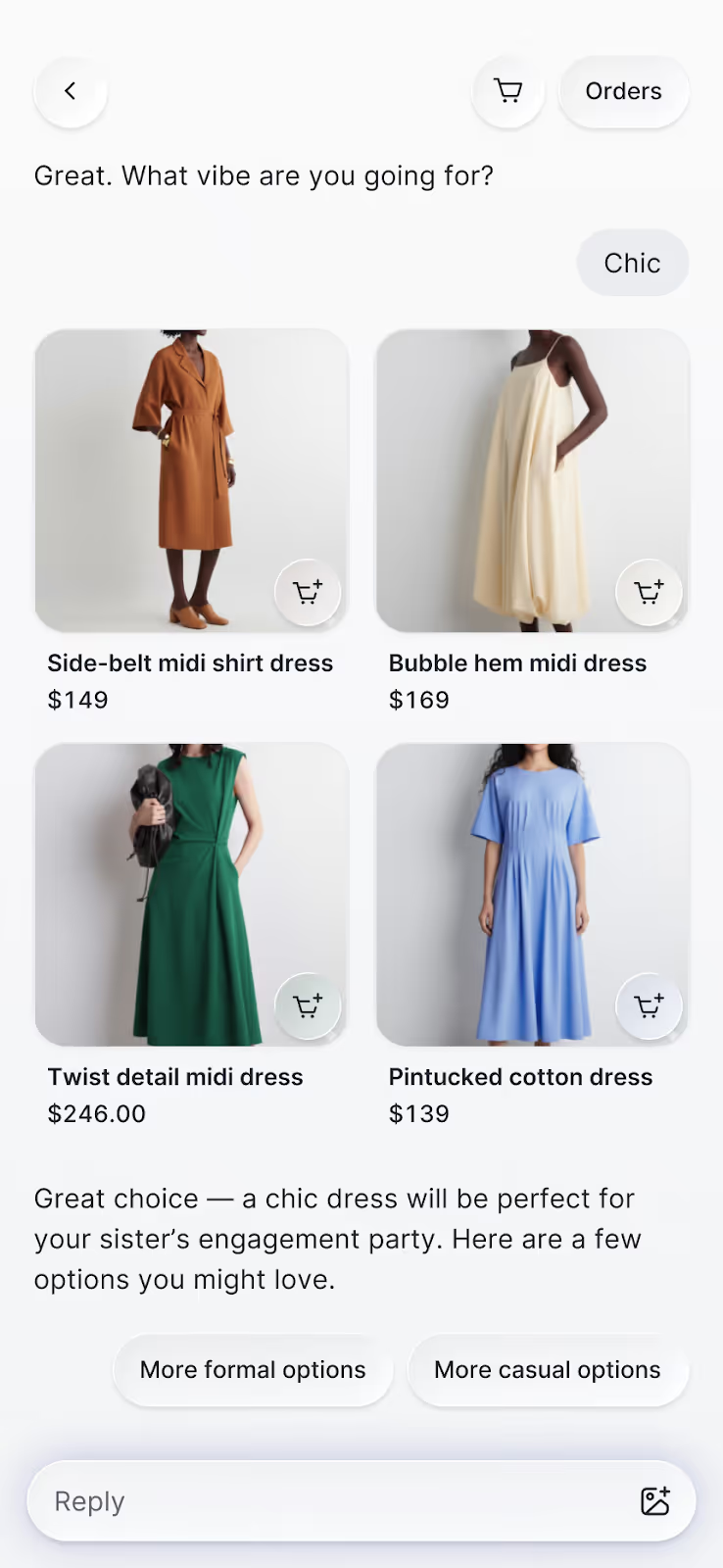
AI Agent provides four product recommendations, each with its own clickable product cards.

Product detail pages that open in chat

We’re keeping the context by removing the external redirects. The new interface lets shoppers browse product recommendations right in chat. View key product details, images, descriptions, variants, and pricing without opening a new tab.
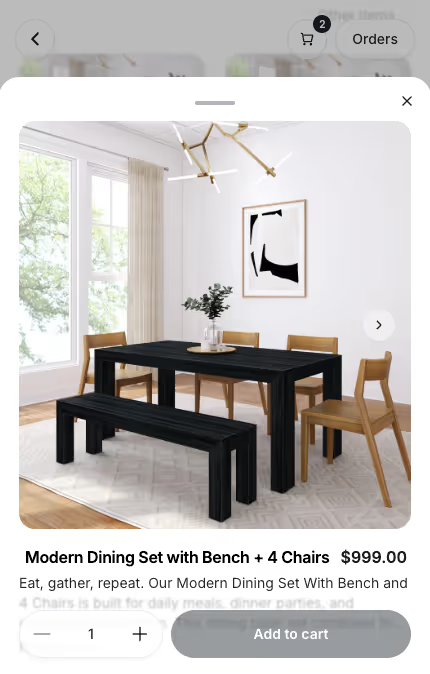
View product page details inside Gorgias Chat

Product page questions that remove hesitation

Chat adds clickable questions on product pages — like “Is this true to size?” or “What’s the difference between shades?” — designed to match what a shopper is likely wondering in the moment. These context-aware prompts help remove buying hesitation before shoppers even think to ask.
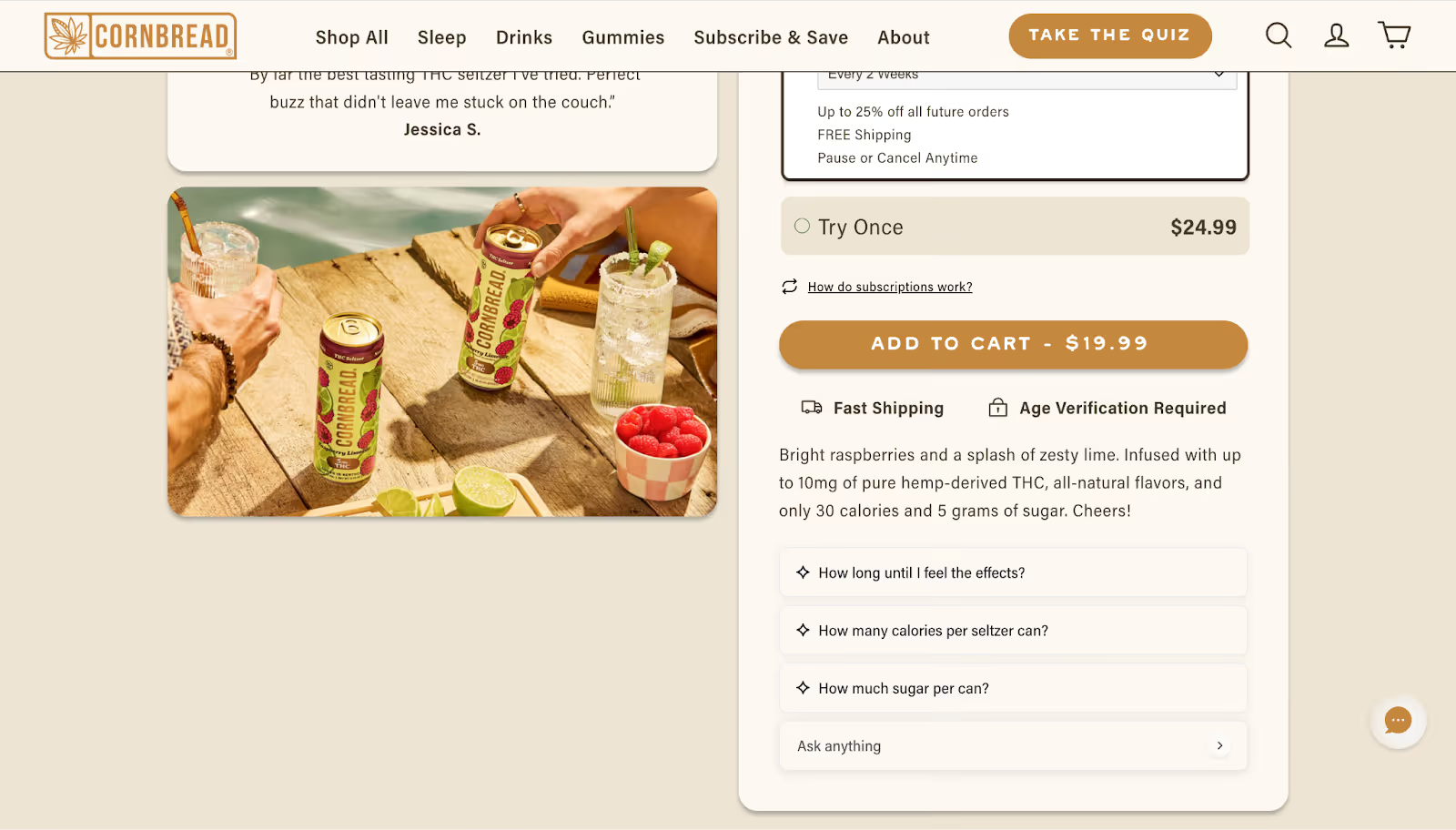
Cornbread Hemp's product pages includes a list of clickable product questions that open up Chat when clicked.

Instant access to cart and order status

Chat adds instant access to shopper actions, like a cart button and an orders button for returning customers. Shoppers can jump straight to their cart or check on an existing order without waiting for an agent to give them a status update.
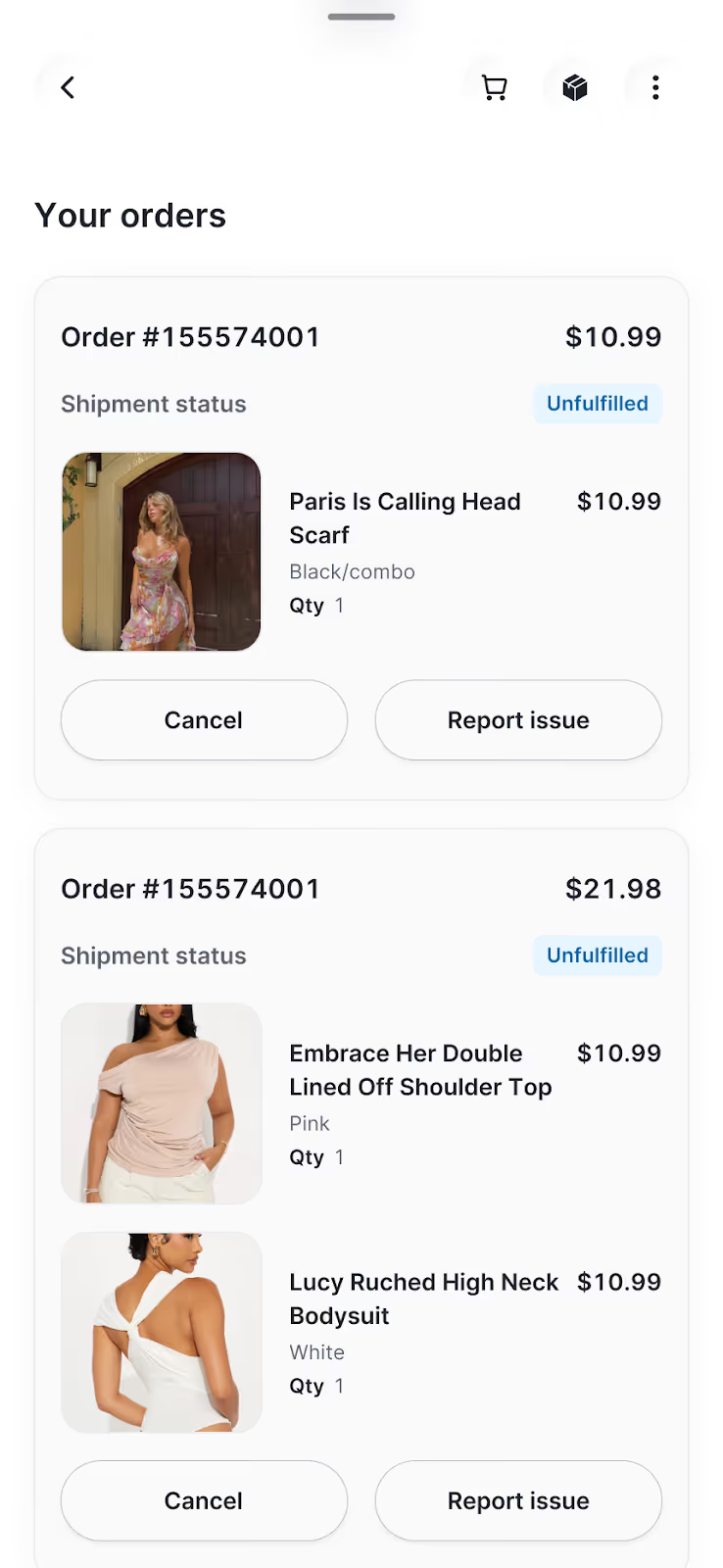
Gorgias Chat allows shoppers to view order status as well as cancel orders.

How our redesigned chat improves your bottom line

Every update in Chat drives performance. We didn’t simply give it a makeover, we also fine-tuned its underlying mechanics. 

36% more customers click on products shown in Chat

When product suggestions are easy to browse, shoppers interact with them more. The new product cards make shopping feel natural, allowing customers to explore items at their own pace. That convenience led to a 36% increase in engagement with recommended products.

2.25x more shoppers add products to cart from Chat

Chat keeps the entire shopping journey inside the conversation, from browsing and asking questions, to adding to cart and checking out. This new layout removes the usual tab-switching between chat and the website. Less friction has led to more than double add-to-cart actions than before the redesign.

7.3% more shoppers engage with Chat

Chat's cleaner design and contextual entry points make it easier for shoppers to start a conversation. With suggested questions on product pages and quick reply buttons, more visitors are choosing to engage earlier in their journey. This has resulted in a 7.3% lift in chat engagement.

Your store, now in every conversation

Conversational commerce has moved from concept to reality. Chat makes it part of the everyday shopping experience, letting shoppers browse, ask questions, compare products, and check out in one interaction. It brings the ease of the in-person shopping experience into the digital world.

We built Chat to redefine the shopping experience. We hope you see it reflected in your customers’ journeys. 

Book a demo to see what's possible with the new experience.

Make AI Sound More Human

Make AI Sound More Human: How to Avoid Robotic Replies in Customer Support

By Gorgias Team
5 min read.
0 min read . By Gorgias Team

TL;DR:

  • Train your AI on your brand voice. A clear voice guide that covers tone, style, and formality helps your AI sound more natural and aligned with your brand.
  • Add short delays before AI responds. A one- or two-second pause can make AI responses seem more thoughtful.
  • Avoid generic phrases. Swap out formal responses for on-brand language that sounds like a real person on your team.
  • Mention customer context in replies. Referencing order history or previous conversations makes AI sound more human and builds trust.
  • Balance automation with human support. Let customers know when they are speaking to AI and escalate to a human when needed to avoid frustration.

Your AI sounds like a robot, and your customers can tell.

Sure, the answer is right, but something feels off. The tone of voice is stiff. The phrases are predictable and generic. At most, it sounds copy-pasted. This may not be a big deal from your side of support. In reality, it’s costing you more than you think.

Recent data shows that 45% of U.S. adults find customer service chatbots unfavorable, up from 43% in 2022. As awareness of chatbots has increased, so have negative opinions of them. Only 19% of people say chatbots are helpful or beneficial in addressing their queries. The gap isn't just about capability. It's about trust. When AI sounds impersonal, customers disengage or leave frustrated.

Luckily, you don't need to choose between automation and the human touch. 

In this guide, we'll show you six practical ways to train your AI to sound natural, build trust, and deliver the kind of support your customers actually like.

1. Train your AI on your brand voice

The fastest way to make your AI sound more human is to teach it to sound like you. AI is only as good as the input you give it, so the more detailed your brand voice training, the more natural and on-brand your responses will be.

Start by building a brand voice guide. It doesn't need to be complicated, but it should clearly define how your brand communicates with customers. At minimum, include:

  • Tone: Is your brand warm and empathetic? Confident and cheeky? Straightforward and helpful?
  • Style: How does your brand write? What is your personality? Short or long sentences, contractions or not, punctuation choices, and overall rhythm.
  • Formality: Do you use slang? Emojis? Address customers as “you,” “y’all,” or something else?
  • Friendliness: How personable should your AI sound? Is it playful, or should responses stay neutral and professional?

Think of your AI as a character. Samantha Gagliardi, Associate Director of Customer Experience at Rhoback, described their approach as building an AI persona:

"I kind of treat it like breaking down an actor. I used to sing and perform for a living — how would I break down the character of Rhoback? How does Rhoback speak? What age are they? What makes the most sense?" 

Next step

✅ Create a brand voice guide with tone, style, formality, and example phrases.

2. Delay responses to mimic human behavior

Humans associate short pauses with thinking, so when your AI responds too quickly, it instantly feels unnatural.

Adding small delays helps your AI feel more like a real teammate.

Where to add response delays:

  • Before sharing info that would realistically take a moment to look up, e.g., order history
  • Before confirming an action like issuing a refund or applying a discount
  • Transitioning or escalating between steps or agents
  • Emotional messages, like customer complaints and product quality issues

Even a one- to two-second pause can make a big difference in a robotic or human-sounding AI.

Next step

✅ Add instructions in your AI’s knowledge base to include short response delays during key moments.

3. Avoid generic phrasing and canned language

Generic phrases make your AI sound like... well, AI. Customers can spot a copy-pasted response immediately — especially when it's overly formal.

That doesn't mean you need to be extremely casual. It means being true to your brand. Whether your voice is professional or conversational, the goal is the same: sound like a real person on your team.

Here's how to replace robotic phrasing with more brand-aligned responses:

Generic Phrase

More Natural Alternative

“We apologize for the inconvenience.”

“Sorry about that, we’re working on it now.” (friendly)
“Apologies for the trouble. We’re resolving this ASAP.” (professional)

“Your satisfaction is our top priority.”

“We want to make sure this works for you.” (friendly)
“Let us know how we can make this right.” (professional)

“Please be advised…”

“Just a quick heads up…” (friendly)
“For your reference…” (professional)

“Your request has been received.”

“Got it. Thanks for reaching out.” (friendly)
“We’ve received your request and will follow up shortly.” (professional)

“I will now review your request.”

“Let me take a quick look.” (friendly)
“I’m reviewing the details now.” (professional)

Next step

✅ Identify your five most common inquiries and give your AI a rewritten example response for each.

4. Use context to inform answers

One of the biggest tells that a response is AI-generated? It ignores what's already happened.

When your AI doesn't reference order history or past conversations, customers are forced to repeat themselves. Repetition can lead to frustration and can quickly turn a good customer experience into a bad one.

Great AI uses context to craft replies that feel personalized and genuinely helpful.

Here's what good context looks like in AI responses:

  • Order awareness: The AI knows the customer placed an order yesterday and provides an accurate delivery estimate without asking for the order number again.
  • Conversation continuity: If the customer reached out earlier that week from a different support channel, the AI references that interaction or picks up where things left off.
  • Customer type: First-time shopper? VIP? The AI adjusts tone and detail level accordingly.

Tools like Gorgias AI Agent automatically pull in customer and order data, so replies feel human and contextual without sacrificing speed.

Next step

✅ Add instructions that prompt your AI to reference order details and/or past conversations in its replies, so customers feel acknowledged.

5. Balance automation with human handoff

Customers just want help. They don't care whether it comes from a human or AI, as long as it's the right help. But if you try to trick them, it backfires fast. AI that pretend to be human often give customers the runaround, especially when the issue is complex or emotional.

A better approach is to be transparent. Solve what you can, and hand off anything else to an agent as needed.

When to disclose that the customer is talking to AI:

  • You can disclose it at the start of the conversation, or include a disclaimer in your chat widget, contact page, or help center to let customers know AI may assist
  • When the customer asks to speak to a human or expresses frustration
  • If the AI cannot fulfill the request and needs to escalate
  • Anytime the AI is making decisions, like issuing refunds or processing cancellations
  • When transitioning from AI to a human agent

For more on this topic, check out our article: Should You Tell Customers They're Talking to AI?

Next step

✅ Set clear rules for when your AI should escalate to a human and include handoff messaging that sets expectations and preserves context.

6. Add intentional imperfections to sound human

We're giving you permission to break the rules a little bit. The most human-sounding AI doesn't follow perfect grammar or structure. It reflects the messiness of real dialogue.

People don't speak in flawless sentences every time. We pause, rephrase, cut ourselves off, and throw in the occasional emoji or "uh." When AI has an unpredictable cadence, it feels more relatable and, in turn, more human.

What an imperfect AI could look like: 

  • Vary sentence length and structure. Some short and choppy, others long. 
  • Add subtle grammatical “mistakes” like sentence fragments or informal punctuation. 
  • Mix in casual phrasing or idioms where appropriate. 
  • Avoid mechanical-sounding transitions. 
  • Occasionally use filler phrases like "kinda," "just checking," or "I think."

These imperfections give your AI a more believable voice.

Next step

✅ Add instructions for your AI that permit variation in grammar, tone, and sentence structure to mimic real human speech.

Natural-sounding AI is easier to set up than you think

Human-sounding AI doesn’t require complex prompts or endless fine-tuning. With the right voice guidelines, small tone adjustments, and a few smart instructions, your AI can sound like a real part of your team.

Book a demo of Gorgias AI Agent and see for yourself.

{{lead-magnet-2}}

AI Chatbot Not Working? 7 Common Issues and How to Fix Them

By Christelle Agustin
min read.
0 min read . By Christelle Agustin

TL;DR:

  • If your AI is giving wrong answers or getting stuck, it’s likely due to missing or conflicting knowledge. Ensure your AI is trained with up-to-date documents and add guardrails to prevent off-topic replies.
  • Loops and escalations usually mean your escalation rules aren’t specific enough. Define when AI should step in, when it should hand over, and create “escape phrases” that trigger human takeover.
  • Customers still want human help. Always offer a path to a real person and make sure your agents get full conversation context when a handoff happens.
  • Inconsistent tone between AI and agents can make disjointed experiences. Align your brand voice across all support channels and choose tools that let you customize AI tone.
  • AI works best when its role is clearly defined. Decide which topics it can handle, train it using real conversations, and review performance regularly to fine-tune your setup.

You’ve chosen your AI tool and turned it on, hoping you won’t have to answer another WISMO question. But now you’re here. Why is AI going in circles? Why isn’t it answering simple questions? Why does it hand off every conversation to a human agent?

Conversational AI and chatbots thrive on proper training and data. Like any other team member on your customer support team, AI needs guidance. This includes knowledge documents, policies, brand voice guidelines, and escalation rules. So, if your AI has gone rogue, you may have skipped a step.

In this article, we’ll show you the top seven AI issues, why they happen, how to fix them, and the best practices for AI setup. 

{{lead-magnet-1}}

1. AI sends the wrong answer — with confidence

AI can only be as accurate as the information you feed it. If your AI is confidently giving customers incorrect answers, it likely has a gap in its knowledge or a lack of guardrails.

Insufficient knowledge can cause AI to pull context from similar topics to create an answer, while the lack of guardrails gives it the green light to compose an answer, correct or not.

How to fix it: 

  • Update the AI knowledge base. Create a new document that covers the affected topic in its entirety. To ensure AI follows every step, write your instructions in a when/if/then format.
  • Define topics that AI should not handle. As a preventive measure, specify the topics the AI should skip and hand over to a human agent. For example, add words such as ‘disappointed’, ‘bad’, and ‘unacceptable’ to your AI off-limit list, so that human agents automatically handle negative-intent tickets.

2. Customer is stuck in an AI loop 

This is one of the most frustrating customer service issues out there. Left unfixed, you risk losing 29% of customers

If your AI is putting customers through a never-ending loop, it’s time to review your knowledge docs and escalation rules.

How to fix it:

  • Double-check for conflicts in knowledge. You may have provided multiple resolutions for the same issue across different knowledge sources, such as uploaded documents, website pages, and in-app instructions.
  • Add “escape routes”. Choose a set of phrases that automatically escalate conversations from AI to your support team. For example, “it’s not working” or “I already tried that”.
  • Set a max number of failed interactions before escalation. Opt for a one-fail-and-escalate approach for every conversation, or specify the number of failed interactions for certain topics.

3. AI escalates too quickly, even for easy questions

It can be frustrating when AI can’t do the bare minimum, like automate WISMO tickets. This issue is likely due to missing knowledge or overly broad escalation rules.

How to fix it:

  • Train AI on your FAQs and common issues. Which customer questions do you repeatedly receive? Create a document that lists out every question and its answer.
  • Update vague escalation rules. AI works best with specificity. For example, if you told it to escalate conversations about “returns,” it may even escalate frequently asked questions about return eligibility.

4. Customers can’t find a way to reach a human

One in two customers still prefer talking to a human to an AI, according to Katana. Limiting them to AI-only support could risk a sale or their relationship. 

The top live chat apps clearly display options to speak with AI or a human agent. If your tool doesn’t have this, refine your AI-to-human escalation rules.

How to fix it:

  • Set phrases to trigger escalation. In your knowledge docs, define which phrases should tell AI to hand a conversation over to your support team. For example, “I want to talk to someone” or “Can I talk to a human?”
  • Add a visible option to connect with a human. This can be a button in your chat widget, a note in your contact page, or even a link in your website footer. At minimum, give customers an easy-to-find way to reach a real person.

5. Handoff happens — but the agent gets no context

If your agents are asking customers to repeat themselves, you’ve already lost momentum. One of the fastest ways to break trust is by making someone explain their issue twice. This happens when AI escalates without passing the conversation history, customer profile, or even a summary of what’s already been attempted.

How to fix it:

  • Use rules to auto-tag conversations based on AI activity. Set up logic to tag tickets when certain conditions are met — like when AI attempted a specific action, couldn't resolve the issue, or triggered escalation.
  • Audit your escalated tickets. Look for patterns where context is missing, and adjust the AI-to-human transition logic accordingly.
  • Use an AI platform that provides automated ticket summaries. Choose a tool like Gorgias that provides a quick overview of every ticket.

6. The tone between AI and agent is jarring

Sure, conversational AI has near-perfect grammar, but if its tone is entirely different from your agents’, customers can be put off.

This mismatch usually comes from not settling on an official customer support tone of voice. AI might be pulling from marketing copy. Agents might be winging it. Either way, inconsistency breaks the flow.

How to fix it:

  • Create shared brand voice guidelines. Align tone, formality, and language rules across both AI scripts and agent responses.
  • Define emojis and punctuation use. A consistent visual style helps conversations feel smoother and more human.
  • Use AI tools that allow tone control. Choose platforms that let you customize the voice and personality of your AI to match your brand.
  • Train your agents with examples of ideal tone. Give your team brand voice examples of how conversations should continue when handed off.

7. You haven’t defined what AI should actually handle

When AI is underperforming, the problem isn’t always the tool. Many teams launch AI without ever mapping out what it's actually supposed to do. So it tries to do everything (and fails), or it does nothing at all.

It’s important to remember that support automation isn’t “set it and forget it.” It needs to know its playing field and boundaries.

How to fix it:

AI should handle

AI should escalate to a human

Order tracking (“Where’s my package?”)

Upset, frustrated, or emotional customers

Return and refund policy questions

Billing problems or refund exceptions

Store hours, shipping rates, and FAQs

Technical product or troubleshooting issues

Simple product questions

Complex or edge‑case product questions

Password resets

Multi‑part or multi‑issue requests

Pre‑sale questions with clear, binary answers

Anything where a wrong answer risks churn

How to set up AI that actually works

Once you’ve addressed the obvious issues, it’s important to build a setup that works reliably. These best practices will help your AI deliver consistently helpful support.

1. Define clear AI boundaries

Start by deciding what AI should and shouldn’t handle. Let it take care of repetitive tasks like order tracking, return policies, and product questions. Anything complex or emotionally sensitive should go straight to your team.

2. Train it using real customer conversations

Use examples from actual tickets and messages your team handles every day. Help center articles are a good start, but real interactions are what help AI learn how customers actually ask questions.

3. Set up fallback triggers

Create rules that tell your AI when to escalate. These might include customer frustration, low confidence in the answer, or specific phrases like “talk to a person.” The goal is to avoid infinite loops and to hand things off before the experience breaks down.

4. Make sure agents receive full context

When a handoff happens, your agents should see everything the AI did. That includes the full conversation, relevant customer data, and any actions it has already attempted. This helps your team respond quickly and avoid repeating what the customer just went through. 

An easy way to keep order history, customer data, and conversation history in one place is by using a conversational commerce tool like Gorgias.

5. Keep tone and voice consistent

A jarring shift in tone between AI and agent makes the experience feel disconnected. Align aspects such as formality, punctuation, and language style so the transition from AI to human feels natural.

6. Review handoffs regularly

Look at recent escalations each week. Identify where the AI struggled or handed off too early or too late. Use those insights to improve training, adjust boundaries, and strengthen your automation flows.

If your AI chatbot isn’t working the way you expected, it’s probably not because the technology is broken. It’s because it hasn’t been given the right rules.

AI that works your way and knows when to escalate

When you set AI up with clear responsibilities, it becomes a powerful extension of your team.

Want to see what it looks like when AI is set up the right way?

Try Gorgias AI Agent. It’s conversational AI built with smart automation, clean escalations, and ecommerce data in its core — so your customers get faster answers and your agents stay focused.

Get started with Gorgias AI Agent →

How to Pitch Gorgias Shopping Assistant to Leadership

By Alexa Hertel
min read.
0 min read . By Alexa Hertel

TL;DR:

  • Position Shopping Assistant as a revenue-driving tool. It boosts AOV, GMV, and chat conversion rates, with some brands seeing up to 97% higher AOV and 13x ROI.
  • Highlight its role as a proactive sales agent, not just a support bot. It recommends products, applies discounts, and guides shoppers to checkout in real time.
  • Use cross-industry case studies to make your case. Show leadership success stories from brands like Arc’teryx, bareMinerals, and TUSHY to prove impact.
  • Focus on the KPIs it improves. Track AOV, GMV, chat conversion, CSAT, and resolution rate to demonstrate clear ROI.

Rising customer expectations, shoppers willing to pay a premium for convenience, and a growing lack of trust in social media channels to make purchase decisions are making it more challenging to turn a profit.  

In this emerging era, AI’s role is becoming not only more pronounced, but a necessity for brands who want to stay ahead. Tools like Gorgias Shopping Assistant can help drive measurable revenue while reducing support costs. 

For example, a brand that specializes in premium outdoor apparel implemented Shopping Assistant and saw a 2.25% uplift in GMV and 29% uplift in average order volume (AOV).

But how, among competing priorities and expenses, do you convince leadership to implement it? We’ll show you.

Why conversational AI matters for modern ecommerce

1) Meet high consumer expectations

Shoppers want on-demand help in real time that’s personalized across devices. 

Shopping Assistant recalls a shopper’s browsing history, like what they have clicked, viewed, and added to their cart. This allows it to make more relevant suggestions that feel personal to each customer. 

2) Keep up with market momentum

The AI ecommerce tools market was valued at $7.25 billion in 2024 and is expected to reach $21.55 billion by 2030

Your competitors are using conversational AI to support, sell, and retain. Shopping Assistant satisfies that need, providing upsells and recommendations rooted in real shopper behavior. 

3) Raise AOV and GMV

Conversational AI has real revenue implications, impacting customer retention, average order value (AOV), conversion rates, and gross market value (GMV). 

For example, a leading nutrition brand saw a GMV uplift of over 1%, an increase in AOV of over 16%, and a chat conversion rate of over 15% after implementing Shopping Assistant.

Overall, Shopping Assistant drives higher engagement and more revenue per visitor, sometimes surpassing 50% and 20%, respectively.
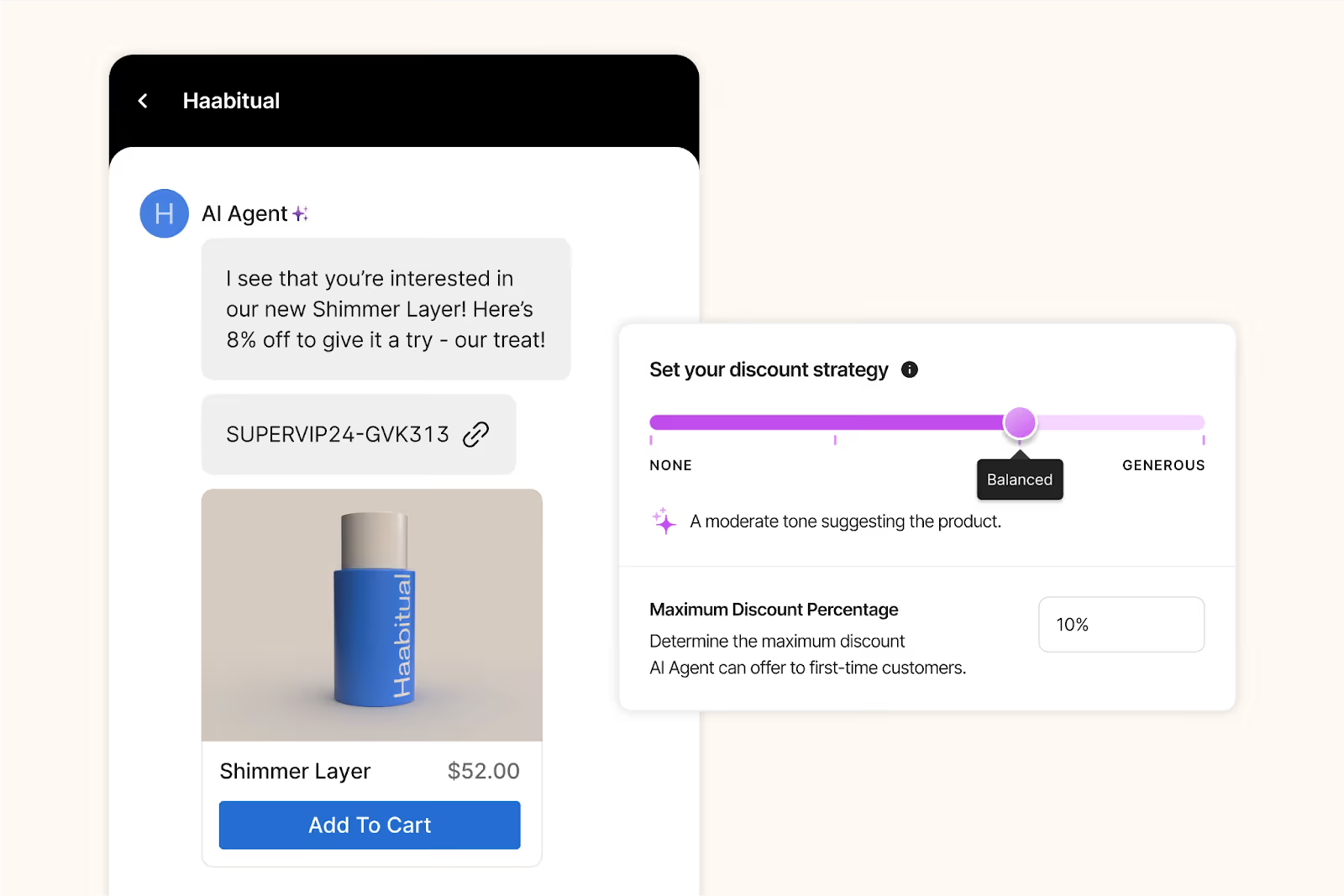
AI Agent chat offering 8% discount on Haabitual Shimmer Layer with adjustable strategy slider.
Shopping Assistant can send discounts based on shopper behavior in real time.

How to show the business impact & ROI of Shopping Assistant

1) Pitch its core capabilities

Shopping Assistant engages, personalizes, recommends, and converts. It provides proactive recommendations, smart upsells, dynamic discounts, and is highly personalized, all helping to guide shoppers to checkout

Success spotlight

After implementing Shopping Assistant, leading ecommerce brands saw real results:

Industry

Primary Use Case

GMV Uplift (%)

AOV Uplift (%)

Chat CVR (%)

Home & interior decor 🖼️

Help shoppers coordinate furniture with existing pieces and color schemes.

+1.17

+97.15

10.30

Outdoor apparel 🎿

In-depth explanations of technical features and confidence when purchasing premium, performance-driven products.

+2.25

+29.41

6.88

Nutrition 🍎

Personalized guidance on supplement selection based on age, goals, and optimal timing.

+1.09

+16.40

15.15

Health & wellness 💊

Comparing similar products and understanding functional differences to choose the best option.

+1.08

+11.27

8.55

Home furnishings 🛋️

Help choose furniture sizes and styles appropriate for children and safety needs.

+12.26

+10.19

1.12

Stuffed toys 🧸

Clear care instructions and support finding replacements after accidental product damage.

+4.43

+9.87

3.62

Face & body care 💆‍♀️

Assistance finding the correct shade online, especially when previously purchased products are no longer available.

+6.55

+1.02

5.29

2) Position it as a revenue driver

Shopping Assistant drives uplift in chat conversion rate and makes successful upsell recommendations.  

Success spotlight

“It’s been awesome to see Shopping Assistant guide customers through our technical product range without any human input. It’s a much smoother journey for the shopper,” says Nathan Larner, Customer Experience Advisor for Arc’teryx. 

For Arc’teryx, that smoother customer journey translated into sales. The brand saw a 75% increase in conversion rate (from 4% to 7%) and 3.7% of overall revenue influenced by Shopping Assistant. 
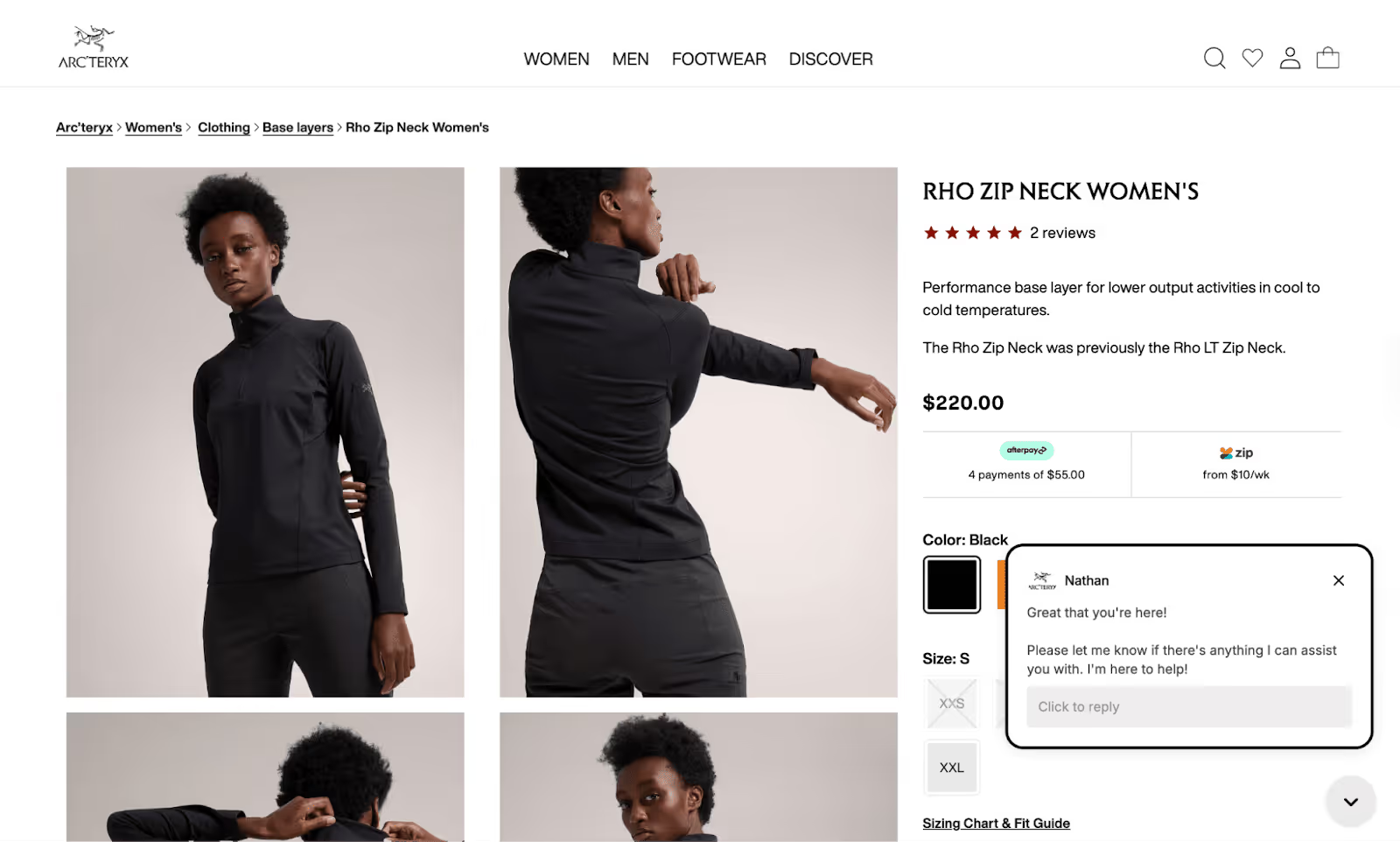
Arc'teryx Rho Zip Neck Women's product page showing black base layer and live chat box.
Arc’teryx saw a 75% increase in conversion rate after implementing Shopping Assistant. Arc’teryx 

3) Show its efficiency and cost savings

Because it follows shoppers’ live journey during each session on your website, Shopping Assistant catches shoppers in the moment. It answers questions or concerns that might normally halt a purchase, gets strategic with discounting (based on rules you set), and upsells. 

The overall ROI can be significant. For example, bareMinerals saw an 8.83x return on investment.  

Success spotlight

"The real-time Shopify integration was essential as we needed to ensure that product recommendations were relevant and displayed accurate inventory,” says Katia Komar, Sr. Manager of Ecommerce and Customer Service Operations, UK at bareMinerals. 

“Avoiding customer frustration from out-of-stock recommendations was non-negotiable, especially in beauty, where shade availability is crucial to customer trust and satisfaction. This approach has led to increased CSAT on AI converted tickets."
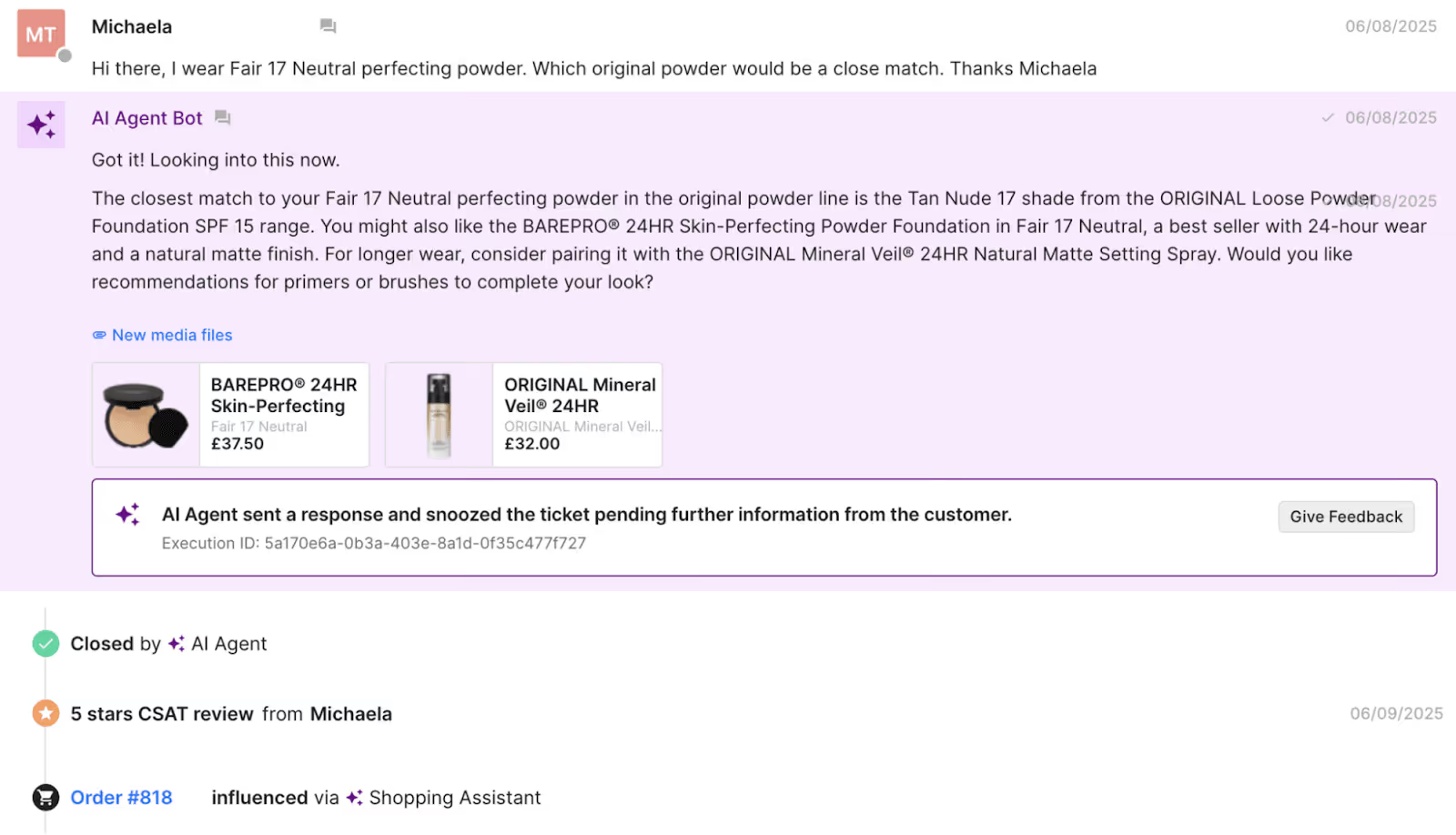
AI Agent chat recommending foundation shades and closing ticket with 5-star review.

4) Present the metrics it can impact

Shopping Assistant can impact CSAT scores, response times, resolution rates, AOV, and GMV.  

Success spotlight

For Caitlyn Minimalist, those metrics were an 11.3% uplift in AOV, an 18% click through rate for product recommendations, and a 50% sales lift versus human-only chats. 

"Shopping Assistant has become an intuitive extension of our team, offering product guidance that feels personal and intentional,” says Anthony Ponce, its Head of Customer Experience.
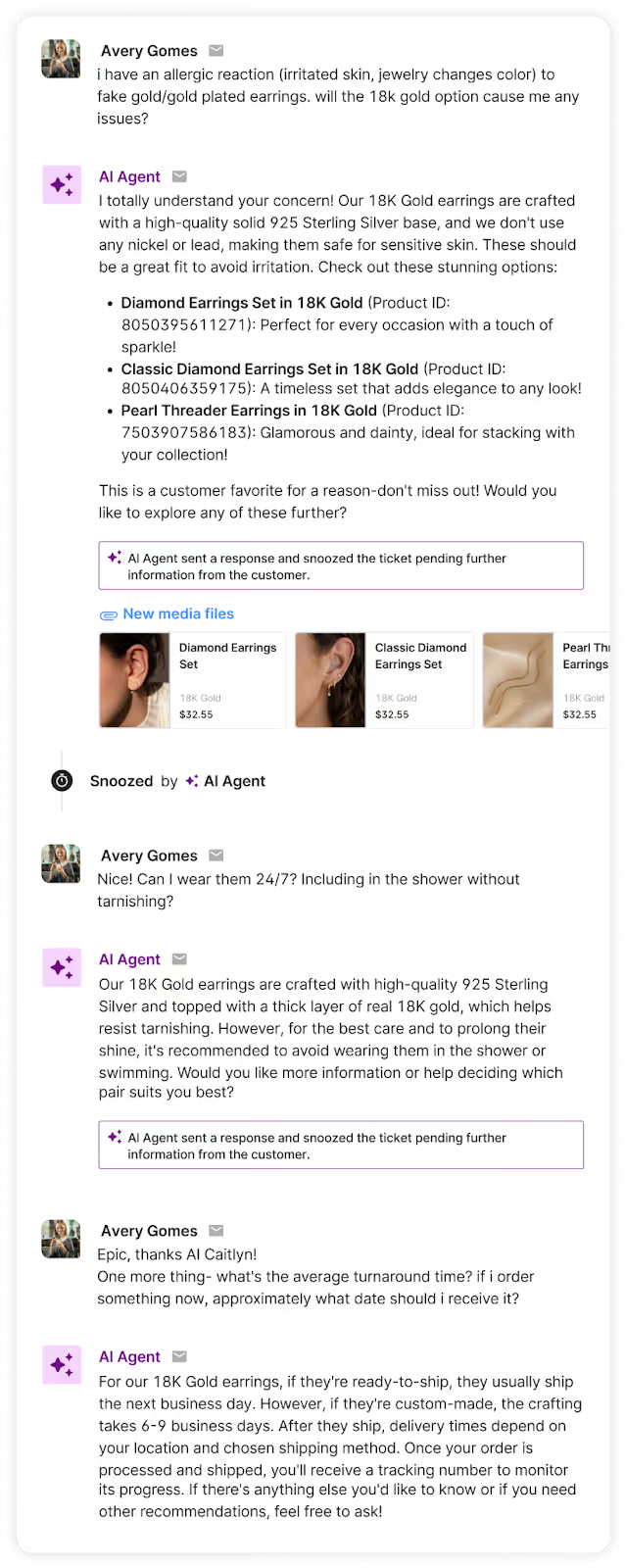
 

AI Agent chat assisting customer about 18K gold earrings, allergies, and shipping details.
Caitlyn Minimalist leverages Shopping Assistant to help guide customers to purchase. Caitlyn Minimalist 

5) Highlight its helpfulness as a sales agent 

Support agents have limited time to assist customers as it is, so taking advantage of sales opportunities can be difficult. Shopping Assistant takes over that role, removing obstacles for purchase or clearing up the right choice among a stacked product catalog.

Success spotlight

With a product that’s not yet mainstream in the US, TUSHY leverages Shopping Assistant for product education and clarification. 

"Shopping Assistant has been a game-changer for our team, especially with the launch of our latest bidet models,” says Ren Fuller-Wasserman, Sr. Director of Customer Experience at TUSHY. 

“Expanding our product catalog has given customers more choices than ever, which can overwhelm first-time buyers. Now, they’re increasingly looking to us for guidance on finding the right fit for their home and personal hygiene needs.”

The bidet brand saw 13x return on investment after implementation, a 15% increase in chat conversion rate, and a 2x higher conversion rate for AI conversations versus human ones. 
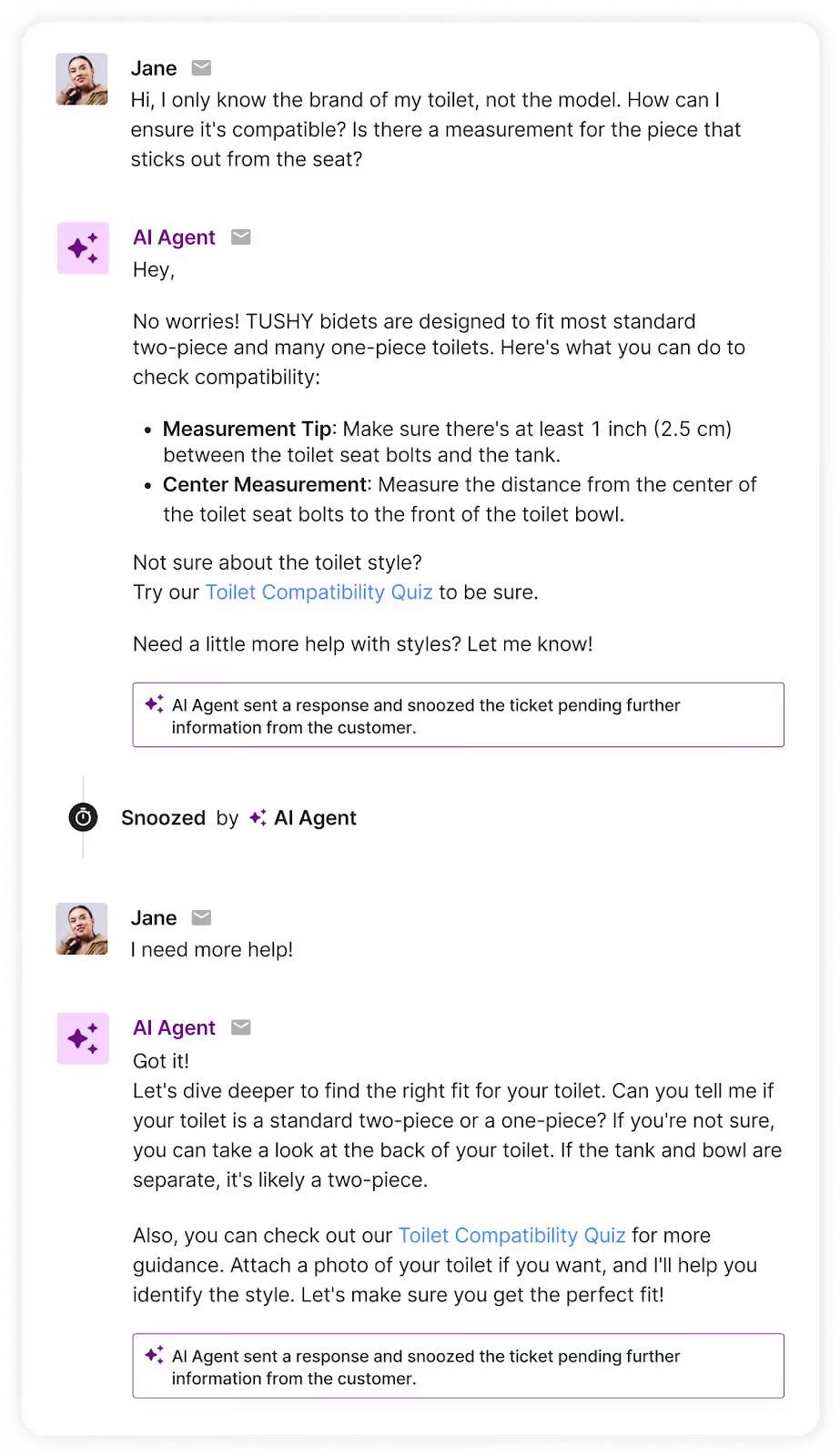
AI Agent chat helping customer check toilet compatibility and measurements for TUSHY bidet.

6) Provide the KPIs you’ll track 

Customer support metrics include: 

  • Resolution rate 
  • CSAT score 

Revenue metrics to track include: 

  • Average order value (AOV) 
  • Gross market value (GMV) 
  • Chat conversion rate 

Shopping Assistant: AI that understands your brand 

Shopping Assistant connects to your ecommerce platform (like Shopify), and streamlines information between your helpdesk and order data. It’s also trained on your catalog and support history. 

Allow your agents to focus on support and sell more by tackling questions that are getting in the way of sales. 

{{lead-magnet-2}}
Shopping Assistant Use Cases

11 Real Ways Ecommerce Brands Use Gorgias Shopping Assistant to Drive Sales

By Holly Stanley
min read.
0 min read . By Holly Stanley

TL;DR:

  • Shoppers often hesitate around sizing, shade matching, styling, and product comparisons, and those moments are key revenue opportunities for CX teams.
  • Guided shopping removes that friction by giving shoppers quick, personalized recommendations that build confidence in their choices.
  • Across 11 brands, guided shopping led to measurable lifts in AOV, conversion rate, and overall revenue.
  • Your biggest upsell opportunities likely sit in the same places your shoppers pause, so start by automating your most common pre-purchase questions.

Most shoppers arrive with questions. Is this the right size? Will this match my skin tone? What’s the difference between these models? The faster you can guide them, the faster they decide.

As CX teams take on a bigger role in driving revenue, these moments of hesitation are now some of the most important parts of the buying journey.

That’s why more brands are leaning on conversational AI to support these high-intent questions and remove the friction that slows shoppers down. The impact speaks for itself. Brands can expect higher AOV, stronger chat conversion rates, and smoother paths to purchase, all without adding extra work to your team.

Below, we’re sharing real use cases from 11 ecommerce brands across beauty, apparel, home, body care, and more, along with the exact results they saw after introducing guided shopping experiences.

1. Recommend similar shoes when an old classic disappears

When you’re shopping for shoes similar to an old but discontinued favorite, every detail counts, down to the color of the bottom of the shoe. But legacy brands with large catalogs can be overwhelming to browse.

For shoppers, it’s a double-edged sword: they want to feel confident that they checked your entire collection, but they also don’t want to spend time looking for it.

How Shopping Assistant helps:

Shopping Assistant accelerates the process, turning hazy details into clear, friendly guidance.

It describes shoe details, from colorways to logo placement, compares products side by side, and recommends the best option based on the shopper’s preferences and conditions.

The result is shoppers who feel satisfied and more connected with your brand.
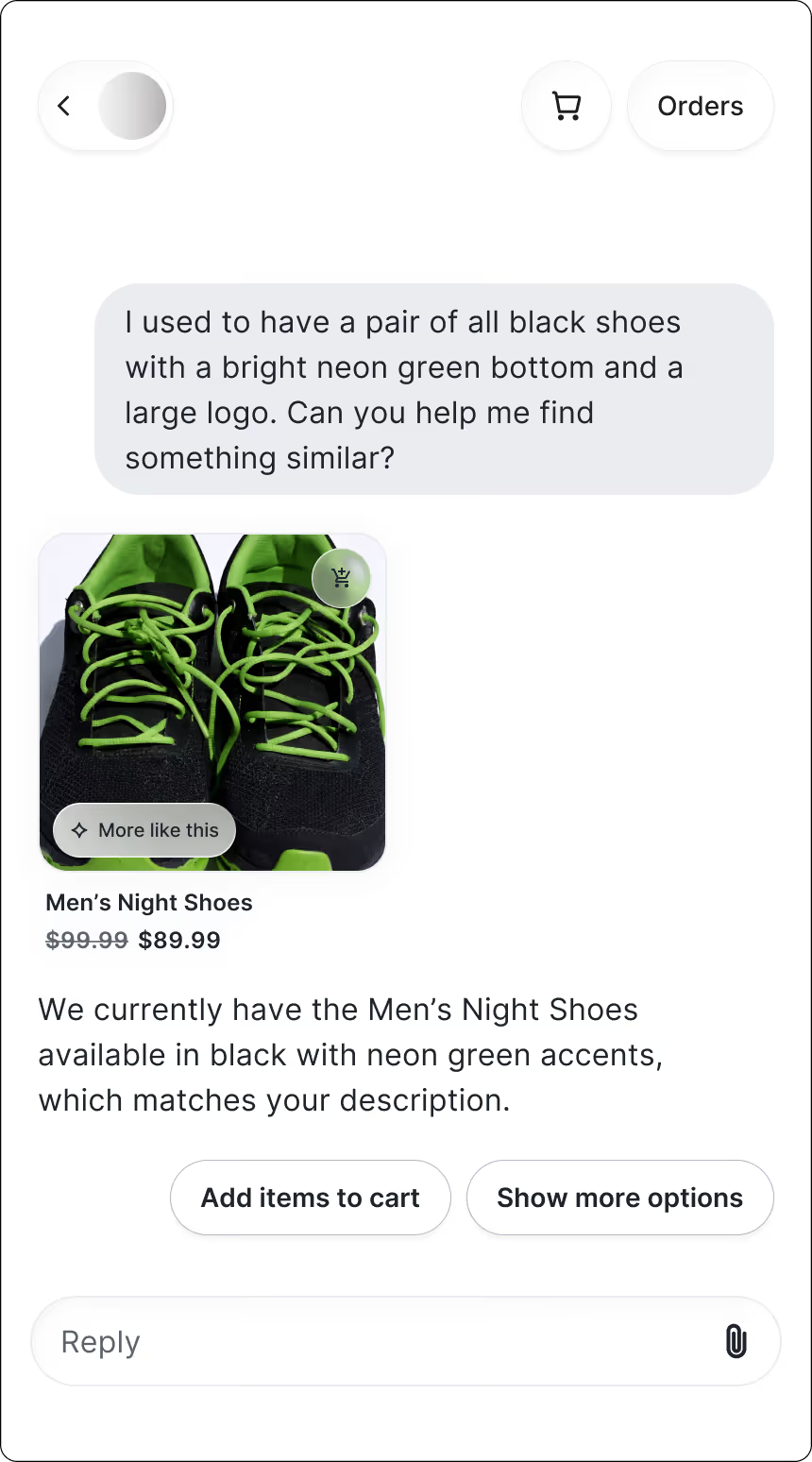
Results:

  • AOV uplift: +6.5%

2. Suggest complete outfits for special occasions

Big events call for great outfits, but putting one together online isn’t always easy. With thousands of options to scroll through, shoppers often want a bit of styling direction.

How Shopping Assistant helps:

Shoppers get to chat with a virtual stylist who recommends full outfits based on the occasion, suggests accessories to complete the look, and removes the guesswork of pairing pieces together. 

The result is a fun, confidence-building shopping experience that feels like getting advice from a stylist who actually understands their plans.
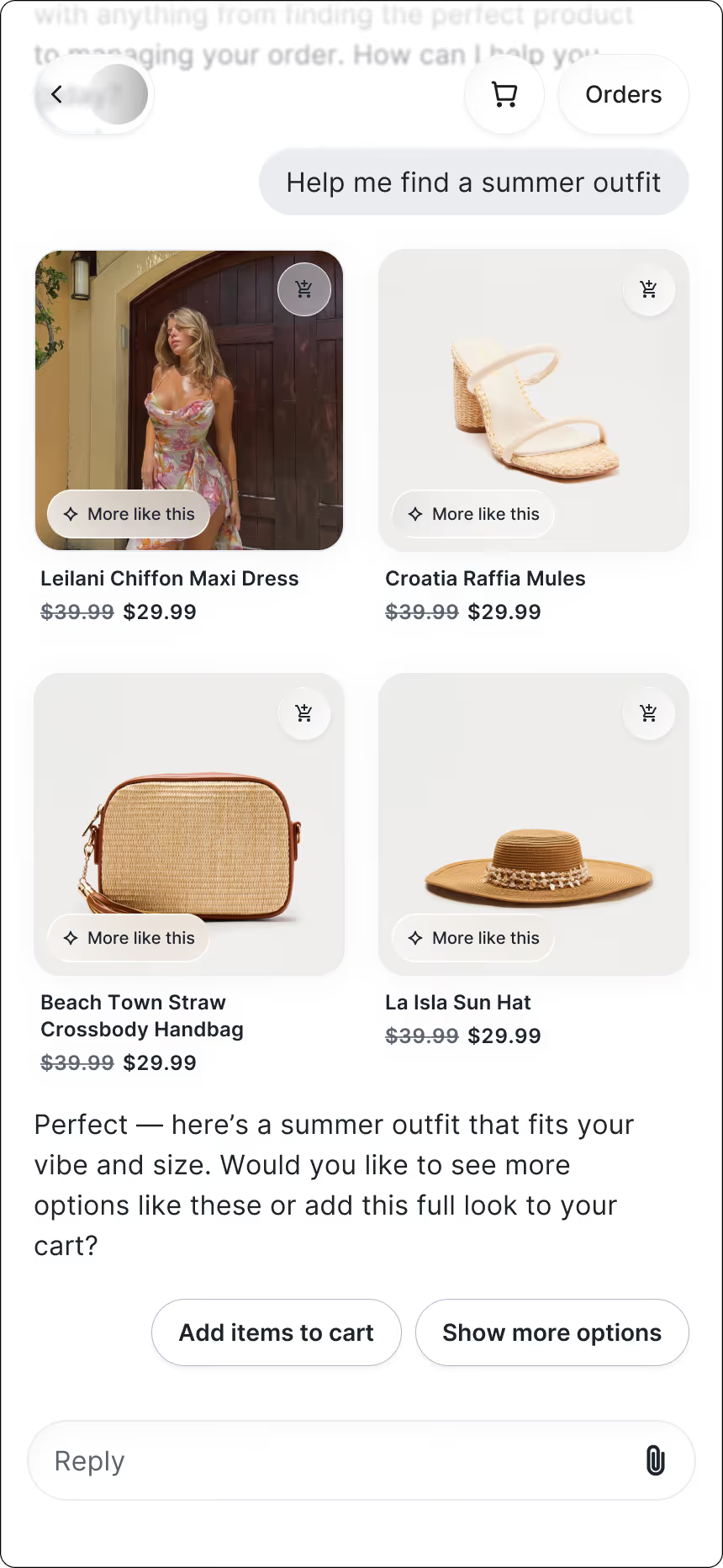
Results:

  • Chat CVR: 13.02%

3. Match shoppers to the right makeup shade when the formula changes

Shade matching is hard enough in-store, but doing it online can feel impossible. Plus, when a longtime favorite gets discontinued, shoppers are left guessing which new shade will come closest. That uncertainty often leads to hesitation, abandoned carts, or ordering multiple shades “just in case.”

How Shopping Assistant helps:

Shoppers find their perfect match without any of the guesswork. The assistant asks a few quick questions, recommends the closest shade or formula, and offers smart alternatives when a product is unavailable.

The experience feels like chatting with a knowledgeable beauty advisor — someone who makes the decision easy and leaves shoppers feeling confident in what they’re buying.

Katia Komar, Sr. Manager of Ecommerce and Customer Service Operations at bareMinerals UK says, “What impressed me the most is the AI’s ability to upsell with a conversational tone that feels genuinely helpful and doesn't sound too pushy or transactional. It sounds remarkably human, identifying correct follow-up questions to determine the correct product recommendation, resulting in improved AOV. It’s exactly how I train our human agents and BPO partners.”
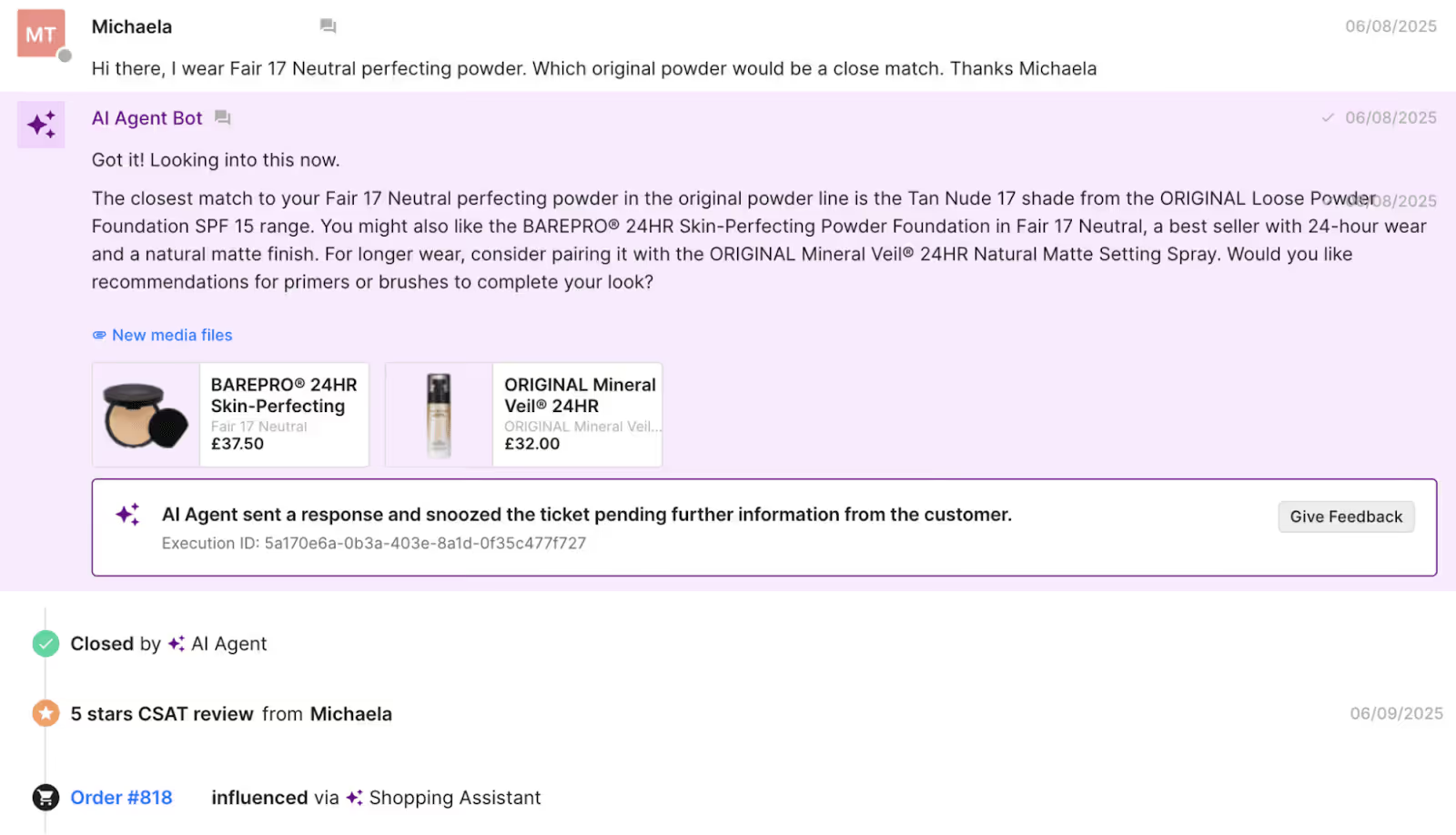
Gorgias AI Agent recommends a powder that pairs well with the foundation a customer wears.
Gorgias Shopping Assistant recommends a powder that pairs well with the foundation a customer currently wears.

Results:

  • GMV uplift: +6.55%

4. Help find the perfect gift when shoppers don’t know what to buy

When shoppers are buying gifts, especially for someone else, they often know who they’re shopping for but not what to buy. A vague product name or a half-remembered scent can quickly make the experience feel overwhelming without someone to guide them.

How Shopping Assistant helps:

Thoughtful guidance goes a long way. By asking clarifying questions and recognizing likely mix-ups, Shopping Assistant helps shoppers figure out what the recipient was probably referring to, then recommends the right product along with complementary gift options that make the choice feel intentional.

It brings the reassurance of an in-store associate to the online experience, helping shoppers move forward with confidence.
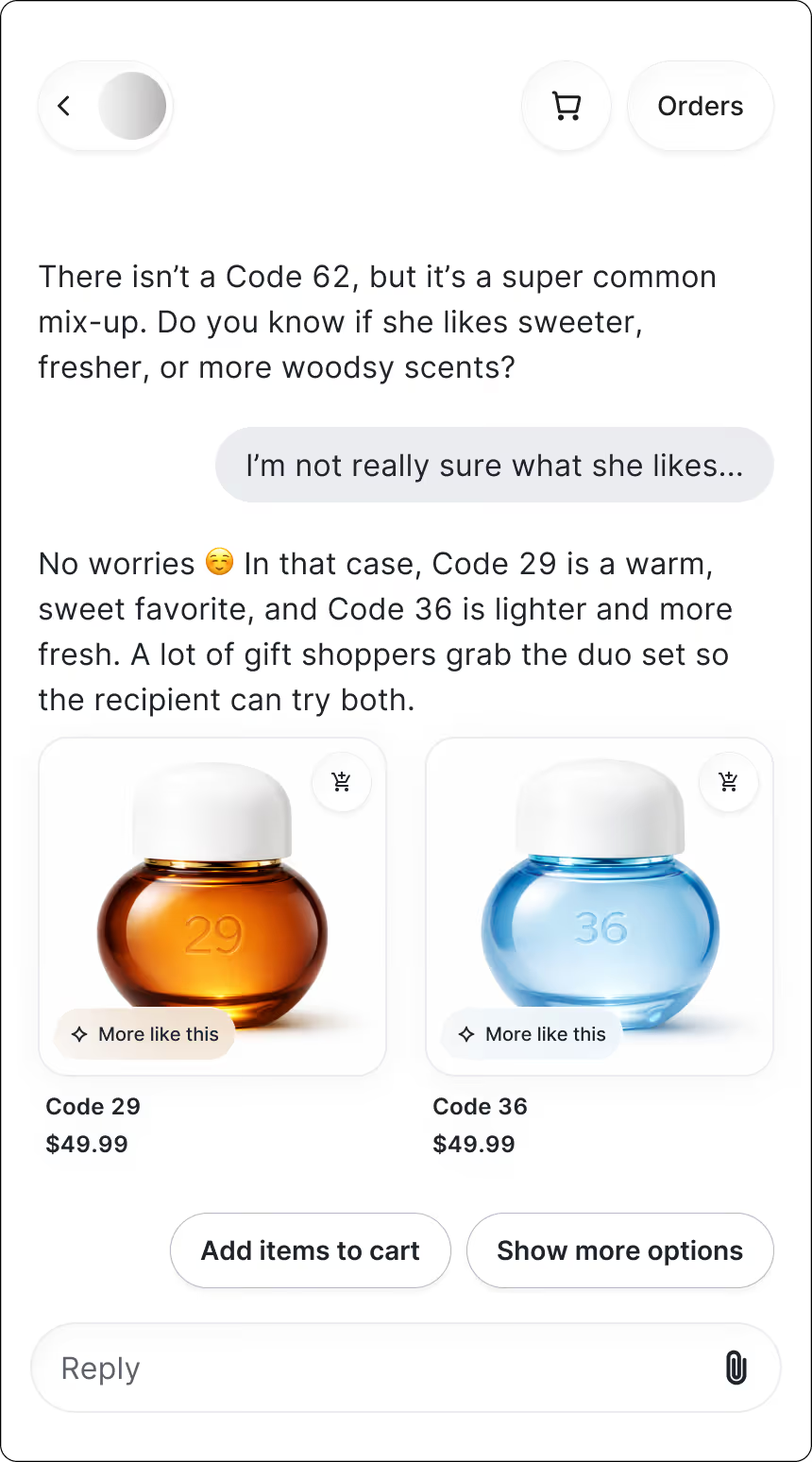
Results:

  • Chat CVR: 8.39%

5. Remove the guesswork from bra sizing online

Finding the right bra size online is notoriously tricky. Shoppers often second-guess their band or cup size, and even small uncertainties can lead to returns — or abandoning the purchase altogether.

Many customers just want someone to walk them through what a proper fit should actually feel like.

How Shopping Assistant helps:

Searching for products is no longer a time-consuming process. Shopping Assistant detects a shopper’s search terms and sends relevant products in chat. Like an in-store associate, it uses context to deliver what shoppers are looking for, so they can skip the search and head right to checkout.
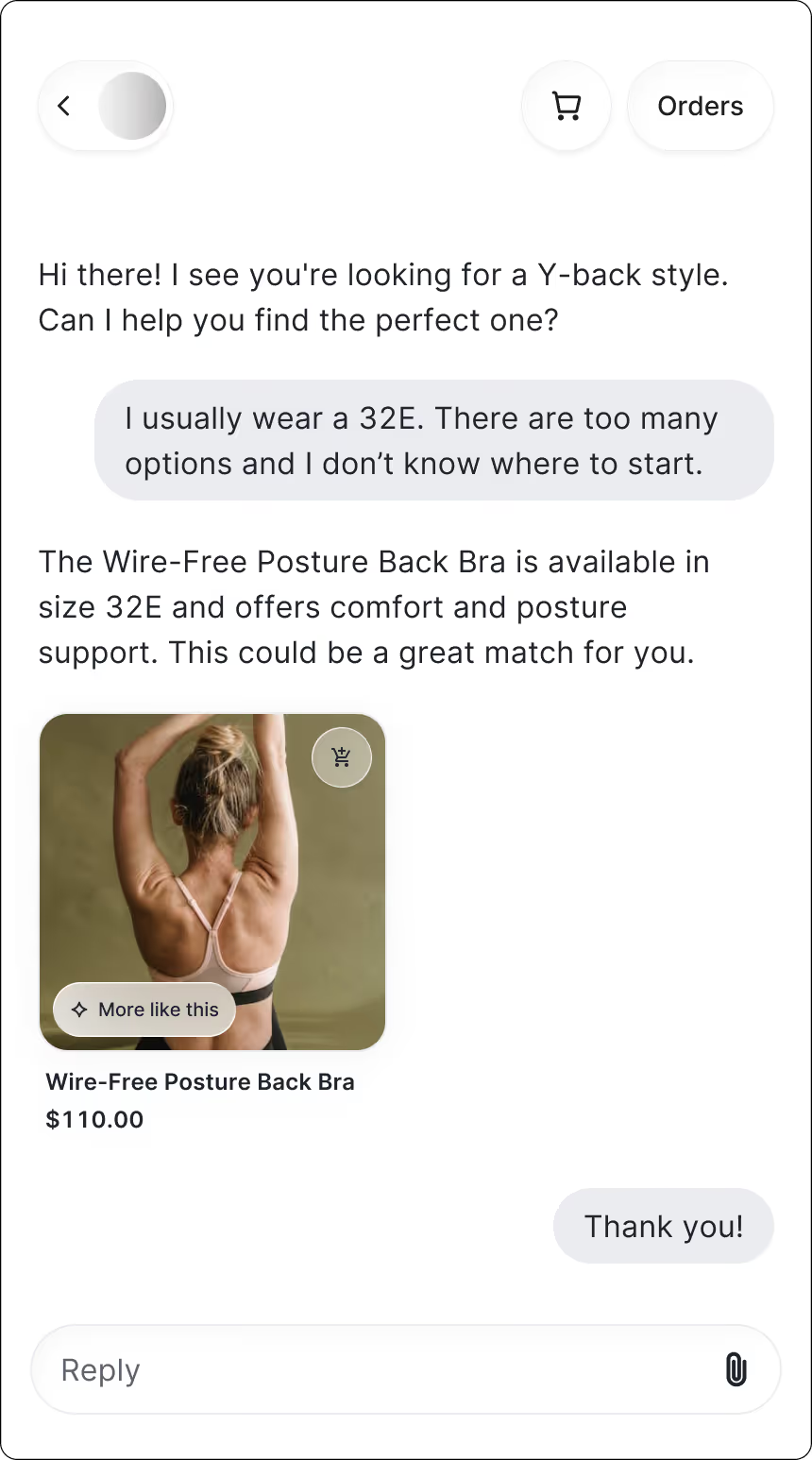
Results:

  • GMV uplift: +6.22%
  • Chat CVR: 16.78%

6. Guide shoppers through jewelry personalization step by step

For shoppers buying personalized jewelry, the details directly affect the final result. That’s why customization questions come up constantly, and why uncertainty can quickly stall the path to purchase.

How Shopping Assistant helps:

Shopping Assistant asks about the shopper’s style preferences and customization needs, then recommends the right product and options so they can feel confident the final piece is exactly their style. The experience feels quick, helpful, and designed to guide shoppers toward a high investment purchase.
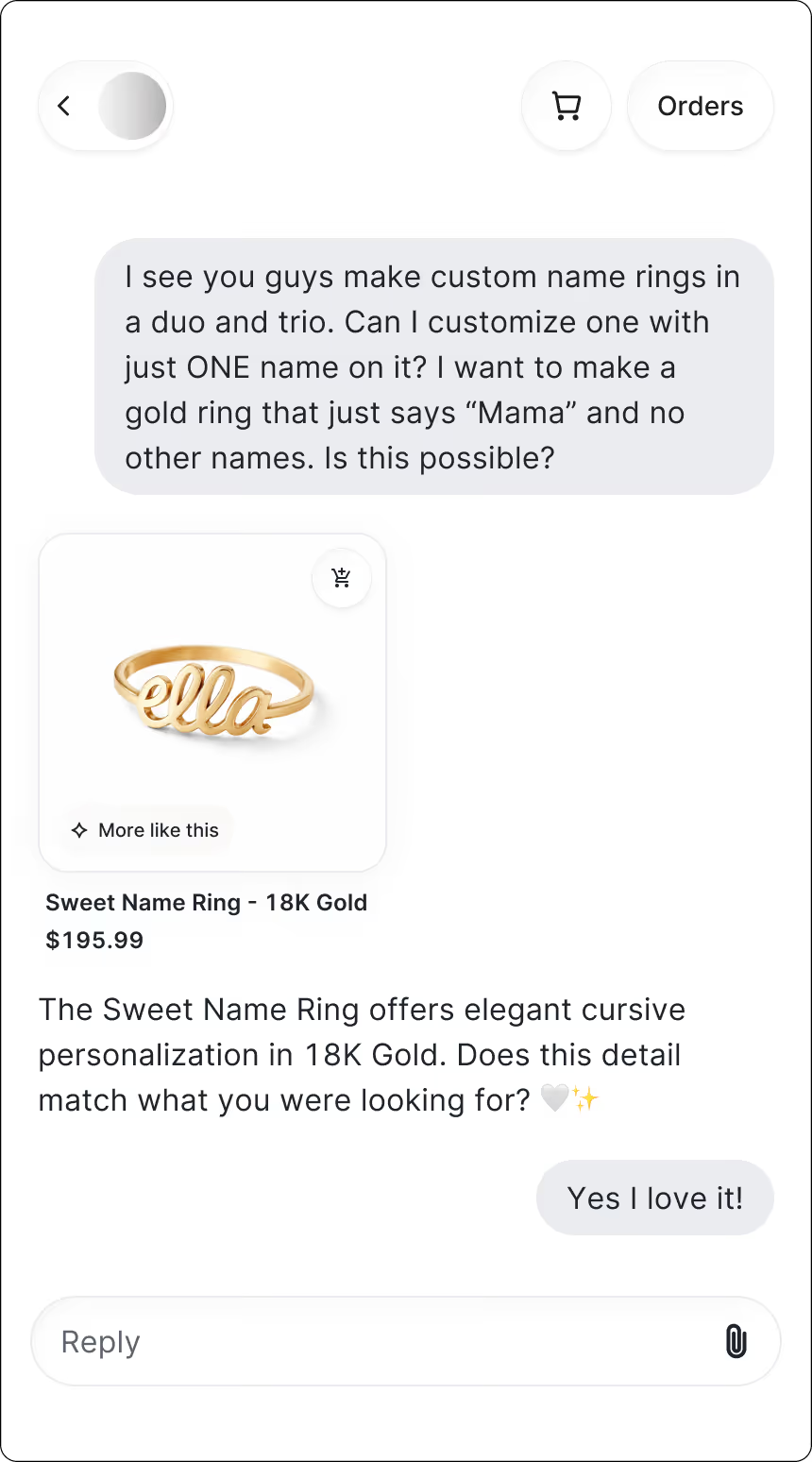
Results:

  • GMV uplift: +22.59%

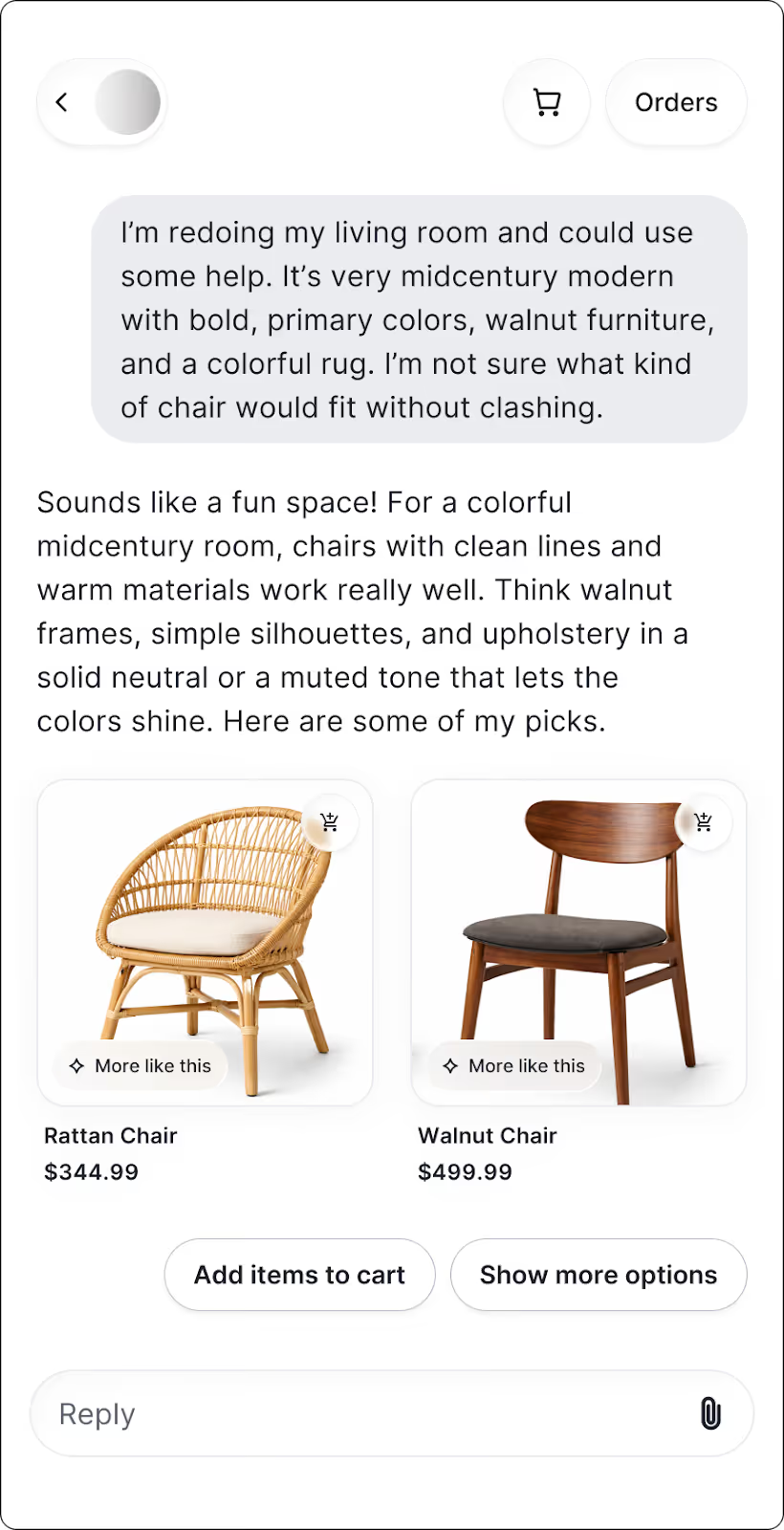
7. Recommend furniture that works well together

Decorating a home is personal, and shoppers often want reassurance that a new piece will blend with what they already own. Questions about color palettes, textures, and proportions come up constantly. And without guidance, it’s easy for shoppers to feel unsure about hitting “add to cart.”

How Shopping Assistant helps:

Giving shoppers personalized styling support helps them visualize how pieces will work in their home. 

Shoppers receive styling suggestions based on their existing space as well as recommendations on pieces that complement their color palette. 

It even guides them toward a 60-minute virtual styling consultation when they need deeper help. The experience feels thoughtful and high-touch, which is why shoppers often spend more once they feel confident in their choices.
Results:

  • AOV uplift: +97.15%
  • Chat CVR: 10.3%

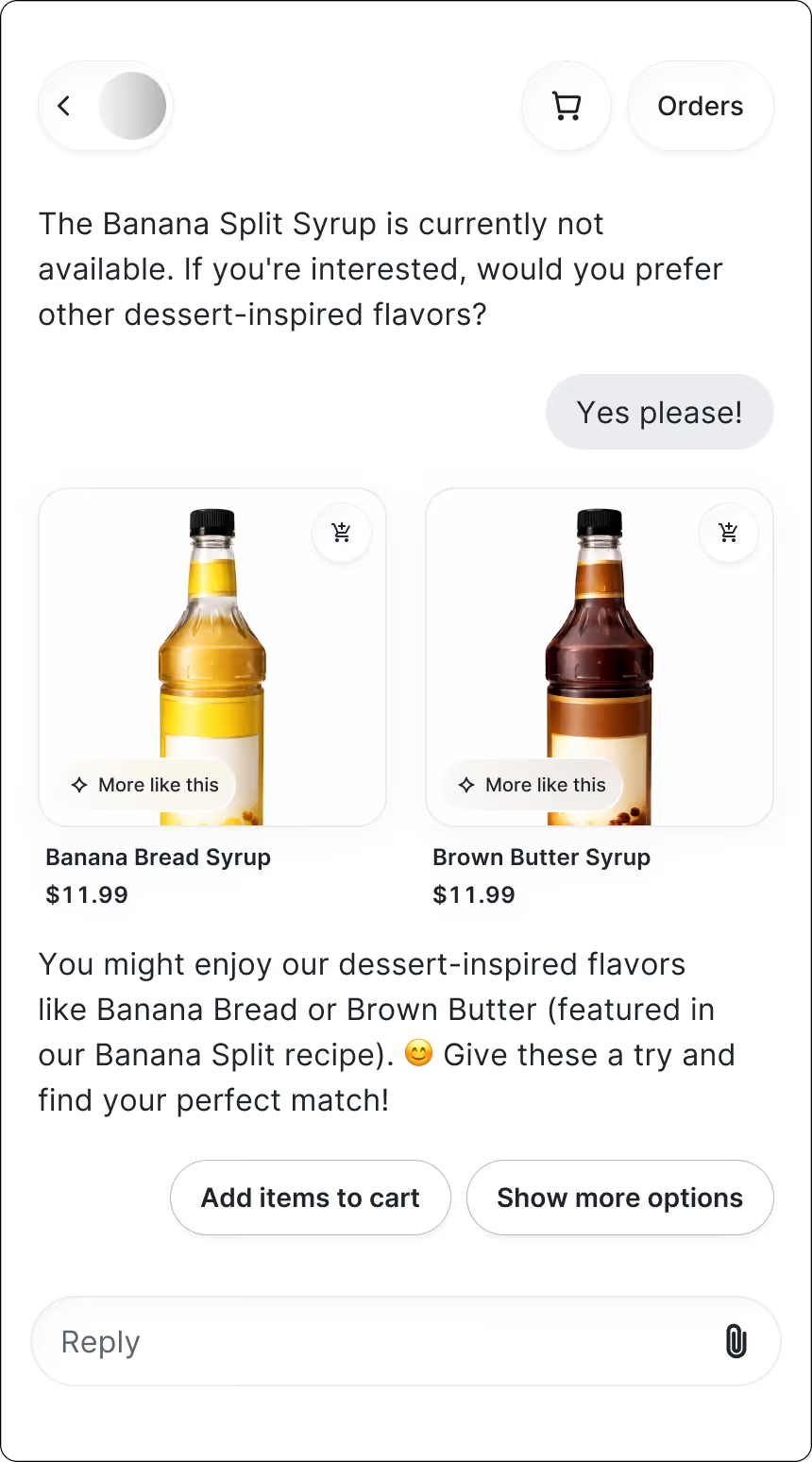
8. Reassure shoppers about flavor before purchase

When shoppers discover a new drink mix, they’re bound to have questions before committing. How strong will it taste? How much should they use? Will it work with their preferred drink or routine? Uncertainty at this stage can stall the purchase or lead to disappointment later.

How Shopping Assistant helps:

Clear, friendly guidance in chat helps shoppers understand exactly how to use the product. Shopping Assistant answers questions about serving size, flavor strength, and pairing options, and suggests the best way to prepare the mix based on the shopper’s preferences.
Results:

  • Chat CVR: 12.75%

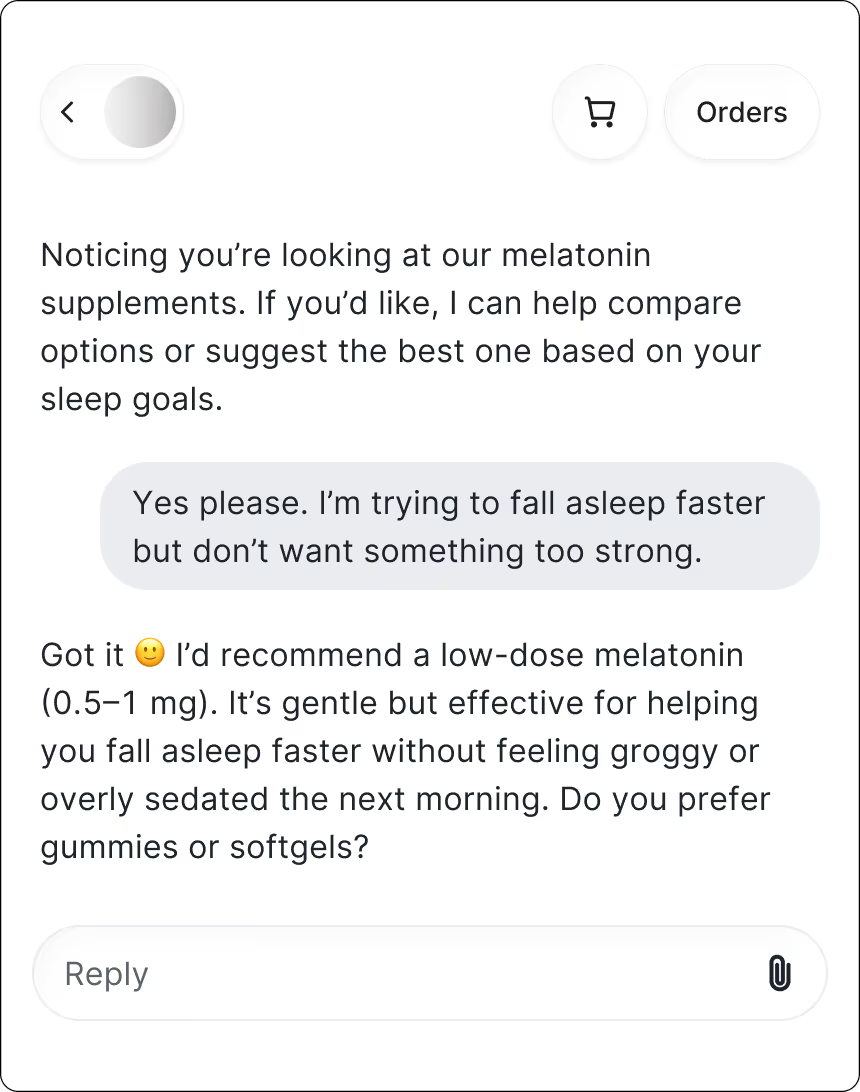
9. Match supplements to age, lifestyle, and health goals

Shopping for health supplements can feel confusing fast. Customers often have questions about which formulas fit their age, health goals, or daily routine. Without clear guidance, most will hesitate or pick the wrong product.

How Shopping Assistant helps:

Shopping Assistant detects hesitation when shoppers linger on a search results page. It proactively asks a few clarifying questions, narrows down product options, and points shoppers to the best product or bundle for their needs. 

The entire experience feels supportive and gives shoppers confidence they’ve picked the right option.
Results:

  • AOV uplift: +16.4%
  • Chat CVR: 15.15%

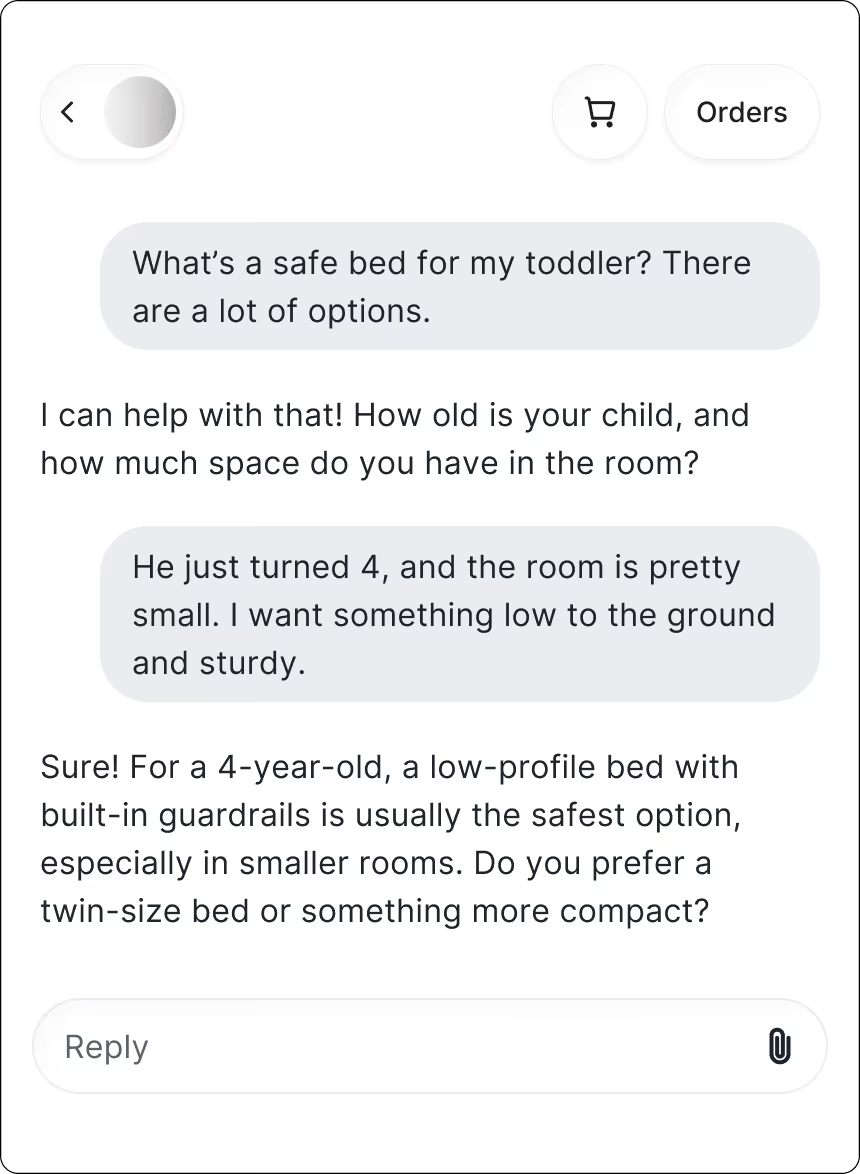
10. Align products with safety needs in kids’ rooms

Shopping for kids’ furniture comes with a lot of “Is this the right one?” moments. Parents want something safe, sturdy, and sized correctly for their child’s age. With so many options, it’s easy to feel unsure about what will actually work in their space.

How Shopping Assistant helps:

Shopping Assistant guides parents toward the best fit right away. It asks about their child’s age, room layout, and safety considerations, then recommends the most appropriate bed or furniture setup. The experience feels like chatting with a knowledgeable salesperson who understands what families actually need as kids grow.
Results:

  • GMV uplift: +12.26%
  • AOV uplift: +10.19%

11. Clarify technical specs that create hesitation

Even something as simple as choosing a toothbrush can feel complicated when multiple models come with different speeds, materials, and features. Shoppers want to understand what matters so they can pick the one that fits their routine and budget.

How Shopping Assistant helps:

Choosing between toothbrush models shouldn’t feel like decoding tech specs. When shoppers can see the key differences in plain language, including what’s unique, how each model works, and who it’s best for, they can make a decision with ease. 

Suddenly, the whole process feels simple instead of overwhelming.
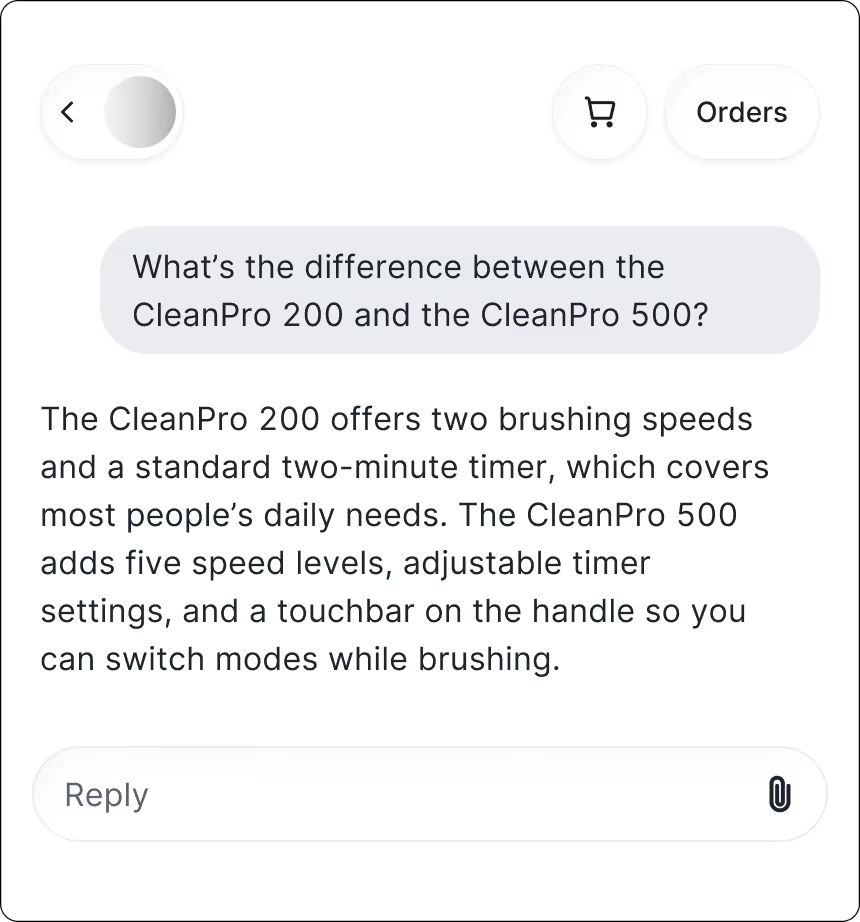
Results:

  • AOV uplift: +11.27%
  • Chat CVR: 8.55%

What these results tell us

Across all 11 brands, one theme is clear. When shoppers get the guidance they need at the right moment, they convert more confidently and often spend more.

Here’s what stands out:

  • AOV jumps when products are technical or high in consideration. Home decor, supplements, and outdoor gear see the biggest lifts because shoppers feel more confident committing to higher-priced items once the details are explained.
  • CVR surges in categories with complex decisions. Lingerie, apparel, and personal styling all showed strong conversion rates because shoppers finally get clarity on fit, shade, or style.
  • GMV rises when AI removes friction from the buying journey. Furniture and beauty saw meaningful gains thanks to personalized recommendations that reduce uncertainty and push shoppers toward the right product faster.
  • The use cases reveal clear upsell opportunities. If your team sees recurring questions about sizing, shade matching, product differences, or how items work together, that’s a strong signal that guided selling can drive more revenue.

What this means for you:

Look closely at your most common pre-purchase questions. Anywhere shoppers hesitate from fit, shade, technical specs, styling, bundles is a place where Shopping Assistant can step in, boost confidence, and unlock more sales.

Want Shopping Assistant results like these?

If you notice the same patterns in your own store, such as shoppers hesitating over sizing, shade matching, product comparisons, or technical details, guided shopping can make an immediate impact. These moments are often your biggest opportunities to increase revenue and improve the buying experience.

Many of the brands in this post started by identifying their most common pre-purchase questions and letting AI handle them at scale. You can do the same.

If you want to boost conversions, lift AOV, and create a smoother path to purchase, now is a great time to explore guided shopping for your team.

Book a demo or activate Shopping Assistant to get started.

{{lead-magnet-2}}

Conversational Commerce Metrics

Your Support Team Drives More Revenue Than You Think: Conversational Commerce Metrics

By Tina Donati
min read.
0 min read . By Tina Donati

TL;DR:

  • Support chats can now be directly tied to revenue. Brands are measuring conversations by conversion rate, average order value (AOV), and GMV influenced.
  • AI resolution rate is only valuable if the answers are accurate and helpful. A high resolution rate doesn’t matter if it leads to poor recommendations — the best AI both deflects volume and drives confident purchases.
  • Chat conversion rates often outperform traditional channels. Brands like Arc’teryx saw a 75% lift in conversions (from 4% to 7%) when AI handled high-intent product questions.
  • Shoppers who chat often spend more. Conversations lead to higher AOVs by helping customers understand products, explore upgrades, and discover add-ons — not just through upselling, but smarter guidance.

Conversational commerce finally has a scoreboard.

For years, CX leaders knew support conversations mattered, they just couldn’t prove how much. Conversations lived in that gray area of ecommerce where shoppers got answers, agents did their best, and everyone agreed the channel was “important”… 

But tying those interactions back to actual revenue? Nearly impossible.

Fast forward to today, and everything has changed.

Real-time conversations — whether handled by a human agent or powered by AI — now leave a measurable footprint across the entire customer journey. You can see how many conversations directly influenced a purchase. 

In other words, conversational commerce is finally something CX teams can measure, optimize, and scale with confidence.

Why measuring conversational commerce matters now

If you want to prove the value of your CX strategy to your CFO, your marketing team, or your CEO, you need data, not anecdotes.

Leadership isn’t swayed by “We think conversations help shoppers.” They want to see the receipts. They want to know exactly how interactions influence revenue, which conversations drive conversion, and where AI meaningfully reduces workload without sacrificing quality.

That’s why conversational commerce metrics matter now more than ever. This gives CX leaders a way to:

  • Quantify the revenue influence of conversations
  • Understand where AI improves efficiency — and where humans add the most value
  • Make informed decisions on staffing, automation, and channel investment
  • Turn CX into a profit center instead of a cost center

These metrics let you track impact with clarity and confidence.

And once you can measure it, you can build a stronger case for deeper investment in conversational tools and strategy.

The 4 metric categories that define conversational commerce success

So, what exactly should CX teams be measuring?

While conversational commerce touches every part of the customer journey, the most meaningful insights fall into four core categories: 

  1. Automation performance
  2. Conversion & revenue impact
  3. Engagement quality
  4. Discounting behavior

Let’s dive into each.

Automation performance metrics

If you want to understand how well your conversational commerce strategy is working, automation performance is the first place to look. These metrics reveal how effectively AI is resolving shopper needs, reducing ticket volume, and stepping into revenue-driving conversations at scale.

The two most foundational metrics?

1. Resolution rate: Are AI-led conversations actually helpful?

Resolution rate measures how many conversations your AI handles from start to finish without needing a human to take over. On paper, high resolution rates sound like a guaranteed win. It suggests your AI is handling product questions, sizing concerns, shade matching, order guidance, and more — all without adding to your team’s workload.

But a high resolution rate doesn’t automatically mean your AI is performing well.

Yes, the ticket was “resolved,” but was the customer actually helped? Was the answer accurate? Did the shopper leave satisfied or frustrated?

This is where quality assurance becomes essential. Your AI should be resolving tickets accurately and helpfully, not simply checking boxes.

At its best, a strong resolution rate signals that your AI is:

  • Confidently answering product questions
  • Guiding shoppers to the right SKU, variant, shade, size, or style
  • Reducing cart abandonment caused by confusion
  • Helping pre-sale shoppers convert faster

When resolution rate quality goes up, so does revenue influence.

You can see this clearly with beauty brands, where accuracy matters enormously. bareMinerals, for example, used to receive a flood of shade-matching questions. Everything from “Which concealer matches my undertone?” to “This foundation shade was discontinued; what’s the closest match?” 

Before AI, these questions required well-trained agents and often created inconsistencies depending on who answered.

Once they introduced Shopping Assistant, resolution rate suddenly became more meaningful. AI wasn’t just closing tickets; it was giving smarter, more confident recommendations than many agents could deliver at scale, especially after hours. 

BareMinerals' AI Agent recommends a customer a foundation that matches their skin tone

That accuracy paid off. 

AI-influenced purchases at bareMinerals had zero returns in the first 30 days because customers were finally getting the right shade the first time.

That’s the difference between “resolved” and resolved well.

2. Zero-touch tickets: How many tickets never reach a human?

The zero-touch ticket rate measures something slightly different: the percentage of conversations AI manages entirely on its own, without ever being escalated to an agent.

This metric is a direct lens into:

  • Workload reduction
  • Team efficiency
  • Cost savings
  • AI’s ability to own high-volume question types

More importantly, deflection widens the funnel for more revenue-driven conversations.

When AI deflects more inbound questions, your support team can focus on conversations that truly require human expertise, including returns exceptions, escalations, VIP shoppers, and emotionally sensitive interactions.

Brands with strong deflection rates typically see:

  • Shorter wait times
  • Higher CSAT
  • Lower support costs
  • More AI-influenced revenue

Conversion and revenue impact metrics

If automation metrics tell you how well your AI is working, conversion and revenue metrics tell you how well it’s selling.

This category is where conversational commerce really proves its value because it shows the direct financial impact of every human- or AI-led interaction.

1. Chat Conversion Rate (CVR): How often do conversations turn into purchases?

Chat conversion rate measures the percentage of conversations that end in a purchase, and it’s one of the clearest indicators of whether your conversational strategy is influencing shopper decisions.

A strong CVR tells you that conversations are:

  • Building confidence
  • Removing hesitation
  • Guiding shoppers toward the right product

You see this clearly with brands selling technical or performance-driven products. 

Outdoor apparel shoppers, for example, don’t just need “a jacket” — they need to know which jacket will hold up in specific temperatures, conditions, or terrains. A well-trained AI can step into that moment and convert uncertainty into action.

Arc’teryx saw this firsthand. 

Arc'teryx uses Shopping Assistant to enable purchases directly from chat

Once Shopping Assistant started handling their high-intent pre-purchase questions, their chat conversion rate jumped dramatically — from 4% to 7%. A 75% lift. 

That’s what happens when shoppers finally get the expert guidance they’ve been searching for.

2. GMV influenced: The revenue ripple effect of conversations

Not every shopper buys the moment they finish a chat. Some take a few hours. Some need a day or two. Some want to compare specs or read reviews before committing.

GMV influenced captures this “tail effect” by tracking revenue within 1–3 days of a conversation.

It’s especially powerful for:

  • High-consideration purchases (like outdoor gear, home furniture, equipment)
  • Products with many options, specs, or configurations
  • Shoppers who need reassurance before buying

In Arc’teryx’s case, shoppers often take time to confirm they’re choosing the right technical gear.

Yet even with that natural pause in behavior, Shopping Assistant still influenced 3.7% of all revenue, not by forcing instant decisions, but by providing the clarity people needed to make the right one.

3. AOV from conversational commerce: Do conversations lead to bigger carts?

This metric looks at the average order value of shoppers who engage in a conversation versus those who don’t. 

If the conversational AOV is higher, it means your AI or agents are educating customers in ways that naturally expand the cart.

Examples of AOV-lifting conversations include:

  • Recommending complementary gear, tools, or accessories
  • Suggesting upgraded options based on needs
  • Helping shoppers understand the difference between product tiers
  • Explaining why a specific product is worth the investment

When conversations are done well, AOV increases not because shoppers are being upsold, but because they’re being guided

4. ROI of AI-powered conversations: The metric your leadership cares most about

ROI compares the revenue generated by conversational AI to the cost of the tool itself — in short, this is the number that turns heads in boardrooms.

Strong ROI shows that your AI:

  • Does the work of multiple agents
  • Drives new revenue, not just ticket deflection
  • Provides accurate answers consistently, at any time
  • Delivers a high-quality experience without expanding headcount

When ROI looks like that, AI stops being a “tool” and starts being an undeniable growth lever.

Related: The hidden power and ROI of automated customer support

Engagement metrics that indicate purchase intent

Not every metric in conversational commerce is a final outcome. Some are early signals that show whether shoppers are interested, paying attention, and moving closer to a purchase.

These engagement metrics are especially valuable because they reveal why conversations convert, not just whether they do. When engagement goes up, conversion usually follows.

1. Click-Through Rate (CTR): Are shoppers acting on the products your AI recommends?

CTR measures the percentage of shoppers who click the product links shared during a conversation. It’s one of the cleanest leading indicators of buyer intent because it reflects a moment where curiosity turns into action.

If CTR is high, it’s a sign that:

  • Your recommendations are relevant
  • The conversation is persuasive
  • The shopper trusts the guidance they’re getting
  • The AI is surfacing the right product at the right time

In other words, CTR tells you which conversations are influencing shopping behavior.

And the connection between CTR and revenue is often tighter than teams expect.

Just look at what happened with Caitlyn Minimalist. When they began comparing the results of human-led conversations versus AI-assisted ones over a 90-day period, CTR became one of the clearest predictors of success. Their Shopping Assistant consistently drove meaningful engagement with its recommendations — an 18% click-through rate on the products it suggested.

That level of engagement translated directly into better outcomes:

  • AI-driven conversations converted at 20%, compared to just 8% for human agents
  • Many of those clicks led to multi-item purchases
  • Overall, the brand experienced a 50% lift in sales from AI-assisted chats compared to human-only ones

When shoppers click, they’re moving deeper into the buying cycle. Strong CTR makes it easier to forecast conversion and understand how well your conversational flows are guiding shoppers toward the right products.

AI Agent recommends a customer with jewelry safe for sensitive skin

Discounting behavior metrics

Discounting can be one of the fastest ways to nudge a shopper toward checkout, but it’s also one of the fastest ways to erode margins. 

That’s why discount-related metrics matter so much in conversational commerce. 

They show not just whether AI is using discounts, but how effectively those discounts are driving conversions.

1. Discounts offered: Are incentives being used strategically or too often?

This metric tracks how many discount codes or promotional offers your AI is sharing during conversations. 

Ideally, discounts should be purposeful — timed to moments when a shopper hesitates or needs an extra nudge — not rolled out as a one-size-fits-all script. When you monitor “discounts offered,” you can ensure that incentives are being used as conversion tools, not crutches.

This visibility becomes particularly important at high-intent touchpoints, such as exit intent or cart recovery interactions, where a small incentive can meaningfully increase conversion if used correctly.

2. Discounts applied: Are those discounts actually influencing the purchase?

Offering a discount is one thing. Seeing whether customers use it is another.

A high “discounts applied” rate suggests:

  • The offer was compelling
  • The timing was right
  • The shopper truly needed that incentive to convert

A low usage rate tells a different story: Your team (or your AI) is discounting unnecessarily.

This metric alone often surprises brands. More often than not, CX teams discover they can discount less without hurting conversion, or that a non-discount incentive (like a relevant product recommendation) performs just as well.

Understanding this relationship helps teams tighten their promotional strategy, protect margins, and use discounts only where they actually drive incremental revenue.

How CX teams use these metrics to make better decisions

Once you know which metrics matter, the next step is building a system that brings them together in one place.

Think of your conversational commerce scorecard as a decision-making engine — something that helps you understand performance at a glance, spot bottlenecks, optimize AI, and guide shoppers more effectively.

In Gorgias, you can customize your analytics dashboard to watch the metrics that matter most to your brand. This becomes the single source of truth for understanding how conversations influence revenue.

Here’s what a powerful dashboard unlocks:

1. You learn where AI performs best (and where humans outperform)

Some parts of the customer journey are perfect for AI: repetitive questions, product education, sizing guidance, shade matching, order status checks. 

Others still benefit from human support, like emotional conversations, complex troubleshooting, multi-item styling, or high-value VIP concerns.

Metrics like resolution rate, zero-touch ticket rate, and chat conversion rate show you exactly which is which.

When you track these consistently, you can:

  • Identify conversation types AI should fully own
  • Spot where AI needs more training
  • Allocate human agents to higher-value conversations
  • Decide when humans should step in to drive stronger outcomes

For example, if AI handles 80% of sizing questions successfully but struggles with multi-item styling advice, that tells you where to invest in improving AI, and where human expertise should remain the default.

2. You uncover what shoppers actually need to convert

Metrics like CTR, CVR, and conversational AOV reveal the inner workings of shopper decision-making. They show which recommendations resonate, which don’t, and which messaging actually moves someone to purchase.

With these insights, CX teams can:

  • Refine product recommendations
  • Improve conversation flows that stall out
  • Adjust the tone or structure of AI messaging
  • Draft stronger scripts for human agents
  • Identify recurring questions that indicate missing PDP information

For instance, if shoppers repeatedly ask clarifying questions about a product’s material or fit, that’s a signal for merchandising or product teams

If recommendations with social proof get high engagement, marketing can integrate that insight into on-site messaging. 

Conversations reveal what customers really care about — often before analytics do.

3. You prove that conversations directly drive revenue

This is the moment when the scorecard stops being a CX tool and becomes a business tool.

A clear set of metrics shows how conversations tie to:

  • GMV influenced
  • AOV lift
  • Revenue generated by AI
  • ROI of conversational commerce tools

When a CX leader walks into a meeting and says, “Our AI Assistant influenced 5% of last month’s revenue” or “Conversational shoppers have a 20% higher AOV,” the perception of CX changes instantly.

You’re no longer a support cost. You’re a revenue channel.

And once you have numbers like ROI or revenue influence in hand, it becomes nearly impossible for anyone to argue against further investment in CX automation.

4. You identify where shoppers are dropping off or hesitating

A scorecard doesn’t just show what’s working, it surfaces what’s not.

Metrics make friction obvious:

Metric Signal

What It Means

Low CTR

Recommendations may be irrelevant or poorly timed.

Low CVR

Conversations aren’t persuasive enough to drive a purchase.

High deflection but low revenue

AI is resolving tickets, but not effectively selling.

High discount usage

Shoppers rely on incentives to convert.

Low discount usage

You may be offering discounts unnecessarily and losing margin.

Once you identify these patterns, you can run targeted experiments:

  • Test new scripts or flows
  • Adjust product recommendations
  • Add social proof or benefit framing
  • Reassess discounting strategies
  • Rework messaging on key PDPs

Compounded over time, these moments create major lifts in conversion and revenue.

5. You create a feedback loop across marketing, merchandising, and product

One of the biggest hidden values of conversational data is how it strengthens cross-functional decision-making.

A clear analytics dashboard gives teams visibility into:

  • Unclear or missing product information (from repeated questions)
  • Merchandising opportunities (from your most popular products)
  • Landing page or PDP improvements (from drop-off points)
  • Messaging that resonates with real customers (from AI messages)

Suddenly, CX isn’t just answering questions — it’s informing strategy across the business.

CX drives revenue when you measure what matters

With the right metrics in place, CX leaders can finally quantify the impact of every interaction, and use that data to shape smarter, more profitable customer journeys.

If you're ready to measure — and scale — the impact of your conversations, tools like Gorgias AI Agent and Shopping Assistant give CX teams the visibility, accuracy, and performance needed to turn every interaction into revenue.

Want to see it in action? Book a demo and discover what conversational commerce can do for your bottom line.

{{lead-magnet-2}}

AI Hallucinations

AI Hallucinations: What Support Teams Need to Know

By Gorgias Team
min read.
0 min read . By Gorgias Team

TL;DR: 

  • AI hallucinations happen when AI models create false information that sounds real. 
  • They occur in customer support when chatbots lack proper training data or face unclear questions.
  • Main causes include bad training data, overfitting, and confusing prompts. You can prevent them by grounding responses in real data, setting clear limits, and keeping humans in the loop. 
  • When managed right, AI reduces support tickets while staying accurate and on-brand.

Your AI chatbot just told a customer their order ships in two days when you actually need five. That's an AI hallucination, or false information delivered with complete confidence.

These fake-but-convincing responses can wreck customer trust and create headaches for your support team. Understanding what triggers these AI mistakes and how to stop them matters for any brand using AI in customer service. 

This guide covers everything support teams need to know about AI hallucinations, from spotting them to building systems that keep your AI honest and helpful.

{{lead-magnet-1}}

What are AI hallucinations?

AI hallucinations are false or made-up responses from AI models that sound completely believable. This means the AI creates information that isn't based on real data but presents it like it's a fact.

The term “hallucination” comes from psychology, but AI hallucinations work differently than human ones. When an AI hallucinates, it's not seeing things that aren't there. Instead, it's filling gaps in its knowledge with creative guesswork.

Large language models (LLMs) power most modern chatbots. These models predict what word comes next based on patterns they learned during training. Sometimes they predict wrong and create entirely made-up information.

The real problem isn't that AI makes mistakes — it's how confidently it delivers wrong answers. Your AI won't say “I think” or “maybe.” It states false information with authority, making errors hard to catch.

For your ecommerce brand, this could mean your chatbot invents return policies or confirms products are in stock when they're not. These confident lies break customer trust and force your human agents to clean up the mess.

What causes AI hallucinations

AI hallucinations are baked into how current models function, caused by training data limitations, missing context, and statistical prediction errors that lead AI to invent convincing but false answers. Knowing why they happen helps you prevent them in your customer support.

Insufficient training data creates the biggest problems. When you ask AI about topics it hasn't learned, it tries to fill knowledge gaps with educated guesses. These guesses often sound reasonable but are completely wrong.

Overfitting happens when AI memorizes training examples instead of learning patterns. The model becomes an expert at repeating what it's seen before but terrible at handling new situations.

Ambiguous prompts confuse AI models. When customers ask vague questions that could mean several things, AI picks one interpretation and runs with it.

Outdated information causes problems because most AI models have knowledge cutoffs. They don't know about new promotions, products, or policy changes after their training ended. Your AI might confidently share old shipping times or discontinued product details.

Pattern misapplication occurs when AI applies learned patterns to wrong situations. The model recognizes linguistic patterns and uses them inappropriately, creating responses that sound right but make no sense in context.

Examples of AI hallucinations in customer support

AI hallucinations create real problems for support teams. When chatbots hallucinate, human agents spend time fixing the damage instead of helping customers with genuine needs.

Here are common ways AI hallucinates in ecommerce support:

  • Product feature invention: Customer asks if a jacket is waterproof. AI confidently says "Yes, it's fully waterproof and tested to 10 feet underwater" when it's only water-resistant.
  • Fake discount codes: Shopper requests a discount. AI creates "SAVE20NOW" — a realistic-sounding but non-existent code that fails at checkout.
  • Wrong return windows: AI tells customers they have 60 days to return items because it hasn’t been fed your return policy, creating expectations you can't meet.
  • Fabricated shipping promises: AI promises next-day delivery for standard shipping orders, setting impossible expectations.
  • Invented company policies: Customer asks about price matching. AI creates a detailed policy you've never offered, forcing agents to disappoint customers.

Each hallucination creates a cascade of problems. Customers get frustrated when promises don't match reality. Your support team wastes time explaining why the AI was wrong. Your brand reputation takes a hit when customers can't trust your automated responses.

The worst part? These hallucinations often sound more helpful than honest answers. An AI that says “I don't know” seems less useful than one that confidently provides detailed (but wrong) information.

How to prevent AI hallucinations in customer support

You can't eliminate AI hallucinations completely, but you can reduce them. The key is moving from pure text generation to grounded, controlled responses based on your real data.

Limit possible outcomes

Instead of letting AI create any response it wants, give it specific options to choose from. For common questions about returns or shipping, create approved response categories. This prevents AI from inventing policies on the spot.

Decision trees work well for this approach. When customers ask about returns, your AI follows a predetermined path: check order date, verify product type, provide appropriate response. No creativity required.

You can also set response templates for frequent questions. Templates include placeholders for customer names or order numbers while keeping core information consistent and accurate.

Related: How to write Guidance with the “when, if, then” framework

Train models on relevant data

Generic AI training creates generic problems. Train your AI specifically on your business data — past support tickets, verified Help Center articles, and current product information.

Your training data should include:

  • Real customer conversations: Use actual support tickets to teach AI how customers ask questions and what answers work
  • Current product catalogs: Keep AI updated on what you actually sell, not what it thinks you might sell
  • Verified policies: Only include official company policies, not industry standards or competitor information
  • Brand voice examples: Show AI how your team actually talks to customers
  • Your public Help Center: Use the resources you already provide to customers to teach it your most-asked questions

Quality matters more than quantity. It’s better to train on 1,000 accurate examples than 10,000 low-quality ones.

Create response templates

Templates give AI structure while allowing personalization. Instead of generating responses from scratch, AI fills in blanks within approved frameworks.

A shipping template might look like: 

  • "Hi [customer name], your order [order number] shipped on [ship date] and will arrive by [delivery date]. Track it here: [tracking link]."

Templates ensure consistency across all AI responses. Customers get the same quality information whether they chat at 2 pm or 2 am. Your brand voice stays consistent even when AI handles the conversation.

Tell the model what to include and exclude

Set explicit boundaries for your AI through system prompts and instructions. Create lists of topics that always need human agents, like product safety complaints or legal threats.

Specify which information sources AI can use. Point it toward your Help Center and product database while blocking access to general internet information that might be outdated or irrelevant.

You can also create escalation triggers. When AI encounters certain keywords or question types, it automatically passes the conversation to a human agent instead of guessing.

Test and refine the system

AI isn't a set-it-and-forget-it tool. Regular testing catches problems before customers do.

Set up quality checks on AI responses. Review a sample of conversations weekly to spot inaccuracies or areas for improvement. Look for patterns in escalated tickets — they often reveal gaps in AI training.

A/B testing helps optimize AI performance. Try different prompt configurations to see which produces more accurate responses. Monitor customer satisfaction scores for AI-handled tickets compared to human-handled ones.

Customer feedback provides valuable insights. When customers report AI errors, use those examples to improve training data and refine response templates.

Add human oversight and escalation

Build safety nets into your AI system. Set confidence thresholds so the AI only responds when it's confident in its answer. Uncertain responses get escalated to human agents automatically.

Create clear escalation paths for complex issues. AI should recognize when questions go beyond its capabilities and smoothly transfer customers to appropriate team members.

Human oversight doesn't mean micromanaging every AI response. Instead, focus on monitoring patterns and intervening when AI consistently struggles with specific questions.

Ground answers in Shopify and help center data

This strategy delivers the biggest impact for ecommerce brands. Grounding means forcing AI to base responses on verified, real-time data from your tech stack.

When customers ask about order status, grounded AI checks live Shopify data instead of guessing. When they ask about policies, it pulls exact text from your Help Center instead of paraphrasing from memory.

Grounding transforms AI from a creative writer into a reliable assistant. It can only share information that exists in your approved systems, dramatically reducing hallucination risk.

Integration with your ecommerce platform ensures AI always has current information about inventory, shipping, and customer orders. No more promising products you don't have or delivery dates you can't meet.

Turn AI accuracy into competitive advantage

The brands winning with AI have put in the hours to train it. They've built systems that combine AI efficiency with human oversight, creating customer experiences that feel both fast and trustworthy.

Gorgias AI Agent demonstrates this approach in action. It grounds responses in your Shopify data and Help Center content, ensuring every automated interaction reflects your actual business information. Customizable guardrails let you set boundaries while maintaining the speed customers expect.

Ready to see how accurate AI can transform your support operations? Book a demo and discover how to automate customer service without sacrificing quality or control.

{{lead-magnet-2}}

AI Alignment

AI in CX Webinar Recap: Turning AI Implementation into Team Alignment

By Gabrielle Policella
min read.
0 min read . By Gabrielle Policella

TL;DR:

  • Implement quickly and iterate. Rhoback’s initial rollout process took two weeks, right before BFCM. Samantha moved quickly, starting with basic FAQs and then continuously optimizing.  
  • Train AI like a three-year-old. Although it is empathetic, an AI Agent does not inherently know what is right or wrong. Invest in writing clear Guidance, testing responses, and ensuring document accuracy. 
  • Approach your AI’s tone of voice like a character study. Your AI Agent is an extension of your brand, and its personality should reflect that. Rhoback conducted a complete analysis of its agent’s tone, age, energy, and vocabulary. 
  • Embrace AI as a tool to reveal inconsistencies. If your AI Agent is giving inaccurate information, it’s exposing gaps in your knowledge sources. Uses these early test responses to audit product pages, help center content, Guidance, and policies.
  • Check in regularly and keep humans in control. Introduce weekly reviews or QA rituals to refine AI’s accuracy, tone, and efficiency. Communicate AI insights cross-functionally to build trust and work towards shared goals.

When Rhoback introduced an AI Agent to its customer experience team, it did more than automate routine tickets. Implementation revealed an opportunity to improve documentation, collaborate cross-functionally, and establish a clear brand tone of voice. 

Samantha Gagliardi, Associate Director of Customer Experience at Rhoback, explains the entire process in the first episode of our AI in CX webinar series.

Top learnings from Rhoback’s AI rollout  

1. You can start before you “feel ready”

With any new tool, the pre-implementation phase can take some time. Creating proper documentation, training internal teams, and integrating with your tech stack are all important steps that happen before you go live. 

But sometimes it’s okay just to launch a tool and optimize as you go. 

Rhoback launched its AI agent two weeks before BFCM to automate routine tickets during the busy season. 

Why it worked:

  • Samantha had audited all of Rhoback’s SOPs, training materials, and FAQs a few months before implementation. 
  • They started by automating high-volume questions such as returns, exchanges, and order tracking.
  • They followed a structured AI implementation checklist. 

2. Audit your knowledge sources before you automate

Before turning on Rhoback’s AI Agent, Samantha’s team reviewed every FAQ, policy, and help article that human agents are trained on. This helped establish clear CX expectations that they could program into an AI Agent. 

Samantha also reviewed the most frequently asked questions and the ideal responses to each. Which ones needed an empathetic human touch and which ones required fast, accurate information?  

“AI tells you immediately when your data isn’t clean. If a product detail page says one thing and the help center says another, it shows up right away.” 

Rhoback’s pre-implementation audit checklist:

  • Review customer FAQs and the appropriate responses for each. 
  • Update outdated PDPs, Help Centre articles, policies, and other relevant documentation.
  • Establish workflows with Ecommerce and Product teams to align Macros, Guidance, and Help Center articles with product descriptions and website copy. 

Read more: How to Optimize Your Help Center for AI Agent

3. Train your AI Agent in small, clear steps

It’s often said that you should train your AI Agent like a brand-new employee. 

Samantha took it one step further and recommended treating AI like a toddler, with clear, patient, repetitive instructions. 

“The AI does not have a sense of good and bad. It’s going to say whatever you train it, so you need to break it down like you’re talking to a three-year-old that doesn’t know any different. Your directions should be so detailed that there is no room for error.”

Practical tips:

  • Use AI to build your AI Guidance, focusing on clear, detailed, simple instructions. 
  • Test each Guidance before adding new ones.
  • Treat the training process like an ongoing feedback loop, not a one-time upload.

Read more: How to Write Guidance with the “When, If, Then” Framework

4. Prioritize Tone of Voice to make AI feel natural

For Rhoback, an on-brand Tone of Voice was a non-negotiable. Samantha built a character study that shaped Rhoback’s AI Agent’s custom brand voice.

“I built out the character of Rhoback, how it talks, what age it feels like, what its personality is. If it does not sound like us, it is not worth implementing.”

Key questions to shape your AI Agent’s tone of voice:

  • How does the AI Agent speak? Friendly, funny, empathetic, etc…?
  • Does your AI Agent use emojis? How often?
  • Are there any terms or phrases the AI Agent should always or never say?

5. Use AI to surface knowledge gaps or inconsistencies

Once Samantha started testing the AI Agent, it quickly revealed misalignment between Rhoback’s teams. With such an extensive product catalog, AI showed that product details did not always match the Help Center or CX documentation. 

This made a case for stronger collaboration amongst the CX, Product, and Ecommerce teams to work towards their shared goal of prioritizing the customer. 

“It opened up conversations we were not having before. We all want the customer to be happy, from the moment they click on an ad to the moment they purchase to the moment they receive their order. AI Agent allowed us to see the areas we need to improve upon.” 

Tips to improve internal alignment:

  • Create regular syncs between CX, Product, Ecommerce, and Marketing teams.
  • Share AI summaries, QA insights, and trends to highlight recurring customer pain points.
  • Build a collaborative workflow for updating documents that gives each team visibility. 

6. Build trust (with your team and customers) through transparency 

Despite the benefits of AI for CX, there’s still trepidation. Agents are concerned that AI would replace them, while customers worry they won’t be able to reach a human. Both are valid concerns, but clearly communicating internally and externally can mitigate skepticism. 

At Rhoback, Samantha built internal trust by looping in key stakeholders throughout the testing process. “I showed my team that it is not replacing them. It’s meant to be a support that helps them be even more successful with what they’re already doing," Samantha explains.

On the customer side, Samantha trained their AI Agent to tell customers in the first message that it is an AI customer service assistant that will try to help them or pass them along to a human if it can’t. 

How Rhoback built AI confidence:

  • Positioned AI as a personal assistant for agents, not a replacement.
  • Let agents, other departments, and leadership test and shape the AI Agent experience early.
  • Told customers up front when automation was being used and made the path to a human clear and easy.

Read more: How CX Leaders are Actually Using AI: 6 Must-Know Lessons

Putting these into practice: Rhoback’s framework for an aligned AI implementation 

Here is Rhoback’s approach distilled into a simple framework you can apply.

  1. Audit your content: Ensure your FAQs, product data, policies, and all documentation are accurate.
  2. Start small: Automate one repetitive workflow, such as returns or tracking.
  3. Train iteratively: Add Guidance in small, testable batches.
  4. Prioritize tone: Make sure every AI reply sounds like your brand.
  5. Align teams: Use AI data to resolve cross-departmental inconsistencies and establish clearer communication lines.
  6. Be transparent: Tell both agents and customers how AI fits into the process.
  7. Refine regularly: Review, measure, and adjust on an ongoing basis.

Watch the full conversation with Samantha to learn how AI can act as a catalyst for better internal alignment

📌 Join us for episode 2 of AI in CX: Building a Conversational Commerce Strategy that Converts with Cornbread Hemp on December 16.

{{lead-magnet-1}}

Building delightful customer interactions starts in your inbox

Registered! Get excited, some awesome content is on the way! 📨
Oops! Something went wrong while submitting the form.
A hand holds an envelope that has a webpage coming out of it next to stars and other webpages