
.png)

Newsletter Signup
The best in CX and ecommerce, right to your inbox
Featured articles

Ticket Volume: How to Measure It, Benchmark It, and Reduce It

Gorgias AI Agent Pricing, Explained

Introducing Helpdesk 2.0: Built for How Agents Work
TL;DR:
- Built directly from agent feedback, Helpdesk 2.0 fixes real workflow pain points. The redesign focuses on reducing friction and helping agents handle more context-heavy tickets.
- A chat-style interface replaces the old email layout. Conversations are easier to follow and resolve in one view.
- Customer context is shown beside the conversation in a right-side panel. Agents can view history, orders, and details without leaving the ticket.
- AI handoffs come with clear summaries. Agents instantly see what happened, what was tried, and what to do next.
- Navigation is simpler and faster across teams. Clean menus, structured queues, and multi-store access keep agents moving efficiently.
Helpdesk 2.0 starts with the people who use it most: the agents.
We spent time understanding customer support from the agent's seat. What do they reach for constantly? What slows them down? What does a better workday look like?
Everything we found is in this brand-new update.
Why we redesigned Helpdesk
Conversational commerce is the new standard.
In customer support, this means customers expect context to remain intact wherever they reach out, whether a conversation starts on social, moves to email, or ends on a call.
This new approach to support has also changed the agent's role. Recurring tickets, like order status checks, shipping updates, and returns, are now handled by AI. What lands in the agent inbox are edge cases that require human judgment and troubleshooting, or tickets that require the full picture.
However, the original Helpdesk was built for a different era of support.
Context was separated across views rather than built into the conversation itself. It's something one in five Gorgias customers flagged, through support tickets, NPS surveys, and conversations with our team. So, we got to work.
Helpdesk 2.0 is the result.
What's new in Helpdesk 2.0
Here's a look at everything that changed.
Read conversations the way they're meant to be read
Conversations have a natural rhythm, one that’s already found in every messaging tool we use. We brought that same layout into the helpdesk.
Say goodbye to the 2000s email interface and hello to chat bubbles. This updated design changes how quickly you can orient yourself and resolve the ticket in one go.

Chats with customers now look like real conversations, using the speech bubble style you’re familiar with on popular messaging apps.
Check customer history without losing your place
Checking a customer's history used to mean leaving the conversation, an extra step that interrupted what should have been a smooth workflow.
Now, past conversations open in a sidebar next to the active conversation. You can view a customer’s full history, search through their timeline, and open prior tickets without going to a new page.

Check past conversations, orders, and customer details in the brand-new Customer Timeline.
See order details the moment you open a ticket
Order information is easier to reference than ever. Open a ticket, and you instantly see the customer's recent orders, marked with product images and invoice details at a glance. Need to dig deeper? Click on an order, and the expanded information appears in the same panel.
For teams using custom integrations, apps are fixed in a quick-access integration menu on the right.

See order details, product images, and totals at a glance on the right panel, without leaving the conversation.
Pick up where AI left off
You shouldn't have to dig through a thread to figure out what AI already tried. Now you don't have to.
When AI Agent escalates a conversation, it includes a concise handover summary that mentions the issue, what actions were taken, and why it was passed to your team.

Escalated tickets include a brief AI-generated handover summary, marked in yellow, for quick reference.
Move faster across every store and team
We restructured and simplified the navigation. The left sidebar organizes everything into clear categories: Inbox, AI Agent, Marketing, and Analytics, so anyone on your team knows exactly where to go.
To quickly update your knowledge base or adjust a workflow, both now live right in the sidebar. For teams managing multiple stores, switching between them is just as straightforward, accessible from the sidebar, so agents can move between inboxes without breaking their flow.

Agents can switch between stores and their corresponding inboxes directly from the left menu.
A workspace that works the way agents do
Support comes down to the person on the other end of the conversation. We built Helpdesk 2.0 is to make sure they have everything they need to show up for that moment.
The best way to see the difference is to work in it. Start a free trial today.



Further reading

72% of Gorgias Uses AI for Decisions: How We Did It
Four months ago, our analysts were dealing with a barrage of questions. "What's our ARR by segment?" "Build me a dashboard for this quarter's pipeline." Quick asks piled up behind complex deep dives. Stakeholders waited for answers that should have taken seconds, and analysts spent their time fielding requests instead of doing the strategic work that creates the most value.
Today, anyone at Gorgias can ask a question in plain language and get an accurate, contextualized response in seconds. Not from a colleague or dashboard, nor from a generic answer from the internet. But a response built on our business context. We call it Cortex, our flagship internal AI agent.
In two months, Cortex went from an idea to fielding thousands of questions every week, recommending actions across the business, and deprecating the need for manual dashboard creation. While most companies right now are treating AI as an initiative — at Gorgias, AI is already part of how we work. 72% of Gorgias employees use Cortex each week, and that number is only growing.
We didn’t achieve this by simply plugging a large language model into our stack. LLMs are a critical part of the equation, but they aren't the driving force — it’s everything else under the hood: the infrastructure, context, platform architecture, and the team that brings it all together.
The framing problem most companies get wrong
The instinct across many companies today is to start with the model, pick a provider to solve a specific challenge, or invest heavily in getting the data right. All reasonable starting points, but most of them solve for one use case. Underneath that approach is a framing problem: seeing AI as an initiative — something you assign and measure. Seeing AI as another tool your company uses versus how your company operates.
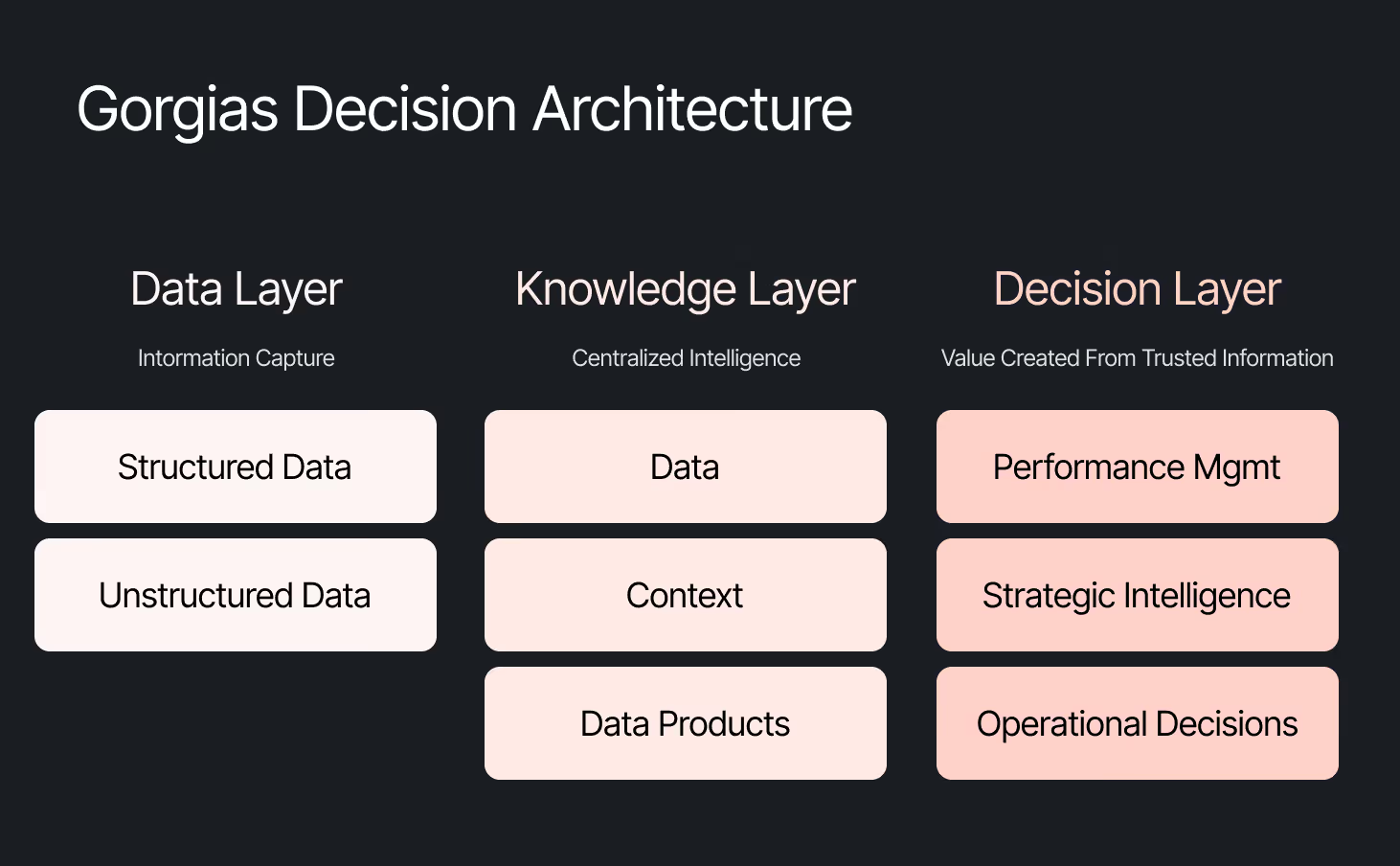
We started somewhere different. Every company is built on four pillars: customers, people, product, and decisions. AI investments tend to place heavy emphasis on the first three. We started with the fourth. Our bet was that if we built everything around the need to make effective decisions first, asking what Gorgias needed to know to operate well, then our AI would become dramatically more powerful.
Cortex is that philosophy in practice
Cortex is our flagship internal AI agent, and the product where we established the tenets that now run through everything else we build: composable and modular infrastructure, governed context, and accessible from wherever decisions happen. Cortex lives in Slack, as well as across LLM vendors, in its own browser extension, and even on its own dedicated internal site.
Cortex doesn’t stop at answering questions. It can read and write to Notion, file Linear tasks, create HTML apps, automate signal delivery, and more. It operates across every layer of our stack, from dashboards to data pipelines, because we designed it as one integrated system. It is this connection that adds remarkable depth to what people can ask, and what they get in return.
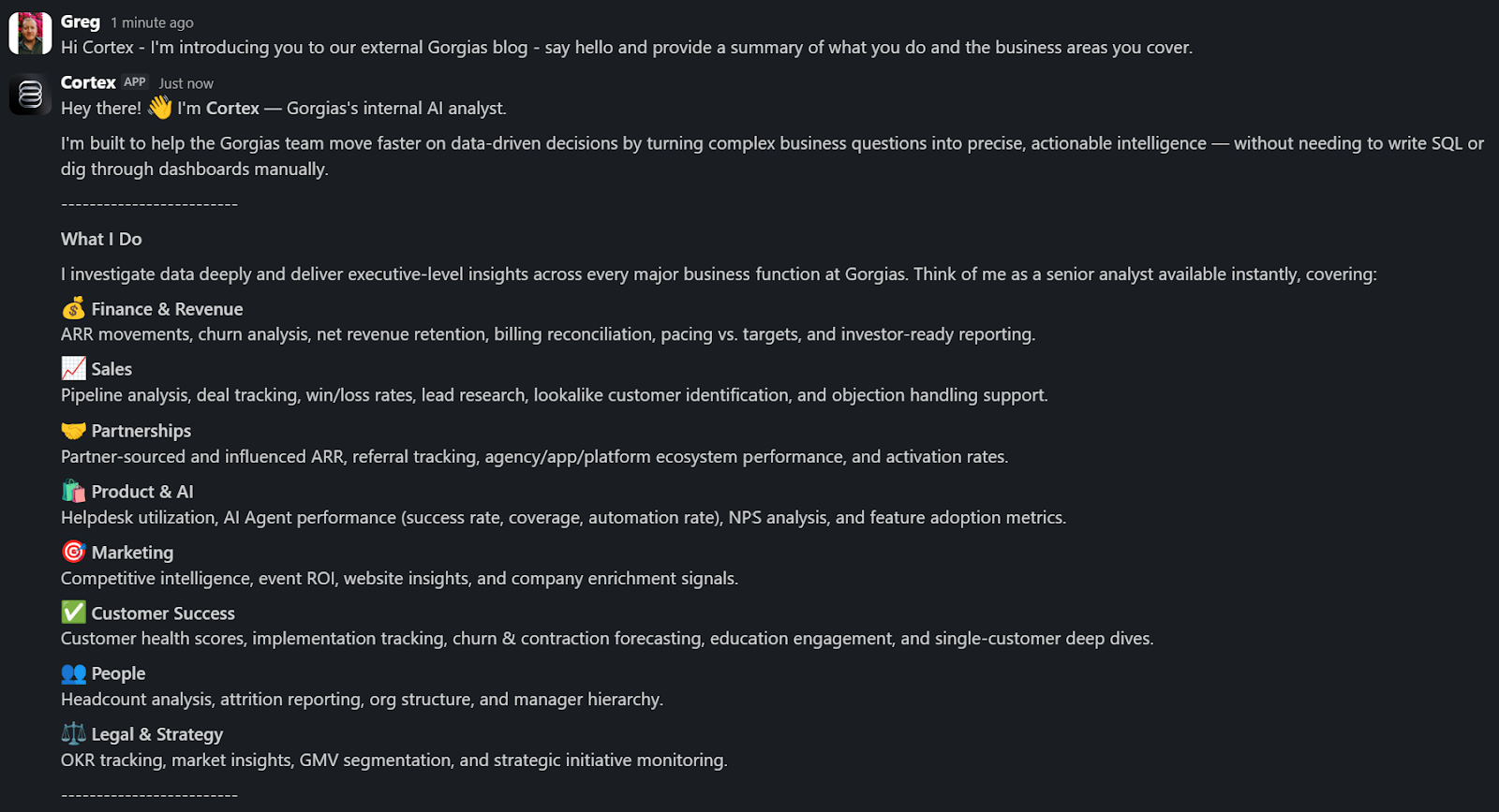
A Sales Lead is pitching and asks Cortex for the full picture of the merchant. In a customized PDF, Cortex lists coverage gaps, pre-sale intent signals, and product fit options. Everything the sales lead needs to walk in with confidence.
A Senior Product leader asks, "How are we performing against OKR #1, and what can my team do to help accelerate it?" Cortex returns a full ARR breakdown, projected end-of-month attainment, segment-level findings, and connects it all back to company-level strategies. A suite of recommendations customized to the leader, the performance, and the signals that bridge how they can support our goals. The kind of answer that used to take someone a week to put together.
These aren't simple lookup queries. They require deep business context spanning multiple areas. Cortex handles these because its Decision Engine gives it the information to reason against governed data, metric definitions, and business context, turning a generic answer into a credible one.
Overnight, teams have built Cortex into how they work. They’re spending less time searching and more time finding answers, not because they were told to, but because Cortex reduced the distance between question and decision.
Flexibility as the foundation
Cortex’s modular infrastructure allows us to experiment and add new capabilities freely. We’ve already built two more internal AI agents made for entirely different use cases, but using the same Decision Engine as Cortex.
GAIA, our internal experimentation AI Agent, helps our customers identify opportunities in their AI Agent Guidance design. It takes institutional knowledge across our teams and turns it into a scalable system that drives automation and value to our customers. Our CEO, Romain Lapeyre, has been its most vocal advocate since day one.
When we needed a platform for investor readiness and board preparation, we built Oracle. Our board decks and talk tracks are informed and built with the same AI, and our numbers are validated every step of the way.
We’re continuing to expand new AI agents internally, exploring how they can create value for customers and our own teams.
AI has transformed how data teams create value, and we’ve already shifted to account for it
When AI handles thousands of analytical questions each week, the highest-value work for a data team shifts permanently. Late 2025, we repositioned from a Data Analytics function into a Decision Intelligence function — a structural change in what we own and how we operate.
Today, our analysts focus on the most sensitive, complex, and forward-looking decisions and analyses. They partner more deeply with stakeholders by driving next steps from signals. They're even building entirely new capabilities that didn't exist in their role descriptions months ago. Things like AI skills for Cortex, context curation, and insight and recommendation delivery. The role of the analyst hasn't diminished. It's expanded to encompass the most meaningful work an analyst can do: driving outcomes and ensuring those decisions can achieve them.
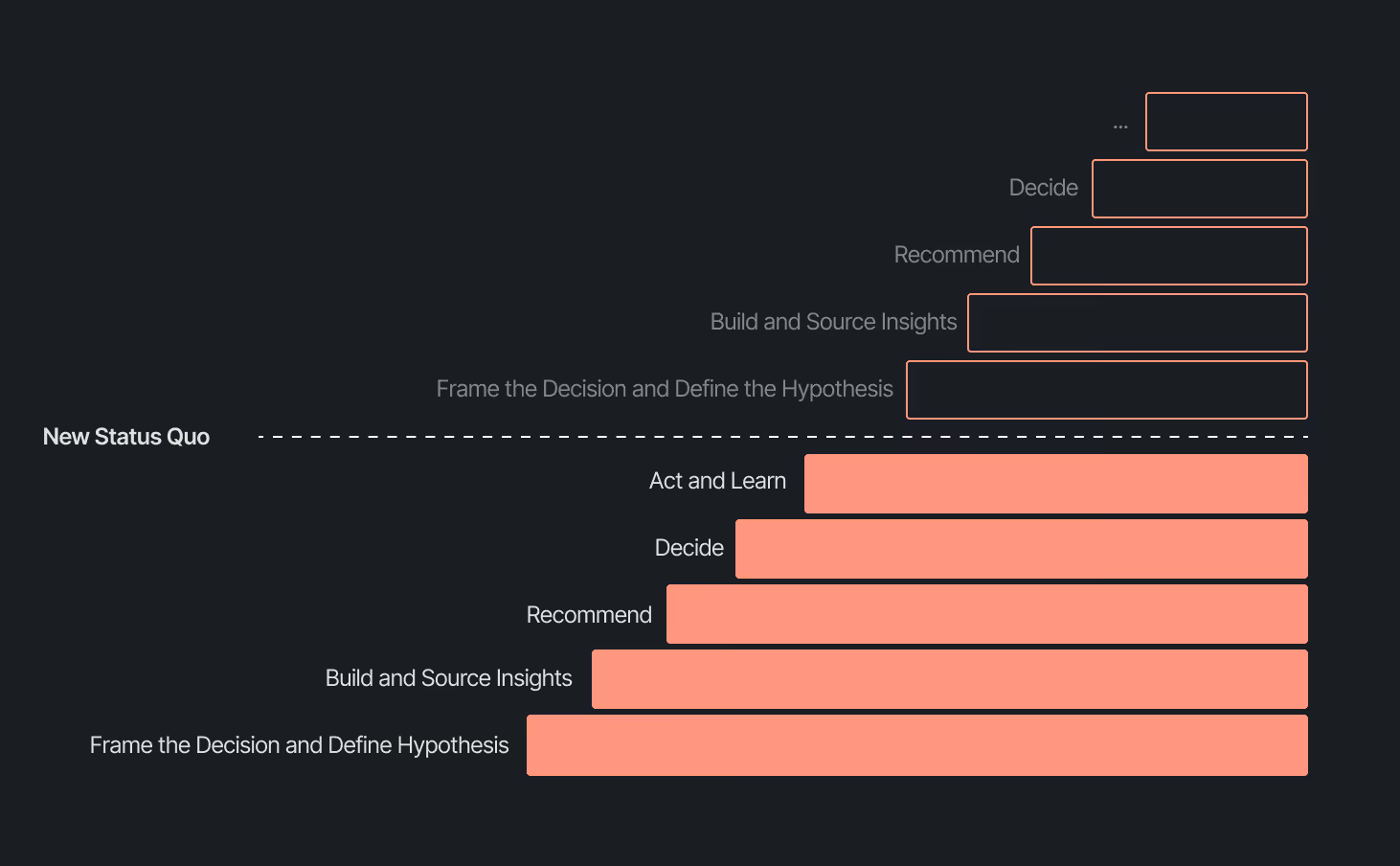
Our business support model has changed, too. Instead of embedding analysts and dedicated engineers within functional teams, we align capacity to the highest-impact company objectives and move fluidly across them. This model works even better because Decision Intelligence brings together both analytics and engineering teams under one roof.
Elliot Trabac leads our Data, Context and AI Engineering teams. The Decision Engine, Cortex, GAIA, and the platforms I've described exist because of the infrastructure his team innovated and built from the ground up. Noemie Happi Nono leads our Decision Strategy and Operations team, driving decision outcomes with stakeholders, advancing the development of Cortex skills and capabilities, and pushing into new areas of analysis every day.
Together, they're shaping what a modern data function looks like when AI becomes a standard building block for how a company operates.
What’s next for the Decision Intelligence team
The question of ROI is long gone. AI has opened the floodgates to more trusted and meaningful signals than ever. The natural next evolution is Proactive Intelligence, signals surfaced toward what you need to know, before you ask. And we're already building this because our architecture is designed to support it.
In the coming weeks, members of the Decision Intelligence team will go deeper into themes I've touched on here. Yochan Khoi, a Senior Analytics Engineer on our team, recently published a technical walkthrough of our context layer and will go further into building context strategies that scale. Others will cover infrastructure, analytical partnerships, evolving data assets into decision assets, and the cost and efficiency gains that make sustained AI investment viable.
AI hasn't changed the most important element of data and analytics functions — delivering outcomes — but it has raised the bar for what it looks like and how far we can take it. We’re just getting started.


10 Best Ecommerce Helpdesk Platforms in 2026
TL;DR
- For Shopify brands, Gorgias is the best ecommerce helpdesk in 2026. It runs support and sales from one inbox, resolves up to 60% of tickets with its AI Agent, and connects natively to Shopify for orders, refunds, and product recommendations.
- The right pick depends on where your store is. Zendesk suits large enterprises that need heavy customization. Freshdesk is the budget entry point. Intercom is built for B2B SaaS, not ecommerce.
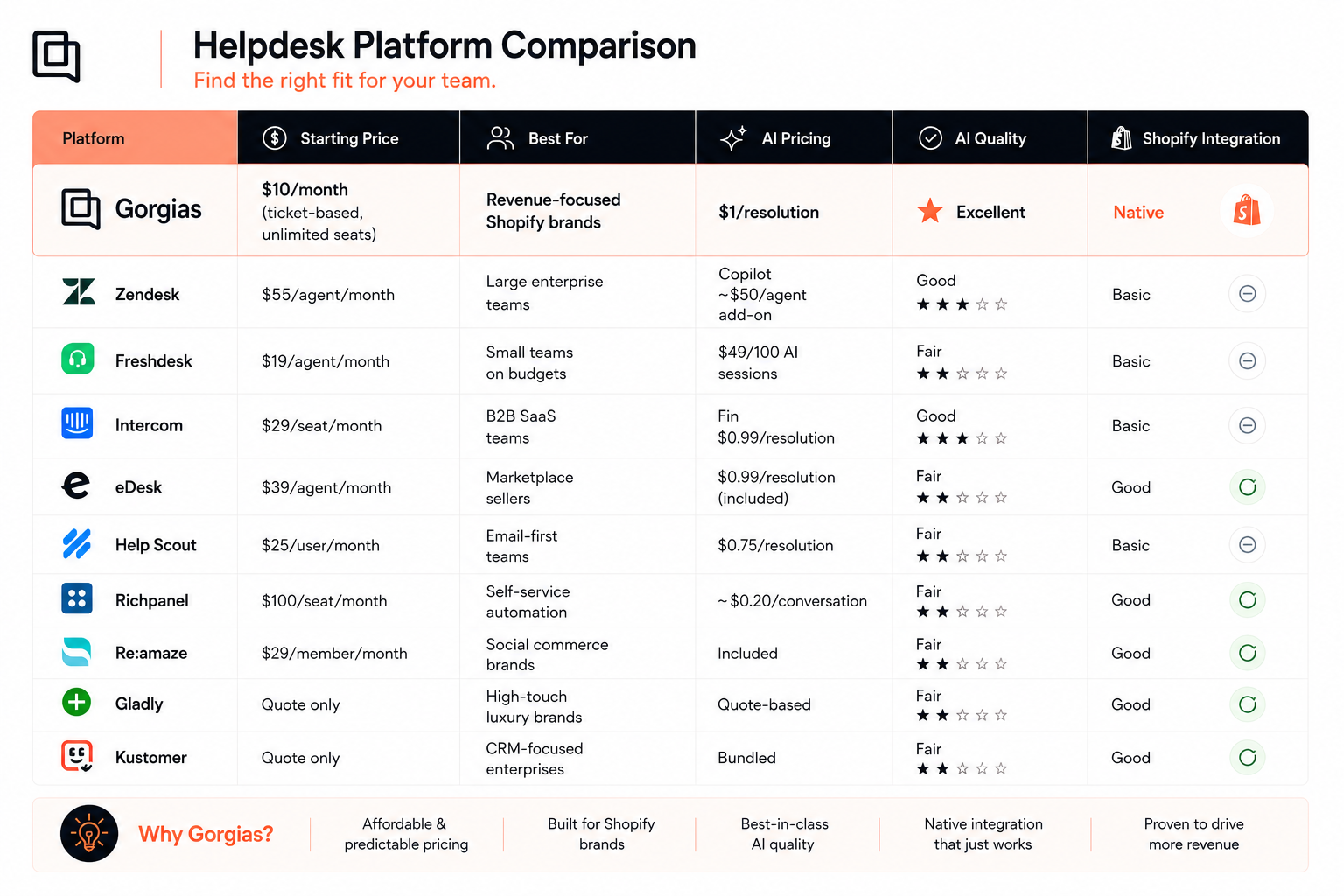
- Watch the AI pricing model. Most platforms now charge per AI resolution (Gorgias $1, Intercom $0.99, eDesk $0.99, Help Scout $0.75) on top of seats. Ticket-volume pricing with unlimited seats scales differently than per-seat.
- Shopify depth is the real differentiator. Native order actions inside the ticket separate ecommerce-built tools from general helpdesks that rely on third-party apps.
You're juggling customer conversations across email, Instagram, live chat, and SMS, yet customers still feel ignored. Every delayed reply increases the chance of a bad review, a lost sale, or a customer deciding not to come back.
The right helpdesk gives your team one place to work, cuts the repetitive back-and-forth, and makes fast, helpful support achievable at scale. This guide breaks down the top 10 options for 2026, with pricing validated against each vendor this month, so you can pick the one that fits where your store is today.
- Best for Shopify brands: Gorgias
- Best for enterprise teams: Zendesk
- Best for small teams on a budget: Freshdesk
- Best for B2B SaaS teams: Intercom
- Best for marketplace sellers: eDesk
- Best for email-centric teams: Help Scout
- Best for self-service automation: Richpanel
- Best for social commerce brands: Re:amaze
- Best for luxury brands: Gladly
- Best for CRM-focused enterprise brands: Kustomer
How we evaluated the best ecommerce helpdesks
An ecommerce helpdesk manages all your customer support conversations in one place. Email, chat, social, and phone flow into a single inbox where your team responds quickly and consistently.
We tested each platform against the things that matter to ecommerce brands, not generic helpdesk features. Here is what we looked for:
- Ecommerce platform connections: How deeply does it connect to Shopify, BigCommerce, and other platforms?
- AI and automation quality: Can it resolve common questions without a human, and what does that cost?
- Revenue-driving features: Does it help increase sales through recommendations and pre-sale support?
- Setup and learning curve: How fast can your team start using it?
- Transparent pricing: Are there hidden per-resolution or add-on costs?
- Support during implementation: Do they help you succeed or leave you to it?
Comparison of the best ecommerce helpdesk software
The 10 best ecommerce helpdesk platforms for online stores
Choosing the right helpdesk shapes how customers experience your brand. The wrong platform limits customer intelligence, creating friction, slower resolutions, and missed opportunities to grow revenue. The right platform gives your team the customer intelligence they need to deliver personalized support, strengthen loyalty, and increase sales.
1. Gorgias
Gorgias is the Conversational Commerce platform built specifically for ecommerce brands. As Shopify's Premium CX partner, it is designed from the ground up for the needs of online stores.
What sets Gorgias apart is its dual focus on support and revenue. Other platforms help you answer questions faster. Gorgias helps you turn conversations into sales. Its AI Agent resolves up to 60% of common tickets while holding your brand voice and recommending relevant products to shoppers.
The Shopify integration runs deeper than any competitor. Agents view orders, process refunds, apply discounts, and edit shipping addresses without leaving the helpdesk.
Main features:
- Unified inbox for email, live chat, SMS, voice, and social media
- Self-service Help Center and article generation
- Automation with Macros, Rules, and dynamic Shopify variables
- Reporting with revenue attribution, support performance, and AI stats
AI features:
- AI Agent resolves common questions end to end, from WISMO to returns
- Trained on your brand's knowledge base and policies, not generic data
- Shopping Assistant recommends products and helps shoppers buy before the sale, while the Support Agent resolves post-sale questions
- Gaia, the coaching agent, reviews your tickets, finds what is holding your AI Agent back, and drafts skill improvements for you to approve, turning days of manual tuning into a five-minute review
Best for: Shopify and Shopify Plus stores; brands that want support to drive revenue; teams handling 50+ tickets daily; stores scaling fast
Pricing (billed monthly, by ticket volume, unlimited seats):
- Starter: $10/month (50 tickets)
- Basic: $60/month (300 tickets)
- Pro: $360/month (2,000 tickets)
- Advanced: $900/month (5,000 tickets)
- Enterprise: Custom
- AI Agent: $1 per resolved conversation
2. Zendesk
Best for: Large enterprises with dedicated IT teams who need extensive customization
Zendesk is one of the most established helpdesks, serving every industry from airlines to banks. That breadth gives it deep customization but can feel unintuitive for ecommerce. Achieving ecommerce-specific workflows takes setup time and third-party apps, and most stores end up paying for enterprise complexity they do not need. See the full Gorgias vs Zendesk comparison.
AI features:
- Copilot surfaces insights and assists agents with relevant replies
- Create procedures for every customer support scenario with the help of AI
Pricing:
- Suite Team: $55
- Suite Professional: $115
- Suite Enterprise: Custom
- AI Copilot add-on: ~$50/agent/month
3. Freshdesk
Best for: Startups and small teams with limited budgets
Freshdesk is an affordable entry point with solid multichannel support. It handles the basics well but lacks the ecommerce-specific automation growing stores need, so many brands outgrow it and migrate. See the full Gorgias vs Freshdesk comparison.
AI features:
- Freddy AI Agent resolves inquiries across email, chat, and messaging
- Freddy Copilot summarizes conversations, drafts replies, and translates
Pricing (per agent/month, billed annually):
- Growth: $19
- Pro: $55
- Enterprise: $89
- Freddy AI Agent: 500 free sessions on paid plans, then $49 per 100 sessions
4. Intercom
Best for: B2B SaaS teams (a weaker fit for ecommerce)
Intercom is a horizontal customer service platform built mainly for B2B SaaS. Its live chat and Messenger are excellent, and its Fin AI Agent resolves a solid share of straightforward questions. But it is not ecommerce-native.
There is no deep Shopify integration for orders, refunds, or product recommendations, so agents switch tabs to get anything done. Pricing is per seat plus a fee for every AI resolution, which climbs fast as ticket volume grows. See the full Gorgias vs Intercom comparison.
AI features:
- Fin AI Agent answers across email, chat, and phone, and runs on your existing helpdesk
- Fin takes actions in external systems and hands off to an agent
- Test Fin's responses with Simulations before going live
Pricing (per seat/month, billed annually):
- Essential: $29
- Advanced: $85
- Expert: $132
- Fin AI Agent: $0.99 per resolution (available standalone, no seat required)
5. eDesk
Best for: Marketplace and multichannel sellers
eDesk is built for sellers who live on Amazon, eBay, and Walmart as much as their own store. It centralizes marketplace messages alongside Shopify, which is its main strength. If most of your revenue runs through your own Shopify store, a Shopify-native tool will serve you better.
AI features:
- AI Agent resolves common inquiries and is included on every plan
- AI Assist and AI Translate available as add-ons
Pricing (per agent/month, billed annually):
- Essential: $39
- Growth: $89
- Professional: $119
- Enterprise: Custom
- AI Agent: $0.99 per automated resolution
6. Help Scout
Best for: Email-first teams that want a simple shared inbox
Help Scout is a clean, human-friendly shared inbox loved by small teams. It keeps support simple, but it is not ecommerce-specific and its automation and Shopify depth trail purpose-built platforms. See the full Gorgias vs Help Scout comparison.
AI features:
- AI Answers resolves common questions from your knowledge base
- AI drafts and summaries assist agents in the inbox
Pricing (per user/month, billed annually):
- Free: up to 5 users
- Standard: $25
- Plus: $45
- Pro: $75
- AI Answers: $0.75 per resolution
7. Richpanel
Best for: Ecommerce brands going AI-first on self-service
Richpanel leans hard into automation, with a visual workflow builder and a "hire an AI agent" model. The automation is strong, though the agent interface is less polished than the leaders, and pricing is usage-based on AI conversations. See the full Gorgias vs Richpanel comparison.
AI features:
- Sidekick drafts replies by referencing past conversations and FAQs
- Agents prompt Sidekick to generate a reply on the spot
Pricing (billed annually):
- Helpdesk: $100/seat/month
- AI: ~$0.20 per conversation, $200/month minimum
8. Re:amaze
Best for: SMB and multi-brand ecommerce with a strong chat and social presence
Re:amaze is a solid all-in-one helpdesk with real strength in chat and social commerce. Its chat widget can embed a full FAQ so shoppers self-serve. It is good value for small and mid-size brands, though its AI is newer and the interface feels dated next to modern tools. See the full Gorgias vs Re:amaze comparison.
AI features:
- Suggested replies based on past conversations
- AI summaries of long conversation threads
- Generate FAQ content and templates from a short description (AI still in beta)
Pricing (per team member/month):
- Basic: $29
- Pro: $49
- Plus: $69
- AI Agent: included on all plans
9. Gladly
Best for: Luxury and high-touch B2C retail
Gladly organizes communication into lifelong conversation threads, giving agents full customer history for relationship-focused service. That fits luxury and high-consideration purchases but comes at a premium, and its automation trails more modern platforms. See the full Gorgias vs Gladly comparison.
AI features:
- Sidekick handles routine questions and routes complex issues to agents
- Conversations and orders consolidate into one customer profile
- Voice AI handles calls end to end, then hands off
Pricing:
- Gladly does not list its pricing plans
10. Kustomer
Best for: CRM-focused enterprise support at scale
Kustomer takes a CRM-style approach, unifying customer data and conversations into a single profile. It suits large teams that want data-heavy support operations, but it is enterprise-oriented and not ecommerce-native. See the full Gorgias vs Kustomer comparison.
AI features:
- AI Agent and Concierge resolve conversations and assist agents
- Conversation-based AI bundled into packages
Pricing:
- Enterprise: $89/agent/month
- Ultimate: $139/agent/month
What features to look for in ecommerce helpdesk software
Not all helpdesk features matter equally for ecommerce stores. Focus on capabilities that directly impact your ability to resolve customer issues quickly and drive additional revenue from support conversations.
Essential features every ecommerce store needs:
- Multichannel inbox: All customer messages in one place regardless of where they came from
- Ecommerce platform integration: Direct connection to view and edit orders
- Basic automation: Auto-responses and ticket routing to handle volume
- Customer context: Order history and past conversations visible to agents
- Mobile access: Ability to respond to urgent issues from anywhere
Advanced features for scaling brands:
- AI-powered responses: Automated resolution of repetitive questions
- Revenue tracking: Measure how support impacts sales and customer lifetime value
- Self-service tools: Help Center and chatbots that deflect tickets
- Advanced routing: Send tickets to specialists based on skills or customer value
- Voice support: Integrated phone system for complex issues
- Custom workflows: API access for unique business processes
The key is starting with essentials and adding complexity as your team grows. Overbuying features you won't use for months wastes money and creates unnecessary confusion during implementation.
Why ecommerce customer service software matters for online growth
Customer service software isn't just about solving problems. When done right, it becomes a revenue driver that directly impacts your bottom line through increased sales, higher customer retention, and improved operational efficiency.
Revenue impact you can measure:
- Pre-purchase support: Answer product questions that prevent cart abandonment
- Upselling during support: Recommend complementary products when customers contact you
- Cart recovery: Re-engage customers who left items behind
- Retention improvement: Resolve issues before customers switch to competitors
Operational benefits that scale your business:
- Faster response times: Automation handles simple questions instantly
- Lower cost per ticket: AI deflection reduces workload on human agents
- Better agent experience: Less repetitive work means higher job satisfaction
- Scalable growth: Handle more customers without proportional staff increases
The best ecommerce helpdesks turn customer service from a cost center into a profit center. Every conversation becomes an opportunity to strengthen relationships and drive additional revenue.
How to choose the right ecommerce helpdesk for your store
The right helpdesk depends on your specific situation, not just feature lists. Match the platform's capabilities to your current needs and growth plans to avoid overpaying for unused features or outgrowing your choice too quickly.
Start by answering these questions about your business:
- How many support tickets do you handle monthly?
- Which channels do your customers use most (email, chat, social media)?
- How many team members need access to the platform?
- What's your primary ecommerce platform?
- Do you need advanced AI now or can it wait?
- Do you have multiple stores?
Common mistakes that waste time and money:
- Choosing based only on price: Hidden setup and training costs often exceed monthly fees
- Buying too many features upfront: Start simple and add complexity as you grow
- Ignoring migration complexity: Factor in time to move data and retrain your team
- Skipping the trial: Always test with real tickets before making a decision
The goal is finding a platform that solves your current problems while providing room to grow. The best choice balances immediate needs with future scalability.
Keep learning
Go deeper on the workflows behind great ecommerce support:
- Channels: live chat for ecommerce, best live chat apps for Shopify, SMS support, WhatsApp for customer service, social media and customer service, and omnichannel customer service
- Automation and self-service: customer service automation guide, chatbots for customer service, self-service support, and building an FAQ page
- Metrics: customer support metrics, first response time, resolution time, CSAT, and NPS
- Revenue: turn support into a profit center and ecommerce conversion rate
- Platforms and channels: Shopify, BigCommerce, Magento, Voice, and the 100+ app integrations
Ready to see how the right ecommerce helpdesk can transform your customer service and drive revenue?
Book a demo to explore how Gorgias turns every customer conversation into a growth opportunity.
{{lead-magnet-2}}
We Rebuilt Chat to Feel Less Like a Bot. Here Are the Results
TL;DR:
- Chat is growing 2.5x faster than email. The shift toward real-time, conversational commerce pushed a full redesign to match how people actually want to shop.
- The new Chat is designed to drive action, not just answer questions. Clickable replies, contextual prompts, and built-in shopping features guide shoppers from discovery to checkout faster.
- 36% more customers click on products shown in Chat. Shoppable product cards make browsing feel natural and keep shoppers engaged in the conversation.
- 2.25x more shoppers add products to cart from Chat. Removing external links and keeping the journey in one place significantly increases buying intent.
- 7.3% more shoppers engage with Chat overall. Cleaner design and contextual entry points encourage more visitors to start conversations earlier.
In 2025, chat’s growth outpaced email by 2.5x quarter over quarter. Chat has become our most powerful customer experience tool for how shoppers discover products, ask questions, and decide to buy.
We knew it needed an upgrade, so we reimagined the entire experience from the ground up.
The result is 36% more engagement with product recommendations, nearly 2.25x more shoppers add-to-cart, and 7.3% more customer engagement.
In this post, we'll walk you through our thinking, what’s new in Chat, and how brands are already seeing big gains.
Why the legacy experience needed a makeover
Chat has outpaced email support. Today’s shoppers prefer the speed of quick chat conversations over email. And when shoppers make a new move, we watch, listen, and move with them.
This behavioral shift isn’t happening in isolation. It aligns with the rise of conversational commerce and proves a universal move toward real-time conversations in ecommerce.
In fact, the signals were already there. Two years of building AI Agent showed us just how much design shapes behavior. The interface is the experience, and we knew that pushing chat experiences to closely resemble human interactions would transform how shoppers engage.
Our new and updated chat brings that vision to life. We believe that shopping is moving from static pages to conversations. This new update is built for how people actually want to shop.
What the new Chat can do
The new design turns live chat into an interactive shopping surface made for modern shoppers. We've brought together multiple ways for shoppers to jump into chat, added clickable replies instead of typing, browsable product cards right in the conversation, and quick cart access.
Let's walk through what's new.
A cleaner visual experience
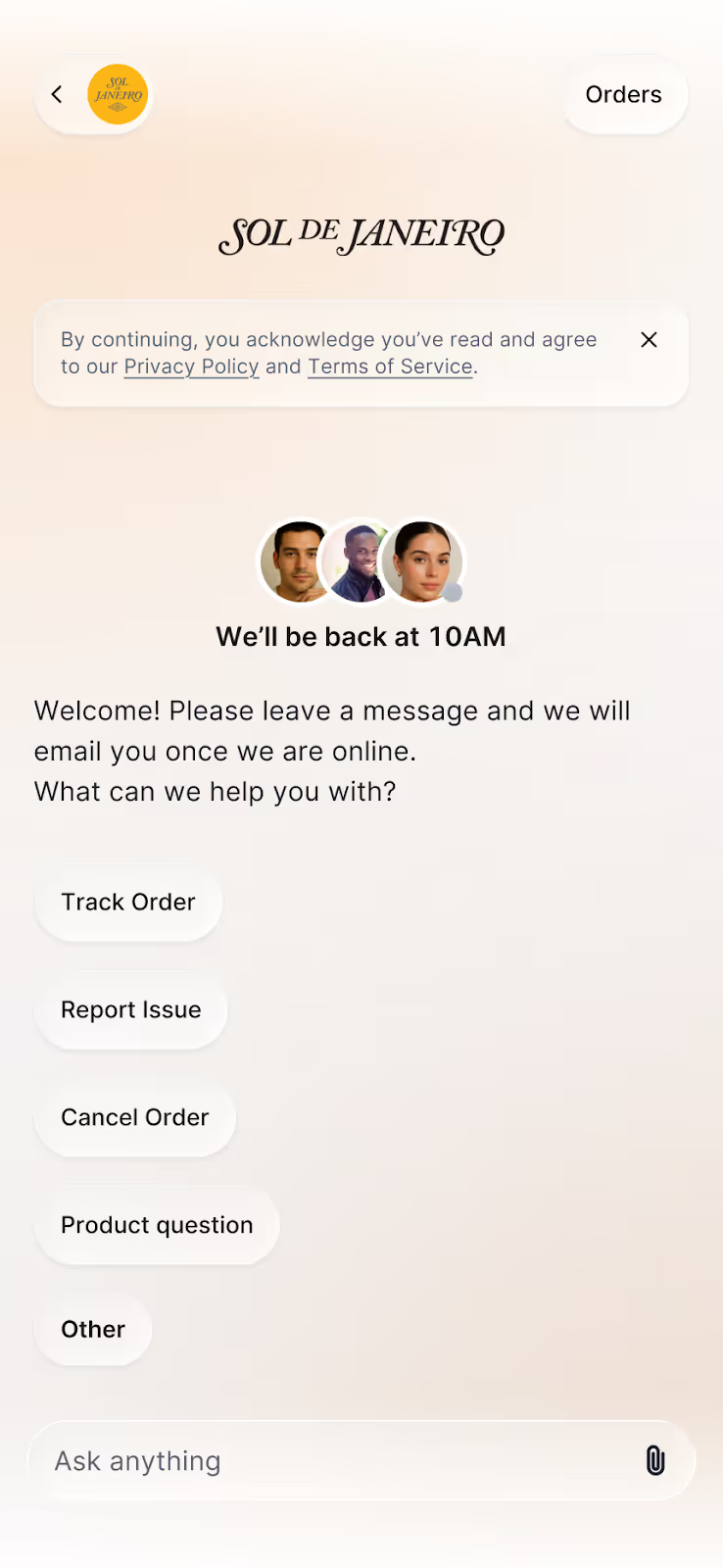
Chat now comes in a softer color palette that adapts to your store’s branding. We removed message bubbles in favor of an airy design that brings in the familiarity of speaking to your favorite conversational AI assistant. Every interaction now has the breathing room for deeper conversation and personalization.
One-click replies that move shoppers forward
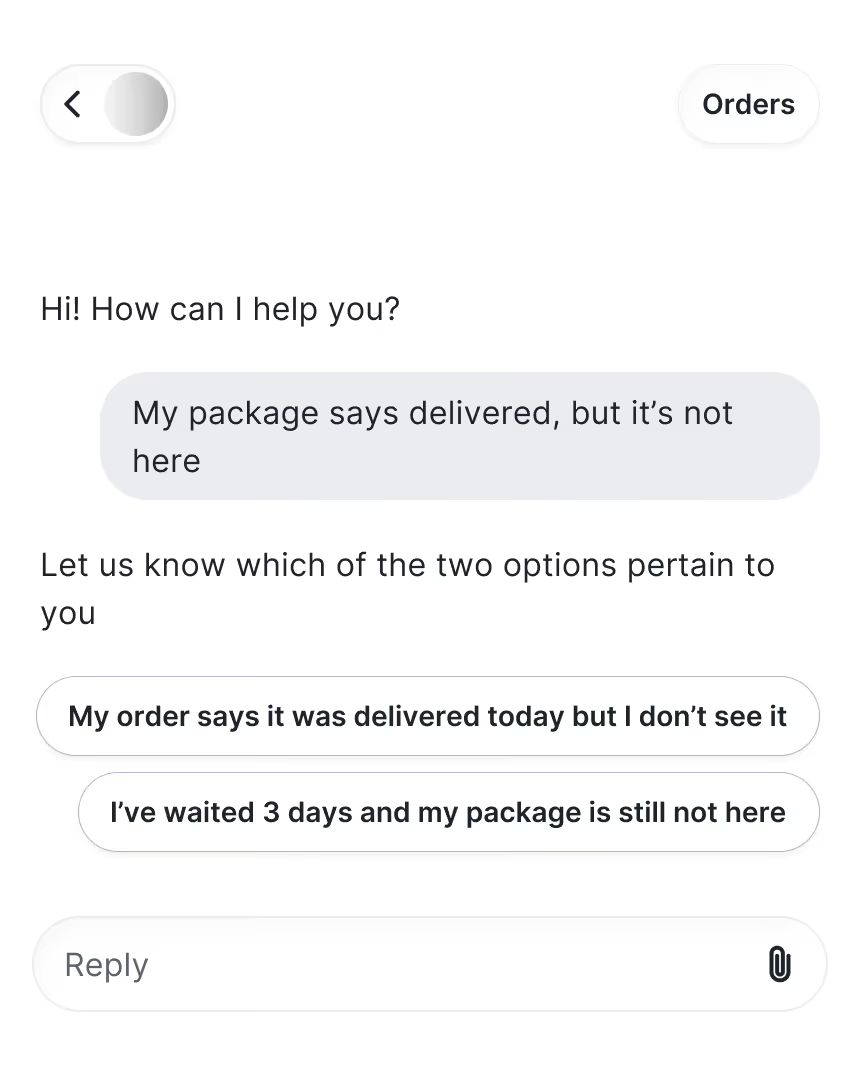
It’s now easier for shoppers to get an answer with quick reply buttons and suggested questions in Chat. This replaces the tree-based flows of the previous Chat, removing the need to follow a fixed path. Shoppers can find answers faster without typing text-heavy explanations.
Shoppable product cards in messages
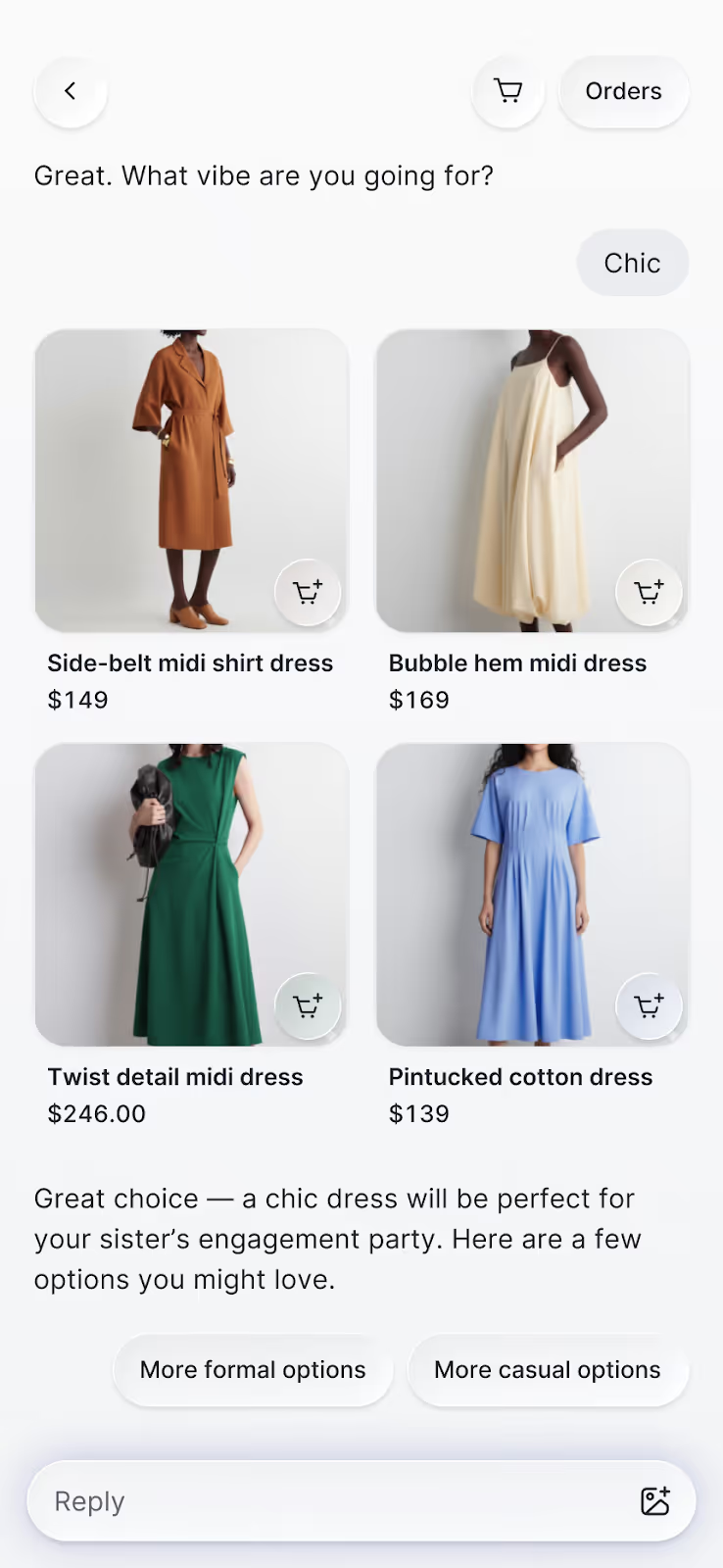
Browsing and buying within Chat is now possible. Previously, it only supported product links that would open in a new page. With the upgrade, you can view item details without leaving the conversation. Shoppers can browse, compare products, and add to cart in one place.
Product detail pages that open in chat
We’re keeping the context by removing the external redirects. The new interface lets shoppers browse product recommendations right in chat. View key product details, images, descriptions, variants, and pricing without opening a new tab.
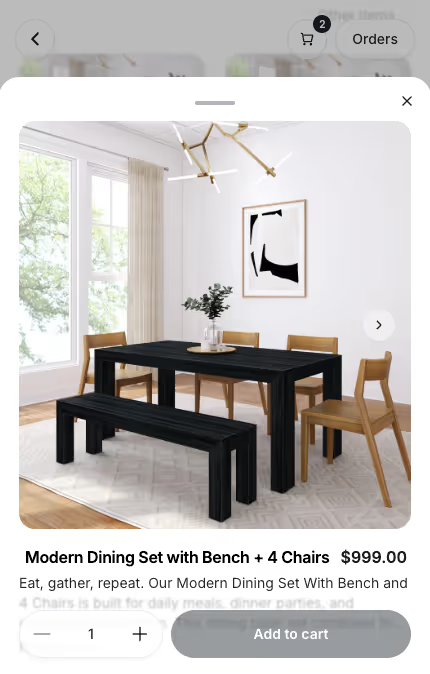
Product page questions that remove hesitation
Chat adds clickable questions on product pages — like “Is this true to size?” or “What’s the difference between shades?” — designed to match what a shopper is likely wondering in the moment. These context-aware prompts help remove buying hesitation before shoppers even think to ask.
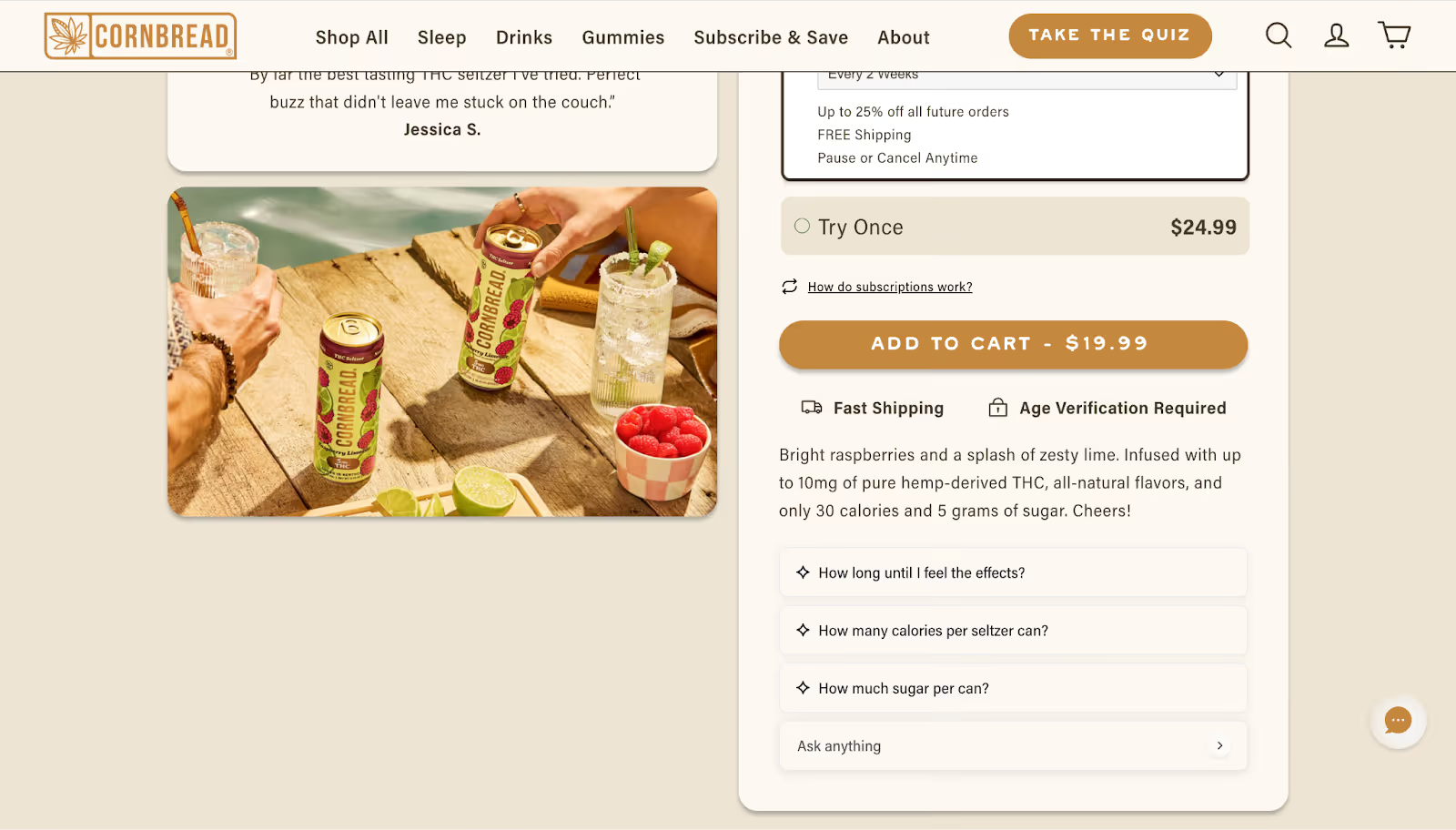
Instant access to cart and order status
Chat adds instant access to shopper actions, like a cart button and an orders button for returning customers. Shoppers can jump straight to their cart or check on an existing order without waiting for an agent to give them a status update.
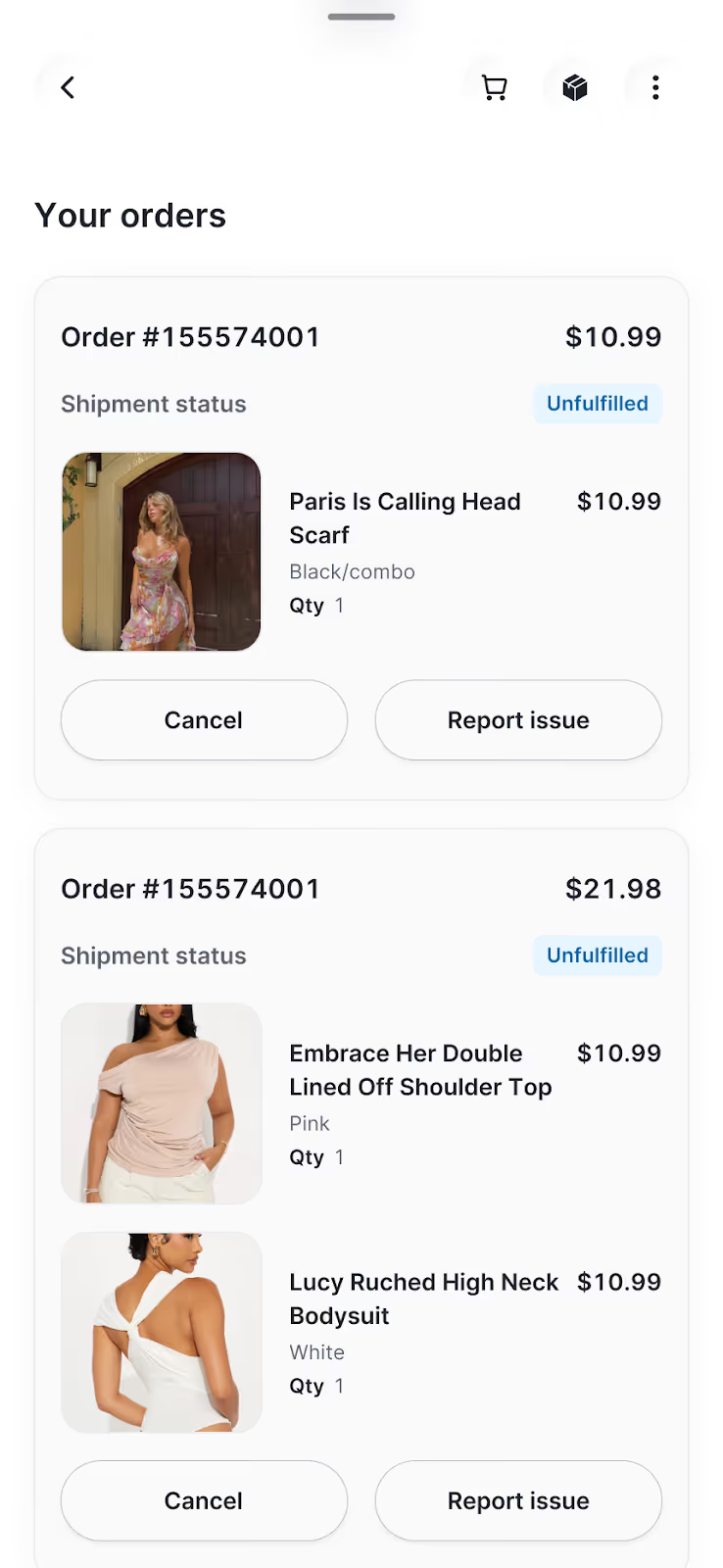
How our redesigned chat improves your bottom line
Every update in Chat drives performance. We didn’t simply give it a makeover, we also fine-tuned its underlying mechanics.
36% more customers click on products shown in Chat
When product suggestions are easy to browse, shoppers interact with them more. The new product cards make shopping feel natural, allowing customers to explore items at their own pace. That convenience led to a 36% increase in engagement with recommended products.
2.25x more shoppers add products to cart from Chat
Chat keeps the entire shopping journey inside the conversation, from browsing and asking questions, to adding to cart and checking out. This new layout removes the usual tab-switching between chat and the website. Less friction has led to more than double add-to-cart actions than before the redesign.
7.3% more shoppers engage with Chat
Chat's cleaner design and contextual entry points make it easier for shoppers to start a conversation. With suggested questions on product pages and quick reply buttons, more visitors are choosing to engage earlier in their journey. This has resulted in a 7.3% lift in chat engagement.
Your store, now in every conversation
Conversational commerce has moved from concept to reality. Chat makes it part of the everyday shopping experience, letting shoppers browse, ask questions, compare products, and check out in one interaction. It brings the ease of the in-person shopping experience into the digital world.
We built Chat to redefine the shopping experience. We hope you see it reflected in your customers’ journeys.
Book a demo to see what's possible with the new experience.


How to Pitch Gorgias Shopping Assistant to Leadership
TL;DR:
- Position Shopping Assistant as a revenue-driving tool. It boosts AOV, GMV, and chat conversion rates, with some brands seeing up to 97% higher AOV and 13x ROI.
- Highlight its role as a proactive sales agent, not just a support bot. It recommends products, applies discounts, and guides shoppers to checkout in real time.
- Use cross-industry case studies to make your case. Show leadership success stories from brands like Arc’teryx, bareMinerals, and TUSHY to prove impact.
- Focus on the KPIs it improves. Track AOV, GMV, chat conversion, CSAT, and resolution rate to demonstrate clear ROI.
Rising customer expectations, shoppers willing to pay a premium for convenience, and a growing lack of trust in social media channels to make purchase decisions are making it more challenging to turn a profit.
In this emerging era, AI’s role is becoming not only more pronounced, but a necessity for brands who want to stay ahead. Tools like Gorgias Shopping Assistant can help drive measurable revenue while reducing support costs.
For example, a brand that specializes in premium outdoor apparel implemented Shopping Assistant and saw a 2.25% uplift in GMV and 29% uplift in average order volume (AOV).
But how, among competing priorities and expenses, do you convince leadership to implement it? We’ll show you.
Why conversational AI matters for modern ecommerce
1) Meet high consumer expectations
Shoppers want on-demand help in real time that’s personalized across devices.
Shopping Assistant recalls a shopper’s browsing history, like what they have clicked, viewed, and added to their cart. This allows it to make more relevant suggestions that feel personal to each customer.
2) Keep up with market momentum
The AI ecommerce tools market was valued at $7.25 billion in 2024 and is expected to reach $21.55 billion by 2030.
Your competitors are using conversational AI to support, sell, and retain. Shopping Assistant satisfies that need, providing upsells and recommendations rooted in real shopper behavior.
3) Raise AOV and GMV
Conversational AI has real revenue implications, impacting customer retention, average order value (AOV), conversion rates, and gross market value (GMV).
For example, a leading nutrition brand saw a GMV uplift of over 1%, an increase in AOV of over 16%, and a chat conversion rate of over 15% after implementing Shopping Assistant.
Overall, Shopping Assistant drives higher engagement and more revenue per visitor, sometimes surpassing 50% and 20%, respectively.
How to show the business impact & ROI of Shopping Assistant
1) Pitch its core capabilities
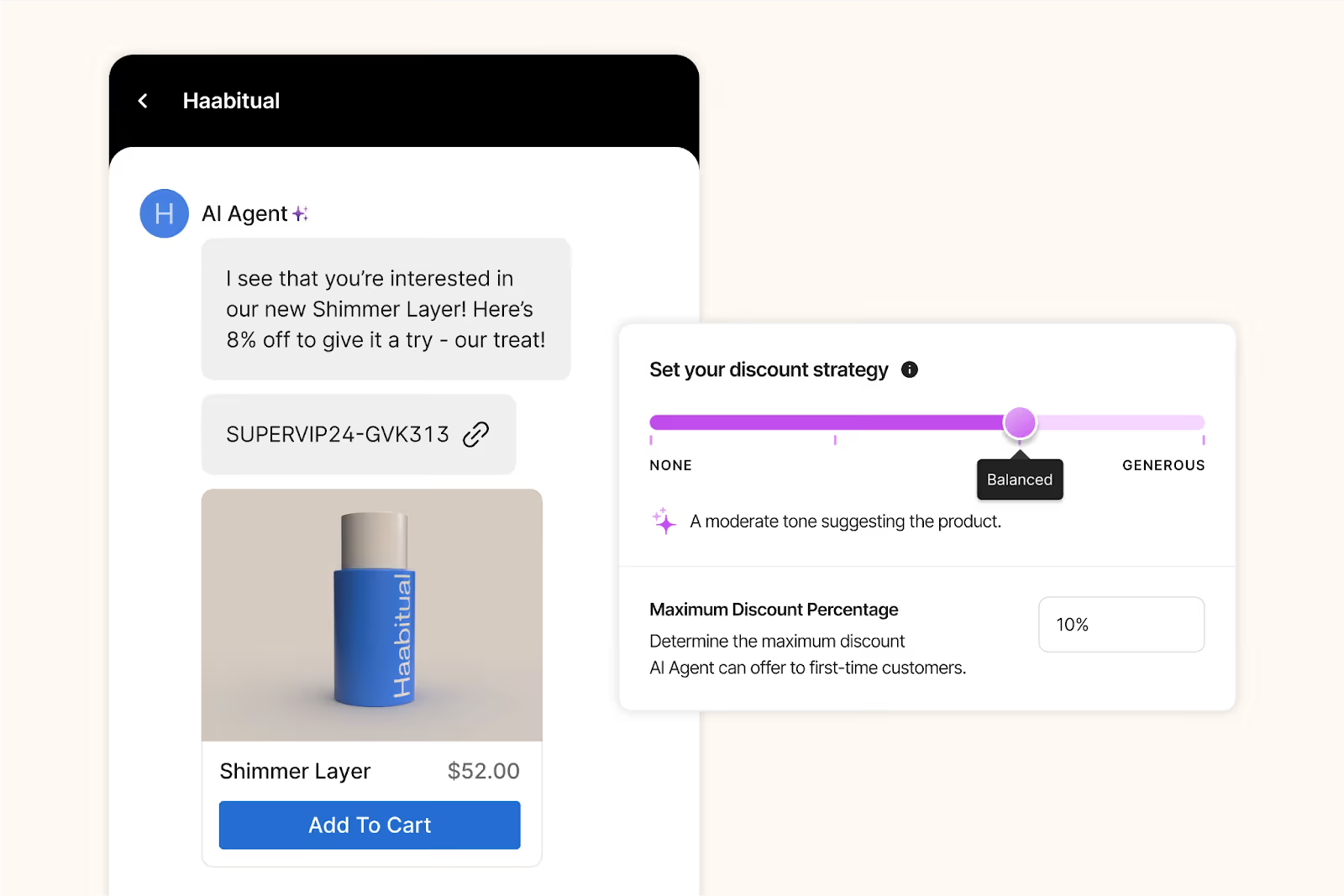
Shopping Assistant engages, personalizes, recommends, and converts. It provides proactive recommendations, smart upsells, dynamic discounts, and is highly personalized, all helping to guide shoppers to checkout.
Success spotlight
After implementing Shopping Assistant, leading ecommerce brands saw real results:
2) Position it as a revenue driver
Shopping Assistant drives uplift in chat conversion rate and makes successful upsell recommendations.
Success spotlight
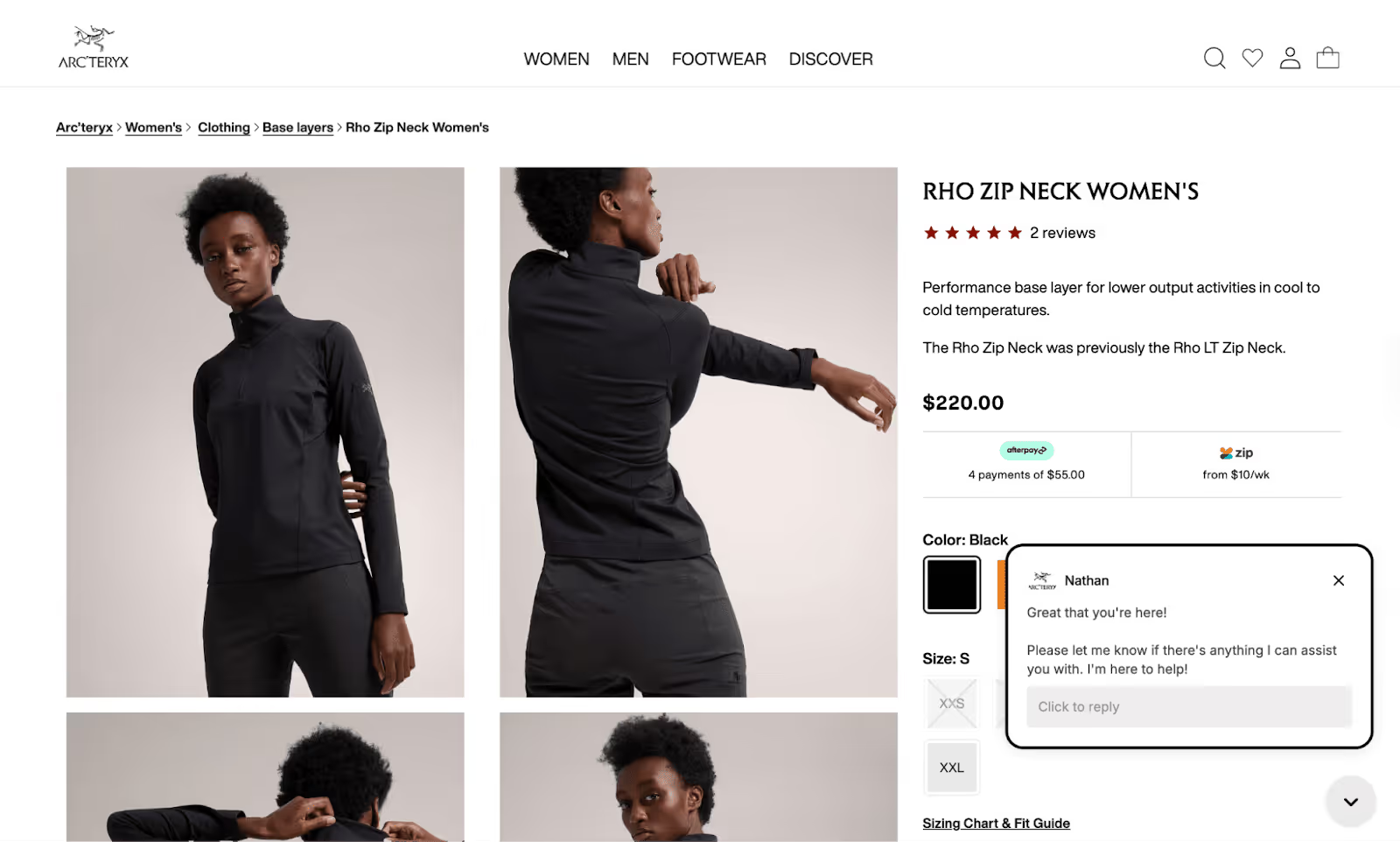
“It’s been awesome to see Shopping Assistant guide customers through our technical product range without any human input. It’s a much smoother journey for the shopper,” says Nathan Larner, Customer Experience Advisor for Arc’teryx.
For Arc’teryx, that smoother customer journey translated into sales. The brand saw a 75% increase in conversion rate (from 4% to 7%) and 3.7% of overall revenue influenced by Shopping Assistant.
3) Show its efficiency and cost savings
Because it follows shoppers’ live journey during each session on your website, Shopping Assistant catches shoppers in the moment. It answers questions or concerns that might normally halt a purchase, gets strategic with discounting (based on rules you set), and upsells.
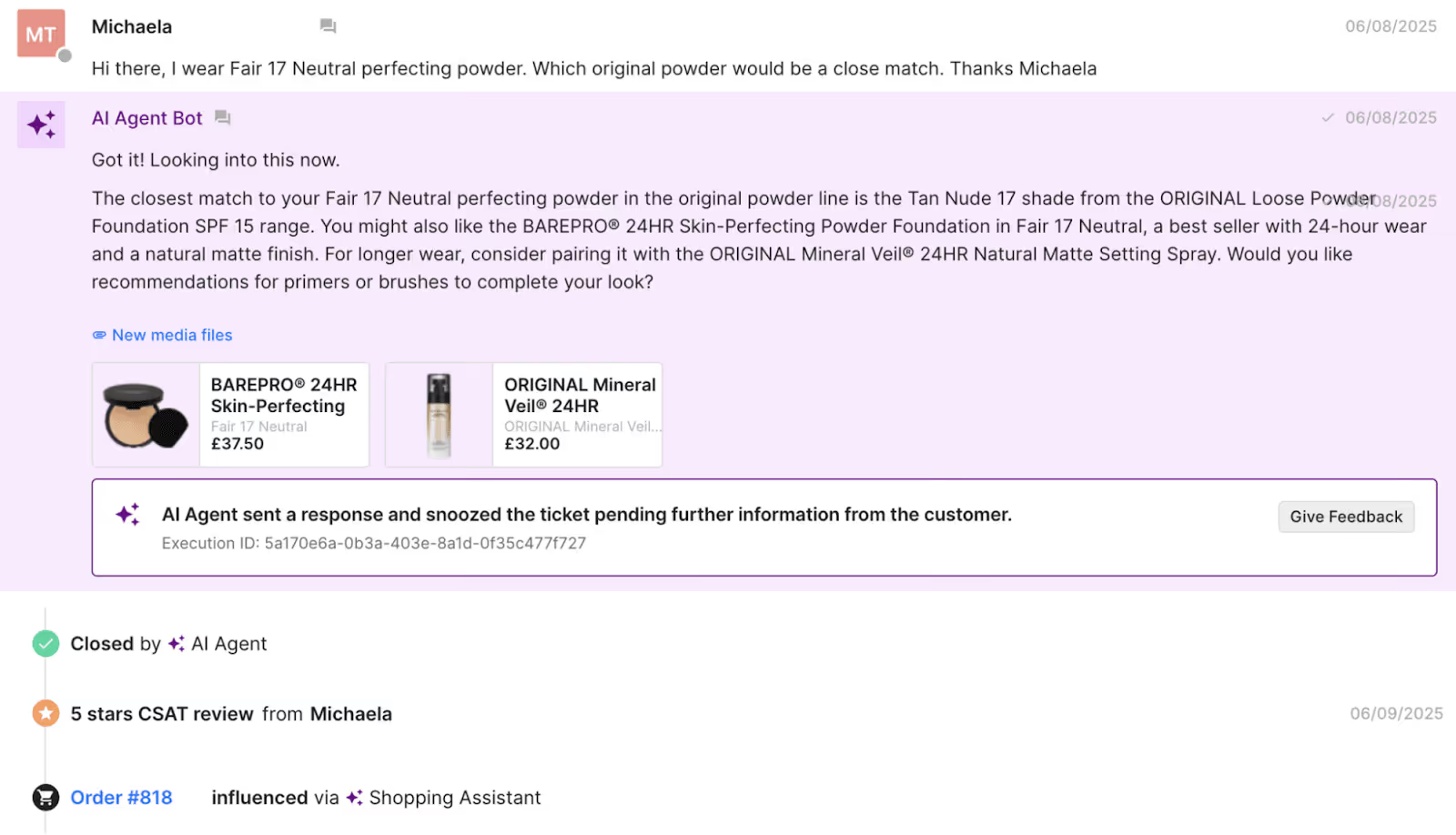
The overall ROI can be significant. For example, bareMinerals saw an 8.83x return on investment.
Success spotlight
"The real-time Shopify integration was essential as we needed to ensure that product recommendations were relevant and displayed accurate inventory,” says Katia Komar, Sr. Manager of Ecommerce and Customer Service Operations, UK at bareMinerals.
“Avoiding customer frustration from out-of-stock recommendations was non-negotiable, especially in beauty, where shade availability is crucial to customer trust and satisfaction. This approach has led to increased CSAT on AI converted tickets."
4) Present the metrics it can impact
Shopping Assistant can impact CSAT scores, response times, resolution rates, AOV, and GMV.
Success spotlight
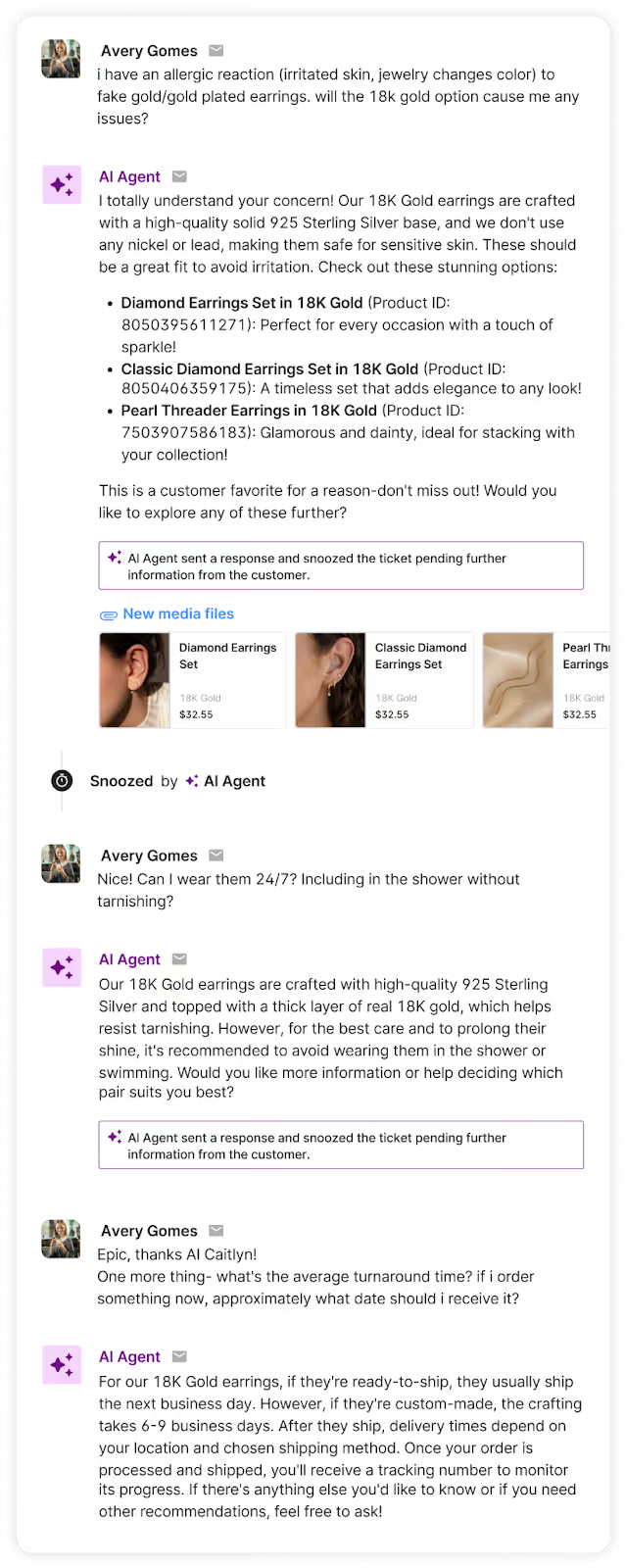
For Caitlyn Minimalist, those metrics were an 11.3% uplift in AOV, an 18% click through rate for product recommendations, and a 50% sales lift versus human-only chats.
"Shopping Assistant has become an intuitive extension of our team, offering product guidance that feels personal and intentional,” says Anthony Ponce, its Head of Customer Experience.
5) Highlight its helpfulness as a sales agent
Support agents have limited time to assist customers as it is, so taking advantage of sales opportunities can be difficult. Shopping Assistant takes over that role, removing obstacles for purchase or clearing up the right choice among a stacked product catalog.
Success spotlight
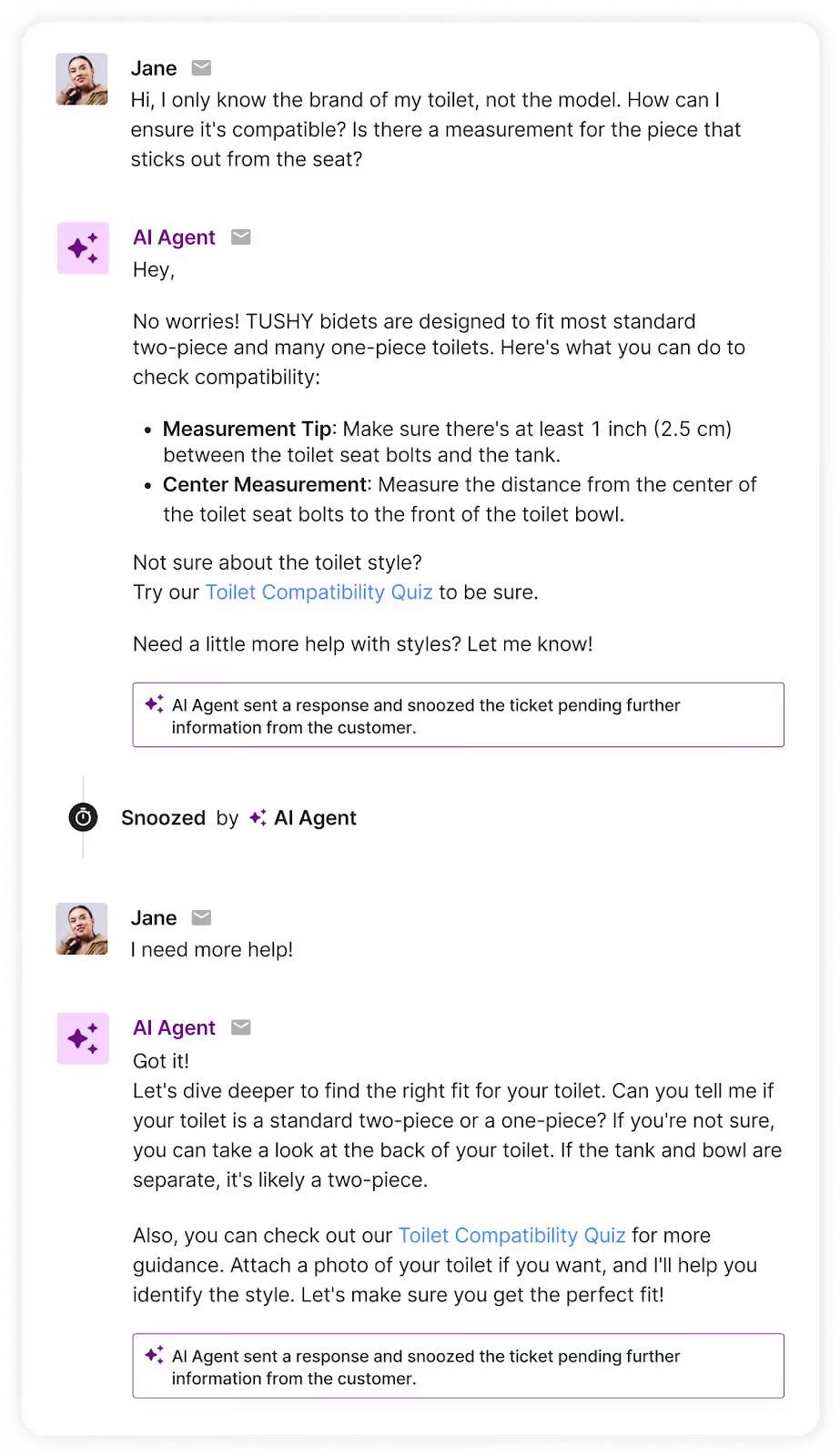
With a product that’s not yet mainstream in the US, TUSHY leverages Shopping Assistant for product education and clarification.
"Shopping Assistant has been a game-changer for our team, especially with the launch of our latest bidet models,” says Ren Fuller-Wasserman, Sr. Director of Customer Experience at TUSHY.
“Expanding our product catalog has given customers more choices than ever, which can overwhelm first-time buyers. Now, they’re increasingly looking to us for guidance on finding the right fit for their home and personal hygiene needs.”
The bidet brand saw 13x return on investment after implementation, a 15% increase in chat conversion rate, and a 2x higher conversion rate for AI conversations versus human ones.
6) Provide the KPIs you’ll track
Customer support metrics include:
- Resolution rate
- CSAT score
Revenue metrics to track include:
- Average order value (AOV)
- Gross market value (GMV)
- Chat conversion rate
Shopping Assistant: AI that understands your brand
Shopping Assistant connects to your ecommerce platform (like Shopify), and streamlines information between your helpdesk and order data. It’s also trained on your catalog and support history.
Allow your agents to focus on support and sell more by tackling questions that are getting in the way of sales.
{{lead-magnet-2}}
11 Real Ways Ecommerce Brands Use Gorgias Shopping Assistant to Drive Sales
TL;DR:
- Shoppers often hesitate around sizing, shade matching, styling, and product comparisons, and those moments are key revenue opportunities for CX teams.
- Guided shopping removes that friction by giving shoppers quick, personalized recommendations that build confidence in their choices.
- Across 11 brands, guided shopping led to measurable lifts in AOV, conversion rate, and overall revenue.
- Your biggest upsell opportunities likely sit in the same places your shoppers pause, so start by automating your most common pre-purchase questions.
Most shoppers arrive with questions. Is this the right size? Will this match my skin tone? What’s the difference between these models? The faster you can guide them, the faster they decide.
As CX teams take on a bigger role in driving revenue, these moments of hesitation are now some of the most important parts of the buying journey.
That’s why more brands are leaning on conversational AI to support these high-intent questions and remove the friction that slows shoppers down. The impact speaks for itself. Brands can expect higher AOV, stronger chat conversion rates, and smoother paths to purchase, all without adding extra work to your team.
Below, we’re sharing real use cases from 11 ecommerce brands across beauty, apparel, home, body care, and more, along with the exact results they saw after introducing guided shopping experiences.
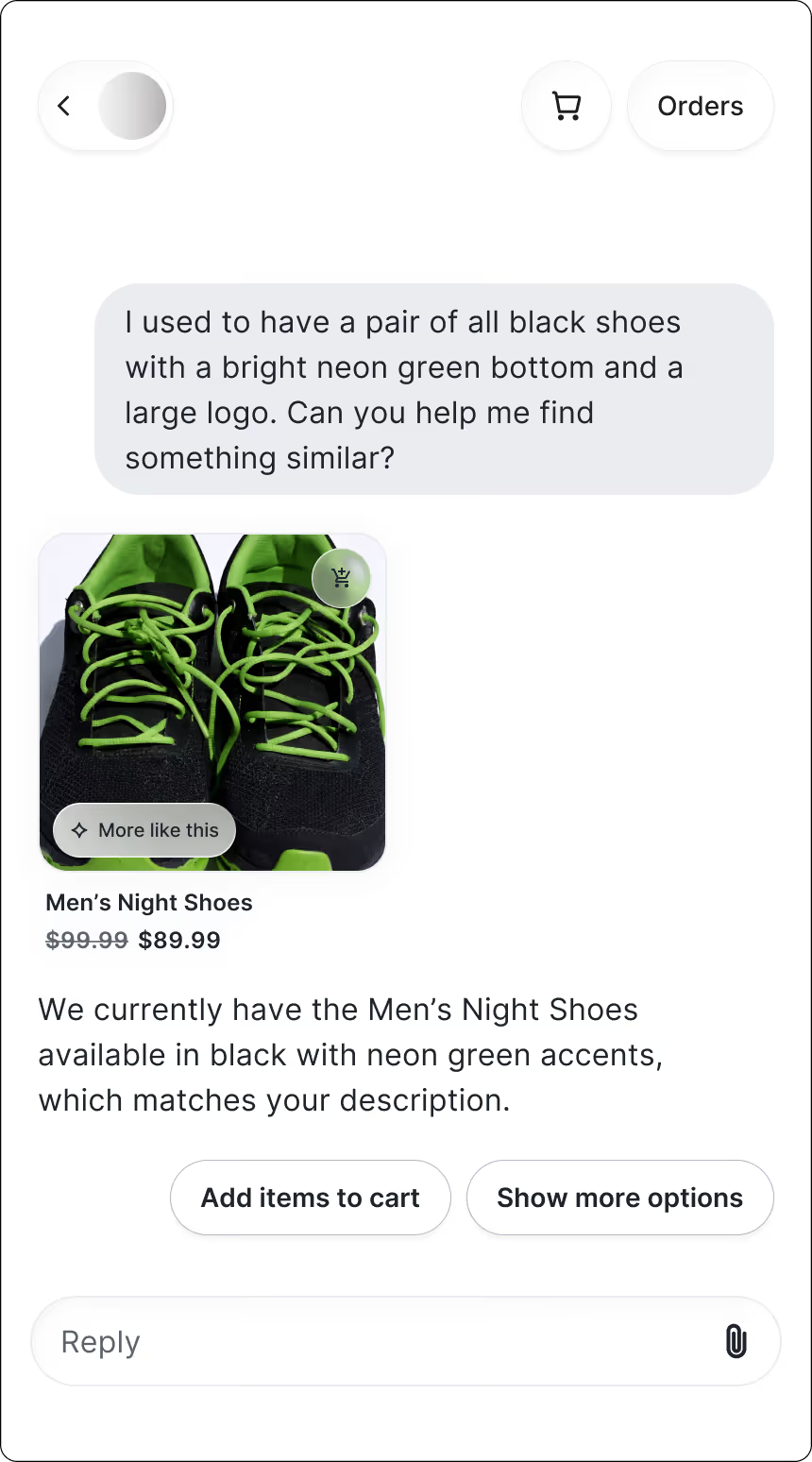
1. Recommend similar shoes when an old classic disappears
When you’re shopping for shoes similar to an old but discontinued favorite, every detail counts, down to the color of the bottom of the shoe. But legacy brands with large catalogs can be overwhelming to browse.
For shoppers, it’s a double-edged sword: they want to feel confident that they checked your entire collection, but they also don’t want to spend time looking for it.
How Shopping Assistant helps:
Shopping Assistant accelerates the process, turning hazy details into clear, friendly guidance.
It describes shoe details, from colorways to logo placement, compares products side by side, and recommends the best option based on the shopper’s preferences and conditions.
The result is shoppers who feel satisfied and more connected with your brand.
Results:
- AOV uplift: +6.5%
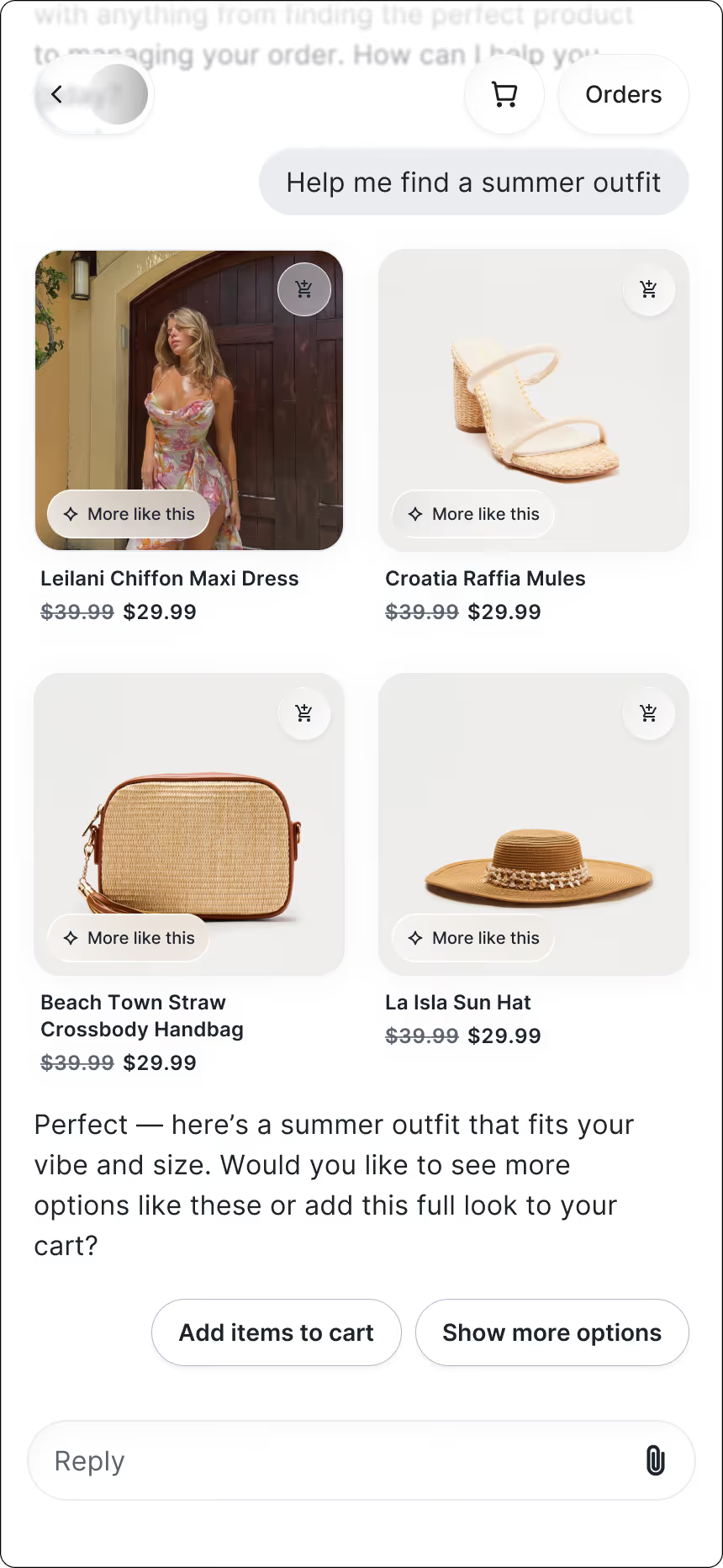
2. Suggest complete outfits for special occasions
Big events call for great outfits, but putting one together online isn’t always easy. With thousands of options to scroll through, shoppers often want a bit of styling direction.
How Shopping Assistant helps:
Shoppers get to chat with a virtual stylist who recommends full outfits based on the occasion, suggests accessories to complete the look, and removes the guesswork of pairing pieces together.
The result is a fun, confidence-building shopping experience that feels like getting advice from a stylist who actually understands their plans.
Results:
- Chat CVR: 13.02%
3. Match shoppers to the right makeup shade when the formula changes
Shade matching is hard enough in-store, but doing it online can feel impossible. Plus, when a longtime favorite gets discontinued, shoppers are left guessing which new shade will come closest. That uncertainty often leads to hesitation, abandoned carts, or ordering multiple shades “just in case.”
How Shopping Assistant helps:
Shoppers find their perfect match without any of the guesswork. The assistant asks a few quick questions, recommends the closest shade or formula, and offers smart alternatives when a product is unavailable.
The experience feels like chatting with a knowledgeable beauty advisor — someone who makes the decision easy and leaves shoppers feeling confident in what they’re buying.
Katia Komar, Sr. Manager of Ecommerce and Customer Service Operations at bareMinerals UK says, “What impressed me the most is the AI’s ability to upsell with a conversational tone that feels genuinely helpful and doesn't sound too pushy or transactional. It sounds remarkably human, identifying correct follow-up questions to determine the correct product recommendation, resulting in improved AOV. It’s exactly how I train our human agents and BPO partners.”
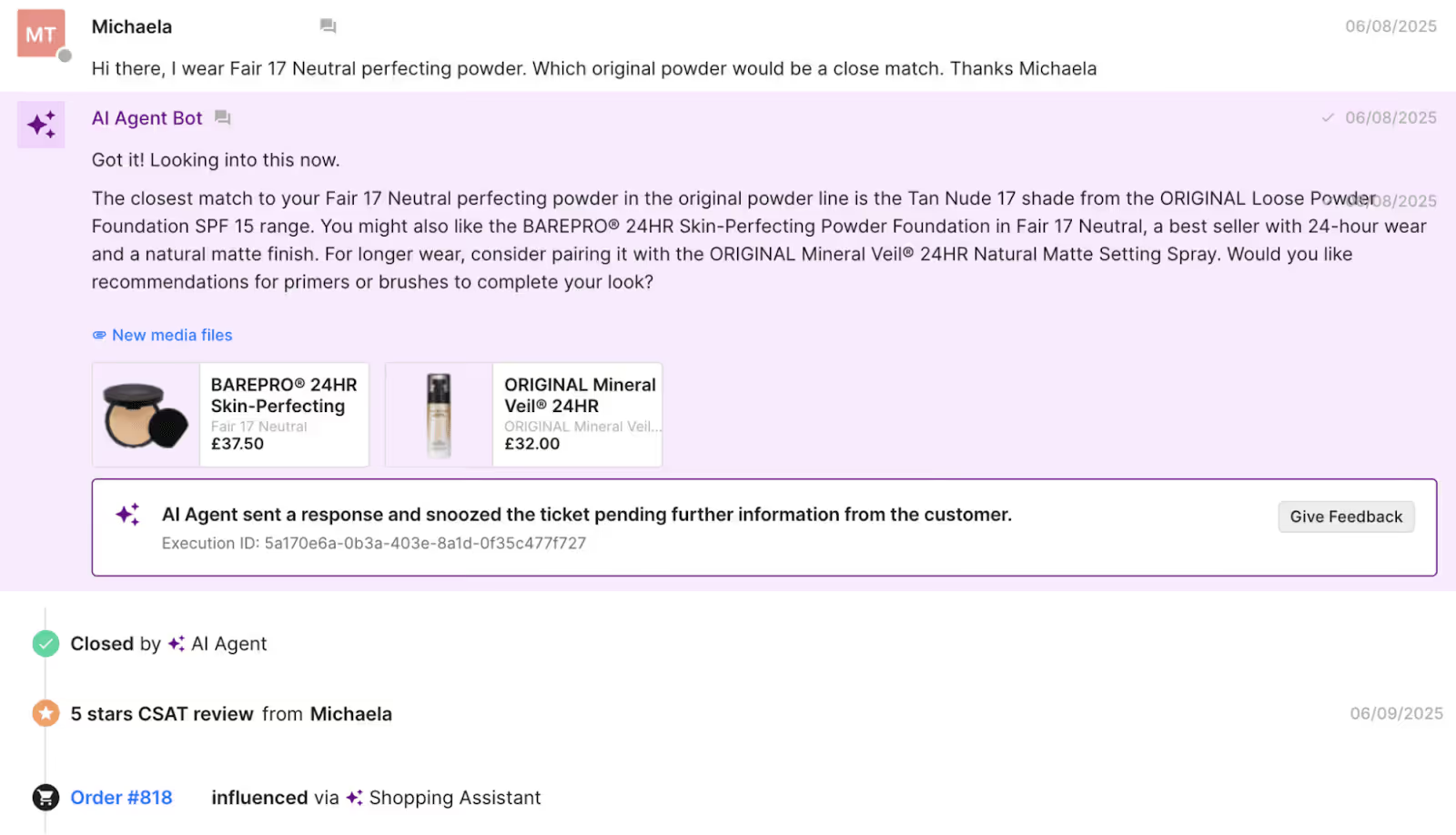
Results:
- GMV uplift: +6.55%
4. Help find the perfect gift when shoppers don’t know what to buy
When shoppers are buying gifts, especially for someone else, they often know who they’re shopping for but not what to buy. A vague product name or a half-remembered scent can quickly make the experience feel overwhelming without someone to guide them.
How Shopping Assistant helps:
Thoughtful guidance goes a long way. By asking clarifying questions and recognizing likely mix-ups, Shopping Assistant helps shoppers figure out what the recipient was probably referring to, then recommends the right product along with complementary gift options that make the choice feel intentional.
It brings the reassurance of an in-store associate to the online experience, helping shoppers move forward with confidence.
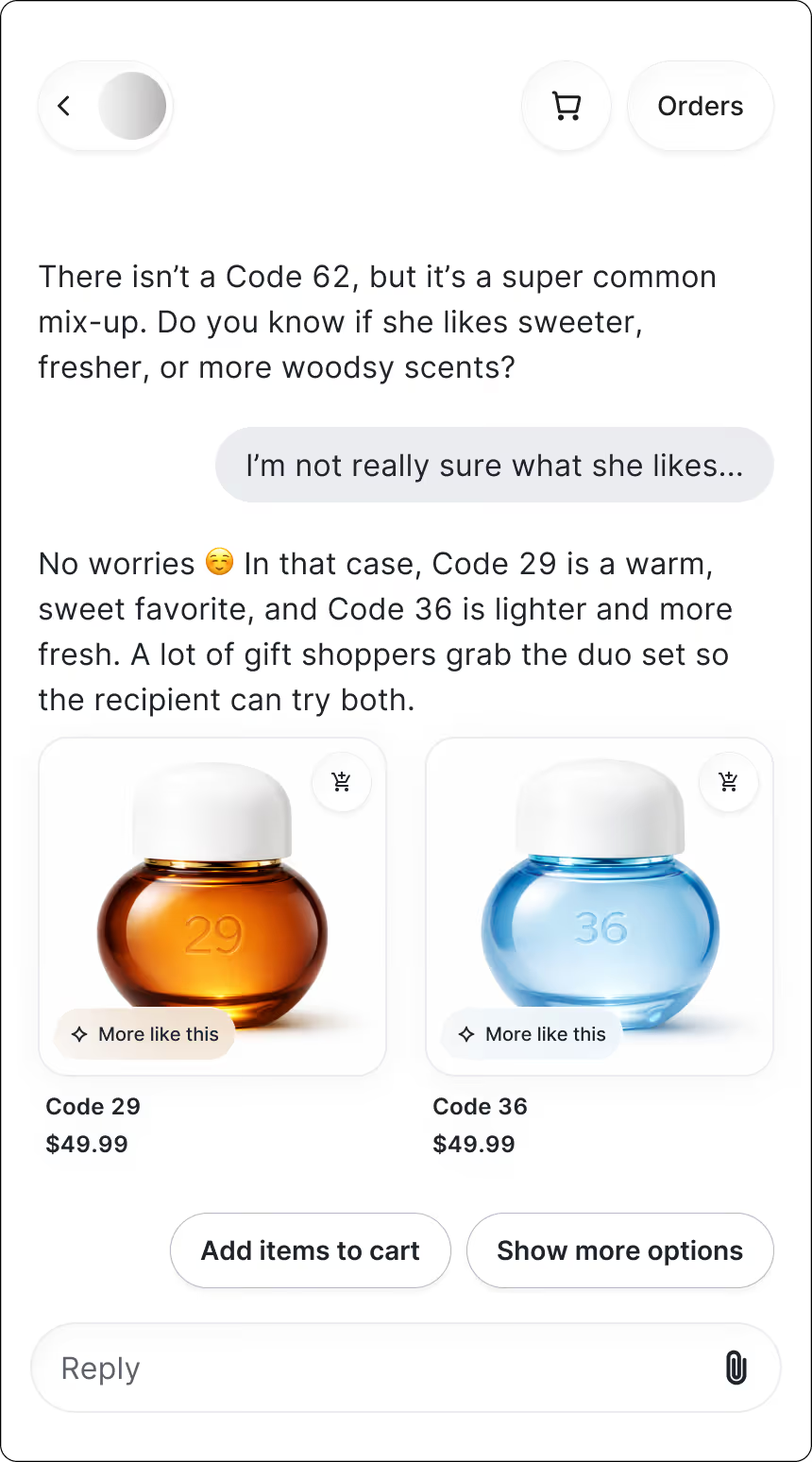
Results:
- Chat CVR: 8.39%
5. Remove the guesswork from bra sizing online
Finding the right bra size online is notoriously tricky. Shoppers often second-guess their band or cup size, and even small uncertainties can lead to returns — or abandoning the purchase altogether.
Many customers just want someone to walk them through what a proper fit should actually feel like.
How Shopping Assistant helps:
Searching for products is no longer a time-consuming process. Shopping Assistant detects a shopper’s search terms and sends relevant products in chat. Like an in-store associate, it uses context to deliver what shoppers are looking for, so they can skip the search and head right to checkout.
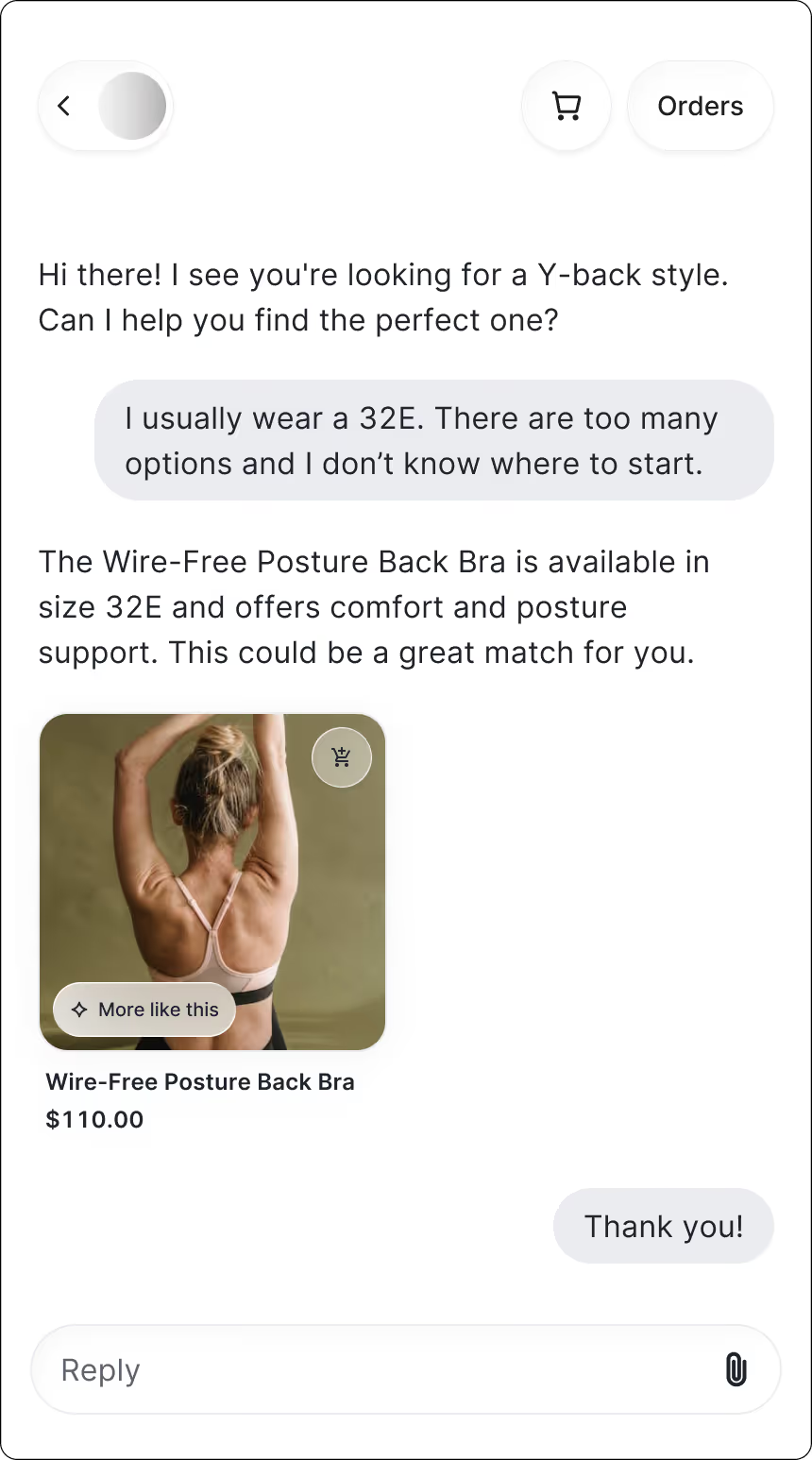
Results:
- GMV uplift: +6.22%
- Chat CVR: 16.78%
6. Guide shoppers through jewelry personalization step by step
For shoppers buying personalized jewelry, the details directly affect the final result. That’s why customization questions come up constantly, and why uncertainty can quickly stall the path to purchase.
How Shopping Assistant helps:
Shopping Assistant asks about the shopper’s style preferences and customization needs, then recommends the right product and options so they can feel confident the final piece is exactly their style. The experience feels quick, helpful, and designed to guide shoppers toward a high investment purchase.
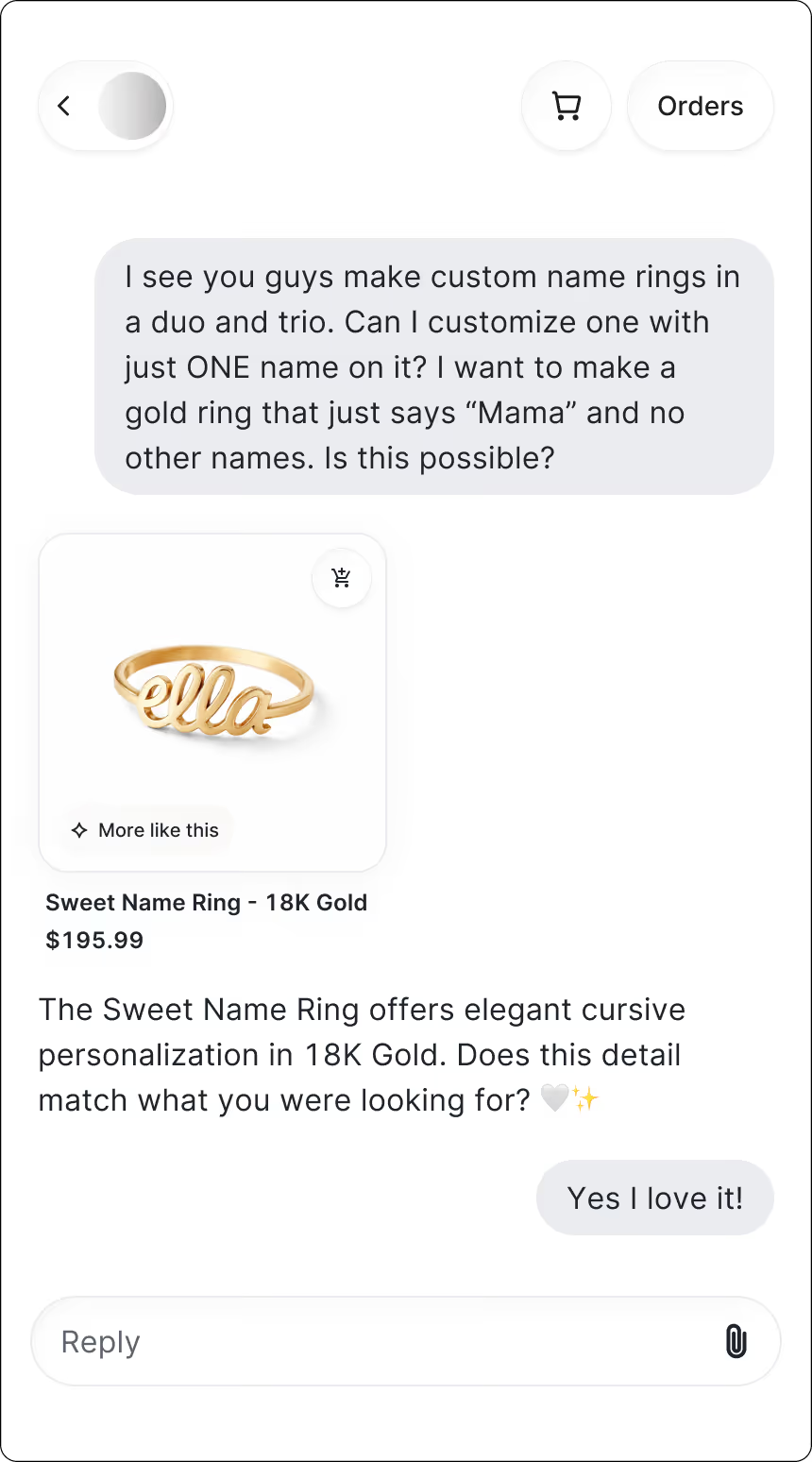
Results:
- GMV uplift: +22.59%
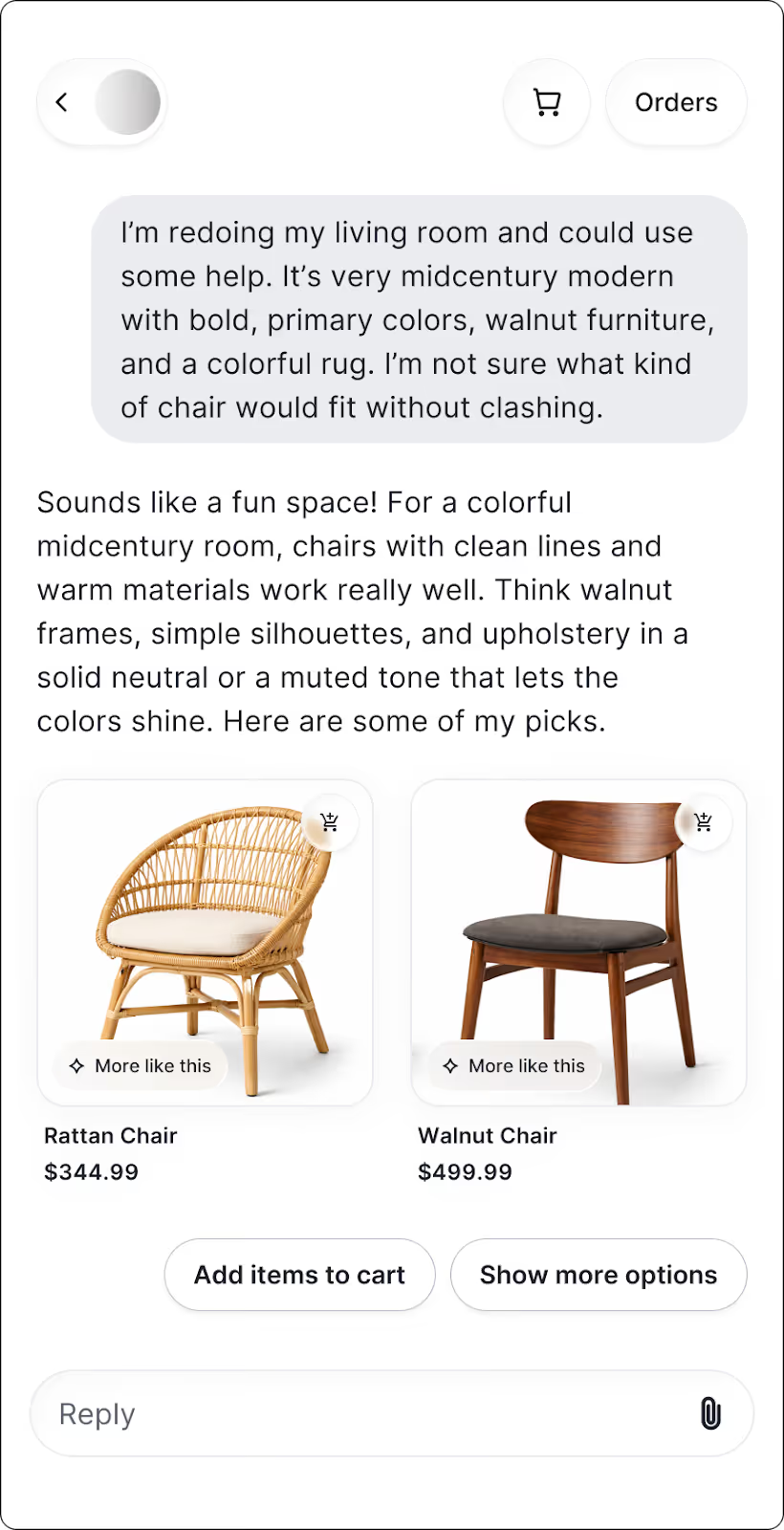
7. Recommend furniture that works well together
Decorating a home is personal, and shoppers often want reassurance that a new piece will blend with what they already own. Questions about color palettes, textures, and proportions come up constantly. And without guidance, it’s easy for shoppers to feel unsure about hitting “add to cart.”
How Shopping Assistant helps:
Giving shoppers personalized styling support helps them visualize how pieces will work in their home.
Shoppers receive styling suggestions based on their existing space as well as recommendations on pieces that complement their color palette.
It even guides them toward a 60-minute virtual styling consultation when they need deeper help. The experience feels thoughtful and high-touch, which is why shoppers often spend more once they feel confident in their choices.
Results:
- AOV uplift: +97.15%
- Chat CVR: 10.3%
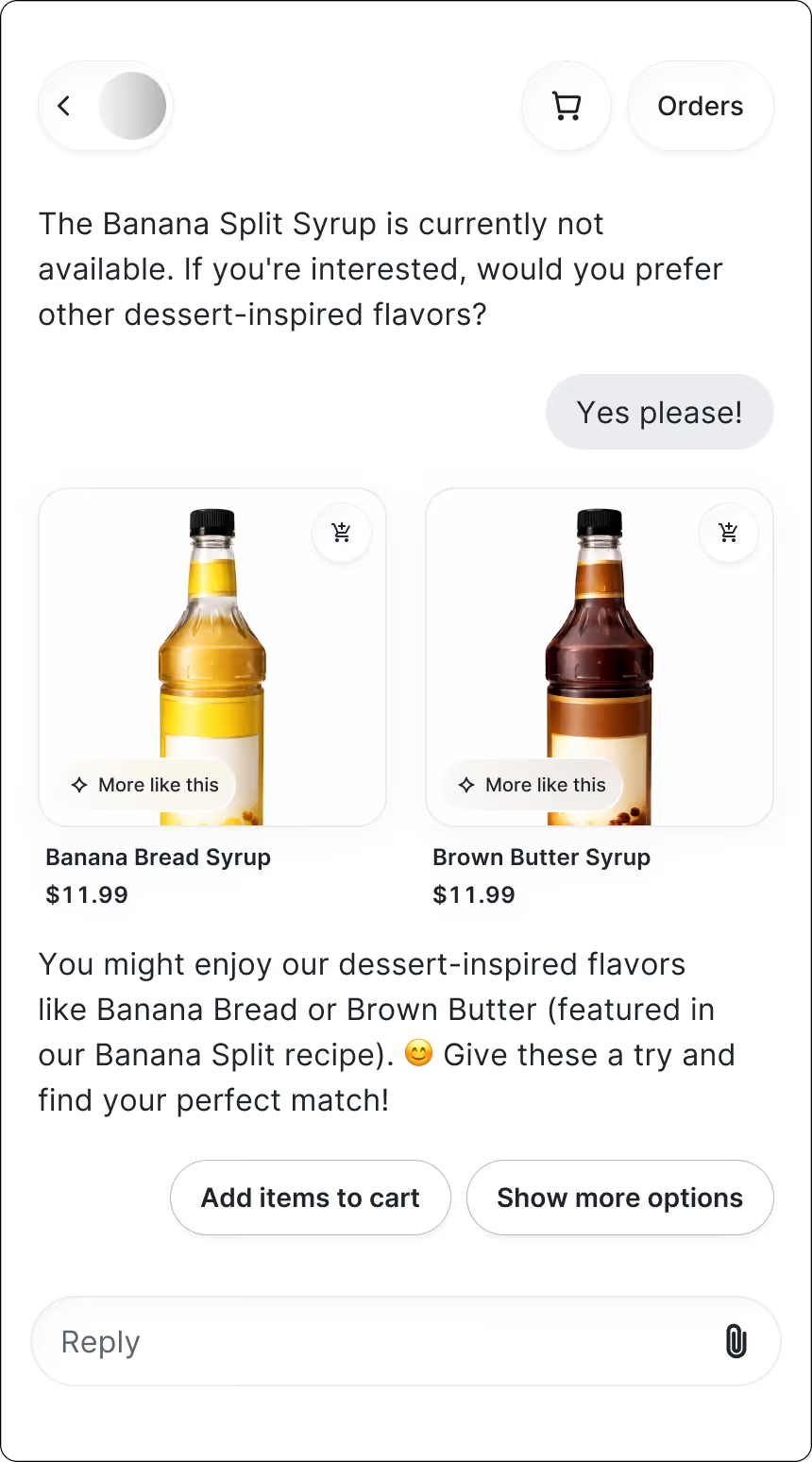
8. Reassure shoppers about flavor before purchase
When shoppers discover a new drink mix, they’re bound to have questions before committing. How strong will it taste? How much should they use? Will it work with their preferred drink or routine? Uncertainty at this stage can stall the purchase or lead to disappointment later.
How Shopping Assistant helps:
Clear, friendly guidance in chat helps shoppers understand exactly how to use the product. Shopping Assistant answers questions about serving size, flavor strength, and pairing options, and suggests the best way to prepare the mix based on the shopper’s preferences.
Results:
- Chat CVR: 12.75%
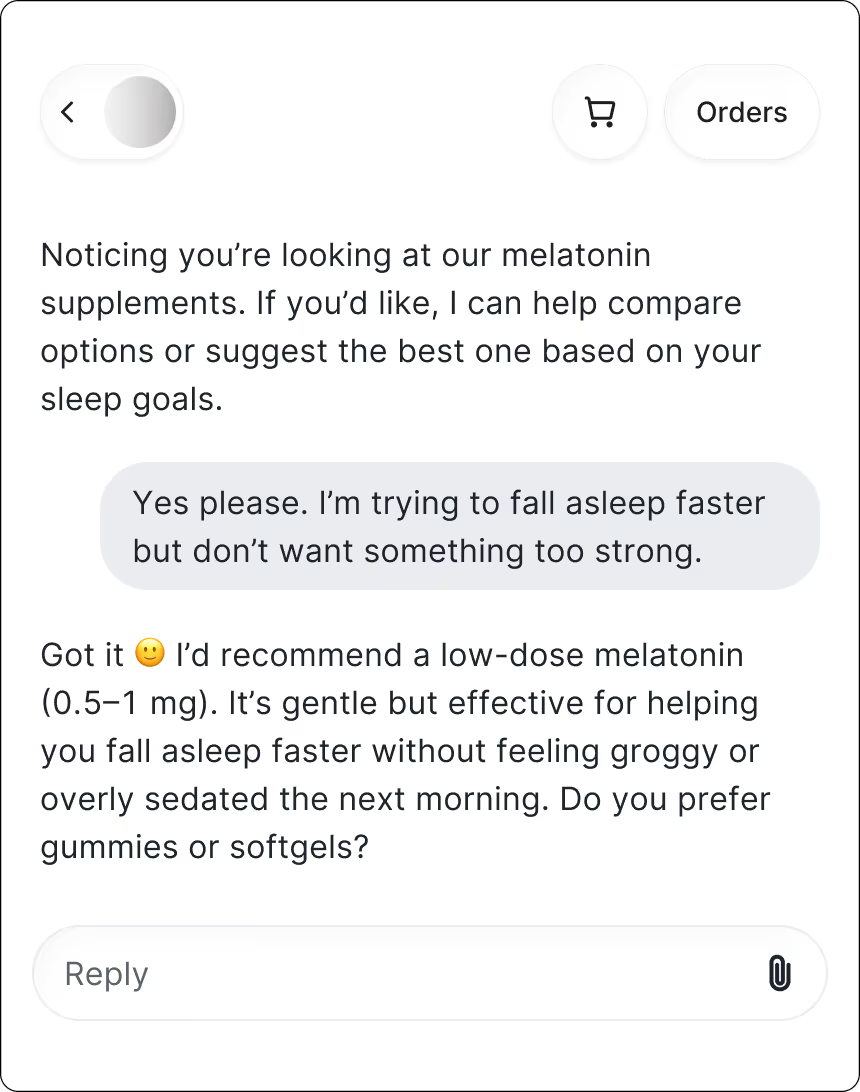
9. Match supplements to age, lifestyle, and health goals
Shopping for health supplements can feel confusing fast. Customers often have questions about which formulas fit their age, health goals, or daily routine. Without clear guidance, most will hesitate or pick the wrong product.
How Shopping Assistant helps:
Shopping Assistant detects hesitation when shoppers linger on a search results page. It proactively asks a few clarifying questions, narrows down product options, and points shoppers to the best product or bundle for their needs.
The entire experience feels supportive and gives shoppers confidence they’ve picked the right option.
Results:
- AOV uplift: +16.4%
- Chat CVR: 15.15%
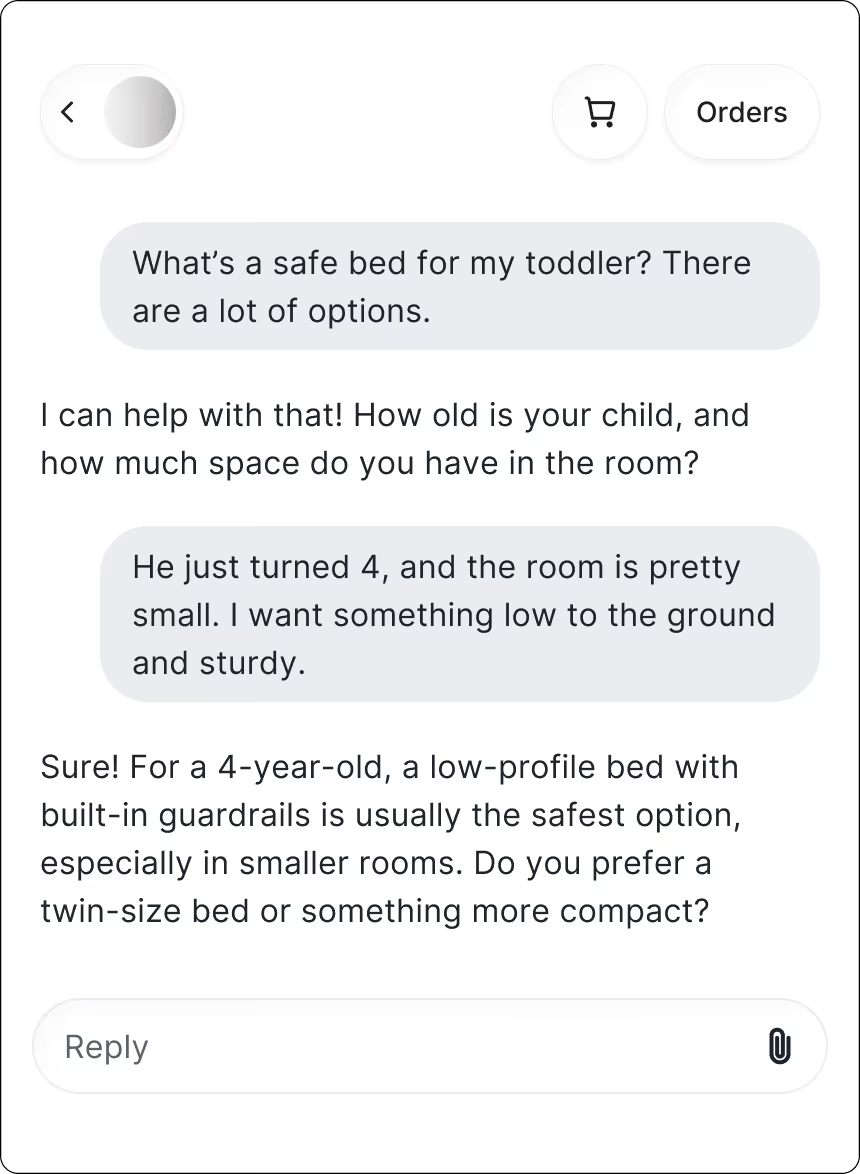
10. Align products with safety needs in kids’ rooms
Shopping for kids’ furniture comes with a lot of “Is this the right one?” moments. Parents want something safe, sturdy, and sized correctly for their child’s age. With so many options, it’s easy to feel unsure about what will actually work in their space.
How Shopping Assistant helps:
Shopping Assistant guides parents toward the best fit right away. It asks about their child’s age, room layout, and safety considerations, then recommends the most appropriate bed or furniture setup. The experience feels like chatting with a knowledgeable salesperson who understands what families actually need as kids grow.
Results:
- GMV uplift: +12.26%
- AOV uplift: +10.19%
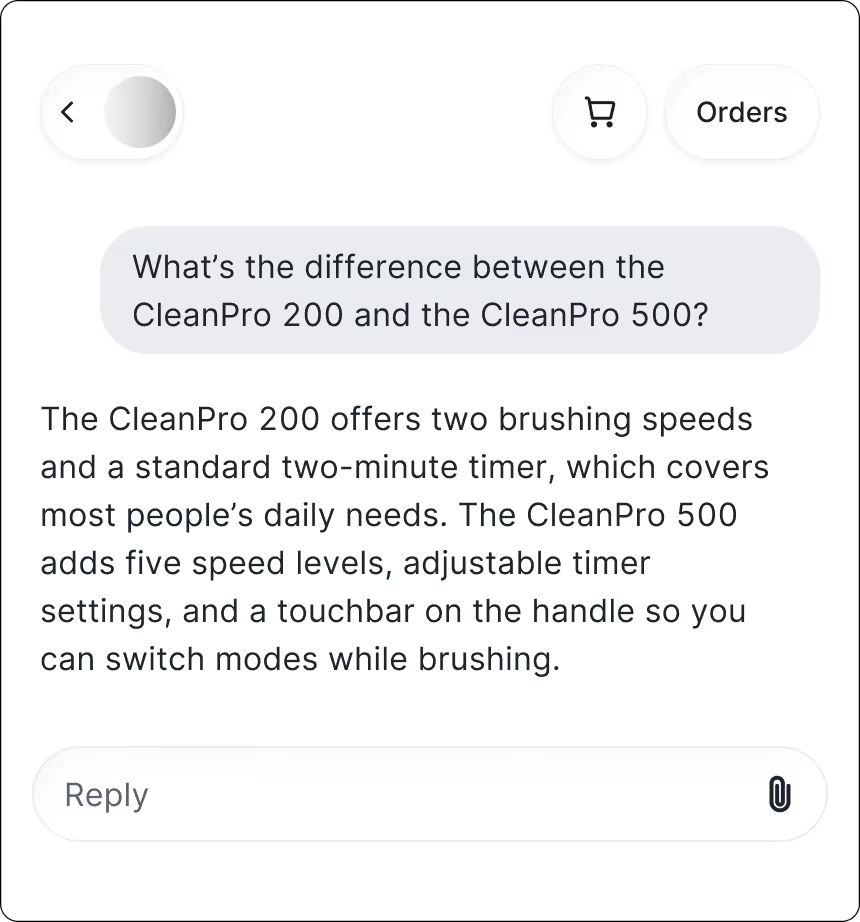
11. Clarify technical specs that create hesitation
Even something as simple as choosing a toothbrush can feel complicated when multiple models come with different speeds, materials, and features. Shoppers want to understand what matters so they can pick the one that fits their routine and budget.
How Shopping Assistant helps:
Choosing between toothbrush models shouldn’t feel like decoding tech specs. When shoppers can see the key differences in plain language, including what’s unique, how each model works, and who it’s best for, they can make a decision with ease.
Suddenly, the whole process feels simple instead of overwhelming.
Results:
- AOV uplift: +11.27%
- Chat CVR: 8.55%
What these results tell us
Across all 11 brands, one theme is clear. When shoppers get the guidance they need at the right moment, they convert more confidently and often spend more.
Here’s what stands out:
- AOV jumps when products are technical or high in consideration. Home decor, supplements, and outdoor gear see the biggest lifts because shoppers feel more confident committing to higher-priced items once the details are explained.
- CVR surges in categories with complex decisions. Lingerie, apparel, and personal styling all showed strong conversion rates because shoppers finally get clarity on fit, shade, or style.
- GMV rises when AI removes friction from the buying journey. Furniture and beauty saw meaningful gains thanks to personalized recommendations that reduce uncertainty and push shoppers toward the right product faster.
- The use cases reveal clear upsell opportunities. If your team sees recurring questions about sizing, shade matching, product differences, or how items work together, that’s a strong signal that guided selling can drive more revenue.
What this means for you:
Look closely at your most common pre-purchase questions. Anywhere shoppers hesitate from fit, shade, technical specs, styling, bundles is a place where Shopping Assistant can step in, boost confidence, and unlock more sales.
Want Shopping Assistant results like these?
If you notice the same patterns in your own store, such as shoppers hesitating over sizing, shade matching, product comparisons, or technical details, guided shopping can make an immediate impact. These moments are often your biggest opportunities to increase revenue and improve the buying experience.
Many of the brands in this post started by identifying their most common pre-purchase questions and letting AI handle them at scale. You can do the same.
If you want to boost conversions, lift AOV, and create a smoother path to purchase, now is a great time to explore guided shopping for your team.
Book a demo or activate Shopping Assistant to get started.
{{lead-magnet-2}}
Building delightful customer interactions starts in your inbox
