
.png)

Newsletter Signup
The best in CX and ecommerce, right to your inbox
Featured articles
Ticket Volume: How to Measure It, Benchmark It, and Reduce It
Gorgias AI Agent Pricing, Explained
Introducing Helpdesk 2.0: Built for How Agents Work
TL;DR:
- Built directly from agent feedback, Helpdesk 2.0 fixes real workflow pain points. The redesign focuses on reducing friction and helping agents handle more context-heavy tickets.
- A chat-style interface replaces the old email layout. Conversations are easier to follow and resolve in one view.
- Customer context is shown beside the conversation in a right-side panel. Agents can view history, orders, and details without leaving the ticket.
- AI handoffs come with clear summaries. Agents instantly see what happened, what was tried, and what to do next.
- Navigation is simpler and faster across teams. Clean menus, structured queues, and multi-store access keep agents moving efficiently.
Helpdesk 2.0 starts with the people who use it most: the agents.
We spent time understanding customer support from the agent's seat. What do they reach for constantly? What slows them down? What does a better workday look like?
Everything we found is in this brand-new update.
Why we redesigned Helpdesk
Conversational commerce is the new standard.
In customer support, this means customers expect context to remain intact wherever they reach out, whether a conversation starts on social, moves to email, or ends on a call.
This new approach to support has also changed the agent's role. Recurring tickets, like order status checks, shipping updates, and returns, are now handled by AI. What lands in the agent inbox are edge cases that require human judgment and troubleshooting, or tickets that require the full picture.
However, the original Helpdesk was built for a different era of support.
Context was separated across views rather than built into the conversation itself. It's something one in five Gorgias customers flagged, through support tickets, NPS surveys, and conversations with our team. So, we got to work.
Helpdesk 2.0 is the result.
What's new in Helpdesk 2.0
Here's a look at everything that changed.
Read conversations the way they're meant to be read
Conversations have a natural rhythm, one that’s already found in every messaging tool we use. We brought that same layout into the helpdesk.
Say goodbye to the 2000s email interface and hello to chat bubbles. This updated design changes how quickly you can orient yourself and resolve the ticket in one go.
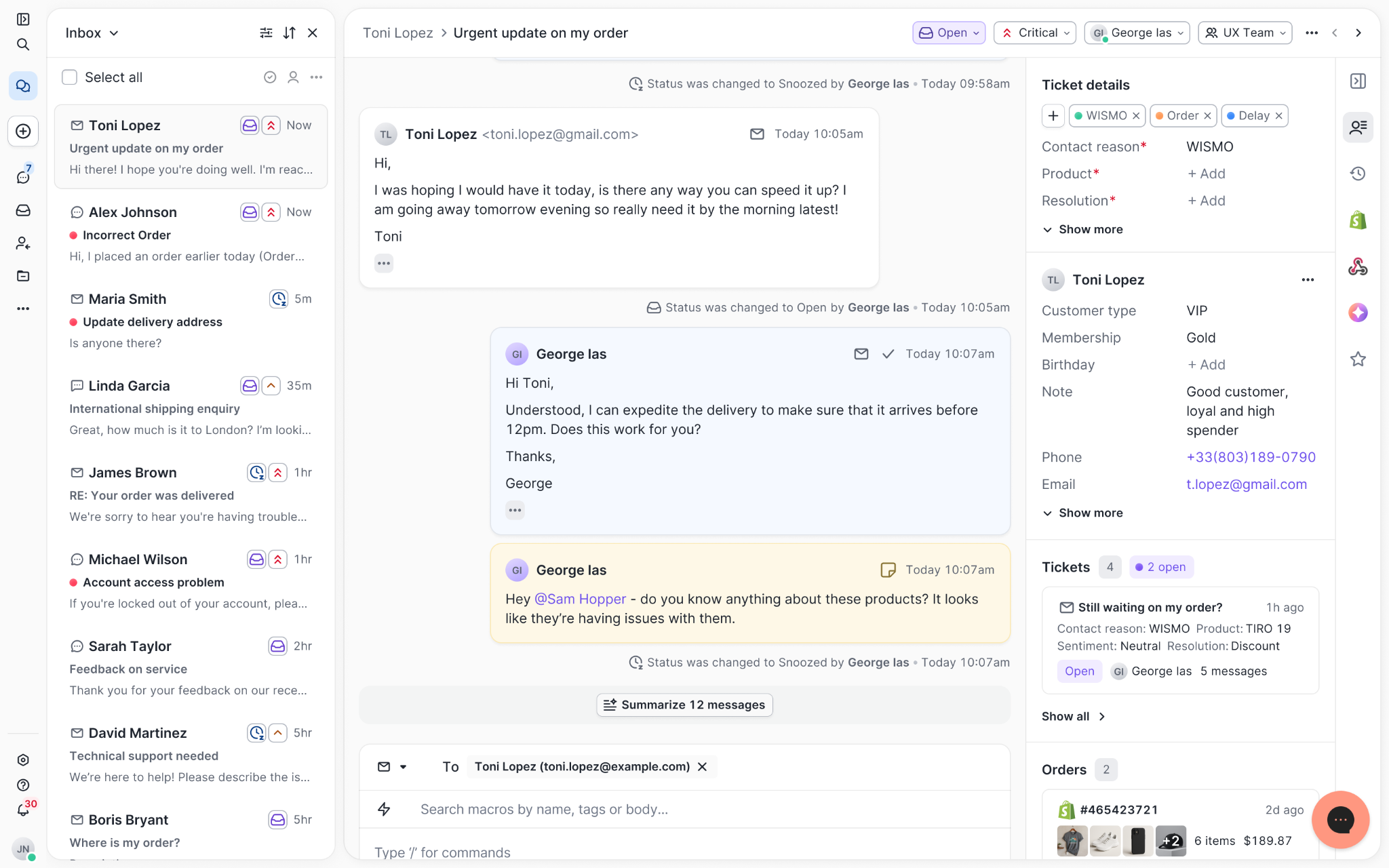
Chats with customers now look like real conversations, using the speech bubble style you’re familiar with on popular messaging apps.
Check customer history without losing your place
Checking a customer's history used to mean leaving the conversation, an extra step that interrupted what should have been a smooth workflow.
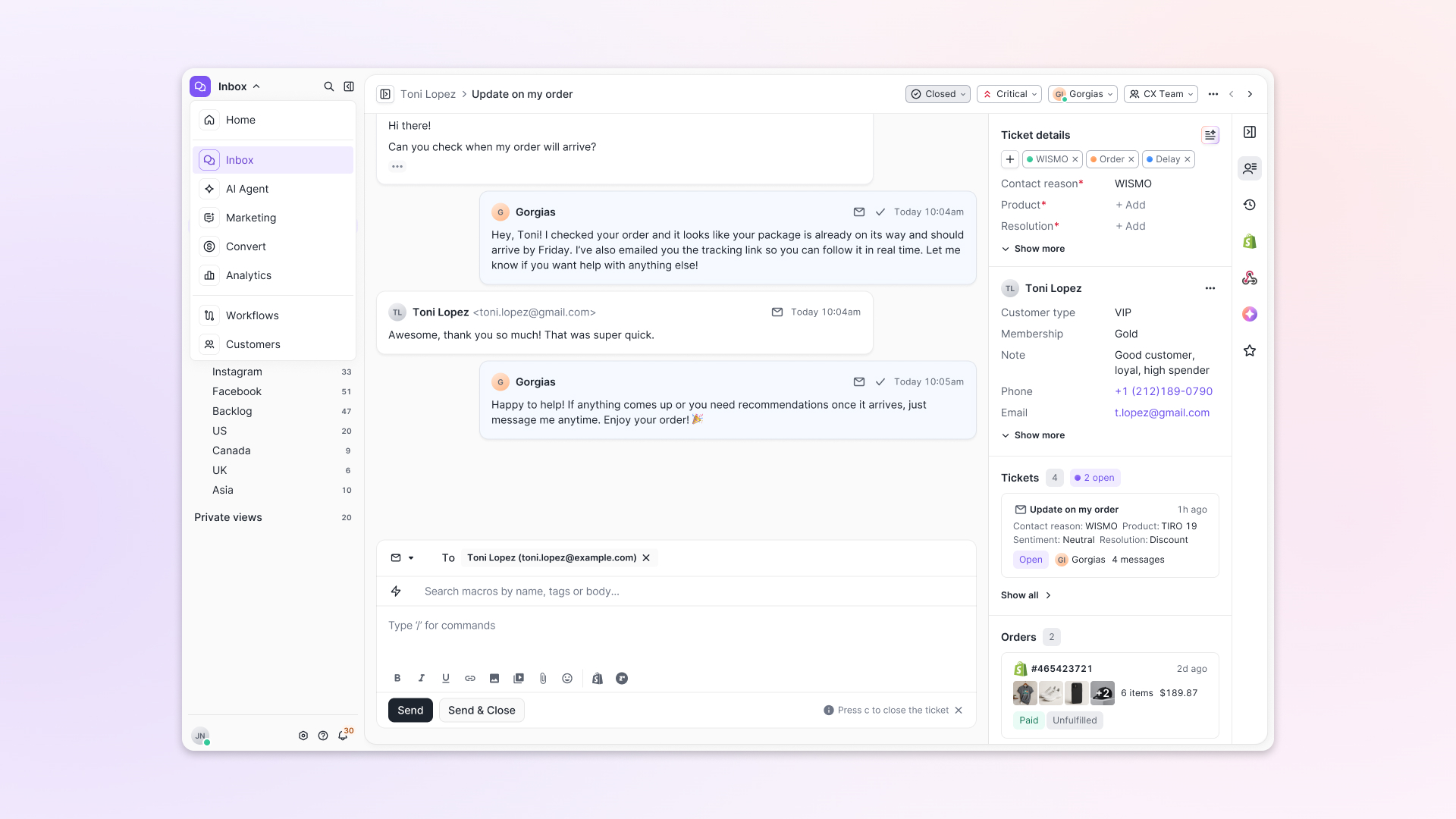
Now, past conversations open in a sidebar next to the active conversation. You can view a customer’s full history, search through their timeline, and open prior tickets without going to a new page.

Check past conversations, orders, and customer details in the brand-new Customer Timeline.
See order details the moment you open a ticket
Order information is easier to reference than ever. Open a ticket, and you instantly see the customer's recent orders, marked with product images and invoice details at a glance. Need to dig deeper? Click on an order, and the expanded information appears in the same panel.
For teams using custom integrations, apps are fixed in a quick-access integration menu on the right.
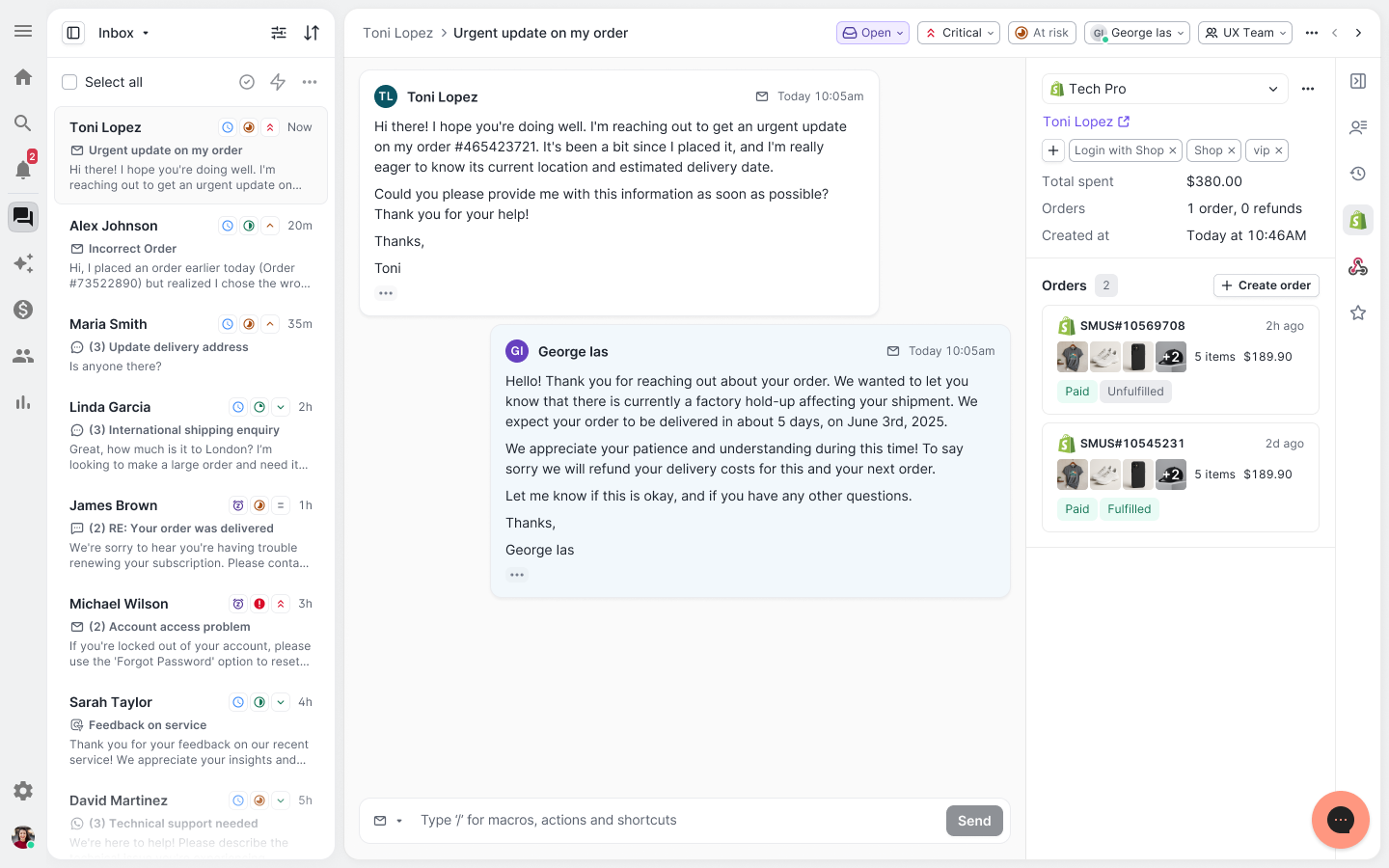
See order details, product images, and totals at a glance on the right panel, without leaving the conversation.
Pick up where AI left off
You shouldn't have to dig through a thread to figure out what AI already tried. Now you don't have to.
When AI Agent escalates a conversation, it includes a concise handover summary that mentions the issue, what actions were taken, and why it was passed to your team.
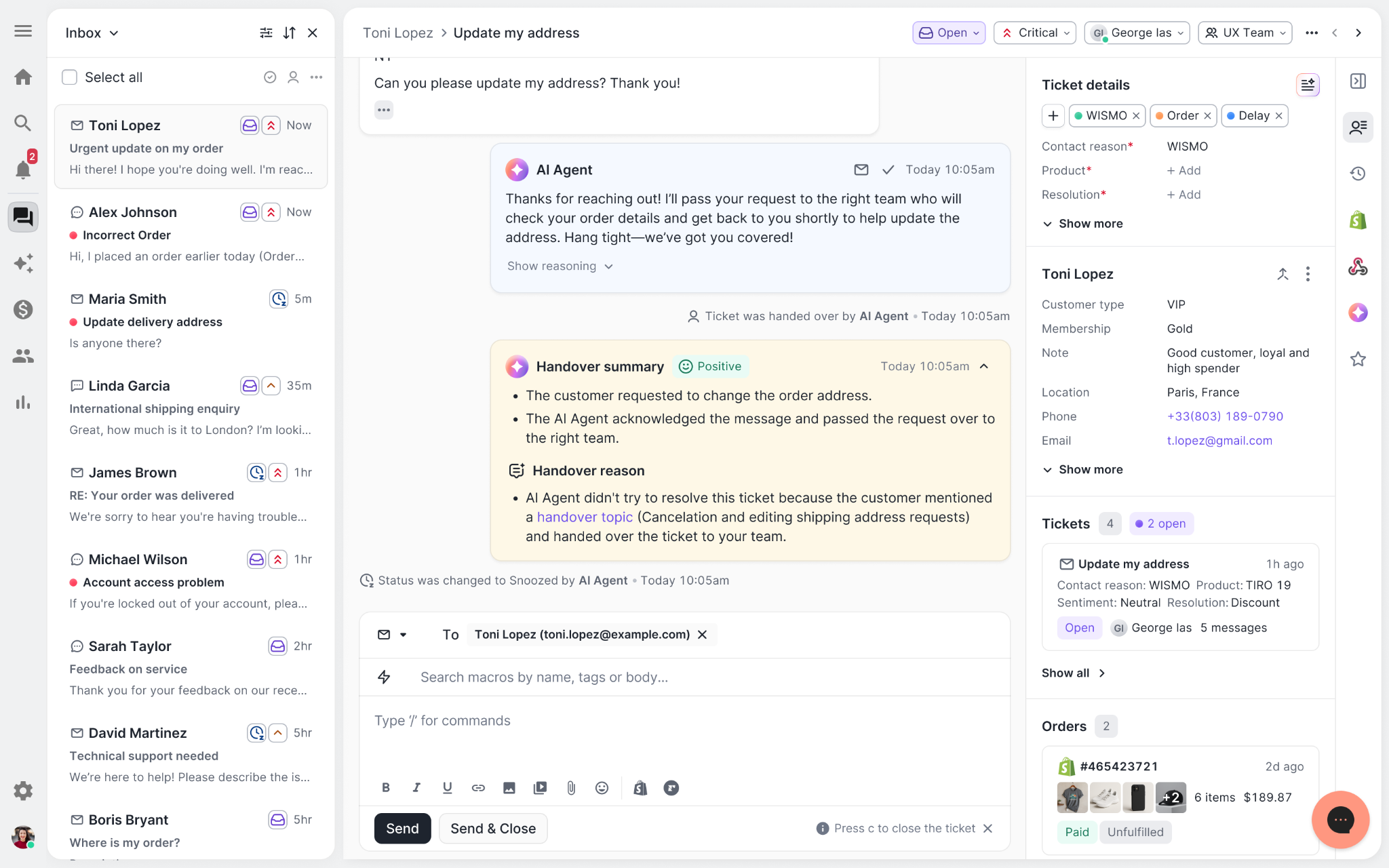
Escalated tickets include a brief AI-generated handover summary, marked in yellow, for quick reference.
Move faster across every store and team
We restructured and simplified the navigation. The left sidebar organizes everything into clear categories: Inbox, AI Agent, Marketing, and Analytics, so anyone on your team knows exactly where to go.
To quickly update your knowledge base or adjust a workflow, both now live right in the sidebar. For teams managing multiple stores, switching between them is just as straightforward, accessible from the sidebar, so agents can move between inboxes without breaking their flow.
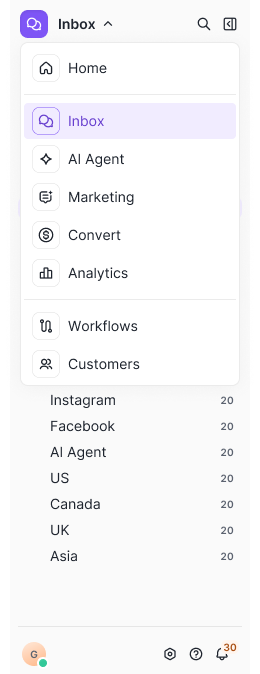
Agents can switch between stores and their corresponding inboxes directly from the left menu.
A workspace that works the way agents do
Support comes down to the person on the other end of the conversation. We built Helpdesk 2.0 is to make sure they have everything they need to show up for that moment.
The best way to see the difference is to work in it. Start a free trial today.


Further reading

How to Refresh Your Help Center for 2025: A Step-by-Step Guide
TL;DR:
- Audit your help center. Review analytics, gather feedback, and test usability to identify gaps and outdated content.
- Update and optimize content. Add trending FAQs, visuals, and clear formatting to improve readability and usability.
- Boost accessibility and SEO. Place links across your site, optimize with keywords, and integrate with proactive support tools.
- Leverage AI for better support. Use your help center to train AI tools and regularly update content for accuracy.
The start of a new year is the perfect time to give your help center the refresh it deserves. For many ecommerce brands, the help center is one of the most underused support tools—yet it's also one of the most powerful. 88% of customers already search your website for some kind of knowledge base or FAQ.
Customers expect fast answers, and a well-designed, updated help center can meet their needs while taking some weight off your support team. We’ll walk you through why refreshing matters and how to do it.
{{lead-magnet-1}}
Why refresh your help center?
90% of consumers worldwide consider issue resolution their top priority for customer service. A robust help center gives you the tools to meet this expectation, delivering fast and reliable solutions that simplify your customers’ lives.
A well-designed help center benefits both your customers and your team. For customers, it lets them solve problems quickly and independently. Instead of waiting for an email response or queuing for live chat, a help center empowers them to find answers on their own terms 24/7.
For your team, a refreshed help center is transformative, too. Here’s what a help center update can achieve:
- Deflect repetitive pre-sale questions: Save your agents from answering the same FAQs over and over by addressing common queries proactively in your help center.
- Support your team: Equip agents with easy access to up-to-date product, service, and policy information. You’ll reduce response times, and your team will deliver consistent answers.
- Train AI tools: Turn your help center into a powerful data source for AI tools. Comprehensive, structured content helps AI provide accurate and consistent responses, giving customers fast solutions and further reducing ticket volume.
In short, refreshing your help center will improve customer experience and boost efficiency across your entire customer service strategy. It’s a win-win for everyone.
How to refresh your help center: 4 steps to follow
Refreshing your help center doesn’t have to be overwhelming. By breaking the process into clear, actionable steps, you can transform your help center into a powerful self-service tool that delights customers and supports your team.
Here are four key steps to guide your refresh.
Step 1: Audit your existing help center
Before making any major changes, you need to understand where your help center currently stands. A thorough audit will help you identify areas for improvement and ensure you make targeted updates.
Here's how to start:
Review analytics
Dive into your help center metrics to spot underperforming content. Look at article views, time-on-page, and bounce rates. Low engagement might mean the content is unclear, irrelevant, or hard to find.
With a customer experience platform like Gorgias, you can view the performance of each article:

Survey your customers
Customer feedback is invaluable. Use surveys or follow-up emails to ask customers what information they had trouble finding. Their responses can highlight blind spots in your help center.
Add CSAT questions
At the end of each help center article, include a simple question like, "Was this content helpful?" Use the feedback to pinpoint which articles are effective and which may need improvement.

Test usability
Put yourself in your customers’ shoes. Try searching for answers to common questions. Is the layout intuitive? Are the search results helpful? A smooth user experience is key to a successful help center.
Evaluate content freshness
Check if your articles are outdated or missing important updates, like new product features or policy changes.
Read more: How to create and optimize a customer knowledge base
Step 2: Update and optimize your help center content
Fresh, well-organized content is the backbone of a great help center. Customers rely on clear and accurate information, so investing in your content can transform your help center into a powerful self-service tool.
Here’s how to refresh your content and make it shine:
Add trending FAQs
Regularly analyze support tickets to identify common and emerging questions. Integrate these into your knowledge base to address customer needs proactively and reduce incoming tickets.
Create multimedia content
Text alone isn’t always enough. Use images, GIFs, and videos to break down complex topics and make instructions easier to follow. For example, a quick explainer video can save customers time and eliminate confusion.
Princess Polly’s customer help center exemplifies what a great help center should look like. Its visually appealing design ensures that customers can quickly navigate to the information they need. Whether they’re looking for help with shipping, payments, returns, or any other issue, the intuitive layout makes the process simple and stress-free.

Gorgias lets you customize fonts, logos, and headers for your Help Center without any coding. If you want more customization, you can dip into HTML and CSS to tailor specific elements.
Standardize your tone
Ensure your content reflects your brand voice while staying approachable and customer-friendly. Consistency builds trust and reinforces your brand identity.
Need help finding your brand voice? Read AI Tone of Voice: Tips for On-Brand Customer Communication for guidance.
Update outdated articles
Review older content for inaccuracies or missing information, such as policy changes or new product details.
Structure for readability
Use bullet points, short paragraphs, and clear headings to make articles easy to scan. Most customers skim for quick answers—design your content to match their behavior.
Step 3: Make your help center easy to find
Even the most well-crafted help center is ineffective if customers can’t locate it. Ensuring visibility across all customer touchpoints is key to driving engagement and making self-service the first stop for support. Here’s how to do it:
Link it everywhere
Make your help center easily accessible by placing links in strategic locations, such as your website’s header, footer, and main navigation menu. Include links in transactional emails, like order confirmations, tracking updates, or shipping updates, where customers often have questions.
Improve SEO
Optimize your help center articles with keywords your customers are likely to search for. Use clear, concise titles, meta descriptions, and headings to boost search engine visibility and help customers find answers directly from Google.
Integrate with support tools
Use tools like automated chat and automated email responses to proactively surface relevant help center articles. For instance, when customers type a question in a chatbox, suggest related articles before escalating to a support agent.
Read more: Offer more self-serve options with Flows: 10 use cases & best practices
Promote it proactively
Don’t wait for customers to stumble upon your help center—promote it! Highlight it in onboarding emails, social media posts, and banners on your site.

Jonas Paul Eyewear ensures their help center is easy to access by prominently linking it in the website’s footer under the “Quick Links” section. The thoughtful placement ensures customers can quickly navigate to the help center from any page, making it a convenient resource for addressing their questions or concerns.
Read more: Boost your Help Center's visibility: Proven strategies to increase article views
Step 4: Use your help center to power AI tools
Your help center isn’t just for customers—it will also level up your AI-driven support strategy. By structuring your knowledge base effectively, you enable AI tools to deliver accurate, reliable, and consistent answers to customer queries.
Here’s how to make it work:
Create comprehensive content
Ensure your help center articles cover a wide range of customer questions in detail. This makes it easier for AI tools to pull relevant information and respond accurately.
Structure for machine readability
Organize your content with clear headings, bullet points, and simple language. Well-structured articles are easier for AI to parse and interpret.
Focus on consistency
Use uniform terminology across articles to prevent confusion and ensure AI tools can quickly identify relevant data.
Update regularly
Keep your knowledge base fresh by adding new FAQs, updating outdated content, and incorporating customer feedback. Up-to-date information ensures AI tools provide answers that align with your latest products, policies, and services.
Test AI performance
Periodically review how well your AI tools are using your help center content to address customer needs. Identify gaps in information and fine-tune articles as needed.
Dr. Bronner’s built their help center to power AI Agent, a conversational support assistant that answers both transactional and personalized customer inquiries in the same style as a human agent. Making this change helps the brand save $100,000 a year and decrease their resolution time by 74%.

💡Pro Tip: Transform your help center into an AI training powerhouse with Gorgias’s help center AI optimization guide. This guide offers actionable tips for making your knowledge base AI-ready.

By using your help center to power AI tools, you’ll improve customer self-service options and lighten the load on your support team. AI-enhanced support delivers faster resolutions, higher customer satisfaction, and a scalable approach to customer service.
Elevate your support strategy with a help center refresh
Refreshing your help center isn’t just about improving customer experience—it’s a game-changer for your entire support strategy. With tools like Gorgias’s Help Center, you can empower customers to self-serve while equipping your team with the resources they need to excel.
In 2025, make your help center the cornerstone of your support operations—and watch the results speak for themselves.
{{lead-magnet-2}}

AI Quality Assurance: The New Standard for Customer Support QA
TL;DR:
- The landscape of QA is moving from manual to AI-powered, where AI can analyze every customer interaction, uncover patterns, and suggest data-driven changes at scale.
- Automating QA allows ticket reviews to be routine. This means customers will always receive high-quality support.
- Every customer interaction is reviewed with AI QA—not just a sample. This gives support leaders full visibility into performance and service quality.
- AI QA saves time and improves agent and Gorgias AI Agent feedback. By automating ticket reviews, agents receive instant, unbiased feedback, and leaders can focus on big-picture CX improvements.
This year, 71% of customer experience (CX) leaders are using AI and automation to handle the holiday shopping season. These tools, including AI agents and email autoresponders, speed up tasks like responding to customers and updating orders.
But answering tickets isn't enough. Responses must also be high-quality, whether from humans or AI. And while customer satisfaction (CSAT) is the standard measure of how successful these interactions are, they have major limits.
CSAT scores don’t tell the full story about whether agents were helpful or if they used on-brand language. These gray areas in quality lead to missed sales, higher return rates, and frustrated customers during peak periods.
AI quality assurance (QA) is changing that. In this article, we’ll see what QA looks like today, how AI can simplify the process, and how CX teams can use tools like Auto QA to improve quality across all conversations.
{{lead-magnet-1}}
Traditional customer support QA is falling by the wayside
Today, QA in customer support is a largely manual responsibility. Customer conversations are reviewed by CX team leads to ensure customer satisfaction and identify areas for agent coaching. Team leads evaluate agent responses against a checklist of best practices, including the proper use of language, product knowledge, consistency, and helpfulness.
However, reviewing tickets takes a long time.
QA is important, but it's hard to prioritize when customers are actively waiting for help with refunds, urgent order edits, or negative reviews. And when CX teams are under-resourced and short-staffed, it’s easy to put QA on the back burner.
What’s more, as AI plays a bigger role in responding to customers, quality assurance must evolve to ensure the quality of AI-generated responses, not just human responses.
Over time, the lack of QA in CX can hold back support teams for three reasons:
- Delayed feedback makes it harder for agents and AI tools to improve.
- Leaders have less time to train agents and refine workflows.
- Inconsistent service risks losing customer trust and loyalty.
What is AI-powered QA in CX?
AI-powered quality assurance (QA) uses AI to automate the process of reviewing customer interactions for resolution completeness, communication, language proficiency, and more.
Instead of team leads spending hours manually sifting through tickets, AI takes over and evaluates how well tickets were resolved by agents.
Shifting this traditionally manual work to an automated process pulls teams out of the weeds and into more beneficial work like speaking to customers and upselling.

With AI QA, routine ticket reviews are not just an optional part of your customer service strategy, they become a permanent part of it. The road to greater customer trust, resolution times, and stronger product knowledge becomes easier.
Read more: Why your strategy needs customer service quality assurance
Why choose AI-powered QA over manual QA?
Manual QA is like trying to review a handful of tickets during an incoming flood of new customer requests. Team leads can only focus on a small sample, leaving most interactions unchecked. Without complete visibility, creating a standard across all interactions is challenging.
Now, switch over to AI QA. You don’t have to choose between QA duty or answering tickets—QA checks are automatically done. You’ll still need to monitor AI’s performance, but now there’s more time to focus on creating strategies that improve the customer experience.
Here’s how AI QA and manual QA measure up to each other:
7 benefits of using AI quality assurance in CX
AI quality assurance helps CX leaders move beyond manual reviews by offering fast, thorough insights into performance and customer needs. Here are seven key benefits it brings to your team.
1. Improved visibility into customer interactions
AI QA reviews every ticket, giving CX leaders a complete view of agent performance and customer trends. Nothing slips through the cracks, so you can act on real data each and every single time.
What the team wins: Key areas to focus on to improve the customer experience.
What the customer wins: A consistent support experience where their concerns are fully addressed.
2. Instantly identify major customer pain points
Only a third of customers highly trust businesses, and without QA checks in place, that trust only deteriorates.
AI QA feedback can highlight confusing policies or common product issues that lead to unhappy customers. With instant feedback, teams can quickly make changes and create better, consistent customer experiences.
What the team wins: Faster fixes for recurring issues.
What the customer wins: A smoother, frustration-free experience.
3. Faster identification of process gaps
Agents can receive feedback that instantly highlights gaps in workflows or unclear escalation steps. This is an efficient way to resolve issues within the wider team before they become more significant problems.
What the team wins: Process issues are solved quickly.
What the customer wins: Faster resolutions with little to no delays.
4. Standardized scoring for AI and human agents
AI QA evaluates both Gorgias AI Agent and human agent interactions using the same criteria. This creates a level playing field and ensures all customer interactions meet the same quality standards.
What the team wins: Fair evaluations for both AI and human responses.
What the customer wins: High-quality support, no matter who handles the ticket.
5. More time for coaching and training
With less time spent on manual reviews, leaders can dedicate more energy to team development. Training sessions guided by AI insights help agents improve quickly and ensure the team delivers support that aligns with protocols.
What the team wins: More focused skill-building based on data.
What the customer wins: Clearer and more accurate support.
6. Drives continuous knowledge for the entire team
AI QA is helpful for showing agents which areas they need more training on, whether it's being better about using brand voice or polishing up on product knowledge. This leads to better support processes and stronger product understanding across the team.
What the team wins: Better support tactics and product expertise.
What the customer wins: Faster resolutions due to knowledgeable agents.
7. Enhanced customer experience through consistently high-quality support
Since all tickets are reviewed, teams can feel confident they’re delivering high-quality support on a regular basis. Customers get clear, helpful answers, while agents gain insights from every ticket with AI feedback.
What the team wins: Consistent support performance.
What the customer wins: Reliable support they can trust.
How accurate is AI QA?
AI QA analyzes tickets using predefined categories to evaluate how complete and helpful agent responses are. Let’s take a closer look at how it maintains accurate ticket reviews with an AI QA tool like Gorgias’s Auto QA.
It measures multiple metrics
Auto QA evaluates tickets based on three key areas: Resolution Completeness, Communication, and Language Proficiency.
For Resolution Completeness, it checks if all customer concerns were fully addressed. For example, if an agent resolves only one of two issues raised, the ticket is marked incomplete. Tickets where customers resolve issues on their own or don’t respond to follow-ups can still be graded as complete if handled appropriately.
Communication quality is scored on a scale of 1 to 5, assessing clarity, professionalism, and tone. Agents earn higher scores when they provide clear solutions and remain positive throughout the interaction.
Finally, Language Proficiency evaluates whether an agent displayed high proficiency in the language of the conversation. The score considers how well spelling, grammar, and syntax were employed.

Teams can improve AI with their own feedback
Auto QA isn’t set in stone. Team leads can expand on AI-generated feedback by adding their comments. For example, if a resolution is graded as ‘Incomplete,’ a team lead can explain why and provide additional context. This helps clarify the evaluation for the agent and also helps the AI model improve over time.
How to get started with AI quality assurance using Auto QA
Ready to bring the benefits of AI QA to your team? Here’s how to get started with Auto QA:
- Audit your current QA process to identify gaps. How do you currently review tickets? Pinpoint areas where manual QA falls short, such as inconsistent feedback or missed interactions.
- Pilot Auto QA with a small team. Introduce Auto QA to a small group of agents to test its impact. This allows you to find out how the new QA process fits into your workflow and how it affects agent performance.
- Use AI insights to refine processes. Analyze the feedback Auto QA provides to identify process gaps or recurring issues. Use these insights to update your workflow, improve training, and address root causes of customer pain points.
- Gradually scale adoption across the team. Once the pilot is successful, roll out Auto QA to more agents. Make sure everyone is trained on how to use its insights and integrate the tool into daily operations.
- Monitor and provide feedback to improve AI accuracy. Review Auto QA’s evaluations to ensure accuracy. Add manual feedback as needed to fine-tune its scoring on future tickets.
- Measure the impact on performance and satisfaction. Track key metrics like ticket close rates, resolution times, and customer satisfaction scores. Use this data to understand how Auto QA transforms your QA process and drives better results.
Make high-quality responses a standard with Auto QA
AI QA isn’t just about automating ticket reviews — it empowers CX leaders to focus on what truly matters: training and improving processes.
Leave spot-checking and inconsistent application of policies and brand voice in the past. As a built-in feature of Gorgias Automate, Auto QA makes high-quality customer interactions your brand’s standard.
Book a demo now.
{{lead-magnet-2}}

What to Do After Black Friday: A Guide to Post-BFCM Planning
TL;DR:
- Reflect quickly: Analyze customer service metrics like CSAT, FRT, and ticket volume immediately after BFCM to identify what worked and what didn’t.
- Optimize self-service: Update FAQs and help centers to address gaps revealed in BFCM support inquiries.
- Streamline operations: Audit staffing, inventory, and fulfillment to avoid bottlenecks in future peak seasons.
- Turn insights into action: Use BFCM data to set measurable goals and implement quick wins for success next year.
Nailing customer support during BFCM is all about staying ahead of the game and making smart moves—fast.
But the real key to success lies in what you do when the rush is over. Treating BFCM as a learning opportunity allows you to refine your customer experience (CX) and set yourself up for an even better performance next year.
Without a plan for what to do after Black Friday, it’s easy to repeat mistakes or overlook key trends that could make all the difference next year.
In this article, we’ll share a simple framework to help you evaluate your BFCM performance and turn insights into actionable steps for long-term CX improvement.
{{lead-magnet-1}}
Key areas to review post-BFCM
It’s best to reflect on key areas like customer service, tech performance, customer behavior, and operations right after BFCM versus waiting until late next year.
By taking a closer look now, you can spot what worked, fix what didn’t, and start applying those insights to other big sales events throughout the year—not just BFCM.
A little effort now = a lot of payoff later!
1. Customer service metrics: Where did your team shine (or struggle)?
By analyzing key metrics, you can identify what worked, where your team excelled, and what areas need improvement to better prepare for future busy seasons. Key metrics include:
- Customer Satisfaction (CSAT): Gauge how happy customers were with their interactions. Look for trends in both positive and negative feedback to pinpoint what delighted or frustrated customers.
- First Response Time (FRT): Assess if your team met expectations for quick responses during peak periods.
- Average Resolution Time (ART): Evaluate how efficiently issues were resolved and whether there were any bottlenecks.
- Contact Rate: Examine whether there was a surge in inquiries, and uncover why.
- Net Promoter Score (NPS): Determine how likely customers are to recommend your brand post-BFCM.
- Ticket Volume: Review peak times and common customer issues. This insight can help forecast future support needs and ensure your team is adequately prepared for high-demand events.
Tools like Gorgias’s Ticket Insights can reveal which issues—like discounts, shipping policies, or damaged orders—dominated your support tickets.

For a more comprehensive view, Gorgias’s Support Performance dashboard shows how customer service influenced sales, including tickets converted, conversion ratios, and total revenue. These insights are invaluable for understanding the connection between support efficiency and revenue growth.

Brands like Obvi, a leading supplement company, have leveraged Gorgias to enhance their support strategies.
Obvi serves a large number of shoppers seeking pre-sales guidance to choose the right supplements. By using Gorgias’s Flows and Article Recommendations, they provide instant, automated answers to frequently asked questions directly within Chat.
Here’s how it works:
- Flows offer shoppers a menu of common queries about products and shipping, providing fast answers to top concerns.
- For more specific questions, Article Recommendations scan Obvi’s Help Center articles and share the most relevant answer. For example:some text
- How do I mix Obvi collagen?
- Is Obvi vegan?
- Can I take collagen while pregnant?

To fine-tune their approach, Obvi uses data from their tickets to identify recurring customer questions. By analyzing the gaps between their initial FAQs and real customer inquiries, they adjusted their automated responses to better meet customer needs.

“We thought we knew what our FAQs were, but data from Gorgias was incredibly insightful to understand which FAQs to automate. That's one reason it's really valuable to have our Helpdesk tickets and automation features in one tool.”
—Ron Shah, CEO and Co-founder at Obvi
2. Technical performance: Did your tools hold up under pressure?
While marketing efforts often steal the spotlight, savvy brands know that backend systems are the unsung heroes of Black Friday and Cyber Monday.
Start by auditing critical areas such as platform downtime, checkout errors, or slow response times. These issues not only frustrate shoppers but can also lead to lost revenue and customer loyalty during your busiest shopping days of the year.
Next, evaluate how well your tools were able to manage peak volumes. Did your helpdesk, CRM, and ecommerce platforms work seamlessly together, or were there gaps in your integrations?
If switching between platforms slowed your team down or caused data silos, consider streamlining your tech stack with an all-in-one CX solution.
For example, conversational AI platforms like Gorgias enable CX teams to consolidate support, sales, and automation into a single tool. Gorgias combines Helpdesk and AI Agent to resolve customer issues efficiently, while Convert supports upselling and increasing customer lifetime value.
A streamlined, integrated platform not only boosts efficiency but also helps your CX team focus on what matters most: delivering exceptional customer experiences.
3. Customer trends and behavior: What did your shoppers really want?
Start by reviewing product demand, buying patterns, and cart-building behaviors. Were there any unexpected customer needs or shifts in preferences? Identifying these trends can help you refine your inventory planning, marketing strategies, and product offerings.
For example, here’s a detailed breakdown of what to look for:
Product demand shifts
Use these insights to adjust inventory planning for future campaigns. Ensure you have sufficient stock of trending products and create promotional bundles for underperforming items.
- Which products outperformed expectations? Were they planned bestsellers or surprise hits?
- Did slow-moving products unexpectedly gain traction, or did top-sellers underperform?
Cart-building behaviors
Tailor future cart-building promotions to encourage higher Average Order Value (AOV). For instance, highlight complementary products or offer discounts on bundles.
- Did customers prefer individual purchases, or did bundling promotions drive higher AOV?
- Were there abandoned cart trends tied to specific products or price thresholds?
Unexpected customer needs
Incorporate these suggestions into your product development or cross-sell strategies. Highlight related products in future campaigns to meet these emerging needs.
- Did reviews or support tickets indicate demand for features, colors, or sizes you didn’t offer?
- Were there inquiries about add-on products or product pairing ideas?
Self-serve helpfulness
If you have an FAQ page or Help Center, evaluate how well it performed. Did customers find the information they needed, or did they still open tickets for common questions?
Metrics like Article Views, Number of Searches, and Click-Through Rates can show how effectively your self-service resources meet customer needs.
If customers contact support for information already in your Help Center, it may indicate unclear articles or poor visibility of resources. This means you should rewrite unclear articles, optimize search terms, and ensure Help Center links are prominently displayed across your website and emails.
4. Operational challenges: Where did the stress show up most?
BFCM is a stress test for your operations, and reflecting on how well your systems handled the surge can help you uncover critical areas for improvement.
Staffing
Start by reviewing your staffing during peak periods. Did your customer service and warehouse teams feel overwhelmed, or were they adequately supported?
Questions to Ask:
- Were there enough team members to handle the workload?
- Did customer service or warehouse teams experience burnout or delays?
Next Steps:
- Plan staffing schedules around peak demand forecasts.
- Cross-train employees to cover high-pressure roles, such as fulfillment or customer support.
- Offer incentives, like performance bonuses, to encourage seasonal staff retention.
Preparing your team with a more flexible schedule and extra resources for high-demand areas can make all the difference.
Order fulfillment
If order fulfillment workflows slowed down or became error-prone, it may be time to optimize your processes.
Questions to Ask:
- Were there delays in shipping or errors in packaging?
- Did order accuracy or speed decline as volumes increased?
Next Steps:
- Audit fulfillment workflows to identify slow or repetitive steps.
- Invest in automation for picking, packing, and shipping processes.
- Partner with a third-party logistics (3PL) provider if in-house capacity was overwhelmed.
Inventory management
Stockouts or overstock situations during BFCM can directly impact both sales and customer satisfaction.
Questions to Ask:
- Did stockouts or overstock situations impact your Black Friday sales?
- Was inventory tracking accurate during the busiest days?
Next Steps:
- Implement real-time inventory tracking to reduce discrepancies.
- Use demand planning software to improve forecasting for top-selling products.
- Bundle slow-moving inventory with bestsellers in future holiday deals to avoid overstock.
Operational challenges often have a ripple effect on customer experience. By reflecting on these areas—staffing, fulfillment, and inventory—you can identify actionable improvements that streamline operations and create a smoother experience for both your team and your customers.
Building a CX improvement plan post-BFCM
Once you've reviewed the key areas of your BFCM performance, the next step is turning those insights into actionable strategies. Here’s how to build a CX improvement plan that sets you up for long-term success.
Step 1: Document lessons learned before they’re forgotten
Start by centralizing everything you’ve uncovered from your retro.
Use collaborative tools like Notion, Google Docs, or Trello to organize insights across customer service, tech performance, and operations.
And don’t just focus on observations—highlight actionable takeaways. For example, instead of noting “high contact rates,” document the underlying causes, like gaps in FAQs or unclear return policies.
If you’re feeling overwhelmed by the volume of data, let AI do the heavy lifting. Use prompts like these to quickly spot patterns:
- “Analyze the common themes in this ticket data and summarize the top three trends.”
- “Identify recurring customer complaints and suggest improvements to address them.”
- “Provide recommendations to optimize self-service options based on this dataset.”
AI tools can save you time and ensure nothing slips through the cracks as you plan your next steps.
Step 2: Tackle your biggest support pain points
Analyzing challenges in your CX processes can reveal quick wins and long-term improvements. Here are a few common support pain points and how to address them:
High contact rates
A surge in customer inquiries often signals that self-service options aren’t meeting expectations.
Solution: Add or update tools like chat widgets, Help Centers, and post-purchase emails to proactively answer common questions.
Inconsistent response times
This usually points to workflow inefficiencies or a lack of team bandwidth.
Solution: Use automation to prioritize urgent tickets, deflect repetitive inquiries, and ensure smoother workflows.
Low CSAT scores
Frustration with slow resolutions or insufficient empathy often leads to poor satisfaction ratings.
Solution: Invest in empathy training and implement faster resolution strategies, like automating FAQs or integrating sentiment detection tools to flag unhappy customers.
AI escalation issues
While tools like Gorgias’s AI Agent can streamline support, improper setup can lead to automation loops that frustrate customers.
Solution: Define rules for when AI should escalate to a human, feed it more comprehensive data (like updated Help Center articles), and set boundaries for topics it shouldn’t handle.

For example, even with the efficiency provided by their Helpdesk, Obvi found Black Friday and Cyber Monday to be a hectic and stressful period for their small customer support team—just one full-time agent and half of another team member’s time.
The influx of customer inquiries made it difficult to focus on more complex tickets that could save sales from unhappy customers or convert inquiries into purchases. Instead, their team was bogged down by thousands of repetitive questions, like “Where is my order?”
Automating answers to repetitive questions gave the Obvi team the room to focus on personalized and revenue-driving customer interactions, like engaging with their community of 75,000 women.
“Instantly, our CX team had time to prioritize important matters, like being active in our community of 75,000 women instead of sitting answering emails.”
—Ron Shah, CEO and Co-founder at Obvi
The extra bandwidth helped Obvi drive over 3x the purchases from support conversations compared to previous years. AI Agent also enabled their team to reach inbox zero by 6 pm—during Black Friday week!
By automating 27% of their inquiries, they not only improved their response times but also handled over 150 tickets daily with just 1.5 agents, driving 10x more sales during BFCM.
Step 3: Focus on quick wins that deliver big impact
Even the smallest changes can deliver a big impact.
For example, update FAQs based on ticket trends or refine chat flows to reduce repetitive questions. Consolidating your CX tools into an omnichannel helpdesk like Gorgias can also reduce agent workload while delivering consistent customer experiences.
Repetitive inquiries—like shipping updates, return questions, or product FAQs—don’t need to consume your team’s time. Automating these workflows can significantly lighten your team’s load while keeping response times quick.
Gorgias users, for example, can automate up to 60% of support tickets with conversational AI tools like AI Agent, enabling teams to focus on higher-value interactions.
Quick wins aren’t just about streamlining support—they can also drive measurable results.
For instance, Pajar, a footwear brand, leverages AI Agent to handle common inquiries in English and French. While this is a feature they use year-round, it’s handy during holiday shopping seasons when support teams are under pressure to respond quickly.

This freed up their small team of five agents to focus on complex tickets, achieving impressive results:
- Resolved 45% of queries with automation, surpassing their 30% goal.
- Reduced first response times to just 12 minutes.
- Maintained high satisfaction scores by delivering timely, accurate responses.
With tools like AI Agent and Sentiment Detection, you can automate prioritization for tickets—such as flagging urgent issues or unhappy customers—while still maintaining a personal touch.
Step 4: Level up training and leverage your team’s tools
Peak season often highlights gaps in both team training and CX tools. Addressing these areas not only improves your team’s ability to handle high-pressure situations but also fosters a stronger customer-first mindset across your organization.
Start by leveraging the feedback you’ve collected. Your team has so much data they can review between channels like email, SMS, chat, and social media—both compliments and complaints. You need to be willing to listen to every customer’s needs.
At Love Wellness, customer feedback is treated as a daily priority.
The team has a dedicated Slack channel for feedback, where team members regularly drop insights from all touchpoints. This collaborative approach helps them get familiar with recurring themes, dissect customer needs, and work together on solutions.

The Love Wellness team recommends scheduling recurring feedback share sessions with Product or Website teams—or even inviting those teams into Gorgias to create dedicated views for feedback categories like product improvements or website issues.
Beyond tools and processes, training is crucial. Their team also emphasizes the importance of fostering a customer-first mindset at all levels:
Customer service is one of the main ways they build trust with customers, especially in the personal care and women’s health niche. That’s why the Love Wellness team created an immersive customer experience training program that involves everyone—from the company's president to its office manager.
This holistic approach ensures that every team member, regardless of their role, understands the company’s purpose and how their actions contribute to a seamless customer experience.
Step 5: Prove the ROI of CX to get more resources
Your customer support team isn’t just there to clear tickets—it’s a key driver of revenue, retention, and customer lifetime value (CLV). Yet, too many teams measure success based solely on metrics like response and resolution times. While these are important, they’re only part of the story.
As Zoe Kahn, Manager of Customer Experience and Retention at Chomps, explains:
“Aiming for overly broad goals of ‘surprising and delighting’ customers without a real understanding of how support impacts the whole customer journey or business ROI is a common pitfall. Customer experience, largely driven by the support team, touches every stage of the journey—from pre-sales to post-sales—and directly influences more sales and loyalty.”
To demonstrate CX’s value, it’s crucial to track metrics that reflect your team’s true impact on the business. For example:
- Customer Retention Rate (CRR): How well does your team retain customers over time?
- CSAT Scores: Are your customers satisfied enough to return or recommend your brand?
- Revenue From Support Conversations: How many sales are driven by proactive or reactive support interactions?
By focusing on these KPIs, you’ll incentivize your support team to go beyond answering questions and actively contribute to business goals. This could include suggesting products during conversations, encouraging happy customers to leave reviews, or proactively addressing issues that lead to churn.

Teams using Gorgias have even greater opportunities to prove ROI through tools like the Revenue Statistics dashboard, which tracks metrics like tickets converted into sales, conversion rates, and total revenue driven by support interactions.
“Without knowing how much money your customer experience (CX) drives, you’ll never fully understand your impact on the business or have the data needed to advocate for more resources from leadership.”
—Zoe Kahn, Chomps
Set smarter goals next year
The best way to close out your post-BFCM retro is by setting clear, measurable goals for next year. Use this year’s insights to create actionable targets that enhance your customer support and CX strategy:
- Reduce ticket volume: Implement or improve self-service options like FAQs, chatbots, and Help Centers.
- Decrease response and resolution times: Optimize workflows, invest in automation, or plan for better staffing during peak periods.
- Boost CSAT: Address recurring customer pain points, streamline support processes, and train your team to deliver more empathetic, effective service.
Tools like Gorgias make it easier to turn these goals into reality. With powerful automation, integrated insights, and scalable support solutions, you can transform this year’s lessons into meaningful, lasting improvements.
Start planning now to make next year’s BFCM your smoothest—and most successful—yet!
{{lead-magnet-2}}

How We Keep Talent Density High and Impact Higher at Gorgias
TL;DR:
- High talent density means a team where every member is highly skilled and performs at their peak. This creates a positive ripple effect, where talented individuals enhance each other's effectiveness and drive overall success.
- Gorgias maintains high talent density by following three pillars: hire great talent, part ways with non-performers, and nurture your talent pool.
- Train managers to share 100% honest feedback with direct reports. Honest feedback, performance improvement plans, and fair severance ensure a respectful and constructive approach to managing team dynamics.
- Measure talent density with key metrics. These include performance scores over time, cross-evaluation reviews, regrettable attrition rates, and transparent promotions to ensure fairness and improvement.
At Gorgias, we’ve embraced the concept of high talent density, introduced by Netflix co-founder and CEO Reed Hastings in No Rules Rules, as a foundation of how we operate. The idea is simple: a team is at its best when every member is highly skilled and performing at their peak.
I’ll walk you through exactly how we’ve built a workplace that prioritizes talent density by breaking down what the concept means, how it shapes our hiring process, and how we keep Gorgias a rewarding environment to grow in.
What is high talent density?
High talent density refers to having a team where each member is highly skilled and performs at their best. When a group consists of top performers, their collective effectiveness increases. Hastings notes, "Talented people make one another more effective."
For example, in a team of five exceptional employees, each individual's high performance elevates the group's overall success. If there is even one underperformer, a team's effectiveness decreases by 30 to 40 percent.
The three pillars of high talent density
We follow three pillars to maintain and grow high talent density. These pillars guide how we build and sustain a team of exceptional performers at Gorgias.
- Hire Great Talent: We look for people who excel in their roles today and show the potential to grow with the company in the future.
- Part Ways with Non-Performers: We prioritize honest feedback and offer support for improvement, but we’re not afraid to make changes when necessary.
- Nurture Your Talent Pool: We invest in our team’s development, ensuring everyone has the tools and opportunities to succeed as the company grows.
To bring this to life, we’ll use an analogy of colors to represent different types of performers in our talent pool:

Let’s take a closer look at how we practice each of these pillars below.
Pillar #1: Hire great talents
Every manager wants to hire someone exceptional, but even with the best intentions, it doesn’t always work out.
To clarify, we’re looking for someone great to do the job now but has the potential to grow and stay strong as the company evolves.
Here’s how we approach it.
Pay well (i.e. transparently and competitively)
Let’s be upfront: great talent often comes with a higher price tag.
The first step in building high talent density is offering competitive pay. Exceptional people expect to be compensated for their contributions, and rightly so.
A single outstanding hire, even if paid 50% more than two average employees, often delivers far greater results.
This is especially true in creative roles, where the impact of a single talent can be worth that of several others. It’s certainly not easy to prioritize compensation when resources are tight, but talented people are an investment — and talent is usually expensive.
Related: How we built an international SAAS salary calculator for our distributed team
Focus on sourcing, not just applicants
Great candidates don’t always come knocking on your door. The best talent is often already employed, not actively looking for a new role.
To hire the best, we go beyond applications and invest heavily in proactive sourcing.
Use a structured recruiting playbook
At Gorgias, we rely on scorecards and standardized feedback forms to assess every applicant fairly and thoroughly. We also include role-specific assessments or assignments as part of the process.
While some argue that take-home tasks are no longer standard, we’ve found them invaluable. A strong interview doesn’t always translate into strong performance, and these assignments often reveal critical insights into a candidate’s true capabilities.
Referrals are another piece of the puzzle. A-players tend to know and recommend other A-players. While leveraging referrals, we also keep a close eye on maintaining diversity to make sure everyone gets the same chance.
Pillar #2: Part ways with non-performers
Regularly assess your talent pool
Performance isn’t static. Someone who was a top performer last year might not meet expectations today, especially as the company grows and their role evolves.
To stay objective, we pair performance reviews with bi-yearly cross-evaluation talent reviews. Cross-evaluations provide a broader perspective, helping managers see beyond potential biases and assess whether a top talent has changed in performance quality.
These regular evaluations ensure we’re always aware of who is meeting expectations and who may need support or a more difficult conversation.
Enforce honest feedback with your managers
While Netflix's philosophy is to immediately separate with employees when they underperform, we believe in a more empathetic approach that follows our company’s core value of being 100% honest.
At Gorgias, we train managers to deliver clear, actionable feedback so team members always know where they stand and how they can improve. To us, honesty means being thoughtful, encouraging, and focused on helping people grow.
We also use Performance Improvement Plans (PIPs) as a tool for growth. We don’t simply view them as compliance tools, but as opportunities for employees to get back on their feet. In fact, 50% of our PIPs result in team members regaining performance.
Provide fair and generous severance packages
Sometimes, despite feedback and coaching, parting ways becomes the best option for both the employee and company. When that happens, we believe in making the transition as respectful and fair as possible.
Offering a strong severance package not only supports employees during their transition but also empowers managers to make tough decisions confidently. It reflects our shared responsibility and ensures we treat people with dignity, even when their time with us comes to an end.
Pillar #3: Nurture your talent pool
Help talent grow alongside the company
When a company grows, employees need to match that pace to keep delivering at a high level. This requires consistent learning and development to meet the challenges of each new stage.
Growth doesn’t happen by accident. As Daniel Coyle explains in The Talent Code, greatness isn’t born; it’s grown through “deep practice.”
To encourage growth, Gorgias managers hold career conversations every six weeks, focusing on the “3Es”: education, exposure, and experience. These discussions identify growth areas, leverage networks, and clarify the steps team members can take to excel.
We also reward our top performers with opportunities beyond financial incentives. From double learning stipends to travel experiences and executive mentorships, these rewards keep our “dark green” talents motivated and engaged.
Read more: Why we don’t increase salaries based on performance
Cultivate a positive and collaborative environment
In the pursuit of high talent density, results are important, but so is maintaining a positive, team-oriented environment.
A top performer with a toxic attitude can harm the environment you’re working hard to build. For that reason, we hire and nurture people who align with our values, show respect for others, and contribute to a collaborative culture. Both the what (talented employees) and the how (exemplary behavior) matter.
Implement pressure management programs
I believe this is one of the toughest topics when it comes to talent management.
Top performers are eager to work hard and prove their worth. Oftentimes, they approach work intensely and passionately. However, too much intensity can lead to exhaustion. And, of course, tired employees can’t deliver well.
That’s why managing pressure is crucial to maintaining high talent density. Introducing programs and initiatives that support the well-being of your employees helps prevent stress and burnout.
We take a tailored approach to prevent burnout, recognizing that one size doesn’t fit all. Having strong management training and great HRBPs (HR Business Partners) are the most impactful pieces. They help uncover the underlying issues of burnout: lack of vacation time, heavy workload, personal challenges, or misalignment.
Once the issues are clear, we provide the right tools to help. This could include coaching, training, enhanced benefits, or adjusted workloads.
How we measure, refine, and design our talent pool
We use specific metrics to gain insights into the effectiveness of our talent management strategies and refine our approach as needed.
Here are the metrics we track to evaluate talent density:
- Performance scores over time: We track average performance scores across the company (excluding new hires) to monitor overall talent density.
- Cross-evaluation reviews: Our biannual talent reviews include cross-evaluations, introducing variables like leadership, learning agility, and drive to ensure a holistic assessment.
- Regrettable attrition rate: We analyze turnover rates to identify potential issues and address them proactively.
- Transparent promotions: We’ve developed a promotion process that prioritizes fairness and merit. Managers must document and justify promotions, holding them accountable for consistency and equity.
By regularly tracking these metrics, we can see where we may be falling short — whether that’s being slow to part ways with low performers, struggling to attract great talent, or losing top performers unnecessarily.
Building strong organizational design
The ultimate goal of having strong talent density is to build a well-performing organization.
After each talent review, HRBPs will work hand in hand with managers to refine the organizational chart. They identify opportunities for improvement, such as promoting top talent, adjusting scopes of responsibility, or making changes to strengthen the team.
Ultimately, you should always make sure that your top performers are leading the most critical and top-priority initiatives.

A personal note on the journey to high talent density
In my role as VP of People at Gorgias, I’ve seen how fast growth fuels the resources and opportunities needed to attract and develop exceptional talent. High performers thrive in environments with big goals and fast results, but it’s up to us to create the right conditions for them to succeed.
Sustaining high talent density takes dedication and humility. It means holding ourselves to high standards while being transparent. While we’ve made great strides, there’s always more to learn and refine.
As we continue this journey, let us remain humble, acknowledging that there is always room for growth and improvement.

How 10 Brands Transformed Customer Support Into Revenue in 2024
TL;DR:
- Support automation cuts resolution times and saves brands thousands. Dr. Bronner's and LSKD automated 40–45% of tickets, saving $100K annually and cutting resolution times to just over a minute.
- Phone support is a profitable yet underutilized support channel. Obvi boosted revenue by $22K in 2 months using phone support alongside Gorgias for upselling and subscription retention.
- Automating returns results in new sales and cost savings. Rumpl recouped $8K in return fees with automated returns, while Pajar resolved tickets in 12 minutes using bilingual AI support.
- App integrations enhance the customer experience. Shopify, Aircall, and Loop Returns integrations helped brands like Jonas Paul Eyewear slash response times by 96% during peak seasons.
Scaling great customer support is often seen as a challenge, especially when ticket volumes climb and customer expectations rise. But for CX leads and executives, it’s essential to recognize that support isn’t just a cost center—it’s a profit driver. Exceptional customer support builds loyalty, drives repeat business, and creates upselling opportunities, directly boosting revenue.
That’s where Gorgias comes in. In this blog, we’ll show you how brands like Rumpl, TalentPop, Stylest, and Baby Gold have turned their support challenges into measurable wins with the power of automation and smart tools.
{{lead-magnet-1}}
1. Obvi boosted revenue by $22,000 in just 2 months with Gorgias and phone support
Obvi was leaving money on the table. Without phone support, they faced challenges like subscription drop-offs and missed upsell opportunities. Voice as a support channel wasn’t on their radar, so valuable revenue streams slipped through the cracks. Plus, they lacked a proactive strategy to retain subscriptions.
By integrating Gorgias’ omnichannel support tech, Obvi transformed their customer experience. They introduced a personalized, phone-based support system tailored to upselling and subscription retention, and partnered with Aventus’ Learning Management System (ALMS) to give their agents expert training.
The result?
A customer support system that delivered exceptional service while boosting revenue.
Results achieved:
- Saved 271 subscription orders, equalling $21,244 in revenue.
- Achieved an average of 20+ upsells per week.
- Enhanced customer satisfaction and retention through personalized interactions.
With Gorgias and phone support, Obvi unlocked the potential of voice to grow their business and deepen customer loyalty.
2. Jonas Paul Eyewear slashed response times by 96% with AI Agent
During peak seasons like back-to-school, Jonas Paul Eyewear struggled to keep up with the sheer volume of customer inquiries. The small customer care team was overwhelmed with repetitive questions, leading to slower response times and increased stress. They needed an efficient solution to handle the increased load while maintaining excellent service.
By partnering with Gorgias, Jonas Paul Eyewear transformed their customer service operations. AI Agent automated responses to common queries like prescription details and return policies, freeing up their team to focus on more complex issues.
An integration with Aircall allowed agents to handle phone calls directly within Gorgias, with access to customer interaction history and Shopify data. A Klaviyo integration streamlined inquiries related to home try-on kits and orders. Together, these tools created a customer-focused experience.
Results achieved:
- Despite a 28% increase in tickets, the team reduced first response time by 96%.
- AI Agent influenced $600 in sales in a single month, nearly doubling its $360/month cost.
- Automated over 30% of support volume, eliminating the need for temporary staff during busy periods.
"With faster responses and more proactive support through AI, we are seeing happier customers, which obviously translates into more retention and more brand loyalty. Overall with the improvement in first response time, we've really seen an uptick in customer satisfaction and less of an escalation in tickets."
—Lynsay Schrader, Lab and Customer Service Senior Manager at Jonas Paul Eyewear
3. Dr. Bronner’s saved $100K annually by automating 45% of customer interactions
As Dr. Bronner's business grew, so did their customer support challenges. The limitations of their previous system, Salesforce, made it difficult for their small customer experience (CX) team to handle increasing inquiries, especially repetitive questions. As a result, customers experienced longer response times, and the brand needed a more effective solution.
By switching to Gorgias, Dr. Bronner's transformed their customer support operations. They implemented AI Agent to automate routine inquiries, allowing their team to focus on more complex, personalized interactions.
The addition of a comprehensive Help Center empowered customers to find answers independently. At the same time, integrations with Shopify, Aircall, and Loop Returns streamlined the management of orders, returns, and voice communications — all within a single platform.
Results achieved:
- Saved $100,000 annually by replacing Salesforce, reducing licensing and development costs.
- Automated over 45% of customer interactions within two months.
- Increased customer satisfaction scores by 11% through faster responses and personalized service.
- Reduced resolution time by 74%, enabling the team to address inquiries more effectively.
"Our CX team is small, which is why leaning into automation was so crucial for us. We were really at a turning point at the beginning of the year, and we knew that we had to make a change. We had to make our tools work for us, not against us. Gorgias was a huge opportunity, and we decided to jump in head first. Within the first 30 days, we were able to automate 30% of customer interactions and are now up to 45%."
—Emily McEnany, Senior CX Manager at Dr. Bronner’s
4. Pajar automated 45% of tickets to cut response times from days to minutes
Peak seasons like winter, Black Friday, and Cyber Monday brought immense pressure to Pajar’s small customer service team of five agents. With high ticket volumes and a bilingual customer base (English and French), maintaining quick response times and delivering excellent service became a major challenge. They needed a solution to streamline operations and keep their customers happy.
Partnering with Gorgias proved to be a game-changer. Pajar implemented AI Agent to handle common inquiries in both English and French, freeing their team to focus on complex tickets. Automation reduced repetitive tasks, improving team efficiency, while Gorgias’ 30-in-30 onboarding program helped them quickly hit their automation goals.
Results achieved:
- Surpassed their 30% goal by fully resolving 45% of queries with automation.
- Achieved a first response time of just 12 minutes and 15 seconds, and a resolution time of 1 day and 20 hours.
- Maintained high satisfaction scores by delivering timely, accurate responses in English and French.

"We were nervous to get started at first, but as soon as we had the implementation call it was a huge weight off of our shoulders — we knew it was going to be great. And we were right. The first day we turned it on, we started seeing results right away."
—Noémie Rousseau, Customer Service Manager at Pajar
5. LSKD tripled email automation and boosted customer satisfaction with AI Agent
LSKD, a popular Australian activewear brand, struggled to keep up with a high volume of customer inquiries during peak periods. Their previous system couldn’t handle repetitive queries efficiently, leading to slower response times and an overburdened support team. To maintain their commitment to excellent customer service, they needed a smarter solution.
Gorgias delivered. By implementing AI Agent, LSKD automated responses to common questions, enabling their team to focus on complex, high-value interactions. Automation streamlined workflows, reducing manual tasks, while integration with Shopify provided instant access to customer order data. LSKD could respond faster and more accurately, improving the overall customer experience.
Results achieved:
- Automated 40% of tickets overall with Gorgias AI Agent.
- Reduced first response time from 1 day 2 hours to 1 minute and 2 seconds.
- Reduced resolution time from 1 day 19 hours to 1 minute and 8 seconds.

"Gorgias AI Agent is going to be a game-changer for us during BFCM. With the ability to provide immediate, personalized responses, we’re confident it will not only reduce the volume of repetitive inquiries but also ensure our community feels supported during the busiest time of the year.”
—Kailey Burton, Community Experience Head Coach at LSKD
6. Baby Gold automated 20% of emails and cut resolution time down to 1 minute 4 seconds
Baby Gold, a jewelry brand known for its personalized pieces, faced growing challenges in meeting customer demands for quick and efficient support. Their existing customer service system lacked the automation needed to manage repetitive inquiries, leading to slower response times and an increased workload for their team.
They needed a solution to improve efficiency and meet customer expectations for rapid assistance.
AI Agent autonomously resolved customer email tickets by learning the brand’s unique policies and voice while automation reduced manual tasks. Easy integration with their existing systems provided agents with instant access to customer data, enabling quicker, more accurate responses and improving overall efficiency.
Results achieved:
- Achieved a 20% email automation rate after joining the AI Agent Beta program.
- Reached a first response time of 49 seconds and a resolution time of 1 minute and 4 seconds.
- Answered 1,361 tickets within two weeks.
"I feel that nowadays, people expect quick responses and rapid assistance. AI and tools such as AI Agent are perfect to meet these expectations."
—Sindi Melgar, Customer Service Manager at Baby Gold
7. Psycho Bunny answers tickets 10x faster with AI Agent
Psycho Bunny, a bold menswear brand known for its edgy take on classic styles, faced a challenge: how to maintain a stellar customer experience while scaling their multi-million dollar business. With a focus on improving key performance indicators (KPIs) and customer satisfaction (CSAT), they needed a solution to boost efficiency without adding to their customer support team’s workload.
Psycho Bunny implemented AI Agent to handle routine customer inquiries, such as order status, returns, and exchanges, freeing up human agents to focus on more complex, high-value interactions.
With automation managing 26% of tickets and integration with existing systems, Gorgias provided the tools to streamline operations and deliver exceptional service, all from one unified platform.
Results achieved:
- Resolved 26% of customer tickets through AI Agent.
- Reduced first response time by 99.8% and resolution time by 99.4%.
- Queries are answered 10x faster than the team average thanks to AI Agent, with a 4.67 CSAT score.
"I already love Gorgias because its email and chat capabilities are ahead of the competition, so I trust Gorgias to also build the best AI agent. And having all our CX tools within the same system is important—I don’t want yet another dashboard to check."
—Tosha Moyer, Senior Customer Experience Manager at Psycho Bunny
8. Stylest achieved a 35.56% conversion rate with Gorgias Convert
Stylest, a swimwear brand, set its sights on a big goal: to boost visitor engagement and convert more casual browsers into loyal customers. They wanted to increase sales and highlight their best-selling styles while providing an enjoyable shopping experience.
To achieve this, Stylest partnered with ECOM DEPARTMENT and implemented Gorgias Convert, an onsite marketing tool designed to optimize customer interactions and drive conversions. With Convert, they launched targeted campaigns that effectively guided visitors toward completing their purchases without disrupting the shopping experience.
Results achieved:
- Achieved an impressive 35.56% conversion rate through exit intent campaigns.
- Campaigns contributed to a 20% lift in Average Order Value (AOV) revenue.
- Over 90 days, campaigns influenced 3% of total revenue, with a peak impact of 18%.
9. TalentPop expanded its customer base by 410 clients through a strategic partnership with Gorgias
TalentPop, a customer service management agency serving ecommerce brands, set out to expand its client base and elevate its service offerings. To achieve these goals, they needed a partner that could align with their go-to-market strategies, provide innovative tools, and help attract new business.
TalentPop tapped into Gorgias’s robust platform and co-selling initiatives to acquire mutual customers.
They received tailored guidance to plan forward-thinking strategies, looking 1–2 years ahead, while maintaining a high standard of service delivery. Access to essential tools and operational support allowed TalentPop to streamline processes, boost efficiency, and increase revenue from customer support services.
Results achieved:
- Acquired 410 mutual customers through effective co-selling efforts.
- Perfectly aligned go-to-market strategies with Gorgias, critical for winning key accounts.
- Helped their client Silky Gem to automate 40% of 5,000 monthly tickets.
"Gorgias has been instrumental in TalentPop’s growth from the start of our partnership. They have provided key prospect opportunities, supported us in winning accounts, and invested in TalentPop by bringing on best-in-class customer service agents to support their teams."
—Olivia Parker, Senior Partnerships Manager at TalentPop
10. Rumpl recouped $8,000 in return fees and achieved 4.89 CSAT
Rumpl’s manual, 3PL-dependent returns process was time-consuming and inefficient, with resolutions taking 2–3 weeks. A reliance on shared Excel sheets created operational bottlenecks during busy periods and frustrated customers.
By integrating Loop Returns with Gorgias, Rumpl automated and streamlined their returns process. Customers could manage returns and exchanges via an automated portal in the Gorgias chat widget. Self-service tools and automated communications reduced manual workloads, while centralized support within Gorgias improved efficiency and visibility.
Results achieved:
- Cut first resolution time by 39% with automation.
- Recouped $8,000 in return fees by converting 31.4% of returned revenue into exchanges or store credit.
- Boosted CSAT to 4.89 by delivering quicker, more efficient service.
"The Gorgias/Loop integration has been really useful for us. Being able to view return info in Gorgias, then open that return in Loop with one click, makes it super easy to navigate and resolve any issues the customer might have."
—Jacob Cantu, Senior Customer & People Experience Manager at Rumpl
Turn customer support into your brand’s growth engine
Great customer support goes beyond answering questions. It involves building trust, driving loyalty, and turning everyday interactions into opportunities for growth. From streamlining returns to automating repetitive tasks, brands like Rumpl, TalentPop, Stylest, and Baby Gold show how the right tools can transform support into a revenue-driving powerhouse.
With Gorgias, you can work smarter, resolve issues faster, and create exceptional experiences that keep your customers coming back.
Want to see how Gorgias can help you scale your support and grow your business? Book a demo today and discover the tools that will take your customer experience to the next level.
{{lead-magnet-2}}

AI Tone of Voice: Tips for On-Brand Customer Communication
TL;DR:
- Tone of voice builds trust. A consistent tone of voice helps create personal connections with customers and builds trust in your brand, even when using AI.
- Analyze your brand's personality to find your tone. Review customer conversations, website copy, and marketing materials.
- AI can mimic brand voice by learning your data. This data includes your brand’s help docs, internal guidebooks, macros, and brand guidelines.
- Keeping AI on-brand requires regular training. Audit your brand voice, set guidance, and monitor responses to keep your AI accurate.
Tone of voice—and a strong brand personality—have become essential components of exceptional customer service.
As many brands introduce AI to automate customer service interactions, the challenge of ensuring that AI is helpful looms. Part of that helpfulness means speaking to customers in a way that connects with them, not alienates them.
That’s why implementing AI that uses your brand’s signature tone of voice has never been so important.
This post will explore why tone of voice matters in customer service and provide insights on how AI can effectively replicate brand voice, with tips on implementing it successfully.
{{lead-magnet-1}}
Why tone of voice matters in customer service
Through a customer service lens, tone of voice is the style, word choice, and general vibe of how your brand speaks when it communicates with customers. Tone of voice is one of the key components of brand identity, so the tone of voice a support team uses will always align with its greater brand.
According to Statista, 64% of customers prefer making purchases from companies that create experiences tailored to their needs and wants. A consistent tone of voice does just that, building trust, creating better relationships between customers and brands, and making experiences more personal.
On the flip side, brands that don’t prioritize tone of voice — especially when it comes to AI — will see robotic tones cause a loss of customer trust.
How AI effectively replicates brand voice
51% of customers share concerns that brands that use AI won’t connect them to a human. But if you choose the right AI tools that leverage your brand’s information and use it effectively, you can train it to mimic your unique voice — sometimes to the point where customers don’t even know that it’s the AI talking.
That’s true for the CX team at toddler carrier brand Wildride.
”An influencer emailed us saying, 'I really love you guys,' and our AI Agent replied, 'Love you too,' with heart emojis, which was really funny. It was just like an email from me and my other team members,” says Amber van den Berg, their Head of Customer Experience.
Wildride trusts Gorgias AI Agent to manage a high volume of tickets while still providing each customer with a great experience.
📚 Further reading: How Wildride automated 33% of email tickets with AI Agent
AI Agent uses a few key components to mimic tone of voice, including LLMs (Large Language Models) to form human-like responses, guidance from you, and the internal resources you provide it.
“We’ve had customers respond to AI Agent thinking they were speaking to a real person. That’s how elevated the response was from AI,” says Emily McEnany, Senior CX Manager at Dr. Bronner’s.

4 tips for successfully infusing AI with your brand’s tone of voice
You can absolutely train AI to match your brand's specific voice and style. Here are a couple of tips that will help you be successful:
- Audit your brand’s existing voice and tone
- Set up guidance
- Monitor responses and give feedback
- Keep up with regular training
1. Audit your brand’s existing voice and tone
If your brand has an established voice and tone, make sure that you either have internal documents that detail it or can describe it accurately in a couple of paragraphs.
You’ll use that information to help train the AI, so it’s essential that it’s up-to-date and accurate.
If you don’t have an established tone, now is a great time to generate your brand voice. Review customer conversations and the copy on your website. Chat with your marketing team and even your brand’s founder to get a clear picture of what it is or what you’d like it to be.
Here’s a quick-start guide for how to find your tone of voice:
- Think about the brands you want to be similar to and pick two.
- Now, take a look at those brands’ websites. Make a list of what you love — it could be the way these brands speak to customers, leverage active verbs, write their product descriptions, or how they talk on social media.
- Now that you have your list, circle the things that feel most relative to your brand.
- Can you put an overarching “vibe” to this list? For example, you might choose a word like friendly, sophisticated, or fun.
- Then, fill in this sentence: “We are (Your Brand) and our tone of voice is (the vibe word you chose).
- Now, see if you can expand on that a little more, with some thoughts about how you might interact with your target audience or write about your products.
2. Set up guidance
Most AI-powered tools will allow you to set up some sort of guidance around how they interact with customers. If you use Gorgias AI Agent, you’ll be able to set specific tone of voice parameters. Choose from three pre-built options—Friendly, Professional, Sophisticated—or Custom to give it your own instructions.
For example, jewelry brand Baby Gold uses an upbeat, friendly, warm, and personable tone. They would likely choose the Friendly option, which is the go-to option for many teams.
“Sometimes agents forget personal details to call out when communicating with our customers, like birthdays or weddings,” says Sindi Melgar, their Customer Service Manager.
“But I noticed on a few different occasions where the AI Agent is highlighting these things and is saying, congratulations on your wedding! Just the tone of voice that Michelle is able to adopt is definitely on brand for us.”
If you’re looking to provide your own specific guidelines, create custom guidance like Wildride did below:

📚 Recommended reading: How to customize AI Agent with 7 brand voice examples
3. Monitor responses and give feedback
In general, you should always keep an eye on how your AI tool is answering questions to ensure that it’s providing accurate responses and that your customers aren’t getting frustrated. Combing through responses manually can be overwhelming, so that’s why Gorgias offers an AI Feedback feature.
In the ticket sidebar you’ll find a summary of the response AI Agent provided, including why it responded the way it did and the resource it pulled the response from.

Then, give feedback by using the 👍 or 👎 icons to mark AI Agent’s response as correct or incorrect. AI Agent uses this feedback to improve responses over time.
📚 Recommended reading: How to coach AI Agent and give feedback
4. Keep up with regular training
Any time you add new policies or update existing ones, make sure you add them to your helpdocs and Macros, which are the main resources the AI is going to draw from.
The more consistently you can go in and provide the AI direct feedback on each response, the more easily AI will nail your unique tone.
Create on-brand responses with AI
Your brand’s tone of voice makes a huge impact on the relationships you build with customers. Combining your unique brand voice with AI means you’ll provide more personalized responses and resolve customer issues faster.
“We were hesitant at first, but AI Agent has really picked up on our brand’s voice,” says Lynsay Schrader, Lab and Customer Service Senior Manager at Jonas Paul Eyewear. “We’ve had feedback from customers who didn’t even realize they were talking to an AI.”
Gorgias AI Agent is the go-to tool for AI-driven customer support that aligns with brand tone.
{{lead-magnet-2}}

Why Your Strategy Needs Customer Service Quality Assurance
TL;DR:
- Manual QA is time-consuming and inconsistent. Reviewing conversations manually makes it difficult to ensure uniform quality across agents and touchpoints.
- Automating QA saves time and improves accuracy. Automation ensures all tickets are reviewed with the same quality, freeing up agent time to create stronger customer connections.
- QA helps teams continuously improve. It enables better agent training and brings forth actionable feedback to exceed customer expectations.
- Implement QA one step at a time. Begin by setting KPIs, introducing small changes, and investing in automation tools to streamline and measure success effectively.
Forrester’s 2024 Customer Experience Index reports that 39% of brands’ customer experience (CX) quality has declined over the past year.
It can be challenging to get a full understanding of how your team—and AI, if you use it—are truly performing.
This is true even with metrics like CSAT.
“A 5-point scale only tells you and your agents so much, and relying on consumers providing feedback further limits what you’re able to look at and learn from,” says Kayla Oberlin, Senior Manager of Customer Experience at amika.
Quality Assurance (QA) is becoming a more crucial component of a customer experience strategy, especially one that prioritizes customer happiness.
We’ll cover the importance of customer service QA, best practices, tools, and tips to implement QA effectively.
🗺️ This article at-a-glance
- What is QA (Quality Assurance) in CX?
- Why QA is critical for customer experience
- Best practices for implementing QA in CX
- Challenges
{{lead-magnet-1}}
What is QA (Quality Assurance) in CX?
In the CX context, QA (Quality Assurance) refers to reviewing customer conversations to improve your support team’s performance and enhance customer satisfaction. QA ensures a consistent and satisfying customer journey across touchpoints, including your website, support channels, and social media.
Common QA pain points for CX teams
Aside from accuracy issues, a manual quality assurance process is:
- Time-consuming: Manual conversation reviews are slow and labor-intensive.
- Limited visibility: It’s difficult to get a clear, scalable view of team and AI performance.
- Inconsistent: Maintaining uniform quality across customer service teams can be tough.
- Resource allocation: Difficulty in ensuring the right skills, training, and resources are in place.
- CSAT limitations: Negative scores often reflect policies, not agent performance.
The solution isn’t for CX teams to skip the QA process altogether but to automate it.
According to research from McKinsey, “A largely automated QA process could achieve more than 90 percent accuracy—compared to 70 to 80 percent accuracy through manual scoring—and savings of more than 50 percent in QA costs.”
With an automated QA process, brands can:
- Save time: Automated quality checks help support agents to focus on the most critical tickets.
- Ensure consistency: Both human agents and AI agents are evaluated with a unified, comprehensive QA score.
- Boost performance: Agents receive targeted coaching to provide more consistent customer experiences.
- Meet customer expectations: Customers benefit from higher-quality support with quicker resolutions and accurate responses.
Why QA is critical for customer experience
According to Statista, 94% of customers are more likely to purchase again after receiving top-notch support. Quality assurance ensures that every customer gets the same experience, and provides agents with the feedback to learn and stay on-brand with each resolution.
At its core, QA:
- Prevents errors
- Ensures consistency
- Builds trust with customers
- Helps with personalization
- Aids in better coaching and training
- Offers opportunities for continuous improvement

Prevent errors
Addressing errors early is important, as even small mistakes can harm customer trust and create lasting negative impressions. QA tools can prevent mistakes because of better coaching and training. This can stop misinformation in its tracks –– and from escalating into bigger problems down the line.
Ensure consistency
QA makes sure that all customer touchpoints, like calls, emails, live chat, and even AI responses, are handled with the same level of care. This is especially helpful when training new team members, introducing new products or policies, or during high-traffic periods.
Build trust
Consistent and reliable experiences build customer trust and loyalty. If you were to reach out to a brand and have an amazing experience the first time but a bad experience the next, you’d probably question which experience was the norm.
Top-notch experiences that happen time and time again tell your customers that you’ll always be there to help. This can boost repeat sales and even referrals: According to Statista, 82% of customers recommend a brand after a great experience.
Personalize experiences
Aside from increasing happiness and making customers feel heard and appreciated, personalized support also affects your bottom line. Statista notes that 80% of businesses found that providing personalized customer experiences led to increased spending for consumers.
Aids in better coaching and training
With QA, teams are able to rate and review all tickets instead of spot-checking. This provides them with a:
- Quicker turnaround on coaching opportunities
- Wider volume of tickets they can review, learn from, and use for training
- Better understanding of when a Macro or a process is leading to incomplete or unhelpful conversations
- Bigger opportunity for constructive feedback and flow improvements that are based on real responses and not frustrations with brand policies
Continuously improve
Whether it’s lowering resolution times, introducing a knowledge base, or adding AI Agent to your team, making continuous improvements will help you stay ahead of the competition.
Implementing a QA program (especially if you can automate it) is one of those additions that provides you with the refinements you need on a resolution-to-resolution level.
Best practices for implementing QA in CX
QA best practices include:
- Establish a baseline for metrics and KPIs
- Monitor and evaluate regularly
- Implement automation tools
- Collect customer feedback
Establish a baseline for metrics and KPIs
As you set out to integrate a Quality Assurance process into your CX program, first establish benchmarks for various metrics and KPIs. These benchmarks help track and evaluate the performance of QA as you implement it.
If you don’t already track customer support metrics, CSAT, first response time (FRT), resolution time, and net promoter score (NPS) are great ones to start with.
💡Tip: If you use Gorgias, you’ll find your current support performance statistics in the Statistics menu. Make sure that you can see back at least six months. Then, compare an equal time frame for post-QA implementation.
Monitor and evaluate regularly
While it might sound a bit “meta” to monitor your quality assurance (which is already monitoring your support responses), it’s still worth noting.
Ensure that your QA process works smoothly, helps your metrics rather than hurts them, and provides actual helpful feedback to your agents.
Implement automation tools
The simplest way to maintain your support quality standards is to use an automated QA tool. Automating the QA process lets CX teams get deeper insights into agent strengths and areas for improvement, and captures deeper insights than a CSAT score could.
Collect customer feedback
Understanding how customers feel will allow you to fine-tune your processes and ensure you’re delivering a consistent and high-quality experience. Here are a few ways to collect feedback:
- Surveys and reviews - Post-interaction surveys or direct reviews provide real-time feedback on what customers think of their experience.
- Social listening and real-time feedback - Monitoring online reviews, social media mentions, and customer comments offers insight into how your customers are feeling that might not be captured through formal surveys.
Challenges of adding QA
Lack of resources, ineffective training, poor communication between team members, not having the right tools, and doing everything manually are some of the challenges you can encounter when adding a QA process.
Here are a couple of solutions we recommend:
- Start with phased rollouts. Rather than rolling out a QA process across your whole team, let more seasoned agents experiment with it first to give you feedback and make tweaks.
- Make incremental improvements. Changing an entire CX process at once to include QA can be overwhelming. We recommend making small changes (like starting to send CSAT surveys if you don’t already) one at a time. These changes will allow you to better measure what’s really working.
- Invest in better technology. A manual QA process can be more time-consuming than helpful. Look for an automated QA tool that’s already integrated into your helpdesk. It will allow you to measure AI and agent responses equally, while also measuring results from a handy dashboard.
Ensure customer experience meets quality standards
By prioritizing QA, your team can identify potential problems early, reduce errors, and improve overall performance, leading to a smoother, more reliable experience for customers –– and your CX team.
In the long run, brands that focus on QA can gain a competitive edge, building stronger relationships with customers and driving sustainable growth. Book a demo now.
{{lead-magnet-2}}

Building Customer Loyalty Through Effective Post-Purchase Support and Automation in Ecommerce
Let's talk about something that often gets overlooked in ecommerce: what happens after someone hits that "Place Order" button. You might think the hard part's over once you've made the sale, but here's the thing the post-purchase experience can make or break your relationship with customers.
In today's competitive online marketplace, those relationships are everything — especially considering that loyal customers spend an average of 67% more per purchase than new customers.
{{lead-magnet-1}}
The importance of post-purchase support and automation in ecommerce
Providing an excellent post-purchase customer experience can turn one-time customers into loyal advocates who are more likely to make repeat purchases and recommend your brand to others.
It's all about the customer experience
When someone buys from your store, they're not just getting a product — they're starting a relationship with your brand.
A great post-purchase experience shows customers you actually care about their satisfaction beyond just making the sale. 90% of U.S. customers say that an immediate customer service response is "important" or "very important.”

When you nail this part, something magical happens: one-time shoppers transform into passionate advocates who not only come back for more but can't help telling others about their amazing experience with your brand.
Having accessible support and an efficient and easy returns process may make the difference between a happy customer and an unsatisfied one.
Building trust that lasts
Trust is everything in online shopping. When customers feel supported after making a purchase, they're much more likely to give you the benefit of the doubt if something goes wrong down the line.
It's like building a friendship: every positive interaction adds another layer of trust. And that trust translates directly into repeat business and glowing recommendations.
The post-purchase support experience makes a huge difference in building that trust. In fact, 96% of customers say excellent customer service builds trust.
Keeping your return rates down
Great post-purchase support can actually help reduce your return rates. By addressing concerns quickly and providing clear information upfront, you can prevent many returns before they happen.
This can save you money on shipping and restocking and create a smoother experience that keeps customers happy and your business healthy.
Making processes more efficient
Automation eliminates manual tasks, freeing up your team to focus on more strategic initiatives. By automating repetitive tasks, you can improve efficiency and productivity, allowing your team to focus on more value-added activities.
You can automate everything from customer support to returns and exchanges to your order tracking and more. Besides meeting customers' straightforward needs, automation allows you to focus your team's energy on solving bigger problems and strengthening customer relationships.
Accuracy, guaranteed
Automation helps ensure consistency across all your post-purchase processes.
When customers know they can count on a reliable experience every time they shop with you, it builds confidence in your brand.
Plus, fewer mistakes mean happier customers and less time spent fixing problems.
Creating better customer experiences
Speed matters in today's world, and automation helps you deliver faster, more personalized responses to customer needs.
Whether it's instant order updates or quick responses to questions, automation helps you meet and exceed customer expectations. The result? More satisfied customers who feel valued and understood.
How to automate the post-purchase experience for better loyalty
Here are some ways to automate the post-purchase experience:
Automate your returns and exchanges process
Streamline the returns process with automated return labels, tracking, and updates. Use ReturnGO to automate this process, saving time and reducing manual errors. With automated returns, you can provide a hassle-free experience for customers, encouraging them to return to your store in the future.
Automated returns can help to improve the customer experience by making the returns process easier and more convenient. 65% of customers say the speed and ease of refunds affect where they choose to shop.
By automating tasks such as generating return labels and tracking packages, you can reduce the time and effort required for customers to return items.
Think about it from their perspective — if returning an item is hassle-free, they'll feel more confident buying from you in the future. It's like having a safety net that makes customers more comfortable taking chances on new products.
Centralize customer support
In today's fast-paced world, customers expect quick and efficient support. Using a customer experience platform like Gorgias, you can manage all your customer support tickets in one place, making it easier to provide fast, accurate help when people need it.
By centralizing your post-purchase support, you can manage support tickets more efficiently, respond to customer inquiries quickly, and provide the most up-to-date information. This centralized approach can hugely improve response times.
Keep customers in the loop
Nobody likes being left in the dark about their order. Automated post-purchase notifications keep your customers informed every step of the way - from order confirmation to delivery and returns. Using tools like ReturnGO, you can send personalized updates that make customers feel looked after. This is essential for building customer loyalty.
Keeping customers informed about their orders can help reduce customer anxiety. When customers know what to expect, they’re less likely to worry about their purchase and are more likely to keep buying from you again and again.

Create an integrated workflow
To truly streamline your post-purchase customer service, if you connect your returns management system with your customer support system, you really bring all of the pieces of a puzzle together.
When these two systems are in sync, you can create a smooth workflow that makes things easier for both your team and your customers.
By automating tasks like creating support tickets and processing returns, you can save time and create a more reliable, efficient system that helps you serve customers better. No more jumping back and forth between systems to check on a return when a customer reaches out about it.
The ReturnGO-Gorgias integration makes this happen seamlessly, with features like:
- Automatic ticket generation: When a customer requests a return, a support ticket is automatically created on Gorgias, saving you time and preventing errors.
- Real-time updates: Return request information is automatically updated from ReturnGO to Gorgias, so your team always has the latest details right there.
- Centralized system: No more digging through multiple systems. This means your support agents always have access to the most up-to-date information and respond quickly and efficiently to customers.
- Smart widget: The ReturnGO-Gorgias integration includes a widget embedded in your Gorgias dashboard, for managing RMAs directly from within Gorgias. This widget enables your team to:
- View RMA information: See all the relevant details about a return, including the customer's information, the items being returned, and the reason for the return.
- Take actions on the RMA: Easily approve or reject a return request directly from Gorgias.

The ReturnGO-Gorgias integration makes it easy for your team to manage returns and communicate with customers without having to jump between systems to hunt for information.
The path to lasting customer loyalty
So, there you have it! In the world of online shopping, how you handle the after-purchase experience can be just as important as making the sale in the first place.
By automating your post-purchase process, you can create a seamless and satisfying customer experience.
Tools like ReturnGO and Gorgias can help you create the kind of experience that builds customer loyalty.
{{lead-magnet-2}}
Building delightful customer interactions starts in your inbox
