
.png)

Newsletter Signup
The best in CX and ecommerce, right to your inbox
Featured articles
Ticket Volume: How to Measure It, Benchmark It, and Reduce It
Gorgias AI Agent Pricing, Explained
Introducing Helpdesk 2.0: Built for How Agents Work
TL;DR:
- Built directly from agent feedback, Helpdesk 2.0 fixes real workflow pain points. The redesign focuses on reducing friction and helping agents handle more context-heavy tickets.
- A chat-style interface replaces the old email layout. Conversations are easier to follow and resolve in one view.
- Customer context is shown beside the conversation in a right-side panel. Agents can view history, orders, and details without leaving the ticket.
- AI handoffs come with clear summaries. Agents instantly see what happened, what was tried, and what to do next.
- Navigation is simpler and faster across teams. Clean menus, structured queues, and multi-store access keep agents moving efficiently.
Helpdesk 2.0 starts with the people who use it most: the agents.
We spent time understanding customer support from the agent's seat. What do they reach for constantly? What slows them down? What does a better workday look like?
Everything we found is in this brand-new update.
Why we redesigned Helpdesk
Conversational commerce is the new standard.
In customer support, this means customers expect context to remain intact wherever they reach out, whether a conversation starts on social, moves to email, or ends on a call.
This new approach to support has also changed the agent's role. Recurring tickets, like order status checks, shipping updates, and returns, are now handled by AI. What lands in the agent inbox are edge cases that require human judgment and troubleshooting, or tickets that require the full picture.
However, the original Helpdesk was built for a different era of support.
Context was separated across views rather than built into the conversation itself. It's something one in five Gorgias customers flagged, through support tickets, NPS surveys, and conversations with our team. So, we got to work.
Helpdesk 2.0 is the result.
What's new in Helpdesk 2.0
Here's a look at everything that changed.
Read conversations the way they're meant to be read
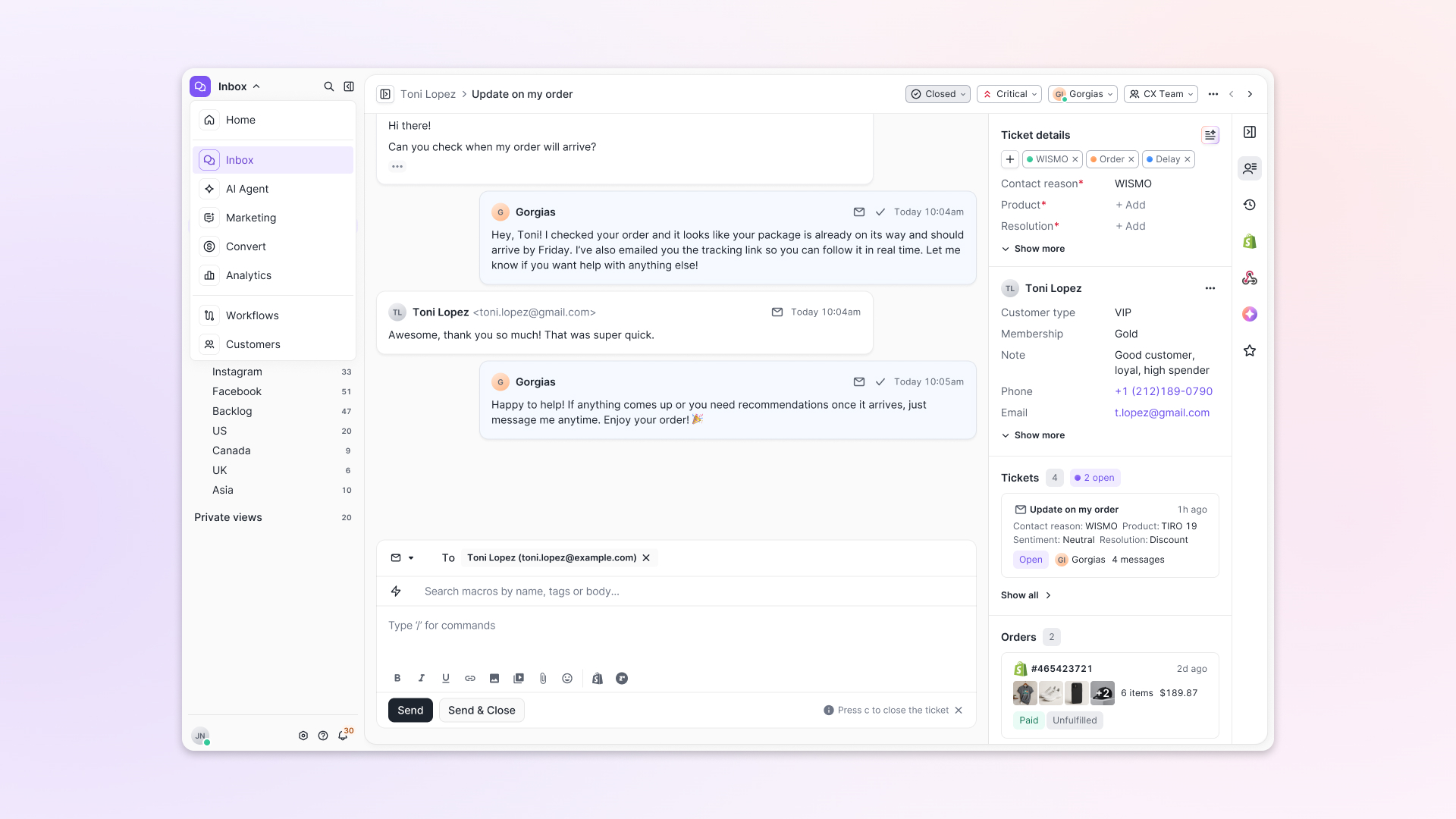
Conversations have a natural rhythm, one that’s already found in every messaging tool we use. We brought that same layout into the helpdesk.
Say goodbye to the 2000s email interface and hello to chat bubbles. This updated design changes how quickly you can orient yourself and resolve the ticket in one go.
Chats with customers now look like real conversations, using the speech bubble style you’re familiar with on popular messaging apps.
Check customer history without losing your place
Checking a customer's history used to mean leaving the conversation, an extra step that interrupted what should have been a smooth workflow.
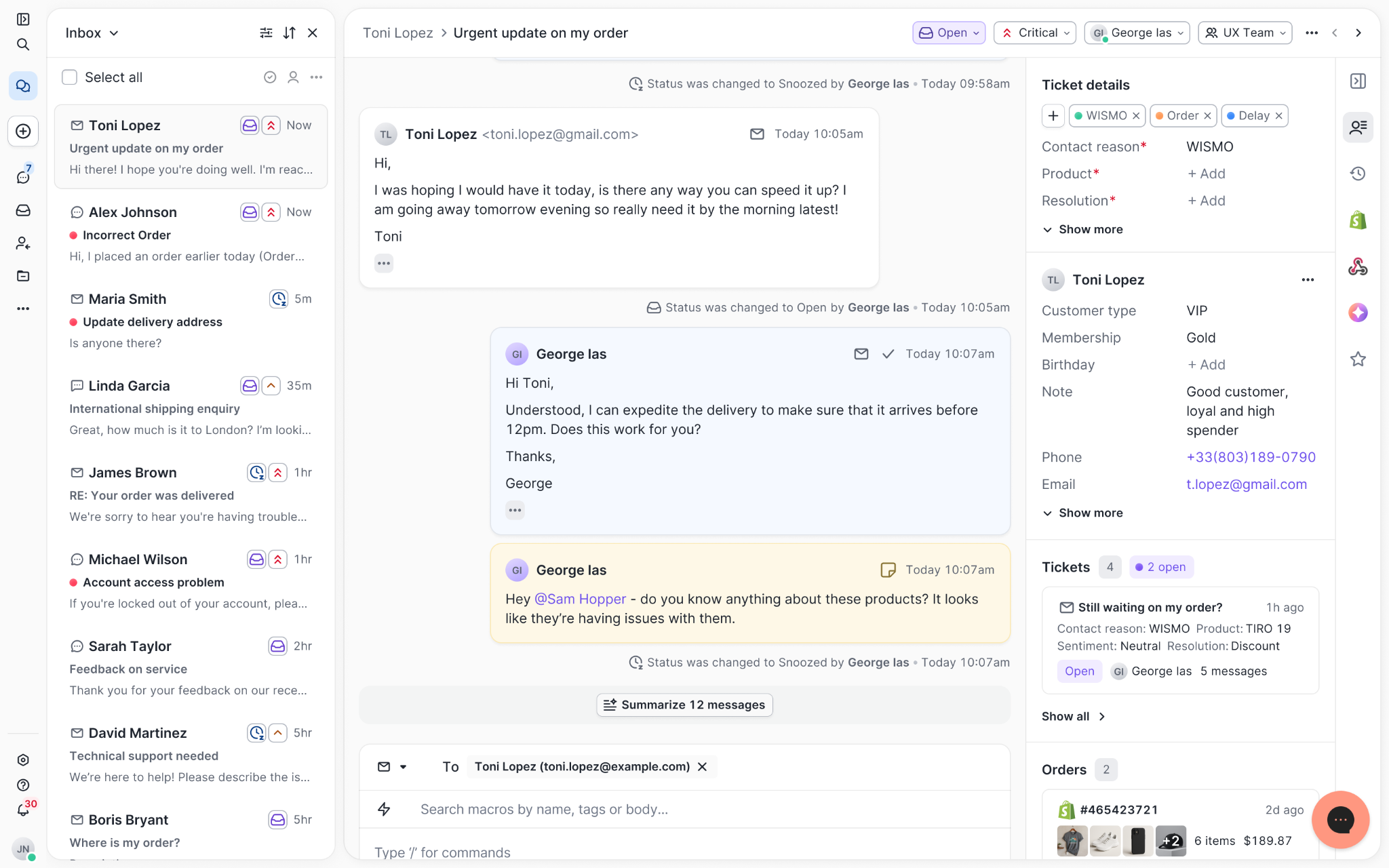
Now, past conversations open in a sidebar next to the active conversation. You can view a customer’s full history, search through their timeline, and open prior tickets without going to a new page.

Check past conversations, orders, and customer details in the brand-new Customer Timeline.
See order details the moment you open a ticket
Order information is easier to reference than ever. Open a ticket, and you instantly see the customer's recent orders, marked with product images and invoice details at a glance. Need to dig deeper? Click on an order, and the expanded information appears in the same panel.
For teams using custom integrations, apps are fixed in a quick-access integration menu on the right.
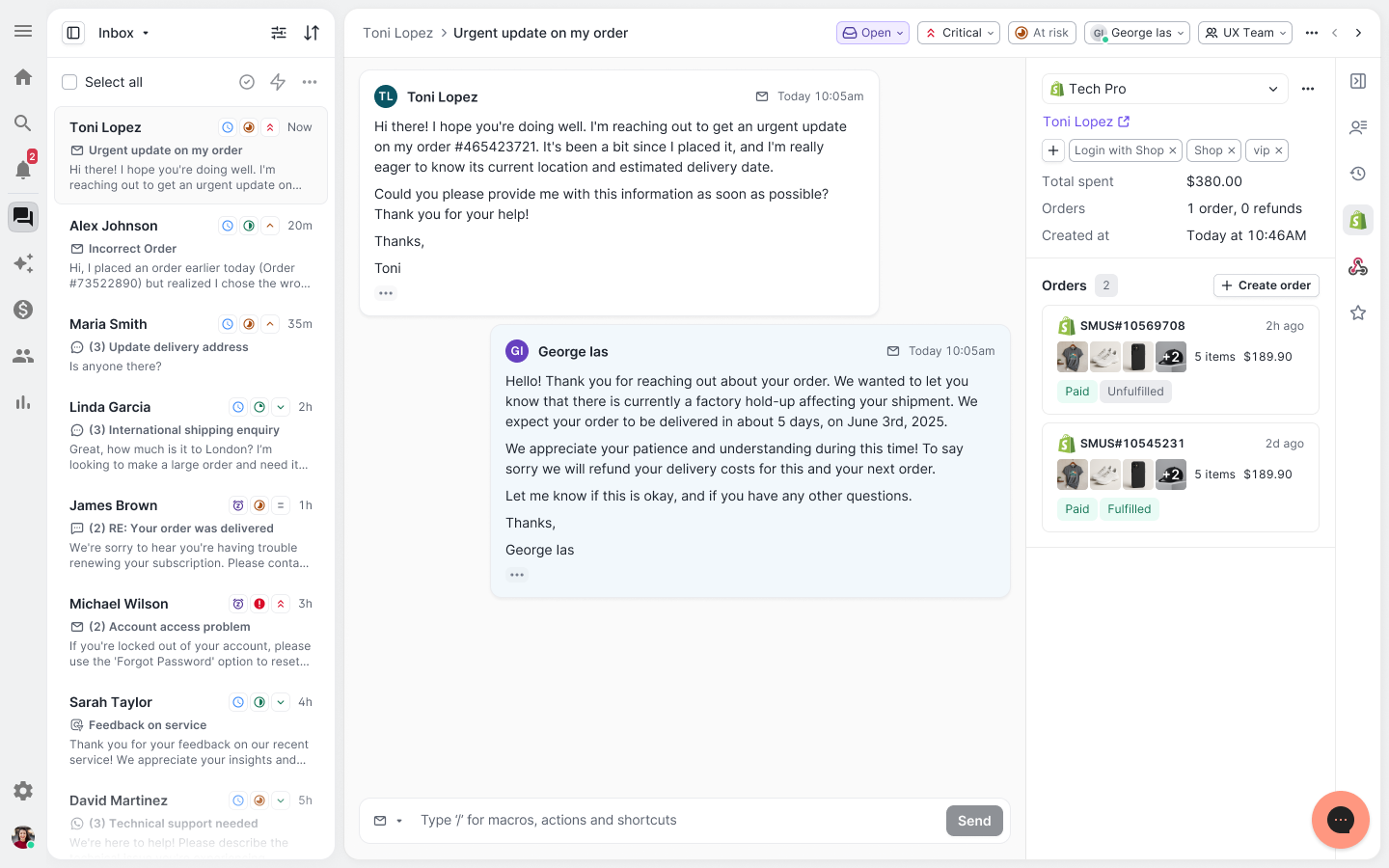
See order details, product images, and totals at a glance on the right panel, without leaving the conversation.
Pick up where AI left off
You shouldn't have to dig through a thread to figure out what AI already tried. Now you don't have to.
When AI Agent escalates a conversation, it includes a concise handover summary that mentions the issue, what actions were taken, and why it was passed to your team.
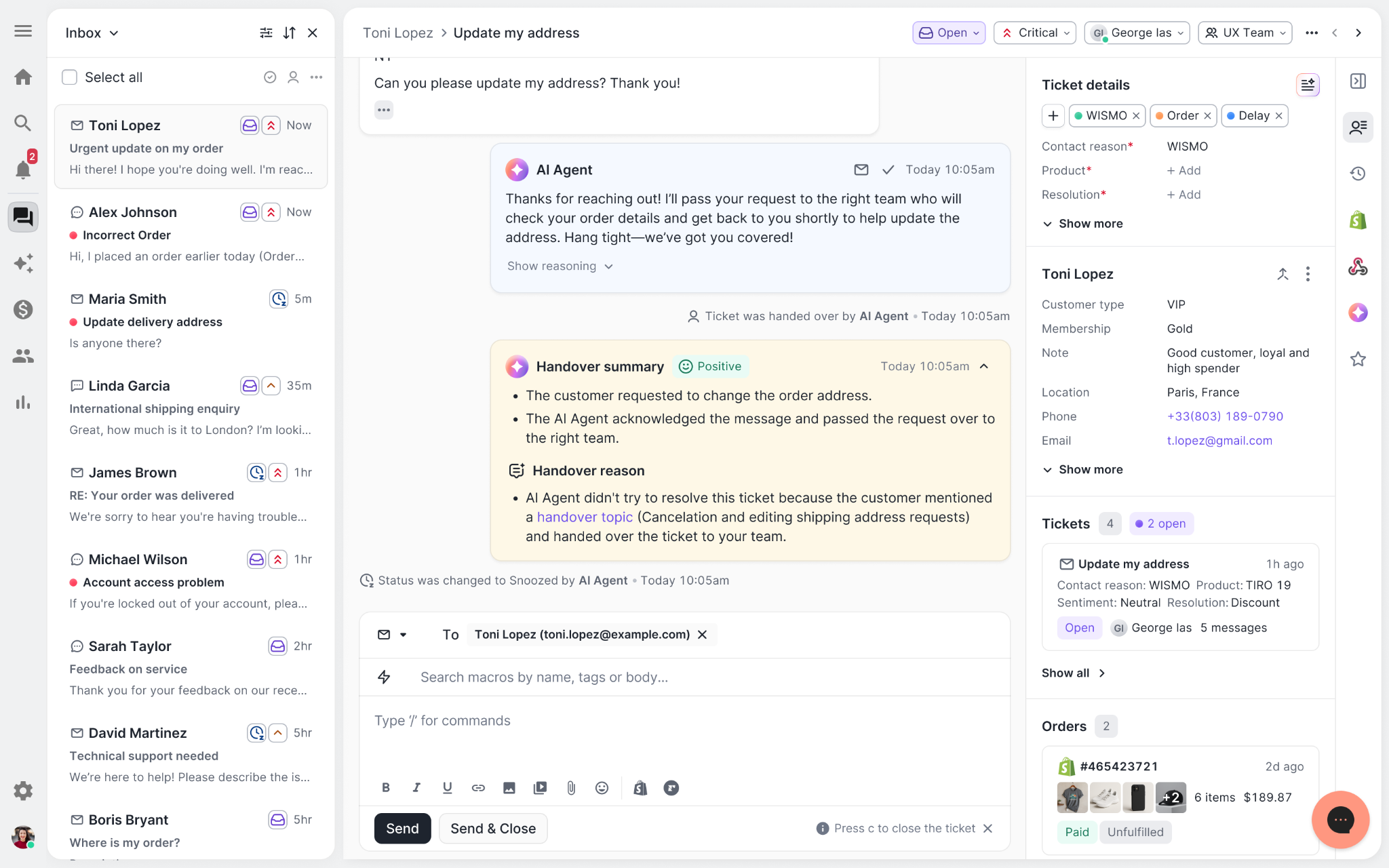
Escalated tickets include a brief AI-generated handover summary, marked in yellow, for quick reference.
Move faster across every store and team
We restructured and simplified the navigation. The left sidebar organizes everything into clear categories: Inbox, AI Agent, Marketing, and Analytics, so anyone on your team knows exactly where to go.
To quickly update your knowledge base or adjust a workflow, both now live right in the sidebar. For teams managing multiple stores, switching between them is just as straightforward, accessible from the sidebar, so agents can move between inboxes without breaking their flow.
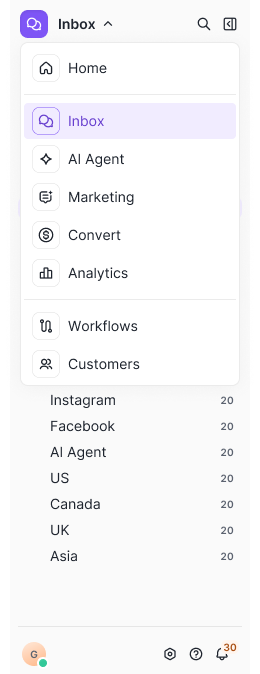
Agents can switch between stores and their corresponding inboxes directly from the left menu.
A workspace that works the way agents do
Support comes down to the person on the other end of the conversation. We built Helpdesk 2.0 is to make sure they have everything they need to show up for that moment.
The best way to see the difference is to work in it. Start a free trial today.


Further reading

Announcing Our Series C-2 Funding & the AI-powered Future of CX
Today, we’re sharing that we raised $29 million in Series C-2 funding from our existing investors, including Shopify.
Throughout the lifetime of Gorgias, we’ve always believed that great CX can be the main channel for growth for brands. Now, we believe that AI empowers any brand to realize that potential.
Most CX leaders agree, with 94% out of 1,000+ agreeing automation is becoming more essential to CX.
Funding will specifically be used to support AI Agent – a fully autonomous AI teammate built on brands’ own knowledge bases, data, and integrations, powered by OpenAI's newest model, GPT-4o.

|
AI and the next evolution of customer experience
AI has changed the landscape of digital technology. The best comparison is in the early 2000s, when the internet boomed and innovation followed.
Brands like Netflix embraced the change, evolving alongside their customers' expectations, while brands like Blockbuster tried to stick with the old ways. Now, one of those brands is a Fortune 500 company and the other is a nostalgic throwback.
Now, in the 2020s, artificial intelligence is lowering overhead, automating cognition, accelerating processes, and so much more. Brands – from software companies like Gorgias to ecommerce brands like the ones we serve – must lean into these new technologies to continue growing.
That’s why we’ve made the conscious decision to go all in on AI and automated CX. We truly believe that AI-powered solutions are the best way to help ecommerce brands on Gorgias grow and succeed.
The case for AI-powered CX
Our recent research shows that brands who automate their CX see:
- 52% reduction in resolution time
- 26% lower ticket-to-order ratio
- 36% more repeat purchases

|
AI is your instant Level 1 support. Use it to handle repetitive, basic questions quickly, to meet customer expectations, at a lower cost than hiring human staff.
Reliable AI frees CX teams to do more than what they previously thought possible, such as opening up new channels like Voice or Live Chat and freeing up your team to focus on high-impact conversations, strategy, and other important projects that get neglected when you’re drowning in tickets.
“The combination of AI and human agents is the future of support,” said Tosha Moyer, Senior Customer Experience Manager at Psycho Bunny.
Leveraging millions of ecommerce data points
Gorgias has processed 500 million tickets — every single one of them from ecommerce brands — which give us the data points and knowledge we need to build the best AI tool for ecommerce.
We also integrate deeply with 100 ecommerce apps like Shopify, Recharge, Loop Returns, and Klaviyo. This means that AI built with Gorgias has access to more data from your ecommerce tech stack, and can push updates to those apps as well.
“The combination of AI and human agents is the future of support”
— Tosha Moyer, Senior Customer Experience Manager at Psycho Bunny
We cannot stress enough the value of these data points and integrations to power CX. Without these, AI can only offer ChatGPT-style answers. It cannot pull up customer information to personalize a response or find information like order status and loyalty points. Likewise, it cannot process a partial refund or update a subscription.
With more data and integrations than any other CX tool built for ecommerce, we’re confident our AI will provide accurate, personalized, and helpful answers to our brands’ customers.
AI that integrates seamlessly with your team
We’re committed to developing AI solutions that put you in full control. You’ll be able to:
- Feed the AI from your private knowledge base
- Teach the AI your brand voice and policies
- Set guidelines that tell the AI exactly when and how to respond to specific scenarios
- Review every single AI interaction
- Provide feedback to improve the AI over time
And much more!
This means the way you work will shift: before, CX work was answering repetitive tickets over and over (and over). Now, you’ll use some of that time to monitor and improve your AI Agent and use the rest to tackle CX projects that have been on the back burner for months (if not years).
The next chapter: AI Agent
Powered by the latest ChatGPT model, GPT-4o, AI Agent can instantly answer tickets, perform actions in other apps, and match a brand's tone of voice, all while ensuring that human hand-off is always possible and smooth for the customer. It can drastically reduce your support time while earning higher CSAT scores than 95% of human agents.
 |
Launching in July, AI Agent is already being used by leading brands like Psycho Bunny. They’ve combined Automate and AI Agent to automate over 40% of inquiries across all channels, responding to and resolving them in minutes, not hours, all while achieving a higher CSAT than their human team.
Join the waitlist
“The AI Agent actually personalizes responses better than our human team, who sometimes just apply a Macro and hit send. The AI Agent restates parts of the customer’s questions helping them feel understood. Plus, of course, it’s super fast.”
— Anneliese Field, Customer Experience Manager at Love In Faith
AI Agent is just the next step in our evolution as a company.
Looking into the future, we’re using this new round of funding to develop AI-powered solutions to help you provide instant responses, gather insights to improve your CX, turn support agents into top sellers, and help you drive LTV through amazing customer experiences.


6 Ways to Increase Conversions by 6%+ With Onsite Campaigns
TL;DR:
- Create personalized onsite campaigns to enhance the shopping experience.
- Activate exit-intent campaigns to reduce cart abandonment.
- Implement upselling strategies to increase average order values.
- Offer product education to boost customer confidence and purchases.
At this point, you’re already well aware that CX is now proving itself to be an invaluable acquisition tool — not just a retention lever.
But to drive the hammer home, we looked into our database to see how CX-focused strategies like onsite campaigns enhance the customer journey and drive substantial increases in sales and conversion rates, specifically with Gorgias Convert.
Using these well-curated campaigns, businesses like Manduka have witnessed a remarkable increase in revenue — approximately $130,000.
We’ll show you how you can achieve similar results and why it’s a crucial marketing strategy — just as important as paid and email marketing.

Ways to use onsite campaigns for sales without disrupting the shopping experience
Gorgias Convert is an onsite revenue generation tool that helps ecommerce brands boost their conversions by over 6% — and it isn’t your typical intrusive pop-up. This feature seamlessly integrates with your website, recommending products to shoppers in a subtle but still captivating way.
Targeting customer segments based on their browsing behaviors, Convert makes timely and relevant suggestions via chat.
Here are a few ways you can use it:
Create fluid shopping experiences that reduce acquisition costs
Imagine this: someone clicks on your social media ad for acne removal solutions, lands on your site, and isn’t just greeted with a standard product page but accompanied by a personalized message that offers valuable product education.
In fact, Gorgias users see that we typically generate $20 for every $1 spent. So think of onsite campaigns as a way to make your ad dollars work harder with a more personalized experience by:
- Mirroring the language and tone of your ads within your onsite campaigns creates a familiar and comforting environment for your visitors.
- Populating welcome campaigns that kick in when a shopper lands on your site so that every new customer engagement starts with meaningful dialogue geared toward turning curiosity into sales.
Here’s a fun example from TUSHY, the modern bidet company.
When customers visit a bidet page, they receive a message from TUSHY’s support team, letting them know about their toilet compatibility page to help them select the right bidet:

Personalize cross-sell and upsell messages on specific product pages
Here’s something many brands get wrong about ecommerce upselling: It’s not about pushing the most expensive items; it’s about showing customers the value of an upgrade that’s complementary to the problems they’re already trying to solve.
As your customers shop, Gorgias Convert suggests complementary items. It’s like when you’re in a store and an associate suggests a tie to match the shirt you’re buying.
Manduka uses these campaigns brilliantly. Targeting shoppers nearing the free shipping threshold, they suggest just the right little extras to tip the scales.

This makes it quick and easy for customers to top up their orders with relevant products.
The results?
- Total Campaign revenue: $11,788.91
- Impressions: 37,586
- Mobile Clicks Conversion Rate: 19.65%
- Desktop Clicks Conversion Rate: 12.06%
Jessica Botello, the Customer Service Manager at Manduka, explains why this campaign works so well:
“People want free shipping. So if they've already got over $75 worth in their cart, they're almost there. Then we pop up and suggest: check out these items. It’s a curated list of the easy little add-ons that you'll need anyway for your yoga practice, but will also take you over the free shipping threshold,” she explains. “What's really helpful is that it pops up, rather than the customer having to go through the menu and look for things.”
{{lead-magnet-1}}
Winback browsers with exit-intent campaigns
You’ve likely tried exit-intent pop-ups before. You know, those pop-ups that trigger when a customer indicates they’re about to abandon their cart or browsing session.
As more brands adopt these pop-ups, customers are becoming more accustomed to them. But what’s less obtrusive is a personalized message directly from your team.
There are many ways you can grab your customers' attention with these messages. Maybe it's offering a little nudge with a timely discount, waiving that shipping fee, or answering a last-minute question they had about the product.
Here, let’s look at two examples of how effective these campaigns can be.
Manduka’s exit-intent messages
Manduka uses these exit-intent messages to offer $20 on orders over $100 (a strategic way to not only reduce cart abandonment but also increase AOV and email subscribers simultaneously.)

By engaging visitors with personalized, timely messages right when they’re about to leave, Gorgias Convert helps transform potential bounces into real conversions.
You can read more about how Manduka set up these campaigns with Gorgias Convert here.
Glamnetic’s approach
Glamnetic has had particular success with an exit intent campaign offering a discount for new customers, new product promotions, and educational campaigns.
Its most successful campaign offers a sweet 15% discount and boasts an on-ticket conversion rate of 18.39%.

Here’s how it works:
- Using Gorgias Convert, Glamnetic detects when the mouse hovers near the top of the browser, a telltale sign of an impending exit.
- The same 15% discount available through newsletter or SMS sign-ups is now presented via live chat. It’s straightforward, no strings attached.
- The campaign targets visitors who’ve been to the site three times or fewer and linger for at least 15 seconds. This specificity ensures the message is relevant and timely.
You can peek at the campaign setup below. It runs 24/7, ready at any moment to engage:

Strategically highlight new product launches
Countless new products pop up every day; consumers are bombarded with options. The challenge for brands is to launch new products in a visible and desirable way.
As you’re well aware, that’s tougher than it sounds amidst all the noise consumers already experience daily.
This is where Gorgias Convert stands out and is different from the other pop-up tools.
Unlike your latest TikTok and Instagram ads, these onsite campaigns feel genuine because a friendly support agent makes the recommendation without disrupting the shopping experience.
For example, when Glamnetic unveiled its vibrant Rainbow collection in May 2023, the team deployed targeted, visually appealing onsite campaigns that immediately drew visitors’ eyes to the new products.
Directly on the homepage, visitors were greeted with eye-catching product images from live chat, featuring a seamless and effortless option to add new items to their cart.

Mia, Head of Customer Experience at Glamnetic, shares the strategy behind the success: “The aim was to elevate the visibility of new releases without requiring customers to hunt for them. Our onsite campaigns proactively present our latest products through compelling visuals and straightforward navigation, simplifying the decision-making process for the buyer.”
That’s why Glamnetic prominently placed top-selling items in the product carousel, directly in the live chat box. The products were impossible to ignore, leading to a 49% sales increase for featured items.
Help customers be successful with product education
Product education is a powerful sales and retention tactic. By building trust with customers right away, they’ll feel more confident purchasing your products because they know they will use them successfully.
Manduka uses onsite campaigns to educate potential customers. Triggered when visitors spend more than 15 seconds on the yoga props page, the campaigns guide customers through their yoga journey and help them choose the perfect props for their practice.

Jessica Botello, Customer Service Manager at Manduka, highlights the campaign's impact:
“This yoga props blog suggestion campaign is really great because we have several options, and that can feel confusing to someone who doesn’t know which one to get because they are new to yoga and aren't familiar with which props would benefit them. The blog explains in more detail how to use the different props in your yoga practice, and the different benefits of a round bolster vs a rectangular bolster. So it helps people go ahead and choose the right product for them.”
In other words, simply explaining the nuances between choices like a round versus a rectangular bolster helped customers feel more confident about the products they purchased.
And the proof is in the pudding. Between April–August 2023, this campaign achieved the following:
- Total Campaign revenue: $3,851.73
- Impressions: 6,310
- Clicks Conversion Rate: 11.5%
By proactively addressing potential questions and concerns, Manduka enhances the shopping experience, leading to higher satisfaction and fewer post-purchase issues.
Promote sales with holiday campaigns
Holidays aren't just for festivities — they're prime opportunities for brands to connect with customers in fun, thematic ways.
Take TUSHY, for example. To celebrate US Independence Day, TUSHY ran a cheekily-themed on-site campaign called "USofSPRAY," offering a patriotic 25% off all bidets.
Yes, you read that right — cleaning your bum has never been more patriotic!

Why it works: TUSHY’s approach to holiday promotions is smart and spirited. By aligning their campaign with a major holiday, they tapped into the celebratory mood of their customers, making it not just about a discount but about being part of a nationwide celebration. This not only makes the promotion more memorable but also more engaging.
The USofSPRAY campaign not only captured attention but also captured significant sales:
- Influence on store revenue: A staggering 47.9% of the store's revenue during this period was influenced by the campaign.
- Click-through rate (CTR): The campaign achieved a healthy 3.5% CTR, indicating strong interest and engagement.
- Impressions: It racked up 65,000 impressions, spreading the word far and wide about the benefits of a cleaner, fresher bathroom experience.
- Conversion rate: Impressively, 76% of customers who engaged with the campaign went on to make a purchase.
4 tips to create a well-thought-out onsite campaign
Investing time in well-thought-out onsite campaigns can significantly amplify your marketing efforts, driving a notable increase in conversion rates and better capturing paid traffic.
Here’s how you can design campaigns that catch the eye and convert browsers into buyers.
Segment, segment, segment
The more targeted your campaign, the better your results — plain and simple.
By segmenting your audience based on specific criteria, such as the amount spent with your brand or past products purchased, you can tailor your messages to match the unique interests and buying habits of different customer groups.
Note: Gorgias is deeply integrated with platforms like Shopify, so it’s easy to leverage shopper data to create highly personalized onsite campaigns that resonate with your audience.
Identify your triggers to personalize messages
Set up your campaigns to activate based on specific behaviors, such as browsing certain products, adding items to the cart, or showing signs of exit intent. You can also use more niche triggers, like:
- Total value of shopping cart
- Products in cart
- Time spent on a page
- Number of visits
- Total spent in the past
- VIP status
For instance, by setting up a trigger for VIP customers, you can send campaigns to those high-value shoppers, like exclusive discounts or personalized style recommendations based on past purchases.
A/B test your campaigns
One of the most powerful tools in your marketing arsenal is A/B testing. By systematically testing messaging, design, or offer variations, you can uncover what resonates most with your audience and refine your strategies accordingly.
TUSHY provides a prime example of A/B testing done right. They conducted an experiment where:
- Group A: 50% of visitors experienced the full suite of targeted on-site campaigns without any discount codes, focusing instead on providing personalized guidance for choosing the right bidet.
- Group B: The other 50% did not receive any targeted campaigns during their visit.
The results were telling:
- Conversion rate lift: Group A saw a 9.6% higher conversion rate than Group B.
- Sales uplift: Additionally, sales increased by 14% compared to those not exposed to the campaigns.
This test highlights the effectiveness of providing personalized support over just using discounts and how A/B testing your offers and messaging — even for one week — helps you understand what makes your customers tick.
Keep track of your success in a detailed dashboard
Effective campaign management isn't just about launching strategies; it’s also about understanding their impact.
With Gorgias Convert, every campaign you run is tracked in detail through the Campaigns Statistics dashboard. This gives marketers a granular view of performance across different time frames and campaign specifics.
Some specific features you can expect are
- Revenue tracking: See at a glance the total revenue generated by each campaign. This allows you to evaluate the financial impact of your campaigns and prioritize those that deliver the best return on investment.
- Engagement metrics: Monitor key metrics like impressions and click-through rates to assess how well your campaigns are engaging potential customers. This data is crucial for understanding which elements of your campaigns are capturing attention and which may need tweaking.
- Conversion details: Dive deep into the data to see which campaigns are converting browsers into buyers. A list of converted tickets or interactions can highlight successful tactics and offer insights into customer behavior.
In addition to tracking basic metrics, the dashboard also provides insights into more nuanced aspects of campaign performance, such as engagement trends over time or the effectiveness of specific call-to-action placements.
Check out an overview of the Campaign Statistics page in the image below.

Start investing in onsite marketing
Onsite campaigns stand as pillars in digital marketing, carrying immense potential to captivate and convert visitors into loyal customers. Through them, you can get directly in front of your customers and showcase products or services – but in their capacity to tailor experiences, foster engagement, and ultimately drive conversions.
Gorgias Convert's innovative approach makes revenue generation easy through onsite campaigns - you will find that you’re increasing your ecommerce revenue quickly and cost-effectively. By leveraging this tool, you can navigate the digital landscape with confidence whether you’re in CX or Marketing.
{{lead-magnet-2}}TL;DR:

Knowing What You Don’t Know with Nick O’Brien
Nick’s Top Advice:
- Sharpen your skills through classes, books, and other resources.
- Ensure your hires are all good communicators.
- Create rapport and maintain strong relationships with your network because this will pay off in your future endeavors.
Nick O’Brien didn’t think he would find himself back in the print packaging industry, a trade that’s been written in his family tree for four generations. Then 2015 came and Nick witnessed how difficult it was for New York City business owners to find print packaging suppliers. This reignited a fire in him, pushing Nick to start his own print packaging business called Templi in 2017.
Don’t end up non-technical
There were already “two big strikes” against Nick starting as a non-technical and solo entrepreneur. Although he had spent his younger years working for his family’s print shop Concept Print, Templi was new territory. Not only was there printing to worry about, there was also the coordination work of wrangling together a reliable group of suppliers, designers, and buyers.
 |
He accepted this operations puzzle completely, “I worked through it by realizing, know what you don't know, and trying to get 1% better and more technical every day.”
Nick took it upon himself to fill in the gaps even without a background in business. Code Academy, an online learning platform for coding, was foundational to Nick’s learning and helped him overcome early obstacles. “You can’t run away from learning,” he says, “you have to try to get proficient in all of these areas before you make your hires.”
“You could start non-technical, but you shouldn't end up non-technical.”
Lead by example
The balance between leader and learner was hectic in the early days of Templi, and Nick could only survive as a one-man operation for so long. Building his team was ultimately a self-assessment of what duties he could and couldn’t handle as a founder. He was “basically replacing [himself] with the things he felt were the most easy to train — like customer service, bookkeeping, artwork.”
For those beginning the hiring process in their startup, he advises to “start small with the technical hire to keep your costs low, then bring in administrative hires to relieve yourself of smaller tasks, so you can stay focused on sales and the customer relationship.”
Now, with 10 people on the team, maintaining a healthy workplace culture is top of mind. “Find people who are good communicators and who raise the standards of the team with each new hire.” As a CEO, that means being eager to receive criticisms from both employees and customers so you know which company standards need to be improved.
“How you deal with problems as CEO is how your culture ends up getting defined.”
Keep in touch with your network
In 2020, Templi was one of many U.S. businesses shocked by the global COVID-19 pandemic. When orders stopped coming in, Nick had to start selling personal protective equipment (PPE) to keep the business afloat, “I relied on some connections I had from living and working in China for a couple of years, and that gave us just enough money to keep the business going.”
Maintaining a network is crucial for Templi since they serve design agencies in charge of multiple brands. “Creatives, by nature, have higher standards, and if we do right by them, we make their life easier, they bring us more customers.”
“You may think that because you're in ecommerce, you're not physically connected to your customer, but I would implore you to get connected in every way you can — visit a customer, call them, understand deeply the problems you’re trying to solve. Those relationships will pay off for you and them.” —Nick O'Brien on connecting with your customers
Optimize with speed-based KPIs
Nick often talks about iterating quickly, and to him, that means integrating customer feedback. He still makes sure to spend time with customers, whether he’s visiting their offices or getting their feedback through an email.
To make sure they’re on track, their KPIs address consistency and speed: “We're always trying to optimize for anything that involves those two things, like optimizing for repeat orders. We ultimately want to put these types of purchases on autopilot for the customer and create as much consistency as we can.”
 |
Templi’s minimum order quantities (also known as MOQ) are at the high end of the spectrum, with coffee cup orders starting at a minimum of 2,000 cups per order and bar coasters at 2,500. At this level of manufacturing, printing errors and product defects can occur. How does Templi salvage them? Or, more importantly, how do they keep customers happy?
“To retain a customer, sometimes you may not want to give a certain discount, but then you realize you need to retain them as best you can. That plays into your customer experience, doing whatever you can to keep customers happy, and optimizing the customer experience at every turn.”
Focus and be present
When the work day ends, Nick comes home to his wife and three-year-old daughter. He is mindful about time, dividing his day into half-hour blocks. For Nick, a great day equates to 10-12 hours of focused work, which he uses carefully: “You need to be able to focus, turn off, and be present for your family.”
Templi has already beat the odds of startup longevity as a seven-year-old business. Focus is also Nick’s mantra when it comes to leveling up Templi, “Just making those incremental improvements on focus is probably the best thing I've done in building the team.”
Nick reminds aspiring entrepreneurs not to shy away from collaboration and to continue getting better 1% every day.
“I'm doing my best. I'm not perfect, so I always try and keep getting better everyday.”
{{lead-magnet-1}}

30 Live Chat Customer Service Templates, Responses, and Scripts for Any Situation
TL;DR:
- Live chat has a positive impact on customer loyalty, sales, and revenue.
- Predefined responses save time and ensure consistent quality.
- Templates for greetings, handling angry customers, managing returns, boosting sales, and ending chats positively.
- Leveraging automation through chatbots can enhance efficiency.
- Balance personalization and efficiency when using live chat templates and scripts.
79% of companies say that live chat has had a positive impact on customer loyalty, sales, and revenue. However, delivering consistently high-quality live chat experiences can be a challenge, especially when live chat agents repeatedly encounter the same questions and inquiries.
By using a set of predefined responses, you’ll enable your customer service team to save time, ensure consistent quality, and offer a smoother customer experience.
Whether you’re just starting to build out your live chat support strategy or looking to streamline your existing processes, here are some live chat response examples for the most common scenarios your support team will encounter.
{{lead-magnet-1}}
Live chat templates that greet customers
Getting the initial interaction right sets a positive tone and builds rapport with customers. First impressions count! Here are some templates to help your agents start the conversation on the right foot.
Template 1) “Hi there! Thanks for reaching out to [business name]. My name is [agent name] and I’m here to help. What can I support you with?”
Template 2) “Hey and welcome to [business name]! I’m [agent name]. What brings you here?”
Template 3) “Hello! This is [agent name] from [business name]. Thank you for reaching out. How can I help?”
Template 4) “Hi! Thanks for reaching out to us. I'm [agent name]. If you have any questions about [business name] and our [products/services], let me know!"
Personalized, templated greetings like these help live chat agents balance a consistent brand tone with efficiency.
Live chat scripts to address angry customers with care
Dealing with angry customers can be challenging, but having the right scripts on hand can make a big difference by speeding up resolution times and improving customer satisfaction. Here are samples of canned responses for de-escalating tense situations:
Template 5) “I really appreciate you reaching out to us to let us know this happened, [customer name] – I’m going to help resolve this for you right away. In order to get this sorted out, can you please share [photo, more information, etc] with me?”
Template 6) “I am so sorry for the inconvenience that you’ve experienced. That’s not the customer experience we strive for at [company name]. Let me look into this further and see what I can do to make this right. If necessary I can talk with my team to see what else we can do.”
Template 7) “[Customer name], I so apologize for the error on our end. I’m going to look into this for you right away. It should only take a couple of minutes. Thanks for your patience!”
Template 8) “I’m sorry to hear that you’ve experienced this issue and I apologize for the trouble. Let’s work together to find a solution that you're happy with.”
By acknowledging the customer’s frustrations and demonstrating a genuine desire to help, your live chat agents can turn a potentially negative situation into a positive one. That's something that Ren Fuller-Wasserman, Director of Customer Experience at bidet brand TUSHY, feels strongly about:
“We’re fervent believers that even the worst customer experiences are actually opportunities ripe for the Poo-Rus to convert into meaningful customer interactions, experiences where we can show a customer that we’re truly listening and have heard their concerns.
We can’t always solve every problem, but our customers knowing that they have a real live pooping human supporting them through their woes has been invaluable in building lifelong product and brand relationships.”
📚 Recommended reading: How TUSHY Approaches Customer Service vs. Customer Experience
Templates to streamline returns, cancellations, or exchanges
Handling returns, cancellations, exchanges, and other routine customer requests can be tricky, but having the right scripts can help ensure a smooth process. The following live chat examples can guide your agents through the necessary steps while providing a consistent high-quality experience for your customers.
💡 Tip: Gorgias's integration with Shopify means all customer context, like their contact information, past orders, order numbers, and shipping status are available for each agent, right in the customer sidebar. No switching tabs or asking customers for simple details again!
Template 9) “I can definitely assist you in returning or exchanging that item. In order to get the process started, can you send over your [order number, email, etc.]?”
Template 10) “I understand you’d like to cancel your order. Let me review the status and see what I can do. Can you provide me with [cancellation reason, order number, etc]?”
Template 11) “[Customer name], Confirming that I've canceled your order [number of last order] and issued a refund. As a reminder, the refund can take [# of days] to process. We refunded the original amount to the same credit card you used to make the purchase.”
Template 12) “No problem, we can certainly process an exchange for you. Could you let me know the item you’d like to exchange and the new item you’d prefer? ... Ok, I’ve swapped out [item name] for the [item name] you originally selected. Can you please confirm that the following [billing information, address, etc] on file is correct? … Is there anything else I can help with?”
Gorgias has empowered clients like Marine Layer, a clothing retailer known for its fun, vibey brand and high-quality clothes, with numerous retail locations and a strong online presence to excel by using templates.
Emphasizing customer-centric experiences, Marine Layer has harnessed chat scripts to streamline and harmonize communication and reduce first response time, resulting in a 68% decrease in resolution times. This approach, featuring clear, brand-aligned messaging, has significantly boosted online successes, enhancing customer support efficiency, customer satisfaction, and increasing online orders.
 |
 |
Discount coupon templates
Who doesn't love a good discount code? Letting shoppers know that you're running a promotion can help take them from browse to checkout.
💡 Tip: Gorgias Convert can automatically trigger coupon codes based on different behaviors. For example, yoga brand Manduka shares a discount code in chat when a shopper looks like they're about to exit the website.
Template 13) “Hey there [customer name]! Good news: [company name] is offering a discount on [promotional item or discount amount]. Questions? Let me know!”
Template 14) “I noticed you’ve been browsing our [product department name/category] collection. I wanted to let you know that we have a special bundle deal that includes [detail the deal]. Let me know if you want to learn more!”
Template 15) “I have some great news - we’re currently offering [discount percentage] off your entire order. Would you like me to apply that discount to your cart? “
Template 16) “Just to say thanks for being awesome, I’d like to offer you an exclusive [discount percentage] off coupon code to use on your next purchase.”
By adapting their approach, agents can elevate a simple sales pitch into a valuable, personalized experience. Through chat scripts, agents are equipped to inform website visitors about general information and perks such as qualifying for free shipping or securing a discount, serving as effective conversation starters that incentivize visitors to make a purchase before leaving a website.
Templates for managing out-of-stock items
Handling out-of-stock situations in response to customer requests can be a delicate balancing act. On one hand, you have disappointed customers who were eager to make a purchase, on the other, you have the realities of inventory management. With the right chat scripts, agents can maintain a positive experience. Try:
Template 17) “Oh shucks! [product name] isn't available right now. But, it will be back soon. Would you like me to put you on a waitlist so you’re the first to know when it’s back in stock?”
Template 18) “I apologize, but it looks like the [product name] you’re interested in is currently out of stock. We’re expecting a new shipment in the next [number range] business days. Why don’t you provide me with your email address or phone number and I can notify you by email or text as soon as it’s back in stock?”
Template 19) “Unfortunately, the [product name] is sold out at the moment. However, I’d be happy to suggest some similar items that are available if you’d like?”
Live chat templates to help boost sales
When customers are actively browsing your site and adding items to their cart, using proactive customer service messages in your chat scripts can provide valuable guidance and encouragement to help seal the deal.
📚 Recommended reading: How to Leverage the Power of Live Chat for Sales
Here are some scripts that team members can use:
Template 20) “The [product name] is one of our best sellers! Other shoppers love it for its [key feature] and [key feature].”
Template 21) “I noticed you’ve been looking at the [product name]. What questions about it can I help answer?”
Template 22) “Based on the items you’ve been exploring, I think you might really like our [product/service] line. It has [key features/benefits] that are designed for [features]. Does this sound like it could be a good fit?.”
The key is to strike the right balance between guiding the customer and empowering informed decisions. As Shinesty – a rapidly growing, innovative apparel brand known for its distinctive, themed underwear and custom-branded collections – gets it right. “We got a lot of praise from our customers, and they talk highly of our CX team after 1:1 interactions.” – Molly Kerrigan, Senior Director of Retention at Shinesty.
 |
 |
 |
By leveraging these sales-boosting live chat scripts, your customer service team can provide the high-touch service customers appreciate in real time and drive more conversions.
Tactful cross-selling and upselling chat scripts
Offering upgraded products can be a great way to increase your agents’ average order value. These templates can help your live agents navigate the cross-sell and upsell process with finesse.
Template 23) “Since you’re interested in the [product name], I wanted to let you know that we also offer a [upgraded product name] with [additional feature] and [additional feature]. Want to learn more?”
Template 24) “I noticed you had [product name] in your cart. [Product name] is the perfect compliment. Together, they [benefit] and [benefit].”
Template 25) “Great choice on the [product name]! While you’re here, I wanted to mention our [bundled product name] – it includes the [original product name] plus [additional item] and [additional item] for a discounted price. Let me know if you have any questions!”
By focusing on the customer’s needs and offering genuine value, live chat agents can turn these interactions into a win-win for both shoppers and your business.
Templates for ending chats on a positive note
Just as important as starting the conversation on the right foot, wrapping up the live chat conversation with a positive tone can leave a lasting impression. Here are some live chat templates to help agents gracefully conclude the conversation:
Template 26) “Is there anything else I can assist you with today? I’m happy to help. … If there is nothing else, feel free to reach out at any time with any more questions. Have a great day!”
Template 27) “I’m so glad we could resolve your issue today! If you need anything else, just send us a message any time. We're online during [hours] if you need a speedy response. Take care!”
Template 28) “Thanks for reaching out! Don't hesitate to shoot us a note if you have any other questions in the future. ”
Template 29) “Thanks for reaching out and letting us know about your experience with us! Have a wonderful rest of your day.”
Template 30) “Thanks so much for your order! I hope you love your new purchase!”
By leaving customers feeling valued and supported, agents are setting the stage for future positive interactions. The idea is to ensure the customer is happy. In fact, 91% of customers say good service is essential and makes them more likely to purchase from the company again.
Leverage automation for efficiency
While live chat templates and chat support scripts can significantly improve the quality and consistency of your customer support, automation takes things to the next level.
Gorgias Automate can handle routine, high-volume inquiries, provide a seamless customer experience, improve efficiency, resolution times and save you money. By combining the power of live chat templates and the efficiency of Automate, you can empower your live chat agents and support team to focus on more complex issues that require a human touch, enhancing the customer experience.
{{lead-magnet-2}}

How to Optimize Your Help Center for AI Agent
TL;DR:
- AI Agent, Gorgias’s conversational AI tool, uses your Help Center as its primary knowledge source to autonomously handle over 30% of customer email inquiries.
- Ensure your Help Center articles address all relevant topics such as shipping, orders, product information, and account management.
- An updated Help Center boosts AI Agent's ability to deliver accurate and relevant responses.
- Ready your Help Center for the upcoming AI Agent beta in May 2024 by using our 50+ article templates.
Your Help Center is a great resource for sharing information with customers. And as AI technology transforms customer support, the Help Center now also serves as a data source that provides AI with the knowledge to answer questions.
Gorgias’s AI features function by drawing on information from knowledge sources. For example, Gorgias’s AI can draw upon your past support tickets to generate Help Center content. Likewise, our upcoming AI Agent uses your Help Center to write and send answers to customer questions.
Our AI Agent is coming July 1st (with a Beta starting in May). Below, we'll explain why an up-to-date Help Center that covers all your policies is the best way to prepare for AI Agent, gain admission to the Beta, and resolve 30%+ of your email support interactions.
{{lead-magnet-1}}
Help Center: The foundation of AI Agent’s knowledge
AI Agent is a conversational AI tool that answers customer support emails by learning your brand’s policies and processes from your Help Center. It can understand a wide array of questions and generate unique responses that are helpful, personalized, and accurate.
Unlike AI tools like ChatGPT or Gemini, which are trained on public information, AI Agent specifically works with your data. Its first layer of support is your Help Center, a database of articles about your products and policies. From there, you can complement its knowledge with data from Macros and connected ecommerce tools like Shopify.
With AI Agent as your level 1 support, your team can focus on escalated or VIP tickets and other projects you may not currently have time for.
The crucial step to fully prepare AI Agent is to make sure your Help Center articles are accurate and up-to-date. You don’t need to have your Help Center published or linked on your website — however, articles must be published and not saved as drafts.
How to tell if your Help Center is ready for AI Agent
To hit the ground running with AI Agent, your Help Center must meet a few criteria. Here’s a checklist to prepare your Help Center:
✔️ Answers all relevant topics
Ideally, customers should find answers with just one click. You can achieve this by publishing articles that answer your customers’ top concerns.
We’ve compiled the most important Help Center articles to have, with the starred questions being essential to include. You can skip to the bottom of this post to find templates for these topics:
Shipping & Tracking
- ⭐️ Where is my order? (WISMO)
- ⭐️ How do I track my order?
- ⭐️ How do I get my tracking number?
- ⭐️ How much does shipping cost?
- ⭐️ Do you offer free shipping?
- ⭐️ International shipping / do you ship worldwide?
- ⭐️ Do you offer expedited shipping?
- ⭐️ How long does delivery take?
- Why can’t I track my order?
Orders & Payment
- ⭐️ Can I edit or add anything to my order?
- ⭐️ How do I apply promo/discount codes?
- What methods of payment do you accept?
- Where do I get promo codes/discounts?
- My promo code isn’t working
- Forgot to add a promo code (but already purchased)
- How do Shop Pay installments work?
- How do I update the billing information on my order?
- How do I purchase a gift card?
- How do I use a gift card for my purchase?
- Do you price match for sales?
Order Issues
- ⭐️ What is your return/exchange policy?
- ⭐️ What is your cancellation policy?
- ⭐️ How do I initiate a return?
- ⭐️ How do I initiate an exchange?
- ⭐️ How do I cancel my order?
- ⭐️ How do I get a refund?
- ⭐️ Order is marked delivered but not here
- ⭐️ What do I do if I receive the wrong item in my order?
- Right product was delivered but wrong size/style/color/etc.
- Item is missing from my order
- Does not fit/not true to size
- I’m having a reaction to the product
- Order damaged
Product Information
- Sizing
- Styles
- Materials/Ingredients
- Product recommendations
- How to use this product
- How long does this last?
- How to store this product (if it’s perishable)?
- Product care / washing / cleaning
- Differences between similar products
Accounts/Subscriptions
- ⭐️ How do I use these benefits/rewards points?
- ⭐️ I’m having trouble logging in
- ⭐️ How do I cancel my membership/subscription?
- ⭐️ How do I skip a subscription shipment?
- ⭐️ How do I update my subscription items?
- How do I set up an account?
- How do I become a member/subscriber/loyalty program?
- What are the member benefits? Why should I sign up?
- I forgot my password / Reset my password
- How do I change my default address?
✔️ Up-to-date and accurate articles
As an online business, your information constantly changes, including policies, product updates, and brand revamps. Review older articles, particularly those over a year old, to ensure the information is still accurate.
Here are the most important elements to update:
- Policies, e.g. international shipping, order processing times, return windows, your contact details
- Product names and availability
- Links (to key pages on your website or self-service portals)
✔️ Includes important links
If your articles point to other web pages, you’ll want to make sure the right texts are hyperlinked, and the links do not lead to 404 pages.
Some important links to include:
- Order tracking portal
- Returns & exchanges portal
- Loyalty program portal
💡 Pro Tip: Avoid including statements in your articles like, “To resolve this issue, contact us at [email]” as this confuses the AI Agent.
✔️ Articles are published
Ensure your articles are published so AI Agent can learn from them. Whether the article is Unlisted or Public, you must take them out of Draft mode. An article left in Draft mode remains invisible to AI Agent. To confirm that your article is published, check the top right corner of the editor to ensure the article is “Published” and not “Unsaved.”
 |
That said, if you’re not ready to share your Help Center with customers, you don’t need to publish the Help Center itself.
 |
Related: How to boost your Help Center’s visibility
How to build a Help Center as quickly as possible
If you don’t currently have a Help Center, you can set one up and start filling it with articles within a couple of hours. Below are three strategies that will let you create the most comprehensive Help Center, fast.
1) Use AI to create articles
When you create a Help Center on Gorgias, you can access the AI Library. The AI-generated articles are based on your past conversations with customers and their concerns. You can edit them to suit your brand voice and policies.
 |
As of now, only accounts with a single Shopify store connected have access to the AI Library. We expect multi-store accounts to gain access to this feature by mid-May 2024.
Related: Our AI Library Help Doc
2) Use article templates
Accelerate the setup of your Help Center by using pre-written article templates. These templates cover common customer inquiries and ensure consistency in response quality and format.
Gorgias offers six ready-to-use Help Center article templates that cover essential topics. These templates enable you to quickly establish a strong database without wasting agents’ time.
 |
3) Leverage existing content
Take stock of your existing content, such as FAQs, product guides, and blog posts. Convert this content into Help Center articles and properly categorize them based on the topic for seamless user navigation.
💡 Pro Tip: Each article should only ask one question. This helps AI Agent to easily decipher the purpose of each article.
 |
50+ Help Center Article Templates with Answers
To speed up Help Center creation, we’ve provided article templates covering topics from shipping and tracking and account creation to product information. Simply edit the details and add the necessary links based on your policies.
Shipping & Tracking
⭐️ Where is my order? (WISMO)
To check the status of your order, please visit our Order Tracking Portal and enter your email address and order number. We update our tracking information as soon as it is available.
⭐️ How do I track my order?
Once your order has shipped, we'll send you a confirmation email with a tracking link. Click on the link to view the latest updates on your order and its estimated delivery date.
⭐️ How do I get my tracking number?
Your tracking number will be emailed to you when your order ships. If you haven't received it, please check your spam folder. If it's not there, please contact our customer support team.
⭐️ How much does shipping cost?
Shipping costs vary depending on the weight of your order and the destination. To view shipping costs, simply add items to your cart, proceed to checkout, and enter your shipping address. The applicable shipping fees will be displayed before you finalize your order.
⭐️ Do you offer free shipping?
Yes, we offer free standard shipping on orders over [$#]. A standard shipping fee will be applied to orders under [$#].
⭐️ Do you ship worldwide?
We ship to [#] countries worldwide. Shipping costs and times vary depending on the destination. For detailed information and to see if we ship to your country, please visit our international shipping page.
⭐️ Do you offer expedited shipping?
Yes, we offer expedited shipping options for most locations. You can select your preferred shipping method at checkout. Additional charges will apply for expedited shipping.
⭐️ How long does delivery take?
Delivery times vary depending on the destination and the shipping method selected. For standard shipping in [country], expect your order to arrive within 5-7 business days. International orders may take 10-20 business days.
Why can’t I track my order?
If you can’t track your order, it may be for several reasons: the tracking information is not yet available, the tracking number is incorrect, or there may be a delay in the tracking system updates.
Please allow up to 24 hours for your tracking information to become available after receiving your shipping confirmation email. If you still face issues, contact our customer support team for further assistance.
Order & Payment
⭐️ Can I edit or add anything to my order?
Once an order is placed, we are unable to make changes to the order. However, if you need to update your shipping address or contact information, please contact our customer service team immediately after placing your order.
⭐️ How do I apply promo/discount codes?
To apply a promo or discount code, proceed to checkout and enter your code in the 'Discount Code' field. Click 'Apply' to see your new total before finalizing your order. Only one code can be used per order.
What methods of payment do you accept?
We accept various payment methods including Visa, MasterCard, American Express, and PayPal.
Please note that we do not accept personal checks or money orders.
Where do I get promo codes/discounts?
To get promo and discount codes, make sure to subscribe to our newsletter, check our homepage, and follow us on social media to get the latest deals.
My promo code isn’t working.
The promo code you entered may not work due to an incorrect input (check that you have entered the right letters and numbers), specific conditions (like minimum spend), or an expiry date. If you continue to experience issues, please contact our support team for assistance.
I forgot to add a promo code but already made a purchase.
If you forgot to apply a promo code at checkout, please contact our customer service team as soon as possible. Depending on the status of your order, our team may be able to apply the promo code for you.
How do Shop Pay installments work?
Shop Pay Installments allow you to split your purchase into multiple payments, interest-free. At checkout, choose Shop Pay, select 'Installments', and follow the prompts to set up your payment plan.
How do I update the billing information on my order?
To update your billing information, you may log in to your account and change your information from the Account Settings page. If you do not have an account, please contact our customer service immediately.
How do I purchase a gift card?
Gift cards can be purchased directly from our website. Visit our gift card section, choose the amount, and complete the purchase. The gift card will be directly emailed to you or to the specified recipient.
How do I use a gift card for my purchase?
To use a gift card, enter the code in the 'Gift Card or Discount Code' box at checkout. The value of the gift card will be deducted from your order total.
Do you price match for sales?
We offer price matching for sales within [specific timeframe] of purchase. If an item you’ve bought goes on sale within this period, please contact our customer service to adjust the price difference. Note that certain conditions may apply.
Order Issues
⭐️ What is your return/exchange policy?
We accept returns and exchanges within [30] days of purchase. Items must be in their original condition and packaging. Some items may not be eligible for return. Please see our detailed return policy for more information.
⭐️ What is your cancellation policy?
Orders can be canceled within 24 hours. After this period, we may not be able to cancel your order as it might already be in processing or shipment.
⭐️ How do I initiate a return?
To initiate a return, please visit our Returns & Exchanges Portal and enter your order number and email address.
⭐️ How do I initiate an exchange?
To exchange an item, please visit our Returns & Exchanges Portal.
⭐️ How do I cancel my order?
If you need to cancel your order, please contact us immediately. If your order has not yet been processed, we will cancel it and issue a full refund. If the order is already processed, please refer to our Returns & Exchanges policy.
⭐️ How do I get a refund?
Refunds are processed upon receipt and inspection of the returned item. Please allow up to 10 business days for your refund to be credited back to your original form of payment.
⭐️ Order is marked delivered but not here.
If your order is marked as delivered but you haven't received it, please check around your delivery location and with neighbors. If you still can't locate it, contact our customer support for assistance.
⭐️ What do I do if I receive the wrong item in my order?
If you receive the wrong item, please contact our customer service immediately. We will arrange for the correct item to be sent to you and provide instructions for returning the incorrect item.
I received the right product but in the wrong size/style/color.
We apologize for any inconvenience caused. Please contact our customer service team within [#] days of receiving your order to initiate an exchange for the correct size/style/color. Visit our Returns & Exchanges policy for more information.
What should I do if an item is missing from my order?
We're sorry to hear that you're experiencing issues with your order. Please check your confirmation emails to ensure all items were included in your shipment. If an item is missing, please contact our customer service team immediately so we can resolve the issue.
What can I do if my item doesn't fit or isn't true to size?
If the item you purchased does not fit, you can return it for a refund or exchange it for a different size. Please refer to our Returns & Exchanges policy for details on how to initiate a return or exchange.
What should I do if I'm having a reaction to the product?
Your safety is our priority. Please stop using the product immediately and consult a healthcare professional as needed. To report a reaction and request a return or exchange, contact our customer support team. We also recommend checking the ingredients list to identify any potential allergens.
What should I do if my order arrived damaged?
We apologize for the inconvenience. Please take a photo of the damaged item and email it to our customer service department within [#] days of delivery. We will assist you with a return or exchange as quickly as possible.
Product Information
Where can I find sizing information?
Our sizing runs true to size unless stated otherwise.
For detailed sizing information, please visit our Sizing Guide page. The guide includes size charts and tips on measuring yourself to ensure the best fit.
Which style is best suited for my needs?
Our various styles cater to different preferences and requirements. For a breakdown of our styles and their best uses, please check out our detailed Style Guide.
What are the materials or ingredients used in this product?
We use high-quality materials/ingredients to ensure the best experience with our products. For a full list of the materials or ingredients in this product, visit the product page.
What product do you recommend for [trait/preference/condition]?
For [trait/preference/condition], we recommend our [Product Name], designed to provide a [benefit here].
How do I use this product?
For optimal results, follow these steps:
- Step 1
- Step 2
- Step 3
- Step 4
How long does this product last and how should it be stored?
This product typically lasts [X amount of time] when used as directed. Store in a cool, dry place away from direct sunlight. For perishable products, refrigeration may be required.
What's the best way to care for this product?
To maintain the quality of your product, we recommend [specific care instructions, e.g., machine wash cold, hand wash only]. For more detailed care instructions, please visit our Care Guide.
What's the difference between Product A and Product B?
Product A is designed for [specific use], while Product B is better suited for [different use].
Accounts/Subscriptions
⭐️ How do I use these rewards points?
You can redeem your rewards points at checkout. Enter the amount of points you wish to apply in the 'Rewards' field, and the discount will be applied to your total.
⭐️ I’m having trouble logging in.
If you're having trouble logging into your account, please try resetting your password using the 'Forgot Password' link on the login page. If you still experience issues, contact our customer support team for help.
⭐️ How do I cancel my membership/subscription?
To cancel your membership or subscription, please log into your account and navigate to the 'Subscriptions' section. You can choose to cancel your subscription from there. If you need assistance, our customer service team is here to help.
⭐️ How do I skip a subscription shipment?
You can skip a subscription shipment by logging into your account, going to the 'Subscriptions' section, and selecting the shipment you wish to skip. Please do this before the billing date for the next shipment.
⭐️ How do I update my subscription items?
To update the items in your subscription, log into your account and visit the 'Subscriptions' tab. You can add or remove products or change the quantities for your next shipment.
How do I set up an account?
Create an account [here] by using the same email address you ordered with.
Please note that if you haven’t created a password, you do not have an account. Additionally, signing up for our emails or ordering doesn't mean you have created an account.
How do I become a member/subscriber/loyalty program?
Become a member by visiting our Membership page.
What are the membership benefits?
You’ll earn many perks as a [company name here] member! Upon joining, you’ll receive a 10% off discount on any purchase.
Plus, more benefits:
- Points for every dollar spent
- [$] off anytime you refer a friend
- A special birthday gift
- An anniversary gift
I forgot my password.
To reset your password, please click [here].
How do I change my default address?
You can change your default address from your Account settings.
If you need to change your shipping address for a current order, please [contact us].
{{lead-magnet-2}}

The Gems of Learning with TJ Balo
TJ’s Top Advice:
- As a leader, foster openness and creativity by encouraging team members to regularly share their ideas.
- Tell your customers when you update a product. Including them in the conversation can build trust and bring about valuable feedback.
- Treat your customers as your stakeholders. They are the driving force behind your brand and deserve to have their voices heard.
- Leadership entails continuous learning from your team, customers, and the industry at large.
Everybody wants to skip to the answers, but for TJ Balo, there is more joy to be found in the learning. Since 2014, TJ has been the Head of Customer Relations and Marketing at Andrea Iyamah, a fashion line founded in 2011 by Nigerian designer Andrea Dumebi Iyamah. From Toronto, TJ leads a group of customer service reps from around the world, including New York and Nigeria, teaching them the ins and outs of customer service operations, logistics, and lingo.
Encouraging out-of-the-box ideas
Brainstorming is one of the most exciting parts of the job for TJ, who’s always finding ways to improve the customer experience. When his team gets together, there is no wrong answer. TJ encourages his staff to think outside the box. Whether it’s a bold social media marketing play or a never-before-done collection, he wants to hear it all.
“I always want them to bring new concepts and ideas to the table. I think that for success, it's not about the implementation. It's about what you’re thinking,” he says.
The vulnerability to share out-of-the-box ideas allows his team to create a playground where creativity is the only goal. It’s where every idea has a chance to shine when the time is right, whether it’s in a month or in the next year. All TJ asks is for every person to be fearless and confident: “Let your presence be known. The minute I can identify you, that's when I know that you're doing something right and I'm doing something right.”

Including customers in the conversation
Online businesses, especially fashion brands, are no strangers to the challenge of meeting customer expectations. Sometimes colors don’t appear the same way on a screen as they do in person. Other times, sizes may run a smidge too loose or snug. Regardless of the issue, “it’s about consistent communication first,” TJ says.
How can you show up for the customer and show them they matter? For TJ’s team, customer satisfaction is their guiding light. They always remember to throw in an incentive for customers, whether it’s a refund, discount, or replacement.
TJ pays the same heed to internal feedback. His team’s opinion takes precedence before a product is released. They answer questions like, “What’s missing?” “Does it translate well to different body types?” People naturally gravitate towards good products, and TJ wants to hit that mark as closely as possible the first time around.
When mishaps occur, broadcasting the solution to their customer base is imperative. “I think that that's one step a lot of fashion and retail brands miss. They take the feedback in, and they come out with a new or better product, but the customer doesn't know because they don't communicate that message to them to say, ‘We took this in from you, we have this new version out, come and try it again,” he says.
Treating customers as stakeholders

Peruse Andrea Iyamah’s Pinterest and their inspirations draw from a cornucopia of African cultures, stories, and experiences. Traditional details can be found in every piece, from a modern sleeveless dress in the recognizable silhouette of a Kaftan to jumpsuits adorned with sculptural pleats similar to those found on a Gele. The room to innovate is boundless, especially with their Treasures.
Treasures, the term of endearment for their customers, are the backbone of Andrea Iyamah. Without the support and feedback of their Treasures, the brand would not have crossed international borders, dressing icons like Michelle Obama, Gabrielle Union, Ciara, and Kate Hudson.
“We treat our customers as our stakeholders. We believe they’re the driving force of the brand and its vision, hence our goal to make them feel valued and appreciated,” TJ emphasizes.
On Instagram, they spotlight their Treasures’ voices with Instagram carousels of rave reviews on Twitter. One Treasure confidently states, “Andrea Iyamah never misses… I swear.”
“You have to take in every single detail. That is where the brand meets the stakeholder. That's where they both come together. I never give credit to just either or. They both come together to create and to curate this amazing masterpiece.” —TJ Balo on handling custom orders
Continuous learning is vital to leadership
For a business that’s been operating for over a decade, you could say Andrea Iyamah has accomplished everything. But for TJ, the learning never stops. “Research and ensuring that you're actually taking in that research is the genesis of staying on the cutting edge.”
He recognizes that they aren’t the first to do it in their industry, that there are countless other companies making great strides. Nonetheless, he wants to be the best to do it. “As we grow, as a business, as a brand, as a company, even just as a team generally, I want to be a reflection of what I would like from my team. You can never know it all. Continuous learning is also leadership.”
{{lead-magnet-1}}

There’s More to Chat Than You Think: Debunking 5 Chat Myths
Customers who use chat support are 2.8 times more likely to convert than those who don’t. Despite its proven impact, misconceptions around chat’s limited scope — reducing it to only live interactions — persist, creating a missed opportunity for the online stores that could benefit from it the most.
The reality is chat is a versatile tool that can adjust to company needs, whether it’s a self-service tool that runs on its own, a channel for providing live support, or both.
For ecommerce businesses on the fence about incorporating chat into their customer service operations, we're here to clear up five of the most common myths about chat’s functions, costs, and benefits. After that, we’ll lay out a five-step guide to efficiently set up chat so you can start delighting customers now.
{{lead-magnet-1}}
What’s the difference between Live Chat and Chat?
Live chat is real-time communication that allows customers to interact with a customer service representative instantly. It's the digital equivalent of walking into a store and speaking directly with an employee.
On the other hand, chat is more than just live interactions; it includes automated responses that ensure customers receive support, even without agents. This hybrid approach allows businesses to deliver 24/7 customer support.
Chat solutions, like Gorgias Chat, blend live chat's on-demand nature with automation and AI. Chat allows businesses to provide support regardless of time zone and staff availability.
Five chat myths debunked
Confusion about what chat can do often discourages businesses from leveraging the powerful customer service tool. Below, we’ll be myth-busting five common misconceptions about chat to reveal its true potential.
Myth 1: Chat is expensive
Contrary to popular belief, chat can be a cost-effective solution to operate customer service. Brands can earn 10x more revenue by implementing chat and, in turn, operate a smaller support team. Support agents can be costly, so using chat to deflect tickets can be a quick way to optimize both time and budget.
 |
Myth 2: Chat is only for big companies
Chat's usefulness transcends business size and breaks down silos in customer service by allowing customers to get answers on their own time. As a customer service tool, any business engaging with customers can benefit greatly from it to tackle pre-sales questions and resolve issues efficiently.
Myth 3: Chat requires staff to operate
As previously mentioned, chat can handle both live and automated interactions, which means no agents are required to manage it. Online stores can set up chat on their websites, allowing it to run 24/7. Businesses can decide whether to enable live chat or keep it fully automated.
 |
Related: Customer service outsourcing: why, when, and how
Myth 4: Chat increases your tickets
Due to automation-based conversations in chat, ticket volume does not necessarily increase when customers use chat. A ticket is only created when a customer converses with a live agent. Unlike using social media as a support channel, chat empowers customers to self-serve and resolve issues on their own.
 |
Myth 5: Chat decreases customer satisfaction
Contrary to popular belief, chat has a positive impact on customer satisfaction. Based on Gorgias data, brands experienced a 1% increase in CSAT when using automation, including chat. The improved satisfaction can be attributed to the efficiency of automated answers and the absence of wait times.
 |
Myth 6: Email is just as good as chat
While email remains a staple, chat offers immediate engagement in the shopping flow that can create opportunities for upselling. For example, an on-site campaign toolkit like Gorgias Convert becomes a seamless extension of your sales and support strategy with the ability to recommend products within chat.
Since chat simplifies the process of reaching out, it is also easier for companies to build trust with their customers. The fewer hurdles customers have to jump over to get an answer, the more readily they will trust your brand.
 |
Read more: You’re doing it wrong: better ways to use email as a customer service channel
The best Chat setup in 4 easy steps
Now that you know chat isn’t expensive and can give you a great return on investment, you can start making the most of it. Here’s the optimal way to set up chat in four, simple steps.
1. Customize your chatbot avatar
A study from the University of Göttingen found that customers value clarity on whether they're conversing with a bot or a human agent. Their satisfaction did not dwindle when issues went unresolved, knowing they were interacting with a chatbot.
You can add “Bot” to your chat name on Gorgias whenever automated messages are sent. Enabling this improves the customer experience by letting them know exactly who they are talking to.
In addition, customizing your chatbot avatar to your company logo instead of leaving it as the default robot avatar adds a personal touch. If live chat is enabled, uploading individual profile photos for your agents will help customers feel more comfortable since they’re able to associate a face with the agent they’re talking to.
2. Set up Quick Responses to answer frequently asked questions
Frequently asked questions can quickly dominate your inbox, but with Quick Responses, you can offer fully automated answers. This allows you to provide customer service on an international scale without worrying about increasing agent workload.
Gorgias Automate upgrades your customer experience with an entire automation toolkit that includes Quick Responses in Chat. You can display up to six Quick Responses at a time, providing customers with immediate answers to their questions.
 |
3. Set live chat hours
While many assume live chat needs to be available for extended hours, the truth is that live chat hours can be tailored to what suits your brand best, even if that's just one hour a day. The key is to clearly communicate when an agent will respond to customers outside of these hours.
Customers prefer live chat because of the lack of wait times, so if you’re offering live chat, be sure your agents meet customer expectations by answering chat conversations in 30 seconds. Strengthening customer relationships is crucial to building trust and, therefore, increasing your ecommerce retention rate. On Gorgias, setting your business hours will directly update how Chat appears to customers.
 |
4. Build a Help Center to provide Article Recommendations in Chat
A help center is a database of articles that range from frequently asked questions and guides to video tutorials and policies. On Gorgias, Chat can use your Help Center articles to enrich automated answers with detailed information. For instance, fashion and apparel stores can create a sizing guide article, which Chat can then reference, guiding customers directly to the information they need.
 |
Accomplish the work of 3 agents with Gorgias Automate
Gorgias Automate enabled luxury luggage company July to handle the equivalent workload of three extra agents. With tools like Chat, July went from handling repetitive queries to focusing on more significant customer issues. This significant change enhanced their support efficiency and customer satisfaction.
Want to become a success story? Discover how Gorgias Automate can streamline your support workflow and elevate customer experience. Book a demo today.
Building delightful customer interactions starts in your inbox
