
.png)

Newsletter Signup
The best in CX and ecommerce, right to your inbox
Featured articles

Ticket Volume: How to Measure It, Benchmark It, and Reduce It

Gorgias AI Agent Pricing, Explained

Introducing Helpdesk 2.0: Built for How Agents Work
TL;DR:
- Built directly from agent feedback, Helpdesk 2.0 fixes real workflow pain points. The redesign focuses on reducing friction and helping agents handle more context-heavy tickets.
- A chat-style interface replaces the old email layout. Conversations are easier to follow and resolve in one view.
- Customer context is shown beside the conversation in a right-side panel. Agents can view history, orders, and details without leaving the ticket.
- AI handoffs come with clear summaries. Agents instantly see what happened, what was tried, and what to do next.
- Navigation is simpler and faster across teams. Clean menus, structured queues, and multi-store access keep agents moving efficiently.
Helpdesk 2.0 starts with the people who use it most: the agents.
We spent time understanding customer support from the agent's seat. What do they reach for constantly? What slows them down? What does a better workday look like?
Everything we found is in this brand-new update.
Why we redesigned Helpdesk
Conversational commerce is the new standard.
In customer support, this means customers expect context to remain intact wherever they reach out, whether a conversation starts on social, moves to email, or ends on a call.
This new approach to support has also changed the agent's role. Recurring tickets, like order status checks, shipping updates, and returns, are now handled by AI. What lands in the agent inbox are edge cases that require human judgment and troubleshooting, or tickets that require the full picture.
However, the original Helpdesk was built for a different era of support.
Context was separated across views rather than built into the conversation itself. It's something one in five Gorgias customers flagged, through support tickets, NPS surveys, and conversations with our team. So, we got to work.
Helpdesk 2.0 is the result.
What's new in Helpdesk 2.0
Here's a look at everything that changed.
Read conversations the way they're meant to be read
Conversations have a natural rhythm, one that’s already found in every messaging tool we use. We brought that same layout into the helpdesk.
Say goodbye to the 2000s email interface and hello to chat bubbles. This updated design changes how quickly you can orient yourself and resolve the ticket in one go.

Chats with customers now look like real conversations, using the speech bubble style you’re familiar with on popular messaging apps.
Check customer history without losing your place
Checking a customer's history used to mean leaving the conversation, an extra step that interrupted what should have been a smooth workflow.
Now, past conversations open in a sidebar next to the active conversation. You can view a customer’s full history, search through their timeline, and open prior tickets without going to a new page.

Check past conversations, orders, and customer details in the brand-new Customer Timeline.
See order details the moment you open a ticket
Order information is easier to reference than ever. Open a ticket, and you instantly see the customer's recent orders, marked with product images and invoice details at a glance. Need to dig deeper? Click on an order, and the expanded information appears in the same panel.
For teams using custom integrations, apps are fixed in a quick-access integration menu on the right.

See order details, product images, and totals at a glance on the right panel, without leaving the conversation.
Pick up where AI left off
You shouldn't have to dig through a thread to figure out what AI already tried. Now you don't have to.
When AI Agent escalates a conversation, it includes a concise handover summary that mentions the issue, what actions were taken, and why it was passed to your team.

Escalated tickets include a brief AI-generated handover summary, marked in yellow, for quick reference.
Move faster across every store and team
We restructured and simplified the navigation. The left sidebar organizes everything into clear categories: Inbox, AI Agent, Marketing, and Analytics, so anyone on your team knows exactly where to go.
To quickly update your knowledge base or adjust a workflow, both now live right in the sidebar. For teams managing multiple stores, switching between them is just as straightforward, accessible from the sidebar, so agents can move between inboxes without breaking their flow.

Agents can switch between stores and their corresponding inboxes directly from the left menu.
A workspace that works the way agents do
Support comes down to the person on the other end of the conversation. We built Helpdesk 2.0 is to make sure they have everything they need to show up for that moment.
The best way to see the difference is to work in it. Start a free trial today.



Further reading

12 Customer Service Challenges Harming Your Team and Revenue (+ How To Solve Them)
As a manager of customer experience and retention, I've seen my fair share of customer service challenges. I even co-host the Oopsie Podcast, where we chat with leaders in DTC about their biggest on-job mistakes.
While the occasional error is inevitable, these random blunders don’t determine the quality of your company’s customer support. It’s really about how you address not only these one-off situations but also the bigger challenges that customer service teams face, day in and day out.
In this article, I'll talk through 12 of the most common pitfalls plaguing growing support teams, and give actionable advice to resolve each one.
With some awareness of these challenges, and the right systems to solve them, you’ll set your team up for success and give your customers the A+ experience that keeps them coming back.
Team management and resourcing challenges
Striking the right balance of staffing and skills for a customer service team is tricky. Under-resourcing leads to agent burnout, but overstaffing drives up costs and causes even bigger problems.
Use the strategies ahead to better allocate your company resources, increase the productivity of your team, and maintain consistent service quality (without going over budget).
1) Proving the team’s ROI and getting buy-in for additional agents and tools
Let’s bring it back to basics for a moment: a customer support agent’s job is to answer questions and address customers’ problems, along with maintaining incredible feedback loops. However, too many teams strictly focus on clearing the ticket queue, measuring the impact of their support teams with non-business metrics like response and resolution times.
Of course, these customer support metrics are important. But they’re only pieces of the larger picture of your team’s impact on the business.
Another common pitfall? Aiming for overly broad goals of “surprising and delighting” customers without a real understanding of how support impacts the whole customer journey or business ROI.
The reality is that customer experience (largely driven by the support team) has many touch points across the entire customer journey (from pre-sales to post-sales) that lead to more sales and customer loyalty.
 |
It’s important for your customer service team to proactively measure and prove ROI. Without knowing how much money your customer experience (CX) drives, you’ll never:
- Actually understand the impact you're having on the business
- Learn about the biggest opportunities to improve your CX
- Have up-to-date data about your impact on revenue to ask for more resources from company leaders
Solution: Shift your support team’s metrics and KPIs
If you only measure first response time and average handle time, you're only seeing whether your agents are good at answering tickets. Not whether they’re boosting revenue.
Expand your KPIs and reporting dashboard to track customer retention rate (CRR), customer satisfaction (CSAT) score, and conversion rate from customer service conversations.
If those are your base measurements, you'll incentivize support team members to act more as sales agents by reaching out to customers proactively to suggest products. This encourages happy customers to leave product reviews and other tactics that boost revenue.
And if you use Gorgias, like my team at Chomps, you can focus on CX-driven revenue even more with this Revenue Statistics dashboard:
 |
{{lead-magnet-1}}
2) Hiring quality customer service agents at scale
As your business gets bigger, it’s tougher to build a team that provides high quality customer support.
Growing a team? Easy, lots of people are looking for jobs. But scaling with the right people? That’s another challenge entirely. If you hire low-quality agents and provide poor training, your team’s morale, performance, and ROI will begin to snowball:
 |
Solution: Hire agents like they’re sales associates
Hiring skilled customer service reps — that you compensate competitively — is the first key to solving this challenge. People often view customer service as a junior, anyone-can-do-it kind of role. That’s just not the case.
Especially in ecommerce, customer support has a huge impact on revenue. Between pre-sales support and post-sales conversations that drive loyalty, it makes much more sense to hire support reps as though they are sales associates. Because, in many ways, they are.
Once you hire an all-star team, choosing a customer support platform that includes built-in product training (like Gorgias Academy) can improve your onboarding process. Base your training on real data about your support team’s performance to help you focus your training on the areas that matter most.
 |
Check out this ultimate guide to customer service hiring for a step-by-step process that attracts strategic, empathetic, and business-minded agents.
3) Too many service tickets for your team to handle (especially during busy seasons)
For all the excitement of shopping events like Black Friday and Cyber Monday, there’s also a bit of pre-holiday scaries. Record sales also mean record tickets and record returns. It’s a great season, but an incredibly busy one.
The challenge is keeping up with a high degree of tickets without losing the fast responses and helpful, customer-centric approach.
Solution: Deflect low-impact tickets (without sacrificing support quality) using self-service
The best way to keep up with tickets (and preserve enough energy to nail the most challenging tickets) is to lean on self-service in your chat widget.
Self-service is a bit like a chatbot, but set up for customer success (rather than customer irritation). While chatbots try and imitate people, self-service provides simple functionality and workflows to answer common questions, track orders, request returns, and more.
Watch this video to understand a bit more about what self-service from Gorgias’ Automate can do for your brand:
If you still struggle to meet demand during busy seasons, even with the help of automation, think about how you can engage your larger team, beyond even CX, to help.
I always talk about how everyone at Chomps is trained on Gorgias (whether they work in CX or not) so that if we have a temporary increase of tickets, we can ask anyone in the company to step in and help out. We love the feature that Gorgias allows unlimited seats that allows this to be possible unlike other helpdesk platforms.
Another option to consider are services such as Simplr which provide remote support agents on demand.
4) Managing stress and avoiding burnout from high-pressure situations
Customer service teams are deeply empathetic, wanting to create the best experience possible for every customer. Unfortunately, this can be a double-edged sword. Even if 99% of customers are patient and understanding, it's hard not to dwell on the 1% who are rude or impatient. The frustrated customer messages and the social media callouts take an emotional toll over time, leading to burnout and turnover.
When good reps leave due to unrelenting pressure, it creates gaps in knowledge and relationships that weaken customer service overall. The long-term effects can ripple through an organization, affecting morale, team cohesion, and the reputation of your customer service department.
Solution: Provide your team with the resources they need — before they need them
The key is being proactive in supporting your team, not reactive. If a rep tells you they need help, it's often too late — the stress has already set in. Instead, provide a range of resources ahead of time.
- Add additional team members. Empower your team to request extra hands based on early warning signs. Bring in temporary contractors to handle seasonal spikes before things get unmanageable. Or, train employees in multiple departments across your company in CX so they can jump in to help.
- Develop go-to templates and scripts. Respond to emails with existing templates (called Macros in Gorgias) — whether that’s replies to shoppers with shipping and delivery problems, customers who got the wrong product, or folks who want to provide positive feedback.
- Wellness resources. Implement wellness initiatives like reset breaks and mental health days before burnout sets in.
Being proactive with resources shows your team you care, prevents disengagement, and ultimately provides better customer experiences. Supporting your team’s well-being strengthens service quality across the board.
Technology and customer service tools
New technologies can improve how your customer service teams operate, giving customers a better overall experience. But there’s always the whole "how the heck do we use this?" phase. offering innovative solutions to better processes and elevate customer experiences.
Balancing the excitement of modernization with the hurdles of integration is a common challenge that teams grapple with.
5) Choosing the right tools (and applying them correctly)
Many companies fall into the trap of investing in customer service tools that promise to do it all — from automated chatbots to crowded helpdesks. But trying to be everything for everyone often leads these generalized tools to frustrate customers more than help them.
A general chatbot, programmed to answer a broad range of queries, can misinterpret nuanced or specific questions, leading to inaccurate responses. Instead of guiding the customer towards a solution, it becomes an obstacle, prolonging the resolution process and frustrating customers more. Without customization, the promise of convenience is overshadowed by the bot's lack of specialized knowledge and inability to provide personalized customer service.
Solution: Select tools built for your business goals
Rather than investing in generic tools that promise to do it all, carefully evaluate solutions purpose-built for your business’s specific needs. For ecommerce, this means identifying where automation can step in to handle high-volume repetitive inquiries like order tracking and refunds. Investing in tools designed to deflect these common questions frees your team to focus on more complex issues that need a human touch.
My team uses Gorgias Order Management Flows for self-service order tracking and automated return/refund requests. Customers can quickly check their status, report issues, or start a cancellation without agent assistance. Not only does this resolve the most frequent customer questions instantly, but it also reduces ticket volume so our customer service reps can spend time building relationships through personalized service.
With the right tools to handle common inquiries in the background, your team is empowered to deliver exceptional human-centric experiences.
6) Creating a unified and seamless customer experience across various platforms
Customers jump between email, social, chat, and self-serve, expecting seamless support. A 2019 report from Salesforce found that 69% of customers want connected experiences, anticipating that the customer service representative they interact with across various channels to have the same information.
Yet, delivering omnichannel customer service across all platforms isn’t easy. Siloed experiences across channels frustrate customers and complicate agent workflows.
Solution: Use an omnichannel helpdesk for a seamless customer experience
An omnichannel helpdesk, like Gorgias, unifies customer service delivery across platforms. Instead of toggling between disconnected inboxes, agents handle all queries from one tool. Customers receive quick, consistent assistance whether they email, chat, SMS, or reach out on social media.
Making use of omnichannel communication comes with a slew of benefits:
- Consistent experiences across all platforms build trust
- Seamless hand-offs between channels reduce repetition
- Unified context gives agents the entire history to personalize interactions
- Meeting customers on preferred channels boosts satisfaction
- Omnichannel analytics uncover service gaps to improve
With a unified helpdesk, interactions build loyalty rather than frustration. The simplicity of managing all touchpoints from a single window creates seamless customer and agent experiences.
Knowledge and training in customer service
Well-informed, knowledgeable agents provide better service. From inconsistent rep expertise to keeping docs updated, knowledge-related challenges impact customer satisfaction.
7) Customer service representatives don’t have the answer to customers' questions
If a customer calls your company and doesn't get the answer to their question, they won’t leave the interaction feeling good about your brand.
Of course, customer service reps can't know the answer to every question off the top of their head. If your team doesn’t have the correct answers, often it’s a leadership issue. This makes it essential to provide your reps with all the resources they need to address each customer’s needs — fast.
Solution: Create a knowledge base, use templates, and thorough onboarding with product and process information
Lean on a knowledge base videos, and other resources that your customer support staff can use to find answers to common questions. It’s different from an external help center or customer-facing knowledge base and more extensive than an FAQ page. Your knowledge base can be an easy reference tool for agents whenever they need to double-check a customer service policy or product.
You can also program that knowledge directly into your helpdesk. Gorgias allows brands to create templated Macros that are easy to use and customize as needed. You can create templates for common questions and issues, building an internal knowledge base for your agents to pull directly into customer tickets.
Here’s an example from our Macros at Chomps, for a technical question that agents might not know off the top of their heads:
 |
This way, customers get consistent, accurate information, and agents don’t have to guess or dig for an answer.
That said, when it comes to instilling product and policy knowledge, nothing replaces your onboarding and training process. I recommend spending these sessions to educate your reps on the following:
- Product and service knowledge
- Policy and process knowledge
- Customer service tools
- Technical skills
- Good vs. bad tickets
- Brand voice and tone
- Soft skills (like how to empathize with customers)
- Helpful customer service phrases
 |
8) No crisis management or escalation policies
Sometimes support tickets need a higher-up to step in and sort them out. If your company doesn't have clear steps for bumping these tickets up, some might slip through the cracks.
This leads to angry customers who feel your company isn’t interested in fixing their problem.
Solution: Automate the ticket escalation process
Creating policies for escalating support tickets is the obvious place to start in addressing this challenge, but it's also helpful to automate ticket escalation to ensure that no ticket (or customer) gets left behind.
With Gorgias’ Rules, support agents can automatically transfer a ticket to another agent or team without having to manually collect customer information and reassign the ticket.
Gorgias also allows you to create rules for escalating tickets automatically, such as a rule for automatically escalating tickets when the platform's Sentiment Detection feature detects that a customer is angry.
Here’s an example of a Rule that uses Sentiment Detection to flag tickets where someone may leave a bad review:
 |
Customer interaction management
Every chat with a customer matters for keeping them happy and loyal to your brand. The tough part? Calming down heated chats, juggling multiple questions at once, and giving that personal touch even when you're swamped. The way agents handle each chat really shapes how the customer feels.
9) Dealing with a frustrated or angry customer
Dealing with angry customers is a part of the job that very few support agents enjoy.
However, empathizing and working with customers, no matter how upset they are, is just part of good customer service.
Angry customers who eventually calm down are potential customers who might return to your company — they are also less likely to leave negative reviews that could damage your brand image.
Solution: Improve your CX proactively with clear product and policy descriptions (plus self-service)
Most blog posts claim the best way to deal with an angry customer is to practice patience and empathy, maybe with a pre-written script. And if you want that kind of advice, check out this blog post with an example script for how to deal with an angry customer.
But let's look closer at the root of most customers' anger: The shopping experience didn't happen like they thought it would. The best way to mitigate that anger is to lean into proactive customer support:
- Create incredibly clear product descriptions (to avoid a customer feeling duped)
- Display detailed policies (for things like shipping and returns) prominently on your website
- Use pop-ups, banners, and mass emails to proactively warn customers about delays and outages before they get frustrated
- Build detailed FAQ pages and Help Centers to help customers find answers fast, before they get angry about having to reach out and wait
 |
For example, develop a great post-purchase experience to avoid customer anger. Send customers a detailed order confirmation, clear step-by-step information about when their product will be shipped, and how to track their order.
If you’re not sure where to start, listen to your customers. This guide to collecting customer feedback explains how to take insights from customer support tickets.
10) Providing customer service to multiple customers at a time
If you want any hope of achieving industry standards for metrics like first response time and resolution time, your customer support reps need to be able to work with multiple customers in real-time, across communication channels (like live chat and social media).
This is one of the more challenging aspects of the job for small teams. Thankfully, it is also something that the right customer service software can go a long way toward helping your customer service agents achieve.
Solution: Use a centralized helpdesk
If you aren’t already, consider using a helpdesk to manage customer conversations across all channels. A helpdesk pulls these conversations into one centralized inbox so your team can offer omnichannel service — a fancy way of saying offering support to customers on all channels without having to switch between tabs.
 |
Once your helpdesk is up and running, direct your customers away from calling your support line and towards your Contact Us page.
I recommend funneling as much traffic to a Contact Us page as possible because we have Rules set up based on the drop downs that the customer chooses. Those Rules organize the tickets into different views so that we can work based on urgency.
If they want to talk to an agent quickly, use channels like SMS or live chat.
 |
Service quality and efficiency
Delivering excellent service quickly is crucial, yet difficult. Customers expect fast, personalized responses and consistent experiences. Challenges include managing wait times, meeting service-level agreements (SLAs), and upholding quality across a growing customer base.
11) Maintaining a singular brand voice across different customer service agents
Customers want the same feel every time they chat with your brand, no matter which agent they get. But since each rep is different, you might find a mix of tones and messages. It's a bit of a balancing act to keep the brand voice consistent while letting agents be themselves.
Solution: Integrate your brand style guide directly into customer service workflows
Having a solid brand style guide keeps things consistent whenever you chat with customers. To create one, define your brand personality, voice, tone, and writing style. Provide guidelines and verbatim examples for everyday interactions like greetings, apologies, confirmations, and closings. Make sure the language aligns with your values.
Here’s how to put your brand style guide into action:
- Incorporate your brand voice directly into canned Macros and automated workflows. Customers will get on-brand, personalized responses.
- Ensure all agents can easily reference the guide as they craft customer conversations.
- In team reviews, collaborate to improve examples and optimize messaging.
- Allow reasonable personalization; agents should represent themselves within the guardrails of your brand voice. The goal is consistency with customer expectations, not rigid uniformity.
12) Slow resolution times
While most customer service teams need to start thinking beyond resolution times, they’re still a tentpole of your team’s performance — and one of the biggest customer service challenges.
Customers expect an immediate response to their questions. This is especially true of younger customers, with 71% of customers between 16 and 24 years old stating that a quick response to questions and issues can drastically improve their customer service experience.
When your team already has more tickets than it can handle, meeting these customer expectations can be a real challenge.
Solution: Give customers instant help with self-service (and prioritize the rest)
Yet again, the answer isn’t to work harder — it’s to work smarter. Rather than trying to answer every question as quickly as possible, set up self-service resources to deflect simple questions and build systems to prioritize the rest of your requests.
 |
I talked about self-service above, but to recap, here are a few easy-to-implement solutions worth considering:
- A robust help center with articles and videos to explain your policies and products
- A public forum where customers can post and answer questions, which becomes a self-service resource for future customers with similar problems
- A customer self-service menu in your chat widget, which customers can click for instant information about their order status or shipping progress
Once you’ve deflected, it’s time to prioritize. While you could prioritize each ticket by hand (sometimes called manual ticket routing), a helpdesk like Gorgias can help you do this automatically. Here’s an example of automation in Gorgias, called a Rule, that will put any customer requests to cancel a recent order (before it ships) into a priority queue:
 |
That’s just one example. Read this full guide to customer service prioritization for more guidance.
Conquer customer support challenges with Gorgias
The common customer service challenges we've explored aren't just annoying — they directly impact revenue and customer loyalty.
Companies need to take CX seriously (and invest accordingly) to boost retention. We all know I’m a Gorgias girlie. My team at Chomps uses Gorgias for support, and it helps us be fast, helpful, and strategic with our support
If you’re an ecommerce company that hasn’t checked out Gorgias, I really recommend giving it a shot. Most of the challenges are going to be extremely difficult to solve without the right tools. And for my money, Gorgias is the best tool for ecommerce support teams.
{{lead-magnet-2}}

How to Manage and Reduce BFCM Returns (& Protect Your Revenue)
Black Friday — Cyber Monday (BFCM) is the most lucrative opportunity for online stores around the holiday season.
In 2022, nearly 10% of all revenue generated between October 1st and December 31st occurred during the BFCM weekend, according to Adobe.
But just like BFCM sales skyrocket, product returns also surge after the weekend, so much of that extra revenue gets erased.
You can combat Black Friday returns issues in two ways:
- Reduce the number of returns. This requires accurate product descriptions, timely pre-sales support, and a clear return policy.
- Streamline the return process. Automations, self-service flows, and other similar tactics can make the return process efficient in terms of costs, time, and man-hours.
In this guide, you’ll learn proven tactics for achieving both of these goals and retaining your BFCM revenue.
Common reasons why customers return BFCM purchases
ZigZag Global’s proprietary metrics showed a 60% increase in return rates after the Black Friday weekend last year, compared to 2021. Loop Returns puts that number at 31%.
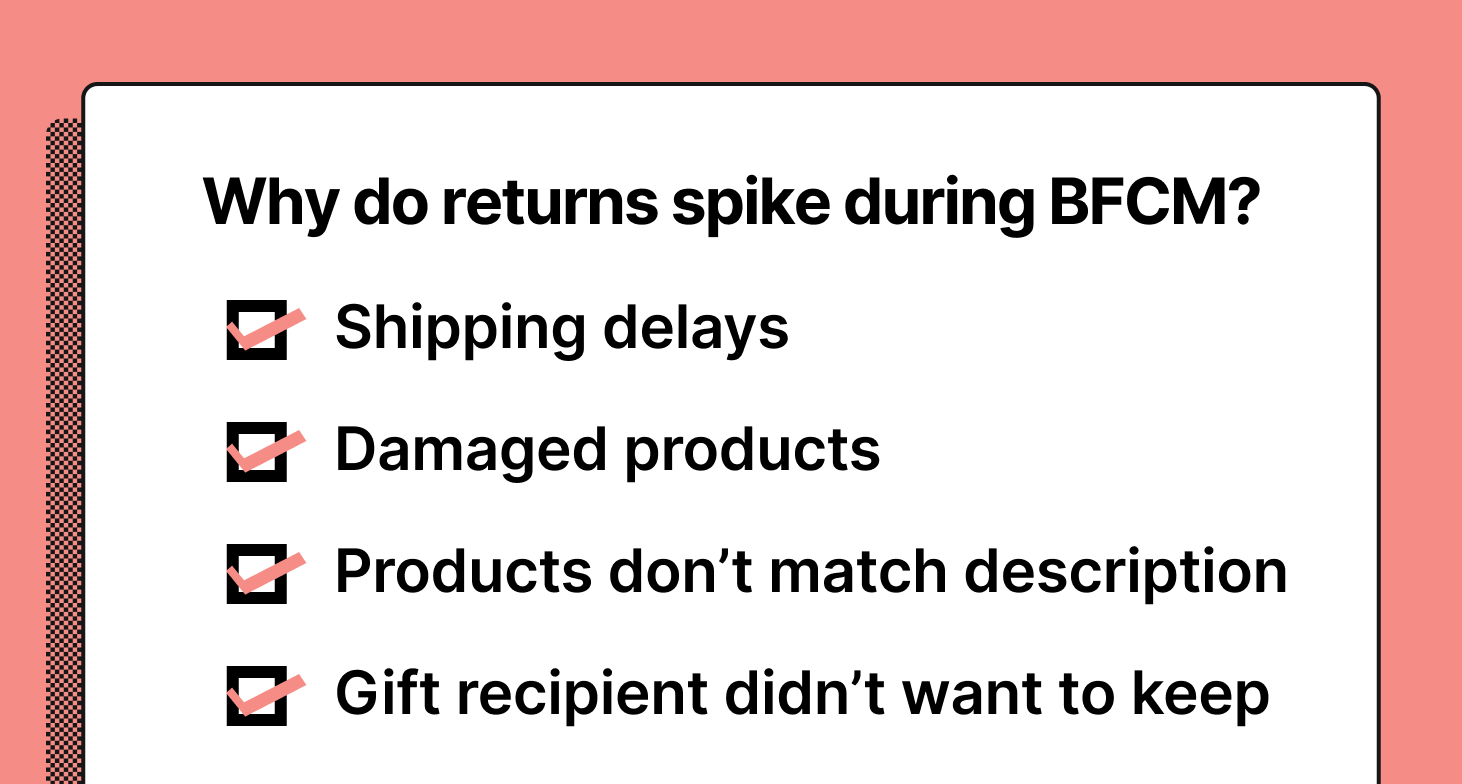
Regardless of the specific numbers, most ecommerce stores face inflated return rates post-BFCM. There are a few common reasons:
- Shipping delays. Shipping companies are overloaded during the holiday sales rush around Thanksgiving, Christmas, and New Year’s Eve. This leads to delays, disappointed customers, and returned items.
- Damaged products. With so much on their plate, shipping companies often don’t handle items with enough care. If the product packaging doesn’t account for that, items can easily get damaged along the way.
- Products that don’t match their description. Returns happen when there’s a discrepancy between what customers expect based on your site and marketing campaigns and what they get.
- Gifts getting returned. Many people do their holiday shopping for Christmas, Hannukkah, and other year-end holidays during BFCM. Plenty of reasons can lead to returns in that context, like wrong sizes, incorrect products, or the recipient not liking the gift in general.
 |
Throughout the following sections, you’ll learn ways to avoid (or at least mitigate) these problems.
How to reduce post-BFCM returns and protect your revenue
While you can’t evade all BFCM returns, you can limit them significantly by following the best practices below.
Plan your BFCM inventory months in advance
A successful BFCM starts way before November. You want to estimate how much inventory you’ll need and order everything at least a few months in advance, depending on how long the shipping process takes for your suppliers.
If you wait too long, you can end up scrambling to secure inventory at times when supply chains are at maximum capability. This can easily lead to shipping delays and returned items.
The best way to estimate how much inventory you’ll need is to use historical data.
For example, if you use Shopify, you can use your Shopify order history data (or the equivalent in your platform) to filter BFCM orders and compare them to the rest of the year. This will give you a good baseline of how much sales typically jump, so you don’t waste money on inventory you won’t sell and don’t miss out on revenue because of understocking.
Here’s a great guide to BFCM inventory planning, if you need more help.
Use pre-sales support to educate shoppers
Providing timely pre-sales support is a powerful way to reduce returns because it lets you:
- Point customers to the right products for their needs. That way, there’s less of a chance they return an item because it didn’t meet their expectations.
- Answer common questions about product shipping times, returns, and exchanges in advance. Besides increasing customer satisfaction and reducing returns, this has the added benefit of slashing repetitive customer support tickets down the line.
Gorgias — our ecommerce helpdesk software — has various features that can help you implement this strategy.
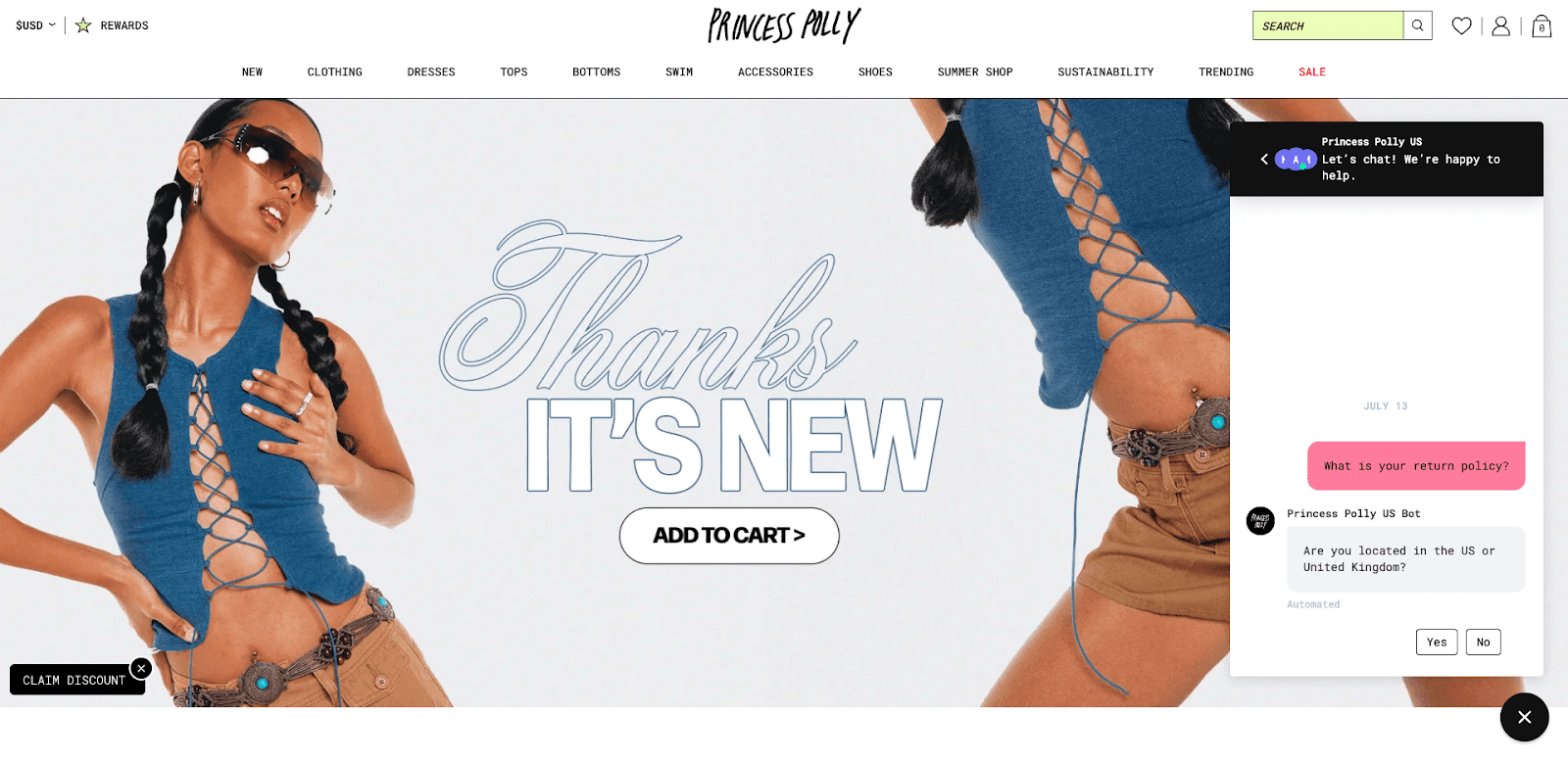
For example, Flows are self-service Q&As that live in your chat widget and Help Center. Customers can use Flows to get personalized product recommendations, ask about promotions, and learn about your shipping and returns policies — all of which are great ways to instill buying confidence and nudge shoppers toward a purchase.
Here’s an example of Flows from Princess Polly, where customers can find the most accurate returns policy for their location without having to talk to an agent.
 |
For a real-life example of the impact of pre-sales support, check out our case study with skincare brand Topicals.
 |
They were able to increase sales by 79% and deflect 69% of incoming tickets by educating customers pre-sale thanks to Gorgias’ chat automations.
{{lead-magnet-1}}
Update product descriptions and images
If product descriptions and product photography don’t match what customers receive, high return rates are imminent.
That’s why it’s a good idea to audit your website a week or two before Black Friday and check if each item’s image and description are accurate. Or, if you don’t have the bandwidth, at least audit the best-selling products and ones that are about to be discounted.
One company that does a great job in this regard is Marine Layer. They offer tons of relevant details under their products, including their exact dimensions, the size of the model wearing the clothes, and more.
Here’s an example from one of their product pages:
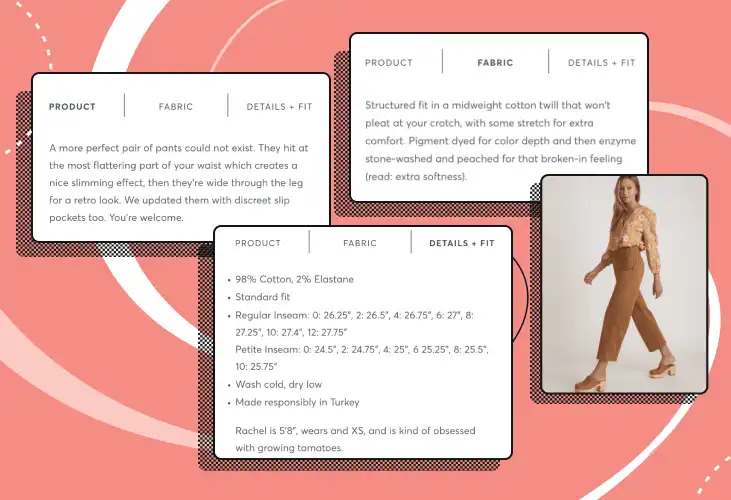 |
This in-depth information helps shoppers make the right choice and helps the brand avoid unnecessary returns down the line.
Test products and packaging before shipping
As I said, broken items are among the most common reasons for returns. You want to ensure all shipments (especially ones containing fragile items) are packaged in a way that can handle more wear and tear than usual.
If you have access to specialized machines like ECT or Mullen testers, you’re probably doing this anyway. But even if you aren't, the process doesn’t have to be complicated. Just package one or two products and throw them around the warehouse a few times to see how they hold up — we did this at a previous company of mine, and it was educational and entertaining.
Ensure a helpful post-purchase experience
The post-purchase experience begins after a customer completes your checkout process. Making this experience useful for your shoppers will reduce the number of returns and help you create long-term, loyal customers.
Here are four essential post-purchase best practices to follow:
Send clear order confirmation emails
Good order confirmation emails are a must in terms of lowering shoppers’ post-purchase anxiety and reducing unnecessary tickets to your support team.
Make sure to automate them, so that they’re sent immediately after a customer completes your checkout flow. The email itself should include:
- A verification that the order was received and that your team is working on it
- A description of the products included in the order
- The order’s number and expected delivery date
- What customers should expect next (e.g., a follow-up email when their order is shipped or a phone call to confirm the order)
Make it easy for shoppers to track their orders
Giving customers a way to track their orders is a great way to improve their experience and reduce the load on your support team.
For example, you can use Gorgias’ Order Management Flows to let customers check their order status, package tracking number, and shipping details. This is a great way to keep shoppers informed while deflecting WISMO (“Where is my order?”) requests from becoming support tickets.
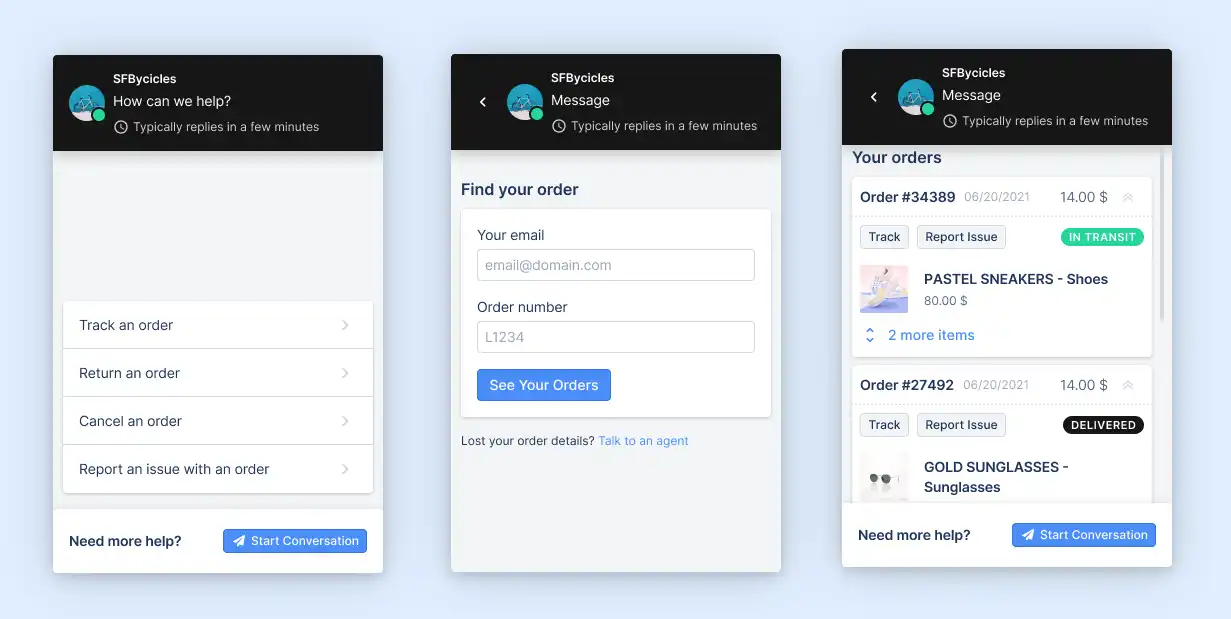 |
Let customers know about shipping delays in advance
Whenever shipping delays can’t be avoided, you want to be upfront about the issue with your customers.
Tell them when they can expect the delivery and apologize for the inconvenience. You can also throw in a shipping discount or another incentive if you feel it’s necessary to prevent potential returns.
Show new customers how to set up and use your products
These might be instructions on how to apply a skincare product, wash a piece of clothing, or configure a Bluetooth speaker.
Regardless of the specifics, you want to make sure shoppers have easy access to the necessary information. This will prevent them from returning products just because they couldn’t figure out how to use them.
Note: For even more details and examples, check out our 10 ways to reduce ecommerce product returns.
3 proven ways to streamline the return process
In some cases, it’s not possible to avoid returns altogether. When that happens, you want to ensure the return process is as cost-efficient as possible, so you can avoid wasting customers’ effort, as well as your team’s time and resources.
Here are three ways to do that.
1) Encourage exchanges instead of returns
This option lets you keep at least part of the revenue and profit margins that would’ve otherwise been lost. Plus, it can help you delight customers with products that they might not know about, so it’s a win-win for both sides.
There are two ways to implement this strategy:
Have your customer service agents suggest exchanges
You can instruct your team to approach return requests as opportunities for an exchange.
If you use Gorgias, your agents can have access to all customer data in one place, so it should be easy for them to suggest relevant products based on each shopper’s previous interactions and purchase history. Plus, with live chat support, your team will be available to customers at every step in the process.
Using a returns tool like Loop Returns
Loop is a returns management app that lets ecommerce businesses embed a self-service return portal on their site.
Besides saving you time (since it’s self-service), the portal can nudge shoppers to exchange their products instead of returning them. This can be done via bonus credits, for example, which give customers more in-store credit than they would get as a refund in the original form of payment.
 |
Jaxxon is one of the ecommerce brands that employ this tactic on their site. They’ve embedded Loop’s return portal, which helps their agents save time and encourages customers to exchange instead of return.
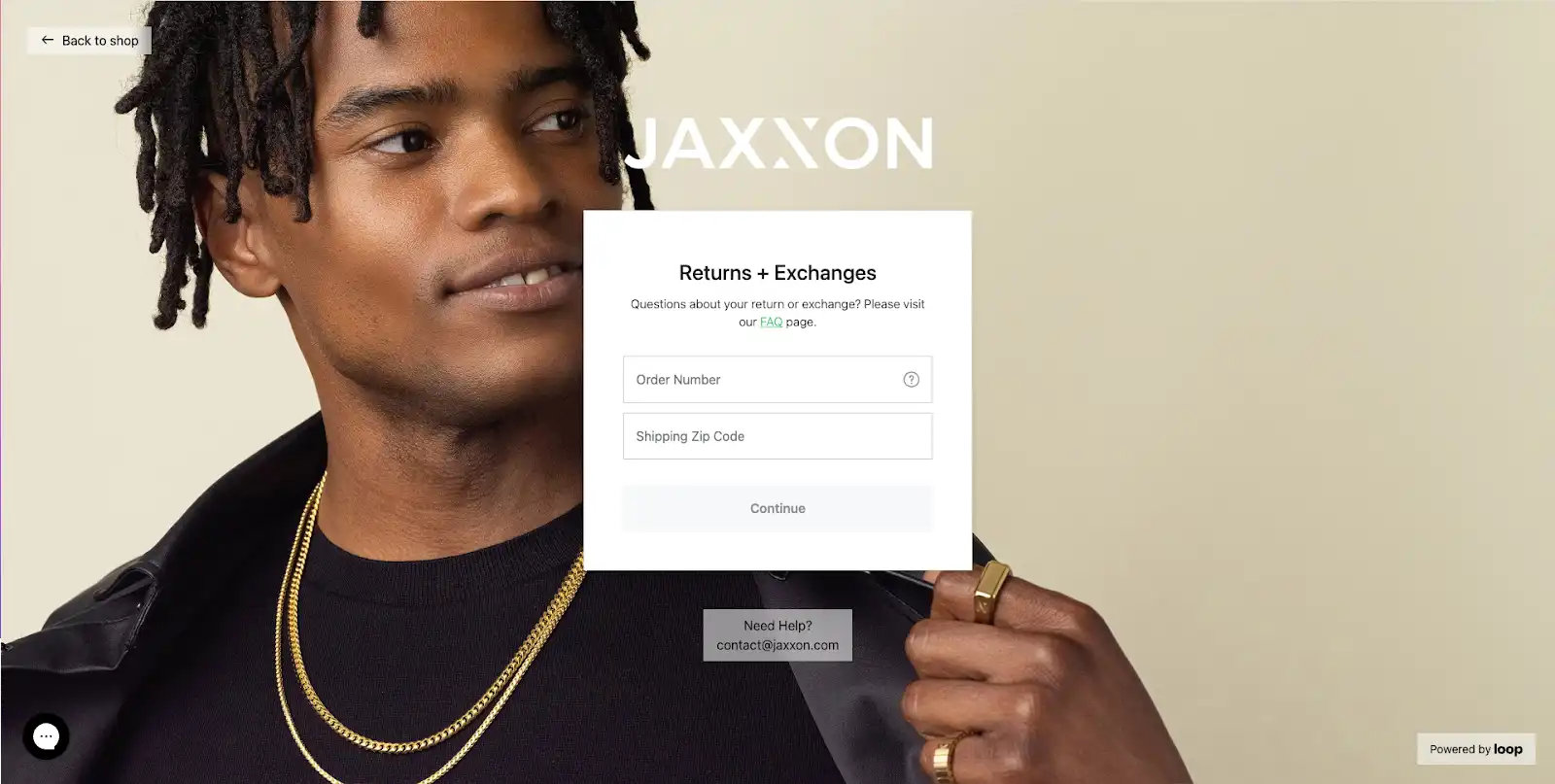 |
They also provide live chat support (via Gorgias) within the portal to answer questions and potentially steer customers away from a return. For instance, their agents can:
- Prompt users to exchange their item with a better option of returning it
- Explain how the customer can troubleshoot and resolve whatever issue causes them to seek a return
- Help the customer through the returns process, so they have a pleasant experience at the very least
Note: Gorgias and Loop Returns can be integrated. This integration allows customers to talk to a support agent while navigating the returns portal. That way, agents have a chance to troubleshoot any issues that may be causing the return (or steer customers toward an exchange).
2) Make your returns policy easily accessible
Another challenging aspect of BFCM is the influx of questions to your support team, many of which have to do with returns, like:
- Is there an extended return window for items bought during BFCM?
- How long will it take for the product to arrive?
- Do you offer free shipping?
- And so on
That’s why you should have your returns policy linked in highly visible places on your website. For example, you could place links to the policy in your site’s navigation or even have a small pop-up that encourages shoppers to read it.
With Gorgias, you can reduce the volume and impact of these repetitive tickets even more by:
- Using Article Recommendations. With this feature, shoppers can automatically receive an article from your Help Center that answers their question. For example, if they ask about returns or exchanges in your live chat window, they’ll get a succinct answer pulled from your content.
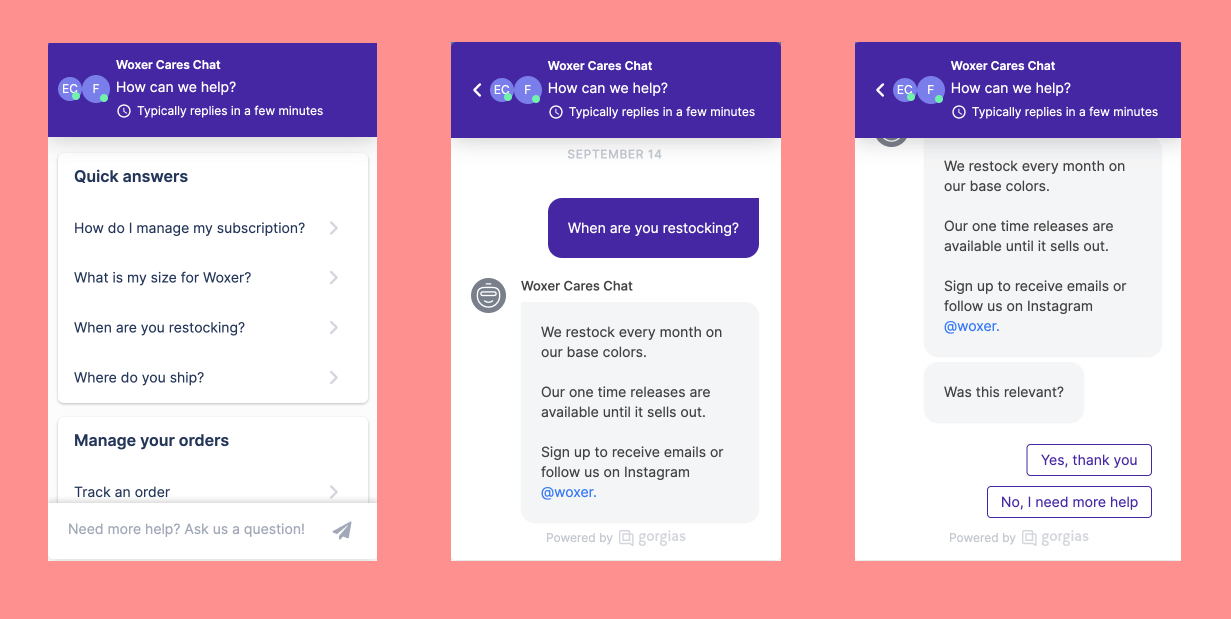 |
- Setting up Macros. These are pre-made responses (or templates) that dynamically pull in customer information like name or order number. You can include links to your return policy in relevant Macros or even create dedicated Macros for answering specific questions about returns and exchanges — like questions about order status, for example.
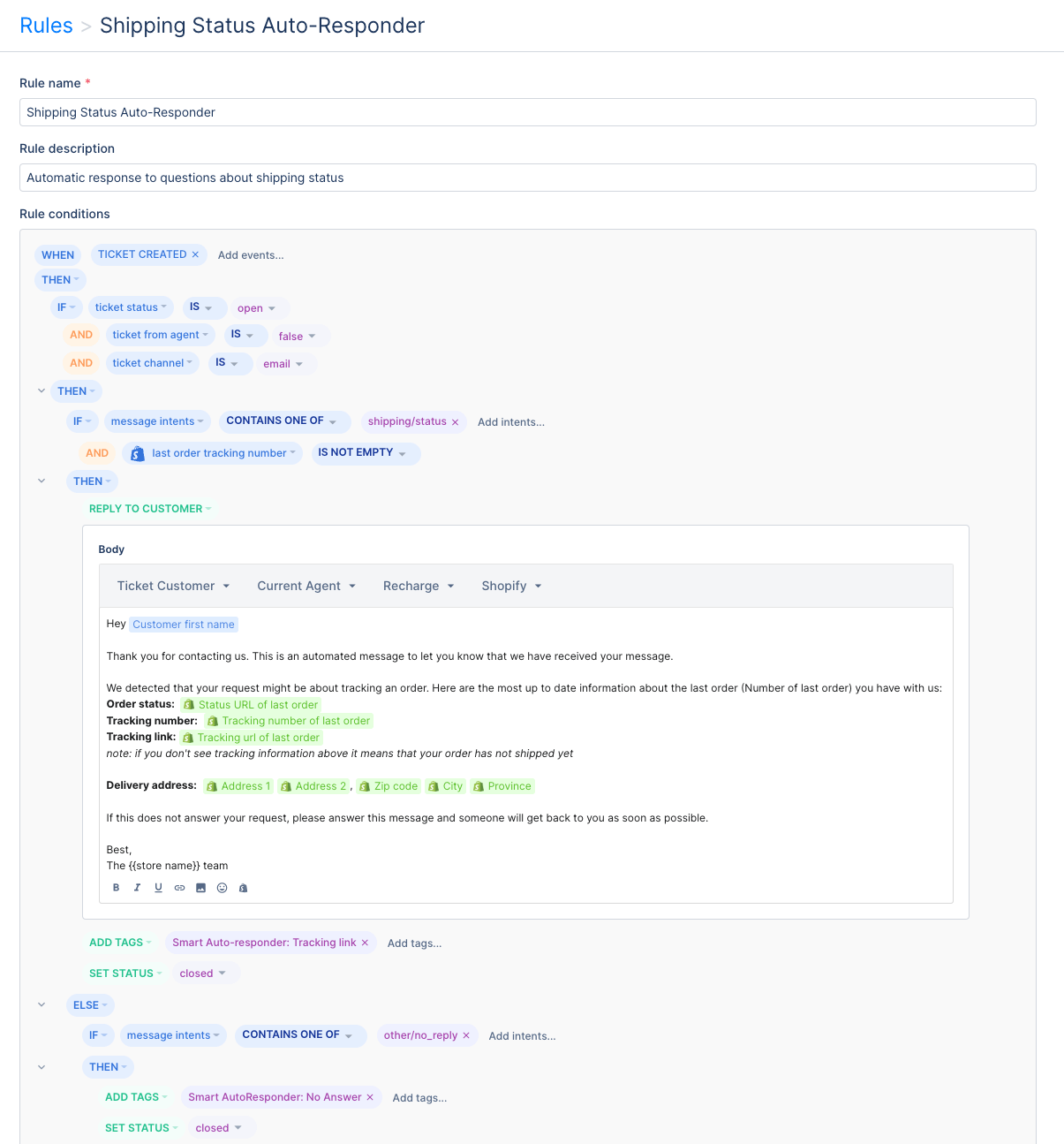 |
Bonus tip: Adjust your return policy if necessary
As mentioned, shoppers often buy Christmas gifts during BFCM. If your return window is 14 or even 30 days, most of the people who receive a gift won’t be able to return it in time.
This can lead to bad reviews, angry shoppers, and poor customer retention (especially for first-time customers). That’s why it’s a good idea to extend your return window after Christmas and New Year to ensure a good customer experience.
3) Enable self-service returns
With self-service returns, online shoppers don’t have to wait for an agent to get to their request, while agents can focus on more complex tickets (or on generating revenue via proactive customer service).
To implement this tactic, you first need to provide shoppers with clear, detailed instructions on how to return their items. These instructions should be included on your site (e.g., on FAQ pages or in helpdesk articles) and can even be printed and shipped alongside the product.
As I said earlier, you can also use Loop Returns to provide shoppers with a self-service return portal on your site. Loop’s portal is easy-to-use, so shoppers can go through it without any unnecessary hassle.
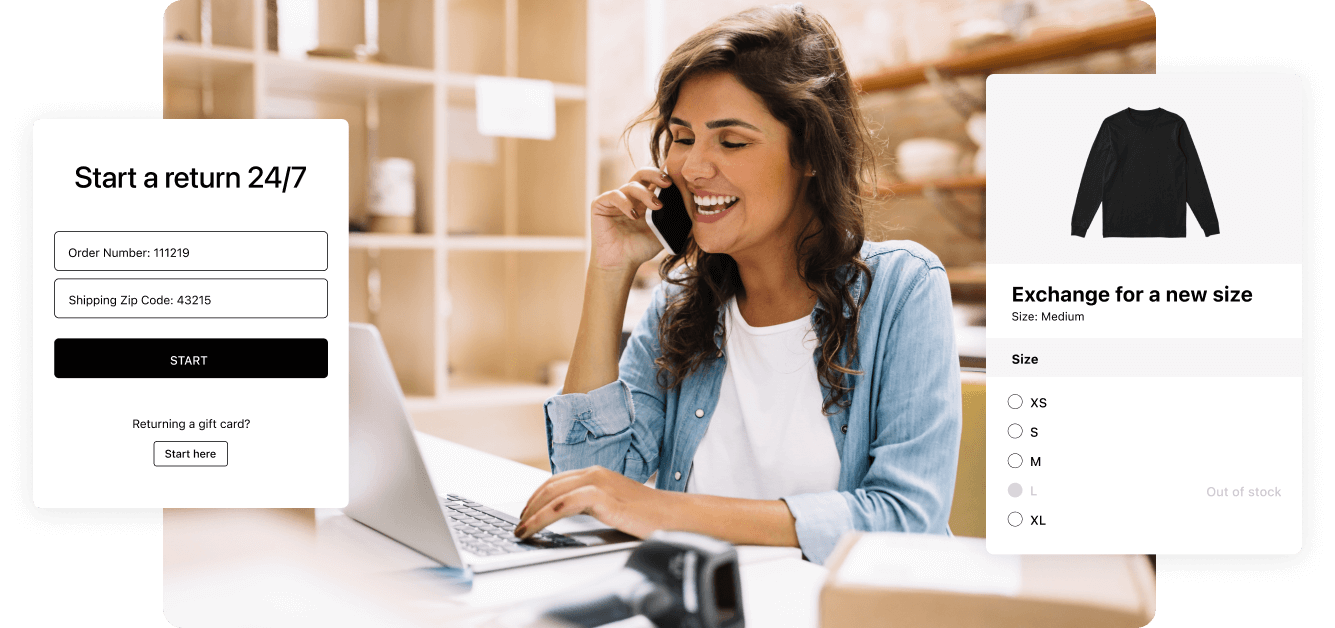 |
From a revenue protection perspective, you can also have Loop nudge customers toward exchanging items instead of returning them. According to their data, companies that use Loop turn 57% of returns into exchanges.
Use Gorgias to maximize your BFCM revenue
Increases in post-BFCM returns are extremely common and in some cases — inevitable.
However, with the tactics outlined in this article, you can minimize their number and impact on your revenue. You can also streamline the return process, so you’re not spending unnecessary time, effort, and money on returning items.
Here’s how Gorgias can help you in both regards:
Streamline the return process
Gorgias offers a plethora of features that can reduce the load on your agents during this year’s shopping season rush — from automated responses to self-service flows, and much more.
Plus, our integration with Loop Returns lets you create a seamless return experience. Shoppers can use the Loop portal for self-service, while also contacting your team if they get stuck (which is a great opportunity to nudge them toward an exchange).
Keep up with multichannel return requests
Gorgias centralizes all customer service tickets in one place. This means your agents don’t have to waste time switching between tabs to handle return requests from your website, email, SMS, and social media profiles, for example.
Provide pre-sales support and generate more conversions
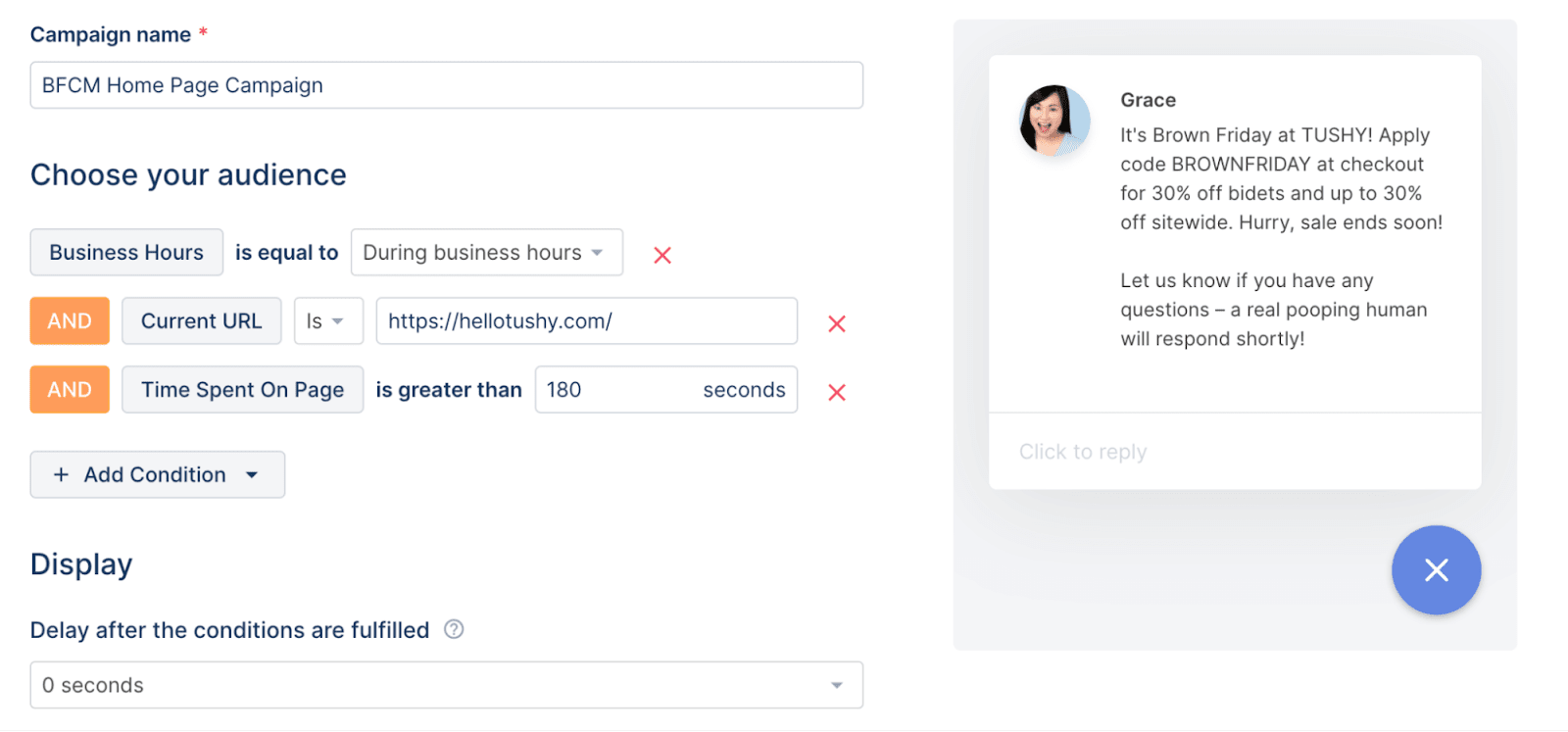
Your agents can use Gorgias chat campaigns to communicate with customers and help them find the right products for their needs (which helps reduce returns down the line).
They can even create proactive chat campaigns aimed at specific visitors to promote BFCM discounts, cross-sell or upsell specific items, reduce cart abandonment rates, and much more.
 |
Lastly, you can also check out our Black Friday Marketing Guide for 18 ideas and strategies that can help you drive more Black Friday sales this year.
{{lead-magnet-2}}

5 Steps to Get Your Customer Support Ready for BFCM
Let's cut to the chase: Black Friday and Cyber Monday customer support is intense. For ecommerce customer support teams, the flood of tickets is the online store version of shoppers mobbing through brick-and-mortar stores.
It's easy to focus on just getting through the flood of tickets. But if you're proactive, your support team can actually reduce the number of incoming tickets with automation. And with all that time saved, the team can have a huge impact on the success of the weekend by unblocking sales, reducing return rates, and more.
Customer support teams are not just there to answer tickets during BFCM. They are key at every stage of the customer journey, from pre-sale shopping questions to post-purchase support.
An unprepared or understaffed support team is the quickest way to kill your BFCM success. With AI adoption among ecommerce brands hitting 96% in 2026, the brands that win peak season are the ones that prepare their AI and their team in advance. BFCM 2026 runs Friday, November 27 through Cyber Monday, November 30, so the time to get ready is now.
Here are five steps to make your support team the hero of BFCM 2026.
Proof it works under pressure: During BFCM 2025, Cornbread used Gorgias to lift Shopping Assistant conversion from a 20% baseline to 30%, cut first response time from over two minutes in 2024 to 21 seconds in 2025, and grow attributed revenue by 75%. Tickets doubled, but AI handled 400% more tickets than the prior year, and CSAT held flat.
1. Update your customer service policies and SLAs
Ecommerce sales depend on clear policies around shipping, returns, lost packages, and more. When customers don't know your policies, they will either write to your support team (if you're lucky) or abandon their cart entirely and head over to Amazon (more likely).
In the first case, your team is stuck answering repetitive questions like "What's your shipping policy?" when customers should have easy access to that information on their own. In the second, you're directly losing sales because of a lack of clear customer self-service options. Either way, we're here to help you solve it.
"Make sure all of your policies are up-to-date before Black Friday-Cyber Monday, and communicate them to both agents (through your SLA) and customers (on key pages of your website). This will reduce the number of tickets you have to field and ensure customers have the information they need to make a confident purchase decision." - Bri Christiano, Director of Support at Gorgias
Shipping and returns policies: where to put them. Make your shipping policy (including the order cutoff date), returns, and exchanges policy visible everywhere a customer looks:
- Checkout flow (shipping method and order preview steps)
- Order confirmation emails
- FAQ page and/or Help Center
- Macros, where relevant
- Website banner
- Product pages
Action plan: Audit every policy now, set tiered SLAs by ticket priority and channel in your helpdesk, and publish your BFCM cutoff dates everywhere above before traffic ramps.
2. Leverage automation for self-serve support
Your agents have more important things to do than answer the same basic questions over and over. The trick: set up self-service resources so customers can help themselves.
That means making information easy to find and using automation to answer simple, repetitive questions ("What size am I?", "Where's my order?") while keeping your FAQ and Help Center current.
With Gorgias, AI Agent resolves these tier-1 questions end to end across chat, email, and social, drawing on your Help Center and order data. Its Shopping Assistant role answers pre-sale questions and recommends products to drive conversion, while its Support Agent role handles post-sale tickets like order status and returns. Reserve your human agents for the conversations that genuinely need judgment and empathy.
Action plan: Before BFCM, refresh your Help Center, expand AI Agent guidance for your top seasonal questions (promos, shipping cutoffs, returns), and confirm handover topics so the right tickets reach humans.
3. Forecast your ticket volume
You can't staff for a wave you haven't measured. Forecasting ticket volume comes down to two ingredients: your contact rate and your projected order volume.
Use your contact rate to project ticket volume. Estimate how many orders you'll see over BFCM, then apply your average contact rate. To project order volume, look at:
- Order volume from BFCM the previous year
- Business growth over the last year
- Market trends surrounding BFCM for the current year
Estimate the agents you need, based on past capacity. Run a report for tickets resolved per full-time agent over a set period (in Gorgias, under Statistics > Agents), use the average as your capacity benchmark, then divide forecasted ticket volume by that number to find how many agents you need. As a reference point, many brands treat 40 to 60 tickets per day per agent as a healthy benchmark.
Action plan: Build the forecast now, identify the staffing gap, and decide how much of it AI Agent closes versus temporary headcount.

4. Improve your response time
Speed wins during BFCM. Shoppers are comparing options and checking out competitors, so a slow reply is a lost sale. Here are six ways to improve response time with Gorgias:
- Set and enforce SLAs with alerts. Set first response time targets by channel and priority, get alerts before a breach, and track adherence in reports. Urgent issues from VIP customers deserve faster responses than standard inquiries.
- Automate tier-1 with AI Agent. Let AI resolve order status, returns eligibility, and FAQs instantly, around the clock.
- Prioritize and route by intent. Use intent and sentiment detection to auto-tag and surface priority tickets (VIPs, damaged orders, longest open).
- Deflect with Help Center and chat automation. Self-service is the fastest possible response time: instant. Build a searchable Help Center and let AI Agent surface answers automatically.
- Add Voice for high-stakes moments. Phone support built for ecommerce, inside Gorgias, for the conversations shoppers want to escalate.
- Monitor analytics to remove bottlenecks. Track first response time and next response time by channel, agent, and time period to find where delays actually occur.
First response time benchmarks by channel:
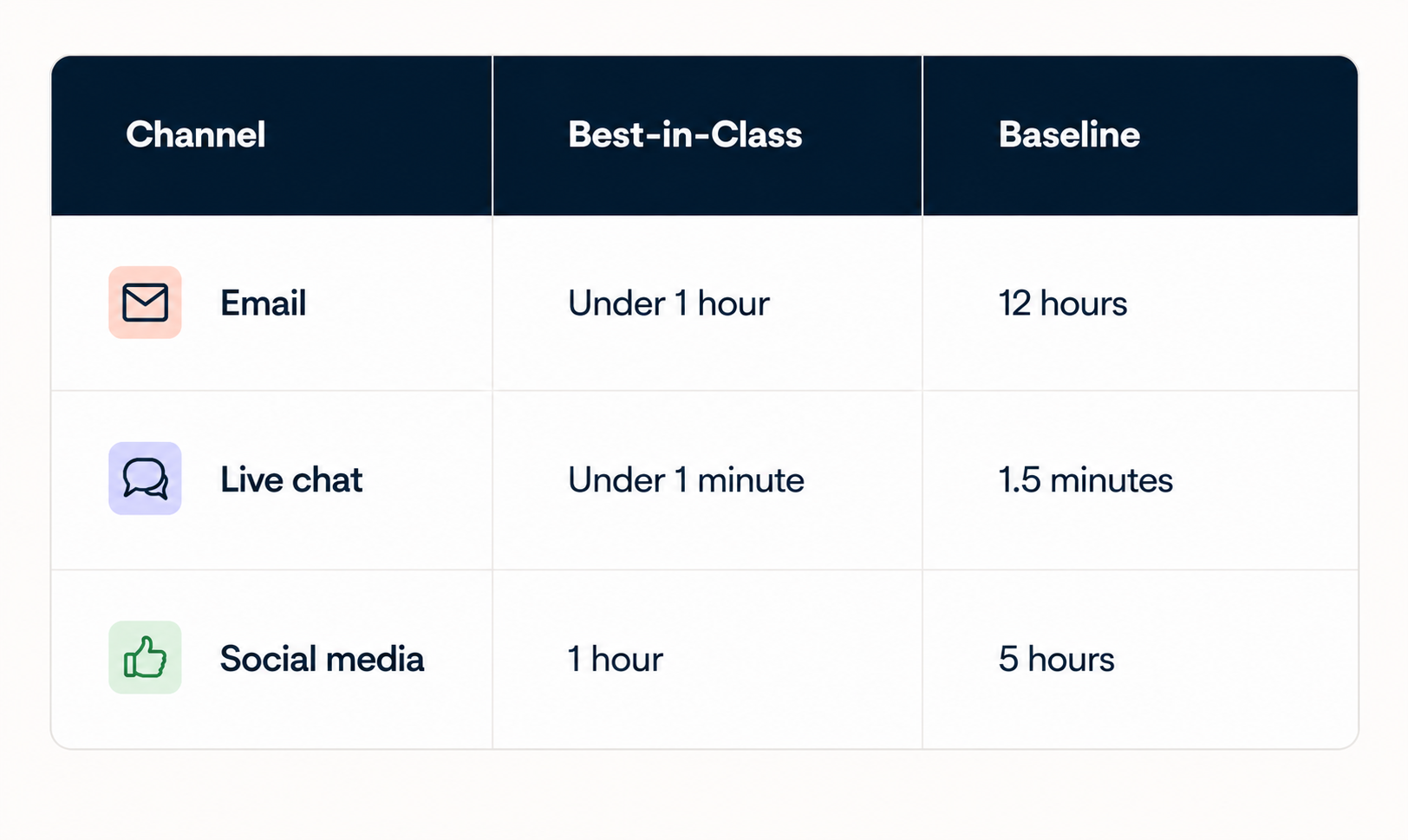
How to calculate first response time (FRT): FRT = total time to first reply divided by number of tickets. Track from inquiry receipt to first meaningful reply (exclude autoresponders), count only business hours, and use the median to avoid outlier skew.
Action plan: Set tiered SLAs, turn on breach alerts, and route by intent so your fastest path (AI and self-service) carries the volume.
5. Monitor analytics to remove bottlenecks
Analytics reveal where delays actually occur. You might assume slow response times come from understaffing, but the data could show the real issue is ticket misrouting or agents spending too long on low-priority tickets. Without measurement, you're guessing.
The Gorgias reporting dashboard tracks first response time, next response time, SLA adherence, and agent performance across channels, time periods, and ticket types. You can see which channels are slowest, which hours create bottlenecks, and which agents need coaching.
- Track FRT and NRT by channel, agent, and time period
- Identify peak hours and adjust staffing accordingly
- Monitor SLA adherence and escalation rates
- Compare agent performance to spot coaching opportunities
- Use trend data to forecast staffing needs
Reporting takeaway for leadership: Tie CX metrics to revenue. Report resolution rate, AI deflection, conversion influenced by Shopping Assistant, and revenue protected, not just ticket counts. That is the view your executives care about during peak.
Action plan: Stand up a BFCM reporting view before the weekend, set a daily review cadence, and pre-build a recovery plan for when volume spikes past forecast.
Get your support ready for BFCM 2026
Gorgias is the Conversational Commerce platform for Shopify brands: Helpdesk, AI Agent, and Voice in one place, so you can scale support, protect CX, and turn peak-season conversations into revenue.
Book a demo or start with AI Agent today.

85+ Helpful Customer Service Statistics for 2023
Looking for some customer support statistics to develop your business strategy for 2023? You’re in the right place.
Understanding customer expectations and their impacts on your business is a great way to improve your company’s customer service. For example, it can help you:
- Make your request for more support resources more compelling and data-backed
- Inform your strategy, including deciding where to invest
- Benchmark your performance against similar companies
In this post, we’ve gathered tons of customer support statistics all in one place so you can understand the objective numbers behind the state of customer service as it stands now.
Customer service stats takeaways
Technology has driven the evolution of ecommerce in many ways, and the same trend rings true when it comes to customer service. Some of the biggest takeaways from this data include:
- Customer expectations are growing. 79% of businesses believe that customers are smarter and more informed now than in the past. They expect A+ service from every brand. Bad customer service experiences will even cause shoppers to look for alternative options.
- Seamless cross-channel journeys are challenging, but essential. 53% of consumers say customer support interactions feel “fragmented.” This is a critical challenge, as customers expect the same experience regardless of when and how they’re interacting with brands and service teams.
- Artificial intelligence (AI) is here. 64% of service professionals who use AI believe it allows them to personalize and improve the service they provide. AI technology is a cost-effective way for brands to keep up. And modern consumers are warming up to the idea, easing concerns about AI leading to bad experiences and issues with privacy, trust, and ethics.
Recommended reading: 8 Customer Service Trends for 2023
{{lead-magnet-1}}
The state of customer service in 2023
Excellent customer service is becoming both more challenging and a bigger competitive advantage than ever before. To deliver on that, brands have to overcome the challenge of high-effort, disconnected experiences.
- 88% of customers say the experience a brand provides is equally as important as the product or services it sells. This is up from 80% in 2020. Consider a good customer service experience one of the most important things you can sell. (Source: State of the Connect Customer report, Salesforce)
- 53% of consumers say customer support interactions feel “fragmented.” This is often due to hold times, handoffs to other customer service representatives, and ill-equipped customer service reps. (Source: State of the Connect Customer report, Salesforce)
- 13% of shoppers believe it takes minimal effort to get their issues resolved. (Source: State of the Connect Customer report, Salesforce)
- 29% of consumers feel like it takes “a lot” of effort to find solutions to their service issues. (Source: State of the Connect Customer report, Salesforce)
- Simplifying the customer journey while simultaneously reducing call volumes and costs is one of the top three customer service priorities for businesses in 2022. (Source: The State of Customer Care Survey 2022, McKinsey & Company)
 |
- 79% of businesses believe that customers are smarter and more informed now than in the past. (Source: HubSpot Annual State of Service in 2022)
 |
- 85% of businesses believe that customers are more likely to share both positive and negative experiences in 2022 than in the past. This could have a huge impact on your company’s word of mouth — a big concern if you’re offering poor customer service experiences. (Source: HubSpot Annual State of Service in 2022)
- 27% of customers who place an order reach out to support at some point in the buying journey, based on data from 12k ecommerce brands. (Source: Gorgias data)
- Brands receive an average of 882 monthly tickets, based on data from 12k ecommerce brands. (Source: Gorgias data)
- 61% of customer care leaders have experienced an increase in total calls in 2022. They cite “increased contacts per customer” and a growing customer base as the leading causes. (Source: The State of Customer Care Survey 2022, McKinsey & Company)
- Brands’ top four customer service priorities in 2022 are creating a great customer experience (45%), customer success (37%), customer retention (35%), and customer engagement(33%). (Source: HubSpot Annual State of Service in 2022)
- 88% of customer service leaders say customer expectations have soared to an “alltime high” in 2022. (Source: HubSpot Annual State of Service in 2022)
- 83% of customers expect to be able to resolve their complex issues with just a single customer support representative. (Source: The State of Customer Care Survey 2022, McKinsey & Company)
The top 10 reasons customers reach out to (ecommerce) support teams (based on a Gorgias survey of 12,000 ecommerce sites) are:
- Order status
- Returns
- Pre-sale product questions
- Shipping questions when deliveries aren’t received
- Order change
- Order cancellation
- Missing an item from an order
- Marketing
- Negative customer feedback
- Warranty questions
 |
Customer service benchmarks
Customer service is increasingly important, and average response times are decreasing. Benchmarks are helpful to keep in mind to ensure you’re competitive, but it’s equally important to set your own benchmarks and compete against yourself.
- Ecommerce businesses have an average Net Promoter Score (NPS) of 50. (Source: Retently)
- The customer satisfaction rating (CSAT) on Gorgias is 4.55. (Source: Gorgias data)
- Customer support agents handle an average of 1 ticket per hour. (Source Gorgias data)
- Brands have an average of 3 active agents at any given time. (Source: Gorgias data)
- The average resolution time is 18.1 hours. (Source: Gorgias data)
 |
- The average first response time is 11.4 hours. (Source: Gorgias data)
- The average first response time on Facebook is 10 hours. (Source: Gorgias data)
- The average first response time on email is 7 hours and 34 minutes. (Source: Gorgias data)
- The average first response time via contact form is 11 hours and 25 minutes. (Source: Gorgias data)
- The average first response time on live chat is 42 minutes. (Source: Gorgias data)
- The average first response time on SMS is 35 minutes hours. (Source: Gorgias data)
 |
- The recommended average resolution time is same-day for email. (Source: Gorgias)
- The recommended average resolution time for SMS tickets is 10 minutes. (Source: Gorgias). (Source: Gorgias)
- Live online chat support queries are typically resolved in under 10 minutes. (Source: Gorgias)
- Customer support interactions over the phone are best resolved in 1 call. (Source: Gorgias)
- Social media queries should ideally have a same-day resolution for comments and a 10-minute resolution for DMs. (Source: Gorgias)
 |
Want to get better at measuring your service? Check out our guide to customer service metrics.
The importance of great customer service (and danger of poor customer service)
Customer service impacts the bottom line, and customers are willing to share their experiences — good or bad. It also builds trust with shoppers, making them more eager to make a purchase and build a lasting relationship with your brand.
- 94% of customer respondents say the “treatment of customers” is the top influence on their purchase decisions. (Source: State of the Connect Customer report, Salesforce)
 |
- Improving the customer experience can increase sales revenues by 2%–7% and profitability by 1%–2%. (Source: Prediction: The future of Customer Experience, McKinsey & Company)
- Improvements to customer service also boost overall shareholder return by 7%–10%. (Source: Prediction: The future of Customer Experience, McKinsey & Company)
- 48% of customers will seek out competing brands for better customer service. (Source: State of the Connect Customer report, Salesforce)
 |
- 74% of customers say it’s more important now than before the pandemic for brands to communicate honestly and transparently. (Source: State of the Connect Customer report, Salesforce)
- 62% of customers feel an emotional connection to the brands they buy from most, which is amazing for customer loyalty. Impersonal interactions, including irrelevant offers or waiting on hold, damage those relationships. (Source: State of the Connect Customer report, Salesforce)
- Repeat customers account for only 21% of customers, but generate 44% of revenue and 46% of orders. (Source: Gorgias)
 |
- 94% of shoppers say they’re likely to make a repeat purchase after a positive customer service experience. (Source: State of the Connect Customer report, Salesforce)
- 82% of customers have recommended a company because they had a positive customer service experience. (Source: State of the Connect Customer report, Salesforce)
- 80% of consumers will even forgive brands after they made a mistake, so long as it’s followed up with good customer service. (Source: State of the Connect Customer report, Salesforce)
- 78% of consumers have made purchase decisions based on their customer service experiences. (Source: State of the Connect Customer report, Salesforce)
 |
- 68% of customers trust businesses are telling the truth in 2022, compared to 59% in 2020. (Source: State of the Connect Customer report, Salesforce)
 |
- 96% of customers say excellent customer service builds trust. (Source: State of the Connect Customer report, Salesforce)
- Repeat customers drive 300% more revenue than new customers. (Source: Gorgias)
 |
Customer service teams and employees
Challenges with employee retention have led to reduced quality in terms of service standards. Brands with strong customer service training and strong, loyal service teams stand to gain a competitive advantage.
- In 2021, nearly half of customer care managers faced increased employee attrition. (This was largely because up to 85% of the workforce shifted to working from home in 2020–2021). (Source: The State of Customer Care Survey 2022, McKinsey & Company)
- The top-cited reason for employees leaving is poaching by competitors—58%—followed by employee dissatisfaction (39%), lack of advancement opportunities (31%), and lack of work–life balance (30%). (Source: The State of Customer Care Survey 2022, McKinsey & Company)
 |
- 41% of service business leaders say it takes three to six months to train a new employee. 20% say it takes more than six months. (Source: The State of Customer Care Survey 2022, McKinsey & Company)
- “Retaining and developing the best people” was one of the top three customer service priorities for businesses in 2022. (Source: The State of Customer Care Survey 2022, McKinsey & Company)
- According to service leaders, the most effective ways to retain top customer service talent is through focusing on motivating and building trust with employees (34%), encouraging leaders to act on employee feedback (24%), offering new career opportunities (11%), and aligning their work to the overall company’s goals and values (11%). (Source: The State of Customer Care Survey 2022, McKinsey & Company)
 |
- According to 54% of customer service professionals, peer relationships are the best way to learn. 50% learn by attending conferences and 39% from formal mentors. (Source: HubSpot Annual State of Service in 2022)
- Service professionals actively learn new skills for their roles “a few times a month or more often” (32%), “about once a month” (30%), or “a few times a year” (28%). (Source: HubSpot Annual State of Service in 2022)
Personalization in customer service statistics
Customers continue to expect more relevant messaging and promotion from brands, including personalized customer support. And their hesitations around data privacy and related technologies are waning, making them more open to sharing information to receive improved customer service interactions.
- 73% of customers expect brands to understand their personal customer needs. (Source: State of the Connect Customer report, Salesforce)
- 62% of shoppers expect brands to anticipate their needs. (Source: State of the Connect Customer report, Salesforce)
- 56% of shoppers expect all offers to be personalized to them. (Source: State of the Connect Customer report, Salesforce)
- 56% of customers feel like brands just treat them as a number, not as a person to build a relationship with. (Source: State of the Connect Customer report, Salesforce)
 |
- 46% of consumers would share their style preferences if it meant they would receive personalized offers and rewards. (Source: State of the Connect Customer report, Salesforce)
- 61% of consumers feel comfortable with brands using their personal information transparently and beneficially. This is an increase from 52% in 2020. (Source: State of the Connect Customer report, Salesforce)
- Almost 80% of consumers say that when brands are transparent about how they use their data to provide personalized experiences, it makes them trust the brand more. (Source: State of the Connect Customer report, Salesforce)
 |
Customer service tools and platforms
Technology is key to delivering exceptional customer service experiences. The right tools, from helpdesks to live chat support apps, are essential to meeting today’s customer expectations.
- Only 12% of digital platforms are “highly integrated.” (Source: The State of Customer Care Survey 2022, McKinsey & Company)
- There are 94 help desk solutions currently available in the market. Gorgias has the top spot. (Source: Datanyze)
- Gorgias customers improve ticket resolution by 34% by adding phone support. (Source: Gorgias)
- 86% of live chat tickets end with a satisfied customer. (Source: Gorgias)
 |
- 77% of businesses use some form of digital means to provide customer service and assistance, yet only 10% of new digital platforms are fully taken advantage of by customers. (Source: The State of Customer Care Survey 2022, McKinsey & Company)
- 95% of customer service leaders believe a customer relationship management (CRM) platform can help boost productivity. (Source: HubSpot Annual State of Service in 2022)
- 36% of brands track NPS scores as a way to listen to customers. (Source: HubSpot Annual State of Service in 2022)
Multichannel customer service statistics
The number of communication channels customers can use to interact with brands (and vice a versa) is constantly increasing. This number is only going to grow, so brands need to understand not only how to leverage each customer service channel but also how to integrate all the touchpoints into a single synonymous customer experience.
Synergy across an omnichannel support experience is the new baseline for good service.
- 43% of shoppers prefer to use non-digital channels for customer service, preferring in-person or phone support. (Source: State of the Connect Customer report, Salesforce)
- 83% of shoppers say they have more brand loyalty when customer service is consistent across departments. (Source: State of the Connect Customer report, Salesforce)
- 86% of live chat tickets end with a satisfied customer—more specifically, a 4- or 5-star CSAT rating. (Source: Gorgias)
- Businesses plan to increase digital customer interactions by 1.5 times by 2024. (Source: The State of Customer Care Survey 2022, McKinsey & Company)
AI and automation in customer service
Artificial intelligence (AI) enables more self-service options, as well as automations. Effective use of support automation technology can boost efficiency and reduce resolution and response times.
- Nearly 80% of businesses have experienced an increase in customer adoption of self-service customer support channels, including chatbots. (Source: State of the Connect Customer report, Salesforce)
- Only 20% of online support interactions are completely self-serviced and unassisted. (Source: The State of Customer Care Survey 2022, McKinsey & Company)
- Nearly two-thirds of customer care leaders say that higher-quality self-service options have contributed significantly to reduced call volumes. (Source: The State of Customer Care Survey 2022, McKinsey & Company)
- 14% of Gorgias tickets are automated. (Source: Gorgias data)
- The top 5% of Gorgias Automate users automate 45% of all interactions (source: Gorgias).
 |
- 79% of customer service professionals believe AI is “somewhat to very important” to their jobs. (Source: HubSpot)
 |
- 64% of service professionals who use AI believe it allows them to personalize and improve the service they provide. (Source: HubSpot)
 |
- 65% of customer service tasks are automated. (Source: The State of Customer Care Survey 2022, McKinsey & Company)
- 57% of consumers trust companies to use AI ethically. (Source: The State of Customer Care Survey 2022, McKinsey & Company)
- 72% of shoppers have concerns about the ethics behind companies’ use of AI. (Source: The State of Customer Care Survey 2022, McKinsey & Company)
- 69% of customers are open to the use of AI if it can improve their experiences. (Source: The State of Customer Care Survey 2022, McKinsey & Company)
 |
- Only 20% of online support interactions are completely self-serviced and unassisted. (Source: The State of Customer Care Survey 2022, McKinsey & Company)
- Nearly two-thirds of customer care leaders say that higher-quality self-service options have contributed significantly to reduced call volumes. (Source: The State of Customer Care Survey 2022, McKinsey & Company)
 |
- 88% of consumers expect brands to have self-service support tools. (Source: Statista)
 |
- In 2022, 58% of customers have used chatbots for simple customer service. (Source: State of the Connect Customer report, Salesforce)
- In 2022, 65% of customers reported having used self-service account portals for service. (Source: State of the Connect Customer report, Salesforce)
 |
- 66% of Millennials prefer self-service for simple support cases, compared to 61% of Gen Zers, 59% of Gen Xers, and 49% of Baby Boomers. (Source: State of the Connect Customer report, Salesforce)
 |
The future of customer service
Anticipating future trends and advancements can help you stay ahead of the curve. Customer expectations will continue to rise, touchpoints will become increasingly complex, and AI will play a growing role in delivering top-notch service.
- 58% of service leaders believe call center volumes will continue to increase over the next 18 months. (Source: The State of Customer Care Survey 2022, McKinsey & Company)
- Digital channels will become increasingly important. Millennials and Gen Zers are the most digitally savvy. Each of these generations, for example, is 1.6x more likely than Baby Boomers to prefer digital channels. (Source: State of the Connect Customer report, Salesforce)
 |
- AI-powered self-service options are also going to grow. Nearly 80% of businesses have experienced an increase in customer adoption of self-service customer support channels, including chatbots. (Source: State of the Connect Customer report, Salesforce)
Are you ready to improve your customer service in 2023?
Now that you know the latest customer experience statistics in 2023, check out our list of customer service best practices to put this knowledge into action and become a more customer-centric company to attract and retain loyal customers.
{{lead-magnet-2}}
A Guide to Customer Service Roles & Responsibilities
TL;DR — the 7 main customer service roles, from entry level to executive, are:
- Customer Service Agent / Representative - frontline support, answers incoming questions ($40K-$55K)
- Customer Service Specialist (Level 2) - handles escalated and complex tickets ($45K-$60K)
- Customer Service Team Lead - manages and coaches the agent team ($55K-$70K)
- Customer Service Manager - owns tools, automation, and department strategy ($65K-$80K)
- Technical Support Engineer - resolves technical and software issues ($75K-$90K)
- Customer Success Manager - owns retention and client relationships ($85K-$100K)
- Director of Customer Service - leads the department, reports to executives ($95K-$110K)
Introduction
Customer service covers a wide range of job titles, each with its own responsibilities, from answering phones at a call center to setting up automations and building customer retention strategy.
If you are looking for a job in customer service, you are in the right place. Customer support is a strong way to transition industries and build toward a rewarding career. Below you will learn about 7 types of customer service roles, including daily duties, qualifications, and salary ranges.
If you are hiring, you can adapt the job description templates in each section. And because the role of support is changing fast, each section also covers how AI is reshaping the job in 2026.
One thing has not changed: the best support teams give everyone a stake in the customer experience, regardless of title.
How AI is reshaping customer service roles in 2026
Short answer: AI does not eliminate customer service roles, it changes what each one spends time on. AI agents now resolve a large share of repetitive, tier-1 tickets automatically, which shifts human teams toward complex problem-solving, oversight, and strategy.
- Agents spend less time on copy-paste answers and more on cases that need judgment and empathy.
- Specialists and Team Leads move into a review-and-coach role, guiding AI-drafted responses with quality scoring.
- Managers and Directors are measured on revenue driven by support and cost-to-serve, not just response time and CSAT.
Modern platforms like Gorgias combine a Helpdesk with an AI Agent that handles both pre-sale shopping questions and post-sale support, so teams scale conversations without adding headcount.
1. Customer Service Agent (or Representative)
What they do: The most junior role on a support team. Customer-facing frontline employees who receive incoming messages and calls, answer basic questions, and pass along complex or technical issues. Even here, Agents improve workflows, tag and organize requests, and pass along feedback. A great starting point for recent graduates or career-changers.
In 2026: AI Agents resolve many repetitive questions (order tracking, simple returns, FAQs), so the human Agent role centers on conversations that need a person.
Job description template
We are seeking a dedicated and friendly Customer Service Agent to join our team. In this role, you will be the face of our company, assisting customers with their inquiries, resolving any issues, and ensuring a positive customer experience.
The ideal candidate will have excellent communication skills, problem-solving abilities, and a passion for delivering exceptional customer service.
Duties and responsibilities
- Provide prompt and efficient responses to customer questions via phone, email, social media, and chat
- Address and resolve customer complaints or concerns in a professional and timely manner
- Maintain a high level of company product knowledge to effectively answer customer queries
- Identify opportunities to upsell or cross-sell products and services to customers
- Collaborate with other team members and departments to ensure customer satisfaction
- Keep accurate records of customer interactions and transactions in the CRM system
- Follow company policies and procedures when handling customer requests and issues
- Continuously strive to improve customer service skills and knowledge through training programs
Qualifications and requirements
- Previous experience in customer service or a related field is preferred
- Excellent verbal and written communication skills, plus active listening skills
- Experience with a helpdesk, CRM software, and other customer service tools
- Ability to multitask and prioritize tasks effectively in a fast-paced environment
- Strong problem-solving and decision-making abilities
- A positive and empathetic attitude toward customers
- Availability to work flexible shifts, including evenings, weekends, and holidays
- High school diploma or equivalent work experience
- Additional certifications in customer service or related fields are a plus
Benefits
- Competitive salary ($40,000 – $55,000)
- Health, dental, and vision insurance
- 401(k) retirement plan
- Paid time off (15 days) plus holidays and sick days
- Ongoing training and development opportunities
How to apply
Interested candidates should submit their resume and cover letter to [email].
How Gorgias supports this role
Gorgias is chock-full of features and automations to help Customer Service Agents offer quick, helpful responses.
For instance, Gorgias centralizes messages from all communication channels (email support, live chat support, social media support, SMS support, WhatsApp support, and more) into one shared inbox so Agents don’t have to spend all day switching tabs. This helps your team offer omnichannel customer service.

Also, when Agents are answering incoming support tickets, Gorgias displays customer information (including past conversations and orders) to give Agents all the context they need to answer the question. This also helps Agents offer personalized customer service.

{{lead-magnet-1}}
2. Customer Service Specialist (or Level 2 Agent)
What they do: Customer Service Specialists have many of the same day-to-day responsibilities as Representatives. The main difference is that Specialists typically have more experience, know more customer service techniques, and can handle more complex, sensitive, and challenging interactions with customers.
In most teams, tickets get “escalated” to Level 2 Agents (or Specialists) if they’re beyond the skillset of an Agent. Often, Agents get promoted to Specialists once they understand the company’s policies, procedures, and products. It can be a great stepping stone to managing a team.
In 2026: Specialists review and refine AI-drafted replies on tougher tickets, applying human judgment where it matters most.
Customer Service Specialist job description template
We are seeking a Customer Service Specialist to join our team who will respond to customer inquiries by phone call, email, or chat. As a Specialist, you will be responsible for resolving mostly routine customer inquiries with some non-routine, more complex problems.
The ideal candidate will have excellent communication skills, problem-solving abilities, and a passion for delivering exceptional customer service — including to angry or escalated customers.
Duties and responsibilities
- Provide excellent customer service by responding to customer inquiries by phone, email, social media, SMS, or chat in a friendly and professional manner
- Analyze customer service needs and refer to other service or technical departments for follow up as needed
- Use customer relationship applications or databases to record activities and research product information
- Resolve mostly routine and some non-routine, more complex problems like processing orders and multitasking
- Document customer inquiries and monitor responses for quality assurance purposes
- Proactively engage with customers, identifying opportunities for improvements and suggesting potential solutions
- Stay up-to-date with industry trends and best practices in customer service
Qualifications and requirements
- 1-3 years of related experience preferred, or additional specialized training and/or certification
- Excellent verbal and written communication skills
- Ability to empathize with customers and remain calm and composed in difficult situations
- Strong problem-solving abilities with a focus on finding effective solutions for customers
- Familiarity with CRM systems and other relevant software tools
- Availability to work flexible hours, including evenings and weekends
- High school diploma or equivalent work experience
- Additional education or certification in customer service is a plus
Benefits
- Competitive salary ($45,000 – $60,000)
- Health, dental, and vision insurance
- 401(k) retirement plan
- Paid time off (15 days) plus holidays and sick days
- Ongoing training and development opportunities
How to Apply
To apply, please submit your resume and a cover letter detailing your relevant experience to [email].
How Gorgias supports this role
Gorgias gives Team Leads a clear view of each agent's CSAT, response times, resolution time, and conversion rate to guide coaching. Gorgias Academy offers courses to help agents upskill, including how to get the most from the Helpdesk.
Here’s a visualization to help explain how Gorgias can automatically detect the contents of a ticket, and assign or tag it however works best for your team.

3. Customer Service Team Lead
What they do: Directly manages a team of Agents. Spends less time on tickets and more on hiring, onboarding, training, and coaching. Most companies separate this from the Manager role: the Team Lead manages people, the Manager manages strategy and business impact.
In 2026: Team Leads coach with AI quality scoring and conversation analytics, spotting coaching moments across far more tickets than they could review by hand.
Customer Service Team Lead job description template
We are seeking a customer service team lead to join our team. Reporting to the customer service team manager, the Customer Service Team Lead will be responsible for leading Customer Support Agents to provide the highest level of support and service to all internal and external customers.
The ideal candidate will have experience in team leadership, customer service, and problem-solving, with an understanding of industry best practices.
Duties and responsibilities
- Lead the customer service team to achieve key performance indicators (KPIs) and customer satisfaction goals
- Develop and implement departmental systems, policies, and procedures to maintain a high level of service
- Identify opportunities to enhance internal processes and promote best practices that lead to overall performance improvement and organizational efficiency
- Monitor and evaluate customer feedback to ensure that the team exceeds customer expectations
- Assist with the recruitment and selection of new team members
- Provide onboarding, coaching, and mentoring to new and existing team members
- Conduct regular performance evaluations and provide development plans that encourage employee engagement
- Plan team rotas to ensure adequate coverage at all times
- Administer the Time Management System (TMS), recording holiday and sickness absences
- Support the team in answering customer inquiries by phone, email, or chat
- Monitor and coordinate the post-sales support process, ensuring all orders are reconciled accurately and progressed through the system correctly
- Evaluate trends in customer inquiries and identify ways to improve customer satisfaction and retention
- Collaborate with other departments to handle customer complaints and issues
- Produce written reports when required to do so
Qualifications and requirements
- Proven experience as a customer service team lead or a relevant leadership role (3+ years)
- A minimum of a high school diploma or equivalent; additional education/training in customer service, leadership, or a related field preferred
- Excellent organizational and problem-solving skills, with a focus on finding effective solutions for customers
- Exceptional verbal and written communication abilities and a customer-centric mindset
- Strong interpersonal skills and experience working as part of a team
- Experience with a helpdesk, CRM software, and other customer service tools
Benefits
- Competitive salary ($55,000 – $70,000)
- Health, dental, and vision insurance
- 401(k) retirement plan
- Paid time off (15 days) plus holidays and sick days
- Ongoing training and development opportunities
How to apply
To apply, please submit your resume and a cover letter detailing your relevant experience to [email].
How Gorgias supports this role
Gorgias gives Team Leads a helpful overview of the team’s performance. Specifically, you can see each agent’s essential metrics — like CSAT, response times, resolution time, conversion rate, and more.

You can use these metrics to evaluate each agent and inform the type of training and coaching each one needs. Speaking of training, Gorgias also offers Gorgias Academy, which features dozens of courses to help teach your agents how to upskill, including how to use the helpdesk.

4. Customer Service Manager
What they do: Implements the department's tools and strategy. Focuses on setting up tools and automation, keeping the team aligned to business goals, and reporting on performance.
In 2026: Increasingly owns the AI Agent setup, deciding which workflows to automate, tuning them, and reporting on automation rate and cost-to-serve.5. Technical Support Engineer
Customer Service Manager job description template
We are seeking a highly motivated and experienced Customer Service Manager to oversee our customer service operations and ensure the highest level of customer satisfaction. The Customer Service Manager will be responsible for leading a team of customer service representatives, implementing effective strategies, and continuously improving customer service processes.
The ideal candidate will have a strong background in customer service, excellent leadership skills, and a passion for delivering exceptional customer experiences.
Duties and responsibilities
- Lead and manage a team of Customer Service Representatives and Team Leads, providing guidance, training, and support
- Develop and implement customer service standards, policies, and procedures to ensure consistent and high-quality service delivery
- Handle escalated customer inquiries or complaints, resolving issues and ensuring customer satisfaction
- Monitor and analyze customer service metrics, identify areas for improvement, and implement strategies to enhance performance
- Collaborate with other departments to improve customer service processes and optimize customer interactions
- Identify training needs and provide ongoing coaching and development opportunities for the customer service team
- Stay up-to-date with industry trends and best practices in customer service management
- Conduct regular performance evaluations and provide feedback and recognition to team members
- Foster a positive and collaborative work environment, promoting teamwork and employee engagement
- Implement customer feedback mechanisms to gather insights and make data-driven decisions
Qualifications and requirements
- Proven experience in a customer service management role (5+ years)
- Strong leadership skills with the ability to motivate and inspire a team
- Excellent communication skills, both verbal and written
- Strong problem-solving and decision-making abilities
- Proficient in customer service software and CRM systems
- Experience in analyzing customer data and using it to drive improvements
- Excellent organizational and time management skills
- Ability to work well under pressure and meet deadlines
- Customer-centric mindset with a passion for delivering exceptional service
- Bachelor's degree in business administration, communications, or a related field (preferred), or equivalent work experience
Benefits
- Competitive salary ($65,000 – $80,000)
- Health, dental, and vision insurance
- 401(k) retirement plan
- Paid time off (15 days) plus holidays and sick days
- Ongoing training and development opportunities
How to apply
To apply, please submit your resume and a cover letter detailing your relevant experience to [email].
How Gorgias supports this role
Gorgias is full of automations that Customer Service Managers can set up to make their team more efficient and productive.
For instance, imagine you’re a Customer Service Manager looking for solutions to answer more tickets without hiring additional agents. You could set up Gorgias Automate to let customers answer FAQs, track orders, request returns, and more in the chat widget and Help Center.

The Manager can also review the performance of these (and other) automations to understand the impact and find areas for improvement.

5. Technical Support Engineer
What they do: Helps customers with software and IT issues. Most work for SaaS companies, universities, hospitals, or large organizations supporting technical equipment.
In 2026: AI handles tier-1 triage and routing, so engineers spend more time on deep technical resolution and documentation.
Technical Support Engineer job description template
We are seeking a skilled and customer-oriented Technical Support Engineer to join our team. The Technical Support Engineer will be responsible for providing technical assistance and support to our customers, ensuring timely resolution of technical issues, and delivering exceptional customer service.
The ideal candidate will have a strong technical background, excellent problem-solving skills, and a passion for helping customers.
Duties and responsibilities
- Take ownership of customer issues reported and see problems through to resolution
- Research, diagnose, troubleshoot, and identify solutions to resolve system issues
- Follow standard procedures for proper escalation of unresolved issues to the appropriate internal teams
- Provide enterprise-level technical assistance to customers, including software and hardware support
- Resolve network issues and configure operating systems as needed
- Use remote desktop connections, email, and chat applications to provide immediate support and answer client queries
- Ask customers targeted questions to quickly understand the root cause of the problem
- Track computer system issues through to resolution, within agreed time limits
- Properly escalate unresolved issues to the appropriate internal teams for further investigation and resolution
- Provide prompt and accurate feedback to customers
- Refer to internal databases or external resources to provide accurate technical solutions
- Ensure all customer issues are properly logged and prioritized
- Manage and prioritize multiple open issues at a time
- Follow up with clients to ensure their IT systems are fully functional after troubleshooting
- Prepare accurate and timely reports
- Document technical knowledge by creating notes and manuals
- Maintain positive and professional relationships with clients
Qualifications and requirements
- Proven work experience as a Technical Support Engineer, Desktop Support Engineer, IT Help Desk Technician, or similar role
- Hands-on experience with Windows/Linux/Mac OS environments
- Good understanding of computer systems, mobile devices, and other tech products
- Ability to diagnose and troubleshoot basic technical issues
- Familiarity with remote desktop applications and helpdesk software
- Excellent problem-solving and communication skills
- Ability to provide step-by-step technical help, both written and verbal
- Bachelor's degree in Information Technology, Computer Science, or a relevant field, or equivalent work experience
- Additional certification in Microsoft, Linux, Cisco, or similar technologies is a plus
Benefits
- Competitive salary ($75,000 – $90,000)
- Health, dental, and vision insurance
- 401(k) retirement plan
- Paid time off (15 days) plus holidays and sick days
- Ongoing training and development opportunities
How to apply
To apply, please submit your resume and a cover letter detailing your relevant experience to [email].
6. Customer Success Manager
What they do: Maintains client relationships. Does not answer tickets. Meets regularly with clients to understand goals, implement solutions, and keep them satisfied. Most work for SaaS companies, agencies, and client-based businesses.
In 2026: CSMs use AI signals such as sentiment and account health to prioritize at-risk accounts and intervene before churn.
Customer Success Manager job description template
Duties and responsibilities
- Establish clear client retention goals and develop strategies to achieve them
- Collaborate with sales and account management teams to onboard new customers and ensure a smooth transition
- Analyze customer data to gain insights and identify opportunities for improving customer experience and increasing revenue
- Conduct product demonstrations and train customers on how to effectively use our products or services
- Upsell additional services and products that align with customer needs and company offerings
- Act as the main point of contact for customer inquiries, concerns, and escalations, and ensure timely resolution
- Regularly engage with customers to check on their satisfaction, gather feedback, and identify areas for improvement
- Create and deliver customer success metrics and reports to internal stakeholders
- Collaborate with cross-functional teams to implement solutions that address customer needs and enhance their experience
- Assist in creating training courses and educational materials to help customers optimize their usage of our products or services
- Monitor customer health metrics and proactively intervene to prevent churn and increase customer loyalty
Qualifications and requirements
- Proven work experience as a Customer Success Manager or similar role
- Strong track record in managing and growing customer accounts
- Exceptional communication and relationship-building skills
- Technical aptitude with the ability to understand and explain complex products or services
- Experience in promoting and delivering value through exceptional customer experiences
- Ability to work independently and collaboratively in a dynamic, fast-paced environment
- Strong problem-solving and analytical skills
- Ability to build and maintain long-term relationships with clients
- Proficient in using CRM software and tools for tracking customer interactions and metrics
- Bachelor's degree in Business Administration, Marketing, or a related field, or equivalent work experience
Benefits
- Competitive salary ($85,000 – $100,000)
- Health, dental, and vision insurance
- 401(k) retirement plan
- Paid time off (15 days) plus holidays and sick days
- Ongoing training and development opportunities
How to apply
To apply, please submit your resume and a cover letter detailing your relevant experience to [email].
7. Director of Customer Service
What they do: Oversees the entire department and reports to executive leadership. Manages the budget, reports to executives, and shapes the department's future. The most senior role here, though larger organizations may add a VP of CX or Chief Customer Officer.
In 2026: Directors report on AI automation rate, deflection, and cost-to-serve to leadership, framing support as a profit and retention driver, not just a cost center.
Director of Customer Service job description template
We are seeking a skilled and experienced Director of Customer Service to oversee our company's customer service policies, initiatives, and operations.
The ideal candidate will possess a deep understanding of customer needs and expectations, a passion for delivering exceptional customer experiences, and a proven track record of managing high-performing customer service teams.
Duties and responsibilities
- Direct and oversee all aspects of the company's customer service policies, initiatives, and operations
- Develop service level standards to improve response times, reduce customer complaints, and increase customer satisfaction
- Establish and implement best practices to improve service delivery quality, efficiency, and effectiveness
- Develop and institute systems to capture and analyze customer feedback, service metrics, and trends
- Manage resource allocation and budgeting to ensure the delivery of world-class customer service across all communication channels
- Align customer service activities with business objectives and support cross-functional initiatives
- Manage and coach customer service staff and enhance their skills delivery for excellent customer service
- Regularly report to top management and inform them of the progress on customer service KPIs and metrics
- Collaborate with other departments to identify areas for improving customer experience
- Maintain up-to-date knowledge of industry trends in customer service management, customer support software and industry software.
Qualifications and requirements
- 7+ years of progressive management experience in customer service, preferably at a leadership level
- Deep knowledge of best practices in customer service experience management
- Proficient in using and managing customer services systems
- Excellent communication, interpersonal, and conflict resolution skills
- Deep understanding of customer needs and expectations
- Excellent problem-solving skills
- Proven track record collaborating with other internal departments
- Bachelor’s degree in Business Administration, Customer Services Management, or related fields, or equivalent work experience
Benefits
- Competitive salary ($95,000 – $110,000)
- Health, dental, and vision insurance
- 401(k) retirement plan
- Paid time off (15 days) plus holidays and sick days
- Ongoing training and development opportunities
How to apply
To apply, please submit your resume and a cover letter detailing your relevant experience to [email].
How Gorgias supports this role
Gorgias offers dashboards Directors can use to communicate performance to leadership, including support benchmarked against other teams in your industry and your team's contribution to revenue.

Tip: Get your whole company involved in customer support
While you build a dedicated team, consider asking non-support members to spend time answering tickets. This helps them understand customers, cover busy seasons like Black Friday Cyber Monday, and appreciate the value of good support.
- Understand your customers: Customer support speaks directly to customers, and it’s a great way to gain a first-hand understanding of their challenges, preferences, and more. Non-support team members can take these insights back to their own roles.
- Answer questions during busy seasons: If non-support team members understand customer support best practices and already know how to use your helpdesk, they can step in during Black Friday — Cyber Monday and other busy seasons.
- Learn the value of good customer support: Often, businesses take customer support for granted. They don’t understand the skill good customer service requires, and they don’t always understand the insights and feedback support conversations can provide.
If you use Gorgias, you are in luck. While nearly every other helpdesk charges per seat, Gorgias gives you unlimited seats so everyone can get involved at no extra cost.
Plus, Gorgias is easy for anyone — even non-support folks — to pick up and use. Here’s what a Marketing employee at Chomps, a Gorgias user, says:
“As a non-CX'r, Gorgias has made helping out the CX team so much easier. The platform is intuitive. And because our team has built out many Macros, I can easily answer common questions and concerns. Although I'm not on the platform every day, I can toggle between open and closed tickets if I need to reference an old situation and get up to speed quickly and efficiently.”
Read more about how Chomps uses Gorgias to share customer insights across the whole company.
Manage all your customer service roles inside Gorgias
Gorgias is a customer service platform built for teams of all sizes. And to accommodate all the different roles and responsibilities, Gorgias lets you select a role for each user, giving them (only) the permissions they need to do their jobs.
This helps keep everyone focused on their role’s scope, and ensure privacy and security — especially if you outsource customer service and want to limit access to sensitive information.
User Roles include:
- Observer agent: View customers and tickets and add internal notes.
- Lite agent: Modify (but not delete) customers and tickets and send messages.
- Basic agent: Modify (and delete) customers and tickets and send messages. Delete customers and tickets.
- Lead agent: Manage customers, tickets, and tags; send messages; and manage the Help Center.
- Admin: Manage everything.

Want to learn about how Gorgias can help you make your customer service team more efficient and effective? Claim your demo today.
Should You Offer Live Chat Support? A Guide for CX Teams
TL;DR:
- Live chat is the fastest way to help shoppers. It gives customers real-time answers and prevents drop-off.
- You don’t need a 24/7 team to run live chat. Automate FAQs and set clear hours to keep it manageable.
- Live chat improves conversions and customer loyalty. Shoppers who chat are more likely to make a purchase and return to your store.
- Start by automating questions like order tracking and returns. These are easy to answer and make up most of your volume.
- Gorgias makes it easy to launch and scale live chat. You can integrate with your store and go live in under a day.
According to 2025 Gorgias data, chat inquiries are resolved in 24 minutes versus two days on email. It’s no wonder customers prefer live chat over any other support channel.
If you aren’t already offering live chat, it might feel like a big commitment. But when the end product is happier customers, it’s high time to catch up.
Thinking about offering live chat? Learn more about the benefits of live chat customer support, how it differs from chatbots, when and how to use it, and the best live chat tools to use based on your team’s needs.
What is live chat support?
Live chat support is a form of customer service that uses a chat widget to intake customer inquiries. Ecommerce websites, browser-based tools, and mobile apps typically offer live chat in combination with other customer service channels like email, phone, and social media.
Depending on the business, live chat support availability can vary. Some businesses choose to run live chat within their operating hours, while others extend 24/7 availability with the help of automation, conversational AI, or a dedicated off-hours team.
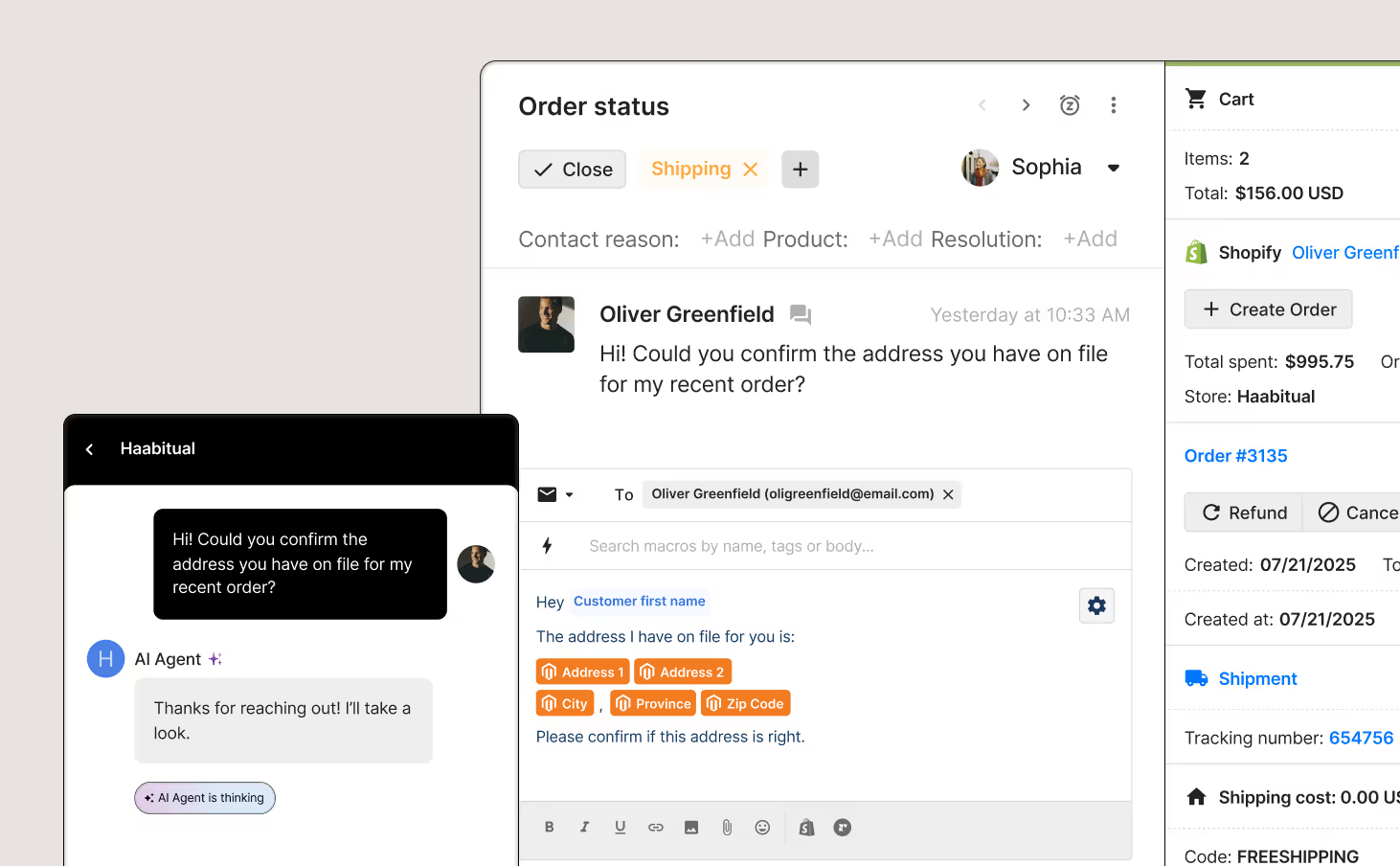
Related: Customer service messaging: Tips and templates for SMS + conversational channels
How does live chat support differ from a chatbot?
The main difference between live chat and chatbots is the option to speak to a live human agent.
With live chat support, customers always have the option of speaking to a live human agent. Meanwhile, chatbots can only provide customers with automated responses, whether preconfigured or generated by AI.
Why should you offer live chat support?
Live chat doesn’t just make support faster—it helps you close more sales.
Aside from quick answers, customers want confidence to buy. In fact, Hiver reports that 63% of consumers prefer live chat over phone and social media, mainly because they get instant answers while they’re still browsing.
Here are the benefits of implementing live chat for your business:
- Customer satisfaction: Customers get the clarity they need while shopping
- Higher conversions: Live chat removes friction at checkout by resolving doubts in real time
- Faster resolutions: Support teams close tickets faster by solving issues right away
- Revenue retention: Agents can recommend the right product, reducing the chance of returns later
Read more: A guide to resolution time: How to measure and lower it
When does live chat make the biggest impact?
Live chat shines in situations where timing directly impacts whether a customer buys your product or walks away. These conversations often happen before a purchase, like when a shopper is deciding between products, has concerns about shipping, or wants to confirm your return policy.
Use live chat in these moments:
How automation makes live chat support scalable
You don’t need a large support team to offer high-quality live chat support. Sure, live chat can feel risky if you’re a brand with a lean CX team or high ticket volume, but when you automate the right types of conversations, it becomes one of the most impactful support channels.
What to automate first
Start with high-frequency, low-complexity inquiries. These are repetitive questions that don’t require an agent to resolve:
- Order tracking (where is my order)
- Shipping, return, exchange, and cancellation policies
- Basic troubleshooting
- Product education, like sizing or fit guides
These types of tickets typically make up the bulk of your live chat volume. Automating them clears the way for agents to focus on conversations that require more specialized knowledge and nuance.

Automation features that help you scale
The best live chat isn’t only a messaging tool, it also comes with features that make the support agents using it more productive.
Here are the top automation features to improve live chat:
- Macros: One-click prewritten replies to common questions that agents can send manually or automatically.
- Customer and product variables: Dynamic details—like name, order number, and delivery date—pulled from your ecommerce platform and inserted into messages can easily make interactions more personalized.
- Flows: Interactive Q&A scenarios that automatically answer customer questions in the chat widget.
- Routing: Prioritize or assign tickets to agents based on topic, urgency, or language for maximum efficiency.
- Conversational AI: Leave live chat on 24/7 with tools like Gorgias AI Agent to answer repetitive questions and update orders—even when your team is offline.
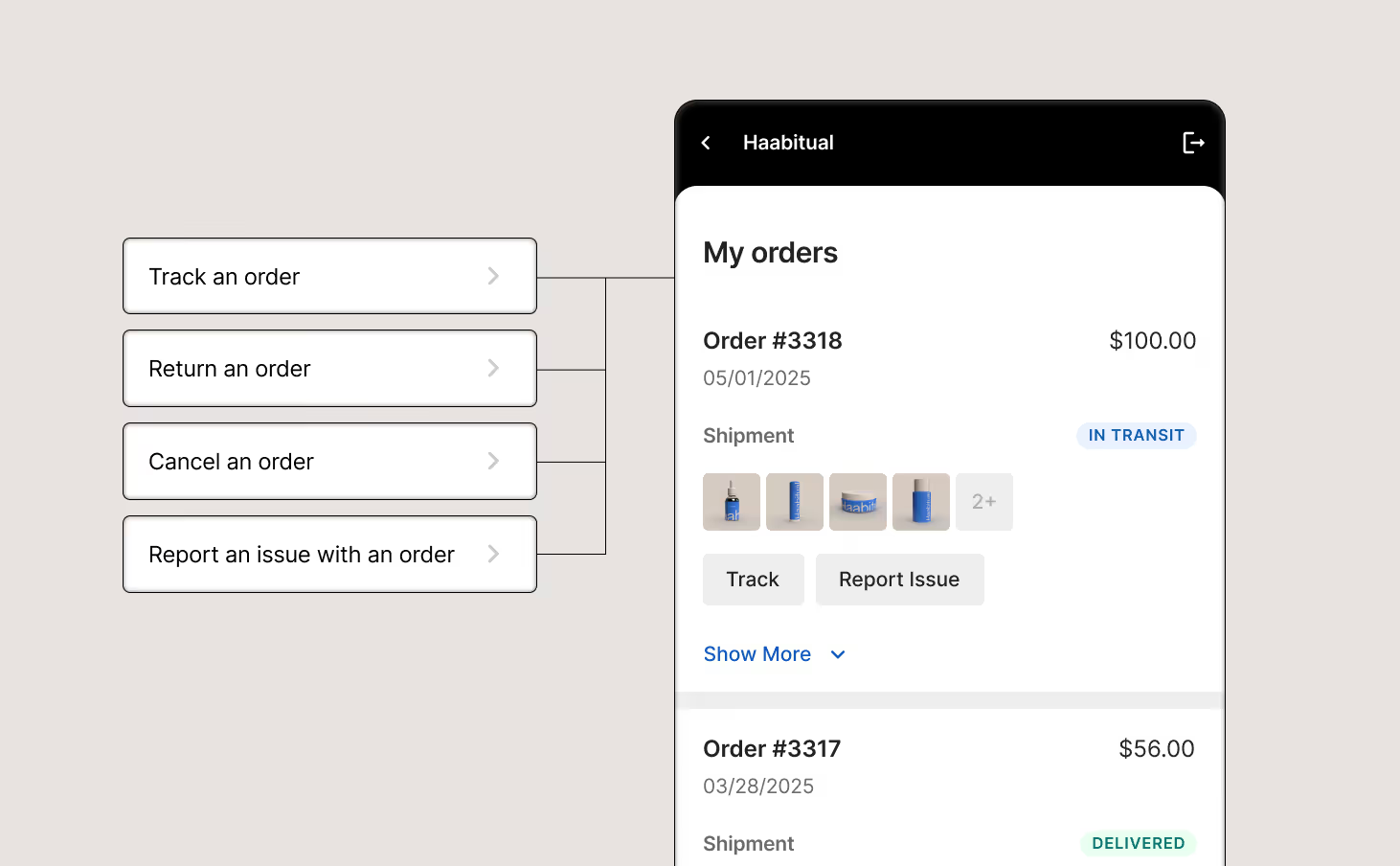
The dos and don’ts of replying to a live chat message
Good live chat messages are quick, helpful, and easy to follow. Poor live chat messages are slow, robotic, or long-winded.
Follow these guidelines to help keep your replies effective and consistent:
How to set up live chat without overwhelming your team
Adding live chat for the first time or want to make your current setup more manageable? Start with these five steps:
1. Set live chat hours
You don’t need to be online at all times to offer live chat. Start by choosing live chat hours that reflect your team’s availability and peak shopping hours.
Remember to display your availability on your website clearly to manage customer expectations.
2. Prioritize live chat tickets in your inbox
Customers who reach out to you via chat are active on your site and often close to purchasing.
Create rules in your helpdesk that flag live chat conversations as urgent, so they don’t get buried under slower channels like email. If you have a dedicated agent who handles chat, route all chat tickets to them for instant visibility.
3. Automate your first reply
Set up an auto-response that triggers immediately when someone starts a chat. Even a short message like “Hey! Thanks for your message, an agent will be right with you,” can reduce drop-off and give your team time to prep.
4. Edit your macros for live chat
Templates that work in email may be too wordy in chat. Shorten your macros, simplify the tone, and make sure each response fits cleanly into a chat window. Use dynamic variables to pull in details like order number or shipping status without slowing down your agents.
5. Capture customer emails when live chat is offline
Customers don't stop having problems when your team clocks out. When someone tries to chat outside business hours, collect their email so an agent can follow up once your support team is back online.

Best live chat tools for CX and support teams
If you’re evaluating live chat software, here are five solid options to start with. Each one fits different team sizes and priorities.
Deliver faster support without adding headcount
Gorgias helps ecommerce brands deliver fast support without cutting into your budget. Automate common questions with conversational AI, resolve tickets in seconds, support and sell, and give your team the context they need to handle complex conversations with one tool.
Want live chat that takes support to the next level? Book a demo.
{{lead-magnet-2}}

Building delightful customer interactions starts in your inbox
