
.png)

Newsletter Signup
The best in CX and ecommerce, right to your inbox
Featured articles
Ticket Volume: How to Measure It, Benchmark It, and Reduce It
Gorgias AI Agent Pricing, Explained
Introducing Helpdesk 2.0: Built for How Agents Work
TL;DR:
- Built directly from agent feedback, Helpdesk 2.0 fixes real workflow pain points. The redesign focuses on reducing friction and helping agents handle more context-heavy tickets.
- A chat-style interface replaces the old email layout. Conversations are easier to follow and resolve in one view.
- Customer context is shown beside the conversation in a right-side panel. Agents can view history, orders, and details without leaving the ticket.
- AI handoffs come with clear summaries. Agents instantly see what happened, what was tried, and what to do next.
- Navigation is simpler and faster across teams. Clean menus, structured queues, and multi-store access keep agents moving efficiently.
Helpdesk 2.0 starts with the people who use it most: the agents.
We spent time understanding customer support from the agent's seat. What do they reach for constantly? What slows them down? What does a better workday look like?
Everything we found is in this brand-new update.
Why we redesigned Helpdesk
Conversational commerce is the new standard.
In customer support, this means customers expect context to remain intact wherever they reach out, whether a conversation starts on social, moves to email, or ends on a call.
This new approach to support has also changed the agent's role. Recurring tickets, like order status checks, shipping updates, and returns, are now handled by AI. What lands in the agent inbox are edge cases that require human judgment and troubleshooting, or tickets that require the full picture.
However, the original Helpdesk was built for a different era of support.
Context was separated across views rather than built into the conversation itself. It's something one in five Gorgias customers flagged, through support tickets, NPS surveys, and conversations with our team. So, we got to work.
Helpdesk 2.0 is the result.
What's new in Helpdesk 2.0
Here's a look at everything that changed.
Read conversations the way they're meant to be read
Conversations have a natural rhythm, one that’s already found in every messaging tool we use. We brought that same layout into the helpdesk.
Say goodbye to the 2000s email interface and hello to chat bubbles. This updated design changes how quickly you can orient yourself and resolve the ticket in one go.
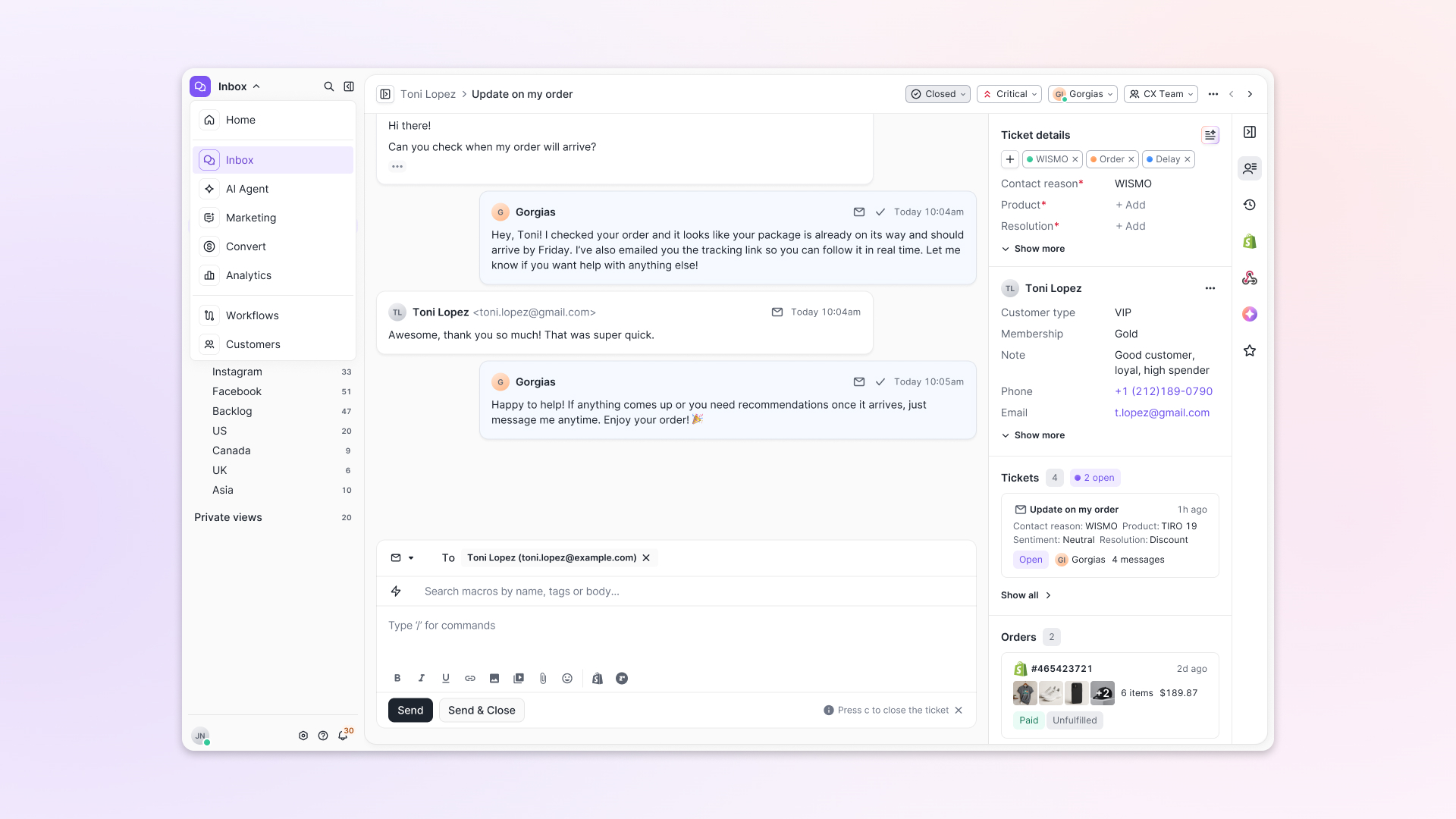
Chats with customers now look like real conversations, using the speech bubble style you’re familiar with on popular messaging apps.
Check customer history without losing your place
Checking a customer's history used to mean leaving the conversation, an extra step that interrupted what should have been a smooth workflow.
Now, past conversations open in a sidebar next to the active conversation. You can view a customer’s full history, search through their timeline, and open prior tickets without going to a new page.

Check past conversations, orders, and customer details in the brand-new Customer Timeline.
See order details the moment you open a ticket
Order information is easier to reference than ever. Open a ticket, and you instantly see the customer's recent orders, marked with product images and invoice details at a glance. Need to dig deeper? Click on an order, and the expanded information appears in the same panel.
For teams using custom integrations, apps are fixed in a quick-access integration menu on the right.
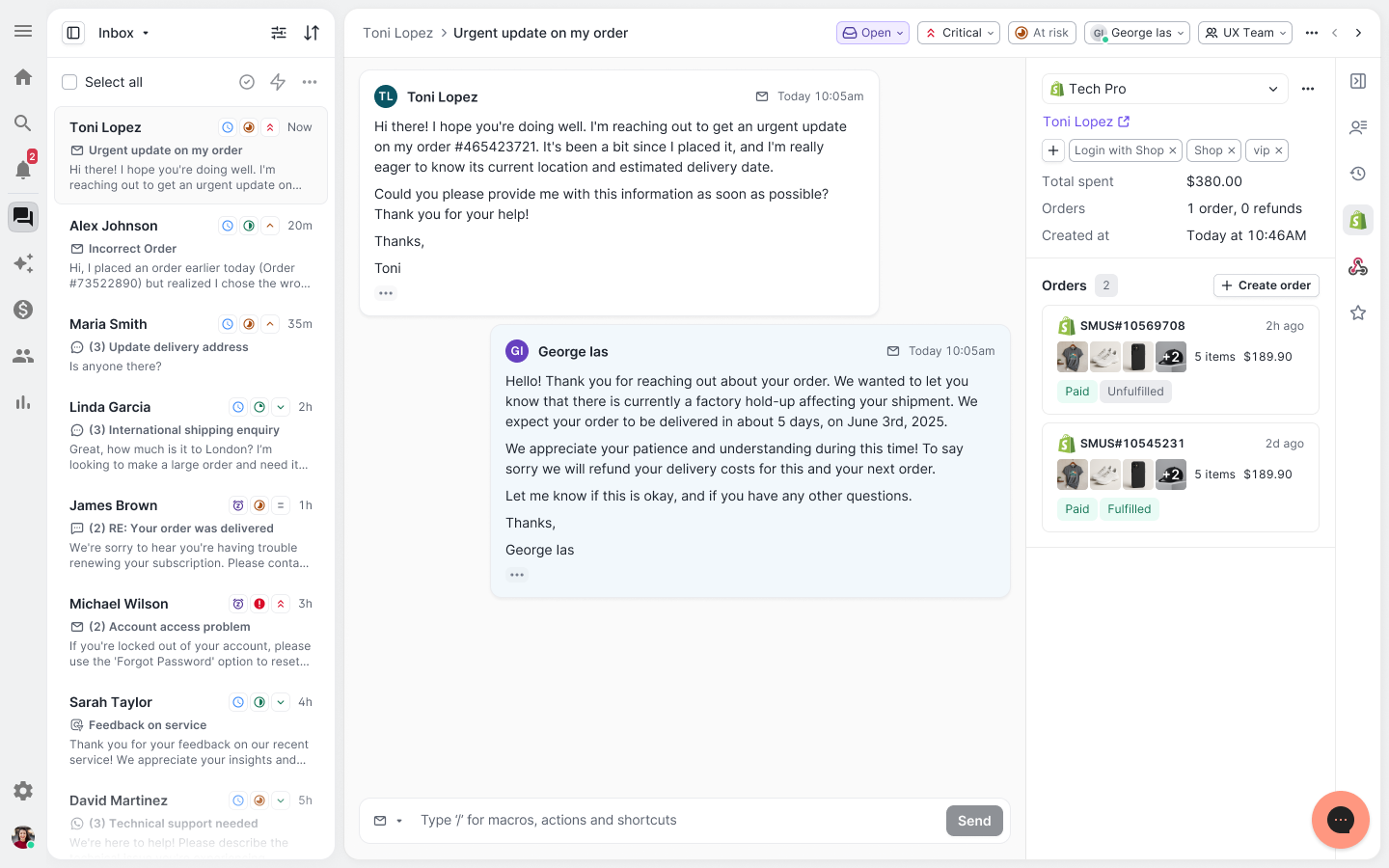
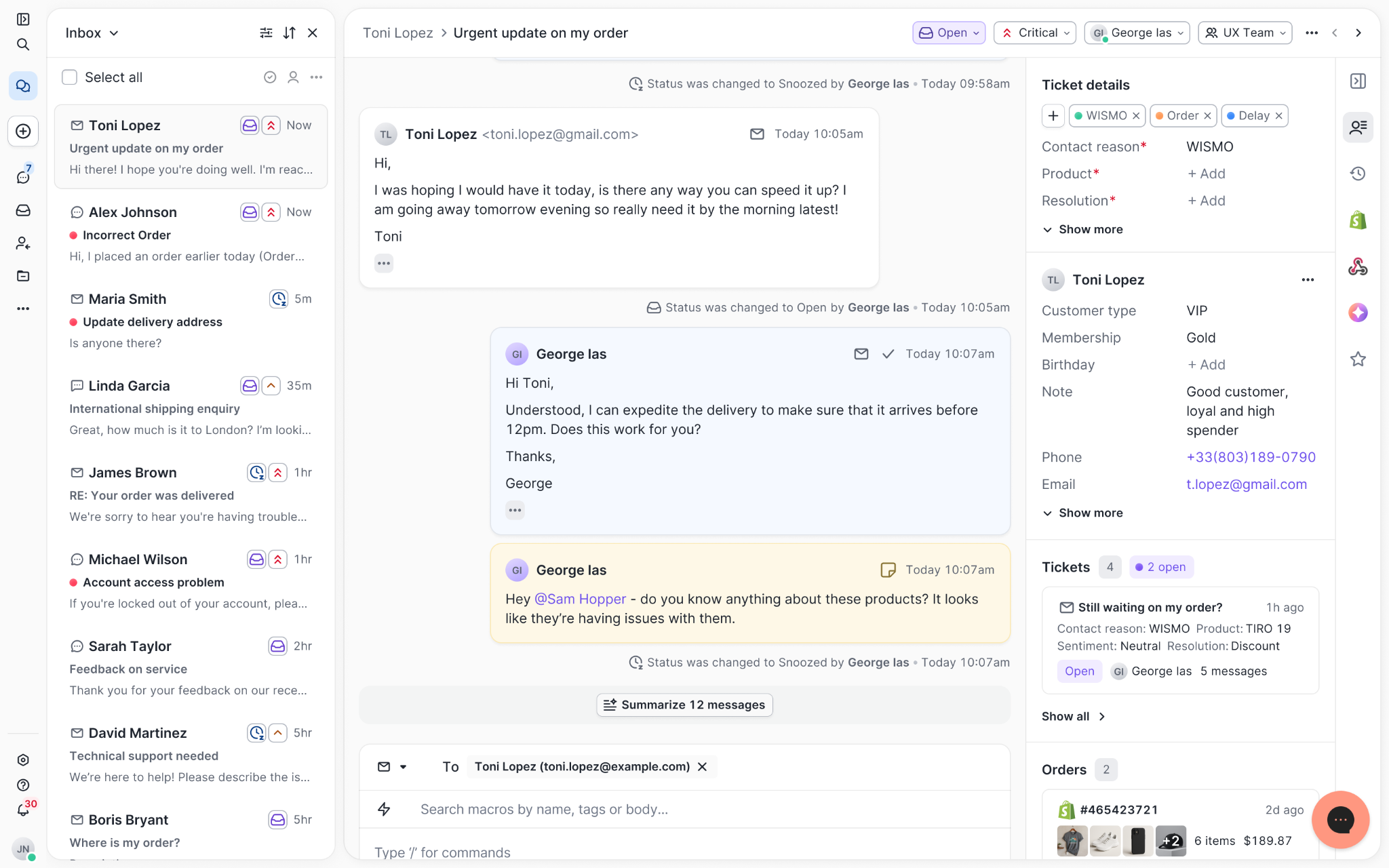
See order details, product images, and totals at a glance on the right panel, without leaving the conversation.
Pick up where AI left off
You shouldn't have to dig through a thread to figure out what AI already tried. Now you don't have to.
When AI Agent escalates a conversation, it includes a concise handover summary that mentions the issue, what actions were taken, and why it was passed to your team.
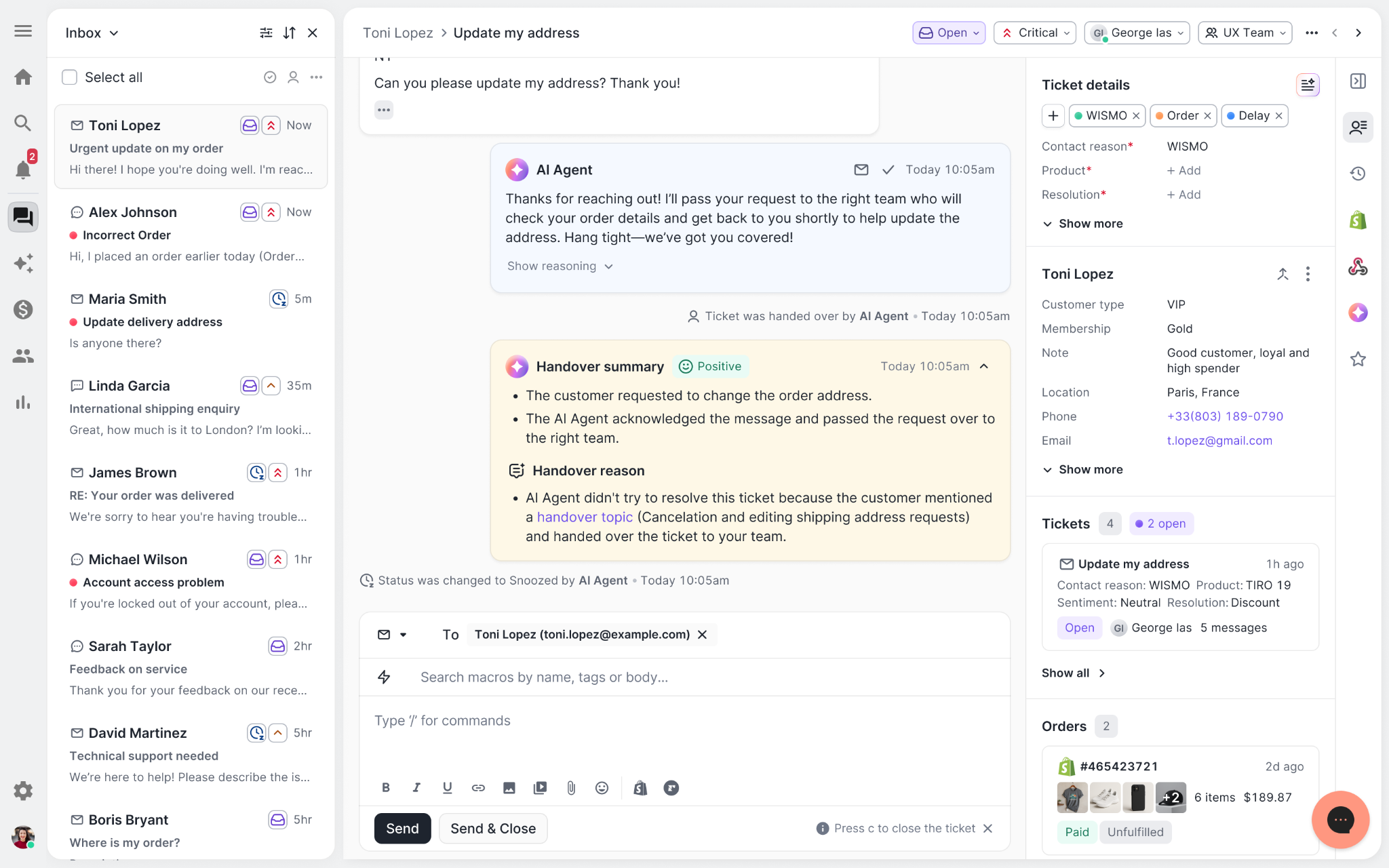
Escalated tickets include a brief AI-generated handover summary, marked in yellow, for quick reference.
Move faster across every store and team
We restructured and simplified the navigation. The left sidebar organizes everything into clear categories: Inbox, AI Agent, Marketing, and Analytics, so anyone on your team knows exactly where to go.
To quickly update your knowledge base or adjust a workflow, both now live right in the sidebar. For teams managing multiple stores, switching between them is just as straightforward, accessible from the sidebar, so agents can move between inboxes without breaking their flow.
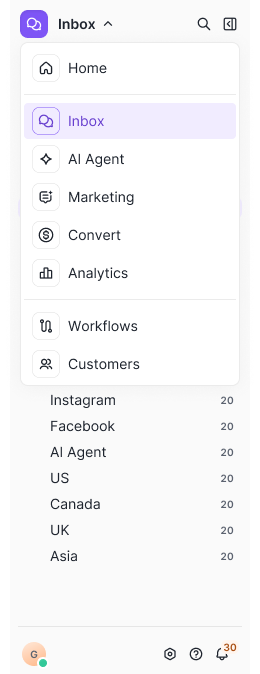
Agents can switch between stores and their corresponding inboxes directly from the left menu.
A workspace that works the way agents do
Support comes down to the person on the other end of the conversation. We built Helpdesk 2.0 is to make sure they have everything they need to show up for that moment.
The best way to see the difference is to work in it. Start a free trial today.


Further reading

New Data Shows 4 Ways Automation Impacts Customer Service
Since ChatGPT was introduced in November 2022, customer service automation has stormed its way into almost every industry, including ecommerce. This leap in technology has paved the way for companies to increase their support efficiency dramatically, as demonstrated by the buy-now-pay-later service Klarna, which recently resolved two-thirds of customer service chats with AI.
The business gains arising from automation are evident. Faster and smarter tools mean less time handling mundane tasks and more time improving the customer journey with meaningful conversations, personalized experiences, and seamless upselling opportunities.
At Gorgias, our mission is to elevate customer experiences with automated solutions. To determine the impact, we analyzed data from over 14,000 merchants who use automation compared to those who do not.
Our data revealed a 36% increase in repeat purchases, a 37% reduction in first response time, a 52% reduction in resolution time, a 27% decrease in the ticket-to-order ratio, and a 1% increase in CSAT when automation is used.
These compelling results assert our belief in automation as the next, inevitable step for scaling support teams.
“AI is going to help us transform ourselves into deeper thinkers by taking over simple, standardized functions” —Ron Shah, CEO and Co-founder at Obvi
The shift in customer service: doing more with less
Before automation, customer service teams scrambled to hire more agents as their customer bases grew. When Black Friday and other peak seasons arrived, hiring more agents was the Band-Aid fix. Today, companies are opting for leaner support teams as automation allows them to do more with less. The benefit? Teams can scale and improve the quality of service without temporarily bringing on new staff.
Automation works like a junior support agent but at a higher efficiency. It can handle frequently asked questions like where is my order? and customize responses according to brand voice. So, as repetitive tasks are handled in the background, agents can focus on more complex tickets, such as product-specific questions or technical issues that require troubleshooting.
“Before, agents had to handle it all. Now, they rarely take a ticket about frequently asked questions. They’re only handling escalations, special product-related questions, and things like that.” —Caela Castillo, Director of Customer Experience, Jaxxon
Automation is redefining customer experiences
The flexibility of automation makes it the ideal tool for personalized customer service. Aside from being a keyboard shortcut or macro, automation can be a hands-off assistant that can engage customers and influence as much as 25% of revenue.
At Gorgias, automation is at the core of our products, powering almost every feature in Helpdesk, Automate, and Convert. It allows merchants to deliver delightful and personalized customer interactions across various channels and touchpoints in the customer journey.
While automation is only one of many factors, we’ve found it to positively impact support performance metrics. Based on our data, merchants who used automation saw clear improvements in repeat purchase rates, response times, resolution times, tickets per order, and CSAT scores.
Automation led to 36% more repeat purchases
Retaining customer loyalty is challenging even when brands launch loyalty programs, as customers are discouraged by the effort required to receive rewards. However, Gorgias data shows that simply using automation can increase repeat purchase rates. Within 28 days, merchants who automated up to 20% of tickets increased their repeat purchase rate by 8 points.
 |
Yoga apparel brand Manduka used Gorgias Convert's on-site campaigns to influence customers to purchase multiple products. The campaign convinced shoppers to hit a $100 order total for free shipping by recommending small additional items they may be interested in. Their campaign brought in nearly $12,000, proving that automation can directly affect revenue.
“We want to be able to target our repeat customers who have purchased a lot, and say, ‘Welcome back! Here's a new product that would go wonderfully with the item you bought last time.’ It would be a wonderful translation of the in-person retail experience where staff know what you like, so they can assist you better.” —Jessica Botello, Customer Service Manager at Manduka
Automation accelerated first response time by 37%
 |
Automated responses resolve tickets in zero seconds and result in faster first response times. On average, merchants using automation respond 37% faster than ones who don’t automate customer service.
Responding to customers as quickly as possible is especially important during busy seasons like Black Friday and Cyber Monday so that revenue-generating questions don’t get pushed to the backlog. The customer experience team at health supplement brand Obvi was able to drive 3x more purchases from support conversations compared to previous years.
Faster response times also mean agents are able to make stronger connections with customers. For Obvi’s CX team, it translated to more time to engage with their vibrant Facebook community:
“Instantly, our CX team had time to prioritize important matters, like being active in our community of 75,000 women instead of sitting answering emails.” —Ron Shah, CEO and Co-founder at Obvi
Customer issues are resolved 52% faster with automation
When customer tickets are automated, resolution times improve dramatically. Merchants using automation resolved tickets 52% faster than those without.
Automation is especially helpful in answering pre-sales questions. High-end luggage retailer July deflected 450 tickets a month immediately after activating Quick Responses, one-click FAQs that live in Chat. Their Head of Operations and CX, Alex Naoumidis, notes that setup was “so easy, with a huge payoff.”
This significant efficiency gain ensures customers are well-educated about their products, leaving agents time to personalize the rest of the customer journey.
Automation decreased ticket-to-order ratio by 27%
As automated responses provide quick solutions to customer issues, customers need to contact support less. Based on our data, brands that automate 10% or more of their tickets see a decrease in billable tickets per order. Brands with little to no automation do not see a significant improvement in the ticket-to-order ratio.
For apparel brand Shinesty, automating more than 10% of tickets greatly decreased the number of tickets per order by 27%. Self-serve tools like interactive conversations called Flows and Article Recommendations enabled customers to solve issues relating to discounts, subscription policies, and returns on their own.
 |
“Automate would be useful for any ecommerce company that needs to lower their ticket counts, or wants to provide a more consistent experience.” —Molly Kerrigan, Senior Director of Retention at Shinesty
30 days of automation allow brands to scale faster
 |
Thirty days after setting up automation in Gorgias, brands enjoyed a 1% increase in CSAT score, a 4.51 score compared to 4.46 for non-automating brands. Even though satisfaction only nudged an inch, the positive effects reached support teams, improving agent morale and team alignment.
Molly Kerrigan, Senior Director of Retention at Shinesty, emphasizes the importance of preserving quality customer interactions during growth, "We get a lot of praise from our customers, and they talk highly of our CX team after 1:1 interactions. We can’t lose that as we scale."
Since Gorgias provides in-depth conversation analytics, CX teams are finally able to see their impact.
“Tracking customer satisfaction scores in Gorgias is a really big help to us. Before, we didn't know if we were doing well or not, but now we can see people like the service we provide. We use the KPI tracking data for internal monthly meetings to review performance and see where we can improve,” says Deja Jefferson, Customer Experience Manager at Topicals.
Clearly, balancing automation with personalization significantly improves the customer journey. Given that customers with positive customer experiences are 2.7 times more likely to do repeat business, the value of automation is unmistakable.
In the future, agents will be AI coaches
AI progress has advanced in a short amount of time. But to remind you, this is only the beginning of what automation and AI can do in customer service. We envision AI as a constant work in progress, meant to intake information until it is capable enough to handle more complex tasks. This means agents will spend more time building strong customer connections and finding ways the business can grow.
Gorgias is at the forefront of this evolution, developing automation and AI-driven solutions like an AI-generated Help Center, an AI Agent, a generative AI assistant that autonomously answers customer questions, and an Interaction Quality Score to measure and report on AI-customer interactions. Gorgias aims to transform how support teams and customers interact with AI, paving the way for more impactful customer experiences on a human scale.
{{lead-magnet-1}}

Boost Your Help Center's Visibility: Proven Strategies to Increase Article Views
TL;DR:
- A Help Center is an article database for customers to get the answers they need without contacting a support team
- Create relevant Help Center articles by monitoring statistics like customer contact reasons, ticket intents, and CSAT scores
- Leverage SEO by including relevant keywords and internal links in articles
- Gorgias Automate can help promote your Help Center articles via on-site article recommendations
The Help Center is more than a database to make the lives of your agents and customers easier. It's also an ingenious way of creating brand awareness. By enhancing your Help Center's visibility, you carve new pathways for shoppers to discover your brand while solidifying your brand's reliability with loyal followers.
This guide delves into practical methods for increasing your article views and turning your Help Center into a dynamic hub with Gorgias. We’ll look at the basics of a Help Center, how to structure it based on statistics and SEO, and how to share it across multiple channels.
What is a Help Center?
A Help Center is a knowledge database of articles addressing common questions about your products, services, and brand. It empowers customers to find solutions on their own without needing to contact your customer service team.
A Help Center can include how-to articles, policies, answers to frequently asked questions, and more. Each article can also be supplemented with images, GIFs, and videos to better guide customers toward solutions.

Two strategies to make your Help Center stand out
Boosting your Help Center's visibility involves two key elements: understanding customer concerns to create relevant content and using SEO to increase article views.
Focusing on your customers' specific needs and questions allows you to provide articles that directly address their concerns.
Let’s delve into the two strategies you can use with Gorgias.
Strategy 1: Understand customer concerns to create relevant articles
The first step to creating Help Center articles is understanding your customers’ problems. Identifying their concerns ensures your content aligns with what questions need clarification.
Here are five ways to uncover customer concerns with Gorgias Statistics:
1) Monitor Ticket Tags
Tags are labels for categorizing tickets by topic or customer intent. Regularly reviewing tags helps identify common customer inquiries. Generally, the more a tag is used, the greater the need for clarity on that topic.
On Gorgias, navigate to Statistics -> Ticket Insights -> Tags to see tag usage frequency. This view gives you an overview of popular tags. You can also adjust the view by filtering by app integration, channel, and date range.
💡 Pro Tip: The most frequently used tags can help inform what articles you should include in your Help Center. Based on the screenshot below, it would be smart to create articles about FAQs and a Price Match policy.

2) View Intent Statistics
Intent Statistics provide valuable insights into why customers contact support. By analyzing these statistics, you can understand the primary reasons behind customer queries.
On Gorgias, go to Statistics -> Ticket Insights -> Intents to review the usage frequency of different customer intents.
This feature provides a clear bar graph view of customer concerns that are frequently mentioned in messages. You can also change the view using filters such as channel and date range.

3) Look into Contact Reasons
Another way to learn about your customers’ concerns is by looking at contact reasons. On Gorgias, Contact Reason is an AI-powered feature that identifies a ticket's contact reason from its message content. Reasons could range from cancellations and refunds to shipment issues and feedback.
The Contact Reason is conveniently located at the top of each ticket, as shown in the image below.

4) Analyze low satisfaction scores and read negative feedback
While positive CSAT scores are gratifying, it's the negative feedback that truly helps improve your customer support.
To view Satisfaction scores on Gorgias, navigate to Statistics -> Support Performance -> Satisfaction. This section provides details on surveys sent, response rates, average ratings, and response distribution over three months.
💡 Pro Tip: For deeper insights into CSAT scores, filter for scores of 3 stars or below. Analyzing lower ratings and their accompanying comments will help you pinpoint the exact topics your Help Center articles should address.

5) Create related articles from top-performing articles

Checking the performance of your articles can be the key to adding relevant articles to your Help Center while avoiding unnecessary topics.
On Gorgias, you can find individual article performance by going to Statistics -> Help Center -> Performance by articles. Articles are sorted from most viewed to least.
Here’s how to use article performance data to write relevant articles:
- 📈 Most viewed articles: These articles indicate the topics customers are most concerned about. Consider creating related articles that branch out from these top articles in order to increase information about a certain topic.
- 📉 Least viewed articles: These articles may be irrelevant to your general customer base, which means you can hold off on writing similar articles. On the other hand, these articles may also not be highly visible on your Help Center. Ensure customers can easily find them.
{{lead-magnet-1}}
Strategy 2: Utilize SEO to increase article views
SEO (Search Engine Optimization) isn't solely for your primary webpages. It's equally crucial for Help Center articles. Using SEO tactics in Help Center articles boosts their online visibility, but most importantly, they allow you to turn visitors into customers.
Here are some effective SEO strategies to apply:
1) Incorporate relevant keywords into articles
Using relevant and related keywords in an article can boost search visibility. Customers won’t always use the same search query, so anticipating their word usage will help capture all types of customers looking for your content.
On Gorgias, you can find out what keywords customers are searching for under Statistics -> Help Center -> Help Center searches.

Here’s how to leverage search result data:
- Search terms with results: Use the most popular search terms as a guide for which keywords to include in existing articles.
- Articles clicked: Sometimes search terms will have zero articles clicked. This may mean users weren’t able to find exactly what they were looking for. Pinpoint the search terms with zero clicks and create articles accordingly.
- No search results: This is a list of keywords customers search for but don't find relevant articles for. Make sure to use these keywords in existing articles or create new articles for them.
💡 Pro Tip: Don’t forget to incorporate relevant keywords into your article titles, subheadings, and excerpts. There are two benefits to this: they make it easier for customers to quickly scan your content and enhance your brand's discoverability in search engines.

2) Update articles based on article performance
Again, data plays a crucial role in making your support and Help Center the ultimate resources. On Gorgias, the "Performance by articles" section allows you to track how well each article performs. Articles are sorted by view count, ratings, and the dates they were last updated.

Here’s how you can leverage the following types of articles:
- 📈 Most viewed articles: Feature your top-performing articles front and center in your Help Center to make them visible to customers looking for answers.
- 👎 Unhelpful articles: Update these articles thumbed down by customers as they may lack detailed and up-to-date information, internal links, and SEO.
- ⌛️ Old articles: There may be a relation between poorly performing and outdated articles. Refresh your old articles accordingly.
3) Use internal links
Internal links are hyperlinks that point to other articles in your Help Center, creating a network of related content. This tactic helps to proactively address questions customers might not have considered, effectively reducing the load on your support team.
Spread the word: share your Help Center articles across multiple platforms
To effectively increase the visibility of your Help Center articles, consider leveraging a variety of communication channels:
- Customer communications. Embed article links in customer interactions, such as order confirmations or support responses, to provide extra assistance.
- Email newsletters. Feature links to key articles in your marketing emails and newsletters to notify existing customers about your additional resources.
- Social media. Share your articles on social media to reach a broader audience and showcase your brand's expertise. You can also share them on forums and online groups to engage with potential customers.
Enhance Help Center performance with Gorgias Automate
Remember, a well-optimized Help Center is a powerful tool in building brand awareness and customer loyalty.
Do more with an AI-powered Help Center with the power of Gorgias Automate. Discover how our advanced tools can streamline your support processes and improve customer satisfaction. Book a demo today.
{{lead-magnet-2}}


How To Leverage Automation For More Personalized Customer Interactions
TL;DR:
- Automation can be customized to fit the language, tone, and voice of your brand.
- Combine automation with ecommerce app integrations to personalize messages at scale.
- Use a customer helpdesk trained on AI to automate personalized customer service.
- Disclose when automated messages are used to maintain customer trust.
While there’s a common concern that automation might alienate customers with responses that miss the mark, it turns out that 73% of customers have higher expectations for personalized experiences when advanced tech is involved.
Not only do customers expect automation and AI in customer service, but they also believe that brands should make the most out of them.
Luckily, helpdesk tools like Gorgias have found the right balance between automation, personalization, and human touch. The only thing left for CX agents to do is to use automation strategically.
{{lead-magnet-1}}
Automation is not AI & other automation myths debunked
Automation and AI are distinct, just like live chat versus chatbots. AI, such as ChatGPT, evolves in real-time from interacting with and learning from input data, while automation follows set rules for routine tasks without understanding natural language.
Automation is highly customizable — it won’t spew out an inappropriate sentence unless you tell it to. If you’re still hesitant about automating your support, here are four automation myths debunked below.
Myth 1: Automation produces robotic language
The tone and style of your automated messages are entirely within your control, thanks to the customizable nature of automation. This flexibility ensures that your brand's unique voice shines through, allowing for a tailored approach that aligns with your ecommerce strategy.
If we’re talking about AI, we’ve also come a long way from generic chatbot responses. In fact, a 2019 Stanford University report found that AI computational power doubled every 3.4 months. The result? Humans are only correct 60% of the time when guessing if they’re talking to AI or a real person.
Myth 2: Automation can’t be personalized
In reality, automation is highly adaptable and can incorporate customer data, brand voice, and plenty of dynamic variables to create powerful communications for personalized customer service.
Learn more: How Manduka used personalized, on-site campaigns and earned $70k
Myth 3: Automation can replace human agents
While automation enhances efficiency, it works best in tandem with human insight rather than as a complete replacement for human agents. Customer service thrives when there is a route back to human support.
Myth 4: Customers prefer human agents
Yes, customers appreciate the ease of connecting to a fellow human, but they also value speed — something automation excels at compared to humans.
Learn more: How Luksusbaby boosted 66% first response time with 45% automation
The balancing act of using automation effectively without sacrificing personalization
A customer-centric helpdesk trained on AI is the most effective way to have rapid and authentic customer interactions. A tool like Gorgias enables you to scale your customer service operations by connecting your ecommerce store. Gorgias learns customer conversations and data and automates simple processes like responding to repetitive tickets and refunding orders.
How to use automation the right way to support your customers
To effectively implement customer service automation, always remember to add a human touch to make customers feel comfortable. More importantly, not all customer interactions are suitable for automated responses so automate strategically.
Here are five ways to implement personalized automation with Gorgias, from automating responses to using website chat and creating a help center.
1) Create auto-responses to answer FAQs
Skip the mental work of reading a frequently asked question and thinking of a response. Auto-responses will do both for you in the background while you complete other high-priority tasks.
How to implement:
- Set up a rule to auto-respond to where is my order? (WISMO) tickets
Note: Manually follow up on complaints or technical issues. Using auto-responses on these sensitive issues may escalate them and cause more customer frustration.

2) Route customers to live chat agents or help center articles
AI is excellent at answering simple inquiries, but sometimes customers will ask questions that need a human’s problem-solving skills. Include a route to a live agent to address this. Allowing AI and agents to work in tandem is an effective way to improve customer satisfaction.
How to implement:
- Enable live chat support alongside automated, offline chat
- Include disclaimers and instructions in your automated responses about how customers can speak to a live agent
- Include an option to talk to an agent in your interactive voice response (IVR) system
Note: Don’t trick customers into thinking they’re speaking to an agent when they’re speaking to AI. Customers are more likely to trust you when you set clear expectations from the start.

3) Use enriched customer data to deliver personalized messages
Make personalization a part of the customer journey to create friendly experiences on a large scale. Without tailored communications, you’ll likely frustrate 76% of your customers due to irrelevant recommendations and marketing campaigns.
How to implement:
- Include customers’ names in emails, SMS, chat, social media direct messages, and other notifications with a Shopify integration
- Mention past purchases when providing customers with new recommendations
- Adjust language in automated emails and email marketing based on customer demographic

4) Prioritize VIP customers with automated rules
According to a survey of 3,000 consumers, 56% would repurchase from a retailer that provides personalization. For this reason, create an automated action, also known as a rule, that labels tickets from VIP customers. Prioritizing VIP needs will allow your team to strengthen loyalty and drive repeat purchases.
How to implement:
- Identify VIP customers by setting a minimum purchase total or total # of orders
- Create a rule that identifies tickets from VIP customers based on their customer profile

5) Build a help center to provide article recommendations
The responsiveness of AI depends on the knowledge you feed it. To accelerate automation’s efficiency, provide it with resources from your knowledge base or help center. In 2020, organizations reported a reduction of up to 70% in call, chat, and email inquiries after implementing a chatbot or virtual customer assistant.
How to implement:
- Compile a list of customers’ most frequently asked questions using an AI tool or help center statistics
- Create articles answering each question and upload them into a help center

Read more: 9 types of customer self-service
Balance automation and the human touch with Gorgias Automate
Setting up automation without the right tools can detract from personalization efforts. Gorgias Automate remedies this by equipping CX teams with features like Autoresponders, self-service Order Management, Quick Responses in Chat, and Article Recommendations. Elevate customer experiences and grow your customer relationships by booking a demo with Gorgias today.
{{lead-magnet-2}}


Chatbot vs. Live Chat Software: What's the Right Solution?
Imagine leaving your angriest customers to spar with an automated script in your website’s chat window. Now picture your support team reading “Where is my order?” for the hundredth time and glancing at the clock, only to find six hours left in the workday.
Who do you think is more frustrated?
Luckily, you won’t have to answer that, because these are completely avoidable problems. Once you learn the important distinctions between chatbot software and live chat software, you’ll understand how to use them both more effectively and lower blood pressures across the board.
Chatbots rely completely on automation and artificial intelligence (AI) while live chat software connects customers with human agents via a real-time chatbox. A third option, self-service chat, is an appealing alternative.
To determine which solution(s) is best for your business, let’s compare chatbots and live chat software and go through the top use cases for each.
What is live chat software?
Live chat support connects customers with human support agents who can answer their questions and assist them with any issues. When a customer opens the chat box on a live chat support solution, they are connected with a real person from the company's customer support department.
Support agents then use live chat messaging to address customer inquiries and walk customers through the solution to their problem.
Interested in getting live chat software? Check out one of these lists for tailored recommendations:
- Best live chat software for ecommerce
- Best live chat software for Shopify stores
- Best live chat software for general use
Pros and cons of live chat
Pros:
- Live agents have the knowledge base to answer complex queries and customer issues
- 73% of customers state that live chat is the most satisfactory form of customer communication with a company
- Enables multitasking for support agents so they can assist multiple customers at the same time
- The personalized touch of a real human can go a long way toward improving your customer satisfaction
- Support agents can find opportunities to convert visitors or turn support interactions into additional sales
Cons:
- Not available after-hours when your customer team is off the clock
- More expensive to employ agents to respond to chats
- Responses will be slowed down by high volume which impacts resolution times
- Much of your agents’ time will be spent answering the same simple questions over and over
{{lead-magnet-1}}
What is the difference between chatbots vs. live chat?
Unlike live chat software, chatbot software doesn’t connect customers with human agents. Instead, chatbot software connects customers with a chatbot that utilizes AI and machine learning to provide natural language answers to common questions.
Automation assists customers with less complex issues and provides quick answers. Chatbot technology enables companies to reduce their average response time, and frees up support agents to focus on more complex queries.
Pros and cons of chat bots
Pros:
- The ability to answer questions 24/7 without paying for agents to work around the clock. According to a survey by Drift, 64% of customers say that 24/7 service is the best feature of chatbots.
- Chatbots offer instant responses to common questions like pricing inquiries, improving customer experience with quick resolutions to common issues
- Chatbot solutions are a highly cost-effective option, as they allow companies to resolve more customer issues without having to hire new customer support reps
- By answering commonly asked questions and resolving simple issues, chatbot solutions can free up support agents to focus on more complex questions
Cons:
- Chatbots can’t handle complex inquiries requiring human intervention
- Automated responses are a colder, less human form of communication, which can impact customer satisfaction
- No opportunity for agents to elevate an inquiry into an exemplary customer experience, such as offering personalized live chat offers
- Customers will become frustrated if the chatbot can’t properly answer their questions or solve an issue
{{lead-magnet-2}}
Live chat vs. chatbots: Evaluating their strengths to help you choose the right one (or both)
When comparing chatbots with live chat solutions, it's important to recognize that each category offers its own unique advantages. Many companies choose to employ both live chat and chatbot apps on their ecommerce websites.
With that in mind, let's explore the strengths of each solution.
Response times and customer expectations
One of the biggest advantages of chatbot solutions is the fact that they allow for immediate responses to customer inquiries. Live chat solutions can also help companies reduce their wait times, though not to the same degree.
Chatbot advantage: Answers are immediate
According to data from HubSpot, 90% of customers rate an "immediate" response as important or very important when contacting customer service, with 60% of customers defining "immediate" as 10 minutes or less.
With a chatbot app, offering immediate response times to customer queries is a much more attainable goal. Best of all, these immediate response times are a 24/7 offering for customers, whereas live chat agents may not always be on the clock.
Live chat advantage: Solve complex issues
The problem with relying solely on chatbots to reduce customer wait times is the fact that even the best and most intelligent chatbots are often unable to resolve complex issues. Chatbots are excellent at pulling information from internal databases to answer common questions, such as providing the status of a customer's order or editing it.
But for uncommon questions or complex issues, a chatbot alone may not be sufficient. Because they can only handle one thing at a time, it can take forever before you get all of your questions resolved.
Solution: Use both chatbots and live chat
Many companies use chatbots alongside live chat support. This allows businesses to offer both immediate responses, as well as more in-depth support for complex issues.
For example, a customer may first be connected with a chatbot that provides instant responses to their query and assists with gathering initial information. If the chatbot determines the customer's question or issue is too complex to resolve, the customer is then connected to a support agent via live chat.
This combination is an ideal solution for many companies, allowing them to quickly resolve common issues without the need for a live chat agent. At the same time, customers have the option to speak with a real person in cases where assistance from a chatbot alone isn’t sufficient.
Human touch and personalization needs
While chatbot apps can help reduce customer service wait times and the number of customer service reps needed, many customers prefer speaking with a person.
Live chat advantage: The human touch
A CGS study found that 86% of customers would rather interact with a human agent than a chatbot. Further, 71% of customers say that they would be less likely to purchase from a brand that did not have real customer service representatives available.
Chatbot advantage: AI learning
Chatbots have come a long way toward replicating natural language and determining customer intent for better customer engagement. Today, the best chatbot applications can come quite close to sounding like actual human beings.
Chatbots leverage AI and machine learning to deliver personalized responses, as opposed to only “canned” responses, and can better serve your customers.
Solution: Use both chatbots and live chat
Even the most advanced chatbots still fall short of a live representative when it comes to delivering a personalized, human touch. They’re also lacking when it comes to handling more complex questions or customer issues.
Once again, a combination of automation and live chat support is typically the best approach.

Consistency and accuracy
Chatbots and live chat applications have unique advantages when it comes to delivering consistent and accurate responses to customer queries.
Chatbot advantage: Consistency
Chatbots are excellent at delivering consistent, on-brand messaging. They can be programmed to systematically follow templates or scripts to provide a consistent customer service experience.
When working with human customer support agents, this high degree of consistency can be a little more difficult to achieve.
Live chat advantage: Accuracy
While live chat support may not offer the same consistency as chatbots, human support agents do tend to be more accurate when determining the intent of the customer they are assisting.
For example, a simple spelling error can sometimes confuse chatbots, whereas a human customer support agent would be much more likely to look past the error and correctly figure out what the customer needs.
A human agent is also much more likely than a chatbot to accurately interpret questions that are worded strangely.
Solution: Use both chatbots and live chat
For companies that are choosing between chatbots and live chat support, it’s a question of whether they’d like to prioritize consistency or accuracy. This is yet another reason why a combination of chatbots and live chat support is often the best solution.
More chat features to provide self-service support without the bots
Many of the issues your website visitors have with bad chatbots involve their mimicry of support from real people. It’s easy to tell when you’re chatting with a robot, but it’s not always made clear to you by the chat widget.
But there’s a third chat option that you should consider in addition to live chat and chatbot software.
Self-service chat options make it clear to your customers that they are receiving automated help. By presenting menus instead of imitating a human conversation, self-service customer support empowers customers to find the answers they need on their own.
It’s a win-win, because the customers get the answers they need in real time, at any hour. And your team can focus on support tickets that are more important to the business.
Here are a few ways self-service chat options can work.
Self-service order management
Up to 30% of incoming customer service tickets are shipping status requests. With self-service order management in the chat widget, customers are empowered to make these queries on their own — providing fast answers and reducing your support tickets.
These automated options are easy to add with Gorgias. This self-service adds buttons to the chat widget to automatically:
- Track an order
- Return an order
- Cancel an order
Quick service with chat automation provides quick, responsive customer service, which means better customer experience and a positive impact on revenue.
Barcelona-based shoe brand ALOHAS added self-service order management flows with Gorgias after experiencing a high chat volume. This allowed customers to find information on their own without a human needing to respond.
Here’s how a “track order” request looks in action:

Quick answer flows
When using a chat widget, you’ll notice the same questions come up again and again. You can satisfy those FAQs by adding quick answer flows into the chat widget.
These automations can be set up in the widget for questions like:
- What is your shipping policy?
- Are there any discounts available?
- Do you have any new products?
- What materials do you use?
These automations can be customized for whatever FAQs are most relevant to your ecommerce store.
Here’s how it looks, for example, when an ALOHAS customer wants to find out more about the brand’s shipping policy.

Luxury jewelry brand Jaxxon has used these self-service quick responses with great success. The customer service team found themselves overwhelmed with customer questions and unable to respond as quickly as desired.
Jaxxon upgraded their live chat widget with Gorgias Automate with Quick Responses for customers. The result, combined with using Gorgias’ helpdesk, reduced live chat volume by 17% and lifted the on-site conversion rate by 6%.

Autoresponders
Even when a customer chooses to type out a question, automation can be used to provide quick, customized service through the chat widget.
Gorgias can detect questions that come in through chat and provide automatic answers using Rules and Macros.
Here’s how the flow works:
- Intact detection scans the incoming message.
- Rules is triggered when a relevant message is found (such as some asking about where their order us) is responds to the customer.
- Macros is where you create the templated response sent to the customer. The Macro can be set up to pull in a customer’s unique information like order number, their name, and their tracking code.
The best part is this can not only be used for chat, but for responses to tickets coming in through other communication channels like email, social media, and SMS.
Keep customer service running 24/7
With Gorgias, you can make sure your chat widget isn’t missing a single ticket, even if your customer support team is offline.
First, you can set up your business hours to correspond with when you have live chat available. This will show up on your site’s chat widget by either showing the current status as online or offline.
From there, you can create automated responses for whether you’re offline or online. During business hours, this message can tell customers you’ve received their request and give a time by which they can expect a response.
After business hours, the responder can tell customers that although you’re offline, they can expect a response during the next day’s business hours via email.

You can also use a contact form which turns a chat into an emailed ticket. This is great to use after-hours and to make sure chat requests don’t get lost overnight.
Combine automation and human interaction for the strongest customer experience
The use of automation within customer service is multifaceted. As we discussed earlier, a human touch is critical for many customers, and speaking with an automated chatbot can be a turn-off. However, automation certainly has its place in the customer service process.
On the customer’s side, starting with self-service chat helps them receive quicker customer support at scale — a more satisfying experience. On your team’s side, automation allows for sorting, segmenting, and prioritizing tickets.
When self-service chat can’t solve an issue, someone from your support team can easily step into the conversation. You can use Macros — scripts that automatically bring in the customer’s information — to scale the human touch on your support team.
So in reality, it’s not automation vs human support. These are two complementary tools that work better together. And the result is a stronger and faster customer experience for your website visitors, which can increase your conversion rate by as much as 12%.
Still not convinced? In 2021, brands using the Gorgias chat widget generated an average of $38,702 from conversations involving chat. We have a whole post on live chat statistics that can help illustrate the impact our chat widget can have on your business.
Gorgias brings intuitive live chat to your ecommerce business, alongside your other channels
If you’re an ecommerce business looking for an all-in-one customer support solution that includes live chat support and AI-powered chatbots, Gorgias is your one-stop shop.
Our algorithms are trained on hundreds of millions of ecommerce tickets, so you can be sure your customers are getting the right responses every time.
Plus, you can manage both live chat and chatbot conversations in the same dashboard that you use for all your other channels, including phone, email and major social media platforms. Bring in chat from other channels, including Facebook Messenger. We’ll even be supporting Whatsapp in early 2023.
Our customer support platform is available for Magento, Shopify, and BigCommerce users.
Read more about our chat offerings by clicking here.

First Contact Resolution Rate: Your Guide to Understanding the Metric
TL;DR:
- First contact resolution rate is the percentage of support tickets resolved in one interaction
- How to calculate FCR: # of tickets resolved on first contact / total # of tickets * 100
- FCR doesn’t distinguish between successful and unsuccessful resolutions, nor does it tell you the reasons for a low or high rate
- You can increase FCR by automating responses, offering self-service resources, and automatic ticket triage
You know what customers love? When their problems are solved on the first try.
Being able to resolve issues right away is a clear sign that your support team is on the right track to provide great customer experiences.
To maintain that level of excellence and efficiency, you’ll need to understand first contact resolution (FCR) rate.
In this article, we’ll deep dive into first contact resolution rate. You’ll learn how to calculate and monitor FCR, how to increase your FCR for better customer experiences, and look at what other metrics to monitor alongside FCR.
{{lead-magnet-1}}
What is first contact resolution?
First contact resolution rate is a metric that measures the percentage of customer support tickets that your agents resolve on the first interaction.
Generally, this measurement is used in call centers, but it’s also considered one of the most essential customer support metrics in ecommerce.
Like a lot of customer support metrics, FCR also goes by a few names, like:
- First call resolution rate
- First interaction rate
- Single reply resolution rate
Whichever name you prefer, the goal of the measurement is the same: understand how efficient your team is at resolving customer issues.
The impact of first contact resolution on a support program
Time-consuming interactions erode trust over time and drive customers to shop with the competition.
According to The Effortless Experience, 96% of shoppers with a high-effort experience feel disloyal to brands afterward.
By aiming to solve customer issues from the very first interaction, you can combat the escalation of poor customer experiences and use positive interactions to improve loyalty and satisfaction, gain repeat customers, and boost revenue to meet your bottom line.
A guide to calculating first contact resolution
Let’s walk through the formula to figure out your FCR and look at an example. Then, we’ll unpack some challenges behind the FCR metric to make it as useful for your support agents as possible.
FCR formula

The formula to calculate first contact resolution rate is:
(Number of support tickets resolved on first contact / total number of resolved support tickets) x 100 = FCR rate %
The goal is to have an FCR percentage that’s as close to 100% as possible. A higher FCR indicates how successful you are at solving tickets at the first interaction without follow-up questions from customers.
Example FCR calculation
Here’s what calculating FCR looks like using real numbers:
(15,000 tickets solved on first contact / 20,000 total resolved tickets) x 100 = 75% FCR
That means, on average, your team can solve 75% of support tickets on the first try.
The challenges of measuring FCR
First contact resolution is a fantastic starting point to improve your support team’s resolution time. But, like most customer support metrics, FCR has some limitations.
FCR doesn’t provide you the reason for a high or low rate
Simply knowing your first contact resolution rate doesn’t give you the whole story.
A low FCR means you aren’t solving most problems on the first try but it doesn’t explain the root causes.
You’ll need to track other metrics that look into customer interactions more qualitatively, like customer satisfaction (CSAT).
FCR doesn’t distinguish ticket quality
Second, a high FCR isn’t an automatic indicator of a successful support strategy. The challenge lies in accurately categorizing tickets resolved in one interaction. This process can be complicated by instances where automated responses may be quick but unhelpful.
{{lead-magnet-2}}
4 tactics to increase first contact resolution rate
Here are four tactics you can use now to improve FCR performance and your customer experiences.
1. Provide support agents with customer service scripts
Your agents are your front line, and it’s important they’re armed with customer service scripts to resolve common issues efficiently. Scripts are pre-written responses that agents can use to avoid typing the same answers over and over again.
At Gorgias, we call scripts Macros. Gorgias allows you to personalize each Macro with customer information pulled from your integrated ecommerce platforms like Shopify and WooCommerce.
Deja Jefferson, CX and Consumer Insights Manager at skincare brand Topicals uses Macros “to help maintain brand voice while handling a high volume of customer service tickets.” As a result of this automation tactic, her team influenced 72% more revenue.
💡 Pro Tip: Exceptional customer experience depends on a robust customer service training program. Keep agent knowledge fresh with a knowledge base or Help Center of scripts. This way, agents can continuously upskill or grab information whenever they need it.
2. Automate responses to frequently asked questions
At Gorgias, we’ve found that automation increases both FCR and sales.
An automation tool like Gorgias Automate can help resolve up to 30% of incoming tickets. With features like Quick Responses and Article Recommendations, customers can get answers to their questions without waiting to speak to an agent.

For example, luxury shoe and garment care retailer Kirby Allison used Gorgias Automate to deflect 30% of incoming tickets and boosted revenue from support by 46%.

3. Offer self-service options to resolve simple customer inquiries
Chances are, a bulk of your tickets can be answered by customers themselves. In fact, 88% of U.S. customers expect a customer self-service portal according to a 2022 Statista survey.
On Gorgias, we solve this issue by giving merchants the ability to create a Help Center.
A Help Center is an article database that includes information commonly sought by shoppers, like product information, policies (like shipping, returns, or order cancellations), and billing and payment information.

Below, Loop Earplugs makes the customer experience seamless by linking to their FAQs in the top navigation bar of their website.

4. Categorize tickets automatically and route them to the most suitable agent
Resolving your low-priority tickets quickly is a surefire way to improve your FCR. It would be a full-time job if you had to manually prioritize and categorize your tickets.
With a helpdesk like Gorgias, you can automatically categorize incoming tickets into low-, medium-, and high-priority based on customizable parameters called Rules. Better yet, Gorgias can take care of routing high-priority tickets to your most experienced agents to maintain customer retention.

For example, snack brand Chomps created a Rule that tagged customer tickets with an “Urgent” tag if their message included phrases like “cancel order,” “wrong,” or “update my address.”

How FCR works with other important customer success metrics
To give deeper context to your customers’ shopping experiences, it’s important to use FCR alongside other customer success metrics and KPIs.
Let’s look at how FCR works with key customer support metrics, like Customer Contact Rate, Average Response Time, Average Resolution Time, and Unresolved Ticket Rate.
Customer contact rate
Customer contact rate (CCR) looks at the percentage of customers who ask for help over a given time. It's an important metric that gives you a snapshot of your company's overall health.
Calculating CCR in combination with FCR will help you see how many people need support versus how effective your team is at deflecting lower-priority tickets.
Average response time
Average response time (AVT) or average reply time measures how long your support team takes to respond to a customer message.
90% of shoppers agree that an immediate response is important when they have a support request, so it’s crucial that you have as low an AVT as possible.
The longer your response time, the longer it’ll take to get to a resolution. That’s why it’s useful to calculate AVT with FCR together. It’ll help show you the time it takes for an agent to respond, getting you even closer to a lightning-fast solution.
Average resolution time
Average resolution time (ART) is similar to FCR in that it looks at your support team’s ability to resolve customer issues.
The difference with ART is that the metric looks at your team’s average ability to resolve issues, not just the first time.
A benefit of calculating ART is that you can understand how efficiently your team resolves higher-priority issues, like complicated returns, customer retention rates, or problems with loyal shoppers.
Unresolved ticket rate
Unresolved ticket rate (UTR) lets you track and measure abandoned conversations and tickets that could not be solved.
It’s critical to calculate UTR because unresolved tickets are a key indicator of unhappy customers — and unhappy customers can negatively impact your bottom line.
Calculating UTR can help you find gaps in your support strategy by locating tickets where a resolution is difficult and working to build a resolution for similar problems in the future.
Measure, track, and improve first contact resolution with Gorgias
If you’re stuck manually calculating first contact resolution, you’ll never have time to improve your strategy.
That’s where Gorgias comes in. Gorgias Helpdesk automatically tracks and measures data like FCR so that you can focus on optimizing your strategy to provide a more positive customer experience.
Sign up for Gorgias or book a demo to track and improve your first contact resolution rate today!

Ecommerce Customer Experience in 2023: Insights & What’s Next in 2024
TL;DR:
- Shipping status, refunds, and damaged orders were the top customer concerns of 2023
- The average first response time was 7.6 hours, a resolution time of 18.6 hours, and a CSAT score of 4.5/5
- On average, 15% of interactions were resolved with automation
- Experts predict that 2024 will focus on strategic planning, optimized AI use, more real-time communication, and amplifying the voice of CX within companies
This year, we witnessed customer service teams from 16,140 brands support over 77 million shoppers and millions of tickets with Gorgias.
As we turn to a new chapter, we want to spotlight how six of the top-performing industries delivered customer service in 2023.
From food to fashion, we’ll see how quickly agents answered questions, then discover what customers were asking, and learn from experts about what customer experience trends to expect in the new year.
{{lead-magnet-1}}
Support teams resolved tickets in 2.5 business days
Step into the ecommerce world, where you’ll find a vibrant population of merchants, each with their own niche and groups of loyal customers. Together, they generated $1.45 billion in revenue in 2023.
Of course, this would not have been possible without the grit of customer service teams and their dedication to customer satisfaction.
Support teams across 20 industries answered customer inquiries within one business day and solved them in two and a half, resulting in very satisfied shoppers. Impressively, 15% of interactions were fully automated and resolved on average.
Here are the average industry support stats:
- First response time: 7.6 hours
- Resolution time: 18.6 hours
- CSAT score: 4.5/5

From food to fashion: a cross-industry glance at support statistics
The most popular ecommerce industries — Apparel and Fashion, Health, Wellness, and Fitness, Cosmetics, Food and Beverage, Consumer Goods, and Luxury Goods and Jewelry — were the top performers.
Using exclusive Gorgias data, we’ll look at how support teams from these industries handled tickets. Then, we’ll gain expert insight into the ecommerce experience in 2023, and how experts predict it will change in the coming year.
Apparel and Fashion strutted with a 4.5/5 CSAT score
Our first stop is the bustling market of Apparel and Fashion. We’re all familiar with how tricky online clothes shopping can be. Most likely due to issues with sizing and style, support teams mainly dealt with inquiries about:
- Shipping status
- Returns
- Refunds
Yet, despite receiving the highest number of customer tickets among the six industries, Apparel and Fashion brands kept customers happy. They responded within one business day and resolved issues within two, with 15% of interactions being resolved with automation.
Here are their stats compared to the overall industry average:
- First response time: 8 hours (+0.4 hours)
- Resolution time: 17 hours (-1.6 hours)
- CSAT score: 4.5/5

According to Loop, over 50% of their merchants now charge for certain returns, including fees for exchanges and returns for store credit. This change aligns with consumer preferences, as their report shows 70% of shoppers are willing to pay for premium, convenient experiences, a trend already embraced by half of these customers.
Cancellations and returns were Health, Wellness, and Fitness’ biggest hurdles
The next stop on our tour is the thriving Health, Wellness, and Fitness industry.
Unfortunately, brands in this sector had a challenging year keeping up with unpleasant tickets about:
- Shipping status
- Subscription cancellations
- Refunds
Perhaps support teams could have automated more than 15% of interactions to handle these repetitive tickets better. But despite their slower-than-average first response time, customers were still pleased with the support experience:
- First response time: 9 hours (+1.4 hours)
- Resolution time: 18.3 hours (-0.3 hours)
- CSAT score: 4.5/5

Expert Insights: Amanda Kwasniewicz, the VP of Customer Experience at women’s wellness brand Love Wellness, highlights that personalized customer service has been a key trend of 2023. She’s observed that customers now expect to receive personal recommendations during their shopping journeys.
Cosmetics enhanced support with 18% automation
Now, take a peek at the fast-growing Cosmetics industry, and you’ll see how eager customers were to check out the hype around both small businesses and celebrity brands.
Given the boom of influencer marketing for these highly personal products, customers often inquired about:
- Shipping status
- Feedback
- Damaged orders
To solve these tickets, support teams automated 18% of interactions and attained faster times than average:
- First response time: 7 hours (-0.6 hours)
- Resolution time: 15.8 hours (-2.8 hours)
- CSAT score: 4.5/5

Food and Beverage served it fresh with a 5-hour first response time
Getting hungry? This year, the growing appetite for Food and Beverage in the ecommerce world was unmistakable. Beef jerky or freshly squeezed fruit juice, customers savored their snacks. But it also didn’t stop them from being tough critics.
The main issues raised to Food and Beverage support teams revolved around:
- Shipping status
- Feedback
- Damaged products
Luckily, they cut down their first response time by automating 15% of interactions — nearly three hours faster than average:
- First response time: 5 hours (-2.6 hours)
- Resolution time: 17.2 hours (-1.4 hours)
- CSAT score: 4.5/5
Expert insights: Zoe Kahn, former Manager of CX & Retention at Chomps and now Owner of Inevitable Agency, saw inventory issues as a major challenge of 2023. The complexity of inventory logistics is difficult for consumers to understand, leading to higher outreach from customers wondering when items would be back in stock. "Quieting those concerns is really difficult," Zoe notes. However, after witnessing inventory issues over the last few years, Zoe realized that "it's inevitable that inventory problems will happen because of how challenging the logistics of selling a product are."

Consumer Goods has CSAT down pat with a 4.6/5
There’s a lot to explore in the all-encompassing Consumer Goods industry. You’ll find brands that sell everything from sustainable water bottles and furniture to everything else in between, like dog toys and mystery subscription boxes.
While Consumer Goods brands only automated 14% of interactions, their resolution time was two hours faster than the industry average, resulting in the happiest customers among the six industries:
- First response time: 8 hours (+0.4 hours)
- Resolution time: 16.4 hours (-2.2 hours)
- CSAT score: 4.6/5 (+0.6)

The top tickets Consumer Goods brands received were about:
- Shipping status
- Damaged orders
- Customer feedback
Expert Insights: Ren Fuller-Wasserman, the Director of Experience at TUSHY, notes that the impact of the macroeconomic climate was among the top challenges faced in 2023. “As there's talk of recession and inflation, people are really looking for products that provide added value,” she says.
Our partner Okendo, a growth marketing platform that has worked with well-known brands like SKIMS and Rhode, notes that tech stack consolidation has been the top priority in 2023. They saw that merchants who used a multifaceted product with app integrations resulted in a 15x return on investment.
Luxury Goods and Jewelry polished interactions with 28% automation
Our final stop is at the small gem of an industry, Luxury Goods and Jewelry. Making sure their pricey wares arrived to customers safely was the top priority. That’s why the top questions support teams received were in regard to:
- Shipping status
- Discount requests
- Damaged orders
Out of all the industries, Luxury Goods and Jewelry brands automated the most interactions at 28%, which certainly helped to shorten response and resolution times:
- First response time: 6 hours (-1.6 hours)
- Resolution time: 17.1 hours (-1.5 hours)
- CSAT score: 4.4/5 (-0.1)

Expert Insights: Caela Castillo, Director of CX at Jaxxon, advises preparing early for BFCM but being flexible to change. She notes, “Sometimes you need a different perspective,” acknowledging that agents are valuable resources to gain customer insights, especially when it comes to planning new customer service strategies.
How to prepare for ecommerce in 2024 (according to experts)
It’s been a fruitful year of expediting the traditionally slow support process. However, with greater strides made in AI technology, ecommerce has only scratched the surface of providing accelerated service.
We interviewed ecommerce experts who saw the rise and fall of trends in 2023 and are ready to use their learnings to make the new year better.
Here are the top four actions ecommerce companies should take in 2024.
1) Identify business goals to adapt to new tech
We’re constantly fed an endless stream of new technology, which can be a distraction to business goals. That’s why the CTO of ecommerce agency Novatize, Pierre-Olivier Brassard, highly recommends planning a robust strategy first. Clear business goals will help teams pick the best tools — not the other way around.
2) Maximize the use of AI to streamline support
Customer service management platform TalentPop saw AI as the top CX trend of 2023. They foresee late adopters using AI next year, while early adopters will focus on optimization. To get ahead of the game, TalentPop recommends that support teams research all AI options since CX will only become more saturated with AI tools.
Brandon Amoroso, Founder & President at Electriq and Co-founder at SCALIS observed similar trends. In 2023, many CX teams implemented more self-service options for customers. Going into 2024, Brandon notes that a “continual integration of AI into the entire customer experience” is likely.
3) Offer real-time communication options
As social shopping gains traction, marketing platform Yotpo predicts customers are going to look for more real-time communication with brands. In fact, HubSpot reports a 45% year-over-year surge in using social media DMs for customer service. Therefore, using tools that enable interactions through DMs or text, like Yotpo SMS, will be a crucial strategy in the upcoming year.
4) Amplify the voice of the customer
Amanda Kwasniewicz, VP of Customer Experience at Love Wellness, advises CX leaders to ensure their contributions are recognized. Kwasniewicz notes that support teams often know the business better than any other department. "Beat the CX drum loudly. If you're not in the room, find a way in the room," she stresses.
Building delightful customer interactions starts in your inbox
