
.png)

Newsletter Signup
The best in CX and ecommerce, right to your inbox
Featured articles

Ticket Volume: How to Measure It, Benchmark It, and Reduce It

Gorgias AI Agent Pricing, Explained

Introducing Helpdesk 2.0: Built for How Agents Work
TL;DR:
- Built directly from agent feedback, Helpdesk 2.0 fixes real workflow pain points. The redesign focuses on reducing friction and helping agents handle more context-heavy tickets.
- A chat-style interface replaces the old email layout. Conversations are easier to follow and resolve in one view.
- Customer context is shown beside the conversation in a right-side panel. Agents can view history, orders, and details without leaving the ticket.
- AI handoffs come with clear summaries. Agents instantly see what happened, what was tried, and what to do next.
- Navigation is simpler and faster across teams. Clean menus, structured queues, and multi-store access keep agents moving efficiently.
Helpdesk 2.0 starts with the people who use it most: the agents.
We spent time understanding customer support from the agent's seat. What do they reach for constantly? What slows them down? What does a better workday look like?
Everything we found is in this brand-new update.
Why we redesigned Helpdesk
Conversational commerce is the new standard.
In customer support, this means customers expect context to remain intact wherever they reach out, whether a conversation starts on social, moves to email, or ends on a call.
This new approach to support has also changed the agent's role. Recurring tickets, like order status checks, shipping updates, and returns, are now handled by AI. What lands in the agent inbox are edge cases that require human judgment and troubleshooting, or tickets that require the full picture.
However, the original Helpdesk was built for a different era of support.
Context was separated across views rather than built into the conversation itself. It's something one in five Gorgias customers flagged, through support tickets, NPS surveys, and conversations with our team. So, we got to work.
Helpdesk 2.0 is the result.
What's new in Helpdesk 2.0
Here's a look at everything that changed.
Read conversations the way they're meant to be read
Conversations have a natural rhythm, one that’s already found in every messaging tool we use. We brought that same layout into the helpdesk.
Say goodbye to the 2000s email interface and hello to chat bubbles. This updated design changes how quickly you can orient yourself and resolve the ticket in one go.

Chats with customers now look like real conversations, using the speech bubble style you’re familiar with on popular messaging apps.
Check customer history without losing your place
Checking a customer's history used to mean leaving the conversation, an extra step that interrupted what should have been a smooth workflow.
Now, past conversations open in a sidebar next to the active conversation. You can view a customer’s full history, search through their timeline, and open prior tickets without going to a new page.

Check past conversations, orders, and customer details in the brand-new Customer Timeline.
See order details the moment you open a ticket
Order information is easier to reference than ever. Open a ticket, and you instantly see the customer's recent orders, marked with product images and invoice details at a glance. Need to dig deeper? Click on an order, and the expanded information appears in the same panel.
For teams using custom integrations, apps are fixed in a quick-access integration menu on the right.

See order details, product images, and totals at a glance on the right panel, without leaving the conversation.
Pick up where AI left off
You shouldn't have to dig through a thread to figure out what AI already tried. Now you don't have to.
When AI Agent escalates a conversation, it includes a concise handover summary that mentions the issue, what actions were taken, and why it was passed to your team.

Escalated tickets include a brief AI-generated handover summary, marked in yellow, for quick reference.
Move faster across every store and team
We restructured and simplified the navigation. The left sidebar organizes everything into clear categories: Inbox, AI Agent, Marketing, and Analytics, so anyone on your team knows exactly where to go.
To quickly update your knowledge base or adjust a workflow, both now live right in the sidebar. For teams managing multiple stores, switching between them is just as straightforward, accessible from the sidebar, so agents can move between inboxes without breaking their flow.

Agents can switch between stores and their corresponding inboxes directly from the left menu.
A workspace that works the way agents do
Support comes down to the person on the other end of the conversation. We built Helpdesk 2.0 is to make sure they have everything they need to show up for that moment.
The best way to see the difference is to work in it. Start a free trial today.



Further reading

How to Calculate NPS: Formula, Examples & Automation
TL;DR:
- The formula: NPS = % Promoters - % Detractors, based on a 0-10 scale measuring likelihood to recommend.
- Scores range from -100 to +100: Negative scores mean more detractors than promoters, while scores above 50 are considered excellent.
- You can calculate NPS three ways: Use a free calculator tool, build an Excel formula with COUNTIF functions, or automate collection and calculation with survey software.
- Measure both transactional and relational NPS: Track post-interaction scores to identify friction and periodic scores to monitor loyalty trends.
- Automation turns measurement into action: Integrated tools eliminate manual calculation, enable real-time tracking, and ensure you never miss a detractor follow-up.
NPS measures how likely your customers are to recommend your business. The calculation is straightforward: subtract the percentage of detractors from the percentage of promoters. You can calculate NPS manually using spreadsheets or automate the process with survey tools as your customer base grows.
The formula is the easy part — the real value comes from knowing how to interpret your score and act on the results. This guide covers the NPS formula, walks through calculation examples, and shows you how to automate the process to turn scores into customer retention.
What is NPS? net promoter score meaning
Net promoter score (NPS) is a customer loyalty metric that measures how likely customers are to recommend your business on a scale from 0 to 10. The score reflects the gap between customers who promote your brand and those who detract from it.
Fred Reichheld of Bain & Company introduced NPS in 2003. Research from Rob Markey, founder of Bain & Company's Customer & Marketing practice, found that companies with high NPS for their industry grow revenue 2.5 times faster than competitors.
NPS centers on a single question: How likely are you to recommend our product to someone else? Customers respond on a 0-10 scale, where 0 means not at all likely and 10 means extremely likely.
The metric connects to business outcomes because it measures both satisfaction and the willingness to stake personal reputation on your brand. Customers who recommend you bring in new business through word-of-mouth. Those who wouldn't recommend you signal retention risk.
How to calculate net promoter score (NPS)
The NPS formula is: NPS = % Promoters - % Detractors

The calculation breaks down into four steps:
- Ask customers: On a scale of 0 to 10, how likely are you to recommend our product to someone else?
- Categorize responses into three groups based on their rating
- Calculate the percentage of promoters and the percentage of detractors from your total responses
- Subtract the detractor percentage from the promoter percentage
The result is an integer between -100 and 100. You never express NPS as a percentage.
Worked example
Imagine you survey 200 customers. Here's how their responses break down:

- Promoters (9-10): 110 customers = 55%
- Passives (7-8): 50 customers = 25%
- Detractors (0-6): 40 customers = 20%
The calculation: 55% - 20% = 35
Your NPS is 35.
NPS scale explained (promoters, passives, detractors)
Promoters (9-10) are loyal customers who actively recommend your brand. They drive growth through referrals and repeat purchases. Most of your organic growth comes from this group.
Passives (7-8) are satisfied but not enthusiastic. They won't actively promote you and competitors can pull them away. These customers don't factor into your NPS calculation, but they matter for your improvement strategy.
Detractors (0-6) are unhappy customers who may share negative experiences. They're at risk of churning and can damage your brand through poor reviews or word-of-mouth.
What is a good NPS? benchmarks
A good NPS varies by industry. The score that signals strength in retail may be average in financial services.
Here's a general framework for interpreting scores:
- Below 0: Needs immediate attention
- 0-30: Room for improvement
- 30-50: Good
- 50-70: Excellent
- 70+: World-class
Context matters more than the number itself. Compare your score to competitors in your industry. Track whether your score trends up or down over time. Segment by customer type or product line to identify where you're strong and where you need work.
Industry benchmarks
Different industries perform at different levels. Retently's 2023 NPS benchmark data shows how scores vary:
B2C Industries:
- Insurance: 74
- Financial services: 71
- Retail: 61
- Ecommerce: 50
- Healthcare: 45
- Communications and media: 29
- B2B Industries: ClearlyRated's 2022 data shows most B2B service NPS ranges from 23 to 60.
B2C scores vary more widely than B2B scores because consumer expectations shift based on product type and price point. Use these benchmarks as reference points, not targets. Your goal is continuous improvement relative to your own baseline.
Transactional vs relational NPS (when to use each)
Transactional NPS (tNPS) measures specific interactions. Send these surveys after purchases, support conversations, or key touchpoints to identify friction in real time.
Relational NPS (rNPS) measures overall relationship health. Send these surveys quarterly or annually to track loyalty trends and benchmark against past performance.
Use transactional NPS when you need to connect scores to specific experiences. If a customer rates their post-purchase experience poorly, you know exactly where to improve. The feedback is concrete and actionable.
Use relational NPS when you want to understand overall brand loyalty. These surveys tell you how customers feel about your company as a whole, independent of recent interactions.
Most ecommerce brands benefit from both. Transactional surveys catch problems as they happen. Relational surveys show whether you're building loyalty over time.
How to design an NPS survey
Survey design affects response rates and data quality. The channel you use, when you send it, and how often you ask all influence whether customers respond and how they answer.
Distribution channels include email, in-app prompts, SMS, and web intercepts. Email works well for relational surveys. In-app or SMS work better for transactional surveys when the interaction is fresh.
Timing matters. Send transactional surveys within hours of the interaction. Wait too long and customers forget details or lose interest. Send relational surveys quarterly or biannually to avoid survey fatigue.
Question wording and scale
The standard NPS question is: "How likely are you to recommend [Company] to a friend or colleague?"
The 0-10 scale anchors at both ends. 0 means not at all likely. 10 means extremely likely. This scale format is consistent across industries, which makes benchmarking possible.
Keep the wording consistent if you want to track scores over time. Changing how you ask the question makes it harder to compare results from different periods.
Follow-up questions
Follow-up questions reveal why customers gave their score. The NPS number tells you what customers think. The open-ended response tells you why.
Effective follow-up questions include:
- "What's the primary reason for your score?"
- "What could we do to improve your experience?"
- "What do you value most about [Company]?"
Make these questions optional. You'll get fewer responses, but the customers who do respond often provide the most actionable feedback. Use open-ended formats that allow customers to explain in their own words.
Read more: NPS survey best practices for the best response rate
How to calculate NPS in Excel and other tools
You can calculate NPS manually using spreadsheet software. Both Excel and Google Sheets handle the formula, and the approach is identical across platforms.
Manual calculation makes sense when you're starting out or running occasional surveys. As your survey volume increases, automation becomes more practical.
Excel/Google Sheets formula
The COUNTIF function counts responses in each category. Here's the step-by-step approach:
- Count promoters: =COUNTIF(A2:A201,">=9")
- Count detractors: =COUNTIF(A2:A201,"
- Calculate total responses: =COUNTA(A2:A201)
- Calculate NPS: =(promoters-detractors)/total*100
Replace A2:A201 with the actual range containing your survey responses. The formula assumes responses are in a single column with each row representing one customer.
You can combine these into a single formula: =((COUNTIF(A2:A201,">=9")-COUNTIF(A2:A201,"
Interpreting and analyzing your NPS
Your score is a starting point for further action. The number tells you where you stand. Analysis tells you what to do about it.
Track scores over time rather than treating any single score as definitive. A score of 40 looks different if it's up from 25 than if it's down from 55. The trend matters more than the absolute value.
Context shapes interpretation. A score below your industry benchmark signals competitive weakness. A declining score, even if still positive, indicates deteriorating loyalty. A rising score validates that your customer support and experience improvements are working.
Segmentation and churn modeling
Segmentation reveals patterns that overall scores hide. Break down NPS by customer type, product line, or channel to find where you're strong and where you're weak.
Useful segmentation approaches include segmenting by:
- Product or product category
- Customer tenure (new vs. longtime customers)
- Purchase frequency or customer lifetime value
- Support channel (email, chat, phone)
Churn modeling uses NPS to predict which customers are likely to leave. Detractors churn at higher rates than promoters. Combining NPS with other signals like purchase frequency or support ticket volume creates a more complete risk profile.
Read more: 9 creative and effective ways to collect customer feedback
How to improve your NPS
Measuring NPS only creates value if you act on the results. The score identifies problems. Your response determines whether those problems get solved.
Improvement is an ongoing process. Each survey cycle should inform changes to product, service, or operations that address the root causes of low scores.
Close the feedback loop
Closed-loop feedback means following up with survey respondents to address what they told you. This turns measurement into relationship-building.
The approach varies by respondent type:
- Detractors: Follow up within 24-48 hours. Acknowledge the issue, explain how you'll resolve it, and make it right if possible.
- Promoters: Thank them for their support. Ask for a review or referral when appropriate.
- Passives: Understand what would move them to promoter status. These customers are satisfied but not loyal.
Responding to detractors shows customers you listen and care about their experience. Fast follow-up can turn a detractor into a promoter. Even when you can't solve the problem immediately, acknowledging it maintains the relationship.
Use customer feedback to improve every support interaction
NPS shows how customers feel about your brand. Post-support feedback shows where your CX team can improve. Gorgias lets ecommerce teams send CSAT surveys after eligible support conversations, with control over timing, ticket channels, and the message customers receive.
Book a demo to see how Gorgias helps you collect feedback and improve customer support.
{{lead-magnet-2}}


Why Talent Sourcing is Key for Gorgias Recruiting (And How We Build Our Talent Pool)
As a Talent Acquisition Specialist, I firmly believe talent sourcing is a crucial component of recruitment. It involves proactively reaching out to good-fit candidates to broaden your talent pool and make key connections well in advance, rather than just waiting for the perfect person to find and apply to job postings once they go live.
Talent sourcing helps us at Gorgias cut through application noise and get the highest quality candidates possible. Our outreach emails for Engineering positions, one of the most challenging roles to fill, see 26%-46% response rates. And in this deeply competitive labor market, getting in contact with those gem candidates is especially important.
In this article, we’ll discuss the merits of talent sourcing as a hiring strategy, as well as the tools and tactics we use for talent sourcing at Gorgias.
The state of the hiring market in Q1 2022 (post-pandemic)
The state of the hiring market in 2022 is worrisome, to say the least. It seems like every single company has at least 10 open roles, and they’re all competing over the same pool of top-notch candidates.
Let’s take a step back and look at the last couple of years. Compared to Q1 2020, iCIMS reports job openings in Q1 2021 are up by 86%, hires are up by 45%, and job applications are down by 11%.

Meanwhile, 78% of companies report being unable to find enough talented candidates in the market to fill their open roles. Why? As we mentioned above, the labor market has tightened. This means that naturally, there are more jobs open than people to fill them, which consequently makes hiring even harder.
2022 continues these trends. There are now a record 5 million more job openings than unemployed people in the US, according to this article published by CNBC (which contains many top takeaways from the Bureau of Labor Statistic’s Job Openings and Labor Turnover Survey.)
Also, like always, certain roles are particularly difficult to fill right now. Full-stack engineers are most in-demand right now, meaning they’re especially difficult to find and hire. Fortunately, a shift toward hiring remote talent in smaller regions is taking place. Software engineers who are open to remote work receive 20% more interview requests.
Part of appealing to this pool of in-demand talent is understanding software engineers’ top priorities. Here’s below the full list of the biggest motivators for software engineers, according to the 2022 State of Software Engineers Report:

These motivators are valuable insights because they can help you market your open roles (and, to get back to the topic, talent sourcing outreach) more sharply.
What exactly is talent sourcing?
There are differing opinions about the exact definition of talent sourcing. But the basic definition of talent sourcing is engaging candidates who are not active applicants. We call the targets of talent sourcing “passive talent,” which excludes candidates who apply traditionally, through a job posting.
For us, the goal of talent sourcing is to build a pipeline of talent that operates throughout the year as a proactive approach to the company’s hiring needs. Sourcing allows us to connect with potential fits long before a need develops. Considering that hiring a new employee can take anywhere from a week to several months, getting a head start on promising candidates is a great long-term strategy.
Why do we believe talent sourcing is an essential best practice?
In Q1 2022, it took our team an average of 53 days to extend an offer. In Q2, we were able to send out offers in 39 days thanks in part to talent sourcing. Therefore, we managed to speed up the process of extending an offer by 26% thanks to talent sourcing.
We looked at some statistics outside of Gorgias and here’s what we found: 70% of the world's workforce are passive candidates, and 86% of the most qualified candidates for your open positions are already employed, hence not actively looking for a job. That said, LinkedIn has found that 90% of the professionals active on their platform would like to hear about career opportunities.
Talent sourcing helps bridge the gap between the companies hiring and passive candidates (which, again, make up 70% of the workforce). We can build relationships with promising talent well before we’re urgently looking to make a hire.
Gem found that talent sourcing is the second most important recruiting trend (after diversity recruiting), according to their 2022 Recruiting Trends: Data-Driven Recruiting.

The impact of talent sourcing on key hiring metrics
Why exactly is talent sourcing such a prominent trend? Because it’s a strategic approach to improve many of the most important metrics a recruiting team pays attention to.
Time to hire
Talent sourcing can improve your time to hire because you can start refining a pool of candidates well before you have a live job ad. For us, one of the best tactics was to use outreach to identify a pool of talent that uses our tech stack. That way, when you post an engineering, product management, or non-tech role, you don’t have to source from scratch and filter out candidates because of basic misalignments.
Once a job posting goes live, our team has a huge headstart (and can therefore crush previous time-to-hire metrics). Instead of going to LinkedIn and starting a search from scratch, I would go to our refined pool of (currently, but forever growing) 111K candidates that match our company’s needs, tech stack, or overall preferences and start my search there.
Candidate quality
Talent sourcing helps us create a pool of pre-vetted candidates, so we’re never in a situation of having to accept a mediocre candidate because of a time crunch and lack of inbound interest.
Also, when a high-potential candidate doesn’t end up receiving (or accepting) an offer, they go back into our talent pool so we can potentially find another opportunity to work with that high-quality candidate.
Diverse hiring
We use Gem for robust top-of-funnel diversity reporting. The tool lets us deep dive into our natural sourcing tendencies and analyze passthrough rates across demographics like gender. This helps us point out some of the unconscious biases we each might have, so we can keep diversity and inclusivity in mind, implement action items, and source a diverse and strong team.
Our approach to building a Talent Pool
Explore our ATS for candidates we want to re-engage
As you likely know, a candidate’s potential (and journey with your company) doesn’t necessarily come to an end after a rejection. To make the most of high-quality candidates who have already gone through our screening once, we check out junior candidates we talked to 2+ years ago and marked as under-qualified. We do the same with candidates who have kept warm after rejection and candidates who withdrew from the process because they took another offer.
These candidates have already expressed an interest in our company and therefore get consideration to introduce into our ongoing talent pool.
Optimize our recruiting tech stack for searchability
One of our most helpful tools is HireSweet. The tool enables us to explore all of the 4,000 candidates who live in our ATS much easier than just searching the database. One of the best features is that HireSweet allows us to find candidates that may have switched careers completely but live in our ATS under an old position.
But the question still stands: how do we expand our talent pool to 111K people?
Source, scrape, and upload a massive number of leads
We don’t reach out to leads by hand: we contact them in bulk by sourcing and scraping. Before we explain our process, the important thing to keep in mind is that your search and bulk leads import should always resonate with the company’s hiring strategy. Simply put, we don’t do volume sourcing for the sake of doing high volume.
Bulk imports can help you in a few ways:
- While searching for candidates, you want to keep profiles that are not an exact fit so you can find them when a better-fit role comes along
- You want to reach out to a higher volume of leads
- You want to anticipate and pre-source for the future
Here’s an example of how we might pre-source our industry to collect a high volume of good-fit names:
- Find a list of start-ups (related to your industry if you want to be more precise)
- Break it down per country
- Find the companies’ LinkedIn pages (with automation, if possible)
- Scrape the “people” section of said pages
- Clean the data, and import it into your 3rd party tool to enrich it
- All employees that mentioned working for the companies you’re targeting are now in your talent pool
We use the following four tools to execute the process described above:

LinkedIn will limit the number of profiles you can scrape each day. If that’s the case, you can set up bot automation to run multiple times a day. With fewer profiles scrapped more frequently, you can stay under the radar.
Additional ways to improve your talent sourcing and recruitment marketing
Did you know that 66% of people who changed jobs were aware of the company they joined before they applied? That’s why we encourage you to do everything you can (with the resources and buy-in you have) to take a proactive approach to your talent strategy. Some more tactics include:
Create clear, engaging outbound messaging
A well-written message tailored to each candidate (or at least each role) is a terrific approach to draw top talent in, keep them interested, and persuade them to discover more about the company.
At Gorgias, we do our best to include the relevant information without plopping an entire job ad in the first message. We typically try and highlight a couple of unique features (including compensation, which we share with our SaaS calculator).
Encourage your non-recruiting team to source talent
Talent sourcing doesn’t just need to be a recruiter activity. We encourage employee ambassadorship, wherein the entire company is invited to source talent for live and upcoming roles. (They aren’t scraping LinkedIn, but can refer candidates our way and spread the word.)
When employees establish a direct relationship with candidates, they can provide a meaningful testimonial and sneak peek into the company’s culture.
Engaging passive candidates involves more effort than engaging active candidates because you have to persuade someone to be interested. But the effort is worthwhile: at the very least, you spread the word about the company.
Speaking of engaging your team, check out our article of five tips to engage a hybrid or distributed team.
Let us know your take on talent sourcing
At Gorgias, we managed to reach a 26%-46% response rate for our outreach emails for Engineering positions.
Even though recruiting and sourcing tactics constantly evolve, the mindset is still the same:
- Grab candidates’ attention
- Engage with them in a clear, helpful way
- Build relationships that make great placements easier in the longterm
Top talent is in high demand, and competition for their attention is severe. That’s why we need to establish a presence wherever potential candidates are — starting with their Inbox.
We’re hungry for lifelong learning and growth, so we want to hear from all the recruiters and sourcers out there. What’s your take on talent sourcing? How are you approaching it in your company? What can we learn from your practice?
Send me an email and let us know!

Playbook: How Berkey Filters Drove Customer Adoption of a New SMS Support Channel
When your company decides to launch a new support channel — usually for efficiency and customer convenience — setting it up is only half the battle. The other half is driving customers toward the new channel (and away from your old ones). Without a concerted effort for customer adoption, you risk paying for a support channel that nobody uses.
Berkey Filters, a world leader in water purification and seller of water filter systems, wanted to add SMS as a support channel for their shoppers. SMS is more convenient for on-the-go shoppers and allows agents to provide service to multiple shoppers more efficiently than other channels.
Berkey Filters launched SMS with Klaviyo, and wanted wanted to add the Klaviyo SMS integration to Gorgias to unify customer conversations in one platform.
The launch was one of the most successful we’ve seen to date, both in terms of ticket efficiency and customer adoption. Within a month of launching SMS, Berkey Filters:
- Achieved a 2-minute average first-response time for SMS
- Achieved a 20-minute average handle time for SMS
- Converted 2% of tickets to SMS from more time-consuming channels
- Decreased time-consuming phone tickets by 23%
- Decreased time-consuming email tickets by 21%
We sat down with Jessica, the Gorgias account owner and Customer Experience Analyst for Berkey Filters, to ask how Berkey Filters achieved such suburb support stats so quickly. Jessica was generously willing to share her strategies to drive customer adoption of the new support channel.
In this Playbook, learn about the six tactics Berkey Filters used to launch SMS, increase the number of customers using this channel, and decrease ticket volume on older channels.
Why add SMS to your helpdesk in the first place?
SMS is one of the fastest-growing support channels today. It’s one of five channels consumers expect from brands, alongside email, website, voice, and chat.
Consumers love SMS because it’s fast, convenient, and always with them (even on the go). They don’t need to block off time in their day to sit by their laptop or on the phone to deal with a support situation. They can carry about their day and effortlessly reply to texts whenever they have a moment – something most people already do.
Support managers love direct messaging channels because conversations are typically shorter and resolved faster. And as long as SMS tickets are managed in the same places as other channels, it’s easy for agents to manage.

Jessica was specifically interested in using the SMS channel in Gorgias for Berkey Filters to achieve the following goals:
- Decrease the number of phone calls they received (because agents can only talk to one person at a time)
- Decrease the number of times a customer reaches out across multiple channels for the same issue (because faster response times on SMS would make it less likely for duplicate tickets to come in)
- Let customers using mobile — which accounts for half of their website visits — contact customer service on the device they’re already using
- Easily send photos back and forth with customers (especially because they frequently get questions about how to fix or store their products)
- Offer a channel that doesn’t require a stable WiFi connection (because they have customers all over the country, including in rural areas that don’t always have reliable service)
Jessica’s team also views SMS as a modern support channel. More and more brands want to offer a customer service experience that’s seamlessly integrated into the shopper’s day, and Berkey wanted to be an early adopter.
While some of these benefits are pretty applicable to any store, make sure you’re clear on your “why” before adding a new support channels. This will help you know how to prioritize it compared to other channels and justify the work that goes into adding a new method of communication with your customers.
How to add Gorgias SMS to your helpdesk
For the purposes of this playbook, we’ll assume you’ve already created your Gorgias helpdesk. If you haven’t, get started with a free trial or schedule a call with our team for a personalized demo.
Gorgias SMS allows you to send and receive 1:1 SMS and MMS messages with your customers. To add it, go to Settings > Integrations > SMS.
You’ll need a Gorgias phone number to get started. If you have one already (likely because you use Gorgias voice support), you can add the SMS integration without changing numbers. If you do not have a number yet, it’ll prompt you to create one first.
If you already have a phone number but it isn’t owned by Gorgias, you’ll need to port it. Learn how in this help doc.
If you’ve just added SMS (or any new channel), there are a few administrative tasks we recommend before following the steps outlined this playbook:
- Create a dedicated view for SMS tickets
- Set up routing Rules for SMS tickets
- Create SMS-specific Macros (SMS messages should probably be shorter than some of your other channels, for example)
- Review existing Rules to add or exclude SMS as a channel trigger
Now, we’ll share exactly how Jessica promoted SMS for Berkey Filters customers.
{{lead-magnet-1}}
6 steps to drive customer adoption of your new SMS channel (inspired by Berkey Filters)
Jessica knew they would eventually add their SMS number directly on the Berkey Filters website, but she also knew she’d have to wait for her developer to do so. In the meantime, she started with the tools available to her in Gorgias.
Here are six tactics Jessica used to drive adoption of the newly launched support channel:
- Launch a Gorgias Chat Campaign on the Berkey Filters “Contact us” page
- Customize the auto-reply that was sent to new email tickets
- Add the SMS number directly on the “Contact us” page
- Promote SMS in the top banner of the website
- Leverage their 2 min. first response time (FRT) for SMS in messaging
- Maintain that FRT with an SLA view in Gorgias
Let’s break each of these down.
1) Launch a Gorgias Chat Campaign on the Berkey Filters “Contact us” page
Even though Jessica would need to wait for her developer to update the actual page content, she knew she could launch a Gorgias Chat Campaign on the “Contact us” page to announce they now offer support via SMS. (If you don’t know, a Chat Campaign is a live chat session that automatically and proactively triggers for targeted website visitors, often to announce special promotions.)
Here’s what their campaign looked like:

Jessica’s campaign automatically opens a live chat box announcing the launch of SMS for anyone who stays on the Berkey Filters contact page for longer than 30 seconds. That time frame is a good way to target anyone who’s clearly trying to identify the best contact method, and not someone who accidentally clicked onto the page (and would likely bounce before 30 seconds).
To create a Chat Campaign in Gorgias, go to Settings > Integrations > Chat and select the chat widget you want to use. Click the “Create Campaign” button in the top right.
From here, you can enter the URL(s) the campaign should appear on, set a required time spent on the page, and customize the message that displays.
Read this help doc to learn more about chat campaigns.
2) Customize the auto-reply on new email tickets
One of the best ways to tell customers about a new support channel is to promote it on one of your existing channels — especially to customers who are already accustomed to those existing channels and may never visit the contact page again.
For the segment of customers who already use email to contact support, Jessica leveraged the initial auto-reply that Berkey Filters sends when a customer emails them to announce the new, faster channel.
In addition to the standard, “Thanks for contacting us! An agent will reply back shortly,” Jessica added, “We are currently experiencing high contact volumes and will be responding as quickly as possible. Our chat and text response times are typically faster. We are now accepting text messages at 1-800-350-4170.”

By customizing the auto-reply to promote the new channel, Jessica met Berkey Filters’ customers where they were to make sure they knew about the latest and greatest way to get support.
3) Add the SMS number directly on the “Contact us” page
At this point, Jessica got developer support to add the support phone number to the website. The contact page is a natural location to add any new support channels, because you know new customers will go there looking for contact information.
Here’s what the Berkey Filters “Contact us” page looks like:

When building this page, Jessica made many intentional decisions to funnel visitors toward the new channel. Specifically, she:
- Featured SMS next to another efficient (and therefore preferred) channel
- Put the phone number in the headline so it’s easy to see
- Added “Text Us” and a chat bubble visuals to clarify the number is for texting, not calls
- Pointed out that texting is great for “Conversation On The Go,” reminding people to use the channel if they plan to step away from the computer
- Set expectations by listing each channel’s average response time (ART)
The lesson? When releasing a new support channel, don’t be afraid to give extra context around it to help your shoppers understand when they should use one over the other.
4. Promote SMS in the top banner across the website
The banner at the top of the website is a high-visibility location that’s especially great for getting in front of returning customers (since they may not need to visit your contact page anymore).
Brands usually use the top banner for promotions or sales, but Berkey Filters uses it for a mix of sales and support to cater to the entire customer experience. If you refresh their website a few times, you’ll see it rotate through three messages:
- Free shipping on orders over a certain amount
- Chat now for an immediate response
- Text us for support on the go

5. Promote first response time (FRT) for SMS in messaging
You might’ve picked up on this already, but Jessica was doing something really strategic with her messaging about SMS: She was promoting their first response time of 2 minutes.
That’s fast! And therefore, a pretty compelling reason for shoppers to use it over other, slower channels like email or voice.
Now, obviously this only works if your team is achieving a fast response time like that and willing to maintain it. (More on that in the next point.)
What’s important is that Gorgias gives you insights into your support team’s performance. While that’s useful for internal planning (staffing, budgeting, etc.), we also highly recommend leveraging these data points with your own customers to show the value of the support you provide.
Support stats that are great to leverage when promoting support via SMS:
- Global first response time
- SMS first response time
- Global resolution time
- SMS resolution time
- Global CSAT score
- Total or percentage of tickets your brand has answered via SMS (if you’re still trying to increase adoption post-launch)
We don’t currently include SMS CSAT score in Gorgias reporting. If you’d like to measure and promote your SMS CSAT score, share that product feedback here!
6. Maintain that FRT with an SLA view in Gorgias
To help her team keep those impressive first response and resolution times, Jessica knew she needed to improve (and not just measure) those times. She set up a service-level agreement (SLA) view in Gorgias that shows SMS tickets that are open and were created more than one minute ago.
Here’s what that looks like:

This view sits at the top of their sidebar along with a few other SLA-based channel views, so agents can quickly prioritize what tickets they should solve next.
In addition to the view, Jessica created an Auto-Reply Rule that sends the first message to an SMS ticket.
This message thanks the customer for texting support, and states the business hours for Berkey Filters. We love how this helps set expectations right from the start, especially for customers who might text in outside of these hours. (So they don’t text again waiting for a reply!)
Here’s what that Rule looks like:

Last but not least, it’s worth mentioning that Jessica was also incredibly intentional about rolling all of this out to the Berkey Filters agents. Specifically, she involved them in the decision to launch the new channel, trained them on the new system, and made sure they were prepared before launch.
None of this would be possible if agents were unsure how to handle incoming SMS tickets or use the SLA view.
{{lead-magnet-2}}
Berkey Filters’ results from adding support via SMS
We’ve already teased some of the impact that Berkey Filters has seen since adding SMS support, but how does it all add up?
In their first 30 days using Gorgias SMS, Berkey Filters:
- Closed over 250 SMS tickets
- Sent almost 1400 messages via SMS
- Achieved a 2-minute first response time
- Achieved 20-minute resolution time
- Converted 2% of all tickets to SMS
- Decreased phone calls by 23%
- Decreased emails by 21%
That’s remarkable! And while those stats certainly speak to the high quality of their support team, they first needed to make customers aware and excited about the new channel. If you decide to launch a new support channel, we recommend following Berkey’s lead and creating an intentional adoption campaign to accompany the launch.
Get your customers excited about texting your brand
Prioritizing SMS shifts customer service conversations to a “live” channel where agents can help multiple customers at once, giving everyone a better experience.
And even if you’re strained for resources (like waiting for your developer to be able to update your store’s site) you can follow Berkey Filters’ lead and use other features and channels in Gorgias to start promoting your new channel.
Gorgias also integrates with SMS marketing platforms like Klaviyo to make texting a seamless part of your customer journey (and easy for agents to manage).
Specifically, if customers reply to an SMS sent with Klaviyo, Gorgias will create a ticket so your agents can respond right away. Plus, Klaviyo and Gorgias share customer data in real time, so you have as much information about your customers as possible in both tools:
“Having the Gorgias + Klaviyo integration has helped provide a service to our customers that we did not have before. Our customer service department is now able to provide a near-instant response via text message without having to exit Gorgias. This feature has made the entire process of getting to these tickets so effortless and much more efficient.”
— Jessica Robles, Customer Experience Analyst at Berkey Filters
To get started with Gorgias SMS, log into your helpdesk or click here to sign up for free.

What’s New with Gorgias: June 2022 Product Updates
Every month, our product team holds a casual, conversational event with our customers to demo new features, receive real-time feedback, and host live Q&As.
Watch the video below or read on for a recap of our latest product updates.
1. Admins can require Two-Factor Authentication for all users (3:18)
While Gorgias does a lot to keep your data secure, one of the best ways to add an extra layer of security is to encourage agents to use secure passwords and two-factor authentication (2FA).
And with our latest update, you can do more than just encourage. Admins can now require agents to set up two-factor authentication.
 |
1. Admins can require Two-Factor Authentication for all users (3:18)
Once an admin toggles the option, all users in your account will have 14 days to set up 2FA. After 14 days, users will need to set it up to access your helpdesk.
2. Add a contact form in Gorgias Chat for a better CX outside business hours (11:38)
It can be hard to follow up with chat tickets that were left during off-business hours. Sometimes customers don’t include enough details in their message, making it harder to follow up on the next day.
Using a contact form in Gorgias Chat, you can capture a customer's email and message in a short conversational way. The contact form is designed to collect more information without disrupting the conversational experience, so you can easily follow up and help via email when you log back into Gorgias.
 |
The contact form prompts your web visitors to select a subject (to help you triage tickets faster), and then provide more details about their issue so your agents know what they’re trying to solve. Last, it collects the shopper’s email address so you know who to follow-up with and where to reach them. All of this information will be collected in a single ticket in your helpdesk.
Read this help center article to learn how to enable the contact form in your Gorgias chat.
3. Create sub-categories in Help Center (19:55)
Create multiple levels of categories to help your shoppers navigate to improve help center organization and find help content for related issues more easily.
 |
These new categories also give your team more options when creating a Help Center, so you can organize FAQs in whatever way makes sense for your brand.
4. New Managed Rules (For Automation Add-on Subscribers) (21:30)
Rules are a powerful feature that let Gorgias users automatically organize, tag, and reply to tickets. Thousands of Gorgias customers have adopted rules in their customer support workflow to save time and allow themselves to provide faster and higher quality service. Focusing on the common inquiries like WISMO, we’ve built Managed Rules to optimize time for Automate subscribers.
 |
Managed Rules are pre-built automations developed by the Gorgias team and include some of the most common and helpful automations. They need no code, no setup. Install them from the Rule Library and you’re good to go! If we improve the Rule, it will automatically update in your helpdesk, no action from you required.
Customer Q&A (24:44)
Tune into the above timestamp if you want the full 25 minutes of customer questions and answers from our product team. Here were a few of the highlights!
With only two weeks left in Q2, which of the planned releases on the public roadmap will actually launch? (25:44)
Some features listed in Q2 of our public roadmap will indeed be released in Q2, while others will spill into Q3 (or later). We’re proud to provide transparency with our public roadmap, but please understand that it’s subject to change throughout the quarter. We do our best to update our roadmap frequently but can’t always do so right away.
Although we can’t promise to release any of these features in Q2, a few features we plan to release sooner than later include:
- FAQ article recommendations in chat
- Create a Chat report in help desk statistics
- Display agents phone availability state
Our team is actively prioritizing the roadmap for Q3 right now. Check back soon to see the latest plan!
Will you be improving the returns and cancellations workflow for the Help center? We use Loop, but can’t integrate our self-service return portal with our new Help Center. (33:40)
This is a limitation we’re definitely aware of, and are exploring options. The long-term solution is to build better integrations with Loop and other top returns platforms. If this is a feature you’d like to see, please submit the request here.
When will the option to convert phone calls to SMS be available? (45:15)
We’re hoping to release more features around that at the start of 2023. Today if you receive a phone call, you can always reply to that ticket via SMS. In the future, we’ll focus on helping you deflect the phone call entirely and prioritize SMS instead.
Join us for the next monthly product event
Thanks for checking out the recap of our June customer product event. We hold these events once as a month as a way to share the latest releases and connect with our customers in real-time. It’s a favorite – from both customers, and the Gorgias team.
If you’d like to sign up for the next one to attend live, you can register here. We’d love to have you join us!

New apps that integrate with Gorgias: Summer 2022
There are now over 85 incredible integrations in the Gorgias App Store with the tools that power your ecommerce store. While each app is unique, together these integrations can help your agents work more efficiently to provide excellent service to your customers.
Take a look at the newest additions so far from 2022.
In the first half of the year, we’ve launched 15 new integrations for your Gorgias helpdesk:
- Klaviyo (updated!)
- Gorgias SMS
- Thankful AI
- Netsuite
- Okendo
- Narvar
- Skio
- Via Software
- Clyde
- Smartrr
- ShipMonk
- Annex Cloud
- Daton
- Shogun Frontend
- Gobot
- Shop2app
Read on to learn how you can use these tools to help manage your store, and visit the Gorgias App Store to activate them today!
Klaviyo (updated early 2022)

Klaviyo is an email and SMS marketing automation platform built for ecommerce. Gorgias was the first helpdesk to connect to Klaviyo SMS, allowing your brand to create seamless conversations between your marketing campaigns, shoppers, and support team.
With the updated Klaviyo integration, you can:
- Automatically create tickets in Gorgias from replies to Klaviyo SMS campaigns
- Reply to Klaviyo SMS messages in the same place as every other customer conversation, with all the context of your ecommerce integrations
- Create contact lists in Klaviyo based on support events in Gorgias
This integration helps you streamline customer interactions and create higher-converting marketing campaigns. To learn more, go to the Gorgias App Store.
Gorgias SMS

We recently released Gorgias SMS, an easy way for your brand to offer this convenient and conversational communication channel. It’s one of the fastest-growing support channels for ecommerce brands, and one of the most reliable for customers to contact you on (since it’s not dependent on internet access).
With Gorgias SMS, you can:
- Talk to customers on their (since they likely always have their phone on them)
- View order information in the same window as SMS tickets
- Easily send photos back and forth with customers
Click here to learn more about Gorgias SMS, available with all plans.
Thankful AI

Thankful AI is a platform dedicated to helping you deliver better support for the post-purchase needs of your customers. The AI is tailored specifically for retail and ecommerce businesses, so you don’t have to worry about a disjointed experience.
With this integration, the Thankful AI agent can:
- Triage and route tickets to real agents
- Tag tickets in Gorgias
- Respond to tickets across all written channels
This frees up your agents to focus on more meaningful conversations with customers. Visit the Gorgias App Store to learn more about the Thankful integration.
NetSuite

NetSuite is a cloud ERP including financials, CRM, and ecommerce. It helps brand work more efficiently, take control of inventory and fulfillment, and bring all your tools together in a unified business management suite.
Sync NetSuite data into Gorgias to give your agents important customer & order information in a single tab.
With this integration, you can:
- Add over 60 NetSuite fields to a widget in the Gorgias Customer Sidebar.
- Sync customer information from NetSuite into Gorgias.
- Sync order information & shipping details from NetSuite into Gorgias.
- Sync RMA information from NetSuite into Gorgias.
- View the last 10 orders that have been created or modified.
This helps your agents have all the context they need next to every conversation they have. Visit the Gorgias App Store to learn more.
Okendo

Okendo is a customer marketing platform and an Official Google Reviews partner that helps brands capture and showcase high-impact social proof such as product ratings & reviews, customer photos & videos, and Q&A messageboards.
With this integration, you can:
- Automatically create tickets in Gorgias for Okendo product reviews
- Easily respond to every customer who leaves a review
- Add an Okendo widget to the Gorgias Customer Sidebar for customer loyalty insights next to every ticket
Visit the Gorgias App Store to learn more about our Okendo integration.
Narvar

Link Narvar Return & Exchanges for Shopify with Gorgias to automate returns management and get rich insights that help you save costs and improve operations.
With this integration, you can:
- Create flexible return policies. Deploy tailored returns flows, policies, and fees for different products or customer segments to offer a differentiated experience.
- Retain revenue with recommended exchanges. Convert up to 45% of refunds to exchanges by recommending exchanges of same or different value to customers right within the returns flow.
- Bring customers back by incentivizing store credit. Add a credit bonus to store credit refunds based on specific exchange rules that will incentivize customers to keep shopping in your store.
To learn more about our Narvar integration, visit the Gorgias App Store.
Skio

Skio helps brands on Shopify sell subscriptions. With this integration, you can add a Skio widget to your Customer Sidebar in Gorgias. This gives your agents insights into customer subscriptions right in the helpdesk without having to switch tabs.
With this integration, you can:
- View Skio customer information in the Gorgias Customer Sidebar
- Quickly click out to Skio right from Gorgias if needed
- Respond to subscription questions from one central location
To learn more about our Skio integration, visit the Gorgias App Store.
Via Software

Via is a mobile commerce (SMS marketing) platform for ecommerce businesses. Send personalized messages to your customers for increased revenue and customer satisfaction.
With this integration, you can:
- Automatically create tickets in Gorgias based on customer replies to Via SMS
- Respond to Via SMS messages directly from the Gorgias helpdesk
- View the entire conversation, including replies from Gorgias, in the Via platform
Visit the Gorgias App Store to learn more.
Clyde

With Clyde and Gorgias working together, you can create a seamless and positive support experience by syncing all warranty data inside your Gorgias account. Stay focused and close tickets faster by viewing Clyde contracts and claims information in the same window you use to talk to customers.
With this integration, you can:
- See the full picture of every customer
- Find open warranty claims in a flash
- Turn your support center into a profit center
Manage warranty requests & find claims information in one tool. Head to the Gorgias App Store to learn more.
Smartrr

Smartrr is a seamless, full-service subscription solution. Paired with Gorgias, you can equip your team with the best customer service tools in one convenient location to increase customer satisfaction and drive customer loyalty.
With this integration, you can:
- Sync subscription data from Smartrr in Gorgias
- Help agents stay focused in a single tab
- Provide better, faster support for subscription questions
To learn more about our Smartrr integration, go to the Gorgias App Store.
ShipMonk

ShipMonk is an order fulfillment platform for eCommerce businesses ready to scale. They offer technology-driven fulfillment solutions that enable business founders to devote more time to the things that matter most in their businesses.
With this integration you'll be able to:
- Pull order fulfillment data and tracking information from ShipMonk to Gorgias
- Access specific orders in ShipMonk directly from the Customer Sidebar in Gorgias
Learm more about the ShipMonk integration in the Gorgias App Store.
Annex Cloud

Annex Cloud is a cloud-based customer loyalty platform for enterprises. They provide integrated loyalty, engagement, and retention solutions across a range of program types like paid memberships, incentives, and more.
With this integration, you can:
- Sync customer’s loyalty data across tools
- Show loyalty information of a customer when opening a new or existing ticket
Click here to learn more about our Annex Cloud integration.
Daton

Daton can replicate Gorgias data to your data warehouse in minutes, freeing up your analysts to focus on generating important business insights instead of extracting data.
With this integration, you can sync information from Gorgias to your data warehouse like:
- Customers
- Jobs
- Users
- Tickets
To learn more about Daton, visit the listing in the Gorgias App Store.
Shogun Frontend

Shogun is a headless ecommerce platform built for merchants. Convert more with richer merchandising and sub-second store speed. The Gorgias integration allows merchants to add chat capabilities to their Shogun-powered shops.
With Gorgias chat on your Shogun Frontend, you can:
- Promote your products and provide order details, all connected to your ecommerce platform
- Create chat campaigns to proactively message customers while they’re shopping live on your site
- Have agents answer live chats or create customizable, automated flows to free up agents for the most important conversations
Click here to learn more about our integration with Shogun Frontend.
Gobot

Gobot helps fast-growing Shopify stores convert more shoppers and reduce support burden with beautiful guided selling quizzes and AI-powered support chatbots.
With this integration, you can:
- Sync recommendation data from Gobot into Gorgias so reps can respond and address questions via chat or email.
- Collect post-purchase survey data and automatically connect select customers with questions/feedback to support reps in Gorgias.
- Automate repetitive customer support inquiries with Gobot’s AI Support Automation and seamlessly transition to Gorgias live chat or email support for those who require human assistance.
Visit the Gobot listing in the Gorgias App Store to learn more.
Shop2app

Shop2app is a mobile app builder. It’s designed for local delivery, national delivery, and in-store pickup, and also makes it easy to manage subscriptions and send push notifications to customers.
With this integration, you can:
- Automatically create tickets in Gorgias when customers contact a merchant from their mobile app.
- Allow customers to initiate a support ticket directly from past orders within the mobile app.
Visit the Shop2app listing in the Gorgias App Store to learn more.
Supercharge Gorgias, your CX command center
The Gorgias App Store features 85+ high-quality integrations with other leading ecommerce tools. By connecting the apps that power your store, you can give your agents the context they need to provide remarkable customer service from a single workspace. (No more switching tabs!)
To add any of these apps to your helpdesk, go to Settings > Integrations or visit the Gorgias App Store.

What’s New With Gorgias – May 2022 Product Updates
Each month, our product team holds a casual, conversational event with our customers to demo new features, receive real-time feedback, and answer live Q&As.
Watch the video recap here, or read on for a recap of the latest releases.
1. SMS is officially live for all accounts (3:10)
With this new channel, you can receive and respond to SMS and MMS messages within Gorgias. This makes it easy for your customers to communicate with your store while they’re on the go, and easy for your agents to provide fast, conversational support.

We’re releasing SMS this quarter as a free trial for every customer on every plan. Conversations will count toward your plan’s ticket count, but there are no additional charges for minutes, usage, phone numbers, etc. In the coming months, we’ll be assessing the best way to provide Voice and SMS so we can continue to innovate and build powerful new features for these channels.
2. SMS Pro-tip: Create a Gorgias Rule to set up a double opt-in (11:55)
If you want customers to consent to receive SMS messages before your agents actually reply, you can do this with a simple Rule in Gorgias. Here’s what it would look like:

Read this article for four more Gorgias Rules to help automate SMS.
3. Agents will now receive browser notifications when a ticket is assigned to them (14:55)

This is especially great for anyone who gets tickets assigned to them, but may not be looking at Gorgias throughout their entire workday. (Think managers, social media collaborators, etc.)
To see these notifications, you may need to adjust your browser and/or computer settings. You can see an example for Chrome + Mac in our official Product Update.
4. Quick response flows in self-service got a revamp (21:48)
Quick response flows bring in a critical component to self-service, creating more ways to engage with shoppers who visit your store online. We designed quick response flows with the guidance that 60% of the time, customers use chat to ask pre-purchase questions. Most successful merchants leverage their FAQ content to prompt conversation with quick response flows that result in generating revenue, trust and loyalty.
If you haven’t yet activated quick response flows, you’re in for a treat. With this revamp, you can now easily manipulate every step of the experience for quick response flows from self-service settings. Immediately under the Quick Response Flows tab, you can write in any question and answer you prefer and hit save. There is no other place or screen you’d need to navigate. Using the preview on the right, you can reassure the quality of the experience you want to create for your customers.

If customers click on a quick response flow and find the information they need, this will not count towards your monthly ticket volume.
If they click on a quick response flow and select “No, I need more help” option, it will create a ticket for an agent to address.
Best practices
It’s amazing when our merchants start using a feature and take it to the next level. We’ve seen some of the best practices to include creating unique tags for each quick response flow created (e.g. Quick_Response_Flow_1), then adding a corresponding view in Tickets. This way, you can track closely the conversations prompted by quick response flows and dedicate a select group of agents who are trained to expand on the subject and help your customers become fans. For more on this subject, check out Quick Response Flows help doc here.
Customer Q&A (26:50)
Tune into that timestamp if you want the full 25 minutes of customer-led questions and answers from our product team. Here were a few of the highlights!
Gorgias Phone vs Aircall: What are the differences? What’s the timeline for improvement for Gorgias Voice? (32:40)
Gorgias phone is an easy way to add a basic phone line to your store. If you’re looking for advanced, full call center features, our partners like Aircall or RingCentral may be a better solution for you.
For example, their phone-specific statistics are more in-depth than ours, but the ability to create a phone number and answer it in the Gorgias helpdesk is naturally easier with Gorgias.
Our long-term vision for Gorgias Phone is not to fully compete with apps like Aircall, but rather to invest in ecommerce-specific solutions so you can provide the best voice support to your shoppers.
What’s up with WhatsApp? (37:50)
It’s our next new channel, coming Q3! We have access to the API and are ready to start building at the end of the quarter. (Just need to polish up a few existing channel bugs first.)
Any plans to integrate with Shopify Blogs? (43:15)
Not yet, but we’d love to hear more feedback about this if it’s something you’re interested in! Submit this idea on our Product Roadmap to help us prioritize it.
Join us for the next monthly product event
That completes our recap of our May customer product event. We hold these events once as a month as a way to review the latest releases and connect with our customers in real-time. It’s a favorite – from both customers, and the Gorgias team.
If you’d like to sign up for the next one to attend live, you can register here. We’d love to have you join us!
4 Reasons You Should Add Voice Support to Your Ecommerce Store
TL;DR:
- Faster support: Voice support helps ecommerce teams reduce first response and resolution times for urgent customer issues
- Stronger customer relationships: Phone conversations make it easier for agents to express empathy, build trust, and improve customer satisfaction
- More shopper confidence: Adding a phone number can reassure customers during high-value or complex purchases
- Simpler operations than expected: Modern voice tools integrate directly with ecommerce helpdesks, making phone support easier to manage without adding disconnected workflows
Wondering if your team should add voice support to your ecommerce channels this year? You’re not alone.
Over 15% of our customers currently have a phone integration added to their account, thanks to the Gorgias Voice integration and partners like Aircall and RingCentral.
While voice support may feel like an “outdated” channel in the age of live chat and social media, this tells us that ecommerce support teams are increasingly finding value in offering it to their clients.
Here are 4 benefits of adding voice support to your ecommerce store:
- You can achieve faster first response times and faster resolution times
- It’s easier to express empathy with customers
- Having a phone number builds trust and brand quality
- It makes your support more accessible.
You can achieve faster first response times and faster resolution times
Phones are an immediate communication channel, so it’s not surprising that adding voice support can boost your first response time. What we weren’t expecting, however, was by how much:
Our customers with phones have a first response time that’s 7x faster than merchants that don’t offer voice support (30 minutes compared to 4 hours.)
What’s even more important to note, however, is that adding voice support doesn’t decrease resolution time (like many support managers fear). In fact, it makes quite a positive impact:
Our merchants using phones have an average resolution time that’s 34% faster than customers who don’t.
So not only does this channel help you respond to customers faster, but it helps you resolve their issues faster. That means your team can work more efficiently and spend up to 66% less time resolving each ticket. (Imagine how that could help increase your store’s revenue!)
It’s easier to express empathy with customers (which can lead to better Satisfaction scores
Talking (literally) to shoppers and hearing their tone of voice is the best way your agents can adjust their responses to create a great customer experience.
While you can do your best to read clues in email and chat, it’s always going to be easier to match the customer’s tone when actually listening to them on the phone.
And when your agents can express empathy and solve the problem accordingly, you’ve got a better chance at getting that 5-star review and positive customer feedback.
Our customers using phones have an average satisfaction score of 4.56 out of 5.
While that score also depends a lot on your support agents and their personal approach to customer service, there’s no denying that actually speaking to clients is helpful for both parties in those moments.
Having a phone number builds trust and brand quality
Especially if you sell high-end products or have VIP customers (like wholesalers buying in bulk), having a phone number adds a level of legitimacy to your business.
Since most online stores don’t immediately add phones as a support channel, it will stand out to customers when your shop does offer voice support.
Phones add a sense of maturity to your business (and especially if you’re using an integrated solution like Gorgias Voice), there’s not much cost involved to elevate the status of your store like this.
It makes your support more accessible
While the internet has come a long way over the years in terms of accessibility, the truth remains that phone support may be an easier and more comfortable contact method for some of your customers than digital channels.
Test your live chat experience with a screen reader, for example. What’s the experience like? And how does it compare to dialing a phone number and talking verbally to someone?
If there’s a chance that voice support is more approachable for a part of your customer demographic, you’ll create a better shopping experience for them by adding a phone line.
How to implement voice support
Now that you're convinced about voice support's benefits, how do you add it to your customer support channels? Follow these three steps.
1. Decide who will handle incoming phone calls
The first thing you’ll need to decide is who on your team will actually be answering the phones.
There are a few options to explore:
- Having your existing support agents answer phones. This is best if your agents aren’t already too busy, or you have someone who’s particularly good at verbal communication.
- Hiring a new agent(s). This is the situation many support managers find themselves in — they want to add phone, but don’t feel like they have the right staff yet to manage it. Hiring someone new can help, but we also recommend following these tips to keep resolution times fast and phone processes efficient.
- Outsourcing phone support. If you’re expecting a large amount of call volume and don’t feel you can internally staff the team to support it, outsourcing to a call agency is always an option. This can be expensive upfront, however, so it may be best to try one of the other options and consider this as a last resort.
2. Choose a phone platform
If you’re adding our built-in voice channel to the Gorgias helpdesk, all you have to do is log in and create a new number (or forward or port an existing one, if you happen to have one already).
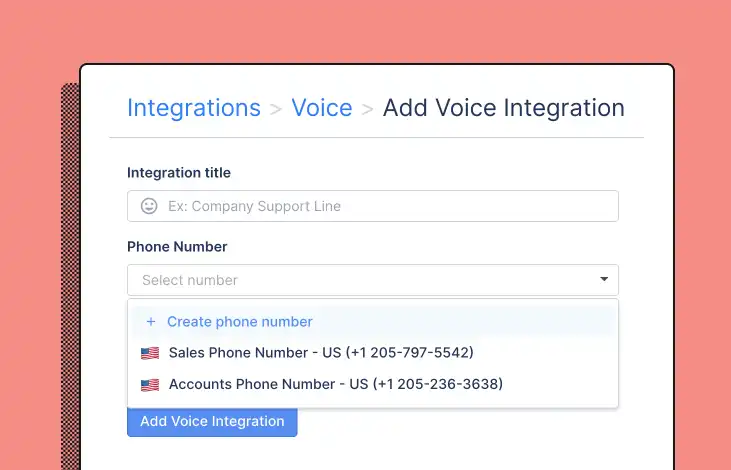
Our phone integration is included in all Gorgias plans, and unlike other providers, there’s no annual contract fee and no minimum seat requirement. This makes it a great option for teams looking to add phones for the first time or who want to manage all communication channels in one place.
Plus, our ecommerce integrations save your agents time by displaying callers’ shopping history right in the helpdesk, so they don’t have to go searching for the last order, for example.
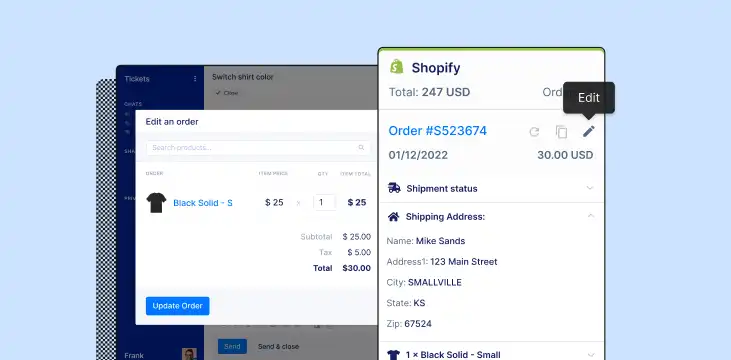
For more tips on how to create efficient phone processes and increase resolution time by 34%, check out this article.
3. Display your phone number on your platforms
If you’re offering voice support for all your customers, you might place it in the footer of your website or all transactional emails.
If you’re piloting voice support or using it exclusively for a segment of shoppers, you might save it for smaller email segments or place it only on dedicated landing pages just for them.
Wherever you decide to put your number, just make sure it's easily accessible and clearly visible so your shoppers can start calling, and your support team can start delivering even better customer experiences.
Offer support on every channel with one tool
Gorgias is an AI-powered helpdesk that unites all support channels, including email and chat to social media and phone, in one platform. To see what an all-in-one tool can do for your brand, start a trial today.
Building delightful customer interactions starts in your inbox
