


Newsletter Signup
The best in CX and ecommerce, right to your inbox
Featured articles

Ticket Volume: How to Measure It, Benchmark It, and Reduce It

Gorgias AI Agent Pricing, Explained

Introducing Helpdesk 2.0: Built for How Agents Work
TL;DR:
- Built directly from agent feedback, Helpdesk 2.0 fixes real workflow pain points. The redesign focuses on reducing friction and helping agents handle more context-heavy tickets.
- A chat-style interface replaces the old email layout. Conversations are easier to follow and resolve in one view.
- Customer context is shown beside the conversation in a right-side panel. Agents can view history, orders, and details without leaving the ticket.
- AI handoffs come with clear summaries. Agents instantly see what happened, what was tried, and what to do next.
- Navigation is simpler and faster across teams. Clean menus, structured queues, and multi-store access keep agents moving efficiently.
Helpdesk 2.0 starts with the people who use it most: the agents.
We spent time understanding customer support from the agent's seat. What do they reach for constantly? What slows them down? What does a better workday look like?
Everything we found is in this brand-new update.
Why we redesigned Helpdesk
Conversational commerce is the new standard.
In customer support, this means customers expect context to remain intact wherever they reach out, whether a conversation starts on social, moves to email, or ends on a call.
This new approach to support has also changed the agent's role. Recurring tickets, like order status checks, shipping updates, and returns, are now handled by AI. What lands in the agent inbox are edge cases that require human judgment and troubleshooting, or tickets that require the full picture.
However, the original Helpdesk was built for a different era of support.
Context was separated across views rather than built into the conversation itself. It's something one in five Gorgias customers flagged, through support tickets, NPS surveys, and conversations with our team. So, we got to work.
Helpdesk 2.0 is the result.
What's new in Helpdesk 2.0
Here's a look at everything that changed.
Read conversations the way they're meant to be read
Conversations have a natural rhythm, one that’s already found in every messaging tool we use. We brought that same layout into the helpdesk.
Say goodbye to the 2000s email interface and hello to chat bubbles. This updated design changes how quickly you can orient yourself and resolve the ticket in one go.

Chats with customers now look like real conversations, using the speech bubble style you’re familiar with on popular messaging apps.
Check customer history without losing your place
Checking a customer's history used to mean leaving the conversation, an extra step that interrupted what should have been a smooth workflow.
Now, past conversations open in a sidebar next to the active conversation. You can view a customer’s full history, search through their timeline, and open prior tickets without going to a new page.

Check past conversations, orders, and customer details in the brand-new Customer Timeline.
See order details the moment you open a ticket
Order information is easier to reference than ever. Open a ticket, and you instantly see the customer's recent orders, marked with product images and invoice details at a glance. Need to dig deeper? Click on an order, and the expanded information appears in the same panel.
For teams using custom integrations, apps are fixed in a quick-access integration menu on the right.

See order details, product images, and totals at a glance on the right panel, without leaving the conversation.
Pick up where AI left off
You shouldn't have to dig through a thread to figure out what AI already tried. Now you don't have to.
When AI Agent escalates a conversation, it includes a concise handover summary that mentions the issue, what actions were taken, and why it was passed to your team.

Escalated tickets include a brief AI-generated handover summary, marked in yellow, for quick reference.
Move faster across every store and team
We restructured and simplified the navigation. The left sidebar organizes everything into clear categories: Inbox, AI Agent, Marketing, and Analytics, so anyone on your team knows exactly where to go.
To quickly update your knowledge base or adjust a workflow, both now live right in the sidebar. For teams managing multiple stores, switching between them is just as straightforward, accessible from the sidebar, so agents can move between inboxes without breaking their flow.

Agents can switch between stores and their corresponding inboxes directly from the left menu.
A workspace that works the way agents do
Support comes down to the person on the other end of the conversation. We built Helpdesk 2.0 is to make sure they have everything they need to show up for that moment.
The best way to see the difference is to work in it. Start a free trial today.



Further reading
A Complete Guide to Black Friday Ecommerce in 2025
TL;DR:
- Start BFCM prep now to capture more revenue and loyal customers. Early planning helps you launch high-converting campaigns and get your support team ready before the rush.
- Update your returns, shipping, and lost package policies. Make these policies visible and self-serviceable to boost trust and reduce support tickets during peak traffic.
- Automate support to protect your team’s time. Use AI tools like Gorgias to deflect FAQs and focus human agents on high-impact tickets.
- Build BFCM campaigns with social media, influencers, and SMS. Create content that highlights your deals, promote top posts, and offer early access to subscribers.
- Recover carts and re-engage new customers post-BFCM. Set up chat widgets, SMS/email automations, and follow-up campaigns to turn browsers into repeat buyers.
One month ahead of Black Friday and Cyber Monday, and shoppers have already managed to spend $88.6 billion online, according to Adobe.
But it takes a coordinated effort by customer support, sales, and marketing to encourage a shopper to click “checkout.” Without a solid ecommerce strategy in place, many online retailers will miss out on the Black Friday and Cyber Monday rush.
Whether you’re looking to optimize your existing strategy or starting from scratch, we’ve got you covered. This guide will help you make the most out of your BFCM ecommerce strategy with a clear list of steps (in chronological order) to help you prepare.
{{lead-magnet-1}}
What is Black Friday, Cyber Monday?
Black Friday, Cyber Monday — also referred to as BFCM — are two back-to-back sales days that bring in a ton of revenue for both in-store and ecommerce retailers in the US. The Black Friday - Cyber Monday shopping window also kick-starts holiday shopping from Thanksgiving day through the new year.
Why you need to prepare for BFCM now
BFCM isn’t just about one big day of generating revenue. It’s a crucial period for online retailers to capture new customers and convince them to keep shopping through the end of the year and beyond.
In-person BFCM experiences are out and ecommerce is in
Shopper sentiment is shifting away from physical experiences. Online transactions are up by 8.2% year-over-year. So, you probably won’t see consumers camping out in front of physical stores on Black Friday, but those same shoppers still want to find a great ecommerce deal.
Consumers are eager to spend, despite concerns about inflation
According to research from Nielsen, the desire for a good deal caused 41% of shoppers to spend more in 2023 than they had the year prior.
Brand loyalty is out — unless given a reason to commit
Shoppers, Gen Z in particular, are willing to buy “dupes” from alternative brands for a cheaper price. That's why building brand awareness well before BFCM is crucial — you need shoppers to know and trust you before the sales frenzy begins.
Get proactive rather than reactive
When you make a plan early, you give your business more time to craft a great marketing campaign. Plus, you give your team time to figure out how to manage customer service on Black Friday for these high-traffic days.
Considering Black Friday, Cyber Monday is the busiest ecommerce sales event of the year, prepare as early as possible to get a leg-up and stay on top of Black Friday trends.
Related reading: Why proactive customer service is essential for growing your business
Pre-Black Friday preparation: What to do before the holidays
Preparing for Black Friday — and building a strong ecommerce strategy — goes well beyond ironing out a limited-time deal.
Tactics like updating key policies, building out customer self-service options, and marketing early will help you be successful.
1. Update key policies on your website before BFCM
Displaying clear-cut and easy-to-find policies on your website makes a huge difference to a customer’s user experience. It sets the customer up for success and cultivates a positive sentiment with your brand.
To prepare for the best Black Friday-Cyber Monday possible, we recommend updating these key policies (and your FAQ page) with BFCM-related information:
- Returns & exchanges: Expect more gift returns and exchanges. Use return apps like Loop Returns to create a self-service portal and connect it with Gorgias so AI Agent can automatically send customers their return link or status update.
- Shipping & fulfillment: Be upfront about processing times, estimated delivery dates, and tracking options. Shoppers buying gifts expect fast and reliable delivery. Transparency here prevents frustration and ticket spikes.
- Lost packages: More shipments mean more chances for loss or delays. Make sure your policy explains whether you cover damages, refunds, or credits. Include this in your FAQ so customers (and your support team) know exactly what to expect.
Related reading: FAQ Page template & tips (+ free Shopify FAQ generator)
2. Reduce strain on your customer service team
Turns out, a lot of the customer support inquiries your team receives can be automated or deflected with self-service tools. AI-powered customer service tools like Gorgias can handle FAQs, order tracking, and returns automatically — freeing your human agents to focus on complex, high-value conversations. That kind of leverage matters most during Black Friday, when ticket volume can spike overnight.
Brands that have pushed automation past 60% nearly tripled their ticket volume while human hours grew just 6%, which is exactly the kind of efficiency that keeps your BFCM operation running without burning out your team.
3. Build a marketing campaign to tap into social commerce
Social commerce is on the rise among consumers worldwide.
Sprout Social reports that one-third of shoppers in the UK make spontaneous purchases based on social media a few times per year. And that number is expected to rise as shoppers complete their holiday shopping during BFCM.
You don’t necessarily have to sell directly through Instagram, but you can leverage your social channels to generate brand awareness.
The need for social-focused customer support is exactly why online retailer MNML turned to Gorgias. The company found that their shoppers turned more and more to social media for answers to their shopping-related questions.
Ultimately, the company leveled up their customer support on social media to connect with potential buyers.

Blanking on BFCM campaigns? Here are some effective marketing campaign ideas:
- Partner with micro-influencers to generate brand awareness. Don’t partner with influencers for the sake of it. Think about it like building a relationship with someone who fits your brand ideals who can cross-sell your products to their audience. Look for a creator with less than 100,000 followers who have audiences that match your target audience.
- Create content around your Black Friday deals. Highlight your deals using creative content. Collect photos, videos, or illustrations of your products. Then, draft copy for captions, think through the best hashtags, and hand over creative briefs to your design team to build any assets you might need.
- Put a little money behind your most successful organic social media posts. The weeks or months leading up to BFCM are prime time to talk about your brand’s Black Friday promotions. Use social media analytics to see which published posts across your channels are performing the best. Even with a small budget, you can use social ads to grab even more eyeballs — and potentially bring more people to your website.
- Prompt customers to sign up for SMS alerts on mobile. Through these notifications, you can give early sale access to subscribers and incentivize new shoppers to build a deeper relationship with your brand.
How to maximize BFCM revenue in 2 steps
Imagine Black Friday, Cyber Monday is here. Even better, imagine you’ve got a ton of website traffic full of eager browsers. You need a plan to keep those browsers engaged.
One major step you can take to boost your conversion rate and potential revenue is to increase communication touch points and focus on recovering abandoned carts.
1. Increase customer touchpoints to keep shoppers engaged
Throughout any customer’s journey, there are many opportunities to interact with your brand. One moment might be finding out about your BFCM sale on social media, signing up for emails to get early access, or browsing the best deals before heading to checkout.
The more you interact with customers along the way, the more you can keep them engaged — and personalized interactions increase your chances of converting a first-time shopper into a repeat customer.
One way to do that is with Gorgias Shopping Assistant, an upselling tool that uses conversational AI to personalize the customer's buying journey. It offers several ways to boost overall engagement:
- Customer-specific product recommendations
- Upselling products during high-intent moments
- Offering discounts to ease customer hesitation

2. Reduce abandoned carts
Cart abandonment is a major source of lost retail sales for any ecommerce business, considering about 70% of online carts are abandoned.
You can easily target customers who have opted into an email list or receive SMS messages from your brand. Design emails or text messages designed to trigger if a cart is abandoned.
Include copy that builds a sense of urgency to drive customers back to their shopping carts to “buy now” before the deal is over.
There’s even a chance to use re-engagement to increase your average order value by upselling once that customer returns to your site.
How to retain new customers you get during BFCM
Repeat customers are valuable — like, really valuable.
According to Gorgias research, returning customers make up about 21% of a brand’s customer base but generate 44% of that same brand’s revenue.
Your brand should re-engage with anyone who shops on your website during the BFCM rush. Those same people could become returning customers who give your shop a revenue boost during the rest of the holiday season.
1. Offer a discount for next time
The perfect moment to re-engage a customer starts at checkout. When someone makes a purchase through your online store, offer them an immediate discount that goes toward their next purchase.
At CX Connect LA 2024, Ron Shah, CEO of Obvi, shared his brand’s strategy for offering discounts to generate revenue. Ron knew implementing AI to support Obvi’s two-person customer support team was necessary to help the brand grow without eliminating the need for his human agents.
“The time saved by AI handled a lot of the redundant work our agents were doing, which meant we could turn them into part-time sales agents. We also gave them a code to help them prevent a refund from happening or upsell somebody. It created a completely new shift in their mindset. They realized, ‘Oh wow, you're not just taking something away from me (with AI) — you're actually elevating my opportunity.’”
Tip: You can increase the touchpoints to re-engage with an existing customer by building a reminder email that triggers one week after their initial transaction. That way, you not only stay at the top of their inbox, you also stay top of mind.
2. Invite customers to join a loyalty program
Loyalty programs are a tried-and-true method to build engaged, returning customers.
In a recent survey, Yotpo found that over half of surveyed consumers agreed a loyalty program would encourage them to purchase more from a brand.
If you already offer a loyalty program, make sure new customers know about how to get the VIP experience with your store. Build awareness touchpoints into your loyalty program marketing strategy. You can also prompt buyers to become loyal customers after they make their first purchase.

3. Continue to improve your customer experience strategy
A successful, positive, and repeatable customer experience doesn’t end after midnight on Cyber Monday. It’s a road rather than a destination.
Consumer habits are always changing, and your support teams must be prepared to handle customer requests.
One way to anticipate your customer’s pain points is to look at customer feedback.
Reviews and social media activity is a great place to start. You might also consider putting a more formal customer sentiment strategy in place, with a CSAT survey to collect direct feedback from customers.
This feedback helps your team prioritize what needs to improve so you’re not left reaching in the dark.
Give your ecommerce strategy a boost this holiday shopping season
The name of the game this Black Friday - Cyber Monday isn’t just to get a ton of online sales; it’s to set up your ecommerce site for a successful holiday shopping season.
Success could look like:
- A reduction in BFCM returns or exchanges
- Having the perfect amount of inventory
- Seeing higher-than-average sustained engagement on your social channels
If you want to move the meter, focus on a strong Black Friday marketing strategy that starts now.
Gorgias is designed with ecommerce merchants in mind. Find out how Gorgias’s time-saving automations and convenient platform can help you create successful customer experiences.
Claim your demo today, or sign up to try Gorgias.
{{lead-magnet-2}}

How to Automate Half of your CX Tasks
TL;DR:
- Automating CX tasks improved Shinesty’s support performance. They cut resolution time by 50% and raised satisfaction scores.
- They focused on high-impact, repetitive inquiries first. WISMO, subscriptions, and account questions were easy wins.
- Automation didn’t kill their brand voice. Smart help articles and custom AI responses kept things on-brand.
- Their small team got more specialized. Freed from repetitive work, agents now handle complex, high-value conversations.
Customer expectations continue to rise — around 82% of service pros say customers expect their requests to be resolved in less than three hours. Given the pressure to meet these climbing demands, more brands are turning to automation and AI.
It’s not only about providing a fast, helpful, and efficient customer experience. Brands must also stay ahead of the competition and adopt the latest tech for long-term success.
Luckily, brands like Shinesty are adopting tech like AI and automation to meet consumer demands. It’s worth it — since adopting automated CX in 2023, Shinesty’s resolution time has decreased by 50%, and their overall satisfaction rate is up.
In a recent workshop, Molly Wallace Kerrigan, the Marketing and CX Director at Shinesty, shared her team’s strategies for setting up automation, maintaining brand voice, and optimizing customer experience (CX).
You can also hear Molly share these insights herself by watching the workshop here:
How Shinesty automates more than half of their CX tasks
Before using AI Agent, Shinesty hired about 20 seasonal employees, including CX agents, to help with the peak holiday season. In 2023, they only hired two, bringing their total to five agents. It was clear that AI Agent saved them money.
“When AI Agent came along, it changed everything... We only hired two agents, raising our team from three to five. That was our biggest game changer with Gorgias.”
Molly shared their impressive journey to automating 54% of their CX tasks — a feat transforming their customer service operations, especially during high-demand periods like the holiday season. Most importantly, they achieved this without losing their brand’s personality.
Here’s how they did it:
Focus on key areas
First, Shinesty identified the most common customer inquiries that could be automated. They prioritized high-volume tasks such as WISMO (where is my order?), subscription cancellations, and account management. Automating these repetitive inquiries reduced the pressure on their human support agents.

Shinesty uses Flows in their Chat to answer frequently asked questions like “Do you have discounts?”
Rebuild and clean up
Before rolling out automation, Shinesty cleaned up its helpdesk. The team re-evaluated existing workflows, removed outdated processes, and ensured their helpdesk was ready for automation. Laying the groundwork helped the team transition to automation more efficiently.
Optimize self-service
A key part of Shinesty’s strategy was empowering customers to find answers on their own. Molly emphasized the importance of creating simple, humorous help articles that resonate with their brand. Regular audits of these resources meant customers could self-serve more easily, reducing the need for human intervention.

Shinesty’s Help Center provides customers with a quick way to self-serve.
Lean into AI recommendations
AI-powered Article Recommendations help Shinesty identify ways to improve their use of automation. For example, AI suggested updating some existing help articles based on common customer questions, helping Shinesty address gaps proactively.

With AI Agent, you can train AI to recommend the most relevant articles depending on a customer’s message.
Gradual scale-up
Instead of overhauling everything at once, Shinesty rolled out automation gradually. The team focused on key areas and then expanded. Eventually, they automated 54% of their CX tasks without overwhelming their team or compromising service quality.
Reinvest time into human agents
Automation doesn’t mean eliminating human agents. Instead of getting bogged down in repetitive tasks, their small team of agents now has the chance to focus on more valuable tasks and specialize.
“With a smaller team, we could develop our agents more, giving them opportunities to specialize in different areas. Our satisfaction rate has increased, and our resolution time has decreased by 50%.”
{{lead-magnet-1}}
Why you should embrace AI and stay ahead of the competition
Molly strongly encourages businesses not to hesitate when it comes to adopting AI tools. “Don't be afraid. Just do it. AI is here to stay, and it's not going anywhere,” she emphasized.
Integrating AI into your CX strategy allows you to keep up with customer demands and position your brand ahead of the competition.
📚 Related reading: The hidden power and ROI of automated customer support
Take the leap with AI for a competitive edge
Molly’s advice is clear: AI is a game-changer for businesses looking to stay ahead. The tools are intuitive, easy to implement, and designed to enhance your team’s capabilities rather than replace them.
Gorgias AI Agent comes with pre-built templates that make it even easier to get started. These templates provide a solid foundation, allowing you to quickly set up automated responses and workflows that align with your brand’s tone and style. Molly pointed out, “The templates were a great starting point, and the guidance part was simple.”
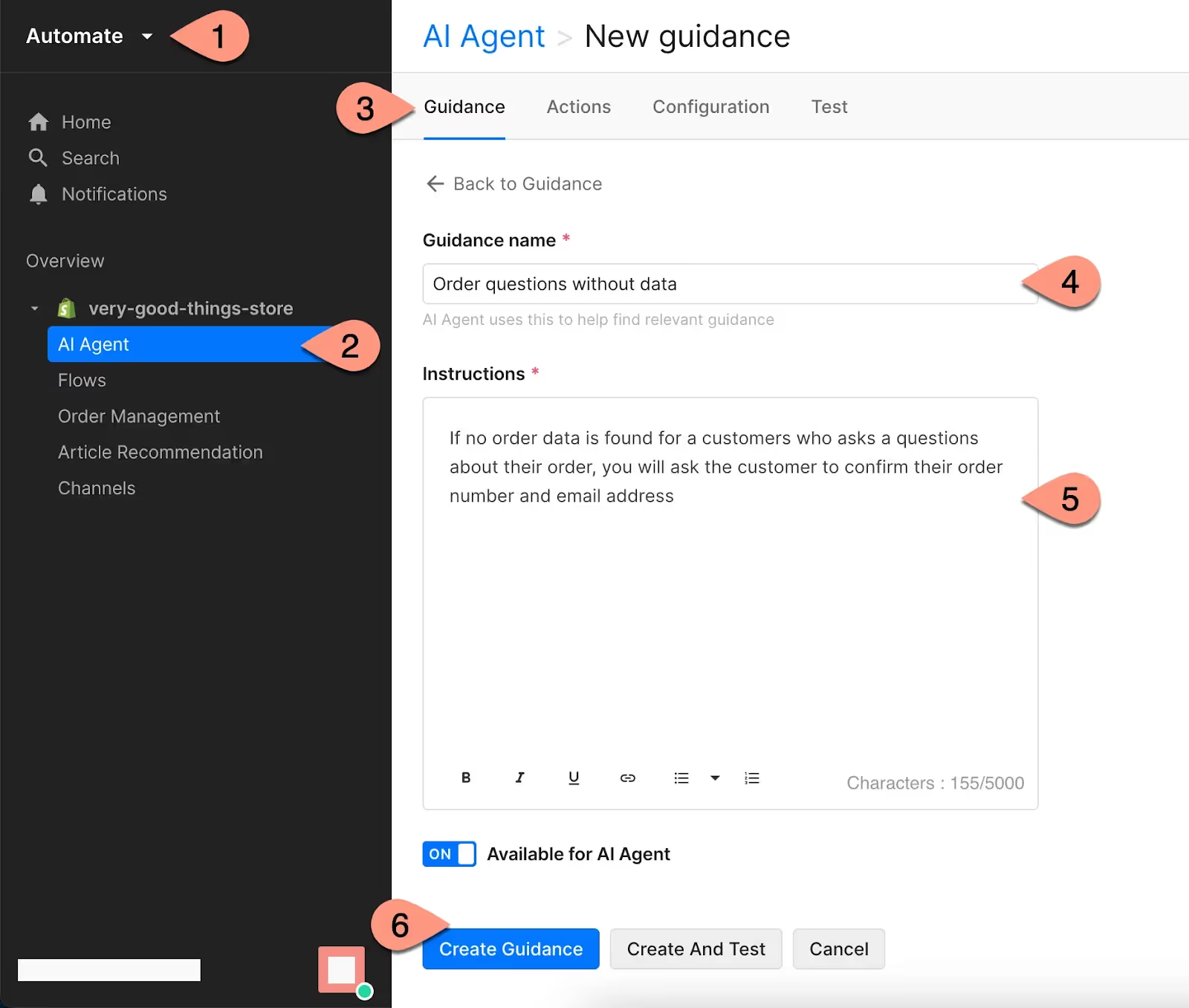
Control how Gorgias’s AI Agent responds to customers with custom instructions based on your best practices and internal policies.
By adopting AI, you can automate routine tasks and ensure consistent and empathetic customer interactions. Your team will also have more time to focus on more complex and valuable activities.
As Molly noted, AI allows your team “to develop beyond mindless tasks” and offers “empathetic responses without turning on the customer,” which can significantly improve customer satisfaction and loyalty.
Read more: How Shinesty automates 50%+ of tickets to offer great CX with a team of 5
The future is here with more AI Agent features
Looking to level up your CX automation? AI Agent has more exciting features, including the ability to perform actions like canceling orders or changing addresses automatically — tasks that currently require human intervention.
Another essential feature for CX teams is Auto QA, which enhances the quality assurance process by removing subjectivity and ensuring more consistent results.
Want to see how many routine tasks you can automate? Book a demo to see Gorgias AI Agent in action today.
{{lead-magnet-2}}

How Campaign Messaging Can Increase Conversions
TL;DR:
- Shoppers' attention spans are short, so your messaging needs to hit fast and resonate. Gorgias Convert helps brands launch personalized, timely campaigns that engage visitors and increase conversions.
- Personalization is key to winning over customers. Use tailored product recommendations, exclusive offers, and personalized messaging to boost order value and lower bounce rates.
- Educational and conversational campaigns build shopper confidence. Quick tutorials, quizzes, and live chat support reduce support tickets and help convert unsure visitors.
- Test your messaging to find what works best. A/B testing within Convert allows you to refine campaigns based on real data, helping you consistently capture more interest and drive purchases.
With so many distractions across platforms, it’s getting trickier to hold shoppers’ attention — even on your own website. You’re lucky to get even a couple of seconds of their time. But don't worry, we've got the perfect bait for your brand.
Gorgias Convert is specially designed to capture shoppers at the right time with the right messaging. This onsite conversion strategy tool launches subtle yet compelling campaigns, allowing ecommerce brands to engage customers like never before.
In this article, we'll dive into how you can refine your messaging to increase conversion rate, boost order value (AOV), reduce bounce rates with clever exit intent triggers, and educate customers through engaging quizzes and informative content.
Get ready to craft campaign messaging that truly connects and drives customers to buy.
{{lead-magnet-1}}
Why should you care about campaign messaging?
Compelling campaigns matter if you want to drive engagement and conversions. If your message doesn’t resonate with shoppers, they’ll exit without taking action.
Customize your content to your shopper's specific needs — it can make all the difference in capturing attention and winning over a new customer.
The top 6 ways to create captivating & compelling campaigns
Different goals call for different campaigns. Here are the top six methods to create compelling campaigns that resonate with your customers.
1. Put a face to your stories
Relatability is the magnet that pulls shoppers closer to considering your product. It’s why brands highly incentivize social proof like customer reviews and influencer endorsements.
Combine stories with social proof through relatable customer story campaigns or behind-the-scenes campaigns. When your customers see someone who genuinely enjoys your product, it nudges them one step closer to the checkout.
How STYLEST did it
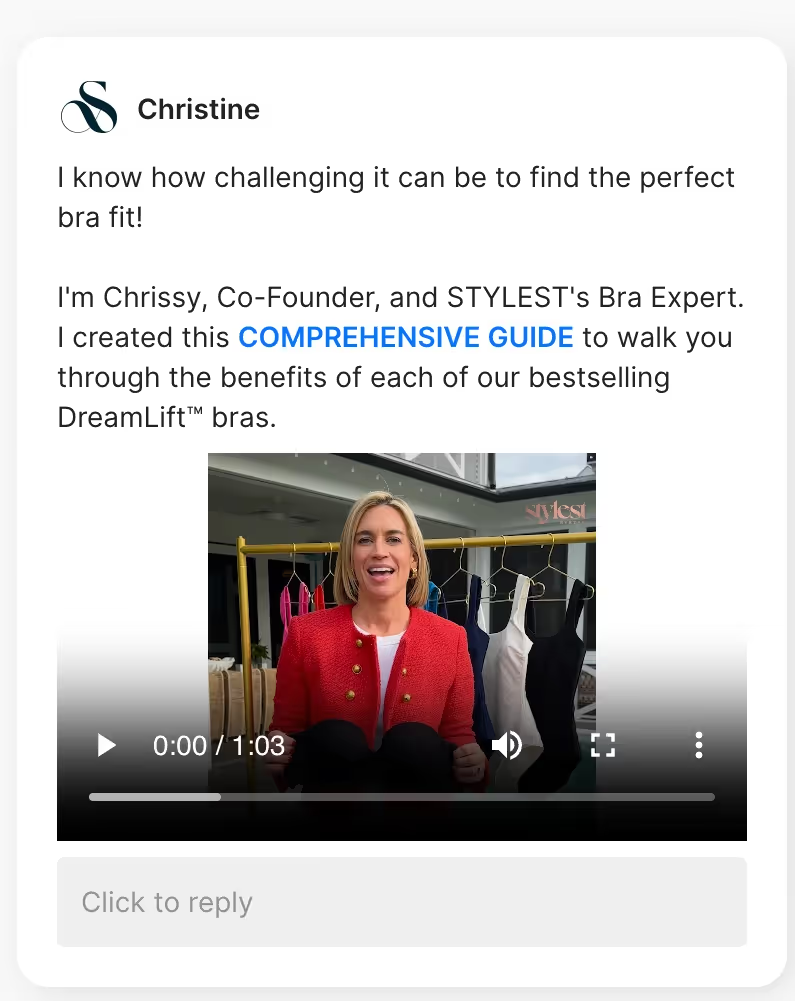
Innovative swimwear brand STYLEST gives customers a VIP shopping touch with a campaign that shows their co-founder Chrissy talking about the benefits of their bras. For shoppers unaware of the brand, a firsthand account from the creator leads to a deeper connection to the brand’s mission and products.
STYLEST created a total of eight campaigns made for different scenarios and customers. At its peak, their campaigns drove 18% of the brand’s total revenue — a remarkable achievement since pop-ups typically influence only 2-5% of revenue.
2. Incorporate visuals
Plain text campaigns can be easy to gloss over. Instead, add visuals to your campaigns, like images, infographics, emojis, or videos, to easily break up text and capture attention.
However, make sure not to overload visuals or text with information. For instance, if you’re making a video tutorial, keep it short and on message. Meandering can cost you engagement.
How Kreyol Essence did it
Haircare brand Kreyol Essence’s welcome campaign is simple but eye-catching: a greeting with a sparkle emoji. Friendly language is a fantastic way to invite shoppers to connect with your support team and find what they’re looking for.
Kreyol Essence created welcome campaigns, product recommendation campaigns, and promo campaigns to lower the barrier to entry for new customers. In three months, they reached an incredible average conversion rate of 11.47% — 8% more than the industry benchmark.

3. Offer personalized product recommendations
According to 1,100+ survey responses, customers want personalized experiences. With product recommendation campaigns, you can deliver just that. Feature a selection of products to upsell and cross-sell in targeted campaigns, then choose which kinds of shoppers receive them.
Three effective scenarios to use product recommendations:
- For visitors viewing a specific product or collection: Suggest product bundles or add-on products that align with what they’re already browsing to increase purchase likelihood. For example, if someone is viewing a shampoo product page, a campaign can suggest a conditioner to go with it.
- For first-time visitors: Showcase best-sellers or trending products to new visitors, helping them discover items they might like.
- During seasonal sales: Feature related products in your holiday or special sale campaigns, promoting bundles or discounted add-ons to boost overall sales.

How LSKD did it
Australia-based sportswear brand LSKD puts eyes on their three newest products by appearing to shoppers with empty carts. This condensed list of recommendations makes buying easier for customers who don’t know where to start.

4. Provide incentives that are unique to the shopper
Give shoppers a reason to stay longer. Exit intent campaigns can be the last-ditch effort to retain customers who are about to leave. Make sure these campaigns are enticing, down to the selling point and message.
Here are the four essential elements to getting your campaign messaging right:
- Offer value: Provide an irresistible offer, such as a discount code or free gift, to persuade customers to stay. Convert enables users to select a generic discount code or a personalized, unique discount code, which can be more enticing and drive higher clickthrough rates (CTR).
- Highlight the benefits: Highlight what customers will gain shopping with you, like free shipping, discounts, or exclusive gifts on top of their order.
- Personalize the message: Customers like to feel seen. Use customer profiles (i.e., subscriber vs. not) or reference items they've viewed to make the offer more relevant.
- Keep it concise: Use clear, direct language and a strong call to action.
How Impact Dog Crates did it
Premium dog crate retailer Impact Dog Crates anticipates uncertain customers by allowing one free exchange per order. They show off this perk to browsing customers in just a couple of sentences — simple and effective.

5. Educate customers with fun, engaging material
Businesses win 28.9% more new customers when they implement customer education programs, according to Intellum.
For browsing shoppers, you don’t need a formal program, just a quick educational campaign that appears while they look through your products. Empowering shoppers with information about product knowledge can lead to better buying decisions and, in turn, decrease return rates.
Educational campaign ideas:
- Interactive quiz campaign: Do you have a product line for specific needs and customers? Point customers to your sizing guide or product matching quiz for a personalized shopping experience that helps them find exactly what they need.
- Informative blog campaign: Share educational advice through a campaign and link out to a relevant blog post.
- Product tutorial campaign: Do customers often struggle with using your product? Demonstrate how to use your products by including a short video tutorial in the campaign.
- Product comparison campaign: Provide a side-by-side comparison of your products to help customers choose the best option.
How TUSHY did it
TUSHY, a leading bidet brand, recognized that many customers were concerned about bidet installation, leading to a spike in support tickets and abandoned carts. Their solution is an educational video campaign that proactively guides customers through installation.
The campaign contributed to 25% of their revenue and a 37% drop in bounce rate. Most importantly, it cleared away installation anxieties and repetitive support inquiries and provided customers with a more confident buying experience.

6. Offer VIP support by having real-time conversations
Use conversational campaigns to show customers you're there to make shopping easier. Plus, personalized advice helps hesitant buyers make decisions.
Actionable tips:
- Offer human support: Ensure seamless integration with human agents for more complex questions and personalized assistance.
- Leverage AI Agent: If your support agents can’t handle the conversation due to business hours, leverage Gorgias’s conversational AI tool, AI Agent, to handle pre-sales questions.
How Glamnetic did it
Accessory brand Glamnetic lets customers know they can call for help anytime, just by using Chat. Quick access to a customer support agent is a simple way to alleviate customer concerns.
Glamnetic’s strategic use of Convert campaigns drove an 18.39% on-ticket conversion rate for their top exit intent campaign and up to 49% more sales for new product promotions. They even saw a 12% increase in average order value.

💡 Pro Tip: Unsure which message will resonate most with your audience? Use A/B testing to experiment with different messages, designs, or calls to action to see which version drives the best results. This data-driven approach takes the guesswork out of your content strategy so you can generate strong interest.
Get their attention with Gorgias Convert
Ready to take your campaigns to the next level? Gorgias Convert offers powerful tools to engage customers at the right moment with personalized, compelling messaging.
If you’re looking to boost conversions, reduce bounce rates, or offer VIP support, Convert makes it easy to create campaigns that truly speak to your audience. Start capturing attention and driving results today with Gorgias Convert. Book a demo now.
{{lead-magnet-2}}

How These Top Ecommerce Brands Respond to Difficult Customers
TL;DR:
- Start with empathy, especially in high-stakes situations. Understanding the emotional weight of events helps agents respond with compassion and urgency.
- Choose your battles wisely. Obvi defuses tension by letting customers keep the product while still receiving a refund, boosting goodwill and lifetime value.
- Trust and empower your CX team. Glamnetic’s agents are given autonomy to resolve issues creatively to avoid bottlenecks.
- Ask customers what went wrong. Jaxxon finds that asking for feedback directly can defuse angry customers and turn complaints into insights.
- AI can help turn negative experiences around. Tools like Gorgias AI Agent support these strategies by delivering fast, thoughtful service at scale.
Strategies for handling difficult customers can sometimes feel like vague, generalized advice. If you’re dealing with these types of customer interactions daily, you need specifics.
At CX Connect 2024 in LA, four leaders in the ecommerce and customer experience space shared their tips for managing demanding customers with empathy, strategy, and a dash of creativity.
In this panel recap, learn how leaders at Princess Polly, Obvi, Glamnetic, and Jaxxon navigate complex customer interactions while maintaining high levels of customer satisfaction.
Watch the full panel discussion:
Start from a place of empathy
Customer experience agents: The baseline is empathy, says Alexandria Collis, Senior Director of Operations at fashion brand Princess Polly. Having a reset point — empathy and understanding — can be valuable for agents to remember, especially in the middle of heated exchanges.
In particular, Alexandria points out that significant life events can be tricky because customers expect a high level of service. These milestones are often sentimental, coming with more emotional investment from the customer’s end than your run of the mill WISMO requests.
Alexandria on empathetic customer experiences:
For example, if a customer receives a damaged graduation dress, Alexandria understands it would be best to replace their item as soon as possible. “Figuring out how to integrate empathetic responses into understanding the actual customer is so important,” Alexandria emphasizes.
Bearing in mind the circumstances and emotions around a customer’s issue, mainly when the stakes are high, is the key to finding a sound resolution.
Don’t fight until you have to fight
Ronak Shah, CEO and co-founder of collagen supplement brand Obvi, advocates for a measured approach when dealing with difficult customers. His philosophy is simple: choose your battles wisely. Obvi’s CX team aims to avoid unnecessary conflict, especially when it comes to returns.
"We don’t make people ship the product back. Instead, we say, 'Hey, you can keep the product. We’ll give you the refund,'" Ron explains. This method defuses potential tension and turns a refund into the potential for better customer lifetime value.
Ron on returns:
Ron acknowledges that not all businesses have the budget to approach returns in this way, so they add a bonus: customers can receive a $10 discount if they share the product with a family member or friend.
However, there’s a limit. "When you have abuse, that’s where you have to fight," Ron adds. His team draws the line when repeat offenders try to exploit the system, ensuring fairness for all customers.
Trust your agents, give them autonomy
Kevin Gould, co-founder of beauty brand Glamnetic, believes in empowering his customer experience team with the freedom to make decisions. He understands that micromanaging can lead to inefficiencies, so he trusts his agents to delight customers in their own ways.
"We try to be very lenient. We give our CX team lots of autonomy to operate because you need to give [them] a lot of leeway, or else everything just gets escalated up to the head of customer experience,” Kevin says. His approach ensures that issues are resolved quickly and effectively.
Kevin on trusting his support team:
For example, Glamnetic often resolves lost package issues by sending out new products or adding an extra "just because" item. They don’t view these as unnecessary expenses. Rather, they’re a way to build trust and improve overall customer satisfaction.
This strategy has paid off, especially in situations where offering a little extra can turn a negative experience into a positive one. Kevin’s trust in his team has proven to be a key component of Glamnetic’s customer service success.
Ask, ‘What did we do wrong?’
When facing unhappy customers, it’s easy to get defensive. But instead of pushing back, Jaxxon’s Director of Customer Experience, Caela Castillo, suggests a different approach: self-reflection. Her advice to the team is to always ask customers, “What did we do wrong?”

“There are customers who aren’t going to be happy with anything,” Caela says. “I try to ask, was there something we could have done that would have made this a better experience?” This basic question shifts the focus from blame to understanding, helping to diffuse tension.
In one case, a customer complained to Jaxxon’s support team because they missed a key detail on the website. Rather than dismissing the complaint, Caela’s team asked how they could make the information more visible. Listening may be a minor solve, but it shows customers that their input matters, which can often guide the interaction toward a peaceful outcome.
Caela on defusing angry customers by asking the right questions:
Turn their frown upside down with AI Agent
Every business faces the challenge of dealing with tough customers, but the strategies shared by these industry leaders offer clear paths for handling those thorny situations. Leading with empathy, picking your battles, trusting your team to make decisions, and reflecting on what could have been done better all lead to stronger customer relationships.
It’s time to level up your customer experience strategy. Explore how Gorgias AI Agent can help your team deliver exceptional service. Book a demo today to see the difference it can make to your support.
{{lead-magnet-1}}

What Makes a Great Knowledge Base for AI?
TL;DR:
- AI is only as smart as your knowledge base. A rich, up-to-date Help Center is what powers accurate, fast, and helpful AI responses.
- A good knowledge base speeds up AI onboarding. The more info your AI has, the quicker it can handle customer questions.
- Keep your content current and on-brand. Regular updates and consistency in tone make AI more trustworthy and accurate.
- Gorgias AI Agent thrives with the right foundation. With strong Help Center content, AI Agent can autonomously resolve issues, boost automation, and save your team time.
According to our recent survey, 69.2% of respondents already use AI and automation in their roles, with support leaders and agents being the highest adopters.
However, in order to be successful, AI needs a robust knowledge base to learn from. The more knowledge and context, the smarter AI will be.
Below, find the tips you need to set up a great customer knowledge base in order to use AI most effectively.
{{lead-magnet-1}}
The role knowledge bases play for AI
Aside from acting as a self service resource for customers, knowledge bases now serve a dual purpose — they also act as a data source that provides AI with the training it needs to accurately answer questions from your customers.
That’s the case for Gorgias AI Agent, a conversational AI team member who can resolve customer inquiries without the involvement of humans. While teams also provide the AI with Guidance during the setup process, your knowledge base is the primary source for AI Agent to be onboarded, have a consistent source of truth, and provided faster and complete resolutions.
Helps your AI get up and running quickly
The more information you provide your AI with, the faster it will be able to deliver accurate responses — and the sooner your customer support team can move onto more important things than answering another WISMO request.
Building a quality knowledge base is essentially the first onboarding step for using AI in your customer service operations. It’s the main data source for AI, sort of like a handbook or manual. The more thorough the Help Center is, the less agents will have to tweak and guide AI at the start.
Provides a consistent source of answers
The more up-to-date and accurate your knowledge base is, the more accurate your AI’s responses to your customers will be. Errors or inconsistencies in knowledge bases can lead to flawed AI behavior.
The benefit of that is that AI will consistently intake any new information you add as long as your Help Center articles are updated. For example, brands who have new or different policies won't have to worry about setting aside time for AI to digest the new info –– it will automatically pull them from the Help Center.

📚 Further reading: How your CX Team will evolve with AI
Allows it to better provide full resolutions
An AI customer support rep can resolve tickets 99.4% faster than human agents –– and that’s full resolutions, not just first responses! But those full resolutions will only be as helpful as your knowledge base is.

Benefits of a high-quality knowledge base
- More accurate responses
- Improved learning and adaptation
- Increased trust and usability
- Effective self-service resource
More accurate responses
Quality data improves AI accuracy and efficiency. For CX, that quality data comes from a robust knowledge base.
For example, clothing brand Psycho Bunny was able to successfully implement AI Agent in part because of their thorough knowledge base.

They have articles that cover: Shipping & Delivery, Order Status, Returns & Exchanges, Buy Online Pick Up in Store, products & FAQs, and Payment & Billing.
“AI Agent helps immensely with data reporting and reducing human error, because it tags tickets accurately and follows processes consistently,” says Mary Mundy, Technical Support Specialist at Psycho Bunny.

Improved learning and adaptation
Knowledge bases also enable AI systems to learn and adapt over time, especially if they’re consistently edited and updated to reflect new or changing policies or product information.
Adaptability is crucial for a high-performing CX team, and your AI tool needs to be able to rise to that challenge. That was the case for premium sport and travel accessory brand Vessel.
“I was a little bit hesitant about using AI Agent initially,” says Lauren Reams, their Customer Experience Manager.
“We knew that we were interested in more automation because we have had more customers reaching out, but weren’t sure that it would be able to meet their growing needs.
“It’s been incredible to see how adaptable AI Agent is, and how it can quickly pick up on the small things — for example, if something is a hot topic for us, you can see AI Agent start talking about it, and knowing when it’s something that needs to be handed off to our team.”
Now, Vessel boasts a 20% automation rate and a resolution time of just 1.06 minutes.

Increased trust and usability
A reliable knowledge base fosters trust in AI systems. It’s a cycle: the better the information in your knowledge base is, the better your AI Agent can speak on your behalf.
For example, fine jewelry brand Baby Gold has built trust with customers through a more personalized AI experience.
“What I like about AI Agent is that the responses are so different, and it makes it sound like it's an actual agent,” says Sindi Melgar, Baby Gold’s Customer Service Manager.
“We've gotten feedback from customers who say, Michelle, has been helping me, Michelle did this for me, Michelle did that for me — so that's awesome. We provide personalized items, so we should provide a personalized experience and journey for our customers.”
Effective self-service resource
Aside from being AI’s most knowledgeable sidekick, your Help Center is a prime self-service hub for customers.
They should be able to locate policies like shipping and returns and answers to product FAQs. If you want to go the extra mile like Baby Gold does, create a portal where shoppers can start a return, track or cancel an order, or report an issue.

Best practices for developing a quality knowledge base
- Include your most important policies
- Identify your FAQs
- Leverage pre-existing templates
- Keep it consistent with your brand’s voice and tone
- Establish a regular cadence for maintenance
Include your most important policies
This might go without saying, but customers won’t know your policies if you don’t clearly list them on your website. A policy section helps set expectations upfront and builds trust.
Some common policies to include are:
- Shipping times and costs
- Returns and exchanges
- Defective or broken merchandise
- Support or in-store operating hours
- Promotions
- Warranty
- Order processing and fulfillment
Identify your FAQs
🛑 Challenge: Identifying your frequently asked questions manually, especially if you have a ton of tickets that come in on the daily, a wide variety of questions, or topics that require super personalized responses. Yes, you can source your brand’s specific FAQs manually by speaking to your agents, but you might not cover everything.
✅ Solution: Some frequently asked questions are pretty standard across ecommerce stores. Your shoppers will always need to know your shipping information, return and exchange policies, order cancellation windows, the status of their most recent order, and where they can reach out for 1:1 support.
If you use a helpdesk, you’ll likely be able to see an aggregate of top questions. With Gorgias AI Agent, it's easy. You can find customers' most asked questions listed in your dashboard, with an option to automatically create a Help Center article for each, answer included.

📚 Further reading: FAQ Pages: Examples, Benefits, and When to Add a Help Center
Leverage pre-existing templates
🛑 Challenge: Scaling your knowledge base to answer all relevant questions can be a daunting task, especially at the beginning.
✅ Solution: You don’t have to create your knowledge base from scratch! You can use an AI tool like ChatGPT to create it or, check out the 50 Help Center templates in this article to establish a solid foundation.
Keep it consistent with your brand’s voice and tone
🛑 Challenge: If your knowledge base doesn’t accurately reflect how your brand engages with customers or how it shows up online, your AI won’t sound like you either.
✅ Solution: If your brand is all about personalization, for example, include that in a “Who we are” article in your Help Center like Baby Gold does.

“Sometimes agents forget personal details to call out when communicating with our customers, like birthdays or weddings,” says Sindi Melgar, Baby Gold’s Customer Service Manager, “But I noticed on a few different occasions where the AI Agent is highlighting these things and is saying, congratulations on your wedding! Just the tone of voice that our AI Michelle is able to adopt is definitely on brand for us.”
Establish a regular cadence for maintenance
🛑 Challenge: Continuously updating the knowledge base to ensure it remains relevant can be time-consuming, especially the longer you wait to review it.
✅ Solution: Because AI is such a huge time saver, your team should have more time available to edit and maintain your knowledge base, as well as coach any AI tools you use. For example, Psycho Bunny sees 26% of all tickets resolved by AI Agent.
Schedule time each month or quarter, depending on how often your policies or products change to keep your knowledge base current and relevant. If your knowledge base has outdated information, your AI most certainly will, too.
📚 Further reading: The Gorgias AI Approach: Onboard, Automate, Observe, and Coach
How AI Agent can help
AI Agent learns your policies and brand voice to autonomously handle support queries via email –– just like a human agent.
Our customers have found that it often doesn't matter if an agent or AI responds to a customer so long as a resolution is reached quickly.
That was the case for Ron Shah, CEO of health and wellness brand Obvi:
“People just want to know things fast; they want things quickly. As long as they're getting accurate responses, most people don't care how.”
Within the first four weeks of its launch, AI Agent supported 300 brands, 60 of which reached a 20% automation rate. It was able to process 10,000 messages in one week.
“These might look like modest numbers on a screen, but they’re translating to significant benefits for the people who monitor, manage, and innovate on ways to deliver exceptional customer experiences — and we feel grateful to be able to facilitate this shift,” says Gorgias CEO and Co-founder Romain Lapeyre.

Investing in and prioritizing high-quality knowledge bases will support both your CX team and your customers. Give your team time back, create better customer experiences, and get on the cutting edge of AI for customer support.
See AI Agent in action and book a demo.
{{lead-magnet-2}}

The Hidden Power and ROI of Automated Customer Support
TL;DR:
- Automating simple customer requests saves major time. AI Agent and automation features helped reduce response times by up to 69%.
- Obvi handled 27% of tickets with just two agents. Within two weeks of using AI Agent, their team saw major efficiency gains.
- Psycho Bunny resolved tickets 99.4% faster using AI Agent. The conversational AI tool boosted speed and reduced manual workload.
- Kirby Allison saw 46% more sales with AI Agent. They used Flows to guide customers and drive purchases more effectively.
Guess what? Automating your customer support doesn’t mean you don't care about every customer interaction—it’s quite the opposite.
Think about it… if someone wants to cancel an order, they simply want it done without any attempts at a personalized upsell. This type of response usually doesn’t require any additional flair.
Automation allows you to meet customers' needs promptly for straightforward requests. At the same time, it gives your team the bandwidth to invest more time and energy into solving intricate problems and building stronger customer relationships.
Many brands using Gorgias AI Agent are saving both time and money, reducing response times, and even increasing sales generated directly from support.
{{lead-magnet-1}}
First, who benefits from Gorgias AI Agent?
As a solopreneur, it’s pretty self-explanatory. You’re busy with all aspects of your business, so automating what you can is going to help you prioritize and focus on more important things.
But what about those who have customer support teams? This might sound counterintuitive, but Gorgias AI Agent isn’t geared toward any specific type of brand.
It benefits everyone at every stage of growth, whether you’re a single founder who wears many hats or lead a large CS team at an enterprise business.
Take Obvi—this mid-market health and wellness brand has a lean CX team of only two support agents. Although surprising, given their size and stage of growth, they’ve been able to automate the tedious and repetitive parts of CX.
For example, during BFCM 2023, Obvi’s CEO Ron Shah decided to use AI Agent to boost CX efficiency even further while still providing excellent customer support.
“I told our team we were going to onboard AI Agent for BFCM, so a good portion of tickets would be handled automatically. There was a huge sigh of relief knowing that customers were going to be taken care of.”
—Ron Shah, CEO and Co-founder at Obvi
Obvi now handles 150+ tickets per day without adding any headcount, thanks to a 27% automation rate—which they achieved within two weeks of onboarding AI Agent.
Even for enterprise brands with larger CX teams, AI Agent helps them deal with the huge influx of queries that don’t require a human response—things like, “Where’s my order?” or “Can you cancel my order?”
And it’s also more than the support teams who benefit. With more time given back to agents for strategic thinking, support teams can share helpful advice across the entire organization:
- For the product team: Report on which products are causing the most tickets to identify and address issues. When the product team can directly reference customer pain points, it becomes easier to improve product quality and reduce future support inquiries.
- For the marketing team: Analyze which campaigns may have been misleading by tracking customer complaints and dissatisfaction to improve future promotions. Customer insights can help refine messaging that resonates better with your audience.
- For the operations team: Identify big spikes in lost or delayed packages to streamline order fulfillment logistics and improve delivery processes.
- For the sales team: Provide insights on customer feedback related to pricing and product preferences to refine sales strategies.
This way, customer support becomes less about the speed of ticket resolution and more about providing high-quality customer service that returns the favor with higher CLTV. How? Let’s review a few stories from brands using AI Agent.
💡 Pro Tip: Deflect WISMO tickets and let customers track their order by activating Order Management in your AI Agent settings. Go to Settings > Productivity > Order Management and toggle Track Order on.
AI Agent resolves tickets 99.4% faster than human agents
Every brand eventually faces a common dilemma: how to scale efficiently while keeping customer experience high and costs low.
This was no different for Psycho Bunny, the vibrant menswear brand known for its edgy twist on classic styles and its iconic skull-and-crossbones rabbit logo. As the company grew, so did the challenge of maintaining top-notch customer support without skyrocketing overhead costs.
"As we continue to grow this multi-million dollar company, the most important thing is maintaining or improving our current KPIs and CSAT, but without raising our customer support overhead. And being able to maintain this for the next 5–10 years."
—Tosha Moyer, Senior Customer Experience Manager at Psycho Bunny
Recognizing the need for innovation, the team turned to AI for a solution, specifically through Gorgias. Quickly after setup, the team began trialing AI Agent and named it Lisa.
Gorgias’s conversational AI tool, AI Agent, is an extension of your team. Just like a new support agent, AI Agent can:
- Learn all your support processes and policies
- Answer tickets in your brand’s tone of voice
- Perform Actions in Shopify and other tools for full resolutions
- Escalate tickets it cannot confidently answer
For Psycho Bunny, AI Agent quickly became a vital member of the team, resolving 26% of customer tickets with lightning speed—99.4% faster than human agents.
By handling repetitive questions like order status and returns, Lisa freed up human agents to tackle more complex and high-value customer interactions.
One of its standout features is its ability to respond with empathy and personalization, reflecting the specific information customers provide.
"We love the empathy in AI Agent’s responses," said Mary Mundy, Technical Support Specialist at Psycho Bunny. "Replacing a generic automated reply with a response that identifies the issues and has empathy, while communicating the key information the customer needs, is awesome."
The impact was immediate and impressive. Lisa answered queries 10 times faster than the team average, typically resolving tickets in under 2 minutes compared to the 4+ hours it took human agents.
Within the first two months, AI Agent shot to the top of Psycho Bunny’s customer support leaderboard for first response and resolution times, all while generating higher CSAT scores (4.67) than the team average (4.6).
💡 Pro Tip: Give your AI Agent some personality to match how your human agents speak. Go to AI Agent > Settings tab, and in the Tone of Voice menu, choose from Friendly, Professional, Sophisticated, or Custom tones.
Kirby Allison generated 46% more sales from answering pre-sales questions
Kirby Allison, the luxury shoe and garment care retailer, has been a staple for well-dressed customers since 2011. However, their growing success came with a hefty challenge: an overwhelming influx of customer support inquiries.
With just two dedicated team members handling a surge of repetitive questions and manual processes, Kirby Allison’s customer support team was stretched thin.
The pressure was on Addison Debter, Head of Customer Service, who not only managed customer queries but also juggled inventory management, product information updates, and website development.
"We were inundated with simple, repetitive questions: 'Where is my order?' 'What kind of shoe polish do I need?' We had to keep repeating similar answers to similar questions. And we were doing the exchanges and returns manually, one by one. We were losing so much time. We couldn't follow up with customers as quickly as we wanted," Addison shared.
The team wanted a better way to handle these tickets, so they switched from Zendesk to Gorgias, specifically for the automation features.

"Our favorite features are definitely Flows and Article Recommendations," Addison said. "They drive so much automation for us. Shoppers get answers to their questions by themselves: what's the right size hanger, where is my order, what shoe polish would you recommend, etc."

Flows allow you to display up to six commonly asked questions directly in your chat widget. If a customer clicks on one of those questions, they’re redirected to articles from your knowledge base where they get the answer quickly. It’s an entirely self-serve experience.

Auto responses have also been impactful for this team. These work by using Rules to automatically reply to emails and messages based on the context of the customer's message.
The results? Within just two months, Kirby Allison saw a 23% increase in conversions and a staggering 46% boost in sales from support.
Automating responses to pre-sales questions freed up the team to engage in conversations that led to sales, improving both revenue and efficiency.
💡 Not sure which FAQs to include in your Chat? Check out our list of 50+ FAQ templates here.
Boost holiday efficiency with 69% faster resolution times
The holidays are always difficult for support teams. The stakes are high, and so is the influx of support tickets.
Thankfully, customers can get the answers and guidance they need faster and more easily via self-serve order management, Flows, and AI-driven Article Recommendations.
Shinesty, the brand that’s all about making the world take itself less seriously, started out selling wacky vintage suits. Nowadays, they’re best known for their men’s underwear range, including the signature Ball Hammocks, which promise booty bliss and scrotal serenity.
Shinesty also offers a subscription service, delivering a fresh pair of underwear each month with exclusive prints and discounts.
As with many ecommerce brands, Shinesty’s peak sales period spans from Black Friday through Christmas. The year-round customer support team of three builds up to 20 agents during the holidays to handle this surge.
For the 2023 holiday season, Molly Kerrigan, Senior Director of Retention, aimed to boost efficiency through automation. The goal? Help the CX team work smarter, not harder, and maintain their stellar customer satisfaction without increasing headcount.
“We get a lot of praise from our customers, and they talk highly of our CX team after 1:1 interactions. We can’t lose that as we scale,” Molly emphasized.
The team was swamped with repetitive questions about order status, discounts, and account management—all important queries but ones that don’t necessarily build customer relationships. Self-service solutions seemed like the answer, but previous tools struggled with Shinesty’s subscription model complexities

“Other tools required a high level of customization to handle the subscription element. But Gorgias AI Agent has been straightforward,” said Molly.
After seeing the impact early, Molly and her team doubled down on optimizing their use of AI Agent:
- One-step Flows offer customers instant answers to common questions. When customers ask questions in Chat, AI checks Shinesty’s Help Center for relevant articles and shares them, often resolving the query without agent interaction.
- Multi-step Flows guide shoppers through a more interactive experience for picking the right undies, managing their subscriptions, and applying discounts.
- Self-serve order tracking and management have become extremely popular. Customers can get instant updates on their orders and report issues through the Help Center or Chat.
These automations are accessible via Chat, the Help Center, or the Contact Form, giving customers fast answers without needing to speak to an agent.
📚 Read more: Offer more self-serve options with flows: 10 use cases & best practices

Shinesty’s Flows are so effective that many have an automation rate of over 90%, meaning they resolve customer inquiries 90% of the time without human intervention.
AI Agent helped Shinesty significantly save on recruitment, training, and overtime costs. Shinesty’s first response time has dropped by 65% and resolution time by 69%. This has resulted in the fastest resolution times Shinesty has ever seen, with the smallest CX team they’ve ever had—just five agents for the 2023 peak season, compared to 20 in 2021 and 12 in 2022.

Why you need a knowledge base for automation
Today, shoppers expect a high-quality shopping experience, and we know that they love having the power to solve problems on their own, on their schedule. In fact, 84% say a company's customer experience is as important as its products and services.
While we’ve seen how AI Agent can help you meet those expectations, a core component to making all of the flows work effectively is a customer knowledge base. This is crucial for any effective customer support automation strategy. Why?
A few reasons:
- Customers get the answers they need quickly and easily, leading to a better overall experience.
- By deflecting common queries to the knowledge base, your support team can focus on more complex issues, improving efficiency.
- Providing detailed product information helps customers make informed purchase decisions, leading to higher conversion rates.
- Educated customers are less likely to make returns, saving your business time and money.
A knowledge base is an interactive portal that connects your customers to both sales and customer service. That means making it easy for them to find answers before making a purchase and helping them troubleshoot any possible issues afterward.
Here’s a helpful example from BrüMate
This brand’s Help Center shines with its customer-focused design.
At the top of the page, it addresses common questions like returns policy and product compatibility, allowing customers to find answers quickly without scrolling. To enhance the shopping experience, BrüMate offers an interactive quiz that guides customers to the perfect product, saving them the hassle of extensive research.

The Help Center also includes easily accessible links for package tracking and returning to the main site, with a chat bubble for immediate assistance. When the customer service team is offline, customers can still access helpful articles.
💡 Did you know? You can teach AI Agent information from specific URLs. Simply go to AI Agent > Knowledge > Public URL sources.
“We’ve started pushing people towards resources that are in our Help Center. We're trying to help our customers self-solve.”
—Colin Waters, leading at The Feed & former Associate Director of Customer Experience at BrüMate
Automate 50% of support volume in 50 days
By integrating AI into your customer support strategy, you can significantly reduce your team's workload. Gorgias AI Agent is proven to be able to handle 30% of inquiries autonomously within just 30 days.
Curious about how conversational AI can benefit your business? Book a demo to learn about the advantages of AI Agent and see firsthand how they can transform your customer support operations.
{{lead-magnet-2}}


Our AI Approach: Onboard, Automate, Observe, and Coach
TL;DR:
- Gorgias views AI as an extension of CX teams, treating it like a human support agent by onboarding it with your policies, automating ticket handling, observing its response quality, and coaching it with continuous feedback.
- AI Agent uses a combination of GPT-4o, brand-owned data, and third-party integrations like Shopify to provide accurate responses while limiting hallucinations.
- AI Agent can fully resolve requests and perform actions to improve first response and resolution times without sacrificing support quality.
- Human feedback continuously refines AI Agent performance to keep it effective and on-brand.
Chances are, you’ve had at least one frustrating experience with AI in customer support. Even with 69.2% of customer support professionals using AI, you’re still skeptical about making AI a permanent part of your customer support operations.
At Gorgias, building AI has been a thoughtful process. We insist on only shipping AI features that improve customer experiences, not degrade them.
To help you understand how we’re approaching AI, we’ll walk through the four pillars that ensure a positive AI experience for you and your customers: Onboard, Automate, Observe, and Coach.
- Onboard: Teach the AI your processes and brand voice.
- Automate: Let the AI start handling tickets in your inbox.
- Observe: Keep a close eye on the quality of the AI’s response.
- Coach: Give feedback to continually improve the AI’s accuracy.
Putting it all together: we view AI as the ultimate assistive tool for customer experience (CX) teams.
AI changes the way CX teams operate
Before diving into the four pillars, let’s set the stage. Two major changes have occurred in the past few years:
- Customer expectations for instant answers across channels are growing.
- We have the technology to answer hundreds of tickets simultaneously, each in <1 minute — without breaking the budget on uncapped hiring.
As AI removes the grunt work from support teams’ plates, repetitive tasks such as providing order status updates, processing returns, and answering frequently asked questions can be offloaded to AI.
AI can even handle the mental work of reading, summarizing, categorizing, prioritizing, and tagging, even when a human needs to step in.
Agents can then focus on higher-impact tasks, like speaking to VIP customers on the phone, offering new support channels, driving upsells and cross-sells, and much more. This is how CX teams evolve.
Brands using Gorgias AI Agent in the alpha testing phase are already automating as much as 30% of email tickets. By the end of 2024, we envision over half of brands’ customer tickets to be handled by AI Agent.

The 4 pillars of AI at Gorgias
Our overall goal is to make CX tools, including AI, that are great for customers and their overall business goals. We follow four pillars when it comes to AI at Gorgias.
Onboard: Teach the AI your processes and brand voice
Bringing AI into your support team is like onboarding a new agent. Like any agent, AI should know:
- How to talk like your brand, using brand-specific voice and language
- Your policy, products, and FAQs
- How your helpdesk processes work, i.e. tagging tickets for organization
- Which topics should be handed over to a superior (in the case of AI, a human)
AI should model the most efficient support reps who know their brand inside and out — while being able to empathize with customers at lightning speed. That is the future of great customer service.
How it looks in Gorgias
AI Agent’s main knowledge reference is your owned data, including your Shopify storefront and backend, Help Center articles, order data, brand voice, conversation history, and other URLs where your brand content is stored.
When adding AI Agent to your Gorgias account, you can sync each of these resources to empower your AI Agent with the knowledge it needs to answer questions and resolve basic issues.
To enhance AI Agent’s answering power, the Guidance feature allows you to provide detailed instructions on how AI Agent should interact with customers.
While the prior resources are centered around brand knowledge, Guidance is more like team processes. You can instruct AI Agent to ask follow-up questions, confirm details, and treat customers one way or another depending on factors like whether:
- Their order was placed within the last XX days
- They have spent more than $XX with your brand
- They are domestic or international customers
- And so much more

Tosha Moyer, Senior Customer Experience Manager at menswear brand Psycho Bunny, highlights the value of our internal guidance feature. “Guidance is so important because we have a lot of internal processes that we do not need to be described in a customer-facing article, but we want AI Agent to be able to access that information and manage tickets accordingly.”
Last, you can instruct AI to speak in your brand’s voice. When setting up AI Agent, you can provide your team’s tone of voice guidelines, brand bible, and other resources to ensure your agent represents your brand identity.

Automate: Let the AI start handling tickets in your inbox
AI can do so much more than restate your brand policies. At Gorgias, we believe AI should fully resolve inquiries — and that means taking action.
According to a report by Gartner, 82% of customers say quick resolutions influence their decision to stay loyal to a brand. When we empower AI to take action, customers have better experiences and are more likely to keep doing business with a brand.
How it looks in Gorgias
AI Agent uses the latest model of ChatGPT, 4o, combined with the content you already have to send human-like answers to customers.
But AI Agent doesn’t only regurgitate your Help Center content. It goes one step further by updating customers’ orders, changing addresses, sending order and return statuses, and more.
Native integrations with Shopify and other apps in the Gorgias ecosystem allow AI Agent to fully resolve basic inquiries by pulling customer-specific data and performing actions in other tools.
Our goal is to make connecting these tools as simple as possible, minimizing the need for technical setups like configuring API calls.

Of course, AI’s decisions on when to execute these Actions should come from your team. That’s why you can set up conditions for each Action, specifying when (and for whom) the Action can fire.

AI Agent includes a variety of pre-built Actions from popular ecommerce apps like Shopify, Recharge, and Loop Returns — with many more on the way. You can also build Custom Actions with any 3rd-party tool.

Within two months, AI Agent outranked Psycho Bunny’s human agents’ resolution times. It resolved tickets in under 2 minutes, compared to the human average of 4+ hours. Customers even gave AI Agent a 4.67/5 CSAT score — nearly 0.1 points higher than human agents’ average CSAT score.
Observe: Keep a close eye on the quality of the AI’s response
AI is a new technology — we humans are still building trust and comfort. In fact, only 3 in 10 Americans are able to identify AI use in digital use cases, according to the Pew Research Center. This suggests a lack of transparency in how companies use AI.
In a problem-solving service like customer support, AI’s role and decision-making should be transparent: Agents should know which tickets are handled by AI, what exactly the AI did, and why.
How it looks in Gorgias
Agents can see the logic of AI Agent right in the ticket view. This includes the knowledge source it used, the specific actions it took, and the exact responses it generated. All actions made by AI Agent are highlighted in purple or symbolized by the purple sparkle AI Agent icon.

Being able to discern AI responses from human ones allows brands to:
- Ensure the accuracy of AI responses to provide speedy resolutions.
- Quickly correct AI missteps to maintain high standards of service.
- Build customer trust by being transparent about AI’s role in the customer support process.
We highly recommend nominating one human agent to review AI Agent’s responses. Set aside time each week to review to understand how it behaves, when it responds vs hands over, and the most common knowledge resources it pulls from.
Coach: Give feedback to continually improve the AI’s accuracy
Inevitably, AI won’t be perfect from day 1. Just like a new agent, AI needs coaching. That’s why the final pillar of our AI philosophy is improving AI’s knowledge and performance through coaching.
When AI makes a mistake, you should have the power to correct it so that future errors are avoided. When AI acts correctly, you should also be able to encourage and reinforce its positive behavior.
A continuous cycle of coaching helps AI become more aligned with your brand’s standards.
How it looks in Gorgias
Feedback is built into AI Agent. Every decision AI Agent makes can be rated with a thumbs-up/down system. Encourage AI Agent to continue making the same actions with a thumbs up, and change behavior with a thumbs down.
You can see how AI handles every situation in detail, giving you full transparency. Reviewing these decisions leads AI to better align with your brand’s standards.

In addition, you can easily instruct AI Agent to pull from different Guidance instructions and Help Center articles or execute different Actions — with the easy ability to create or edit those resources in just a few clicks.

Empower your team with AI
At Gorgias, we designed AI to enhance your customer support experience. By leveraging the pillars of Onboard, Automate, Observe, and Coach, we ensure that AI Agent is an effective and reliable partner for your team.
With AI handling low-priority repetitive questions, your team can focus on creating more meaningful connections. This includes prioritizing VIP customers and escalated tickets, upselling, and engaging in higher-impact activities.
The future of AI at Gorgias is bright, with continuous improvements and new features on the horizon. Embrace the power of AI and see how it can transform your customer service team.
Book a demo today to experience the benefits of AI Agent for yourself.
{{lead-magnet-1}}
Building delightful customer interactions starts in your inbox
