Join us for Moments That Matter: Meet the Modern Helpdesk
September 10 at 12PM EST.
Save your seat


TL;DR:
Conversational commerce finally has a scoreboard.
For years, CX leaders knew support conversations mattered, they just couldn’t prove how much. Conversations lived in that gray area of ecommerce where shoppers got answers, agents did their best, and everyone agreed the channel was “important”…
But tying those interactions back to actual revenue? Nearly impossible.
Fast forward to today, and everything has changed.
Real-time conversations — whether handled by a human agent or powered by AI — now leave a measurable footprint across the entire customer journey. You can see how many conversations directly influenced a purchase.
In other words, conversational commerce is finally something CX teams can measure, optimize, and scale with confidence.
If you want to prove the value of your CX strategy to your CFO, your marketing team, or your CEO, you need data, not anecdotes.
Leadership isn’t swayed by “We think conversations help shoppers.” They want to see the receipts. They want to know exactly how interactions influence revenue, which conversations drive conversion, and where AI meaningfully reduces workload without sacrificing quality.
That’s why conversational commerce metrics matter now more than ever. This gives CX leaders a way to:
These metrics let you track impact with clarity and confidence.
And once you can measure it, you can build a stronger case for deeper investment in conversational tools and strategy.
So, what exactly should CX teams be measuring?
While conversational commerce touches every part of the customer journey, the most meaningful insights fall into four core categories:
Let’s dive into each.
If you want to understand how well your conversational commerce strategy is working, automation performance is the first place to look. These metrics reveal how effectively AI is resolving shopper needs, reducing ticket volume, and stepping into revenue-driving conversations at scale.
The two most foundational metrics?
Resolution rate measures how many conversations your AI handles from start to finish without needing a human to take over. On paper, high resolution rates sound like a guaranteed win. It suggests your AI is handling product questions, sizing concerns, shade matching, order guidance, and more — all without adding to your team’s workload.
But a high resolution rate doesn’t automatically mean your AI is performing well.
Yes, the ticket was “resolved,” but was the customer actually helped? Was the answer accurate? Did the shopper leave satisfied or frustrated?
This is where quality assurance becomes essential. Your AI should be resolving tickets accurately and helpfully, not simply checking boxes.
At its best, a strong resolution rate signals that your AI is:
When resolution rate quality goes up, so does revenue influence.
You can see this clearly with beauty brands, where accuracy matters enormously. bareMinerals, for example, used to receive a flood of shade-matching questions. Everything from “Which concealer matches my undertone?” to “This foundation shade was discontinued; what’s the closest match?”
Before AI, these questions required well-trained agents and often created inconsistencies depending on who answered.
Once they introduced Shopping Assistant, resolution rate suddenly became more meaningful. AI wasn’t just closing tickets; it was giving smarter, more confident recommendations than many agents could deliver at scale, especially after hours.
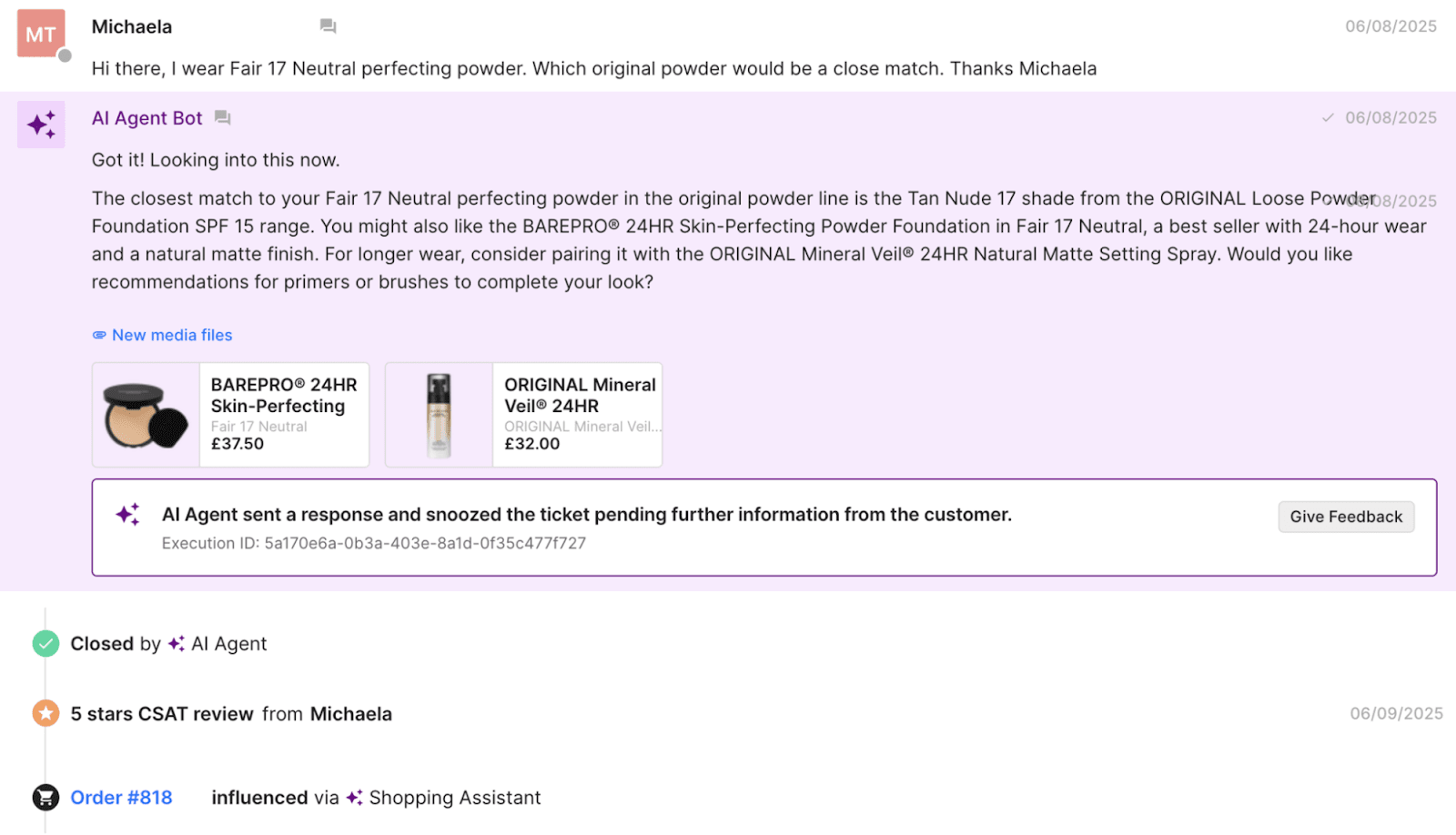
That accuracy paid off.
AI-influenced purchases at bareMinerals had zero returns in the first 30 days because customers were finally getting the right shade the first time.
That’s the difference between “resolved” and resolved well.
The zero-touch ticket rate measures something slightly different: the percentage of conversations AI manages entirely on its own, without ever being escalated to an agent.
This metric is a direct lens into:
More importantly, deflection widens the funnel for more revenue-driven conversations.
When AI deflects more inbound questions, your support team can focus on conversations that truly require human expertise, including returns exceptions, escalations, VIP shoppers, and emotionally sensitive interactions.
Brands with strong deflection rates typically see:
If automation metrics tell you how well your AI is working, conversion and revenue metrics tell you how well it’s selling.
This category is where conversational commerce really proves its value because it shows the direct financial impact of every human- or AI-led interaction.
Chat conversion rate measures the percentage of conversations that end in a purchase, and it’s one of the clearest indicators of whether your conversational strategy is influencing shopper decisions.
A strong CVR tells you that conversations are:
You see this clearly with brands selling technical or performance-driven products.
Outdoor apparel shoppers, for example, don’t just need “a jacket” — they need to know which jacket will hold up in specific temperatures, conditions, or terrains. A well-trained AI can step into that moment and convert uncertainty into action.
Arc’teryx saw this firsthand.
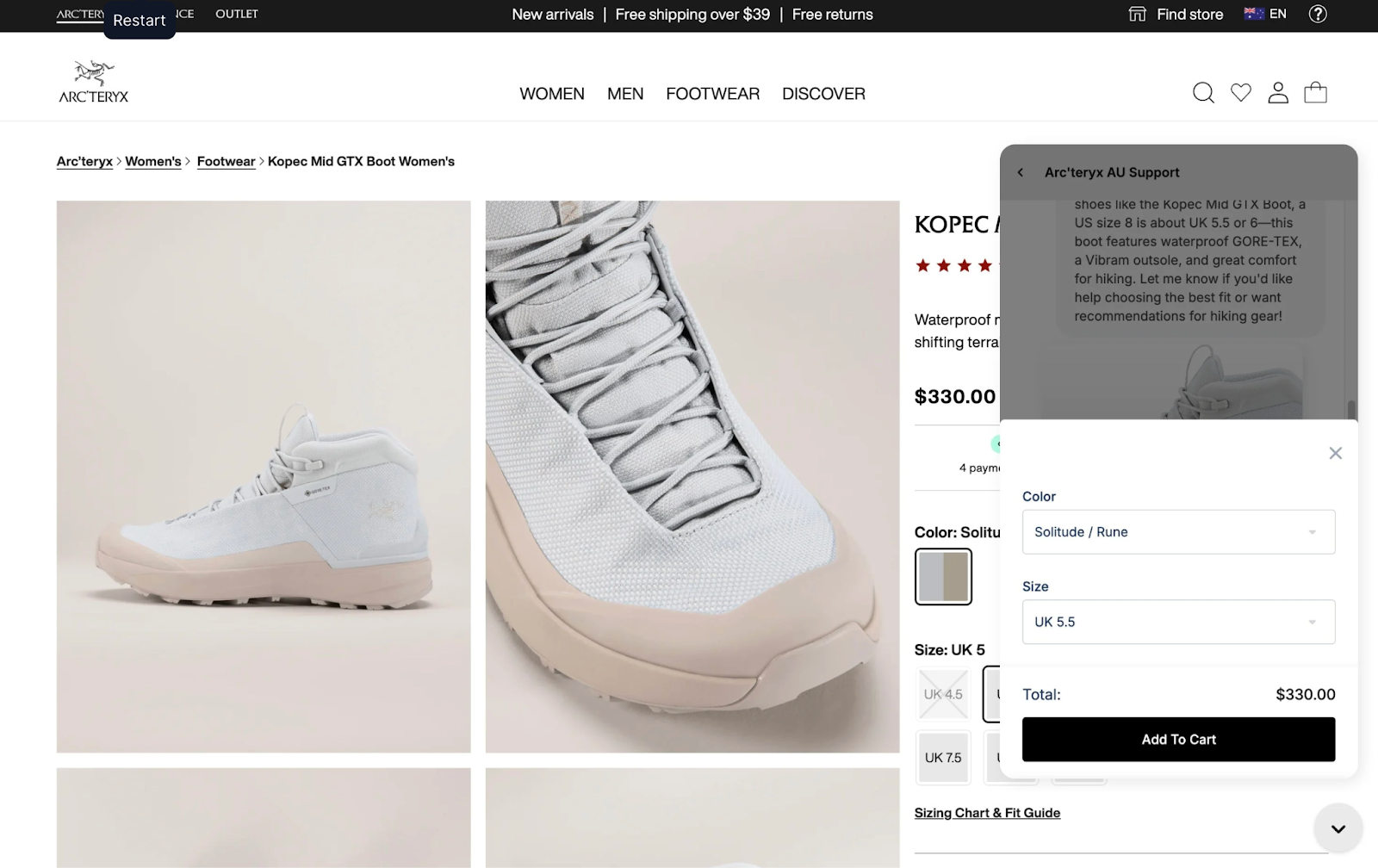
Once Shopping Assistant started handling their high-intent pre-purchase questions, their chat conversion rate jumped dramatically — from 4% to 7%. A 75% lift.
That’s what happens when shoppers finally get the expert guidance they’ve been searching for.
Not every shopper buys the moment they finish a chat. Some take a few hours. Some need a day or two. Some want to compare specs or read reviews before committing.
GMV influenced captures this “tail effect” by tracking revenue within 1–3 days of a conversation.
It’s especially powerful for:
In Arc’teryx’s case, shoppers often take time to confirm they’re choosing the right technical gear.
Yet even with that natural pause in behavior, Shopping Assistant still influenced 3.7% of all revenue, not by forcing instant decisions, but by providing the clarity people needed to make the right one.
This metric looks at the average order value of shoppers who engage in a conversation versus those who don’t.
If the conversational AOV is higher, it means your AI or agents are educating customers in ways that naturally expand the cart.
Examples of AOV-lifting conversations include:
When conversations are done well, AOV increases not because shoppers are being upsold, but because they’re being guided.
ROI compares the revenue generated by conversational AI to the cost of the tool itself — in short, this is the number that turns heads in boardrooms.
Strong ROI shows that your AI:
When ROI looks like that, AI stops being a “tool” and starts being an undeniable growth lever.
Related: The hidden power and ROI of automated customer support
Not every metric in conversational commerce is a final outcome. Some are early signals that show whether shoppers are interested, paying attention, and moving closer to a purchase.
These engagement metrics are especially valuable because they reveal why conversations convert, not just whether they do. When engagement goes up, conversion usually follows.
CTR measures the percentage of shoppers who click the product links shared during a conversation. It’s one of the cleanest leading indicators of buyer intent because it reflects a moment where curiosity turns into action.
If CTR is high, it’s a sign that:
In other words, CTR tells you which conversations are influencing shopping behavior.
And the connection between CTR and revenue is often tighter than teams expect.
Just look at what happened with Caitlyn Minimalist. When they began comparing the results of human-led conversations versus AI-assisted ones over a 90-day period, CTR became one of the clearest predictors of success. Their Shopping Assistant consistently drove meaningful engagement with its recommendations — an 18% click-through rate on the products it suggested.
That level of engagement translated directly into better outcomes:
When shoppers click, they’re moving deeper into the buying cycle. Strong CTR makes it easier to forecast conversion and understand how well your conversational flows are guiding shoppers toward the right products.
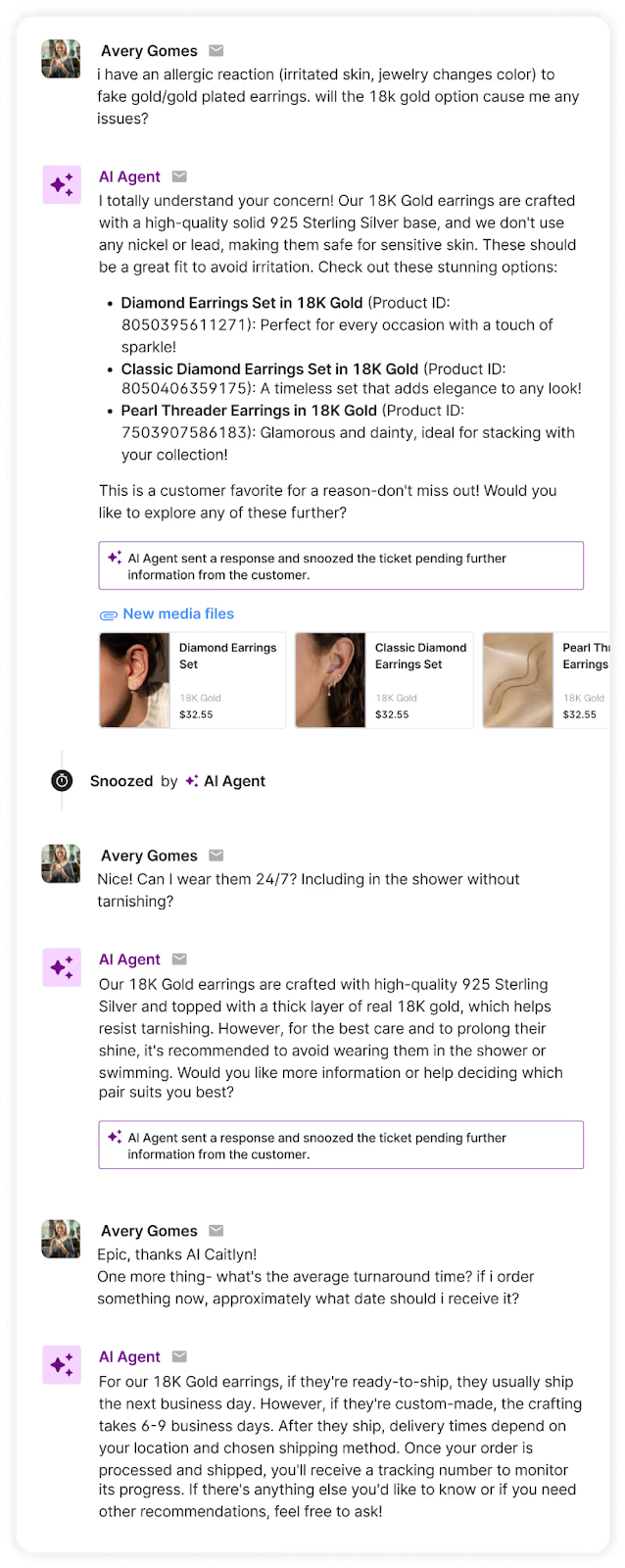
Discounting can be one of the fastest ways to nudge a shopper toward checkout, but it’s also one of the fastest ways to erode margins.
That’s why discount-related metrics matter so much in conversational commerce.
They show not just whether AI is using discounts, but how effectively those discounts are driving conversions.
This metric tracks how many discount codes or promotional offers your AI is sharing during conversations.
Ideally, discounts should be purposeful — timed to moments when a shopper hesitates or needs an extra nudge — not rolled out as a one-size-fits-all script. When you monitor “discounts offered,” you can ensure that incentives are being used as conversion tools, not crutches.
This visibility becomes particularly important at high-intent touchpoints, such as exit intent or cart recovery interactions, where a small incentive can meaningfully increase conversion if used correctly.
Offering a discount is one thing. Seeing whether customers use it is another.
A high “discounts applied” rate suggests:
A low usage rate tells a different story: Your team (or your AI) is discounting unnecessarily.
This metric alone often surprises brands. More often than not, CX teams discover they can discount less without hurting conversion, or that a non-discount incentive (like a relevant product recommendation) performs just as well.
Understanding this relationship helps teams tighten their promotional strategy, protect margins, and use discounts only where they actually drive incremental revenue.
Once you know which metrics matter, the next step is building a system that brings them together in one place.
Think of your conversational commerce scorecard as a decision-making engine — something that helps you understand performance at a glance, spot bottlenecks, optimize AI, and guide shoppers more effectively.
In Gorgias, you can customize your analytics dashboard to watch the metrics that matter most to your brand. This becomes the single source of truth for understanding how conversations influence revenue.
Here’s what a powerful dashboard unlocks:
Some parts of the customer journey are perfect for AI: repetitive questions, product education, sizing guidance, shade matching, order status checks.
Others still benefit from human support, like emotional conversations, complex troubleshooting, multi-item styling, or high-value VIP concerns.
Metrics like resolution rate, zero-touch ticket rate, and chat conversion rate show you exactly which is which.
When you track these consistently, you can:
For example, if AI handles 80% of sizing questions successfully but struggles with multi-item styling advice, that tells you where to invest in improving AI, and where human expertise should remain the default.
Metrics like CTR, CVR, and conversational AOV reveal the inner workings of shopper decision-making. They show which recommendations resonate, which don’t, and which messaging actually moves someone to purchase.
With these insights, CX teams can:
For instance, if shoppers repeatedly ask clarifying questions about a product’s material or fit, that’s a signal for merchandising or product teams.
If recommendations with social proof get high engagement, marketing can integrate that insight into on-site messaging.
Conversations reveal what customers really care about — often before analytics do.
This is the moment when the scorecard stops being a CX tool and becomes a business tool.
A clear set of metrics shows how conversations tie to:
When a CX leader walks into a meeting and says, “Our AI Assistant influenced 5% of last month’s revenue” or “Conversational shoppers have a 20% higher AOV,” the perception of CX changes instantly.
You’re no longer a support cost. You’re a revenue channel.
And once you have numbers like ROI or revenue influence in hand, it becomes nearly impossible for anyone to argue against further investment in CX automation.
A scorecard doesn’t just show what’s working, it surfaces what’s not.
Metrics make friction obvious:
Once you identify these patterns, you can run targeted experiments:
Compounded over time, these moments create major lifts in conversion and revenue.
One of the biggest hidden values of conversational data is how it strengthens cross-functional decision-making.
A clear analytics dashboard gives teams visibility into:
Suddenly, CX isn’t just answering questions — it’s informing strategy across the business.
With the right metrics in place, CX leaders can finally quantify the impact of every interaction, and use that data to shape smarter, more profitable customer journeys.
If you're ready to measure — and scale — the impact of your conversations, tools like Gorgias AI Agent and Shopping Assistant give CX teams the visibility, accuracy, and performance needed to turn every interaction into revenue.
Want to see it in action? Book a demo and discover what conversational commerce can do for your bottom line.
{{lead-magnet-2}}
The best in CX and ecommerce, right to your inbox
TL;DR:
In 2024, Shopify merchants drove $11.5 billion in sales over Black Friday Cyber Monday. Now, BFCM is quickly approaching, with some brands and major retailers already hosting sales.
If you’re feeling late to prepare for the season or want to maximize the number of sales you’ll make, we’ll cover how food and beverage CX teams can serve up better self-serve resources for this year’s BFCM.
Learn how to answer and deflect customers’ top questions before they’re escalated to your support team.
💡 Your guide to everything peak season → The Gorgias BFCM Hub
During busy seasons like BFCM and beyond, staying on top of routine customer asks can be an extreme challenge.
“Every founder thinks BFCM is the highest peak feeling of nervousness,” says Ron Shah, CEO and Co-founder of supplement brand Obvi.
“It’s a tough week. So anything that makes our team’s life easier instantly means we can focus more on things that need the time,” he continues.
Anticipating contact reasons and preparing methods (like automated responses, macros, and enabling an AI Agent) is something that can help. Below, find the top contact reasons for food and beverage companies in 2025.
According to Gorgias proprietary data, the top reason customers reach out to brands in the food and beverage industry is to cancel a subscription (13%) followed by order status questions (9.1%).
Because product detail queries represent 5.7% of contact reasons for the food and beverage industry, the more information you provide on your product pages, the better.
Include things like calorie content, nutritional information, and all ingredients.
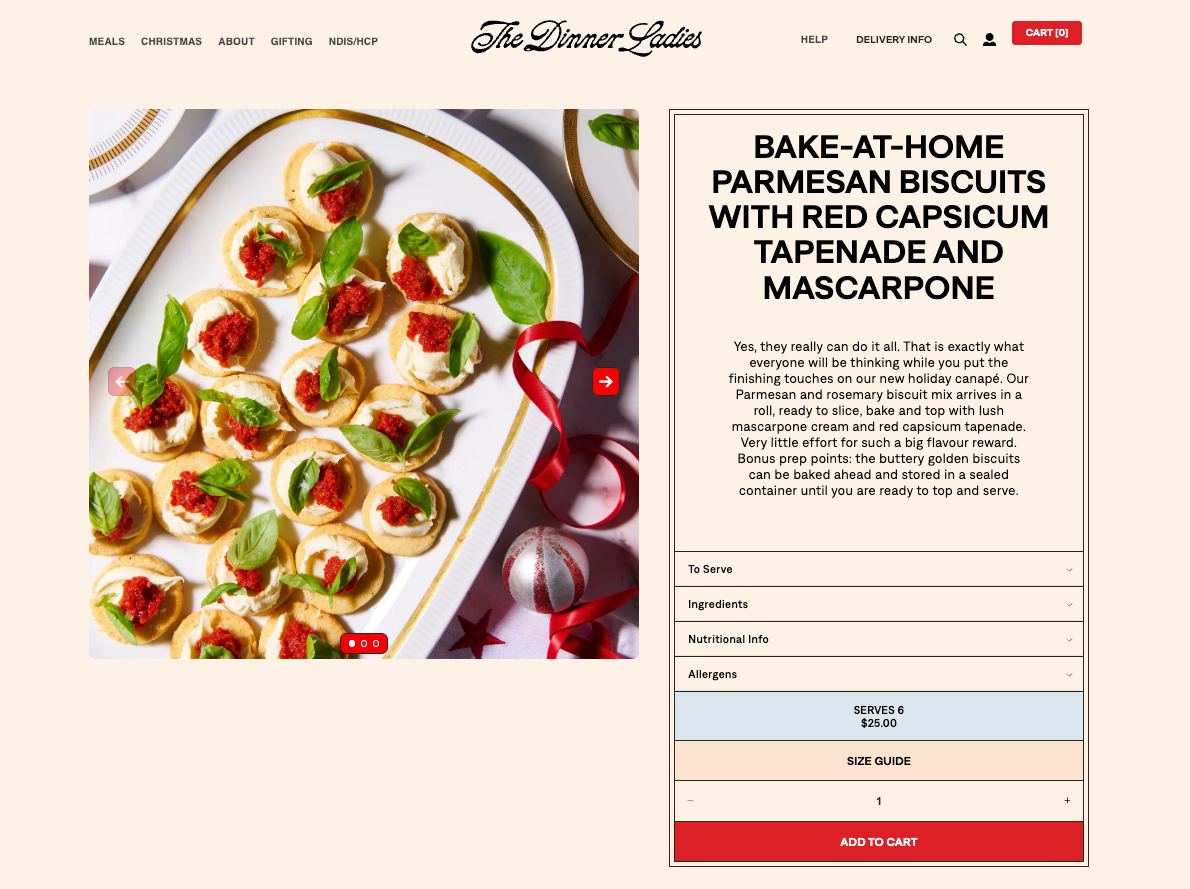
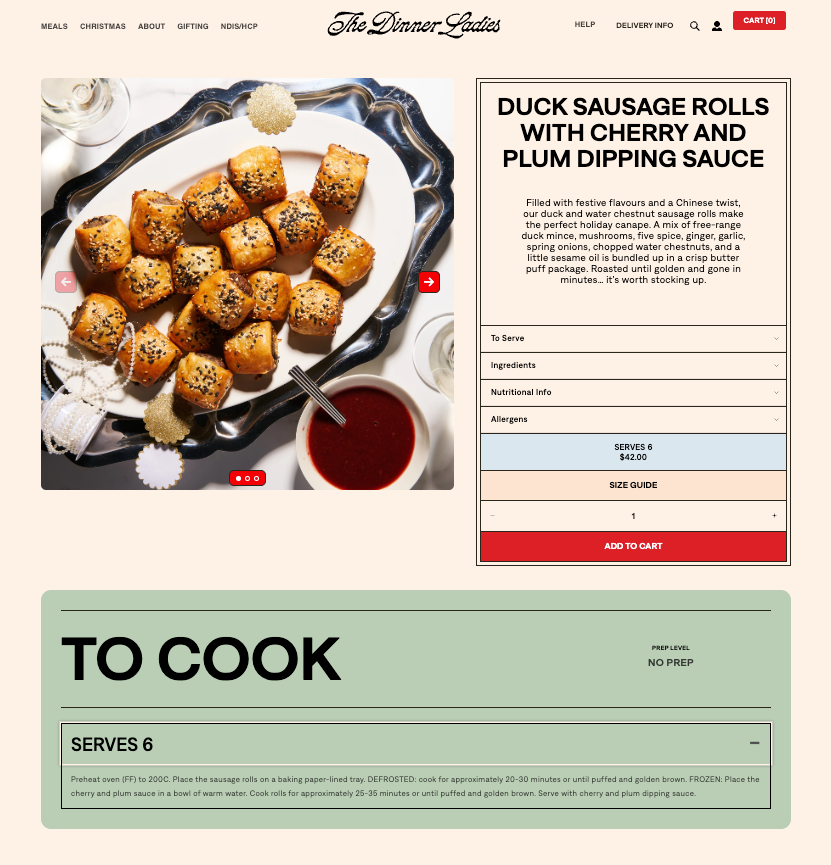
For example, ready-to-heat meal company The Dinner Ladies includes a dropdown menu on each product page for further reading. Categories include serving instructions, a full ingredient list, allergens, nutritional information, and even a handy “size guide” that shows how many people the meal serves.
FAQ pages make up the information hub of your website. They exist to provide customers with a way to get their questions answered without reaching out to you.
This includes information like how food should be stored, how long its shelf life is, delivery range, and serving instructions. FAQs can even direct customers toward finding out where their order is and what its status is.

In the context of BFCM, FAQs are all about deflecting repetitive questions away from your team and assisting shoppers in finding what they need faster.
That’s the strategy for German supplement brand mybacs.
“Our focus is to improve automations to make it easier for customers to self-handle their requests. This goes hand in hand with making our FAQs more comprehensive to give customers all the information they need,” says Alexander Grassmann, its Co-Founder & COO.
As you contemplate what to add to your FAQ page, remember that more information is usually better. That’s the approach Everyday Dose takes, answering even hyper-specific questions like, “Will it break my fast?” or “Do I have to use milk?”
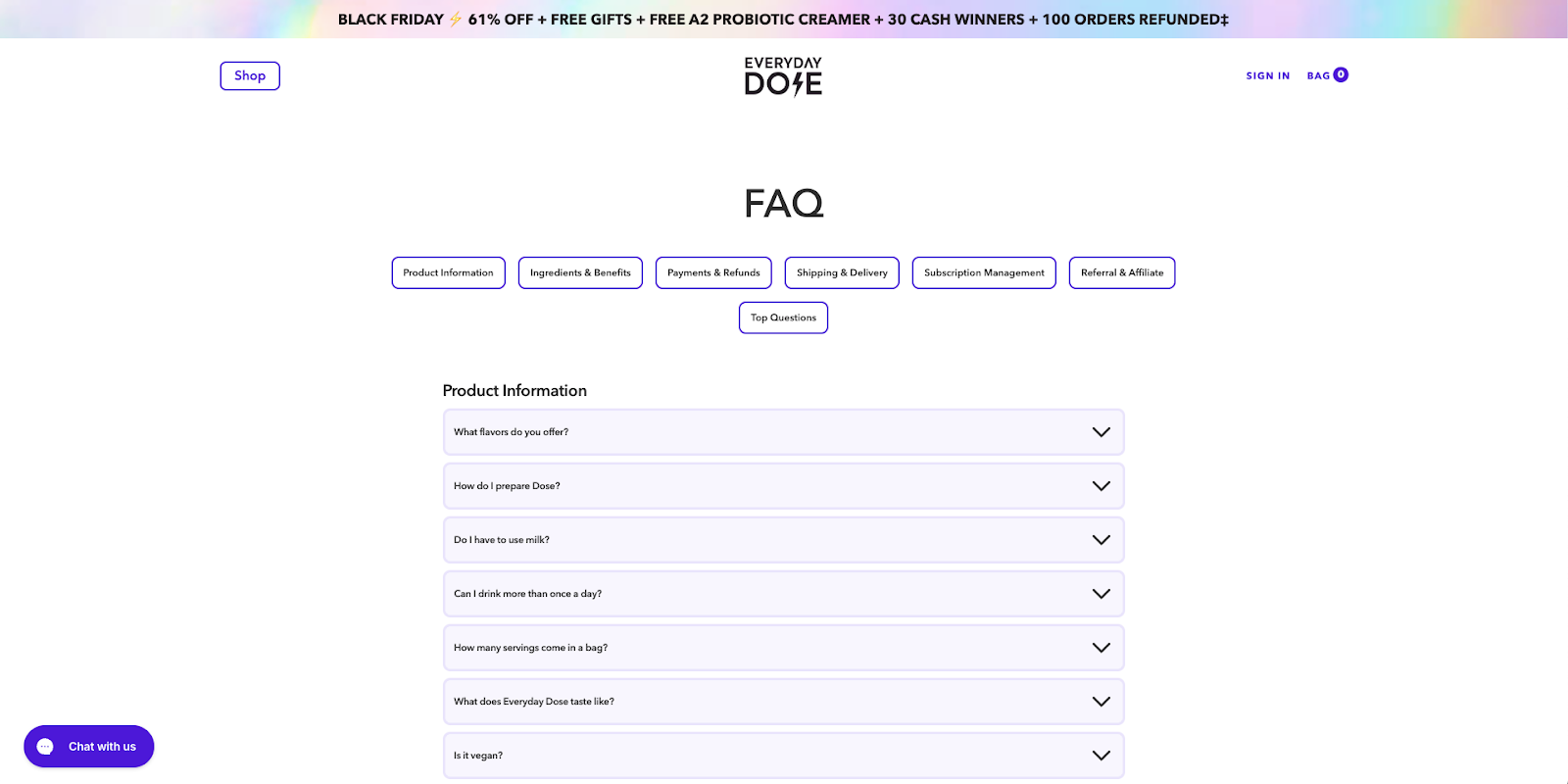
While the FAQs you choose to add will be specific to your products, peruse the top-notch food and bev FAQ pages below.
Time for some FAQ inspo:
AI Agents and AI-powered Shopping Assistants are easy to set up and are extremely effective in handling customer interactions––especially during BFCM.
“I told our team we were going to onboard Gorgias AI Agent for BFCM, so a good portion of tickets would be handled automatically,” says Ron Shah, CEO and Co-founder at Obvi. “There was a huge sigh of relief knowing that customers were going to be taken care of.”
And, they’re getting smarter. AI Agent’s CSAT is just 0.6 points shy of human agents’ average CSAT score.
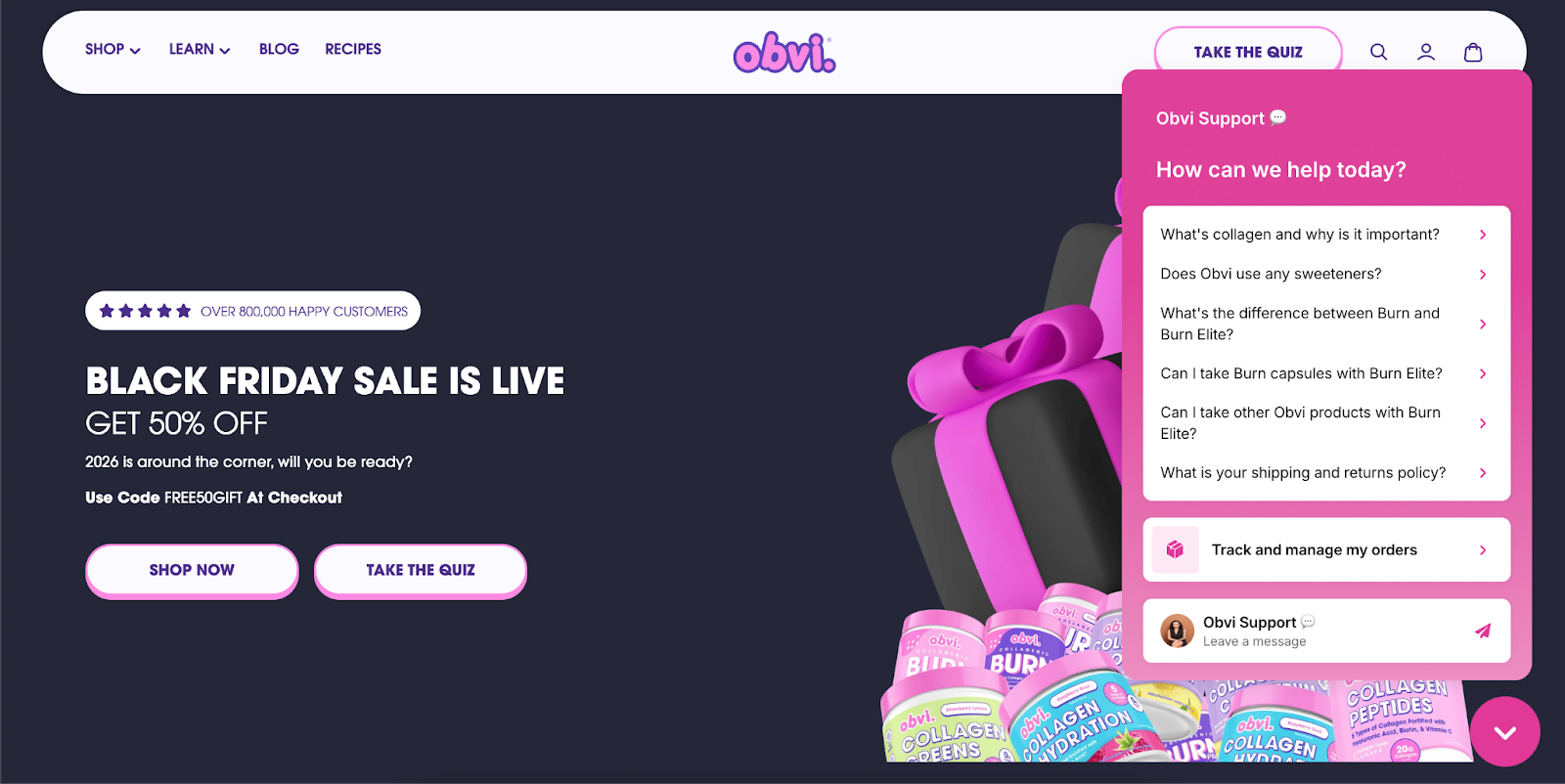
Here are the specific responses and use cases we recommend automating:
Get your checklist here: How to prep for peak season: BFCM automation checklist
With high price reductions often comes faster-than-usual sell out times. By offering transparency around item quantities, you can avoid frustrated or upset customers.
For example, you could show how many items are left under a certain threshold (e.g. “Only 10 items left”), or, like Rebel Cheese does, mention whether items have sold out in the past.
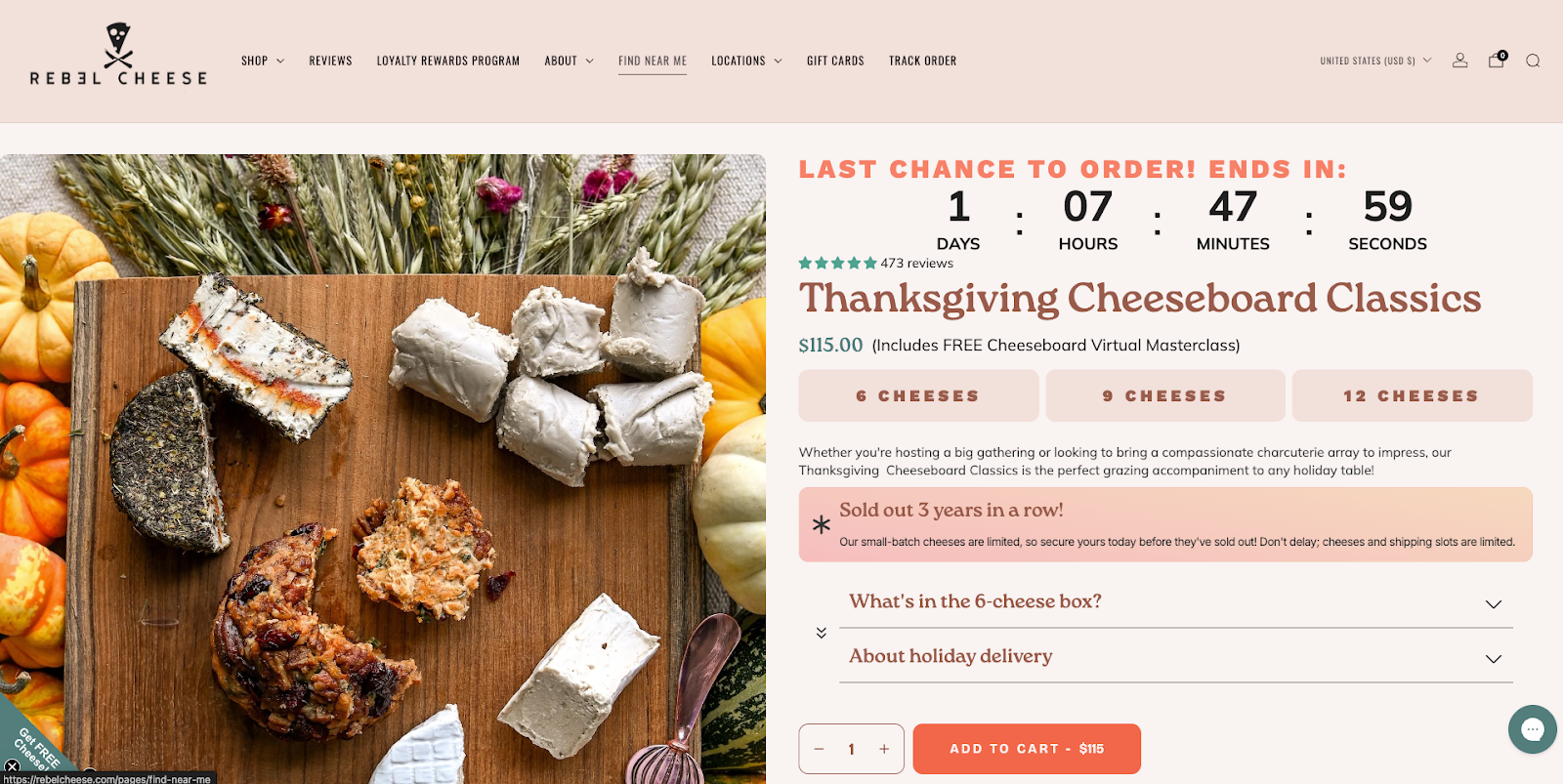
You could also set up presales, give people the option to add themselves to a waitlist, and provide early access to VIP shoppers.
Give shoppers a heads up whether they’ll be able to cancel an order once placed, and what your refund policies are.
For example, cookware brand Misen follows its order confirmation email with a “change or cancel within one hour” email that provides a handy link to do so.
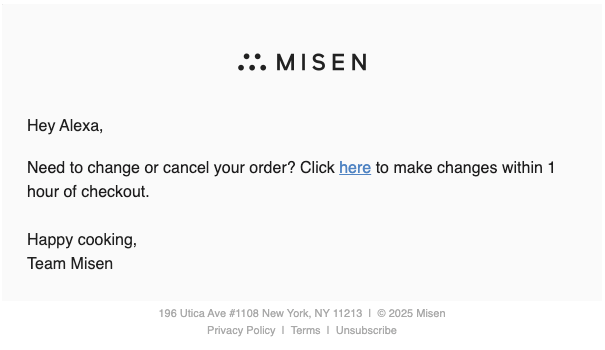
Your refund policies and order cancellations should live within an FAQ and in the footer of your website.
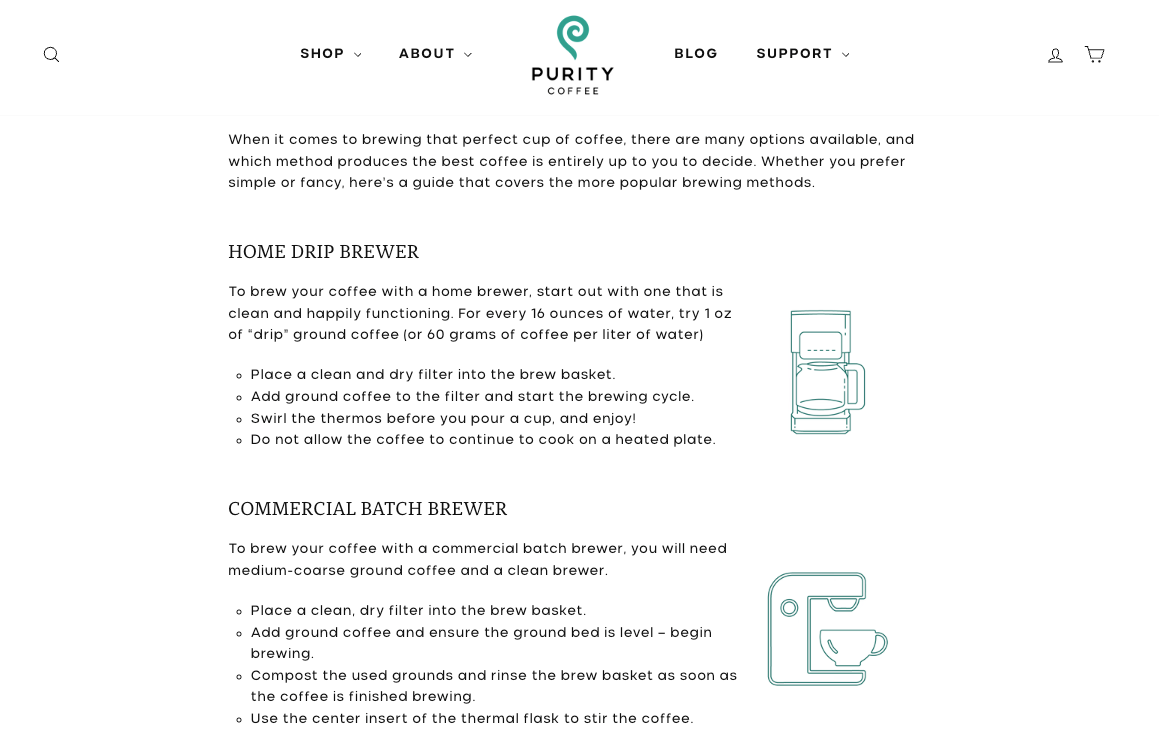
Include how-to information on your website within your FAQs, on your blog, or as a standalone webpage. That might be sharing how to use a product, how to cook with it, or how to prepare it. This can prevent customers from asking questions like, “how do you use this?” or “how do I cook this?” or “what can I use this with?” etc.
For example, Purity Coffee created a full brewing guide with illustrations:
Similarly, for its unique preseasoned carbon steel pan, Misen lists out care instructions:

And for those who want to understand the level of prep and cooking time involved, The Dinner Ladies feature cooking instructions on each product page.
Interactive quizzes, buying guides, and gift guides can help ensure shoppers choose the right items for them––without contacting you first.
For example, Trade Coffee Co created a quiz to help first timers find their perfect coffee match:
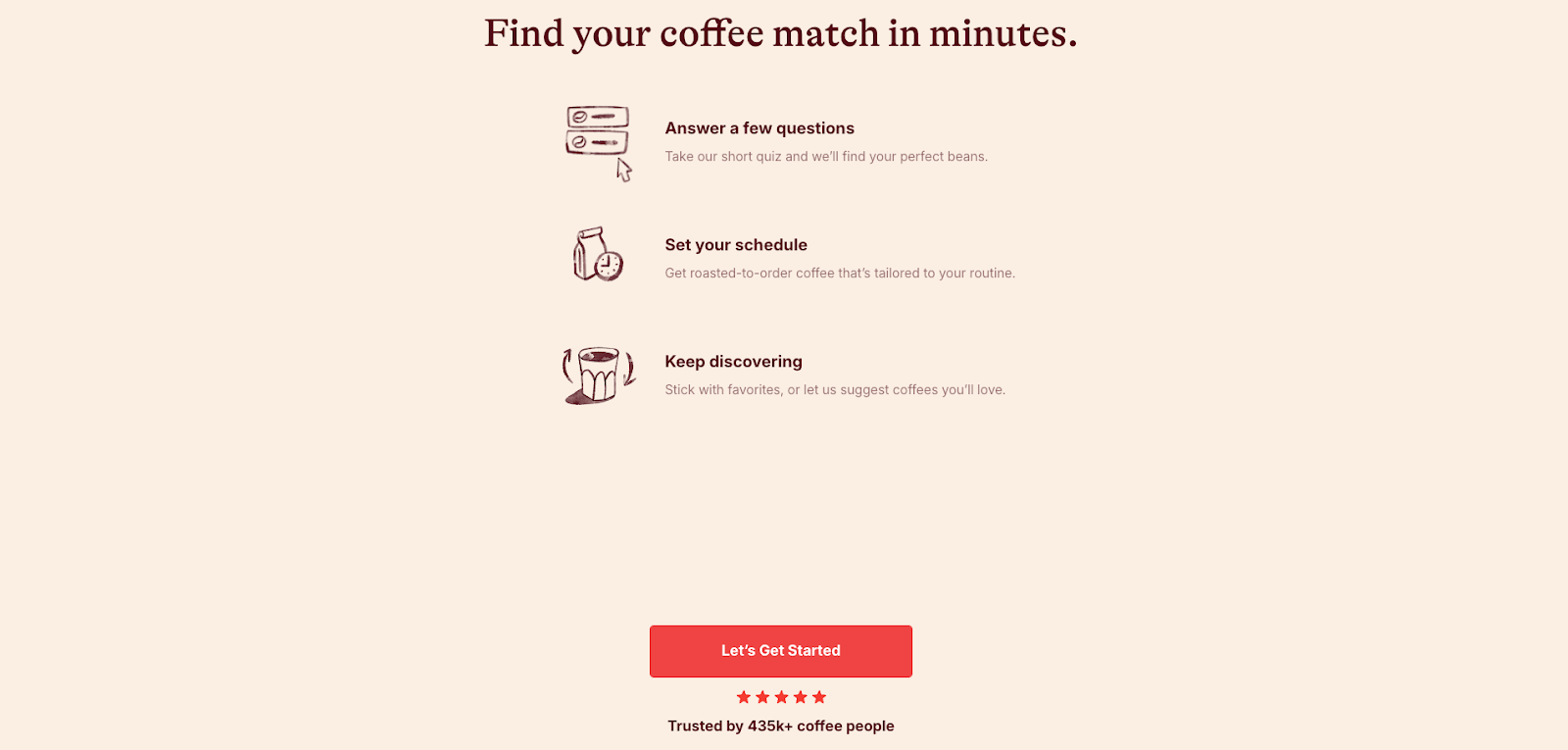
The more information you can share with customers upfront, the better. That will leave your team time to tackle the heady stuff.
If you’re looking for an AI-assist this season, check out Gorgias’s suite of products like AI Agent and Shopping Assistant.
{{lead-magnet-2}}

TL;DR:
As holiday season support volumes spike and teams lean on AI to keep up, one frustration keeps surfacing, our Help Center has the answers—so why can’t AI find them?
The truth is, AI can’t help customers if it can’t understand your Help Center. Most large language models (LLMs), including Gorgias AI Agent, don’t ignore your existing docs, they just struggle to find clear, structured answers inside them.
The good news is you don’t need to rebuild your Help Center or overhaul your content. You simply need to format it in a way that’s easy for both people and AI to read.
We’ll break down how AI Agent reads your Help Center, finds answers, and why small formatting changes can help it respond faster and more accurately, so your team spends less time on escalations.
{{lead-magnet-1}}
Before you start rewriting your Help Center, it helps to understand how AI Agent actually reads and uses it.
Think of it like a three-step process that mirrors how a trained support rep thinks through a ticket.
Your Help Center is AI Agent’s brain. AI Agent uses your Help Center to pull facts, policies, and instructions it needs to respond to customers accurately. If your articles are clearly structured and easy to scan, AI Agent can find what it needs fast. If not, it hesitates or escalates.
Think of Guidance as AI Agent’s decision layer. What should AI Agent do when someone asks for a refund? What about when they ask for a discount? Guidance helps AI Agent provide accurate answers or hand over to a human by following an “if/when/then” framework.
Finally, AI Agent uses a combination of your help docs and Guidance to respond to customers, and if enabled, perform an Action on their behalf—whether that’s changing a shipping address or canceling an order altogether.
Here’s what that looks like in practice:
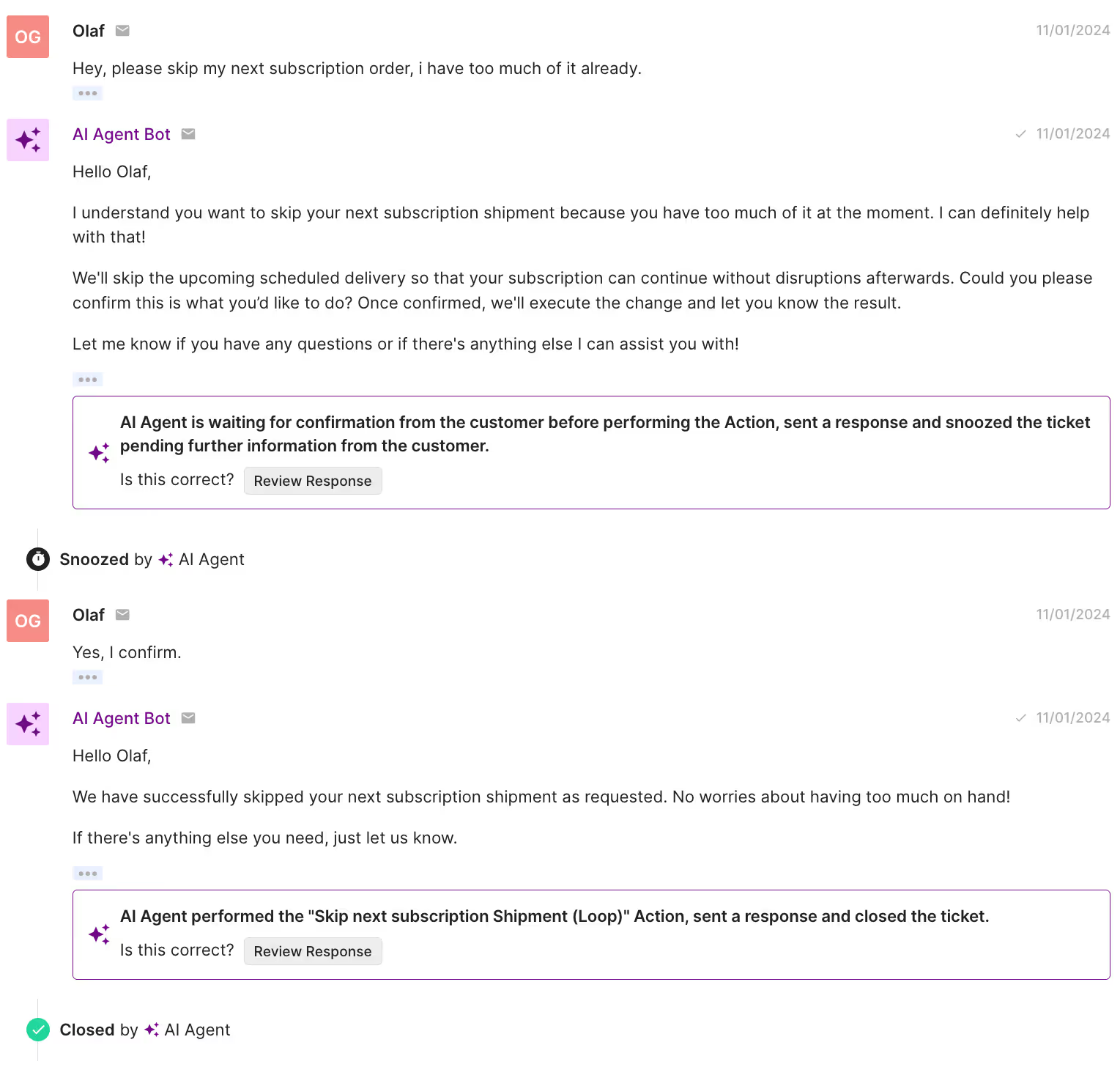
This structure removes guesswork for both your AI and your customers. The clearer your docs are about when something applies and what happens next, the more accurate and human your automated responses will feel.
A Help Center written for both people and AI Agent:
Our data shows that most AI escalations happen for a simple reason––your Help Center doesn’t clearly answer the question your customer is asking.
That’s not a failure of AI. It’s a content issue. When articles are vague, outdated, or missing key details, AI Agent can’t confidently respond, so it passes the ticket to a human.
Here are the top 10 topics that trigger escalations most often:
Each of these topics needs a dedicated, clearly structured Help Doc that uses keywords customers are likely to search and spells out specific conditions.
Here’s how to strengthen each one:
Start by improving these 10 articles first. Together, they account for nearly half of all AI Agent escalations. The clearer your Help Center is on these topics, the fewer tickets your team will ever see, and the faster your AI will resolve the rest.
Once you know how AI Agent reads your content, the next step is formatting your help docs so it can easily understand and use them.
The goal isn’t to rewrite everything, it’s to make your articles more structured, scannable, and logic-friendly.
Here’s how.
Both humans and large language models read hierarchically. If your article runs together in one long block of text, key answers get buried.
Break articles into clear sections and subheadings (H2s, H3s) for each scenario or condition. Use short paragraphs, bullets, and numbered lists to keep things readable.
Example:
How to Track Your Order
A structured layout helps both AI and shoppers find the right step faster, without confusion or escalation.
AI Agent learns best when your Help Docs clearly define what happens under specific conditions. Think of it like writing directions for a flowchart.
Example:
This logic helps AI know what to do and how to explain the answer clearly to the customer.
Customers don’t always use the same words you do, and neither do LLMs. If your docs treat “cancel,” “stop,” and “pause” as interchangeable, AI Agent might return the wrong answer.
Define each term clearly in your Help Center and add small keyword variations (“cancel subscription,” “end plan,” “pause delivery”) so the AI can recognize related requests.
AI Agent follows links just like a human agent. If your doc ends abruptly, it can’t guide the customer any further.
Always finish articles with an explicit next step, like linking to:
Example: “If your return meets our policy, request your return label here.”
That extra step keeps the conversation moving and prevents unnecessary escalations.
AI tools prioritize structure and wording when learning from your Help Center—not emotional tone.
Phrases like “Don’t worry!” or “We’ve got you!” add noise without clarity.
Instead, use simple, action-driven sentences that tell the customer exactly what to do:
A consistent tone keeps your Help Center professional, helps AI deliver reliable responses, and creates a smoother experience for customers.
You don’t need hundreds of articles or complex workflows to make your Help Center AI-ready. But you do need clarity, structure, and consistency. These Gorgias customers show how it’s done.
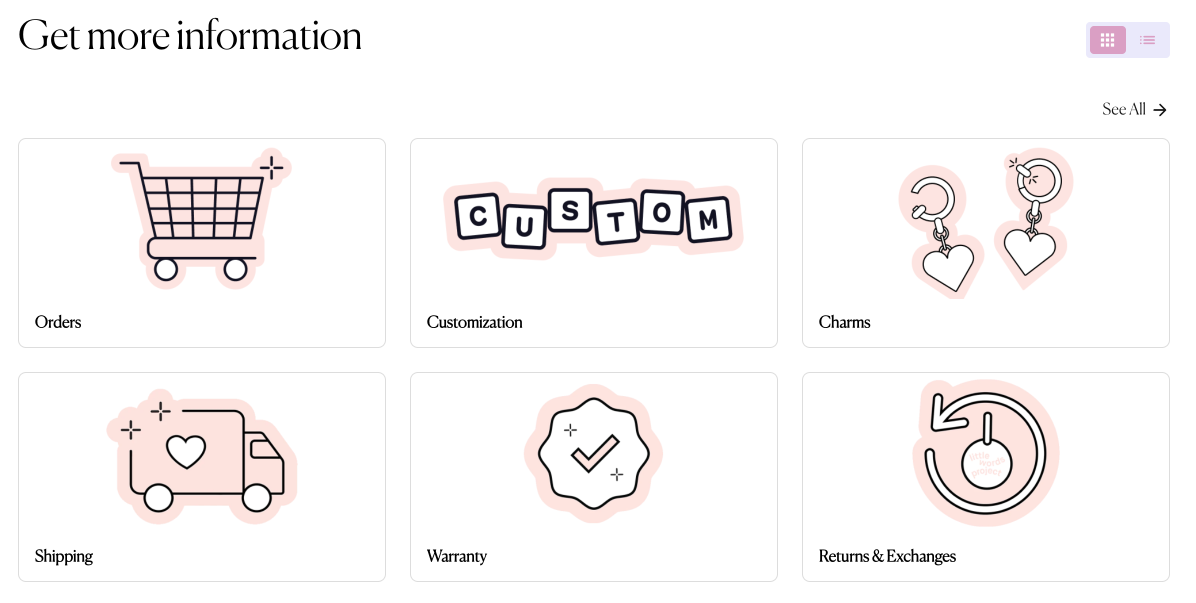
Little Words Project keeps things refreshingly straightforward. Their Help Center uses short paragraphs, descriptive headers, and tightly scoped articles that focus on a single intent, like returns, shipping, or product care.
That makes it easy for AI Agent to scan the page, pull out the right facts, and return accurate answers on the first try.
Their tone stays friendly and on-brand, but the structure is what shines. Every article flows from question → answer → next step. It’s a minimalist approach, and it works. Both for customers and the AI reading alongside them.
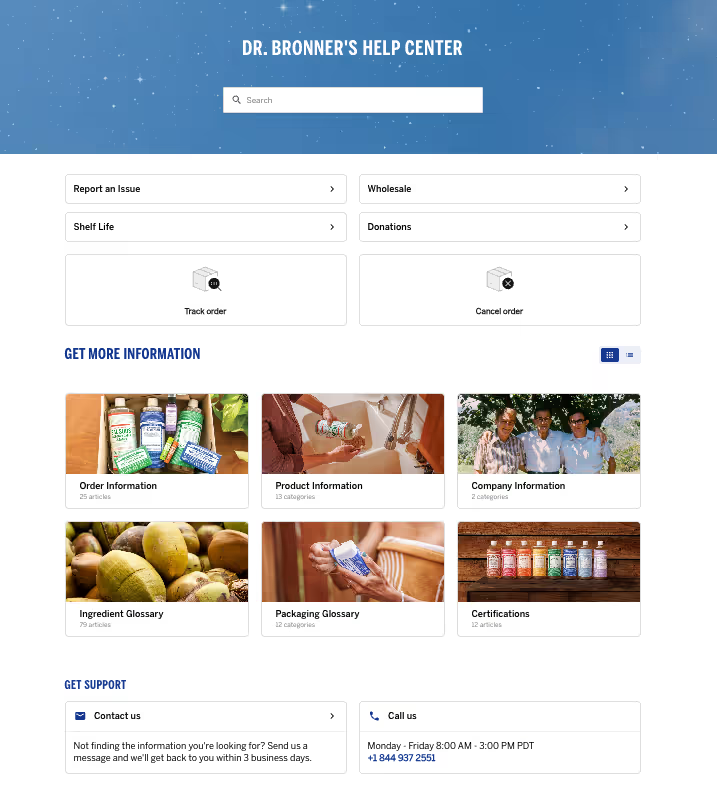
Customer education is at the heart of Dr. Bronner’s mission. Their customers often ask detailed questions about product ingredients, packaging, and certifications. With Gorgias, Emily and her team were able to build a robust Help Center that helped to proactively give this information.
The Help Center doesn't just provide information. The integration of interactive Flows, Order Management, and a Contact Form automation allowed Dr. Bronner’s to handle routine inquiries—such as order statuses—quickly and efficiently. These kinds of interactive elements are all possible out-of-the-box, no IT support needed.

When Ekster switched to Gorgias, the team wanted to make their Help Center work smarter. By writing clear, structured articles for common questions like order tracking, returns, and product details, they gave both customers and AI Agent the information needed to resolve issues instantly.
"Our previous Help Center solution was the worst. I hated it. Then I saw Gorgias’s Help Center features, and how the Article Recommendations could answer shoppers’ questions instantly, and I loved it. I thought: this is just what we need." —Shauna Cleary, Head of Ecommerce at Ekster
The results followed fast. With well-organized Help Center content and automation built around it, Ekster was able to scale support without expanding the team.
“With all the automations we’ve set up in Gorgias, and because our team in Buenos Aires has ramped up, we didn’t have to rehire any extra agents.” —Shauna Cleary, Head of Ecommerce at Ekster
Learn more: How Ekster used automation to cover the workload of 4 agents
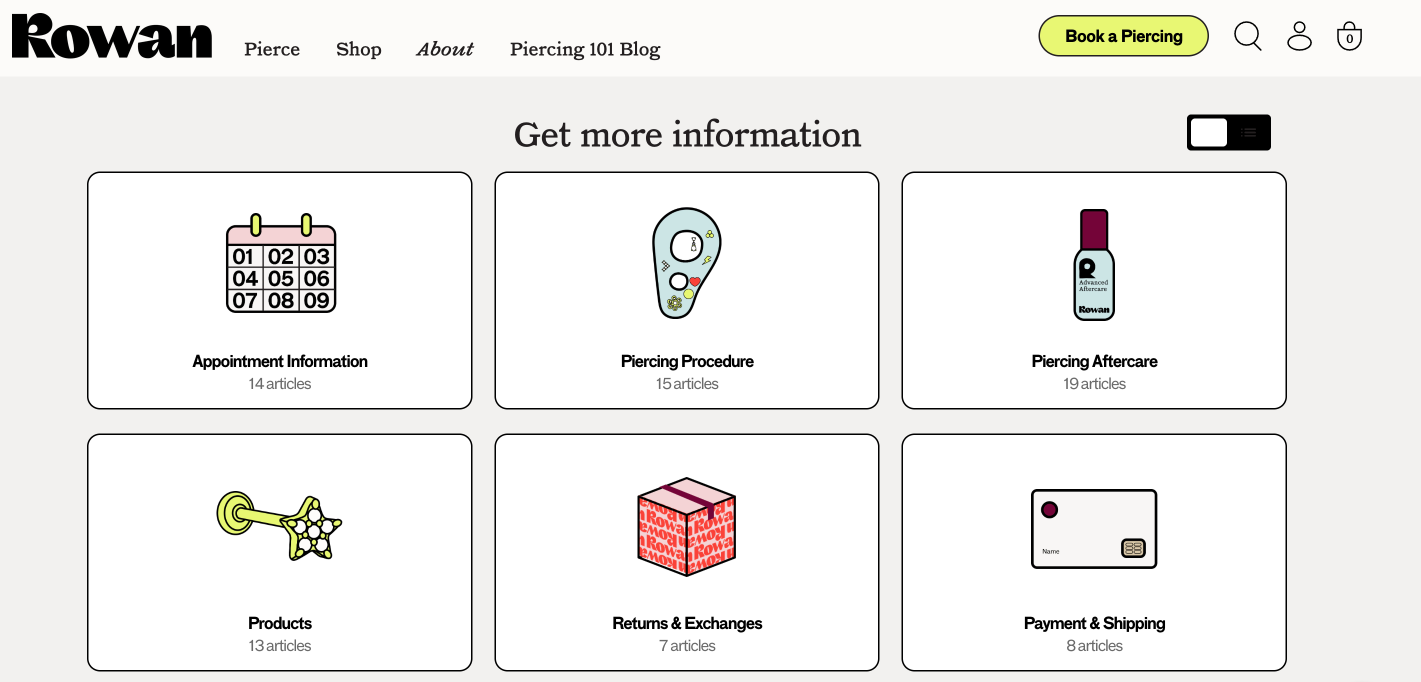
Rowan’s Help Center is a great example of how clear structure can do the heavy lifting. Their FAQs are grouped into simple categories like piercing, shipping, returns, and aftercare, so readers and AI Agent can jump straight to the right topic without digging.
For LLMs, that kind of consistency reduces guesswork. For customers, it creates a smooth, reassuring self-service experience.
TUSHY proves you can maintain personality and structure. Their Help Center articles use clear headings, direct language, and brand-consistent tone. It makes it easy for AI Agent to give accurate, on-brand responses.
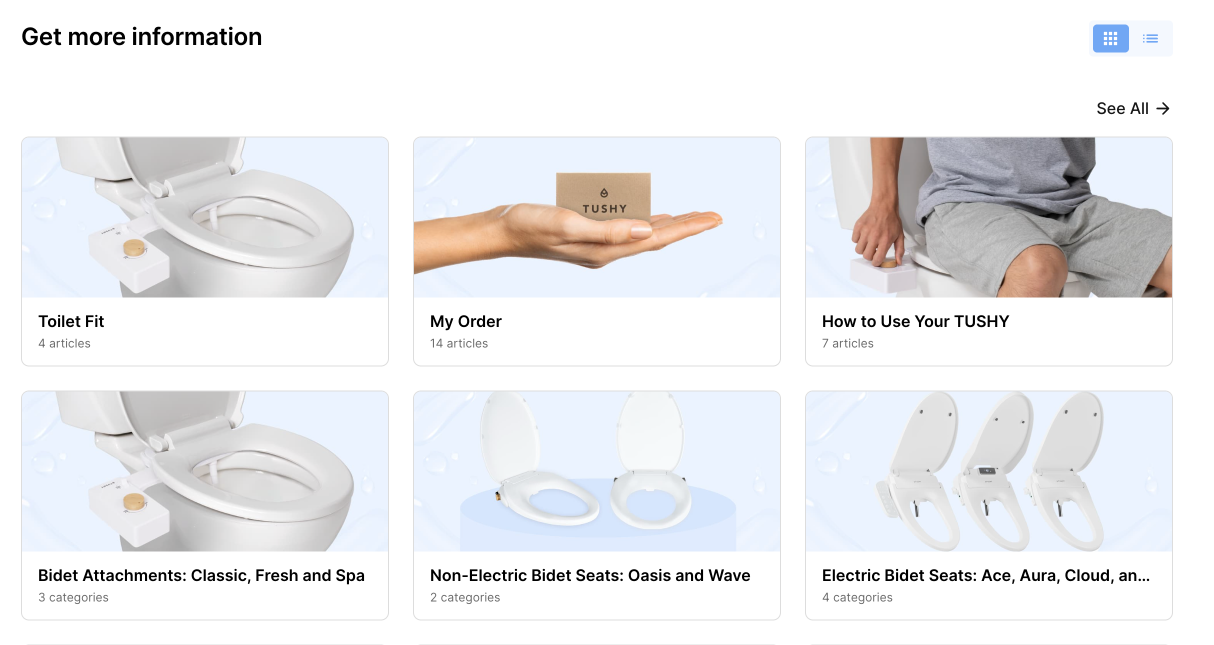
“Too often, a great interaction is diminished when a customer feels reduced to just another transaction. With AI, we let the tech handle the selling, unabashedly, if needed, so our future customers can ask anything, even the questions they might be too shy to bring up with a human. In the end, everybody wins!" —Ren Fuller-Wasserman, Senior Director of Customer Experience at TUSHY
Ready to put your Help Center to the test? Use this five-point checklist to make sure your content is easy for both customers and AI to navigate.
Break up long text blocks and use descriptive headers (H2s, H3s) so readers and AI Agent can instantly find the right section.
Spell out what happens in each scenario. This logic helps AI Agent decide the right next step without second-guessing.
Make sure your Help Center includes complete, structured articles for high-volume issues like order status, returns, and refunds.
Close every piece with a call to action, like a form, related article, or support link, so neither AI nor customers hit a dead end.
Use direct, predictable phrasing. Avoid filler like “Don’t worry!” and focus on steps customers can actually take.
By tweaking structure instead of your content, it’s easier to turn your Help Center into a self-service powerhouse for both customers and your AI Agent.
Your Help Center already holds the answers your customers need. Now it’s time to make sure AI can find them. A few small tweaks to structure and phrasing can turn your existing content into a powerful, AI-ready knowledge base.
If you’re not sure where to start, review your Help Center with your Gorgias rep or CX team. They can help you identify quick wins and show you how AI Agent pulls information from your articles.
Remember: AI Agent gets smarter with every structured doc you publish.
Ready to optimize your Help Center for faster, more accurate support? Book a demo today.
{{lead-magnet-2}}


TL;DR:
Managing customer support as a Shopify store owner can feel like juggling too many tools at once.
Constantly switching tabs to look up orders, update customer information, or track returns wastes valuable time. Plus, it prevents your team from focusing on what really matters––delivering quick, personalized customer service.
Gorgias’s Shopify integration solves this. It keeps all your Shopify data in one place, so your team spends less time toggling tabs and more time helping customers. The result? Faster responses, better service, and more revenue.
Below, we break down the eight key capabilities of this integration, each paired with practical use cases to showcase its real-world value.
{{lead-magnet-1}}
What it does: Shopify order data is displayed directly within support tickets, allowing agents to view essential details like order status, customer information, and transaction history without leaving the helpdesk.
Use case: An agent handling a “Where’s my order?” request can instantly check tracking information and update the customer.
The fashion retailer Princess Polly improved their customer experience team’s efficiency by using Gorgias's deep integration with Shopify. Agents can view and update customer and order data directly within Gorgias, eliminating the need to switch between multiple tabs.
Taking a streamlined approach led to a 40% increase in efficiency, an 80% decrease in resolution time, and a 95% decrease in first response time.

What it does: Agents can update Shopify order and customer data with Shopify Actions right in Gorgias.
Key features:
Use case: Agents can perform Shopify actions directly from Gorgias, such as adding products, applying discounts, updating quantities, or issuing refunds.

What it does: Create templated responses called Macros with dynamic Shopify variables to automatically incorporate customer-specific information.
Key features:
Use case: A customer inquires about their order. With one click, the agent uses a Macro that pulls in the order status and expected delivery date, creating a faster and more personalized response.
Take Try The World, a gourmet subscription service, needed a robust Shopify integration to handle an increasing volume of customer inquiries. By switching to Gorgias, they gained the ability to unify conversations and embed Shopify data directly into Macros. Now, agents can quickly generate personalized responses that includes order details, tracking links, and customer-specific information.
Try the World’s support team’s efficiency skyrocketed, enabling them to handle 120 tickets per day, up from 80, and reduce response times to just one business day.

What it does: Macros with embedded Shopify data let agents quickly and accurately share pre-sale information like product links, stock availability, and discount codes, helping to convert prospective customers into buyers.
Key features:
Use case: A customer asks if a specific product is available in their size and color. The agent can apply a Macro that automatically pulls the product's inventory details and includes a discount code, sending a response like this:
“Hi [customer name Macro],
Great news! The product [Shopify product information Macro] is currently in stock in the size and color you’re looking for. You can check it out here: [Product Link]. Use the code WELCOME10 at checkout for 10% off your first order! Let me know if you have any other questions!”
How it helps:
What it does: Using Gorgias Chat, customers can track orders or manage their purchases on their own with no agent assistance needed.
Key feature:
Use case: A customer wants to check the status of their recent purchase. By accessing Chat on your website, they can enter their email and order number and receive instant updates on their order's progress, including shipping and delivery information, without waiting for an agent's response.
How it helps:
What it does: Rules paired with Shopify variables can automate various support tasks, such as identifying specific customer segments or tagging tickets, to boost efficiency and consistency.
Key features:
Use case: A customer with a history of substantial purchases contacts support. A rule detects that the customer's total spending exceeds a predefined threshold and automatically tags the ticket as "VIP."
This tag can then trigger other workflows, such as assigning the ticket to a senior support agent or escalating its priority.
How it helps:

What it does: Gorgias offers comprehensive reporting that allows you to measure how your support interactions influence sales.
Key features:
These metrics are accessible under Statistics → Support Performance → Revenue in your Gorgias dashboard. You can filter the data by integration, ticket channel, tags, or specific time periods to gain detailed insights.
Use case: By analyzing Revenue Statistics, you can identify which support channels or agents are most effective in driving sales. For example, if live chat interactions have a higher conversion rate, you might allocate more resources to that channel.
Additionally, recognizing top-performing agents can inform training programs to elevate overall team performance.
For example, One Block Down, a Milan-based streetwear brand, struggled to manage a growing volume of customer inquiries across multiple platforms. By integrating Gorgias with Shopify, they centralized all customer interactions into a single platform, giving agents instant access to crucial information like order history and returns directly within tickets.
The setup allowed the team to measure the direct impact of their support efforts on revenue.
The result? An impressive 1,000% increase in support-generated revenue and a 1-hour average first response time. By connecting the dots between customer service and sales performance, One Block Down demonstrated how proactive, data-driven support can directly influence the bottom line.
How it helps:

What it does: AI Agent automates Shopify actions like canceling orders, editing order details, and reshipping items.
Key features:
Use case: A customer realizes they've entered an incorrect shipping address shortly after placing an order. They contact support, and AI Agent promptly verifies that the order is unfulfilled, confirms the correct address with the customer, updates the shipping information in Shopify, and sends a confirmation email—all without human intervention.
How it helps:

{{lead-magnet-2}}

TL;DR:
Looking to grow an email list to capture leads or offer welcome incentives? These days, the default solution is to plaster a full-screen pop-up on your homepage.
It seems effective on the surface, collecting emails right off the bat, but dig deeper, and these pop-ups disrupt the shopping experience and skyrocket bounce rates—with 72% of customers exiting a website.
But how else do you get your message across?
That’s where Gorgias Convert comes in—a smarter, more customer-centric tool to drive conversions without pushing your visitors away.
Below, we’ll explore why it’s time to move on from full-screen pop-ups and how Gorgias Convert offers a better alternative for Shopify brands looking to boost engagement and revenue.
Pop-ups can be an effective marketing tool, but their full-screen counterpart often creates more problems than they solve. These intrusive overlays pose several challenges that can harm both user experience and your bottom line.
Full-screen pop-ups demand attention, often at the worst possible moment—like when a customer is browsing products or is just about to check out. This experience can frustrate visitors and lead them to abandon your site entirely.
The BBC says every extra second a page takes to load can cost you 10% of your users—and pushy pop-ups don’t help. If your pop-ups are poorly timed or overly intrusive, visitors feel unwelcome, causing them to leave before exploring your offerings.
Traditional pop-ups are static and one-size-fits-all. They can’t adjust messaging based on where the customer is in their shopping journey or their behavior on your site.
Many users employ ad blockers that filter out pop-ups altogether, meaning your message never even reaches a portion of your audience.
Gorgias Convert flips the script by offering a subtle, customer-friendly way to capture leads and drive sales without the drawbacks of full-screen pop-ups. Here’s why your Shopify brand should make the switch:
Gorgias Convert integrates seamlessly into your store, using a chat-based widget that feels like a natural part of the browsing experience. Using chat to double as a supporting and converting tool is less disruptive, allowing customers to explore your store at their own pace.

Convert makes it easy to bring any type of campaign to life. Catch the attention of the exact shoppers you want by detecting their browsing behavior, customer profile, cart attributes, and more.
For example, the exit intent campaign is the top-performing Convert campaign—it detects when a user is about to leave and displays a discount code. It’s fully customizable, allowing you to tailor offers based on how much time they’ve spent on a page, the number of items in their cart, or if they’ve visited more than three times without making a purchase.

Unlike one-size-fits-all pop-ups, Convert lets you tailor your messaging based on customer behavior, order history, and engagement. For example, if a customer is browsing a specific product, Convert can offer a relevant discount or incentive tied directly to that item.
With Convert, you’re not just collecting an email address—you’re starting a conversation. The tool allows you to engage with customers in real-time through pre-set flows that guide them toward taking action, whether it’s signing up for your newsletter, redeeming an offer, or completing a purchase.

Related: 6 types of conversational customer service + how to implement them
In 2024, smartphones were responsible for generating 68 percent of online shopping orders. To meet shoppers where they are, Convert’s chat-style interactions are optimized for mobile users. Unlike traditional pop-ups that don’t display correctly on smaller screens, Convert maintains a seamless experience for shoppers who prefer to shop on the go.

Using Convert means you can combine immediate assistance with smart marketing through its native integration with Gorgias and Shopify. For example, if a customer hesitates to make a purchase, you can intervene with a live chat offer or product recommendation in real-time.
The Shopify integration also allows you to generate unique discount codes that expire within 48 hours—preventing them from being shared on unauthorized coupon sites. These codes are automatically created with customizable thresholds, such as discounts for specific collections or individual users, without manual setup.

Convert allows you to test different messages and incentives, giving valuable insights into what resonates most with your audience. This data-driven approach ensures your lead capture strategy evolves with shoppers over time.
Read more: How campaign messaging can increase conversions
Shopify brands using Gorgias Convert have led to a conversion rate boost of 6-10% more across their website, up to a 24% click-through rate and 43% click-to-order rate, and improved customer satisfaction. By prioritizing a frictionless shopping experience, these brands are turning casual visitors into loyal customers.
Here’s what some happy brands have to say about Convert:
Haircare brand, Kreyol Essence, influenced 13% of revenue with Convert campaigns: “With Convert, we’ve not only improved our conversion rates but also created a seamless, personalized shopping experience that our customers love. It’s like having a personal assistant for each shopper. Thanks to Convert, we can interact with our customers and surface key information at the right time, turning clicks into connections."
Brands using customer service management agency, TalentPop, love how easy it is to generate revenue with Convert: “Clients are constantly surprised and delighted by how effective Gorgias Convert is for revenue generation. They especially appreciate that Convert can be used to target a diverse range of customers across the entire purchasing journey.”
In five months, yoga brand Manduka, increased revenue by 284.15% after using Convert: “Gorgias Convert has helped us make the shopping experience more intuitive. We can give a nice prompt to remind people of promotions we’re running, highlight specific product features, or just remind them we're here to help and answer questions. The chat campaigns make it easy for customers because they lead them to us, as opposed to them having to search for how to contact us for assistance.”
Shoppers want personalized experiences that respect their time and preferences. Full-screen pop-ups belong to an era of intrusive marketing that shoppers would rather leave in the past.
Gorgias Convert for your Shopify brand means delivering impactful interactions, more conversions, and an easy path to long-term customer loyalty.
Ready to make the switch? Start your effortless shopping journey today with Gorgias Convert. Chat with our team!

Today, we’re announcing our deeper investment in conversational AI for ecommerce.
"Since day one, Gorgias has been dedicated to helping ecommerce brands deliver exceptional customer experiences. We started with a helpdesk to centralize support, then introduced AI Agent to instantly resolve support questions,” says Romain Lapeyre, CEO of Gorgias.
“Now, we're taking the next leap forward with an AI Agent that powers the entire customer journey—anticipating buyer needs, boosting sales, and automating high-quality support. Today, I'm happy to announce Gorgias as the Conversational AI platform for ecommerce.”
Gorgias’s Conversational AI platform will let teams provide fast, scalable, and cost-effective support while helping them drive revenue growth. From automatic order changes and refunds to product recommendations and cross-sells, brands will be able to flawlessly combine their support and sales efforts.
The end result is an AI-powered customer journey where every customer interaction feels complete, personal, and connected, both before and after purchase.
Last year, we introduced AI Agent for email.
Some brands call their AI Agent Lisa, some call it Wally, and most treat it like a real member of the team. But this reliable support sidekick was only available to answer customers on email—until now.
Get ready for instant responses that tackle support inquiries of all sizes. Now, your customers can enjoy fast responses that keep their shopping experience as smooth as possible.
On top of improving first response times, AI Agent can play an even more critical role in unblocking sales, suggesting products, and driving upsells and cross-sells.
With responses sent in 15 seconds or less, brands can delight customers with near-instant resolutions.

Actions let AI Agent perform customer requests on behalf of your support team. This includes changing shipping addresses, fetching fulfillment status, canceling orders, adding discounts, and more.
You can use a library of pre-configured Actions for popular apps like Shopify, Rebuy, Loop, and more. And you don’t need any technical skills to set them up.
With almost half of queries requiring some kind of update, Actions is your go-to for complete resolutions so you can get more accomplished.

Quality checks have traditionally been manual, time-consuming, and inconsistent. Our brand new Auto QA feature changes that by automatically scoring 100% of conversations on resolution completeness and communication quality—whether from a human or AI agent.
With Auto QA, team leads can:

Support teams should be in complete control of their AI. That’s why the AI Agent Report and AI Agent Insights were created—to help you know exactly how your AI Agent is performing and contributing to your customer service operations.
The AI Agent Report provides full visibility into AI Agent’s performance, covering metrics like first response Time, CSAT, and one-touch ticket resolutions. Fully integrated into your Support Performance Statistics dashboard, the report includes:

AI Agent Insights takes it a step further. It analyzes AI Agent’s performance data and provides you with a dashboard of recommendations, including potential automation opportunities, popular ticket intents to optimize, and knowledge base improvements.

Soon, we’ll be expanding AI Agent's skills with the launch of Shopping Assistant, a tool designed to assist customers on their shopping journey.
Shopping Assistanthelps brands boost their sales capabilities through smart product recommendations, on-page checkout assistance, and personalized conversations. Now it's easier to reduce cart abandonment, suggest complementary products to boost average order value, and overcome pre-sale objections.
This new tool will bridge the gap between marketing and CX, ensuring brands can scale personalized interactions 24/7 without increasing headcount.
As we continue to innovate with conversational AI, our focus remains on helping you succeed.
By combining smarter tools with valuable insights, we’re creating opportunities for you to put your customers first and build deeper connections at every touchpoint.
Join us as we pave a new way for the future of ecommerce.
{{lead-magnet-1}}

TL;DR:
Your customer service conversations contain a goldmine of insight about your shoppers—like why they reached out, trends in shopper behavior, and how your products or services perform.
But how do you turn thousands of unstructured support tickets into accurate, digestible, and actionable takeaways?
Ticket Fields are the answer. They give support teams extra layers of data by labeling tickets in a much smarter way than traditional tags. With the right setup, Ticket Fields can help you uncover patterns, make smarter decisions, and highlight the value customer experience (CX) brings to your entire organization.
{{lead-magnet-1}}
Ticket Fields are customizable properties that allow CX teams to collect and organize information about tickets. Agents fill in ticket fields before closing the ticket, making it much easier to scale data collection.
Ticket Fields can be mandatory, requiring an agent to populate a field before closing the ticket. They can also be conditional, only appearing when relevant to the ticket.
There are four types of Ticket Fields: Dropdown, Number, Text, and Yes/No. Here are some ways to use each:

Unlike Tags, which are single-reason and non-conditional, Ticket Fields ensure key information, such as fulfillment details or cancellation reasons, is built into a ticket.
Think of Tags as stickers added to a ticket, while Ticket Fields are part of the ticket’s DNA itself, giving you much more control and insight.
Let’s take a closer look at why Ticket Fields are far superior at collecting data than Tags:
Agents manually apply Tags, which means it’s easy to forget to tag a ticket.
Ticket Fields, however, enforce structure by allowing CX managers to decide which fields are mandatory and which are optional. This flexibility ensures that all tickets contain the same basic details.
Ticket Fields can be conditional, meaning certain types of tickets automatically include fields that must be filled in.
How does it work? Take a look at this example:
If the Contact Reason field is Cancellation, conditional ticket fields like Cancel Reason, Did We Cancel Subscription, and Order Number must also be filled out.
Here’s how it looks in the Field Conditions settings:

No more missing context, gaps in the data, or typing N/A in a field. Support teams can capture the data they need from each ticket every time.
For CX teams transitioning from other helpdesks, being able to import historical ticket data with the field information intact is significant. This preserves workflows and existing data, helping teams get set up in no time without losing crucial information.
Tags, on the other hand, should be used to:
Ticket Fields are incredibly adaptable, allowing you to capture the exact data your team needs to meet your goals—whether it’s tracking product trends, choosing a shipping carrier, or increasing customer satisfaction.
Here are 12 examples of custom Ticket Fields to level up your data analysis.
Type of ticket field: Dropdown
What to do with the data: Identify common reasons customers contact you and take proactive steps to address them.
The Contact Reason ticket field is an easy way to figure out why customers reach out to your support team in the first place.
You can quickly identify trends, such as a sudden spike in return requests, and investigate whether it's a website, fulfillment, product, or service issue.
Some common contact reasons:
Note: Gorgias AI automatically suggests contact reasons, pre-filling the field with a prediction based on message content. Agents can accept or adjust the suggestion, helping the system become smarter over time as it learns from these interactions.

Type of ticket field: Dropdown
What to do with the data: Assess the effectiveness of resolutions and refine your service level agreement.
The Resolution ticket field tracks the action taken to resolve a ticket. Analyzing how your team handles tickets and identifying opportunities to improve resolutions is essential.
For example, you could analyze how often issues are resolved with replacements versus discounts. If you find replacements are overused for minor issues, you might implement a policy to provide discounts instead, helping to reduce costs without harming customer satisfaction.
Here are some values to add to the Resolution ticket field:

Type of ticket field: Dropdown
What to do with the data: Use both positive and negative feedback to update your policies, escalation process, customer-facing resources, product, and more.
The Feedback ticket field can capture general feedback about your brand or feedback specific to your products.
This field is an excellent way to carry out product research. For example, if you’re a food brand, you can create a dropdown that categorizes feedback by sentiment, such as “Too Sweet,” “Too Salty,” “General Dislike,” and “Artificial Taste.” Once you’ve received a decent amount of feedback, you can return to the test kitchen and perfect your recipe.

Type of ticket field: Dropdown
What to do with the data: Track product trends and prioritize improvements.
The Product field is valuable for tracking which items generate the most inquiries. If you have a large inventory, incorporating a Product ticket field can help flag which products are causing the most issues or trouble for shoppers.
If a product is the most used value, this could indicate frequent issues with the product, such as quality issues, defects, or missing information on its product page.
If a product is the least used value, it may not be generating much attention. If this is due to low sales, consider enhancing its visibility through marketing to attract more shoppers. However, being the least used value can also be good news, meaning your product performs well, and shoppers have no complaints.
Pro Tip: To understand which specific products are getting returned, add a conditional “Product” ticket field.

Type of ticket field: Dropdown + conditional field
What to do with the data: Identify recurring quality issues and fix root causes.
Track the most prominent defects reported by customers with a Defect ticket field. This can help you monitor product quality and adjust production, manufacturer, or supplier processes.
For deeper insights, add a conditional “Product” field to pinpoint which products experience specific defects. For example, if you’re a bag brand, you might find that a certain backpack is usually tied to a “Zipper” defect. This can be a valuable insight to pass on to your product team to alter the design or adjust your manufacturing process.
Here’s a look at the dropdown values for the Defect ticket field:

Type of ticket field: Dropdown
What to do with the data: Lower churn by addressing cancellation triggers.
If you’re a subscription-based business with a climbing cancellation rate, adding a Cancellation Reason ticket field can help you stop the churn. This field tracks why customers cancel orders or subscriptions. It’s a powerful way to identify patterns, such as price sensitivity or delivery delays, and to take steps to retain customers.
Cancellation reason examples:
Type of ticket field: Dropdown + conditional field
What to do with the data: Evaluate shipping carrier performance and improve logistics.
For any ecommerce brand, your shipping carrier is a big contributor to customer satisfaction. The faster a customer’s order gets to them, the better.
Use a Shipping Carrier ticket field to track the shipping carrier for tickets related to delivery issues. This will provide insights into which carriers perform poorly, enabling you to modify your logistics and order fulfillment processes.
Pair the Shipping Carrier field with a conditional “Shipping Issue” field to identify potential correlations. For example, if “Delayed” is a top shipping issue for a certain carrier, it may be time to change your logistics process.

Type of ticket field: Dropdown
What to do with the data: Learn how customers find your brand and see what types of customers and issues are tied to the purchase source.
The Purchase Origin field helps you see where customers are coming from. Are they buying directly from your website? Or from social media platforms like Instagram or TikTok?
Dig deeper, and you may also spot connections between purchase origin and common issues.
For your marketing team, this data will help improve strategies at all levels, from advertising and messaging to targeting the right platforms.

Type of ticket field: Yes/No
What to do with the data: Reduce escalations by revising escalation processes and retraining agents.
The Customer Escalation field tracks whether a ticket was escalated to a manager. It helps teams identify training needs and improve processes to reduce escalations.
As the use of AI agents increases in ecommerce customer service, having a clear view of which tickets are escalated can help pinpoint gaps in AI performance and identify scenarios that require human intervention.
Analyzing this data over time can guide updates to AI workflows and agent training, reducing the need for escalations altogether.
Type of ticket field: Number
What to do with the data: Understand how discounts impact customer satisfaction.
The Discount Percentage ticket field tracks the percentage of a discount applied to a customer's order, offering insights into how promotions affect customer behavior.
For example, if customers using a 20% discount frequently contact support about order confusion or dissatisfaction, it might indicate unclear promotion terms or product descriptions. This data helps brands refine promotional messaging and determine whether higher discounts lead to increased ticket volumes, customer satisfaction, or sales.

Type of ticket field: Yes/No + conditional field
What to do with the data: Improve the customer experience for brand new customers.
The First-Time Buyer field flags whether a customer is making their first purchase, making it easier to spot and support new shoppers. When a customer is marked as a first-time buyer, a conditional “Customer Sentiment” field can appear to capture how they feel about their experience.
First-time buyers often have questions about products or need recommendations to feel confident about their purchase. Pairing this ticket field with sentiment data helps to identify common pain points, preferences, and patterns among new customers so your team can finetune the customer experience and leave a lasting first impression.

Type of ticket field: Number
What to do with the data: Analyze product performance over time.
The Months in Use field tracks how long customers have been using a product. It’s perfect for spotting when items start breaking down, spoiling, or losing effectiveness.
This data helps brands figure out where durability, shelf life, or packaging could be improved to keep customers happy and products performing as expected.
Ticket Fields provide value across the entire CX ecosystem, from agents to decision-makers.
Ticket Fields are only as powerful as the processes that support them. Follow these five steps to help your team turn support tickets into valuable data for better reporting.
Decide what insights your team needs to improve workflows, product quality, or customer satisfaction. For example, if you want to track cancellations, set up fields like "Cancellation Reason" and "Refund Amount." Keep your Ticket Fields focused on data your team can use.
Use Gorgias to configure Ticket Fields in a structured and easy-to-use format. Keep dropdown options concise and specific to avoid confusion. Then, run a test ticket or two to confirm the setup works smoothly for agents.
Read more: Create and edit Ticket Fields
Create a presentation deck that clearly explains the purpose of every Ticket Field, the options agents can select for each field, and how the fields tie into the team’s data goals. For added visuals, include flowcharts to show when and how to use each field.

Pro Tip: Give agents a quick reference tool they can easily consult by providing a cheat sheet summarizing Ticket Field best practices.
Whether the data points to gaps in your workflows, product details, or customer education, acting on these patterns is how you drive meaningful change.
Here are some fixes, from low to high effort, that your team can implement:
Schedule a monthly meeting to review your Ticket Fields Statistics and evaluate their impact on your support workflows and customer satisfaction.
During the meeting, discuss:
Lastly, remember to document the insights and update your team regularly to keep everyone aligned.

Gorgias’s Ticket Fields turn ticket data into insights you can actually use. Spot trends, improve workflows, and make faster, smarter decisions.
Are you ready to see it in action? Book a demo, and let us show you how Ticket Fields can elevate your support.
{{lead-magnet-2}}

TL;DR:
According to Salesforce research, 77% of support staff have dealt with increased and complex workflows compared to the year prior. In addition, 56% of agents have experienced burnout due to support work.
As teams transition into the next era of CX—one where almost every customer expects efficiency, convenience, and friendly and knowledgeable service –– they’ll need the support of more than just a stellar lead to avoid the stress that comes with the job.
AI and automation are valuable and impactful tools that can aid teams in providing these top-notch experiences while helping agents lower their own stress.
Here are seven ways to leverage AI and automation to increase agent productivity, meet customer expectations, and decrease burnout on CX teams.
{{lead-magnet-1}}
While there will always be reasons for human intervention, here are seven support challenges that AI and automation can solve for CX teams long term.
Every CX team receives repetitive questions like “where is my order” (WISMO), “can I change my shipping address,” or “what is your return policy” every single day. These questions add up over time, creating frustration and burnout for agents and longer response times for customers.
Instead, teams can leverage AI and automation to answer these questions and take time back for other essential tasks.
If you use Gorgias, there are a couple of ways to put automation to work.

"Gorgias's AI Agent has been a game-changer for us, allowing us to automate nearly half of our customer service inquiries. This efficiency means we don’t need to hire additional staff to manage routine tasks, which has saved us the equivalent of two full-time positions.
—Noémie Rousseau, Customer Service Manager at Pajar
Resource: How to automate half of your CX tasks
Many customers get frustrated due to delayed support responses, especially if (they believe) they’re asking a simple question. Not only can AI and automation support by offering responses to these questions, they allow human agents to respond faster to customers who have more complex questions.

AI Agent has been an effective tool for the team at luxe golf accessory shop VESSEL. “Now we’re able to get back to people so much faster than before,” says Lauren Reams, their Customer Experience Manager.
“We can quickly collect information – avoiding the back and forth questions like what is your name, email or shipping address. Using AI to eliminate the back and forth has been great, and getting back to customers much faster than before has been the biggest win for our team.”
If customers see an inconsistent tone of voice across responses, it’ll affect your brand credibility. It also causes confusion and may create issues maintaining repeat and loyal customers.

Manual quality assurance checks are time-consuming and often inconsistent. But they’re key to providing great support at scale while maintaining a high standard across thousands of interactions. Aside from catching any errors, a regular QA process also builds trust with customers, increases personalization, and helps agents improve over time.
Automated quality assurance can provide up to 90% accuracy, according to research by McKinsey. To ensure 100% of your customer conversations are checked, used Auto QA. This AI-powered QA tool evaluates your team's responses—AI or human—based on Resolution Completeness, Communication, and Language Proficiency.

When CX teams are bogged down with an overwhelming amount of tickets, there’s going to be a lack of time and opportunity to upsell in customer conversations. This is especially true when dealing with angry or upset customers, and during high-impact periods like BFCM.
Activate onsite marketing campaigns with Gorgias Convert to provide product recommendations and promote current discounts, sales, or campaigns.
For example, you can use AI to promote relevant items to shoppers to increase their cart value. You might highlight items that are frequently bought together, or show a bundle that would make a great gift for someone. Research shows that these types of personalized recommendations can increase average order value (AOV) by 15%.

Resource: 5 Holiday Onsite Campaigns to Maximize Year-End Sales
The National Retail Federation (NRF) projects that retail returns will total $890 billion in 2024. With so many brands losing money from returns, it’s essential that you find ways to mitigate them.
By switching to Gorgias, Audien Hearing saw nearly a 5% drop in return rates. And Rumpl saw $8,000 in recouped return fees by integrating Loop Returns with Gorgias.
Loop lets customers self-serve returns through a returns portal that encourages exchanges instead. It makes the entire process a breeze, and eliminates back and forth between customers and busy support teams.

Many times, issues that were completely avoidable are escalated, leaving support teams with more tickets and already frustrated customers. These issues are likely common points of confusion that you can easily solve before they ever reach your customers.
If you use Gorgias, here’s how you can leverage automation:

“I’ve been in this role for four years and this was probably our best back to school season yet. In past years, you knew you were going to come in and be bogged down – but this year was way more seamless and much less stressful and that’s thanks to AI Agent.”
—Danae Kaminski, Customer Care Team Lead at Jonas Paul Eyewear
At Gorgias, our goal is to create solutions to the real problems CX professionals face every day. Tools like AI Agent make it possible for teams to provide better customer experiences, reduce agent stress, and create more cohesive and positive working environments overall.
”Thanks to the time we've saved by automating many of our routine tasks, our team has had the chance to bond more,” says Noémie.
“We even had time for a team picnic and painted a picnic table outside! It’s been great to step away and spend time as a team occasionally, knowing that our customers are still being taken care of by the AI Agent. It’s really improved team morale.”
{{lead-magnet-2}}

TL;DR:
The start of a new year is the perfect time to give your help center the refresh it deserves. For many ecommerce brands, the help center is one of the most underused support tools—yet it's also one of the most powerful. 88% of customers already search your website for some kind of knowledge base or FAQ.
Customers expect fast answers, and a well-designed, updated help center can meet their needs while taking some weight off your support team. We’ll walk you through why refreshing matters and how to do it.
{{lead-magnet-1}}
90% of consumers worldwide consider issue resolution their top priority for customer service. A robust help center gives you the tools to meet this expectation, delivering fast and reliable solutions that simplify your customers’ lives.
A well-designed help center benefits both your customers and your team. For customers, it lets them solve problems quickly and independently. Instead of waiting for an email response or queuing for live chat, a help center empowers them to find answers on their own terms 24/7.
For your team, a refreshed help center is transformative, too. Here’s what a help center update can achieve:
In short, refreshing your help center will improve customer experience and boost efficiency across your entire customer service strategy. It’s a win-win for everyone.
Refreshing your help center doesn’t have to be overwhelming. By breaking the process into clear, actionable steps, you can transform your help center into a powerful self-service tool that delights customers and supports your team.
Here are four key steps to guide your refresh.
Before making any major changes, you need to understand where your help center currently stands. A thorough audit will help you identify areas for improvement and ensure you make targeted updates.
Here's how to start:
Dive into your help center metrics to spot underperforming content. Look at article views, time-on-page, and bounce rates. Low engagement might mean the content is unclear, irrelevant, or hard to find.
With a customer experience platform like Gorgias, you can view the performance of each article:

Customer feedback is invaluable. Use surveys or follow-up emails to ask customers what information they had trouble finding. Their responses can highlight blind spots in your help center.
At the end of each help center article, include a simple question like, "Was this content helpful?" Use the feedback to pinpoint which articles are effective and which may need improvement.

Put yourself in your customers’ shoes. Try searching for answers to common questions. Is the layout intuitive? Are the search results helpful? A smooth user experience is key to a successful help center.
Check if your articles are outdated or missing important updates, like new product features or policy changes.
Read more: How to create and optimize a customer knowledge base
Fresh, well-organized content is the backbone of a great help center. Customers rely on clear and accurate information, so investing in your content can transform your help center into a powerful self-service tool.
Here’s how to refresh your content and make it shine:
Regularly analyze support tickets to identify common and emerging questions. Integrate these into your knowledge base to address customer needs proactively and reduce incoming tickets.
Text alone isn’t always enough. Use images, GIFs, and videos to break down complex topics and make instructions easier to follow. For example, a quick explainer video can save customers time and eliminate confusion.
Princess Polly’s customer help center exemplifies what a great help center should look like. Its visually appealing design ensures that customers can quickly navigate to the information they need. Whether they’re looking for help with shipping, payments, returns, or any other issue, the intuitive layout makes the process simple and stress-free.

Gorgias lets you customize fonts, logos, and headers for your Help Center without any coding. If you want more customization, you can dip into HTML and CSS to tailor specific elements.
Ensure your content reflects your brand voice while staying approachable and customer-friendly. Consistency builds trust and reinforces your brand identity.
Need help finding your brand voice? Read AI Tone of Voice: Tips for On-Brand Customer Communication for guidance.
Review older content for inaccuracies or missing information, such as policy changes or new product details.
Use bullet points, short paragraphs, and clear headings to make articles easy to scan. Most customers skim for quick answers—design your content to match their behavior.
Even the most well-crafted help center is ineffective if customers can’t locate it. Ensuring visibility across all customer touchpoints is key to driving engagement and making self-service the first stop for support. Here’s how to do it:
Make your help center easily accessible by placing links in strategic locations, such as your website’s header, footer, and main navigation menu. Include links in transactional emails, like order confirmations, tracking updates, or shipping updates, where customers often have questions.
Optimize your help center articles with keywords your customers are likely to search for. Use clear, concise titles, meta descriptions, and headings to boost search engine visibility and help customers find answers directly from Google.
Use tools like automated chat and automated email responses to proactively surface relevant help center articles. For instance, when customers type a question in a chatbox, suggest related articles before escalating to a support agent.
Read more: Offer more self-serve options with Flows: 10 use cases & best practices
Don’t wait for customers to stumble upon your help center—promote it! Highlight it in onboarding emails, social media posts, and banners on your site.

Jonas Paul Eyewear ensures their help center is easy to access by prominently linking it in the website’s footer under the “Quick Links” section. The thoughtful placement ensures customers can quickly navigate to the help center from any page, making it a convenient resource for addressing their questions or concerns.
Read more: Boost your Help Center's visibility: Proven strategies to increase article views
Your help center isn’t just for customers—it will also level up your AI-driven support strategy. By structuring your knowledge base effectively, you enable AI tools to deliver accurate, reliable, and consistent answers to customer queries.
Here’s how to make it work:
Ensure your help center articles cover a wide range of customer questions in detail. This makes it easier for AI tools to pull relevant information and respond accurately.
Organize your content with clear headings, bullet points, and simple language. Well-structured articles are easier for AI to parse and interpret.
Use uniform terminology across articles to prevent confusion and ensure AI tools can quickly identify relevant data.
Keep your knowledge base fresh by adding new FAQs, updating outdated content, and incorporating customer feedback. Up-to-date information ensures AI tools provide answers that align with your latest products, policies, and services.
Periodically review how well your AI tools are using your help center content to address customer needs. Identify gaps in information and fine-tune articles as needed.
Dr. Bronner’s built their help center to power AI Agent, a conversational support assistant that answers both transactional and personalized customer inquiries in the same style as a human agent. Making this change helps the brand save $100,000 a year and decrease their resolution time by 74%.

💡Pro Tip: Transform your help center into an AI training powerhouse with Gorgias’s help center AI optimization guide. This guide offers actionable tips for making your knowledge base AI-ready.

By using your help center to power AI tools, you’ll improve customer self-service options and lighten the load on your support team. AI-enhanced support delivers faster resolutions, higher customer satisfaction, and a scalable approach to customer service.
Refreshing your help center isn’t just about improving customer experience—it’s a game-changer for your entire support strategy. With tools like Gorgias’s Help Center, you can empower customers to self-serve while equipping your team with the resources they need to excel.
In 2025, make your help center the cornerstone of your support operations—and watch the results speak for themselves.
{{lead-magnet-2}}

TL;DR:
This year, 71% of customer experience (CX) leaders are using AI and automation to handle the holiday shopping season. These tools, including AI agents and email autoresponders, speed up tasks like responding to customers and updating orders.
But answering tickets isn't enough. Responses must also be high-quality, whether from humans or AI. And while customer satisfaction (CSAT) is the standard measure of how successful these interactions are, they have major limits.
CSAT scores don’t tell the full story about whether agents were helpful or if they used on-brand language. These gray areas in quality lead to missed sales, higher return rates, and frustrated customers during peak periods.
AI quality assurance (QA) is changing that. In this article, we’ll see what QA looks like today, how AI can simplify the process, and how CX teams can use tools like Auto QA to improve quality across all conversations.
{{lead-magnet-1}}
Today, QA in customer support is a largely manual responsibility. Customer conversations are reviewed by CX team leads to ensure customer satisfaction and identify areas for agent coaching. Team leads evaluate agent responses against a checklist of best practices, including the proper use of language, product knowledge, consistency, and helpfulness.
However, reviewing tickets takes a long time.
QA is important, but it's hard to prioritize when customers are actively waiting for help with refunds, urgent order edits, or negative reviews. And when CX teams are under-resourced and short-staffed, it’s easy to put QA on the back burner.
What’s more, as AI plays a bigger role in responding to customers, quality assurance must evolve to ensure the quality of AI-generated responses, not just human responses.
Over time, the lack of QA in CX can hold back support teams for three reasons:
AI-powered quality assurance (QA) uses AI to automate the process of reviewing customer interactions for resolution completeness, communication, language proficiency, and more.
Instead of team leads spending hours manually sifting through tickets, AI takes over and evaluates how well tickets were resolved by agents.
Shifting this traditionally manual work to an automated process pulls teams out of the weeds and into more beneficial work like speaking to customers and upselling.

With AI QA, routine ticket reviews are not just an optional part of your customer service strategy, they become a permanent part of it. The road to greater customer trust, resolution times, and stronger product knowledge becomes easier.
Read more: Why your strategy needs customer service quality assurance
Manual QA is like trying to review a handful of tickets during an incoming flood of new customer requests. Team leads can only focus on a small sample, leaving most interactions unchecked. Without complete visibility, creating a standard across all interactions is challenging.
Now, switch over to AI QA. You don’t have to choose between QA duty or answering tickets—QA checks are automatically done. You’ll still need to monitor AI’s performance, but now there’s more time to focus on creating strategies that improve the customer experience.
Here’s how AI QA and manual QA measure up to each other:
AI quality assurance helps CX leaders move beyond manual reviews by offering fast, thorough insights into performance and customer needs. Here are seven key benefits it brings to your team.
AI QA reviews every ticket, giving CX leaders a complete view of agent performance and customer trends. Nothing slips through the cracks, so you can act on real data each and every single time.
What the team wins: Key areas to focus on to improve the customer experience.
What the customer wins: A consistent support experience where their concerns are fully addressed.
Only a third of customers highly trust businesses, and without QA checks in place, that trust only deteriorates.
AI QA feedback can highlight confusing policies or common product issues that lead to unhappy customers. With instant feedback, teams can quickly make changes and create better, consistent customer experiences.
What the team wins: Faster fixes for recurring issues.
What the customer wins: A smoother, frustration-free experience.
Agents can receive feedback that instantly highlights gaps in workflows or unclear escalation steps. This is an efficient way to resolve issues within the wider team before they become more significant problems.
What the team wins: Process issues are solved quickly.
What the customer wins: Faster resolutions with little to no delays.
AI QA evaluates both Gorgias AI Agent and human agent interactions using the same criteria. This creates a level playing field and ensures all customer interactions meet the same quality standards.
What the team wins: Fair evaluations for both AI and human responses.
What the customer wins: High-quality support, no matter who handles the ticket.
With less time spent on manual reviews, leaders can dedicate more energy to team development. Training sessions guided by AI insights help agents improve quickly and ensure the team delivers support that aligns with protocols.
What the team wins: More focused skill-building based on data.
What the customer wins: Clearer and more accurate support.
AI QA is helpful for showing agents which areas they need more training on, whether it's being better about using brand voice or polishing up on product knowledge. This leads to better support processes and stronger product understanding across the team.
What the team wins: Better support tactics and product expertise.
What the customer wins: Faster resolutions due to knowledgeable agents.
Since all tickets are reviewed, teams can feel confident they’re delivering high-quality support on a regular basis. Customers get clear, helpful answers, while agents gain insights from every ticket with AI feedback.
What the team wins: Consistent support performance.
What the customer wins: Reliable support they can trust.
AI QA analyzes tickets using predefined categories to evaluate how complete and helpful agent responses are. Let’s take a closer look at how it maintains accurate ticket reviews with an AI QA tool like Gorgias’s Auto QA.
Auto QA evaluates tickets based on three key areas: Resolution Completeness, Communication, and Language Proficiency.
For Resolution Completeness, it checks if all customer concerns were fully addressed. For example, if an agent resolves only one of two issues raised, the ticket is marked incomplete. Tickets where customers resolve issues on their own or don’t respond to follow-ups can still be graded as complete if handled appropriately.
Communication quality is scored on a scale of 1 to 5, assessing clarity, professionalism, and tone. Agents earn higher scores when they provide clear solutions and remain positive throughout the interaction.
Finally, Language Proficiency evaluates whether an agent displayed high proficiency in the language of the conversation. The score considers how well spelling, grammar, and syntax were employed.

Auto QA isn’t set in stone. Team leads can expand on AI-generated feedback by adding their comments. For example, if a resolution is graded as ‘Incomplete,’ a team lead can explain why and provide additional context. This helps clarify the evaluation for the agent and also helps the AI model improve over time.
Ready to bring the benefits of AI QA to your team? Here’s how to get started with Auto QA:
AI QA isn’t just about automating ticket reviews — it empowers CX leaders to focus on what truly matters: training and improving processes.
Leave spot-checking and inconsistent application of policies and brand voice in the past. As a built-in feature of Gorgias Automate, Auto QA makes high-quality customer interactions your brand’s standard.
Book a demo now.
{{lead-magnet-2}}
TL;DR:
Nailing customer support during BFCM is all about staying ahead of the game and making smart moves—fast.
But the real key to success lies in what you do when the rush is over. Treating BFCM as a learning opportunity allows you to refine your customer experience (CX) and set yourself up for an even better performance next year.
Without a plan for what to do after Black Friday, it’s easy to repeat mistakes or overlook key trends that could make all the difference next year.
In this article, we’ll share a simple framework to help you evaluate your BFCM performance and turn insights into actionable steps for long-term CX improvement.
{{lead-magnet-1}}
It’s best to reflect on key areas like customer service, tech performance, customer behavior, and operations right after BFCM versus waiting until late next year.
By taking a closer look now, you can spot what worked, fix what didn’t, and start applying those insights to other big sales events throughout the year—not just BFCM.
A little effort now = a lot of payoff later!
By analyzing key metrics, you can identify what worked, where your team excelled, and what areas need improvement to better prepare for future busy seasons. Key metrics include:
Tools like Gorgias’s Ticket Insights can reveal which issues—like discounts, shipping policies, or damaged orders—dominated your support tickets.

For a more comprehensive view, Gorgias’s Support Performance dashboard shows how customer service influenced sales, including tickets converted, conversion ratios, and total revenue. These insights are invaluable for understanding the connection between support efficiency and revenue growth.

Brands like Obvi, a leading supplement company, have leveraged Gorgias to enhance their support strategies.
Obvi serves a large number of shoppers seeking pre-sales guidance to choose the right supplements. By using Gorgias’s Flows and Article Recommendations, they provide instant, automated answers to frequently asked questions directly within Chat.
Here’s how it works:

To fine-tune their approach, Obvi uses data from their tickets to identify recurring customer questions. By analyzing the gaps between their initial FAQs and real customer inquiries, they adjusted their automated responses to better meet customer needs.

“We thought we knew what our FAQs were, but data from Gorgias was incredibly insightful to understand which FAQs to automate. That's one reason it's really valuable to have our Helpdesk tickets and automation features in one tool.”
—Ron Shah, CEO and Co-founder at Obvi
While marketing efforts often steal the spotlight, savvy brands know that backend systems are the unsung heroes of Black Friday and Cyber Monday.
Start by auditing critical areas such as platform downtime, checkout errors, or slow response times. These issues not only frustrate shoppers but can also lead to lost revenue and customer loyalty during your busiest shopping days of the year.
Next, evaluate how well your tools were able to manage peak volumes. Did your helpdesk, CRM, and ecommerce platforms work seamlessly together, or were there gaps in your integrations?
If switching between platforms slowed your team down or caused data silos, consider streamlining your tech stack with an all-in-one CX solution.
For example, conversational AI platforms like Gorgias enable CX teams to consolidate support, sales, and automation into a single tool. Gorgias combines Helpdesk and AI Agent to resolve customer issues efficiently, while Convert supports upselling and increasing customer lifetime value.
A streamlined, integrated platform not only boosts efficiency but also helps your CX team focus on what matters most: delivering exceptional customer experiences.
Start by reviewing product demand, buying patterns, and cart-building behaviors. Were there any unexpected customer needs or shifts in preferences? Identifying these trends can help you refine your inventory planning, marketing strategies, and product offerings.
For example, here’s a detailed breakdown of what to look for:
Use these insights to adjust inventory planning for future campaigns. Ensure you have sufficient stock of trending products and create promotional bundles for underperforming items.
Tailor future cart-building promotions to encourage higher Average Order Value (AOV). For instance, highlight complementary products or offer discounts on bundles.
Incorporate these suggestions into your product development or cross-sell strategies. Highlight related products in future campaigns to meet these emerging needs.
If you have an FAQ page or Help Center, evaluate how well it performed. Did customers find the information they needed, or did they still open tickets for common questions?
Metrics like Article Views, Number of Searches, and Click-Through Rates can show how effectively your self-service resources meet customer needs.
If customers contact support for information already in your Help Center, it may indicate unclear articles or poor visibility of resources. This means you should rewrite unclear articles, optimize search terms, and ensure Help Center links are prominently displayed across your website and emails.
BFCM is a stress test for your operations, and reflecting on how well your systems handled the surge can help you uncover critical areas for improvement.
Start by reviewing your staffing during peak periods. Did your customer service and warehouse teams feel overwhelmed, or were they adequately supported?
Questions to Ask:
Next Steps:
Preparing your team with a more flexible schedule and extra resources for high-demand areas can make all the difference.
If order fulfillment workflows slowed down or became error-prone, it may be time to optimize your processes.
Questions to Ask:
Next Steps:
Stockouts or overstock situations during BFCM can directly impact both sales and customer satisfaction.
Questions to Ask:
Next Steps:
Operational challenges often have a ripple effect on customer experience. By reflecting on these areas—staffing, fulfillment, and inventory—you can identify actionable improvements that streamline operations and create a smoother experience for both your team and your customers.
Once you've reviewed the key areas of your BFCM performance, the next step is turning those insights into actionable strategies. Here’s how to build a CX improvement plan that sets you up for long-term success.
Start by centralizing everything you’ve uncovered from your retro.
Use collaborative tools like Notion, Google Docs, or Trello to organize insights across customer service, tech performance, and operations.
And don’t just focus on observations—highlight actionable takeaways. For example, instead of noting “high contact rates,” document the underlying causes, like gaps in FAQs or unclear return policies.
If you’re feeling overwhelmed by the volume of data, let AI do the heavy lifting. Use prompts like these to quickly spot patterns:
AI tools can save you time and ensure nothing slips through the cracks as you plan your next steps.
Analyzing challenges in your CX processes can reveal quick wins and long-term improvements. Here are a few common support pain points and how to address them:
A surge in customer inquiries often signals that self-service options aren’t meeting expectations.
Solution: Add or update tools like chat widgets, Help Centers, and post-purchase emails to proactively answer common questions.
This usually points to workflow inefficiencies or a lack of team bandwidth.
Solution: Use automation to prioritize urgent tickets, deflect repetitive inquiries, and ensure smoother workflows.
Frustration with slow resolutions or insufficient empathy often leads to poor satisfaction ratings.
Solution: Invest in empathy training and implement faster resolution strategies, like automating FAQs or integrating sentiment detection tools to flag unhappy customers.
While tools like Gorgias’s AI Agent can streamline support, improper setup can lead to automation loops that frustrate customers.
Solution: Define rules for when AI should escalate to a human, feed it more comprehensive data (like updated Help Center articles), and set boundaries for topics it shouldn’t handle.

For example, even with the efficiency provided by their Helpdesk, Obvi found Black Friday and Cyber Monday to be a hectic and stressful period for their small customer support team—just one full-time agent and half of another team member’s time.
The influx of customer inquiries made it difficult to focus on more complex tickets that could save sales from unhappy customers or convert inquiries into purchases. Instead, their team was bogged down by thousands of repetitive questions, like “Where is my order?”
Automating answers to repetitive questions gave the Obvi team the room to focus on personalized and revenue-driving customer interactions, like engaging with their community of 75,000 women.
“Instantly, our CX team had time to prioritize important matters, like being active in our community of 75,000 women instead of sitting answering emails.”
—Ron Shah, CEO and Co-founder at Obvi
The extra bandwidth helped Obvi drive over 3x the purchases from support conversations compared to previous years. AI Agent also enabled their team to reach inbox zero by 6 pm—during Black Friday week!
By automating 27% of their inquiries, they not only improved their response times but also handled over 150 tickets daily with just 1.5 agents, driving 10x more sales during BFCM.
Even the smallest changes can deliver a big impact.
For example, update FAQs based on ticket trends or refine chat flows to reduce repetitive questions. Consolidating your CX tools into an omnichannel helpdesk like Gorgias can also reduce agent workload while delivering consistent customer experiences.
Repetitive inquiries—like shipping updates, return questions, or product FAQs—don’t need to consume your team’s time. Automating these workflows can significantly lighten your team’s load while keeping response times quick.
Gorgias users, for example, can automate up to 60% of support tickets with conversational AI tools like AI Agent, enabling teams to focus on higher-value interactions.
Quick wins aren’t just about streamlining support—they can also drive measurable results.
For instance, Pajar, a footwear brand, leverages AI Agent to handle common inquiries in English and French. While this is a feature they use year-round, it’s handy during holiday shopping seasons when support teams are under pressure to respond quickly.

This freed up their small team of five agents to focus on complex tickets, achieving impressive results:
With tools like AI Agent and Sentiment Detection, you can automate prioritization for tickets—such as flagging urgent issues or unhappy customers—while still maintaining a personal touch.
Peak season often highlights gaps in both team training and CX tools. Addressing these areas not only improves your team’s ability to handle high-pressure situations but also fosters a stronger customer-first mindset across your organization.
Start by leveraging the feedback you’ve collected. Your team has so much data they can review between channels like email, SMS, chat, and social media—both compliments and complaints. You need to be willing to listen to every customer’s needs.
At Love Wellness, customer feedback is treated as a daily priority.
The team has a dedicated Slack channel for feedback, where team members regularly drop insights from all touchpoints. This collaborative approach helps them get familiar with recurring themes, dissect customer needs, and work together on solutions.

The Love Wellness team recommends scheduling recurring feedback share sessions with Product or Website teams—or even inviting those teams into Gorgias to create dedicated views for feedback categories like product improvements or website issues.
Beyond tools and processes, training is crucial. Their team also emphasizes the importance of fostering a customer-first mindset at all levels:
Customer service is one of the main ways they build trust with customers, especially in the personal care and women’s health niche. That’s why the Love Wellness team created an immersive customer experience training program that involves everyone—from the company's president to its office manager.
This holistic approach ensures that every team member, regardless of their role, understands the company’s purpose and how their actions contribute to a seamless customer experience.
Your customer support team isn’t just there to clear tickets—it’s a key driver of revenue, retention, and customer lifetime value (CLV). Yet, too many teams measure success based solely on metrics like response and resolution times. While these are important, they’re only part of the story.
As Zoe Kahn, Manager of Customer Experience and Retention at Chomps, explains:
“Aiming for overly broad goals of ‘surprising and delighting’ customers without a real understanding of how support impacts the whole customer journey or business ROI is a common pitfall. Customer experience, largely driven by the support team, touches every stage of the journey—from pre-sales to post-sales—and directly influences more sales and loyalty.”
To demonstrate CX’s value, it’s crucial to track metrics that reflect your team’s true impact on the business. For example:
By focusing on these KPIs, you’ll incentivize your support team to go beyond answering questions and actively contribute to business goals. This could include suggesting products during conversations, encouraging happy customers to leave reviews, or proactively addressing issues that lead to churn.

Teams using Gorgias have even greater opportunities to prove ROI through tools like the Revenue Statistics dashboard, which tracks metrics like tickets converted into sales, conversion rates, and total revenue driven by support interactions.
“Without knowing how much money your customer experience (CX) drives, you’ll never fully understand your impact on the business or have the data needed to advocate for more resources from leadership.”
—Zoe Kahn, Chomps
The best way to close out your post-BFCM retro is by setting clear, measurable goals for next year. Use this year’s insights to create actionable targets that enhance your customer support and CX strategy:
Tools like Gorgias make it easier to turn these goals into reality. With powerful automation, integrated insights, and scalable support solutions, you can transform this year’s lessons into meaningful, lasting improvements.
Start planning now to make next year’s BFCM your smoothest—and most successful—yet!
{{lead-magnet-2}}


