
.png)

Newsletter Signup
The best in CX and ecommerce, right to your inbox
Featured articles

Ticket Volume: How to Measure It, Benchmark It, and Reduce It

Gorgias AI Agent Pricing, Explained

Introducing Helpdesk 2.0: Built for How Agents Work
TL;DR:
- Built directly from agent feedback, Helpdesk 2.0 fixes real workflow pain points. The redesign focuses on reducing friction and helping agents handle more context-heavy tickets.
- A chat-style interface replaces the old email layout. Conversations are easier to follow and resolve in one view.
- Customer context is shown beside the conversation in a right-side panel. Agents can view history, orders, and details without leaving the ticket.
- AI handoffs come with clear summaries. Agents instantly see what happened, what was tried, and what to do next.
- Navigation is simpler and faster across teams. Clean menus, structured queues, and multi-store access keep agents moving efficiently.
Helpdesk 2.0 starts with the people who use it most: the agents.
We spent time understanding customer support from the agent's seat. What do they reach for constantly? What slows them down? What does a better workday look like?
Everything we found is in this brand-new update.
Why we redesigned Helpdesk
Conversational commerce is the new standard.
In customer support, this means customers expect context to remain intact wherever they reach out, whether a conversation starts on social, moves to email, or ends on a call.
This new approach to support has also changed the agent's role. Recurring tickets, like order status checks, shipping updates, and returns, are now handled by AI. What lands in the agent inbox are edge cases that require human judgment and troubleshooting, or tickets that require the full picture.
However, the original Helpdesk was built for a different era of support.
Context was separated across views rather than built into the conversation itself. It's something one in five Gorgias customers flagged, through support tickets, NPS surveys, and conversations with our team. So, we got to work.
Helpdesk 2.0 is the result.
What's new in Helpdesk 2.0
Here's a look at everything that changed.
Read conversations the way they're meant to be read
Conversations have a natural rhythm, one that’s already found in every messaging tool we use. We brought that same layout into the helpdesk.
Say goodbye to the 2000s email interface and hello to chat bubbles. This updated design changes how quickly you can orient yourself and resolve the ticket in one go.

Chats with customers now look like real conversations, using the speech bubble style you’re familiar with on popular messaging apps.
Check customer history without losing your place
Checking a customer's history used to mean leaving the conversation, an extra step that interrupted what should have been a smooth workflow.
Now, past conversations open in a sidebar next to the active conversation. You can view a customer’s full history, search through their timeline, and open prior tickets without going to a new page.

Check past conversations, orders, and customer details in the brand-new Customer Timeline.
See order details the moment you open a ticket
Order information is easier to reference than ever. Open a ticket, and you instantly see the customer's recent orders, marked with product images and invoice details at a glance. Need to dig deeper? Click on an order, and the expanded information appears in the same panel.
For teams using custom integrations, apps are fixed in a quick-access integration menu on the right.

See order details, product images, and totals at a glance on the right panel, without leaving the conversation.
Pick up where AI left off
You shouldn't have to dig through a thread to figure out what AI already tried. Now you don't have to.
When AI Agent escalates a conversation, it includes a concise handover summary that mentions the issue, what actions were taken, and why it was passed to your team.

Escalated tickets include a brief AI-generated handover summary, marked in yellow, for quick reference.
Move faster across every store and team
We restructured and simplified the navigation. The left sidebar organizes everything into clear categories: Inbox, AI Agent, Marketing, and Analytics, so anyone on your team knows exactly where to go.
To quickly update your knowledge base or adjust a workflow, both now live right in the sidebar. For teams managing multiple stores, switching between them is just as straightforward, accessible from the sidebar, so agents can move between inboxes without breaking their flow.

Agents can switch between stores and their corresponding inboxes directly from the left menu.
A workspace that works the way agents do
Support comes down to the person on the other end of the conversation. We built Helpdesk 2.0 is to make sure they have everything they need to show up for that moment.
The best way to see the difference is to work in it. Start a free trial today.



Further reading

Our AI Approach: Onboard, Automate, Observe, and Coach
TL;DR:
- Gorgias views AI as an extension of CX teams, treating it like a human support agent by onboarding it with your policies, automating ticket handling, observing its response quality, and coaching it with continuous feedback.
- AI Agent uses a combination of GPT-4o, brand-owned data, and third-party integrations like Shopify to provide accurate responses while limiting hallucinations.
- AI Agent can fully resolve requests and perform actions to improve first response and resolution times without sacrificing support quality.
- Human feedback continuously refines AI Agent performance to keep it effective and on-brand.
Chances are, you’ve had at least one frustrating experience with AI in customer support. Even with 69.2% of customer support professionals using AI, you’re still skeptical about making AI a permanent part of your customer support operations.
At Gorgias, building AI has been a thoughtful process. We insist on only shipping AI features that improve customer experiences, not degrade them.
To help you understand how we’re approaching AI, we’ll walk through the four pillars that ensure a positive AI experience for you and your customers: Onboard, Automate, Observe, and Coach.
- Onboard: Teach the AI your processes and brand voice.
- Automate: Let the AI start handling tickets in your inbox.
- Observe: Keep a close eye on the quality of the AI’s response.
- Coach: Give feedback to continually improve the AI’s accuracy.
Putting it all together: we view AI as the ultimate assistive tool for customer experience (CX) teams.
AI changes the way CX teams operate
Before diving into the four pillars, let’s set the stage. Two major changes have occurred in the past few years:
- Customer expectations for instant answers across channels are growing.
- We have the technology to answer hundreds of tickets simultaneously, each in <1 minute — without breaking the budget on uncapped hiring.
As AI removes the grunt work from support teams’ plates, repetitive tasks such as providing order status updates, processing returns, and answering frequently asked questions can be offloaded to AI.
AI can even handle the mental work of reading, summarizing, categorizing, prioritizing, and tagging, even when a human needs to step in.
Agents can then focus on higher-impact tasks, like speaking to VIP customers on the phone, offering new support channels, driving upsells and cross-sells, and much more. This is how CX teams evolve.
Brands using Gorgias AI Agent in the alpha testing phase are already automating as much as 30% of email tickets. By the end of 2024, we envision over half of brands’ customer tickets to be handled by AI Agent.

The 4 pillars of AI at Gorgias
Our overall goal is to make CX tools, including AI, that are great for customers and their overall business goals. We follow four pillars when it comes to AI at Gorgias.
Onboard: Teach the AI your processes and brand voice
Bringing AI into your support team is like onboarding a new agent. Like any agent, AI should know:
- How to talk like your brand, using brand-specific voice and language
- Your policy, products, and FAQs
- How your helpdesk processes work, i.e. tagging tickets for organization
- Which topics should be handed over to a superior (in the case of AI, a human)
AI should model the most efficient support reps who know their brand inside and out — while being able to empathize with customers at lightning speed. That is the future of great customer service.
How it looks in Gorgias
AI Agent’s main knowledge reference is your owned data, including your Shopify storefront and backend, Help Center articles, order data, brand voice, conversation history, and other URLs where your brand content is stored.
When adding AI Agent to your Gorgias account, you can sync each of these resources to empower your AI Agent with the knowledge it needs to answer questions and resolve basic issues.
To enhance AI Agent’s answering power, the Guidance feature allows you to provide detailed instructions on how AI Agent should interact with customers.
While the prior resources are centered around brand knowledge, Guidance is more like team processes. You can instruct AI Agent to ask follow-up questions, confirm details, and treat customers one way or another depending on factors like whether:
- Their order was placed within the last XX days
- They have spent more than $XX with your brand
- They are domestic or international customers
- And so much more

Tosha Moyer, Senior Customer Experience Manager at menswear brand Psycho Bunny, highlights the value of our internal guidance feature. “Guidance is so important because we have a lot of internal processes that we do not need to be described in a customer-facing article, but we want AI Agent to be able to access that information and manage tickets accordingly.”
Last, you can instruct AI to speak in your brand’s voice. When setting up AI Agent, you can provide your team’s tone of voice guidelines, brand bible, and other resources to ensure your agent represents your brand identity.

Automate: Let the AI start handling tickets in your inbox
AI can do so much more than restate your brand policies. At Gorgias, we believe AI should fully resolve inquiries — and that means taking action.
According to a report by Gartner, 82% of customers say quick resolutions influence their decision to stay loyal to a brand. When we empower AI to take action, customers have better experiences and are more likely to keep doing business with a brand.
How it looks in Gorgias
AI Agent uses the latest model of ChatGPT, 4o, combined with the content you already have to send human-like answers to customers.
But AI Agent doesn’t only regurgitate your Help Center content. It goes one step further by updating customers’ orders, changing addresses, sending order and return statuses, and more.
Native integrations with Shopify and other apps in the Gorgias ecosystem allow AI Agent to fully resolve basic inquiries by pulling customer-specific data and performing actions in other tools.
Our goal is to make connecting these tools as simple as possible, minimizing the need for technical setups like configuring API calls.

Of course, AI’s decisions on when to execute these Actions should come from your team. That’s why you can set up conditions for each Action, specifying when (and for whom) the Action can fire.

AI Agent includes a variety of pre-built Actions from popular ecommerce apps like Shopify, Recharge, and Loop Returns — with many more on the way. You can also build Custom Actions with any 3rd-party tool.

Within two months, AI Agent outranked Psycho Bunny’s human agents’ resolution times. It resolved tickets in under 2 minutes, compared to the human average of 4+ hours. Customers even gave AI Agent a 4.67/5 CSAT score — nearly 0.1 points higher than human agents’ average CSAT score.
Observe: Keep a close eye on the quality of the AI’s response
AI is a new technology — we humans are still building trust and comfort. In fact, only 3 in 10 Americans are able to identify AI use in digital use cases, according to the Pew Research Center. This suggests a lack of transparency in how companies use AI.
In a problem-solving service like customer support, AI’s role and decision-making should be transparent: Agents should know which tickets are handled by AI, what exactly the AI did, and why.
How it looks in Gorgias
Agents can see the logic of AI Agent right in the ticket view. This includes the knowledge source it used, the specific actions it took, and the exact responses it generated. All actions made by AI Agent are highlighted in purple or symbolized by the purple sparkle AI Agent icon.

Being able to discern AI responses from human ones allows brands to:
- Ensure the accuracy of AI responses to provide speedy resolutions.
- Quickly correct AI missteps to maintain high standards of service.
- Build customer trust by being transparent about AI’s role in the customer support process.
We highly recommend nominating one human agent to review AI Agent’s responses. Set aside time each week to review to understand how it behaves, when it responds vs hands over, and the most common knowledge resources it pulls from.
Coach: Give feedback to continually improve the AI’s accuracy
Inevitably, AI won’t be perfect from day 1. Just like a new agent, AI needs coaching. That’s why the final pillar of our AI philosophy is improving AI’s knowledge and performance through coaching.
When AI makes a mistake, you should have the power to correct it so that future errors are avoided. When AI acts correctly, you should also be able to encourage and reinforce its positive behavior.
A continuous cycle of coaching helps AI become more aligned with your brand’s standards.
How it looks in Gorgias
Feedback is built into AI Agent. Every decision AI Agent makes can be rated with a thumbs-up/down system. Encourage AI Agent to continue making the same actions with a thumbs up, and change behavior with a thumbs down.
You can see how AI handles every situation in detail, giving you full transparency. Reviewing these decisions leads AI to better align with your brand’s standards.

In addition, you can easily instruct AI Agent to pull from different Guidance instructions and Help Center articles or execute different Actions — with the easy ability to create or edit those resources in just a few clicks.

Empower your team with AI
At Gorgias, we designed AI to enhance your customer support experience. By leveraging the pillars of Onboard, Automate, Observe, and Coach, we ensure that AI Agent is an effective and reliable partner for your team.
With AI handling low-priority repetitive questions, your team can focus on creating more meaningful connections. This includes prioritizing VIP customers and escalated tickets, upselling, and engaging in higher-impact activities.
The future of AI at Gorgias is bright, with continuous improvements and new features on the horizon. Embrace the power of AI and see how it can transform your customer service team.
Book a demo today to experience the benefits of AI Agent for yourself.
{{lead-magnet-1}}

How Your CX Team Will Evolve with AI
TL;DR:
- AI will handle repetitive customer questions without replacing human agents, allowing them to focus on more strategic and meaningful tasks.
- AI will enable CX teams to focus on revenue-generating duties like upselling and building better customer experiences.
- AI drives strategic insights by allowing your team to analyze trends and share actionable insights with product, marketing, and operations teams.
Your customer experience team is considering investing in AI and automation, but you might be wondering: What will happen to your team after?
They aren’t going anywhere.
Instead, your team has more time to tackle high-priority work that often gets put on the back burner, like:
- Coaching AI to make it more efficient
- Handling complex issues
- Focusing on revenue opportunities like upselling or cross-selling
- Building better customer experiences
- Analyzing insights and impacting the whole business
We’ve found that automating just 30% of your incoming ticket load can take on the work of three support agents. Overall, AI is a tool that can streamline customer service work and make your agents' lives easier.
Just as a helpdesk unifies all customer messages and removes the part of the process where agents have to jump between inboxes, AI eliminates the grunt work of reading and resolving repetitive tickets and more.
Automating tickets opens a world of opportunity for your support agents. Let’s break down how your CX team will evolve once AI joins the party.
{{lead-magnet-1}}
AI frees your team from repetitive questions, turning them into AI coaches
One of the biggest benefits of incorporating AI within your ecommerce CX strategy is encouraging your team to become AI coaches.
When you automate “traditional” CX tasks, like answering incoming tickets, your team gains back time to provide feedback to continuously improve your AI and create more effective processes.

Empowering your human agents to become AI coaches could happen in multiple scenarios, such as:
- Providing feedback on AI interactions to improve AI’s responses, align with your brand guidelines, and boost first contact resolution rates.
- Updating your Help Center and internal knowledge base so AI can learn from your content to provide on-brand customer experiences. Agents should continuously document workflows and relay instructions from customer interactions, such as product information and customer sentiment.
- Integrating third-party tools to let AI perform actions. AI shouldn’t only be a tool for communication, it should also resolve issues. Connect 100+ apps and integrate your entire ecommerce tech stack to let AI carry out actions like canceling orders, changing addresses, and sending unique discount codes.
How Psycho Bunny trains their AI
Psycho Bunny uses Gorgias’s conversational AI tool, AI Agent, to automate 26% of customer tickets, providing empathetic and personalized responses to customer questions rather than generic auto-replies.
An incoming customer inquiry may occasionally require an agent to refer to internal, non-public information. At Psycho Bunny, AI Agent uses Guidance to leverage internal information and prompts to properly resolve or escalate issues as needed.
“The Guidance feature is so important because we have a lot of processes that we definitely don't want described in a customer-facing article, but we want AI Agent to be able to access that information and manage tickets accordingly,” says Tosha Moyer, Senior Customer Experience Manager at Psycho Bunny.

AI lets your team drive revenue
AI lets your team upsell and cross-sell
AI can handle most of your incoming repetitive questions, like “Where’s my order?” or “What’s my size?” but where it falls short is tackling high-priority issues, like a question asked shortly after a purchase is made.
When it comes to ticket prioritization, we recommend using AI to handle low-priority tickets to free up your team to solely take care of the most pressing customer issues. Low-priority tickets are not time-sensitive or tied to generating a sale, making them perfect candidates for automation.

With AI handling easy-to-resolve issues, your team can focus on high-priority and revenue-related requests. High-priority tickets include those tied to revenue, such as VIP or returning customer inquiries, escalated cases like potential bad reviews, and conversations needing immediate responses via SMS or live chat.
AI lets your team run revenue-generating tactics
Every conversation with a customer is an opportunity to drive a sale.
Your support team is on the frontline of customer interactions. No one knows your brand's customers and their pain points better.
When you allow AI to manage ticket loads, the nature of your team changes from simply managing grunt work to becoming more like sales associates.
This is an opportunity for agents to think beyond answering tickets and to become cross-functional partners across the brand, providing more value to the business overall by:
- Generating unique discount codes: Create unique discount codes using Convert campaigns. This helps incentivize purchases and track the effectiveness of your campaigns. For example, supplement brand Obvi positions their CX team as sales associates and support agents, helping to triple sales while resolving issues.
- Proactively engage shoppers to lift revenue by 13%. Mimic the in-store shopping journey by letting AI engage with customers on chat as they shop. Chat is an efficient way to upsell without disrupting the shopping experience.
- Integrating more revenue-generating tools: Make the most of customer experiences by connecting app integrations specializing in customer loyalty like Loyoly, rewards like Toki, and personalized messaging like Yotpo.
- Monitoring revenue statistics: Utilize Gorgias's Revenue Statistics to keep track of customer behavior and sales trends. Your team can use these insights to identify opportunities for upselling and cross-selling.

How Manduka increased conversions
Manduka implemented Gorgias Convert, an ecommerce marketing tool designed to turn first-time shoppers into repeat customers. Using onsite campaigns, Convert leverages audience segmentation to provide proactive and personalized interactions to increase conversions and boost average order value.
For instance, when an online shopper looks likely to leave Manduka’s website and meets certain conditions, a discount code campaign is triggered if customers sign up for email or SMS marketing messages.
Between April and August 2023, Manduka’s on-site Convert campaign saw:
- Total campaign revenue: $32,349.46
- Impressions: 62,690
- Clicks conversion rate: 25.28%

“Gorgias Convert is amazing, we highly recommend it,” says Jessica Botello, Customer Service Manager at Manduka. “Gorgias Convert is almost a one-to-one translation of the in-person retail experience to the online retail experience where that wasn't available before.”
(For anyone considering implementing Convert, we also offer a Convert Bootcamp to get CX teams up and running in just a few weeks.)
AI allows your team to build new customer experiences
When AI can automatically handle the bulk of incoming customer inquiries, you can put your human team on channels that push conversations and higher lifetime value (LTV).
Here are some ways to enhance your customer experiences:
- Offer consultations through live chat: Encourage one-on-one support through personalized, conversational customer service. Real-time assistance helps build customer trust and increases product education and customer satisfaction.
- Expand support channels to Voice and SMS: According to Salesforce, 79% of customers expect consistent communication across different channels. Widen your reach by offering support on phone and SMS to provide immediate support, accessibility, and more sales.
- Develop interactive product quizzes: With the Flows feature, agents can create custom multi-step paths to answer shoppers' questions based on their preferences. Matching shoppers to your most suitable product helps them get familiar with your offerings and builds interest in purchasing.
- Improve product descriptions to reduce return rates: Meet customer expectations by crafting clear, detailed descriptions. Comprehensive descriptions help shoppers understand what product they’ll receive, leading to fewer returns and better customer satisfaction. See how Love Wellness optimizes their product pages here.
How JAXXON uses their extra time to create new customer relationships and sales
Caela Castillo, Director of CX at JAXXON, notes that automation is not a total replacement for agents but a tool that provides instant information to shoppers while allowing agents to focus on more critical, revenue-generating tickets.
While AI Agent automatically resolves 37% of their tickets, JAXXON agents have more time to attend to higher-impact conversations, such as escalations and particular product-related questions. In addition, they can spend more time in the back end of their helpdesk by creating engaging chat campaigns and improving their self-service resources.

AI lets your team provide strategic insights
AI makes agents' jobs more strategic.
With a bulk of tickets automatically managed, your team can spend less time putting out small fires. Agents can identify trends in customer interactions and make better-informed decisions that affect more than the CX team.
The key is to share insights and collaborate with other teams to improve the business as a whole.
Here are specific insights to share with certain teams:
- Product Team: Report on which products are causing the most tickets to identify and address issues.
- Marketing Team: Analyze which campaigns may have been misleading by tracking customer complaints and dissatisfaction to improve future promotions.
- Operations Team: Identify big spikes in lost or delayed packages to streamline order fulfillment logistics and improve delivery processes.
- Sales Team: Provide insights on customer feedback related to pricing and product preferences to refine sales strategies.
- Customer Success Team: Share trends in customer satisfaction and common issues to improve your onboarding program.
How Topicals reduced returns using customer satisfaction insights
Topicals wanted to reduce the high number of returned products by providing more helpful information to shoppers before they went to the checkout, so they leveraged Gorgias AI Agent to handle 69% of incoming tickets.
With AI Agent, Topicals’ return rate dropped significantly, and sales from customer support increased by 78%. Agents also gained free time to think more strategically about the customer experience overall. Thanks to improved pre-sales conversations, customer satisfaction scores are now at 4.8/5.
As a result, the Topicals team now better understands what types of customer experience generate more sales and higher satisfaction scores. Best of all, they can leverage these insights to continuously fine-tune the experience.
“Being able to track customer satisfaction scores in Gorgias is a really big help to us. Before, we didn't know if we were doing well or not, but now we can see people like the service we provide. And we use the KPI tracking data for internal monthly meetings to review performance and see where we can improve.”
— Deja Jefferson, Customer Experience Manager at Topicals
Empower the evolution from support agent to AI coach
There’s a lot of fear around AI. We get it — change is hard (and scary).
It’s important to choose a tool you can trust. At Gorgias, AI and automation aren’t new trends. With AI Agent, Gorgias has led the revolution in AI-driven customer support solutions for 16,000 ecommerce brands.
Sign up for free to kickstart your journey in automating CX with the power of AI.
{{lead-magnet-2}}

Eliminating Pre-sales Friction with Effective Educational Campaigns
TL;DR:
- Revisit your data: Use data from historical support tickets and customer feedback to identify common concerns.
- Encourage real-time conversations: Use live chat support with specific CTAs to entice customers and provide personalized assistance.
- Optimize timely messaging: Deliver campaign messages at the right moment based on browsing patterns.
- Educate to reduce returns: Clear and thorough product information helps set accurate expectations, leading to fewer misunderstandings and returns.
In the competitive ecommerce landscape, turning browsers into buyers is like… trying to get a cat to take a bath (if you know, you know). You can activate various website campaigns until something sticks, but without relying on concrete data, you may never see the conversions you want.
This is where addressing pre-sales friction points comes into play. In other words, resolving concerns that customers face before making a purchase.
Once you’ve determined the problem areas, you can use Convert campaigns to lead customers to the checkout. These onsite campaigns have proven to enhance customer engagement, drive conversions, and significantly reduce return rates.
Ready to gain new customers? Let’s deep dive into identifying pre-sales friction points and resolving them with Convert campaigns.
{{lead-magnet-1}}
How to identify pre-sales friction points
Creating campaigns that convert requires identifying your top pre-sales barriers. These are obstacles in the buying journey that prevent customers from proceeding with a purchase.
Some sale-preventing questions could be:
- How do I know which size will fit me best?
- What are the shipping costs and delivery times for my location?
- What is your return policy if the product doesn't meet my expectations?
- What are other customers saying about this product?
Proactively addressing these friction points can remove customers' hesitation when purchasing.
Take a look at three data sources to identify your brand’s specific friction points.
- Historical Tickets: Review your past customer support tickets, especially those in the product or pre-sale categories, to find valuable insights into customer concerns. For instance, TUSHY, a leading bidet brand, discovered that many shoppers had questions about toilet compatibility. After they targeted this concern with a campaign, they reduced customer hesitation and boosted the conversion rate by 10%.
- Customer Feedback: Surveys, reviews, and customer interactions are rich sources of data. Collecting and analyzing customer feedback can help identify recurring issues and areas where additional information or support is needed.
- Website Analytics: Use tools like Google Analytics to determine when visitors drop off or spend excessive time on certain pages. For example, if many visitors exit on the product detail page, they might need more information or reassurance before making a purchase.
3 solutions to reduce friction points using Convert
After you’ve identified the obstacles in customers’ buying journeys, the next step is to resolve them.
Targeted onsite campaigns with Convert are an excellent way to tackle these issues.
Here are three effective strategies to address common pre-sales friction points and enhance the shopping experience for your customers.
Solution #1: Use real-time messaging on the cart page
As of 2024, 70% of customers worldwide end up abandoning their online shopping carts. Price, value, competitors — there are many reasons why customers choose not to checkout. The solution is to engage with customers in real time while deep in shopping mode.
Conversational campaigns are among the highest-performing Convert campaign strategies, allowing brands to address customer questions and provide personalized assistance instantly.
TUSHY enhances product education by launching an educational campaign for shoppers browsing their product pages. The campaign features a video demonstrating how easy it is to install their bidets, reassuring customers about the simplicity of using their products.
 |
Tips for Effective Real-Time Engagement:
- Compelling Call to Action (CTA): A generic CTA like “Let us know if you have any questions” is good, but specificity can resonate more with shoppers. For example, if you sell linen pants, try a CTA such as: “Ask our team below if you have any questions on linen care instructions or how you can expect the fit to adjust after washing.”
- Bandwidth Management: If 24/7 live chat support isn’t feasible, consider implementing different versions of the campaign for business hours and off-hours. Offer options for future scheduling or provide offline resources like quizzes, guides, or FAQs to keep customers engaged and informed. Brands can also leverage AI Agent to handle email conversations.
Solution #2: Capture customer attention at the right time using historical data
Timing is a critical factor in the success of onsite campaigns. Messages should be delivered at the right moment to ensure visitor attention without interrupting their browsing experience.
Fortunately, with Convert, you can target an audience based on the time spent on a visit or specific page.
Check out how cosmetics brand Glamnetic appeals to browsing customers who spend more than a minute on their page:
 |
Strategies for Timely Messaging:
- Analyze Browsing Patterns: Study the typical browsing time on your target pages. Campaign messages should appear after the visitor has had enough time to process the content but before they move on to another page. This balance is essential to maximize engagement without causing frustration.
- A/B Testing: Experiment with different delay times and message formats to identify what works best for your audience. Continuous testing and optimization can refine your approach and improve overall campaign performance.
Solution #3: Proactively assist shoppers in the product page
Educating customers is about providing information and empowering them to make confident purchasing decisions.
If customers are hesitant to buy from you, consider creating educational campaigns for:
- Product installation
- Product use
- Sizing/fitting guide
- Product comparison guide
Glamnetic runs focused educational campaigns to provide customers with helpful product info and tutorials, like how to apply lash extensions. These campaigns make shopping easier and answer customers' specific questions, helping them make better buying choices.
The results? +27% higher conversation rate and +12% AOV.
 |
Convert campaigns success: compelling data
Numbers don’t lie, and these impressive data points highlight the impact of well-crafted educational campaigns:
- 6%+ Engagement Rate: Convert educational campaigns have an average engagement rate of 9.09%, compared to the 1-3% benchmark. This means customers are more engaged with relevant and informative content.
- 11%+ More Conversions: 31% of tickets in these campaigns are converted, far exceeding the industry benchmark of 5-20%. Educational content helps resolve customer queries and moves them closer to making a purchase.
- 3%+ Boost in Conversion Rate: Convert campaigns have an overall conversion rate of 12.52%, compared to the 3-9% benchmark. Educated customers are more likely to complete their purchases, boosting sales.
Experience the true meaning of conversions with Gorgias Convert
Making the leap from browser to buyer is no easy feat. By addressing the friction points in the buyer journey, brands can smooth the path for their customers. These strategies not only enhance the shopping experience but also build customer confidence and trust.
The data speaks for itself: well-crafted educational campaigns drive higher engagement, better conversion rates, and significantly reduce returns. Remember, you're not just selling a product — you're providing a solution, building relationships, and fostering long-term success in your brand.
Let the campaigns do all the work, and book a demo with Gorgias if you’re not leveraging Convert campaigns already.

Customer Expectations Have Changed — Here’s What You Can Do
TL;DR:
- Ecommerce sales are expected to rise by 8.8% in 2024, presenting new growth opportunities.
- Longer consideration times mean businesses need to engage customers at every stage of their buying journey.
- SEO remains crucial for growth, with over half of consumers using search for pre-purchase information.
- Ethical AI and well-managed returns can boost customer trust and loyalty while driving sales.
Let’s stop with the doom and gloom ecommerce trends and talk about what’s really up: growth.
Yep, you read that right.
Ecommerce sales are set to soar by 8.8% in 2024, and the digital marketplace is ripe with opportunity.
Sure, we’ve all been budget-conscious for the past year or more—businesses and consumers alike. And we’re not saying you shouldn’t be.
Despite that, there is a ton of opportunity to grow your sales this year. It’s just time to understand how consumer behavior is shifting and how you should adapt to it.
So, what’s changing? We shared six trends to know about below.
{{lead-magnet-1}}
1. Consideration times are longer
There’s no denying that the more budget-conscious mindset is creating longer consideration times.
According to a 2023 consumer behavior report from Knocommerce, only 23.4% of shoppers reported discovering a brand and making a purchase on the same day.
Meanwhile, 15.3% reported buying in the first week, and 61.3% of people reported taking longer than a week to make their first purchase.
What this data tells us
It's imperative to adopt a full-funnel approach and strategically engage customers at every stage of their buying journey.
How? First, you must understand what they need to learn about your products, when they need to learn it, and which customer service channels and content formats they prefer for learning about your products.
Part of the issue is knowing how to simply be available for your customers. They shouldn’t feel like they’re on a scavenger hunt on your website, trying to track down your product FAQs and contact information.
Helpdesks are a great way to solve both issues. For example, with Gorgias onsite campaigns, you can recommend products to shoppers in a subtle way, typically at various stages of their buying cycle like:
- Personalized messages on product pages that resonate with individual shopper preferences and browsing history.
- Recommending complementary products or upgrades based on the customer's current cart selection.
- Capitalizing on the excitement of new product launches to capture the attention of browsers.
- Implementing winback campaigns targeted at customers who have previously engaged with your brand but haven't made a purchase recently.
- Using browse and cart abandonment strategies to re-engage customers who have shown interest in your products but haven't completed the purchase process.
- Providing valuable educational content that addresses common pain points, showcases product benefits, and guides customers towards informed purchasing decisions.
- Sending targeted holiday campaigns around seasonal trends and shopper preferences to drive conversions.


2. Search still matters
Over half of consumers (55% to be exact) rank search as their top source for pre-purchase information.
Despite what some marketing gurus share online, SEO is still an essential part of any brand’s growth strategy. Don’t sleep on SEO as an acquisition channel.
What to do about this
Don’t forget the basics of SEO.
We know it’s easy to forget when to set up an internal link or use a specific keyword, but there are a few best practices you should use to make sure your SEO engine is chugging alone:
- Conduct keyword research to identify high-value keywords related to your products or services and integrate them strategically into your website content, meta tags, and headings.
- Focus on creating high-quality, relevant content that addresses user queries and provides valuable information to enhance your search visibility and rankings. I.e. don’t try to “game” the system.
- Use customer knowledge bases to improve your website's visibility in search engine results and attract organic traffic. Incorporate targeted keywords and search-friendly formatting into your knowledge-base articles to maximize their SEO impact.
- Keep your website content fresh, relevant, and up-to-date to maintain search visibility and engage users effectively.
- Track and analyze key SEO metrics, such as keyword rankings, organic traffic, and conversion rates, to measure the effectiveness of your SEO efforts. If possible, do this at least every few months (we know you’re busy!).
Remember, SEO takes time to build. Two things you should know:
- Traffic reflects past efforts (often taking at least 6 months to show results).
- Your success 6 months from now depends on your work from 6 months ago.
Essentially, what you do today will shape your results next year, which is why it’s worth investing ASAP.
3. Customers expect AI safeguards. Prioritize an ethical AI strategy
According to a report by Salesforce, 74% of customers express concerns about the unethical use of AI. Additionally, 80% emphasize the importance of human validation of AI output.
Can shoppers be any more clear about the fact that we need a human-centered approach to AI implementation?
AI is impacting how customers trust businesses. Plain and simple, you need to implement an ethical strategy and make sure it’s managed by humans.
What this data tells us
There’s a fine balance between speed to resolution and adding a human element to every customer message. And you can have both automation and humans running the show.
Businesses that take this approach meet customer expectations for AI safeguards while driving operational efficiency and delivering exceptional customer experiences.
The proof is in the pudding: According to Gorgias data, within just 28 days, merchants who automated up to 20% of tickets experienced an impressive 8-point increase in repeat purchase rates.
Automation goes beyond keyboard shortcuts or macros; it serves as a hands-off assistant capable of engaging customers and impacting revenue significantly—while making it easy for a human to jump in at any point for more specific customer inquiries.
TL;DR: Don’t be afraid to embrace automation as a strategic tool for customer engagement and growth.
4. Returns are becoming a profit driver, not a cost center
Returns are an inevitable part of ecommerce, with up to 30% of sales potentially resulting in returns.
Contrary to common belief, returns are not a cost center—they can be transformed into a profit driver and a valuable touchpoint for enhancing customer loyalty and retention.
In fact, 91% of consumers actively track their packages, indicating a high level of interest and engagement in the returns process.
By making it easy for customers to track returns and exchanges directly from the order tracking page, you reduce return-related support tickets while providing a transparent experience for buyers.
TL;DR: A well-handled return can start a new chapter in the customer's relationship with a brand, not the final page.
What to do about this
At the end of the day, returns can be costly… Unless you customize the returns experience based on shopper segments and save time to re-allocate to other growth-related initiatives.
Some tips:
- Customize the returns experience: Only offer free returns exclusively to VIP customers to incentivize loyalty and increase customer satisfaction.
- Understand return reasons: Collect data on return reasons to gain insights into areas for improvement. For example, customers will tell you how to improve product quality, refine the buying experience, and tailor messaging to better meet expectations.
- Empower customers: Provide customers with the autonomy to initiate returns independently. By enabling self-service returns, businesses can streamline operations, reduce resource-intensive support tickets, and enhance overall efficiency.
- Use integration solutions: Leverage integrated platforms such as Gorgias and Loop Returns to streamline returns management and customer support processes. With two-way integration, merchants can access comprehensive returns data directly within their Gorgias admin interface, enabling faster ticket resolution and improved customer service.

Read more: Ecommerce returns: 10 best practices for taking your online store to the next level
5. Customers expect connected journeys: Break down your business silos
A staggering 79% of customers expect consistent interactions across different departments. Unfortunately, only 45% of customers feel that companies currently provide such consistency.
Additionally, 56% of customers report the frustration of having to repeat or re-explain information to different representatives, highlighting the disconnect between departments within organizations.
PwC states that 44% of consumers are willing to engage with chatbots to seek product information before making a purchase, making it even more important to have consistency across departments.
Today, customer support teams play a dual role as both problem solvers for post-purchase inquiries and guides for customers exploring products before buying.
What this data tells us
Your support team must understand how to provide consistent support, pre-sale and post-sale. No matter where a buyer is in their journey, every message should feel consistent with the rest of the brand’s ethos.
Our recommendation?
First, develop templates and macros for customer communication to ensure consistency in tone of voice. By providing standardized responses, businesses can maintain a cohesive brand identity and deliver a seamless experience to customers.
Second, keep all customer information in one centralized location to avoid the need for repetitive inquiries and ensure a holistic view of each customer's interaction history with the brand. No one should have to repeat themselves when trying to get support.
Last, promote a customer-first mindset across the entire organization by prioritizing the needs and preferences of customers in all decision-making processes. For a real-life example of what this looks like, Amanda Kwasniewicz, VP of Customer Experience, shares the strategies she uses at Love Wellness in this article here.
(Teaser: the team shares customer feedback directly in Slack for the whole company to see.)

6. Email is harder, time to diversify
You’re likely already aware that Gmail, Yahoo, and others are imposing stricter rules for inbox placement, making it harder for marketing emails to reach their intended recipients.
Not only that, but according to Klaviyo's benchmark report, email-placed order rates have remained stagnant, with only a minimal increase from Q1-Q3, reaching just 0.8%, and a slight rise to 0.9% in Q4.
PWC also shares that TV and social ads remain highly influential in customers’ purchase decisions, whereas email is closer to the bottom. This doesn’t mean you should stop investing in email marketing, but connecting with customers in other ways is a good idea to supplement your email efforts.
What to do about this
You can explore many other channels—SMS, direct mail, mobile apps. Even voice marketing is a super unique and niche way to connect with audiences today.
Here at Gorgias, we’re experts at customer experience marketing, and using conversational customer service is a great way to engage with customers directly and personally—without hoping the message hits their inbox and not the spam folder.
This communication style engages customers using various channels, including live chat, messaging apps, chatbots, and even voice support.
For example, skincare brand Topicals increased sales by 78% using conversational customer support. Specifically, the brand uses Flows to automate answers to common questions, such as:
- How should I use the Faded Serum?
- Where do you ship?
- How do I apply to the Ambassador Program?
- How do I find the right products for my skin type?
All of this takes place within a self-service chat. These chat flows also guide shoppers to additional helpful resources in Topicals' Help Center or product pages. If a customer still has unanswered questions, a customer support agent can take over the conversation and chat with them directly.

Change can be good — embrace it
If there’s one thing we’ll leave you with, it’s this:
Embrace the shifts, leverage the trends, and explore new avenues of engagement.
You don’t have to be scared of new customer expectations, and thankfully, there are a ton of awesome tools out there now that make it easier than ever before to connect with your buyers.
With Gorgias, you can set up conversational marketing across your website, connecting with customers in ways that resonate and drive results. You can try it out for yourself here.
{{lead-magnet-2}}

Why Automation is the Future of CX
TL;DR:
- Automation increases repeat purchase rates, boosts response times, improves resolution times, and allows brands to scale faster while saving time and money.
- 94% of ecommerce experts agree that automation is going to be more important in ecommerce.
- Brands saw an 8-point increase in repeat purchase rates in 28 days by handling repetitive inquiries with automation.
- Gorgias users report 52% faster resolutions, reducing response and resolution times, making customers happier.
For most CX teams, budgets are getting tighter, but tickets are on the rise.
With strapped teams and incoming customer issues, automation is becoming an ideal tool.
94% of Gorgias customers agree, according to our recent survey.
Supporting automation in your workflow now is a surefire way to set your team up for success. Let’s explore why we’ll see an AI and automation-driven future within CX.
{{lead-magnet-1}}
Automation increases repeat purchase rates
Happy customers are the best fuel for growth. Why?
Happy customers want to come back to shop with you, and we know that repeat customers give long-term value to your brand.
Findings from 12,000+ Gorgias merchants show that repeat customers:
- Account for only 21% of customers but generate 44% of revenue
- Make up 46% of orders
- Generate 300% more revenue than first-time customers
Our research also found that it is five times less expensive for a brand to retain an existing customer than it is to source a new one.
If you want to see improvement in your repeat purchase rates, automation is the way to go. Automation can handle repetitive inquiries from customers, like “Where’s my order?” so your team can focus on high-touch problems.
Brands that use Gorgias to fuel automation see improved repeat purchase rates. Within 28 days, merchants who automated up to 20% of tickets increased their repeat purchase rate by 8 points.
Automation boosts response times
Gorgias's research found that 90% of U.S. customers expect an immediate customer service response. Of those customers, 60% want that response in 10 minutes or less.
A significant advantage of automation is that it effectively gives you a zero-second response time. When you trust automation to handle even a tiny percentage of your incoming tickets, you will see a decrease in your first-response time (FRT).
After Shinesty implemented Gorgias AI Agent, the company saw a 65% boost in its first response time. This change in FRT made a monumental impact on the support team's workload.
Thanks to AI Agent, Shinesty is able to deflect 55% of incoming tickets with automation, giving CX agents more time to deliver personalized and proactive support to customers.
On this improvement, Molly Kerrigan, Senior Director of Retention at Shinesty, says:
“AI Agent has allowed us to focus on improving customer experience from the ground up, because we're not so deep in ‘ticket town.’”
Thanks to automation features from Gorgias, Shinesty gained the best of both worlds, providing excellent customer service while saving the budget.
Automation improves resolution times
An added benefit of lightning-fast response times is getting to a resolution faster. This is more than just a nice-to-have — it makes your customers happier.
As we said earlier, happy customers are more likely to shop again and cite an overall more positive experience with your brand. This is a full-circle moment that shows how a slight change in workflow can lead to significantly positive results.
In 2022, Gorgias studied over 10,000 ecommerce brands to understand the connection between customer experience and growth. We found that lowering the average resolution time to under 6 hours gave companies a 2% boost in revenue.
With Gorgias, customers see resolution times improve dramatically, with automatically handled tickets resolving issues 52% faster than those handled without.

That happened at Psycho Bunny, where the customer support team saw resolution times improve by a staggering 99.4% after implementing Gorgias AI Agent to automate 26% of customer tickets.
With AI Agent to support the team, Psycho Bunny’s human customer support agents were free to spend more time on higher-value tasks beyond answering FAQs.
“Our customer support KPIs are already fantastic: we're already leading in the industry,” says Tosha Moyer, Senior Customer Experience Manager at Psycho Bunny. “To improve on that, we need AI — it’s not physically or financially possible with human agents alone.”
Automation allows brands to scale faster
Growth is always the goal, and incorporating automation into your existing CX workflow is a tool for achieving that growth.
Brands that use Gorgias's automation tools can successfully scale their customer service operations quickly.
For example, just 30 days after deploying Gorgias's automation features, brands see an average 1% increase in CSAT.
It's a small move in the meter that has a long-lasting impact on team morale, improved customer interactions, and a more positive experience for shoppers.
Obvi relies on Gorgias’s automation features to efficiently handle 150+ tickets each day with a slim team.
AI Agent manages about 27% of Obvi’s incoming tickets — which consist of low-priority, simple, or repetitive customer inquiries. This frees up the support team to answer complex tickets and drive sales, leading to an astonishing 10x boost in revenue over BFCM.
Even better, Obvi was able to achieve all of this after onboarding Gorgias in just two weeks.
“AI is going to help us transform ourselves into deeper thinkers by taking over simple, standardized functions,” says Ron Shah, CEO and Co-founder at Obvi. “In the ecommerce world, Gorgias is getting ahead with doing that for customer support — they’re the center of the AI revolution, and that is the standard customers are expecting.”
Automation saves time & money
Your team can focus on more meaningful work by automating responses to repetitive questions or low-priority tickets.
Quickly solving a customer's problem also means they can get back to checkout faster.
But remember, automation is a tool, not a replacement for human agents. Automation helps teams of all sizes drive value, gaining extra support without spending more overhead.
July turns to AI Agent to tackle 30% of incoming tickets, taking on the workload of three extra agents.
In this case, the company has the demand to support a bigger team but not the budget. Automation helps July fill this gap to provide a seamless customer experience without overextending their human teammates.
“We immediately deflected 450 tickets a month just by setting up some automated Flows,” says Alex Naoumidis, Head of Operations and CX at July.
“Now, we don’t waste the customer or the agent’s time with basic questions that probably don’t require any human interaction.”
Gorgias AI Agent: Your solution to an automated future
Gorgias is leading the revolution in conversational AI for ecommerce.
Features like our AI-generated Help Center, AI Agent, Flows, and Quick Responses allow brands to autonomously answer customer questions and track and measure AI-customer interactions to create more meaningful customer experiences and transform how support is delivered.
Start a free trial to see Gorgias AI Agent and automation features in action.
{{lead-magnet-2}}

Offer More Self-Serve Options with Flows: 10 Use Cases & Best Practices
Unfortunately, many shoppers struggle to find the information they need while shopping online, even when self-service portals should be standard, according to 88% of consumers.
At Gorgias, we focus on simplifying customer experiences with AI and automation tools. Our automation tool, Flows, is a self-service feature that delivers shoppers instant answers throughout the entire buying journey, whether it’s to find the right size or track an order.
Keep reading, and we’ll show you how to leverage self-service options at every customer touchpoint using Flows. We’ll start with 10 Flows examples from ecommerce brands, show you how to do it yourself on Gorgias, and then put all the learnings together with some best practices.
{{lead-magnet-1}}
What are Flows?
Flows are designed to initiate simple interactions that quickly guide shoppers to the information or actions they need. They minimize website bounce rates and enhance automation rates for ecommerce customer support teams.
Flows enhance your website's chat by automating interactions with customers. They provide an immediate automated response with just one click or guide customers through a branching path that caters to their specific needs. This path could include multiple-choice questions or even prompt customers to log in and select an order.
Effective ways to use Flows:
- Sizing guide
- Returns and exchanges portal
- Warranty claim handler
- Free shipping checker
- And more
Read more: The types of Flow steps
10 powerful use cases for Flows
Flows are so versatile that they can be used for every type of shopping experience, whether a shopper has just discovered you or they’re already a dedicated brand advocate.
We’ll go through 10 use cases that could benefit from a Flow, show you how real ecommerce brands use them, and how you can make them yourself with Gorgias AI Agent.
1. Answer shipping policy inquiries
Provide instant answers to customers' shipping inquiries with an easy-to-access shipping policy Flow directly on your website. This Flow efficiently resolves questions about shipping times and fees, helping customers quickly go from browsing to buying.
Nomad states their shipping policy in a Flow that conveniently answers processing time, shipping time, and shipping rates:
Do it yourself on Gorgias
Gorgias has a templated Flow to get you started. Here's what a shipping policy Flow might look like:

2. Automate returns & exchanges
If a customer isn’t satisfied with your product, don’t make it harder for them to return it. A returns Flow not only clarifies your return policy to motivate a customer who's on the fence but also connects them directly to the right process to start a return or exchange. All they have to do is enter their order number and email, and they’re done.
No handling it on the agent side and waiting from the customer end.
Try out bag brand CALPAK’s returns Flow in the tour below:
Do it yourself on Gorgias
Gorgias has a templated Flow to get you started. Here's what a return and exchange Flow might look like:

3. Recommend products to browsing customers
A product-matching quiz can solve decision fatigue if shoppers are faced with multiple versions of a product — like a supplement for different concerns, beverage flavors, or makeup for different skin tones.
Sol de Janeiro, the fast-growing body care brand, boasts shower gels, body creams, and fragrances of different scents and colors. To prevent customers from feeling overwhelmed, Sol de Janeiro offers product-matching quizzes.
For example, their What body cream is right for me? quiz asks customers about their main skin concern. If a customer’s concern is smooth skin, they’ll recommend a body cream supporting skin elasticity. If the concern is firmer-looking skin, they recommend a cream rich in antioxidants.
Here’s what the Flow looks like on Sol de Janeiro’s website:
Do it yourself on Gorgias
Gorgias has a templated Flow to get you started. Here's what a simple product recommendation Flow might look like:

4. Manage subscriptions in a few clicks
Seventy-four percent of customers forget they’re paying for a subscription, based on C+R Research. Keep customer relationships honest and show customers that they have full control over their memberships, whether they want to upgrade, downgrade, or cancel their subscription plans.
Even if you have a customer portal for managing subscriptions, not all customers will look for it on their own. A Flow can bridge this gap by guiding customers directly to the portal while significantly reducing the volume of subscription-related tickets in your inbox.
Online vet care service Dutch lays it all out with a subscription management Flow, providing customers with straightforward instructions:
Do it yourself on Gorgias
Gorgias has a templated Flow to get you started. Here's what a subscription management Flow might look like:

5. Display your warranty policy
Big ticket purchases need extra support in case of defective parts. Tell customers you’ve got their back by displaying your warranty policy upfront. You’ll ease their concerns and earn their loyalty knowing their premium buy is protected.
Bidet brand TUSHY sells premium bidets. To provide similarly premium customer experiences, they have a 12-month guarantee on equipment and parts. They present their warranty policy Flow on their website:
Do it yourself on Gorgias
Gorgias has a templated Flow to get you started. Here's what a warranty policy Flow might look like:

6. Notify customers about product restocks
“Sold Out” or “Out of Stock” aren’t the nicest words to see on a product page, especially if you’re a repeat customer ready to buy your favorite product. To keep customers in the loop, create a Flow that lets them know the status of your products.
For the baby stroller brand Zoe, popular products sell out quickly. To efficiently manage customer inquiries, they created a When are you expecting a restock? Flow. It informs customers about product availability and also encourages them to leave their email address or SMS number. This ensures they can purchase a stroller as soon as it's back in stock and allows Zoe to connect with them for future marketing efforts.
Do it yourself on Gorgias
Here's what a restock notification Flow might look like:

7. Troubleshoot an order
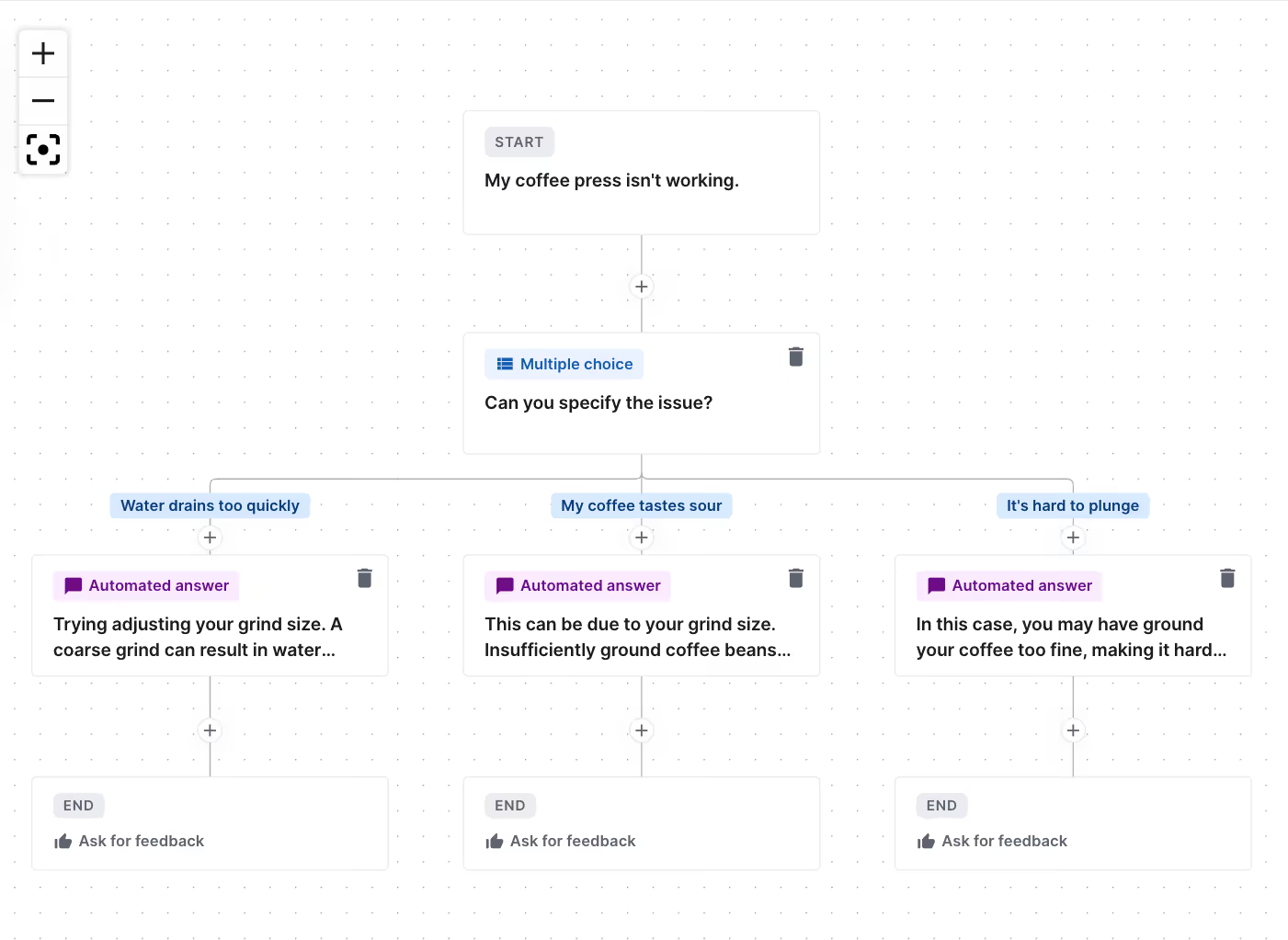
Products may require additional assistance depending on their usage. These can be products like electronics, apparel, and furniture. If customers are asking the same troubleshooting question, it would be best to add a troubleshooting Flow.
Check out how AeroPress handles product issues with a simple Troubleshoot Flow:
Do it yourself on Gorgias
Here's what a troubleshooting Flow might look like:
8. Welcome new customers
Nothing beats a warm welcome, especially for new customers who are just starting their journey with your brand. A welcome Flow is essential for engaging these newcomers right from the start. It provides them with crucial product education and relevant information, setting the tone for a supportive customer relationship.
Take a look at how Crunch Labs, STEM building kits for kids, assists customers with a welcome Flow:
Do it yourself on Gorgias
Here's what a welcome Flow might look like:

9. Ensure perfect product matches with a sizing guide
Apparel brands face frequent sizing inquiries that can lead to returns. A sizing guide Flow provides clear, self-service information upfront, reducing sizing issues. This Flow acts as a self-service tool that customers can use to find their correct size before purchasing.
Here’s how gender-inclusive apparel brand Both& guides customers to the right size:
Do it yourself on Gorgias
Gorgias has a templated Flow to get you started. Here's what a sizing guide Flow might look like:

10. Answer pre-sales questions
Unanswered pre-sales questions can deter purchases. A pre-sales question Flow delivers immediate, thorough answers, leads to a boost in customer confidence, and reduces post-purchase dissatisfaction.
Organic soap brand Dr. Bronner’s provides shelf life information for all their products with a Flow:
Do it yourself on Gorgias
Here's what a pre-sales question Flow might look like:

Keep these Flows best practices in mind
Stick to 1-step Flows to maximize automation potential
Single-step Flows are the most engaging Flows because there’s no opportunity for shoppers to drop off. Single-step Flows can link out to additional resources, like a Help Center article or a returns and subscription portal through tools like Loop Returns or Recharge.
💡 Pro Tip: Keep Flows to a maximum of five steps. Any more and you're likely to lose customers’ attention.
Include shipping and returns policies in your Flows
Online stores’ top-performing Flows are almost always about shipping and return policies. Make sure to anticipate customer questions by creating a Flow for each policy, succinctly answering questions like:
Shipping Policy:
- How long does shipping take?
- How much does shipping cost?
- Where do you ship?
- Where is my order? (with a link to Order Management tracking if possible)
Return Policy:
- What is the return window?
- Cost of return shipping
- Condition item(s) must be in
- How do I initiate a return? (with a link to the Return Portal if possible)
Create Flows for each language
Flows will not appear for shoppers unless the language of the Flow matches the language of the shopper's browser — including regional languages.
If a Flow is only in English (UK), it will not show up for American shoppers whose browsers are in English (US).
If you sell internationally, we highly recommend adding all possible languages to Flows, including regional languages.
Note: Gorgias Chat supports 15 languages, including English (US and UK), French (France and Canada), Spanish, Danish, Swedish, Italian, Dutch, German, Norwegian, Czech, Brazilian Portuguese, Japanese, and Finnish.
Read more: Multi-language support for Chat
Link to other self-service tools (like Loop, Recharge, Help Center, etc.)
Flows often automate interactions when they send customers to another page (like a Recharge login page or a Loop portal, or even sometimes a Help Center article).
If a customer’s inquiry could be solved with one of these tools, include a link to the right page in the Flow’s automated answer.
Automate engagement with Gorgias AI Agent
Join brands like Shinesty that use AI Agent to transform their customer experience. By using our AI and automation features, Shinesty has been able to automate over 50% of their customer tickets.
Book a demo now and be a part of the 15,000+ ecommerce brands using Gorgias to transform their customer experiences.
{{lead-magnet-2}}

How to Reap the Benefits of Automated Chat
TL;DR:
- The benefits of automating chat include reduced workload, round-the-clock support availability, multi-language support, FAQ resolutions, and a convenient customer self-service channel
- Use Gorgias Automate’s Quick Responses, Flows, Order Management feature, and Article Recommendations to provide a complete automatic chat experience
- Automated chat uses answers pre-set by you which means it cannot produce answers without your approval
Live chat users wait an average of 30 seconds before they get an answer. However, large language models like ChatGPT have flipped customer expectations with unbeatable rapid responses.
Thirty-second replies may be possible for customer service teams who handle one chat conversation at a time — assuming they have deep product knowledge — but agents who handle multiple chats will be hard-pressed to beat that average.
Chat automation is the best way to offer instant support without an agent. Automating chat means customers get support 24/7 in multiple languages and relevant answers in seconds. More importantly, agents can provide more meaningful customer experiences because they don’t have to monitor chat.
Below, learn how to turn live chat into an automated channel in four steps with Gorgias Automate. Then, we’ll go over how three ecommerce brands overcame some of the most common chat challenges.
{{lead-magnet-1}}
The benefits of automating chat
Automating live chat support results in a win-win situation for agents and customers. These are the five instant benefits you get when automating chat.
Benefit 1) Reduces agent workload
Automated chat responses mean team members don’t need to operate chat unless customers specifically ask for human support.
Using automation as your first line of defense means fewer repetitive tickets and more time for agents to take care of urgent, customer-specific inquiries.
Benefit 2) Empowers customers to resolve issues on their own
According to Tidio, around 73% of customers prefer to find answers on their own as opposed to getting them from a support rep. Automated chat provides easy-to-receive answers and is a simple way to let customers self-serve without the wait time.
Listen to how shoe brand Merry People uses Gorgias Automate’s chat-based automation features called Flows to cut response time down by 60%:
Benefit 3) Delivers support 24/7
Having a live chat widget may be an excellent way to expand customer support, but its functionality is also limited by your business hours and agent availability.
With automated chat, these concerns disappear since chat can remain active even when your agents are off the clock.
Read more: There’s more to chat than you think: debunking 5 chat myths
Benefit 4) Speaks in multiple languages
According to a survey by CSA Research, 40% of customers will not buy from websites in other languages.
With multi-language automated chat, you don’t have to worry about losing prospective customers. Rather, it’ll be easier for you to turn website visitors into repeat shoppers.
Gorgias Chat is a multi-language chat solution that can serve shoppers from anywhere. Languages include English (US and UK), French (France and Canada), Spanish, Danish, Swedish, Italian, Dutch, German, Norwegian, Czech, Brazilian Portuguese, Japanese, and Finnish.
Benefit 5) Resolves frequently asked questions
Chances are, customers on chat will ask one of these questions:
- Where’s my order?
- Do you take returns?
- Do you ship internationally?
- What size should I get?
If you’re used to manually responding to these questions, know that there’s a faster way. Once you’ve identified your brand’s most asked questions, you can automate the answers to them, eliminating the need to type out replies on chat.
How to automate chat in 4 quick steps
If you have chat on your website, you’re halfway there. The next step is automating it to start reaping the benefits. Here’s how to use Gorgias Automate to automate chat in four steps.
{{lead-magnet-2}}
Step 1) Resolve FAQs with Quick Responses
Automated chat’s main ability is to answer frequently asked questions. You probably know that tickets with FAQs can pile up extremely quickly, causing your agents to miss the important questions.
To automate FAQs, use Quick Responses. These are one-click Q&A scenarios displayed on chat for customers to quickly get the answers they need. You can activate up to six responses and may toggle questions on and off to save them for later.
 |
💡 Pro Tip: Gorgias Chat is multi-language and automatically detects a shopper’s default language based on their browser settings. This way, you can provide global support without hiring additional agents.
Step 2) Simplify order management
A third of online purchases are returned which means agents ultimately spend time processing refunds. The most effective solution is to automate order management through chat so that agents can instead use the extra time upselling.
With Gorgias, you can provide a self-service returns portal through integrations like Loop. This allows customers to process returns on their own, making their shopping journey straightforward and strengthening their trust in your brand.
 |
💡 Pro Tip: Always encourage exchanges by recommending products in a different size or variant or a product of a similar value. This way, customers can still experience what you have to offer without requesting a refund.
Check it out: Return policy template generator
Step 3) Provide personalized support with Flows
Flows are more dynamic than Quick Responses and let you create personalized and interactive conversations. The resulting answer or action of these Flows all depends on the customer’s input, enabling you to deliver answers for every type of shopper.
As the name suggests, Flows are based on a flowchart structure and are best used for questions that have multiple answers. Here are some ways you can use Flows:
- Product matching quizzes
- Sizing guides
- Filing warranty claims
- Scheduling services
 |
Step 4) Deliver detailed answers with AI-powered Article Recommendations
For more comprehensive answers, turn to Article Recommendations. When customers ask a question on chat, Gorgias AI finds the most relevant article to send. These articles are pulled right from your Help Center or customer-facing knowledge base.
To get Article Recommendations on chat, you’ll need to first populate your Help Center with articles your customers care about.
Here are some Help Center articles to get you started:
- Do you offer free shipping?
- How much does shipping cost?
- Do you ship internationally?
- What is your return/exchange policy?
- What do I do if I receive the wrong item in my order?
- How do I cancel my membership/subscription?
 |
Related: How to optimize your Help Center for AI Agent
How 3 brands debunk automated chat myths
If you still have some hesitation about automating chat, it’s time to clear them up. Let’s take a look at real use cases and how three ecommerce brands have cleared up misconceptions about automated chat myths with Gorgias Automate.
Myth 1) Automated chat is complicated to set up
Solution: No coding or special add-ons are required to set up automated chat.
With Gorgias Automate, you can set up Quick Responses, Flows, Order Management, and Article Recommendations in a matter of minutes. Each feature can be toggled on or off, helping you shorten setup time and offer support in whatever way is best for your brand.
Collagen supplement brand Obvi found Automate’s user experience to be intuitive, setting up chat just a few weeks before Black Friday–Cyber Monday. They were able to increase conversion rates (CRO) and earn $10,000 in revenue just by activating automated chat.
Here’s how Obvi’s CEO, Ronak Shah, benefited from using Gorgias Automate:
Myth 2) Automated chat increases your tickets
Solution: Automated responses deliver instant resolutions, which keep ticket volumes low.
Tickets are only created when customers talk to live agents. This allows customers to solve issues on their own, unlike when using social media for support.
Underwear brand Shinesty uses Flows to address a variety of inquiries, from account registration to order tracking. Their Flows are so effective that 90% of the time, inquiries are completely resolved by automation.
 |
Here’s how Shinesty’s four-person team increases customer satisfaction scores with Automate:
Myth 3) Automated chat gives inaccurate answers
Solution: Automation is customizable and acts on parameters set by you.
Unlike AI chatbots or generative AI which produces responses through machine learning, automated chat uses responses defined by you.
In Gorgias, you can customize Quick Responses and Flows with your brand voice in mind. This guarantees that customer messaging is always relevant, on-brand, and accurate. Chat cannot compose brand-new answers on its own.
According to Alex Naoumidis, Head of Operations and CX at July, Flows helped their support team accomplish the work of three agents. They were still able to provide a human touch, resulting in 450 tickets deflected.
Support and sell more with Gorgias Automate
If the success stories of these brands have inspired you to upgrade your customer experience, it’s time to see what Gorgias Automate can do for you.
Setup is straightforward — no coding needed — and you can start seeing improvements in your customer agents’ workflow and your customers’ satisfaction straight away.
Book a demo with Gorgias today and discover how chat automation can streamline your operations and increase customer engagement.

How to Prime Your Website to Automate CX
TL;DR:
- Automating customer experience (CX) can save costs, reduce agent burnout, and increase customer satisfaction
- A good website user experience consists of fast load times, informative product pages, mobile optimization, and guest checkout
- Automate CX by using automated chat, replacing email links with contact forms, updating your help center, and deploying onsite campaigns
- Do not overcomplicate the user journey by only providing automatic support — route back to human agents
Nowhere is the customer experience more important than on your website. CX is so much more than post-purchase troubleshooting. CX that grows your brand makes the entire buying journey as effortless as possible, from the first ad to the 10th item purchased.
Your website isn’t only the marketing team’s domain. Your support team’s input is crucial to ensure customers can find all the answers they need without waiting around.
With a better website experience for your customers, you enable more sales and reduce the repetitive inquiries for your agents.
Here are some tips to enrich your website with CX automations that will delight your customers and your team.
{{lead-magnet-1}}
Why automating CX is essential
With 63% of consumers expecting service agents to know their unique needs and preferences, your efforts should be focused on improving support speed and responsiveness — and that starts with automation.
Here are the five benefits of automating your customer experience:
- Cost efficient: Automating routine questions cuts down the cost of human labor, redirecting resources to more impactful areas of customer service.
- Reduced workload for agents: Your support team can focus on more complex issues instead of spending time on questions that can be answered with automated replies.
- Increased customer satisfaction: Automation provides fast answers, keeping the shopping experience uninterrupted.
- Enhanced navigation and user experience (UX): A website optimized for automation is easier to navigate and shop from, and reduces cart abandonment rates.
- Prevents support overload: Automation helps your agents from lessening their touchpoints with customers where it’s not needed, allowing customers to feel in control of their own journeys.
How website UX and CX work together
If done correctly, your website's UX should be so intuitive and smooth that shoppers barely notice it. For ecommerce stores, a well-thought-out website UX consists of everything from a logical menu to a straightforward checkout flow.
Below, pay attention to the following website elements as they directly influence the buying journey and can impact customer satisfaction.
Informative product pages
Engaging and detailed product descriptions add substantial value by influencing buying decisions and simplifying the shopping experience.
Take a look at how Good Protein keeps descriptions engaging but short in three bullet points, includes social proof by displaying customer ratings, and provides flavor, size, and subscription options in one section:

Mobile optimization
According to Airship’s 11,000-respondent survey, 76% of shoppers shop through retailers’ mobile websites. With a significant portion of online sales coming from smartphones, it’s best to test your website on mobile devices. If users can’t complete a purchase through mobile, you lose out on a large fraction of sales.
Minimized distractions
Reducing distractions like unnecessary pop-ups and banners keeps the shopper focused on the main goal of conversion. Streamlining content to spotlight key campaigns or product launches can dramatically improve conversion rates.
Quick page load times
Fast-loading pages are crucial for keeping potential customers engaged. Delays can significantly deter shoppers, as studies show that even a one-second delay in page loading can reduce conversions by 7%.
Check out Google’s PageSpeed Insights to assess your website's performance.
Streamlined checkout process
Simplifying the checkout process and providing multiple payment options, such as guest checkout, removes common barriers to conversion by offering a convenient purchasing process.
Swimwear brand TRIANGL makes shopping easy and fast by adding a Quick Buy button to every product:

Exceptional customer support
Tools like live chat or help centers provide a portal through fast support. AI-powered support tools like Gorgias Automate combine automated responses with the option for human interaction, ensuring customer inquiries are addressed promptly.
This integration of website UX with automated customer experience strategies creates a more efficient, enjoyable, and productive shopping environment that exceeds customer expectations.
Related: Stop Marketing, Start Converting playbook
Implement these 5 strategies to prep your website for automation
Keeping your customer support options visible is the key to prepping your website for automation.
Follow these five methods to provide easily accessible support routes, simplify communication, and help customers quickly find the information they need.
1. Keep chat active 24/7
When you hear “chat,” you may think about not having enough bandwidth to offer live chat all the time. Well, that’s just a common chat myth.
In fact, chat doesn’t require agents to operate 24/7. You can configure live chat to only be active during your busiest hours or even deactivate it altogether and replace it with automated FAQs to keep customer questions answered throughout the day.
Here’s how ALOHAS keeps their chat running using Gorgias Automate’s Quick Responses:

Beyond automating common questions, chat can also accomplish other support-related tasks:
- Email Capture: When live agents aren’t available, automation can ask for customer emails so that their inquiries can be routed to your support inbox.
- Article Recommendations: Chat questions can be scanned and matched with the most relevant article, reducing the need to talk to an agent.
- Order Management: Automate WISMO requests with an order management portal right in chat. Customers can track, return, cancel, or report an issue on their own without waiting for an agent to do it for them.
Don’t forget that chat is one of the most visible components on your website. Make sure the chat dialog can be minimized and hidden to avoid disrupting the shopping journey.
2. Replace email with structured contact forms
Leaving your customer support email on your contact page is the equivalent of leaving plain URLs on your website — it’s disorganized and can attract spam like no other channel.
Contact forms are far superior to email links because they collect all necessary information (like issue type and contact information). This helps agents provide resolutions as efficiently as possible because tickets are already structured and include the necessary details.
For example, Gorgias Chat includes Offline Capture to collect customer inquiries while agents are offline. Gorgias Helpdesk then uses the structured information to detect customer intent, making interactions easier to manage.

3. Display your Help Center and contact form prominently
Make your Help Center visible no matter which page shoppers are on. Displaying important customer support resources like this in your website's header, footer, and various emails like marketing messages and order confirmations allows customers to self-serve, without having to contact a live agent.
With Gorgias, you can use one-page Help Centers to create a seamless experience from one page to another on your online store. This setup allows customers to quickly find the answers they need, improving accessibility while reducing the demand on your team.
Here’s what clothing brand Princess Polly’s one-page Help Center looks like:

4. Make sure your knowledge base is up-to-date and comprehensive
Updating your knowledge base, whether it's a Gorgias Help Center or another FAQ page, directly impacts the customer journey. Gorgias's AI Agent uses the Help Center as its primary source to autonomously handle over 30% of customer email inquiries, drawing on articles that cover necessary topics like shipping, orders, product information, and account management.
To optimize your Help Center for AI, ensure your content is comprehensive and current, particularly in areas such as policies and product updates. All articles should be published, not saved as drafts, to be accessible to AI Agent. Regularly reviewing your articles encourages customer self-service and reduces reliance on agent assistance.
5. Maintain engagement with targeted campaigns
Targeted onsite campaigns on product pages educate customers and boost confidence, especially when tailored to your top-selling products. For instance, when items are out of stock, campaigns can redirect customers to similar products, as demonstrated by Glamnetic during their product launches.
Additionally, Gorgias Convert chat campaigns like those used by Manduka, which highlight product guarantees, provide valuable pre-sales information that mimics the support of a physical store.
Related: Convert Campaigns playbook
The 3 don’t s of website optimization
There are pitfalls to avoid when optimizing your website for better user experiences. Keep the user journey simple and always provide options for human assistance like live email or voice. Below are three key mistakes to steer clear of.
1. Don't complicate the user journey
The user journey includes all interactions from browsing to the post-purchase experience, and automation should make this process seamless, not hinder it. Avoid adding unnecessary steps or making critical information hard to find, as this can disrupt the shopping experience and force customers to seek help when it isn't needed.
For instance, include a guest checkout option on the checkout page to simplify purchases, and ensure that links to your Help Center or Contact page are easily accessible in the top navigation.
Watch out for these common elements that can confuse the user journey:
- Complex navigation: A convoluted menu system can make it difficult for customers to find what they need.
- Hidden support information: Essential details like shipping costs and return policies should be visible and easy to find.
- Excessive pop-ups: Overloading pages with pop-ups can frustrate users.
2. Don't only provide automated support
Automation is valuable but don’t rely on it — it's still important to provide avenues for human assistance when needed. This includes support options like live chat, email, phone, and social media.
The key is balance: make it easy for them to reach out to human support once they realize self-service options are insufficient. This might involve including contact options in a Help Center or contact page rather than displaying raw email addresses everywhere.
3. Don't forget to test regularly
Maintaining an optimized website requires data-driven testing and optimization. You can improve your website by following customer feedback and suggestions. Once changes have been applied, monitoring performance metrics and user behavior can ensure the user journey remains solid.
Metrics to track:
- Cart abandonment rate: A high abandonment rate may mean that your checkout process is too complex, causing shoppers to exit early.
- Page load time: Slow-loading webpages negatively impact the customer experience.
- Bounce rate: Difficult navigation, slow loading times, or an unattractive layout are all factors that contribute to a high bounce rate.
- Conversion rate: Conversion rate indicates which areas of your website are performing well and which are not. Pay attention to conversion rate to prioritize areas for improvement, such as optimizing landing pages or adjusting the user journey.
Automate 30% of CX for exceptional customer experiences
July, a leading luggage brand, uses the power of Gorgias Automate to deliver unbeatable user experiences. With Automate, routine tasks typically handled by level 1 agents are accomplished automatically. Agents are then able to free up valuable resources to focus on more complex inquiries.
Ready to elevate your CX game? Book a demo today and unlock the full potential of automation for your business.
{{lead-magnet-2}}
Building delightful customer interactions starts in your inbox
