
.png)

Newsletter Signup
The best in CX and ecommerce, right to your inbox
Featured articles

Ticket Volume: How to Measure It, Benchmark It, and Reduce It

Gorgias AI Agent Pricing, Explained

Introducing Helpdesk 2.0: Built for How Agents Work
TL;DR:
- Built directly from agent feedback, Helpdesk 2.0 fixes real workflow pain points. The redesign focuses on reducing friction and helping agents handle more context-heavy tickets.
- A chat-style interface replaces the old email layout. Conversations are easier to follow and resolve in one view.
- Customer context is shown beside the conversation in a right-side panel. Agents can view history, orders, and details without leaving the ticket.
- AI handoffs come with clear summaries. Agents instantly see what happened, what was tried, and what to do next.
- Navigation is simpler and faster across teams. Clean menus, structured queues, and multi-store access keep agents moving efficiently.
Helpdesk 2.0 starts with the people who use it most: the agents.
We spent time understanding customer support from the agent's seat. What do they reach for constantly? What slows them down? What does a better workday look like?
Everything we found is in this brand-new update.
Why we redesigned Helpdesk
Conversational commerce is the new standard.
In customer support, this means customers expect context to remain intact wherever they reach out, whether a conversation starts on social, moves to email, or ends on a call.
This new approach to support has also changed the agent's role. Recurring tickets, like order status checks, shipping updates, and returns, are now handled by AI. What lands in the agent inbox are edge cases that require human judgment and troubleshooting, or tickets that require the full picture.
However, the original Helpdesk was built for a different era of support.
Context was separated across views rather than built into the conversation itself. It's something one in five Gorgias customers flagged, through support tickets, NPS surveys, and conversations with our team. So, we got to work.
Helpdesk 2.0 is the result.
What's new in Helpdesk 2.0
Here's a look at everything that changed.
Read conversations the way they're meant to be read
Conversations have a natural rhythm, one that’s already found in every messaging tool we use. We brought that same layout into the helpdesk.
Say goodbye to the 2000s email interface and hello to chat bubbles. This updated design changes how quickly you can orient yourself and resolve the ticket in one go.

Chats with customers now look like real conversations, using the speech bubble style you’re familiar with on popular messaging apps.
Check customer history without losing your place
Checking a customer's history used to mean leaving the conversation, an extra step that interrupted what should have been a smooth workflow.
Now, past conversations open in a sidebar next to the active conversation. You can view a customer’s full history, search through their timeline, and open prior tickets without going to a new page.

Check past conversations, orders, and customer details in the brand-new Customer Timeline.
See order details the moment you open a ticket
Order information is easier to reference than ever. Open a ticket, and you instantly see the customer's recent orders, marked with product images and invoice details at a glance. Need to dig deeper? Click on an order, and the expanded information appears in the same panel.
For teams using custom integrations, apps are fixed in a quick-access integration menu on the right.

See order details, product images, and totals at a glance on the right panel, without leaving the conversation.
Pick up where AI left off
You shouldn't have to dig through a thread to figure out what AI already tried. Now you don't have to.
When AI Agent escalates a conversation, it includes a concise handover summary that mentions the issue, what actions were taken, and why it was passed to your team.

Escalated tickets include a brief AI-generated handover summary, marked in yellow, for quick reference.
Move faster across every store and team
We restructured and simplified the navigation. The left sidebar organizes everything into clear categories: Inbox, AI Agent, Marketing, and Analytics, so anyone on your team knows exactly where to go.
To quickly update your knowledge base or adjust a workflow, both now live right in the sidebar. For teams managing multiple stores, switching between them is just as straightforward, accessible from the sidebar, so agents can move between inboxes without breaking their flow.

Agents can switch between stores and their corresponding inboxes directly from the left menu.
A workspace that works the way agents do
Support comes down to the person on the other end of the conversation. We built Helpdesk 2.0 is to make sure they have everything they need to show up for that moment.
The best way to see the difference is to work in it. Start a free trial today.



Further reading


Tips for Using Facebook Messenger for Customer Service
The best way to make customer service as convenient as possible is for ecommerce stores to meet customers where they already are.
With that in mind, responding to customer interactions on a messaging platform can be an excellent way to provide better customer service — especially on one as popular as Facebook Messenger.
According to research by Statista, Messenger has 106 million active daily users in America. And if a customer comes across one of your Facebook pages, your Facebook ad, or a Facebook comment that mentions you, the Facebook messaging app might be the first place they’ll go to ask you a question.
Below, learn how to use Messenger for business as an optimized customer service channel.
Why teams use Facebook Messenger for customer service
According to data from Review42, 1.3 billion people around the globe use Facebook Messenger each month. This makes Facebook Messenger the second most popular mobile app for messaging in the world, behind WhatsApp (and, if you count it, SMS).
Providing customer care via a channel customers already spend a lot of their time creates an easier, more comfortable experience for them overall. Here are some other benefits of implementing customer support on Facebook Messenger.
 |
Provide an omnichannel experience
Asking customers to report a problem via your company's website or its customer support phone number may not seem like a big ask. However, allowing them to contact your company via the social media messaging apps that they are already most comfortable with increases the chances that they will reach out. If contacting support is too cumbersome or unfamiliar, they may simply take their business elsewhere without giving you the opportunity to make it right.
Answering customer queries seamlessly across channels is called omnichannel customer service, and it’s become a critical way for brands to offer better customer experiences. Research shows that getting support on the channels they love even influences purchase decisions.
📚Recommended reading: How to usse social media for customer service.
Make customer engagement more personal
Messenger is one of the more personal communication channels to choose from, especially since many people use Facebook Messenger to communicate with friends and family.
Because of this, managing customer relationships via Facebook Messenger is a more relaxed, natural, and personal way for customers to engage with your brand.
📚Recommended reading: How to offer personalized customer service at scale.
Make public conversions private
If a customer is upset, they might leave an angry comment on one of your Facebook posts. Bringing that conversation into a direct message takes that public conversation private, allowing you to offer more personalized support without the eyes of your entire follower base (or prospective customers) on you.
- For curious or excited customers, you can have more personalized conversations, send over a small discount, and have a longer conversation that isn’t possible in public comment
- For escalated or upset customers, you can remove the heated conversation from a public forum and resolve the issues with minimal damage to your brand
Just be sure to ask them to message you first to comply with privacy standards.
📚Recommended reading: How to deal with angry and escalated customers.
Integrate with a helpdesk and centralize communication
When you open the floodgates to social media customer support, you or your team will likely be overwhelmed by the sheer volume of comments, questions, or posts that include your brand. While not all of these mentions will require support, the more you can stay on top of them, the better your brand perception will be.
 |
Facebook Messenger can integrate with a CRM or helpdesk that can centralize conversations from all of your other support channels (like email, live chat, SMS, voice, and social media) under one user-friendly dashboard. This makes it much easier to organize conversations so that reps can respond to things in real time or automate responses to common questions.
For example, Gorgias lets you create templated responses to common questions which saves your support reps time. It also lets you set business hours and automate responses to set customer expectations and let them know when you’ll respond.
Learn more about how Gorgias integrates with Facebook Messenger.
Messenger saves each customer's chat history and makes it easy to re-engage at any time
Even without any integrations, Facebook Messenger still automatically saves customers’ chat history. This makes it easy to re-engage with customers anytime you wish, which simplifies the customer service process and can potentially save your support team (and customers) a lot of time and hassle.
📚Recommended reading: Should You Delegate Social Media to Customer Support?
Use chatbots and automation to provide quick responses
Chatbots offer near-immediate response and resolution times to simple customer inquiries. By addressing common issues without the need for a live support agent, chatbots can also reduce your support ticket volume and free your support team up to focus on more complex and pressing issues.
However, practice caution here. Most chatbots provide sub-optimal customer service. That’s why we prefer automation features that offer the same convenience (without deceiving your customers). While it’s not currently available on Facebook Messenger, take a look at how we build automation features into live chat to offer a better experience than chatbots:
https://gorgias.wistia.com/medias/gb277k8th0
📚Recommended reading: 2022 Customer Service Automation Guide [+Benefits and Best Practices]
7 Facebook Messenger best practices for customer support teams
If you’d like to get as much value as possible from Facebook Messenger, here are seven best practices for using Facebook Messenger as a customer service channel.
1) Mind Facebook Messenger’s privacy policy
Keep in mind that, as stated in Messenger’s privacy policy, you can only send messages to people who message you first.
When moving from a public channel (like a Facebook comment) to a private channel, ask customers to make the move rather than messaging them. One way to maneuver this conversation is to ask the customer to message you something specific, privately, to resolve the issue. For example:
“No worries, {{Customer name}}! Your order hasn’t shipped so we can still change the mailing address. Please send us the new shipping address in a private message and we’ll make the change.”
2) Respond quickly, whether via a live chat experience or a chatbot
According to data from SuperOffice, 46% of customers expect a response time for customer service inquiries of four hours or less. Further, 12% of customers expect companies to provide a quick response in 15 minutes or less.
Using Messenger chatbots can be a great way to ensure speedy responses to common customer questions. However, responding quickly is still important if you’re offering customers a live chat experience via Facebook Messenger rather than directing them to a chatbot. Even if you do use live chat, you can still set up chatbots to send an auto-response that thanks them for their inquiry and lets them know that an agent will assist them soon.
Here’s how to set up that kind of automatic response Rule within Gorgias:
 |
In all cases, it’s essential to make every effort to respond to customer inquiries as quickly as possible.
📚Recommended reading: Check out our case study of Berkey Filters, who achieved low response rates and high channel adoption rates after launching a new customer service messaging channel.
3) Automate simple questions that come through Facebook Messenger
In addition to lowering the average first response time of your customer support team, using bots to automate simple questions that come through Facebook Messenger can also free up a lot of time in your team's schedule.
According to data from Tidio, 62% of customers would rather use a chatbot than wait for a customer service representative to take their call, making Facebook Messenger chatbots an excellent way to ensure that your customer service process is as speedy and convenient as possible. If you use a helpdesk, a plugin like ShopMessage can create this type of automation for you.
If you use Gorgias, set up autoresponse rules to make each day’s workflow easier for your team. For example, set business hours and an autoresponse rule that fires if a customer does or doesn’t reach you during that time.
For shoppers who message outside of business hours, automate text to let them know when you’ll be back online. For those who message during business hours, automate a message that approximates wait times:
 |
4) Use content, FAQs, and knowledge base material to get customers to solutions faster
Resources like blog posts, FAQs, and knowledge base material can all serve as excellent customer service tools to supplement the support you offer via Facebook Messenger.
 |
Link your help center prominently on Facebook, send over links to your help articles for additional details or step-by-step walkthroughs once you answer their questions, or share blog posts that provide additional helpful information directly via chat.
Providing helpful self-service tools like these as part of your Facebook Messenger support strategy can go a long way toward making Facebook a more effective customer service channel.
5) Create short, Facebook-appropriate templates for FAQs
To save yourself or your team time, create templated responses for the most common questions that come through Facebook Messenger.
Like a Facebook message would be, keep these responses short and sweet. Prioritize the messages that tend to come through Facebook. For example, shoppers will likely send in a message about an ad they saw or a product they’re interested in rather than asking for an update on their order status.
📚Recommended reading: 10 Best Practices for Providing Exceptional Customer Service on Twitter
6) Seek out context to help customers with support requests
While it can certainly be beneficial for support agents to direct customers to resources such as knowledge base material, the reverse is true as well. Resources customers send in while seeking assistance can offer a lot of value.
Facebook Messenger makes it easy for people to send photos, videos, and documents. These resources can provide helpful additional information about an issue support reps are attempting to resolve. For example, an agent might need to take a closer look at a crack in a defective product or see the color of an item they need to send a replacement for.
Seeking context starts with having your agents ask customers the right questions. For example, asking customers how they are using the product that they purchased can provide agents with a lot more context regarding the issue that the customer is facing. Asking customers if there is anything else that you can help them with after the initial problem has been resolved is another question that can ensure that no issues go unaddressed.
By making an effort to seek out as much context as possible, your customer support agents can ensure that they provide relevant information that fully resolves each issue.
{{lead-magnet-1}}
7) Respond to every customer who sends you a message
It isn't always easy, but responding to every customer who sends you a message through Facebook Messenger is essential if you want to optimize customer satisfaction and reduce churn. This is especially evident when you consider the fact that Facebook Messenger shows users when their message has been seen.
In other words, if you choose to ignore a customer's message, they’ll know about it. Thankfully, tools such as autoresponders and dashboards for centralizing customer conversations can make replying to each and every customer message a much more feasible goal. For example, if you use Gorgias, all open tickets will appear prominently until you close them.
Respond to Facebook messages in your helpdesk to provide omnichannel service
Centralizing all of your customer conversations across channels under one easy-to-use dashboard makes managing Facebook Messenger conversations much more efficient for your support team. It lessens the possibility that high-priority messages will get lost, and allows teams to assign different conversations to the right agent who is best suited to support.
This is where customer service platforms like Gorgias come in. Those that offer integrations will also show a customer's entire history with your business like their purchase history, past support conversations, and even social comments on different platforms. This allows your support agents to provide more helpful and personalized assistance.
 |
Omnichannel experiences help meet customers where they are, ensure a smooth, hassle-free experience, and let them message you from the app where they’re most comfortable. This increases the likelihood they will actually reach out to you, rather than deciding not to shop with you again instead.
How to set up a Facebook customer service channel with Gorgias
With Gorgias, ecommerce stores can centralize customer conversations across multiple channels under one user-friendly dashboard, employ customer experience automation features complete with AI-powered customer intent and sentiment detection, create automated customer service workflows for Facebook Messenger, and much more. You can also expand your support messaging capabilities with our SMS feature.
Setting up the Gorgias and Facebook integration is quick and easy. Just visit Settings -> Integrations -> Facebook, Messenger & Instagram on your Gorgias dashboard. Make sure you’re logged into the correct Facebook account, authorize Gorgias on Facebook, select the page you want to add and your import settings, and then add the page!
 |
To see for yourself how Gorgias can streamline your customer service process by integrating with Facebook to create a unified customer service workspace, check out our social media features or sign up for a free trial today.
{{lead-magnet-2}}
A Complete Guide to BFCM Logistics
Black Friday and Cyber Monday are two of the biggest retail days in a year, for most businesses.
A good number of online businesses 11 months analyzing data, planning discounts, and building inventories just to prepare for the Thanksgiving week. One mistake many ecommerce businesses make is not paying enough attention to logistics.
During the Thanksgiving rush, a single mistake can throw off your entire supply chain. The holiday rush can get so hectic that last year, UPS hired more than 100,000 additional employees, in order to handle the anticipated increase parcel volume.
Seeing how order numbers are about to skyrocket during Black Friday, it’s important to prepare your business to handle it.
If your business isn’t ready just yet, this blog post is for you. We’re going to cover:
- What can you do to make sure your store is prepared for BFCM
- The biggest logistic challenges your store will face during the holidays
- How to create a complete logistics plan in five easy-to-follow steps
So let’s dive into it.
How to Prepare Your Online Store for BFCM
During the holidays, the competition for consumers’ attention can be fierce. By the time Thanksgiving comes around, most store owners have already spent months developing BFCM marketing strategies and planning deals.
But if your website isn’t fully prepared for the occasion, you say goodbye to BFCM profit. Check out our complete guide to BFCM for ecommerce for more tips.
Check Website Performance
Around 45% of consumers buy only from brands they trust. Nothing can destroy your credibility and customer relationship quicker than a low-functioning website. Having a website capable of handling a huge surge of visitors is especially important during the holidays.
For starters, make sure that the store functions properly on both mobile and desktop devices. Last year, almost 40% of Black Friday online sales came from phones and tablets.
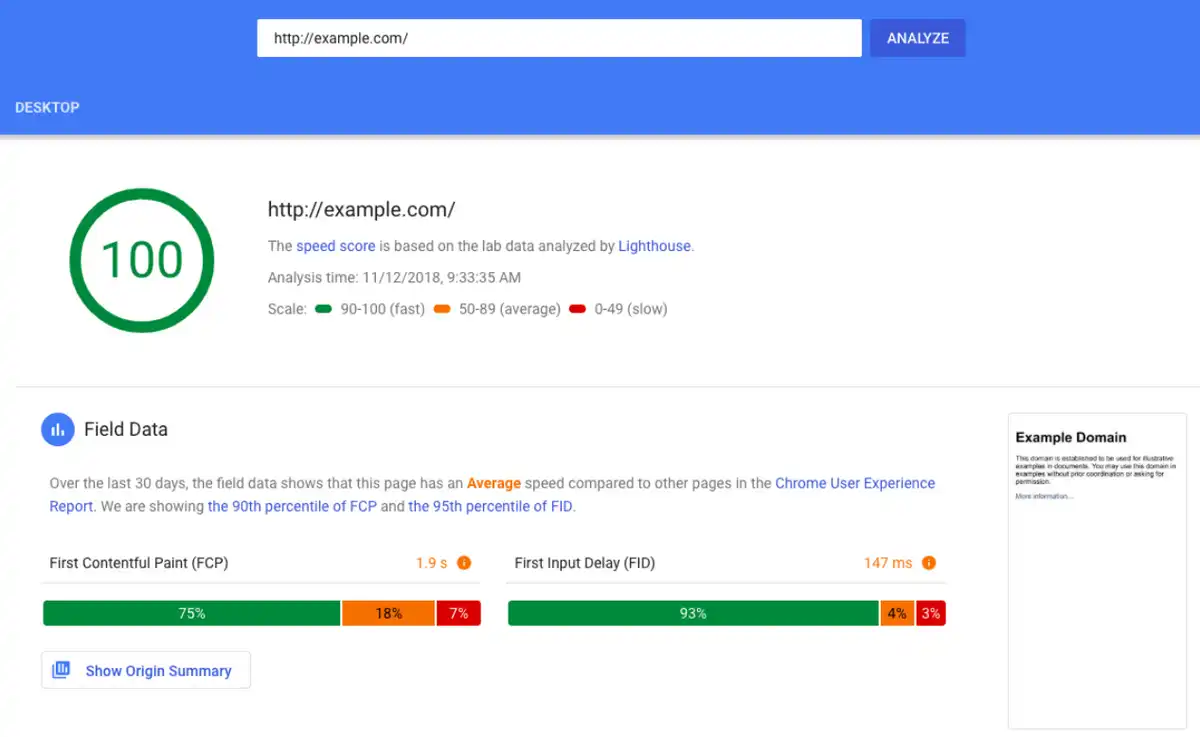
There are a lot of things that can slow your website down. In order to see if everything is working as it should, you need to check it. You can do this by going to Google PageSpeed Insights and running a checkup for free.
 |
Have a Look at Your Inventory
While keeping track of inventory may be low on your totem pole of customer support Black Friday tasks, it’s important to be aware of. Your inventory can affect everything from advertising to logistics.
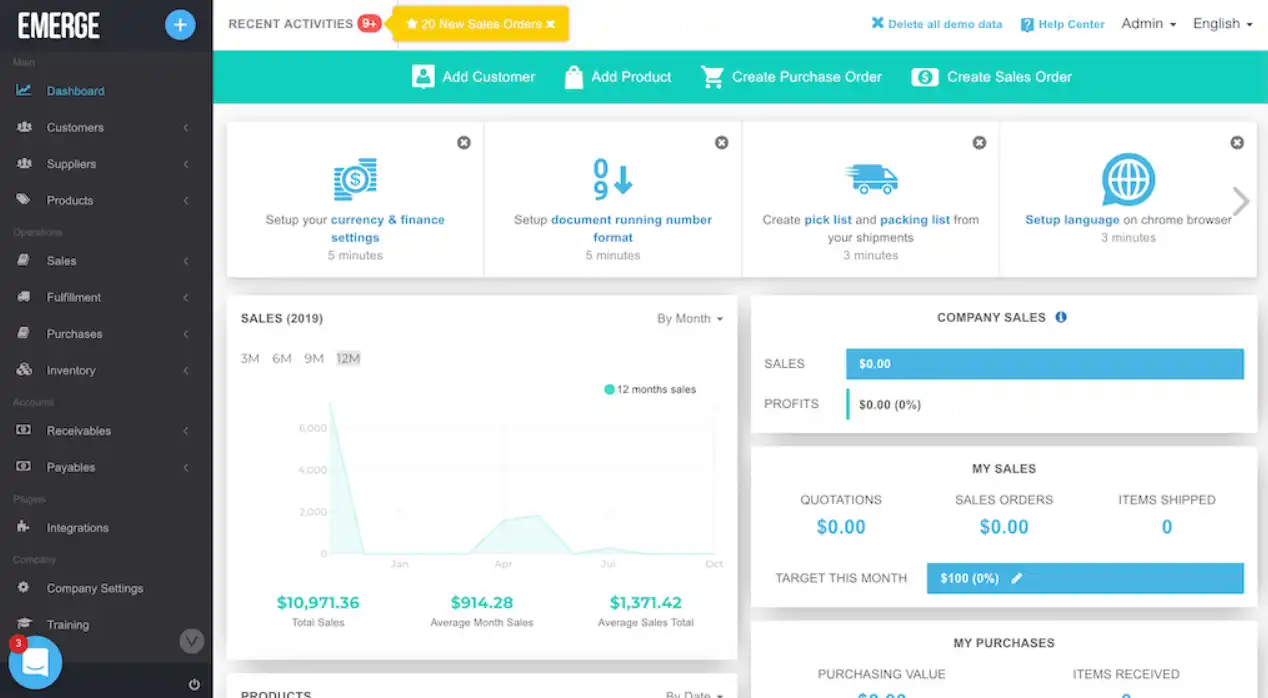
One possible solution is to start using inventory management software in the months leading up to the Black Friday weekend. One solution is to use the Emerge App, which allows you to keep track of every single piece of inventory.
Inventory management solutions will help you know which products need to be restocked and which ones you can start pushing early. If a certain item has failed to sell out after more than 12 months, you can put a high discount on it. Examine your inventory in time and plan everything accordingly.
 |
Prepare Your Workers
Once Black Friday comes around, your workers better be ready to handle the increase in orders, BFCM returns, and complaints. If you want to keep satisfaction levels high, customer service agents need to do their jobs correctly. And in order for them to do their job, you need to make sure that they’re trained.
Talk to your staff. See if they’re aware that things are about to become more frantic than usual. Some workers thrive under pressure. Others aren’t accustomed to working in stressful situations. The best way to eliminate their fear – and subsequent mistakes – is to put in work and train them.
If they want to nail customer service, your workers need to:
- Respond to inquiries immediately
- Use positive/professional language
- Take a proactive approach to problem-solving
Logistics Challenges During BFCM
Last year, many retailers were caught by surprise by BFCM. Due to high discounts, many consumers hurried to make their purchases early. Those discounts pulled a bulk of sales into a narrow timeframe. Unsurprisingly, some merchants weren’t expecting such a high demand.
Since most people will do a majority of their shopping online this BFCM weekend, you can expect a busy year again. Here are some logistic challenges that you’ll face in 2022.
The Demand Can Vary Significantly
The biggest logistics challenge is the lack of control retailers have during the Black Friday weekend. Year-to-year, demand isn’t consistent. This can happen for many reasons. For instance, this year, in the United States, the demand may not be so high.
That’s because the last November payday falls after Black Friday. This will eliminate the spur-of-the-moment purchases. On the other hand, more people have probably saved up money during quarantine. All of these factors make the entire ordeal hard to predict.
Lack of Communication
As we said earlier, even the biggest players in the delivery game like FedEx are forced to add capacity to meet the ever-increasing demands during BFCM. No matter what company you’re working with, chances are, they might not be able to deliver all of your product on time.
But you have to talk to them and find out for yourself.
If you’re not communicating with your logistics partner, you won’t be able to create a delivery commitment schedule that’s manageable. By making unrealistic claims, you can jeopardize your entire operation and lose a lot of customers.
Unrealistic Delivery Expectations
Large online stores like Amazon, Walmart, and Target all offer next-day delivery. To compete with them, many small and mid-sized companies are offering this option as well. However, during Black Friday, this may be impossible to maintain.
While you want to offer fast delivery you need to be realistic with yourself as well as your customers. You can discuss this with your delivery company. If the delivery company you're working with can’t handle the load, notify your customers.
And don’t worry, most consumers prefer honesty over speed.
How to Plan BFCM Logistics in 5 Steps
Black Friday is unpredictable and so are the consumers. If you really want to have a successful Thanksgiving week, you need to be able to adapt to any situation. And you can do this by making sure that your business is prepared for the unexpected.
Here are five steps you need to take in order to bulletproof your logistics and get your store ready just in time for BFCM.
1. Conducting Demand Forecasting
If you take the time to prepare for Black Friday, you can expect good results. And by results, we do mean sales. But make sure you’re communicating delivery times, and following through with orders. Otherwise, you risk a ton of complaints, emails, and negative comments.
To be prepared, you need to do some demand forecasting.
What’s demand forecasting, you might ask? Simply put, it’s a way of calculating how many sales you can expect to generate during a certain period.
Your supply chain management solution probably has the ability to give you a demand forecast. In addition, talk to your supplier, they’re probably watching Black Friday trends closely and doing their own market research. They can possibly help you find the right level of product you should be carrying on BFCM.
2. Preparing Great Shipping Deals
When talking about customer satisfaction levels, you can’t overlook delivery. Your customers want to be in the know. They want to know exactly when their order will arrive. As a matter of fact, 9 out 10 shoppers feel that on-time delivery is extremely important.
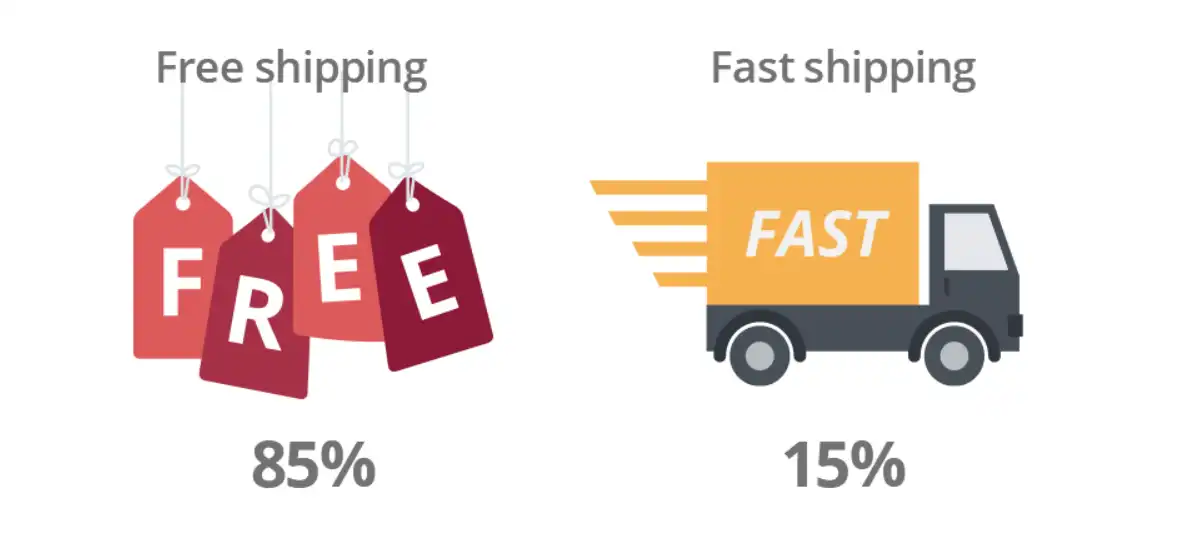
Timely delivery is one thing, but you know what will really make you look good in the eyes of your customers? Making the shipping free. Not sure about it? Well, just consider this: more than 85% of Black Friday sales Salesforce tackled in 2019 had free shipping.
If you’re afraid that you’ll lose a lot of money this way, just consider this an investment. Your customers will be happy with their purchase and will surely come back after BFCM. Keep this in mind: 85% of customers prefer free shipping to fast delivery.
If you need shipping support, check out our list of the top shipping software for ecommerce.
 |
3. Making an Effort With Customer Service
Everyone feels overwhelmed at times during a Black Friday sale. But no matter how hectic things become, you need to make sure that every customer question and request gets answered in short amount of time.
Customer service is important all year round, but during the holiday season, it’s extremely important. Many customers will come across your website for the first time during the BFCM weekend. You want to leave a great first impression, don’t you?
Some customers will contact you directly, while others will message you on social media. Your help desk should allow you to see and answer all of these messages as quickly as possible. With Gorgias, you can decrease your first -response time by 78%.
4. Automate As Much As You Can
Many aspects of your business operations can be automated. Countless companies lose countless hours every month on needless tasks. Now is the perfect time to get ahead and start looking into customer experience automation. Customer support is a great place to start to solve tickets quicker and drive revenue.
By notifying your customers about the status of their purchase quickly, you’ll undoubtedly let them know that they can trust you. Also, if you’re working with a small delivery company, you should check to see if your supplier is up-to-date.
According to a recent study, one-third of warehouses in the United States are working with outdated storage and management equipment. New equipment is much faster and will prevent any delays in delivery. Make sure that your 3rd-party supplier is legitimate.
5. Setting Up Reverse Logistics
The reality of any holiday seasons is: people can change their minds in a second. That’s why we see so many abandoned shopping carts and returned products. Even though you’ll hope for no returns, you need to be prepared for them.
You can do this by doing some reverse logistics. This should be a part of every supply chain. In reverse logistics, the goods move from the end user back to the seller. The returned products may be disposed of in some cases, but more often than not, they’re resold.
Reverse logistics may relate to any of these activities after the purchase:
- Product returns
- Product refurbishing
- Damaged packaging
- Delivery failure
To prevent delivery failure, you can easily set up an order tracking page that will allow your customers to know about the status of their purchase at any time.
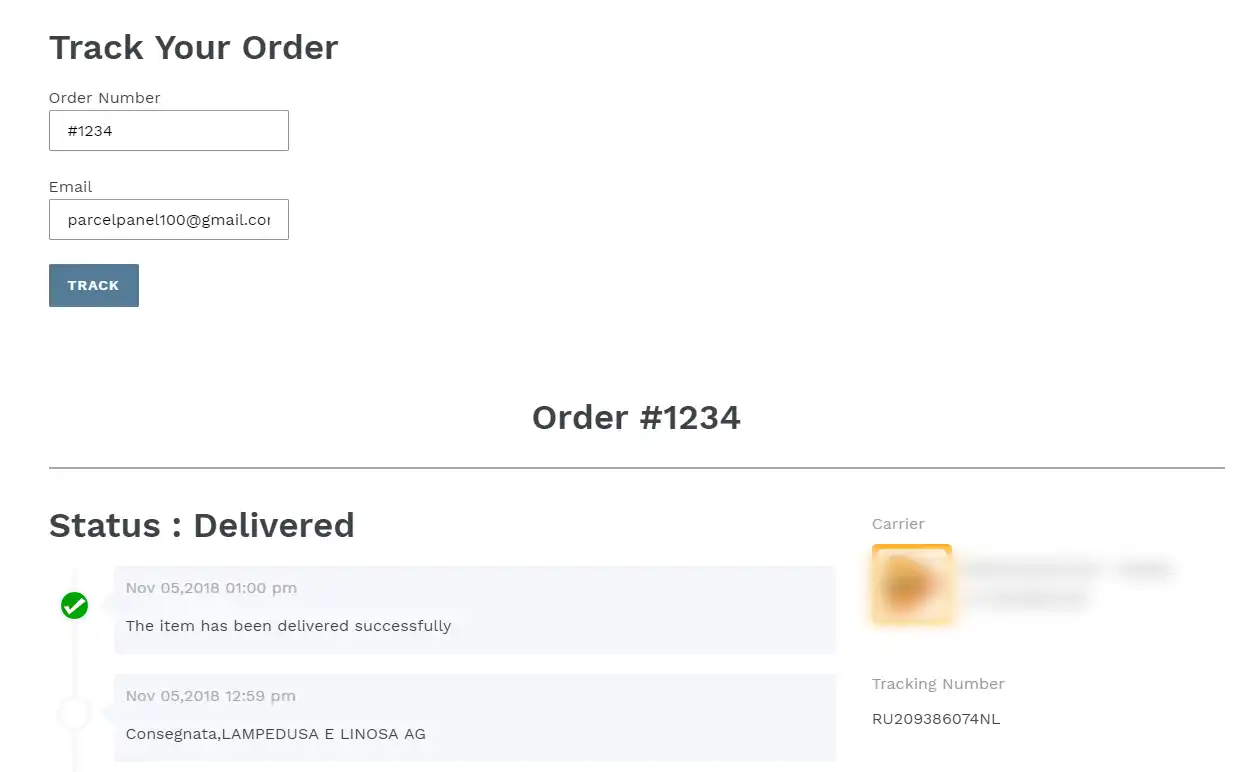 |
Don’t Forget to Keep Your Shoppers in the Loop!
Preparing for the Black Friday weekend can be stressful. There are dozens of business aspects you need to prepare for the increase in orders. Logistics is one of the most important elements of your operation, so you need to put in extra work.
Let’s go over the basics again. In the months leading up to BFCM, your business should:
- What’s the demand for your products and restock accordingly
- Prepare good shopping deals for your customers worldwide
- Beef up your customer service and implement live chat
- Automate tickets and work with automated warehouses
- Set up reverse logistics to prepare for product returns
Keeping the customers satisfied should be your #1 concern. If you manage to do that during the BFCM weekend, they’ll surely come back to your stare after the holiday.
You can’t leave the customers waiting for their shipment or a response. To ensure that, you need a handy helpdesk. That’s why you should try out Gorgias.
Gorgias is an ecommerce help desk that allows users to provide multichannel customer service from a single dashboard.
Go ahead, sign up for Gorgias, get your 15-day free trial, and see your customer satisfaction rates skyrocket.

9 Apps for Ecommerce That Every Early-Stage Brand Needs
Starting a new ecommerce business can be a whirlwind of responsibilities and decisions — like choosing which ecommerce apps you'll use to run your business. When your time and budget are limited, how do you determine which apps and plug-ins will:
- Be easy to manage?
- Have the biggest impact on your business?
- Make sense for an new store’s priorities?
Some ecommerce apps are a must-have right out of the gate, while others can wait until you get more budget and staff.
To help determine which apps are necessary for your new business, we share the most important criteria early-stage brands should look for in an app before covering nine ecommerce apps that every online business needs to download.
The best ecommerce apps for small-but-mighty brands
Now that we've covered the specific criteria that new ecommerce stores should look for in their apps, let's take a look at a few of the most essential ecommerce apps to set your business up for success.
1) Shopify: An ecommerce platform for building your online store
The first and most essential app for anyone starting a new ecommerce store is an ecommerce platform for building and hosting a shopping app or website. As the most popular ecommerce platform on the market today, Shopify makes it easy for new stores to offer online shopping essentials, like:
- Mobile optimization for shoppers on mobile devices
- Multiple payment options (like credit card, PayPal, Apple Pay, and more)
- Simple checkout processes to limit cart abandonment
With Shopify, app development is easy-breezy: You can build a customized online store using simple drag-and-drop commands. Best of all, Shopify has an app store full of integrations with just about all popular ecommerce apps and tools, enabling you to expand on all of these features. For example, you can download a Shopify app to:
- Sell your product on marketplaces like Amazon or Ebay
- Search-engine optimize (SEO) your store
- Add pop-ups to reduce shopping cart abandonment
Key features
- Easy-to-use store creator
- Hundreds of customizable themes and templates
- Hundreds of apps and integrations available on the Shopify app store
Pros
- Intuitive and easy-to-use interface
- Affordable pricing
- Great customer support
Cons
- Not as customizable as more advanced ecommerce platforms such as Magento and BigCommerce
- Does not support email hosting
Pricing options
Shopify offers three pricing plans:
- Basic plan for $29 per month
- Shopify plan for $79 per month
- Advanced plan for $299 per month
While Shopify is a favorite choice for many, it’s not the only ecommerce platform. Popular alternatives include WooCommerce, BigCommerce, and Magento. We recommend staying away from general website builders like WordPress and Wix, which offer limited support for ecommerce.
2) Huboo: Order fulfillment and tracking
Huboo is an order fulfillment solution that enables effortless order tracking and much more. With Huboo, you can outsource all of your company's order fulfillment responsibilities, shipping your products in bulk to Huboo warehouses, where they are stored, picked, packed, and delivered on behalf of your brand.
Customers demand the ability to track their orders. 90% of consumers who engage in online shopping actively track their packages, with 20% of consumers tracking their packages multiple times a day. If you want to keep your customers happy and avoid a flood of "where is my order?" tickets, you will need to provide order tracking.
Using your Huboo Dashboard, you can see sales and listings by channel, courier tracking, inventory, costs, and billing, making it easy to provide order updates to your customers.
To learn more about Huboo, check out our Huboo partner page.
Key features
- Capable of integrating with all popular sales channels and marketplaces
- Huboo Dashboard for easily tracking orders along with important fulfillment metrics and KPIs
- Wide-ranging fulfillment network in the EU and UK capable of fulfilling orders all over the world
Pros
- Helps eliminate fulfillment errors with 99.9% picking accuracy
- Removes the burden of order fulfillment and warehouse management
Cons
- Per-item pricing adds to your company's shipping costs
- Does not accept bulky, chilled, or frozen goods
Pricing options
Huboo charges per-item rates for every package shipped, varying based on the package size and how quickly it is delivered. For a detailed breakdown of these rates, check out Huboo's pricing page.
3) ShipHero: Warehouse management and order fulfillment
Another excellent warehouse management and order fulfillment app, ShipHero offers two solutions to ecommerce stores:
- A warehouse management system for managing your own warehouses more efficiently
- Completely outsourced fulfillment.
With ShipHero’s fully outsourced fulfillment services, store owners can ship their products in bulk to ShipHero warehouses, where they are picked, packed, and delivered with 99%+ shipping accuracy.
ShipHero’s warehouse management system lets you automatically process orders and returns, manage your inventory, and access insightful analytics and reporting.
Key features
- Fully outsourced warehouse management and order fulfillment
- Built-in reporting features covering everything from COGS to Picker/Packer Efficiency to Replenishment
- Automation rules, including smart warehouse routing, shipping method mapping, and address validation
Pros
- Provides the option to manage inventory and order fulfillment yourself using ShipHero’s warehouse management system or the option to outsource these responsibilities
- Includes excellent automation features for improving order fulfillment efficiency and accuracy
- Enables 30% faster shipping and a 35% reduction in warehouse costs
Cons
- Somewhat difficult to set up and navigate by some reports
- Higher shipping costs
Pricing options
ShipHero offers three pricing plans for its warehouse management system:
- Standard WMS for Brands plan starting at $1,850 per month
- WMS for 3PLs plan starting at $1,995 per month
- Enterprise WMS for Brands plan with custom pricing available upon request
However, pricing for their outsourced fulfillment services is only available upon request.
4) Gorgias: Helpdesk and live chat
89% of customers are more likely to make another purchase with a company following a positive customer service interaction. While most brands want to offer great customer experience, doing so as a small team can be difficult.
Luckily, helpdesks like Gorgias make it easy to offer great customer support without all the hassle, thanks to automation and self-service features.
Thankfully, Gorgias makes it easy for brands of all sizes to offer personalized customer support via an industry-leading customer support platform. This includes features such as:
- A centralized dashboard for managing tickets and customer messages across numerous support channels
- Automation of tedious customer support tasks
- Help Centers and other self-service support options
- A fast-loading live chat widget for offering live chat support
- And much more
Key features
- Macros and Rules to provide automatic, personalized responses to common customer questions
- Centralized customer support dashboard that pulls in and organizes tickets from live chat, email, social media, SMS, phone, and more
- Advanced automation features to automatically respond to up to 30% of support requests
Pros
- Detailed customer support data and analytics for further fine-tuning your support services
- Broad range of customer support tools and features in a single platform
- Revenue-generation focused so that you can turn customer support into profits
Cons
- Can take some time to master all of Gorgias' tools and features
- Revenue statistics are only available on upper-tier plans
Pricing options
Gorgias offers five pricing plans:
- Starter plan for $10 per month
- Basic plan for $60 per month
- Pro plan for $360 per month
- Advanced plan for $900 per month
- Enterprise plan with custom pricing available upon request
5) Klaviyo: SMS and email marketing
Klaviyo is an SMS and email marketing platform with unparalleled personalization possitbilitieis. With Klaviyo, you can:
- Design attractive custom emails and text for your ecommerce website’s shoppers without any coding experience
- Manage and segment contact lists with built in customer relationship management (CRM) features
Create and launch automated SMS and email marketing campaigns - Track the results of those campaigns with detailed reports
Email marketing remains one of the most effective of all digital marketing channels and is something that every ecommerce store should take advantage of. Plus, SMS marketing has been one of the most trending marketing channels for the past few years thanks to texting’s highly visible push notifications.
Take a look at how Klaviyo and Gorgias integrate for even more powerful experiences.
Key features
- A/B testing and segmentation features for honing your email marketing strategy
- Drag-and-drop email builder
- Advanced campaign automation
Pros
- Easy to set up and use
- Affordable pricing, including a forever free plan
Cons
- Limited SMS marketing features
- Support team is sometimes unresponsive
Pricing options
Klaviyo offers three pricing plans:
- Free plan for $0 per month that supports up to 500 monthly email sends
- Email plan with pricing based on how many contacts your business has
- Email and SMS plan with pricing based on how many contacts your business has
6) Canva: Design and content creation
Whether it's creating graphics for your emails, website, social media posts, or anything in between, creating and running an online store requires you to design a lot of content. Canva makes content design and creation easy regardless of your artistic experience.
With Canva, you can use attractive design templates and user-friendly drag-and-drop commands to create all manner of designs, including logos, flyers, banners, and much more.
Key features
- Drag-and-drop content designer
- Premium content library with 100 million+ photos, graphics, video, audio, and fonts
- Time-saving design tools such as Magic Resize and Background Remover.
Pros
- Very easy to use regardless of your design experience
- Advanced functionality that rivals expensive competitors like Photoshop
Cons
- Can't move one design to another, requiring you to create each design completely from scratch
- Limited video editing tools
Pricing options
Canva offers three pricing plans:
- Free plan for $0 per month
- Pro plan starting at $12.99 per month
- Teams plan starting at $14.99 per month
7) Typeform: Customer feedback surveys
Customer feedback is an invaluable resource for ecommerce stores of all sizes, enabling you to take a data-based approach to optimizing your store's customer experience.
With Typeform, you can start gathering more customer feedback by using templates to create customer feedback surveys.
Along with these customer feedback survey templates, Typeform also offers signup forms, report forms, order forms, and a ton of other professional templates.
Key features
- Hundreds of high-quality survey and form templates
- Quiz maker for creating customer quizzes (such as product recommendation quizzes)
- Brand kit for creating a set of custom fonts, colors, and media that you can use on any form
Pros
- Supports a long list of integrations with other popular ecommerce tools
- Makes it easy to create high-quality customer feedback surveys regardless of your design experience
Cons
- Only for creating surveys and forms; you'll need integrations to actually send these forms out and gather responses
- Offers mobile app for iOS but not for Android
Pricing options
Typeform offers three pricing plans:
- Basic plan for $25 per month
- Plus plan for $50 per month
- Business plan for $83 per month
8) Triple Whale: Analytics and reporting
Triple Whale is a complete ecommerce hub for Shopify stores that lets you track the metrics that matter most to your brand in one easy-to-use dashboard.
https://youtu.be/RIaCgvdr2mc
Triple Whale's attribution features allow you to track how much you spend on each marketing channel and your return on these investments. If you are looking for a single solution that gives your brand access to all of the data and insights it needs to grow and improve, you'll find a lot to like about Triple Whale.
Key features
- Six attribution models and journey mapping for unlocking key insights in real-time
- Creative analysis tools for measuring ad performance
- Mobile app for viewing your data on the go
Pros
- Real-time insights provide much more flexibility and proactivity than monthly reports
- Single source of truth for your ecommerce store
Cons
- Somewhat costly for the features that it provides
- Only available for Shopify stores
Pricing options
Triple Whale offers five pricing plans:
- Dashboard plan for $100 per month
- Attribution plan for $300 per month
- Full Whale plan for $450 per month
- Custom plan with custom pricing available upon request
9) Recharge: Subscription management
It might surprise you to learn that 54% of online shoppers are subscribed to at least one ecommerce subscription. Leveraging the subscription model is a good way to create a reliable, recurring revenue stream for your business. However, it's also a model that entails its own unique requirements and complexities.
The best way to create and manage a subscription service for your online store is to utilize a subscription management app, and Recharge is a great one to consider. Recharge lets you quickly set up a subscription program, packaging your products or services into monthly or annual subscription plans.
The app processes recurring subscription payments and makes it easy to manage every aspect of your subscription programs, providing detailed analytics into the performance of your program. Recharge also allows you to create a customer-facing subscription management portal where customers can easily view, change, or cancel their subscriptions.
Learn how Recharge and Gorgias integrate for powerful subscription management.
Key Features
- Developer Hub for quickly creating and setting up subscription offers
- Analytics suite that provides insights into revenue, customers, and subscriptions
- Subscription management via RechargeSMS or a customer portal
Pros
- Gives customers the option to skip or delay deliveries rather than canceling, helping reduce customer churn
- Makes it quick and easy to create subscription offers
Cons
- Limited customization options
- The only subscription management app on the market for Shopify stores
Pricing options
Recharge offers three pricing plans:
- Standard plan with no monthly fees and 1% + 10 cents per transaction
- Pro plan for $499/month and 1% + 19 cents per transaction
- Custom plan with tailored pricing available upon request
{{lead-magnet-1}}
Key ecommerce app features small businesses should look for
Most new ecommerce businesses don't have the budget or the sales volume to justify purchasing a broad range of ecommerce apps right away. So, you'll need to narrow down your selection to the apps with great bang for your buck.
With that in mind, here are the most important features that small business owners should look for in ecommerce apps:

Provides flexible, affordable pricing
Some ecommerce solutions can cost thousands of dollars a month or more, putting them out of reach for most small businesses and early-stage brands.
These high-priced apps are almost always geared toward larger organizations anyway, meaning that you aren't likely to need all of the features they offer until your business grows.
The good news is that there’s also a wide range of affordable ecommerce apps designed to support smaller stores and brands — those are the ones we’ll focus on below.
Automates manual tasks and ecommerce processes
Starting a new business requires a lot of hard work. The more manual tasks and workflows you can automate, the more time you have to focus on important activities like developing new products and growing your audience.
Creating automated email marketing campaigns rather than sending out emails manually is one example of how apps that offer automation features can save you time. Using automation to provide canned responses to common customer questions is another example of the time-saving benefits that automation can provide.
Monitors ecommerce performance
Whatever function of your ecommerce business that an app is designed to facilitate (whether it's customer support, marketing, sales, or order fulfillment), it also needs to be able to track your store's performance in these key areas.
This is especially important for small stores, who don’t have full time data analysts to pull insights from tools. Choosing apps that provide detailed analytics and reporting will give your business the data and insights it needs for continual optimization.
Integrates with other ecommerce tools
Integrating all your ecommerce apps can enable powerful new features and capabilities. For instance, integrating your customer support app with your order tracking and fulfillment app might allow you to easily provide tracking numbers and order updates when customers request them.

Along with choosing apps that offer a broad range of possible integrations with other popular ecommerce tools, it's especially important to ensure that the apps you select are capable of integrating with whatever ecommerce platform you use.
Supports your most important ecommerce KPIs
When you don't have the budget to purchase every app you might want, it's important to focus on the apps that align most closely with your important KPIs. Business of all sizes, but especially small businesses, do well to focus on one area at a time. Are you looking to:
- Increase customer satisfaction?
- Boost conversion rate?
- Raise brand awareness?
- Improve customer retention?
Identifying the KPIs most important to your business and choosing your ecommerce apps based on these KPIs will ensure that you purchase apps that will have the biggest impact on your store's success.
Offers "try it before you buy it" model
When budgets are tight, you need to ensure that the app you purchase will meet your business's needs before you break out your wallet. For this reason, small businesses should prioritize apps that offer a free trial, a free version, or, at the very least, a free demo.
Includes customer success or support
Ecommerce apps are often challenging to set up and use. And as a small business owner, you can't afford to spend all your time troubleshooting issues with your ecommerce apps. This makes it important to choose apps with high-quality customer support or customer success services.
Offers additional pricing plans
While it's great to find an app with free or affordable pricing, you also need solutions that can scale alongside your company. Choosing apps with multiple pricing plans allows you to upgrade your subscription as your company grows, without having to switch to a new app.
Learn why ecommerce stores of all sizes favor the Gorgias app
Choosing the right customer support platform is just one of the many vital decisions you will need to make as an ecommerce store owner. While you’ve got plenty of options, only one is exclusively built for ecommerce and offers features and plans that scale from small stores to large enterprises.
{{lead-magnet-2}}
If you want to get started enjoying the many benefits of the best ecommerce customer support platform on the market, sign up for Gorgias today!


How To Improve Customer Service and Lift Revenue in 2024
As rising inflation, higher-than-ever customer acquisition costs, and the looming possibility of a global recession continue to weigh heavy on the minds of many brands, driving revenue via great customer service is now more important than ever before. In these turbulent times, many online businesses are doubling down on customer experience to retain and grow business through upsells, repeat purchases, and referrals — all of which offer higher ROI than pursuing new customers.
It’s clear that happy customers are a great path to growth. But how can you create a customer service strategy that leads to happy customers? We’ll suggest 16 tactics below to improve customer service in 2024, including new ways to incentivize your customer support team and self-service resources you can use to reduce customer effort.
What’s the link between customer service and revenue?
Business leaders often view customer service as a necessary expense rather than an opportunity for business growth. However, every customer interaction along the entire customer journey presents a chance to create revenue for your business. Your customer service team’s exceptional customer service can generate revenue by:
- Answering pre-sales questions to improve your conversion rate
- Encourages happy customers to refer others to your brand
- Create loyal customers through helpful customer support
- Drive upsells and customer retention
According to data from Emplify, one in six customers will leave a company after just one negative customer care experience, while 86% of customers will leave a company after two negative customer service interactions. And 73% of customers will leave a brand after just a few poor interactions, according to a 2022 Coveo report. These negative interactions catch like wildfire and are an early warning of a sinking ship.
It’s not all doom and gloom, though — better customer service can be a huge differentiator for your brand, especially when you consider the value of loyal customers. According to data from 10,000 Gorgias, returning customers make up only 21% of a brand’s customers but generate 41% of orders and 44% of overall revenue.

16 tips to improve your customer service and drive more revenue
Let’s take a look at our top 16 tips to get your team on the way to creating a better customer experience — and generating more revenue in the process.
1) Incentivize your customer service agents to meet business goals
We already discussed the impact your customer service representatives can have on business outcomes. To get serious about providing the best customer service possible, align your customer service team’s KPIs around demonstrated business goals.
Here are a few business-related KPIs that your team can focus on improving:
Consider going a step beyond setting KPIs and offering bonuses, gift cards, and other incentives for individual agents or teams that reach their goals as part of your customer support team management strategy. It’s common for sales — why not customer support, if they’re also driving revenue through customer interactions?
2) Build a user-friendly customer help center
When customers encounter a problem, they won’t reach out to you immediately. In fact, 88% of customers say that they expect companies to provide self-service support tools so that they can resolve issues on their own.
How can you help your customers help themselves? You need to build a good FAQ page or knowledge base, also called a help center, to help your customers answer their questions without having to contact an agent. Important considerations to keep in mind as you go about designing your help center include:
- Have a clearly visible search bar at the top of every page
- Include a prominent CTA to contact a human agent
- Organize your help center in categories like Product, Shipping, and Returns
For an example of an excellent ecommerce help center that accomplishes all of these objectives, check out our post on FAQ pages and help centers.

3) Use technology to remember 100% of customer details
Every customer has a unique conversation history, order history, and sentiment toward your brand. Whenever you talk to those customers, you should make an effort to personalize the conversation by using their names, acknowledging past interactions, using past order information instead of asking them to repeat it, and so on. Thankfully, technology makes offering this sort of personalized customer service much easier than it used to be.
Tools such as Gorgias’ Customer Sidebar can provide your customer support team with the data that they need to offer each customer a personalized customer service experience:

4) Prioritize complaints and pre-sale actions
Customer complaints and pre-sale actions are high-priority customer service tickets since they can directly impact your company's revenue. Addressing customer complaints prevents customer churn and encourages repeat purchases. Pre-sale actions such as questions about product sizing or your shipping policy present the opportunity to drive a sale home — if your agents answer in time.
You can develop your customer service team to prioritize these tickets manually, or you can prioritize them automatically within your helpdesk. If you use Gorgias, a combination of automated Rules and Intents can automatically identify certain ticket types — like customer complaints, pre-sales questions, or tickets from VIP customers — and flag them as high priority.
5) Only use positive/professional language
Sometimes, it’s not about what you say — it’s about how you say it. This rings especially true for customer service. You must make sure you sound level-headed, calm, and collected whenever you contact a customer.
If you’re delivering bad news, there’s no way to sugarcoat it. You need to be direct and professional about it. At the same time, you should also try to find a way to solve the problem.
For instance, if a customer has ordered something that was out of stock, an automated email telling them that you don’t have the product right now won’t cut it. You should tell the customer when you expect it to be available or perhaps offer some other products instead.
It's best to have a written procedure ready to respond to frustrated customers so your customer support agents know how to deal with them without having to worry too much. Of course, active listening is important to hear the customer’s response and settle on next steps.
See our post on customer support tips for more suggestions like this.
{{lead-magnet-1}}
6) Introduce proactive customer support to your strategy
The classic image of customer support is reactive. When your customers encounter a problem, they come to your customer service reps for a solution. However, that doesn’t mean that you can’t approach certain problems proactively.
Case in point: shipping delays. In the past couple of months, ecommerce shipments have increased drastically. Recent reports indicate that there have been 47% more shipments since the start of the COVID-19 pandemic. With such an increase, shipment delays are bound to happen.
To keep your customers in the loop, you can send out proactive communication about shipping setbacks. This will set customer expectations right and prepare them for any possible delays.
Another great example of proactive customer service is Gorgias' live chat campaigns, a tool that lets your team automatically reach out proactively to visitors browsing your website to ask if they need help, offer product recommendations or discounts, and guide them through the buying process.

Creating clear product descriptions and convenient self-help resources is another great way to be proactive about customer service and can help reduce ticket volume while also improving the customer experience.
7) Be as clear as possible about your policies
More often than not, customers are worried about the fine print. As a matter of fact, 67% of online shoppers will check a company's return policy before making a purchase. Sloppily-written policies will turn off a lot of customers. Every policy on your website needs to be clearly articulated so users can easily find what they’re looking for.
Creating or updating your refund and return policies? Our policy generator can help you get started. We’re a big fan of the detail and organization of Steve Madden’s return policy:

8) Use automation strategically to dedicate your attention to high-impact tickets
Many tickets that a customer service rep handles throughout the day are repetitive, straightforward questions. Many of your agents are likely spending hours each day simply telling customers where their order is. Answering these common customer questions is a key part of good customer service, but these tickets are not high-impact tickets for revenue generation.
Fortunately, a customer service platform like Gorgias can help you completely automate these tickets so that your team can focus on more impactful tickets (such as escalated complaints and pre-sale discussions).

By creating Macros with answers to common questions and automated Rules to trigger with zero agent effort, you can free up your support agents to go the extra mile and provide a more personalized touch to the tickets that matter most.
9) Nurture customer relationships with community engagement
For some, a community engagement strategy consists of asking customers to like their page on Facebook, follow their business on Twitter, and not much else. Having thousands of followers and likes is a good look for your business, sure. But you can’t let those followers go to waste.
Engage your followers and get them talking about the experience with your brand. Then, ask them for some feedback about your business, operations, and employees. You can then use that information to tweak your business.
Here are a few questions you should ask yourself before building a community:
- What do you plan on doing with the community?
- Are you doing everything you can to engage the members?
- What type of information can you get from the members?
10) Use post-interaction surveys to collect customer feedback in real-time
If you’re looking to improve your customer service, you should send a customer satisfaction (CSAT) survey after every interaction. These short, simple surveys give you a snapshot of the quality of customer support you currently offer, which is a great first step toward improving customer support.
Gorgias’ CSAT survey feature can be automatically sent out every time a customer interacts with one of your service reps. After every interaction, customers will get the following simple survey asking them to rate the interaction and, if they want, explain their answer:

Read our full guide to improving CSAT scores.
11) Train your employees in the areas where your customer service is weak
Many companies don’t place as much emphasis as they should on hiring and training talented customer service reps. Instead, they view the position as an entry-level, outsourceable role that doesn't justify a comprehensive onboarding process. However, if you want your customer service agents to perform like sales associates and drive revenue, then it’s essential to teach them the right customer service skills.
Your customer service reps are the front lines of your company and some of the only employees your customers will directly interact with. When you train customer service reps with an emphasis on revenue generation, you can turn your customer service team into a source of revenue that more than justifies its investment. Rather than simply instructing your agents to put out fires, train them on how to convert customer interactions into sales and promote customer loyalty.

Read our complete guide to customer service training for more guidance.
12) Follow up with the customer after they've had a chance to use your product or service
Following up with customers who have purchased your product/service (even if they don't contact you first) has many benefits: For one, it shows that you are committed to their satisfaction, even with their post-purchase experience.
It also provides you with the opportunity to collect valuable customer feedback. This feedback can be used to improve your product and overall customer experience and is something that many successful companies go to great lengths to collect.
Lastly, following up with customers can be a direct source of revenue generation. Recommending additional products to customers based on their experience with a previous purchase is an example of how following up with customers can lead to sales.
The most effective way to follow up with your customers is by setting up an automated email campaign that sends them an email after their purchase. What these emails include will depend on your specific goals (i.e., survey forms if you are trying to collect customer feedback or personalized product recommendations if you are trying to generate repeat sales).
13) Create a customer loyalty program
The more incentives you create for your customers to remain loyal to your brand, the better. While many considerations go into generating high ecommerce retention rates, creating a customer loyalty program is one proven effective option.
Customer loyalty programs give customers a financial incentive to remain loyal to your brand. They also turn the shopping experience into somewhat of a game, where reward points are the goal and making repeat purchases is how you score them. The more creative and fun you can make your customer loyalty program, the more effective it stands to be.
Along with repeat purchases, you can use customer loyalty programs to encourage other customer actions such as referrals, reviews, and survey responses by rewarding these actions with reward points as well.
Software solutions such as Smile.io and LoyaltyLion make it incredibly easy to create and manage customer loyalty programs – and they integrate with Gorgias to pull loyalty data into your helpdesk. These tools allow you to automatically track customer actions and reward loyalty-building actions with points and discounts.
14) Consider offering free shipping to qualifying customers
According to Small Business Trends, 66% of U.S. customers expect free shipping on every online purchase, while 80% expect free shipping if their purchase total exceeds a certain amount.
Even if you have to raise your product pricing by a small percentage to maintain profitable margins, it’s still likely to positively impact both customer satisfaction and your conversion rates. Logical or not, a $50 subtotal plus free shipping is more appealing than a $45 plus $5 shipping.
If you can't afford to offer free shipping on every purchase, offering free shipping on purchases that exceed a certain amount can help you meet customer expectations and increase your average order value. For example, offering free shipping on orders over $100 will encourage many customers who have purchased just under that total to add an extra product or two to their cart.
Here’s what qualified free shipping looks like on apparel brand Woxer’s website:

15) Provide a solution for items that are out of stock
Create a policy for handling customer support tickets regarding out-of-stock products. Just a few ways to head off customer complaints regarding out-of-stock products include:
- Offering customers alternative products
- Placing an emergency order from your supplier
- Purchasing from an alternative supplier
- Offering customers discounts for their inconvenience
Along with offering one or more of these remedies, it’s also important to communicate effectively with customers trying to purchase an out-of-stock product. Follow up with them frequently to let them know the status of their order and when they can expect it to arrive.
Solutions for out-of-stock products can also be proactive and don't always require a customer to contact support. Giving customers the option to sign up for automated email alerts when a product is back in stock is one passive way to generate sales while improving customer satisfaction.
16) Add more customer touchpoints to shift to an omnichannel approach
According to a Salesforce report, 78% of customers prefer to choose between a variety of channels to reach a brand’s customer support. Depending on the issue, their mood, or the company, a customer may want to send a DM on social media, have a phone call, send a text message, or ask you their question on your website’s live chat.
One of the biggest challenges support teams face when managing multiple channels is keeping up with messages spread across platforms. That’s why a helpdesk that unifies all these channels is so valuable: Your team can spend less time looking for messages and copy/pasting information, and more time providing quality care across all channels.

Examples of excellent customer service
Good customer service entails much more than being willing and able to help solve a customer's problems. If you want to transform your customer service team into a powerful source of revenue, here are some elements of great customer service to strive for:
- Your first-response time is below two minutes and your average-handle time is below one hour: Customers expect quick responses, making first-response/average-handle times two of the most important customer support metrics to track and lower.
- You have clear and lenient return and refund policies: Use Gorgias' refund policy generator to easily create a clear and well-thought-out return/refund policy for your store. (By the way, Gorgias data shows that offering free returns is actually cost-neutral because of the boost in revenue from customer loyalty it provides.)
- You reduce customer effort with self-service options like an FAQ page, a help center, self-service flows, and/or chatbots: Providing customers with self-service options can reduce the workload for your team members and improve customer satisfaction.
- You can clearly present the impact customer service has on revenue: Customer service teams often have to prove their ROI to earn the budget they need for additional agents and new tools, making it important to connect the dots between customer service and revenue growth.
Examples of bad customer service
Bad customer experience comes in many shapes and sizes. But some recurring elements leave customers feeling completely frustrated. Research from Hotjar reveals the top issues that have the most damaging effect on customer experience:
- Long waits and slow response times: If your customers are left waiting for your response for too long, they’ll probably go to your competitor.
- Failing to understand customer needs: Answering customer questions before truly understanding them will result in a frustrating customer experience.
- Unresolved issues and unanswered questions: Leaving tickets unanswered won’t leave a good impression and will leave your customer dissatisfied
- Lack of customer service personalization: Sending out generic responses to customer inquiries only shows that you don’t really care about your customers
Learn more about why customer service matters and how to measure it in this post from our Head of Success & Support: Evaluating Your Customer Service Program: Why, Challenges, and KPIs That Matter
Build a customer service engine that generates revenue
So far, the past few years have presented plenty of challenges for online retailers and 2024 will likely be no different. Moving forward, the ecommerce stores that can leverage customer service to their full revenue-generating potential will be the ones that succeed.
Want to learn more about how you can build a customer service operation designed to maximize your company's bottom line? Check out our CX growth playbook, a free resource that dives into 18 tactics to boost revenue by 44% by improving customer experience, based on 25+ interviews with top ecommerce brands and analysis of 10,000+ Gorgias customers.
{{lead-magnet-2}}

What Is a Help Desk? Definition, Types & How AI Fits In
TL;DR:
- A help desk is a centralized platform that manages customer support requests through ticketing, automation, and self-service tools
- Modern help desks use AI to resolve repetitive inquiries instantly while routing complex issues to human agents
- Core features include omnichannel support, knowledge bases, SLA tracking, and reporting analytics
- Help desks improve customer satisfaction, reduce agent workload, and enable businesses to scale support without hiring proportionally
- Ecommerce brands benefit most from help desks built for Shopify integration and conversational commerce
When customers have questions, they expect fast answers. A help desk gives your support team a centralized system to manage every conversation and automate repetitive tasks.
For ecommerce brands, the right help desk turns support into revenue. It connects customer data, order information, and product recommendations in one place. This guide explains what a help desk is, how it works, and which features matter most for online stores.
{{lead-magnet-1}}
What is a help desk?
A help desk is a centralized support platform that manages customer service requests with a ticketing system, automation, and self-service tools. In ecommerce, brands use helpdesk software to help their customers with issues and questions surrounding products and orders.
At its core, a help desk transforms incoming customer requests from multiple channels into organized tickets or conversations. It allows teams to collaborate on managing, organizing, responding to, and reporting on customer requests. Today, the latest help desks combine human support with AI-powered automation to accelerate resolutions without losing the human touch.
Most importantly, helpdesk software enables teams to track key metrics related to customer tickets, like first response time (FRT), average resolution time, unresolved tickets, and customer satisfaction. These metrics help you better understand how well your team is serving customers and gives you solid data — versus relying solely on customer feedback.
What does a help desk do?
Help desks handle both reactive incident management (responding to customer issues) and proactive requests (order updates, account changes). The platform organizes these interactions into a structured workflow that ensures nothing falls through the cracks.
Common help desk tasks include:
- Answering product and shipping questions
- Tracking order status
- Managing returns and refunds
- Troubleshooting connectivity and login issues
- Processing password resets and account access
- Escalating complex issues to specialized teams
Help desk vs. service desk
Service desk and help desk are often used interchangeably to describe a tool used to centralize service management and improve the end user's support experience. Very few companies have both.
Technically, a service desk is a bit broader than a help desk. A help desk's core feature is reactive, break/fix support. It helps you quickly collect and respond to customer issues. A service desk is broader and includes end-to-end IT service management (ITSM), change management, and proactive service delivery. However, with today's help desks, you can also achieve many of those same goals.
Why a help desk matters
Above all else, helpdesk software helps you improve customer satisfaction and leads to more happy customers for your brand. The benefits span three key stakeholder groups: customers who get faster resolutions, agents who work more efficiently, and businesses that scale support without proportional hiring.
Customer satisfaction
54% of customers expect an immediate response whenever they reach out to a business. Help desks improve satisfaction by:
- Speeding up resolutions. organized ticket queues help agents prioritize and respond before frustration escalates
- Meeting customers on their preferred channel. omnichannel support consolidates email, SMS, social media, and live chat into one view, so agents have full context and customers never repeat themselves
- Providing 24/7 self-service. knowledge bases, FAQ pages, and AI chat widgets give customers instant answers outside business hours, which is especially valuable for ecommerce brands serving global audiences
Employee productivity
Help desks remove the busywork that slows agents down. Productivity gains include:
- Automation deflects low-impact tickets — Gorgias data shows a mix of automation and self-service can deflect up to a third of incoming volume
- Smart routing sends tickets to the right agent based on expertise, availability, and complexity, cutting back-and-forth and speeding up resolution
- Macros and knowledge bases turn your best responses into reusable templates, bringing consistency to every interaction and helping new agents ramp up faster
Scalability
Help desks let you grow ticket volume without growing your team at the same rate. The business impact is huge:
- Proven ROI — customer experience solutions have been shown to produce a 633% ROI increase over three years
- Revenue lift — the average Gorgias merchant sees around 5% higher revenue after adopting the platform
- Ticket surge resilience — AI and automation absorb volume spikes during Black Friday, Cyber Monday, and product launches without sacrificing service quality
- Real results — Princess Polly increased efficiency by 40%, cut resolution time by 80%, and reduced first response time by 95%
Core features of modern help desk software
It's important to note that not all helpdesks are created equal. Modern help desks combine core ticketing functionality with AI agents, workflow automation, and deep customer data integration. These features work together to deliver faster, more personalized support at scale.
Ticketing system
Ticketing is the foundation of help desk operations. When a customer reaches out via any channel, the help desk creates a ticket that tracks the entire conversation from first contact to resolution. This ensures nothing slips through the cracks and keeps your team accountable to SLAs. As ticket volume grows, a centralized ticketing system is what keeps support manageable. An efficient ticket system has the following:
- Flexible routing: Assign tickets manually, round-robin across available agents, or by skill-based rules that match complexity to expertise
- Full lifecycle tracking: Monitor tickets across every stage (new, open, pending, resolved, closed) with prioritization rules built in
- SLA compliance: Set response and resolution targets, with alerts before deadlines are missed
- Live reporting: See open queues, tickets closed per shift, and agent workload at a glance
Support team benefit: A structured queue replaces inbox chaos. Agents always know what to work on next and how urgently.
Customer benefit: Every interaction is tracked and accountable. Nothing gets lost or forgotten mid-conversation.
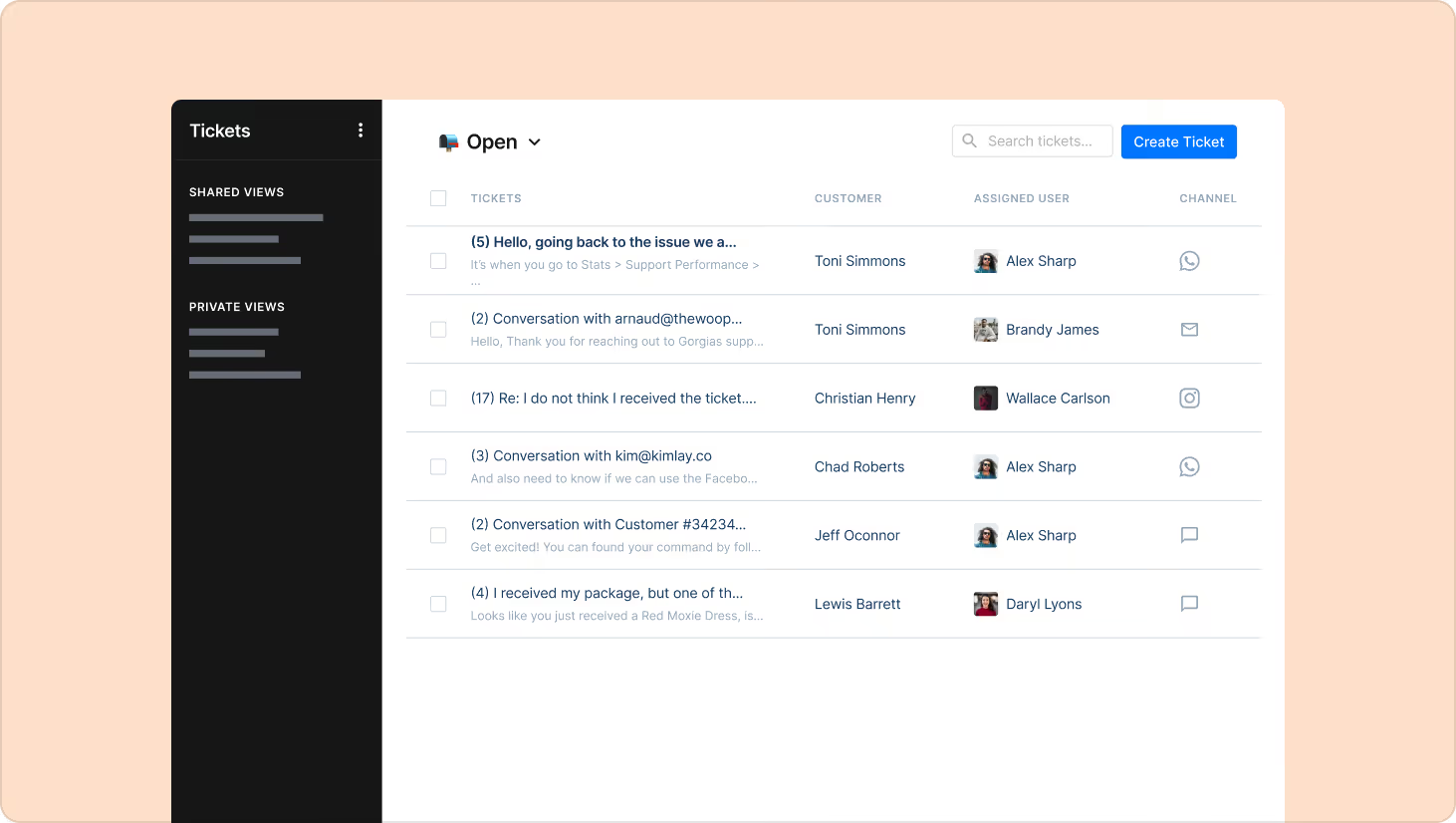
Customer and order data
Not all help desks offer this, but having customer information directly inside your help desk is a significant advantage for teams trying to deliver fast, personalized support. The best help desks surface full order history, past conversations, and transaction data in one place so agents have all the context they need before they type a single word. Make sure you can view:
- Full order history: See every purchase, return, and transaction a customer has made with your brand
- Complete conversation history: Access every prior interaction across email, chat, and social media in one view
- Customer context at a glance: Understand past experiences, whether positive or negative, before responding
- No repeated information: Agents already know the backstory, so customers never have to start from scratch
Support team benefit: Agents enter every conversation informed. No digging through separate tools or asking customers to repeat themselves.
Customer benefit: Interactions feel personal and efficient. Customers are treated like returning customers, not strangers.
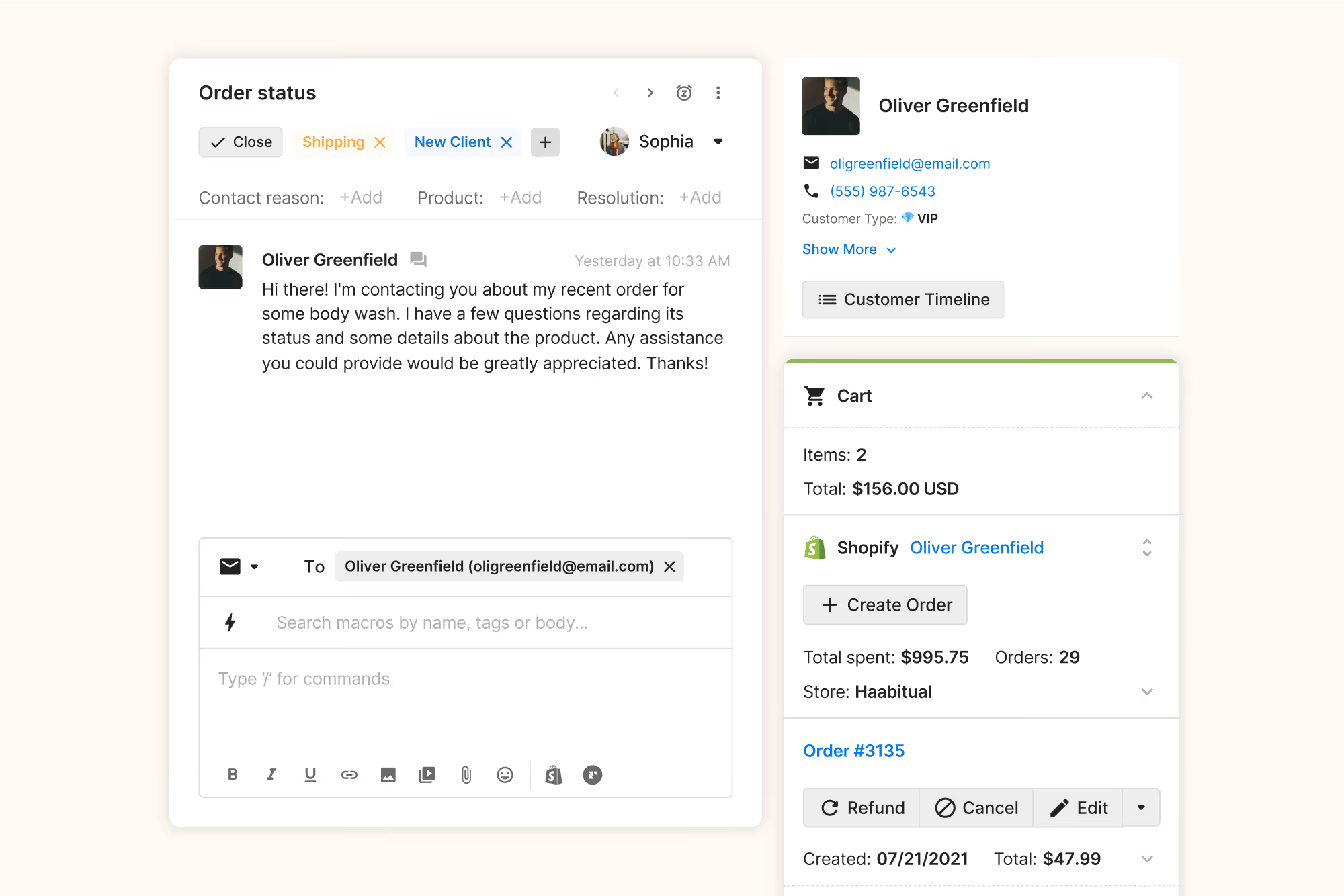
Omnichannel support
Customers want to reach you on their preferred channel, and they expect a seamless experience when they do. A true omnichannel help desk consolidates every conversation into one unified inbox, so agents aren't jumping between platforms or losing context. Basic omnichannel features include:
- Unified inbox: Email, live chat, SMS, social media, voice, and WhatsApp all in one place
- Full conversation history: Agents see every prior interaction regardless of channel, so customers never have to repeat themselves
- Cross-channel context: A conversation that starts on Instagram and continues over email stays connected in a single ticket view
Support team benefit: One inbox replaces five tabs. No more copy-pasting context between platforms or losing time switching tools.
Customer benefit: They can reach out however is most convenient. The conversation picks up wherever they left off, regardless of channel.
Knowledge base & self-service
A knowledge base lets customers find answers on their own, without waiting for an agent. 88% of customers expect businesses to offer self-service support portals, and a well-built one reduces inbound volume significantly while improving customer experience outside business hours. To give customers full independece, make sure you have these:
- Help center articles: FAQ pages, how-to guides, and policy explanations customers can browse anytime
- Order tracking tools: Let customers check status without contacting support
- AI-powered article suggestions: Surfaces relevant content based on what the customer is asking in real time
- Chat widget integration: Deflects common questions before they become tickets
Support team benefit: Fewer repetitive tickets means more time for complex, high-value conversations.
Customer benefit: Instant answers at any hour, without the wait time.

Automation & AI
Automation eliminates the repetitive, low-value tasks that slow agents down, and AI handles entire conversations that don't need a human at all. In customer support, these features are vital for streamlined and scalable operations:
- Conversational AI: Resolve common requests like order status, return questions, and shipping updates instantly. They can give personalized responses and take action based on the request, like updating addresses or canceling orders.
- Intelligent routing: Assigns tickets based on topic, sentiment, and agent capacity. Urgent queries are flagged automatically.
- Auto-tagging: Categorizes tickets by content and channel without manual input
- Macros and canned responses: Templated replies with dynamic variables for fast, consistent messaging
- SLA escalations: Automatically surfaces overdue tickets before they breach targets
Support team benefit: Repetitive tickets get handled automatically. The team can focus on conversations that actually require a human touch.
Customer benefit: Common questions get resolved instantly, 24/7, without waiting in a queue.

Reporting functionalities
A help desk should also give you the data to improve your support operations. Reporting dashboards bring performance metrics into one place so you can make real decisions, spot problems early, and demonstrate the business impact of your team. Basic features include:
- Ticket metrics: Track tickets created, replied, closed, resolution time, and first response time
- Agent performance: Monitor individual output, workload, and efficiency across your team
- Customer satisfaction: Measure survey response rates, average ratings, and rating distribution
- Tag and intent reporting: Identify which ticket types make up the bulk of your volume
- Product issue tracking: Surface recurring customer complaints to inform improvements beyond support
Support team benefit: Managers can spot bottlenecks, balance workloads, and coach agents based on real data rather than gut feel.
Customer benefit: Teams that track and act on performance data resolve issues faster and deliver more consistent experiences over time.
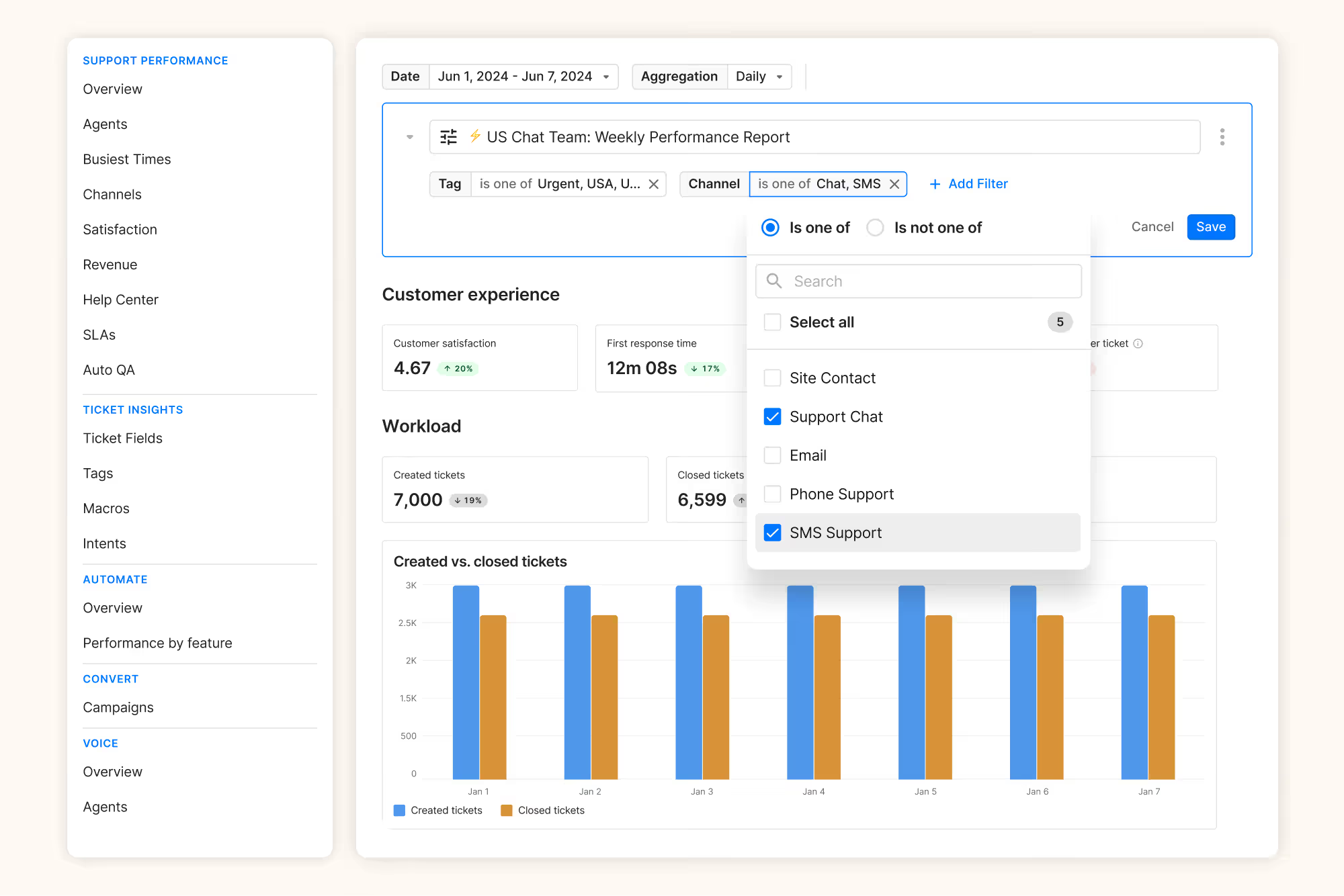
Types of help desks
Help desks vary by organizational structure and deployment model. A customer support team needs a very different type of helpdesk than an IT department. Understanding these distinctions helps you choose the right solution for your business needs.
Digital or cloud-based helpdesks
A cloud-based helpdesk is hosted by the provider and billed on a monthly or annual subscription. You skip the cost and complexity of building or maintaining software yourself. This is the most common choice for small and mid-sized businesses without an in-house IT team.
On-site helpdesks
With an on-site helpdesk, your company purchases the software license and hosts it on your own servers. You get full control over data and security. Most cloud-based solutions are actually safer, though, thanks to advanced built-in security features. On-site helpdesks are increasingly rare, mostly used by government offices and law firms with strict data requirements.
Enterprise helpdesks
Enterprise helpdesks are built for large organizations with complex needs. They can be cloud-based or on-site, but come with deeper customization and dedicated support. Higher pricing reflects that. Unless you know you need enterprise-grade software, this probably isn't the right fit.
Open-source helpdesks
Open-source helpdesks give developers free access to the source code. There's no licensing fee, but you'll need an IT team to build and maintain it. They're also more vulnerable to data breaches and outages, and don't come with dedicated support.
Internal IT helpdesks
Some larger organizations, like hospitals and universities, run internal helpdesks for employee tech support. Instead of managing requests over email, IT teams use a portal with self-service guides and a structured way to submit tickets. It works the same way as customer support, just facing inward.
What are help desk tiers?
Help desks organize teams into tiers based on complexity and expertise. Tiered models ensure customers reach the right expertise level for their issue. Each tier handles progressively more complex requests, with clear escalation paths when an issue exceeds the current tier's scope.
What are escalations in a help desk?
Escalation happens when an issue exceeds the current tier's scope or expertise. Your customer service team members can create an escalation plan so that urgent queries are given to the right teams. Clear escalation criteria prevent bottlenecks and ensure complex issues get resolved by the most qualified person.
For example, a customer reporting a missing $500 order may start with a frontline agent who can confirm shipment details, but needs a senior agent with refund authority to resolve it. Or a customer who mentions they plan to post about a defective product on social media gets flagged and routed to a manager to handle with extra care.
Best practices and key metrics
Effective help desks combine process discipline with continuous measurement. Following established best practices ensures consistency, while tracking the right metrics helps you identify opportunities for improvement.
Best practices:
- Set clear SLAs for response and resolution times
- Invest in agent training and knowledge documentation
- Monitor ticket trends to identify recurring issues
- Use automation to handle repetitive inquiries
- Collect customer feedback after resolutions
- Review and update knowledge base regularly
Key metrics to track:
- First response time (FRT)
- Average handle time (AHT)
- First contact resolution (FCR)
- Customer satisfaction score (CSAT)
- Ticket volume and backlog
- Self-service deflection rate
A help desk brings all your customer support metrics into one system for better reporting. A central dashboard makes it easy to track customer issues. You can use this data to inform business decisions and optimize your support process. You're also better able to meet your service level agreements (SLAs) thanks to the accountability of clear reporting dashboards.
Read more: 25 customer service metrics & KPIs + how to track them
How to choose the right help desk solution
The right help desk balances ease of use, feature depth, and long-term value. Each company's needs are slightly different, so we encourage signing up for a few demos and trials while shopping for a helpdesk.
Ease of use & UX
Is it easy to learn and navigate? Complex help desks slow down adoption and frustrate agents. If your team spends more time navigating the software than helping customers, you've chosen the wrong tool. The best help desks feel intuitive from day one.
Does the interface feel clean and organized? Look for clear navigation and minimal training requirements. Agents should find what they need within seconds. The ticket view should surface relevant customer information without overwhelming the screen.
Can you try it before you commit? Give a few agents access during the trial period and gather their feedback. They use the tool every day, so their input matters more than any feature checklist.
Scalability & ROI
Can it handle volume spikes without slowing down? Black Friday, product launches, and viral moments can triple your normal ticket volume overnight. Your help desk needs to maintain speed and reliability when it matters most, not buckle under pressure.
Is the pricing model the right fit for your business? Some help desks charge per agent, others by ticket volume or features unlocked. Look beyond the seat cost and consider the total cost of ownership, including setup, training, integrations, and ongoing support.
How do you measure whether it's worth the investment? Track reduced handle times, higher CSAT scores, and deflection rates. The best help desks pay for themselves through efficiency gains. If you want to dig deeper, check out our guide to customer service ROI.
What should you check before making a decision? Use this as a quick checklist when reviewing your options:
- Pricing: Does it fit your budget and offer flexible plans?
- Ticket organization: Is there a clear, visual way to see which tickets need attention and who owns them?
- Automation: Does it save time for both your team and your customers?
- Omnichannel support: Does it work across all the channels you use?
- Integrations: Does it connect to the tools you already use or plan to use?
How do I start using a help desk for customer support?
Successful help desk implementations follow a structured approach. Rushing through setup leads to gaps in configuration and frustrated teams.
Step 1: Research and plan
- Review the past 90 days of customer conversations. Identify your most common questions, preferred channels, and where agents spend the most time.
- Gather input from agents, managers, and customers. Agents know what's broken. Managers understand business constraints. Customers can tell you what frustrates them most.
- Evaluate vendors based on features, integrations, and support quality. Ask how each feature works in practice and request references from brands similar to yours.
Step 2: Set up and configure
- Configure ticket routing, SLAs, and escalation rules first. These foundational settings determine how work flows through your team.
- Build your knowledge base and self-service portal next. Start with your top 20 most common questions and expand as patterns emerge.
- Train agents on core functionality before rolling out fully. Launch, gather feedback, and refine workflows as you learn what works.
Step 3: Complete your configuration checklist
Before going live, make sure you have:
- Integrations connected to your ecommerce platform and key tools
- Macros created for your most common responses
- User roles and permissions defined
- Automation rules configured for tagging, routing, and responses
- Reporting dashboards set up for key metrics
Is a help desk the same as a CRM?
No, a helpdesk isn't the same as a CRM.
CRM stands for customer relationship management and is a system for managing relationships with customers. It's one central place that helps organize all the details about your leads and customers. Using this system, you can get a full picture of every customer and understand the status of every customer relationship.
A CRM typically doesn't have functionalities for ticket management because its primary focus is on data from sales and accounts. But ticket management is a fundamental component of a helpdesk — hence the difference between both software solutions. Platforms such as Salesforce are sometimes confused as helpdesk tools, but their focus is primarily CRM, not helpdesk management.
Strong helpdesk platforms like Gorgias do have some features of CRMs, like aggregating all interactions with a given customer in one location alongside loyalty data, marketing campaign responses, etc.
Is a help desk the same as a live chat?
No, but some helpdesks also include live chat software.
Live chat tools are typically hosted on websites and allow website visitors to communicate with a brand in real time. Helpdesk software pulls customer requests from multiple places such as email, phone, and social media. Live chat is a component of more robust helpdesk software, but not vice versa.
Here's an example: Gorgias is a helpdesk that includes live chat functionality, meaning all Gorgias users can install a live chat widget to their website in just a few clicks. Once installed, live chat becomes another channel in your help desk. You can answer chats, emails, and social media DMs without leaving the platform.
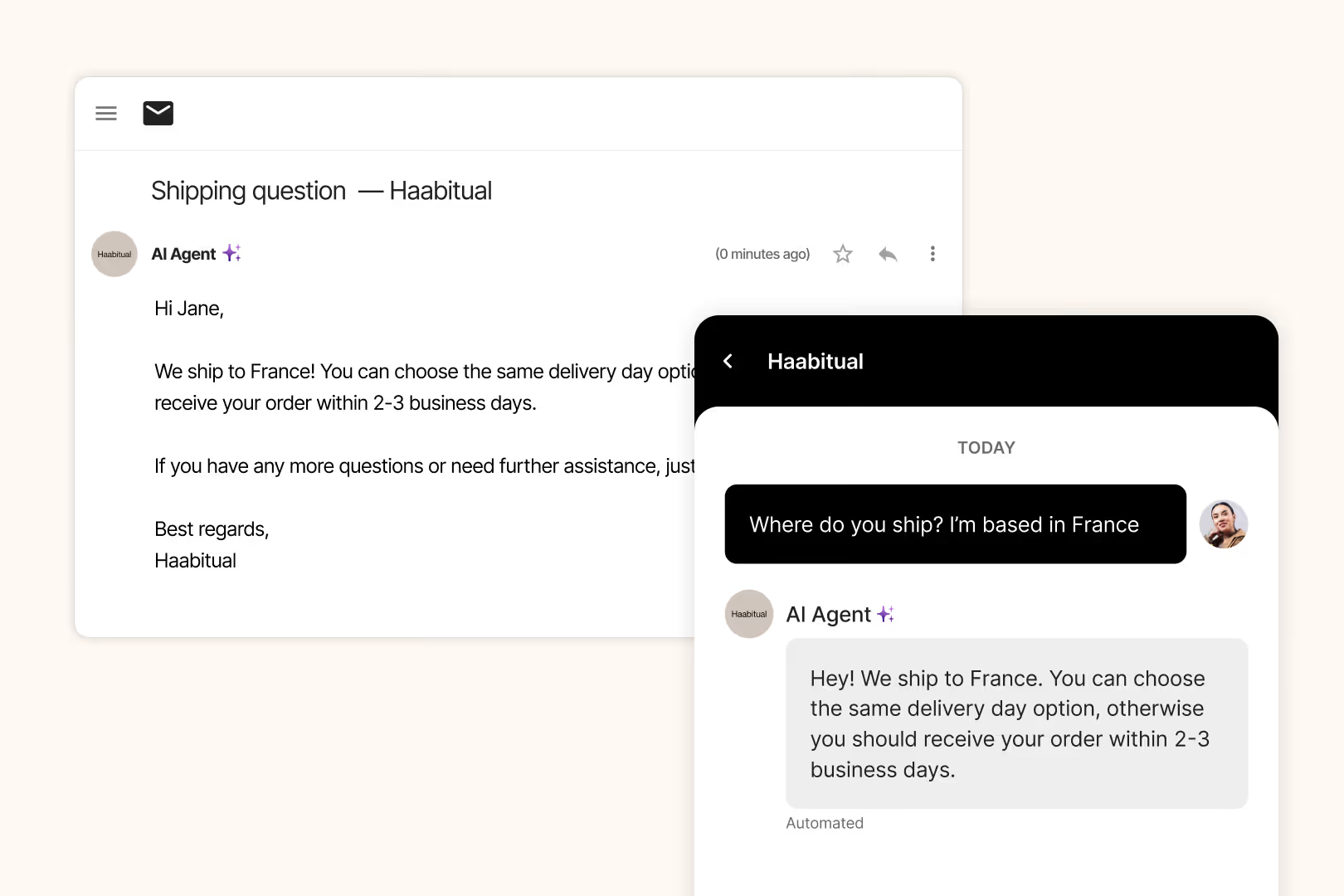
Related: Best live chat apps for customer support
High-quality customer experiences start in the help desk
The right help desk doesn't just resolve tickets faster. It turns support conversations into revenue opportunities by connecting customer data, product recommendations, and order management in one platform. Gorgias is built for ecommerce brands, with deep Shopify integration, AI automation, and conversational commerce tools that help your support team drive measurable business impact. Book a demo to see how Gorgias can transform your customer support.
Shopping for a helpdesk? Check out these articles to guide your shopping:
- The best Shopify helpdesk apps
- The best helpdesk ecommerce brands
- The best software for customer service
{{lead-magnet-2}}
Building delightful customer interactions starts in your inbox
