Join us for Moments That Matter: Meet the Modern Helpdesk
September 10 at 12PM EST.
Save your seat


TL;DR:
In 2024, Shopify merchants drove $11.5 billion in sales over Black Friday Cyber Monday. Now, BFCM is quickly approaching, with some brands and major retailers already hosting sales.
If you’re feeling late to prepare for the season or want to maximize the number of sales you’ll make, we’ll cover how food and beverage CX teams can serve up better self-serve resources for this year’s BFCM.
Learn how to answer and deflect customers’ top questions before they’re escalated to your support team.
💡 Your guide to everything peak season → The Gorgias BFCM Hub
During busy seasons like BFCM and beyond, staying on top of routine customer asks can be an extreme challenge.
“Every founder thinks BFCM is the highest peak feeling of nervousness,” says Ron Shah, CEO and Co-founder of supplement brand Obvi.
“It’s a tough week. So anything that makes our team’s life easier instantly means we can focus more on things that need the time,” he continues.
Anticipating contact reasons and preparing methods (like automated responses, macros, and enabling an AI Agent) is something that can help. Below, find the top contact reasons for food and beverage companies in 2025.
According to Gorgias proprietary data, the top reason customers reach out to brands in the food and beverage industry is to cancel a subscription (13%) followed by order status questions (9.1%).
Because product detail queries represent 5.7% of contact reasons for the food and beverage industry, the more information you provide on your product pages, the better.
Include things like calorie content, nutritional information, and all ingredients.
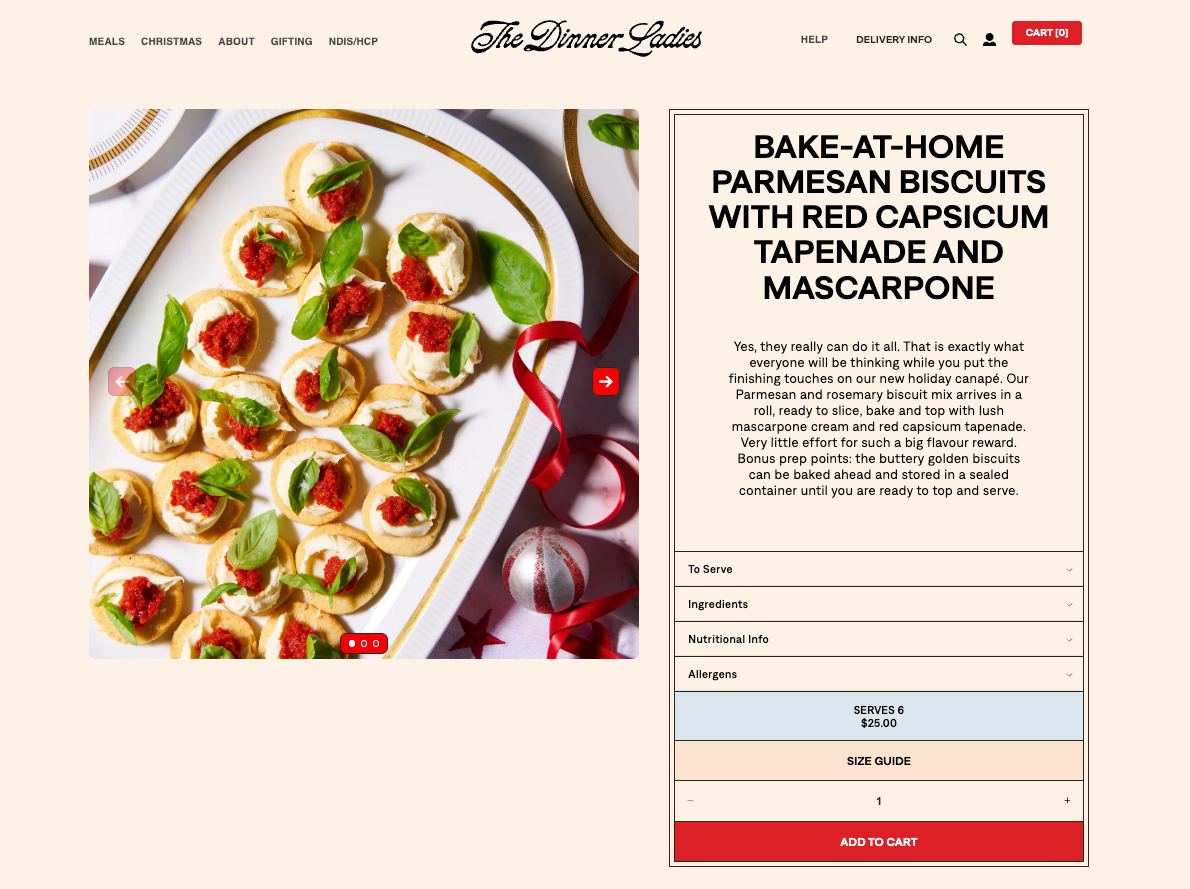
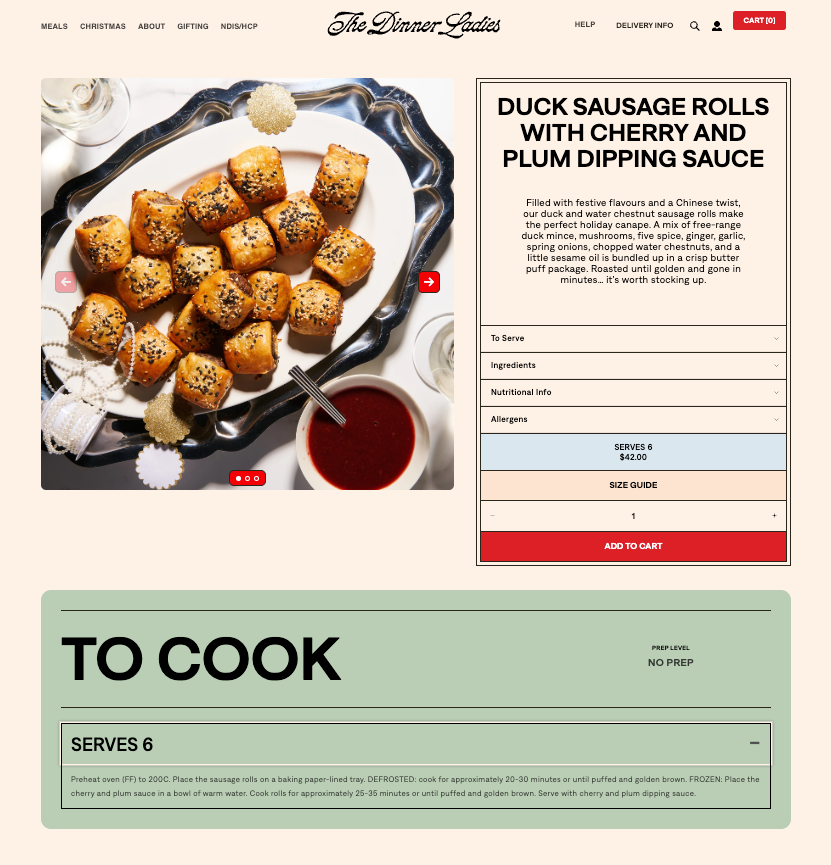
For example, ready-to-heat meal company The Dinner Ladies includes a dropdown menu on each product page for further reading. Categories include serving instructions, a full ingredient list, allergens, nutritional information, and even a handy “size guide” that shows how many people the meal serves.
FAQ pages make up the information hub of your website. They exist to provide customers with a way to get their questions answered without reaching out to you.
This includes information like how food should be stored, how long its shelf life is, delivery range, and serving instructions. FAQs can even direct customers toward finding out where their order is and what its status is.

In the context of BFCM, FAQs are all about deflecting repetitive questions away from your team and assisting shoppers in finding what they need faster.
That’s the strategy for German supplement brand mybacs.
“Our focus is to improve automations to make it easier for customers to self-handle their requests. This goes hand in hand with making our FAQs more comprehensive to give customers all the information they need,” says Alexander Grassmann, its Co-Founder & COO.
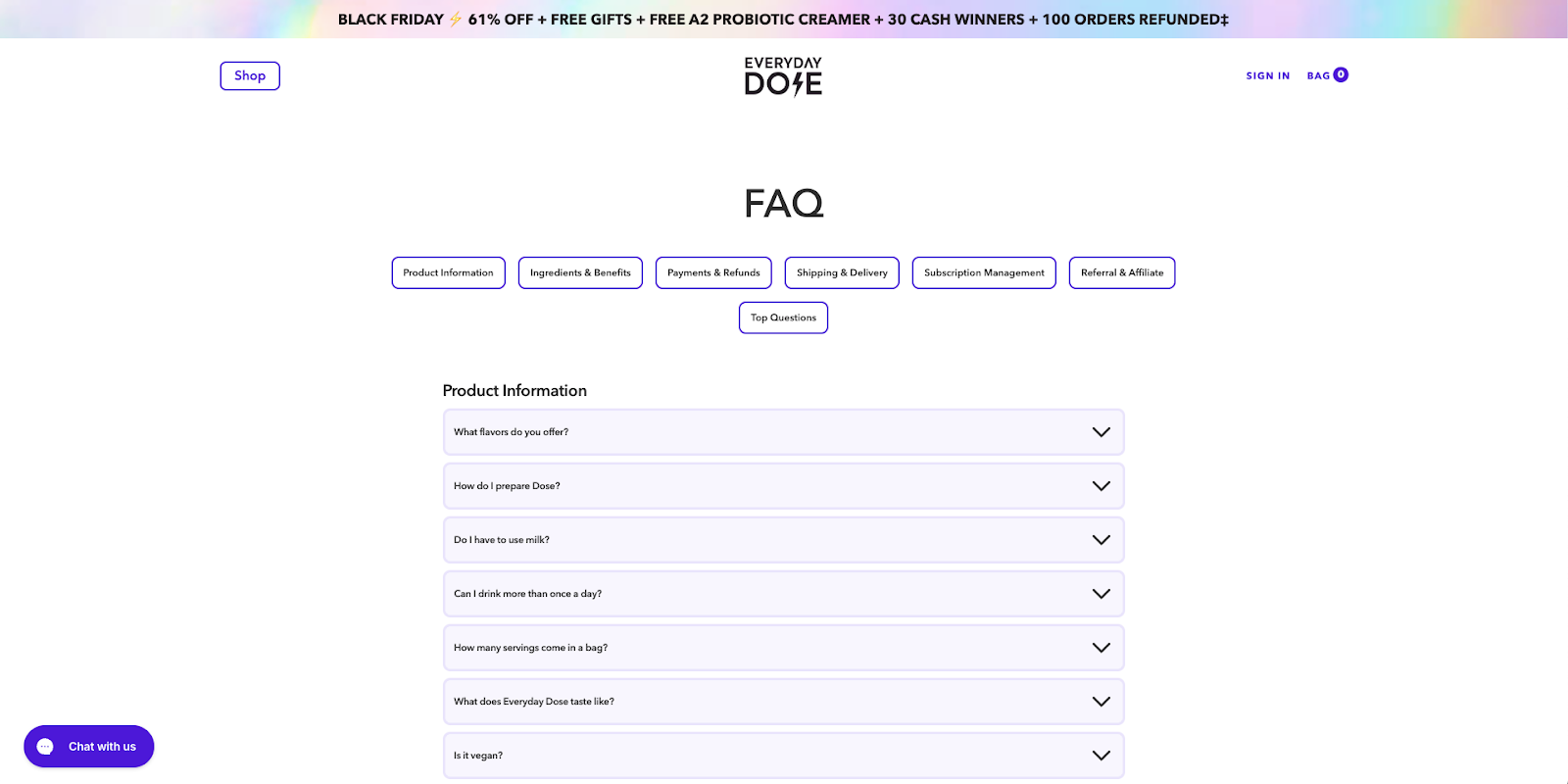
As you contemplate what to add to your FAQ page, remember that more information is usually better. That’s the approach Everyday Dose takes, answering even hyper-specific questions like, “Will it break my fast?” or “Do I have to use milk?”
While the FAQs you choose to add will be specific to your products, peruse the top-notch food and bev FAQ pages below.
Time for some FAQ inspo:
AI Agents and AI-powered Shopping Assistants are easy to set up and are extremely effective in handling customer interactions––especially during BFCM.
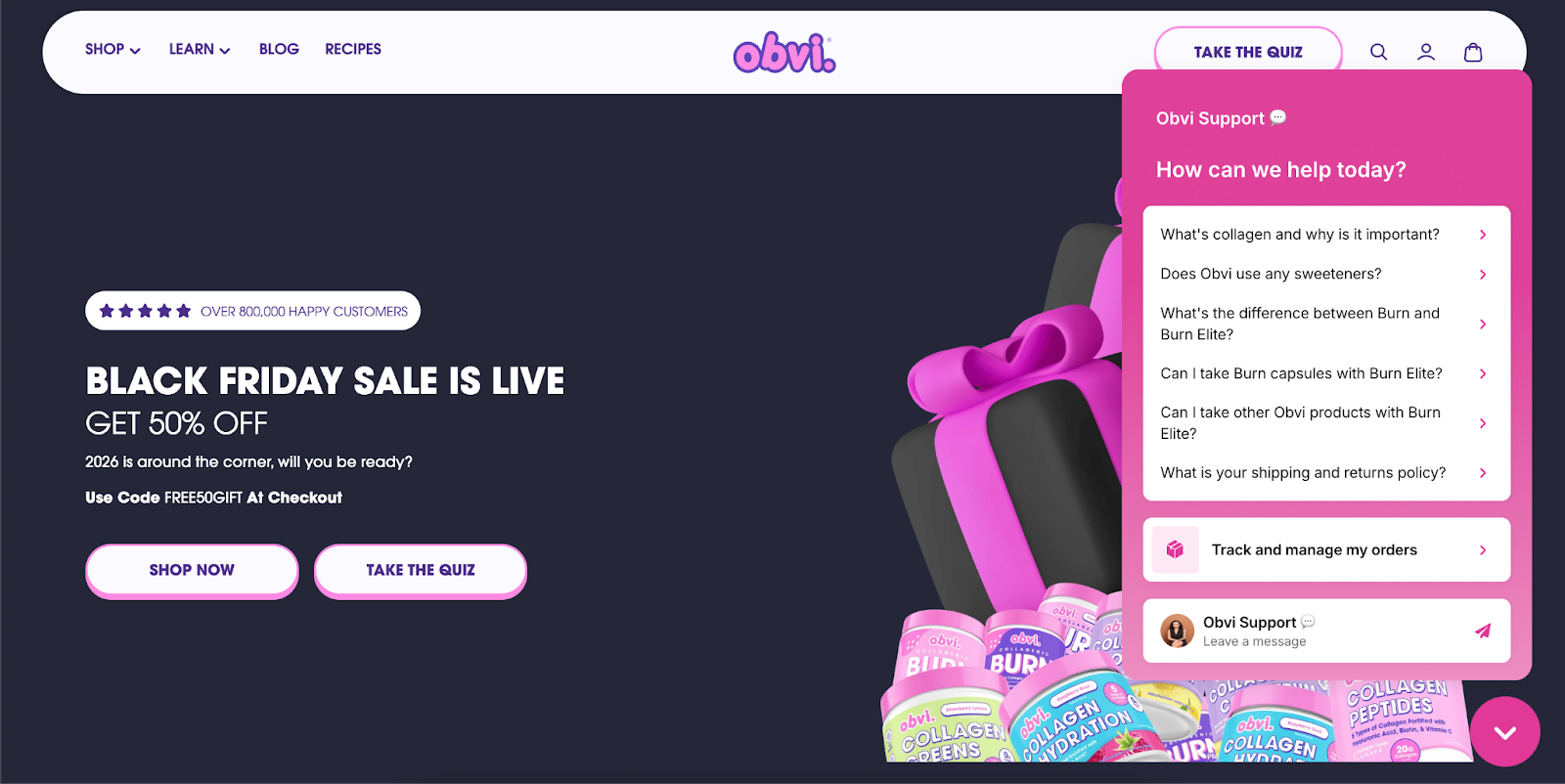
“I told our team we were going to onboard Gorgias AI Agent for BFCM, so a good portion of tickets would be handled automatically,” says Ron Shah, CEO and Co-founder at Obvi. “There was a huge sigh of relief knowing that customers were going to be taken care of.”
And, they’re getting smarter. AI Agent’s CSAT is just 0.6 points shy of human agents’ average CSAT score.
Here are the specific responses and use cases we recommend automating:
Get your checklist here: How to prep for peak season: BFCM automation checklist
With high price reductions often comes faster-than-usual sell out times. By offering transparency around item quantities, you can avoid frustrated or upset customers.
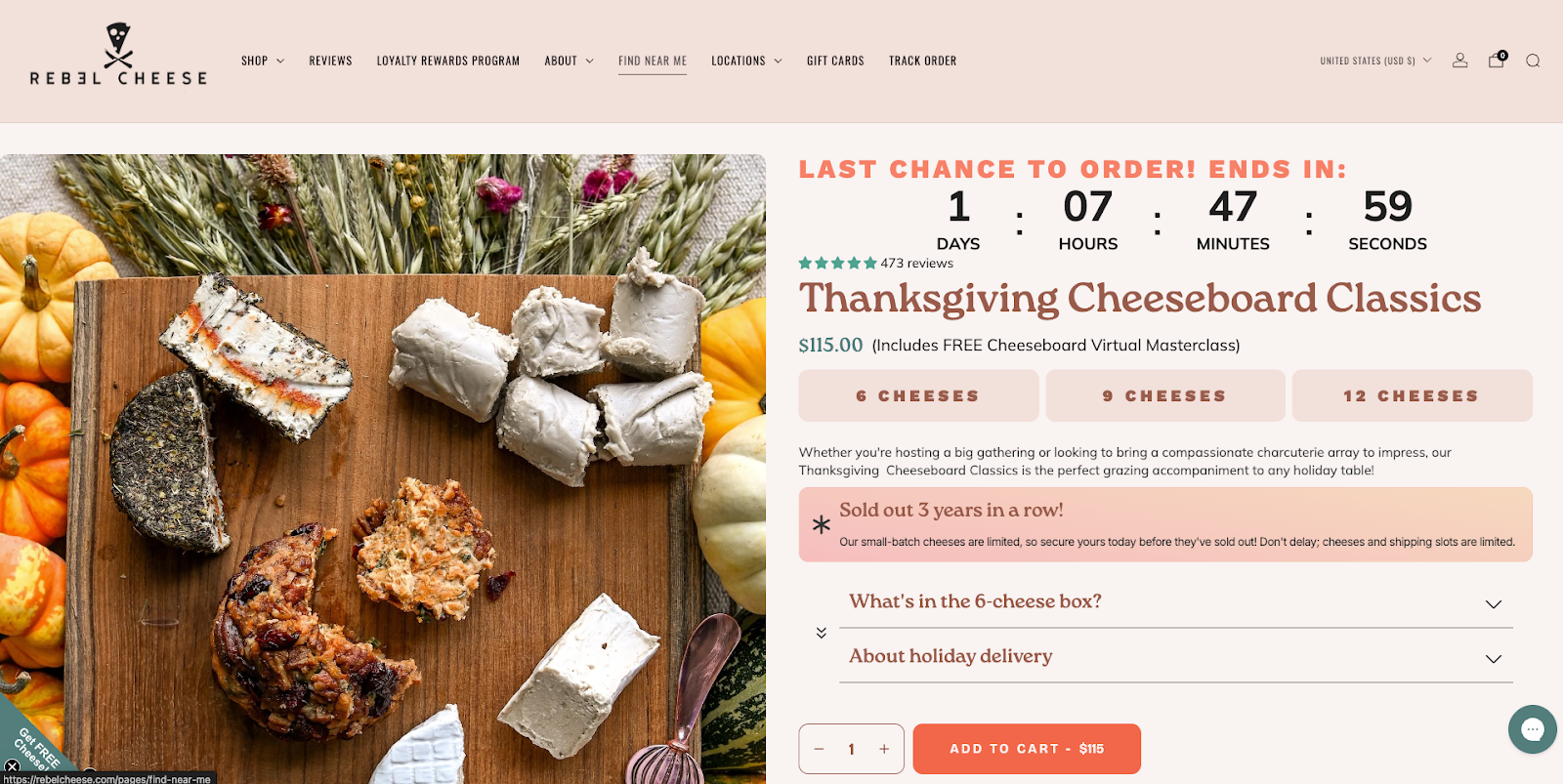
For example, you could show how many items are left under a certain threshold (e.g. “Only 10 items left”), or, like Rebel Cheese does, mention whether items have sold out in the past.
You could also set up presales, give people the option to add themselves to a waitlist, and provide early access to VIP shoppers.
Give shoppers a heads up whether they’ll be able to cancel an order once placed, and what your refund policies are.
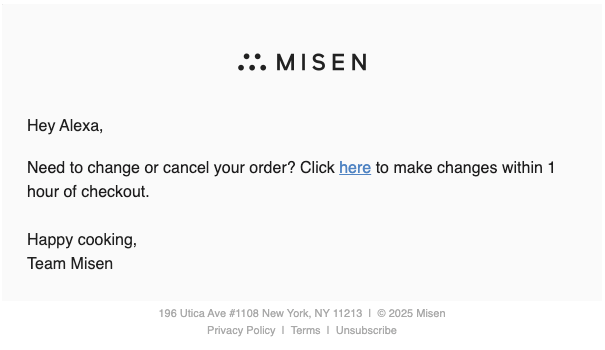
For example, cookware brand Misen follows its order confirmation email with a “change or cancel within one hour” email that provides a handy link to do so.
Your refund policies and order cancellations should live within an FAQ and in the footer of your website.
Include how-to information on your website within your FAQs, on your blog, or as a standalone webpage. That might be sharing how to use a product, how to cook with it, or how to prepare it. This can prevent customers from asking questions like, “how do you use this?” or “how do I cook this?” or “what can I use this with?” etc.
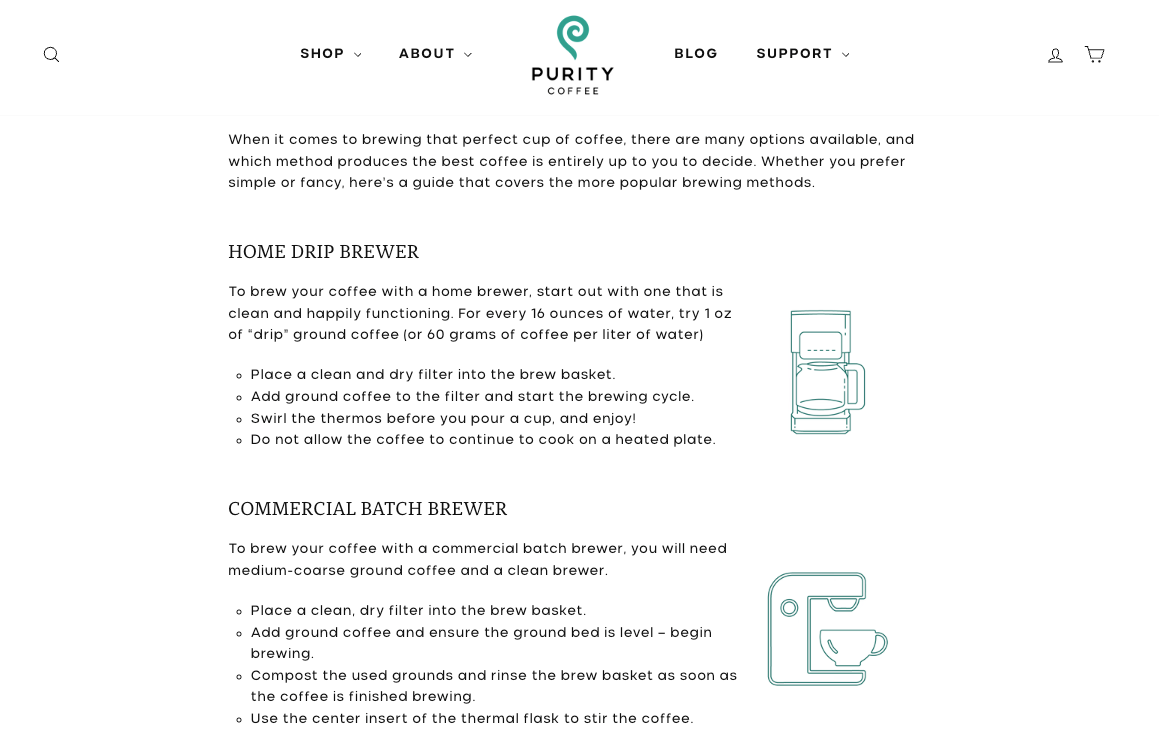
For example, Purity Coffee created a full brewing guide with illustrations:
Similarly, for its unique preseasoned carbon steel pan, Misen lists out care instructions:

And for those who want to understand the level of prep and cooking time involved, The Dinner Ladies feature cooking instructions on each product page.
Interactive quizzes, buying guides, and gift guides can help ensure shoppers choose the right items for them––without contacting you first.
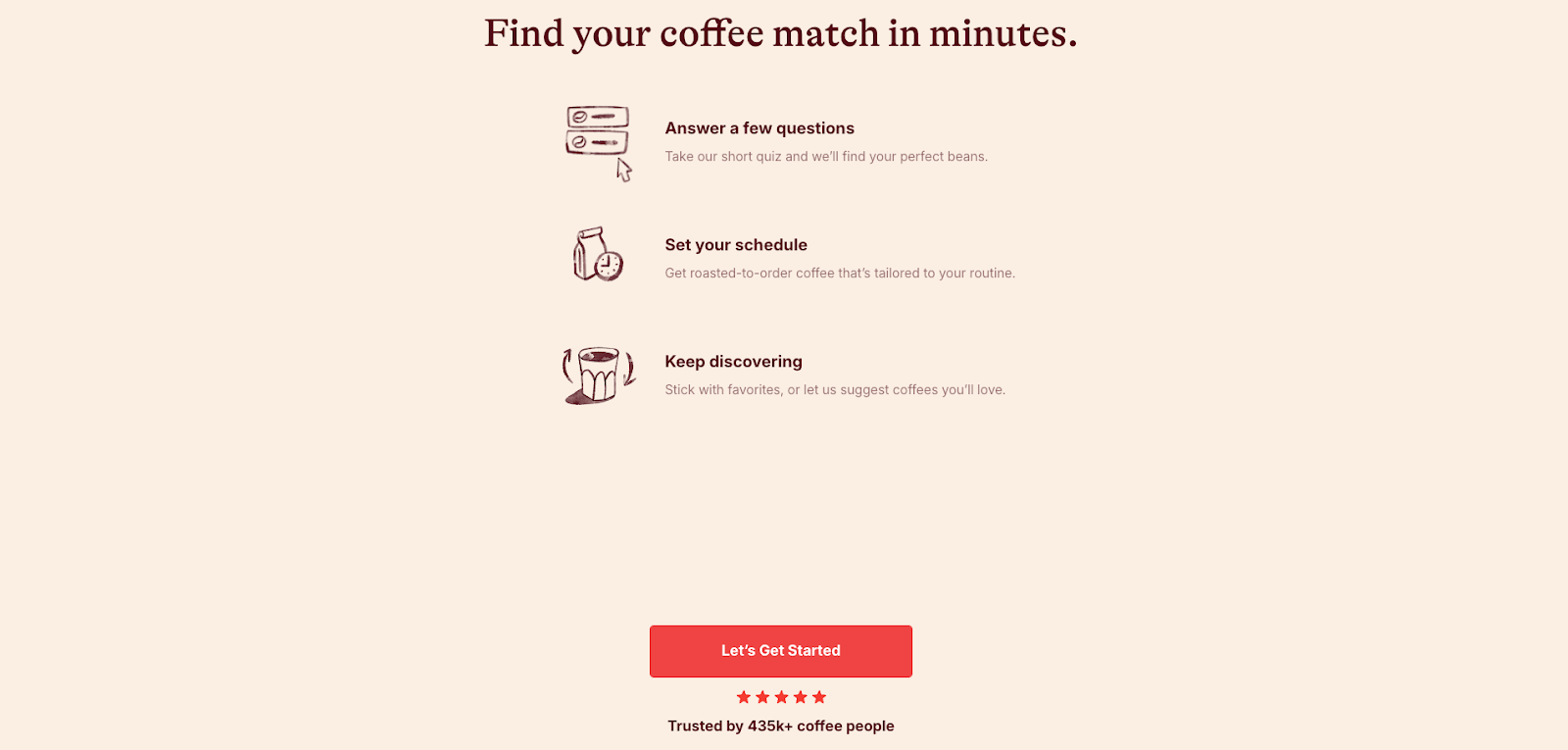
For example, Trade Coffee Co created a quiz to help first timers find their perfect coffee match:
The more information you can share with customers upfront, the better. That will leave your team time to tackle the heady stuff.
If you’re looking for an AI-assist this season, check out Gorgias’s suite of products like AI Agent and Shopping Assistant.
{{lead-magnet-2}}
TL;DR:
As holiday season support volumes spike and teams lean on AI to keep up, one frustration keeps surfacing, our Help Center has the answers—so why can’t AI find them?
The truth is, AI can’t help customers if it can’t understand your Help Center. Most large language models (LLMs), including Gorgias AI Agent, don’t ignore your existing docs, they just struggle to find clear, structured answers inside them.
The good news is you don’t need to rebuild your Help Center or overhaul your content. You simply need to format it in a way that’s easy for both people and AI to read.
We’ll break down how AI Agent reads your Help Center, finds answers, and why small formatting changes can help it respond faster and more accurately, so your team spends less time on escalations.
{{lead-magnet-1}}
Before you start rewriting your Help Center, it helps to understand how AI Agent actually reads and uses it.
Think of it like a three-step process that mirrors how a trained support rep thinks through a ticket.
Your Help Center is AI Agent’s brain. AI Agent uses your Help Center to pull facts, policies, and instructions it needs to respond to customers accurately. If your articles are clearly structured and easy to scan, AI Agent can find what it needs fast. If not, it hesitates or escalates.
Think of Guidance as AI Agent’s decision layer. What should AI Agent do when someone asks for a refund? What about when they ask for a discount? Guidance helps AI Agent provide accurate answers or hand over to a human by following an “if/when/then” framework.
Finally, AI Agent uses a combination of your help docs and Guidance to respond to customers, and if enabled, perform an Action on their behalf—whether that’s changing a shipping address or canceling an order altogether.
Here’s what that looks like in practice:
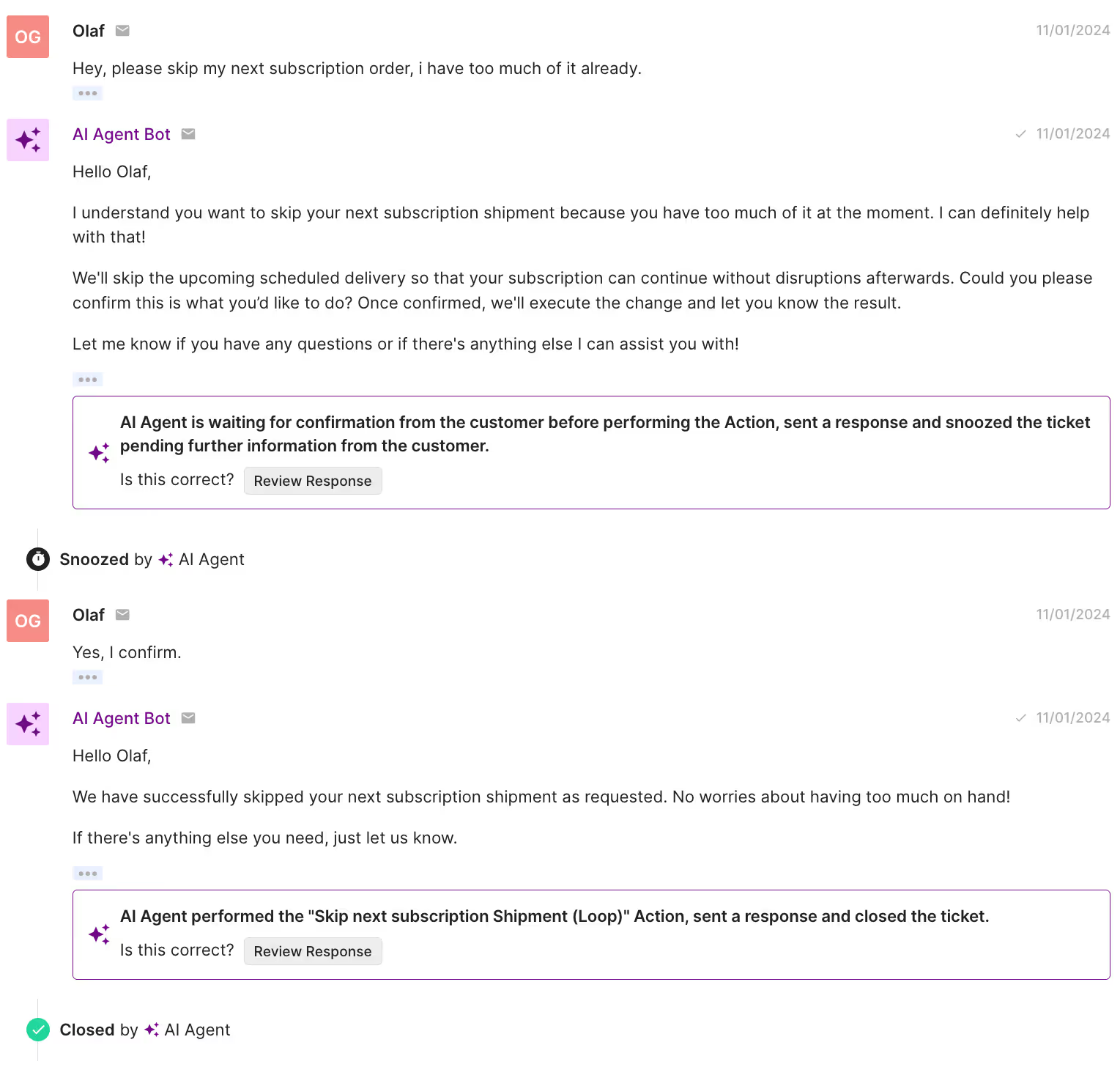
This structure removes guesswork for both your AI and your customers. The clearer your docs are about when something applies and what happens next, the more accurate and human your automated responses will feel.
A Help Center written for both people and AI Agent:
Our data shows that most AI escalations happen for a simple reason––your Help Center doesn’t clearly answer the question your customer is asking.
That’s not a failure of AI. It’s a content issue. When articles are vague, outdated, or missing key details, AI Agent can’t confidently respond, so it passes the ticket to a human.
Here are the top 10 topics that trigger escalations most often:
Each of these topics needs a dedicated, clearly structured Help Doc that uses keywords customers are likely to search and spells out specific conditions.
Here’s how to strengthen each one:
Start by improving these 10 articles first. Together, they account for nearly half of all AI Agent escalations. The clearer your Help Center is on these topics, the fewer tickets your team will ever see, and the faster your AI will resolve the rest.
Once you know how AI Agent reads your content, the next step is formatting your help docs so it can easily understand and use them.
The goal isn’t to rewrite everything, it’s to make your articles more structured, scannable, and logic-friendly.
Here’s how.
Both humans and large language models read hierarchically. If your article runs together in one long block of text, key answers get buried.
Break articles into clear sections and subheadings (H2s, H3s) for each scenario or condition. Use short paragraphs, bullets, and numbered lists to keep things readable.
Example:
How to Track Your Order
A structured layout helps both AI and shoppers find the right step faster, without confusion or escalation.
AI Agent learns best when your Help Docs clearly define what happens under specific conditions. Think of it like writing directions for a flowchart.
Example:
This logic helps AI know what to do and how to explain the answer clearly to the customer.
Customers don’t always use the same words you do, and neither do LLMs. If your docs treat “cancel,” “stop,” and “pause” as interchangeable, AI Agent might return the wrong answer.
Define each term clearly in your Help Center and add small keyword variations (“cancel subscription,” “end plan,” “pause delivery”) so the AI can recognize related requests.
AI Agent follows links just like a human agent. If your doc ends abruptly, it can’t guide the customer any further.
Always finish articles with an explicit next step, like linking to:
Example: “If your return meets our policy, request your return label here.”
That extra step keeps the conversation moving and prevents unnecessary escalations.
AI tools prioritize structure and wording when learning from your Help Center—not emotional tone.
Phrases like “Don’t worry!” or “We’ve got you!” add noise without clarity.
Instead, use simple, action-driven sentences that tell the customer exactly what to do:
A consistent tone keeps your Help Center professional, helps AI deliver reliable responses, and creates a smoother experience for customers.
You don’t need hundreds of articles or complex workflows to make your Help Center AI-ready. But you do need clarity, structure, and consistency. These Gorgias customers show how it’s done.
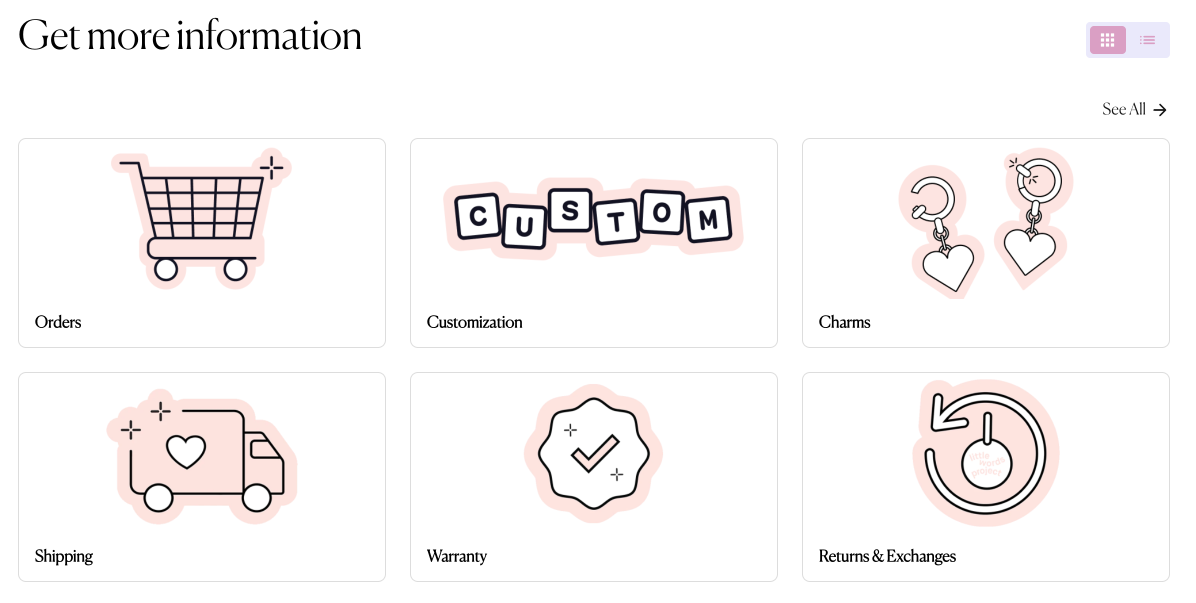
Little Words Project keeps things refreshingly straightforward. Their Help Center uses short paragraphs, descriptive headers, and tightly scoped articles that focus on a single intent, like returns, shipping, or product care.
That makes it easy for AI Agent to scan the page, pull out the right facts, and return accurate answers on the first try.
Their tone stays friendly and on-brand, but the structure is what shines. Every article flows from question → answer → next step. It’s a minimalist approach, and it works. Both for customers and the AI reading alongside them.
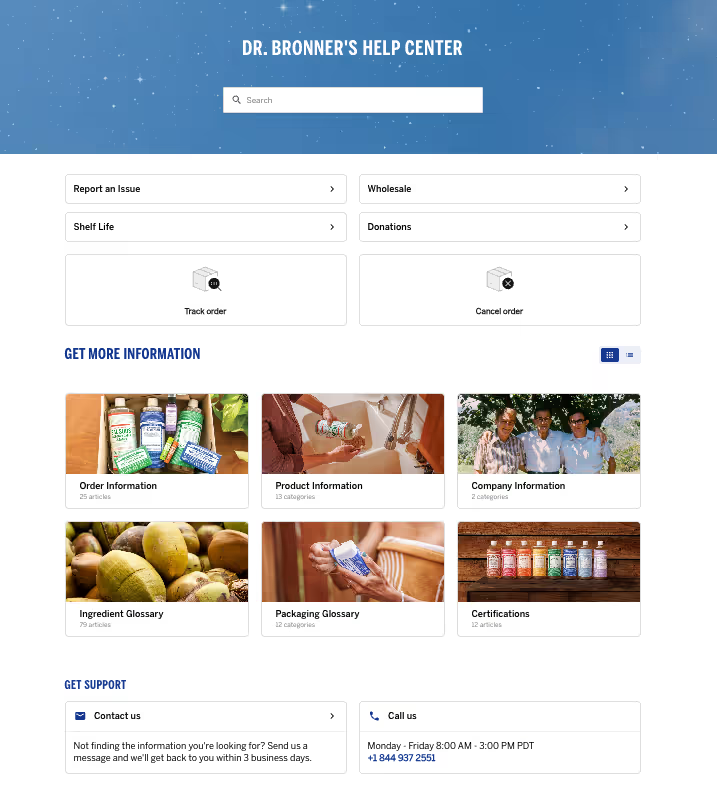
Customer education is at the heart of Dr. Bronner’s mission. Their customers often ask detailed questions about product ingredients, packaging, and certifications. With Gorgias, Emily and her team were able to build a robust Help Center that helped to proactively give this information.
The Help Center doesn't just provide information. The integration of interactive Flows, Order Management, and a Contact Form automation allowed Dr. Bronner’s to handle routine inquiries—such as order statuses—quickly and efficiently. These kinds of interactive elements are all possible out-of-the-box, no IT support needed.

When Ekster switched to Gorgias, the team wanted to make their Help Center work smarter. By writing clear, structured articles for common questions like order tracking, returns, and product details, they gave both customers and AI Agent the information needed to resolve issues instantly.
"Our previous Help Center solution was the worst. I hated it. Then I saw Gorgias’s Help Center features, and how the Article Recommendations could answer shoppers’ questions instantly, and I loved it. I thought: this is just what we need." —Shauna Cleary, Head of Ecommerce at Ekster
The results followed fast. With well-organized Help Center content and automation built around it, Ekster was able to scale support without expanding the team.
“With all the automations we’ve set up in Gorgias, and because our team in Buenos Aires has ramped up, we didn’t have to rehire any extra agents.” —Shauna Cleary, Head of Ecommerce at Ekster
Learn more: How Ekster used automation to cover the workload of 4 agents
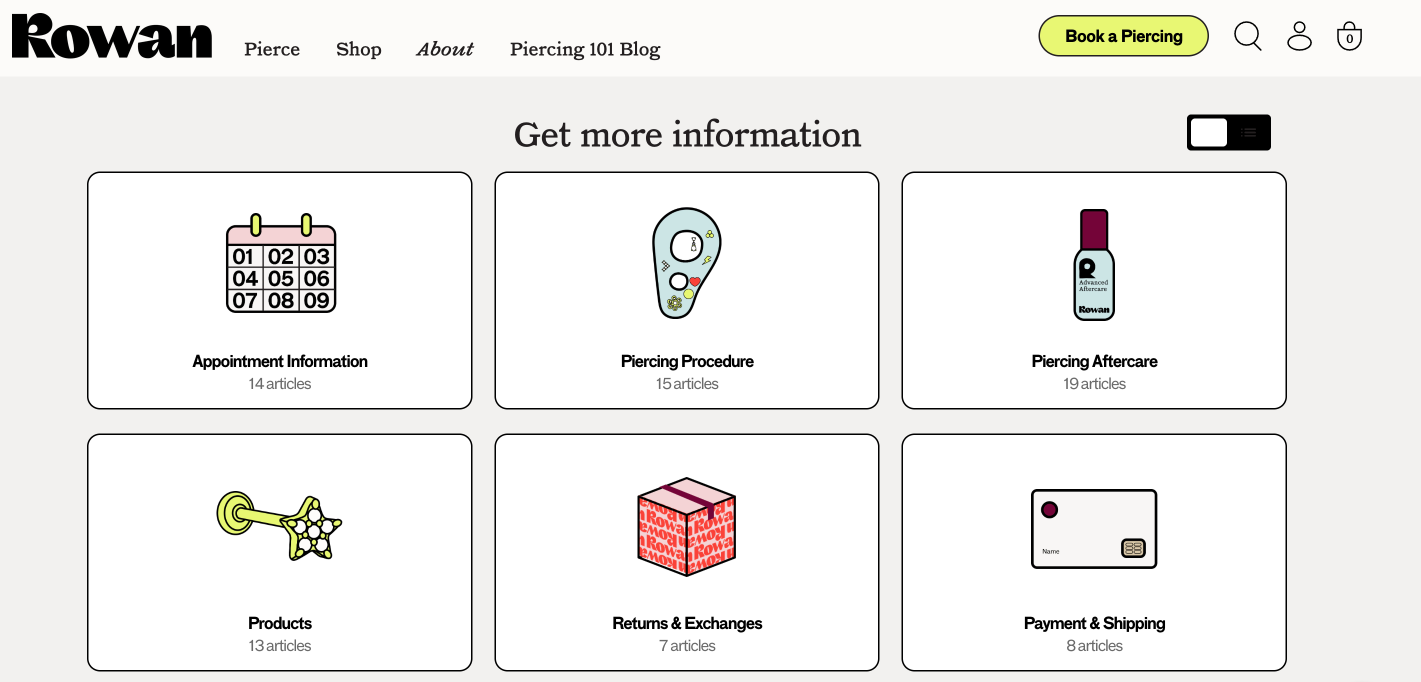
Rowan’s Help Center is a great example of how clear structure can do the heavy lifting. Their FAQs are grouped into simple categories like piercing, shipping, returns, and aftercare, so readers and AI Agent can jump straight to the right topic without digging.
For LLMs, that kind of consistency reduces guesswork. For customers, it creates a smooth, reassuring self-service experience.
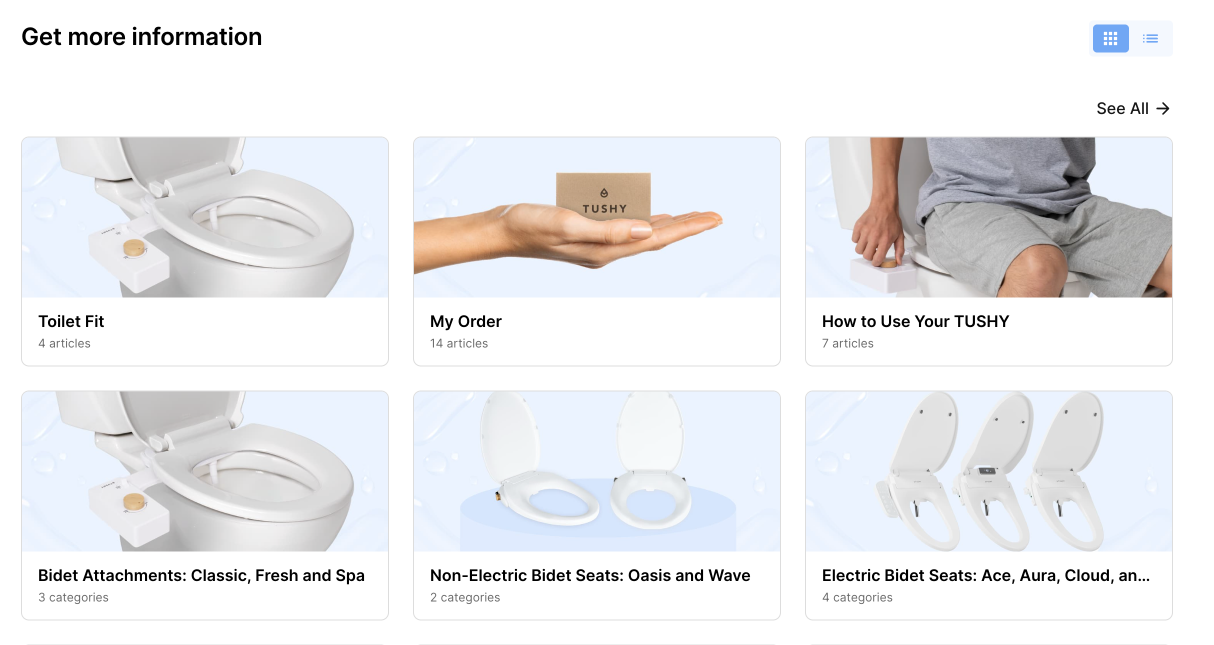
TUSHY proves you can maintain personality and structure. Their Help Center articles use clear headings, direct language, and brand-consistent tone. It makes it easy for AI Agent to give accurate, on-brand responses.
“Too often, a great interaction is diminished when a customer feels reduced to just another transaction. With AI, we let the tech handle the selling, unabashedly, if needed, so our future customers can ask anything, even the questions they might be too shy to bring up with a human. In the end, everybody wins!" —Ren Fuller-Wasserman, Senior Director of Customer Experience at TUSHY
Ready to put your Help Center to the test? Use this five-point checklist to make sure your content is easy for both customers and AI to navigate.
Break up long text blocks and use descriptive headers (H2s, H3s) so readers and AI Agent can instantly find the right section.
Spell out what happens in each scenario. This logic helps AI Agent decide the right next step without second-guessing.
Make sure your Help Center includes complete, structured articles for high-volume issues like order status, returns, and refunds.
Close every piece with a call to action, like a form, related article, or support link, so neither AI nor customers hit a dead end.
Use direct, predictable phrasing. Avoid filler like “Don’t worry!” and focus on steps customers can actually take.
By tweaking structure instead of your content, it’s easier to turn your Help Center into a self-service powerhouse for both customers and your AI Agent.
Your Help Center already holds the answers your customers need. Now it’s time to make sure AI can find them. A few small tweaks to structure and phrasing can turn your existing content into a powerful, AI-ready knowledge base.
If you’re not sure where to start, review your Help Center with your Gorgias rep or CX team. They can help you identify quick wins and show you how AI Agent pulls information from your articles.
Remember: AI Agent gets smarter with every structured doc you publish.
Ready to optimize your Help Center for faster, more accurate support? Book a demo today.
{{lead-magnet-2}}
The best in CX and ecommerce, right to your inbox
TL;DR:
Getting ready for that yearly ticket surge isn’t only about activating every automation feature on your helpdesk, it’s about increasing efficiency across your entire support operations.
This year, we’re giving you one less thing to worry about with our 2025 BFCM automation guide. Whether your team needs a tidier Help Center or better ticket routing rules, we’ve got a checklist for every area of the customer experience brought to you by top industry players, including ShipBob, Loop Returns, TalentPop, and more.
{{lead-magnet-1}}
Your customer knowledge base, FAQs, or Help Center is a valuable hub of answers for customers’ most asked questions. For those who prefer to self-serve, it’s one of the first resources they visit. To ensure customers get accurate answers, do the following:
Take stock of what’s currently in your database. Are you still displaying low-engagement or unhelpful articles? Are articles about discontinued products still up? Start by removing outdated content first, and then decide which articles to keep from there.
Related: How to refresh your Help Center: A step-by-step guide
Are you missing key topics, or don’t have a database yet? Look at last year’s tickets. What were customers’ top concerns? Were customers always asking about returns? Was there an uptick in free shipping questions? If an inquiry repeats itself, it’s a sign to add it to your Help Center.
An influx of customers means more people using your shipping, returns, exchanges, and discount policies. Make sure these have accurate information about eligibility, conditions, and grace periods, so your customers have one reliable source of truth.
Personalization tip: Loop Returns advises adjusting your return policy for different return reasons. With Loop’s Workflows, you can automatically determine which customers and which return reasons should get which return policies.
Read more: Store policies by industry, explained: What to include for every vertical
Customers want fast answers, so ensure your docs are easy to read and understand. Titles and answers should be clear. Avoid technical jargon and stick to simple sentences that express one idea. To accelerate the process, use AI tools like Grammarly and ChatGPT.
No time to set up a Help Center? Gorgias automatically generates Help Center articles for you based on what people are asking in your inbox.

Think of ticket routing like running a city. Cars are your tickets (and customers), roads are your inboxes, and traffic lights are your automations and rules. The better you maintain these structures, the better they can run on their own without needing constant repairs from your CX team.
Here’s your ticket routing automation checklist:
Instead of asking agents to tag every ticket, set rules that apply tags based on keywords, order details, or message type. A good starting point is to tag tickets by order status, returns, refunds, VIP customers, and urgent issues so your team can prioritize quickly.
Luckily, many helpdesks offer AI-powered tags or contact reasons to reduce manual work. For example, Gorgias automatically detects a ticket’s Contact Reason. The system learns from past interactions, tagging your tickets with more accuracy each time.

Custom or filtered inbox views give your agents a filtered and focused workspace. Start with essential views like VIP customers, returns, and damages, then add specialized views that match how your team works.
If you’re using conversational AI to answer tickets, views become even more powerful. For example, you might track low CSAT tickets to catch where AI responses fall short or high handover rates to identify AI knowledge gaps. The goal is to reduce clutter so agents can focus on delivering support.
Don’t get bogged down in minor issues while urgent tickets sit unanswered. Escalation rules make sure urgent cases are pushed to the top of your inbox, so they don’t risk revenue or lead to unhappy customers.
Tickets to escalate to agents or specialized queues:
Ticket Fields add structure by requiring your team to capture key data before closing a ticket. For BFCM, make fields like Contact Reason, Resolution, and Return Reason mandatory so you always know why customers reached out and how the issue was resolved.
For CX leads, Ticket Fields removes guesswork. Instead of sifting through tickets one by one, you’ll have clean data to spot trends, report on sales drivers, and train your team.
Pro Tip: Use conditional fields to dig deeper without overwhelming agents. For example, if the contact reason is “Return,” automatically prompt the agent to log the return reason or product defect.
Macros and AI Agent are your frontline during BFCM. When prepped properly, they can clear hundreds of repetitive tickets. The key is to ensure that answers are accurate, up-to-date, and aligned with what you want AI to handle.
Customers will flood your inbox with the same questions: “Where’s my order?” “When will my discount apply?” “What’s your return policy?” Write macros that give short, direct answers up front, include links for details, and use placeholders for personalization.
Bad macro:
Good macro:
Pro Tip: Customers expect deep discounts this time of year. BPO agency C(x)atalyze recommends automating responses to these inquiries with Gorgias Rules. Include words such as “discount” AND “BFCM”, “holiday”, “Thanksgiving”, “Black Friday”, “Christmas”, etc.
AI is only as good as the information you feed it. Before BFCM, make sure it’s pulling from:
Double-check a few responses in Test Mode to confirm the AI is pulling the right information.

Edge cases and urgent questions need a human touch, not an automated reply. Keep AI focused on quick requests like order status, shipping timelines, or promo eligibility. Complex issues, like defective products, VIP complaints, and returns, can directly go to your agents.
Pro Tip: In Gorgias AI Agent settings, you can customize how handovers happen on Chat during business hours and after hours.
Too few agents and you prolong wait times and miss sales. Too many and you’ll leave your team burned out. Capacity planning helps you find the balance to handle the BFCM surge.
Use your ticket-to-order ratio from last year as a baseline, then apply it to this year’s forecast. Compare that number against what your team can realistically handle per shift to see if your current staffing plan holds up.
Read more: How to forecast customer service hiring needs ahead of BFCM
You still have options if you don’t have enough agents helping you out. Customer service agency TalentPop recommends starting by identifying where coverage will fall short, whether that’s evenings, weekends, or specific channels. Then decide whether to increase automation and AI use or bring in temporary assistance.
Before the holiday season, run refreshers on new products, promos, and policy changes so no one hesitates when the tickets roll in. Pair training with cheat sheets or an internal knowledge base, giving your team quick access to the answers they’ll need most often.
Expect late shipments, low inventory, and more returns than usual during peak season. With the proper logistics automations, you can stay ahead of these issues while reducing pressure on your team.
ShipBob and Loop recommend the following steps:
Shipping costs add up fast during peak season. Work with your 3PL or partners like Loop Returns to take advantage of negotiated carrier rates and rate shopping tools that automatically select the most cost-effective option for each order.
To maintain a steady supply of products, set automatic reorder points at the SKU level so reorders are triggered once inventory dips below a threshold. More lead time means fewer ‘out of stock’ surprises for your customers.
Bad weather, delays, or unexpected demand can disrupt shipping timelines. Create a playbook in advance so your team knows exactly how to respond when things go sideways. At minimum, your plan should cover:
Customers want to know when their order will arrive before they hit checkout. Add estimated delivery dates and 2-day shipping badges directly on product pages. These cues help shoppers make confident decisions and reduce pre-purchase questions about shipping times.
Pro Tip: To keep those timelines accurate, build carrier cutoff dates into your Black Friday logistics workflows with your 3PL or fulfillment team. This allows you to avoid promising delivery windows your carriers can’t meet during peak season.
You’ve handled the basics, from ticket routing to staffing and logistics. Now it’s time to go beyond survival. Upselling automations create an end-to-end experience that enhances the customer journey, shows them products they’ll love, and makes it easy to buy more with confidence. To put them to work:
BFCM puts pressure on customers to find the right deal fast, but many don’t know what they’re looking for. Make it easier for them with macros that point shoppers to bestsellers or curated bundles. For a more advanced option, conversational AI like Gorgias Shopping Assistant can guide browsers on their own, even when your agents are offline.
No need to damage your conversion rate just because customers missed the items they wanted. Automations can recommend similar or complementary products, keeping customers engaged rather than leaving them empty-handed.
If an item is sold out, set up automations to:
Automations can detect hesitation through signals like abandoned carts, long checkout times, or even customer messages that mention keywords such as “too expensive” or “I’ll think about it.” In these cases, trigger a small discount to encourage the purchase.
You can take this a step further with conversational AI like Gorgias Shopping Assistant, which detects intent in real time. If a shopper seems uncertain, it can proactively offer a discount code based on the level of their buying intent.
During BFCM, speed alone is not enough. Customers expect accurate, helpful, and on-brand responses, even when volume is at its highest. QA automations help you prioritize quality by reviewing every interaction automatically and flagging where standards are slipping. To make QA part of your automation prep:
Manual QA can only spot-check a small sample of tickets, which means most interactions go unreviewed. AI QA reviews every ticket automatically and delivers feedback instantly. This ensures consistent quality, even when your team is flooded with requests.
Compared to manual QA, AI QA offers:
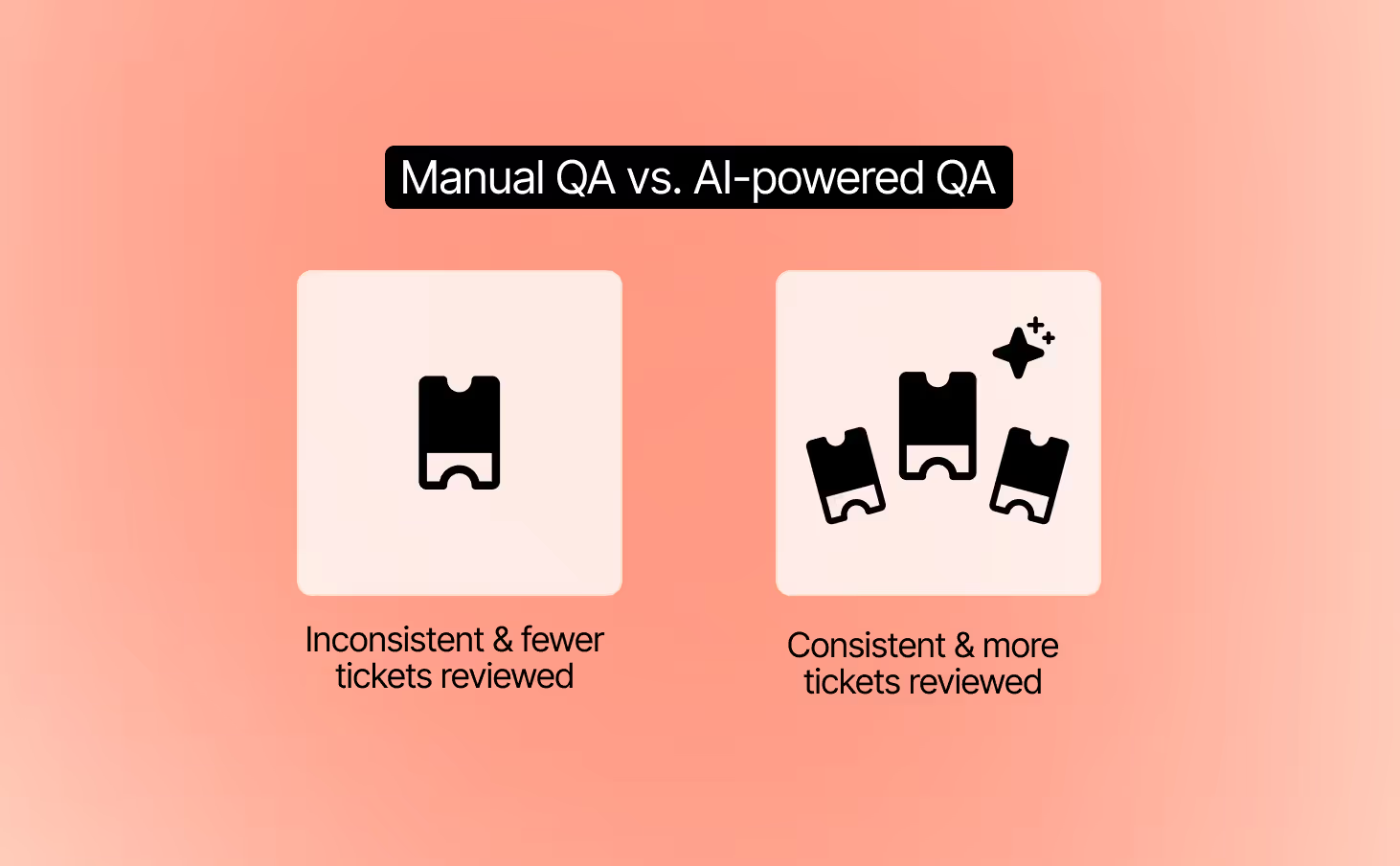
Customers should get the same level of quality no matter who replies. AI QA evaluates both human and AI conversations using the same criteria. This creates a fair standard and gives you confidence that every interaction meets your brand’s bar for quality.
QA automation is not just about grading tickets. It highlights recurring issues, unclear workflows, or policy confusion. Use these insights to guide targeted coaching sessions and refine AI guidance so both humans and AI deliver better results.
Pro Tip: Pilot your AI QA tool with a small group of agents before peak season. This lets you validate feedback quality and scale with confidence when BFCM volume hits.
The name of the game this Black Friday-Cyber Monday isn’t just to get a ton of online sales, it’s to set up your site for a successful holiday shopping season.
If you want to move the meter, focus on setting up strong BFCM automation flows now.
Gorgias is designed with ecommerce merchants in mind. Find out how Gorgias’s time-saving CX platform can help you create BFCM success. Book a demo today.
{{lead-magnet-2}}
TL;DR:
Shopping today isn’t a linear funnel. It’s a fluid conversation. Browse → question → help → buy → return → repeat.
Every step is a dialogue between the shopper’s intent and the brand’s response.
But what bridges the gap between “just looking” and “I’m buying” isn’t persuasion or urgency — it’s suggestion: the subtle design, timing, and language cues that guide action without forcing it.
When done well, suggestion becomes the architecture of trust. It’s also the best way to make AI-powered experiences feel human-first, not tech-first.
This article explores how the power of suggestion — rooted in behavioral psychology and UX design — shapes modern conversational commerce.
{{lead-magnet-1}}
The average ecommerce shopper faces thousands of micro-decisions from the moment they land on a site. Which product? Which variant? Which review to trust? Which shipping method? Each one adds cognitive weight.
Psychologist Barry Schwartz coined the term The Paradox of Choice to describe how abundance often leads to paralysis. In his research, participants faced with too many options were less likely to make a choice and less satisfied when they did.
In ecommerce, that means overload costs conversions. When shoppers must evaluate too many variables, they hesitate, second-guess, or abandon.
Shoppers today expect empathy and ease, not persuasion. When you suggest rather than push, you signal empathy and support.
This is especially important for conversational commerce. Suggestion humanizes automation by making AI interactions feel like conversations rather than transactions.
When you push and persuade, you create a memorable experience for customers — but it’s not the kind you want them to remember.
One Reddit thread perfectly captures the problem: a user tried to cancel their Thrive Market membership and had to ask nine times before the chatbot complied.
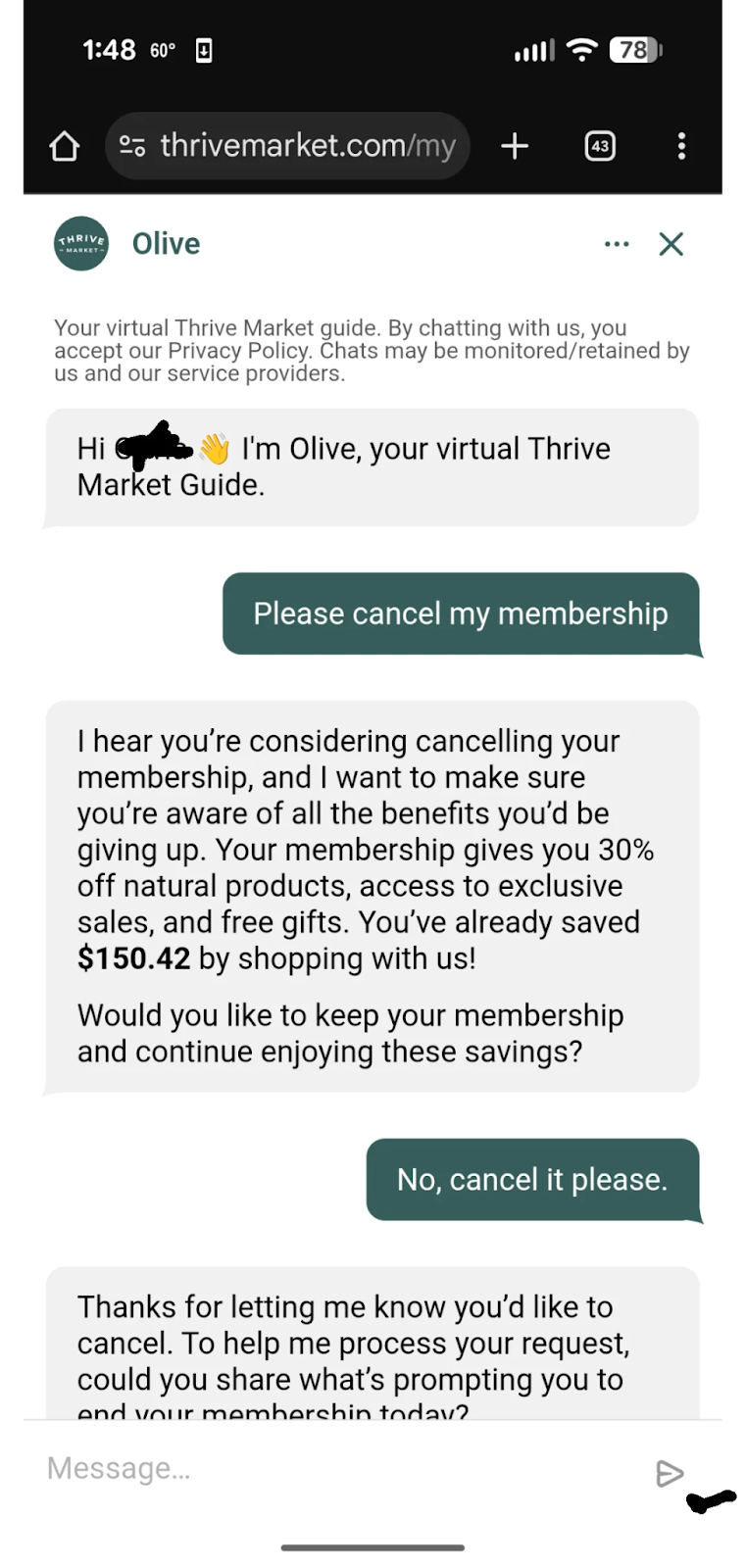
Each time, the AI assistant tried to talk them out of it (offering deals, guilt-tripping responses, or irrelevant messages) until the customer’s frustration boiled over.
The thread exploded not just because it was mildly infuriating, but because it illustrated what customers fear most about automation: a lack of empathy.
Suggestion is how you design for trust, ease, and interaction. And for ecommerce and CX professionals, suggestion bridges browsing and buying by prompting dialogue in a gentle, psychologically sound way.
The magic of suggestion is that it works with human psychology, not against it. It bridges the space between what a shopper wants to do and what helps them do it.
That’s the foundation of the Fogg Behavior Model, developed by Stanford’s Dr. BJ Fogg. The model states that behavior happens when three things intersect:
When these three align, the likelihood of action skyrockets.
In conversational commerce, suggestion is the gentle push that turns intent into interaction.
Below are five ways to apply suggestion with agentic AI (think chat, assistants, and marketing tools) to drive trust, dialogue, and conversion.
A first impression shapes the entire interaction.
A greeting like “Need help?” or “Looking for something special?” signals availability without applying pressure. It’s the digital equivalent of a store associate smiling and saying, “Let me know if you need anything.”
This works because of linguistic framing, which is a form of persuasive language that subtly shapes how people interpret intent.
In practice, this means:
Take a look at Glamnetic. Its shopping assistant sits at the bottom-right corner of every page. While shoppers scroll on the homepage, a prompt appears: “Shop with AI.” It’s transparent about being an AI chat, but subtle enough to be there for shoppers when they’re ready to use it at their own leisure.
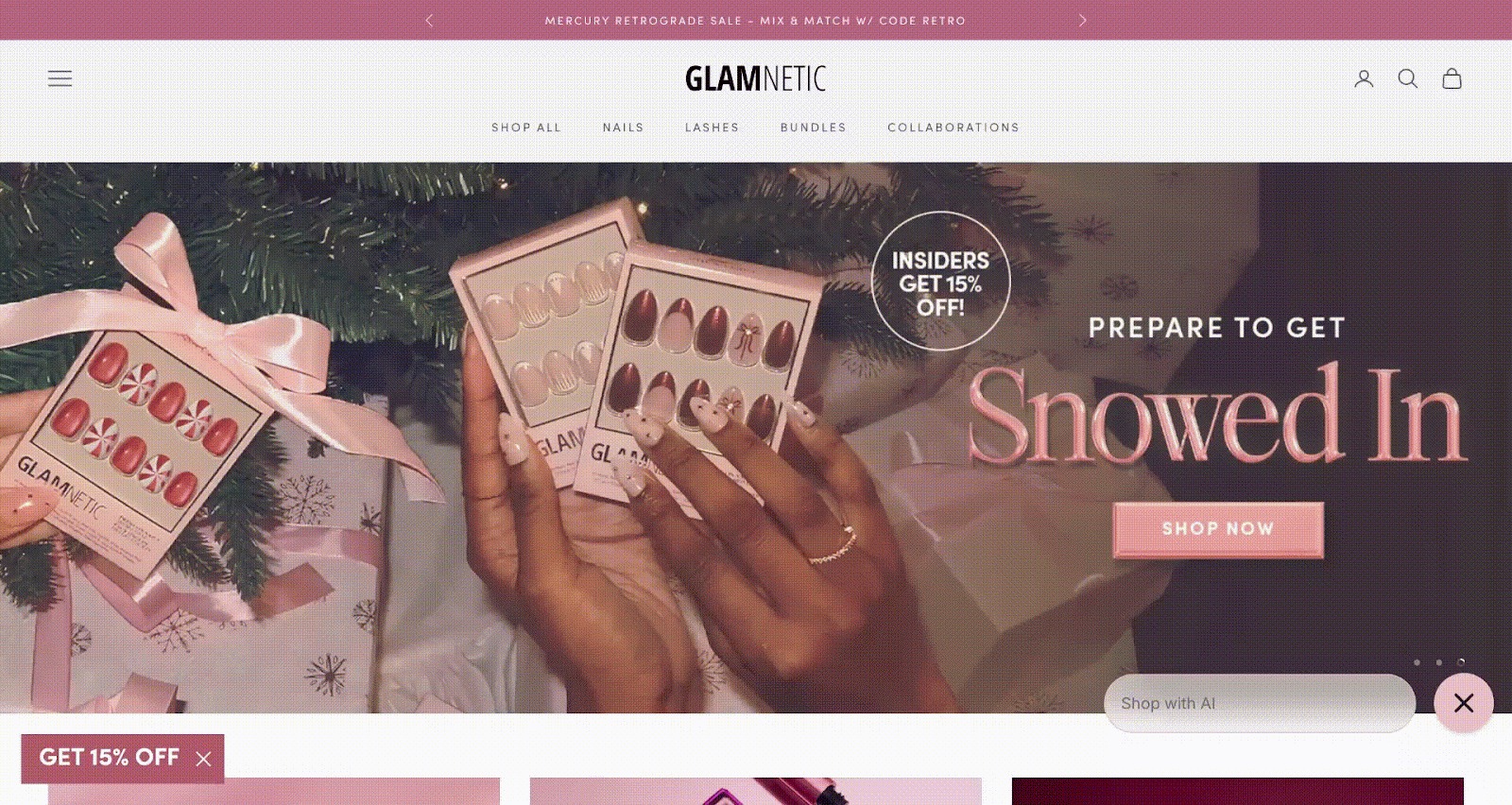
Gorgias Shopping Assistant is an easy way to do this. At the right moment, Shopping Assistant appears with a greeting such as “Need help?” or “Chat with our AI!” It’s friendly, low-pressure, optional, more “Hey I’m here if you need” than “Buy now!”
If you’ve ever scrolled through 80 product filters and given up, you’ve experienced choice overload. This is the Paradox of Choice in action:
More options = higher cognitive effort = lower satisfaction.
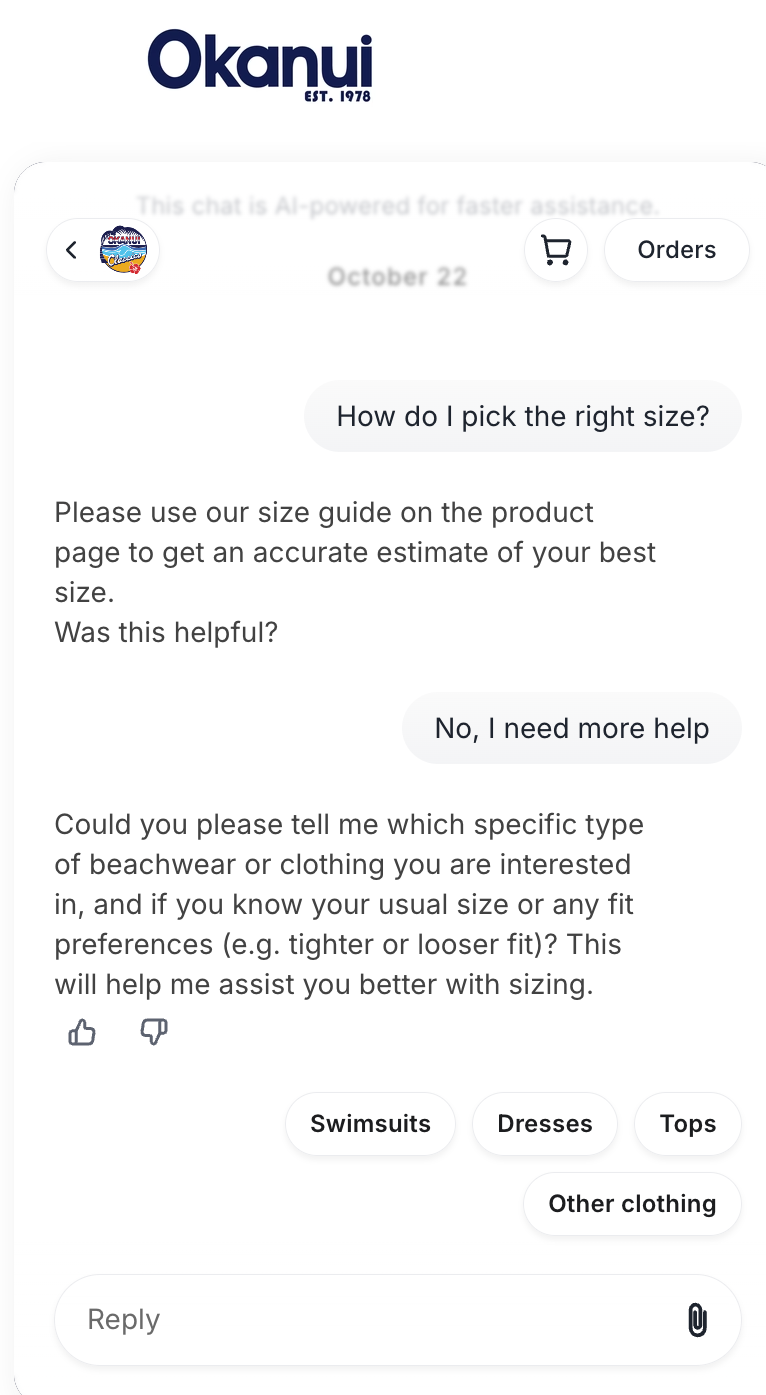
Suggestion works because it reduces mental effort. When an AI assistant limits quick-reply options to just a few (say, “Long sleeve,” “Short sleeve,” “Sleeveless”), it transforms chaos into clarity.
Each small tap provides forward momentum, a concept known as the goal-gradient effect: the closer we feel to completing a goal, the faster and more positively we act.
How can you apply this to agentic AI?
Gorgias’s Shopping Assistant does this well, surfacing only the most relevant next steps. Instead of forcing open-ended typing, it guides shoppers through mini-decisions that build confidence. Here’s an example from Okanui, showing four clear options to reply to Shopping Assistant.
Before a shopper reads a single word of text, their brain has already judged whether your interface feels safe to engage with.
That’s the Aesthetic–Usability Effect — when people perceive something as visually appealing, they assume it will be easier and more trustworthy to use.
Design psychologist Don Norman put it best: “Attractive things work better because they make people feel better.”
Here’s why visual subtlety matters:
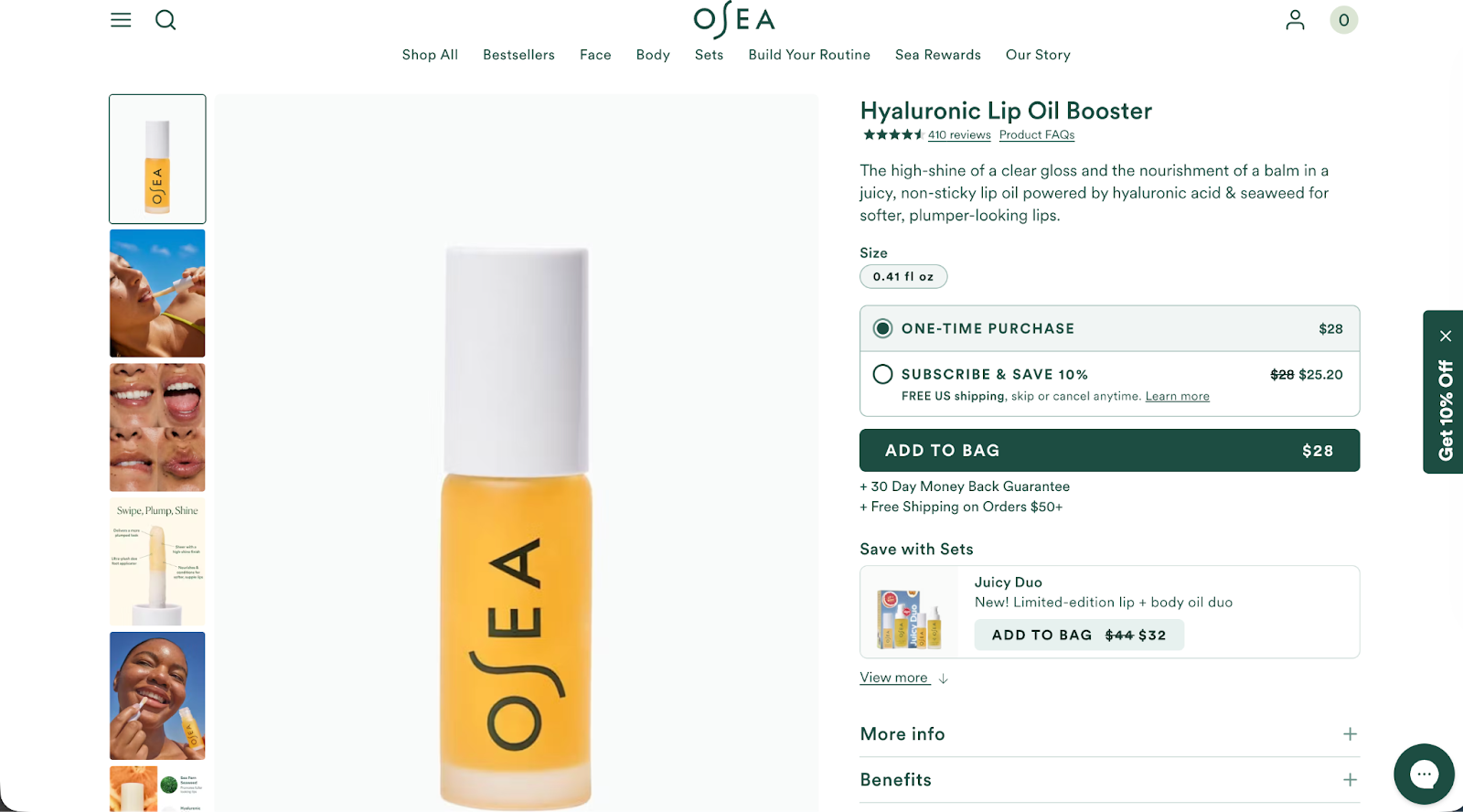
OSEA’s product description page is a beautiful example of unintrusive design in action. The buttons have rounded edges, the 10% offer isn’t covering other page elements, and the chat sits in the bottom-right corner, making it easily accessible if a shopper has questions about the product.
Timing is everything in suggestion-based design. Even the most thoughtful interaction will fail if it appears at the wrong moment.
That’s where the Fogg Behavior Model becomes tactical: Behavior = Motivation × Ability × Prompt
When shoppers are motivated (interested in a product) and able (engaging is easy), a well-timed prompt (chat bubble, message, or offer) turns potential into action.
But mistime it, and you risk the opposite. A chat that appears too early feels like spam. Too late, and the user’s interest window closes.
Here’s how to align the timing sweet spot:
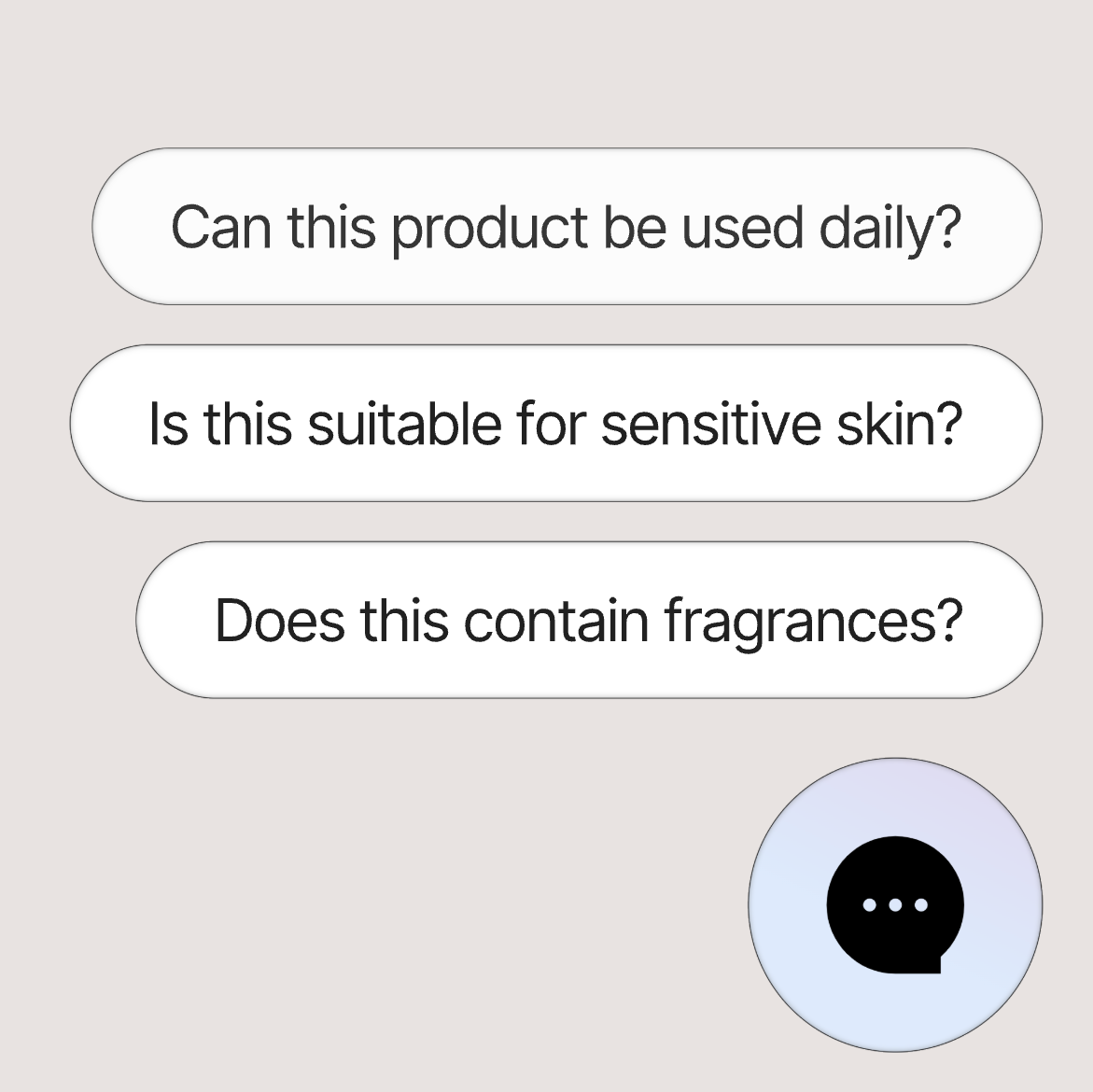
Gorgias Shopping Assistant does all of the above. Using context — such as the current page, conversational context, and cart behavior — helps the AI trigger prompts like “Need help choosing a size?” or “Have questions about shipping?”
Every small suggestion — a phrase, a button shape, a pause, a tone — creates what behavioral economists call a moment of micro-trust.
Individually, these moments may feel insignificant. But together, they turn a static interface into a relationship.
When greeting, choices, design, and timing align, conversation becomes the natural outcome — not the goal. That’s what conversational commerce gets right: it reframes success from “did they convert?” to “did they connect?”
For CX teams, this shift requires designing for the emotional continuity of the experience:
We love this example from Perry Ellis to drive this tip home:

As AI continues to shape how people shop, brands face a choice: Design for control, or design for trust.
Suggestion is the path to the latter.
The right cue, delivered at the right time, reminds people that even in automated spaces, there’s still room for empathy and understanding.
Gorgias was built on the belief that great commerce starts with conversation, not conversion.
{{lead-magnet-2}}

TL;DR:
Handing trust over to AI can be intimidating. One off-brand reply and you undo the reputation and customer loyalty you’ve worked so hard to build.
That’s why we’ve made accuracy our top priority with Gorgias AI Agent.
For the past year, the Gorgias team has been hard at work fulfilling the pressing demand for accuracy and speed. AI Agent is getting smarter, faster, and more reliable, and merchants and their customers are happier with the output.
Here’s the data.
{{lead-magnet-1}}
This year, AI Agent’s accuracy rose from 3.55 to 4.08 out of 5, a 14.9% improvement from January. This average score is based on CX agents' ratings of AI Agent responses in the product, on a scale of 1 to 5.
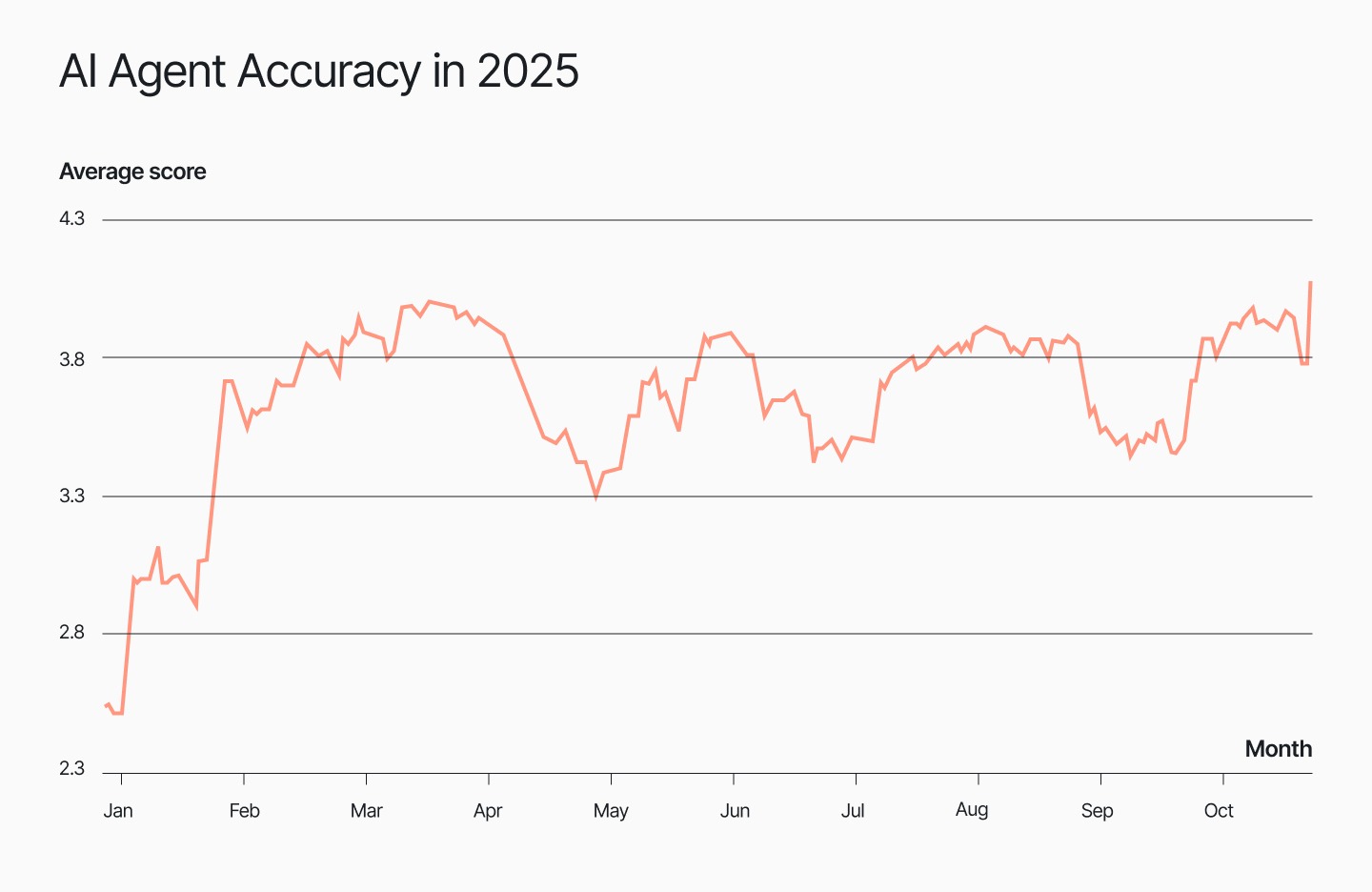
In the past year, we’ve improved knowledge retrieval, added new integrations, expanded reporting features, and asked for more feedback in-product.
We saw the steadiest leap in July, right after the release of GPT-5. AI Agent began reaching levels of consistency and accuracy that agents could trust.
Clear, easy-to-understand language helps people trust what they’re reading. Website Planet found that 85% more visitors bounced from a page when typos were present. That’s why we’ve made it a priority for AI Agent to respond to customers with correct grammar, syntax, and tone of voice.
The efforts have paid off: AI Agent scores a high 4.77 out of 5 in language proficiency compared to 4.4 for human agents. The result is error-free messages that are easy to read and consistent with your brand vocabulary.
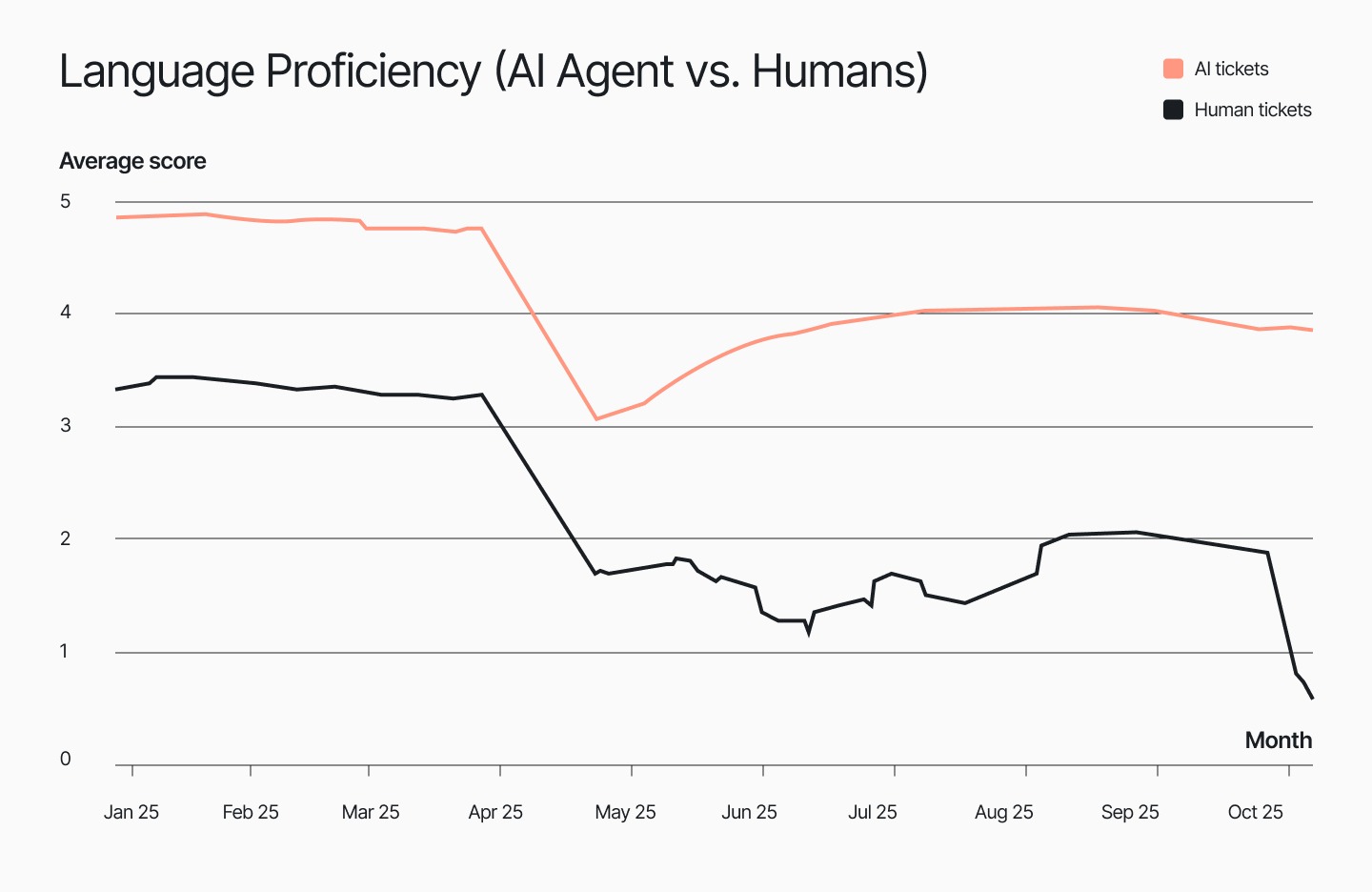
Accuracy isn’t just about saying the right thing; it’s also about how a message lands. For that reason, we track AI Agent’s communication quality. Did it reply with empathy? Did it exhibit active listening and respond with clear phrasing?
Recently, AI Agent is even scoring slightly above humans with 4.48 out of 5 in communication, compared to 4.27. This means AI Agent captures the nuance of every message by considering the background context and acknowledging customer frustration before it gives customers a solution.
What happens when a ticket ends without a clear answer? Customers feel neglected and leave the chat still unsure. This can make your brand look out of touch, leaving customers with the lingering feeling that you don’t care.
But don’t worry, we built AI Agent to close that loop every time: AI Agent’s resolution completeness score sits at a perfect 1 out of 1, compared to 0.99 out of 1 for human agents.
In practice, this means customers feel cared for and understood, while your team receives fewer follow-ups, giving them more time to focus on strategic, high-priority tasks.
Read more: A guide to resolution time: How to measure and lower it
Building a great product is a two-way conversation between our engineers and the people who use it. We listen, review feedback, ship changes, and measure what improves.
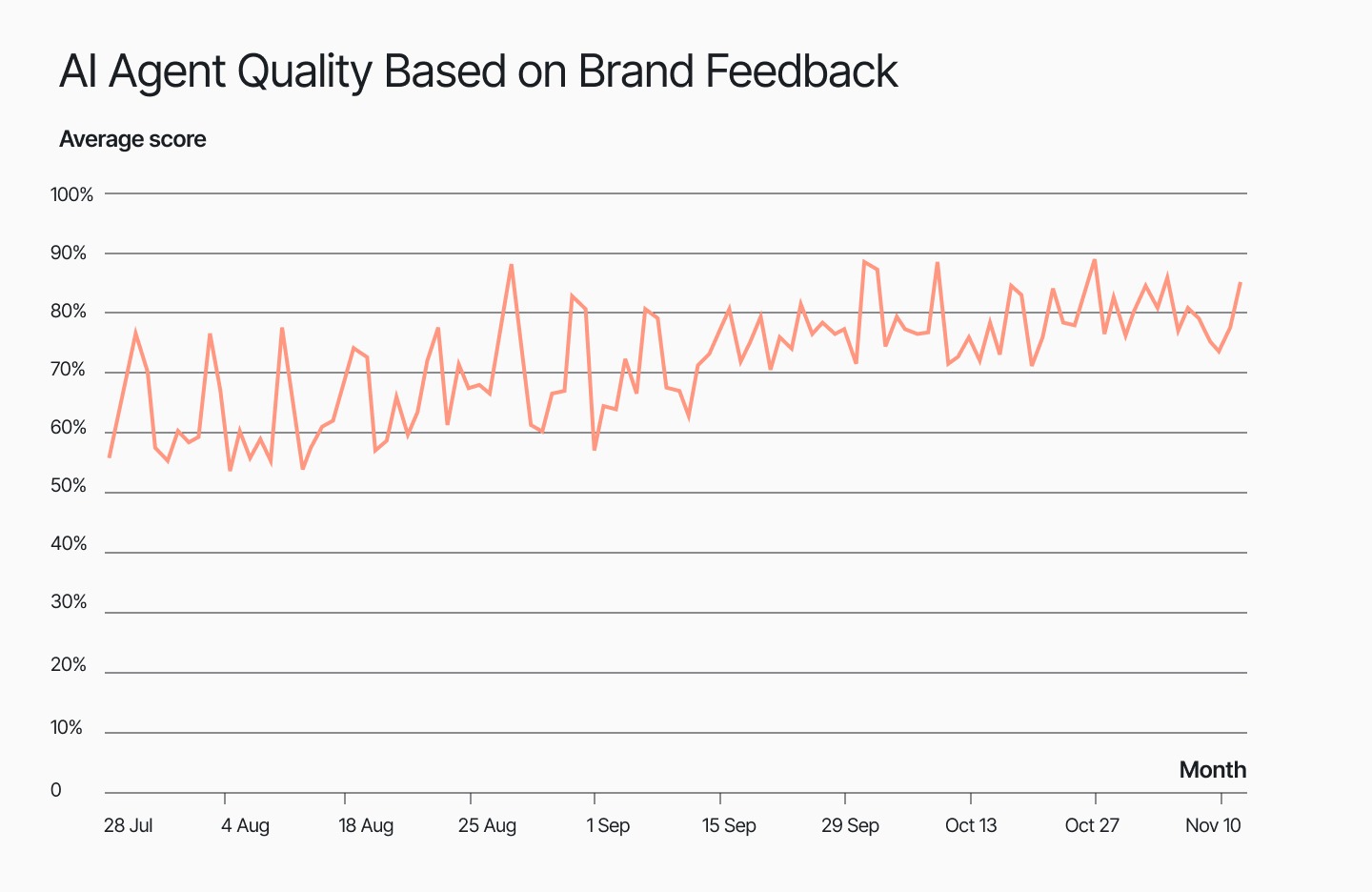
From January to November 2025, AI Agent quality rose from about 57% to 85%. August was the first big step up, and September kept climbing. Brands are seeing fewer low-quality or incorrect answers and more steady decisions.
This is proof that merchants and their shoppers are witnessing the improvements we’ve been making, for the better.
Related: The engineering work that keeps Gorgias running smoothly
At the end of the day, what matters is how customers feel when they talk to support. Do they trust the answer? Do they find it helpful? Are they running into more friction with AI than without it?
Our data shows that customers are appreciating AI assistance more and more. Since the start of 2025, AI Agent on live chat has gotten a CSAT score 40% closer to the average CSAT of human agents. For email, the gap has narrowed by about 8%.
The goal is to eventually achieve a gap of zero. At this point, AI’s support quality is indistinguishable from that of humans. To get there, we’re focusing on practical improvements like accuracy, clear language, complete answers, and better handoff rules.

How we measure CSAT gap: The CSAT gap is calculated by subtracting AI CSAT from human CSAT. When the number is closer to zero, AI is catching up. When it’s negative, AI is still below human results.
Behind every accurate AI reply is a team that cares about the details. AI Agent doesn’t make up answers—it follows what you teach it. The more effort your team puts into maintaining an up-to-date Help Center and Guidance, the better the customer experience becomes.
As we look ahead to 2026, we’re focused on fine-tuning knowledge retrieval logic, refining Guidance rules, and continuously learning from feedback from you and your customers.
We’re proud of the strides AI Agent continues to make, and can’t wait for more brands to experience the accuracy for themselves.
Want to see how AI Agent delivers exceptional accuracy without sacrificing speed? Book a demo or start a trial today.
{{lead-magnet-2}}


This week, Gorgias and Simplr announced a partnership to help provide ecommerce brands with a customer service stack that is built to turn contact centers into revenue drivers via 24/7 rapid-response digital customer engagement.
And, with consumers operating on a “NOW” schedule, we’re pretty excited about how this partnership will enable ecommerce brands to engage more customers in valuable CX moments.
If you put on your consumer hat for a minute, think back to even two or three years ago- a time when we had to wait just a little bit longer for a meal delivery, for the arrival of an online order, or for a customer service email response. Today, everyone’s tolerance for waiting is lower than ever, thanks to the sky-high standards set by world-class companies like Amazon, Netflix, and Spotify. These are the brands that are setting the tone for every other experience your customer is having. Your business is not only competing with others in your industry, you’re competing with the best brands in the world.
Elevated customer expectations in our instant gratification culture have created a new kind of consumer that CX professionals haven’t been forced to deal with before.
We call this consumer the NOW customer.
For ecommerce brands in particular, the NOW customer, who is always “on” and expects immediacy in every experience they have, both online and offline, is looking for exceptional CX from the brands they shop and engage with -- they won’t (and shouldn’t have to?) settle for anything less.
In the new Simplr Consumer Online Shopping and Customer Service Study, published in December 2020, Simplr found that NOW-centric, exceptional customer service is a must (unless you like losing customers):
NOW customers are quicker than ever to leave you and shop with someone else if they aren’t getting the service they expect. So how does the NOW Customer define “exceptional” service?
From the same study, we found that:
All this boils down to providing fast, always-on service, on the customer’s terms, over any channel they want, 24/7. That’s all. Oh, and if you can’t deliver this type of experience, your customers and would-be fans will leave, and your brand ends up missing out on revenue. No big deal.
Tongue-in-cheek-ness aside, providing this type of experience has historically been extremely hard, and few brands have actually been able to crack the NOW customer code.
The fact of the matter is, the traditional contact center model is not able to scale and flex to meet these new expectations. The fixed and rigid nature forces you to make compromises and tradeoffs that are ultimately trade-downs for your customers- resulting in limited hours and channels, deflection, and slow response times- all because the model you’re using today is so fixed and rigid, along with the costs that go with it.
Now, brands don’t have to be held back by a contact center model that can’t scale. CX professionals can access a new model and approach the rise of the NOW customer as an opportunity to set themselves apart from the rest of the pack. By taking a “NOW” approach to CX and providing a level of service that boosts your reputation with buyers, you’ll be in a position to take advantage of every revenue opportunity in the moment.

To provide the NOW customer with the service they expect and deserve, and to capitalize on every revenue opportunity, brands should break free from their traditional contact center model and embrace a newer model that was designed to deliver for the NOW customer. This model needs to scale easily, enable you to always be ready and responsive for customers, and engage them whenever and wherever they want.
The NOW customer can’t be ignored. And the brands that will rise in the NOW era will be the ones that have this realization and make the necessary adjustments, well, now.
Find out more about how the Simplr + Gorgias partnership can help you rise to meet the NOW customer and capture revenue opportunities in every moment.

Standing out and building a community of loyal fans is hard, and it’s even harder after the surge online shopping had in 2020. The mammoth amount of competition out there is constantly fighting for even the tiniest slice of ecommerce action.
To gain a competitive edge, brands must put their customers first.
In fact, companies voted customer experience as the most exciting opportunity for businesses over the next year, and it makes sense. Why? It’s because the customer experience drives sales. Research shows that brands with a customer experience mindset drive revenue 4-8% higher than the rest.
When your customers have a bad experience, it can wreak havoc on a brand and dramatically affect the bottom line. The problem is, it can be tricky to improve, especially if you don’t know where to start or what your customers actually want. This is where those customer reviews come into play
Not only do they help bolster customer support best practices, but these powerful assets give you a deep understanding of your customers — something that DTC brands are leveraging to the max. Customer-centric brands like Born Primitive, Beardbrand, Bombas, Tuff Wraps, and WAG are nailing customer experience by tapping into reviews and using them to leverage the buyer journey.
Read on to learn how reviews and UGC are helping brands create a 5-star customer experience.
A clothing brand isn’t going to know how a jacket sits on every single body type, and they’re certainly not going to include this information in their product descriptions. Unfortunately, this can be a sticking point, especially since online shoppers aren’t able to try on products before they buy.
This unsurprisingly leads to more returns (while in-store returns are around 8%, online returns hover around 25%).
There’s a solution though, by strategically using reviews and UGC, brands can provide online shoppers with in-depth insights to help customers get exactly what they’re looking for. This is particularly essential for brands that use reviews with additional product and customer attributes, like shopper size and product color or type.

Born Primitive does exactly this, sharing customer attributes and photos alongside reviews to help buyers get an idea about how items might look on them.
Your products are the crux of your business.
Fail to get your products right, and you’ll struggle to grow a flourishing business. This is one of the most important customer support tips for Shopify merchants — know thy customer and give them what they want.
Brands can fuel product development and internal procedures with customer feedback to continue to optimize the customer experience, all you need to do is listen.
Using real-life feedback from buyers to improve how they view and buy products, as well as the products themselves, ties into the customer-centric vision that successful DTC brands share. It also shows your customers that you’re an honest, and transparent brand working to give them the best product and best experience.
Take LSKD, for example. They’re using customer reviews to improve their products and to better align with customer wants and needs. The brand uses Okendo to capture reviews, respond to them, and gather crucial customer feedback.

In fact, the brand’s popular Rep Tights have been molded over the years by customer feedback to ensure they take on the attributes buyers are looking for. Through reviews, customers are able to share their thoughts on specific product points to fuel development.
Involving customers in this part of the process creates a community around a brand, and ensures you’re giving customers what they want.
And think about it: if a brand is giving customers everything you need, why would they go elsewhere?
Support and customer experience go hand-in-hand. If customer support is good, the customer experience tends to be good too.
Creating a good customer support experience is all about streamlining responses and separating those easy-to-answer questions from more complex ones. Brands can use reviews to automate commonly asked questions and personalize support based on the type of review a customer has given.
On a more basic level, reviews help retailers identify customers who might be experiencing problems with their order. This, in turn, allows brands to address and resolve issues by responding to customer reviews, turning the experience from bad to good in a matter of minutes. Which can end up saving a company from hitting a bit of a rough patch, or issue with further customer responses.

Tuff Wraps regularly replies to less-than-stellar reviews with extra information and an email address that customers can use to get in touch with support. This can help customers feel seen and heard and completely turn around what was initially a poor experience. Combining reviews and customer support in this two-pronged approach aligns with the common best practices for customer support on Shopify.
If you’re experiencing this issue with customers leaving negative reviews, we’ve got something that might help. With Gorgias’ integration with Okendo, you’re able to diagnose these problems and handle them seamlessly from a single dashboard. By leveraging this integration, merchants gain full visibility on customer reviews and their support history.
As many of us know, reviews are key to creating a positive customer experience, especially when they form such a crucial part of the buying journey. Shoppers actively seek out peer reviews before they buy to get a better understanding of a product.
This is where Okendo can come in again, since it encourages customers to leave reviews complete with visuals and helpful attribute information. You can then use the reviews that come rolling in to glean valuable insights into the customer experience and identify ways to improve your products and the overall experience for your buyers.
Signup to Gorgias and leverage reviews to create a 5-star customer experience.

The Covid-19 pandemic has dramatically accelerated the move from offline to online in retail. This got us busier than ever supporting our merchants, new and old, to ensure we help them work towards providing exceptional customer service.
The latest example of this is Black Friday and Cyber Monday, where Shopify saw an uptick of 75% GMV when compared to last year.
As a result of this huge ecommerce spike, 2020 has been a massive year for Gorgias.
At the beginning of the year, we had just 30 people on our team and now, we’re sitting at over 100 incredible people working each and every day to help serve 5,000+ merchants.

The reason our team grew so much this year is to support the growth of our merchants.
Throughout the year, order volume has massively increased and therefore, lots of customers have been contacting businesses through customer service. We went from having 2 million support requests a month on Gorgias to 6 million during the holiday season.

So today, we’re announcing a $25m series B lead by Rajeev Dham at Sapphire Ventures, with participation of Jason Lemkin (SaaStr), François Meteyer (Alven) and other historic investors.
We want to accelerate our progress towards our mission to transform support from painful to exceptional for merchants.
We asked our merchants and learned that they have the following needs: first they want their support to be fast and high quality, then they want to optimize their cost, and once they’ve done that, they are willing to shift the way they think about support to make it a profit center.

In 2021, we want to focus on the top questions our merchants are getting, which account for 60% of the support volume. By empowering support agents to respond faster to these frequent questions, we’re aiming at reducing first response time for our merchants and at increasing the quality of their support. This will free up agents time so that they can focus more on the more complex questions their customers are asking.

You can learn more about our next quarter roadmap here.
Looking further ahead into the future, our goal is to change the role of support from responding to customers’ issues to helping the business grow.
2021 is going to be a new chapter for us. With this round, we’re going to double our team to 200 people across all our hubs, in San Francisco, Belgrade, Paris, Charlotte, Toronto and Sydney.
If you’d like to join the adventure and help us improve the daily lives of 3 million support agents in the US (and more worldwide), we’re hiring aggressively in all these locations.
I want to thank our amazing team for helping build a company that has an impact on 60 million customers yearly, and the 5000 merchants who’ve decided to use our product every day.
The adventure continues, we’re more excited than ever!
Alex & Romain
.avif)
TL;DR:
An ecommerce business plan is your roadmap to build and scale a profitable online store. It outlines your target market, strategy, and financial projections to give you clarity as you grow.
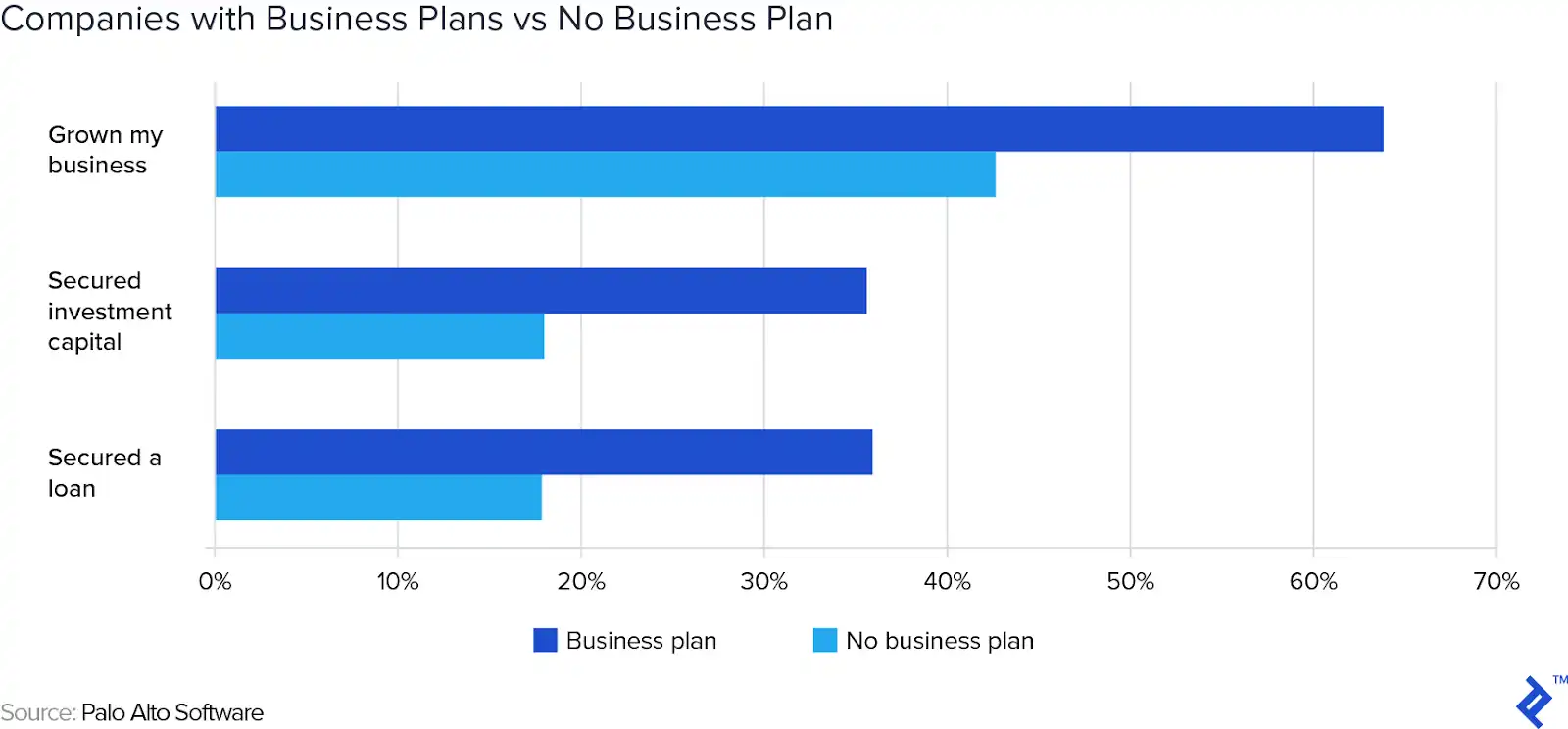
A well-crafted plan keeps you focused on acquiring customers and driving revenue. Unlike traditional retail, ecommerce plans prioritize digital marketing, logistics, and technology infrastructure — the pillars of online commerce. According to research from Wiley, startups with a business plan grow 30% faster. A Harvard Business Review study also found they are 16% more likely to succeed.
This guide walks through every component of an ecommerce business plan. We provide actionable insights and expert tips to help you create a plan that works.
{{lead-magnet-1}}
An ecommerce business plan is a strategic document that outlines your online store's objectives, target market, competitive positioning, operational approach, and financial projections. It serves as both a roadmap for growth and a tool for securing funding from investors or lenders. This document translates your business idea into a concrete strategy. It identifies potential challenges and shows stakeholders where your business is headed.
Unlike traditional retail business plans, ecommerce plans prioritize digital customer acquisition, logistics partnerships, and technology infrastructure. Your plan should address how you'll drive traffic to your store, fulfill orders efficiently, and leverage data to optimize the customer experience. The business world can be harsh — about 45% of businesses fail in the first five years. A comprehensive ecommerce business plan helps you avoid becoming part of that statistic.
Every ecommerce business benefits from a plan — whether you're launching a new store, seeking venture capital, or scaling an existing operation. Create your initial plan before launch, then revisit it quarterly to adjust for market changes, new product lines, or shifts in customer behavior. Here's who needs an ecommerce business plan:
A comprehensive ecommerce business plan includes seven essential sections. Each component serves a specific purpose — from defining your market to projecting your finances. Together, they create a complete picture of your business strategy, operational approach, and growth projections. Below, we break down what goes into each section so you can craft a plan that's both thorough and actionable.
The executive summary is a one-page overview of your entire business plan. It highlights your business concept, target market, competitive advantage, financial needs, and projected outcomes. Think of it as your elevator pitch in written form — concise, compelling, and complete. Even though it appears first, you should write it last. This allows you to distill the most important points after completing all other sections.
Your executive summary should answer these questions: What problem does your store solve? Who are your customers? What makes you different from competitors? How much funding do you need, and what will you use it for? This section needs to grab your reader's attention and convince them it's worth their time to read the entire document. Keep it under 300 words and focus on the most compelling aspects of your business model and unit economics.
Use clear, confident language that reflects your brand voice. Avoid jargon and focus on demonstrating what makes your business unique.
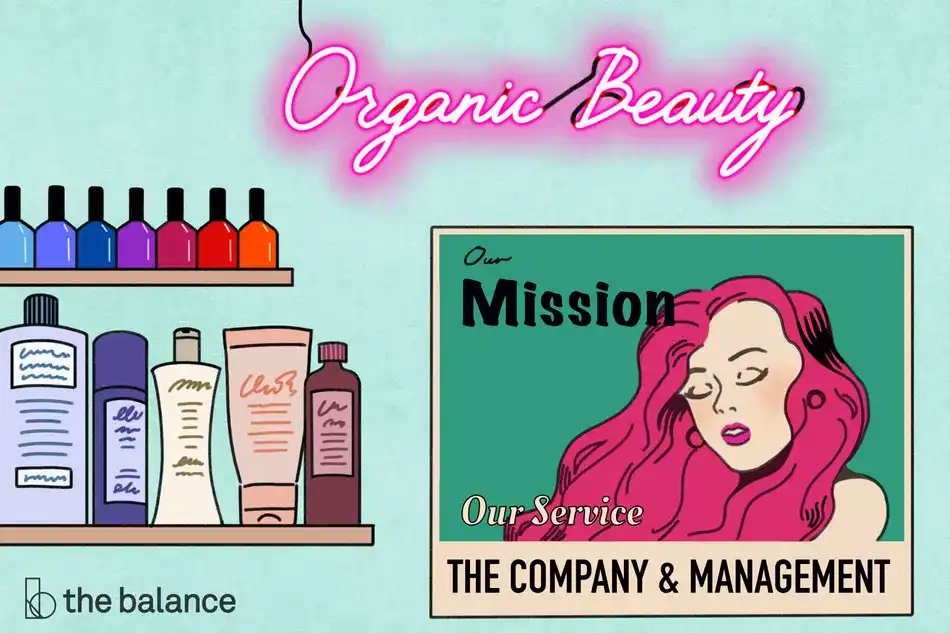
Your company overview describes the fundamentals of your business: your name, legal structure, mission, and team. This section gives readers context on who you are and how you're organized to execute your plan. It typically appears second and provides vital details about your ecommerce business, including the size of your company, your location, and what you want to achieve.
Specify your legal structure — LLC, S-corp, sole proprietorship, or partnership — and explain why you chose it. Include your business name, domain, physical address (if applicable), and founding date. If you have a unique founder-market fit story that demonstrates your expertise in the space, share it here. This helps build credibility and shows you understand the market you're entering.
Your mission statement explains why your business exists. In a few sentences, it should describe what you strive to accomplish.
Introduce key team members, highlighting relevant experience and roles. Make sure you paint a picture of your team that showcases their professionalism and finest skills. If you're a solo founder, explain how you'll handle operations and growth as you scale. Consider outlining these team roles:
Market analysis is where you prove there's demand for your products. This section should demonstrate both your expertise and provide a thorough analysis of your current market. If you plan on tapping into a new market, you should also analyze it. Start by defining your target market — the specific group of customers most likely to buy from you. You must understand your target market. Never assume that everyone will want to buy your products. Create detailed buyer personas that include demographics, psychographics, pain points, and shopping behaviors.
Calculate your total addressable market (TAM), serviceable addressable market (SAM), and serviceable obtainable market (SOM). TAM represents the entire market for your product category. SAM narrows it to the segment you can realistically serve based on your business model and resources. SOM is the portion you can capture in the near term, considering competition and market dynamics. The industry market size is often a huge factor for investors that will read your business plan. You should also note if the market is declining or growing.
Identify your direct and indirect competitors. You want to know who is thriving in your niche, and why. Analyze their strengths, weaknesses, pricing, and customer reviews. This could be everything from their weaknesses to their web traffic, to their product and pricing strategy. Use a strengths, weaknesses, opportunities, and threats (SWOT) analysis to map your position relative to the competition. The more you know about your competition, the better you will be able to position yourself to stand out.
Highlight relevant trends that support your business case — shifts in consumer behavior, emerging technologies, or regulatory changes. Show investors you understand the market dynamics that will influence your success. This demonstrates your command of the competitive landscape and validates your business opportunity.
Describe what you sell, including SKU count, product categories, and any proprietary features. Explain your unique selling proposition—what makes your products different or better than alternatives. Describe all of your products, explaining their key benefits and features. They need to address a need that customers have or opportunities in the market. Show how your products differ from competitors. Highlight why customers will choose your product over other options. If you plan to expand your product line, outline your roadmap for the weeks, months, and years to come.
Detail your pricing strategy: cost-plus (markup on COGS), value-based (pricing tied to customer perceived value), or competitive (matching or undercutting competitors). A monetization strategy is a detailed plan about how to generate revenue for your products. Justify your pricing with data on production costs, competitor pricing benchmarks, and customer willingness to pay. Consider these pricing factors:
If you have patents, trademarks, or proprietary technology, mention them here. Intellectual property can be a significant competitive moat. Even without formal IP, explain how your branding, customer experience, or supply chain creates defensibility. This helps investors understand what makes your business sustainable in the long term.
Your marketing plan outlines how you'll attract and convert customers. This segment of your business expansion plan is where you share your comprehensive marketing plan, identifying how you plan to promote your products, attract leads, and retain customers. Start with brand positioning—how you want customers to perceive your store relative to competitors. Define your brand voice, key messaging, and value proposition. Your marketing strategy will determine your growth.
List your primary acquisition channels: organic search (SEO), paid ads (Google, Meta), social media, email marketing, influencer partnerships, or affiliate programs. For each channel, estimate customer acquisition cost (CAC) and expected conversion rates. Here are the primary channels to consider:
Calculate your customer lifetime value (LTV)—the total revenue you expect from a customer over their relationship with your brand. Your CAC should be significantly lower than LTV (ideally a 3:1 ratio or better). Map the customer's path from awareness to purchase. Identify key conversion points and drop-off risks.
Explain how you'll retain customers through lifecycle marketing: welcome campaigns, post-purchase follow-ups, loyalty programs, and win-back campaigns. To retain customers, consider rewarding them through a loyalty program. Retention is often more profitable than acquisition, so plan for it from the start.
Gymshark example: This go-to-market (GTM) strategy turned Gymshark into a category leader in athletic apparel, demonstrating the power of a well-executed marketing plan.

Operations and logistics cover how you'll source, store, and ship products. This section accounts for the day-to-day operations of your ecommerce store. Describe your supply chain: Will you manufacture in-house, work with wholesalers, or dropship? Identify key suppliers, lead times, and minimum order quantities (MOQ). Production is a very important component of success, so be very detailed.
Choose your fulfillment model: in-house (you handle storage and shipping), third-party logistics (3PL), or dropshipping. Each has trade-offs in cost, control, and scalability. Define your service level agreements (SLAs) for shipping speed and accuracy. Consider whether you will sell your products to international customers, how long it will take to package and ship them, and whether a third party shipment company will be necessary.
List the technology you'll use to manage operations: ecommerce platform (Shopify, BigCommerce), warehouse management system (WMS), inventory tracking tools, and shipping integrations. Explain how you'll monitor inventory turns and avoid stockouts or overstock. Here, you should include how much inventory you have at any given time and plan for how you will store, handle, and track product lines. Key operational metrics to track include:
Transformer Table example: Transformer Table scaled globally by partnering with reliable 3PL providers and optimizing their shipping strategy. Their business plan included detailed logistics planning, allowing them to fulfill orders efficiently across multiple countries while maintaining high customer satisfaction. This operational excellence became a key competitive advantage.
Your financial plan proves that your ecommerce store can be successful. Start with your revenue model: How do you make money? Detail your pricing, sales volume projections, and expected growth rate. Create a three-to-five-year P&L (profit and loss) statement showing projected revenue, COGS, operating expenses, and net income. You will have the opportunity to demonstrate profitability by translating all the components of your business into numbers.
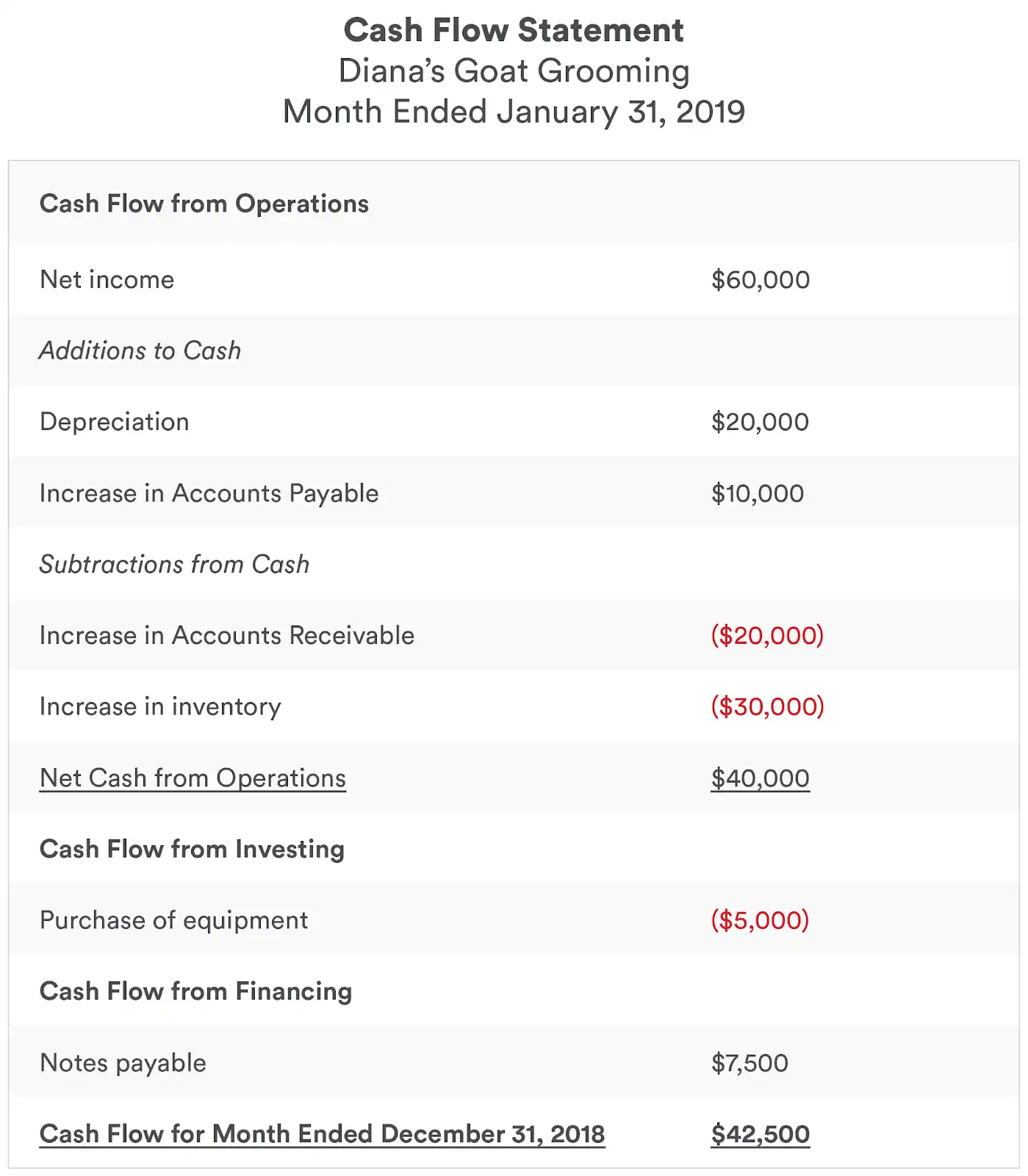
List your startup costs: inventory, platform fees, marketing, legal fees, and initial payroll. Undoubtedly, equipment will be required for your business to operate — list out what you have on hand, what you will need before you launch, and what you might need as your business grows. Build a cash flow forecast showing monthly inflows and outflows for your first year. Cash flow statements show the cash that comes in and goes out each month. Identify your break-even point — the moment when revenue covers all expenses.
Startup Costs: Inventory, Platform fees, Legal & licensing, Initial marketing
Operating Costs: Marketing, Payroll, Shipping, Platform fees
Calculate your unit economics: gross margin per product, CAC, LTV, and CAC:LTV ratio. These metrics show whether your business model is sustainable. If you're seeking funding from investors, specify how much you need, what you'll use it for, and when you expect to reach profitability.
Runway is how long you can operate before running out of cash. Build in contingency plans for slower-than-expected growth or unexpected expenses. Forecasting cash flow is very important, even if it is an imprecise practice. It allows you to prepare for a variety of different circumstances, such as a quiet season, and demonstrate how you will adapt your ecommerce business strategy accordingly. Investors want to see that you've thought through downside scenarios.
Your ecommerce platform is the foundation of your online store. Popular options include Shopify (easy setup, extensive app ecosystem), BigCommerce (scalability and built-in features), and WooCommerce (flexibility for WordPress users). Choose based on your technical skills, budget, and growth plans. The platform you select will influence everything from your site's performance to your ability to integrate essential tools.
Beyond your platform, you'll need a payment gateway (Stripe, PayPal), CRM for customer service (Gorgias), email service provider (Klaviyo, Mailchimp), and analytics tools (Google Analytics, Shopify Analytics). Each tool should integrate seamlessly with your platform to create a unified tech stack. Your business plan should list the software, hardware, and machinery critical to the success of your operations. Here are the must-have tools:
Customer service is revenue-critical for ecommerce. A helpdesk like Gorgias centralizes support across email, chat, social media, and voice — integrating with Shopify to provide agents full customer context. AI Agent can automate repetitive inquiries, freeing your team to focus on high-value interactions. Gorgias integrates with Shopify and over 100 ecommerce tools. This helps you streamline customer service and drive revenue with personalized support. Planning for customer support infrastructure from the start ensures you can scale efficiently while maintaining customer satisfaction.
We've created a structured approach to help you build your ecommerce business plan efficiently. A template includes all seven core sections with prompts and guidance to help you cover every essential component. Starting with a clear framework ensures you don't miss critical elements and helps you organize your thoughts systematically.
You now have the resources and tools to write a comprehensive business plan.
Traditional business plans are comprehensive (20-30 pages) and ideal for seeking funding. Lean business plans are shorter (1-2 pages) and focus on key metrics — perfect for internal planning or quick iterations. Choose the format that matches your immediate goals:
Traditional business plan:
Lean business plan:
A strong business plan is built on solid research. Before writing, gather data on your market, competitors, and customers. Use tools like Google Trends, SEMrush, and industry reports to validate your assumptions. The more evidence you provide, the more credible your plan. This research phase is critical — it's the foundation that supports every claim you'll make about your business opportunity.
Avoid jargon and buzzwords. Write in plain language that anyone — investors, partners, or team members — can understand. Use short sentences and paragraphs to improve readability. Bold key terms like SMART goals (Specific, Measurable, Achievable, Relevant, Time-bound) and use bullet lists to break up dense information. Your goal is to communicate clearly, not to impress with complex terminology.
Your business plan isn't static. Revisit it quarterly to adjust for market changes, new product launches, or shifts in customer behavior. Treat it as a living document that evolves with your business. Your business plan helps you attract investors. It also helps you overcome common obstacles that ecommerce businesses face. By planning ahead, you increase your chances of success and help to ensure that your business will enjoy a continued fruitful future.
Customer service is a critical component of your ecommerce business plan — it directly impacts retention, revenue, and brand reputation. Planning for customer support infrastructure early ensures you can scale efficiently while maintaining high satisfaction. When you map out your operations and technology stack, include how you'll handle customer inquiries, resolve issues, and turn support interactions into revenue opportunities.
Gorgias is built specifically for ecommerce businesses, integrating seamlessly with Shopify, Magento, BigCommerce, and 100+ other tools in your tech stack. Our AI Agent automates up to 60% of repetitive customer inquiries — like order tracking, returns, and product questions — freeing your team to focus on complex issues and personalized service. With full customer context at your agents' fingertips, you can deliver the kind of support that drives loyalty and repeat purchases.
Your business plan should account for customer service as a growth driver, not just a cost center. Gorgias helps you:
See how Gorgias can support your ecommerce growth — book a demo today.
{{lead-magnet-2}}

By doing quality assurance on the support side, you’re able to see what’s working, what triggers customers and how to train your team to improve. It’s also a great tool for your team’s personal development as a support agent.
Since it’s time consuming though, everyone wants to find a way to streamline.
The good news?
Klaus can do it, and there’s officially an integration that you can use with your Gorgias account to streamline it. Klaus is a quality review tool that helps you create a perfect customer experience for buyers and potential buyers
So, how does this help with the issues you may be facing with customer support quality assurance?
Let’s dive in.
As we just talked about earlier, customer assurance can be a time sucker. You may be manually looking at transcripts and organizing everything yourself, but there’s no need to do it this way. You know at Gorgias how much we love saving you time, so here’s how to reduce that with our new Klaus integration.
By pulling conversations automatically from your helpdesk, you can get instant review samples with erases the manually part of copy and pasting transcripts. Using Klaus, there’s also manual filtering options to help you quickly, and seamlessly, find specific cases or keywords you’re looking for.
For example, say you were curious about those tickets that took several responses to solve, or ones that received negative ratings from customers, you can easily pull those up in an instant
Notifications are also automatic when it comes to using Slack or email. By setting up these notifications, you’re able to ensure that none of your support agents misses a piece of their feedback. Thus saving you time, and constant reminders, to ensure that they receive these reviews.
You all know how we love having all our data and information in one place, and Klaus is the same as Gorgias. Their dashboard which allows you to track you team’s performance over time, see the aspects of their communication they may be struggling with and looking into their quality scores (which will get into), really makes things easy.
This full overview makes things efficient for you to see the overall health of your customer support team for your ecommerce business.
On top of that, reporting efficiencies are really easy. Reporting, no matter the department, tends to take up a lot of time. With Klaus, you can have all your efforts easily viewable in the dashboard.
No matter the size of your ecommerce business or support team, you’re always going to want to know how each of your members are doing. Using customizable scorecards with Klaus you can create these to add in a rating criteria for a number of different situations (an unlimited about by the way!).
This is helpful when it comes to working with multiple teams or support channels since it allows you to efficiently track quality in as much detail as you need based on what you’d set the customizable scorecards for.
Klaus also lets you choose between different rating scales. For example, a binary thumbs up/down suit some people, while others would rather use the 3 or 5 point scoring system -- you choose what you prefer!
At Gorgias, we’re continuing to work on partnerships that will make your life easier, and Klaus is one of those that will make the difference in a critical part of your strategy. Haven’t tried Gorgias out yet? Give it a try for 7-days free and see how it can make your life more efficient and simple when it comes to your ecommerce store and customer support.
Your online store, mixed with the e-commerce helpdesk Gorgias, and topped with the quality review tool Klaus - that’s how you cook purr-fect customer experiences for your buyers.
You don’t even have to write this recipe down because we’re excited to announce that we’ve just released the native Gorgias and Klaus integration! You can now pull your customer conversations from Gorgias seamlessly into Klaus for internal support QA and provide consistent feedback to your agents.
There’s a number of reasons why Gorgias can be the best solution for your online store. And there’s a lot of sense in using it together with Klaus if you want to provide your customers with top-notch customer care.
Let’s look into the magic that you can unleash with the Gorgias and Klaus integration.
If you’re running an online store then you probably already know that e-commerce customer service is not just about helping your users. It’s about converting customers, increasing sales, and growing your business.
To reap the benefits of having a revenue-driving e-commerce support team, set your team up for success with the right tools. A regular helpdesk may be enough to give timely answers to your online visitors’ questions, but it might not reveal the full potential of each of your customer interactions.
That’s why dedicated ‘e-commerce helpdesks’ are a thing now, and why Gorgias has become so successful in this category. Here’s what sets Gorgias apart from other more generic helpdesk solutions:
Gorgias also delivers information about the customers’ previous orders and other nifty functionalities that help you turn your customer service team into a sales department - and, as a matter of fact, a very successful one.
But how can you make sure that your customer service agents actually nail every sales opportunity hiding in your support interactions? That’s where Klaus comes in.
 |
Klaus is a conversation review and support QA tool dedicated to helping your agents make the most out of every support interaction. It’s a platform for having a systematic insight into your customer conversations, providing consistent feedback to your agents, and gaining control over support performance.
You can’t improve your support quality if you don’t measure it. And Internal Quality Score - the metric of conversation reviews - does just that. It makes the quality of your customer service quantifiable and allows you to track and compare your team’s performance over time.
While some smaller teams prefer to manage their internal quality reviews in spreadsheets, companies like Automattic, Wistia, PandaDoc, and Geckoboard, have trusted the manual work behind support QA to Klaus. Here’s why:
Klaus is a very dynamic and customizable tool and that’s why it works well with all customer service teams. If you want to boost your online store sales results through your support team, make sure you create the respective rating categories, measure your agents’ performance in them, and give regular feedback on how to score higher.
We’re firm believers of support-driven growth and we’ve written more about building customer loyalty through customer service here. Go forth and prosper!
Your e-commerce customer service is running on Gorgias and now you want to start improving your customer service quality and drive more sales with Klaus? Can be done easily.
 |
Connecting your Gorgias account with Klaus is easy as one-two-three with our native integration seamlessly connecting these software solutions. To set up the connection:
There you go, you’ve built yourself a scalable way of assessing your support team’s performance and providing individual feedback to your agents with no unnecessary hassle.
The Gorgias and Klaus integration can give your customer service such an advantage that it almost sounds unfair. Poor competitors of yours!
Getting control over your support interactions and turning them into your sales reps is an art that not everyone can master. Working with the right tools is a quick shortcut to success.
We’re excited to welcome Gorgias into our extended family connected through our native integrations. Which other integrations would you like to see on our list? Share your thoughts in our online CX community The Quality Tribe.

No matter what product or service you sell, customer support is always one of the highest priorities. If you don’t give your customers the best support and experience possible, a few things can happen:
The good news is, if you’re here you’re already thinking in the right way -- you want to enhance your support so that it’s seamless for both the customer, and your team.
That’s why all BigCommerce store owners can now integrate with Gorgias to deliver an outstanding customer support experience to consumers.
 |
Gorgias is all about the customer-first model and this aligned vision with BigCommerce stores can bring your business to the next level.
We touched on that a little bit already, but let’s dive in more on why support actually matters.
Countless business owners view the support side as a cost centre, but when you look at it as more than that, this is when you really start seeing success. By improving satisfaction overall, you’re able to maintain loyal customers, which is key to growing your store. On top of that, you can increase engagement on-site and also across social channels because when people have a good experience with a brand, they love to share the story.
Of course, at the end of the day, it also heavily contributes to sales. Using live chat and other means of customer support channels you can advise people quickly on what the best product for them is. When you create those loyal customers, word of mouth can be one of your strongest driving forces.
Nowadays your audience and customers are everywhere. On top of that, they want the same experience across all channels which can sound very overwhelming. That being said, it is possible to make everything from social media to live chat, phone and beyond (we’ll talk about that in a little bit) work together seamlessly. By making all these channels easier to check on and respond on, it’ll help immensely with organization and responsiveness.
 |
We all know that the faster you respond the happier the customer will be. The issue is, countless stores have a low response time, and this offers a big opportunity for those who can do better. Not only does it lead to higher customer satisfaction, but it can lead to more sales too.. For instance, if someone is asking your support team about a particular product, there’s a good chance they have other stores open in other tabs, and if you can answer that customer first they may be more likely to go with your product over another.
Lastly, don’t forget that sounding robotic isn’t cool and customers can usually read right through it. By being human, you’re able to have a more personal relationship with customers as opposed to something strictly transactional. By personalizing answers, your customer will truly feel like you care and know them, making it far more likely that they’ll purchase from your store again.
Well, let’s start with a couple words from Iris Schiefer, Sr. Strategic Partnerships Manager, EMEA at BigCommerce. She knows what Gorgias can do to help shop owners out, saying that it “allowsBigCommerce merchants to offer an exceptional support experience and deepen relationships with customers.”
 |
This is fairly broad, and that’s because there’s lots of ways Gorgias can benefit your BigCommerce store. By using Gorgias, you can actually cut your customer support first response times and ticket resolution time without losing that precious human touch element.
Gorgias allows BigCommerce merchants to offer an exceptional support experience and deepen relationships with their customers. We are strongly aligned in terms of both our values and dedication to providing best-of-breed solutions to our merchants - We couldn't be happier to have Gorgias on board as a BigCommerce partner.
We understand, it sounds too good to be true, but it is possible. So, let’s dive into a few things you’ll be able to do if you integrate Gorgias into your BigCommerce store.
You can connect BigCommerce along with all your communication channels including email, social media, phone, live chat and more to Gorgias. This centralizes everything into one platform so that it's all in one place. This allows you to not miss any requests, and handle responses much faster.
With Gorgias, you can view your customer’s order history easily from the BigCommerce backend. This way, you can ensure speed and accuracy in responses as opposed to switching between tabs or cutting and pasting.
Personalization becomes easy and far less time consuming as well. With Gorgias, you can integrate data provided by BigCommerce like first name, shipping address and much more. This gives you the opportunity to send automatic and accurate messages for a personalized customer experience.
Repetitive questions can get frustrating, but Gorgias also has a function to get to these quickly and easily. You can automate answers to common questions to save valuable time for your team, that way they can focus on new customers and those with more complicated requests.
When you integrate Gorgias, you’re also using advanced machine learning to detect the intent, along with sentiment of each and every message. This means that by learning about tracking updates, return policies and urgency, Gorgias helps set priorities and categorize tickets based on what they’re all about.
Just like every other area of your business, tracking customer support performance is essential. Using Gorgias you can track KPIs to ensure you and your team are on track to delivering incredible support.
By integrating Gorgias, you’ll be able to also integrate with some of the biggest Apps in the BigCommerce Marketplace including Klaviyo, Omnisend, Smile.io and many more.
Now, how do you get started? It’s easier than you might think:
You can find a more detailed step by step guide here.
Are you building out your ecommerce tech stack and seeking more app recommendations for BigCommerce? Check out our lists of:
By the way, if you haven’t already signed up for Gorgias, you can start off by getting a free, 7-day trial to test it out on your BigCommerce store!

The fact is that content marketing can help an eCommerce brand immensely, given that content is a foundational element for visibility in the SERPs, social media engagement, the cultivation of thought leadership and industry authority, lead generation, customer self-service, and other vital business activities.
But the reality is that most blogs fail, and for a variety of different reasons. One of the most prevailing is that it doesn’t generate immediate results, ultimately discouraging future content creation.
However, there are various tactics that merchants can use to cultivate traffic to blogs and boost conversions as a result of those visits.
For merchants who want to take advantage of the benefits that content marketing has to offer, here are seven ways to boost conversions with eCommerce blog content.
One of the best ways to gain more site visitors who turn into paying customers is to create content that targets the intent of the user.
Of course, “user intent” is the reason behind the individual’s Google search. It is the outcome they aim to achieve.
For instance, if a consumer searches "best Bluetooth headphones," the intent behind the user's search is to obtain information that will narrow down their purchase options to just a couple of products.
When looking at how people search, there are three main types of user intents, often referred to as “Do, Know, Go.” Those intents are:
When creating content for a blog, merchants will likely be targeting information queries. These types of searches will result in a consumer finding high-ranking materials that relate to their search for knowledge.

Alternatively, a transactional search will often lead shoppers directly to product pages.
However, this isn’t to say that sellers shouldn’t link to their item listings within information blogs, assuming that the product is relevant to the piece. This can actually be a great way to pull a shopper from the top of the funnel down to deeper stages. More on this momentarily.
The sales funnel model is something that marketers use to delineate the path to purchase that consumers take. While there are numerous iterations of this model, the basics are that:
The job of site owners is to get consumers to move through the entirety of the brand’s sales funnel. Since awareness and research are highly dependent on the content offerings available to shoppers, merchants must craft quality content that targets top-of-funnel prospects.
Optimizing top-of-funnel content relies on uncovering and integrating long-tail keywords into various pieces. Since long-tail phrases are highly-specific and generate less search volume (and more conversions) than broad-head keywords, these phrases are a must.
Fortunately, a variety of tools such as Answer the Public, Keyword Tool, Ubersuggest and many others are geared specifically towards this task.
While all of these tools are extremely useful, Answer the Public is a favorite as it provides long-tail keywords questions that consumers are searching, thereby cluing in retailers even further as to what precisely potential buyers want to know.
In addition to these tools, sellers can also mine incredibly useful information about consumer queries from sites like Quora, Reddit and similar boards.
Speaking of answering questions, we also recommend you host an FAQ page on your website to help customers. Check out our free FAQ template to get started.
While this idea was touched upon slightly with targeting long-tail terms and phrases, there is a lot more to optimizing content for conversions than just plugging in a few keywords.

For retailers to get the visibility required to earn clicks and conversions, it is necessary to optimize blog posts according to Google’s SEO ranking factors. Some tactics that merchants will want to utilize include:
Additionally, while meta descriptions have no bearing on SEO performance, they do influence clicks, which does impact rankings. Therefore, crafting a concise, alluring and accurate meta description is also a necessity.
Linking to a product within a piece of content is a simple yet effective tactic for driving clicks to product pages and earning conversions.
However, the key thing to remember here is that the item must be relevant to the content. If sellers create a blog centered on ways to remedy plantar fasciitis and then include a link to great running shoes, that link will generate very few clicks and even fewer sales.
Alternatively, if a seller talks about and links to shoes or inserts for plantar fasciitis, it is far more likely that the content will earn sales as a result of the internal link.
The point of the post is to solve the reader's problems. If merchants have a product that can achieve that goal, then it is vital to include a link to the item. That said, do not promote products that are not relevant to the piece just for the sake of promotion. Doing so could damage a store’s credibility in the consumer’s eyes.
Social proof has become a necessity in the eCommerce industry. With all the shady dealings that are happening online, consumers want to know that what they are getting is the real deal.
Therefore, including social proof within content and on product pages is a powerful strategy for increasing conversions and encouraging that elusive second purchase.
Some excellent forms of social proof that can be deployed in content or on product pages include:

By providing the evidence that other customers love their purchase, others are more likely to follow the same path.
Visuals are a critical element for content.
Including images throughout blogs dramatically increases the readability of the piece and helps consumers to retain more of the information contained therein. The fact is, nobody likes reading massive walls of text.

Therefore, several ways that merchants can increase the readability of a piece and keep it engaging include:
There are a slew of tools out there for creating such visuals, including Canva, Pablo, Easil and many others.
If merchants are looking to create content that converts, visuals are a must.
No matter if merchants are looking to drive traffic to product pages, get readers to share a post or simply generate comments, including a clear, direct call-to-action is vital to meeting that goal.
The fact is that if a merchant wants to achieve something with their content, they often must make it explicit by letting consumers know what step they should take next.

By including a call-to-action at the end of a piece for visitors to check out a product page or other content, retailers are far more likely to generate conversions than if they were to leave consumers to their own devices.
For retailers who employ tracking pixels, those who visit their site can be retargeted to on Google, through social media and other popular online destinations.
Retargeting is an essential tactic for earning more conversions as consumers have already shown interest in a brand’s offerings–be they content or products.
While some consider retargeting to be an off-putting practice, looking at the facts about retargeting shows that this strategy is extremely useful in reaching consumers, generating sales and optimizing conversion rates.
In today’s attention economy, merchants must remain top-of-mind. Retargeting adverts help them achieve that end.
Creating eCommerce content that drives conversions is critical for merchants to compete in the increasingly crowded online retail industry. Moreover, by targeting user intent with such pieces, sellers can reel in new readers and bolster their customer base while still catering to existing shoppers.
For other ways to grow your ecommerce store, check out our list of ecommerce growth tactics.
Utilize the strategies listed above to help ensure that your company’s content earns the visibility it needs to generate clicks and conversions from shoppers–new and old. Don't have enough time to start a blog? Check out our ecommerce customer service automation guide to see how you can save time by automating many of the repetitive tasks that go into running an online store.


