
.png)

Newsletter Signup
The best in CX and ecommerce, right to your inbox
Featured articles

Ticket Volume: How to Measure It, Benchmark It, and Reduce It

Gorgias AI Agent Pricing, Explained

Introducing Helpdesk 2.0: Built for How Agents Work
TL;DR:
- Built directly from agent feedback, Helpdesk 2.0 fixes real workflow pain points. The redesign focuses on reducing friction and helping agents handle more context-heavy tickets.
- A chat-style interface replaces the old email layout. Conversations are easier to follow and resolve in one view.
- Customer context is shown beside the conversation in a right-side panel. Agents can view history, orders, and details without leaving the ticket.
- AI handoffs come with clear summaries. Agents instantly see what happened, what was tried, and what to do next.
- Navigation is simpler and faster across teams. Clean menus, structured queues, and multi-store access keep agents moving efficiently.
Helpdesk 2.0 starts with the people who use it most: the agents.
We spent time understanding customer support from the agent's seat. What do they reach for constantly? What slows them down? What does a better workday look like?
Everything we found is in this brand-new update.
Why we redesigned Helpdesk
Conversational commerce is the new standard.
In customer support, this means customers expect context to remain intact wherever they reach out, whether a conversation starts on social, moves to email, or ends on a call.
This new approach to support has also changed the agent's role. Recurring tickets, like order status checks, shipping updates, and returns, are now handled by AI. What lands in the agent inbox are edge cases that require human judgment and troubleshooting, or tickets that require the full picture.
However, the original Helpdesk was built for a different era of support.
Context was separated across views rather than built into the conversation itself. It's something one in five Gorgias customers flagged, through support tickets, NPS surveys, and conversations with our team. So, we got to work.
Helpdesk 2.0 is the result.
What's new in Helpdesk 2.0
Here's a look at everything that changed.
Read conversations the way they're meant to be read
Conversations have a natural rhythm, one that’s already found in every messaging tool we use. We brought that same layout into the helpdesk.
Say goodbye to the 2000s email interface and hello to chat bubbles. This updated design changes how quickly you can orient yourself and resolve the ticket in one go.

Chats with customers now look like real conversations, using the speech bubble style you’re familiar with on popular messaging apps.
Check customer history without losing your place
Checking a customer's history used to mean leaving the conversation, an extra step that interrupted what should have been a smooth workflow.
Now, past conversations open in a sidebar next to the active conversation. You can view a customer’s full history, search through their timeline, and open prior tickets without going to a new page.

Check past conversations, orders, and customer details in the brand-new Customer Timeline.
See order details the moment you open a ticket
Order information is easier to reference than ever. Open a ticket, and you instantly see the customer's recent orders, marked with product images and invoice details at a glance. Need to dig deeper? Click on an order, and the expanded information appears in the same panel.
For teams using custom integrations, apps are fixed in a quick-access integration menu on the right.

See order details, product images, and totals at a glance on the right panel, without leaving the conversation.
Pick up where AI left off
You shouldn't have to dig through a thread to figure out what AI already tried. Now you don't have to.
When AI Agent escalates a conversation, it includes a concise handover summary that mentions the issue, what actions were taken, and why it was passed to your team.

Escalated tickets include a brief AI-generated handover summary, marked in yellow, for quick reference.
Move faster across every store and team
We restructured and simplified the navigation. The left sidebar organizes everything into clear categories: Inbox, AI Agent, Marketing, and Analytics, so anyone on your team knows exactly where to go.
To quickly update your knowledge base or adjust a workflow, both now live right in the sidebar. For teams managing multiple stores, switching between them is just as straightforward, accessible from the sidebar, so agents can move between inboxes without breaking their flow.

Agents can switch between stores and their corresponding inboxes directly from the left menu.
A workspace that works the way agents do
Support comes down to the person on the other end of the conversation. We built Helpdesk 2.0 is to make sure they have everything they need to show up for that moment.
The best way to see the difference is to work in it. Start a free trial today.



Further reading

The 26 Best Shopify Themes (Of the 13,191 We Analyzed)
Finding the best Shopify theme for your business may feel like a huge undertaking — and it is. You have to identify themes, test them, and determine criteria as you go. It can easily start to feel overwhelming.
To make this process a little easier for you, we’ve analyzed 13,191 Shopify stores and hand-picked the 26 most popular themes to help get you started. But before diving in, it’s important to understand how to approach choosing the right Shopify theme for your business.
The top ten Shopify themes we recommend are:
How to choose the right Shopify theme
A free theme or a premium one? A template or a custom theme? Which one you should choose actually depends on many factors.
If you’re looking for a Shopify theme for your store but don’t know where to start, answering the following questions might help:
- What is your product category? A clothing store’s design is different from a store selling online courses.
- How big is your product catalog? Are you running a one-product store or a store with multiple product categories?
- What features do you need? Do you want a slideshow on the homepage, an opt-in form, a mobile-friendly, intuitive design, or an embeddable video?
- What are your competitors doing? Knowing how your competitors’ stores look might give you an idea of your store’s appearance. Detect their themes to find out.
- What’s your budget? Are you willing to invest in a custom Shopify theme?
- Can you manage the theme yourself? Do you need help with the technical side? Do you want immediate support whenever you have a question?
There is no “one size fits all” strategy for choosing a theme because every business is unique, so take time to figure out the questions above to narrow down your options.
Pro tip: Get inspired from established stores by using a Shopify theme detector to identify the theme they’re using. You’ll get a lot of ideas to build your own ecommerce store, for sure.
26 best official Shopify themes for your ecommerce store
Shopify hosts a limited selection of themes on their website. These official Shopify themes go through intensive testing for quality and bugs. Usually, they sell at a premium pricepoint compared to non-approved themes — but offer merchants the most effortless and professional-looking stores.
1) Mojave
Price: $350
Website: Mojave Shopify Theme
Mojave is a flexible, modern, premium Shopify theme designed by DigiFist. It’s built with fashion, health and beauty, apparel, and clothing brands in mind. Mojave’s modern design features a detailed product page with large images, clean lines, and minimalist fonts that will capture (and hold) your customer's attention. Mojave supports all the new Online Store 2.0 features, such as drag-and-drop sections and blocks to create custom pages in your store without special coding. Mojave comes with flexible, well-designed blocks for images, products, videos, quotes, and more.
Additional key features
- Unlimited free trial and lifetime free theme updates
- Compatible with Online Store 2.0
- Over 20+ conversion-increasing features

2) Retina
Price: $220
Website: Retina Shopify Theme

Developed by Out of the Sandbox, Retina is an ideal choice if you’re selling apparel or furniture and housewares. Retina offers four styles: Austin, Montreal, Melbourne, and Amsterdam, with different color palettes.
Each style includes useful features like product recommendations, multiple home page videos, custom promotion tiles, product image zoom, and slide-out cart. You can also create a self-service FAQ page so customers can find answers to common questions themselves.
If you choose Retina, you can be sure your ecommerce website is mobile-friendly and leveraging Search Engine Optimization (SEO) to reach more Shopify customers.
Additional key features
- Modern boutique mobile-friendly design
- Simple setup and customization
- Testimonial sections and featured product callouts options
3) Flow
Price: $350
Website: Flow Shopify Theme

Flow offers three sharp and minimalist designs (Queenstown, Byron, and Cannes) that help your products stand out. This theme is great if you’re selling high-end items or you want to direct customers to unique features of your products.
Flow allows you to feature a YouTube or Vimeo video on the homepage, display your products in a masonry-style grid, and showcase information about a specific collection with a page sidebar. You can also add a slide-out cart so your customers can easily add products to their shopping cart without leaving the current page. There is a promotional banner where you can set up to promote your latest offers.
Keep in mind that you can contact the Flow developers team via email only. The phone and video call support aren’t available.
Additional key features
- Ideal for high-volume stores, flash sales, and selling internationally
- Easily customizable by utilizing drag-and-drop sections and blocks to create custom pages without coding
- In-depth marketing and conversion features (back-in-stock alerts, blogs, promo pop-ups, promo tiles, etc.)
4) Paper
Price: $260
Website: Paper Shopify theme

Paper is an easy-to-use and modern Shopify theme designed by Brickspace Lab. Paper’s clean and thoughtful design features large imagery with in-depth branding customizations. You will be able to take advantage of new Online Store 2.0 features and build custom templates with expertly designed drag-and-drop sections.
Additional key features
- Unlimited free trial and lifetime free theme updates
- Conversion-boosting design
- Performance-optimized page speeds
- Features to help you sell more, such as in-cart upsells
5) Parallax
Price: $240
Website: Parallax Shopify Theme

If you want to build a modern ecommerce site, think about Parallax. This theme offers a striking parallax scrolling effect, enhancing your brand’s style and making it more appealing to customers.
Parallax offers four styles: Aspen, Madrid, Vienna, and Los Angeles. These styles share features like parallax effect, a multi-level menu, promotional banner, multiple homepage videos, and slide-out cart.
Parallax is also developed by Out of the Sandbox, so you can be sure you’ll receive excellent customer support from the team.
Additional key features
- In-depth creative control (full-width images, slideshows, video, testimonials, featured promotions, and more)
- Slideout cart, quick shop, and promotional banners for ease of use for customers
- Distinctive scrolling style for long-format home page layouts
6) Taiga
Price: $350
Website: Taiga Shopify theme

Taiga is a blazing-fast and mobile-first premium Shopify theme for D2C brands designed by award-winning Shopify Plus agency Woolman. It gives you outstanding visual freedom: over 10+ video-supporting sections with unparalleled access to define your design settings. Zero customized code to make your brand feel unique.
Taiga is developed for the needs of modern merchants. Quality code powers winning speed: two components you need as a fast-growing sustainable business.
Additional key features
- Outstanding design settings
- Lightning-fast speed and performance
- Modern sections like Banner grid with video, Quick view, Countdown timer, Cart upsell, and Visual menu
7) Testament
Price: $260
Website: Testament Shopify Theme

Testament offers four styles (Genesis, Exodus, Revelation, and Deliverance), aiming to help you create a seamless shopping experience for your customers.
Testament supports quick view, multi-column menu, color swatches, collection page sidebar, and homepage video. The theme comes with the sticky navigation feature, allowing you to keep menus fixed to the top of your page as you scroll down.
Additional key features
- Designed for stores that process high amount of transactions in a specific time period
- Visual storytelling elements
- Designed specifically for stores that do in-person selling
8) Prestige
Price: $350
Website: Prestige Shopify Theme

Prestige is a premium Shopify theme designed for high-end ecommerce businesses and is great for businesses in clothing and accessories, health and beauty, as well as business equipment and supplies. It supports three styles (Allure, Couture, and Vogue) and is great for editorial content, visual storytelling, and physical stores.
Additional key features
- Image hotspot linking: Drag hotspots to tag images, making it easier for customers to discover your products
- Built-in timeline tool: Use this feature to tell the story of your brand
- Optimized for larger images: Display high-resolution product images hassle-free
- Homepage menu lists: Display menu lists on store homepage
{{lead-magnet-1}}
9) Impulse
Price: $350
Website: Impulse Shopify Theme

Impulse is great if you often run promotion campaigns because it allows you to display custom promotions in different places in your store.
Impulse allows you to display promotional content on collection pages and promote sales with custom promotion tiles. Its features also include homepage menu lists, collection sub-listing, custom collection sidebar filters, and pickup availability.
Additional key features
- Designed for high-volume stores
- In-depth marketing and merchandising features (promo features, customizable contact form, animation, product videos, and more)
- Product discovery features like MegaMenu and sticky headers
10) Motion
Price: $350
Website: Motion Shopify Theme

If you want to use animation and video in your store, consider the Motion theme. It’s a premium Shopify theme designed and supported by Archetype Themes.
Motion includes many interesting features that aim to bring your brand to life regardless of catalog size, including multiple text, image, and page animations as well as multiple auto-play YouTube and videos on homepage.
Additional key features
- Filter products by tag without reloading pages
- Support high-resolution images
- View product information in a pop-up
- Visual storytelling
11) Symmetry
Price: $320
Website: Symmetry Shopify Theme

Symmetry is another great Shopify theme for stores selling different product categories. It supports four styles: Salt Yard, Beatnik, Chantilly, and Duke.
One of Symmetry’s best features is reorderable homepage rows, allowing you to display products, blog posts, or promotions in any order with customizable rows. Besides, this theme provides slideshow, long-form design, quick buy view, and multi-column menu.
Additional key features
- Built specifically for OS 2.0
- Ability to customize page tabs, metafields, size and price catalog filters, and more
- Over 20 drag-and-drop sections to choose from
12) Envy
Price: $350
Website: Envy Shopify Theme

Envy offers an intuitive design with four styles: Oslo, Copenhagen, Stockholm, and Gothenburg. It’s perfect for stores that focus on regular promotions and featured products.
Envy features include display discounts, free gifts, and other promotional content with a pop-up or a banner as well as the ability to tag images using image hotspot linking.
Additional key features
- Help customers easily navigate through the store with a multi-level menu
- Hover over a product image to zoom out
- Optimize for smaller devices and mobile commerce
13) Atlantic
Price: $280
Website: Atlantic Shopify Theme

Atlantic is great for high-volume stores. It’s designed to help you grow and scale your business faster.
Atlantic supports four styles (Organic, Light, Modern, and Chic). Features include a multi-column menu, slideshow, quick buy, modular-style homepage, and pickup availability. This theme receives many five-star reviews on the Shopify theme store because of its excellent customer support.
Additional key features
- Perfect for product discovery with features like image zoom, live search, and multi-column menus
- Ability to handle medium to large catalogs; ideal for growth
- Uncluttered design
14) Modular
Price: $300
Website: Modular Shopify Theme

Modular comes in three styles (Chelsa, Mayfair, and Hoxton) that are well-suited for a wide range of products. It also focuses on clean and minimalist design.
Using Modular, you can give customers a better experience with scrolling between product pages, adding items to their carts without leaving pages (one tactic to help recover abandoned shopping carts), and quickly filtering products by brand, price, etc. You can also add customer testimonials to build trust with first-time shoppers.
Additional key features
- Cart notes and stick cart
- Marketing features like back-in-stock alerts, blogs, FAQ page, press coverage, and more
- In-depth product discovery options like breadcrumbs, enhanced search, MegaMenu, and product filtering and sorting
15) Empire
Price: $340
Website: Empire Shopify Theme

Designed and supported by Pixel Union, Empire allows you to create a store that offers customers the same shopping experience as Amazon. Empire comes with three styles (Graphic, Supply, and Industrial) optimized for stores with large catalogs. Empire offers features like homepage menu lists, pickup availability, live search, advanced product filtering, and quick add-to-cart functionality.
Additional key features
- User-friendly, responsive design made specifically for dropshippers
- Many predefined color pallets and controls to create custom color schemes
- Integration with Shopify product ratings and reviews app
16) Pipeline
Price: $320
Website: Pipeline Shopify Theme

Pipeline is another minimalist Shopify theme with parallax effect scrolling and three unique styles (Light, Bright, and Dark). This theme is best suited for stores with a large number of products.
Like many other themes in this list, Pipeline offers a multi-column drop-down menu, a modular-style homepage, and advanced product filtering. The theme also supports large images, which means those images fit seamlessly into your pages.
Additional key features
- Optimized for mobile commerce
- Designed for stores that sell internationally as well as in physical stores
- Flexible, well-designed blocks for ease of customization
17) District
Price: $220
Website: District Shopify Theme

No matter what you’re selling, the District Shopify Theme could be great for your shop if you have large catalogs and a desire to showcase featured products and collections. District features Shopify’s Online Store 2.0, which uses drag-and-drop sections to create custom pages without coding.
Additional key features
- Flexible, well-designed blocks to spotlight images, products, videos, and quotes and support digital storytelling
- Cart notes, quick buy, and in-store pick up options
- In-depth marketing, conversion, merchandising, and product discovery features
18) Icon
Price: $260
Website: Icon Shopify Theme

If you’re looking for a Shopify theme to highlight images and other content, Icon may be perfect for you — especially if you’re also in the fashion, health and beauty, or home and garden industries. Icon is also uniquely set up for stores with large catalogs and dropshippers. This theme also features numerous marketing and conversion features like promo banners, in-menu promos, cross-selling, blogs, back-in-stock alerts, quickview, FAQ page, and store locator.
Additional key features
- Visually striking design
- Quick and easy launch with minimal steps required
- Extensive merchandising and product discovery features like image galleries, image zoom, lookbooks, MegaMenu, product filtering, and infinite scroll
19) Responsive
Price: $240
Website: Responsive Shopify Theme

Looking for a focus on your products? You may want to check out the Responsive Shopify theme as it puts your products and brand at the forefront, utilizing full-width imagery. Responsive is ideal for fashion, beauty, and sports and recreation shops with large catalogs. Even better, the Responsive theme looks stunning on every screen across devices.
Additional key features
- Wide-layout with features like image zoom, hero videos, and promo banners
- Highly customizable layouts, typography, and featured promotions
- Editorial content capabilities with longer-form text sections for storytelling
7 more non-official Shopify themes for your ecommerce store
Merchants can also find themes that aren’t in Shopify’s official theme library. These themes are often high-quality (especially those with a many reviews and high ratings, like the ones below) and usually a bit less expensive. But they aren’t vetted by Shopify, and therefore may be a little rougher around the edges.
1) Vendy
Price: $77
Website: Vendy Shopify Theme

Vendy is a premium multipurpose Shopify theme for fashion. It’s developed for comfortable use and flawless online store creation. Even if you are not tech-savvy at all, with Vendy you can launch a store of any complexity. Plus, this theme is perfect for dropshipping
What’s more? Vendy is a synonym for “responsive clean design.” Also, Vendy allows flexible editing in the Shopify Visual Builder and the number of pre-made layouts. Without a doubt, you will like varied page templates, catchy web forms, product wish lists and lists, and other perks. As well, this Shopify theme for fashion is packed with unique lookbook and blog templates. Just try it and customize it as you prefer!
Additional key features
- MegaMosaic section
- Dynamic filtering system
- Header and footer customization
2) Ella
Price: $89
Website: Ella Shopify Theme

Ella offers +17 homepage layouts, +16 child themes, +7 category pages, +10 product pages, multiple headers and footers, and more. It’s an all-in-one Shopify theme, ideal for any stylish fashion and clothing stores.
Ella allows you to design your store using features like quick shop, quick edit cart, quick update car, multiple languages, multiple currencies, product recommendation, upsell bundle, etc. This theme also includes smart search and suggestion features, enhancing the shopping experience.
Additional key features
- Over 22 homepage layouts and skins, including child themes
- Frequently bought together feature and upsell bundle with discount options
- Before-you-leave pop-up capability
3) Shella
Price: $79
Website: Shella Shopify Theme

When it comes to Shopify themes for fashion, Shella can be considered one of the best. This theme is developed with fashion in mind, meaning everything on it is optimized to help you get your fashion stores noticed.
Here is what makes Shella worth checking out:
- More than 89 pre-designed pages for layouts, collection pages, product pages, blog, gallery, and other pages
- Strong integration with dropshipping apps like Printiful, Privy, Dropshipper, Shopzie
- Conversion optimization features like countdown timers, number left in stock, free shipping progress bar
- Vertical MegaMenu, four levels for navigation menu, blocks for homepage, product filter options (title, description, price, vendor, type, and tags), and more
Additional key features
- Great for dropshipping
- MegaMenu
- Price and stock countdown
4) Basel
Price: $99
Website: Basel Shopify Theme

With plenty of design options, Basel allows you to design your store in many different ways. For example, Basel supports the drag-and-drop page builder, making it easy for you to add/remove/replace elements on pages. It also comes with several header variations, colors, and backgrounds.
Additional key features
- AJAX search, color swatches, product quick view, and 360-degree view
- 30 ready-to-use layouts, four blog styles, seven portfolio styles, four product hover effects
- Instagram widget, Twitter widget, testimonial slide, styled banners shortcode
- Developed with SCSS
5) Porto
Price: $99
Website: Porto Shopify Theme

Porto is a popular Shopify theme used by more than 45,000 ecommerce merchants. It’s built with amazing UI and UX experience and is continuously being updated.
Porto’s highlight features:
- +20 modern and classic demo concepts
- Optimized for speed performance
- Bunch of collections and product detail page variations
- MegaMenu and vertical MegaMenu
Additional key features
- Fully responsive with any mobile device
- Powerful admin panel
- Unlimited colors and skins
- RTL support, testimonial slide, AJAX loading, Google Fonts integration
6) Wokiee
Price: $89
Website: Wokiee Shopify Theme

As a Premium Shopify theme, Wokiee is not your basic theme; it can act as a powerful design tool to help your business grow. Even with its in-depth premium features, it is still easy to create fast, responsive, and mobile-friendly websites to provide a top-notch user experience.
Additional key features
- Full control through your own content management system, which allows for customization of navigation, site content, images, products, and more
- Over 80 predefined skins and layouts
- MegaMenu, instagram shop, wishlist, related products, and more
7) Roxxe
Price: $59
Website: Roxxe Shopify Theme

The Roxxe Shopify theme is a versatile choice for a shop that wants options but also desires a robust yet modern look. Roxxe has over 70 pre-built homepages, as well as 50 pre-designed layouts with sections you can rearrange and combine as you see fit. Needless to say, Roxxe is a fairly simple theme to use that also comes with plenty of easy-to-follow instructions.
Additional key features
- Fully responsive and option for retina-ready pages
- MegaMenu and customization in footer area to make newsletter subscription simple
- Quick-view option for customers to review product details in a lightbox pop-up without leaving the page they’re on
Take your Shopify Store to the next level with Gorgias
There you have it! We hope this list of the best Shopify themes made it easier to find what you need to get your online shop up and running. And check out our guide on Shopify vs. Shopify Plus if you're interested in additional ways to customize your site beyond these themes. As you continue building your brand and updating your website based on the needs of your customers, you’ll also want to review your customer service process.
Luckily, you can tap into a Shopify helpdesk app like Gorgias to level up.
Gorgias’ customer service platform is uniquely positioned to help Shopify owners with all of their customer service needs, from automating your most common tasks to using machine learning to better help customers.
Learn more about Gorgias for Shopify stores.
{{lead-magnet-2}}
Reduce Cart Abandonment: Proven, Data-Backed Strategies for Ecommerce
TL;DR:
- Customers add items but leave before buying (the average cart abandonment rate is around 70%)
- The top reasons include unexpected fees, friction in checkout, trust concerns, and limited payment or delivery options
- Reducing abandonment requires diagnosing drop-off points with analytics and session replays, then streamlining checkout UX and building trust
- Recovery tactics like abandoned cart emails, SMS reminders, and retargeting ads help win back lost sales
- Continuous A/B testing and speed optimization keep your checkout competitive and converting
Shopping cart abandonment is one of the biggest revenue leaks in ecommerce. Customers browse your store, add products to their cart, and then disappear before completing checkout. With abandonment rates averaging around 70%, the impact on your bottom line is real.
But abandonment isn't random.
It's driven by friction in your checkout flow, unexpected costs, trust gaps, and limited payment options.
This guide shows you how to diagnose abandonment causes and streamline your checkout. You'll learn to build shopper confidence and recover lost sales through proven strategies.
What is shopping cart abandonment?
Shopping cart abandonment is an event that occurs when a shopper adds items to their online cart but leaves the website before completing the purchase.
It's distinct from checkout abandonment, which refers specifically to customers who enter the checkout flow but exit before finalizing their order. While checkout abandonment is a subset of cart abandonment, both represent significant lost revenue opportunities.
According to a Baymard Institute study, the average shopping cart abandonment rate for ecommerce stores is about 70%. The metric varies across industries, with the automotive industry reporting the highest shopping cart abandonment rate (89.11%), according to Statista.
What does that mean in terms of revenue? Reducing cart abandonment by 33% is equivalent to growing your customer base by 23%. Completely eliminating cart abandonment (while not feasible) would in theory triple most online stores' revenue. Reducing cart abandonment may not be easy, but it's a whole lot easier and less expensive than acquiring tons of new customers.
How to calculate the cart abandonment rate
The cart abandonment rate formula is straightforward:
Cart abandonment rate = (1 - (completed purchases / initiated checkouts)) × 100
"Initiated checkouts" refers to the number of shopping sessions where a customer added at least one item to their cart, while "completed purchases" counts the transactions that were finalized.
For example, if you had 1,000 initiated checkouts and 300 completed purchases, your cart abandonment rate would be (1 - (300/1,000)) × 100 = 70%.
Why shoppers abandon their carts
Understanding the causes of cart abandonment is the first step to reducing it. Most abandonment happens for predictable reasons that fall into four main categories:
Unexpected fees and price shocks
Unexpected fees are the number one reason shoppers abandon their cart. These include surprise shipping costs, taxes, and handling fees revealed at checkout. When the final price doesn't match expectations set earlier in the shopping journey, buyers lose trust and leave.
Friction in checkout (too many steps/fields)
Checkout friction from long forms, multiple checkout pages, and forced account creation slows buyers down and makes the process more difficult. Every additional click or required field increases the risk that a shopper will give up and navigate away.
Trust and security concerns
Trust signals like Secure Sockets Layer (SSL) certificates, recognizable payment gateways, and clear return policies are essential for converting hesitant shoppers. When these elements are missing or unclear, customers worry about security and legitimacy, leading them to abandon their cart.
Limited payments or delivery options
Payment flexibility matters: missing a shopper's preferred payment method (digital wallets, buy now pay later options) or offering only slow or expensive shipping options creates friction. When customers can't pay or receive their order the way they want, they're more likely to shop elsewhere.
Find and validate the causes of cart abandonment
Before implementing fixes, you need to diagnose your specific abandonment drivers. Analytics, session replays, and customer feedback reveal where and why shoppers drop off. This data allows you to prioritize the changes that will have the biggest impact.
Analyze funnel & behavior signals
Funnel analysis helps you identify which stages lose the most shoppers — product page, cart page, or checkout. Track behavior signals like rage clicks (repeated clicking on non-functional elements), error messages that block progress, and unusually long time spent on checkout pages. These patterns reveal specific friction points.
Tools like Google Analytics, Shopify Analytics, or dedicated helpdesk platforms let you track:
- Drop-off rate by funnel stage
- Rage clicks and error interactions
- Time spent on checkout pages
Session replays, heatmaps & VoC
Session replays let you watch real user journeys to spot friction points you might miss in aggregate data. Heatmaps reveal where users click, scroll, and hesitate, showing you which elements draw attention and which are ignored. Voice of Customer (VoC) tools like exit-intent surveys and post-purchase feedback let you ask shoppers directly why they left or what almost stopped them from buying.
Effective VoC methods include:
- Exit-intent surveys
- Post-purchase feedback forms
- Live chat transcripts
A/B test checkout hypotheses
A/B testing validates which changes — like removing a form field, adding trust badges, or reordering checkout steps — actually reduce abandonment. Test one variable at a time for clear results, and let tests run long enough to reach statistical significance. Continuous testing helps you iterate and improve over time.
Streamline your checkout
The goal is simple: make checkout as fast and frictionless as possible. Reducing steps, fields, and clicks directly lowers abandonment.
Reduce steps & clicks
A one-page checkout or minimal-step flow keeps shoppers moving forward. Every additional page or click increases drop-off risk. Where possible, combine shipping and billing information on one screen to minimize navigation.
Minimize form fields & enable autofill
Remove unnecessary fields like phone numbers or dates of birth that aren't essential to completing the order. Enable browser autofill and address verification to reduce manual typing and speed up completion.
Guest checkout + accelerated wallets
Forcing account creation adds friction and drives abandonment. Offer guest checkout as the default option, allowing customers to complete their purchase without setting up an account. For even faster completion, integrate accelerated wallets like Shop Pay, Apple Pay, and Google Pay that enable one-click checkout for returning customers.
Popular accelerated payment options include:
- Shop Pay
- Apple Pay
- Google Pay
- PayPal
Progress bar & inline validation
A progress bar shows shoppers how close they are to finishing, reducing anxiety about checkout length. Inline validation provides real-time error messaging so users can fix mistakes immediately instead of hitting a wall at the final submit button.
Editable cart & easy store navigation
An editable cart lets shoppers adjust quantities, remove items, or return to browse without losing their progress. Locking users into checkout without easy navigation back to the store increases frustration and abandonment.
Optimize for mobile
Mobile abandonment rates are typically higher than desktop, often reaching 85%. Use mobile-first design principles: large tap targets, minimal typing requirements, and fast load times. Test your checkout on real mobile devices, not just desktop browsers resized to mobile dimensions.
Boost trust & transparency
Eliminate doubt and surprise so shoppers feel confident buying. Trust signals, clear policies, and upfront costs reduce hesitation at critical decision points.
Show all costs early (no surprises)
Displaying upfront costs — including shipping, taxes, and fees — on the product page or cart page prevents sticker shock at checkout. According to research from the Baymard Institute, unexpected costs like shipping and taxes are the top reason customers abandon their carts.
One option is to charge a flat rate for shipping and taxes. This lets you display final costs on product pages, so customers don't have to wait until checkout.
While this might have a higher upfront cost, the reduction in cart abandonment could more than make up for the investment.
Another option is to design your cart page or checkout page so that customers can input their address immediately, allowing your system to calculate shipping costs and taxes right away.
Display estimated delivery upfront
Showing delivery estimates on product pages or in the cart helps shoppers decide if the item will arrive in time for their needs. Unclear delivery dates create doubt and increase the likelihood of abandonment.
Clear returns & money-back guarantees
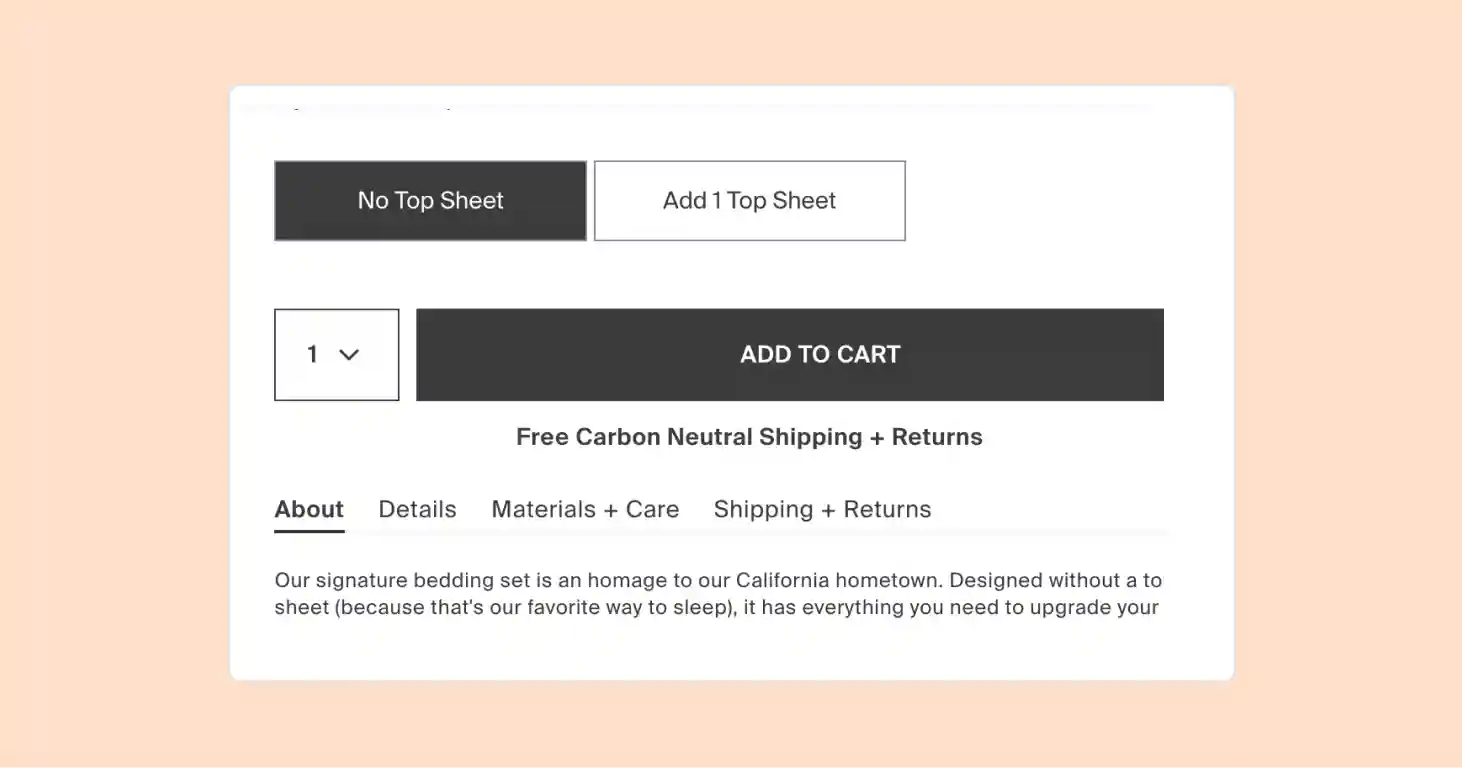
A generous, easy-to-find return policy reduces purchase risk, especially for first-time buyers. Money-back guarantees build confidence by eliminating the financial risk of trying a new product or brand. Shoppers return 30% of all products ordered from online retailers. For this reason, a clear and customer-friendly return policy is key to building trust.
Parachute includes a clear label to show off their free and carbon-neutral shipping and returns:
To make returns and exchanges even easier for your customers and agents, consider a dedicated returns management app. Our favorite apps are Loop, Returnly, and ReturnLogic. They are comprehensive, affordable, and integrate with Gorgias for a centralized returns process.
Trust badges & secure payments
Display trust badges like SSL/TLS certificates, Payment Card Industry Data Security Standard (PCI DSS) compliance seals, and payment processor logos (Visa, Mastercard, PayPal) near the payment button. These visual signals reassure shoppers that their payment information is secure.
Social proof on PDP/checkout
Social proof like customer reviews, star ratings, and testimonials on product pages and checkout reduces doubt about product quality. Real-time social proof (e.g., "10 people bought this today") creates urgency and validates the purchase decision.
Offer flexible payment options (wallets, BNPL)
Payment flexibility means offering multiple payment methods to accommodate different shopper preferences. Customers expect to find their preferred payment method at checkout, whether that's credit cards, digital wallets, or buy now pay later options.
Popular payment methods include:
- Credit/debit cards
- PayPal
- Apple Pay / Google Pay
- BNPL (Klarna, Affirm, Afterpay)
Choosing a payment processing solution that can accept various payment methods is the simplest way to offer your customers this level of flexibility. For example, with PayPal, ecommerce stores can accept credit card payments, debit card payments, payments via a PayPal account, and payments via PayPal credit cards.

Shipping costs and delivery timelines
Offering free shipping — or a clear free shipping threshold (e.g., "Free shipping on orders over $50 USD") — reduces abandonment significantly. Showing multiple delivery options (standard, expedited, same-day) gives shoppers control over speed versus cost trade-offs.
Read more: Want to reduce shipping costs? Read our guide on how to offer free shipping.
Live chat to resolve last-second doubts
Live chat on product pages and checkout helps shoppers get instant answers to questions that might otherwise cause abandonment. Ecommerce customer service that can catch customers at critical moments is key to reducing online shopping cart abandonment. AI-powered chatbots can handle common questions 24/7, ensuring customers receive timely support even outside business hours.
A customer support platform like Gorgias lets you add live chat to your website. This enables customers to instantly connect with a support agent. This timely support can nudge shoppers toward completing their purchase.
Having live chat support ready is especially important when high average order value (AOV) customers are on the fence.
Check out our customer story on CROSSNET, a Gorgias customer that once secured a whopping $450,000 through a live chat conversation:
Recover abandoned carts
Re-engage shoppers who left without buying through proven recovery channels. Email, SMS, and retargeting ads bring customers back to complete their purchase.
Abandoned cart emails (best practices)
Abandoned cart emails remind shoppers of items left behind and encourage them to complete checkout. Send the first email within 1 hour while intent is still high, then follow up at 24 and 48 hours if they don't return.
Best practices for abandoned cart emails:
- Send first email within 1 hour
- Include product images and shopper name
- Clear CTA: "Complete your purchase"
- Add urgency or discount in follow-ups
Many email marketing solutions like Klaviyo and ActiveCampaign make it easy to create automated abandoned cart recovery campaigns.
As far as the copy, check out the cheeky email our friends at Braxley Bands send to customers who leave items in their cart:
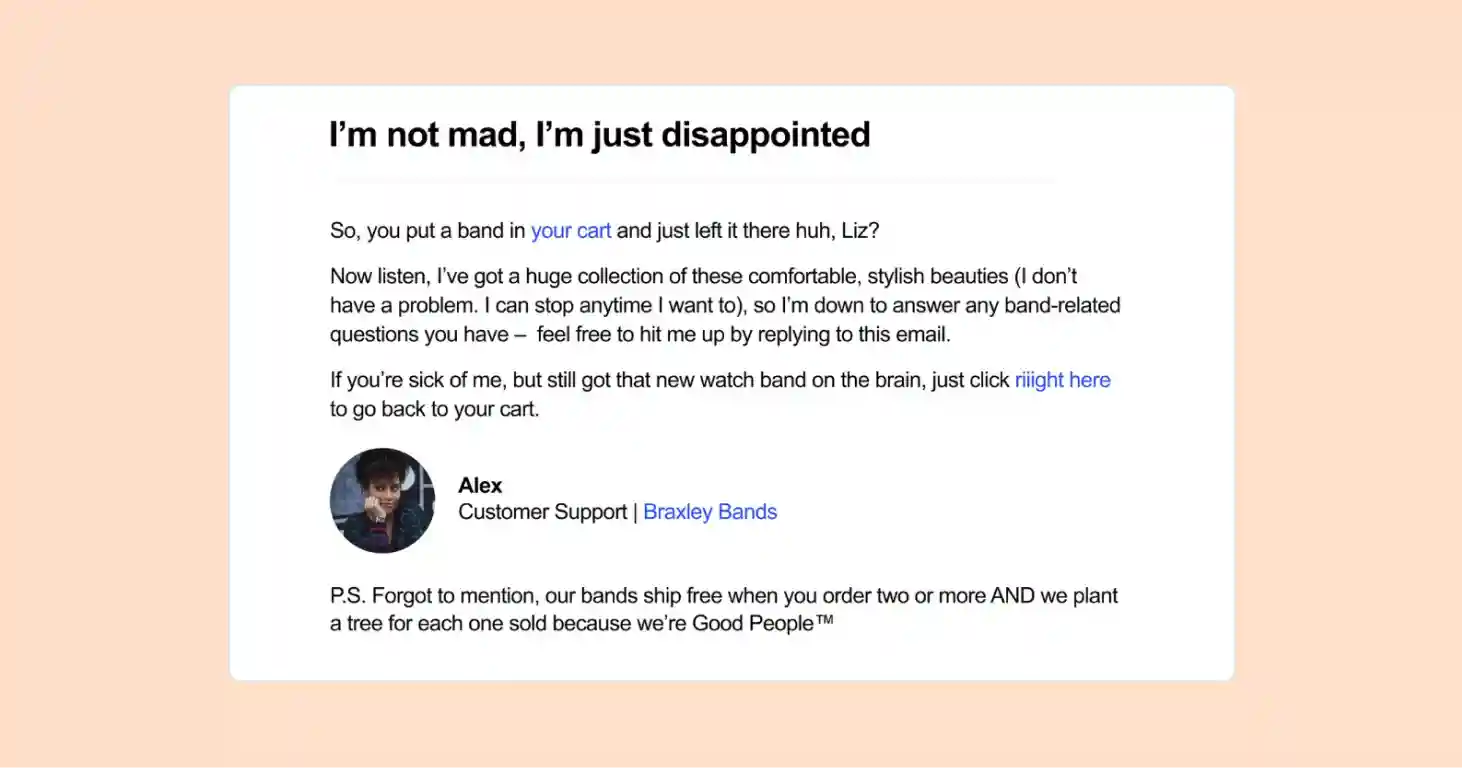
They also follow this email up with a text message that offers a 15% off discount.
SMS/WhatsApp reminders
SMS and WhatsApp messages have higher open rates than email, often exceeding 90%. These channels work well for time-sensitive reminders (e.g., "Your cart expires in 2 hours") and should include a direct link to the abandoned cart.
Retargeting ads (DPA)
Dynamic product ads (DPA) on Facebook, Instagram, and Google show shoppers the exact items they left behind as they browse other sites. Retargeting keeps your brand top-of-mind and provides additional touchpoints to bring customers back. For best results, combine retargeting with email and SMS for multi-channel recovery.
Exit-intent offers and on-site incentives
Exit-intent pop-ups detect when a shopper is about to leave and offer a discount or free shipping to keep them on-site. Urgency messaging (e.g., "10% off if you buy now") can convert hesitant shoppers. Use this tactic sparingly to avoid training shoppers to wait for discounts.
Our analysis of 300 Shopify store owners showed 50% of online stores use website pop-ups to engage visitors. This isn't surprising since pop-ups can yield a conversion rate of between 3% and 11%, compared to standard rates around 2%.
Your ecommerce platform will have pop-up tools like SmartPopup or Pixelpop available for integration. If you use Shopify, check out our list of Shopify pop-ups for a complete rundown of the best tools.
Test and scale what works
Continuously improve checkout and recovery tactics through testing and optimization. What works for one store may not work for another, so ongoing experimentation is essential.
A/B test checkout & recovery flows
A/B testing lets you compare two versions of a checkout page or recovery email to see which converts better. Test one variable at a time (e.g., CTA button color, number of form fields, email subject line) and wait for statistical significance before declaring a winner.
Monitor speed & Core Web Vitals
Slow page load times increase abandonment — every second counts. Core Web Vitals (Largest Contentful Paint, First Input Delay, Cumulative Layout Shift) are Google's benchmarks for page speed and user experience. Use tools like Google PageSpeed Insights or real user monitoring (RUM) to track performance and identify bottlenecks.
Many tools can optimize page load speeds, including Google's PageSpeed Insights. Ensuring that you are using an ecommerce platform or checkout solution that offers an optimized UI and fast loading times is also crucial.
Leverage recovery apps/integrations
Recovery apps and integrations available on ecommerce platforms like Shopify and BigCommerce automate cart recovery workflows. Email automation tools, SMS platforms, and retargeting pixel integrations reduce manual effort while increasing recovery rates. Gorgias integrates with Shopify and other platforms to centralize customer data and automate recovery flows across channels.
Turn conversations into conversions with Gorgias
Gorgias is a conversational commerce platform built for ecommerce brands that need to scale support, drive revenue, and reduce cart abandonment. Here's how Gorgias helps:
- Centralizes customer conversations from email, chat, SMS, and social media in one inbox
- Use AI Agent to answer pre-purchase questions 24/7 (e.g., "Does this jacket run large?" or "When will this ship?")
- Automates abandoned cart recovery emails and SMS reminders with personalized product recommendations
- Provides live chat on product pages and checkout to resolve last-second doubts
- Integrates with Shopify for real-time order data, enabling agents to see cart contents, order history, and customer details instantly
Gorgias's AI Agent can handle up to 60% of support inquiries, freeing your team to focus on high-value conversations that drive revenue.
To try our customer service platform free for seven days, sign up for Gorgias today.
{{lead-magnet-2}}
9 Ways to Improve Your Post-Checkout Experience (and Keep Customers Coming Back)
TL;DR:
- Checkout is where your retention strategy begins. A strong post-purchase experience helps turn first-time buyers into repeat customers and reduces returns.
- Make support fast, visible, and proactive. Offer live chat, clear FAQs, and updates so customers don’t have to chase you for answers.
- Use post-purchase touchpoints to build trust and drive repeat sales. Optimize confirmation emails, clarify delivery timelines, and send timely order updates.
- Give customers control and keep your UX friction-free. Ensure checkout works smoothly on all devices and allow self-service order changes to reduce support load.
- Stay engaged after delivery to boost loyalty and growth. Use remarketing, create a memorable unboxing experience, and ask for reviews to keep customers coming back.
Your job doesn't end once a customer makes a purchase.
Of course, the marketing work you do pre-purchase plays an important role in establishing a well-rounded shopping experience, but there's a world of tactics to employ after your customer hits the “buy” button that can help you entice first time shoppers to make a second purchase.
Remember that without designing an inclusive experience that encourages customer retention, you may struggle to create a solid growth path for your business. If you want to keep new customers coming, reengage past shoppers, and reduce returns, here are nine tips for delivering an outstanding post-checkout experience.
{{lead-magnet-1}}
9 ways to create a better post-checkout experience for your customers
- Offer amazing customer support
- Keep your checkout button visible on every device
- Make the most out of your confirmation email
- Make delivery dates and next steps clear
- Send customers order updates before they have to ask
- Let customers manage their own order changes
- Stay in touch later with remarketing
- Enhance the “unboxing” experience
- Ask for reviews and follow up after the item arrives
1) Offer amazing customer support
First and foremost, let’s make sure you’re offering great customer support before we explore other options for improving your post-checkout experience. While you might already be doing everything you reasonably can to ensure your customers don’t experience disruptions or problems after a purchase, sometimes hiccups happen. It’s not so much about avoiding problems entirely but rather how you deal with them when they occur.
Sometimes your shoppers will reach out to you after a purchase with questions about their item’s delivery or how to return something. (This is much easier with the right returns management and order management software.) And they may be frustrated or impatient. Make it easier for them (and ultimately better for you) by offering ways to contact you on the channels they prefer. Also, offer proactive customer service in the form of FAQ pages and clear return policies to confusion (and save your agents time).
For instance, if your analytics tell you that your audience is most active on Facebook, make sure your page makes it clear how to reach your support team. You can do this by including the relevant links in the About section and of course, be turning on a chatbot function.

But even so, customers may make contact simply by posting on your page or commenting on your posts. Employ a catch all approach by integrating your Facebook page to your Gorgias helpdesk and you’ll be able to automatically publish personalized answers in the comment threads.
And if you don’t have one, get live chat on your site! Gorgias can also help with that by allowing you to seamlessly integrate a live chat into your website, with also a list of customizable rules. The live chat button will show consistently on all pages of your site, both on mobile and desktop.
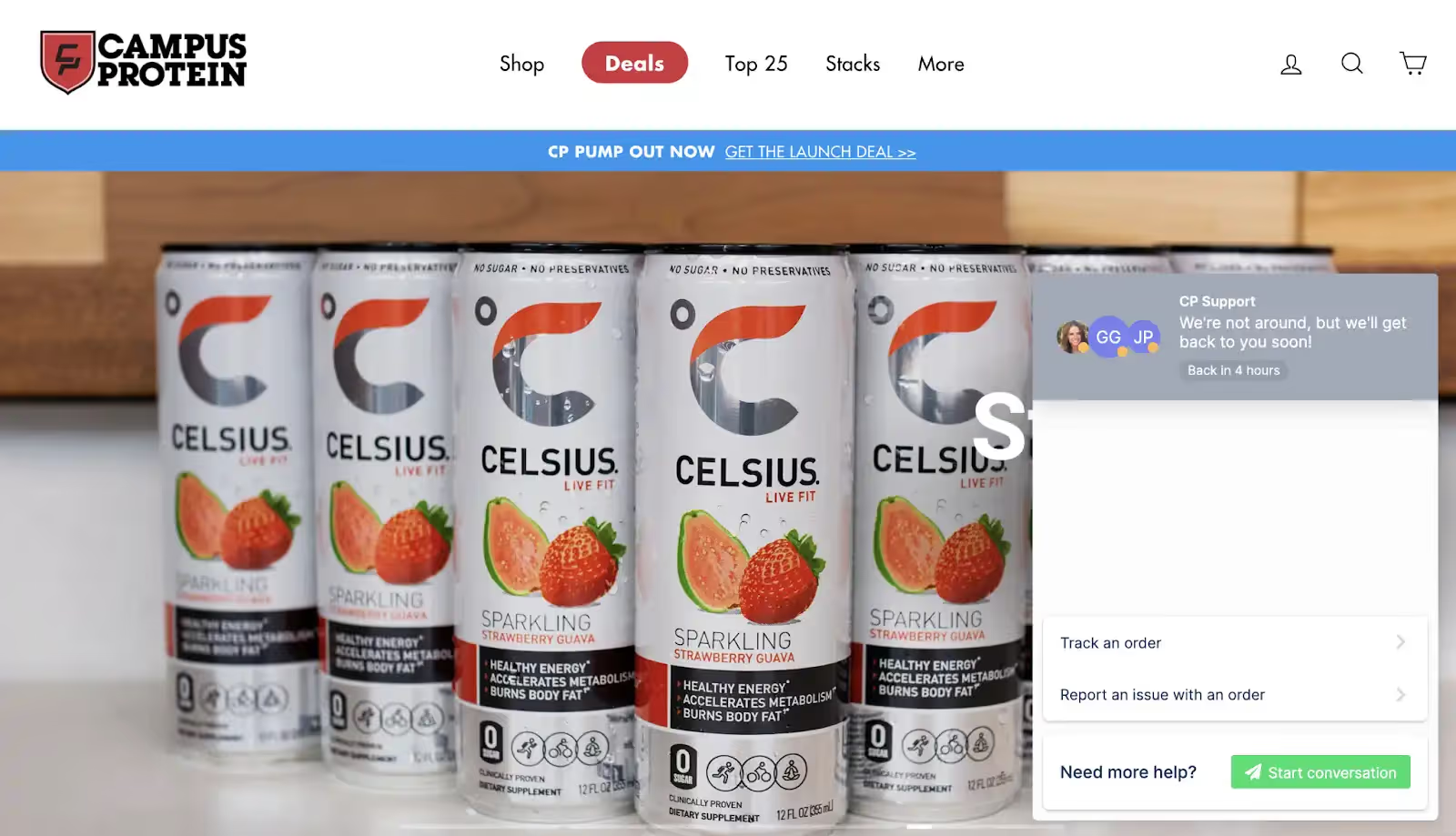
Your customers don’t need to hunt down a special contact page or dig up an email address. They always know exactly where to go when they need help. Also, using live chat is useful to create a personalized, human-centric, accessible, and fast shopping experience, which the value of can’t be discounted!
2) Keep your checkout button visible on every device
This one sounds obvious, but it's easy to miss: live chat widgets, cookie banners, and other third-party apps that sit fixed at the bottom of the page can overlap your checkout button — especially on mobile. If a customer can't tap "Buy now" or "Proceed to checkout" without dismissing something first, some of them simply won't.
Audit your mobile checkout experience regularly, particularly after adding any new app or widget to your store. Check that fixed UI elements don't stack on top of each other on smaller screens, and that your checkout button always has enough breathing room to be tapped comfortably.
3) Make the most out of your confirmation email
While the confirmation email should always include basic information (think an order summary and delivery timeline), you can add a few extras to empower your customer to make the most out of their experience with your brand.
If you’re working with a recommendation engine and already produce editorial content, this would be a great opportunity to attach one or two relevant blog articles to the lower third of your confirmation email. Not only serving as a helpful encouragement to spend more time on your site, but sending relevant content helps to reinforce the idea that you are an expert in your field.


You may also wish to consider including a promo code as a thank you for ordering - it can be a small expense that ensures a customer returns.
4) Make delivery dates and next steps clear
Once your customer purchases an item from your site, you would benefit from having a system in place that allows them to review their item’s delivery status. This could be as simple as a “vanity” order confirmation page that appears once the purchase is confirmed. Show a simple timeline that displays where they are at in the delivery timeline starting with an origin destination and ending with their home address.
Even if they didn’t register on your site and never return to this page, showing them such an order tracking timeline leaves a good impression on your customer by reinforcing the concept that what they’ve purchased really exists and is on its way.
5) Send customers order updates before they have to ask
WISMO — "Where's my order?" — is one of the highest-volume support ticket categories for ecommerce brands. Often, impatience doesn't drive these tickets, it's tracking that hasn't updated. If customers have no idea where their order is, they worry and go straight to your support team.
Set up proactive shipping notifications at every key milestone: confirmed, in transit, out for delivery, delivered. If a delay happens, let customers know before they come looking. Pair that with a branded tracking page instead of a generic carrier portal, and you eliminate most WISMO tickets before they're ever written.
6) Let customers manage their own order changes
After checkout, customers often need quick fixes, like updating a shipping address, swapping a size, or canceling before the item ships. If they can't do this themselves, it becomes a support ticket.
Give customers a self-service portal where they can manage these changes without contacting your team. Just make sure any update syncs across your systems automatically — manually updating Shopify, your warehouse, and your 3PL separately is how errors happen.
{{lead-magnet-1}}
7) Stay in touch later with remarketing
You may have been under the misconception that setting up remarketing ads was reserved exclusively for your bounced traffic. While that’s certainly an effective way to recapture lost traffic, you can also use them to remind previous customers about your products when it makes sense to do so for you.
For example, let’s say you’re a cosmetic company and you’ve just launched a new moisturizer. By setting up a remarketing ad that targets those customers who purchased a similar product from you three months ago, you’re finding them again just as they may be in need of restocking. This helps place customers who may have otherwise forgotten about your brand back into your marketing funnel with the goal of getting them to buy from you again.
8) Enhance the “unboxing” experience
Let’s embrace the fact that we’re living in the age of social media by applying it to your shipping experience. Make your orders feel like the gift that they are by packing your product in a customized box and filling the empty space inside with fun, yet recyclable fillers like crinkle paper or business cards, personalized notes with instructions on how to leave a review or something simple but enjoyable like brand stickers. When relevant, you may also want to consider including a sample of an upcoming item into your box, or a flyer advertising its existence.

When you create an “unboxing experience” you’ll not only trigger those loyalty-building positive emotions in your customer’s brain but you’re also encouraging them to post about your brand on their social feeds - free advertisement to a similar audience of future customers!
9) Ask for reviews and follow up after the item arrives
Reviews are one of the most effective ways to increase sales and encourage new customers to shop with you. You need them to grow your business. But not everyone, even happy shoppers, are hardwired to follow up a purchase with a review. In this instance we like to follow the simple manta: ask and you shall receive.
Asking for reviews doesn't have to seem desperate (even though we all desperately want them). Start by building a review request into your post-checkout email workflow that automatically delivers a request to review the purchased product after delivery occurs. Play around with the sound of your email and don’t be afraid to employ a curious but humble tone that expresses your genuine desire to know that they enjoyed what they bought or how they like to see it improved in the future.
We hope you find these nine tips useful when it comes to making the most out of your post-checkout experience. As always be patient and in time, you’ll reap the rewards of a job well done. Keep an eye on your retention rate to measure your post-checkout success.
{{lead-magnet-2}}
.avif)
8 Tips to Reduce Shipping Costs and Speed Up Delivery
Anyone who recognizes that ecommerce customers have high expectations these days also recognizes that fast shipping is part of what keeps those customers happy. We’ve seen non-essential items on Amazon be delayed because of COVID-19, and that’s cause quite a bit of grumbling from both customers and ecommerce businesses. While guaranteeing fast shipping to your customers is definitely a good thing--16% of people have abandoned a shopping cart if the estimated delivery time is too slow--it’s a double-edged sword. Your customers will love getting their order in one or two business days, but it can also be cripplingly expensive.
The solution is complicated. If shipping faster costs more, do you pass the cost along to your customers? Do you let it eat into your profit margin? Believe it or not, there are other options. Is it possible to have your cake and eat it too? Yes, but you’ll need a crash course in logistics if you’re going to find affordable ecommerce shipping. Let’s dive in!
1. Implement zone skipping
If you’ve ever had to ship your inventory cross-country and had the accompanying jaw-drop when you discovered how expensive that was going to be, you’ve encountered shipping zones before. The further you ship your products, the more it’s going to cost -- obviously -- so how do you get around it?
The answer is zone skipping. To skip zones, you need to store your inventory strategically so that you can choose which location to ship from (and pick the closest one). For example, if you get an order from a customer in Los Angeles and you have inventory stored in Miami and Las Vegas, you’ll want to send them that product from Vegas to save a bunch of money on shipping (and ensure that the order gets to them speedily).
Whether you store and manage your own inventory or rely on a national fulfillment network of warehouses, zone skipping is a smart money saving solution. For example, you’ll probably keep some inventory in a warehouse in Miami, have a location in Pennsylvania to hit the northeast, maybe one in St. Louis for the midwest, and one in Las Vegas to cover the west coast.
2. Consider dimensional weight
Shipping carriers don’t just measure the weight of your packages in pounds and ounces anymore - if this is news to you, this could be a major opportunity to decrease your costs. When a carrier determines the cost of shipping, they charge you the greater of the two weights - dimensional and actual. Actual weight is just what it sounds like, but dimensional weight measures the size of your package. The bigger it is, the more it costs to ship, even if it’s as light as a feather. It makes affordable ecommerce shipping tough for businesses with large or bulky packages, because they always get charged the dimensional weight.
The good news is if your dimensional weight is greater than your actual weight, you can decrease the size of the package to save money. The more you can minimize the volume of your package the more you can save. Think about how to streamline your packaging experience, whether it’s removing unnecessary infill, using boxes that are more specifically fit for your inventory, or getting rid of any bulky extras that you’re throwing in. Making any one of those changes, even if it seems small, can add up to be huge over time.
3. Determine whether to ship flat-rate or not
For something that claims to simplify the costs of shipping, it is a lot more complicated than it seems at first glance. However, offering flat rate shipping has the potential to save you money, so let’s go over what kinds of businesses can save big with flat rates.
Each carrier has its own flat rate shipping system, so it’s well worth your time to check out a full explainer of flat rate shipping. However, it boils down to a few specific instances in which flat shipping could help you save big.
The first is if your products are small, but heavy - this means you’re getting hefty shipping charges due to the actual weight of the product, and shipping in a flat rate box that doesn’t charge by weight could save you a lot. The second is if you ship from coast to coast frequently - for example, if you have a warehouse on the east coast but a lot of your orders come from the west coast. When you ship with UPS or USPS, the flat rate shipping charge doesn’t change depending on distance, so you’d likely save big there. It could also be a good choice if you need to charge your customers a flat rate, or if you fulfill your orders yourself (and then you could take advantage of the convenience).
If you don’t fall into the above categories, though, stay away from flat shipping. It will likely cost you more in the end.

4. Offer bulk rate shipping discounts
Buy more, pay less. That’s the dream, right? It is when you can manage to get a bulk rate discount from your shipping carrier. If you’re selling a high volume of products and you haven’t looked into getting a bulk discount, you need to get on that ASAP. However, it can be kind of confusing to figure out how to get that discount, as it’s not exactly something that the shipping carriers freely advertise.
There are a few ways you can try to get discounts for more affordable ecommerce shipping from carriers. If you’re a small business and you’re fulfilling everything yourself, you’re most likely to get bulk rates by using a platform like ShipStation or Shippo. They’ll let you compare prices and figure out the cheapest way to ship your items as quickly as possible, and they’re able to take advantage of bulk rate discounts by negotiating with carriers on behalf of all of their clients. Shopify offers a very similar service through their own platform, called Shopify Shipping.
However, unless you’re an enterprise-scale company, the chances are good that the best rates are going to come if you partner with a 3PL fulfillment company. They typically ship a huge volume of packages and are thus able to negotiate a discounted rate - without you having to do as much work.
{{lead-magnet-1}}
5. Beef up your last mile options
The last mile - metaphorically speaking, anyway - is the last step between the warehouse and the customer. This last step can sometimes take the longest. If you’ve ever tracked a package on its way to your house, you may have noticed the significant gap of time between it being out for delivery and actually being delivered. That’s because this step is complicated and relies on a lot of different cogs spinning together as one machine. It can depend on the third party you work with, how busy they are, where their facility is located, what courier they use, and many other factors that are completely out of your control.
As you can imagine, cutting down on the time and cost spent in the last mile is critical. But how can you do it?
First, don’t be afraid to A/B test different courier services to see which one does better. Something like a drone delivery service, while very cool, is probably way too expensive. But trying different companies can help you find that sweet spot between costly and quick. While Fedex and UPS frequently outsource to USPS for the last mile because of their coverage, other options have popped up in the last few years. Just like Uber Eats or Lyft, drivers contract with companies and use their car to complete deliveries - in this case, getting your package to the customer’s door.
You can also consider a pick-up option, which cuts out that last mile entirely. Make the customer come to you! If you have brick-and-mortar stores, setting up in-store pickup is an easy choice. If not, you may even want to consider participating in something like the UPS Access Point program.
6. Encourage larger average order sizes
In general, the more items you can ship in the same box, the more you can save on shipping. And when you’re saving on shipping, you can give some of those savings back by offering upgraded fast shipping or free shipping. But how?
A common way to encourage larger order sizes is to offer free shipping once they hit a certain minimum (like $50). However, you can try a new take on that, which is to offer upgraded shipping once they hit the minimum, which will reward them for ordering more by getting it to them faster. To set your minimum, look at your average order amount and set it a bit higher than that, which should bring your overall average order amount up over time. To do a trial run, try doing a customer appreciation campaign with upgraded shipping at your new minimum to gauge the popularity.
Another option is to sell in kits or in bulk when you can. By packaging best-selling or complementary products together you can easily increase the size of the order (and it’s an easy upsell for your customer as well). Ultimately, the more items you can fit in one shipment, the cheaper it will be to get it there quickly. This is a great way to balance affordable ecommerce shipping with fast shipping speeds.

7. Minimize the weight of your product and/or packaging
Hot take: no one cares about your inserts. Not-so-hot take: the unboxing experience is a crucial part of the impression you make on your customer. Both are true; how?
It’s true that unboxing is a big part of your image, and it takes on a life of its own on social media. The problem is that when companies think of unboxing, they think the more the better - and that’s not necessarily true. Practically, those materials take up valuable space and weight in the box, leading to marginal increases in shipping cost that become significant at scale. They also take longer to assemble, and all of the inserts you throw in will be tossed in the recycling bin (or the garbage) eventually, even if they do bring in an extra lead or two. It’s not worth it.
What is worth it is designing smart. Your unboxing experience doesn’t have to be over the top and filled to the brim with extras - a smart, thoughtful experience is just as meaningful for your customers, and packaging trends are moving that way as well. Consider talking to a package design company to see how you can really wow with design and ditch the inserts, or think about how using less can actually be more effective (like moving towards a more environmentally-friendly image).
8. Restrict where you offer fast shipping
Lastly, fast shipping does not have to be an all-or-nothing game. With the U.S. being the size that it is, at a certain point, you’re going to have to make some exceptions to where you can get to quickly. Just ask anyone in Alaska or Hawaii-- they’ll be the first to tell you that it takes ages for shipments to arrive. Finding fast and affordable ecommerce shipping for the entire U.S. is going to be pretty difficult, especially if you’re not working for a 3PL, so you’re going to have to make some sacrifices. Sorry Alaska and Hawaii.
To make conditional fast shipping work for you, you can set parameters that will allow you to offer fast shipping where it is reasonable and affordable to you. This could be within major urban zones, or areas within a certain radius of the warehouse(s) that store your inventory. You can consider shipping to more remote areas, or places a certain distance outside of your core shipping radius, to be like shipping outside the lower 48. Even if you can’t offer fast shipping to all of your customers, you can at least increase your conversion rate where you do offer it without breaking the bank.
Related: Our list of the 12 best shipping softwares for ecommerce.
Final thoughts
Fast shipping and low costs are a balancing act. With customers expecting everything faster than ever (and freer than ever) it can feel overwhelming to try to make everyone happy. In reality, you’re going to be best served by cutting your own shipping costs as much as you can, and taking advantage of any deals you can get by using special services. Hope that cake tastes good!
{{lead-magnet-2}}
Ecommerce SEO Guide: Rank Higher, Spend Less, Sell More
TL;DR:
- Ecommerce SEO builds long-term brand authority. Ranking organically establishes credibility, lowers acquisition costs, and creates compounding traffic that generates revenue after the initial work.
- Keep products within three clicks of your homepage. Structure your site as homepage → category → subcategory → product so Google and customers easily find products.
- Write unique descriptions with transactional keywords. Avoid copying manufacturer text. Target buying-intent keywords like “buy wireless headphones under $100.”
- AI is changing search with zero-click results. Use structured data, comprehensive content, and trust signals to get cited in AI overviews.
Organic visibility is the difference between scaling profitably and burning through ad budgets just to stay visible. Every day, Google processes roughly 3.5 billion searches, and a significant portion are product-related searches with high purchase intent. Millions of ecommerce stores are competing for the same audience.
This guide covers the strategic foundations that matter most: keyword research that targets buyers, site architecture Google can crawl efficiently, on-page optimization that converts, and technical foundations that prevent traffic loss. Whether you're optimizing product pages or rethinking your entire approach, these tactics will help you rank where it counts.
What is ecommerce SEO?
Ecommerce SEO is the process of optimizing online stores to rank higher in organic search results for product and category searches. Unlike general SEO that often focuses on informational content like blog posts, ecommerce SEO zeroes in on people who are ready to buy. This means optimizing product detail pages (PDPs), category pages, and the technical infrastructure that supports them.
The core components include:
- Keyword research targeting product terms
- Site architecture that keeps products within easy reach
- On-page elements like titles and descriptions
- Technical optimizations for speed and crawlability
- Content strategies that build authority
Although paid ads will attract more people as well, SEO will cost you a lot less and yield better results in the long run. Paid ads are hindered by things like ad blockers and ad blindness — and they only work when you're investing money into them.
How ecommerce SERPs differ from other search results
Ecommerce search results are visually distinct and designed for shoppers ready to buy.
The key features of ecommerce SERPs:
- Product carousels with images and prices
- Shopping ads at the top of the page
- Review snippets with star ratings
- Dedicated shopping tabs for product comparisons
- Zero-click results and AI Overviews that answer questions directly on the SERP
Ecommerce SERPs vs. informational SERPs
Informational queries (like “how to tie running shoes”) typically show blog posts, guides, and how-to content in traditional blue-link format. Ecommerce queries prioritize visual, transactional elements that push organic listings further down the page.
[img: A side-by-side comparison screenshot showing an informational SERP (left) vs. an ecommerce SERP (right) for related queries—for example, "how to choose running shoes" vs. "running shoes"—to visually demonstrate the difference in layout and features.]
Category intent vs. product intent
Search behavior also varies by specificity. A broad search like “running shoes” surfaces category pages from major retailers, while a specific query like “Nike Air Zoom Pegasus 40” pulls up individual product pages and direct purchase options.
Why ecommerce SEO matters
Organic traffic compounds, paid traffic doesn't. Every dollar you spend on ads stops working the moment you pause the campaign. But ranking organically? That's an asset that keeps generating traffic and revenue long after the initial work is done.
The first page of Google captures nearly all the traffic. A study by Chitika found that the first organic result on Google gets 95% of traffic. Positions one through three capture the majority of clicks, and anything beyond page one gets very little traffic.
SEO builds brand authority and trust. Customers trust organic results more than ads — they see you as a legitimate player in your space, not just someone paying for attention. This translates to lower customer acquisition costs (CAC) and higher lifetime value.
Impact on organic search vs. paid spend
Two key metrics show whether your ecommerce SEO is working: click-through rate (CTR) and how much you're spending on paid advertising. Here's how SEO directly impacts both.
Click-through rate (CTR) is the percentage of people who organically see your listing in search results and click it. Paid spend refers to the money you invest in advertising, like Google Ads or pay-per-click (PPC) campaigns.
When it comes to CTR, organic search consistently outperforms paid ads. While paid ads might get 2-5% of searchers to click, the top organic position can capture 25-30% or higher. The main difference is that each organic click costs you nothing, while every paid click comes with a price tag.
The advantage goes beyond individual clicks. When you optimize your site — whether through keyword research, improving product pages, or fixing technical issues — that work continues generating traffic for months or years. In contrast, paid advertising only works while you're actively spending. Stop the ads, and the traffic disappears immediately.
Keyword research for ecommerce
Keyword research is the foundation of ecommerce SEO. It's the process of identifying the exact words and phrases your potential customers type into Google when they're looking to buy. Get this wrong, and you're optimizing pages that no one is searching for. Get it right, and you're positioning your products exactly where buyers are looking.
The keyword research process has three phases: discovery (find potential keywords), intent analysis (understand what searchers want), and selection (choose keywords based on search volume, competition, and business relevance).
For ecommerce, focus on transactional intent or keywords that signal someone is ready to buy. These include phrases like “buy,” “best price,” “free shipping,” or specific product names and models.
Here are three practical strategies to find the right keywords for your store:
- Discovery: Use autocomplete and related queries from Google and Amazon
- Intent analysis: Mine competitor sites and Reddit communities
- Selection: Select keywords by intent, volume, and difficulty
1. Discovery: Use autocomplete and related queries from Google and Amazon
Start by entering a broad product term into Google — let's say “dog food” — and watch what appears. You might see suggestions like “organic dog food,” “best dog food for puppies,” and “dog food delivery.” Each of these is a potential keyword target that reflects actual search behavior.
Amazon's autocomplete is even more product-focused. The suggestions there tend to be highly specific since people are typically ready to buy. Compare “dog food” on Google versus Amazon, and you'll notice Amazon surfaces brand names, specific formulations, and package sizes much faster.
Pro Tip: Don't forget the “related searches” section at the bottom of Google's search results page. These are semantically related queries that help you understand the broader topic landscape and discover long-tail variations you might have missed.
2. Intent analysis: Mine competitor sites and subreddit communities
Competitor keyword gap analysis is one of the fastest ways to find opportunities. Tools like Ahrefs and Semrush let you enter a competitor's domain and see exactly which keywords they rank for that you don't. This reveals gaps in your own strategy and shows you what's already working in your market.
For example, if you sell camping gear and a competitor ranks for “ultralight backpacking tent under 2 pounds,"” but you don't, that's a clear opportunity to create or optimize a page targeting that specific query.
Pro Tip: People speak differently in communities than they do in broad product searches. Browse subreddits related to your niche — r/camping, r/fitness, r/skincareaddiction — and pay attention to how people speak. The terminology you find there often translates directly into long-tail keywords that tools miss.
3. Selection: Select keywords by intent, volume, and difficulty
Once you've gathered potential keywords from the top search engines, you need to prioritize which ones to actually target. You can't optimize for everything. The three factors that determine whether a keyword is worth your time are search intent, keyword difficulty (KD), and search volume.
Search intent is what someone is trying to accomplish when they search. Understanding intent helps you focus on keywords from people ready to buy. The three main types are:
- Informational: Learning or research (“how do wireless headphones work”)
- Commercial investigation: Comparing options (“best wireless headphones 2024”)
- Transactional: Ready to buy (“buy wireless headphones under $100”)
Prioritize transactional and commercial investigation keywords for ecommerce.
Keyword difficulty (KD) shows how hard it will be to rank based on competition. Most SEO tools use a 0-100 scale. If you're a new or smaller site, target moderate difficulty keywords (KD 20-40) where you can realistically rank within 6-12 months.
Search volume tells you how many people search for a keyword each month. A keyword with 10 monthly searches likely isn't worth targeting, but 500-1,000 searches could drive meaningful traffic — especially with low difficulty and high intent.
The ideal keyword combines transactional or commercial intent, moderate difficulty, and sufficient search volume.
Site architecture for ecommerce
Site architecture is how your website's pages are organized and connected to each other. Good architecture helps Google find and crawl your pages efficiently, helps customers navigate your store easily, and distributes ranking power to your product pages.
As a rule of thumb, keep all products within three clicks of your homepage. That means homepage → category → subcategory → product. Any deeper and products get buried for both customers and search engines. The number of clicks to reach a page from your homepage or “click depth” is important in signaling to Google how important a page is.
Keep navigation simple with minimal click depth
Structure your main navigation around your top categories. If you sell headphones, your structure might look like: Homepage → Headphones → Wireless → Onyx Wireless Over-Ear Headphones. Each level should be meaningful and help customers narrow their options.
This is also called breadcrumb navigation, showing users where they are in your site's hierarchy. It appears as a clickable trail at the top of a page, like “Home > Headphones > Wireless > Sony WH-1000XM5.” Breadcrumbs also appear in search results, making your listings more prominent.
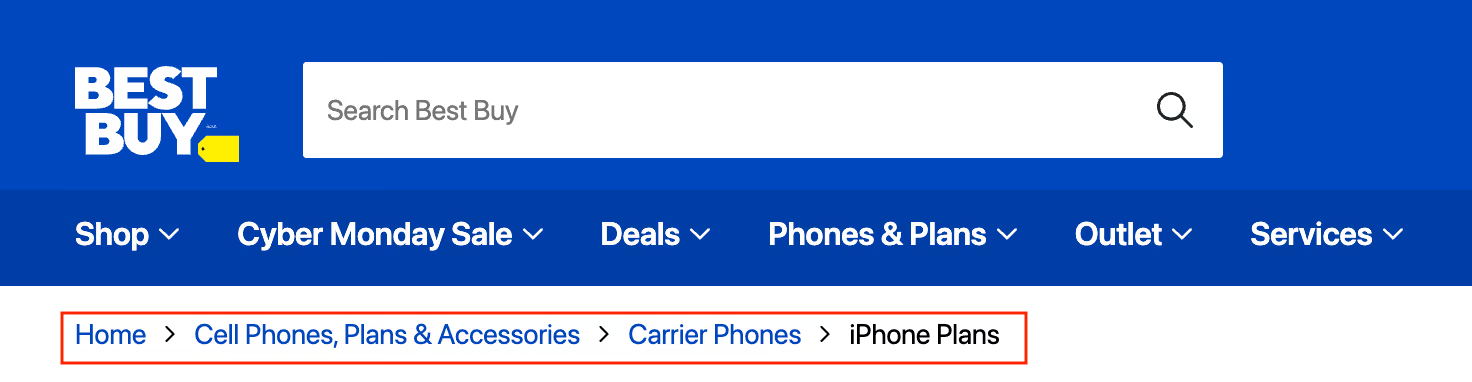
Pro Tip: Avoid creating unnecessary subcategories just because you can. Every additional layer adds friction and dilutes your site's ranking power across too many pages.
Simplify product filters to avoid duplicate content issues
Faceted navigation refers to your website’s product filters for color, size, price, and brand. They're essential for user experience but create SEO problems if not managed properly.
The problem: Each filter combination creates a new URL. For example, filtering headphones by “red” and “Sony” might create “/headphones?color=red&brand=sony”. With multiple filters, you could end up with thousands of nearly identical pages. This confuses Google and wastes your crawl budget — the limited number of pages Google will bother checking on your site.
The solution: Tell Google which pages to pay attention to and which to ignore. You have two options:
- Use canonical tags to point all filter pages back to your main category page. This tells Google to treat all the filtered versions as the same page as /headphones.
- Selectively control what gets indexed. If certain filters are popular searches (like “red shoes”), let Google index those specific pages. For low-value combinations like sort orders or multi-filter pages, add a noindex tag that tells Google to skip them entirely.
This keeps your site organized in Google's eyes while still giving customers the filtering experience they need.
On-page SEO for product and category pages
On-page SEO is optimizing each element of a webpage to rank higher and convert better. Product and category pages are your revenue drivers, so they deserve the most attention.
Focus on these elements: title tags, meta descriptions, URLs, product descriptions, heading tags (H1, H2, H3), internal links, and schema markup.
Write compelling title tags and meta descriptions
Title tags are your most important on-page element. They appear as the clickable headline in search results and in browser tabs. Include your primary keyword (stay under 60 characters to avoid getting cut off) and add modifiers that increase clicks like “buy,” “sale,” “free shipping,” or the current year.
Compare these examples:
- Good title: “Wireless Headphones - Free Shipping on Orders $50+ | YourBrand”
- Bad title: “YourBrand - Products - Electronics - Audio - Headphones - Wireless”
Meta descriptions appear as the summary text below your title in search results. They don't directly impact rankings, but they heavily influence whether someone clicks your result. Include your keyword, highlight benefits or unique selling points, and keep it under 160 characters. Think of it as ad copy competing against nine other results on the page.
Compare these examples:
- Good description: “Shop premium wireless headphones with 40-hour battery life and active noise cancellation. Free two-day shipping on orders over $50.”
- Bad description: “Wireless headphones 40 hour battery life”
Use descriptive URLs and breadcrumbs
Your URLs — the web addresses for each page — should be clean and easy to read. Clear URLs help Google index your site quickly and help visitors understand where they are on your site.
Compare these examples:
- Clean URL: https://www.suitshopping.com/blog
- Messy URL: https://www.suitshopping.com/index.php?page=blog
URL best practices:
- Keep URLs short and descriptive
- Use hyphens to separate words (not underscores)
- Include your target keyword
- Follow a logical hierarchy
Add unique product copy with related terms
Using the same manufacturer's description that appears on 50 other websites gives Google no reason to rank your page over competitors. Thin, duplicate product descriptions are a major SEO problem.
A strong product description includes:
- Core features and specifications
- Benefits, not just features (explain what the product does for the customer)
- Use cases or scenarios
- Related keywords that match how customers search
- Answers to common questions
Pro Tip: Don't forget alt text for product images. Alt text is the descriptive text added to images in your site's backend. It helps Google understand what's in the image and improves accessibility for visually impaired users. Describe what's in the image using natural language and include your product name when appropriate.
Build internal links and add review schema
Now we're getting into the less visible parts of your website, or the behind-the-scenes elements that shape how both shoppers and search engines navigate your store.
Internal linking connects pages within your own website. When done well, it's invisible to shoppers but logically guides them where they need to go, like naturally suggesting “You might also like these running socks” on a running shoe page. Link related products together, category pages to featured products, and blog posts to relevant products to build up link equity.
Schema markup is like the infrastructure beneath a city — you don't see it, but it's what makes everything work smoothly. It's code added to your pages that translates your content into a language search engines easily understand. Think of it as labeling everything in your store so Google knows exactly what each piece of information means.
For ecommerce, the two most important types are:
- Product schema – Tells Google your price, availability, brand, and SKU
- Review schema – Displays star ratings and review count directly in search results
Review schema is especially valuable because those gold stars next to your listing significantly increase click-through rates. Most ecommerce platforms have plugins or built-in support for adding schema, so you don't need to code it manually.
Technical SEO essentials
Technical SEO covers the behind-the-scenes optimizations that ensure search engines can crawl, index, and rank your site effectively. Poor technical SEO can prevent even the best content from ranking.
Secure your site with HTTPS and optimize Core Web Vitals
HTTPS is non-negotiable. It's a confirmed ranking factor, and browsers now flag HTTP sites as "not secure," which destroys trust and conversions. If you're still on HTTP, migrating to HTTPS should be your first priority.
Core Web Vitals are Google's metrics for page experience:
- Largest Contentful Paint (LCP) – Loading speed
- Interaction to Next Paint (INP) – Interactivity and responsiveness
- Cumulative Layout Shift (CLS) – Visual stability (pages shouldn't jump around while loading)
Poor scores hurt rankings and frustrate users. Speed matters: 52% of mobile shoppers will leave if your site doesn't load immediately, and a one-second delay can reduce conversions by 7%.
Try these optimization tactics:
- Compress images
- Use a content delivery network (CDN)
- Minimize JavaScript and CSS
- Enable browser caching
- Lazy-load images (load images only as users scroll to them)
Submit sitemaps and use canonical and noindex tags
An XML sitemap is a file (e.g., at domain.com/sitemap.xml) that lists all your important pages and helps search engines discover them efficiently. Most platforms like Shopify and WooCommerce generate sitemaps automatically, but you should still submit yours through Google Search Console to ensure Google knows about every product and category page.
Canonical tags consolidate duplicate content signals. If multiple URLs show the same or similar content (like filter pages), a canonical tag points to the preferred version and tells Google "index this one, ignore the others."
Noindex tags prevent pages from appearing in search results entirely. Use them for low-value pages like thank-you pages, account dashboards, and certain filter combinations. You want Google spending its crawl budget on pages that actually drive revenue, not administrative pages.
Content marketing strategies to drive demand
Content marketing for ecommerce is about creating content that captures people close to making a purchase, including comparison guides, “best” lists, buying guides, and educational content that positions your products as solutions.
Here are some strategies to create content that drives sales:
Comparison and “best” product lists target commercial intent keywords like “best wireless headphones.” These attract people ready to buy but just need help deciding. Structure posts with feature comparison tables, clear pros and cons, and direct links to your product pages.
Product-led content features your products as solutions. Instead of "10 Best Leather Boots" (which could feature competitors), create "How to Clean and Condition Leather Boots" that demonstrates your leather care products. Or "How to Set Up a Home Office for Under $1000" featuring your desks, chairs, and accessories.
User-generated content (UGC) is social proof that includes everything from reviews and testimonials to customer photos. Reviews often include natural language variations of product terms you'd never think to optimize for. Encourage UGC by sending post-purchase review requests or asking customers to share product photos on social media.
Link building playbook
Link building is the practice of earning one-way hyperlinks from other websites to yours. Backlinks are votes of confidence — the more high-quality sites that link to you, the more authority Google assigns to your domain.
While it’s one of the most effective techniques for improving search rankings, there’s a catch: many websites don't want to link to commercial product pages, so you need to get creative.
Here are proven link building strategies for ecommerce:
- Claim unlinked mentions. Use tools like Google Alerts or Ahrefs to find when someone mentions your brand without linking to you, then reach out and ask them to add a link.
- Get supplier and distributor links. Ask your suppliers, manufacturers, and distributors to link to your store from their websites.
- Use HARO (Help a Reporter Out). Respond to journalist queries in your industry to earn authoritative press links from major publications.
- Launch digital PR campaigns. Create newsworthy content like original research, data studies, or timely commentary that journalists want to cover.
- Run backlink gap analysis. Use tools like Ahrefs or Semrush to see who's linking to competitors but not to you, then reach out to those sites.
- Guest post on industry blogs. Write educational content for blogs in your niche and include links back to your site.
- Partner with affiliates and influencers. Offer discount codes and run giveaways with influencers and bloggers to earn backlinks and brand exposure.
- Fix broken links. Find broken links on relevant websites and suggest your content as a replacement.
Ecommerce SEO mistakes to avoid
Even experienced ecommerce teams make avoidable mistakes that damage their SEO performance.
Here are the key mistakes to avoid:
- Thin content - Pages with just a product image and one sentence don't give Google enough information to rank you well.
- Duplicate product descriptions - If you copy manufacturer descriptions word-for-word, Google will rank the original source instead of your store.
- Keyword stuffing - Repeating the same keyword over and over looks unnatural and can get you penalized by Google.
- Indexing too many filter pages - Letting Google crawl every color, size, and price filter creates thousands of similar pages that waste your crawl budget.
- Creating orphan pages - Pages with no internal links pointing to them are invisible to both customers and search engines.
The future of ecommerce SEO
Search is changing fast because of AI. Google now uses AI to create answers directly in search results by pulling information from multiple websites. When someone searches “best lipgloss” Google might show a comparison table with recommendations before anyone clicks a link. These are called zero-click results, where users get their answer without visiting your site.
To stay visible, focus on quality and authority. Structured data helps Google understand your product information clearly, so use it extensively. Your content should fully answer customer questions, not just brief descriptions. Trust signals like customer reviews and links from reputable sites matter more than ever.
Above all, high-quality content still drives traffic even when the playing field has changed.
Quick-start checklist for immediate impact
- Set up Google Search Console. This free tool shows you how Google sees your site and alerts you to issues.
- Conduct keyword research. Use Google autocomplete, competitor analysis, and tools like Ahrefs or Semrush to identify 10-20 high-priority keywords targeting transactional intent.
- Audit your top pages. Run your best-selling product and top category pages through PageSpeed Insights and fix any Core Web Vitals issues flagging as "”poor.”
- Optimize title tags and meta descriptions. Start with your homepage and top 10 product/category pages. Include primary keywords and compelling language that encourages clicks.
- Build five pieces of commercial content. Create comparison guides, "best" lists, or buying guides that naturally link to your products.
See how Gorgias helps ecommerce brands optimize customer conversations for SEO and conversions. Book a demo to learn more.
{{lead-magnet-2}}

Influencer Marketing for Ecommerce: Strategies & Tips for Getting Started
Almost 50% of consumers depend on ecommerce influencers to guide their purchasing decisions.
Partnering up with an influencer your target audience resonates with can help you attract new customers, cultivate your community, and grow your sales.
We've discussed the benefits of social media for customer service, but in this blog we'll discuss using social media influencers to expand your brand's reach. Here’s what you’ll learn in this guide:
- What influencer partnerships are all about and how can you use them
- Why companies similar to yours choose influencer marketing
- How to find the right influencers and get started on your first campaign
What is influencer marketing for ecommerce?
Influencer marketing is the process of working with social media influencers to advertise your ecommerce products on their social channels to their followers. Usually, you'll work with influencers whose followers are within your target audience.
{{lead-magnet-1}}
How to leverage influencer marketing
You know how it works, how to use it, but you’re still not sure how to create an influencer marketing campaign. Don’t worry, it’s not that complicated.
Here’s what you need to know about launching an influencer campaign.
1. Create a marketing persona
You can’t pick a partner if you don’t know who you want to attract. That’s why creating a “marketing persona” needs to be the first thing you do. Determining what age, gender, and interests of your average customer can help you a lot.
Let’s say you’re selling women's clothing. You do your homework and find out that most of your visitors are ladies in their 40s from North America and Canada. This knowledge narrows your search down. You need an English-speaking influencer that appeals to middle-aged women.
That can get things going.
2. Select social platforms
Once you get to know your audience, you’ll easily find out what are some of their social media platforms on the Internet. Consider platforms like TikTok, Instagram, Facebook, Twitter, or LinkedIn.

If you’re looking for a universal solution, then you should reach out to Instagram influencers, since the platform has one of the most diverse user-bases. According to Social Media Today, Instagram is the most active influencer platform.
3. Look for the right influencer for your store
You of course want a partner with a good reach. Contacting a person with less than 1,000 followers doesn’t make any sense, correct? That person can’t be even called an influencer. But you shouldn’t get stuck on every metric.
Engagement is what you’re looking for.
Sometimes, smaller is better. You might be surprised to know that micro-influencers are far more effective than big ones. In fact, an average micro-influencer gets 7X more engagement than a far-reaching one.

4. Reach out to multiple influencers
As soon as you nail what type of audience you’re targeting and what kind of person would suit your store best, you need to start getting in contact with influencers. However, you can’t just reach out to one and hope you get a response right away.
You need to contact a few social media personalities at the same time. Using a platform such as FameBit, or #Paid you’ll be able to contact several influencers, sort them by followers, age, and other metrics that can be helpful for your marketing campaign.

5. Evaluate your potential partners
As we keep saying, you need to find someone that your buyers will find relatable. Relatability is twice as important as popularity if you want to attract the right kind of people.
Talk to the influencers, see what their values are, do they align with your values, and see whether or not they’d shop at your store if you didn’t reach out to them.
6. Set the objectives for your partnership
Like any other form of marketing, your influencer strategy can and has to be measured. You can’t expect to have a successful strategy without some tweaks along the way. And you can’t really make any corrections to your strategy if you don't know how it’s performing in the first place.
According to research from the Digital Marketing Institute, these are the biggest KPIs for measuring your effectiveness:
- Reach and Awareness
- Audience Growth
- Referral Traffic
- Conversion Rate
- User Engagement
Your KPI choice depends on your needs and ambitions. Sit down with the rest of your team, discuss in which direction you want to take things, and only then select important KPIs.
7. Select a platform to measure your campaign
For three-quarters of business owners, measuring ROI is the biggest challenge of an influencer marketing campaign. Nonetheless, measuring success should be one of the most important parts of your campaign.
You need to have the right tools if you want to get the job done right. NeoRech can help you track referrals and monitor the effectiveness of every single influencer you have, while TapInfluence can help you measure your ROI more effectively.
8. Launch your first influencer campaign
Once you have your influencers in place, your KPIs all set, and all of the measuring tools in place, you can give your partners permission to start the campaign.
For the first couple of days, the surge of visitors might not be huge. However, after a month or so, you can expect to see some serious results from the campaign.
9. Ask for testimonials
This is a perfect opportunity to get some content for your website. You can always ask for a couple of testimonials from the people you’re working with and place the quote alongside their pictures on your website.
Now your visitors can see who works with you.
Every person that visits your website will know that the influencer vouches for your store, products, and organization. That testimonial will allow you to build your brand, establish credibility, and boost trust among your consumer base.
10. Make the partnership mutually beneficial
Last but not least, try to make the partnership mutually beneficial for both parties. By that we mean, consider offering the influencer some discount codes or some of your products.
The influencer can and will send a good number of users your way. That shouldn’t be a one-and-done deal. More than a third of influencers like to work with brands long-term. If the first campaign turns out as planned, why not do it a few more times?

Why businesses rely on influencer marketing
A business can’t rely only on influencers to increase sales. You should look at this as an enhancement tool for your current marketing strategy.
It’s a great, cost-effective way of improving marketing efforts. Nearly 90% of marketers feel that influencer marketing has a better ROI than other, more traditional marketing channels.
Let’s look at a few more ways influencer marketing can help your store…

They have real sway with their followers
While a niche influencer may not be able to reach millions of people, they can still have a lot of influence over a small group of users. Niche influencers attract are comprised out of users who share the same interests, buy the same products, and visit the same stores.
Therefore, by working with an influential person, you’ll be able to reach that small amount of people and turn them into regular customers. You just need to find a person that caters to your target audience. For example, if you go into a random gym in your area, you’ll probably find someone wearing Gymshark clothing. The company is huge. At the moment, it’s valued at about $200 million.

And how did the company manage to find the right influencers? By knowing their target audience.
Their gym clothing was aimed at millennials. As soon as Gymshark launched a line of women’s clothing, they sought out young fitness influencers like Nikki Blackketter to team up with them. Soon after, their “Flex Leggings” became a huge hit among millennials.
They're really relatable
As we established, while celebrities may be influencers, they’re usually seen as spokespeople for certain brands and companies. Why is that? That’s because celebrities live completely different lives than 99% of us.
Simply put, the average person can’t relate to most celebrities. Relatability is everything if you want your campaign to generate real results. Almost 90% of Gen Z-ers and Millennials follow influencers because they’re relatable.
They can help niche or taboo businesses
If you’re selling niche products that aren’t considered mainstream, you may have trouble finding success with mainstream advertising. For instance, anything that Google deems “dangerous advertising” is heavily prohibited.
Everything CBD and marijuana-related products to martial arts equipment and hunting gear all fall into that category. Stores that sell similar products can get a healthy amount of visitors and brand exposure from influencers.
Partner up to get your profits up
If you want to partner up with an ecommerce influencer to grow your online store, you should start by thinking about how that partnership can help your store increase sales and help your brand become more known. Here are a few things to keep in mind:
- Influencer marketing works perfectly on people who dislike traditional marketing
- Social platforms allow influencers to make the most out of their connection with users
- Continuously investing in influencer marketing can be beneficial for both parties
And remember: even though influencer marketing is still new and always adapting, it’s just a regular marketing strategy that needs to be monitored and measured. For that, you need the best tools. Speaking of which, check out our post on the best social media integrations for Shopify.
If you are starting out with an influencer campaign, especially on Instagram you may see a spike in engagement on your Instagram feed. If those users are commenting on your posts - especially your products, don’t just ignore them, welcome them to your community.
{{lead-magnet-2}}

10 Customer Appreciation Ideas to Grow Your Business & Retain Return Shoppers
Your customers are the backbone of your business. Ask any successful entrepreneur and they’ll agree that your number one priority should be to nurture satisfaction with your shoppers. Show them some love and run a customer appreciation campaign.
What is customer appreciation?
A win-win for your shoppers and your brand, a customer appreciation campaign or a shopper appreciation campaign is a promotion that a company runs to celebrate its customers. It can include discounts, small gifts or freebies, contests, and more. The point is to delight your customers.
You can run a shopper appreciation campaign annually, quarterly, monthly -- there are no set rules. But, one constant with all successful shopper appreciation promotions is that they show customers recognition and gratitude for shopping with the brand beyond a simple ‘thank you.’
A promotion like this will help you retain shoppers and increase eCommerce conversions.
Customer appreciation ideas to show gratitude and retain loyal customers
Let’s explore some ideas to kick off your next customer appreciation campaign.
- Run a flash sale
- Feature customers in social media posts
- Make it an annual event
- Share brand promotions with your personal network
- Send handwritten notes
- Send free swag
- Follow up with your brand advocates
- Donate to a cause
- Send a gift card
- Reward customers with a loyalty program
- Offer a price cut
1) Run a flash sale
This idea goes against what I mentioned earlier about letting shoppers know what you’re planning in advance (to generate hype). But, if you have limited resources and you think it’s time to show customers you truly care, a flash sale is a viable option.

Above is an example from Hand-Picked, an online jewelry and gift retailer. For just four hours, everything in their store was on sale at a 40% discount. They announced the sale on social media for their followers, which created an atmosphere of exclusivity and urgency -- very appealing.
2) Feature your shoppers on social media posts
People love it when you love them. Show your customers appreciation by sharing their images on social media to your followers. Attention like this makes shoppers feel like they do when their new friend shares a photo of them -- like they’re someone to be proud of.

Rianna Phillips is an accessories seller with a flair for glam. In the above example, they share a photo of their customer, @imb_amande, “looking effortlessly chic.” In this case, they’ve placed their product (a pretty, pink phone case) in a real-life glamorous-looking scenario while showing their gratitude for the purchase; this tactic appeals to the customer(s) you promote and onlookers who might want to try the product.
3) Make it an annual event
One way to encourage customer loyalty is to make sure your shoppers have something to look forward to. Plan your promotions in advance and make sure your shoppers know that they can consistently expect exciting deals from your brand.

[Image source: Plum Deluxe]
Above, you see a landing page that Plum Deluxe keeps up on their website all year long. A recent tweet with a product photo let their followers know that time was almost up to get in on the discounts for what has been their full month of gratitude. Follow their lead and keep your shoppers interested in you long-term.
4) Share brand promotions with your personal network
Sometimes it’s beneficial to share your professional promotions with your personal connections. When you say thank you to your shoppers is one of the better times to do so. You don’t want to pitch your products and services to your friends and family because that’s annoying. But, there are ways to make brand shares tasteful.

Amethyst Babe is an online boutique body product retailer. Behind the scenes, @theillestpisces runs the show. With her personal followers, she retweets her branded promotional tweet. Now, everyone knows, if they order, they will receive a surprise gift with their purchase. Which of your store’s posts should you be sharing with your personal network?
5) Send handwritten notes
Thank you notes are a classic way of letting someone know you appreciate them. You send them to your friends and family. Why not send them to your customers? Consumers absolutely love handwritten cards because they give the shopping experience a tremendously personal touch.

Casper is a mattress company that sends handwritten thank you notes with their deliveries. They keep them simple and welcome customers to their “family.” You can take this idea and run with it for nearly any product offering. If you couldn’t possibly write enough notes yourself, look into a printing alternative.
6) Send free swag
Branded merch is a win for both parties because your shoppers will appreciate the gesture. And, if they choose to sport your gift, they’ll be marketing your company to their friends and family in the real world. It’s like a thank you note that serves as a commercial for your brand.

Above, you see some free Beatles pins that are going into some packages as surprise gifts for Pizzawednesday’s weekend Etsy orders. What better way to get people excited about your products than send them a little extra? What unique swag could you use to delight your shoppers?
7) Follow up with your brand advocates
When your customers check in with you on social media or they tag you in their posts, make sure to follow up. Engaging with advocates, both big and small, gives you an opportunity to make someone happy. Plus, it’s just good PR. Don’t just aim for influencers, either.

Every brand mention is a chance for you to deliver an exceptional experience to your customers. Love Always Claire understands the value in simply acknowledging shoppers when they have something nice to say. You never know what good can happen for your business if you ignore your patrons.
8) Donate to a cause
On behalf of your most loyal customers and brand advocates, consider making a donation to a cause. This is one of the best forms of PR you can get. You’ll have a fanatic on your team who wants to share what you’ve done with the rest of the world, and you’ll make people feel great.

On behalf of the Burst Southeast Team, Burst Oral Care donated $2,500 to the Wounded Warrior Project, for example. During your promotion, you can choose a charity to donate to or run a contest wherein the winner chooses which organization gets your donation. Just make it fun and relevant. Because of its nature, this tactic is always a success.
9) Send a gift card
Another classic way to express your gratitude, a gift card can be an excellent promotional tactic. Depending on your budget, you can send a gift card for your online store or send your shoppers out to lunch or for a coffee. For the most impact, you’re best to execute this tactic as a surprise.
For example, when a customer couldn’t find what they were looking for in their local store, Argos sent them a gift voucher to use online. In this case, they were making up for a mistake, but you don’t have to mess things up before you deliver a delightful experience. Try taking a look at your ten top-purchasing customers from the past year and send them a gift card.
10) Reward customers with a loyalty program
A loyalty and rewards program is one of the best ways for an online store to create customer retention. And, it’s an excellent way to show your appreciation for the purchases made. in the eyes of your customers, make sure your rewards are worth talking about. If you do, they will share their story with the world.

Above, Luisaviaroma created a hit with a “private sale” for special shoppers. They sent a huge discount to a select few on their luxury fashion, making at least one customer feel like the star of the show. And, that is how a brand effectively shows their appreciation.
11) Offer a price cut
Sometimes a simple discount can get people excited and chatting. And, it doesn’t necessarily have to be 75% off to cause a stir. Find out how much you can afford to shave off your prices and start handing out savings to your loyal shoppers. It’s a simple offer and it works.

Marshall Artist, modern tailoring online, offered a 15% discount for new shoppers and it got people talking. When customers were able to connect over their purchases, it created a sense of community in the Tweetosphere. And, people were connecting over the business in a positive light. You can mimic this tactic by offering percentage and dollar amounts off your prices for specific actions.
Customer appreciation campaign best practices
Your customer base is inspired to shop when they feel like they’re getting something of value. To most consumers, there’s nothing more valuable than feeling appreciated. Follow these best practices when creating a campaign to acknowledge your gratitude.
1) Start promoting in advance
Before your campaign commences, it is crucial to give potential shoppers a sneak peek of what’s to come. You need people to know that something big is about to happen so they can get ready to engage. Anticipation is at the heart of a successful campaign.

So, run a pre-launch email series and let social media followers know what’s happening. You can also add a countdown bar to the top of your website or online store; try using it as a lead-generation tool by collecting email addresses of shoppers who want a notification when your promotion officially starts.
By letting people know what’s up in advance, you ensure more traffic to your store on the day of launch.
2) Make it all about your customers, not your brand
If you want shoppers to promote you, you need to promote your shoppers. Don’t focus too much on your product or service. Instead, feature customers as the VIP of your party. You’re not exactly saying, ‘happy birthday,’ but you want customers to feel like you are -- you’re celebrating and it should be fun. I’ll bet you can come up with something just as clever while staying relevant to your products and services. Then, bring it to social media.
Facebook, Instagram, and Twitter are great platforms to get shoppers engaged with your brand. So, call your customers to action on these social channels and thank them for joining in.
3) Make every shopper feel important
To your customers, the engagement they have with your brand is one-on-one. So, keep this in mind when you connect with people. Don’t talk to shoppers as if you’re speaking to a crowd. Especially since your interactions primarily take place online, remember to keep the experience hyper-personalized.

Encourage your customer support team to enthusiastically address each customer who engages with you on social media, email, live chat, and by phone. Then, try to enhance the experience by letting everyone know about the promotion you’re currently running.
4) Carry the vibes into the future
The fun shouldn’t stop here. In fact, you should use your promotion as a springboard for creating an exceptional brand experience all year long. Shoppers appreciate consistency. So, show them that you can consistently make them feel like a vital part of your business every single day.

[Image Source: Sunski]
Use your customer appreciation campaign as an opportunity to launch a new, ongoing campaign. Here are some of the best types of long-term campaigns to start during a shopper appreciation week or day promotion:
- User-Generated Content (UGC) Campaign - Start a hashtag promotion on Instagram, ask for product reviews, or ask your shoppers to submit certain photos of your products for a contest. Incentivize customer action with a discount or gift. Then, keep it going to continue generating interest in your brand each day of the year.
- Referral Program - It might be time to start asking for referrals. If so, you can use customer appreciation week as a starting point. Maybe you could offer additional bonuses during launch, but make sure your satisfied shoppers want to continue telling other people about your products.
- Loyalty or Rewards Program - A loyalty program can go hand-in-hand with your new referral program. And, it doesn’t have to end with your shopper appreciation day or week.
- Discount - Now might be the time to start giving shoppers a new shipping discount on sales over a certain price. Or, maybe you want to start offering markdowns on bulk orders in certain categories. The possibilities are endless.
Ultimately, you want to use your campaign to kickstart a new company lifestyle, not just a few sales. If you’re interested in making the processes easier on yourself, check out some of our favorite Shopify apps, which include platforms for ongoing loyalty, rewards, and other campaigns.
5 Customer appreciation scripts to inspire your support team
Right now, customer appreciation scripts might be what your team needs to help set the mood when connecting with customers. During your campaign, share these scripts with your team to get them ready for the big push. They can use them as general guidelines to follow when communicating with shoppers.
Script #1. Simple greeting
Hello there, I’m happy to help with whatever it is you need. Before we get started, did you know that we’re celebrating shopper appreciation week? To say thank you for your patronage, I’d like to offer you some exclusive perks. Some of them are super cool. Are you interested in hearing more?
Script #2. Pitch a newsletter signup
Hi! I see that you haven’t signed up for our newsletter yet [Make sure this is true.]. As a way to say thank you, we post regular articles that can help you understand how to better understand your [Insert Product or Product Category] and other relevant [Insert Main Blog Theme] tips and advice.
Right now, we’re offering [Insert Gift or Discount Offering] to anyone who signs up with their email address. Would you like me to subscribe you to our newsletter and show you how to redeem your reward?
Script #3. Propose a contest entry
Hey there, thank you for reaching out/ stopping in! As a way to give back to you and our other shoppers, we’re running a contest right now. All you have to do is [Insert Customer Action(s)], and you’ll have a chance to win [Insert Prize]. And, just for playing, you’ll get [Insert Gift or Discount Offering]. Would you like to play?
Script #4. Solve a general problem
[After the problem is solved...] I’m so happy I could help you, today! I sincerely appreciate your patronage. Before I let you go, I want to say ‘thank you,’ and let you know about a promotion we’re running to show that we appreciate you for being a part of our family.
Today/ This week only, we’re offering [Insert Gift or Discount Offering] to anyone who [Insert Customer Action(s)]. Would you like me to send you more information?
Script #5. Solve a problem for an unhappy customer
[After the problem is solved...] Whew, I know that was frustrating for you. I want to say that I’m grateful for your patience while we sorted through that mess. Your business is important to us.
As a thank you, I’d like to offer you [Insert Gift or Discount Offering]. If you’re interested, all you would need to do is [Insert Customer Action(s)]. Would you like to proceed?
###
The above scripts can be modified to suit your customer needs, brand voice, the skill level of your customer support team, and the nature of your promotion. The examples should be used as a starting point to get everyone’s wheels turning and the creative juices flowing. You might also like these customer service quotes to help keep your support agents motivated throughout the year.
Final thoughts
When it comes to shopper appreciation, the bottom line is to make sure you find a way to show your gratitude to the people who matter most. You want to satisfy your customers and you wan to increase your sales. In the end, what matters most is the relationships you build. So, if you focus on that, you will certainly be successful.
Remember to be authentic, transparent, and open in all of your ecommerce marketing campaigns. If you’re not, your brand will stick out like a sore thumb. There’s nothing people hate more in this day and age than a phony, especially when it comes to where they spend their money. What tactics have you used to show your appreciation for the people who visit your online store?
Building delightful customer interactions starts in your inbox
