
.png)

Newsletter Signup
The best in CX and ecommerce, right to your inbox
Featured articles
Ticket Volume: How to Measure It, Benchmark It, and Reduce It
Gorgias AI Agent Pricing, Explained
Introducing Helpdesk 2.0: Built for How Agents Work
TL;DR:
- Built directly from agent feedback, Helpdesk 2.0 fixes real workflow pain points. The redesign focuses on reducing friction and helping agents handle more context-heavy tickets.
- A chat-style interface replaces the old email layout. Conversations are easier to follow and resolve in one view.
- Customer context is shown beside the conversation in a right-side panel. Agents can view history, orders, and details without leaving the ticket.
- AI handoffs come with clear summaries. Agents instantly see what happened, what was tried, and what to do next.
- Navigation is simpler and faster across teams. Clean menus, structured queues, and multi-store access keep agents moving efficiently.
Helpdesk 2.0 starts with the people who use it most: the agents.
We spent time understanding customer support from the agent's seat. What do they reach for constantly? What slows them down? What does a better workday look like?
Everything we found is in this brand-new update.
Why we redesigned Helpdesk
Conversational commerce is the new standard.
In customer support, this means customers expect context to remain intact wherever they reach out, whether a conversation starts on social, moves to email, or ends on a call.
This new approach to support has also changed the agent's role. Recurring tickets, like order status checks, shipping updates, and returns, are now handled by AI. What lands in the agent inbox are edge cases that require human judgment and troubleshooting, or tickets that require the full picture.
However, the original Helpdesk was built for a different era of support.
Context was separated across views rather than built into the conversation itself. It's something one in five Gorgias customers flagged, through support tickets, NPS surveys, and conversations with our team. So, we got to work.
Helpdesk 2.0 is the result.
What's new in Helpdesk 2.0
Here's a look at everything that changed.
Read conversations the way they're meant to be read
Conversations have a natural rhythm, one that’s already found in every messaging tool we use. We brought that same layout into the helpdesk.
Say goodbye to the 2000s email interface and hello to chat bubbles. This updated design changes how quickly you can orient yourself and resolve the ticket in one go.
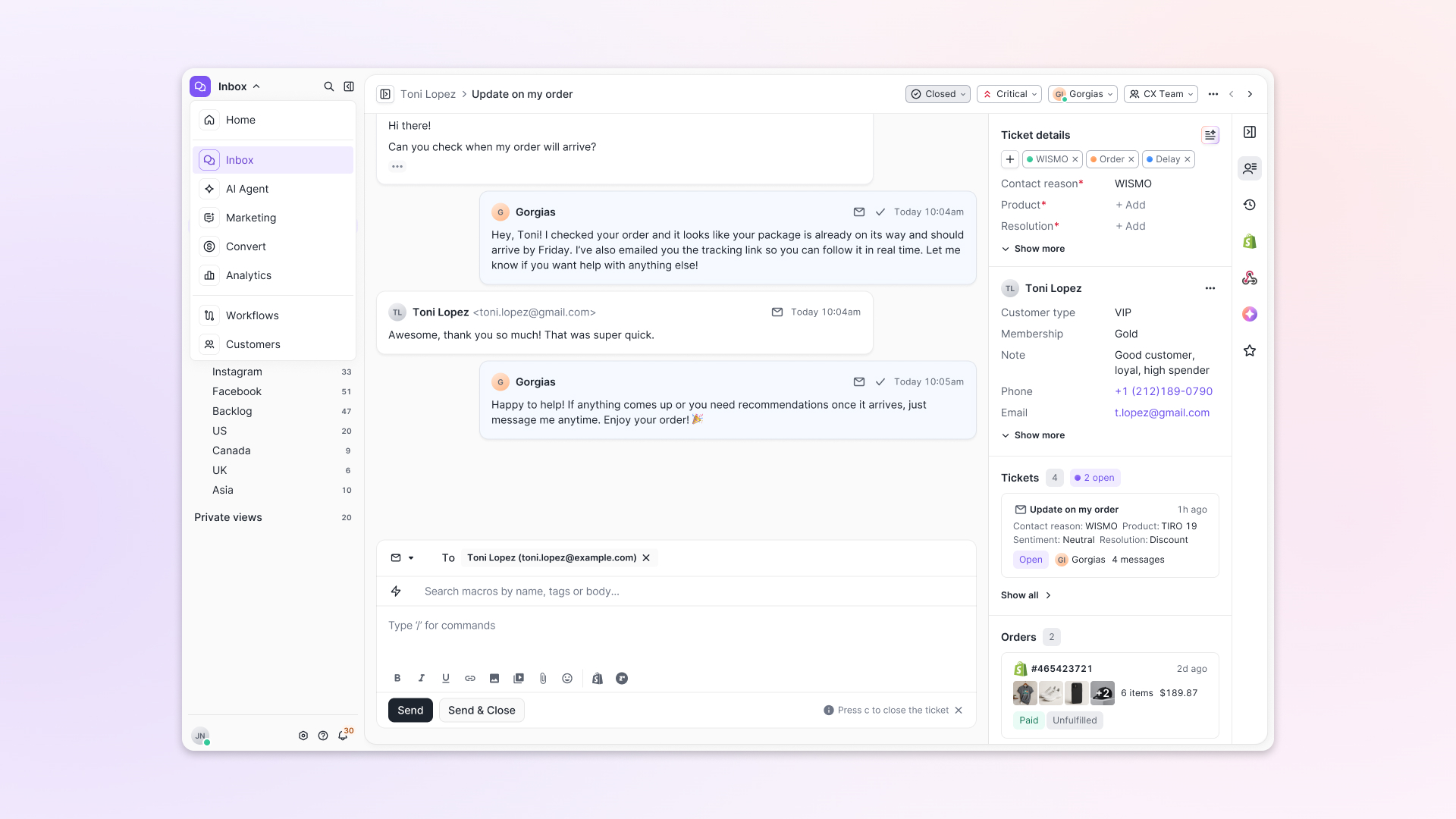
Chats with customers now look like real conversations, using the speech bubble style you’re familiar with on popular messaging apps.
Check customer history without losing your place
Checking a customer's history used to mean leaving the conversation, an extra step that interrupted what should have been a smooth workflow.
Now, past conversations open in a sidebar next to the active conversation. You can view a customer’s full history, search through their timeline, and open prior tickets without going to a new page.

Check past conversations, orders, and customer details in the brand-new Customer Timeline.
See order details the moment you open a ticket
Order information is easier to reference than ever. Open a ticket, and you instantly see the customer's recent orders, marked with product images and invoice details at a glance. Need to dig deeper? Click on an order, and the expanded information appears in the same panel.
For teams using custom integrations, apps are fixed in a quick-access integration menu on the right.
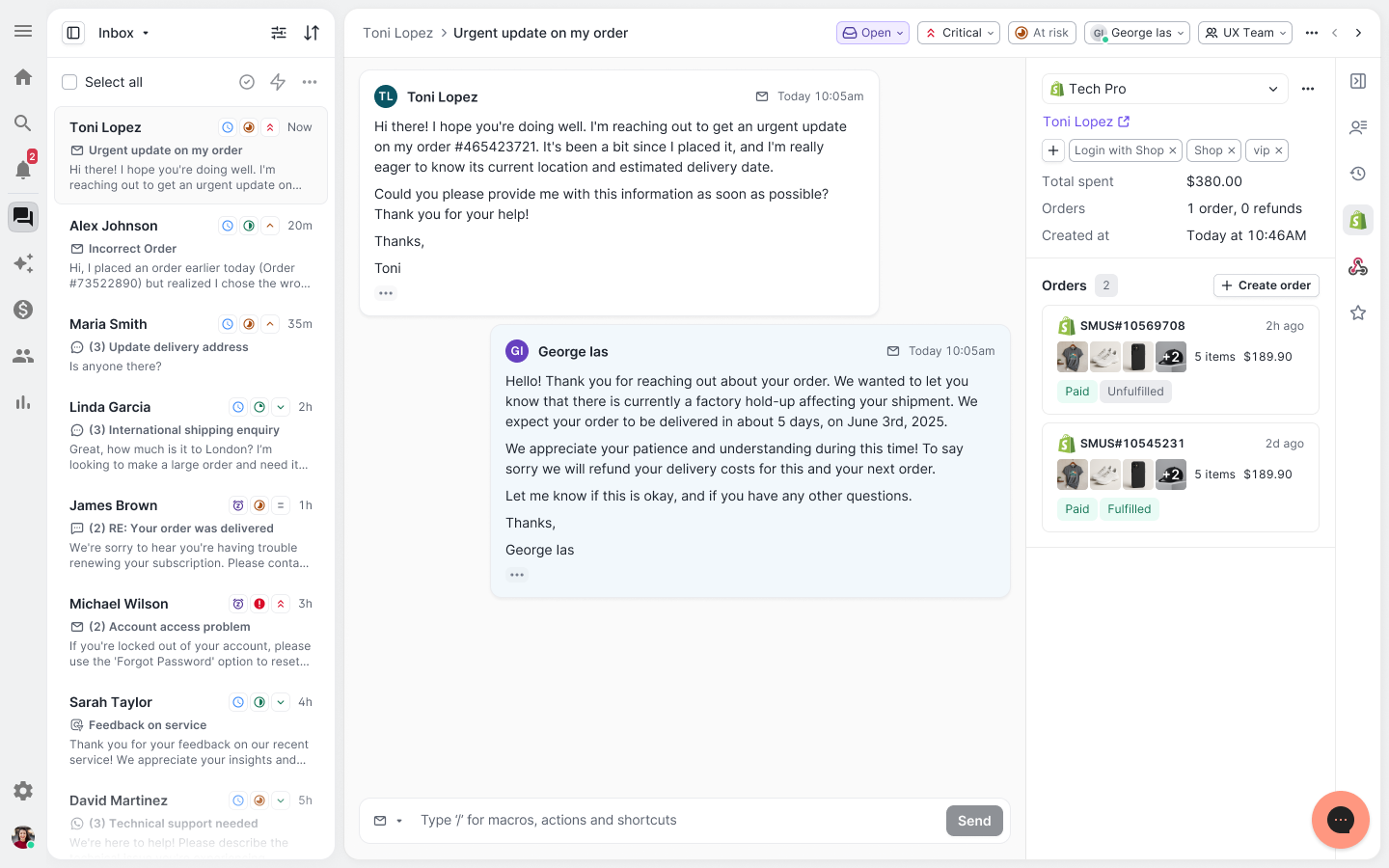
See order details, product images, and totals at a glance on the right panel, without leaving the conversation.
Pick up where AI left off
You shouldn't have to dig through a thread to figure out what AI already tried. Now you don't have to.
When AI Agent escalates a conversation, it includes a concise handover summary that mentions the issue, what actions were taken, and why it was passed to your team.
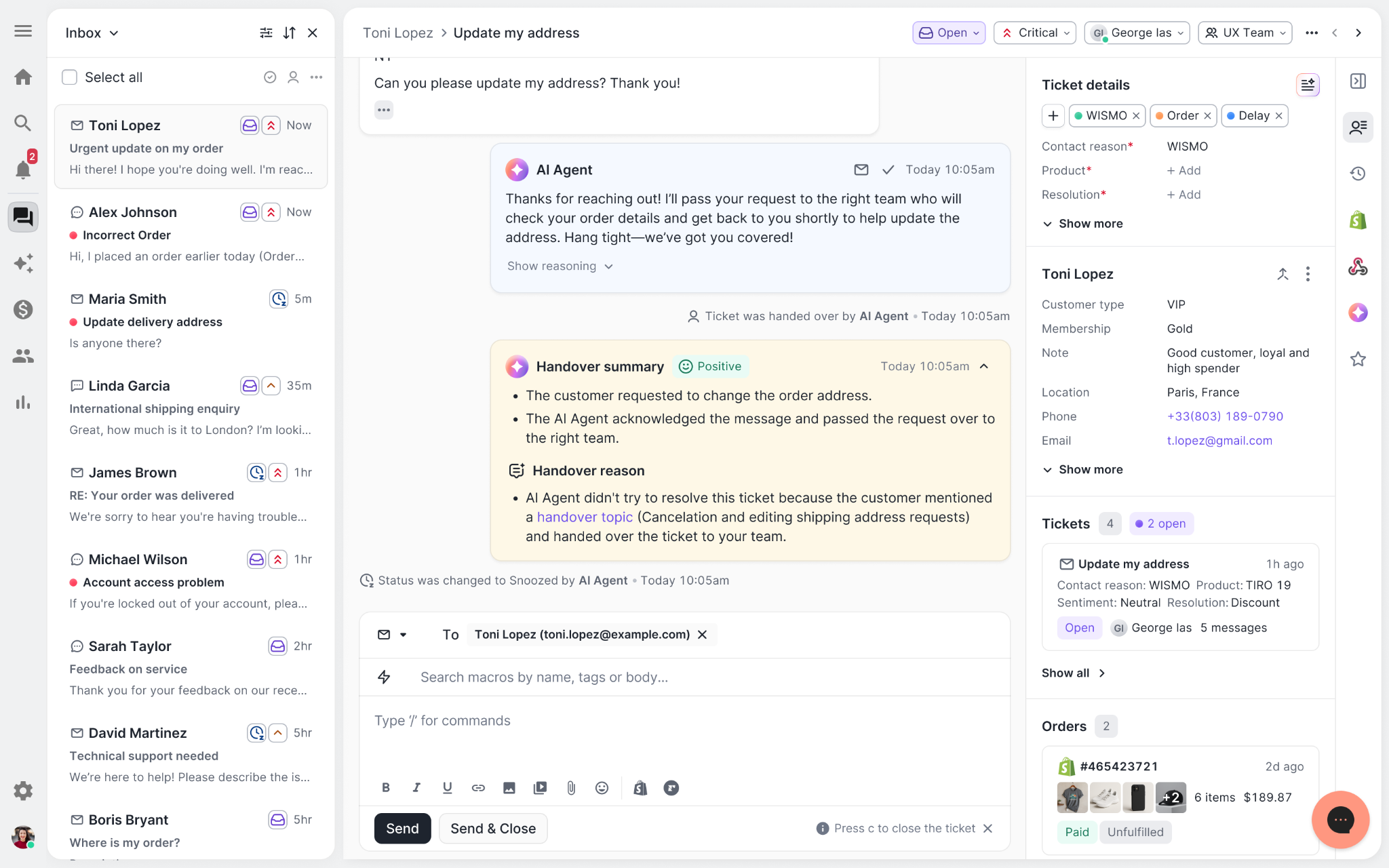
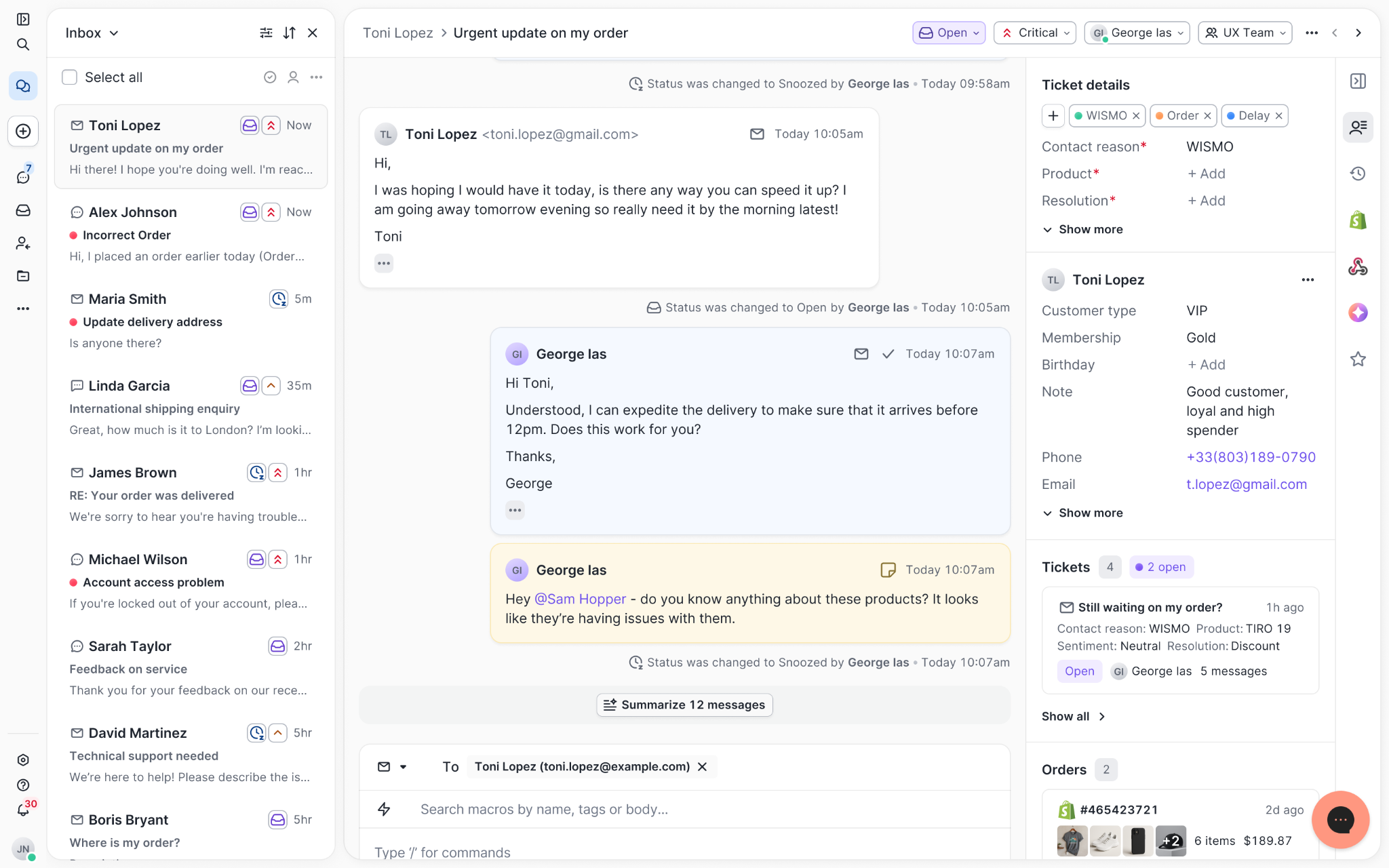
Escalated tickets include a brief AI-generated handover summary, marked in yellow, for quick reference.
Move faster across every store and team
We restructured and simplified the navigation. The left sidebar organizes everything into clear categories: Inbox, AI Agent, Marketing, and Analytics, so anyone on your team knows exactly where to go.
To quickly update your knowledge base or adjust a workflow, both now live right in the sidebar. For teams managing multiple stores, switching between them is just as straightforward, accessible from the sidebar, so agents can move between inboxes without breaking their flow.
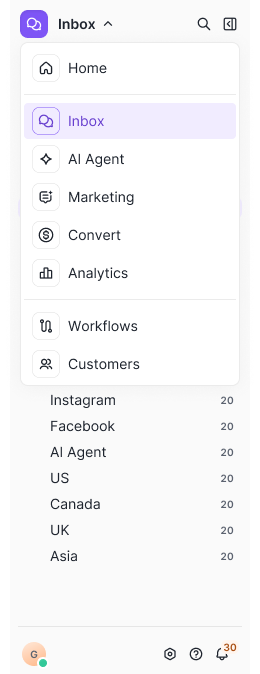
Agents can switch between stores and their corresponding inboxes directly from the left menu.
A workspace that works the way agents do
Support comes down to the person on the other end of the conversation. We built Helpdesk 2.0 is to make sure they have everything they need to show up for that moment.
The best way to see the difference is to work in it. Start a free trial today.


Further reading

17 Customer Service Interview Questions to Help Build Your Dream Customer Support Team
Building an incredible customer support team at your company starts with finding the right people. But once you attract a pool of applicants, distinguishing between an excellent candidate and a so-so one isn’t always simple.
Why does this matter? Research from Harvard Business Review concluded that positive customer experiences can create as much as a 140% spread in how much customers spend at transactional businesses. And a massive part of that customer experience rides on your customer service team.
And for subscription-based businesses, that same study found a 31% spread in churn: quality of the experience was a significant driver of recurring membership and revenue.
This adds up over time, as well. Forbes found a cumulative loss of $75 billion yearly across all businesses pegged to a single source: poor customer service.
So, in the big picture, a great hire in customer service or support makes you more money. A bad one hurts the bottom line, and so much more.
As a hiring manager, it’s never been more important to get the most out of your interviews. The needs of customer service teams are more technically complex than before, with numerous channels for meeting customer needs. Working with an ecommerce helpdesk support partner like Gorgias can ease some of the pressure, but the interview itself remains highly strategic.
Major Traits and Characteristics to Look for in Customer Service Job Interviews
Before we get into specific questions, it’s worth noting that not every candidate has the right disposition for customer service work. Many customer service skills are crucial, and these traits and characteristics rise to the top of the list. As you work through the selection and interview process, look for these elements.
The Interviewee Is Familiar with Your Brand and Tone of Voice
This isn’t an all-out dealbreaker, but interviewees that are already familiar with your brand and tone of voice will assimilate much more quickly into your organization. This is true whether this familiarity is natural (because the candidate is already a fan of your brand) or learned (because the candidate took the time to prepare before the interview).
The Interviewee Has Strong Communication Skills
Your customer service representatives spend all day communicating directly with customers, so you want to hire people with great communication skills for customer service roles. Your customer service team forms the face of your company for many customers, so the ability to communicate clearly about a customer’s problem is essential
Customer service reps will inevitably deal with angry customers as well as difficult customers, so hiring managers should look for candidates that can keep those communication skills up even under pressure.
The best candidates for customer service roles will pair strong communication skills with superior problem-solving ability, as well.
The Interviewee Has the Ability to Communicate Via Specific Service Channels
The days of single-channel customer service departments that existed solely as phone-based call centers are long gone. Most businesses rely on a multichannel customer service strategy that could involve face-to-face assistance, phone communication, or any of a wide range of web-based platforms. Today's agents need to apply customer service best practices to many channels.
A customer service candidate that can speak empathetically and clearly but cannot navigate social media or a customer service platform may not be a good fit for your current needs.
Conversely, you may find candidates that struggle with over-the-phone communication but can tirelessly plow through online tickets with superior skill.
If your team is large enough to differentiate, both types of candidates could succeed in clearly defined roles.
Still, it’s a good idea to get a sense of which service channels a candidate is likely to succeed in. Do this during the interview if you don’t do it earlier in the process.
17 Customer Support Interview Questions and Answers
If you’re a hiring manager in customer service or customer support, you already know that crafting the perfect customer service job interview questions is difficult. And if you’re an aspiring or current customer service representative, you may be looking for advice on how to answer customer service interview questions.
No matter your role, this list of 17 customer service interview questions and answers will give you some new approaches to the customer service job interview. Consider adding several of these questions to your interview process so you can hone your interview process and get better results.
(And if you’re a job seeker, these sample answers should give you insight into what interviewers might be expecting to hear. Adapt them to fit your situation, of course! You might also benefit from 5 Tips to Find Your Next Job in Support.)
1) How Familiar Are You with Our Brand, Products, and Services?
You don’t have to hire someone with prior knowledge of your brand, but it sure helps. The more the prospect knows about you, the less you have to teach them. So it’s worth asking how familiar the prospective hire is with your brand and what they think about it.
If your interviewee is familiar with your brand, go ahead and ask if they’ve ever interacted with your customer service team. If they have, their answers could be illuminating — about the candidate and about the customer service experience.
Listen for an honest, enthusiastic response. It’s OK if a candidate doesn’t know much about the brand, but finding someone with the skills AND who is a big fan of your brand can lead to the ultimate customer service prospect.
Pro Tip: Watch out for a response in which a candidate wants to change too much: some constructive criticism is healthy, but customer service is not the place from which to spearhead major company-wide change.
Sample Answer
“I’ve been using your [specific product/service] for some time now. I use it to [use case], and my appreciation for your [brand/culture/products] is a big part of why I applied for this job!”
Or
“I hadn’t heard of your company before I saw this job post, but as I began to research the company, I resonated with [product or aspect of mission]. I believe it’s something I can get behind and contribute to!”
2) Have You Ever Worked with the Software We Use?
Customer service is more software-oriented than ever before, and this question does double (maybe triple) duty: first, it tells you the obvious (whether the interviewee is familiar with your software). Second, it also often reveals a candidate’s overall comfort level with software. You’ll usually get a sense in their answer of whether they’re worried about the prospect of learning new software.
Third, assuming your job listing indicated which software solutions you use, this question will reveal how closely the applicant studied the job listing. If they seem confused by the question or don’t know which software solution you’re asking about, that might be a red flag.
As you listen to the applicant’s answer, don’t settle for a blunt “yes.” Follow up with a question or two that will reveal whether the person has actual knowledge of the software. And if the applicant isn’t familiar with your chosen software, listen for confidence about the ability to learn.
Sample Answer
“At my previous company, we used [competitor software solution], and I can tell based on my own research that the two are pretty similar. I’m sure there may be some slight gaps, but I’m eager to learn those differences and get up to speed in [your software solution].”
3) How Long Were You with Your Last Company and Why Did You Leave?
Behavioral interview questions can be powerful because they give you insight into an interviewee’s thought processes and ways of engaging with the world. Length of employment at the previous company is merely factual, but the “why did you leave” portion is deeply behavioral.
Tenure at a previous employer isn’t always important, though a resume filled with a series of three- to six-month gigs could be a red flag. More important is the stated reason for leaving. Did the candidate struggle with a previous manager? Did they leave over scheduling issues (that are likely to be an issue at your company as well)?
To be clear, leaving a previous company isn’t always a bad thing. But the reasons why — and the way the candidate explains those reasons — can teach you a lot about the person’s approach to working on a team.
Sample Answer
“I’m still employed at [current employer], but I see a better future for myself with your company. I’m happy enough at [current employer], but I’m more passionate about your company for [give a reason or two].”
Or
“I worked at [previous employer] for [time period] but had to leave due to [reason]. That said, I know [reason] won’t be an issue here because [explanation].”

4) What Were the Most Common Problems with the Products and Services You Supported in the Past and How Did You Help Solve Them?
This question helps you keep developing a profile of the candidate’s experience. At the most basic level, you want to learn whether they are familiar with the most common customer service questions that your team deals with.
While the key to delivering great customer service is the ability to use problem-solving skills to navigate especially difficult situations, those everyday types of questions make up the bulk of the actual work. Finding an employee that’s already well-versed in your most common customer issues (and who already has good responses to those issues) makes your job a lot easier.
Also, this is another behavioral interview question that can give you deeper insight into what makes a candidate tick. Listen carefully to how the person describes their activity helping various types of customers. You’ll learn at least as much about how the person thinks as how they solved a specific problem.
Sample Answer
“Issues with account logins made up around 15 percent of my customer service interactions at my last job. We had a script to follow for this kind of issue, and I used it when I could. But over time I noticed that many users were getting tripped up on the same problem that wasn’t covered by the script. I helped them resolve it by [x] and recommended we add this step to the script.”
5) Describe a Previous Situation at Work When You Recognized an Emotionally Tense Situation and Were Able to Turn it Around to Delight the Customer.
This is the first of several classic behavior-based questions. You’re listening for soft skills here, those intangibles that differentiate truly excellent customer service reps from the rest.
With this question, you’re looking at conflict resolution skills surrounding customer issues like public complaints or angry customer emails. Does the candidate have a handy example of being able to
- Recognize that tensions were high
- Defuse the situation enough that the customer left the interaction delighted?
You’re also looking at the ability to follow instructions and think outside the box. You don’t want renegades and mavericks, but you do want folks that can think beyond provided customer support scripts.
Push the interviewee to be specific with their answer to questions like these.
Sample Answer
“Once I dealt with a customer with [stated problem]. I could tell the customer was upset before we ever started talking because of [verbal/written cues]. I kept my cool, sidestepped that anger, and determined that the customer’s core problem was [actual problem]. Once I identified that I made sure to empathize with the customer as I guided them to a solution to [actual problem.”

[Image source: Me.me]
6) Can You Give Examples of Methods You Have Used in the Past to Increase Revenue, Save Time, or Increase Procedural Efficiency at Work?
Hiring for customer service is a delicate balance. You don’t want a cadre of people constantly trying to reinvent the wheel (or, worse, the company itself). And you also don’t want mindless followers. This question helps you gauge a candidate’s ownership mindset.
If they don’t have an answer at all, they might not be thinking enough about the big picture. Conversely, if their answer sounds a little too revolutionary, you’ll be aware that this candidate might need guidance in what’s appropriate.
As the candidate responds, listen for actionable ideas and methods that seem genuinely useful. Vague feedback with no clear outcomes isn’t what you’re looking for here.
Sample Answer
“I noticed we were getting tons of customer support calls about one of the company’s products. The product was fine, but the included instructions left out a crucial step that was leading to the calls. I was able to point this out and escalate it to the proper team, who corrected the instructions for the next printing. In the meantime, I created an email template to help agents respond to customer questions about the issue faster. By getting the instructions fixed, I reduced these calls so the team could focus on more important customer issues.”
7) Aside from Customer Service Positions, Have You Had Any Other Professional Roles That Helped You Build Relevant Skills for the Position You Are Applying For?
Sometimes, the best agents have experience from other roles with complementary skillsets. For example, wait staff at restaurants have a ton of insights about human interactions and communication since they serve people in person for hours on end.
Or, if the company products are highly technical or industry-specific, you’ll benefit from finding customer service reps with relevant tech or industry backgrounds as well.
Find out if your prospect has other experience they can bring to the table. Maybe they can even teach your team a thing or two.
Sample Answer
“I’ve worked for ‘x’ years in foodservice, including ‘y’ years as a server. In those years I developed the ability to read verbal and nonverbal cues. And have found creative ways to meet customer needs. My time in restaurants has prepared me to excel in customer service by giving me a keen sense of customers’ needs, proactive tactics to keep them happy, and multiple strategies for resolving their complaints.”
8) Do You Have Any Formal Education That Pertains to Communication or Communication Technology?
You already know a candidate’s formal education as it is listed on their resume, but this question gives them a chance to expand upon that. Perhaps they took a specific course that’s relevant to this job or additional training certifications that didn’t make it on the resume.
Give them a chance to explain how some of their formal education enhances their abilities for this job.
This is also a great place to explore whether a candidate has experience in the systems you use, such as these:
- Online helpdesk software
- Email platform
- CRM
- Social media
- Relevant discount and rewards software
- eCommerce platform or CMS
Of course, reliance on formal training varies from company to company. Some brands focus more exclusively on skills and traits. Use your judgment with this question (but make sure you don’t imply that a degree is required unless it is).
Sample Answer
“My degree was in [field], and as a part of my coursework, I took several courses in communication as well as a technology course. In these courses, I learned [two or three high-level lessons], which will help me in this role [explain how].”

9) At Work, What Are Your Three Core Values? For Example Honesty, Trust, Patience, Etc.
You want agents that are hard-working and have excellent time management skills. But you also want a support team filled with healthy people. Learning about workplace morals and values will indicate to you how much of a team player the candidate is or what their ethical point of view looks like.
Sample Answer
“My top three core values in the workplace are [list three]. These core values permeate every aspect of my work: how I interact with customers, how I work with other team members, and more. If you ask [reference at previous employer] about this, I believe you’ll hear that I lived this out there, and I’ll do the same here.”
10) Can You Provide an Example of a Time When You Had to Deny a Customer’s Request? How Did You Handle It?
You want customer service agents that can, in most cases, get your customer what they want. But sometimes customers are wrong, demanding things that can’t be done. An experienced customer service rep will certainly have run into this scenario and learning how they handled it will give you great insight into their abilities.
Were they able to salvage a customer relationship? Show the customer a better way? Or did they just blow up the situation and provide no alternatives?
Sample Answer
“I always do my best to meet customer requests, but of course this isn’t always possible. One time, a customer [describe illegitimate request scenario]. He was convinced I could do this for him, but it was out of scope. However, instead of just flat-out denying him, I was able to guide him to an alternative that was in scope. He didn’t get everything he wanted, but I did keep him as a customer.”
11) As an Agent, What Was the Most Difficult Customer Service Situation You Have Ever Experienced?
For interviewees with previous customer service experience, this question gives you insight into how far they’ve been stretched — as well as their emotional intelligence after the fact.
Look for how serious or difficult the described situation is (compared to what’s typical in your organization), and pay attention to how calmly — or not — the candidate can recount the scenario.
Sample Answer
“In my current/previous position, I’ve had a few encounters in a class all their own. Probably the most challenging one was [describe the scenario]. It was challenging for sure, but I’m glad I went through it because I learned [lesson/insight]. I also really appreciated the support I got from my leadership team throughout the situation.”
12) As a Representative, What Was the Best Customer Service Situation You Have Experienced?
If a candidate has a quality answer to this question, it will likely reveal the sorts of situations that motivate the individual. You should look for excitement, interest, and perhaps even joy as the individual answers this question. And knowing the kinds of situations that motivate an individual can give insight into whether they’ll be a good fit for your team.
Sample Answer
“I once had a customer call in who was incredibly angry, but it was an issue that I knew I could solve. As I worked with the customer to unpack the layers of the issue, I heard her tone gradually soften. By the end of the encounter, I’d not only solved her problem, but I’d also managed to upsell her to a higher tier of service — and she was happy about it!”

13) What Would You Do If You Couldn’t Find the Answer to a Customer’s Question?
The stock answer here is “contact my supervisor,” of course, but see if you can get a little more. What avenues (official and unofficial) would the candidate pursue before escalating to a manager? Will this prospect solve problems independently, or will the individual create an unending cascade of manager escalations?
Sample Answer
“When I didn’t know an answer, I’d quickly search our internal knowledge base/wiki. If I didn’t find the answer there, I might search Google, our company Slack, or a more knowledgeable peer. I tried to minimize the number of escalations since I know that solving the problem myself is always the ideal outcome. But of course, I escalated issues to my manager when needed.”
14) How Would You Handle a Situation Wherein You Knew the Customer Was Wrong?
“The customer is always right” only goes so far. Sometimes the customer is quite wrong, and your customer support teams know this. The real question is what a prospective team member will do when this happens.
This is another question that explores soft skills. There are countless ways to say “you’re wrong” without coming out and saying it. Can the prospect guide a customer to a better understanding without insulting them along the way? That’s the kind of customer service rep you need.
Sample Answer
“I never take a confrontational approach when this happens. Instead, I assume that the customer isn’t willfully wrong, and I try to find a gentle way to guide them to a better understanding.
If there’s documentation or fine print that the customer missed, I’ll guide them to that information. I might also ask questions to get a better sense of where the customer got the incorrect understanding.”
15) As an Online Shopper, What Was the Best Customer Support Experience You Ever Received from a Brand You Did Not Work For?
Every one of us brings experiences from our personal lives into our professional work, and great customer service reps are no exception. We’ve all been the customer in need of service at some point, and there are great lessons to learn from the good experiences.
A prospect’s answer to this question should demonstrate their insightfulness and awareness. It will also likely reveal more about a person’s priorities in customer service encounters.
Sample Answer
“I had an experience with [company] that impressed me as a customer and gave me some great ideas for how to solve customer challenges in my work. [Describe scenario and lessons learned.]”
16) Describe a Time When You Received Poor Customer Service as a Consumer.
Asking the opposite question gives you similar insights: whatever got under the skin of your interviewee is an aspect of customer service that they’re passionate about. And, of course, having been a frustrated consumer can build empathy when working with other frustrated consumers.
Sample Answer
“I had an encounter with one company where the agents were working from scripts, and it didn’t seem like they took the time to process what I’d said in my complaint. It was deeply frustrating, but I learned from the experience that scripts can only get you so far and that I need to make sure I always understand the customer’s concern before I start trying to solve it.”
17) How Flexible Is Your Schedule and How Many Hours Do You Hope to Work Each Week?
If you’ve gotten to this point and expect that you’ll offer the candidate a job, it’s time to get this crucial information. If your only needs are second shift and the candidate can’t or won’t work it, you need to know now.
Sample Answer
Simply be honest. “I’m looking for full-time work, and normal business hours are my preference. I could work the second shift if necessary, but no overnights. That said, let me know what you’re looking for, and let’s talk about it.”

[Image source: IMC]
Up Your Support Offerings with the Best Ecommerce Customer Service Solution
Getting the right team in place is a crucial component of your customer service strategy and so is giving your new team members the best in ecommerce customer service technology.
Find out why Gorgias is the #1 rated helpdesk for ecommerce merchants. See how Gorgias integrates with Shopify, Magento, and BigCommerce.
And, if you need help with the technology portion of your customer service strategy, schedule a Gorgias demo today.

Live Statistics for teams who want to perform
Do you switch multiple screens and views to understand what’s going on with your team? If you do, we’re happy to report that there is now a shortcut. 🪄 Live Statistics on Gorgias is your destination to get a quick overview of ticket volume, agent activity and active channels in real-time.
Where is it?
It’s up top! Once you navigate to Statistics, you will see Live Statistics conveniently placed at the top. Click on Overview to see a snapshot of all customer support activity over all channels and agents.

Ok, what am I looking at?
In Live Overview, you will see the number of Agents Online and offline. Next to these, you will find the numbers of Open Tickets in two sections (to indicate whether they’re assigned or unassigned).

Pro tip: Hover over the tooltip to see a quick list of the actual agents who are online and offline. ⬇️

Consider the number of Agents Online compared to Open Tickets
Say it’s late afternoon and you’re seeing a spike in open tickets. In Live Overview, you read 60 Open Tickets, and only 2 Agents Online. → 30 tickets per person 😱
With this information, you can immediately make decisions and take action on how to handle the higher volume your team is experiencing. For example, you may consider:
• Going to Live Agents Statistics to see the number of Chat tickets
• Creating a macro and a rule for your Chat customers who are waiting for longer than 1 minute ⌛️
• Creating a macro and a rule to set expectations around the delay
• Check internally to see if there is a problem with your delivery ops
• Stepping in to answer tickets with the Urgent tag
Knowing exactly what’s going on as it happens live, later observing fluctuations in First Response Time or Resolution Time won’t catch you by surprise. You can make a better assessment on your team’s performance by being fully aware of the circumstances around your metrics.
In Live Statistics, we simplify and organize information so you can be fully aware without needing to contact your team personally or be physically there.
Monitor Support Volume live
In Live Overview, you will see a nice graph to inform you on the hourly Support Volume. Use this graph to see how your team is responding to inquiries as they emerge.

Looking at this graph, you can quickly grasp the volume you’re getting by the number of Tickets Created, Tickets Replied and Tickets Closed separately, but on the same timeline so you can compare.
Observe when Tickets Created see a spike, compare it to Tickets Replied
When do you receive the bulk of inquiries? Does it happen before business hours?

You can see above an example where a lot of customers decided to contact the support team throughout the night. As a manager, you can monitor to see if this is a consistent pattern over time, and develop strategies on the support and operations side to improve experience. Looking at this graph, and seeing this type of pattern, you may want to ask:
• Are these tickets urgent? Are we properly auto-tagging to identify urgency?
• Are my agents ready to tackle this ticket volume at the beginning of their shift?
• Are these tickets auto-assigned?
• If these inquiries are urgent, should we set autoresponders?
• Is it worth getting additional staffing or how can I leverage self-service?
Monitoring the Support Volume graph, you can start to detect patterns that are connected to the entire customer experience. Anticipating problems or delays before they can occur, you can take measures to improve CSAT despite the predicaments due to international shipping challenges or a mix-up on a batch of orders etc. You can use the visibility and insights from Live Statistics to inform your overall operations.
Live means real-time
Live Statistics is designed to inform you on an hourly basis. It gathers the right metrics and combines them strategically so you can get the right information and react quickly without being there.
All metrics in Live Statistics reflect your current day from 12:00 am to 11:59 pm in your time zone. If you need to change the time zone, you can easily do this in Business Hours under Settings.
Who is working?
In Live Agents, you will see whether each team member is currently online or offline, indicated by a green dot if they’re online - 💪 working away, or an orange dot indicating that 💤 they’re offline.

Pro Tip: Hover over these dots to see when they signed in (on the green dot), and when they were last seen that day (on the orange dot).

Live Agents Statistics will show you the exact amount of time each team member has been online in hours and minutes (e.g. 2h 6m). On this table, you will also see the number of Tickets Closed and Messages Sent. The ability to see this exact combination of data per agent will really help you monitor your team’s efficiency and know which agents to coach to improve performance.

Have all of your team use this, so everyone can self-check 🩺 and have their sense of achievement for the day based on data - 😉 not just feelings. Reviewing Live Statistics as a team, you can collaborate to come up with effective strategies to reduce the rate of messages sent per ticket closed.
Who is working on what?
Located in the far right column, Open Tickets 🤩 feature makes Live Statistics whole. This is where you can clearly see who’s working on what. You can see the total number of open tickets currently being helped by each team member. Placed immediately next to this number is the breakdown by channel.

You can read above how Jenny has 15 open tickets, with 3 from Chat, 7 from Email, 3 from Facebook and 2 from Instagram.
Click on this number to see just exactly what Jenny’s working on. Each of the numbers provided under Open Tickets, the total and by channel, is clickable and it will bring you to a readily filtered view where you can take a closer look at what your agent has at hand.
This experience will help you review your team’s activity in microscopic detail as you desire, without needing to interfere or navigate to different Views.
Help your team on the spot
Check out the full combination of Online Time, Tickets Closed, Messages Sent and Open Tickets. Let’s bring back Jenny and look closer to see that she has 3 Tickets Closed, 12 Messages Sent and 15 Open Tickets. Under Online Time, it reads 6h 12m so she is approaching the end of her shift.

Right away, we can notice that she’s approaching the end of her shift with a lot (15) more tickets to go. There’s no need to get alarmed, but it’s better to take a quick look at what’s going on. Clicking on the number listed under Open Tickets, we can easily review the tickets she’s working on. Taking a quick look at her tickets, we notice a shipping problem on multiple orders - all large items shipping internationally with a third party. Knowing Jenny’s not familiar with third party shipping, we can remove these tickets from Jenny’s queue and make sure that we mark our calendar to train her on this topic before BFCM hits. ✅
All of these features in Live Statistics, Overview and Agents are designed to give you full visibility and control so you can take timely action to remove stress from work and from your team. 😅
Still waiting to give it a try? Go to Live Statistics now ➡️
📞 Let’s get on a call to have a quick chat.
✏️ We love hearing your insights, please drop us a note here.

7 new apps that integrate with Gorgias
Gorgias connects to over 70 leading ecommerce applications, giving you the power to centralize customer data in your helpdesk, perform support actions from a single place, and streamline your store’s toolkit.
This month, we launched 7 new integrations:
- LoyaltyLion
- Twitter (No longer supported in 2023)
- Call Hippo
- Shipup
- Tolstoy
- Autopilot
- Sentisum
- Yotpo (updates to our existing integration)
Read on to learn how you can use these tools to help manage your store, and visit the Gorgias App Store to activate them today!
1. LoyaltyLion
LoyaltyLion is a digital loyalty framework that gives ecommerce stores innovative ways to engage and retain customers. If you're using LoyaltyLion for your loyalty program, you can connect it to Gorgias to display information next to support tickets, and reward loyalty points using Macros.

2. Twitter
Note: Gorgias no longer supports Twitter. You can still use Facebook, Instagram, and WhatsApp in Gorgias.
Give your support team the power to provide customer service to shoppers on Twitter, without having to log into another platform or share credentials with your social media manager. View past Twitter conversations, gain cross-channel message context, and customize your replies to provide exceptional customer support.
Note: This integration is currently only available for Enterprise plans. View pricing here.

3. Call Hippo
CallHippo allows startups and businesses to buy instant local support numbers from over 50+ countries around the world. With this integration, you can create tickets in Gorgias for phone calls and SMS conversations via Call Hippo.

4. ShipUp
Shipup follows your packages in real-time to create a seamless, transparent, and branded delivery experience. With the Gorgias integration, you can easily share shipping information with your support team, immediately notify them with a ticket in Gorgias when an incident occurs, and find customer information right next to conversations.

5. Tolstoy
Tolstoy is an interactive video platform, helping users create meaningful and personal conversations at scale. With this integration, Gorgias users can sync their Tolstoy videos and monitor every viewer interaction as a ticket, empowering support agents to engage without ever leaving the help desk.

6. Autopilot
Autopilot is a data and customer journey marketing platform designed for businesses who sell online. With this integration, you can now combine your Shopify and Gorgias data together seamlessly in Autopilot. You’ll not only have a single view of your customer, but you’ll be able to deliver a more personalized marketing experience and get glowing reviews from satisfied customers.

7. SentiSum
SentiSum is an automated ticket tagging engine powered by natural language processing technology. With this integration, SentiSum tags can auto-fill form fields directly in Gorgias. From there, you can implement additional automation that saves agent time and improves customer outcomes.

8. Yotpo
You can now receive Yotpo product reviews right in Gorgias and reply to them as tickets! This gives your agents visibility into how shoppers feel about your product and allows them to address concerns without ever leaving the helpdesk. Each ticket will include the review details (like score and product) and allow you to either reply publicly or privately, so you can customize the support experience.

To add these integrations and discover more, go to the Gorgias App Store.

Top 10 Integrations Used by Gorgias Ecommerce Merchants
Have you ever wondered how other leading ecommerce stores manage customer support, especially when they are using Gorgias? We love identifying these trends and wanted to see what integrations have been the most useful in our customers' ecommerce tech stacks so far.
In order to help you bring all your customer data in one place and offer truly exceptional, personalized support, here are the top 10 integrations being used by Gorgias customers:
- Email, specifically Gmail
- Gorgias Chat
- Facebook and Instagram
- SMS apps
- Klaviyo
- Recharge
- Phone, either our native solution or Aircall
- Yotpo
- Smile
- ChannelReply
1. Email, specifically Gmail
If you've been worried that email is becoming obsolete in the age of chat boxes and SMS support, don't be. Email is the leading support channel on Gorgias, used by 67% of customers.
This make sense. While faster, more instantaneous methods of communications are becoming common, email is still the primary channel to answer complicated support questions and send transactional messages like shipping updates, return logistics, and order/cancellation confirmations.
Of email integrations, Gmail is the leading provider with 59% of Gorgias customers having it active.
To learn more about our Gmail integration, click here.
2. Gorgias chat
Chat support is the second most common channel we see our merchants using, in order to offer real-time communication in addition to traditional emails or tickets. And thanks to our native chat integrations, it's easier than ever to launch a chat widget on your website.
57% of Gorgias merchants use our native chat integrations to offer real-time support.

This allows your shoppers to talk to an agent faster, but also presents a great opportunity to implement self-service options so they can help themselves. (Our Self-Service Chat Portal can help with that!)
3. Facebook and Instagram
Managing inquiries on social media and gaining insights into the conversations happening in those communities is te next priority for our merchants.
Over 50% of Gorgias brands are integrated with Facebook and/or Instagram.
Our Facebook integrations (which also includes Instagram) allows you to manage messages, comments, ad comments, and mentions as tickets in Gorgias. This gives your agents visibility into every conversation no matter where it happens, and empowers them to reply directly to shoppers without having to log into separate platforms or coordinate with your brand's social media team.
"The Gorgias-Facebook-Shopify integration is amazing. We've stopped hunting and matching Facebook users to customer accounts on Shopify. The information we need is surfaced so we can respond better and faster. Gorgias allows us to operate both ecommerce and social commerce business seamlessly." - Guita Gopalan, Chief Revenue Officer at Ellana
Nervous about the quantity of tickets that would be created from integrating social channels with Gorgias? Don't be. You can use Rules to filter out comments your team doesn't need to worry about (like comments that only consist of emojis), or even auto-assign tickets to specify agents/teams so no one has to triage the requests.
4. SMS apps
Text message marketing has become an incredible revenue generator for ecommerce brands, but it also opens another new communication channel with your customers: SMS.
In order to make the most of SMS as a marketing tool, you also need to be ready to support it when customers reply back with questions. That's where Gorgias comes in; we integrate with SMS apps to help you connect your agents with shoppers sooner and collect all customer conversations in one place.
Over 23% of Gorgias customers are integrated with an SMS tool.
The top SMS apps connected to Gorgias are:
- Attentive, used by 10% of merchants
- Postscript, used by 8% of merchants
- SMS Bump, used by 5% of merchants
"Working with Postscript and Gorgias gave us the leverage to keep customers close to deliver the best possible customer experience. It is super helpful to have a full view of the customer, all in one-spot." -Eli Weiss, Director of CX at OLIPOP
5. Klaviyo
The next app on our list will help you collaborate with your marketing team to create a best-in-class shopper experience, whether they are interacting with the support team or receiving the latest promotion.
Klaviyo is an email and SMS marketing app for businesses that sell online. Our integration connects the two platforms, allowing you to use the data to create better campaigns.

17% of Gorgias merchants are integrated with Klaviyo.
With this integration, you can push Gorgias events into Klaviyo for advances and customer-centric email segmenting.
For example, here are some of the ways we've seen customers use the two tools together:
- Promoting sales or new products to customers who had positive support experiences to drive upsell and revenue generation from support.
- Excluding customers with open support tickets from promotional messaging campaigns.
- Sending target coupons or discounts to win back customers who reported poor support experiences.
You can learn more about our Klaviyo integration or activate it here.
6. Recharge
The most common integration will help with subscription management, which is probably no surprise: Even with a great payment platform, subscription questions and transactions tend to result in a lot of support requests.
Recharge us a subscription and recurring payment platform for ecommerce sites, and helps you turn transactions into relationships.
15% of Gorgias merchants are integrated with Recharge.
Connect Gorgias and ReCharge for a simple way to manage customer subscriptions and customer service from one convenient location.
When you integrate Gorgias and Recharge, you can:
- Display ReCharge subscriptions next to support tickets in Gorgias, to gather full customer context before replying to questions.
- Cancel subscriptions, re-activate subscriptions, or refund a charge (either partially or totally) right from the Gorgias helpdesk.
- Embed ReCharge data in your Macro replies to automate the most common support questions.
Click here to learn more about our Recharge integration.
7. Phone, either our native solution or Aircall
It's clear that digital support is the first priority for most of our merchants, as seen by email, chat, and social media being the top three integrations on our list.
Sometimes it's nice to have a real conversation with your customers, however, which is why phone integrations are next.

12% of merchants offer phone support.
Many use our Aircall integration, which is great if you need the advanced feature a dedicated tool like Aircall provides. If you're just adding phones for the first time, we released a native phone integration this year that's helping merchants begin to offer voice support.
8. Yotpo
Beyond answering customer questions, your support team may want to engage with reviews from shoppers in order to address issues, win back unhappy customers, and interact with your biggest fans!
Yotpo, a platform for ecommerce marketing and reviews, is great for this.
Over 8% of Gorgias merchants have activated our Yotpo integration.
The integration allows you to:
- Display customer's Yotpo data un Gorgias customer Activity Sidebar such as loyalty points, provided ratings, latest reviews, etc.
- Manage customer loyalty plans (change point balance, assign VIP tier, honor redemptions, and send rewards) from the Gorgias sidebar.
- Respond to a question with an answer either publicly or privately as new tickets.
- Moderate customer reviews (product and site) and questions from within Gorgias as new tickets.
- Request reviews from a customer.
Click here to learn more about our Yotpo integration and activate it.
9. Smile
No one knows your shoppers quite like your support team, which makes an integration with a loyalty app a natural fit! Smile.io is a favorite of Gorgias merchants, which helps you manage a reward program and build strong relationships with your newest and most loyal customers.
6% of Gorgias merchants integrate with Smile.io.
With this integration, you'll be able to see customer loyalty information right next to tickets in Gorgias, so every agent knows when they are talking to a new customer or one of your VIPs! You can also use this information to help triage tickets or separate ticket views by loyalty status (which is great for managing different levels of support SLAs).

To learn more about our integration with Smile.io and activate it for your account, click here.
10. ChannelReply
If your shop sells on public marketplaces beyond your own Shopify store, the final app on our list is a must. ChannelReply helps you manage messages from Amazon, eBay, and Walmart.
With our integration, you can then manage all those messages right from your helpdesk, eliminating the need for your agents to open different browser tabs for each platform.
Over 5% of Gorgias merchants use the ChannelReply integrations.
To learn more about ChannelReply and activate the integration for your account, click here.
And there you have it: The top 10 integrations with Gorgias in 2021! We hope this helps inspire you how you can use your helpdesk to offer exceptional, conceptual support and how to streamline the tools your store uses everyday to grow your business.
To get more ecommerce tool suggestions, check out our list of 150+ great tools. And to view all integrations with our platform, visit the Gorgias App Store.

12 New Apps That Integrates With Gorgias
Gorgias connects to over 65 leading ecommerce applications, giving you the power to centralize customer data in your helpdesk, perform support actions from a single place, and streamline your store’s toolkit.
This month, we launched 12 new integrations:
- SMS Live
- Checkout Champ
- CallHippo
- Konnektive
- TXTFi
- Shopney
- ReturnLogic
- Stateset
- Gatsby
- Trustpilot
- ShipBob
- AfterShip
Read on to learn how you can use these tools to help manage your store, and visit the Gorgias App Store to activate them today!
1. SMS Live
SMS Live is an SMS texting app for Shopify and Shopify Plus. When you add this integration, you’ll see customer information from SMS Live in the Gorgias sidebar, so your agents don’t have to switch between the two applications. You’ll also be able to respond to SMS messages within the Gorgias helpdesk or switch those conversations to a different channel, such as email or phone.

2. Checkout Champ
Checkout Champ simplifies the checkout process and makes it easy to charge for subscription services or one-click upsells. With the Gorgias integration, you can manage all of your customer interactions to include refunds, fulfillment tracking, purchase alterations, and all messaging and tickets.

3. Konnektive
Konnektive is a cloud-based CRM and order management solution that helps optimize, centralize, and automate ecommerce business processes. With this integration, you can display order information right next to tickets in Gorgias and update customer information between the two platforms. It automatically comes with 10 pre-built Macros, to help you get started right away!

4. TXTFi
TXTFi allows brands to leverage purchasing through SMS and ensures side-by-side customer support to communicate with customers in real time. With this integration, you can manage SMS conversations from TXTFi as tickets in Gorgias in order to quickly connect your shoppers with a live agent.

5. Shopney
Shopney is a mobile app builder for Shopify and Shopify Plus that lets you build an app for your store in just one day. With this integration, the conversations that happen through Shopney’s in-app live chat can be managed in the Gorgias helpdesk for a streamlined experience for your agents.

6. ReturnLogic
ReturnLogic helps D2C brands give their customers an easy returns process while automating workflows for their customer service and warehouse teams. With the Gorgias integration, you can embed the Gorgias Chat Box right on the ReturnLogic portal, giving shoppers another opportunity to make their return, exchange, or warranty process as smooth as possible. You can also manage these chat conversations in Gorgias and populate ReturnLogic data into Gorgias tickets.

7. Stateset
Stateset is your single source of truth for managing your online business and automating your commerce operations. The Stateset AI Responder app uses state-of-the-art artificial intelligence and robotic process automation to quickly and accurately build data-driven responses ready for your customer service team to approve. When you connect the Gorgias integration, you can start generating intelligent and dynamic responses directly from Gorgias or from within Shopify.

8. Gatsby
See Instagram insights when responding to tickets, track Instagram mentions and engagement for your brand, and automate valuable influencer workflows all in Gorgias.
With the Gorgias and Gatsby integration, you can now identify when influential customers are reaching out for support and take that into account when prioritizing tickets, asking them to share positive support experiences and more.

9. Trustpilot Reviews
Trustpilot Reviews is a customer review platform. With the Gorgias integration, you can streamline review responses with machine learning and AI. Trustpilot Review data is displayed in the Gorgias Customer Sidebar, ready to be leveraged by agents to reward happy customers and help recover customers at risk of churn.

10. ShipBob
ShipBob is an ecommerce fulfillment solution for online brands. With the Gorgias integration, you can sync customer and order information associated with a specific ShipBob account into the corresponding Gorgias account. You can also display data from ShipBob in the Customer Sidebar, and use that data in Gorgias Macros to automate responses to common claims.

11. AfterShip
AfterShip is an automated shipment tracking platform for e-commerce businesses. With the Gorgias integration, you can sync and display all customer shipment tracking data in the Customer Sidebar, allowing your agents to quickly answer questions without switching applications.

To add these integrations and discover more, go to the Gorgias App Store.

10 Rules to Help You Efficiently Manage Instagram Interactions on Gorgias
Instagram is really the perfect social channel for Ecommerce brands. You can show off your products, share user-generated content, and engage with your community to build brand loyalty.
All that engagement is great, except it adds a task to your plate that quickly multiplies as your brand grows: You have to interact back. Or at least you should, if you want to capitalize on all that engagement!
Sometimes your marketing team or social media manager will handle Instagram replies, but sooner or later you’ll start to get the “Where is my order?” (or “WISMO”) question from shoppers, regardless of the content being shared. This can result in an inefficient workflow between social and support teams to communicate the question, track down an order status, and get a reply back to the customer.
That’s why Gorgias integrates directly with Instagram (and other social media platforms), to streamline the management and interaction with top-level comments, ad comments, private messages, and replies. Instead of going back and forth between your Ecommerce platform, the social team, and the support team, you can empower your agents to reply quickly and accurately to any question that comes in, thanks to over 50+ integrations with the leading Ecommerce apps. (So all the context they need will be in one single browser tab!)
You could even have your marketing team or social media manager help create Macros, so your support agents can use templated (and on brand) messages that speed up their replies. Getting everything centralized in a single place is the first step to providing excellent social support for your store. The next is to start automating replies to common engagements, so you can free up your agents to focus on more important conversations instead of saying “Thanks for the mention!” for the hundredth time.
To help your store start managing Instagram support more efficiently, I’ve collected a list of Rules that Gorgias customers are using to engage with their shoppers, resolve questions faster, and keep their agents focused on the most important conversations.
Here are 10 Rule ideas for more efficient Instagram support:
- Auto-close tickets from giveaway posts
- Auto-close all Instagram tickets
- Auto-tag all Instagram interactions
- Auto-tag likely buyers & create a specialized view
- Auto-tag interactions from influencers for VIP support
- Auto-tag public comments vs private messages
- Auto-tag Instagram tickets with questions
- Auto-close Instagram tickets the don’t mention support or order status
- Auto-tag negative comments
- Auto-assign Instagram tickets to an agent or team
1. Auto-close tickets from giveaway posts
Giveaway posts are great for brand awareness, but can also result in a large increase in tickets in your help desk. To stop this from ever becoming a problem, you can set up a Rule to auto-close tickets generated from giveaway posts, based on the message content.

In this example, we’re auto-closing tickets without the words “who,” “what,” “when,” “where,” “why,” and “how,” in order to avoid accidentally closing an actual question that your team might want to respond to. You could also customize this to close tickets that include a specific word or phrase, based on the criteria of the giveaway. I recommend working closely with your social media manager whenever a new promotion starts, to make sure your helpdesk is set up to triage tickets accordingly.
2. Auto-close all Instagram tickets
If you want to see Instagram engagements in a contact’s message history, but not necessarily respond to them from Gorgias yet, you can auto-close any ticket generated from Instagram, that way it doesn’t fill up the open queue.

By doing this, your agents will have the full cross-channel message history when interacting with a shopper, so they can customize the conversation and know exactly what they’ve asked in the past.
3. Auto-tag all Instagram interactions
Tagging tickets in Gorgias is a great way to measure channel statistics and create customized Views. While your agents will always have the option to manually add tags, you can create a Rule to do the tagging automatically, that way it’s one less step in their workflow.

Then when you go to Statistics > Tags, you’ll be able to see how many tickets are generated from Instagram during a given period, and what percentage that is of all the tickets you receive.
Pro-tip: If you haven’t started managing Instagram tickets in Gorgias yet because you’re not sure what exactly the ticket volume would be, you can Auto-tag and Auto-close tickets in order to see the stats without conversations counting toward your plan’s ticket count yet.
4. Auto-tag potential shoppers & create a specialized view
Prioritize the messages and comments from those most likely to purchase. By detecting message sentiment and filtering by common phrases, you can automatically tag tickets with a high purchase intent, allowing your agents to answer questions quickly or send along a discount code to speed up the purchase.

Once you’ve set up the Rule, you can create a View to filter tickets that only contain this tag, that way your agents can easily see right in the left-hand sidebar whenever there’s a ticket from Instagram from a likely lead!

5. Auto-tag interactions from influencers for VIP support
If you work with influencers, it’s critical to reply to them right away to maximize the impact of their community. To make sure your team never misses an opportunity, you can auto-tag tickets created from the partners you’re working with based on their email address.

Once the Rule is auto-tagging these tickets, you can also create a view to segment these messages from the others. Depending on how many partners and influencers your brand manages at a time, it may be helpful to set up one View per influencer (in which case you’d want to use separate tags), or group them all together in an “Influencers” section.
6. Auto-tag public comments vs private messages
Whenever you reply to a ticket in Gorgias, you’ll see a small icon next to the customer’s name that signals what channel you’re replying on. If you want some extra assurance that your reps are only replying with personal details in private channels however (such as Instagram messages) you can automatically add tags to designate “public” vs “private,” so everyone can see right at the top of the ticket which type of communication it is.

7. Auto-tag Instagram tickets with questions
Prioritize interactions that are asking your brand something, instead of just commenting with emojis. If your brand receives a lot of engagement, this can help you filter out what needs to be addressed and what can likely just be closed out (or handled by the social team).

8. Auto-close Instagram tickets the don’t mention support or order status
If your support team is only interested in responding to the Instagram tickets that specifically mention customer service, you can auto-close everything else (and assume the brand team will take care of it). To do this, create a rule that closes tickets that do not include phrases like “order” “status” “support” or “customer service.”

9. Auto-tag negative interactions
Escalate the tickets that have negative intent to get them a response faster. You can add keywords (or emojis) and use our sentiment detection to auto-tag negative comments, so your agents see right away what kind of ticket they’re opening.

10. Auto-assign Instagram tickets to an agent or team
If you have a specific person who handles social media, whether that’s an agent or the social media manager, you can automatically assign tickets created via that channel to them, so those tickets never get routed to the rest of your team.

I hope these 10 Rules help you engage with your shoppers, resolve questions faster, and keep your agents focused on the most important conversations. If you haven’t connected your Gorgias account to Instagram yet, follow this guide to get started.
Alternatively, keep reading about social media for customer service, or check out our list of the best social media integrations for your Shopify store.

New integration: Manage Instagram messages from Gorgias
If your store leverages Instagram to drive sales, you know it’s important to engage with every member of your community whether they’re commenting on your posts, engaging with your Story, or sending you a message.
Over 4,000 teams on Gorgias have been using our Instagram integration to respond to (or automate responses to) mentions, comments, and ad comments. Earlier this summer, some customers were able to also start receiving and responding to Instagram messages (but it was limited to accounts with between 1,000-100,000 followers).
Today, we’re excited to share that there’s no longer a follower requirement to use Instagram messaging!
Every Gorgias customer (with a non-legacy plan) can manage Instagram messages (including Story mentions) directly from your helpdesk, allowing you to engage with your shoppers quickly and efficiently so you never miss a conversation.
Plus you’ll also be able to reply to comments with a message, giving your team the option to turn a public conversation into a 1-1 chat.

Customers who were able to start using this feature early have already replied to over 300,000 messages and Story mentions. In fact, about 2% of tickets in Gorgias are Instagram messages!
It’s clear our customers love using Instagram to engage with their communities and drive sales, which is why we’re so excited to open this channel up for all of our merchants regardless of their follower count.
Related: Our list of the best social media apps for Shopify.
To get started, you’ll need to make sure you have the "Allow Access to Messages" setting active in Instagram.
You can do this In Instagram Business Messenger by going to Settings → Privacy → Messages and setting the toggle to active.
Once that’s done, go to the Integrations tab in your Gorgias helpdesk and select “Facebook, Messenger & Instagram.”

Click the green “Reconnect” button to refresh your settings, and then you’ll be able to enable “Instagram Direct Messages” in the checkboxes.

This will connect Messages and Story mentions to Gorgias, allowing you to reply directly from the helpdesk and see previous conversation history (so your agents have all the information they need right in one place).
The following video will show you how to get started, along with some common troubleshooting tips.
If you’re managing a lot of customer support conversations on Instagram, it may be helpful to set up views for each type of interaction. For example, you could have a view for Instagram comments, another for Instagram Messages, and a third for Instagram ad comments.

You can also use Rules and Macros in Gorgias to reply even faster (or automate conversations entirely!) in order to free up your agents to focus on more important conversations.
Here are a few ideas to get you started!
1. Create a Macro sending a message to say “Thanks for the mention!”
If you have customers that love to tag your brand or products in their own posts, an easy way to continue building brand loyalty is to send a quick “thank you.” To save your agents time, you can create a Macro they can re-use anytime you get a Message that you’ve been mentioned in someone’s story or post.

2. Adding tags to track Instagram Story mentions
If you want to track how often your brand is mentioned in Instagram Stories, you can tag tickets that come in from the Messages channel with “Mentioned you” in the message body.
By creating a Rule to do this, you can automate this process so it doesn’t add any extra time or steps into your agents workflow, but gives you powerful insights.

3. Creating a Rule to auto-reply to Instagram messages outside of business hours
If you don’t want to reply to messages 24/7, it may be helpful to create an auto-response to set some expectations outside of your business hours.
You can easily do this with a Rule, and even encourage your followers to go somewhere else in the meantime, such as your website, a specific landing page, or even a partner account!

Hopefully this gives you some inspiration on how you can start using Gorgias to engage with your Instagram community without increasing the workload on your support agents. And if you're interested in messaging customers directly, check out our social media and SMS features. With social media for customer service, you can interact with customers on platforms like Instagram or Facebook. And with SMS for customer service, you can enable texting for your most on-the-go customers.
Related: Lean how Gorgias customer Berkey Filters launched SMS and drove incredible customer adoption to this new, faster channel.
To start simplifying management of your messages, comments, and mentions, get started with Gorgias and add the Instagram integration today!

It’s Official: Gorgias is Now SOC 2 Type II Certified
When you use Gorgias, we know that you’re putting your trust in us. That’s why we hold our commitment to your security as our highest priority and safeguard your data with full transparency. Our security policy contains penetration testing, incident response plan, data lifecycle, comprehensive system status live report, and more.
We're thrilled to share that Gorgias is Service Organization Control (SOC) 2 compliant for Type 2. This achievement follows our numerous investments in platform security over the years as part of our goals to secure customer data.
An independent auditor conducted a thorough audit of our servers, systems, and products over six months. They verified that our information security practices, policies, procedures, and operations meet the thorough SOC 2 standards for security.
2022 update: We're happy to share that we renewed our SOC 2 Type 2 certification to continue protecting our customer data.
This industry-wide recognition serves as our reassurance that your data is managed in a controlled and audited environment.
What is SOC 2 Type II Compliance?
Developed by the American Institute of CPAs (AICPA), SOC 2 defines criteria for evaluating how well a company manages customer data and ensuring a set of security controls are in place. A SOC 2 report is unique to each organization because it’s in line with specific business practices.

There are two types of SOC 2 reports: Type I and Type II. Type I checks if a system can handle issues like data breaches. Meanwhile, Type II examines how the system works and how effective it is to protect data against security threats.
What Does Our SOC 2 Type 2 Compliance Mean for You?
Our completion of the SOC 2 Type II audit is our testament to the fact that we always prioritize your data security and privacy. We appreciate your trust in us and strive to strengthen this trust in the long term.
You can be sure that:
- The data you share with Gorgias meets the AICPA standards for security. That goes for your personal information, ticket inquiries, customer data, and the like.
- Your data is protected with procedures and controls to assess, minimize, and eliminate risks and vulnerabilities.
- We always conduct ongoing monitoring of features and processes across our platform to maintain security.
What’s Next?
We hope our successful SOC 2 Type 2 helps you rest easy knowing that your data in Gorgias is secure. But this update is only the latest milestone in delivering our commitment. We’re continuing to improve our security control and data privacy practices for all merchants. To learn more about our security policies, visit our security page or contact us at support@gorgias.com.