


Newsletter Signup
The best in CX and ecommerce, right to your inbox
Featured articles

Ticket Volume: How to Measure It, Benchmark It, and Reduce It

Gorgias AI Agent Pricing, Explained

Introducing Helpdesk 2.0: Built for How Agents Work
TL;DR:
- Built directly from agent feedback, Helpdesk 2.0 fixes real workflow pain points. The redesign focuses on reducing friction and helping agents handle more context-heavy tickets.
- A chat-style interface replaces the old email layout. Conversations are easier to follow and resolve in one view.
- Customer context is shown beside the conversation in a right-side panel. Agents can view history, orders, and details without leaving the ticket.
- AI handoffs come with clear summaries. Agents instantly see what happened, what was tried, and what to do next.
- Navigation is simpler and faster across teams. Clean menus, structured queues, and multi-store access keep agents moving efficiently.
Helpdesk 2.0 starts with the people who use it most: the agents.
We spent time understanding customer support from the agent's seat. What do they reach for constantly? What slows them down? What does a better workday look like?
Everything we found is in this brand-new update.
Why we redesigned Helpdesk
Conversational commerce is the new standard.
In customer support, this means customers expect context to remain intact wherever they reach out, whether a conversation starts on social, moves to email, or ends on a call.
This new approach to support has also changed the agent's role. Recurring tickets, like order status checks, shipping updates, and returns, are now handled by AI. What lands in the agent inbox are edge cases that require human judgment and troubleshooting, or tickets that require the full picture.
However, the original Helpdesk was built for a different era of support.
Context was separated across views rather than built into the conversation itself. It's something one in five Gorgias customers flagged, through support tickets, NPS surveys, and conversations with our team. So, we got to work.
Helpdesk 2.0 is the result.
What's new in Helpdesk 2.0
Here's a look at everything that changed.
Read conversations the way they're meant to be read
Conversations have a natural rhythm, one that’s already found in every messaging tool we use. We brought that same layout into the helpdesk.
Say goodbye to the 2000s email interface and hello to chat bubbles. This updated design changes how quickly you can orient yourself and resolve the ticket in one go.

Chats with customers now look like real conversations, using the speech bubble style you’re familiar with on popular messaging apps.
Check customer history without losing your place
Checking a customer's history used to mean leaving the conversation, an extra step that interrupted what should have been a smooth workflow.
Now, past conversations open in a sidebar next to the active conversation. You can view a customer’s full history, search through their timeline, and open prior tickets without going to a new page.

Check past conversations, orders, and customer details in the brand-new Customer Timeline.
See order details the moment you open a ticket
Order information is easier to reference than ever. Open a ticket, and you instantly see the customer's recent orders, marked with product images and invoice details at a glance. Need to dig deeper? Click on an order, and the expanded information appears in the same panel.
For teams using custom integrations, apps are fixed in a quick-access integration menu on the right.

See order details, product images, and totals at a glance on the right panel, without leaving the conversation.
Pick up where AI left off
You shouldn't have to dig through a thread to figure out what AI already tried. Now you don't have to.
When AI Agent escalates a conversation, it includes a concise handover summary that mentions the issue, what actions were taken, and why it was passed to your team.

Escalated tickets include a brief AI-generated handover summary, marked in yellow, for quick reference.
Move faster across every store and team
We restructured and simplified the navigation. The left sidebar organizes everything into clear categories: Inbox, AI Agent, Marketing, and Analytics, so anyone on your team knows exactly where to go.
To quickly update your knowledge base or adjust a workflow, both now live right in the sidebar. For teams managing multiple stores, switching between them is just as straightforward, accessible from the sidebar, so agents can move between inboxes without breaking their flow.

Agents can switch between stores and their corresponding inboxes directly from the left menu.
A workspace that works the way agents do
Support comes down to the person on the other end of the conversation. We built Helpdesk 2.0 is to make sure they have everything they need to show up for that moment.
The best way to see the difference is to work in it. Start a free trial today.



Further reading

Leveraging Automation on Our Path to Continuous Deployment and GitOps
As we all locked down in March 2020 and changed our shopping habits, many brick-and-mortar retailers started their first online storefronts.
Gorgias has benefitted from the resulting ecommerce growth over the past two years, and we have grown the team to accommodate these trends. From 30 employees at the start of 2020, we are now more than 200 on our journey to delivering better customer service.
Our engineering team contributed to much of this hiring, which created some challenges and growing pains. What worked at the beginning with our team of three did not hold up when the team grew to 20 people. And the systems that scaled the team to 20 needed updates to support a team of 50. To continue to grow, we needed to build something more sustainable.
Continuous deployment — and the changes required to support it — presented a major opportunity for reaching toward the scale we aspired to. In this article I’ll explore how we automated and streamlined our process to make our developers’ lives easier and empower faster iteration.
Scaling our deployment process alongside organizational growth
Throughout the last two years of accelerated growth, we’ve identified a few things that we could do to better support our team expansion.
Before optimizing the feature release process, here’s how things went for our earlier, smaller team when deploying new additions:
- Open a pull request (PR) on GitHub, which would run our tests in our continuous integration (CI) system
- Merge those changes into the main branch, once the changes are approved
- Automatically deploy the new commit in the staging/testing environment, after tests run and pass on the main branch
- Deploy these changes in our production environment, assuming all goes well up until this point
- Post on the dedicated Slack channel to inform the team of the new feature, specifying the project deployed and attaching a screenshot of all commits since the last deployment.
- Watch dashboards for any changes — as a failsafe to back up the alerts that were already triggering — to check if the change needed to be rolled back.
This wasn’t perfect, but it was an effective solution for a small team. However, the accelerated growth in the engineering team led to a sharp increase in the number of projects and also collaborators on each project. We began to notice several points of friction:
- The process was slow and painful. The continuous integration and continuous deployment (CI/CD) systems are meant to speed the process up, but we still need to perform rigorous testing. We needed to find the sweet spot between speed and rigorous testing and we believed both aspects left room for improvement.
- Developers didn’t always take full ownership of their changes. When a change wasn’t considered critical (which happened fairly often), a developer would often let the next developer with a critical change deploy multiple commits at the same time. When problems occurred, this made it much more difficult to diagnose the bad commit.
- It was a challenge to track version changes. To track the version of a service that was deployed in production, you had to either check our Kubernetes clusters directly or go through the screenshots in our dedicated Slack channel.
- Each project had its own set of scripts to help with deployment. We wanted to streamline our deployment process and add some consistency across all projects.
It was clear that things needed to change.
Adjusting practices and tools to lay the foundation for implementing GitOps
On the Site Reliability Engineering (SRE) team, we are fans of the GitOps approach, where Git is the single source of truth. So when the previously mentioned points of friction became more critical, we felt that all the tooling involved in GitOps practices could help us find practical solutions.
Additionally, these solutions would often rely on tooling we already had in place (like Kubernetes, or Helm for example).
What is GitOps?
GitOps is an operational framework. It takes application-development best practices and applies them to infrastructure automation.
The main takeaway is that in a GitOps setting, everything from code to infrastructure configuration is versioned in Git. It is then possible to create automation by leveraging the workflows associated with Git.
What are the benefits of implementation?
One such class of that automation could be “operations by pull requests”. In that case, pull requests and associated events could trigger various operations.
Here are some examples:
- Opening a pull request could build an application and deploy it to a preview environment
- You could add a commit to said pull request to rebuild the application and update the container image’s version in the preview environment
- By merging the pull request, you could trigger a workflow that would result in the new changes being deployed in a live production environment
Using ArgoCD as a building block
ArgoCD is a continuous deployment tool that relies on GitOps practices. It helps synchronize live environments and services to version-controlled declarative service definitions and configurations, which ArgoCD calls Applications.
In simpler terms, an Application resource tells ArgoCD to look at a Git repository and to make sure the deployed service’s configuration matches the one stored in Git.
The goal wasn’t to reinvent the wheel when implementing continuous deployment. We instead wanted to approach it in a progressive manner. This would help build developer buy-in, lay the groundwork for a smoother transition, and reduce the risk of breaking deploys. ArgoCD was an excellent step toward those goals, given how flexible it is with customizable Config Management Plugins (CMP).
ArgoCD can track a branch to keep everything up to date with the last commit, but can also make sure a particular revision is used. We decided to use the latter approach as an intermediate step, because we weren’t quite ready to deploy off the HEAD of our repositories.
The only difference from a pipeline perspective is that it now updates the tracked revision in ArgoCD instead of running our complex deployment scripts. ArgoCD has a Command Line Interface (CLI) that allows us to simply do that. Our deployment jobs only need to run the following command:
The developers’ workflow is left untouched at this point. Now comes the fun part.
Building automation into our process to move faster
Our biggest requirement for continuous deployment was to have some sort of safeguard in case things went wrong. No matter how much we trust our tests, it is always possible that a bug makes its way to our production environments.
Before implementing Argo Rollouts, we still kept an eye on the system to make sure everything was fine during deployment and took quick action when issues were discovered. But up to that point, this process was carried out manually.
It was time to automate that process, toward the goal of raising our team’s confidence levels when deploying new changes. By providing a safety net, of sorts, we could be sure that things would go according to plan without manually checking it all.
Argo Rollouts can revert changes automatically, when issues arise
Argo Rollouts is a progressive delivery controller. It relies on a Kubernetes controller and set of custom resource definitions (CRD) to provide us with advanced deployment capabilities on top of the ones natively offered by Kubernetes. These include features like:
- Blue/Green, which consists of deploying all the new instances of our application alongside the old version without sending traffic to it at first. We can then run some tests on the new version and flip the switch when we made sure everything was fine. Once no more traffic is sent to the old version, we can tear it down.
- Canary deployments, which allow us to start by only deploying a small number of replicas, using the new version of our software. This way, we’re able to shift a small portion of traffic to the new version. We can do multiple steps here and only shift 1% of the traffic towards the new version at first. Then 10%, 50% or even more depending on what we try to achieve.
- Analyzing new deployments’ performance. Argo Rollouts allows us to automate some checks as we are rolling out a new version of our software. To do that, we describe such checks in an AnalysisTemplate resource, which Argo Rollouts will use to query our metric provider and make sure everything is fine.
- Experiments, which are another resource Argo Rollouts introduces to allow for short-lived experiments such as A/B testing.
- Progressive delivery in Kubernetes clusters by managing the entire rollout process and allowing us to describe the desired steps of a rollout. It allows us to set a weight for a canary deployment (the ratio between pods running the new and the old versions), perform an analysis, or even pause a deployment for a given amount of time or until manual validation.

We were especially interested in the canary and canary analysis features. By shifting only a small portion of traffic to the new version of an application, we can limit the blast radius in case anything is wrong. Performing an analysis allows us to automatically, and periodically, check that our service’s new version is behaving as expected before promoting this canary.
Argo Rollouts is compatible with multiple metric providers including Datadog, which is the tool we use. This allows us to run a Datadog query (or multiple) every few minutes and compare the results with a threshold value we specify.
We can then configure Argo Rollouts to automatically take action, should the threshold(s) be exceeded too often during the analysis. In those cases, Argo Rollouts scales down the canary and scales the previous stable version of our software back to its initial number of replicas.

Each service has its own metrics to monitor, but for starters we added an error rate check for all of our services.
Creating a deployment conductor to simplify configuration and deployment management
Remember when I mentioned replacing complex, project-specific deployment scripts with a single, simple command? That’s not entirely accurate, and requires some additional nuance for a full understanding.
Not only did we need to deploy software on different kinds of environments (staging and production), but also in multiple Kubernetes clusters per environment. For example, the applications composing the Gorgias core platform are deployed across multiple cloud regions all around the world.
ArgoCD and Argo Rollouts might seem to be magic tools, we actually still need some “glue” to make things stick together. Now because of ArgoCD’s application-based mechanisms, we were able to get rid of custom scripts and use this common tool across all projects. This in-house tool was named deployment conductor.
We even went a step further and implemented this tool in a way that accepts simple YAML configuration files. Such files allow us to declare various environments and clusters in which we want each individual project to be deployed.
When deploying a service to an environment, our tool will then go through all clusters listed for that environment.
For each of these, it will look for dedicated values.yaml files in the service’s chart’s directory. This allows developers to change a service’s configuration based on the environment and cluster in which it’s deployed. Typically, they would want to edit the number of replicas for each service depending on the geographical region.
This makes it much easier for developers than having to manage configuration and maintain deployment scripts.
Enabling continuous deployment
This leads us to the end of our journey’s first leg: our first encounter with continuous deployment.
After we migrated all our Kubernetes Deployments to Argo Rollouts, we let our developers get acclimated for the next few weeks.
Our new setup still wasn’t fully optimized, but we felt like it was a big improvement compared to the previous one. And while we could think of many improvements to make things even more reliable before enabling continuous deployment, we decided to get feedback from the team during this period, to iterate more effectively.
Some projects introduced additional technicalities to overcome, but we easily identified a small first batch of projects where we could enable CD. Before deployment, we asked the development team if we were missing anything they needed to be comfortable with automatic deployment of their code in production environments.
With everyone feeling good about where we were at, we removed the manual step in our CI system (GitLab) for jobs deploying to production environments.
Next steps on the path to continuous deployment
We’re still monitoring this closely, but so far we haven’t had any issues. We still plan on enabling continuous deployment on all our projects in the near future, but it will be a work in progress for now.
Here are some ideas for future improvements that anticipate potential roadblocks:
- Some projects still require additional safeguards before continuous deployment. Automating database migrations is one of our biggest challenges. Helm pre-upgrade hooks would allow us to check if a migration is necessary before updating an application and run it when appropriate. But when automating these database migrations, the tricky part is avoiding heavy locks on critical tables.
- It still isn’t that easy to track what version of a service is currently deployed. When things go according to plan, the last commit in the main branch should either be deployed or currently deploying. To solve this, we could go a step further and version the state of each application for each cluster, including the version identifier for the version that should be deployed. We’re also monitoring the Argo image updater repository closely. When a stable version is released, it could help us detect new available versions for services, deploy them, and update the configuration in Git automatically.
- When there are multiple clusters per environment with the same services deployed, we end up with too many ArgoCD applications. One thing we could do is use the “app of apps” pattern and manage a single application to create all the other required applications for a given service.
- On the bigger projects, the volume of activity may require the queuing of deployments. In fact, if two people merge changes in the main branch around the same time, there could be issues. The last thing we want is for the last commit to be deployed and then replaced by the commit preceding it.
We’re excited to explore these challenges. And, overall, our developers have welcomed these changes with open arms. It helps that our systems have been successful at stopping bad deployments from creating big incidents so far.
While we haven’t reached the end of our journey yet, we are confident that we are on the right path, moving at the right pace for our team.

Avoiding idle-in-transaction connection states with SQLAlchemy
As you work with SQLAlchemy, over time, you might have a performance nightmare brewing in the background that you aren’t even aware of.
In this lesser-known issue, which strikes primarily in larger projects, normal usage leads to an ever-growing number of idle-in-transaction database connections. These open connections can kill the overall performance of the application.
While you can fix this issue down the line, when it begins to take a toll on your performance, it takes much less work to mitigate the problem from the start.
At Gorgias, we learned this lesson the hard way. After testing different approaches, we solved the problem by extending the high-level SQLAlchemy classes (namely sessions and transactions) with functionality that allows working with "live" DB (database) objects for limited periods of time, expunging them after they are no longer needed.
This analysis covers everything you need to know to close those unnecessary open DB connections and keep your application humming along.
The problem: your database connection states are monopolizing unnecessary resources
Leading Python web frameworks such as Django come with an integrated ORM (object-relational mapping) that handles all database access, separating most of the low-level database concerns from the actual user code. The developer can write their code focusing on the actual logic around models, rather than thinking of the DB engine, transaction management or isolation level.
While this scenario seems enticing, big frameworks like Django may not always be suitable for our projects. What happens if we want to build our own starting from a microframework (instead of a full-stack framework) and augment it only with the components that we need?
In Python, the extra packages we would use to build ourselves a full-fledged framework are fairly standard: They will most likely include Jinja2 for template rendering, Marshmallow for dealing with schemas and SQLAlchemy as ORM.
Request-response paradigm vs. background tasks
Not all projects are web applications (following a request-response pattern) and among web applications, most of them deal with background tasks that have nothing to do with requests or responses.
This is important to understand because in request-response paradigms, we usually open a DB transaction upon receiving a request and we close it when responding to it. This allows us to associate the number of concurrent DB transactions with the number of parallel HTTP requests handled. A transaction stays open for as long as a request is being processed, and that must happen relatively quickly — users don't appreciate long loading times.
Transactions opened and closed by background tasks are a totally different story: There's no clear and simple rule on how DB transactions are managed at a code level, there's no easy way to tell how long tasks (should) last, and there usually isn't any upper limit to the execution time.
This could lead to potentially long transaction times, during which the process effectively holds a DB connection open without actually using it for the majority of the time period. This state is known as an idle-in-transaction connection state and should be avoided as much as possible, because it blocks DB resources without actively using them.
The limitations of SQLAlchemy with PEP-249
To fully understand how database access transpires in a SQLAlchemy-based app, one needs to understand the layers responsible for the execution.

At the highest level, we code our DB interaction using high-level SQLAlchemy queries on our defined models. The query is then transformed into one or more SQL statements by SQLAlchemy's ORM which is passed on to a database engine (driver) through a common Python DB API defined by PEP-249. (PEP-249 is a Python Enhancement Proposal dedicated to standardizing Python DB server access.) The database engine communicates with the actual database server.
At first glance, everything looks good in this stack. However there's one tiny problem: The DB API (defined by PEP-249) does not provide an explicit way of managing transactions. In fact, it mandates the use of a default transaction regardless of the operations you're executing, so even the simplest select will open a transaction if none are open on the current connection.
SQLAlchemy builds on top of PEP-249, doing its best to stay out of driver implementation details. That way, any Python DB driver claiming PEP-249 compatibility could work well with it.
While this is generally a good idea, SQLAlchemy has no choice but to inherit the limitations and design choices made at the PEP-249 level. More precisely (and importantly), it will automatically open a transaction for you upon the very first query, regardless whether it’s needed. And that's the root of the issue we set out to solve: In production, you'll probably end up with a lot of unwanted transactions, locking up on DB resources for longer than desired.
Also, SQLAlchemy uses sessions (in-memory caches of models) that rely on transactions. And the whole SQLAlchemy world is built around sessions. While you could technically ditch them to avoid the idle-in-transactions problem with a “lower-level” interface to the DB, all of the examples and documentation you’ll find online uses the “higher-level” interface (i.e. sessions). It’s likely that you will feel like you are trying to swim against the tide to get that workaround up and running.
Postgres and the different types of autocommits
Some DB servers, most notably Postgres, default to an autocommit mode. This mode implies atomicity at the SQL statement level — something developers are likely to expect. But they prefer to explicitly open a transaction block when needed and operate outside of one by default.
If you're reading this, you have probably already Googled for "sqlalchemy autocommit" and may have found their official documentation on the (now deprecated) autocommit mode. Unfortunately this functionality is a "soft" autocommit and is implemented purely in SQLAlchemy, on top of the PEP-249 driver; it doesn't have anything to do with DB's native autocommit mode.
This version works by simply committing the opened transaction as soon as SQLAlchemy detects an SQL statement that modifies data. Unfortunately, that doesn't fix our problem; the pointless, underlying DB transaction opened by non-modifying queries still remains open.
When using Postgres, we could in theory play with the new AUTOCOMMIT isolation level option introduced in psycopg2 to make use of the DB-level autocommit mode. However this is far from ideal as it would require hooking into SQLAlchemy's transaction management and adjusting the isolation level each time as needed. Additionally, "autocommit" isn't really an isolation level and it’s not desirable to change the connection's isolation level all the time, from various parts of the code. You can find more details on this matter, along with a possible implementation of this idea in Carl Meyer's article “PostgreSQL Transactions and SQLAlchemy.”
At Gorgias, we always prefer explicit solutions to implicit assumptions. By including all details, even common ones that most developers would assume by default, we can be more clear and leave less guesswork later on. This is why we didn't want to hack together a solution behind the scenes, just to get rid of our idle-in-transactions problem. We decided to dig deeper and come up with a proper, explicit, and (almost) hack-free method to fix it.
Visualizing an idle-in-transaction case
The following chart shows the profile of an idle-in-transaction case over a period of two weeks, before and after fixing the problem.

As you can see, we’re talking about tens of seconds during which connections are being held in an unusable state. In the context of a user waiting for a page to load, that is an excruciatingly long period of time.
The solution: expunged objects and frozen models
Expunging objects to prevent long-lasting idle connections
SQLAlchemy works with sessions that are, simply put, in-memory caches of model instances. The code behind these sessions is quite complex, but usage boils down to either explicit session reference...
...or implicit usage.
Both of these approaches will ensure a transaction is opened and will not close it until a later ***session.commit()***or session.rollback(). There's actually nothing wrong with calling session.commit() when you need to explicitly close a transaction that you know is opened and you’re done with using the DB, in that particular scope.
To address the idle-in-transaction problem generated by such a line, we must keep the code between the query and the commit relatively short and fast (i.e. avoid blocking calls or CPU-intensive operations).
It sounds simple enough, but what happens if we access an attribute of a DB model after session.commit()? It will open another transaction and leave it hanging, even though it might not need to hit the DB at all.
While we can't foresee what a developer will do with the DB object afterward, we can prevent usage that would hit the DB (and open a new transaction) by expunging it from the session. An expunged object will raise an exception if any unloaded (or expired) attributes are accessed. And that’s what we actually want here: to make it crash if misused, rather than leaving idle-in-transaction connections behind to block DB resources.
Building an expunging context manager to handle transactions and connections
When working with multiple objects and complex queries, it’s easy to overlook the necessary expunging of those objects. It only takes one un-expunged object to trigger the idle-in-transaction problem, so you need to be consistent.
Objects can't be used for any kind of DB interaction after being expunged. So how do we make it clear and obvious that certain objects are to be used in within a limited scope? The answer is a Python context manager to handle SQLAlchemy transactions and connections. Not only does it allow us to visually limit object usage to a block, but it will also ensure everything is prepared for us and cleaned up afterwards.
The construct above normally opens a transaction block associated to a new SQLAlchemy session, but we've added a new expunge keyword to the begin method, instructing SQLAlchemy to automatically expunge objects associated with block's session (the tx.session). To get this kind of behavior from a session, we need to override the begin method (and friends) in a subclass of SQLAlchemy's Session.
We want to keep the default behavior and use a new ExpungingTransaction instead of SQLAlchemy's SessionTransaction, but only when explicitly instructed to by the expunge=True argument.
You can use the class_ argument of sessionmaker to instruct it to build am ExpungingSession instead of a regular Session.
The last piece of the puzzle is the ExpungingTransaction code, which is responsible for two important things: committing the session so the underlying transaction gets closed and expunging objects so that we don't accidentally reopen the transaction.
By following these steps, you get a useful context manager that forces you to group your DB interaction into a block and notifies you if you mistakenly use (unloaded) objects outside of it.
Using frozen models to deal with expunged objects
What if we really need to access DB models outside of an expunging context?
Simply passing models to functions as arguments helps in achieving a great goal: the decoupling of models retrieval from their actual usage. However, such functions are no longer in control of what happens to those models afterwards
We don't want to forbid all usage of models outside of this context, but we need to somehow inform the user that the model object comes “as is,” with whatever loaded attributes it has. It's disconnected from the DB and shouldn't be modified.
In SQLAlchemy, when we modify a live model object, we expect the change to be pushed to the DB as soon as commit or flush is called on the owning session. With expunged objects this is not the case, because they don't belong to a session. So how does the user of such an object know what to expect from a certain model object? The user needs to ensure that she:
- Doesn't access an unloaded attribute of a live DB object, as it may open an unwanted transaction
- Doesn't modify attributes of an expunged object, as it won't be saved
To safely and explicitly pass along these kind of model objects, we introduced frozen objects. Frozen objects are basically proxies to expunged models that won't allow any modification.
To work with these frozen objects, we added a freeze method to our ExpungingSession:
So now our code would look something like this:
Now, what if we want to modify the object outside of this context, later on, (e.g. after a long-lasting HTTP request)? As our frozen object is completely disconnected from any session (and from the DB), we need to fetch a warm instance associated to it from the DB and make our changes to that instance. This is done by adding a helper fetch_warm_instance method to our session...
...and then our code that modifies the object would say something like this.
When the second context manager exits, it will call commit on tx.session, and changes to my_model will be committed to the DB right away.
Frozen Relationships
We now have a way of safely dealing with models without generating idle-in-transaction problems, but the code quickly becomes a mess if we have to deal with relationships: We need to freeze them separately and pass them along as if they aren’t related. This could be overcome by telling the freeze method to freeze all related objects, recursively walking the relationships.
We'll have to make some adjustments to our frozen proxy class as well.
Now, we can fetch, freeze, and use frozen objects with any preloaded relationships.
Additional recommendations and caveats
- Don't call session.commit() inside an expunging context manager's block. In fact, avoid using session at all and use tx.session instead. The context manager will take care of flushing and committing the session when exited.
- Avoid nested sessions inside the context block.
- Try to use one single query inside a context manager. If you need multiple queries, it often makes sense to use separate context blocks for each one.
- If you don't need to pass along an entire model object, you don't need to freeze it. Imagine that you only need an object's id or name attribute; you can simply store it in a variable while inside the expunging context block.
Avoid idle-in-transaction connection states to preserve DB resources
While the code to access the DB with SQLAlchemy may look simple and straightforward, one should always pay close attention to transaction management and the subtleties that arise from the various layers of the persistence stack.
We learned this the hard way, when our services eventually started to exhaust the DB resources many years into development.
If you recently decided to use a software stack similar to ours, you should consider writing your DB access code in such a way that it avoids idle-in-transaction issues, even from the first days of your project. The problem may not be obvious at the beginning, but it becomes painfully apparent as you scale.
If your project is mature and has been in development for years, you should consider planning changes to your code to avoid or to minimize idle-in-transaction issues, while the situation is still under control. You can start writing new idle-in-transaction-proof code while planning to gradually update existing code, according to the capacity of your development team.

How We Built an International SaaS Salary Calculator for Our Distributed Team
Like any major topic in your company, your compensation policy should reflect your organizational values.
At Gorgias, we created a compensation calculator that reflected ours, setting salaries across the organization based on 3 key principles:
- Compensation should be based on data
- Compensation should reflect everyone’s ownership, meaning everyone should have equity
- Compensation should be transparent
Since the beginning, we applied the first two: Each of our employees was granted data-driven stock options that beat the market average.
However, we were challenged internally: Our team members asked how much they would make if they switched teams or if they got promoted.
This led to the implementation of our third key principle, as we shared the compensation calculator with everyone at Gorgias and beyond: See the calculator here.
This was not a small challenge. We’re sharing our process in hopes that we can help other companies arrive at equitable, transparent compensation practices.
We built our compensation calculator using four key indicators
First, let’s get back to how we built the tool. We had to decide which criteria we wanted to take into account. Based on research articles and benchmarks on what other companies did before, we decided that our compensation model would be based on 4 factors: position, level, location, and strategic orientation.
If we had to sum it up all briefly, our formula looks like this:
Average of Data (for the position at defined percentile & Level) x Location index

Position
This is the job title someone has in the company. It looks simple, but it can be challenging to define! Even if the titles don’t really vary from one company to another, people might have different duties, deal with much bigger clients or have more technical responsibilities. Sometimes your job title or position doesn’t match the existing databases.
For some of these roles, when we thought that our team members were doing more than average in the market, we crossed some databases to get something closer to fairness.
Level
To assess a level we defined specific criteria in our growth plan for each job position. It is, of course, linked to seniority, but that is not the primary factor. When we hire someone, we evaluate their skills using specific challenges and case studies during our interview processes.
Depending on the databases you’ll find beginner, intermediate, expert, which we represent as L1, L2, L3, etc.We decided to go with six levels from L1 to L6 for individual contributors and six levels in management from team lead to C-level executive.
Location
Our location index is based on the cost of living in a specific city (we rely on Numbeo for instance) and on the average salary for a position we hire (we use Glassdoor). Some cities are better providers of specific talents. By combining them, we get a more accurate location index.
When we are missing data for a specific city, we use the nearest one where we have data available.
Our reference is San Francisco, where the location index equals 1, meaning it’s basically the most expensive city in terms of hiring. For others, we have an index that can vary from 0.29 (Belgrade, Serbia) to 0.56 (Paris, France) to 0.65 (Toronto, Canada) etc. We now have 50+ locations in our salary calculator — a necessary consideration for our quickly growing, global team of full-time employees and contractors.

Strategic orientation
We rely on our strategic orientation to select which percentile we want to use in our databases. When we started Gorgias we were using the 50th percentile. As we grew (and raised funds), we wanted to be 100% sure that we were hiring the best people to build the best possible company.
High quality talent can be expensive (but not as expensive as making the wrong hires)! Obviously, we can’t pay everyone at the top of the market and align with big players like Google, but we can do our best to get close.
Since having the best product is our priority we pay our engineering and product team at the 90th percentile, meaning their pay is in the top 10% of the industry. We pay other teams at the 60th percentile.
Some other companies take into account additional criteria, such as company seniority. We believe seniority should reflect in equity, rather than in salary. If you apply seniority in the company index on salaries, eventually some of your team members will be inconsistent with the market. Those employees may stay in your company only because they won’t be able to find the same salary elsewhere.
By crossing several databases, we arrived at a more accurate dataset
Data is at the heart of our company DNA.
Where should you find your data? Data is everywhere! What matters most is the quality.
We look for the most relevant data on the market. If the database is not robust enough, we look elsewhere. So far we have managed to rely on several of them: Opencomp, Optionimpact, Figures.hr, and Pave are some major datasets we use for compensation. We’re curious and always looking for more. We’ll soon dig into Carta, Eon, and Levels. The more data we get, the more confident we are about the offers we make to our team.

Once we have the data, we apply our location index. It applies to both salaries and equity.
To build our equity package, we use the compensation and we then apply a “team” multiplier and a “level” multiplier. Those multipliers rely on data, of course. We’re using the same databases mentioned above and also on Rewarding Talent documentation for Europe.
Internal communication is key
As we mentioned above, once our tool was robust enough, we shared it internally.
To be honest, checking and checking again took longer than expected. But we all agreed that we’d rather release it to good reactions than rush it and create fear. We postponed the release for one month to check and double-check the results..
For the most effective release, we decided to do two things:
- We shared it with one team at a time. This was done to anticipate the flow of questions, though we didn’t receive that many.
- We shared it with a lot of humility. . Even if we checked the data many times, we could have missed something, or there could have been something that lacked consistency. We asked everyone to stress-test it and to provide feedback.
Overall, the reactions have been great. People loved the transparency and we got solid feedback.
We released the new calculator in September 2021, and overall we’re really happy with the response. We also had positive feedback from the update this month.
Let’s see how it goes with time.
Next step: share it with the rest of the industry
You can check out the calculator here.
Now that it’s public within our teams, we can collect feedback and make updates every year. Everyone can add comments as they notice potential issues.
We hope we’ll attract more talent thanks to this level of transparency and the value of our compensation packages.

Gorgias’s Playbook for Engaging Employees in a Hybrid World
I come from the world of physical retail where building a bond was more straightforward. We often celebrated wins with breakfast and champagne (yes, I’m French!) or by simply clapping our hands and making noise of joy.
We would also have lunch together every day, engaging in many informal discussions.
Of course, it bonded us! I knew my colleagues’ dog names and their plumber problems, and I felt really close to many of them.
Employee engagement is one of the primary drivers of productivity, work quality, and talent retention. When I joined Gorgias, where we have a globally distributed team, I wondered how you create the sense of belonging that drives that engagement
The ingredients for employee engagement
Like many companies now, our workforce is distributed. But at Gorgias, it’s a truly global affair: Our team lives in 17 countries, four continents, and many different time zones, which can be challenging.
And yet, I believe Gorgias culture is truly amazing and even better than the one I used to know.
I realize that we achieved that by relying on the critical ingredients of a strong relationship
- Strong moments - Simply sharing coffee won’t take you very far in getting to know your colleagues. But creating some great moments together will bring you one step further.
- Repetition - If you don’t nourish the relationship consistently, it may unravel with time. You won’t feel as connected as before.

By repeating these strong moments, you can make the connection between people stronger as well. The stronger the connection, the stronger the engagement.
Speaking of a strong engagement, Gorgias’s eNPS (employee Net Promoter Score) is 50. How is this possible? Well, what’s always quoted as one of our main strengths is the company culture, and how it connects our employees.
Let’s take it further by exploring five actionable steps we have taken to make that happen.
Organize virtual summits (quarterly)
While some would push back against events like these falling under the purview of the People team, they are important for building strong culture, team cohesion, and employee happiness — all areas that are definitely part of our directive.
Here’s what you need to know to bring these summits to your organization.

What is the virtual summit?
As the name states, it’s a virtual event where the whole company connects.
It’s not mandatory, but it is highly recommended to attend because it’s fun and you learn many things.
It’s a mix of company updates, fun moments, and inspiring sessions. Each session is short, to let everyone the opportunity to breathe.
Typically we have three kinds of sessions:
- Company updates range from intro sessions with the CEO and team lead presentations, to founder Q&As. During these sessions we have a short retro on the quarter to share strategic vision, which also provides an opportunity for the whole team to challenge the company leadership.
- Fun moments include activities like scavenger hunts, quizzes, online escape games, and online musical activities.
- Inspiring sessions covered topics including the benefits of a morning routine, and recruiting tips . These sessions help us to learn and grow, a top priority for our teammates.
Due to timezones, some sessions don’t include every country.

What are the key elements to make it work?
- Teamwork: Pretty obvious, right? But a great team is key to making the virtual summit a success. Identify who can be the owner of this whole event. In our case, it was someone from the People team, our Office and Happiness manager.
- Delegation: Get help from other teams to build the summit content. Having your team building that all alone would be overwhelming. Delegate! The customer success team can help you build the quiz: “How well do you know our customers?” for instance. The recruiting team can share how to be a good recruiter. And external vendors can help with specific games — we used virtual event contractors for the ones that would’ve been too cumbersome to build.
- Tools: Look for a solid platform to rely on. We used to rely on Google Meet, but since we have a growing number of employees, we use Bevy to cater to our virtual event needs.
- Content: A nice video at the beginning of the session as an ice breaker is always a good idea, and plus, it sets up the mood. The same goes for engaging slides. Even though we rarely use slide decks, dynamic slides are more effective than boring written docs for engaging 200 people for half-hour blocks. We share slides to present the company updates and the learning sessions.
- Anticipation: I think we can all agree that last-minute organization doesn’t work. The more you anticipate, the less stressful it will be. And the bigger your company is, the more things you need to anticipate.

How much does it cost?
Our last virtual summit cost us roughly $13,000, which means $65 per head. Here’s the breakdown:
- Content: $4,000
- Speakers for learning sessions: $2,000
- Games/animations: $5,000
- Food: $2,000
What are the challenges?
The first thing you might already have in mind is: It takes time! And you’re right.
The more we grow, the more challenging it becomes to organize these events.
I believe we’ll eventually need to have a dedicated event manager for all of our physical and virtual events. I want to have them within my team, and I 100% believe it’s worth it.
Another challenge can be technical difficulties with your event software choice, so make sure that you find a reliable platform that suits your needs.
Allow in person gathering at the nearest hub (quarterly)
Our team is a mix of hybrid and full-remote workers.
Since we don’t want the full-remote people to become disconnected, we highly encourage them to join the nearest hub once a quarter.
And when they do, we organize some happy hours, games or movie nights. Those face-to-face activities help create bonds between employees. It’s simple and doesn’t require a lot of organization, but it creates an incredible moment every time the remote teams join. We call them Gorgias Weeks.
Organize a company offsite (annually) Of course with the pandemic, that’s not an easy one.
We were fortunate to be able to organize our company offsite and gather a massive part of the crew together in October 2021.
The pandemic created doubt and additional points of stress, but looking back I’m so glad we were able to create an opportunity for everyone to meet in person.
We asked everyone to bring a health pass — full vaccination or PCR test — and we picked a location that allowed for a lot of outdoor activities.
We made sure the agenda for the two days was not too busy. As with our virtual summit, it was a balance of company alignment, learning, and fun. We made sure people had enough free time to relax, talk to each other, play games, or play sports.
This company offsite is surely an essential and strong moment for us and it helps create strong bonds and great memories.

Encourage team offsites (annually)
We encourage every team to organize their own offsite for team-building purposes. Since people don’t meet a lot physically, having these once a year is great!
We let each team lead own it. They pick up the location and the agenda. Then, we provide guidelines with the budget.
Needless to say, it helps build stronger bonds and great memories.
Have informal fun moments (weekly)
In my experience, it was quite tough to create those moments internally with the team. That’s why we decided to start our team meeting with a fun activity of 10-15 minutes, where we are able to share more than just work.
Every week, there is a different meeting owner who has to come up with new fun activities and games. Starting the meeting with this kind of ice-breaking activity brings powerful energy, and people are more engaged and effective in the sessions. I would recommend it to everyone, especially to those who think, “We already have so many things to review in those weekly meetings, we don’t have time for that.” Try it once, you’ll see how the energy and productivity are different afterward.
On top of that, I also believe tools that encourage colleagues to randomly meet together are great. On our side we use Donut. It gives a weekly reminder that encourages employees to make it to their meeting with a colleague.
Team cohesion and employee happiness are worthwhile investments
Overall, we’ve organized six virtual summits, four company retreats, three Gorgias weeks, and hundreds of virtual coffee and fun meetings.
At the beginning there were only 30 people in the company — now there are 200 of them. As I mentioned, it’s becoming more and more challenging to organize these meetups, but it’s also the most exciting part: making sure the next summit is better than the previous one!
Of course, I’m aware that employee fulfillment and connection are not the only ingredients for retention. But they are key ingredients and shouldn’t be forgotten, especially as we all become more remote.
It’s a worthy investment to organize these events and allocate resources to them, because it makes everyone at Gorgias feel included and connected. And I have no doubt, now, that it’s part of our responsibilities in People Ops.

10 Best Practices for Providing Exceptional Customer Service on Twitter
When a customer's problem goes unanswered on Twitter, you lose that customer and possibly the audience of people who watched it happen.
It’s hard to come back from that, which is why customer care is so important on social media platforms. In fact, Shopify found 57% of North American consumers are less likely to buy if they can’t reach customer support in the channel of their choice.
Your customers want to talk to you — and you should want the same, before they head to a competitor. But first, you need to build a customer support presence on Twitter that lives up to your broader customer experience.
We've helped over 8,000 brands upgrade their customer support and seen the best and worst of social media interactions. Here are our top 10 battle-tested best practices for providing exceptional Twitter support.
1. Promptly and accurately respond to tweets
Prompt response time is one of the most important pillars of great customer service, and according to data from a survey conducted by Twitter, 75% of customers on Twitter expect fast responses to their direct messages.
Of course, responding with accurate and helpful information is ultimately even more important than responding in real time, so be sure that you don't end up providing inaccurate information in a rush to reduce your response times.
Promptly and accurately responding to customer service issues that are sent to your company's Twitter account is often easier said than done. To do both, you need an efficient system and a well-trained customer support team.
This is where a helpdesk is critical, to bring your Twitter conversations into a central feed with all your other tickets.

If you’re trying to manage Twitter natively in a browser, or through copy-paste discussions with your social media manager, you’re not going to see the first-response times you need to succeed.
As data from Twitter's survey shows, speed is a necessity in order to meet customer expectations and provide a positive experience.
2. Move conversations out of the public space
There may be instances where customers contact your Twitter support account via a mention in a tweet as opposed to a direct message. In fact, one in every four customers on Twitter will tweet publicly at brands in the hopes of getting a faster response according to data from Twitter. In these instances, it is important to move the conversation out of the public space as soon as possible by moving the conversation to the DMs.
There are a couple of reasons you would want to avoid resolving customer service issues on a public forum. For one, keeping customer service conversations private allows you to maintain better control over your brand voice and image since customer service conversations can often get a little messy and may not be something you want to broadcast to your entire audience.
Moving conversations out of the public space also enables you to collect more personal data from the customer such as their phone number or other contact information, details about their order and their credit card information without having to worry about privacy concerns.
In Gorgias, you can set up an auto-reply rule that responds to public support questions and directs them to send a DM for further help. This can ensure that people feel heard immediately, even if it takes a while for your team to get to their DM.
3. Don’t get into emotional arguments
Regardless of whether you are discussing an issue with a customer via your Twitter account or any other medium, it is never a good idea for your reps to get into arguments with the customer.
Social media platforms such as Twitter tend to have a much more informal feel than other contact methods, and they also tend to sometimes bring out the worst in the people who hide behind the anonymity that they provide. You may end up finding that customers who contact you via Twitter are sometimes a little more argumentative than customers who contact you via more formal channels.
Nevertheless, it is essential for your Twitter support reps to maintain professionalism and avoid engaging in emotional arguments with customers. It may even help to establish guidelines for your team, to help deal with this type of customer tweet. You can include rules on emoji use, helpful quick-response scripts, and whatever other priorities you have.
Recommended reading: How to respond to angry customers
4. Have a direct way for your support agent to reply to tweets
It is certainly possible to use Twitter alone when providing customer support via the platform. However, this isn't always the most efficient way to go about it.
Keep in mind that, like other social networks, Twitter wasn't necessarily designed to be a customer support channel. There aren't a lot of Twitter features beyond basic notifications that will be able to help your team organize support tickets.
Thankfully, there are third-party solutions that you can use that allow your support agents to respond to tweets and Twitter direct messages from your company website in a way that is much more organized and efficient. At Gorgias, for example, we offer a Twitter integration that will automatically create support tickets anytime someone mentions your brand, replies to your brand's tweets, or direct messages your brand. (By the way, we also offer integrations for Facebook Messenger and WhatsApp.)
Agents can then respond to these messages and mentions directly from the Gorgias platform, where they will show up in the same dashboard as the tickets from your other support channels.
This integration makes Twitter customer support far more efficient for your team and is one of the most effective ways to take your Twitter customer support services to the next level.

5. Always respond to feedback (even if it’s negative)
It is always important to respond to all questions and feedback that customers provide via Twitter, even if that feedback is negative. This is an important part of relationship marketing.
Many brands shy away from responding to negative feedback on public forums for fear of drawing more attention to the issue. However, this doesn't usually have the desired effect. Failing to respond to negative feedback can make it seem to anyone who happens to see the tweet in question that your brand is dodging the issue.
While you may wish to move the conversation out of the public space as soon as possible, you should always provide a public response to public feedback — negative or not.
For examples of brands effectively responding to negative tweets, check out this article.
6. Be as personable as possible
According to data from Forbes, 86% of customers say that they would rather speak with a real human being than a chatbot. Even if you don't rely on chatbots for providing customer support, though, your customers may not be able to tell the difference unless you train your reps to be as personable as possible.
When your reps tailor their responses and connect on a personal level, it provides a much more positive support experience that provides a halo effect to your brand. Customers will remember that the next time they arrive at the checkout button, and they might even be open to upsell opportunities at that very moment.
7. Create a tracking strategy for brand mentions
Small businesses may not struggle to keep up with brand mentions, given that there are less to track. For larger companies, though, keeping up with brand mentions can often be a difficult task. This is especially true when some users tag brands with hashtags instead of handles.
This makes it important to create an effective strategy for tracking brand mentions in an efficient and organized manner. One of the best ways to go about this is to utilize integrations that will create a support ticket anytime a customer mentions your brand in a tweet. You can even create custom views in Gorgias to centralize all of these mentions.
By tracking these brand mentions, you can also retweet positive posts for brand awareness.

8. Create guidelines to explain which issues you support via Twitter
Not every customer service issue can be handled via Twitter. If there are certain types of issues that fall into that category for your brand, it's a good idea to keep your customers in the loop by providing concise FAQ guidelines that explain which issues you do and don't support via Twitter.
These guidelines can come in the form of a pinned Tweet at the top of your Twitter support account or an off-Twitter link that you provide to customers when they contact you on Twitter with an issue that requires a different medium for resolution. You could even have a visual you add when you respond to questions that don’t fit your guidelines.
Simply responding to customers and requesting that they direct message you for further assistance is another option for addressing issues that you don't want to handle on Twitter. If you set up the auto-reply we mentioned in the second tip, above, it could even include a link to these guidelines.
Check out what this brand did when contacted on Twitter with a problem that needed to be taken off-platform in order to be resolved.
9. Consider having multiple Twitter handles for sales, marketing, and customer support
If it makes sense for your brand, it may be a good idea to create multiple Twitter handles that are designated for sales, marketing, and customer support. Creating multiple Twitter handles that serve different purposes allows you to better organize your direct messages and mentions by breaking them down into different categories.
Having a designated customer support Twitter account can also better encourage customers to contact you via Twitter with their customer support issues since it reassures them that this is the purpose that the account serves.
But even then, some customers will still tweet at your main account with issues. When this happens, you can use intent and sentiment analysis in Gorgias to automatically route those issues to the correct agent or team.

10. Understand the full context of every Twitter interaction
When a customer takes the time to reach out to you on Twitter, whether it’s via direct message or a mention, it’s likely not the first time that customer has interacted with your brand.
If you respond on Twitter, you can see the direct message history on that platform, but that’s where the context ends. With Gorgias’s Twitter integration, you can see the full customer journey, including all social media engagement, support tickets across all of your channels and even past orders.
This context is crucial to understanding the conversation you’re walking into, so you can deal with the situation appropriately. If the person is a long-time customer who engages frequently, you’re going to treat that conversation differently than that of a customer who bashes you on social networks and returns products frequently.
Break down your Twitter customer service silo
Any customer support you provide through Twitter will make things more convenient and accessible for your audience.
But to make the experience faster and more pleasant on both sides of the conversation, you should consider handling all of your social media customer support in one platform, alongside all your other tickets.
Gorgias ties social handles to customer profiles from your Shopify, BigCommerce or Magento store, uniting relevant conversations from across all of your support channels. All of that info is automatically pulled into your response scripts, and you can even automate the process for no-touch ticket resolution.
Check out our social media features to learn more.

How We Reduced Our Chat Widget’s Lighthouse Impact From -15 Points to -1 With Simple Bundle Fixes
Strong website performance is no longer a “nice to have” metric — it’s a critical part of your user experience.
Slow loading times and laggy pages tank conversion rates. They serve up a negative first impression of your brand and can push even your most loyal customers to greener pastures.
When we found out our chat widget had started negatively impacting our customers’ Google Lighthouse scores — an important performance metric — we immediately started searching for a solution.
Live chat is a notoriously resource-intensive category, but we were able to cut our entry point bundle in half using the process I lay out in this article. As a result, we reduced the Lighthouse score impact to just one point, compared with a control.
Here’s what we’ll cover:
- Live chat widgets: form and function
- Initial negative impact of our chat widget
- Analysis and bundle reorganization
- Results and impact of the bundle reorganization
- Preventing future regression
Form and function of live chat widgets
Chat widgets are small apps that allow visitors to get quicker results without leaving the webpage they’re on. The chat window usually sits in the bottom corner of the screen, when open.
Here is an example:

Live chat is especially helpful on ecommerce websites, because retail shoppers expect quicker responses. Repetitive questions involving order status, return policies, and similar situations are easily resolved in chat, and it can also provide a starting point for more complex inquiries.
Because merchants make up the bulk of our customers at Gorgias, our live chat feature is a major part of our product offering.
Our live chat feature is a regular React Redux application rendered in an iframe. It may appear simple and limited, but its features extend beyond simple chat to include campaigns, a self-service portal and widget API.
We implemented code-splitting from the beginning to reduce bundle size, leaving us with the following chunks:
- An entry point chunk, which contained React, Redux and other essential modules
- A chat window chunk
- A chunk with a phone number input component
Unfortunately, that initial action wasn’t enough to prevent performance issues.
Initial negative impact of our chat widget
We started hearing from merchants that the chat widget was impacting their Google Lighthouse scores, essentially decreasing page performance. As I previously mentioned, chat widgets generally have a bad reputation in this regard. But we were seeing unacceptable drops of 15 points or more.
To put those 15 points in context, here are the Google Lighthouse ranges:
- 0 to 49 - Poor
- 50 to 89 - Needs improvement
- 90 to 100 - Good
So if you had a website with 95 performance points, it was considered to be “good” by Lighthouse, but the chat could take it down to “needs improvement”.
Of course, we immediately set out to find and fix the issue.
Analysis and bundle reorganization
There were several potential causes for these performance issues. To diagnose them and test potential solutions, we prioritized the possible problem areas and worked our way down the list. We also kept an open mind and looked in other areas, which allowed us to find some fixes we didn’t initially expect.
The initial entrypoint file was 195kB gzipped and the entire bundle was 343kB gzipped. By the end, we had reduced those numbers to 109kB and 308kB respectively.
Here’s what we found.
Checking for unnecessary rendered DOM elements
First, we opened a test shop with chat installed and tried to find something unusual.
It didn’t take long: The chat window chunk was loaded and the corresponding component was rendered, even if you didn't interact with the chat. It wasn't visible, because the main iframe element had a display: none property set.

Then, we moved to the Profiler tab, where we found that the browser was using a lot of CPU, as reported:

Here's what happens if you defer rendering of this component, as originally intended:
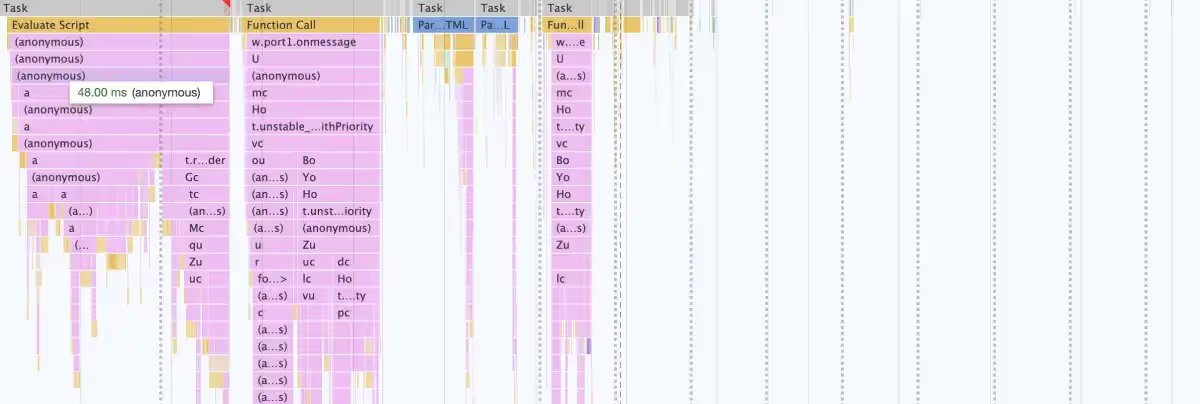
However, this deferral introduced another issue. After clicking the button to open the chat, this window starts to appear with some delay. It's easy to explain: Previously, the JS chunk with this component was downloaded and executed immediately, while these changes caused the chunk to load only after interaction.
This problem is easily fixable by using resource hints. These special HTML tags tell your browser to proactively make connections or download content before the browser normally would. We needed a resource hint called prefetch, which asks the browser to download and cache a resource with a low priority.
It looks like this:
There's a similar resource hint called preload which basically does the same thing, but with higher priority. We chose prefetch, because chat assets are not as important as the resources of the main site.
Since we're using webpack to bundle the app, it's very easy to add this tag dynamically. We just added a special comment inside dynamic import, so it looked like this:
Though this solution didn’t affect bundle size, it significantly increased the performance score by only loading the chat when necessary.
Analyzing bundle size
Once the rendering was working as intended, we started to search for opportunities to reduce the bundle size.
Bundle size doesn’t always affect performance. For example, here you can see almost the same amount of JS, although execution times are very different:

In most cases, however, there is a correlation between bundle size and the performance. It takes the browser longer to parse and execute the additional lines of code in larger bundle sizes.
This is especially true if the app is bundled via webpack, which wraps each module with a function to execute. This isn’t a problem with just a couple of modules, but it can add up — especially once you start getting up into the hundreds.
We used a few tools to find opportunities to reduce bundle size.
The webpack-bundle-analyzer plugin created an interactive treemap, visualizing the content in all bundles

The Coverage tab inside Google Chrome DevTools helped us see which lines were loaded, but not used. The minified code made it more difficult to use, but it was still insightful.

Checking that tree-shaking is working properly
Next, we discovered the client bundle included the yup validation library, which was unexpected. We use this library on the backend, but it’s not a part of the widget.
It turns out the intended tree-shaking didn't work in this situation — we had a shared file which was used by the JS client and backend. It contained a type declaration and validation object, and for some reason webpack didn't eliminate the second one.
After moving type declaration to its own file, bundle size was reduced dramatically - 48kB gzipped
Lazy loading big libraries
We also discovered the Segment analytics SDK took 37.8 kB gzipped.
Since we don't use this SDK on initial load, we created a separate chunk for this library and started to load it only when it's needed.
Separating certain libraries out of the main chunk
By looking into the chart from webpack-bundle-analyzer, we realized that it was possible to move React Router's code from the main chunk to the chunk with the chat window component. It reduced entrypoint size by 3.7kB and removed unnecessary render cycles, according to React Profiler.
We also found that the Day.js library was included in the entrypoint chunk, which we found odd. We actively use this library inside the Chat Window component, so we expected to see this library only inside the chunk related to this component.
In one of the initialization methods, we found usage of utc() and isBefore() from this library, functionality that is already present in native Date API. To parse date string in ISO format you can run new Date() and for comparison just add the < sign. By rewriting this code, we were able to reduce entrypoint size by 6.67kB gzipped. Not a lot, but it’s all starting to add up.
Finding alternatives for big libraries
Another offender was the official client of Sentry (23.4kB gzip). It is a known issue which has not been resolved yet.
One option is to lazy load this SDK. But in this case, there was a risk that we could miss errors occurring before the SDK fully loaded. We followed another approach, using an alternative called micro-sentry. It’s only 2kB and covered all functionality that we needed.
We also tried to replace React with Preact, which worked really well and decreased the bundle size by 33kB in gzip. However, we couldn't find a big difference in the final performance score.
After further discussion with the team, we decided not to use it for now. We think the React team could introduce some interesting features in new versions (for example, concurrent mode looks very promising), while it would take some time for the Preact team to adopt it there. It happened before with hooks: The stable Preact version of the React feature followed a full year later.
Finding more compression opportunities
From further inspection, we found the mp3 file used for the notification sound could be compressed using FFmpeg without a noticeable difference in sound, saving 17.5kB gzipped.
We also found that we used a TTF format for font files, which is not a compression format. We converted them to WOFF2 and WOFF formats, which reduced size by 23kb in gzip for each font file — 115kB in total.
We didn't notice any differences in performance score after these changes, but it was not a redundant exercise. With these changes, we transfer less information, using less network resources. This could be beneficial for customers with bad network connection.
Delivering chat assets from the browser cache
We already used a content delivery network (CDN) to improve the loading time, but we were able to reconfigure its cache policies to make it more efficient. Instead of downloading chat every time user visits the page, chat is downloaded via network only on a first visit, while all subsequent requests will use a version from the browser cache.
A CDN is a very good way to deliver assets to clients, because CDN providers store a cached version of chat application assets in multiple geographical locations. Then, these assets are served based on visitor's location. For example, when someone in London accesses the website with our chat, chat assets are downloaded from a server in the United Kingdom.
Results and impact of the bundle reorganization
Below, you can see how the bundle composition changed after applying the fixes we’ve mentioned. The entrypoint file was halved in size, and the total amount of JS was reduced by 35kB gzipped.

And here’s the full chart inclusive of all chat assets, including the static assets.

To see the impact of these reductions, we performed Google Lighthouse audits on our Shopify test store using three configurations:
- Without chat (as a control)
- With unoptimized chat
- With optimized chat.
We also used the mobile preset to tighten up the conditions. In this mode Lighthouse simulates mobile network and applies CPU throttling.
Here are the results:
- Without any chat, the performance score was around 97-98 points
- With unoptimized chat, the score dropped to around 83-85 points
- With optimized chat, the score jumped back up to around 96-97 points

Not only did we improve on the original penalties, but we were able to get the performance score almost to the same level as when there is no chat enabled at all.
This is either in line with, or outperforming most other chat widgets we have analyzed.
Preventing future regression
To maintain the current levels of performance and impact, we added a size-limit check to our continuous integration pipeline. When you open a pull request, our CI server builds the bundle, measures its size and raises an error if it exceeds the defined limit.
When you import a function, it’s not always obvious what kind of code would be added under the hood — sometimes it's just a few bytes of code, but other times it could import a large library.
This new step makes it possible to detect these regressions in a timely manner.

It's also possible to define a time limit using this tool. In this case, the tool runs a headless version of Chrome to track the time a browser takes to compile and execute your JS.
While it sounds nice, in theory, we found results from this method very unstable. There's an open issue with a suggestion on how to make measurements more stable, so hopefully we can take advantage of the time limit functionality in the future.
Think about performance before it becomes an issue
It turns out there is a lot of low-hanging fruit when it comes to performance optimization.
Just by using built-in developer tools in the browser and a plugin to generate a visual representation of the bundle, you might find a lot of opportunities to optimize performance without refactoring the whole codebase. In our case, we reduced entrypoint file size by 49% and reduced impact on the client's website significantly.
If you work on a new project, we strongly advise you to think about performance before it's too late. You can prevent the accumulation of technical debt by taking simple steps like checking bundlephobia before installing a library, adding size-limit to your build pipeline and running Lighthouse audits from time to time.

Gorgias in 2021: 8,000 ecommerce brands turned support challenges into $1.1 billion
As ecommerce grew this year, we continued to work toward a decentralized vision of commerce — a model where merchants take back their customer relationships from colossal marketplaces and connect one-to-one with the people who buy their products.
Our merchants had a record-breaking number of these personal interactions in 2021 and that’s worth celebrating. So we’ve collected all the firsts, upgrades and proudest moments to share with you.
Since January 2021 feels like 10 years ago (and also 10 minutes ago, somehow), let’s take a walk down memory lane.
- 8,000 brands with one thing in common
- 75 million chances to improve customer experience
- Our merchants met shoppers wherever they were
- Assembling the ecommerce A-Team
- Customer feedback drove our product roadmap
- Gorgias grew alongside our merchants
- Looking ahead to 2022
8,000 brands with one thing in common
This year, we helped 8,000 brands support over 290 million shoppers, bringing in customers like Bidabo, Biketart, Lillie's Q and Livinguard.
All together, our customers generated $1.1 billion from their customer support functions in 2021.
Those companies varied in size, from single entrepreneurs still proving their products to enterprise companies scaling beyond their wildest dreams. Differences aside, they united in prioritizing customer experience to grow their businesses.
 |
Some industries came up again and again on our roster, including:
- Fashion and apparel (like Marine Layer)
- Health and wellness (like Kettlebell Kings)
- Food and beverage (like Olipop)
- Cosmetics (like Ellana)
And because Gorgias powered growth across 110 industries, our customers’ customers were purchasing everything from medical supplies to maritime essentials.
 |
75 million chances to improve customer experience
Every minute of 2021, Gorgias customers closed out an average of 179 tickets. In more relatable terms, they helped more than 10,000 shoppers in the time it took to watch a new episode of Shark Tank.
At the peak of support volume — the five-day period from Thanksgiving and Black Friday through Cyber Monday (BFCM) — our merchants answered 2.5 million tickets. Their support teams drove $25.6 million in sales during that time.
With tools made for that moment, they were able to stay on top of the ticket pile and turn the holiday rush into a gold rush.
 |
The impact didn’t stop there. On average, our merchants received a 4/5 satisfaction rating from their customers in 2021. The 75 million tickets they answered reinforced their brands, one loyal customer at a time.
After all, when your team has a million fires to extinguish, the only flames in customer support should be the emoji reactions to your five-star ratings.
And that’s exactly what you’ll be chasing as your performance metrics approach those from our top quartile of merchants. The top-performing teams clocked first-response times under two hours and resolution times under 8 hours, on average.
.webp) |
Our merchants met shoppers wherever they were
As ecommerce becomes more decentralized, so do the channels that provide your customer feedback.
Still, it’s no surprise that email remains the most popular support channel, used by 92% of our brands. Together, they answered 64 million emails in 2021 (85% of all tickets).
This next stat may be more of a revelation: 78% of our brands have brought Facebook, Instagram, and/or Twitter interactions into their Gorgias workspace. They answered 3.7 million comments across those three channels, with almost two-thirds coming from Facebook.
 |
These social channels were used even more than our live chat, phone, and SMS integrations. And Gorgias helped merchants meet their customers in all of the above, without ever leaving their dashboard.
Assembling the ecommerce A-Team
2021 also saw the launch of our long-awaited Gorgias App Store. This hub features 75 apps to extend the power of our helpdesk and centralize the information support agents rely on.
 |
62% of our merchants are using at least one of our partner apps, and we’re exploring new partnerships all the time to continue streamlining the customer support process.
This allows us, and all of our partners, to stay focused on being the absolute best at what we do.
Some of our merchants’ favorite integrations include:
- Klaviyo: An email and SMS marketing automation platform
- Recharge: For subscriptions and recurring payments
- Attentive: A comprehensive text message marketing solution
- Postscript: SMS marketing for growing ecommerce stores
- Yotpo: For customer reviews, loyalty, referrals, and more
 |
So go ahead and close those 20 tabs out — you won’t need them where we’re headed.
Customer feedback drove our product roadmap
We released 91 features this year, 42 of which were led by your requests on our public roadmap.
Our most requested features (that are all available today!) were:
- Receiving and replying to Instagram DMs from within Gorgias
- Creating a Help Center, or FAQ hub, on your website
- Adding a self-service portal to your chat widget to handle order-status inquiries
- Receiving and replying to Twitter posts, mentions, and DMs from your helpdesk
- Managing phone calls in Gorgias, with both new and existing phone numbers
The quick adoption of our 2021 social media updates made it clear these channels were critical to our merchants’ success this year. We expect that to continue into 2022. (TikTok, anyone? Give it an upvote here!)
And while voice support didn’t see the same volume of requests as the social channels, we knew it was essential for certain brands. To better serve these merchants, we built a native phone integration that’s easily set up for new and existing numbers.
Merchants responded by taking more than 4,000 calls from shoppers this year. As a result, resolution times were up to 34% faster than others who left phone service out of their strategies.
 |
And while we want to give our merchants a variety of tools to provide help, sometimes it's best to empower shoppers to help themselves.
Our new Help Center feature provides FAQ hubs on merchant websites, to work toward this goal. The first 100 Help Centers that went live attracted over 100,000 views, answering inquiries before they could turn into tickets.
Another contribution is perhaps our most exciting release: Our Automate product allows for customization of self-service flows and deflects even more tickets to boost team efficiency.
Hundreds of merchants used the add-on in 2021 to automate their tickets, increasing efficiency across their support teams.
Our self-service portal alone deflected up to another 33% of tickets specific to shoppers (like order status). This freed up agent time to provide a more personal touch to important conversations.
Gorgias grew alongside our merchants
We tripled the size of our team in 2021 to continue building the best possible helpdesk for the specific needs of ecommerce brands. There are now 185 employees who work in 16 countries around the globe and speak 18 different languages.
 |
That means there’s more Gorgians building out integrations, furthering the product roadmap, and contributing to our merchants’ success.
And our customers have let us know how much these improvements impacted their businesses. We currently hold top marks among the helpdesk categories on G2, Capterra and the Shopify app store.
 |
Looking ahead to 2022
2021 was a year to remember for the Gorgias team and our customers, but 2022 is shaping up to be even better. It might even be the year people learn to pronounce our name. (470 people asked how during this year’s demos; think “gorgeous.”)
Fingers crossed.
Either way, we have some key new features on the roadmap and several surprises up our sleeves. We’ll continue building and optimizing channels so you can meet your customers where they are (including a much-requested Whatsapp integration). We’re also going to renew our focus on automation tools to increase efficiency across your team.
Make sure you subscribe to our newsletter, below, to beam all of our updates directly to your inbox.
As for the rest of the ecommerce industry, we have high hopes for 2022 (and plenty of predictions). We’re expecting continued shift of support tickets to social channels, a bigger emphasis on self-service options and a sharper focus on app integrations across the ecommerce ecosystem.
Until then, thanks for a great year!

17 Customer Service Interview Questions to Help Build Your Dream Customer Support Team
Building an incredible customer support team at your company starts with finding the right people. But once you attract a pool of applicants, distinguishing between an excellent candidate and a so-so one isn’t always simple.
Why does this matter? Research from Harvard Business Review concluded that positive customer experiences can create as much as a 140% spread in how much customers spend at transactional businesses. And a massive part of that customer experience rides on your customer service team.
And for subscription-based businesses, that same study found a 31% spread in churn: quality of the experience was a significant driver of recurring membership and revenue.
This adds up over time, as well. Forbes found a cumulative loss of $75 billion yearly across all businesses pegged to a single source: poor customer service.
So, in the big picture, a great hire in customer service or support makes you more money. A bad one hurts the bottom line, and so much more.
As a hiring manager, it’s never been more important to get the most out of your interviews. The needs of customer service teams are more technically complex than before, with numerous channels for meeting customer needs. Working with an ecommerce helpdesk support partner like Gorgias can ease some of the pressure, but the interview itself remains highly strategic.
Major Traits and Characteristics to Look for in Customer Service Job Interviews
Before we get into specific questions, it’s worth noting that not every candidate has the right disposition for customer service work. Many customer service skills are crucial, and these traits and characteristics rise to the top of the list. As you work through the selection and interview process, look for these elements.
The Interviewee Is Familiar with Your Brand and Tone of Voice
This isn’t an all-out dealbreaker, but interviewees that are already familiar with your brand and tone of voice will assimilate much more quickly into your organization. This is true whether this familiarity is natural (because the candidate is already a fan of your brand) or learned (because the candidate took the time to prepare before the interview).
The Interviewee Has Strong Communication Skills
Your customer service representatives spend all day communicating directly with customers, so you want to hire people with great communication skills for customer service roles. Your customer service team forms the face of your company for many customers, so the ability to communicate clearly about a customer’s problem is essential
Customer service reps will inevitably deal with angry customers as well as difficult customers, so hiring managers should look for candidates that can keep those communication skills up even under pressure.
The best candidates for customer service roles will pair strong communication skills with superior problem-solving ability, as well.
The Interviewee Has the Ability to Communicate Via Specific Service Channels
The days of single-channel customer service departments that existed solely as phone-based call centers are long gone. Most businesses rely on a multichannel customer service strategy that could involve face-to-face assistance, phone communication, or any of a wide range of web-based platforms. Today's agents need to apply customer service best practices to many channels.
A customer service candidate that can speak empathetically and clearly but cannot navigate social media or a customer service platform may not be a good fit for your current needs.
Conversely, you may find candidates that struggle with over-the-phone communication but can tirelessly plow through online tickets with superior skill.
If your team is large enough to differentiate, both types of candidates could succeed in clearly defined roles.
Still, it’s a good idea to get a sense of which service channels a candidate is likely to succeed in. Do this during the interview if you don’t do it earlier in the process.
17 Customer Support Interview Questions and Answers
If you’re a hiring manager in customer service or customer support, you already know that crafting the perfect customer service job interview questions is difficult. And if you’re an aspiring or current customer service representative, you may be looking for advice on how to answer customer service interview questions.
No matter your role, this list of 17 customer service interview questions and answers will give you some new approaches to the customer service job interview. Consider adding several of these questions to your interview process so you can hone your interview process and get better results.
(And if you’re a job seeker, these sample answers should give you insight into what interviewers might be expecting to hear. Adapt them to fit your situation, of course! You might also benefit from 5 Tips to Find Your Next Job in Support.)
1) How Familiar Are You with Our Brand, Products, and Services?
You don’t have to hire someone with prior knowledge of your brand, but it sure helps. The more the prospect knows about you, the less you have to teach them. So it’s worth asking how familiar the prospective hire is with your brand and what they think about it.
If your interviewee is familiar with your brand, go ahead and ask if they’ve ever interacted with your customer service team. If they have, their answers could be illuminating — about the candidate and about the customer service experience.
Listen for an honest, enthusiastic response. It’s OK if a candidate doesn’t know much about the brand, but finding someone with the skills AND who is a big fan of your brand can lead to the ultimate customer service prospect.
Pro Tip: Watch out for a response in which a candidate wants to change too much: some constructive criticism is healthy, but customer service is not the place from which to spearhead major company-wide change.
Sample Answer
“I’ve been using your [specific product/service] for some time now. I use it to [use case], and my appreciation for your [brand/culture/products] is a big part of why I applied for this job!”
Or
“I hadn’t heard of your company before I saw this job post, but as I began to research the company, I resonated with [product or aspect of mission]. I believe it’s something I can get behind and contribute to!”
2) Have You Ever Worked with the Software We Use?
Customer service is more software-oriented than ever before, and this question does double (maybe triple) duty: first, it tells you the obvious (whether the interviewee is familiar with your software). Second, it also often reveals a candidate’s overall comfort level with software. You’ll usually get a sense in their answer of whether they’re worried about the prospect of learning new software.
Third, assuming your job listing indicated which software solutions you use, this question will reveal how closely the applicant studied the job listing. If they seem confused by the question or don’t know which software solution you’re asking about, that might be a red flag.
As you listen to the applicant’s answer, don’t settle for a blunt “yes.” Follow up with a question or two that will reveal whether the person has actual knowledge of the software. And if the applicant isn’t familiar with your chosen software, listen for confidence about the ability to learn.
Sample Answer
“At my previous company, we used [competitor software solution], and I can tell based on my own research that the two are pretty similar. I’m sure there may be some slight gaps, but I’m eager to learn those differences and get up to speed in [your software solution].”
3) How Long Were You with Your Last Company and Why Did You Leave?
Behavioral interview questions can be powerful because they give you insight into an interviewee’s thought processes and ways of engaging with the world. Length of employment at the previous company is merely factual, but the “why did you leave” portion is deeply behavioral.
Tenure at a previous employer isn’t always important, though a resume filled with a series of three- to six-month gigs could be a red flag. More important is the stated reason for leaving. Did the candidate struggle with a previous manager? Did they leave over scheduling issues (that are likely to be an issue at your company as well)?
To be clear, leaving a previous company isn’t always a bad thing. But the reasons why — and the way the candidate explains those reasons — can teach you a lot about the person’s approach to working on a team.
Sample Answer
“I’m still employed at [current employer], but I see a better future for myself with your company. I’m happy enough at [current employer], but I’m more passionate about your company for [give a reason or two].”
Or
“I worked at [previous employer] for [time period] but had to leave due to [reason]. That said, I know [reason] won’t be an issue here because [explanation].”

4) What Were the Most Common Problems with the Products and Services You Supported in the Past and How Did You Help Solve Them?
This question helps you keep developing a profile of the candidate’s experience. At the most basic level, you want to learn whether they are familiar with the most common customer service questions that your team deals with.
While the key to delivering great customer service is the ability to use problem-solving skills to navigate especially difficult situations, those everyday types of questions make up the bulk of the actual work. Finding an employee that’s already well-versed in your most common customer issues (and who already has good responses to those issues) makes your job a lot easier.
Also, this is another behavioral interview question that can give you deeper insight into what makes a candidate tick. Listen carefully to how the person describes their activity helping various types of customers. You’ll learn at least as much about how the person thinks as how they solved a specific problem.
Sample Answer
“Issues with account logins made up around 15 percent of my customer service interactions at my last job. We had a script to follow for this kind of issue, and I used it when I could. But over time I noticed that many users were getting tripped up on the same problem that wasn’t covered by the script. I helped them resolve it by [x] and recommended we add this step to the script.”
5) Describe a Previous Situation at Work When You Recognized an Emotionally Tense Situation and Were Able to Turn it Around to Delight the Customer.
This is the first of several classic behavior-based questions. You’re listening for soft skills here, those intangibles that differentiate truly excellent customer service reps from the rest.
With this question, you’re looking at conflict resolution skills surrounding customer issues like public complaints or angry customer emails. Does the candidate have a handy example of being able to
- Recognize that tensions were high
- Defuse the situation enough that the customer left the interaction delighted?
You’re also looking at the ability to follow instructions and think outside the box. You don’t want renegades and mavericks, but you do want folks that can think beyond provided customer support scripts.
Push the interviewee to be specific with their answer to questions like these.
Sample Answer
“Once I dealt with a customer with [stated problem]. I could tell the customer was upset before we ever started talking because of [verbal/written cues]. I kept my cool, sidestepped that anger, and determined that the customer’s core problem was [actual problem]. Once I identified that I made sure to empathize with the customer as I guided them to a solution to [actual problem.”

[Image source: Me.me]
6) Can You Give Examples of Methods You Have Used in the Past to Increase Revenue, Save Time, or Increase Procedural Efficiency at Work?
Hiring for customer service is a delicate balance. You don’t want a cadre of people constantly trying to reinvent the wheel (or, worse, the company itself). And you also don’t want mindless followers. This question helps you gauge a candidate’s ownership mindset.
If they don’t have an answer at all, they might not be thinking enough about the big picture. Conversely, if their answer sounds a little too revolutionary, you’ll be aware that this candidate might need guidance in what’s appropriate.
As the candidate responds, listen for actionable ideas and methods that seem genuinely useful. Vague feedback with no clear outcomes isn’t what you’re looking for here.
Sample Answer
“I noticed we were getting tons of customer support calls about one of the company’s products. The product was fine, but the included instructions left out a crucial step that was leading to the calls. I was able to point this out and escalate it to the proper team, who corrected the instructions for the next printing. In the meantime, I created an email template to help agents respond to customer questions about the issue faster. By getting the instructions fixed, I reduced these calls so the team could focus on more important customer issues.”
7) Aside from Customer Service Positions, Have You Had Any Other Professional Roles That Helped You Build Relevant Skills for the Position You Are Applying For?
Sometimes, the best agents have experience from other roles with complementary skillsets. For example, wait staff at restaurants have a ton of insights about human interactions and communication since they serve people in person for hours on end.
Or, if the company products are highly technical or industry-specific, you’ll benefit from finding customer service reps with relevant tech or industry backgrounds as well.
Find out if your prospect has other experience they can bring to the table. Maybe they can even teach your team a thing or two.
Sample Answer
“I’ve worked for ‘x’ years in foodservice, including ‘y’ years as a server. In those years I developed the ability to read verbal and nonverbal cues. And have found creative ways to meet customer needs. My time in restaurants has prepared me to excel in customer service by giving me a keen sense of customers’ needs, proactive tactics to keep them happy, and multiple strategies for resolving their complaints.”
8) Do You Have Any Formal Education That Pertains to Communication or Communication Technology?
You already know a candidate’s formal education as it is listed on their resume, but this question gives them a chance to expand upon that. Perhaps they took a specific course that’s relevant to this job or additional training certifications that didn’t make it on the resume.
Give them a chance to explain how some of their formal education enhances their abilities for this job.
This is also a great place to explore whether a candidate has experience in the systems you use, such as these:
- Online helpdesk software
- Email platform
- CRM
- Social media
- Relevant discount and rewards software
- eCommerce platform or CMS
Of course, reliance on formal training varies from company to company. Some brands focus more exclusively on skills and traits. Use your judgment with this question (but make sure you don’t imply that a degree is required unless it is).
Sample Answer
“My degree was in [field], and as a part of my coursework, I took several courses in communication as well as a technology course. In these courses, I learned [two or three high-level lessons], which will help me in this role [explain how].”

9) At Work, What Are Your Three Core Values? For Example Honesty, Trust, Patience, Etc.
You want agents that are hard-working and have excellent time management skills. But you also want a support team filled with healthy people. Learning about workplace morals and values will indicate to you how much of a team player the candidate is or what their ethical point of view looks like.
Sample Answer
“My top three core values in the workplace are [list three]. These core values permeate every aspect of my work: how I interact with customers, how I work with other team members, and more. If you ask [reference at previous employer] about this, I believe you’ll hear that I lived this out there, and I’ll do the same here.”
10) Can You Provide an Example of a Time When You Had to Deny a Customer’s Request? How Did You Handle It?
You want customer service agents that can, in most cases, get your customer what they want. But sometimes customers are wrong, demanding things that can’t be done. An experienced customer service rep will certainly have run into this scenario and learning how they handled it will give you great insight into their abilities.
Were they able to salvage a customer relationship? Show the customer a better way? Or did they just blow up the situation and provide no alternatives?
Sample Answer
“I always do my best to meet customer requests, but of course this isn’t always possible. One time, a customer [describe illegitimate request scenario]. He was convinced I could do this for him, but it was out of scope. However, instead of just flat-out denying him, I was able to guide him to an alternative that was in scope. He didn’t get everything he wanted, but I did keep him as a customer.”
11) As an Agent, What Was the Most Difficult Customer Service Situation You Have Ever Experienced?
For interviewees with previous customer service experience, this question gives you insight into how far they’ve been stretched — as well as their emotional intelligence after the fact.
Look for how serious or difficult the described situation is (compared to what’s typical in your organization), and pay attention to how calmly — or not — the candidate can recount the scenario.
Sample Answer
“In my current/previous position, I’ve had a few encounters in a class all their own. Probably the most challenging one was [describe the scenario]. It was challenging for sure, but I’m glad I went through it because I learned [lesson/insight]. I also really appreciated the support I got from my leadership team throughout the situation.”
12) As a Representative, What Was the Best Customer Service Situation You Have Experienced?
If a candidate has a quality answer to this question, it will likely reveal the sorts of situations that motivate the individual. You should look for excitement, interest, and perhaps even joy as the individual answers this question. And knowing the kinds of situations that motivate an individual can give insight into whether they’ll be a good fit for your team.
Sample Answer
“I once had a customer call in who was incredibly angry, but it was an issue that I knew I could solve. As I worked with the customer to unpack the layers of the issue, I heard her tone gradually soften. By the end of the encounter, I’d not only solved her problem, but I’d also managed to upsell her to a higher tier of service — and she was happy about it!”

13) What Would You Do If You Couldn’t Find the Answer to a Customer’s Question?
The stock answer here is “contact my supervisor,” of course, but see if you can get a little more. What avenues (official and unofficial) would the candidate pursue before escalating to a manager? Will this prospect solve problems independently, or will the individual create an unending cascade of manager escalations?
Sample Answer
“When I didn’t know an answer, I’d quickly search our internal knowledge base/wiki. If I didn’t find the answer there, I might search Google, our company Slack, or a more knowledgeable peer. I tried to minimize the number of escalations since I know that solving the problem myself is always the ideal outcome. But of course, I escalated issues to my manager when needed.”
14) How Would You Handle a Situation Wherein You Knew the Customer Was Wrong?
“The customer is always right” only goes so far. Sometimes the customer is quite wrong, and your customer support teams know this. The real question is what a prospective team member will do when this happens.
This is another question that explores soft skills. There are countless ways to say “you’re wrong” without coming out and saying it. Can the prospect guide a customer to a better understanding without insulting them along the way? That’s the kind of customer service rep you need.
Sample Answer
“I never take a confrontational approach when this happens. Instead, I assume that the customer isn’t willfully wrong, and I try to find a gentle way to guide them to a better understanding.
If there’s documentation or fine print that the customer missed, I’ll guide them to that information. I might also ask questions to get a better sense of where the customer got the incorrect understanding.”
15) As an Online Shopper, What Was the Best Customer Support Experience You Ever Received from a Brand You Did Not Work For?
Every one of us brings experiences from our personal lives into our professional work, and great customer service reps are no exception. We’ve all been the customer in need of service at some point, and there are great lessons to learn from the good experiences.
A prospect’s answer to this question should demonstrate their insightfulness and awareness. It will also likely reveal more about a person’s priorities in customer service encounters.
Sample Answer
“I had an experience with [company] that impressed me as a customer and gave me some great ideas for how to solve customer challenges in my work. [Describe scenario and lessons learned.]”
16) Describe a Time When You Received Poor Customer Service as a Consumer.
Asking the opposite question gives you similar insights: whatever got under the skin of your interviewee is an aspect of customer service that they’re passionate about. And, of course, having been a frustrated consumer can build empathy when working with other frustrated consumers.
Sample Answer
“I had an encounter with one company where the agents were working from scripts, and it didn’t seem like they took the time to process what I’d said in my complaint. It was deeply frustrating, but I learned from the experience that scripts can only get you so far and that I need to make sure I always understand the customer’s concern before I start trying to solve it.”
17) How Flexible Is Your Schedule and How Many Hours Do You Hope to Work Each Week?
If you’ve gotten to this point and expect that you’ll offer the candidate a job, it’s time to get this crucial information. If your only needs are second shift and the candidate can’t or won’t work it, you need to know now.
Sample Answer
Simply be honest. “I’m looking for full-time work, and normal business hours are my preference. I could work the second shift if necessary, but no overnights. That said, let me know what you’re looking for, and let’s talk about it.”

[Image source: IMC]
Up Your Support Offerings with the Best Ecommerce Customer Service Solution
Getting the right team in place is a crucial component of your customer service strategy and so is giving your new team members the best in ecommerce customer service technology.
Find out why Gorgias is the #1 rated helpdesk for ecommerce merchants. See how Gorgias integrates with Shopify, Magento, and BigCommerce.
And, if you need help with the technology portion of your customer service strategy, schedule a Gorgias demo today.
Building delightful customer interactions starts in your inbox
